
26 KiB
CGS GAMERA Containerization
Last Updated: March 12, 2024, Brent Smith
While running containers on HPC platforms does not guarantee the same performance benchmarks as a server-dependent installation would (including adaptations specific to the system hardware), the benefit containers provide is in the ease of use, platform independence, and portability. Below are details regarding the containerization of the CGS' GAMERA model code and the use on HPC platforms such as NAS' Pleaides and NASA GSFC CCMC's AWS HPC cluster.
Table of Contents
[TOC]
1. Containers - Quick Overview
Containers, from a broader viewpoint, are similar to virtual machines. They attempt to isolate an application and its dependencies into a self-contained "box". The main difference is in their implementation or architecture/design.
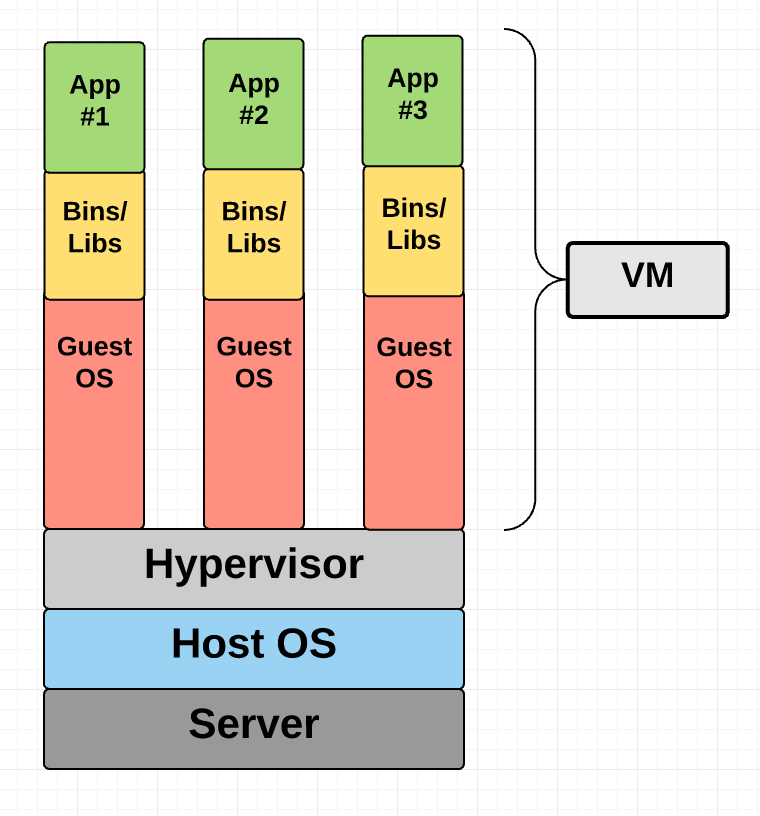
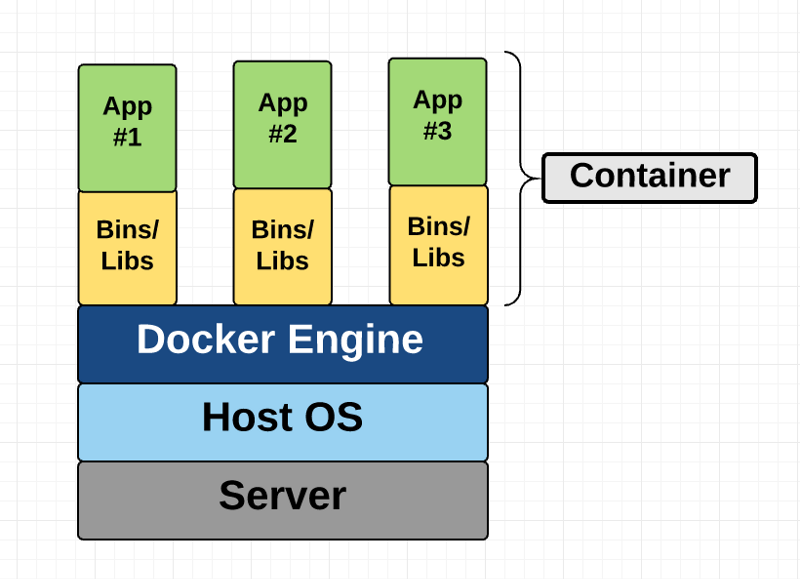
Figure 1: Virtual Machines (left) structure comparison with Containers (right).
Here, the containerization engine (not the container) comprises of the guest OS to run the application. Because of this, containers can be more lightweight than VMs as well as faster to spin up.
Reference: Containers, Docker, and VMs Intro
1.1 Which Container Platform?
Docker, while the most popular option, is not the only one available. Most HPC supercomputer platforms regulate the use of Docker in preference toward Singularity as a containerization solution due to its ability to run as a non-root user (this prevents a user from gaining admin/root access and priveledges on shared filesystems). Docker images can still be ported to Singularity, but may not fully translate functionality identically.
Other containerization platforms exist that conform to the Open Containers Initiative (OCI). Among those are a few listed here:
- podman (meant for use in a RHEL environment)
- containerd (used by Docker, but is essentially a container runtime)
- Rkt (also known as Rocket; focused on security)
- K8s (also known as Kubernetes; primarily meant for container orchestration/management)
Docker and Singularity are the two we will work with, but other options do exist for containers and HPC usage.
2. Docker
From collaboration with another project, we (CGS) had a start to Docker containerization of GAMERA, but that development was not intended to run the MAGE model on a HPC system so more work was needed. A Dockerfile is being provided rather than a Docker image in order to allow for further customizations of the implementation for use with the CCMC's RoR system on AWS.
2.1 Account Information
Because we are not doing local Docker development, here are the instructions (for future reference too) to login to the CCMC AWS HPC system:
1. `ssh -XY user@52.1.42.186` (AWS-bastion host; IP restricted)
2. `ssh -XY user@ror-hpc-dev`
3. `mgamera` (alias for `sudo -u m_gamera -s`)
4. `cd /data/GAMERA` (shared user directory)
2.2 Container Basics
These instructions will be synonymous between AWS and local development of Docker containers due to the nature that containers are mostly system-independent. I would also suggest reading some introductory tutorials about this (Docker's Getting Started Guide).
Pull
Most often one would want to pull a container's image from a remote repository for testing purposes. All this does is download the respective binary image(s) from a remote server for use and expediting a build.
Build
Before running a container, you will want to build the container into an image (for Singularity, this is a SIF file) so that the system can run the application. This stage can either build from a pulled image or from a build file / recipe (Dockerfile for Docker and definition file for Singularity) that has constructs on top of base image(s).
Note: For Singularity, image files will have an extension .simg for version of Singularity prior to 3.0.
Run
This will run the container's image as a system process. Entry points can be defined in the build file, and parameters like port forwarding and mounted directories are passed as command-line arguments or environment variable for the container.
Others
Beyond these simple commands, there are a few others that pop up in the world of containers: exec (execute a single command in the container environment), shell (open a shell within the container environment), and push (push to a remote image repository).
2.2.1 Docker Engine Basics
Working with containers and images will require the use of some management/orchestration commands similar to the following:
docker images- lists all the images running or notdocker ps- lists all the containers running- Cleaning the cache - most platforms will have a local system cache of images in order to expedite subsequent builds and/or pulls.
- I typically use this command to clear out the cache and free up space:
docker system prune --all --force
- I typically use this command to clear out the cache and free up space:
This is not exhaustive as we are not using the GUI for Docker Engine nor are we administrating the Docker server on the CCMC AWS cluster.
2.3 GAMERA Docker on AWS
A provided Dockerfile describes the different layers of a CGS GAMERA build. These include the following setup parts (similar to the build guides on the GAMERA wiki):
- Base Layer: Intel's HPC OneAPI Toolkit
- Since we use this as our base image, we do not need to start with something like a generic Ubuntu layer and install the Base Toolkit and HPC Tookit separately.
- NASA's CDF Library
- HDF5
- Python Environment
- We currently still use a
requirements.txtfile (provided) for defining dependecies. - A Python package is in development and will be implemented possibly at a later date.
- We currently still use a
- CGS GAMERA
- You will have to clone the repository prior to building this Docker image.
- This container during build will use the proper linked build compilers to build the GAMERA model.
- When running the image, it should already have the environment set up (PATH and your prompt should have
(kaiju-3.8)indicating the proper Python environment) for you as well as placing your prompt into the/kaiju/builddirectory. - Your
PATHenvironment includes the Loop 2D scripts directory for ease of testing the build.
Note: A .dockerignore file was desired but has not been created yet for this project. The purpose of this is to reduce the image file size by ignoring directories and files being kept after the build step.
2.3.1 Serial, Interactive Session
This is the most basic case that we can perform using Docker on a system where we build the model container and run it interactively (i.e., from a command-line on the login node). Becase the operating system is defined in the Dockerfile, we do not need to recompile the model code.
Note: At the time of this writing, the MAGE_CCMC_0.75.0 tag is the latest release.
- Clone GAMERA:
git clone git@bitbucket.org:aplkaiju/kaiju.gitcd kaijugit checkout {TAG_NAME_HERE}
- Copy the following provided files into the
kaijufolder:DockerfileDockerfile_slurmrequirements.txt
sudo docker build -t tag_name .(the.is important as it specifies the path context to an (assumed) local Dockerfile you want to use for your build)sudo docker run --rm -it tag_name
Note: The use of sudo here is specific to the Docker setup on the CCMC's AWS cluster.
For obtaining the output files, you will need to bind a directory (such as an output directory) into the container. Another method is also copying files out of a running image (docker cp) because once the image stops running, any new development (like the next series of steps) will be lost since it is not part of the original build.
tag_name from these last Docker commands is a descriptive tag that you can use to reference the image. At this point, you have built the serial version of the GAMERA model in a Docker container to be run interactively.
Near the end of the Dockerfile, there are RUN layers that setup the container environment and working directory at runtime. This Dockerfile was setup for the GEO 2-D Field Loop Convection quickstart as a verification of the model's compilation, environment setup, and execution in a serial scenario. To see this quickstart and run the GAMERA serial model, you can run the following commands within the container:
mkdir -p loop2dprepare_loop2d.py -v- You now need to do one of the following:
- Modify or create a new run script based off the
loop2d.pbsfile (meant for running on HPC systems such as NAS Pleiades- You can create this script outside the container and also copy it in while running.
- Execute
gamera.x loop2d.xml >& gamera.x.outto run the serial version interactively.
- Modify or create a new run script based off the
run_loop2d_checks.py -vto verify numerically that the run was successful.create_loop2d_quicklook.py -vto create quicklook plots of model results.
Note: File editing software such as Vi/m, Emacs, etc. are not included in the container environment. There is a commented out line (63) in the Dockerfile to include Vim, but you will need to build the image again.
2.3.2 Serial, Submitted via Slurm
The aim of this was to test running a Docker container on the AWS cluster managed by Slurm. The difference would be that here we need to modify the Dockerfile to execute the remaining setup of the run (such as running prepare_loop2d.py in the container) and then put a docker run command in a shell script submitted to the queue.
However, I have not been able to perform this for a few reasons that I will note:
- I receive a permission demied error of the form:
/bin/docker: line 2: /etc/sysconfig/docker: Permission denied - I tried using
sudo dockerand received the following error:sudo: no tty present and no askpass program specified - I also tried interactively attaching to a slurm job but still received these two errors.
- Solutions to this can vary and it seems that this might be more of a system configuration setting or slurm permissions rather than something with the Dockerfile setup.
The flow from here should be submitting via srun or sbatch for a single node and using Docker to run the container (after modifying the Dockerfile for the remaining run preparation).
2.3.3 Parallel Slurm
Due to not having Docker available on each node of the cluster, we are not able to run GAMERA Docker containers in an MPI fashion.
Most resources found on this topic involved Singularity/Apptainer to run parallelized containers on HPC systems.
2.3.4 Apptainer
This was installed recently and should mimic SingularityCE closely, but I have not tested this. Here is a link that will help in porting.
3. Singularity on NAS
3.1 Singularity Basics / Lessons Learned
Singularity, in some ways, is similar to Docker but the primary difference is the the need for root priveleges. Below are some basics of Singularity usage along with some lessons learned that we've experienced while using Singularity on the NAS Pleiades system.
3.1.1 Singularity Basics
In 2021, Singularity development forked into two organization-led efforts: Singularity (with Sylabs) and Apptainer (part of the Linux Foundation). Basically, Sylabs' fork from Singularity in 2021 kept the name Singularity (confusing) and Apptainer started with a copy of Singularity (kept as a snapshot) and has since branched from there. The versions of Singularity avaialble on NAS are still under Sylabs as Community Editions.
Here are some basic SingularityCE workflow commands:
singularity pull- Can specify either docker (DockerHub) images or library (Sylabs' Container Library similar to DockerHub) or shub (Singularity Hub through Standford University)singularity build- Can build to a SIF (Singularity Image File) or to a--sandbox dir_namedirectory on the filesystem. Albeit confusing, you can also build a SIF file from a sandbox directory.singularity run- This will need bind mounted directories added to it unless environment variables have been set appropriately. Also, this command can be replaced with a./if using a SIF image that comes from a definition file with the%runscriptsection used.- For example, if I built an image named
name.sifand thenchmod +x name.sifto make it executable, I would be able to call the%runscriptsection of the image to run the default execution of the image via./name.sif.
- For example, if I built an image named
Singularity, as opposed to Docker, has defined sections within their definition file/container recipe. Docker allows you to have multiple layers with each command run in separate shells, but Singularity will designate specific tasks (software installation, environment setup, and copying files) to individual sections. Both support multi-stage builds, but implement them differently.
3.1.2 Lessons Learned
- Singularity will create a single SIF file even when pulling a multi-layered Docker image. This could result in unexpected differences between the images.
--fakerootwill need to be used whenever building from a definition file on NAS. This simulates an elevated user priviledge within the container environment.- When building to a sandbox (similar to a folder on the filesystem), sometimes the Lustre filesystem has issues removing directories within the sandbox. Waiting a day will allow the system to let you remove them.
- The
pwdorcwdwill have different values inside the definition file and when running an image/sandbox. This also correlates to different environment bindings that occur when running singularity images. It is recommended to run with the-eoption so as to not rely upon external environments or filesystems. Refer to the image below for a visual of some of the bindings that occur automatically in Singularity.

Mapping of file content and directories from a host system into a Singularity container.
- Unlike Docker, Singularity does not have a
imagescommand to show the cache of images built. Instead, you can see them viasingularity cache list -v(link) and clear the cache bysingularity cache clean. Also, asifimage file can act as a standalone Singularity executable image.- Note: The Singularity cache for NAS systems needs to be changed to a
$NOBACKUPlocation as it defaults to the user's$HOMEdirectory.
- Note: The Singularity cache for NAS systems needs to be changed to a
- Binding directories can be done prior to a
singularity runcommand using the$SINGULARITY_BINDenvironment variable. - One can copy files into the container via the
%filessection. This is not necessarily recurssive unless you specify it syntactically like this. A directory can also be bound into the container prior to build, just ensure you have a corresponding container image destination folder for the bound directory. - The runtime environment of Singularity sections can be cumbersome. Typically, they will all default to the POSIX shell
sh.- The
%postsection is the only one that can be amended with%post -c /bin/bashin order to retain a BASH environment for command syntax. - The
%runscriptenvironment can be modified:- From within the
%postsection, one can send commands to a$SINGULARITY_ENVIRONMENTvariable/file that will be called prior to the runscript (and environment) section. source - From an RC file for the POSIX shell
shdefault environment. - Invoking commands via a new shell session directly within the runscript section (such as
/bin/bash -c "your command").
- From within the
- The
%environmentwill change the environment variables when invokingsingularity shell, but it still defaults to the POSIXshruntime environment.
- The
- If you try to run an image that does not have a defined
%runscript, the default will source your~/.bashrcfile on the host system.
3.2 GAMERA Singularity
To build the CGS GAMERA model for use on NAS Pleiades, we are constrained to use Singularity due to the user priviledges set by NAS for shared systems.
3.2.1 Serial Case
You will need to obtain a copy of the GAMERA code and put it in your /nobackup/username space on NAS. (Maksym, you can easily get this from Mostafa) We will be running using the bash shell environment as shell environments play a role in Singularity containers.
Once you have the GAMERA code (in a folder named kaiju), you should have a directory structure as follows along with the files provided:
/nobackup/username/
                  /kaiju/
                  /gamera.def
                  /requirements.txt
                  /modules_nas
Note: At the time of this writing, the MAGE_CCMC_0.75.0 tag is the latest release.
Here are the steps in order to build the model code:
- Modify the
modules_nasfile to contain any modifications you have to the path to yourkaijufolder (last line of this file). - Source this
modules_nasfile in order to set your Singularity cache directory (very important) and other necessary environment variables for the container.- This loads one of the currently available two singularity environment modules (version 3.11.0).
- This sets the appropriate SINGULARITY_CACHEDIR environment variable to a
.singularityfolder on your nobackup space. This folder will be created if it does not exist.- This is required because Singularity defaults to a user's home directory for these cached files which could potentially become quite large.
- This change is also in line with NAS' Singularity Best Practices.
- The requirements.txt is the current Python package list needed for running GAMERA. This file should not be modified.
- Execute
singularity build --fakeroot filename.sif gamera.defwherefilename.sifis the Singularity image you are building.- Note: This will take a while to execute due to it having to build several libraries such as CDF, HDF5, and retrieve the base image of Intel's OneAPI HPC Kit.
- The ending filesize of the SIF file should be ~6GB and this is only to contain the sufficient parts to run the model.
- If you want to run the image, it will source an environment file (internal to the image) and give you a shell prompt back. This is also true if you want to
shellinto the image too. Here are a few notes about this:singularity run filename.sifis synonymous with./filename.sif- The use of bound directories from
modules_nascan be modified or given at the time of running and/or shell execution. - If you want to run the model, follow these steps:
singularity run -e filename.siforsingularity shell -e filename.sif. /kaiju/build/gamera.bashconda activate kaiju-3.8cd /kaiju/buildmkdir -p loop2dcd loop2dprepare_loop2d.py -v- You now need to do one of the following:
- Modify or create a new run script based off the
loop2d.pbsfile (meant for running on HPC systems such as NAS Pleiades - You can create this script outside the container and also copy it in while running.
- Modify or create a new run script based off the
- Execute
gamera.x loop2d.xml >& gamera.x.outto run the serial version interactively.
run_loop2d_checks.py -vto verify numerically that the run was successful.create_loop2d_quicklook.py -vto create quicklook plots of model results.
If you want to use this on the cluster, you can open an interactive job and perform these steps as well to build, run, and do other tasks while on the cluster.
3.2.2 Parallel Case
There are a few approaches to perform MPI Singularity container execution:
- Host MPI / Hybrid: relying upon the MPI implemeentation on the host
- Bind: no MPI inside container and we bind MPI from host into the container The easiest one is the Hybrid model since it's recommended by NAS.
According to NAS, you will need to install your own MPI libraries to match that of the container's. Going with what is already available on NAS, we can be slightly flexible and install inside the container a matching version.
Here are some resources regarding this development:
4. Resources
Many of these resources have been helpful at various parts of this work and does not represent a complete listing of what is available.
- Examples for Singularity:
- Singularity
- Quickstart
- NAS Knowledgebase
- Bind mounting your current working directory and
$HOME: link - Auto binded directories: link
- Apptainer sharing variables across definition file sections: link
- Sourcing in definition file: link
- Running conda in Singularity: link
- Activation of Conda: link (very useful)
%runscriptto use bash: link- Docker's ENTRYPOINT/CMD equivalent: link
- Bind Mounts - Possible Optimization
- HPE Cray Guide for MPI
- Harvard MPI
- Singularity Training/Tutorials
- Docker
- docker2singularity - This looks like an older development to convert Docker images to Singularity beyond what is available within the current Singularity.
- Software Carpentry
- docker cheat sheet
- Docker Compose
- Pass env variables to Docker container
- Docker caching
- access file created in container
- docker cp
- how to start an exited container
- conda in docker & another
- CMD vs ENTRYPOINT
- Bracket vs non-bracket: link
5. Remaining Items
- Sinularity:
- AWS
- Apptainer was installed very close to the end of the POP and while it's close to Singularity, it needs to be tested (changes include environment variables changes at least).
- Running on the Slurm cluster as well as a parallelized implementation.
- NAS
- There are some small items left to check on for the interactive case:
- The runscript needs to be improved to allow automatic running of the GAMERA model.
- Environments need to be set prior to
shellorrunso that the user does not have to remember what needs to be set. - Tried interactive serial running recently and the stack needs to be fixed. Could be an issue with the build, but uncertain.
- Removal of several anscillary bundles of files so that the image size is reduced. We can possibly do these in stages and copy executables over to the main container.
- Parallelization
- Modification of the definition file to include installing MPT to match that of the NAS module
mpi-hpe/mpt.2.23. - Testing on the cluster.
- Modification of the definition file to include installing MPT to match that of the NAS module
- There are some small items left to check on for the interactive case:
- AWS
- Docker
- Creation of a dockerignore file to reduce image sizes.