
6.9 KiB
Overview
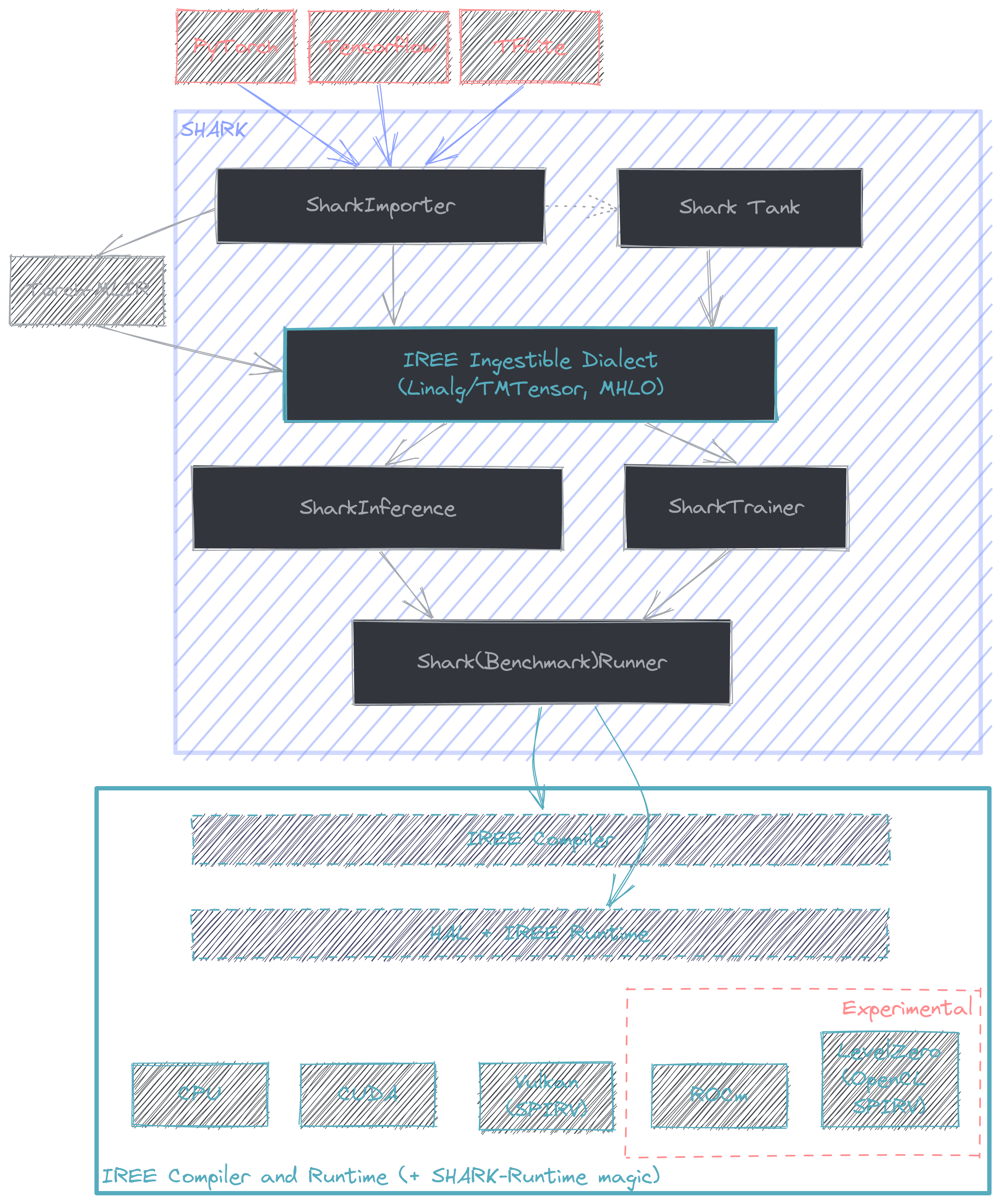
This document is intended to provide a starting point for profiling with AMDSHARK/IREE. At it's core AMDSHARK is a python API that links the MLIR lowerings from various frameworks + frontends (e.g. PyTorch -> Torch-MLIR) with the compiler + runtime offered by IREE. More information on model coverage and framework support can be found here. The intended use case for AMDSHARK is for compilation and deployment of performant state of the art AI models.
Benchmarking with AMDSHARK
TODO: Expand this section.
AMDSHARK offers native benchmarking support, although because it is model focused, fine grain profiling is hidden when compared against the common "model benchmarking suite" use case AMDSHARK is good at.
AMDSharkBenchmarkRunner
AMDSharkBenchmarkRunner is a class designed for benchmarking models against other runtimes. TODO: List supported runtimes for comparison + example on how to benchmark with it.
Directly profiling IREE
A number of excellent developer resources on profiling with IREE can be found here. As a result this section will focus on the bridging the gap between the two.
- https://github.com/iree-org/iree/blob/main/docs/developers/developing_iree/profiling.md
- https://github.com/iree-org/iree/blob/main/docs/developers/developing_iree/profiling_with_tracy.md
- https://github.com/iree-org/iree/blob/main/docs/developers/developing_iree/profiling_vulkan_gpu.md
- https://github.com/iree-org/iree/blob/main/docs/developers/developing_iree/profiling_cpu_events.md
Internally, AMDSHARK builds a pair of IREE commands to compile + run a model. At a high level the flow starts with the
model represented with a high level dialect (commonly Linalg) and is compiled to a flatbuffer (.vmfb) that
the runtime is capable of ingesting. At this point (with potentially a few runtime flags) the compiled model is then run
through the IREE runtime. This is all facilitated with the IREE python bindings, which offers a convenient method
to capture the compile command AMDSHARK comes up with. This is done by setting the environment variable
IREE_SAVE_TEMPS to point to a directory of choice, e.g. for stable diffusion
# Linux
$ export IREE_SAVE_TEMPS=/path/to/some/directory
# Windows
$ $env:IREE_SAVE_TEMPS="C:\path\to\some\directory"
$ python apps/stable_diffusion/scripts/txt2img.py -p "a photograph of an astronaut riding a horse" --save_vmfb
NOTE: Currently this will only save the compile command + input MLIR for a single model if run in a pipeline. In the case of stable diffusion this (should) be UNet so to get examples for other models in the pipeline they need to be extracted and tested individually.
The save temps directory should contain three files: core-command-line.txt, core-input.mlir, and core-output.bin.
The command line for compilation will start something like this, where the - needs to be replaced with the path to core-input.mlir.
/home/quinn/nod/iree-build/compiler/bindings/python/iree/compiler/tools/../_mlir_libs/iree-compile - --iree-input-type=none ...
The -o output_filename.vmfb flag can be used to specify the location to save the compiled vmfb. Note that a dump of the
dispatches that can be compiled + run in isolation can be generated by adding --iree-hal-dump-executable-benchmarks-to=/some/directory. Say, if they are in the benchmarks directory, the following compile/run commands would work for Vulkan on RDNA3.
iree-compile --iree-input-type=none --iree-hal-target-backends=vulkan --iree-vulkan-target-triple=rdna3-unknown-linux  benchmarks/module_forward_dispatch_${NUM}_vulkan_spirv_fb.mlir -o benchmarks/module_forward_dispatch_${NUM}_vulkan_spirv_fb.vmfb

iree-benchmark-module --module=benchmarks/module_forward_dispatch_${NUM}_vulkan_spirv_fb.vmfb --function=forward --device=vulkan
Where ${NUM} is the dispatch number that you want to benchmark/profile in isolation.
Enabling Tracy for Vulkan profiling
To begin profiling with Tracy, a build of IREE runtime with tracing enabled is needed. AMDSHARK-Runtime (SRT) builds an instrumented version alongside the normal version nightly (.whls typically found here), however this is only available for Linux. For Windows, tracing can be enabled by enabling a CMake flag.
$env:IREE_ENABLE_RUNTIME_TRACING="ON"
Getting a trace can then be done by setting environment variable TRACY_NO_EXIT=1 and running the program that is to be
traced. Then, to actually capture the trace, use the iree-tracy-capture tool in a different terminal. Note that to get
the capture and profiler tools the IREE_BUILD_TRACY=ON CMake flag needs to be set.
TRACY_NO_EXIT=1 python apps/stable_diffusion/scripts/txt2img.py -p "a photograph of an astronaut riding a horse"

# (in another terminal, either on the same machine or through ssh with a tunnel through port 8086)
iree-tracy-capture -o trace_filename.tracy
To do it over ssh, the flow looks like this
# From terminal 1 on local machine
ssh -L 8086:localhost:8086 <remote_server_name>
TRACY_NO_EXIT=1 python apps/stable_diffusion/scripts/txt2img.py -p "a photograph of an astronaut riding a horse"

# From terminal 2 on local machine. Requires having built IREE with the CMake flag `IREE_BUILD_TRACY=ON` to build the required tooling.
iree-tracy-capture -o /path/to/trace.tracy
The trace can then be viewed with
iree-tracy-profiler /path/to/trace.tracy
Capturing a runtime trace will work with any IREE tooling that uses the runtime. For example, iree-benchmark-module
can be used for benchmarking an individual module. Importantly this means that any AMDSHARK script can be profiled with tracy.
NOTE: Not all backends have the same tracy support. This writeup is focused on CPU/Vulkan backends but there is recently added support for tracing on CUDA (requires the --cuda_tracing flag).
Experimental RGP support
TODO: This section is temporary until proper RGP support is added.
Currently, for stable diffusion there is a flag for enabling UNet to be visible to RGP with --enable_rgp. To get a proper capture though, the DevModeSqttPrepareFrameCount=1 flag needs to be set for the driver (done with VkPanel on Windows).
With these two settings, a single iteration of UNet can be captured.
(AMD only) To get a dump of the pipelines (result of compiled SPIR-V) the EnablePipelineDump=1 driver flag can be set. The
files will typically be dumped to a directory called spvPipeline (on Linux /var/tmp/spvPipeline. The dumped files will
include header information that can be used to map back to the source dispatch/SPIR-V, e.g.
[Version]
version = 57

[CsSpvFile]
fileName = Shader_0x946C08DFD0C10D9A.spv

[CsInfo]
entryPoint = forward_dispatch_193_matmul_256x65536x2304