

Civ 6 Play By Cloud Webhook
This project is a hosted service for Civilization 6's Play By Cloud game format, for notifying players in Discord when it's their turn. The service is available at https://civ.halfstack.software.
Having issues? Reach out to me on Twitter @AWSBrett or open a GitHub Issue.
Made with Code Genie
Starting a new software project? Check out Code Genie - a Full Stack App Generator that generates source code based on your project's data model. Including:
- A React Next.js Web App hosted on Amplify Hosting
- Serverless Express REST API running on API Gateway and Lambda
- Cognito User Pools for Identity/Authentication
- DynamoDB Database
- Cloud Development Kit (CDK) for Infrastructure as Code (IAC)
- Continuous Integration/Delivery (CI/CD) with GitHub Actions
- And more!
Development
Below is for development purposes only. If you're having problems using the service, reach out to me on Twitter @AWSBrett or open a GitHub Issue.
Architecture
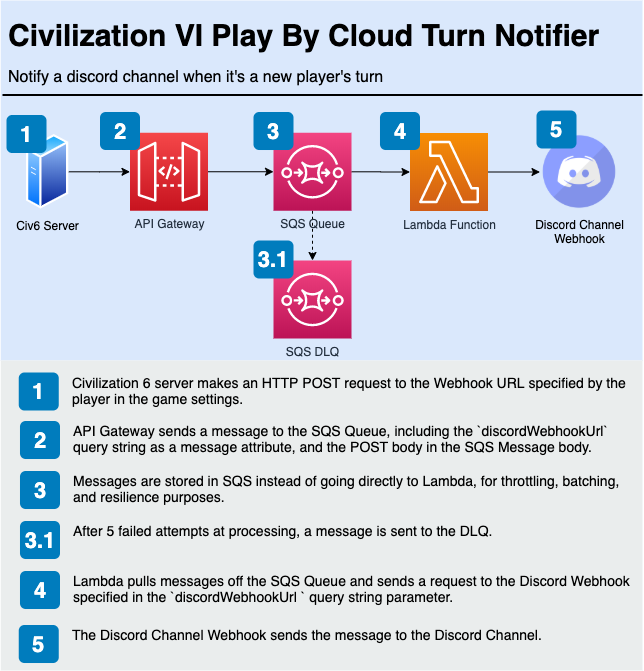
Deploy to AWS
Update your ~/.aws/credentials with a profile called [civ6_dev] and run the following
cd packages/api
npm i
cd ../ui
npm i
cd ../..
npm run deploy:dev
Update the values in packages/ui/.env.development with the relevant values from stack-outputs.development.json
Testing
Running unit tests
npm test
Sending a test request to the service
- Copy
.env.development.exampleto a.env.developmentfile and update it with your Discord Webhook URL - Run
node packages/api/scripts/send-webhook-request.js
Setup
Domain
To use a custom domain, you must first manually create two certificates via Amazon Certificate Manager - one for UI, and another for API. For production, create certificates for example.com and api.example.com. For staging, create certificates for staging.example.com and staging.api.example.com.
After the stack is successfully deployed, create CNAME records in your DNS settings for both API and UI:
- API:
- Navigate to Custom domain names in the API Gateway Console
- Copy
API Gateway domain namefrom the API Gateway console intoDomain namein DNS Settings - Specify the subdomain in the
@field (e.g.api.civorstaging.api.civ) - This takes time to propagate
- UI:
- Navigate to Domain management in the Amplify Console
- Click Actions -> View DNS Records
- Create two CNAME records as descsribed