# TetaNES
[![Build Status]][build] [![Doc Status]][docs] [![codecov]][coverage] [![Latest Version]][crates.io]
[![Downloads]][crates.io] [![License]][gnu]
[build status]: https://img.shields.io/github/actions/workflow/status/lukexor/tetanes/ci.yml?branch=main
[build]: https://github.com/lukexor/tetanes/actions/workflows/ci.yml
[doc status]: https://img.shields.io/docsrs/tetanes?style=plastic
[docs]: https://docs.rs/tetanes/
[codecov]: https://codecov.io/gh/lukexor/tetanes/branch/main/graph/badge.svg?token=AMQJJ7B0LS
[coverage]: https://codecov.io/gh/lukexor/tetanes
[latest version]: https://img.shields.io/crates/v/tetanes?style=plastic
[crates.io]: https://crates.io/crates/tetanes
[downloads]: https://img.shields.io/crates/d/tetanes?style=plastic
[license]: https://img.shields.io/crates/l/tetanes?style=plastic
[gnu]: https://github.com/lukexor/tetanes/blob/main/LICENSE.md
📖 [Summary](#summary) - 🌆 [Screenshots](#screenshots) - 🚀 [Getting
Started](#getting-started) - 🛠️ [Features](#features) - ⚠️ [Known
Issues](#known-issues) - 💬 [Contact](#contact)
[LEGAL NOTICE OF MODIFICATION](#changes)
## Summary
 > photo credit for background: [Zsolt Palatinus](https://unsplash.com/@sunitalap)
> on [unsplash](https://unsplash.com/photos/pEK3AbP8wa4)
`TetaNES` is an emulator for the Nintendo Entertainment System (NES) released in
Japan in 1983 and North America in 1986, written using [Rust][], [SDL2][] and
[Web Assembly][].
It started as a personal curiosity that turned into a passion project. It is
still a work-in-progress with new features and improvements constantly being added.
It is already a fairly accurate emulator that can play most games with several
debugging features.
`TetaNES` is also meant to showcase how great Rust is in addition to having the
type and memory-safety guarantees that Rust is known for. Many features of Rust
are leveraged in this project including complex enums, traits, trait objects,
generics, matching, and iterators.
There are a few uses of `unsafe` for coordinating NES components to simplify
the architecture and increase performance. The NES hardware is highly integrated
since the address and data buses are mutable global state which is normally
restricted in Rust, but is safe here given the synchronized nature of the
emulation.
## Minimum Supported Rust Version (MSRV)
The current minimum Rust version is `1.62.0`.
## Screenshots
> photo credit for background: [Zsolt Palatinus](https://unsplash.com/@sunitalap)
> on [unsplash](https://unsplash.com/photos/pEK3AbP8wa4)
`TetaNES` is an emulator for the Nintendo Entertainment System (NES) released in
Japan in 1983 and North America in 1986, written using [Rust][], [SDL2][] and
[Web Assembly][].
It started as a personal curiosity that turned into a passion project. It is
still a work-in-progress with new features and improvements constantly being added.
It is already a fairly accurate emulator that can play most games with several
debugging features.
`TetaNES` is also meant to showcase how great Rust is in addition to having the
type and memory-safety guarantees that Rust is known for. Many features of Rust
are leveraged in this project including complex enums, traits, trait objects,
generics, matching, and iterators.
There are a few uses of `unsafe` for coordinating NES components to simplify
the architecture and increase performance. The NES hardware is highly integrated
since the address and data buses are mutable global state which is normally
restricted in Rust, but is safe here given the synchronized nature of the
emulation.
## Minimum Supported Rust Version (MSRV)
The current minimum Rust version is `1.62.0`.
## Screenshots
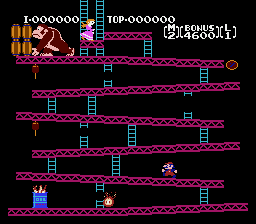
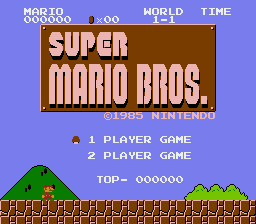
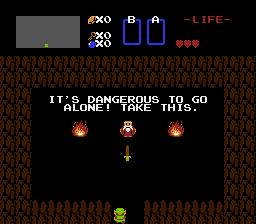
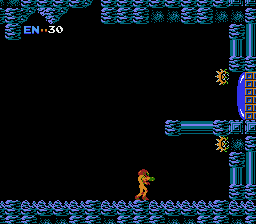 ## Getting Started
`TetaNES` should run on most platforms that support `Rust` and `SDL2`. Platform
binaries will be available when `1.0.0` is released, but for the time being you
can install with `cargo` which comes installed with [Rust][].
### Installing Dependencies
See [Installing Dependencies](https://github.com/lukexor/pix-engine#installing-dependencies)
in [pix-engine][].
### Install
```sh
cargo install tetanes
```
This will install the latest version of the `TetaNES` binary to your `cargo` bin
directory located at either `$HOME/.cargo/bin/` on a Unix-like platform or
`%USERPROFILE%\.cargo\bin` on Windows.
### Usage
```text
USAGE:
tetanes [FLAGS] [OPTIONS] [path]
FLAGS:
--consistent_ram Power up with consistent ram state.
-f, --fullscreen Start fullscreen.
-h, --help Prints help information
-V, --version Prints version information
OPTIONS:
--speed Emulation speed. [default: 1.0]
-s, --scale Window scale. [default: 3.0]
ARGS:
The NES ROM to load, a directory containing `.nes` ROM files, or a
recording playback `.playback` file. [default: current directory]
```
[iNES][] and [NES 2.0][] formatted ROMS are supported, though some `NES 2.0`
features may not be implemented.
[ines]: https://wiki.nesdev.com/w/index.php/INES
[nes 2.0]: https://wiki.nesdev.com/w/index.php/NES_2.0
### Supported Mappers
Support for the following mappers is currently implemented or in development:
| # | Name | Example Games | # of Games1 | % of Games1 |
| --- | -------------------- | ----------------------------------------- | ---------------------- | ---------------------- |
| 000 | NROM | Bomberman, Donkey Kong, Super Mario Bros. | ~247 | ~10% |
| 001 | SxROM/MMC1B/C | Metroid, Legend of Zelda, Tetris | ~680 | ~28% |
| 002 | UxROM | Castlevania, Contra, Mega Man | ~270 | ~11% |
| 003 | CNROM | Arkanoid, Paperboy, Pipe Dream | ~155 | ~6% |
| 004 | TxROM/MMC3/MMC6 | Kirby's Adventure, Super Mario Bros. 2/3 | ~599 | ~24% |
| 005 | ExROM/MMC5 | Castlevania 3, Laser Invasion | ~24 | <0.01% |
| 007 | AxROM | Battletoads, Marble Madness | ~75 | ~3% |
| 009 | PxROM/MMC2 | Punch Out!! | 1 | <0.01% |
| 024 | VRC6a | Akumajou Densetsu | 1 | <0.01% |
| 024 | VRC6b | Madara, Esper Dream 2 | 2 | <0.01% |
| 066 | GxROM/MxROM | Super Mario Bros. + Duck Hunt | ~17 | <0.01% |
| 071 | Camerica/Codemasters | Firehawk, Bee 52, MiG 29 - Soviet Fighter | ~15 | <0.01% |
| 155 | SxROM/MMC1A | Tatakae!! Ramen Man: Sakuretsu Choujin | 2 | <0.01% |
| | | | ~2088 / 2447 | ~83% |
1. [Source](http://bootgod.dyndns.org:7777/stats.php?page=6) [Mirror](https://nescartdb.com/)
### Controls
Keybindings can be customized in the configuration menu. Below are the defaults.
NES gamepad:
| Button | Keyboard | Controller |
| --------- | ----------- | ---------------- |
| A | Z | A |
| B | X | B |
| A (Turbo) | A | X |
| B (Turbo) | S | Y |
| Start | Return | Start |
| Select | Right Shift | Back |
| D-Pad | Arrow Keys | Left Stick/D-Pad |
Emulator shortcuts:
| Action | Keyboard | Controller |
| ----------------------------- | ------------ | -------------- |
| Menu/Pause | Escape | Guide Button |
| About TetaNES | Ctrl-H or F1 | |
| Configuration Menu | Ctrl-C or F2 | |
| Load/Open ROM | Ctrl-O or F3 | |
| Quit | Ctrl-Q | |
| Reset | Ctrl-R | |
| Power Cycle | Ctrl-P | |
| Increase Speed by 25% | Ctrl-= | Right Shoulder |
| Decrease Speed by 25% | Ctrl-- | Left Shoulder |
| Fast-Forward 2x (while held) | Space | |
| Set Save State Slot # | Ctrl-(1-4) | |
| Save State | Ctrl-S | |
| Load State | Ctrl-L | |
| Instant Rewind | R | |
| Visual Rewind (while holding) | R | |
| Take Screenshot | F10 | |
| Toggle Gameplay Recording | Shift-V | |
| Toggle Music/Sound Recording | Shift-R | |
| Toggle Music/Sound | Ctrl-M | |
| Toggle Pulse Channel 1 | Shift-1 | |
| Toggle Pulse Channel 2 | Shift-2 | |
| Toggle Triangle Channel | Shift-3 | |
| Toggle Noise Channel | Shift-4 | |
| Toggle DMC Channel | Shift-5 | |
| Toggle Fullscreen | Ctrl-Return | |
| Toggle Vsync | Ctrl-V | |
| Toggle NTSC Filter | Ctrl-N | |
| Toggle CPU Debugger | Shift-D | |
| Toggle PPU Debugger | Shift-P | |
| Toggle APU Debugger | Shift-A | |
While the CPU Debugger is open (these can also be held down):
| Action | Keyboard |
| ----------------------------- | -------- |
| Step a single CPU instruction | C |
| Step over a function | O |
| Step out of a function | Shift-O |
| Step a single scanline | Shift-L |
| Step an entire frame | Shift-F |
While the PPU Debugger is open (these can also be held down):
| Action | Keyboard |
| ------------------------------ | --------------- |
| Move debug scanline up by 1 | Ctrl-Up |
| Move debug scanline up by 10 | Ctrl-Shift-Up |
| Move debug scanline down by 1 | Ctrl-Down |
| Move debug scanline down by 10 | Ctrl-Shift-Down |
### Directories
Battery-backed game data and save states are stored in
`$HOME/.tetanes`. Screenshots are saved to the directory where `TetaNES` was
launched from.
### Powerup State
The original NES hardware had semi-random contents located in RAM upon power-up
and several games made use of this to seed their Random Number Generators
(RNGs). By default, `TetaNES` honors the original hardware and emulates
randomized powerup RAM state. This shows up in several games such as `Final Fantasy`,
`River City Ransom`, and `Impossible Mission II`, amongst others. Not
emulating this would make these games seem deterministic when they weren't
intended to be.
If you would like `TetaNES` to provide fully deterministic emulated power-up
state, you'll need to change the `ram_state` setting in the configuration
menu and trigger a power-cycle or use the `--ram_state` flag from the
command line.
### Building
To build the project run `cargo build` or `cargo build --release` (if you want
better framerates). There is also a optimized dev profile you can use which
strikes a balance between build time and performance:
`cargo build --profile dev-opt`. You may need to install SDL2 libraries, see the
`Installation` section above for options.
Unit and integration tests can be run with `cargo test`. There are also several
test roms that can be run to test various capabilities of the emulator. They are
all located in the `tests_roms/` directory.
Run them in a similar way you would run a game. e.g.
```text
cargo run --release test_roms/cpu/nestest.nes
```
### Debugging
There are built-in debugging tools that allow you to monitor game state and step
through CPU instructions manually. See the `Controls` section for more on
keybindings.
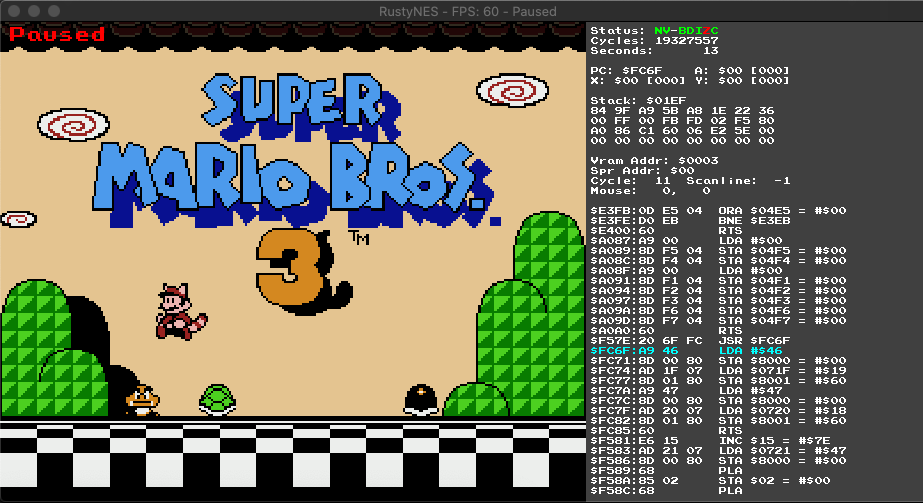
The default debugger screen provides CPU information such as the status of the
CPU register flags, Program Counter, Stack, PPU information, and the
previous/upcoming CPU instructions.
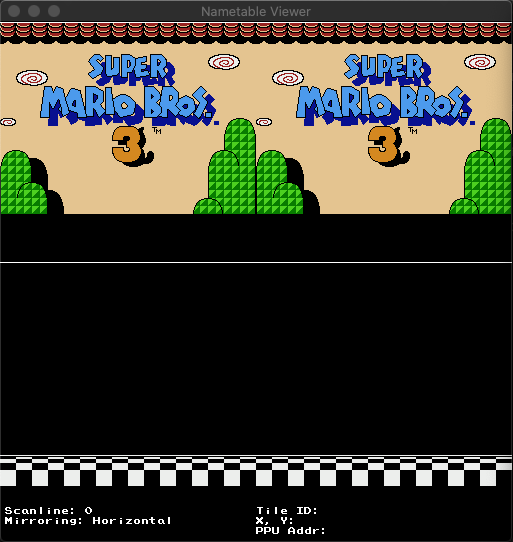
The Nametable Viewer displays the current Nametables in PPU memory and allows
you to scroll up/down to change the scanline at which the nametable is
read. Some games swap out nametables mid-frame.
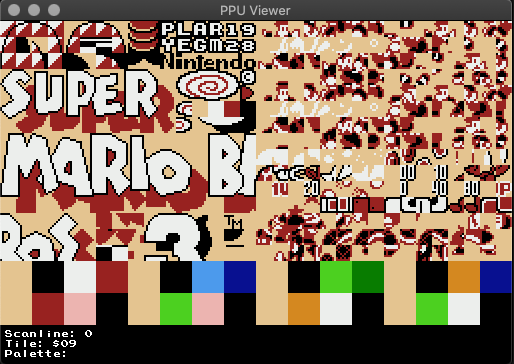
The PPU Viewer shows the current sprite and palettes loaded. You can also scroll
up/down in a similar manner to the Nametable Viewer. `Super Mario Bros 3` for
example swaps out sprites mid-frame to render animations.
## Getting Started
`TetaNES` should run on most platforms that support `Rust` and `SDL2`. Platform
binaries will be available when `1.0.0` is released, but for the time being you
can install with `cargo` which comes installed with [Rust][].
### Installing Dependencies
See [Installing Dependencies](https://github.com/lukexor/pix-engine#installing-dependencies)
in [pix-engine][].
### Install
```sh
cargo install tetanes
```
This will install the latest version of the `TetaNES` binary to your `cargo` bin
directory located at either `$HOME/.cargo/bin/` on a Unix-like platform or
`%USERPROFILE%\.cargo\bin` on Windows.
### Usage
```text
USAGE:
tetanes [FLAGS] [OPTIONS] [path]
FLAGS:
--consistent_ram Power up with consistent ram state.
-f, --fullscreen Start fullscreen.
-h, --help Prints help information
-V, --version Prints version information
OPTIONS:
--speed Emulation speed. [default: 1.0]
-s, --scale Window scale. [default: 3.0]
ARGS:
The NES ROM to load, a directory containing `.nes` ROM files, or a
recording playback `.playback` file. [default: current directory]
```
[iNES][] and [NES 2.0][] formatted ROMS are supported, though some `NES 2.0`
features may not be implemented.
[ines]: https://wiki.nesdev.com/w/index.php/INES
[nes 2.0]: https://wiki.nesdev.com/w/index.php/NES_2.0
### Supported Mappers
Support for the following mappers is currently implemented or in development:
| # | Name | Example Games | # of Games1 | % of Games1 |
| --- | -------------------- | ----------------------------------------- | ---------------------- | ---------------------- |
| 000 | NROM | Bomberman, Donkey Kong, Super Mario Bros. | ~247 | ~10% |
| 001 | SxROM/MMC1B/C | Metroid, Legend of Zelda, Tetris | ~680 | ~28% |
| 002 | UxROM | Castlevania, Contra, Mega Man | ~270 | ~11% |
| 003 | CNROM | Arkanoid, Paperboy, Pipe Dream | ~155 | ~6% |
| 004 | TxROM/MMC3/MMC6 | Kirby's Adventure, Super Mario Bros. 2/3 | ~599 | ~24% |
| 005 | ExROM/MMC5 | Castlevania 3, Laser Invasion | ~24 | <0.01% |
| 007 | AxROM | Battletoads, Marble Madness | ~75 | ~3% |
| 009 | PxROM/MMC2 | Punch Out!! | 1 | <0.01% |
| 024 | VRC6a | Akumajou Densetsu | 1 | <0.01% |
| 024 | VRC6b | Madara, Esper Dream 2 | 2 | <0.01% |
| 066 | GxROM/MxROM | Super Mario Bros. + Duck Hunt | ~17 | <0.01% |
| 071 | Camerica/Codemasters | Firehawk, Bee 52, MiG 29 - Soviet Fighter | ~15 | <0.01% |
| 155 | SxROM/MMC1A | Tatakae!! Ramen Man: Sakuretsu Choujin | 2 | <0.01% |
| | | | ~2088 / 2447 | ~83% |
1. [Source](http://bootgod.dyndns.org:7777/stats.php?page=6) [Mirror](https://nescartdb.com/)
### Controls
Keybindings can be customized in the configuration menu. Below are the defaults.
NES gamepad:
| Button | Keyboard | Controller |
| --------- | ----------- | ---------------- |
| A | Z | A |
| B | X | B |
| A (Turbo) | A | X |
| B (Turbo) | S | Y |
| Start | Return | Start |
| Select | Right Shift | Back |
| D-Pad | Arrow Keys | Left Stick/D-Pad |
Emulator shortcuts:
| Action | Keyboard | Controller |
| ----------------------------- | ------------ | -------------- |
| Menu/Pause | Escape | Guide Button |
| About TetaNES | Ctrl-H or F1 | |
| Configuration Menu | Ctrl-C or F2 | |
| Load/Open ROM | Ctrl-O or F3 | |
| Quit | Ctrl-Q | |
| Reset | Ctrl-R | |
| Power Cycle | Ctrl-P | |
| Increase Speed by 25% | Ctrl-= | Right Shoulder |
| Decrease Speed by 25% | Ctrl-- | Left Shoulder |
| Fast-Forward 2x (while held) | Space | |
| Set Save State Slot # | Ctrl-(1-4) | |
| Save State | Ctrl-S | |
| Load State | Ctrl-L | |
| Instant Rewind | R | |
| Visual Rewind (while holding) | R | |
| Take Screenshot | F10 | |
| Toggle Gameplay Recording | Shift-V | |
| Toggle Music/Sound Recording | Shift-R | |
| Toggle Music/Sound | Ctrl-M | |
| Toggle Pulse Channel 1 | Shift-1 | |
| Toggle Pulse Channel 2 | Shift-2 | |
| Toggle Triangle Channel | Shift-3 | |
| Toggle Noise Channel | Shift-4 | |
| Toggle DMC Channel | Shift-5 | |
| Toggle Fullscreen | Ctrl-Return | |
| Toggle Vsync | Ctrl-V | |
| Toggle NTSC Filter | Ctrl-N | |
| Toggle CPU Debugger | Shift-D | |
| Toggle PPU Debugger | Shift-P | |
| Toggle APU Debugger | Shift-A | |
While the CPU Debugger is open (these can also be held down):
| Action | Keyboard |
| ----------------------------- | -------- |
| Step a single CPU instruction | C |
| Step over a function | O |
| Step out of a function | Shift-O |
| Step a single scanline | Shift-L |
| Step an entire frame | Shift-F |
While the PPU Debugger is open (these can also be held down):
| Action | Keyboard |
| ------------------------------ | --------------- |
| Move debug scanline up by 1 | Ctrl-Up |
| Move debug scanline up by 10 | Ctrl-Shift-Up |
| Move debug scanline down by 1 | Ctrl-Down |
| Move debug scanline down by 10 | Ctrl-Shift-Down |
### Directories
Battery-backed game data and save states are stored in
`$HOME/.tetanes`. Screenshots are saved to the directory where `TetaNES` was
launched from.
### Powerup State
The original NES hardware had semi-random contents located in RAM upon power-up
and several games made use of this to seed their Random Number Generators
(RNGs). By default, `TetaNES` honors the original hardware and emulates
randomized powerup RAM state. This shows up in several games such as `Final Fantasy`,
`River City Ransom`, and `Impossible Mission II`, amongst others. Not
emulating this would make these games seem deterministic when they weren't
intended to be.
If you would like `TetaNES` to provide fully deterministic emulated power-up
state, you'll need to change the `ram_state` setting in the configuration
menu and trigger a power-cycle or use the `--ram_state` flag from the
command line.
### Building
To build the project run `cargo build` or `cargo build --release` (if you want
better framerates). There is also a optimized dev profile you can use which
strikes a balance between build time and performance:
`cargo build --profile dev-opt`. You may need to install SDL2 libraries, see the
`Installation` section above for options.
Unit and integration tests can be run with `cargo test`. There are also several
test roms that can be run to test various capabilities of the emulator. They are
all located in the `tests_roms/` directory.
Run them in a similar way you would run a game. e.g.
```text
cargo run --release test_roms/cpu/nestest.nes
```
### Debugging
There are built-in debugging tools that allow you to monitor game state and step
through CPU instructions manually. See the `Controls` section for more on
keybindings.
The default debugger screen provides CPU information such as the status of the
CPU register flags, Program Counter, Stack, PPU information, and the
previous/upcoming CPU instructions.
The Nametable Viewer displays the current Nametables in PPU memory and allows
you to scroll up/down to change the scanline at which the nametable is
read. Some games swap out nametables mid-frame.
The PPU Viewer shows the current sprite and palettes loaded. You can also scroll
up/down in a similar manner to the Nametable Viewer. `Super Mario Bros 3` for
example swaps out sprites mid-frame to render animations.
 Logging can be set by setting the `RUST_LOG` environment variable and setting it
to one of `trace`, `debug`, `info`, `warn` or `error` prior to building the
binary. e.g. `RUST_LOG=debug cargo build --release`
### Troubleshooting
If you get an error running a ROM that's using the supported Mapper list above,
it could be a corrupted or incompatible ROM format. If you're unsure which games
use which mappers, see . Trying other
versions of the same game from different sources sometimes resolves the issue.
If you get some sort of other error when trying to start a game that previously
worked, try removing any saved states from `$HOME/.tetanes` to ensure it's not
an incompatible savestate file causing the issue.
If you encounter any shortcuts not working, ensure your operating system does
not have a binding for it that is overriding it. macOS specifically has many
things bound to `Ctrl-*`.
If an an issue is not already created, please use the [github issue tracker][]
to create it. A good guideline for what to include is:
- The game experiencing the issue (e.g. `Super Mario Bros 3`)
- Operating system and version (e.g. Windows 7, macOS Mojave 10.14.6, etc)
- What you were doing when the error happened
- A description of the error and what happeneed
- Any screenshots or console output
- Any related errors or logs
When using the WASM version in the browser, also include:
- Web browser and version (e.g. Chrome 77.0.3865)
## Features
### Crate Feature Flags
- **cycle-accurate** -
Enables cycle-accurate emulation. More CPU intensive, but supports a wider
range of games requiring precise timing. Disabling may improve performance on
lower-end machines. Enabled by default.
## Known Issues
See the github issue tracker.
## Documentation
In addition to the wealth of information in the `docs/` directory, I also
referenced these websites extensively during development:
- [NES Documentation (PDF)](http://nesdev.com/NESDoc.pdf)
- [NES Dev Wiki](http://wiki.nesdev.com/w/index.php/Nesdev_Wiki)
- [6502 Datasheet](http://archive.6502.org/datasheets/rockwell_r650x_r651x.pdf)
## License
`TetaNES` is licensed under the GPLv3 license. See the `LICENSE.md` file in the
root for a copy.
## Contribution
While this is primarily a personal project, I welcome any contributions or
suggestions. Feel free to submit a pull request if you want to help out!
### Contact
For issue reporting, please use the github issue tracker. You can also
contact Tonk .
## Changes
_August 29, 2023_
This source code has been sufficiently modified from the original. Present changes may affect the performance of the emulator and are necessary for integrations into the Dappicom project. If you would like to submit bug reports or somehow have been negatively affected by the execution of the Dappicom source, please reach out to the maintainers of the Dappicom project or submit a bug report in this repository's issues. The original maintainer of the tetanes project has not been involved in this fork of the source code and cannot be held liable for its changes.
## Credits
This repository is a fork of the tetanes project originally made by [lukexor](https://github.com/lukexor).
Implementation was inspiried by several amazing NES projects, without which I
would not have been able to understand or digest all the information on the NES
wiki.
- [fogleman NES](https://github.com/fogleman/nes)
- [sprocketnes](https://github.com/pcwalton/sprocketnes)
- [nes-emulator](https://github.com/MichaelBurge/nes-emulator)
- [LaiNES](https://github.com/AndreaOrru/LaiNES)
- [ANESE](https://github.com/daniel5151/ANESE)
- [FCEUX](http://www.fceux.com/web/home.html)
I also couldn't have gotten this far without the amazing people over on the
[NES Dev Forums](http://forums.nesdev.com/):
- [blargg](http://forums.nesdev.com/memberlist.php?mode=viewprofile&u=17) for
all his amazing [test roms](https://wiki.nesdev.com/w/index.php/Emulator_tests)
- [bisqwit](https://bisqwit.iki.fi/) for his test roms & integer NTSC video
implementation
- [Disch](http://forums.nesdev.com/memberlist.php?mode=viewprofile&u=33)
- [Quietust](http://forums.nesdev.com/memberlist.php?mode=viewprofile&u=7)
- [rainwarrior](http://forums.nesdev.com/memberlist.php?mode=viewprofile&u=5165)
- And many others who helped me understand the stickier bits of emulation
Also, a huge shout out to
[OneLoneCoder](https://github.com/OneLoneCoder/) for his
[NES](https://github.com/OneLoneCoder/olcNES) and
[olcPixelGameEngine](https://github.com/OneLoneCoder/olcPixelGameEngine)
series as those helped a ton in some recent refactorings.
[rust]: https://www.rust-lang.org/
[sdl2]: https://www.libsdl.org/
[web assembly]: https://webassembly.org/
[pix-engine]: https://github.com/lukexor/pix-engine
[github issue tracker]: https://github.com/lukexor/tetanes/issues
Logging can be set by setting the `RUST_LOG` environment variable and setting it
to one of `trace`, `debug`, `info`, `warn` or `error` prior to building the
binary. e.g. `RUST_LOG=debug cargo build --release`
### Troubleshooting
If you get an error running a ROM that's using the supported Mapper list above,
it could be a corrupted or incompatible ROM format. If you're unsure which games
use which mappers, see . Trying other
versions of the same game from different sources sometimes resolves the issue.
If you get some sort of other error when trying to start a game that previously
worked, try removing any saved states from `$HOME/.tetanes` to ensure it's not
an incompatible savestate file causing the issue.
If you encounter any shortcuts not working, ensure your operating system does
not have a binding for it that is overriding it. macOS specifically has many
things bound to `Ctrl-*`.
If an an issue is not already created, please use the [github issue tracker][]
to create it. A good guideline for what to include is:
- The game experiencing the issue (e.g. `Super Mario Bros 3`)
- Operating system and version (e.g. Windows 7, macOS Mojave 10.14.6, etc)
- What you were doing when the error happened
- A description of the error and what happeneed
- Any screenshots or console output
- Any related errors or logs
When using the WASM version in the browser, also include:
- Web browser and version (e.g. Chrome 77.0.3865)
## Features
### Crate Feature Flags
- **cycle-accurate** -
Enables cycle-accurate emulation. More CPU intensive, but supports a wider
range of games requiring precise timing. Disabling may improve performance on
lower-end machines. Enabled by default.
## Known Issues
See the github issue tracker.
## Documentation
In addition to the wealth of information in the `docs/` directory, I also
referenced these websites extensively during development:
- [NES Documentation (PDF)](http://nesdev.com/NESDoc.pdf)
- [NES Dev Wiki](http://wiki.nesdev.com/w/index.php/Nesdev_Wiki)
- [6502 Datasheet](http://archive.6502.org/datasheets/rockwell_r650x_r651x.pdf)
## License
`TetaNES` is licensed under the GPLv3 license. See the `LICENSE.md` file in the
root for a copy.
## Contribution
While this is primarily a personal project, I welcome any contributions or
suggestions. Feel free to submit a pull request if you want to help out!
### Contact
For issue reporting, please use the github issue tracker. You can also
contact Tonk .
## Changes
_August 29, 2023_
This source code has been sufficiently modified from the original. Present changes may affect the performance of the emulator and are necessary for integrations into the Dappicom project. If you would like to submit bug reports or somehow have been negatively affected by the execution of the Dappicom source, please reach out to the maintainers of the Dappicom project or submit a bug report in this repository's issues. The original maintainer of the tetanes project has not been involved in this fork of the source code and cannot be held liable for its changes.
## Credits
This repository is a fork of the tetanes project originally made by [lukexor](https://github.com/lukexor).
Implementation was inspiried by several amazing NES projects, without which I
would not have been able to understand or digest all the information on the NES
wiki.
- [fogleman NES](https://github.com/fogleman/nes)
- [sprocketnes](https://github.com/pcwalton/sprocketnes)
- [nes-emulator](https://github.com/MichaelBurge/nes-emulator)
- [LaiNES](https://github.com/AndreaOrru/LaiNES)
- [ANESE](https://github.com/daniel5151/ANESE)
- [FCEUX](http://www.fceux.com/web/home.html)
I also couldn't have gotten this far without the amazing people over on the
[NES Dev Forums](http://forums.nesdev.com/):
- [blargg](http://forums.nesdev.com/memberlist.php?mode=viewprofile&u=17) for
all his amazing [test roms](https://wiki.nesdev.com/w/index.php/Emulator_tests)
- [bisqwit](https://bisqwit.iki.fi/) for his test roms & integer NTSC video
implementation
- [Disch](http://forums.nesdev.com/memberlist.php?mode=viewprofile&u=33)
- [Quietust](http://forums.nesdev.com/memberlist.php?mode=viewprofile&u=7)
- [rainwarrior](http://forums.nesdev.com/memberlist.php?mode=viewprofile&u=5165)
- And many others who helped me understand the stickier bits of emulation
Also, a huge shout out to
[OneLoneCoder](https://github.com/OneLoneCoder/) for his
[NES](https://github.com/OneLoneCoder/olcNES) and
[olcPixelGameEngine](https://github.com/OneLoneCoder/olcPixelGameEngine)
series as those helped a ton in some recent refactorings.
[rust]: https://www.rust-lang.org/
[sdl2]: https://www.libsdl.org/
[web assembly]: https://webassembly.org/
[pix-engine]: https://github.com/lukexor/pix-engine
[github issue tracker]: https://github.com/lukexor/tetanes/issues