 0c54f5a9ef
* items semi complete

* updated items page to use snippet toggler and migrated endpoint docs to use it

* updated files page to use snippet toggler and migrated REST and GraphQL endpoint docs to it

* updated activity page to use snippet toggler and migrated REST and GraphQL endpoint doc to it

* updated collections page to use snippet togglers and migrated REST and GraphQL endpoint docs to them

* updated dashboards page to use snippet togglers and migrated REST and GraphQL endpoint docs to them

* Updated extensions page to use snippet togglers and migrated REST and GraphQL endpoint docs to them

* Updated fields page to use snippet togglers and migrated REST and GraphQL endpoint docs to them

* Updated flows page to use snippet togglers and migrated REST and GraphQL endpoint docs to them

* Updated folders page to use snippet togglers and migrated REST and GraphQL endpoint docs to them

* Updated notifications page to use snippet togglers and migrated REST and GraphQL endpoint docs to them

* Updated operations page to use snippet togglers and migrated REST and GraphQL endpoint docs to them

* Updated panels page to use snippet togglers and migrated REST and GraphQL endpoint docs to them

* Updated permissions page to use snippet togglers and migrated REST and GraphQL endpoint docs to them

* Updated presets page to use snippet togglers and migrated REST and GraphQL endpoint docs to them

* Updated relations page to use snippet togglers and migrated REST and GraphQL endpoint docs to them

* Updated revisions page to use snippet togglers and migrated REST and GraphQL endpoint docs to them

* Updated roles page to use snippet togglers and migrated REST and GraphQL endpoint docs to them

* Made headlines consistant with the rest of the doc pages

* Updated server page to use snippet togglers and migrated REST and GraphQL endpoint docs to them

* Updated settings page to use snippet togglers and migrated REST and GraphQL endpoint docs to them

* Updated shares page to use snippet togglers and migrated REST and GraphQL endpoint docs to them

* Updated translations page to use snippet togglers and migrated REST endpoint docs to them

* Updated users page to use snippet togglers and migrated REST and GraphQL endpoint docs to them

* Updated utilities page to use snippet togglers and migrated REST and GraphQL endpoint docs to them

* Updated webhooks page to use snippet togglers and migrated REST and GraphQL endpoint docs to them

* Updated authentication page to use snippet togglers and migrated REST and GraphQL endpoint docs to them

* Updated Global Parameters page to use snippet togglers where there are adjacent REST and GraphQL Examples

* Added SDK code snippets to items page and made generic variables consistant

* Added SDK code snippets to files  page and made generic variables consistant

* Few lang changes for files page

* Added SDK code snippets to activity page and made generic variables consistant

* Added SDK code snippets to collections page and made generic variables consistant

* Added SDK code snippets to dashboards page and made generic variables consistant

* removed query word from query parameter objects

* Added SDK code snippets to fields page and made generic variables consistant

* SnippetToggler border

* Used dynamic border color for snippettoggler heading

* Spacing top and bottom of snippet toggler in docs

* Removed extra HRs

* Remove manual TOC in query reference

* Small code styling change in items page

* Updated users page to use snippet togglers and migrated REST and GraphQL endpoint docs to them

* dashboards fixed up property names

* Small copy update on extensions page

* Updated keys in delete mult notifications REST

* Updated keys in operations

* Update keys in panel delete many

* Update keys in permissions

* Added quotes around generic example ID strings

* Added code formatting to final example in share public info

* Format files

* Refined sidebar

* Insert newline before ending template tags

* Fixed extra closing tags, causing an error, un users ref

* Text Formatting Users

* Put GQL related notes inside toggler

* Added SDK code snippets to flows page and made generic variables consistant

* Added SDK code snippets to folder page and made generic variables consistant

* fixing whitepsace for flows and folders page

* Consistent newlines in SnippetToggler usages

* Run prettier

* Fix 'alwaysDark' definition

* Home page snippet toggler style fixes

* Fix snippet toggler lang hover color in light mode

* Introduce different code theme for light mode

* Added SDK code snippets to notifications page and made generic variables consistant

* Switch to 'material-theme-lighter'

* Format file

* Fix tip

* Fix tip in sdk ref

* Consistent spacing for custom containers

* Added SDK code snippets to operations page and made generic variables consistant

* Lint & format code blocks

* Lint & format operations

* Added SDK code snippets to panels page and made generic variables consistant

* Added SDK code snippets to permissions page and made generic variables consistant

* Added SDK code snippets to presets page and made generic variables consistant

* Added SDK code snippets to relations page and made generic variables consistant

* Added SDK code snippets to revisions page and made generic variables consistant

* Added SDK code snippets to roles page and made generic variables consistant

* Added SDK code snippets to server page and made generic variables consistant

* Added SDK code snippets to settings page and made generic variables consistant

* app_url -> directus_project_url

* Omitted auth details in delete multiple files

* Added quotes to values in roles

* Upload a file snippets

* Pluralization for upload/import files

* More files functions typos

* Added SDK code snippets to shares page (still missing createShare(s) as endpoint not functioning currently) and made generic variables consistant

* Added SDK code snippets to translations page (missing delete endponts because not working) and made generic variables consistant

* Added SDK code snippets to users page and made generic variables consistant

* Added SDK code snippets to webhooks page and made generic variables consistant

* Added SDK code snippets to utilites page (except cleaning cache, will be tested and added in later commit) and made generic variables consistant

* Added SDK code snippets to auth page (not login, refresh, and logout though due to errors)

* Added SDK code snippets for utilsExport and clearCache

* added github username be7DOTis to contributors

* Omit auth commands in updateComment

* utilsImport

* rename app_url generic value

* changed instances of updated*operation* to update*Operation*

* missed some 'updated' changse

* Added SDK Snippets to Query Parameters page

* Add section on file security

* added create(s)Shares SDK snippet to shares page

* added console.log to create snippets

* Added delete(s)Webhook SDK snippet to webhooks page

* Added SDK snippets to extensions page

* Added create/updateSingleton section to items page

* Links in files security

* Added SDK Snippets to Schema page

* Added GQL Generic examples to snippet togglers and removed snippet toggler from Login Using SSO Providers

* Added create(s)Presets SDK Snippets to presets page

* replaced fields query in generics snippets for a more generic

* replaced fields query in generics snippets for a more generic

* Use storage value only if valid choice

* Sync snippet togglers across page

* Update docs/reference/system/activity.md

* Update docs/reference/system/activity.md

* Update docs/reference/system/extensions.md

* Update docs/reference/system/revisions.md

* Update docs/reference/system/settings.md

* Update docs/reference/system/revisions.md

* Update docs/reference/system/settings.md

* Update docs/reference/system/activity.md

* Update docs/reference/system/roles.md

* Update docs/reference/system/roles.md

* Update docs/reference/system/roles.md

* Update docs/reference/system/roles.md

* Update docs/reference/system/schema.md

* Update docs/reference/system/server.md

* Update docs/reference/system/shares.md

* Replace all directus_project_url placeholders

* Revert "Sync snippet togglers across page"

This reverts commit 8b36f0d778.

* Update docs/reference/system/shares.md

* Update docs/reference/system/webhooks.md

* Clarify singleton section

* Consistent newlines between SnippetToggler templates

* Format files

* Remove console.log(result) statements from snippet

* Add examples for shares & users

Co-authored-by: Brainslug <tim@brainslug.nl>

* Fix hash GraphQL example

* Clarify update singleton section

* Add auth examples

Co-authored-by: Brainslug <tim@brainslug.nl>

* Final run on consistent newlines between SnippetToggler

* Switch to github themes

* The "Last One"

Co-authored-by: Brainslug <tim@brainslug.nl>

* The "Big One"

* Fix dead links

---------

Co-authored-by: Bevis Halsey-Perry <hi@be7.is>
Co-authored-by: Kevin Lewis <kvn@lws.io>
Co-authored-by: Pascal Jufer <pascal-jufer@bluewin.ch>
Co-authored-by: Brainslug <br41nslug@users.noreply.github.com>
Co-authored-by: rijkvanzanten <rijkvanzanten@me.com>
Co-authored-by: Brainslug <tim@brainslug.nl>
9.6 KiB
description, readTime
| description | readTime |
|---|---|
| A Trigger initiates a Flow on some internal or external event, such as an in-app activity, incoming webhook, cron job, execution of Operation(s) from other Flows, and beyond! | 3 min read |
Triggers
A trigger defines the event that starts your flow. This could be from an internal or external activity, such as changes to data, logins, errors, incoming webhooks, cron jobs, operations from other flows, or even the click of a button within the Data Studio.
::: tip Before You Begin
Please be sure to read the overview documentation on Flows.
:::
Event Hook
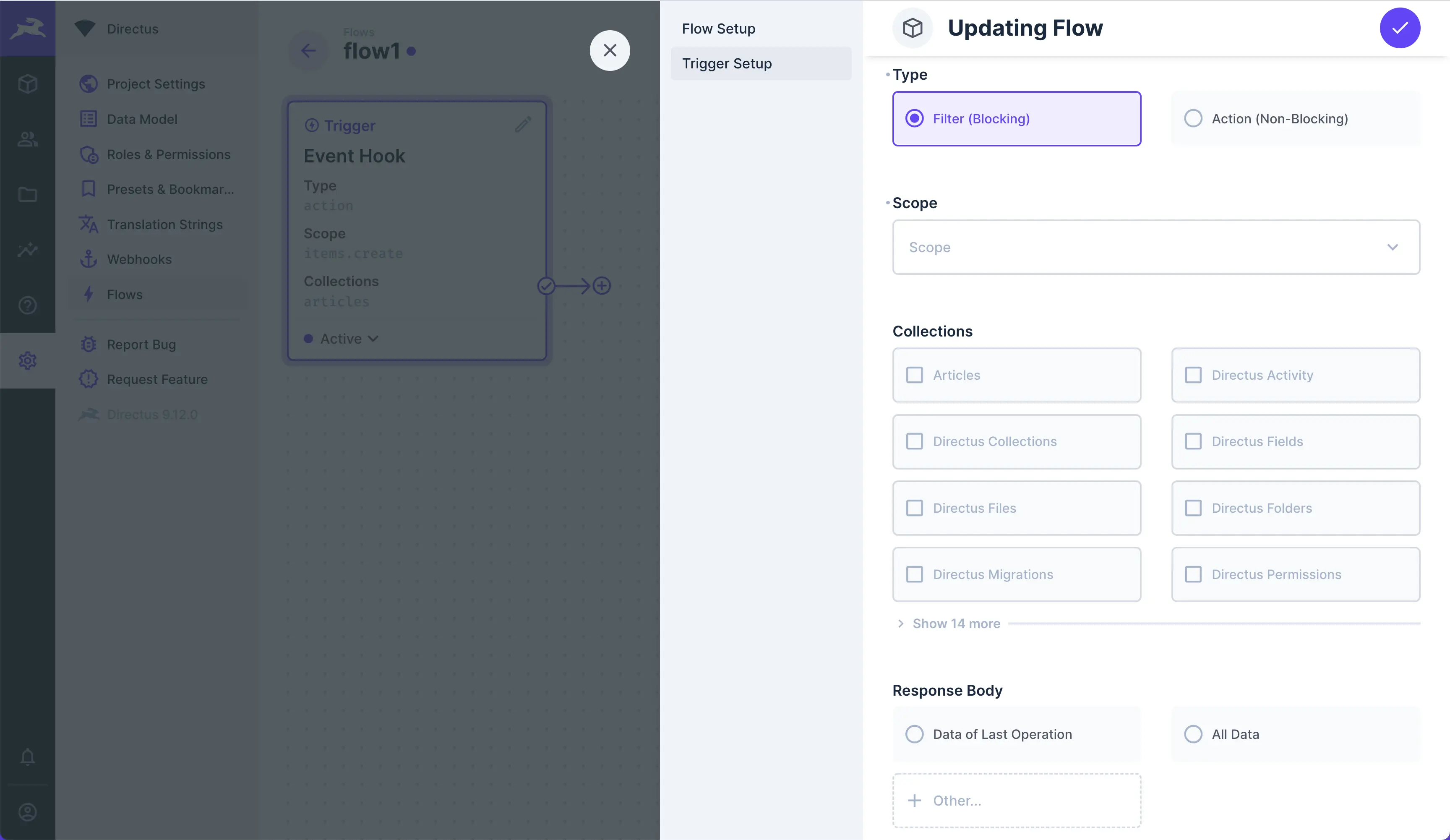
Event Hooks are triggered by events within the platform. The logic is based on Custom API Hooks.
Any data generated by the event will be nested in the $trigger.
- Type — Choose the type of event hook:
- Filter (Blocking) — This pauses the transaction and passes the
payloadto your flow, allowing you to validate or transformpayloador even prevent the event transaction. - Action (Non-Blocking) — Actions do not block the event. A non-blocking action is mostly useful for completing tasks in response to an event, without modifying the event or slowing the API.
- Filter (Blocking) — This pauses the transaction and passes the
- Scope — Set the types of events that trip this trigger.
- Collections — Set the collections whose events trip this trigger.
- Response Body — This is optional. Its also only for Filter (Blocking) events. Defines data to replace the
event's original
payload. Choose to return:- Data of Last Operation — Replaces event
payloadwith value from$last. - All Data — Replaces event
payloadwith the entire data chain. - Other — Replaces event
payloadwith value from an<operationKey>.
- Data of Last Operation — Replaces event
::: tip Events with Multiple Items
If you create items in a single request, the Flow will trigger once for each and every item. If you create three items, the flow runs three separate times. On each run, just one item will be in the payload.
:::
Filters
A Filter will halt the event transaction, copy the event payload into the flow, let the whole flow run,
optionally replace the original payload by configuring Response Body, then resume the event's transaction to
the database.
For example, let's say you configure the scope to be item.create.
- A request to create an item is sent to Directus.
- The create item event halts.
- The event's
payloadis copied into the$triggerof the flow. - The flow runs.
- Optional: If you defined a Response Body, this replaces the event's
payload. - The event transaction is committed or cancelled, based on your flow's logic.
::: tip Response Body
If no Response Body is configured, the original payload will not be modified, but you'd still have the ability to cancel the transaction.
:::
::: tip Cancelling Transactions
To completely cancel a transaction, you'll need to throw an error within a script operation or end the flow on a failure path.
:::
Actions
An Action lets the event commit its transaction to the database without waiting for the flow to finish. Therefore,
Actions give you a more performant API, but you have no ability to validate or transform the payload before the
transaction is committed to the database. However, a copy of the payload is still added into $trigger to use as
desired.
For example, let's imagine once more that you configure the scope to be item.create.
- A request to create an item is sent to Directus.
- The create item event is transacted.
- The event's
payloadis copied into the$triggerof the flow. - The flow runs.
To recap, Filters let you modify the original payload of an event but block the API until the flow finishes. Actions
still provide the payload to the flow, but don't let you modify it before transaction; so you get a faster API but no
control over the event transaction.
Webhook

Triggers on an incoming HTTP request to: /flows/trigger/:this-webhook-trigger-id which you can copy from the webhook
trigger panel.
- Method — Choose whether the flow will be triggered by a
GETorPOSTrequest from the dropdown. - Asynchronous — Toggle whether or not the trigger responds asynchronously.
- Response Body — Optional. Defines data to return as a response. Choose to return:
- Data of Last Operation — Responds with value from
$last. - All Data — Responds with the entire data chain.
- Other — Responds with value from an
<operationKey>.
- Data of Last Operation — Responds with value from
- Cache — Choose whether responses to
GETrequests should be stored and served from cache or the cache should be bypassed.
::: tip Response Body
If no data is defined in Response Body, the response is empty.
:::
::: tip Asynchronous
If Asynchronous is enabled, the flows system will immediately resolve/respond to the request without returning a Response Body, which frees up the API immediately. If it is disabled, the flows system will wait for the flow to finish and return whatever value is in Response Body. This slows the API, but lets you send data.
:::
Schedule (CRON)

This trigger enables you to create data at scheduled intervals, via 6-point cron job syntax.
- Interval — Set the cron job interval to schedule when the flow triggers.
Syntax Explanation
 ┌────────────── second (0-59)
 │ ┌──────────── minute (0-59)
 │ │ ┌────────── hour (0-23)
 │ │ │ ┌──────── day of month (1-31)
 │ │ │ │ ┌────── month (1-12)
 │ │ │ │ │ ┌──── day of week (0-7)
 │ │ │ │ │ │
 │ │ │ │ │ │
 * * * * * *
Another Flow

This trigger executes by the trigger flow operation, allowing you to chain flows.
- Response Body — Optional. Defines data to return and append under the
<operationKey>of trigger flow operation that tripped the trigger. Choose to return:- Data of Last Operation — Responds with value from
$last. - All Data — Responds with the entire data chain.
- Other — Responds with value from an
<operationKey>.
- Data of Last Operation — Responds with value from
::: tip Flows for-loops
If you pass an array to this trigger, it will run once for each item in the array.
:::
Manual

This Trigger starts your flow on a manual click of a button within the Data Studio. When you use this trigger, a Flows menu containing a button will appear in the sidebar of the specified collection page(s) and/or its item pages.
The manual trigger must take in item ID(s) before you can click it. So on the collection page, the button will be
grayed out until you select some number of items. From the item page, the current item's ID is passed in
automatically. These item IDs are passed in to $trigger.
- Collections — Choose the Collection(s) to add the button to.
- Location — Choose to display the button on the Item Page, Collection Page, or both.
- Asynchronous — Toggle whether the Flow executes asynchronously. If enabled, you can immediately trigger the flow again. If not, you must wait for the flow to complete to use it again.
- Collection Page (Requires Selection) — Toggle whether a selection is required in the Collection Page to trigger.
- Require Confirmation - Toggle whether a confirmation dialog will be shown before the flow is executed.
After the operation runs, a toast notification will appear in your sidebar indicating whether the flow ran successfully.
Confirmation Dialog

If enabled, a confirmation dialog will be shown in a modal before the flow is executed. There are further options to set up a confirmation dialog.
- Confirmation Description - Text shown at the top of the modal.
- Confirmation Input Fields - Set up one or more inputs to be filled by users before executing the flow.

Each input field can have its own data type, interface, and display options. Some convenience options are also provided to immediately alter the user input (such as trimming whitespace and slugifying text).
Data provided by users when triggering a manual flow with a confirmation dialog will be accessible in $trigger.body in
the data chain.