 d2a311b20e
* .gitignored package-lock.json that was created in the docs subfolder

* added cloud section structure

* set initial article outlines

* drafter accts-teams and shifted cloud docs in navbar

* added overview and projects draft

* added tiers and billing outline and basics

* added image to drafts and polished text. needs one more pass. added css for dngr on icons

* Added photos to overview

* minor tweak on images

* imrpoved copy and expanded CSS for inline icons

* expnaded CSS and, added images and finished copy on  acct-n-team

* more copy touchups

* Add divider between cloud and regular docs

* Fix capitalization of Github -> GitHub

* fixed overview images and tweaked copy

* recructured pages. Added writing tasks on appropriate pages

* added accts, options, and teams pages

* Overview intro (re)written)

* overview initial copy

* Overview first draft complete, links not added, media not added

* accounts initial draft complete, no media

* teams redrafted, projects and options partial refactoring

* projects redrafted

* finalized 5th page as glossay and reformatted

* refactored glossary structure

* glossary terms p1

* glossary copy 80% complete

* more glossary copy

* cloud glossary basic copy probably 100% done

* checked hyperlinks

* initial proofread on overview

* initial accounts proofread

* re-edited billing sections

* re-editec projects section and glossary

* re-edited teams

* small edits

* edited accounts, teams, projects

* re-edited glossary

* added screenshot-based media, still need graphic illustrations

* small, tiny edits

* fixed GitHub capitalization and other small type error

* applied ben's edit suggestions on overview, accounts, and 1/2 of projects

* applied the rest of Ben's edits

* added missing screenshots

* proof-read

* Fixed Team proejcts title

* tweaked copy after my ~10 questions to ben

* reworked 'projects > create a project' sections and 'glossary > data-processing' section

* final copy touchup, link check, still missing Rijk's review

Co-authored-by: rijkvanzanten <rijkvanzanten@me.com>
Co-authored-by: Eron Powell <eronpowell@Erons-MBP-2.local>
Co-authored-by: Eron Powell <eronpowell@Erons-MBP-2.hitronhub.home>
12 KiB
Glossary
Asset Storage
Directus Core allows asset storage for any type of file. This applies on all Cloud Projects. However, on Directus Cloud, certain hard technical limits apply to file uploads such as limits on size per asset and total asset storage per Project. For more details, see Cloud Policies
Automatic Updates
Software updates on any app can be a time-consuming chore, taking developer energy and focus away from core business logic. Cloud Projects are updated every two weeks in rolling releases (i.e. done with no downtime). These updates keep your Project on the latest version and fully up-to-date with all Cloud Exclusives, dependencies, and security patches.
::: tip Version-locking
Version-locking is available on Enterprise Projects.
:::
Backups
By default, file assets and databases are backed up once per day on all Standard and Enterprise Projects. Additionally, Enterprise customers can work with our team for more tailored backup solutions. In the event of an emergency, such as your Node crashing, your data will be safe. If you need access to your backed-up data, contact us
:::warning
Please note that Community Projects are not backed up.
:::
Caching
Caching is enabled on Cloud Projects. Public data is cached in the CDN for a short period of time. All Directus Cloud Projects are running behind a Global CDN. Enterprise Projects offer other advanced caching strategies as well.
Cloud Exclusives
Our managed service includes several Cloud-Exclusive Extensions that are not available to self-hosted users. It is important to note that these are not paywalled Core features, but are instead progressive enhancements that add to the base offering. Our team is always adding new exclusives, so check back often to stay up to date with the latest and greatest. Cloud Exclusives development is managed by the Core Team, so these will stay up-to-date with the latest version of Directus. Examples include:
- Kanban Layout
:::tip
Directus Team is always adding more Cloud Exclusives, so check back frequently to see the latest and greatest on Directus Cloud. Looking to sponsor development of an Extension or Cloud Exclusive? Contact Us
:::
Data Portability
Directus Core is totally detached from the database. Data can be cleanly imported and exported on Projects with the API via the schema endpoints. For Enterprise clients, the Directus Team will work with you to help you through this process.
Datacenter Regions
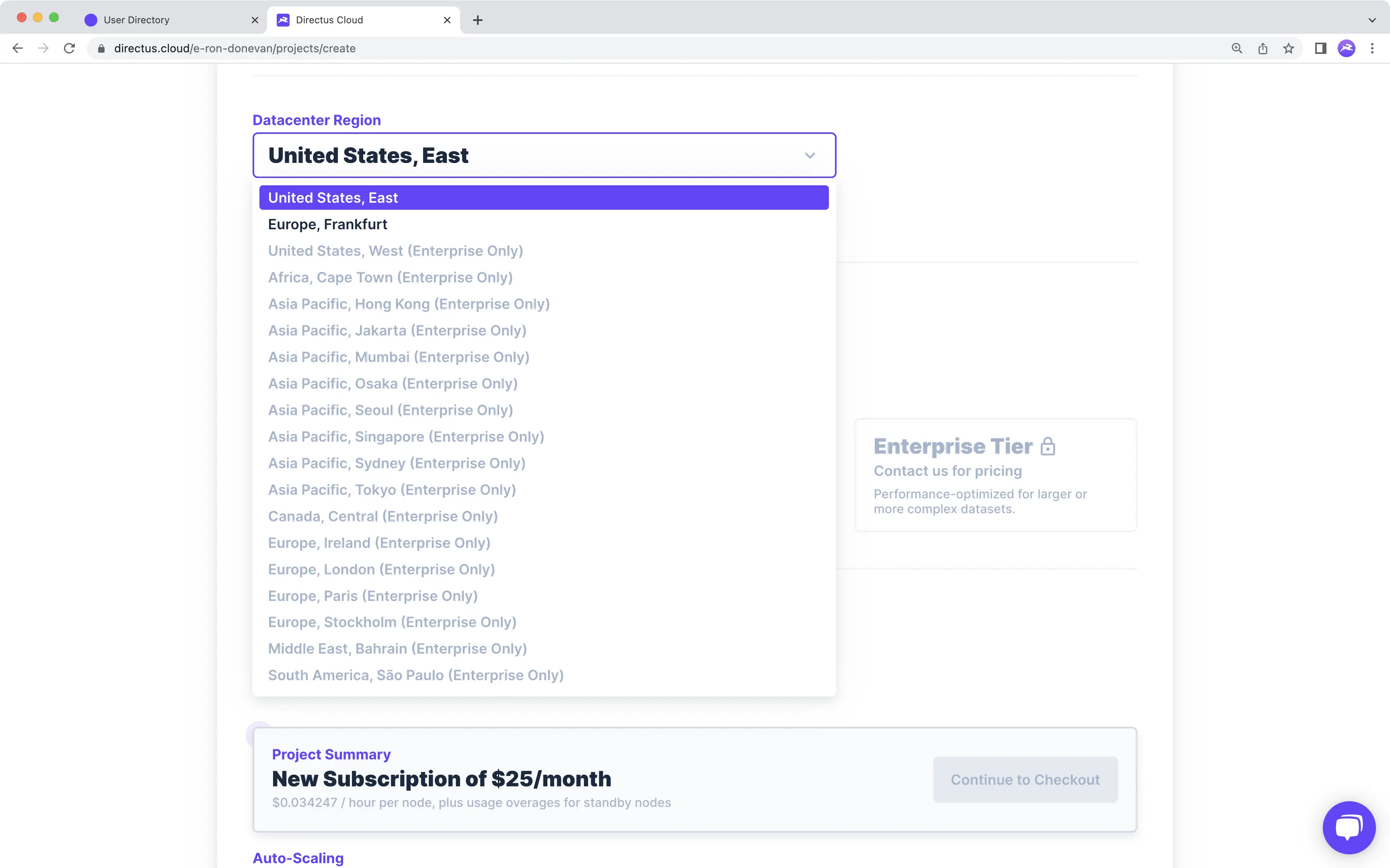
The location you choose to Host your Project can have measurable impact. In order to optimize your Project as well as help you meet any local data compliance laws such as GDPR, Standard and Enterprise Projects allow you to choose the region your Project is hosted in. There are 19 Datacenter Regions available to Enterprise Projects and two available to Standard Projects.
:::tip
Community Projects are hosted in the United States, East Region.
:::
Encryption and Security
Asset Storage, data storage, and in-transit encryption are included on all Cloud Projects. All data at rest remains encrypted. HTTPS/TLS protocols are enabled on all in-transit data. Cloud Projects are created with secure and safe tenancy architectures.
:::tip Directus Core Security Features
Directus core comes with even more security features out-of-the-box including IP address whitelabeling, 2FA enabling, SSO options, customization for Password Rule requirements, and the flexibility to use any access token paradigm desired.
:::
Extensions
The term Extension refers to any feature or component that adds to the functionality of Directus Core. Directus has been architected to be completely modular and extensible to ensure you will never hit a hard feature ceiling within the platform.
All Cloud Projects have access to the Cloud Exclusive Extensions, which are developed and maintained by the Core Team. Enterprise Projects get all Cloud Exclusives, but also have the option to implement their own custom Extensions as needed.
Global CDN
A Global CDN is provided on all Cloud Projects, out-of-the-box, with over 300 cache locations, which means assets and data will be delivered with the lowest latency.
Infrastructure
In the context of these docs, Infrastructure refers refers to the hardware running your Project including the database, serverless nodes, asset storage, and global CDN. Infrastructure differs by Project tier. Please refer to Projects as well as the Infrastructure section on the pricing page for side-by-side comparisons.
Nodes
Directus Cloud has options to choose the processing power of your Node as well as the number of Nodes your Project runs on. Nodes can be configured to meet traffic needs at any scale. In general, there are two approaches to scale performance, vertical-scaling and horizontal-scaling. Vertical-scaling refers to the use of improved hardware (e.g. better CPUs and more RAM) to scale up. In Directus Cloud, configuring the Node Type will provide vertical-scaling. Horizontal-scaling refers to increasing the number of Nodes to scale up. In Directus Cloud, adding more Active and Standby Nodes will provide horizontal-scaling.
Node Types
Each Node Type provides a different level of processing power.
-
Community
Community Projects come equipped with one Node, which can handle basic web traffic required for hobby-projects, learning/demoing Directus Cloud, and other non-production use cases. Community Nodes will pause after 3 days of inactivity. -
General Purpose
General Purpose Nodes are the basic Node Type offered on Standard Projects. These Nodes are the right choice for most small-to-medium scale, production-ready use-cases. -
Performance Tier
Performance Tier Nodes are the upgraded Node Type offered on Standard Projects, which may provide better performance under certain conditions, such as for handling Image transformations as well as fetching deeply nested or complex relationships via the API. -
Enterprise
Node configuration options are flexible and customizable, tailored to the Project's needs.
:::tip
In Standard Projects, the Node Type configured and associated cost per hour will apply to both Active and Standby Nodes.
:::
Active Nodes
Active Nodes stay on constantly. A Project must have at least 1 Active Node in order to function.
:::warning
Community Nodes paused due to inactivity can't receive requests until unpaused.
:::
Load Balancing
Similar to the term horizontal-scaling, the term Load balancing refers to the instantaneous distribution of load across the Active Nodes that your Project is running.
Standby Nodes
Standby Nodes stay turned-off until traffic starts to take up significant system capacity, at which point Standby Nodes activate one-by-one as needed to safely handle the increase in traffic. Activation occurs within just a few moments.
Standby Nodes are not required, however you do not pay when Standby Nodes are disabled. For more pricing information, see billing.
Auto-scaling
Auto-scaling refers to the automatic horizontal scaling provided by Standby Nodes, which helps to keep system capacity at safe levels.
:::tip Optimal Node Configuration
As noted under Billing, Projects can be reconfigured as needed. The Project Monitor Page provides performance analytics to help inform Node configuration decisions.
:::
Quotas
Directus does not impose arbitrary software-based limits of any kind. So for things like Collections, Roles, or Users- whether you have 10 or 10,000 of these, you are free to build out your Project as needed, with no up-charge. However, actual Project performance is going to depend on Node configuration, so there are hard technical limits. For details, see Cloud Policies
Rate Limiting
Rate limiting refers to technical limitations within Directus Cloud as well as Cloud Projects. This includes limits on things like API requests per second per Project. For details, see Cloud Policies
Support Options
There are three types of support for Directus.
Community Support
As an open-source Project, everyone is encouraged to reach out to the Community for help on Projects, and of course help others as well. Find us on GitHub and Discord to join the thousands of other developers all discussing and guiding the future of the Directus platform. Most common questions have already been asked and answered and can be easily searched.
:::warning No Guaranteed Response Time
While the Directus Core Team plays an active and engaged role in community discussions, aiming to answer questions within a few days, there is no guaranteed response time for Community Support.
:::
Basic and Premium Support
Basic and Premium Support offer direct communication with the Directus Core Team. Basic support is included on all Enterprise Projects. Premium Support adds 24/7 response times for critical software issues only.
:::tip Add-on Support
Looking for Basic or Premium Support on a self-hosted Project? Contact Sales
:::
System Status
Click check in the Dashboard Header to navigate to the System Status Page. This Page is where to find out what happened in the super rare event that the network slows down or goes offline. Here you can view the current connectivity status of Directus Cloud, status on individual Projects by URL, and a daily Incidents log. For more information, see Cloud Policies
Multi-tenancy
Tenancy refers to how client data is stored within a database. In single-tenancy architecture, a database stores data from only one tenant. In multi-tenancy architecture, a database stores data from multiple tenants, with mechanisms in place to protect data privacy. In the context of Directus Cloud, each Project represents a tenant.
Community
Community project databases are technically single-tenant, but also file-based, and therefore may be too limited on power
for a production-ready environment.
Standard
Standard Projects are created using multi-tenant architecture. However, if your neighbor's Project gets busy, it will not
impact your Project because each Standard Project is scoped to one container per Project with dedicated minimum resources.
Projects also have the ability to scale beyond this minimum allocation based on currently available resources within the
multitenant pool. However, these additional resources are not guaranteed and are offered on a dynamic first-come, first-serve
basis. For end-to-end, single-tenant infrastructure with fully dedicated resources, contact us about our Enterprise Tier
Enterprise
Databases on Enterprise Projects are single-tenant, 100% dedicated to your Project. No neighbors. Ready to go Enterprise?
Contact us
:::tip
This section refers to how your Cloud Project is stored among other Cloud Projects and has nothing to do with how you design your Project's data model. You can implement single or multi-tenant architecture within any Directus Cloud Project.
:::