# 📚 ebook2audiobook
CPU/GPU Converter from eBooks to audiobooks with chapters and metadata
using Calibre, ffmpeg, XTTSv2, Fairseq and more. Supports voice cloning and +1110 languages!
> [!IMPORTANT]
**This tool is intended for use with non-DRM, legally acquired eBooks only.**
The authors are not responsible for any misuse of this software or any resulting legal consequences.
Use this tool responsibly and in accordance with all applicable laws.
[](https://discord.gg/63Tv3F65k6)
Thanks to support ebook2audiobook developers!
[](https://ko-fi.com/athomasson2)
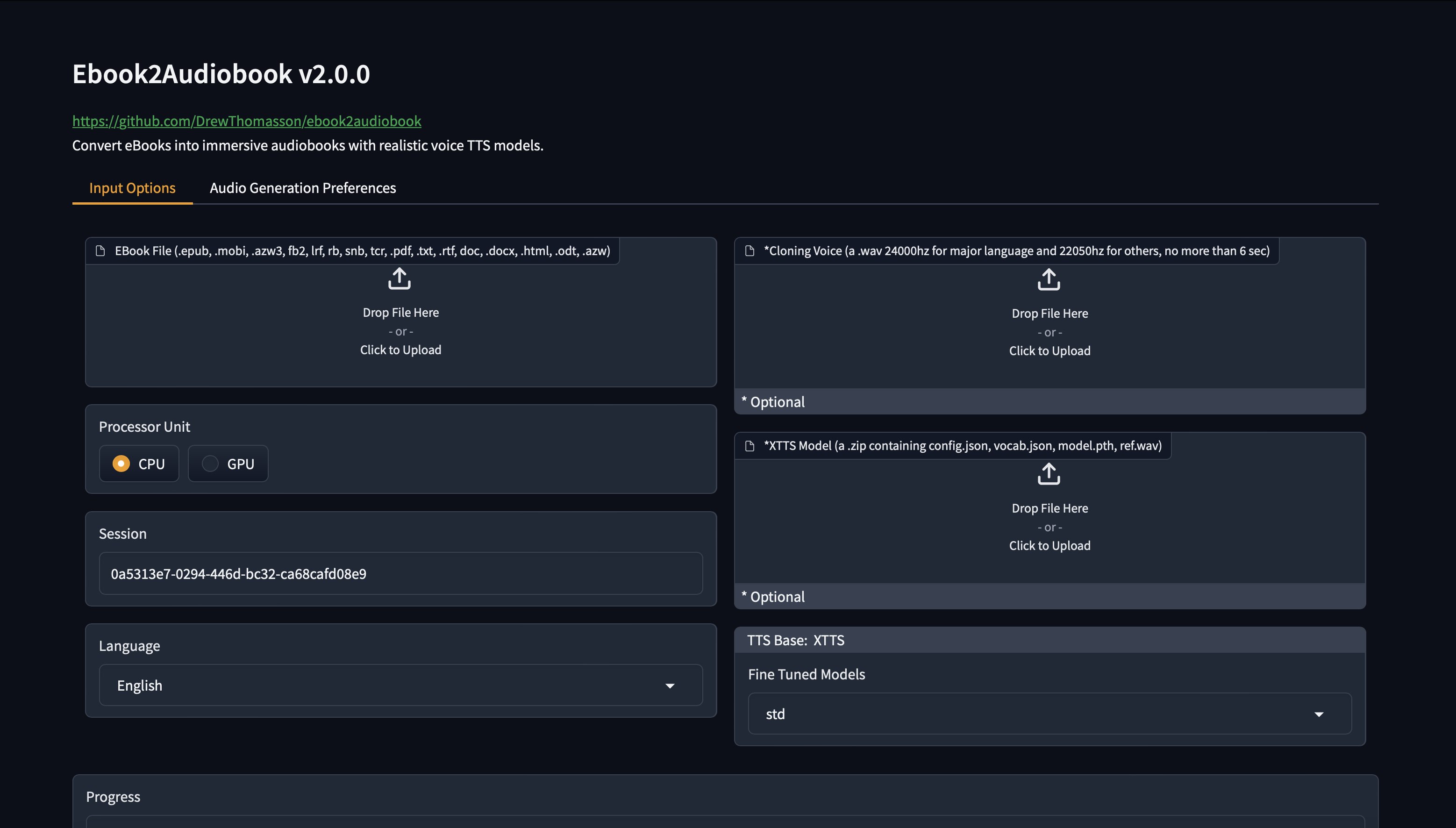
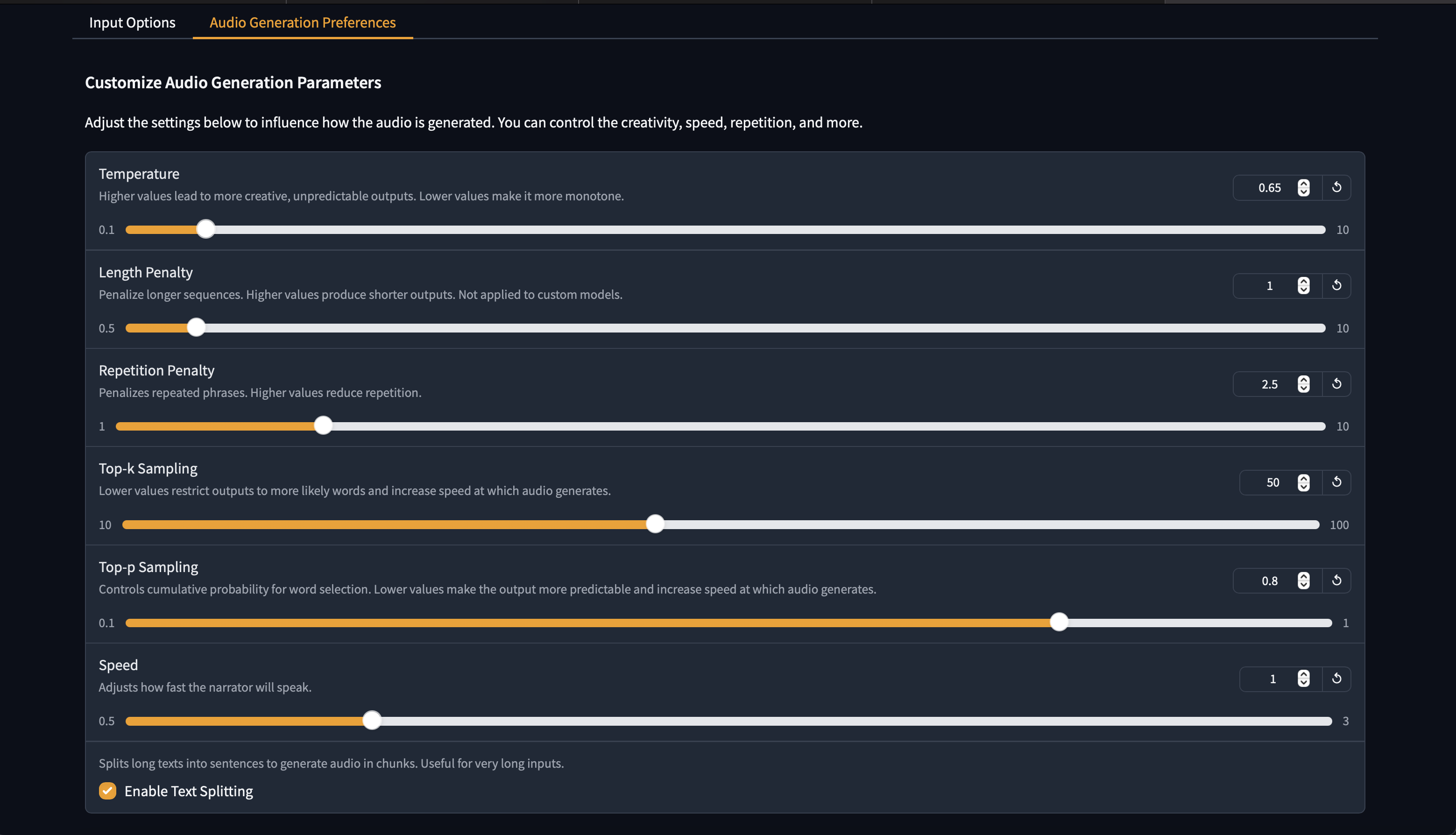
#### New v2.0 Web GUI Interface!
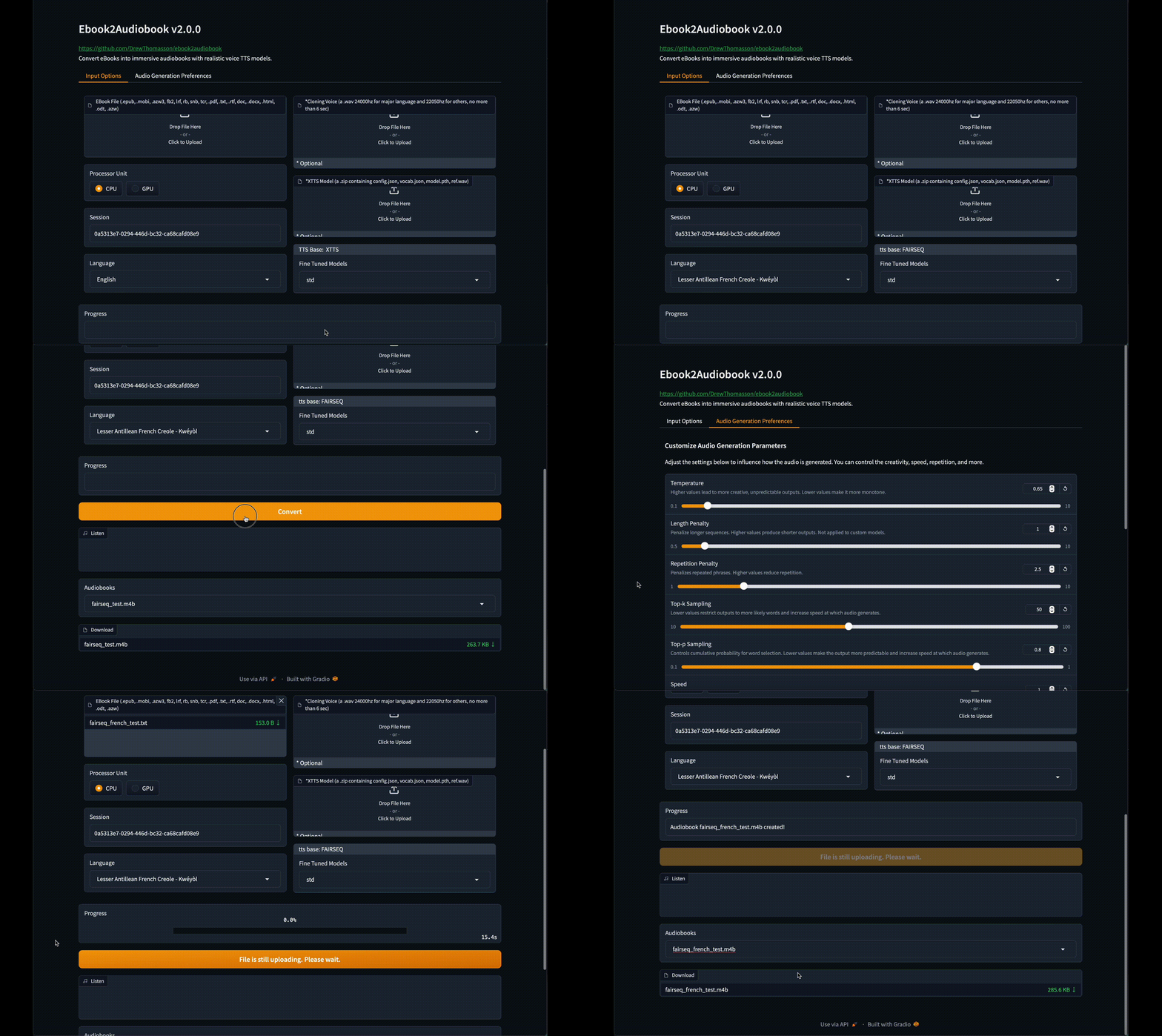
Click to see images of Web GUI

## README.md
- ara [العربية (Arabic)](./readme/README_AR.md)
- zho [中文 (Chinese)](./readme/README_CN.md)
- eng [English](README.md)
- swe [Svenska (Swedish)](./readme/README_SWE.md)
- fas [فارسی (Persian)](./readme/README_FA.md)
## Table of Contents
- [ebook2audiobook](#ebook2audiobook)
- [Features](#features)
- [New v2.0 Web GUI Interface](#new-v20-web-gui-interface)
- [Huggingface Space Demo](#huggingface-space-demo)
- [Free Google Colab](#free-google-colab)
- [Pre-made Audio Demos](#demos)
- [Supported Languages](#supported-languages)
- [Requirements](#requirements)
- [Installation Instructions](#installation-instructions)
- [Usage](#usage)
- [Launching Gradio Web Interface](#launching-gradio-web-interface)
- [Basic Headless Usage](#basic-headless-usage)
- [Headless Custom XTTS Model Usage](#headless-custom-xtts-model-usage)
- [Renting a GPU](#renting-a-gpu)
- [Help command output](#help-command-output)
- [Fine Tuned TTS models](#fine-tuned-tts-models)
- [For Collection of Fine-Tuned TTS Models](#fine-tuned-tts-collection)
- [Using Docker](#using-docker)
- [Docker Run](#running-the-docker-container)
- [Docker Build](#building-the-docker-container)
- [Docker Compose](#docker-compose)
- [Docker headless guide](#docker-headless-guide)
- [Docker container file locations](#docker-container-file-locations)
- [Common Docker issues](#common-docker-issues)
- [Supported eBook Formats](#supported-ebook-formats)
- [Output](#output)
- [Common Issues](#common-issues)
- [Special Thanks](#special-thanks)
- [Join Our Server!](#join-our--server)
- [Legacy](#legacy-v10)
- [Glossary of Sections](#glossary-of-sections)
## Features
- 📖 Converts eBooks to text format with Calibre.
- 📚 Splits eBook into chapters for organized audio.
- 🎙️ High-quality text-to-speech with [Coqui XTTSv2](https://huggingface.co/coqui/XTTS-v2) and [Fairseq](https://github.com/facebookresearch/fairseq/tree/main/examples/mms) (and more).
- 🗣️ Optional voice cloning with your own voice file.
- 🌍 Supports +1110 languages (English by default). [List of Supported languages](https://dl.fbaipublicfiles.com/mms/tts/all-tts-languages.html)
- 🖥️ Designed to run on 4GB RAM.
## [Huggingface space demo](https://huggingface.co/spaces/drewThomasson/ebook2audiobook)
[](https://huggingface.co/spaces/drewThomasson/ebook2audiobook)
- Huggingface space is running on free cpu tier so expect very slow or timeout lol, just do not give it giant files is all
- Best to duplicate space or run locally.
## Free Google Colab
[](https://colab.research.google.com/github/DrewThomasson/ebook2audiobook/blob/main/Notebooks/colab_ebook2audiobook.ipynb)
## Supported Languages
- **Arabic (ara)**
- **Chinese (zho)**
- **Czech (ces)**
- **Croatian (hrv)**
- **Dutch (nld)**
- **English (eng)**
- **French (fra)**
- **German (deu)**
- **Hindi (hin)**
- **Hungarian (hun)**
- **Italian (ita)**
- **Japanese (jpn)**
- **Korean (kor)**
- **Polish (pol)**
- **Portuguese (por)**
- **Russian (rus)**
- **Spanish (spa)**
- **Turkish (tur)**
- **Vietnamese (vie)**
- [** +1100 languages via Fairseq**](https://dl.fbaipublicfiles.com/mms/tts/all-tts-languages.html)
## Hardware Requirements
- 4gb RAM minimum, 8GB recommended
- Virtualization enabled if running on windows (Docker only)
- CPU compatible, GPU recommended
> [!IMPORTANT]
**Before to post an install or bug issue search carefully to the opened and closed issues TAB
to be sure your issue does not exist already.**
>[!NOTE]
**Lacking of any standards structure like what is a chapter, paragraph, preface etc.
you should first remove manually any text you don't want to be converted in audio.**
### Installation Instructions
1. **Clone repo**
```bash
git clone https://github.com/DrewThomasson/ebook2audiobook.git
```
### Launching Gradio Web Interface
1. **Run ebook2audiobook**:
- **Linux/MacOS**
```bash
./ebook2audiobook.sh # Run Launch script
```
- **Windows**
```bash
.\ebook2audiobook.cmd # Run launch script or double click on it (Bypass windows alerts)
```
2. **Open the Web App**: Click the URL provided in the terminal to access the web app and convert eBooks.
3. **For Public Link**:
`python app.py --share` (all OS)
`./ebook2audiobook.sh --share` (Linux/MacOS)
`ebook2audiobook.cmd --share` (Windows)
### Basic Usage
- **Linux/MacOS**:
```bash
./ebook2audiobook.sh --headless --ebook \
--voice [path_to_voice_file] --language [language_code]
```
- **Windows**
```bash
.\ebook2audiobook.cmd --headless --ebook
--voice [path_to_voice_file] --language [language_code]
```
- **[--ebook]**: Path to your eBook file.
- **[--voice]**: Voice cloning file path (optional).
- **[--language]**: Language code in ISO-639-3 (i.e.: ita for italian, eng for english, deu for german...).
Default language is eng and --language is optional for default language set in ./lib/lang.py.
The ISO-639-1 2 letters codes are also supported.
### Example of Custom Model Zip Upload
(must be a .zip file containing the mandatory model files. Example for XTTS: config.json, model.pth, vocab.json and ref.wav)
- **Linux/MacOS**
```bash
./ebook2audiobook.sh --headless --ebook \
--voice --language --custom_model
```
- **Windows**
```bash
.\ebook2audiobook.cmd --headless --ebook \
--voice --language --custom_model
```
- ****: Path to `model_name.zip` file,
which must contain (according to the tts engine) all the mandatory files
(see ./lib/models.py).
### For Detailed Guide with list of all Parameters to use
- **Linux/MacOS**
```bash
./ebook2audiobook.sh --help
```
- **Windows**
```bash
.\ebook2audiobook.cmd --help
```
- **Or for all OS**
```python
app.py --help
```
```bash
usage: app.py [-h] [--script_mode SCRIPT_MODE] [--session SESSION] [--share]
[--headless] [--ebook EBOOK] [--ebooks_dir EBOOKS_DIR]
[--language LANGUAGE] [--voice VOICE] [--device {cpu,gpu,mps}]
[--tts_engine {xtts,bark,vits,fairseq,yourtts}]
[--custom_model CUSTOM_MODEL] [--fine_tuned FINE_TUNED]
[--output_format OUTPUT_FORMAT] [--temperature TEMPERATURE]
[--length_penalty LENGTH_PENALTY] [--num_beams NUM_BEAMS]
[--repetition_penalty REPETITION_PENALTY] [--top_k TOP_K] [--top_p TOP_P]
[--speed SPEED] [--enable_text_splitting] [--output_dir OUTPUT_DIR]
[--version]
Convert eBooks to Audiobooks using a Text-to-Speech model. You can either launch the Gradio interface or run the script in headless mode for direct conversion.
options:
-h, --help show this help message and exit
--session SESSION Session to resume the conversion in case of interruption, crash,
or reuse of custom models and custom cloning voices.
**** The following options are for all modes:
Optional
--script_mode SCRIPT_MODE
Mode the script will run. Accepted values are "native" and "full_docker". Default mode is "native".
"full_docker" cannot be used without a docker command.
**** The following option are for gradio/gui mode only:
Optional
--share Enable a public shareable Gradio link.
**** The following options are for --headless mode only:
--headless Run the script in headless mode
--ebook EBOOK Path to the ebook file for conversion. Cannot be used when --ebooks_dir is present.
--ebooks_dir EBOOKS_DIR
Relative or absolute path of the directory containing the files to convert.
Cannot be used when --ebook is present.
--language LANGUAGE Language of the e-book. Default language is set
in ./lib/lang.py sed as default if not present. All compatible language codes are in ./lib/lang.py
optional parameters:
--voice VOICE (Optional) Path to the voice cloning file for TTS engine.
Uses the default voice if not present.
--device {cpu,gpu,mps}
(Optional) Pprocessor unit type for the conversion.
Default is set in ./lib/conf.py if not present. Fall back to CPU if GPU not available.
--tts_engine {xtts,bark,vits,fairseq,yourtts}
(Optional) Preferred TTS engine (available are: ['xtts', 'bark', 'vits', 'fairseq', 'yourtts'].
Default depends on the selected language. The tts engine should be compatible with the chosen language
--custom_model CUSTOM_MODEL
(Optional) Path to the custom model zip file cntaining mandatory model files.
Please refer to ./lib/models.py
--fine_tuned FINE_TUNED
(Optional) Fine tuned model path. Default is builtin model.
--output_format OUTPUT_FORMAT
(Optional) Output audio format. Default is set in ./lib/conf.py
--temperature TEMPERATURE
(xtts only, optional) Temperature for the model.
Default to 0.6. Higher temperatures lead to more creative outputs.
--length_penalty LENGTH_PENALTY
(xtts only, optional) A length penalty applied to the autoregressive decoder.
Default to 1.2. Not applied to custom models.
--num_beams NUM_BEAMS
(xtts only, optional) Controls how many alternative sequences the model explores. Must be equal or greater than length penalty.
Default to 4
--repetition_penalty REPETITION_PENALTY
(xtts only, optional) A penalty that prevents the autoregressive decoder from repeating itself.
Default to 2.0
--top_k TOP_K (xtts only, optional) Top-k sampling.
Lower values mean more likely outputs and increased audio generation speed.
Default to 45
--top_p TOP_P (xtts only, optional) Top-p sampling.
Lower values mean more likely outputs and increased audio generation speed. Default to 0.85
--speed SPEED (xtts only, optional) Speed factor for the speech generation.
Default to 1.0
--enable_text_splitting
(xtts only, optional) Enable TTS text splitting. This option is known to not be very efficient.
Default is set to True
--output_dir OUTPUT_DIR
(Optional) Path to the output directory. Default is set in ./lib/conf.py
--version Show the version of the script and exit
Example usage:
Windows:
Gradio/GUI:
ebook2audiobook.cmd
Headless mode:
ebook2audiobook.cmd --headless --ebook '/path/to/file'
Linux/Mac:
Gradio/GUI:
./ebook2audiobook.sh
Headless mode:
./ebook2audiobook.sh --headless --ebook '/path/to/file'
```
NOTE: in gradio/gui mode, to cancel a running conversion, just click on the [X] from the ebook upload component.
### Using Docker
You can also use Docker to run the eBook to Audiobook converter.
This method ensures consistency across different environments and simplifies setup.
#### Running the Docker Container
To run the Docker container and start the Gradio interface, use the following command:
-Run with CPU only
```powershell
docker run -it --rm -p 7860:7860 --platform=linux/amd64 \
athomasson2/ebook2audiobook python app.py
```
-Run with GPU Speedup (NVIDIA compatible only)
```powershell
docker run -it --rm --gpus all -p 7860:7860 --platform=linux/amd64
athomasson2/ebook2audiobook python app.py
```
#### Building the Docker Container
- You can build the docker image with the command:
'''powershell
docker build --platform linux/amd64 -t athomasson2/ebook2audiobook
'''
This command will start the Gradio interface on port 7860.(localhost:7860)
- For more options add the parameter `--help`
## Docker container file locations
All ebook2audiobooks will have the base dir of `/home/user/app/`
For example:
`tmp` = `/home/user/app/tmp`
`audiobooks` = `/home/user/app/audiobooks`
## Docker headless guide
first for a docker pull of the latest with
```bash
docker pull athomasson2/ebook2audiobook
```
- Before you do run this you need to create a dir named "input-folder" in your current dir
which will be linked, This is where you can put your input files for the docker image to see
```bash
mkdir input-folder && mkdir Audiobooks
```
- In the command below swap out **YOUR_INPUT_FILE.TXT** with the name of your input file
```bash
docker run -it --rm \
-v $(pwd)/input-folder:/home/user/app/input_folder \
-v $(pwd)/audiobooks:/home/user/app/audiobooks \
--platform linux/amd64 \
athomasson2/ebook2audiobook \
python app.py --headless --ebook /input_folder/YOUR_INPUT_FILE.TXT
```
- And that should be it!
- The output Audiobooks will be found in the Audiobook folder which will also be located
in your local dir you ran this docker command in
## To get the help command for the other parameters this program has you can run this
```bash
docker run -it --rm \
--platform linux/amd64 \
athomasson2/ebook2audiobook \
python app.py --help
```
and that will output this
[Help command output](#help-command-output)
### Docker Compose
This project uses Docker Compose to run locally. You can enable or disable GPU support
by setting either `*gpu-enabled` or `*gpu-disabled` in `docker-compose.yml`
#### Steps to Run
1. **Clone the Repository** (if you haven't already):
```bash
git clone https://github.com/DrewThomasson/ebook2audiobook.git
cd ebook2audiobook
```
2. **Set GPU Support (disabled by default)**
To enable GPU support, modify `docker-compose.yml` and change `*gpu-disabled` to `*gpu-enabled`
3. **Start the service:**
```bash
docker-compose up -d
```
4. **Access the service:**
The service will be available at http://localhost:7860.
#### New v2.0 Docker Web GUI Interface!

Click to see images of Web GUI
## Renting a GPU
Don't have the hardware to run it or you want to rent a GPU?
#### You can duplicate the hugginface space and rent a gpu for around $0.40 an hour
[Huggingface Space Demo](#huggingface-space-demo)
#### Or you can try using the google colab for free!
(Be aware it will time out after a bit of your not messing with the google colab)
[Free Google Colab](#free-google-colab)
## Common Docker Issues
- Docker gets stuck downloading Fine-Tuned models.
(This does not happen for every computer but some appear to run into this issue)
Disabling the progress bar appears to fix the issue,
as discussed [here in #191](https://github.com/DrewThomasson/ebook2audiobook/issues/191)
Example of adding this fix in the `docker run` command
```Dockerfile
docker run -it --rm --gpus all -e HF_HUB_DISABLE_PROGRESS_BARS=1 -e HF_HUB_ENABLE_HF_TRANSFER=0 \
-p 7860:7860 --platform=linux/amd64 athomasson2/ebook2audiobook python app.py
```
## Fine Tuned TTS models
You can fine-tune your own xtts model easily with this repo
[xtts-finetune-webui](https://github.com/daswer123/xtts-finetune-webui)
If you want to rent a GPU easily you can also duplicate this huggingface
[xtts-finetune-webui-space](https://huggingface.co/spaces/drewThomasson/xtts-finetune-webui-gpu)
A space you can use to de-noise the training data easily also
[denoise-huggingface-space](https://huggingface.co/spaces/drewThomasson/DeepFilterNet2_no_limit)
### Fine Tuned TTS Collection
To find our collection of already fine-tuned TTS models,
visit [this Hugging Face link](https://huggingface.co/drewThomasson/fineTunedTTSModels/tree/main)
For an XTTS custom model a ref audio clip of the voice reference is mandatory:
## Demos
Rainy day voice
https://github.com/user-attachments/assets/8486603c-38b1-43ce-9639-73757dfb1031
David Attenborough voice
https://github.com/user-attachments/assets/47c846a7-9e51-4eb9-844a-7460402a20a8
## Supported eBook Formats
- `.epub`, `.pdf`, `.mobi`, `.txt`, `.html`, `.rtf`, `.chm`, `.lit`,
`.pdb`, `.fb2`, `.odt`, `.cbr`, `.cbz`, `.prc`, `.lrf`, `.pml`,
`.snb`, `.cbc`, `.rb`, `.tcr`
- **Best results**: `.epub` or `.mobi` for automatic chapter detection
## Output
- Creates a `['m4b', 'm4a', 'mp4', 'webm', 'mov', 'mp3', 'flac', 'wav', 'ogg', 'aac']` (set in ./lib/conf.py) file with metadata and chapters.
- **Example**

## Common Issues:
- CPU is slow (better on server smp CPU) while NVIDIA GPU can have almost real time conversion.
[Discussion about this](https://github.com/DrewThomasson/ebook2audiobook/discussions/19#discussioncomment-10879846)
For faster multilingual generation I would suggest my other
[project that uses piper-tts](https://github.com/DrewThomasson/ebook2audiobookpiper-tts) instead
(It doesn't have zero-shot voice cloning though, and is Siri quality voices, but it is much faster on cpu).
- "I'm having dependency issues" - Just use the docker, its fully self contained and has a headless mode,
add `-h` parameter after the `app.py` in the docker run command for more information.
- "Im getting a truncated audio issue!" - PLEASE MAKE AN ISSUE OF THIS,
we don't speak every language and need advise from users to fine tune the sentence splitting logic.😊
## What I need help with! 🙌
## [Full list of things can be found here](https://github.com/DrewThomasson/ebook2audiobook/issues/32)
- Any help from people speaking any of the supported languages to help with proper sentence splitting methods
- Potentially creating readme Guides for Multiple languages(Becuase the only language I know is English 😔)
## Special Thanks
- **Coqui TTS**: [Coqui TTS GitHub](https://github.com/idiap/coqui-ai-TTS)
- **Calibre**: [Calibre Website](https://calibre-ebook.com)
- **FFmpeg**: [FFmpeg Website](https://ffmpeg.org)
- [@shakenbake15 for better chapter saving method](https://github.com/DrewThomasson/ebook2audiobook/issues/8)
### [Legacy V1.0](legacy/v1.0)
You can view the code [here](legacy/v1.0).
## Join Our Server!
[](https://discord.gg/63Tv3F65k6)