 f1c7df8c28
* docs: add code signing tutorial

* docs: link to code signing tutorial from readme

* docs: remove unneeded use of "application" from docs readme
2.1 KiB
Code Signing
Code signing is a security technology that you use to certify that an app was created by you. Once an app is signed, the system can detect any change to the app, whether the change is introduced accidentally or by malicious code.
While it is possible to distribute unsigned apps, it is not recommended. For example, here's what macOS users see when attempting to start an unsigned app:
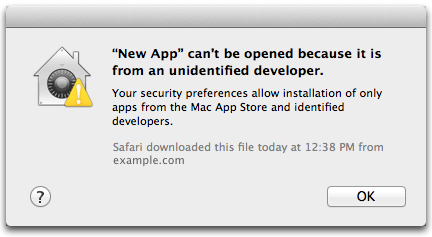
App can't be opened because it is from an unidentified developer
If you are building an Electron app that you intend to package and distribute, it should be code signed. The Mac and Windows app stores do not allow unsigned apps.
Signing macOS builds
Before signing macOS builds, you must do the following:
- Enroll in the Apple Developer Program(Apple Developer Program) (requires an annual fee)
- Download and install Xcode
- Generate, download, and install signing certificates
There are a number of tools for signing your packaged app:
electron-osx-signis a standalone tool for signing macOS packages.electron-packagerbundleselectron-osx-sign. If you're usingelectron-packager, pass the--osx-sign=trueflag to sign your build.electron-builderhas built-in code-signing capabilities. See electron.build/code-signing
For more info, see the Mac App Store Submission Guide.
Signing Windows builds
See the Windows Store Guide.