
9.6 KiB






Garmin Connect
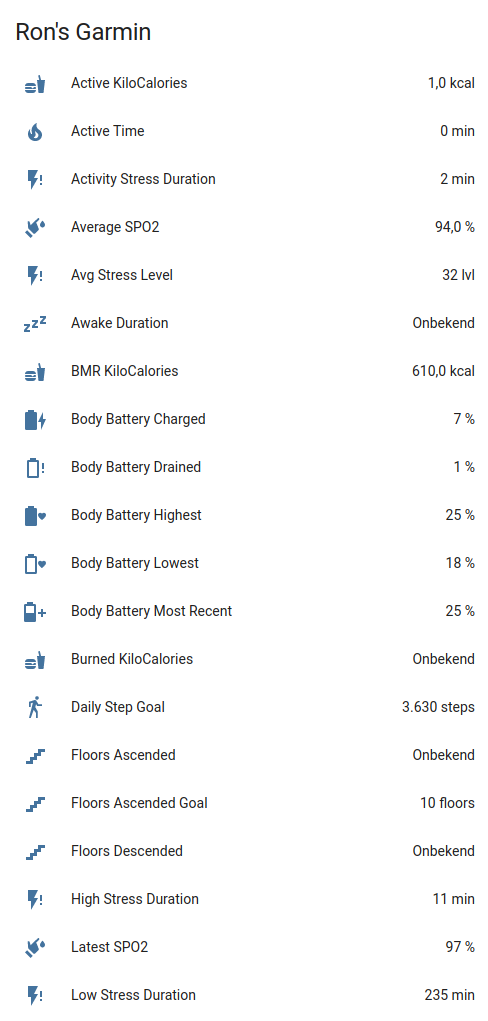
Integrate your Garmin Connect fitness data with Home Assistant. Access 110+ sensors covering health metrics, activities, body composition, and gear tracking—plus add measurements directly to Garmin Connect via services.
Supported Features
- Health Metrics - Steps, calories, heart rate, stress, sleep, body battery, SpO2
- Body Composition - Weight, BMI, body fat, muscle mass, hydration
- Fitness Tracking - Activities, intensity minutes, fitness age, endurance score
- Gear Management - Track usage of shoes, bikes, and other equipment
- Services - Add body composition and blood pressure data, manage gear defaults
Available Sensors
Note: All sensors are enabled by default. You can disable sensors using Home Assistant's sensor configuration. Sensor values depend on your Garmin devices and connected apps.
Activity & Steps
| Sensor | Description |
|---|---|
| Total Steps | Daily step count |
| Daily Step Goal | Your configured step target |
| Yesterday Steps/Distance | Previous day's complete totals |
| Weekly Step/Distance Avg | 7-day averages |
| Total Distance | Distance walked/run in meters |
| Floors Ascended/Descended | Floors climbed |
Calories & Nutrition
| Sensor | Description |
|---|---|
| Total/Active/BMR Calories | Daily calorie metrics |
| Burned/Consumed Calories | Calorie tracking |
Heart Rate
| Sensor | Description |
|---|---|
| Resting Heart Rate | Daily resting HR |
| Min/Max Heart Rate | Daily HR range |
| Last 7 Days Avg HR | Weekly average |
| HRV Weekly/Nightly Avg | Heart rate variability metrics |
| HRV Baseline | Personal HRV baseline |
Stress & Recovery
| Sensor | Description |
|---|---|
| Avg/Max Stress Level | Stress measurements (0-100) |
| Stress Durations | Time in rest/activity/low/medium/high stress |
Sleep
| Sensor | Description |
|---|---|
| Sleep Score | Overall sleep quality score |
| Sleep/Awake Duration | Time asleep and awake |
| Deep Sleep | Time in deep sleep |
| Light Sleep | Time in light sleep |
| REM Sleep | Time in REM sleep |
Body Battery
| Sensor | Description |
|---|---|
| Body Battery Most Recent | Current energy level (0-100) |
| Charged/Drained | Energy gained/spent |
| Highest/Lowest | Daily peak and low |
Body Composition
| Sensor | Description |
|---|---|
| Weight/BMI | Body weight and mass index |
| Body Fat/Water | Percentage measurements |
| Muscle/Bone Mass | Mass measurements |
| Metabolic Age | Estimated metabolic age |
Hydration
| Sensor | Description |
|---|---|
| Hydration | Daily water intake (ml) |
| Hydration Goal | Target intake |
| Sweat Loss | Estimated fluid loss |
Health Monitoring
| Sensor | Description |
|---|---|
| SpO2 (Avg/Low/Latest) | Blood oxygen levels |
| HRV Status | Heart rate variability |
| Respiration Rate | Breathing measurements |
Fitness & Performance
| Sensor | Description |
|---|---|
| Fitness Age | Estimated fitness age |
| Chronological Age | Your actual age |
| Endurance Score | Overall endurance rating |
Activity Tracking
| Sensor | Description |
|---|---|
| Next Alarm | Next scheduled alarm time |
| Last Activity/Activities | Recent activity info |
| Badges/User Points/Level | Gamification metrics |
Menstrual Cycle Tracking
| Sensor | Description |
|---|---|
| Cycle Phase | Current menstrual phase |
| Cycle Day | Day of the current cycle |
| Period Day | Day of the period |
| Cycle Length | Total cycle length (days) |
| Period Length | Period length (days) |
Note: Menstrual cycle sensors are only available if tracking is enabled in your Garmin Connect account.
Gear Tracking
Gear sensors are dynamically created for each piece of equipment registered in Garmin Connect (shoes, bikes, etc.). They track total distance and usage statistics.
Screenshots
Requirements
- A Garmin Connect account.
- A device that syncs to the Garmin Connect website.
HACS (Recommended)

Alternatively:
- Install HACS if not already installed
- Search for "Garmin Connect" in HACS
- Click Download
- Restart Home Assistant
- Add via Settings → Devices & Services
Manual Installation
- Copy
custom_components/garmin_connectto your<config>/custom_components/directory - Restart Home Assistant
- Add via Settings → Devices & Services
Configuration
Adding the Integration
- Navigate to Settings → Devices & Services
- Click + Add Integration
- Search for "Garmin Connect"
- Enter your configuration:
- Username: Your Garmin Connect username
- Password: Your Garmin Connect password
- MFA Code: Your Garmin Connect MFA code (optional)
Advanced Usage
Automation Examples
Add Body Composition
action: garmin_connect.add_body_composition
data:
  weight: 87
  bmi: 25.5
  bone_mass: 4.8
See the action template for other available values to add.
Full Automation Example (Withings to Garmin):
alias: WithingsToGarmin
description: Sync weight from Withings to Garmin Connect
triggers:
  - trigger: state
    entity_id:
      - sensor.withings_weight
conditions:
  - condition: numeric_state
    entity_id: sensor.withings_weight
    above: 55
    below: 100
actions:
  - action: garmin_connect.add_body_composition
    data:
      weight: "{{ states('sensor.withings_weight') }}"
      timestamp: "{{ now().isoformat() }}"
      bmi: >-
        {{ (states('sensor.withings_weight') | float(0) / 1.72**2) | round(1) }}
      bone_mass: "{{ states('sensor.withings_bone_mass') }}"
      muscle_mass: "{{ states('sensor.withings_muscle_mass') }}"
      percent_fat: "{{ states('sensor.withings_fat_ratio') }}"
mode: single
Set Active Gear
action: garmin_connect.set_active_gear
target:
  entity_id: sensor.garmin_connect_adidas_running_shoes
data:
  activity_type: running
  setting: set as default
Add Blood Pressure
action: garmin_connect.add_blood_pressure
data:
  systolic: 120
  diastolic: 80
  pulse: 60
  timestamp: "2025-01-21T07:34:00"
  notes: Measured with Beurer BC54
Enable Debug Logging
Add the relevant lines below to the configuration.yaml:
logger:
  default: info
  logs:
    custom_components.garmin_connect: debug
Alternatively, enable debug logging via the UI in Settings → Devices & Services → Garmin Connect → Enable debug logging:

Then perform any steps to reproduce the issue and disable debug logging again. It will download the relevant log file automatically.
Development
Quick-start (from project root):
python3 -m venv .venv
source .venv/bin/activate
python -m pip install --upgrade pip
pip install -r requirements_lint.txt
./scripts/lint    # runs pre-commit + vulture
# or: ruff check .
# to auto-fix: ruff check . --fix
💖 Support This Project
If you find this library useful for your projects, please consider supporting its continued development and maintenance:
🌟 Ways to Support
- ⭐ Star this repository - Help others discover the project
- 💰 Financial Support - Contribute to development and hosting costs
- 🐛 Report Issues - Help improve stability and compatibility
- 📖 Spread the Word - Share with other developers
💳 Financial Support Options
Why Support?
- Keeps the project actively maintained
- Enables faster bug fixes and new features
- Supports infrastructure costs (testing, AI, CI/CD)
- Shows appreciation for hundreds of hours of development
Every contribution, no matter the size, makes a difference and is greatly appreciated! 🙏
License
This project is licensed under the MIT License - see the LICENSE file for details.