There are some bugs with it that I cannot figure out related to `floating-ui` and `downshift`'s handling of refs.
Will need to revisit this component in the future.
* Testing change to LatentsToText to allow setting different cfg_scale values per diffusion step.
* Adding first attempt at float param easing node, using Penner easing functions.
* Core implementation of ControlNet and MultiControlNet.
* Added support for ControlNet and MultiControlNet to legacy non-nodal Txt2Img in backend/generator. Although backend/generator will likely disappear by v3.x, right now they are very useful for testing core ControlNet and MultiControlNet functionality while node codebase is rapidly evolving.
* Added example of using ControlNet with legacy Txt2Img generator
* Resolving rebase conflict
* Added first controlnet preprocessor node for canny edge detection.
* Initial port of controlnet node support from generator-based TextToImageInvocation node to latent-based TextToLatentsInvocation node
* Switching to ControlField for output from controlnet nodes.
* Resolving conflicts in rebase to origin/main
* Refactored ControlNet nodes so they subclass from PreprocessedControlInvocation, and only need to override run_processor(image) (instead of reimplementing invoke())
* changes to base class for controlnet nodes
* Added HED, LineArt, and OpenPose ControlNet nodes
* Added an additional "raw_processed_image" output port to controlnets, mainly so could route ImageField to a ShowImage node
* Added more preprocessor nodes for:
MidasDepth
ZoeDepth
MLSD
NormalBae
Pidi
LineartAnime
ContentShuffle
Removed pil_output options, ControlNet preprocessors should always output as PIL. Removed diagnostics and other general cleanup.
* Prep for splitting pre-processor and controlnet nodes
* Refactored controlnet nodes: split out controlnet stuff into separate node, stripped controlnet stuff form image processing/analysis nodes.
* Added resizing of controlnet image based on noise latent. Fixes a tensor mismatch issue.
* More rebase repair.
* Added support for using multiple control nets. Unfortunately this breaks direct usage of Control node output port ==> TextToLatent control input port -- passing through a Collect node is now required. Working on fixing this...
* Fixed use of ControlNet control_weight parameter
* Fixed lint-ish formatting error
* Core implementation of ControlNet and MultiControlNet.
* Added first controlnet preprocessor node for canny edge detection.
* Initial port of controlnet node support from generator-based TextToImageInvocation node to latent-based TextToLatentsInvocation node
* Switching to ControlField for output from controlnet nodes.
* Refactored controlnet node to output ControlField that bundles control info.
* changes to base class for controlnet nodes
* Added more preprocessor nodes for:
MidasDepth
ZoeDepth
MLSD
NormalBae
Pidi
LineartAnime
ContentShuffle
Removed pil_output options, ControlNet preprocessors should always output as PIL. Removed diagnostics and other general cleanup.
* Prep for splitting pre-processor and controlnet nodes
* Refactored controlnet nodes: split out controlnet stuff into separate node, stripped controlnet stuff form image processing/analysis nodes.
* Added resizing of controlnet image based on noise latent. Fixes a tensor mismatch issue.
* Cleaning up TextToLatent arg testing
* Cleaning up mistakes after rebase.
* Removed last bits of dtype and and device hardwiring from controlnet section
* Refactored ControNet support to consolidate multiple parameters into data struct. Also redid how multiple controlnets are handled.
* Added support for specifying which step iteration to start using
each ControlNet, and which step to end using each controlnet (specified as fraction of total steps)
* Cleaning up prior to submitting ControlNet PR. Mostly turning off diagnostic printing. Also fixed error when there is no controlnet input.
* Added dependency on controlnet-aux v0.0.3
* Commented out ZoeDetector. Will re-instate once there's a controlnet-aux release that supports it.
* Switched CotrolNet node modelname input from free text to default list of popular ControlNet model names.
* Fix to work with current stable release of controlnet_aux (v0.0.3). Turned of pre-processor params that were added post v0.0.3. Also change defaults for shuffle.
* Refactored most of controlnet code into its own method to declutter TextToLatents.invoke(), and make upcoming integration with LatentsToLatents easier.
* Cleaning up after ControlNet refactor in TextToLatentsInvocation
* Extended node-based ControlNet support to LatentsToLatentsInvocation.
* chore(ui): regen api client
* fix(ui): add value to conditioning field
* fix(ui): add control field type
* fix(ui): fix node ui type hints
* fix(nodes): controlnet input accepts list or single controlnet
* Moved to controlnet_aux v0.0.4, reinstated Zoe controlnet preprocessor. Also in pyproject.toml had to specify downgrade of timm to 0.6.13 _after_ controlnet-aux installs timm >= 0.9.2, because timm >0.6.13 breaks Zoe preprocessor.
* Core implementation of ControlNet and MultiControlNet.
* Added first controlnet preprocessor node for canny edge detection.
* Switching to ControlField for output from controlnet nodes.
* Resolving conflicts in rebase to origin/main
* Refactored ControlNet nodes so they subclass from PreprocessedControlInvocation, and only need to override run_processor(image) (instead of reimplementing invoke())
* changes to base class for controlnet nodes
* Added HED, LineArt, and OpenPose ControlNet nodes
* Added more preprocessor nodes for:
MidasDepth
ZoeDepth
MLSD
NormalBae
Pidi
LineartAnime
ContentShuffle
Removed pil_output options, ControlNet preprocessors should always output as PIL. Removed diagnostics and other general cleanup.
* Prep for splitting pre-processor and controlnet nodes
* Refactored controlnet nodes: split out controlnet stuff into separate node, stripped controlnet stuff form image processing/analysis nodes.
* Added resizing of controlnet image based on noise latent. Fixes a tensor mismatch issue.
* Added support for using multiple control nets. Unfortunately this breaks direct usage of Control node output port ==> TextToLatent control input port -- passing through a Collect node is now required. Working on fixing this...
* Fixed use of ControlNet control_weight parameter
* Core implementation of ControlNet and MultiControlNet.
* Added first controlnet preprocessor node for canny edge detection.
* Initial port of controlnet node support from generator-based TextToImageInvocation node to latent-based TextToLatentsInvocation node
* Switching to ControlField for output from controlnet nodes.
* Refactored controlnet node to output ControlField that bundles control info.
* changes to base class for controlnet nodes
* Added more preprocessor nodes for:
MidasDepth
ZoeDepth
MLSD
NormalBae
Pidi
LineartAnime
ContentShuffle
Removed pil_output options, ControlNet preprocessors should always output as PIL. Removed diagnostics and other general cleanup.
* Prep for splitting pre-processor and controlnet nodes
* Refactored controlnet nodes: split out controlnet stuff into separate node, stripped controlnet stuff form image processing/analysis nodes.
* Added resizing of controlnet image based on noise latent. Fixes a tensor mismatch issue.
* Cleaning up TextToLatent arg testing
* Cleaning up mistakes after rebase.
* Removed last bits of dtype and and device hardwiring from controlnet section
* Refactored ControNet support to consolidate multiple parameters into data struct. Also redid how multiple controlnets are handled.
* Added support for specifying which step iteration to start using
each ControlNet, and which step to end using each controlnet (specified as fraction of total steps)
* Cleaning up prior to submitting ControlNet PR. Mostly turning off diagnostic printing. Also fixed error when there is no controlnet input.
* Commented out ZoeDetector. Will re-instate once there's a controlnet-aux release that supports it.
* Switched CotrolNet node modelname input from free text to default list of popular ControlNet model names.
* Fix to work with current stable release of controlnet_aux (v0.0.3). Turned of pre-processor params that were added post v0.0.3. Also change defaults for shuffle.
* Refactored most of controlnet code into its own method to declutter TextToLatents.invoke(), and make upcoming integration with LatentsToLatents easier.
* Cleaning up after ControlNet refactor in TextToLatentsInvocation
* Extended node-based ControlNet support to LatentsToLatentsInvocation.
* chore(ui): regen api client
* fix(ui): fix node ui type hints
* fix(nodes): controlnet input accepts list or single controlnet
* Added Mediapipe image processor for use as ControlNet preprocessor.
Also hacked in ability to specify HF subfolder when loading ControlNet models from string.
* Fixed bug where MediapipFaceProcessorInvocation was ignoring max_faces and min_confidence params.
* Added nodes for float params: ParamFloatInvocation and FloatCollectionOutput. Also added FloatOutput.
* Added mediapipe install requirement. Should be able to remove once controlnet_aux package adds mediapipe to its requirements.
* Added float to FIELD_TYPE_MAP ins constants.ts
* Progress toward improvement in fieldTemplateBuilder.ts getFieldType()
* Fixed controlnet preprocessors and controlnet handling in TextToLatents to work with revised Image services.
* Cleaning up from merge, re-adding cfg_scale to FIELD_TYPE_MAP
* Making sure cfg_scale of type list[float] can be used in image metadata, to support param easing for cfg_scale
* Fixed math for per-step param easing.
* Added option to show plot of param value at each step
* Just cleaning up after adding param easing plot option, removing vestigial code.
* Modified control_weight ControlNet param to be polistmorphic --
can now be either a single float weight applied for all steps, or a list of floats of size total_steps, that specifies weight for each step.
* Added more informative error message when _validat_edge() throws an error.
* Just improving parm easing bar chart title to include easing type.
* Added requirement for easing-functions package
* Taking out some diagnostic prints.
* Added option to use both easing function and mirror of easing function together.
* Fixed recently introduced problem (when pulled in main), triggered by num_steps in StepParamEasingInvocation not having a default value -- just added default.
---------
Co-authored-by: psychedelicious <4822129+psychedelicious@users.noreply.github.com>
In some cases the command-line was getting parsed before the logger was
initialized, causing the logger not to pick up custom logging
instructions from `--log_handlers`. This PR fixes the issue.
[fix(ui): blur tab on
click](93f3658a4a)
Fixes issue where after clicking a tab, using the arrow keys changes tab
instead of changing selected image
[fix(ui): fix canvas not filling screen on first
load](68be95acbb)
[feat(ui): remove clear temp folder canvas
button](813f79f0f9)
This button is nonfunctional.
Soon we will introduce a different way to handle clearing out
intermediate images (likely automated).
There was an issue where for graphs w/ iterations, your images were output all at once, at the very end of processing. So if you canceled halfway through an execution of 10 nodes, you wouldn't get any images - even though you'd completed 5 images' worth of inference.
## Cause
Because graphs executed breadth-first (i.e. depth-by-depth), leaf nodes were necessarily processed last. For image generation graphs, your `LatentsToImage` will be leaf nodes, and be the last depth to be executed.
For example, a `TextToLatents` graph w/ 3 iterations would execute all 3 `TextToLatents` nodes fully before moving to the next depth, where the `LatentsToImage` nodes produce output images, resulting in a node execution order like this:
1. TextToLatents
2. TextToLatents
3. TextToLatents
4. LatentsToImage
5. LatentsToImage
6. LatentsToImage
## Solution
This PR makes a two changes to graph execution to execute as deeply as it can along each branch of the graph.
### Eager node preparation
We now prepare as many nodes as possible, instead of just a single node at a time.
We also need to change the conditions in which nodes are prepared. Previously, nodes were prepared only when all of their direct ancestors were executed.
The updated logic prepares nodes that:
- are *not* `Iterate` nodes whose inputs have *not* been executed
- do *not* have any unexecuted `Iterate` ancestor nodes
This results in graphs always being maximally prepared.
### Always execute the deepest prepared node
We now choose the next node to execute by traversing from the bottom of the graph instead of the top, choosing the first node whose inputs are all executed.
This means we always execute the deepest node possible.
## Result
Graphs now execute depth-first, so instead of an execution order like this:
1. TextToLatents
2. TextToLatents
3. TextToLatents
4. LatentsToImage
5. LatentsToImage
6. LatentsToImage
... we get an execution order like this:
1. TextToLatents
2. LatentsToImage
3. TextToLatents
4. LatentsToImage
5. TextToLatents
6. LatentsToImage
Immediately after inference, the image is decoded and sent to the gallery.
fixes#3400
This PR creates the databases directory at app startup time. It also
removes a couple of debugging statements that were inadvertently left in
the model manager.
# Make InvokeAI package installable by mere mortals
This commit makes InvokeAI 3.0 to be installable via PyPi.org and/or the
installer script. The install process is now pretty much identical to
the 2.3 process, including creating launcher scripts `invoke.sh` and
`invoke.bat`.
Main changes:
1. Moved static web pages into `invokeai/frontend/web` and modified the
API to look for them there. This allows pip to copy the files into the
distribution directory so that user no longer has to be in repo root to
launch, and enables PyPi installations with `pip install invokeai`
2. Update invoke.sh and invoke.bat to launch the new web application
properly. This also changes the wording for launching the CLI from
"generate images" to "explore the InvokeAI node system," since I would
not recommend using the CLI to generate images routinely.
3. Fix a bug in the checkpoint converter script that was identified
during testing.
4. Better error reporting when checkpoint converter fails.
5. Rebuild front end.
# Major improvements to the model installer.
1. The text user interface for `invokeai-model-install` has been
expanded to allow the user to install controlnet, LoRA, textual
inversion, diffusers and checkpoint models. The user can install
interactively (without leaving the TUI), or in batch mode after exiting
the application.
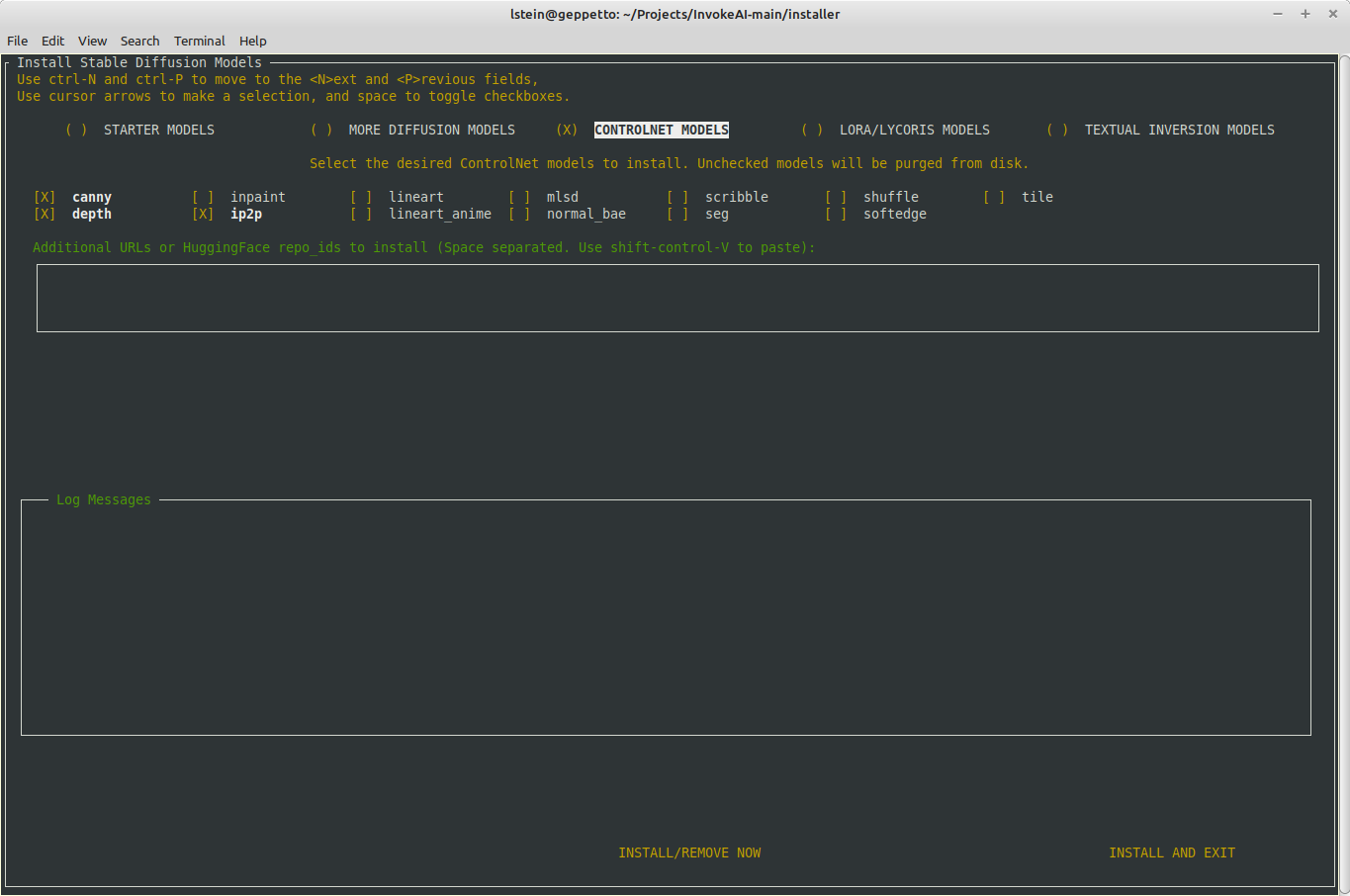
2. The `invokeai-model-install` command now lets you list, add and
delete models from the command line:
## Listing models
```
$ invokeai-model-install --list diffusers
Diffuser models:
analog-diffusion-1.0 not loaded diffusers An SD-1.5 model trained on diverse analog photographs (2.13 GB)
d&d-diffusion-1.0 not loaded diffusers Dungeons & Dragons characters (2.13 GB)
deliberate-1.0 not loaded diffusers Versatile model that produces detailed images up to 768px (4.27 GB)
DreamShaper not loaded diffusers Imported diffusers model DreamShaper
sd-inpainting-1.5 not loaded diffusers RunwayML SD 1.5 model optimized for inpainting, diffusers version (4.27 GB)
sd-inpainting-2.0 not loaded diffusers Stable Diffusion version 2.0 inpainting model (5.21 GB)
stable-diffusion-1.5 not loaded diffusers Stable Diffusion version 1.5 diffusers model (4.27 GB)
stable-diffusion-2.1 not loaded diffusers Stable Diffusion version 2.1 diffusers model, trained on 768 pixel images (5.21 GB)
```
```
$ invokeai-model-install --list tis
Loading Python libraries...
Installed Textual Inversion Embeddings:
EasyNegative
ahx-beta-453407d
```
## Installing models
(this example shows correct handling of a server side error at Civitai)
```
$ invokeai-model-install --diffusers https://civitai.com/api/download/models/46259 Linaqruf/anything-v3.0
Loading Python libraries...
[2023-06-05 22:17:23,556]::[InvokeAI]::INFO --> INSTALLING EXTERNAL MODELS
[2023-06-05 22:17:23,557]::[InvokeAI]::INFO --> Probing https://civitai.com/api/download/models/46259 for import
[2023-06-05 22:17:23,557]::[InvokeAI]::INFO --> https://civitai.com/api/download/models/46259 appears to be a URL
[2023-06-05 22:17:23,763]::[InvokeAI]::ERROR --> An error occurred during downloading /home/lstein/invokeai-test/models/ldm/stable-diffusion-v1/46259: Internal Server Error
[2023-06-05 22:17:23,763]::[InvokeAI]::ERROR --> ERROR DOWNLOADING https://civitai.com/api/download/models/46259: {"error":"Invalid database operation","cause":{"clientVersion":"4.12.0"}}
[2023-06-05 22:17:23,764]::[InvokeAI]::INFO --> Probing Linaqruf/anything-v3.0 for import
[2023-06-05 22:17:23,764]::[InvokeAI]::DEBUG --> Linaqruf/anything-v3.0 appears to be a HuggingFace diffusers repo_id
[2023-06-05 22:17:23,768]::[InvokeAI]::INFO --> Loading diffusers model from Linaqruf/anything-v3.0
[2023-06-05 22:17:23,769]::[InvokeAI]::DEBUG --> Using faster float16 precision
[2023-06-05 22:17:23,883]::[InvokeAI]::ERROR --> An unexpected error occurred while downloading the model: 404 Client Error. (Request ID: Root=1-647e9733-1b0ee3af67d6ac3456b1ebfc)
Revision Not Found for url: https://huggingface.co/Linaqruf/anything-v3.0/resolve/fp16/model_index.json.
Invalid rev id: fp16)
Downloading (…)ain/model_index.json: 100%|██████████████████████████████████████████████████████████████████████████████████████████████| 511/511 [00:00<00:00, 2.57MB/s]
Downloading (…)cial_tokens_map.json: 100%|██████████████████████████████████████████████████████████████████████████████████████████████| 472/472 [00:00<00:00, 6.13MB/s]
Downloading (…)cheduler_config.json: 100%|██████████████████████████████████████████████████████████████████████████████████████████████| 341/341 [00:00<00:00, 3.30MB/s]
Downloading (…)okenizer_config.json: 100%|██████████████████████████████████████████████████████████████████████████████████████████████| 807/807 [00:00<00:00, 11.3MB/s]
```
## Deleting models
```
invokeai-model-install --delete --diffusers anything-v3
Loading Python libraries...
[2023-06-05 22:19:45,927]::[InvokeAI]::INFO --> Processing requested deletions
[2023-06-05 22:19:45,927]::[InvokeAI]::INFO --> anything-v3...
[2023-06-05 22:19:45,927]::[InvokeAI]::INFO --> Deleting the cached model directory for Linaqruf/anything-v3.0
[2023-06-05 22:19:45,948]::[InvokeAI]::WARNING --> Deletion of this model is expected to free 4.3G
```
1. Contents of autoscan directory field are restored after doing an installation.
2. Activate dialogue to choose V2 parameterization when importing from a directory.
3. Remove autoscan directory from init file when its checkbox is unselected.
4. Add widget cycling behavior to install models form.
The processor is automatically selected when model is changed.
But if the user manually changes the processor, processor settings, or disables the new `Auto configure processor` switch, auto processing is disabled.
The user can enable auto configure by turning the switch back on.
When auto configure is enabled, a small dot is overlaid on the expand button to remind the user that the system is not auto configuring the processor for them.
If auto configure is enabled, the processor settings are reset to the default for the selected model.
Add uploading to IAIDndImage
- add `postUploadAction` arg to `imageUploaded` thunk, with several current valid options (set control image, set init, set nodes image, set canvas, or toast)
- updated IAIDndImage to optionally allow click to upload
- when the controlnet model is changed, if there is a default processor for the model set, the processor is changed.
- once a control image is selected (and processed), changing the model does not change the processor - must be manually changed
This handles the case when an image is deleted but is still in use in as eg an init image on canvas, or a control image. If we just delete the image, canvas/controlnet/etc may break (the image would just fail to load).
When an image is deleted, the app checks to see if it is in use in:
- Image to Image
- ControlNet
- Unified Canvas
- Node Editor
The delete dialog will always open if the image is in use anywhere, and the user is advised that deleting the image will reset the feature(s).
Even if the user has ticked the box to not confirm on delete, the dialog will still show if the image is in use somewhere.
- fix "bounding box region only" not being respected when saving
- add toasts for each action
- improve workflow `take()` predicates to use the requestId
- responsive changes were causing a lot of weird layout issues, had to remove the rest of them
- canvas (non-beta) toolbar now wraps
- reduces minH for prompt boxes a bit
1. Model installer works correctly under Windows 11 Terminal
2. Fixed crash when configure script hands control off to installer
3. Kill install subprocess on keyboard interrupt
4. Command-line functionality for --yes configuration and model installation
restored.
5. New command-line features:
- install/delete lists of diffusers, LoRAS, controlnets and textual inversions
using repo ids, paths or URLs.
Help:
```
usage: invokeai-model-install [-h] [--diffusers [DIFFUSERS ...]] [--loras [LORAS ...]] [--controlnets [CONTROLNETS ...]] [--textual-inversions [TEXTUAL_INVERSIONS ...]] [--delete] [--full-precision | --no-full-precision]
[--yes] [--default_only] [--list-models {diffusers,loras,controlnets,tis}] [--config_file CONFIG_FILE] [--root_dir ROOT]
InvokeAI model downloader
options:
-h, --help show this help message and exit
--diffusers [DIFFUSERS ...]
List of URLs or repo_ids of diffusers to install/delete
--loras [LORAS ...] List of URLs or repo_ids of LoRA/LyCORIS models to install/delete
--controlnets [CONTROLNETS ...]
List of URLs or repo_ids of controlnet models to install/delete
--textual-inversions [TEXTUAL_INVERSIONS ...]
List of URLs or repo_ids of textual inversion embeddings to install/delete
--delete Delete models listed on command line rather than installing them
--full-precision, --no-full-precision
use 32-bit weights instead of faster 16-bit weights (default: False)
--yes, -y answer "yes" to all prompts
--default_only only install the default model
--list-models {diffusers,loras,controlnets,tis}
list installed models
--config_file CONFIG_FILE, -c CONFIG_FILE
path to configuration file to create
--root_dir ROOT path to root of install directory
```
There was a potential gotcha in the config system that was previously
merged with main. The `InvokeAIAppConfig` object was configuring itself
from the command line and configuration file within its initialization
routine. However, this could cause it to read `argv` from the command
line at unexpected times. This PR fixes the object so that it only reads
from the init file and command line when its `parse_args()` method is
explicitly called, which should be done at startup time in any top level
script that uses it.
In addition, using the `get_invokeai_config()` function to get a global
version of the config object didn't feel pythonic to me, so I have
changed this to `InvokeAIAppConfig.get_config()` throughout.
## Updated Usage
In the main script, at startup time, do the following:
```
from invokeai.app.services.config import InvokeAIAppConfig
config = InvokeAIAppConfig.get_config()
config.parse_args()
```
In non-main scripts, it is not necessary (or recommended) to call
`parse_args()`:
```
from invokeai.app.services.config import InvokeAIAppConfig
config = InvokeAIAppConfig.get_config()
```
The configuration object properties can be overridden when
`get_config()` is called by passing initialization values in the usual
way. If a property is set this way, then it will not be changed by
subsequent calls to `parse_args()`, but can only be changed by
explicitly setting the property.
```
config = InvokeAIAppConfig.get_config(nsfw_checker=True)
config.parse_args(argv=['--no-nsfw_checker'])
config.nsfw_checker
# True
```
You may specify alternative argv lists and configuration files in
`parse_args()`:
```
config.parse_args(argv=['--no-nsfw_checker'],
conf = OmegaConf.load('/tmp/test.yaml')
)
```
For backward compatibility, the `get_invokeai_config()` function is
still available from the module, but has been removed from the rest of
the source tree.
this PR adds long prompt support and enables compel's new `.and()`
concatenation feature which improves image quality especially with SD2.1
example of a long prompt:
> a moist sloppy pindlesackboy sloppy hamblin' bogomadong, Clem Fandango
is pissed-off, Wario's Woods in background, making a noise like
ga-woink-a

the same prompt broken into fragments and concatenated using `.and()`
(syntax works like `.blend()`):
```
("a moist sloppy pindlesackboy sloppy hamblin' bogomadong",
"Clem Fandango is pissed-off",
"Wario's Woods in background",
"making a noise like ga-woink-a").and()
```

and a less silly example:
> A dream of a distant galaxy, by Caspar David Friedrich, matte
painting, trending on artstation, HQ

the same prompt broken into two fragments and concatenated:
```
("A dream of a distant galaxy, by Caspar David Friedrich, matte painting",
"trending on artstation, HQ").and()
```

as with `.blend()` you can also weight the parts eg `("a man eating an
apple", "sitting on the roof of a car", "high quality, trending on
artstation, 8K UHD").and(1, 0.5, 0.5)` which will assign weight `1` to
`a man eating an apple` and `0.5` to `sitting on the roof of a car` and
`high quality, trending on artstation, 8K UHD`.
Implement `dnd-kit` for image drag and drop
- vastly simplifies logic bc we can drag and drop non-serializable data (like an `ImageDTO`)
- also much prettier
- also will fix conflicts with file upload via OS drag and drop, bc `dnd-kit` does not use native HTML drag and drop API
- Implemented for Init image, controlnet, and node editor so far
More progress on the ControlNet UI
- The invokeai.db database file has now been moved into
`INVOKEAIROOT/databases`. Using plural here for possible
future with more than one database file.
- Removed a few dangling debug messages that appeared during
testing.
- Rebuilt frontend to test web.
This PR provides a number of options for controlling how InvokeAI logs
messages, including options to log to a file, syslog and a web server.
Several logging handlers can be configured simultaneously.
## Controlling How InvokeAI Logs Status Messages
InvokeAI logs status messages using a configurable logging system. You
can log to the terminal window, to a designated file on the local
machine, to the syslog facility on a Linux or Mac, or to a properly
configured web server. You can configure several logs at the same time,
and control the level of message logged and the logging format (to a
limited extent).
Three command-line options control logging:
### `--log_handlers <handler1> <handler2> ...`
This option activates one or more log handlers. Options are "console",
"file", "syslog" and "http". To specify more than one, separate them by
spaces:
```bash
invokeai-web --log_handlers console syslog=/dev/log file=C:\Users\fred\invokeai.log
```
The format of these options is described below.
### `--log_format {plain|color|legacy|syslog}`
This controls the format of log messages written to the console. Only
the "console" log handler is currently affected by this setting.
* "plain" provides formatted messages like this:
```bash
[2023-05-24 23:18:2[2023-05-24 23:18:50,352]::[InvokeAI]::DEBUG --> this is a debug message
[2023-05-24 23:18:50,352]::[InvokeAI]::INFO --> this is an informational messages
[2023-05-24 23:18:50,352]::[InvokeAI]::WARNING --> this is a warning
[2023-05-24 23:18:50,352]::[InvokeAI]::ERROR --> this is an error
[2023-05-24 23:18:50,352]::[InvokeAI]::CRITICAL --> this is a critical error
```
* "color" produces similar output, but the text will be color coded to
indicate the severity of the message.
* "legacy" produces output similar to InvokeAI versions 2.3 and earlier:
```bash
### this is a critical error
*** this is an error
** this is a warning
>> this is an informational messages
| this is a debug message
```
* "syslog" produces messages suitable for syslog entries:
```bash
InvokeAI [2691178] <CRITICAL> this is a critical error
InvokeAI [2691178] <ERROR> this is an error
InvokeAI [2691178] <WARNING> this is a warning
InvokeAI [2691178] <INFO> this is an informational messages
InvokeAI [2691178] <DEBUG> this is a debug message
```
(note that the date, time and hostname will be added by the syslog
system)
### `--log_level {debug|info|warning|error|critical}`
Providing this command-line option will cause only messages at the
specified level or above to be emitted.
## Console logging
When "console" is provided to `--log_handlers`, messages will be written
to the command line window in which InvokeAI was launched. By default,
the color formatter will be used unless overridden by `--log_format`.
## File logging
When "file" is provided to `--log_handlers`, entries will be written to
the file indicated in the path argument. By default, the "plain" format
will be used:
```bash
invokeai-web --log_handlers file=/var/log/invokeai.log
```
## Syslog logging
When "syslog" is requested, entries will be sent to the syslog system.
There are a variety of ways to control where the log message is sent:
* Send to the local machine using the `/dev/log` socket:
```
invokeai-web --log_handlers syslog=/dev/log
```
* Send to the local machine using a UDP message:
```
invokeai-web --log_handlers syslog=localhost
```
* Send to the local machine using a UDP message on a nonstandard port:
```
invokeai-web --log_handlers syslog=localhost:512
```
* Send to a remote machine named "loghost" on the local LAN using
facility LOG_USER and UDP packets:
```
invokeai-web --log_handlers syslog=loghost,facility=LOG_USER,socktype=SOCK_DGRAM
```
This can be abbreviated `syslog=loghost`, as LOG_USER and SOCK_DGRAM are
defaults.
* Send to a remote machine named "loghost" using the facility LOCAL0 and
using a TCP socket:
```
invokeai-web --log_handlers syslog=loghost,facility=LOG_LOCAL0,socktype=SOCK_STREAM
```
If no arguments are specified (just a bare "syslog"), then the logging
system will look for a UNIX socket named `/dev/log`, and if not found
try to send a UDP message to `localhost`. The Macintosh OS used to
support logging to a socket named `/var/run/syslog`, but this feature
has since been disabled.
## Web logging
If you have access to a web server that is configured to log messages
when a particular URL is requested, you can log using the "http" method:
```
invokeai-web --log_handlers http=http://my.server/path/to/logger,method=POST
```
The optional [,method=] part can be used to specify whether the URL
accepts GET (default) or POST messages.
Currently password authentication and SSL are not supported.
## Using the configuration file
You can set and forget logging options by adding a "Logging" section to
`invokeai.yaml`:
```
InvokeAI:
[... other settings...]
Logging:
log_handlers:
- console
- syslog=/dev/log
log_level: info
log_format: color
```
1. Separated the "starter models" and "more models" sections. This
gives us room to list all installed diffuserse models, not just
those that are on the starter list.
2. Support mouse-based paste into the textboxes with either middle
or right mouse buttons.
3. Support terminal-style cursor movement:
^A to move to beginning of line
^E to move to end of line
^K kill text to right and put in killring
^Y yank text back
4. Internal code cleanup.
The gallery could get in a state where it thought it had just reached the end of the list and endlessly fetches more images, if there are no more images to fetch (weird I know).
Add some logic to remove the `end reached` handler when there are no more images to load.
it doesn't work for the img2img pipelines, but the implemented conditional display could break the scheduler selection dropdown.
simple fix until diffusers merges the fix - never use this scheduler.
Inputs with explicit values are validated by pydantic even if they also
have a connection (which is the actual value that is used).
Fix this by omitting explicit values for inputs that have a connection.
Problem was that controlnet support involved adding **kwargs to method calls down in denoising loop, and AddsMaskLatents didn't accept **kwarg arg. So just changed to accept and pass on **kwargs.
This may cause minor gallery jumpiness at the very end of processing, but is necessary to prevent the progress image from sticking around if the last node in a session did not have an image output.
Some socket events should not be handled by the slice reducers. For example generation progress should not be handled for a canceled session.
Added another layer of socket actions.
Example:
- `socketGeneratorProgress` is dispatched when the actual socket event is received
- Listener middleware exclusively handles this event and determines if the application should also handle it
- If so, it dispatches `appSocketGeneratorProgress`, which the slices can handle
Needed to fix issues related to canceling invocations.
Now that images are in a database and we can make filtered queries, we can do away with the cumbersome `resultsSlice` and `uploadsSlice`.
- Remove `resultsSlice` and `uploadsSlice` entirely
- Add `imagesSlice` fills the same role
- Convert the application to use `imagesSlice`, reducing a lot of messy logic where we had to check which category was selected
- Add a simple filter popover to the gallery, which lets you select any number of image categories
Because we dynamically insert images into the DB and UI's images state, `page`/`per_page` pagination makes loading the images awkward.
Using `offset`/`limit` pagination lets us query for images with an offset equal to the number of images already loaded (which match the query parameters).
The result is that we always get the correct next page of images when loading more.
- Update all thunks & network related things
- Update gallery
What I have not done yet is rename the gallery tabs and the relevant slices, but I believe the functionality is all there.
Also I fixed several bugs along the way but couldn't really commit them separately bc I was refactoring. Can't remember what they were, but related to the gallery image switching.
- Remove `ImageType` entirely, it is confusing
- Create `ResourceOrigin`, may be `internal` or `external`
- Revamp `ImageCategory`, may be `general`, `mask`, `control`, `user`, `other`. Expect to add more as time goes on
- Update images `list` route to accept `include_categories` OR `exclude_categories` query parameters to afford finer-grained querying. All services are updated to accomodate this change.
The new setup should account for our types of images, including the combinations we couldn't really handle until now:
- Canvas init and masks
- Canvas when saved-to-gallery or merged
Currenly only used to make names for images, but when latents, conditioning, etc are managed in DB, will do the same for them.
Intended to eventually support custom naming schemes.
MidasDepth
ZoeDepth
MLSD
NormalBae
Pidi
LineartAnime
ContentShuffle
Removed pil_output options, ControlNet preprocessors should always output as PIL. Removed diagnostics and other general cleanup.
MidasDepth
ZoeDepth
MLSD
NormalBae
Pidi
LineartAnime
ContentShuffle
Removed pil_output options, ControlNet preprocessors should always output as PIL. Removed diagnostics and other general cleanup.
MidasDepth
ZoeDepth
MLSD
NormalBae
Pidi
LineartAnime
ContentShuffle
Removed pil_output options, ControlNet preprocessors should always output as PIL. Removed diagnostics and other general cleanup.
MidasDepth
ZoeDepth
MLSD
NormalBae
Pidi
LineartAnime
ContentShuffle
Removed pil_output options, ControlNet preprocessors should always output as PIL. Removed diagnostics and other general cleanup.
- Update the canvas graph generation to flag its uploaded init and mask images as `intermediate`.
- During canvas setup, hit the update route to associate the uploaded images with the session id.
- Organize the socketio and RTK listener middlware better. Needed to facilitate the updated canvas logic.
- Add a new action `sessionReadyToInvoke`. The `sessionInvoked` action is *only* ever run in response to this event. This lets us do whatever complicated setup (eg canvas) and explicitly invoking. Previously, invoking was tied to the socket subscribe events.
- Some minor tidying.
- `ImageType` is now restricted to `results` and `uploads`.
- Add a reserved `meta` field to nodes to hold the `is_intermediate` boolean. We can extend it in the future to support other node `meta`.
- Add a `is_intermediate` column to the `images` table to hold this. (When `latents`, `conditioning` etc are added to the DB, they will also have this column.)
- All nodes default to `*not* intermediate`. Nodes must explicitly be marked `intermediate` for their outputs to be `intermediate`.
- When building a graph, you can set `node.meta.is_intermediate=True` and it will be handled as an intermediate.
- Add a new `update()` method to the `ImageService`, and a route to call it. Updates have a strict model, currently only `session_id` and `image_category` may be updated.
- Add a new `update()` method to the `ImageRecordStorageService` to update the image record using the model.
The `RangeInvocation` is a simple wrapper around `range()`, but you must provide `stop > start`.
`RangeOfSizeInvocation` replaces the `stop` parameter with `size`, so that you can just provide the `start` and `step` and get a range of `size` length.
When returning a `FileResponse`, we must provide a valid path, else an exception is raised outside the route handler.
Add the `validate_path` method back to the service so we can validate paths before returning the file.
I don't like this but apparently this is just how `starlette` and `fastapi` works with `FileResponse`.
- Address database feedback:
- Remove all the extraneous tables. Only an `images` table now:
- `image_type` and `image_category` are unrestricted strings. When creating images, the provided values are checked to ensure they are a valid type and category.
- Add `updated_at` and `deleted_at` columns. `deleted_at` is currently unused.
- Use SQLite's built-in timestamp features to populate these. Add a trigger to update `updated_at` when the row is updated. Currently no way to update a row.
- Rename the `id` column in `images` to `image_name`
- Rename `ImageCategory.IMAGE` to `ImageCategory.GENERAL`
- Move all exceptions outside their base classes to make them more portable.
- Add `width` and `height` columns to the database. These store the actual dimensions of the image file, whereas the metadata's `width` and `height` refer to the respective generation parameters and are nullable.
- Make `deserialize_image_record` take a `dict` instead of `sqlite3.Row`
- Improve comments throughout
- Tidy up unused code/files and some minor organisation
feat(nodes): add ResultsServiceABC & SqliteResultsService
**Doesn't actually work bc of circular imports. Can't even test it.**
- add a base class for ResultsService and SQLite implementation
- use `graph_execution_manager` `on_changed` callback to keep `results` table in sync
fix(nodes): fix results service bugs
chore(ui): regen api
fix(ui): fix type guards
feat(nodes): add `result_type` to results table, fix types
fix(nodes): do not shadow `list` builtin
feat(nodes): add results router
It doesn't work due to circular imports still
fix(nodes): Result class should use outputs classes, not fields
feat(ui): crude results router
fix(ui): send to canvas in currentimagebuttons not working
feat(nodes): add core metadata builder
feat(nodes): add design doc
feat(nodes): wip latents db stuff
feat(nodes): images_db_service and resources router
feat(nodes): wip images db & router
feat(nodes): update image related names
feat(nodes): update urlservice
feat(nodes): add high-level images service
The problem was the same seed was getting used for the seam painting pass, causing the fried look.
Same issue as if you do img2img on a txt2img with the same seed/prompt.
Thanks to @hipsterusername for teaming up to debug this. We got pretty deep into the weeds.
This commit makes InvokeAI 3.0 to be installable via PyPi.org and the
installer script.
Main changes.
1. Move static web pages into `invokeai/frontend/web` and modify the
API to look for them there. This allows pip to copy the files into the
distribution directory so that user no longer has to be in repo root
to launch.
2. Update invoke.sh and invoke.bat to launch the new web application
properly. This also changes the wording for launching the CLI from
"generate images" to "explore the InvokeAI node system," since I would
not recommend using the CLI to generate images routinely.
3. Fix a bug in the checkpoint converter script that was identified
during testing.
4. Better error reporting when checkpoint converter fails.
5. Rebuild front end.
* added optional middleware prop and new actions needed
* accidental import
* make middleware an array
---------
Co-authored-by: Mary Hipp <maryhipp@Marys-MacBook-Air.local>
# Application-wide configuration service
This PR creates a new `InvokeAIAppConfig` object that reads
application-wide settings from an init file, the environment, and the
command line.
Arguments and fields are taken from the pydantic definition of the
model. Defaults can be set by creating a yaml configuration file that
has a top-level key of "InvokeAI" and subheadings for each of the
categories returned by `invokeai --help`.
The file looks like this:
[file: invokeai.yaml]
```
InvokeAI:
Paths:
root: /home/lstein/invokeai-main
conf_path: configs/models.yaml
legacy_conf_dir: configs/stable-diffusion
outdir: outputs
embedding_dir: embeddings
lora_dir: loras
autoconvert_dir: null
gfpgan_model_dir: models/gfpgan/GFPGANv1.4.pth
Models:
model: stable-diffusion-1.5
embeddings: true
Memory/Performance:
xformers_enabled: false
sequential_guidance: false
precision: float16
max_loaded_models: 4
always_use_cpu: false
free_gpu_mem: false
Features:
nsfw_checker: true
restore: true
esrgan: true
patchmatch: true
internet_available: true
log_tokenization: false
Cross-Origin Resource Sharing:
allow_origins: []
allow_credentials: true
allow_methods:
- '*'
allow_headers:
- '*'
Web Server:
host: 127.0.0.1
port: 8081
```
The default name of the configuration file is `invokeai.yaml`, located
in INVOKEAI_ROOT. You can use any OmegaConf dictionary by passing it to
the config object at initialization time:
```
omegaconf = OmegaConf.load('/tmp/init.yaml')
conf = InvokeAIAppConfig(conf=omegaconf)
```
The default name of the configuration file is `invokeai.yaml`, located
in INVOKEAI_ROOT. You can replace supersede this by providing
anyOmegaConf dictionary object initialization time:
```
omegaconf = OmegaConf.load('/tmp/init.yaml')
conf = InvokeAIAppConfig(conf=omegaconf)
```
By default, InvokeAIAppConfig will parse the contents of `sys.argv` at
initialization time. You may pass a list of strings in the optional
`argv` argument to use instead of the system argv:
```
conf = InvokeAIAppConfig(arg=['--xformers_enabled'])
```
It is also possible to set a value at initialization time. This value
has highest priority.
```
conf = InvokeAIAppConfig(xformers_enabled=True)
```
Any setting can be overwritten by setting an environment variable of
form: "INVOKEAI_<setting>", as in:
```
export INVOKEAI_port=8080
```
Order of precedence (from highest):
1) initialization options
2) command line options
3) environment variable options
4) config file options
5) pydantic defaults
Typical usage:
```
from invokeai.app.services.config import InvokeAIAppConfig
# get global configuration and print its nsfw_checker value
conf = InvokeAIAppConfig()
print(conf.nsfw_checker)
```
Finally, the configuration object is able to recreate its (modified)
yaml file, by calling its `to_yaml()` method:
```
conf = InvokeAIAppConfig(outdir='/tmp', port=8080)
print(conf.to_yaml())
```
# Legacy code removal and porting
This PR replaces Globals with the InvokeAIAppConfig system throughout,
and therefore removes the `globals.py` and `args.py` modules. It also
removes `generate` and the legacy CLI. ***The old CLI and web servers
are now gone.***
I have ported the functionality of the configuration script, the model
installer, and the merge and textual inversion scripts. The `invokeai`
command will now launch `invokeai-node-cli`, and `invokeai-web` will
launch the web server.
I have changed the continuous invocation tests to accommodate the new
command syntax in `invokeai-node-cli`. As a convenience function, you
can also pass invocations to `invokeai-node-cli` (or its alias
`invokeai`) on the command line as as standard input:
```
invokeai-node-cli "t2i --positive_prompt 'banana sushi' --seed 42"
invokeai < invocation_commands.txt
```
- Make environment variable settings case InSenSiTive:
INVOKEAI_MAX_LOADED_MODELS and InvokeAI_Max_Loaded_Models
environment variables will both set `max_loaded_models`
- Updated realesrgan to use new config system.
- Updated textual_inversion_training to use new config system.
- Discovered a race condition when InvokeAIAppConfig is created
at module load time, which makes it impossible to customize
or replace the help message produced with --help on the command
line. To fix this, moved all instances of get_invokeai_config()
from module load time to object initialization time. Makes code
cleaner, too.
- Added `--from_file` argument to `invokeai-node-cli` and changed
github action to match. CI tests will hopefully work now.
- invokeai-configure updated to work with new config system
- migrate invokeai.init to invokeai.yaml during configure
- replace legacy invokeai with invokeai-node-cli
- add ability to run an invocation directly from invokeai-node-cli command line
- update CI tests to work with new invokeai syntax
* refetch images list if error loading
* tell user to refresh instead of refetching
* unused import
* feat(ui): use `useAppToaster` to make toast
* fix(ui): clear selected/initial image on error
---------
Co-authored-by: Mary Hipp <maryhipp@Marys-MacBook-Air.local>
Co-authored-by: psychedelicious <4822129+psychedelicious@users.noreply.github.com>
This PR improves the logging module a tad bit along with the
documentation.
**New Look:**

## Usage
**General Logger**
InvokeAI has a module level logger. You can call it this way.
In this below example, you will use the default logger `InvokeAI` and
all your messages will be logged under that name.
```python
from invokeai.backend.util.logging import logger
logger.critical("CriticalMessage") // In Bold Red
logger.error("Info Message") // In Red
logger.warning("Info Message") // In Yellow
logger.info("Info Message") // In Grey
logger.debug("Debug Message") // In Grey
```
Results:
```
[12-05-2023 20]::[InvokeAI]::CRITICAL --> This is an info message [In Bold Red]
[12-05-2023 20]::[InvokeAI]::ERROR --> This is an info message [In Red]
[12-05-2023 20]::[InvokeAI]::WARNING --> This is an info message [In Yellow]
[12-05-2023 20]::[InvokeAI]::INFO --> This is an info message [In Grey]
[12-05-2023 20]::[InvokeAI]::DEBUG --> This is an info message [In Grey]
```
**Custom Logger**
If you want to use a custom logger for your module, you can import it
the following way.
```python
from invokeai.backend.util.logging import logging
logger = logging.getLogger(name='Model Manager')
logger.critical("CriticalMessage") // In Bold Red
logger.error("Info Message") // In Red
logger.warning("Info Message") // In Yellow
logger.info("Info Message") // In Grey
logger.debug("Debug Message") // In Grey
```
Results:
```
[12-05-2023 20]::[Model Manager]::CRITICAL --> This is an info message [In Bold Red]
[12-05-2023 20]::[Model Manager]::ERROR --> This is an info message [In Red]
[12-05-2023 20]::[Model Manager]::WARNING --> This is an info message [In Yellow]
[12-05-2023 20]::[Model Manager]::INFO --> This is an info message [In Grey]
[12-05-2023 20]::[Model Manager]::DEBUG --> This is an info message [In Grey]
```
**When to use custom logger?**
It is recommended to use a custom logger if your module is not a part of
base InvokeAI. For example: custom extensions / nodes.
1. if retrieving an item from the queue raises an exception, the
InvocationProcessor thread crashes, but the API continues running in
a non-functional state. This fixes the issue
2. when there are no items in the queue, sleep 1 second before checking
again.
3. Also ensures the thread isn't crashed if an exception is raised from
invoker, and emits the error event
Intentionally using base Exceptions because for now we don't know which
specific exception to expect.
Fixes (sort of)? #3222
- do not show canvas intermediates in gallery
- do not show progress image in uploads gallery category
- use custom dark mode `localStorage` key (prevents collision with
commercial)
- use variable font (reduce bundle size by factor of 10)
- change how custom headers are used
- use style injection for building package
- fix tab icon sizes
when building for package, CSS is all in JS files. when used as a package, it is then injected into the page. bit of a hack to missing CSS in commercial product
**Features:**
- Add UniPC Scheduler
- Add Euler Karras Scheduler
- Add DPMPP_2 Karras Scheduler
- Add DEIS Scheduler
- Add DDPM Scheduler
**Other:**
- Renamed schedulers to their accurate names: _a = Ancestral, _k =
Karras
- Fix scheduler not defaulting correctly to DDIM.
- Code split SCHEDULER_MAP so its consistently loaded from the same
place.
**Known Bugs:**
- dpmpp_2s not working in img2img for denoising values < 0.8 ==> // This
seems to be an upstream bug. I've disabled it in img2img and canvas
until the upstream bug is fixed.
https://github.com/huggingface/diffusers/issues/1866
This PR updates to `xformers ~= 0.0.19` and `torch ~= 2.0.0`, which
together seem to solve the non-deterministic image generation issue that
was previously seen with earlier versions of `xformers`.
Update the push trigger with the branch which should deploy the docs,
also bring over the updates to the workflow from the v2.3 branch and:
- remove main and development branch from trigger
- they would fail without the updated toml
- cache pip environment
- update install method (`pip install ".[docs]"`)
hi there, love the project! i noticed a small typo when going over the
install process.
when copying the automated install instructions from the docs into a
terminal, the line to install the python packages failed as it was
missing the `-y` flag.
when copying the automated install instructions from the docs into a terminal, the line to install the python packages failed as it was missing the `-y` flag.
Seems like this is the only change needed for the existing inpaint code
to work as a node. Kyle said on Discord that inpaint shouldn't be a
node, so feel free to just reject this if this code is going to be gone
soon.
# Intro
This commit adds invokeai.backend.util.logging, which provides support
for formatted console and logfile messages that follow the status
reporting conventions of earlier InvokeAI versions:
```
### A critical error
*** A non-fatal error
** A warning
>> Informational message
| Debugging message
```
Internally, the invokeai logging module creates a new default logger
named "invokeai" so that its logging does not interfere with other
module's use of the vanilla logging module. So `logging.error("foo")`
will go through the regular logging path and not add InvokeAI's
informational message decorations, while `ialog.error("foo")` will add
the decorations.
# Usage:
This is a thin wrapper around the standard Python logging module. It can
be used in several ways:
## Module-level logging style
This style logs everything through a single default logging object and
is identical to using Python's `logging` module. The commonly-used
module-level logging functions are implemented as simple pass-thrus to
logging:
```
import invokeai.backend.util.logging as logger
logger.debug('this is a debugging message')
logger.info('this is a informational message')
logger.log(level=logging.CRITICAL, 'get out of dodge')
logger.disable(level=logging.INFO)
logger.basicConfig(filename='/var/log/invokeai.log')
logger.error('this will be logged to console and to invokeai.log')
```
Internally these functions all go through a custom logging object named
"invokeai". You can access it to perform additional customization in
either of these ways:
```
logger = logger.getLogger()
logger = logger.getLogger('invokeai')
```
## Object-oriented style
For more control, the logging module's object-oriented logging style is
also supported. The API is identical to the vanilla logging usage. In
fact, the only thing that has changed is that the getLogger() method
adds a custom formatter to the log messages.
```
import logging
from invokeai.backend.util.logging import InvokeAILogger
logger = InvokeAILogger.getLogger(__name__)
fh = logging.FileHandler('/var/invokeai.log')
logger.addHandler(fh)
logger.critical('this will be logged to both the console and the log file')
```
## Within the nodes API
From within the nodes API, the logger module is stored in the `logger`
slot of InvocationServices during dependency initialization. For
example, in a router, the idiom is:
```
from ..dependencies import ApiDependencies
logger = ApiDependencies.invoker.services.logger
logger.warning('uh oh')
```
Currently, to change the logger used by the API, one must change the
logging module passed to `ApiDependencies.initialize()` in `api_app.py`.
However, this will eventually be replaced with a method to select the
preferred logging module using the configuration file (dependent on
merging of PR #3221)
- I've sorted out the issues that make *not* persisting troublesome, these will be rolled out with canvas
- Also realized that persisting gallery images very quickly fills up localStorage, so we can't really do it anyways
vastly improves the gallery performance when many images are loaded.
- `react-virtuoso` to do the virtualized list
- `overlayscrollbars` for a scrollbar
On hyperthreaded CPUs we get two threads operating on the queue by
default on each core. This cases two threads to process queue items.
This results in pytorch errors and sometimes generates garbage.
Locking this to single thread makes sense because we are bound by the
number of GPUs in the system, not by CPU cores. And to parallelize
across GPUs we should just start multiple processors (and use async
instead of threading)
Fixes#3289
- `disabledParametersPanels` -> `disabledFeatures`
- handle disabling `faceRestore`, `upscaling`, `lightbox`, `modelManager` and OSS header links/buttons
- wait until models are loaded to hide loading screen
- also wait until schema is parsed if `nodes` is an enabled tab
When gallery was empty (and there is therefore no selected image), no
progress images were displayed.
- fix by correcting the logic in CurrentImageDisplay
- also fix app crash introduced by fixing the first bug
Prevent legacy CLI crash caused by removal of convert option
- Compensatory change to the CLI that prevents it from crashing when it
tries to import a model.
- Bug introduced when the "convert" option removed from the model
manager.
- Fix the update script to work again and fixes the ambiguity between
when a user wants to update to a tag vs updating to a branch, by making
these two operations explicitly separate.
- Remove dangling functions and arguments related to legacy checkpoint
conversion. These are no longer needed now that all legacy models are
either converted at import time, or on-the-fly in RAM.
I noticed that the current invokeai-new.py was using almost all of a CPU
core. After a bit of profileing I noticed that there were many thousands
of calls to epoll() which suggested to me that something wasn't sleeping
properly in asyncio's loop.
A bit of further investigation with Python profiling revealed that the
__dispatch_from_queue() method in FastAPIEventService
(app/api/events.py:33) was also being called thousands of times.
I believe the asyncio.sleep(0.001) in that method is too aggressive (it
means that the queue will be polled every 1ms) and that 0.1 (100ms) is
still entirely reasonable.
Currently translated at 100.0% (512 of 512 strings)
translationBot(ui): update translation (Russian)
Currently translated at 100.0% (512 of 512 strings)
translationBot(ui): update translation (English)
Currently translated at 100.0% (512 of 512 strings)
translationBot(ui): update translation (Ukrainian)
Currently translated at 100.0% (506 of 506 strings)
translationBot(ui): update translation (Russian)
Currently translated at 100.0% (506 of 506 strings)
translationBot(ui): update translation (Russian)
Currently translated at 100.0% (506 of 506 strings)
Co-authored-by: System X - Files <vasyasos@gmail.com>
Translate-URL: https://hosted.weblate.org/projects/invokeai/web-ui/en/
Translate-URL: https://hosted.weblate.org/projects/invokeai/web-ui/ru/
Translate-URL: https://hosted.weblate.org/projects/invokeai/web-ui/uk/
Translation: InvokeAI/Web UI
Currently translated at 100.0% (512 of 512 strings)
translationBot(ui): update translation (Italian)
Currently translated at 100.0% (511 of 511 strings)
translationBot(ui): update translation (Italian)
Currently translated at 100.0% (506 of 506 strings)
Co-authored-by: Riccardo Giovanetti <riccardo.giovanetti@gmail.com>
Translate-URL: https://hosted.weblate.org/projects/invokeai/web-ui/it/
Translation: InvokeAI/Web UI
Currently translated at 100.0% (512 of 512 strings)
translationBot(ui): update translation (Spanish)
Currently translated at 100.0% (511 of 511 strings)
translationBot(ui): update translation (Spanish)
Currently translated at 100.0% (506 of 506 strings)
Co-authored-by: gallegonovato <fran-carro@hotmail.es>
Translate-URL: https://hosted.weblate.org/projects/invokeai/web-ui/es/
Translation: InvokeAI/Web UI
* if `shouldFetchImages` is passed in, UI will make an additional
request to get valid image URL when an invocation is complete
* this is necessary in order to have optional authorization for images
- Style the Minimap
- Made the Node UI Legend Responsive
- Set Min Width for nodes on Spawn so resize doesn't snap.
- Initial Implementation of Node Search
- Added FuseJS to handle the node filtering
The first draft for a Responsive Mobile Layout for InvokeAI. Some basic
documentation to help contributors. // Notes from: @blessedcoolant
---
The whole rework needs to be done using the `mobile first` concept where
the base design will be catered to mobile and we add responsive changes
as we grow to larger screens.
**Added**
- Basic breakpoints have been added to the `theme.ts` file that indicate
at which values Chakra makes the responsive changes.
- A basic `useResolution` hook has been added that either returns
`mobile`, `tablet` or `desktop` based on the breakpoint. We can
customize this hook further to do more complex checks for us if need be.
**Syntax**
- Any Chakra component is directly capable of taking different values
for the different breakpoints set in our `theme.ts` file. These can be
passed in a few ways with the most descriptive being an object. For
example:
`flexDir={{ base: 'column', xl: 'row' }}` - This would set the `0em and
above` to be column for the flex direction but change to row
automatically when we hit `xl` and above resolutions which in our case
is `80em or 1280px`. This same format is applicable for any element in
Chakra.
`flexDir={['column', null, null, 'row', null]}` - The above syntax can
also be passed as an array to the property with each value in the array
corresponding to each breakpoint we have. Setting `null` just bypasses
it. This is a good short hand but I think we stick to the above syntax
for readability.
**Note**: I've modified a few elements here and there to give an idea on
how the responsive syntax works for reference.
---
**Problems to be solved** @SammCheese
- Some issues you might run into are with the Resizable components.
We've decided we will get not use resizable components for smaller
resolutions. Doesn't make sense. So you'll need to make conditional
renderings around these.
- Some components that need custom layouts for different screens might
be better if ported over to `Grid` and use `gridTemplateAreas` to swap
out the design layout. I've demonstrated an example of this in a commit
I've made. I'll let you be the judge of where we might need this.
- The header will probably need to be converted to a burger menu of some
sort with the model changing being handled correctly UX wise. We'll
discuss this on discord.
---
Anyone willing to contribute to this PR can feel free to join the
discussion on discord.
https://discord.com/channels/1020123559063990373/1020839344170348605/threads/1097323866780606615
* feat(ui): add axios client generator and simple example
* fix(ui): update client & nodes test code w/ new Edge type
* chore(ui): organize generated files
* chore(ui): update .eslintignore, .prettierignore
* chore(ui): update openapi.json
* feat(backend): fixes for nodes/generator
* feat(ui): generate object args for api client
* feat(ui): more nodes api prototyping
* feat(ui): nodes cancel
* chore(ui): regenerate api client
* fix(ui): disable OG web server socket connection
* fix(ui): fix scrollbar styles typing and prop
just noticed the typo, and made the types stronger.
* feat(ui): add socketio types
* feat(ui): wip nodes
- extract api client method arg types instead of manually declaring them
- update example to display images
- general tidy up
* start building out node translations from frontend state and add notes about missing features
* use reference to sampler_name
* use reference to sampler_name
* add optional apiUrl prop
* feat(ui): start hooking up dynamic txt2img node generation, create middleware for session invocation
* feat(ui): write separate nodes socket layer, txt2img generating and rendering w single node
* feat(ui): img2img implementation
* feat(ui): get intermediate images working but types are stubbed out
* chore(ui): add support for package mode
* feat(ui): add nodes mode script
* feat(ui): handle random seeds
* fix(ui): fix middleware types
* feat(ui): add rtk action type guard
* feat(ui): disable NodeAPITest
This was polluting the network/socket logs.
* feat(ui): fix parameters panel border color
This commit should be elsewhere but I don't want to break my flow
* feat(ui): make thunk types more consistent
* feat(ui): add type guards for outputs
* feat(ui): load images on socket connect
Rudimentary
* chore(ui): bump redux-toolkit
* docs(ui): update readme
* chore(ui): regenerate api client
* chore(ui): add typescript as dev dependency
I am having trouble with TS versions after vscode updated and now uses TS 5. `madge` has installed 3.9.10 and for whatever reason my vscode wants to use that. Manually specifying 4.9.5 and then setting vscode to use that as the workspace TS fixes the issue.
* feat(ui): begin migrating gallery to nodes
Along the way, migrate to use RTK `createEntityAdapter` for gallery images, and separate `results` and `uploads` into separate slices. Much cleaner this way.
* feat(ui): clean up & comment results slice
* fix(ui): separate thunk for initial gallery load so it properly gets index 0
* feat(ui): POST upload working
* fix(ui): restore removed type
* feat(ui): patch api generation for headers access
* chore(ui): regenerate api
* feat(ui): wip gallery migration
* feat(ui): wip gallery migration
* chore(ui): regenerate api
* feat(ui): wip refactor socket events
* feat(ui): disable panels based on app props
* feat(ui): invert logic to be disabled
* disable panels when app mounts
* feat(ui): add support to disableTabs
* docs(ui): organise and update docs
* lang(ui): add toast strings
* feat(ui): wip events, comments, and general refactoring
* feat(ui): add optional token for auth
* feat(ui): export StatusIndicator and ModelSelect for header use
* feat(ui) working on making socket URL dynamic
* feat(ui): dynamic middleware loading
* feat(ui): prep for socket jwt
* feat(ui): migrate cancelation
also updated action names to be event-like instead of declaration-like
sorry, i was scattered and this commit has a lot of unrelated stuff in it.
* fix(ui): fix img2img type
* chore(ui): regenerate api client
* feat(ui): improve InvocationCompleteEvent types
* feat(ui): increase StatusIndicator font size
* fix(ui): fix middleware order for multi-node graphs
* feat(ui): add exampleGraphs object w/ iterations example
* feat(ui): generate iterations graph
* feat(ui): update ModelSelect for nodes API
* feat(ui): add hi-res functionality for txt2img generations
* feat(ui): "subscribe" to particular nodes
feels like a dirty hack but oh well it works
* feat(ui): first steps to node editor ui
* fix(ui): disable event subscription
it is not fully baked just yet
* feat(ui): wip node editor
* feat(ui): remove extraneous field types
* feat(ui): nodes before deleting stuff
* feat(ui): cleanup nodes ui stuff
* feat(ui): hook up nodes to redux
* fix(ui): fix handle
* fix(ui): add basic node edges & connection validation
* feat(ui): add connection validation styling
* feat(ui): increase edge width
* feat(ui): it blends
* feat(ui): wip model handling and graph topology validation
* feat(ui): validation connections w/ graphlib
* docs(ui): update nodes doc
* feat(ui): wip node editor
* chore(ui): rebuild api, update types
* add redux-dynamic-middlewares as a dependency
* feat(ui): add url host transformation
* feat(ui): handle already-connected fields
* feat(ui): rewrite SqliteItemStore in sqlalchemy
* fix(ui): fix sqlalchemy dynamic model instantiation
* feat(ui, nodes): metadata wip
* feat(ui, nodes): models
* feat(ui, nodes): more metadata wip
* feat(ui): wip range/iterate
* fix(nodes): fix sqlite typing
* feat(ui): export new type for invoke component
* tests(nodes): fix test instantiation of ImageField
* feat(nodes): fix LoadImageInvocation
* feat(nodes): add `title` ui hint
* feat(nodes): make ImageField attrs optional
* feat(ui): wip nodes etc
* feat(nodes): roll back sqlalchemy
* fix(nodes): partially address feedback
* fix(backend): roll back changes to pngwriter
* feat(nodes): wip address metadata feedback
* feat(nodes): add seeded rng to RandomRange
* feat(nodes): address feedback
* feat(nodes): move GET images error handling to DiskImageStorage
* feat(nodes): move GET images error handling to DiskImageStorage
* fix(nodes): fix image output schema customization
* feat(ui): img2img/txt2img -> linear
- remove txt2img and img2img tabs
- add linear tab
- add initial image selection to linear parameters accordion
* feat(ui): tidy graph builders
* feat(ui): tidy misc
* feat(ui): improve invocation union types
* feat(ui): wip metadata viewer recall
* feat(ui): move fonts to normal deps
* feat(nodes): fix broken upload
* feat(nodes): add metadata module + tests, thumbnails
- `MetadataModule` is stateless and needed in places where the `InvocationContext` is not available, so have not made it a `service`
- Handles loading/parsing/building metadata, and creating png info objects
- added tests for MetadataModule
- Lifted thumbnail stuff to util
* fix(nodes): revert change to RandomRangeInvocation
* feat(nodes): address feedback
- make metadata a service
- rip out pydantic validation, implement metadata parsing as simple functions
- update tests
- address other minor feedback items
* fix(nodes): fix other tests
* fix(nodes): add metadata service to cli
* fix(nodes): fix latents/image field parsing
* feat(nodes): customise LatentsField schema
* feat(nodes): move metadata parsing to frontend
* fix(nodes): fix metadata test
---------
Co-authored-by: maryhipp <maryhipp@gmail.com>
Co-authored-by: Mary Hipp <maryhipp@Marys-MacBook-Air.local>
Since the change itself is quite straight-forward, I'll just describe
the context. Tried using automatic installer on my laptop, kept erroring
out on line 140-something of installer.py, "ERROR: Can not perform a
'--user' install. User site-packages are not visible in this
virtualenv."
Got tired of of fighting with pip so moved on to command line install.
Worked immediately, but at the time lacked instruction for CPU, so
instead of opening any helpful hyperlinks in the readme, took a few
minutes to grab the link from installer.py - thus this pr.
- Fixed a bunch of padding and margin issues across the app
- Fixed the Invoke logo compressing
- Disabled the visibility of the options panel pin button in tablet and mobile views
- Refined the header menu options in mobile and tablet views
- Refined other site header elements in mobile and tablet views
- Aligned Tab Icons to center in mobile and tablet views
Made some basic responsive changes to demonstrate how to go about making changes.
There are a bunch of problems not addressed yet. Like dealing with the resizeable component and etc.
This component just classifies `base` and `sm` as mobile, `md` and `lg` as tablet and `xl` and `2xl` as desktop.
This is a basic hook for quicker work with resolutions. Can be modified and adjusted to our needs. All resolution related work can go into this hook.
This commit adds invokeai.backend.util.logging, which provides support
for formatted console and logfile messages that follow the status
reporting conventions of earlier InvokeAI versions.
Examples:
### A critical error (logging.CRITICAL)
*** A non-fatal error (logging.ERROR)
** A warning (logging.WARNING)
>> Informational message (logging.INFO)
| Debugging message (logging.DEBUG)
This style logs everything through a single logging object and is
identical to using Python's `logging` module. The commonly-used
module-level logging functions are implemented as simple pass-thrus
to logging:
import invokeai.backend.util.logging as ialog
ialog.debug('this is a debugging message')
ialog.info('this is a informational message')
ialog.log(level=logging.CRITICAL, 'get out of dodge')
ialog.disable(level=logging.INFO)
ialog.basicConfig(filename='/var/log/invokeai.log')
Internally, the invokeai logging module creates a new default logger
named "invokeai" so that its logging does not interfere with other
module's use of the vanilla logging module. So `logging.error("foo")`
will go through the regular logging path and not add the additional
message decorations.
For more control, the logging module's object-oriented logging style
is also supported. The API is identical to the vanilla logging
usage. In fact, the only thing that has changed is that the
getLogger() method adds a custom formatter to the log messages.
import logging
from invokeai.backend.util.logging import InvokeAILogger
logger = InvokeAILogger.getLogger(__name__)
fh = logging.FileHandler('/var/invokeai.log')
logger.addHandler(fh)
logger.critical('this will be logged to both the console and the log file')
This commit adds invokeai.backend.util.logging, which provides support
for formatted console and logfile messages that follow the status
reporting conventions of earlier InvokeAI versions.
Examples:
### A critical error (logging.CRITICAL)
*** A non-fatal error (logging.ERROR)
** A warning (logging.WARNING)
>> Informational message (logging.INFO)
| Debugging message (logging.DEBUG)
- add invocation schema customisation
done via fastapi's `Config` class and `schema_extra`. when using `Config`, inherit from `InvocationConfig` to get type hints.
where it makes sense - like for all math invocations - define a `MathInvocationConfig` class and have all invocations inherit from it.
this customisation can provide any arbitrary additional data to the UI. currently it provides tags and field type hints.
this is necessary for `model` type fields, which are actually string fields. without something like this, we can't reliably differentiate `model` fields from normal `string` fields.
can also be used for future field types.
all invocations now have tags, and all `model` fields have ui type hints.
- fix model handling for invocations
added a helper to fall back to the default model if an invalid model name is chosen. model names in graphs now work.
- fix latents progress callback
noticed this wasn't correct while working on everything else.
When running this app first time in WSL2 environment, which is
notoriously slow when it comes to IO, computing the SHAs of the models
takes an eternity.
Computing shas for sd2.1
```
| Calculating sha256 hash of model files
| sha256 = 1e4ce085102fe6590d41ec1ab6623a18c07127e2eca3e94a34736b36b57b9c5e (49 files hashed in 510.87s)
```
I increased the chunk size to 16MB reduce the number of round trips for
loading the data. New results:
```
| Calculating sha256 hash of model files
| sha256 = 1e4ce085102fe6590d41ec1ab6623a18c07127e2eca3e94a34736b36b57b9c5e (49 files hashed in 59.89s)
```
Higher values don't seem to make an impact.
- add `list_images` endpoint at `GET api/v1/images`
- extend `ImageStorageBase` with `list()` method, implemented it for `DiskImageStorage`
- add `ImageReponse` class to for image responses, which includes urls, metadata
- add `ImageMetadata` class (basically a stub at the moment)
- uploaded images now named `"{uuid}_{timestamp}.png"`
- add `models` modules. besides separating concerns more clearly, this helps to mitigate circular dependencies
- improve thumbnail handling
- the functionality to automatically import and run legacy checkpoint
files in a designated folder has been removed from the backend but there
are vestiges of the code remaining in the frontend that are causing
crashes.
- This fixes the problem.
- Closes#3075
This PR introduces a new set of ModelManager methods that enables you to
retrieve the individual parts of a stable diffusion pipeline model,
including the vae, text_encoder, unet, tokenizer, etc.
To use:
```
from invokeai.backend import ModelManager
manager = ModelManager('/path/to/models.yaml')
# get the VAE
vae = manager.get_model_vae('stable-diffusion-1.5')
# get the unet
unet = manager.get_model_unet('stable-diffusion-1.5')
# get the tokenizer
tokenizer = manager.get_model_tokenizer('stable-diffusion-1.5')
# etc etc
feature_extractor = manager.get_model_feature_extractor('stable-diffusion-1.5')
scheduler = manager.get_model_scheduler('stable-diffusion-1.5')
text_encoder = manager.get_model_text_encoder('stable-diffusion-1.5')
# if no model provided, then defaults to the one currently in GPU, if any
vae = manager.get_model_vae()
```
- Compensatory change to the CLI that prevents it from crashing
when it tries to import a model.
- Bug introduced when the "convert" option removed from the model
manager.
* Add latents nodes.
* Fix iteration expansion.
* Add collection generator nodes, math nodes.
* Add noise node.
* Add some graph debug commands to the CLI.
* Fix negative id linking in CLI.
* Fix a CLI bug with multiple links per node.
- New method is ModelManager.get_sub_model(model_name:str,model_part:SDModelComponent)
To use:
```
from invokeai.backend import ModelManager, SDModelComponent as sdmc
manager = ModelManager('/path/to/models.yaml')
vae = manager.get_sub_model('stable-diffusion-1.5', sdmc.vae)
```
The typo accidentally did not affect functionality; when `query==""`, it
`search()`ed but found everything due to empty query, then paginated
results, so it worked the same as `list()`.
Still fix it
currently if users input eg `happy (camper:0.3)` it gets parsed
incorrectly, which causes crashes if it's in the negative prompt. bump
to compel 1.0.5 fixes the parser to avoid this (note the weight is
parsed as plain text, it's not converted to proper invoke syntax)
- This PR adds support for embedding files that contain a single key
"emb_params". The only example I know of this format is the
"EasyNegative" embedding on HuggingFace, but there are certainly others.
- This PR also adds support for loading embedding files that have been
saved in safetensors format.
- It also cleans up the code so that the logic of probing for and
selecting the right format parser is clear.
- This is the same as #3045, which is on the 2.3 branch.
- Commands, invocations and their parameters will now autocomplete using
introspection.
- Two types of parameter *arguments* will also autocomplete:
- --sampler_name will autocomplete the scheduler name
- --model will autocomplete the model name
- There don't seem to be commands for reading/writing image files yet,
so path autocompletion is not implemented
A long-standing issue with importing legacy checkpoints (both ckpt and
safetensors) is that the user has to identify the correct config file,
either by providing its path or by selecting which type of model the
checkpoint is (e.g. "v1 inpainting"). In addition, some users wish to
provide custom VAEs for use with the model. Currently this is done in
the WebUI by importing the model, editing it, and then typing in the
path to the VAE.
## Model configuration file selection
To improve the user experience, the model manager's `heuristic_import()`
method has been enhanced as follows:
1. When initially called, the caller can pass a config file path, in
which case it will be used.
2. If no config file provided, the method looks for a .yaml file in the
same directory as the model which bears the same basename. e.g.
```
my-new-model.safetensors
my-new-model.yaml
```
The yaml file is then used as the configuration file for importation and
conversion.
3. If no such file is found, then the method opens up the checkpoint and
probes it to determine whether it is V1, V1-inpaint or V2. If it is a V1
format, then the appropriate v1-inference.yaml config file is used.
Unfortunately there are two V2 variants that cannot be distinguished by
introspection.
4. If the probe algorithm is unable to determine the model type, then
its last-ditch effort is to execute an optional callback function that
can be provided by the caller. This callback, named
`config_file_callback` receives the path to the legacy checkpoint and
returns the path to the config file to use. The CLI uses to put up a
multiple choice prompt to the user. The WebUI **could** use this to
prompt the user to choose from a radio-button selection.
5. If the config file cannot be determined, then the import is
abandoned.
## Custom VAE Selection
The user can attach a custom VAE to the imported and converted model by
copying the desired VAE into the same directory as the file to be
imported, and giving it the same basename. E.g.:
```
my-new-model.safetensors
my-new-model.vae.pt
```
For this to work, the VAE must end with ".vae.pt", ".vae.ckpt", or
".vae.safetensors". The indicated VAE will be converted into diffusers
format and stored with the converted models file, so the ".pt" file can
be deleted after conversion.
No facility is currently provided to swap a diffusers VAE at import
time, but this can be done after the fact using the WebUI and CLI's
model editing functions.
Note that this is the same fix that was applied to the 2.3 branch in
#3043 . This applies to `main`.
## Enable the on-the-fly conversion of models based on SD 2.0/2.1 into
diffusers
This commit fixes bugs related to the on-the-fly conversion and loading
of legacy checkpoint models built on SD-2.0 base.
- When legacy checkpoints built on SD-2.0 models were converted
on-the-fly using --ckpt_convert, generation would crash with a precision
incompatibility error. This problem has been found and fixed.
This commit fixes bugs related to the on-the-fly conversion and loading of
legacy checkpoint models built on SD-2.0 base.
- When legacy checkpoints built on SD-2.0 models were converted
on-the-fly using --ckpt_convert, generation would crash with a
precision incompatibility error.
The Pytorch ROCm version in the documentation in outdated (`rocm5.2`)
which leads to errors during the installation of InvokeAI.
This PR updates the documentation with the latest Pytorch ROCm `5.4.2`
version.
A long-standing issue with importing legacy checkpoints (both ckpt and
safetensors) is that the user has to identify the correct config file,
either by providing its path or by selecting which type of model the
checkpoint is (e.g. "v1 inpainting"). In addition, some users wish to
provide custom VAEs for use with the model. Currently this is done in
the WebUI by importing the model, editing it, and then typing in the
path to the VAE.
To improve the user experience, the model manager's
`heuristic_import()` method has been enhanced as follows:
1. When initially called, the caller can pass a config file path, in
which case it will be used.
2. If no config file provided, the method looks for a .yaml file in the
same directory as the model which bears the same basename. e.g.
```
my-new-model.safetensors
my-new-model.yaml
```
The yaml file is then used as the configuration file for
importation and conversion.
3. If no such file is found, then the method opens up the checkpoint
and probes it to determine whether it is V1, V1-inpaint or V2.
If it is a V1 format, then the appropriate v1-inference.yaml config
file is used. Unfortunately there are two V2 variants that cannot be
distinguished by introspection.
4. If the probe algorithm is unable to determine the model type, then its
last-ditch effort is to execute an optional callback function that can
be provided by the caller. This callback, named `config_file_callback`
receives the path to the legacy checkpoint and returns the path to the
config file to use. The CLI uses to put up a multiple choice prompt to
the user. The WebUI **could** use this to prompt the user to choose
from a radio-button selection.
5. If the config file cannot be determined, then the import is abandoned.
The user can attach a custom VAE to the imported and converted model
by copying the desired VAE into the same directory as the file to be
imported, and giving it the same basename. E.g.:
```
my-new-model.safetensors
my-new-model.vae.pt
```
For this to work, the VAE must end with ".vae.pt", ".vae.ckpt", or
".vae.safetensors". The indicated VAE will be converted into diffusers
format and stored with the converted models file, so the ".pt" file
can be deleted after conversion.
No facility is currently provided to swap a diffusers VAE at import
time, but this can be done after the fact using the WebUI and CLI's
model editing functions.
- This PR adds support for embedding files that contain a single key
"emb_params". The only example I know of this format is the
"EasyNegative" embedding on HuggingFace, but there are certainly
others.
- This PR also adds support for loading embedding files that have been
saved in safetensors format.
- It also cleans up the code so that the logic of probing for and
selecting the right format parser is clear.
keeping `main` up to date with my api nodes branch:
- bd7e515290: [nodes] Add cancelation to
the API @Kyle0654
- 5fe38f7: fix(backend): simple typing fixes
- just picking some low-hanging fruit to improve IDE hinting
- c34ac91: fix(nodes): fix cancel; fix callback for img2img, inpaint
- makes nodes cancel immediate, use fix progress images on nodes, fix
callbacks for img2img/inpaint
- 4221cf7: fix(nodes): fix schema generation for output classes
- did this previously for some other class; needed to not have node
outputs be optional
Some schedulers report not only the noisy latents at the current
timestep, but also their estimate so far of what the de-noised latents
will be.
It makes for a more legible preview than the noisy latents do.
I think this is a huge improvement, but there are a few considerations:
- Need to not spook @JPPhoto by changing how previews look.
- Some schedulers (most notably **DPM Solver++**) don't provide this
data, and it falls back to the current behavior there. That's not
terrible, but seeing such a big difference in how _previews_ look from
one scheduler to the next might mislead people into thinking there's a
bigger difference in their overall effectiveness than there really is.
My fear of configuration-option-overwhelm leaves me inclined to _not_
add a configuration option for this, but we could.
- Commands, invocations and their parameters will now autocomplete
using introspection.
- Two types of parameter *arguments* will also autocomplete:
- --sampler_name will autocomplete the scheduler name
- --model will autocomplete the model name
- There don't seem to be commands for reading/writing image files yet, so
path autocompletion is not implemented
- resolve conflicts with generate.py invocation
- remove unused symbols that pyflakes complains about
- add **untested** code for passing intermediate latent image to the
step callback in the format expected.
This PR fixes#2951 and restores the step_callback argument in the
refactored generate() method. Note that this issue states that
"something is still wrong because steps and step are zero." However,
I think this is confusion over the call signature of the callback, which
since the diffusers merge has been `callback(state:PipelineIntermediateState)`
This is the test script that I used to determine that `step` is being passed
correctly:
```
from pathlib import Path
from invokeai.backend import ModelManager, PipelineIntermediateState
from invokeai.backend.globals import global_config_dir
from invokeai.backend.generator import Txt2Img
def my_callback(state:PipelineIntermediateState, total_steps:int):
print(f'callback(step={state.step}/{total_steps})')
def main():
manager = ModelManager(Path(global_config_dir()) / "models.yaml")
model = manager.get_model('stable-diffusion-1.5')
print ('=== TXT2IMG TEST ===')
steps=30
output = next(Txt2Img(model).generate(prompt='banana sushi',
iterations=None,
steps=steps,
step_callback=lambda x: my_callback(x,steps)
)
)
print(f'image={output.image}, seed={output.seed}, steps={output.params.steps}')
if __name__=='__main__':
main()
```
- When a legacy checkpoint model is loaded via --convert_ckpt and its
models.yaml stanza refers to a custom VAE path (using the 'vae:' key),
the custom VAE will be converted and used within the diffusers model.
Otherwise the VAE contained within the legacy model will be used.
- Note that the checkpoint import functions in the CLI or Web UIs
continue to default to the standard stabilityai/sd-vae-ft-mse VAE. This
can be fixed after the fact by editing VAE key using either the CLI or
Web UI.
- Fixes issue #2917
The mkdocs-workflow has been failing over the past week due to
permission denied errors. I *think* this is the result of not passing
the GitHub API token to the workflow, and this is a speculative fix for
the issue.
- This PR turns on pickle scanning before a legacy checkpoint file is
loaded from disk within the checkpoint_to_diffusers module.
- Also miscellaneous diagnostic message cleanup.
- See also #3011 for a similar patch to the 2.3 branch.
Currently translated at 100.0% (504 of 504 strings)
translationBot(ui): update translation (Spanish)
Currently translated at 100.0% (501 of 501 strings)
Co-authored-by: gallegonovato <fran-carro@hotmail.es>
Translate-URL: https://hosted.weblate.org/projects/invokeai/web-ui/es/
Translation: InvokeAI/Web UI
Currently translated at 100.0% (504 of 504 strings)
translationBot(ui): update translation (Italian)
Currently translated at 100.0% (501 of 501 strings)
translationBot(ui): update translation (Italian)
Currently translated at 100.0% (500 of 500 strings)
Co-authored-by: Riccardo Giovanetti <riccardo.giovanetti@gmail.com>
Translate-URL: https://hosted.weblate.org/projects/invokeai/web-ui/it/
Translation: InvokeAI/Web UI
This PR fixes#2951 and restores the step_callback argument in the
refactored generate() method. Note that this issue states that
"something is still wrong because steps and step are zero." However,
I think this is confusion over the call signature of the callback, which
since the diffusers merge has been `callback(state:PipelineIntermediateState)`
This is the test script that I used to determine that `step` is being passed
correctly:
```
from pathlib import Path
from invokeai.backend import ModelManager, PipelineIntermediateState
from invokeai.backend.globals import global_config_dir
from invokeai.backend.generator import Txt2Img
def my_callback(state:PipelineIntermediateState, total_steps:int):
print(f'callback(step={state.step}/{total_steps})')
def main():
manager = ModelManager(Path(global_config_dir()) / "models.yaml")
model = manager.get_model('stable-diffusion-1.5')
print ('=== TXT2IMG TEST ===')
steps=30
output = next(Txt2Img(model).generate(prompt='banana sushi',
iterations=None,
steps=steps,
step_callback=lambda x: my_callback(x,steps)
)
)
print(f'image={output.image}, seed={output.seed}, steps={output.params.steps}')
if __name__=='__main__':
main()
```
This PR corrects a bug in which embeddings were not being applied when a
non-diffusers model was loaded.
- Fixes#2954
- Also improves diagnostic reporting during embedding loading.
- This PR turns on pickle scanning before a legacy checkpoint file
is loaded from disk within the checkpoint_to_diffusers module.
- Also miscellaneous diagnostic message cleanup.
- When a legacy checkpoint model is loaded via --convert_ckpt and its
models.yaml stanza refers to a custom VAE path (using the 'vae:'
key), the custom VAE will be converted and used within the diffusers
model. Otherwise the VAE contained within the legacy model will be
used.
- Note that the heuristic_import() method, which imports arbitrary
legacy files on disk and URLs, will continue to default to the
the standard stabilityai/sd-vae-ft-mse VAE. This can be fixed after
the fact by editing the models.yaml stanza using the Web or CLI
UIs.
- Fixes issue #2917
- 86932469e76f1315ee18bfa2fc52b588241dace1 add image_to_dataURL util
- 0c2611059711b45bb6142d30b1d1343ac24268f3 make fast latents method
static
- this method doesn't really need `self` and should be able to be called
without instantiating `Generator`
- 2360bfb6558ea511e9c9576f3d4b5535870d84b4 fix schema gen for
GraphExecutionState
- `GraphExecutionState` uses `default_factory` in its fields; the result
is the OpenAPI schema marks those fields as optional, which propagates
to the generated API client, which means we need a lot of unnecessary
type guards to use this data type. the [simple
fix](https://github.com/pydantic/pydantic/discussions/4577) is to add
config to explicitly say all class properties are required. looks this
this will be resolved in a future pydantic release
- 3cd7319cfdb0f07c6bb12d62d7d02efe1ab12675 fix step callback and fast
latent generation on nodes. have this working in UI. depends on the
small change in #2957
Update `compel` to 1.0.0.
This fixes#2832.
It also changes the way downweighting is applied. In particular,
downweighting should now be much better and more controllable.
From the [compel
changelog](https://github.com/damian0815/compel#changelog):
> Downweighting now works by applying an attention mask to remove the
downweighted tokens, rather than literally removing them from the
sequence. This behaviour is the default, but the old behaviour can be
re-enabled by passing `downweight_mode=DownweightMode.REMOVE` on init of
the `Compel` instance.
>
> Formerly, downweighting a token worked by both multiplying the
weighting of the token's embedding, and doing an inverse-weighted blend
with a copy of the token sequence that had the downweighted tokens
removed. The intuition is that as weight approaches zero, the tokens
being downweighted should be actually removed from the sequence.
However, removing the tokens resulted in the positioning of all
downstream tokens becoming messed up. The blend ended up blending a lot
more than just the tokens in question.
>
> As of v1.0.0, taking advice from @keturn and @bonlime
(https://github.com/damian0815/compel/issues/7) the procedure is by
default different. Downweighting still involves a blend but what is
blended is a version of the token sequence with the downweighted tokens
masked out, rather than removed. This correctly preserves positioning
embeddings of the other tokens.
* Update root component to allow optional children that will render as
dynamic header of UI
* Export additional components (logo & themeChanger) for use in said
dynamic header (more to come here)
# The Problem
Pickle files (.pkl, .ckpt, etc) are extremely unsafe as they can be
trivially crafted to execute arbitrary code when parsed using
`torch.load`
Right now the conventional wisdom among ML researchers and users is to
simply `not run untrusted pickle files ever` and instead only use
Safetensor files, which cannot be injected with arbitrary code. This is
very good advice.
Unfortunately, **I have discovered a vulnerability inside of InvokeAI
that allows an attacker to disguise a pickle file as a safetensor and
have the payload execute within InvokeAI.**
# How It Works
Within `model_manager.py` and `convert_ckpt_to_diffusers.py` there are
if-statements that decide which `load` method to use based on the file
extension of the model file. The logic (written in a slightly more
readable format than it exists in the codebase) is as follows:
```
if Path(file).suffix == '.safetensors':
safetensor_load(file)
else:
unsafe_pickle_load(file)
```
A malicious actor would only need to create an infected .ckpt file, and
then rename the extension to something that does not pass the `==
'.safetensors'` check, but still appears to a user to be a safetensors
file.
For example, this might be something like `.Safetensors`,
`.SAFETENSORS`, `SafeTensors`, etc.
InvokeAI will happily import the file in the Model Manager and execute
the payload.
# Proof of Concept
1. Create a malicious pickle file.
(https://gist.github.com/CodeZombie/27baa20710d976f45fb93928cbcfe368)
2. Rename the `.ckpt` extension to some variation of `.Safetensors`,
ensuring there is a capital letter anywhere in the extension (eg.
`malicious_pickle.SAFETENSORS`)
3. Import the 'model' like you would normally with any other safetensors
file with the Model Manager.
4. Upon trying to select the model in the web ui, it will be loaded (or
attempt to be converted to a Diffuser) with `torch.load` and the payload
will execute.

# The Fix
This pull request changes the logic InvokeAI uses to decide which model
loader to use so that the safe behavior is the default. Instead of
loading as a pickle if the extension is not exactly `.safetensors`, it
will now **always** load as a safetensors file unless the extension is
**exactly** `.ckpt`.
# Notes:
I think support for pickle files should be totally dropped ASAP as a
matter of security, but I understand that there are reasons this would
be difficult.
In the meantime, I think `RestrictedUnpickler` or something similar
should be implemented as a replacement for `torch.load`, as this
significantly reduces the amount of Python methods that an attacker has
to work with when crafting malicious payloads
inside a pickle file.
Automatic1111 already uses this with some success.
(https://github.com/AUTOMATIC1111/stable-diffusion-webui/blob/master/modules/safe.py)
- The value of png_compression was always 6, despite the value provided
to the --png_compression argument. This fixes the bug.
- It also fixes an inconsistency between the maximum range of
png_compression and the help text.
- Closes#2945
- The value of png_compression was always 6, despite the value provided to the
--png_compression argument. This fixes the bug.
- It also fixes an inconsistency between the maximum range of png_compression
and the help text.
- Closes#2945
Prior to this commit, all models would be loaded with the extremely unsafe `torch.load` method, except those with the exact extension `.safetensors`. Even a change in casing (eg. `saFetensors`, `Safetensors`, etc) would cause the file to be loaded with torch.load instead of the much safer `safetensors.toch.load_file`.
If a malicious actor renamed an infected `.ckpt` to something like `.SafeTensors` or `.SAFETENSORS` an unsuspecting user would think they are loading a safe .safetensor, but would in fact be parsing an unsafe pickle file, and executing an attacker's payload. This commit fixes this vulnerability by reversing the loading-method decision logic to only use the unsafe `torch.load` when the file extension is exactly `.ckpt`.
#2931 was caused by new code that held onto the PRNG in `get_make_image`
and used it in `make_image` for img2img and inpainting. This
functionality has been moved elsewhere so that we can generate multiple
images again.
fix(ui): remove old scrollbar css
fix(ui): make guidepopover lazy
feat(ui): wip resizable drawer
feat(ui): wip resizable drawer
feat(ui): add scroll-linked shadow
feat(ui): organize files
Align Scrollbar next to content
Move resizable drawer underneath the progress bar
Add InvokeLogo to unpinned & align
Adds Invoke Logo to Unpinned Parameters panel and aligns to make it feel seamless.
# Remove node dependencies on generate.py
This is a draft PR in which I am replacing `generate.py` with a cleaner,
more structured interface to the underlying image generation routines.
The basic code pattern to generate an image using the new API is this:
```
from invokeai.backend import ModelManager, Txt2Img, Img2Img
manager = ModelManager('/data/lstein/invokeai-main/configs/models.yaml')
model = manager.get_model('stable-diffusion-1.5')
txt2img = Txt2Img(model)
outputs = txt2img.generate(prompt='banana sushi', steps=12, scheduler='k_euler_a', iterations=5)
# generate() returns an iterator
for next_output in outputs:
print(next_output.image, next_output.seed)
outputs = Img2Img(model).generate(prompt='strawberry` sushi', init_img='./banana_sushi.png')
output = next(outputs)
output.image.save('strawberries.png')
```
### model management
The `ModelManager` handles model selection and initialization. Its
`get_model()` method will return a `dict` with the following keys:
`model`, `model_name`,`hash`, `width`, and `height`, where `model` is
the actual StableDiffusionGeneratorPIpeline. If `get_model()` is called
without a model name, it will return whatever is defined as the default
in `models.yaml`, or the first entry if no default is designated.
### InvokeAIGenerator
The abstract base class `InvokeAIGenerator` is subclassed into into
`Txt2Img`, `Img2Img`, `Inpaint` and `Embiggen`. The constructor for
these classes takes the model dict returned by
`model_manager.get_model()` and optionally an
`InvokeAIGeneratorBasicParams` object, which encapsulates all the
parameters in common among `Txt2Img`, `Img2Img` etc. If you don't
provide the basic params, a reasonable set of defaults will be chosen.
Any of these parameters can be overridden at `generate()` time.
These classes are defined in `invokeai.backend.generator`, but they are
also exported by `invokeai.backend` as shown in the example below.
```
from invokeai.backend import InvokeAIGeneratorBasicParams, Img2Img
params = InvokeAIGeneratorBasicParams(
perlin = 0.15
steps = 30
scheduler = 'k_lms'
)
img2img = Img2Img(model, params)
outputs = img2img.generate(scheduler='k_heun')
```
Note that we were able to override the basic params in the call to
`generate()`
The `generate()` method will returns an iterator over a series of
`InvokeAIGeneratorOutput` objects. These objects contain the PIL image,
the seed, the model name and hash, and attributes for all the parameters
used to generate the object (you can also get these as a dict). The
`iterations` argument controls how many objects will be returned,
defaulting to 1. Pass `None` to get an infinite iterator.
Given the proposed use of `compel` to generate a templated series of
prompts, I thought the API would benefit from a style that lets you loop
over the output results indefinitely. I did consider returning a single
`InvokeAIGeneratorOutput` object in the event that `iterations=1`, but I
think it's dangerous for a method to return different types of result
under different circumstances.
Changing the model is as easy as this:
```
model = manager.get_model('inkspot-2.0`)
txt2img = Txt2Img(model)
```
### Node and legacy support
With respect to `Nodes`, I have written `model_manager_initializer` and
`restoration_services` modules that return `model_manager` and
`restoration` services respectively. The latter is used by the face
reconstruction and upscaling nodes. There is no longer any reference to
`Generate` in the `app` tree.
I have confirmed that `txt2img` and `img2img` work in the nodes client.
I have not tested `embiggen` or `inpaint` yet. pytests are passing, with
some warnings that I don't think are related to what I did.
The legacy WebUI and CLI are still working off `Generate` (which has not
yet been removed from the source tree) and fully functional.
I've finished all the tasks on my TODO list:
- [x] Update the pytests, which are failing due to dangling references
to `generate`
- [x] Rewrite the `reconstruct.py` and `upscale.py` nodes to call
directly into the postprocessing modules rather than going through
`Generate`
- [x] Update the pytests, which are failing due to dangling references
to `generate`
Prior to the folder restructure, the `paths` for `test-invoke-pip` did
not include the UI's path `invokeai/frontend/`:
```yaml
paths:
- 'pyproject.toml'
- 'ldm/**'
- 'invokeai/backend/**'
- 'invokeai/configs/**'
- 'invokeai/frontend/dist/**'
```
After the restructure, more code was moved into the `invokeai/frontend/`
folder, and `paths` was updated:
```yaml
paths:
- 'pyproject.toml'
- 'invokeai/**'
- 'invokeai/backend/**'
- 'invokeai/configs/**'
- 'invokeai/frontend/web/dist/**'
```
Now, the second path includes the UI. The UI now needs to be excluded,
and must be excluded prior to `invokeai/frontend/web/dist/**` being
included.
On `test-invoke-pip-skip`, we need to do a bit of logic juggling to
invert the folder selection. First, include the web folder, then exclude
everying around it and finally exclude the `dist/` folder
Currently translated at 100.0% (500 of 500 strings)
translationBot(ui): update translation (Italian)
Currently translated at 100.0% (500 of 500 strings)
translationBot(ui): update translation (Italian)
Currently translated at 100.0% (482 of 482 strings)
translationBot(ui): update translation (Italian)
Currently translated at 100.0% (480 of 480 strings)
Co-authored-by: Riccardo Giovanetti <riccardo.giovanetti@gmail.com>
Translate-URL: https://hosted.weblate.org/projects/invokeai/web-ui/it/
Translation: InvokeAI/Web UI
Currently translated at 100.0% (500 of 500 strings)
translationBot(ui): update translation (Spanish)
Currently translated at 100.0% (482 of 482 strings)
translationBot(ui): update translation (Spanish)
Currently translated at 100.0% (480 of 480 strings)
Co-authored-by: gallegonovato <fran-carro@hotmail.es>
Translate-URL: https://hosted.weblate.org/projects/invokeai/web-ui/es/
Translation: InvokeAI/Web UI
Cause of the problem was inadvertent activation of the safety checker.
When conversion occurs on disk, the safety checker is disabled during loading.
However, when converting in RAM, the safety checker was not removed, resulting
in it activating even when user specified --no-nsfw_checker.
This PR fixes the problem by detecting when the caller has requested the InvokeAi
StableDiffusionGeneratorPipeline class to be returned and setting safety checker
to None. Do not do this with diffusers models destined for disk because then they
will be incompatible with the merge script!!
Closes#2836
Some schedulers report not only the noisy latents at the current timestep,
but also their estimate so far of what the de-noised latents will be.
It makes for a more legible preview than the noisy latents do.
Reverts invoke-ai/InvokeAI#2903
@mauwii has a point here. It looks like triggering on a comment results
in an action for each of the stale issues, even ones that have been
previously dealt with. I'd like to revert this back to the original
behavior of running once every time the cron job executes.
What's the original motivation for having more frequent labeling of the
issues?
I found it to be a chore to remove labels manually in order to
"un-stale" issues. This is contrary to the bot message which says
commenting should remove "stale" status. On the current `cron` schedule,
there may be a delay of up to 24 hours before the label is removed. This
PR will trigger the workflow on issue comments in addition to the
schedule.
Also adds a condition to not run this job on PRs (Github treats issues
and PRs equivalently in this respect), and rewords the messages for
clarity.
This ought to be working but i don't know how it's supposed to behave so
i haven't been able to verify. At least, I know the numbers are getting
pushed all the way to the SD unet, i just have been unable to verify if
what's coming out is what is expected. Please test.
You'll `need to pip install -e .` after switching to the branch, because
it's currently pulling from a non-main `compel` branch. Once it's
verified as working as intended i'll promote the compel branch to pypi.
# Overview
Adding a few accessibility items (I think 9 total items). Mostly
`aria-label`, but also a `<VisuallyHidden>` to the left-side nav tab
icons. Tried to match existing copy that was being used. Feedback
welcome
* Fix img2img and inpainting code so a strength of 1 behaves the same as txt2img.
* Make generated images identical to their txt2img counterparts when strength is 1.
Updates the CLI to define CLI commands as Pydantic objects, similar to
how Invocations (nodes) work. For example:
```py
class HelpCommand(BaseCommand):
"""Shows help"""
type: Literal['help'] = 'help'
def run(self, context: CliContext) -> None:
context.parser.print_help()
```
*looks like this #2814 was reverted accidentally. instead of trying to
revert the revert, this PR can simply be re-accepted and will fix the
ui.*
- Migrate UI from SCSS to Chakra's CSS-in-JS system
- better dx
- more capable theming
- full RTL language support (we now have Arabic and Hebrew)
- general cleanup of the whole UI's styling
- Tidy npm packages and update scripts, necessitates update to github
actions
To test this PR in dev mode, you will need to do a `yarn install` as a
lot has changed.
thanks to @blessedcoolant for helping out on this, it was a big effort.
There are actually two Stable Diffusion v2 legacy checkpoint
configurations:
1. "epsilon" prediction type for Stable Diffusion v2 Base
2. "v-prediction" type for Stable Diffusion v2-768
This commit adds the configuration file needed for epsilon prediction
type models as well as the UI that prompts the user to select the
appropriate configuration file when the code can't do so automatically.
To avoid `git blame` recording all the autoformatting changes under the
name 'lstein', this PR adds a `.git-blame-ignore-revs` that will ignore
any provenance changes that occurred during the recent refactor merge.
This fixes the crash that was occurring when trying to load a legacy
checkpoint file.
Note that this PR includes commits from #2867 to avoid diffusers files
from re-downloading at startup time.
There are actually two Stable Diffusion v2 legacy checkpoint
configurations:
1) "epsilon" prediction type for Stable Diffusion v2 Base
2) "v-prediction" type for Stable Diffusion v2-768
This commit adds the configuration file needed for epsilon prediction
type models as well as the UI that prompts the user to select the
appropriate configuration file when the code can't do so
automatically.
# Migrate to new HF diffusers cache location
This PR adjusts the model cache directory to use the layout of
`diffusers 0.14`. This will automatically migrate any diffusers models
located in `INVOKEAI_ROOT/models/diffusers` to
`INVOKEAI_ROOT/models/hub`, and cache new downloaded diffusers files
into the same location.
As before, if environment variable `HF_HOME` is set, then both
HuggingFace `from_pretrained()` calls as well as all InvokeAI methods
will use `HF_HOME/hub` as their cache.
- Migrate UI from SCSS to Chakra's CSS-in-JS system
- better dx
- more capable theming
- full RTL language support (we now have Arabic and Hebrew)
- general cleanup of the whole UI's styling
- Tidy npm packages and update scripts, necessitates update to github
actions
To test this PR in dev mode, you will need to do a `yarn install` as a
lot has changed.
thanks to @blessedcoolant for helping out on this, it was a big effort.
This removes modules that appear to be no longer used by any code under
the `invokeai` package now that the `ckpt_generator` is gone.
There are a few small changes in here to code that was referencing code
in a conditional branch for ckpt, or to swap out a ⚡ function for a
🤗 one, but only as much was strictly necessary to get things to
run. We'll follow with more clean-up to get lingering `if isinstance` or
`except AttributeError` branches later.
build(ui): fix husky path
build(ui): fix hmr issue, remove emotion cache
build(ui): clean up package.json
build(ui): update gh action and npm scripts
feat(ui): wip port lightbox to chakra theme
feat(ui): wip use chakra theme tokens
feat(ui): Add status text to main loading spinner
feat(ui): wip chakra theme tweaking
feat(ui): simply iaisimplemenu button
feat(ui): wip chakra theming
feat(ui): Theme Management
feat(ui): Add Ocean Blue Theme
feat(ui): wip lightbox
fix(ui): fix lightbox mouse
feat(ui): set default theme variants
feat(ui): model manager chakra theme
chore(ui): lint
feat(ui): remove last scss
feat(ui): fix switch theme
feat(ui): Theme Cleanup
feat(ui): Stylize Search Models Found List
feat(ui): hide scrollbars
feat(ui): fix floating button position
feat(ui): Scrollbar Styling
fix broken scripts
This PR fixes the following scripts:
1) Scripts that can be executed within the repo's scripts directory.
Note that these are for development testing and are not intended
to be exposed to the user.
configure_invokeai.py - configuration
dream.py - the legacy CLI
images2prompt.py - legacy "dream prompt" retriever
invoke-new.py - new nodes-based CLI
invoke.py - the legacy CLI under another name
make_models_markdown_table.py - a utility used during the release/doc process
pypi_helper.py - another utility used during the release process
sd-metadata.py - retrieve JSON-formatted metadata from a PNG file
2) Scripts that are installed by pip install. They get placed into the venv's
PATH and are intended to be the official entry points:
invokeai-node-cli - new nodes-based CLI
invokeai-node-web - new nodes-based web server
invokeai - legacy CLI
invokeai-configure - install time configuration script
invokeai-merge - model merging script
invokeai-ti - textual inversion script
invokeai-model-install - model installer
invokeai-update - update script
invokeai-metadata" - retrieve JSON-formatted metadata from PNG files
protect invocations against black autoformatting
deps: upgrade to diffusers 0.14, safetensors 0.3, transformers 4.26, accelerate 0.16
Things to check for in this version:
- `diffusers` cache location is now more consistent with other
huggingface-hub using code (i.e. `transformers`) as of
https://github.com/huggingface/diffusers/pull/2005. I think ultimately
this should make @damian0815 (and other folks with multiple
diffusers-using projects) happier, but it's worth taking a look to make
sure the way @lstein set things up to respect `HF_HOME` is still
functioning as intended.
- I've gone ahead and updated `transformers` to the current version
(4.26), but I have a vague memory that we were holding it back at some
point? Need to look that up and see if that's the case and why.
This PR fixes the following scripts:
1) Scripts that can be executed within the repo's scripts directory.
Note that these are for development testing and are not intended
to be exposed to the user.
```
configure_invokeai.py - configuration
dream.py - the legacy CLI
images2prompt.py - legacy "dream prompt" retriever
invoke-new.py - new nodes-based CLI
invoke.py - the legacy CLI under another name
make_models_markdown_table.py - a utility used during the release/doc process
pypi_helper.py - another utility used during the release process
sd-metadata.py - retrieve JSON-formatted metadata from a PNG file
```
2) Scripts that are installed by pip install. They get placed into the
venv's
PATH and are intended to be the official entry points:
```
invokeai-node-cli - new nodes-based CLI
invokeai-node-web - new nodes-based web server
invokeai - legacy CLI
invokeai-configure - install time configuration script
invokeai-merge - model merging script
invokeai-ti - textual inversion script
invokeai-model-install - model installer
invokeai-update - update script
invokeai-metadata" - retrieve JSON-formatted metadata from PNG files
```
Fix error when using txt2img
ModuleNotFoundError: No module named 'invokeai.backend.models'
and
ModuleNotFoundError: No module named
'invokeai.backend.generator.diffusers_pipeline'
This PR fixes the following scripts:
1) Scripts that can be executed within the repo's scripts directory.
Note that these are for development testing and are not intended
to be exposed to the user.
configure_invokeai.py - configuration
dream.py - the legacy CLI
images2prompt.py - legacy "dream prompt" retriever
invoke-new.py - new nodes-based CLI
invoke.py - the legacy CLI under another name
make_models_markdown_table.py - a utility used during the release/doc process
pypi_helper.py - another utility used during the release process
sd-metadata.py - retrieve JSON-formatted metadata from a PNG file
2) Scripts that are installed by pip install. They get placed into the venv's
PATH and are intended to be the official entry points:
invokeai-node-cli - new nodes-based CLI
invokeai-node-web - new nodes-based web server
invokeai - legacy CLI
invokeai-configure - install time configuration script
invokeai-merge - model merging script
invokeai-ti - textual inversion script
invokeai-model-install - model installer
invokeai-update - update script
invokeai-metadata" - retrieve JSON-formatted metadata from PNG files
To avoid `git blame` recording all the autoformatting changes
under the name 'lstein', this PR adds a `.git-blame-ignore-revs`
that will ignore any provenance changes that occurred during the
recent refactor merge.
# All python code has been moved under `invokeai`. All vestiges of `ldm`
and `ldm.invoke` are now gone.
***You will need to run `pip install -e .` before the code will work
again!***
Everything seems to be functional, but extensive testing is advised.
A guide to where the files have gone is forthcoming.
This is the first phase of a big shifting of files and directories
in the source tree.
You will need to run `pip install -e .` before the code will work again!
Here's what's in the current commit:
1) Remove a lot of dead code that dealt with checkpoint and safetensor loading.
2) Entire ckpt_generator hierarchy is now gone!
3) ldm.invoke.generator.* => invokeai.generator.*
4) ldm.model.* => invokeai.model.*
5) ldm.invoke.model_manager => invokeai.model.model_manager
6) In addition, a number of frequently-accessed classes can be imported
from the invokeai.model and invokeai.generator modules:
from invokeai.generator import ( Generator, PipelineIntermediateState,
StableDiffusionGeneratorPipeline, infill_methods)
from invokeai.models import ( ModelManager, SDLegacyType
InvokeAIDiffuserComponent, AttentionMapSaver,
DDIMSampler, KSampler, PLMSSampler,
PostprocessingSettings )
* [nodes] Add better error handling to processor and CLI
* [nodes] Use more explicit name for marking node execution error
* [nodes] Update the processor call to error
This should make caching way easier and therefore speed up the image
(re-)creation a lot.
Other small improvements:
- reorder .dockerignore
- rename amd flavor to rocm to align with cuda flavor
- use `user:group` for definitions
- add `--platform=${TARGETPLATFORM}` to base
This PR adds the core of the node-based invocation system first
discussed in https://github.com/invoke-ai/InvokeAI/discussions/597 and
implements it through a basic CLI and API. This supersedes #1047, which
was too far behind to rebase.
## Architecture
### Invocations
The core of the new system is **invocations**, found in
`/ldm/invoke/app/invocations`. These represent individual nodes of
execution, each with inputs and outputs. Core invocations are already
implemented (`txt2img`, `img2img`, `upscale`, `face_restore`) as well as
a debug invocation (`show_image`). To implement a new invocation, all
that is required is to add a new implementation in this folder (there is
a markdown document describing the specifics, though it is slightly
out-of-date).
### Sessions
Invocations and links between them are maintained in a **session**.
These can be queued for invocation (either the next ready node, or all
nodes). Some notes:
* Sessions may be added to at any time (including after invocation), but
may not be modified.
* Links are always added with a node, and are always links from existing
nodes to the new node. These links can be relative "history" links, e.g.
`-1` to link from a previously executed node, and can link either
specific outputs, or can opportunistically link all matching outputs by
name and type by using `*`.
* There are no iteration/looping constructs. Most needs for this could
be solved by either duplicating nodes or cloning sessions. This is open
for discussion, but is a difficult problem to solve in a way that
doesn't make the code even more complex/confusing (especially regarding
node ids and history).
### Services
These make up the core the invocation system, found in
`/ldm/invoke/app/services`. One of the key design philosophies here is
that most components should be replaceable when possible. For example,
if someone wants to use cloud storage for their images, they should be
able to replace the image storage service easily.
The services are broken down as follows (several of these are
intentionally implemented with an initial simple/naïve approach):
* Invoker: Responsible for creating and executing **sessions** and
managing services used to do so.
* Session Manager: Manages session history. An on-disk implementation is
provided, which stores sessions as json files on disk, and caches
recently used sessions for quick access.
* Image Storage: Stores images of multiple types. An on-disk
implementation is provided, which stores images on disk and retains
recently used images in an in-memory cache.
* Invocation Queue: Used to queue invocations for execution. An
in-memory implementation is provided.
* Events: An event system, primarily used with socket.io to support
future web UI integration.
## Apps
Apps are available through the `/scripts/invoke-new.py` script (to-be
integrated/renamed).
### CLI
```
python scripts/invoke-new.py
```
Implements a simple CLI. The CLI creates a single session, and
automatically links all inputs to the previous node's output. Commands
are automatically generated from all invocations, with command options
being automatically generated from invocation inputs. Help is also
available for the cli and for each command, and is very verbose.
Additionally, the CLI supports command piping for single-line entry of
multiple commands. Example:
```
> txt2img --prompt "a cat eating sushi" --steps 20 --seed 1234 | upscale | show_image
```
### API
```
python scripts/invoke-new.py --api --host 0.0.0.0
```
Implements an API using FastAPI with Socket.io support for signaling.
API documentation is available at `http://localhost:9090/docs` or
`http://localhost:9090/redoc`. This includes OpenAPI schema for all
available invocations, session interaction APIs, and image APIs.
Socket.io signals are per-session, and can be subscribed to by session
id. These aren't currently auto-documented, though the code for event
emission is centralized in `/ldm/invoke/app/services/events.py`.
A very simple test html and script are available at
`http://localhost:9090/static/test.html` This demonstrates creating a
session from a graph, invoking it, and receiving signals from Socket.io.
## What's left?
* There are a number of features not currently covered by invocations. I
kept the set of invocations small during core development in order to
simplify refactoring as I went. Now that the invocation code has
stabilized, I'd love some help filling those out!
* There's no image metadata generated. It would be fairly
straightforward (and would make good sense) to serialize either a
session and node reference into an image, or the entire node into the
image. There are a lot of questions to answer around source images,
linked images, etc. though. This history is all stored in the session as
well, and with complex sessions, the metadata in an image may lose its
value. This needs some further discussion.
* We need a list of features (both current and future) that would be
difficult to implement without looping constructs so we can have a good
conversation around it. I'm really hoping we can avoid needing
looping/iteration in the graph execution, since it'll necessitate
separating an execution of a graph into its own concept/system, and will
further complicate the system.
* The API likely needs further filling out to support the UI. I think
using the new API for the current UI is possible, and potentially
interesting, since it could work like the new/demo CLI in a "single
operation at a time" workflow. I don't know how compatible that will be
with our UI goals though. It would be nice to support only a single API
though.
* Deeper separation of systems. I intentionally tried to not touch
Generate or other systems too much, but a lot could be gained by
breaking those apart. Even breaking apart Args into two pieces (command
line arguments and the parser for the current CLI) would make it easier
to maintain. This is probably in the future though.
author Kyle Schouviller <kyle0654@hotmail.com> 1669872800 -0800
committer Kyle Schouviller <kyle0654@hotmail.com> 1676240900 -0800
Adding base node architecture
Fix type annotation errors
Runs and generates, but breaks in saving session
Fix default model value setting. Fix deprecation warning.
Fixed node api
Adding markdown docs
Simplifying Generate construction in apps
[nodes] A few minor changes (#2510)
* Pin api-related requirements
* Remove confusing extra CORS origins list
* Adds response models for HTTP 200
[nodes] Adding graph_execution_state to soon replace session. Adding tests with pytest.
Minor typing fixes
[nodes] Fix some small output query hookups
[node] Fixing some additional typing issues
[nodes] Move and expand graph code. Add base item storage and sqlite implementation.
Update startup to match new code
[nodes] Add callbacks to item storage
[nodes] Adding an InvocationContext object to use for invocations to provide easier extensibility
[nodes] New execution model that handles iteration
[nodes] Fixing the CLI
[nodes] Adding a note to the CLI
[nodes] Split processing thread into separate service
[node] Add error message on node processing failure
Removing old files and duplicated packages
Adding python-multipart
label:What version did you experience this issue on?
description:|
Please share the version of Invoke AI that you experienced the issue on. If this is not the latest version, please update first to confirm the issue still exists. If you are testing main, please include the commit hash instead.
stale-issue-message:"There has been no activity in this issue for ${{ env.DAYS_BEFORE_ISSUE_STALE }} days. If this issue is still being experienced, please reply with an updated confirmation that the issue is still being experienced with the latest release."
close-issue-message:"Due to inactivity, this issue was automatically closed. If you are still experiencing the issue, please recreate the issue."
_**Note: The UI is not fully functional on `main`. If you need a stable UI based on `main`, use the `pre-nodes` tag while we [migrate to a new backend](https://github.com/invoke-ai/InvokeAI/discussions/3246).**_
InvokeAI is a leading creative engine built to empower professionals and enthusiasts alike. Generate and create stunning visual media using the latest AI-driven technologies. InvokeAI offers an industry leading Web Interface, interactive Command Line Interface, and also serves as the foundation for multiple commercial products.
**Quick links**: [[How to Install](https://invoke-ai.github.io/InvokeAI/#installation)] [<a href="https://discord.gg/ZmtBAhwWhy">Discord Server</a>] [<a href="https://invoke-ai.github.io/InvokeAI/">Documentation and Tutorials</a>] [<a href="https://github.com/invoke-ai/InvokeAI/">Code and Downloads</a>] [<a href="https://github.com/invoke-ai/InvokeAI/issues">Bug Reports</a>] [<a href="https://github.com/invoke-ai/InvokeAI/discussions">Discussion, Ideas & Q&A</a>]
@@ -84,7 +86,7 @@ installing lots of models.
6. Wait while the installer does its thing. After installing the software,
the installer will launch a script that lets you configure InvokeAI and
select a set of starting image generaiton models.
select a set of starting image generation models.
7. Find the folder that InvokeAI was installed into (it is not the
same as the unpacked zip file directory!) The default location of this
Applications are built on top of the invoke framework. They should construct `invoker` and then interact through it. They should avoid interacting directly with core code in order to support a variety of configurations.
### Web UI
The Web UI is built on top of an HTTP API built with [FastAPI](https://fastapi.tiangolo.com/) and [Socket.IO](https://socket.io/). The frontend code is found in `/frontend` and the backend code is found in `/ldm/invoke/app/api_app.py` and `/ldm/invoke/app/api/`. The code is further organized as such:
| Component | Description |
| --- | --- |
| api_app.py | Sets up the API app, annotates the OpenAPI spec with additional data, and runs the API |
| dependencies | Creates all invoker services and the invoker, and provides them to the API |
| events | An eventing system that could in the future be adapted to support horizontal scale-out |
| sockets | The Socket.IO interface - handles listening to and emitting session events (events are defined in the events service module) |
| routers | API definitions for different areas of API functionality |
### CLI
The CLI is built automatically from invocation metadata, and also supports invocation piping and auto-linking. Code is available in `/ldm/invoke/app/cli_app.py`.
## Invoke
The Invoke framework provides the interface to the underlying AI systems and is built with flexibility and extensibility in mind. There are four major concepts: invoker, sessions, invocations, and services.
### Invoker
The invoker (`/ldm/invoke/app/services/invoker.py`) is the primary interface through which applications interact with the framework. Its primary purpose is to create, manage, and invoke sessions. It also maintains two sets of services:
- **invocation services**, which are used by invocations to interact with core functionality.
- **invoker services**, which are used by the invoker to manage sessions and manage the invocation queue.
### Sessions
Invocations and links between them form a graph, which is maintained in a session. Sessions can be queued for invocation, which will execute their graph (either the next ready invocation, or all invocations). Sessions also maintain execution history for the graph (including storage of any outputs). An invocation may be added to a session at any time, and there is capability to add and entire graph at once, as well as to automatically link new invocations to previous invocations. Invocations can not be deleted or modified once added.
The session graph does not support looping. This is left as an application problem to prevent additional complexity in the graph.
### Invocations
Invocations represent individual units of execution, with inputs and outputs. All invocations are located in `/ldm/invoke/app/invocations`, and are all automatically discovered and made available in the applications. These are the primary way to expose new functionality in Invoke.AI, and the [implementation guide](INVOCATIONS.md) explains how to add new invocations.
### Services
Services provide invocations access AI Core functionality and other necessary functionality (e.g. image storage). These are available in `/ldm/invoke/app/services`. As a general rule, new services should provide an interface as an abstract base class, and may provide a lightweight local implementation by default in their module. The goal for all services should be to enable the usage of different implementations (e.g. using cloud storage for image storage), but should not load any module dependencies unless that implementation has been used (i.e. don't import anything that won't be used, especially if it's expensive to import).
## AI Core
The AI Core is represented by the rest of the code base (i.e. the code outside of `/ldm/invoke/app/`).
| Name | `strength` | This field is referred to as `strength` |
| Type Hint | `float` | This field must be of type `float` |
| Field | `Field(default=0.75, gt=0, le=1, description="The strength")` | The default value is `0.75`, the value must be in the range (0,1], and help text will show "The strength" for this field. |
Notice that `image` has type `Union[ImageField,None]`. The `Union` allows this
field to be parsed with `None` as a value, which enables linking to previous
invocations. All fields should either provide a default value or allow `None` as
a value, so that they can be overwritten with a linked output from another
invocation.
The special type `ImageField` is also used here. All images are passed as
`ImageField`, which protects them from pydantic validation errors (since images
only ever come from links).
Finally, note that for all linking, the `type` of the linked fields must match.
If the `name` also matches, then the field can be **automatically linked** to a
previous invocation by name and matching.
### Config
```py
# Schema customisation
classConfig(InvocationConfig):
schema_extra={
"ui":{
"tags":["upscaling","image"],
},
}
```
This is an optional configuration for the invocation. It inherits from
pydantic's model `Config` class, and it used primarily to customize the
autogenerated OpenAPI schema.
The UI relies on the OpenAPI schema in two ways:
- An API client & Typescript types are generated from it. This happens at build
time.
- The node editor parses the schema into a template used by the UI to create the
node editor UI. This parsing happens at runtime.
In this example, a `ui` key has been added to the `schema_extra` dict to provide
some tags for the UI, to facilitate filtering nodes.
See the Schema Generation section below for more information.
- [Not Safe for Work (NSFW) Checker](features/NSFW.md)
<!-- seperator -->
### Prompt Engineering
- [Prompt Syntax](features/PROMPTS.md)
- [Generating Variations](features/VARIATIONS.md)
- [Prompt Syntax](features/PROMPTS.md)
- [Generating Variations](features/VARIATIONS.md)
## :octicons-log-16: Latest Changes
@@ -181,188 +162,84 @@ This method is recommended for those familiar with running Docker containers
#### Migration to Stable Diffusion `diffusers` models
Previous versions of InvokeAI supported the original model file format
introduced with Stable Diffusion 1.4. In the original format, known variously as
"checkpoint", or "legacy" format, there is a single large weights file ending
with `.ckpt` or `.safetensors`. Though this format has served the community
well, it has a number of disadvantages, including file size, slow loading times,
and a variety of non-standard variants that require special-case code to handle.
In addition, because checkpoint files are actually a bundle of multiple machine
learning sub-models, it is hard to swap different sub-models in and out, or to
share common sub-models. A new format, introduced by the StabilityAI company in
collaboration with HuggingFace, is called `diffusers` and consists of a
directory of individual models. The most immediate benefit of `diffusers` is
that they load from disk very quickly. A longer term benefit is that in the near
future `diffusers` models will be able to share common sub-models, dramatically
reducing disk space when you have multiple fine-tune models derived from the
same base.
Previous versions of InvokeAI supported the original model file format introduced with Stable Diffusion 1.4. In the original format, known variously as "checkpoint", or "legacy" format, there is a single large weights file ending with `.ckpt` or `.safetensors`. Though this format has served the community well, it has a number of disadvantages, including file size, slow loading times, and a variety of non-standard variants that require special-case code to handle. In addition, because checkpoint files are actually a bundle of multiple machine learning sub-models, it is hard to swap different sub-models in and out, or to share common sub-models. A new format, introduced by the StabilityAI company in collaboration with HuggingFace, is called `diffusers` and consists of a directory of individual models. The most immediate benefit of `diffusers` is that they load from disk very quickly. A longer term benefit is that in the near future `diffusers` models will be able to share common sub-models, dramatically reducing disk space when you have multiple fine-tune models derived from the same base.
When you perform a new install of version 2.3.0, you will be offered the option
to install the `diffusers` versions of a number of popular SD models, including
Stable Diffusion versions 1.5 and 2.1 (including the 768x768 pixel version of
2.1). These will act and work just like the checkpoint versions. Do not be
concerned if you already have a lot of ".ckpt" or ".safetensors" models on disk!
InvokeAI 2.3.0 can still load these and generate images from them without any
extra intervention on your part.
When you perform a new install of version 2.3.0, you will be offered the option to install the `diffusers` versions of a number of popular SD models, including Stable Diffusion versions 1.5 and 2.1 (including the 768x768 pixel version of 2.1). These will act and work just like the checkpoint versions. Do not be concerned if you already have a lot of ".ckpt" or ".safetensors" models on disk! InvokeAI 2.3.0 can still load these and generate images from them without any extra intervention on your part.
To take advantage of the optimized loading times of `diffusers` models, InvokeAI
offers options to convert legacy checkpoint models into optimized `diffusers`
models. If you use the `invokeai` command line interface, the relevant commands
are:
To take advantage of the optimized loading times of `diffusers` models, InvokeAI offers options to convert legacy checkpoint models into optimized `diffusers` models. If you use the `invokeai` command line interface, the relevant commands are:
- `!convert_model` -- Take the path to a local checkpoint file or a URL that
is pointing to one, convert it into a `diffusers` model, and import it into
InvokeAI's models registry file.
- `!optimize_model` -- If you already have a checkpoint model in your InvokeAI
models file, this command will accept its short name and convert it into a
like-named `diffusers` model, optionally deleting the original checkpoint
file.
- `!import_model` -- Take the local path of either a checkpoint file or a
`diffusers` model directory and import it into InvokeAI's registry file. You
may also provide the ID of any diffusers model that has been published on
and it will be downloaded and installed automatically.
* `!convert_model` -- Take the path to a local checkpoint file or a URL that is pointing to one, convert it into a `diffusers` model, and import it into InvokeAI's models registry file.
* `!optimize_model` -- If you already have a checkpoint model in your InvokeAI models file, this command will accept its short name and convert it into a like-named `diffusers` model, optionally deleting the original checkpoint file.
* `!import_model` -- Take the local path of either a checkpoint file or a `diffusers` model directory and import it into InvokeAI's registry file. You may also provide the ID of any diffusers model that has been published on the [HuggingFace models repository](https://huggingface.co/models?pipeline_tag=text-to-image&sort=downloads) and it will be downloaded and installed automatically.
The WebGUI offers similar functionality for model management.
For advanced users, new command-line options provide additional functionality.
Launching `invokeai` with the argument `--autoconvert <path to directory>` takes
the path to a directory of checkpoint files, automatically converts them into
`diffusers` models and imports them. Each time the script is launched, the
directory will be scanned for new checkpoint files to be loaded. Alternatively,
the `--ckpt_convert` argument will cause any checkpoint or safetensors model
that is already registered with InvokeAI to be converted into a `diffusers`
model on the fly, allowing you to take advantage of future diffusers-only
features without explicitly converting the model and saving it to disk.
For advanced users, new command-line options provide additional functionality. Launching `invokeai` with the argument `--autoconvert <path to directory>` takes the path to a directory of checkpoint files, automatically converts them into `diffusers` models and imports them. Each time the script is launched, the directory will be scanned for new checkpoint files to be loaded. Alternatively, the `--ckpt_convert` argument will cause any checkpoint or safetensors model that is already registered with InvokeAI to be converted into a `diffusers` model on the fly, allowing you to take advantage of future diffusers-only features without explicitly converting the model and saving it to disk.
for more information on model management in both the command-line and Web
interfaces.
Please see [INSTALLING MODELS](https://invoke-ai.github.io/InvokeAI/installation/050_INSTALLING_MODELS/) for more information on model management in both the command-line and Web interfaces.
#### Support for the `XFormers` Memory-Efficient Crossattention Package
On CUDA (Nvidia) systems, version 2.3.0 supports the `XFormers` library. Once
installed, the`xformers` package dramatically reduces the memory footprint of
loaded Stable Diffusion models files and modestly increases image generation
speed. `xformers` will be installed and activated automatically if you specify a
CUDA system at install time.
On CUDA (Nvidia) systems, version 2.3.0 supports the `XFormers` library. Once installed, the`xformers` package dramatically reduces the memory footprint of loaded Stable Diffusion models files and modestly increases image generation speed. `xformers` will be installed and activated automatically if you specify a CUDA system at install time.
The caveat with using `xformers` is that it introduces slightly
non-deterministic behavior, and images generated using the same seed and other
settings will be subtly different between invocations. Generally the changes are
unnoticeable unless you rapidly shift back and forth between images, but to
disable `xformers` and restore fully deterministic behavior, you may launch
InvokeAI using the `--no-xformers` option. This is most conveniently done by
opening the file `invokeai/invokeai.init` with a text editor, and adding the
line `--no-xformers` at the bottom.
The caveat with using `xformers` is that it introduces slightly non-deterministic behavior, and images generated using the same seed and other settings will be subtly different between invocations. Generally the changes are unnoticeable unless you rapidly shift back and forth between images, but to disable `xformers` and restore fully deterministic behavior, you may launch InvokeAI using the `--no-xformers` option. This is most conveniently done by opening the file `invokeai/invokeai.init` with a text editor, and adding the line `--no-xformers` at the bottom.
#### A Negative Prompt Box in the WebUI
There is now a separate text input box for negative prompts in the WebUI. This
is convenient for stashing frequently-used negative prompts ("mangled limbs, bad
anatomy"). The `[negative prompt]` syntax continues to work in the main prompt
box as well.
There is now a separate text input box for negative prompts in the WebUI. This is convenient for stashing frequently-used negative prompts ("mangled limbs, bad anatomy"). The `[negative prompt]` syntax continues to work in the main prompt box as well.
To see exactly how your prompts are being parsed, launch `invokeai` with the
`--log_tokenization` option. The console window will then display the
tokenization process for both positive and negative prompts.
To see exactly how your prompts are being parsed, launch `invokeai` with the `--log_tokenization` option. The console window will then display the tokenization process for both positive and negative prompts.
#### Model Merging
Version 2.3.0 offers an intuitive user interface for merging up to three Stable
Diffusion models using an intuitive user interface. Model merging allows you to
mix the behavior of models to achieve very interesting effects. To use this,
each of the models must already be imported into InvokeAI and saved in
`diffusers` format, then launch the merger using a new menu item in the InvokeAI
launcher script (`invoke.sh`, `invoke.bat`) or directly from the command line
with `invokeai-merge --gui`. You will be prompted to select the models to merge,
the proportions in which to mix them, and the mixing algorithm. The script will
create a new merged `diffusers` model and import it into InvokeAI for your use.
Version 2.3.0 offers an intuitive user interface for merging up to three Stable Diffusion models using an intuitive user interface. Model merging allows you to mix the behavior of models to achieve very interesting effects. To use this, each of the models must already be imported into InvokeAI and saved in `diffusers` format, then launch the merger using a new menu item in the InvokeAI launcher script (`invoke.sh`, `invoke.bat`) or directly from the command line with `invokeai-merge --gui`. You will be prompted to select the models to merge, the proportions in which to mix them, and the mixing algorithm. The script will create a new merged `diffusers` model and import it into InvokeAI for your use.
See [MODEL MERGING](https://invoke-ai.github.io/InvokeAI/features/MODEL_MERGING/) for more details.
#### Textual Inversion Training
Textual Inversion (TI) is a technique for training a Stable Diffusion model to
emit a particular subject or style when triggered by a keyword phrase. You can
perform TI training by placing a small number of images of the subject or style
in a directory, and choosing a distinctive trigger phrase, such as
"pointillist-style". After successful training, The subject or style will be
activated by including `<pointillist-style>` in your prompt.
Textual Inversion (TI) is a technique for training a Stable Diffusion model to emit a particular subject or style when triggered by a keyword phrase. You can perform TI training by placing a small number of images of the subject or style in a directory, and choosing a distinctive trigger phrase, such as "pointillist-style". After successful training, The subject or style will be activated by including `<pointillist-style>` in your prompt.
Previous versions of InvokeAI were able to perform TI, but it required using a
command-line script with dozens of obscure command-line arguments. Version 2.3.0
features an intuitive TI frontend that will build a TI model on top of any
`diffusers` model. To access training you can launch from a new item in the
launcher script or from the command line using `invokeai-ti --gui`.
Previous versions of InvokeAI were able to perform TI, but it required using a command-line script with dozens of obscure command-line arguments. Version 2.3.0 features an intuitive TI frontend that will build a TI model on top of any `diffusers` model. To access training you can launch from a new item in the launcher script or from the command line using `invokeai-ti --gui`.
See [TEXTUAL INVERSION](https://invoke-ai.github.io/InvokeAI/features/TEXTUAL_INVERSION/) for further details.
#### A New Installer Experience
The InvokeAI installer has been upgraded in order to provide a smoother and
hopefully more glitch-free experience. In addition, InvokeAI is now packaged as
a PyPi project, allowing developers and power-users to install InvokeAI with the
command `pip install InvokeAI --use-pep517`. Please see
[Installation](#installation) for details.
The InvokeAI installer has been upgraded in order to provide a smoother and hopefully more glitch-free experience. In addition, InvokeAI is now packaged as a PyPi project, allowing developers and power-users to install InvokeAI with the command `pip install InvokeAI --use-pep517`. Please see [Installation](#installation) for details.
Developers should be aware that the `pip` installation procedure has been
simplified and that the `conda` method is no longer supported at all.
Accordingly, the `environments_and_requirements` directory has been deleted from
the repository.
Developers should be aware that the `pip` installation procedure has been simplified and that the `conda` method is no longer supported at all. Accordingly, the `environments_and_requirements` directory has been deleted from the repository.
#### Command-line name changes
All of InvokeAI's functionality, including the WebUI, command-line interface,
textual inversion training and model merging, can all be accessed from the
`invoke.sh` and `invoke.bat` launcher scripts. The menu of options has been
expanded to add the new functionality. For the convenience of developers and
power users, we have normalized the names of the InvokeAI command-line scripts:
All of InvokeAI's functionality, including the WebUI, command-line interface, textual inversion training and model merging, can all be accessed from the `invoke.sh` and `invoke.bat` launcher scripts. The menu of options has been expanded to add the new functionality. For the convenience of developers and power users, we have normalized the names of the InvokeAI command-line scripts:
- `invokeai` -- Command-line client
- `invokeai --web` -- Web GUI
- `invokeai-merge --gui` -- Model merging script with graphical front end
- `invokeai-ti --gui` -- Textual inversion script with graphical front end
- `invokeai-configure` -- Configuration tool for initializing the `invokeai`
directory and selecting popular starter models.
* `invokeai` -- Command-line client
* `invokeai --web` -- Web GUI
* `invokeai-merge --gui` -- Model merging script with graphical front end
* `invokeai-ti --gui` -- Textual inversion script with graphical front end
* `invokeai-configure` -- Configuration tool for initializing the `invokeai` directory and selecting popular starter models.
For backward compatibility, the old command names are also recognized, including
`invoke.py` and `configure-invokeai.py`. However, these are deprecated and will
eventually be removed.
For backward compatibility, the old command names are also recognized, including `invoke.py` and `configure-invokeai.py`. However, these are deprecated and will eventually be removed.
Developers should be aware that the locations of the script's source code has
been moved. The new locations are:
Developers should be aware that the locations of the script's source code has been moved. The new locations are:
Developers are strongly encouraged to perform an "editable" install of InvokeAI using `pip install -e . --use-pep517` in the Git repository, and then to call the scripts using their 2.3.0 names, rather than executing the scripts directly. Developers should also be aware that the several important data files have been relocated into a new directory named `invokeai`. This includes the WebGUI's `frontend` and `backend` directories, and the `INITIAL_MODELS.yaml` files used by the installer to select starter models. Eventually all InvokeAI modules will be in subdirectories of `invokeai`.
Developers are strongly encouraged to perform an "editable" install of InvokeAI
using `pip install -e . --use-pep517` in the Git repository, and then to call
the scripts using their 2.3.0 names, rather than executing the scripts directly.
Developers should also be aware that the several important data files have been
relocated into a new directory named `invokeai`. This includes the WebGUI's
`frontend` and `backend` directories, and the `INITIAL_MODELS.yaml` files used
by the installer to select starter models. Eventually all InvokeAI modules will
@@ -50,7 +50,7 @@ subset that are currently installed are found in
|stable-diffusion-1.5|runwayml/stable-diffusion-v1-5|Stable Diffusion version 1.5 diffusers model (4.27 GB)|https://huggingface.co/runwayml/stable-diffusion-v1-5 |
|sd-inpainting-1.5|runwayml/stable-diffusion-inpainting|RunwayML SD 1.5 model optimized for inpainting, diffusers version (4.27 GB)|https://huggingface.co/runwayml/stable-diffusion-inpainting |
|stable-diffusion-2.1|stabilityai/stable-diffusion-2-1|Stable Diffusion version 2.1 diffusers model, trained on 768 pixel images (5.21 GB)|https://huggingface.co/stabilityai/stable-diffusion-2-1 |
|sd-inpainting-2.0|stabilityai/stable-diffusion-2-1|Stable Diffusion version 2.0 inpainting model (5.21 GB)|https://huggingface.co/stabilityai/stable-diffusion-2-1 |
|sd-inpainting-2.0|stabilityai/stable-diffusion-2-inpainting|Stable Diffusion version 2.0 inpainting model (5.21 GB)|https://huggingface.co/stabilityai/stable-diffusion-2-inpainting |
|analog-diffusion-1.0|wavymulder/Analog-Diffusion|An SD-1.5 model trained on diverse analog photographs (2.13 GB)|https://huggingface.co/wavymulder/Analog-Diffusion |
|deliberate-1.0|XpucT/Deliberate|Versatile model that produces detailed images up to 768px (4.27 GB)|https://huggingface.co/XpucT/Deliberate |
# Coauthored by Lincoln Stein, Eugene Brodsky and Joshua Kimsey
# Copyright 2023, The InvokeAI Development Team
####
# This launch script assumes that:
# 1. it is located in the runtime directory,
@@ -11,85 +16,168 @@
set -eu
# ensure we're in the correct folder in case user's CWD is somewhere else
# Ensure we're in the correct folder in case user's CWD is somewhere else
scriptdir=$(dirname "$0")
cd"$scriptdir"
. .venv/bin/activate
exportINVOKEAI_ROOT="$scriptdir"
PARAMS=$@
# set required env var for torch on mac MPS
# Check to see if dialog is installed (it seems to be fairly standard, but good tocheck regardless) and if the user has passed the --no-tui argument to disable the dialog TUI
tui=true
ifcommand -v dialog &>/dev/null;then
# This must use $@ to properly loop through the arguments passed by the user
for arg in "$@";do
if["$arg"=="--no-tui"];then
tui=false
# Remove the --no-tui argument to avoid errors later on when passing arguments to InvokeAI
PARAMS=$(echo"$PARAMS"| sed 's/--no-tui//')
break
fi
done
else
tui=false
fi
# Set required env var for torch on mac MPS
if["$(uname -s)"=="Darwin"];then
exportPYTORCH_ENABLE_MPS_FALLBACK=1
fi
whiletrue
do
if["$0" !="bash"];then
echo"Do you want to generate images using the"
echo"1. command-line interface"
echo"2. browser-based UI"
echo"3. run textual inversion training"
echo"4. merge models (diffusers type only)"
echo"5. download and install models"
echo"6. change InvokeAI startup options"
echo"7. re-run the configure script to fix a broken install"
positive_conditioning:Optional[ConditioningField]=Field(description="Positive conditioning for generation")
negative_conditioning:Optional[ConditioningField]=Field(description="Negative conditioning for generation")
noise:Optional[LatentsField]=Field(description="The noise to use")
steps:int=Field(default=10,gt=0,description="The number of steps to use to generate the image")
cfg_scale:Union[float,List[float]]=Field(default=7.5,ge=1,description="The Classifier-Free Guidance, higher values may result in a result closer to the prompt",)
scheduler:SAMPLER_NAME_VALUES=Field(default="euler",description="The scheduler to use")
model:str=Field(default="",description="The model to use (currently ignored)")
control:Union[ControlField,List[ControlField]]=Field(default=None,description="The control to use")
# seamless: bool = Field(default=False, description="Whether or not to generate an image that can tile without seams", )
# seamless_axes: str = Field(default="", description="The axes to tile the image on, 'x' and/or 'y'")
# fmt: on
@validator("cfg_scale")
defge_one(cls,v):
"""validate that all cfg_scale values are >= 1"""
ifisinstance(v,list):
foriinv:
ifi<1:
raiseValueError('cfg_scale must be greater than 1')
else:
ifv<1:
raiseValueError('cfg_scale must be greater than 1')
returnv
# Schema customisation
classConfig(InvocationConfig):
schema_extra={
"ui":{
"tags":["latents"],
"type_hints":{
"model":"model",
"control":"control",
# "cfg_scale": "float",
"cfg_scale":"number"
}
},
}
# TODO: pass this an emitter method or something? or a session for dispatching?
Some files were not shown because too many files have changed in this diff
Show More
Reference in New Issue
Block a user
Blocking a user prevents them from interacting with repositories, such as opening or commenting on pull requests or issues. Learn more about blocking a user.



