mirror of
https://github.com/directus/directus.git
synced 2026-01-28 14:28:02 -05:00

64 lines
3.0 KiB
Markdown
64 lines
3.0 KiB
Markdown
---
|
|
description:
|
|
The Content Module is the primary way for Users to interact with Items in a Collection. Regardless of what your data
|
|
model contains _(be it blog posts, event bookings, IoT fleets, geo-positions, CRM, or whatever!)_ the Content Module
|
|
enables Users to view and manage, sort and search, or import and export data.
|
|
readTime: 3 min read
|
|
---
|
|
|
|
# Content
|
|
|
|
> The Content Module is the primary way for Users to interact with Items in a Collection. Regardless of what your data
|
|
> model contains _(be it blog posts, event bookings, IoT fleets, geo-positions, CRM, or whatever!)_ the Content Module
|
|
> enables you to view and manage, sort and search, or import and export data.
|
|
|
|
::: tip Before You Begin
|
|
|
|
A solid understanding about [Collections](/getting-started/glossary#collections),
|
|
[Items](/getting-started/glossary#items) and [Fields](/getting-started/glossary#fields) will help you use the Content
|
|
module efficiently.
|
|
|
|
<!--
|
|
@TODO getting-started > 30-90 min tutorial
|
|
Link to tutorial
|
|
-->
|
|
|
|
:::
|
|
|
|
## Collection Page
|
|
|
|
|
|
|
|
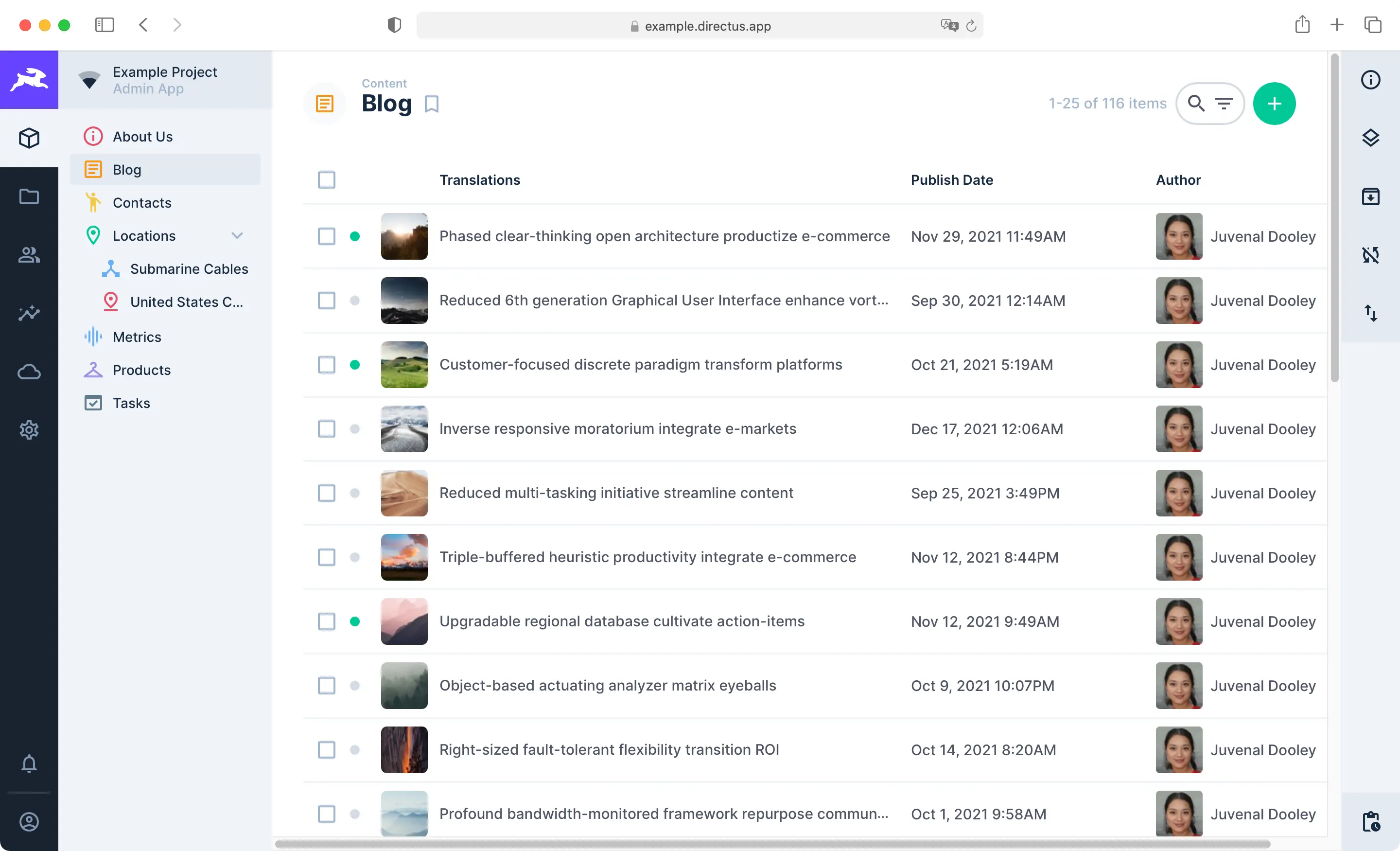
The Content Module consists of Collection Pages and Item Pages. Use the Navigation Bar on the left to move between
|
|
Collections. Each Collection Page displays all Items in its Collection and comes with highly configurable
|
|
[Layouts](/getting-started/glossary#layouts) for browsing, visualizing, and managing Items. The Page Header includes key
|
|
action buttons for sorting, searching, filtering, creating, editing, archiving, and deleting multiple Items. To learn
|
|
more, see our guide on the [Collection Page](/app/content/collections).
|
|
|
|
:::tip
|
|
|
|
The Content module helps you manage Items. Collections are managed within the **Settings** menu, as these actions
|
|
results in changes to the data model. To learn more, see our guide on
|
|
[data model configuration](/configuration/data-model).
|
|
|
|
:::
|
|
|
|
## Item Page
|
|
|
|

|
|
|
|
When you click an Item on the Collection page, its Item Page will open. The Item Page is a form that enables you to
|
|
view, edit or delete an Item and its field values. You can also comment on, share, archive, or revert an Item from this
|
|
form. To learn more, see our guide on the [Item Page](/app/content/items).
|
|
|
|
## Shares
|
|
|
|
<video title="Data Sharing" autoplay playsinline muted loop controls>
|
|
<source src="https://cdn.directus.io/docs/v9/app-guide/content/content/content-20220415A/data-shares-20220415A.mp4" type="video/mp4" />
|
|
</video>
|
|
|
|
In any project, certain Collections will have limited access permissions. In some cases, you may need to share one of
|
|
the Items within the collection with an individual or group of individuals who don't yet have permission. In this case,
|
|
use Shares. Shares enable you to share an Item from a Collection with anyone, regardless of their permissions, and even
|
|
if they are not Users within the project. To learn more, see our guide on [Data Sharing](/app/content/shares).
|