mirror of
https://github.com/directus/directus.git
synced 2026-01-28 11:07:58 -05:00

190 lines
10 KiB
Markdown
190 lines
10 KiB
Markdown
---
|
|
description:
|
|
Users are the individual accounts for authenticating into the API and App. Each user belongs to a Role which defines
|
|
its access Permissions.
|
|
readTime: 7 min read
|
|
---
|
|
|
|
# Users, Roles & Permissions
|
|
|
|
> Users, roles, and permissions work together to determine _who can access what_ inside your database.
|
|
> [Users](/getting-started/glossary#users) are the individual accounts for authenticating into the project. Each user is
|
|
> assigned a [role](/getting-started/glossary#roles) which defines its
|
|
> [access permissions](/getting-started/glossary#permissions).
|
|
|
|

|
|
|
|
:::tip Before You Begin
|
|
|
|
We recommend you try the [Quickstart Guide](/getting-started/quickstart.md) to get an overview of the platform.
|
|
|
|
:::
|
|
|
|
:::tip Learn More
|
|
|
|
To manage users, role and permissions programmatically via the API, please see our API guides on
|
|
[users](/reference/system/users.md), [roles](/reference/system/roles.md), and
|
|
[permissions](/reference/system/permissions.md).
|
|
|
|
:::
|
|
|
|
In order to understand how users, roles, and permissions work in Directus, a conceptual understanding of _how they work
|
|
in general_ will be helpful. The following few paragraphs will introduce you to how users, roles, and permissions work
|
|
within a relational database. If you're already familiar with these concepts, feel free to skip to
|
|
[How it Works in Directus](#how-it-works-in-directus).
|
|
|
|
### Users
|
|
|
|
Remember, [users are data](/reference/system/users.md). They are simply rows in a `users` data table. It may be easy to
|
|
forget this if you are new to working with data models, as the term _users_ can create a warm place in our hearts which
|
|
distinguishes or elevates it above and beyond term _"data"_. But from the perspective of the data model, that's not the
|
|
case. Users are still just data.
|
|
|
|
Projects typically have many different kinds of users. For example, you'll need developers and administrators to design
|
|
the data model as well as manage all its data. Your team may have other users, such as data analysts, content writers,
|
|
or managers who need to access to some sensitive data, but not the entire data model. Finally, you might have end-users,
|
|
such as customers, subscribers, 3rd party sellers, _and beyond_ who need access to their own personal data, but should
|
|
not be able to access any other business data. Therefore, we need to be able to create permissions to define what a user
|
|
can and can't access.
|
|
|
|
:::tip
|
|
|
|
Another key point is that a user _does not need to be a person at all_. A user could be an AI bot, chat bot, API, or any
|
|
other entity that can login and interact with the database.
|
|
|
|
:::
|
|
|
|
### Roles
|
|
|
|
In many cases, your project will have multiple users doing the same thing _(managers, writers, subscribers, etc)_. If we
|
|
assigned permissions directly to the user, we would have to configure the same permissions over and over, which makes it
|
|
tedious to change configurations for all users doing the same job and also leads to a higher chance of misconfiguration.
|
|
This problem is an example of [data duplication](/configuration/data-model.md#avoid-data-duplication). To avoid this, we
|
|
create roles, configure the role's permissions once, then assign the role to users as desired.
|
|
|
|
Regardless of your project, your SQL database will _always_ need an administrator role and a public role. In addition,
|
|
you may need any number of custom roles.
|
|
|
|
**Administrators**\
|
|
An administrator role provides complete, unrestricted control over the database, including the data model and all it data.
|
|
This cannot be limited, as by definition it would no longer be an administrator role. You need at least one user in an administrator
|
|
role. Otherwise, it would be impossible to fully manage the database.
|
|
|
|
**Public**\
|
|
A public role defines access permissions for unauthenticated requests to the database. That means that if you enable an access
|
|
permission for this role, _everybody has that permission enabled_. Remember, the database has no idea which data you'd want
|
|
the public to see. So to be safe, all permissions begin turned off by default. It is up to the administrators to re-configure
|
|
these and define exactly what the public role has access to.
|
|
|
|
**Custom Roles**\
|
|
In addition to these two extreme types of roles, you may need to create more roles each with their own unique set of permissions.
|
|
The roles you create and the permissions you configure for them are completely open-ended and dependent on your project's
|
|
needs.
|
|
|
|
### Permissions
|
|
|
|
Remember, for the majority of projects, it wouldn't be safe or ethical to give every user full access to the data. Users
|
|
could accidentally damage data or even take malicious actions against the project and its users. For example, a student
|
|
may need to be able to _see their grade, but not be able to change it_.
|
|
|
|
Thus, there are four types of permissions for each data table, based on the four CRUD actions you can do to data in a
|
|
database: _create, read, update, and delete_... Hence you often hear the term CRUD permissions. You can configure CRUD
|
|
permissions on each data table as desired. For example, you can grant:
|
|
|
|
- read-only permission
|
|
- read and write but not update or delete permissions
|
|
- _any other combination of the four_
|
|
|
|
### Business Rules
|
|
|
|
In many cases, you will need to grant permissions to data based on its value, or by some other conditional logic. This
|
|
type of conditional permission is often called a business rule.
|
|
|
|
To give an example, students should be able to read to their own grades, but not the grades of other students. So you
|
|
could create a business rule for the `student` role, so that a user can only see his or her own grade.
|
|
|
|
Taking this example one step further, we'd also want to allow students to read and create answers to an online test, but
|
|
not update or delete their test answers once submitted. Then you may need a business rule to crate a submission
|
|
deadline. Finally, you likely want to restrict each student's CRUD access to all other student tests.
|
|
|
|
It is common to have multiple, complex business rules in a project.
|
|
|
|
## How it Works in Directus
|
|
|
|
<video title="How Users, Roles, & Permissions Work" autoplay playsinline muted loop controls>
|
|
<source src="https://cdn.directus.io/docs/v9/configuration/users-roles-permissions/users-roles-permissions-20220909/how-users-roles-and-permissions-work-20220909A.mp4" type="video/mp4" />
|
|
</video>
|
|
|
|
While you have full reign to configure these using SQL, Directus also provides a complete system to configure and manage
|
|
users, roles, and permissions without writing a single line of SQL. The process has three key steps.
|
|
|
|
1. [Create a Role](/configuration/users-roles-permissions/roles.md#create-a-role)
|
|
2. [Configure its Permissions](/configuration/users-roles-permissions/permissions.md#configure-role-permissions)
|
|
3. [Assign Role to User](/configuration/users-roles-permissions/roles.md#assign-role-to-user)
|
|
|
|
:::tip No Artificial Limits
|
|
|
|
You can create as many roles as you need, (re)assign them to as many users as many times you please, and configure
|
|
complex granular permissions as desired.
|
|
|
|
:::
|
|
|
|
:::tip
|
|
|
|
Remember, the following users, role and permissions systems built into Directus cannot be deleted, however using them is
|
|
optional. You may configure your own system as desired.
|
|
|
|
:::
|
|
|
|
## Directus Users
|
|
|
|

|
|
|
|
Within the Data Studio, users are managed within the [User Directory](/app/user-directory.md). However, there are some
|
|
controls available to assign users to roles in **Settings > Roles and Permissions**.
|
|
|
|
To learn more, please see our guide on [users](/configuration/users-roles-permissions/users.md).
|
|
|
|
## Directus Roles
|
|
|
|

|
|
|
|
You can create as many roles as you need for your project. Directus also comes with built-in administrator and public
|
|
roles, which cannot be deleted.
|
|
|
|
The administrator role provides full permissions for all data in the app, and this cannot be limited. You must always
|
|
have at least one user with an administrator role.
|
|
|
|
The public role comes with all access permissions turned off by default, but this can be reconfigured as desired.
|
|
Remember, any access permissions granted to this role will apply to everyone, including unauthenticated web traffic _and
|
|
all existing users_. If you wish to keep the project private, simply keep all permissions turned off.
|
|
|
|
To learn more, see our guide on [roles](/configuration/users-roles-permissions/roles.md).
|
|
|
|
## Directus Permissions
|
|
|
|

|
|
|
|
Directus offers an extremely granular, yet easy to configure permissions system. When you
|
|
[create a role](#create-a-role), all permissions are turned off by default, allowing you to explicitly grant permissions
|
|
as desired.
|
|
|
|
There are two other key points to note about Directus. First, the term
|
|
[custom access permissions](/configuration/users-roles-permissions/permissions.md#configure-custom-permissions) is used
|
|
in place of [business rules](#business-rules), however the concept is the same. Second, instead of the standard CRUD
|
|
permissions, Directus provides CRUDS permissions: _create, read, update, delete, and share_. This _fifth_ type of
|
|
permission, share, defines whether a user has permissions to perform [data sharing](/app/content/shares.md) on items in
|
|
a collection.
|
|
|
|
To learn more, see our guide on [permissions](/configuration/users-roles-permissions/permissions.md).
|
|
|
|
## Workflows
|
|
|
|
|
|
|
|
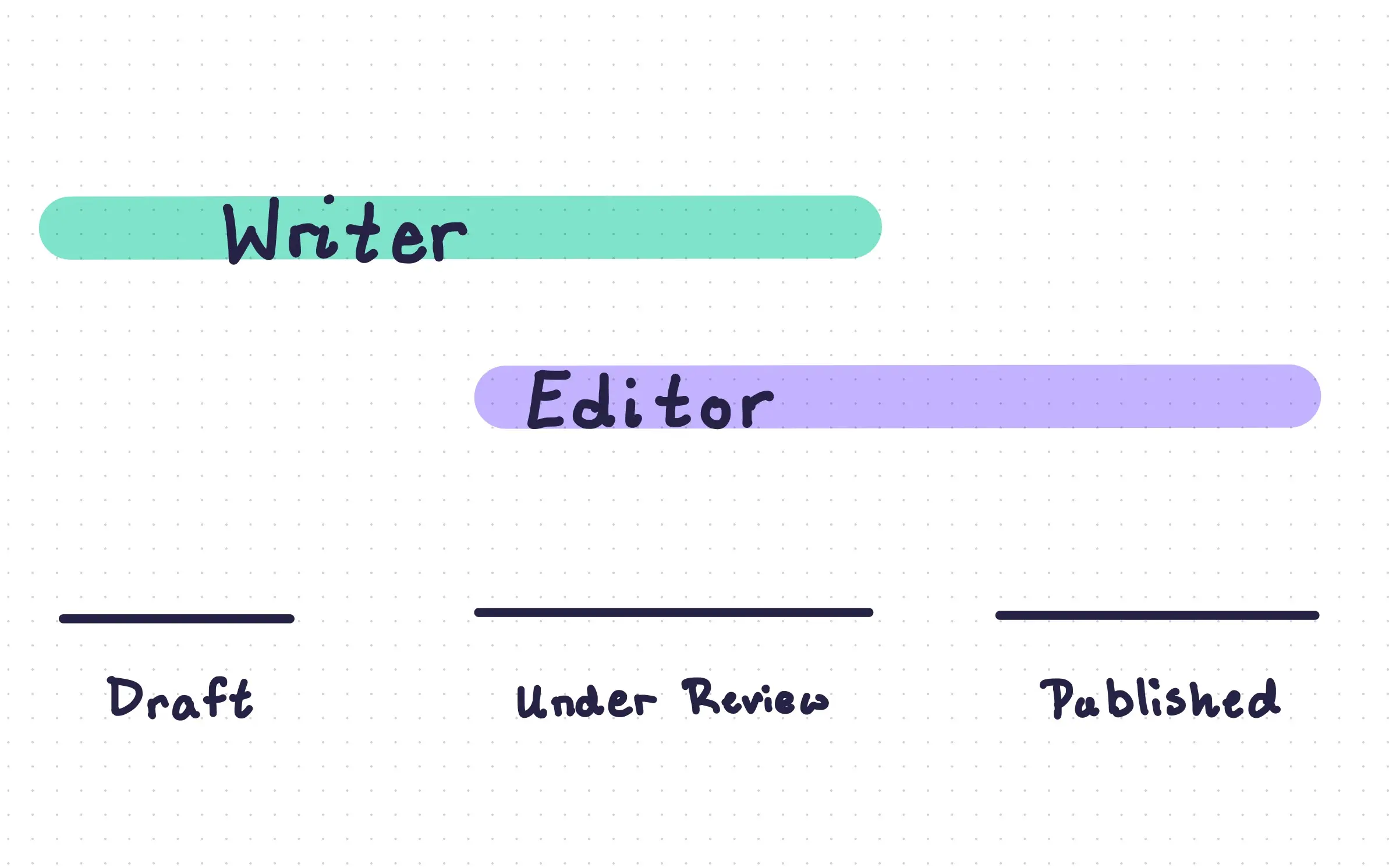
Workflows are a way to setup structured stages to content authoring and data management. They are created primarily with
|
|
custom access permissions, but can be enhanced with email notifications, custom [Interfaces](/extensions/interfaces.md)
|
|
as well as [flows](/configuration/flows.md). Directus supports endlessly configurable workflows.
|
|
|
|
To learn more, see our recipe on [basic workflows](/cookbook/permissions/basic-workflows.md).
|