mirror of
https://github.com/directus/directus.git
synced 2026-01-28 05:18:13 -05:00

142 lines
7.3 KiB
Markdown
142 lines
7.3 KiB
Markdown
---
|
|
description:
|
|
tags: []
|
|
skill_level:
|
|
directus_version: 9.18.1
|
|
author_override:
|
|
author: Eron Powell
|
|
---
|
|
|
|
# Building Content Approval Workflows
|
|
|
|
> Workflows are the use of custom access permissions to add structured stages to the flow of content creation or data
|
|
> generation. Workflows enable you to do things like pass off work in progress between multiple roles, build decision
|
|
> trees, _and beyond!_
|
|
|
|
:::tip Author: {{$frontmatter.author}}
|
|
|
|
<!-- **Skill Level:** {{$frontmatter.skill_level}}\ -->
|
|
|
|
**Directus Version:** {{$frontmatter.directus_version}}
|
|
|
|
<!-- **Tags:** {{$frontmatter.tags.join(", ")}} -->
|
|
|
|
:::
|
|
|
|
## Explanation
|
|
|
|
Remember, your basic [CRUDS permissions](/configuration/users-roles-permissions/permissions.md#configure-permissions)
|
|
define what a role can and can't do to all items in a collection.
|
|
[Custom access permissions](/configuration/users-roles-permissions/permissions.md#configure-custom-permissions) take
|
|
things a step further and let you define what a role can and can't do to each item in a collection, _based on its
|
|
[field values](/configuration/data-model/fields.md)_.
|
|
|
|
Workflows are when you use these permissions techniques to create structured stages to content or data creation. In
|
|
simplest terms, it is when you have two or more roles, and you give them different permissions at each stage in the
|
|
content creation process.
|
|
|
|
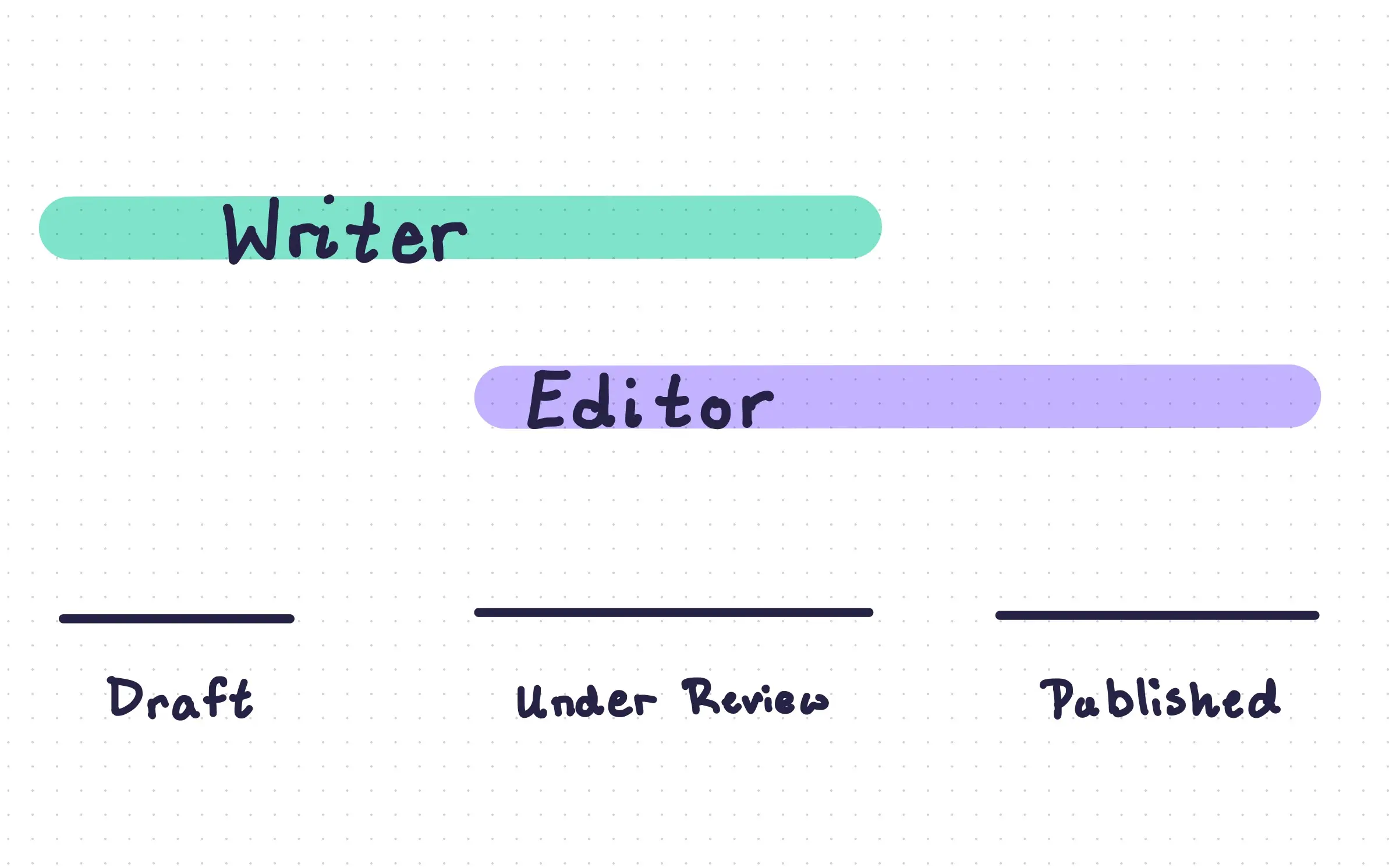
There are an infinite number of possible workflows you could configure. But for this recipe, we will configure a simple
|
|
workflow where `writers` and `editors` work together to create, co-edit and publish `articles`.
|
|
|
|
|
|
|
|
For this recipe, our workflow will have three stages, `draft`, `under review`, and `published`, which will be defined in
|
|
a `status` field.
|
|
|
|
| `status` | `Author` | `Editor` |
|
|
| ---------------------------- | --------------------------------------------------------------------------------------- | ----------------------------------------------------------------------------- |
|
|
| _Article is not yet created_ | Author can create new items in `articles`, but only with a status of `draft`. | Editor cannot create new items in `articles`. |
|
|
| `Draft` | Author creates and edits the article. Then can set status to `under review` when ready. | Editor has either read-only, or no permissions at all. |
|
|
| `Under Review` | Author can edit the article's content, but not the `status` field. | Editor can edit the article, as well as set status to `Draft` or `Published`. |
|
|
| `Published` | Author is no longer responsible for article, and has read-only permissions. | Editor has permissions to update or delete the article. |
|
|
|
|
This whole workflow is created with permissions. All we need to do to create these stages is change the `author` and
|
|
`editor` permissions for each item in `articles` conditionally, based on the value of `status`.
|
|
|
|

|
|
|
|
## How-To Guide
|
|
|
|
:::tip Requirements
|
|
|
|
To implement a workflow, you'll need:
|
|
|
|
- An understanding of [permissions](/configuration/users-roles-permissions.md) and [filters](/reference/filter-rules.md)
|
|
in Directus.
|
|
- A collection with some kind of content. In this recipe, we'll use a collection called `articles`.
|
|
- A field on that collection to validate conditionally. We'll use a `status` field.
|
|
- Two _(or more)_ roles that will work to author content. We'll use `writer` and `editor` roles.
|
|
|
|
:::
|
|
|
|
<!-- <video autoplay playsinline muted loop controls>
|
|
<source src="" type="video/mp4" />
|
|
</video> -->
|
|
|
|
To create a structured workflow for `articles`, follow these steps.
|
|
|
|
1. First, [create a field](/configuration/data-model/fields.md#create-a-field-standard) to track the article status.
|
|
We'll call this field `status`, but it could be named anything.
|
|
2. [Create a field](/configuration/data-model/fields.md#create-a-field-advanced) with a Dropdown Interface. Name it
|
|
`status` and add the stages _(`draft`, `under review` and `published`)_ needed for your content creation process.
|
|
3. Next, [create two roles](/configuration/users-roles-permissions/roles.md#create-a-role): `author` and `editor`.
|
|
4. Finally, configure
|
|
[custom access permissions](/configuration/users-roles-permissions/permissions.md#configure-custom-permissions) for
|
|
each role based on the value of the `status` field.
|
|
- For the `author` role:
|
|
- Set a filter under **Create > Use Custom > Field Validation** to ensure the author can only create articles with
|
|
a `draft` status.
|
|
- Enable all read permissions.
|
|
- Set a filter under **Update > Use Custom > Item Permissions** to ensure the user can update articles with a
|
|
`draft` or `under review` status.
|
|
- Set a filter under **Update > Use Custom > Field Validation** to ensure the user can only update article status
|
|
to `under review`.
|
|
- Keep delete permissions restricted.
|
|
- Keep shares permissions restricted.
|
|
- For the `editor` role:
|
|
- Keep create permissions restricted.
|
|
- Enable all read permissions.
|
|
- Set a filter under **Update > Use Custom > Item Permissions** to ensure the user can only update articles with an
|
|
`under review` status.
|
|
- Set a filter under **Update > Use Custom > Field Validation** to ensure the user can only update status to
|
|
`published`.
|
|
- Keep delete permissions restricted.
|
|
- Keep shares permissions restricted.
|
|
|
|
## Final Tips
|
|
|
|
This recipe covers one simple example of a workflow. As you move forward and created your own custom-tailored workflows,
|
|
just remember:
|
|
|
|
- You could use any number of roles.
|
|
- You could use any collection or relationally linked collections.
|
|
- You can add more stages in your workflow by adding more values to your `status` field.
|
|
|
|
Be sure to pay close attention to how you configure custom access permissions for workflows. Unintentional
|
|
misconfigurations can have side-effects.
|
|
|
|
In our simple `articles` workflow above, a minor misconfiguration in a co-editing workflow between two team members
|
|
_might_ not be a big problem. But in other cases it can have big consequences. For example, let's imagine for a second
|
|
that:
|
|
|
|
- The `writer` and `editor` roles were `teacher` and `student` roles.
|
|
- The `articles` collection was instead a `tests` collection.
|
|
- The `status` field defined if the test was `not started`, `in progress`, or `submitted`.
|
|
|
|
A minor misconfiguration here could ruin academic integrity. Here's a few potential issues:
|
|
|
|
- students retake/re-edit their own submitted test.
|
|
- students take/edit/delete tests of other students.
|
|
- teachers modify the results of students that they like or don't like.
|
|
- _and beyond!_
|
|
|
|
When creating your own workflow, its a good idea to define each role involved, each stage in the workflow, and the
|
|
explicit set of permissions each role has at each stage.
|
|
|
|
:::tip Next Steps
|
|
|
|
Workflows can be further enhanced with custom [Interfaces](/extensions/interfaces.md) as well as
|
|
[flows](/configuration/flows.md).
|
|
|
|
:::
|