mirror of
https://github.com/directus/directus.git
synced 2026-01-31 15:57:57 -05:00
 7481419fb1
* small tweaks on content page, pushing to origin

* collectionsfirst edit half done

* improved tip on create an item

* reworked intro sections of content docs

* added on import/export and layouts pages

* finished content.md first draft, added some structural details

* content-collections.md first draft complete

* renamed content-collections.md to 'Collection Page' and content-items.md to 'Item Page'

* content-items.md first draft finished

* content-layouts.md first draft complete

* import/export first draft *almost* done

* imports/export first draft done

* forgot to manually add import/export file to commit

* moved layouts into utilities

* import-export first draft done

* Initial proofread of all content docs

* addressed most comments from github review

* media added

* widows

* Update docs/app/content.md

Co-authored-by: Rijk van Zanten <rijkvanzanten@me.com>

* applied half of rijk's edit requests, waiting for replies to add the other half

* finished applying rijk's edit requests

* Fix active link style in docs sidebar nav

* Add cloud exclusive mention

* The last of it... Until Loris edits

Co-authored-by: Eron Powell <eronpowell@Erons-MBP-2.local>
Co-authored-by: rijkvanzanten <rijkvanzanten@me.com>
65 lines
3.0 KiB
Markdown
65 lines
3.0 KiB
Markdown
# Content
|
|
|
|
> The Content Module is the primary way for Users to interact with Items in a Collection. Regardless of what your data
|
|
> model contains _(be it blog posts, event bookings, IoT fleets, geo-positions, CRM, or whatever!)_ the Content Module
|
|
> enables Users to view and manage, sort and search, or import and export data.
|
|
|
|
[[toc]]
|
|
|
|
::: tip Before You Begin
|
|
|
|
To efficiently use this Module, you will need to know about [Collections](/getting-started/glossary/#collections),
|
|
[Items](/getting-started/glossary/#items) and [Fields](/getting-started/glossary/#fields).
|
|
|
|
<!--
|
|
@TODO getting-started > 30-90 min tutorial
|
|
Link to tutorial
|
|
-->
|
|
|
|
:::
|
|
|
|
## Collection Page
|
|
|
|
|
|
|
|
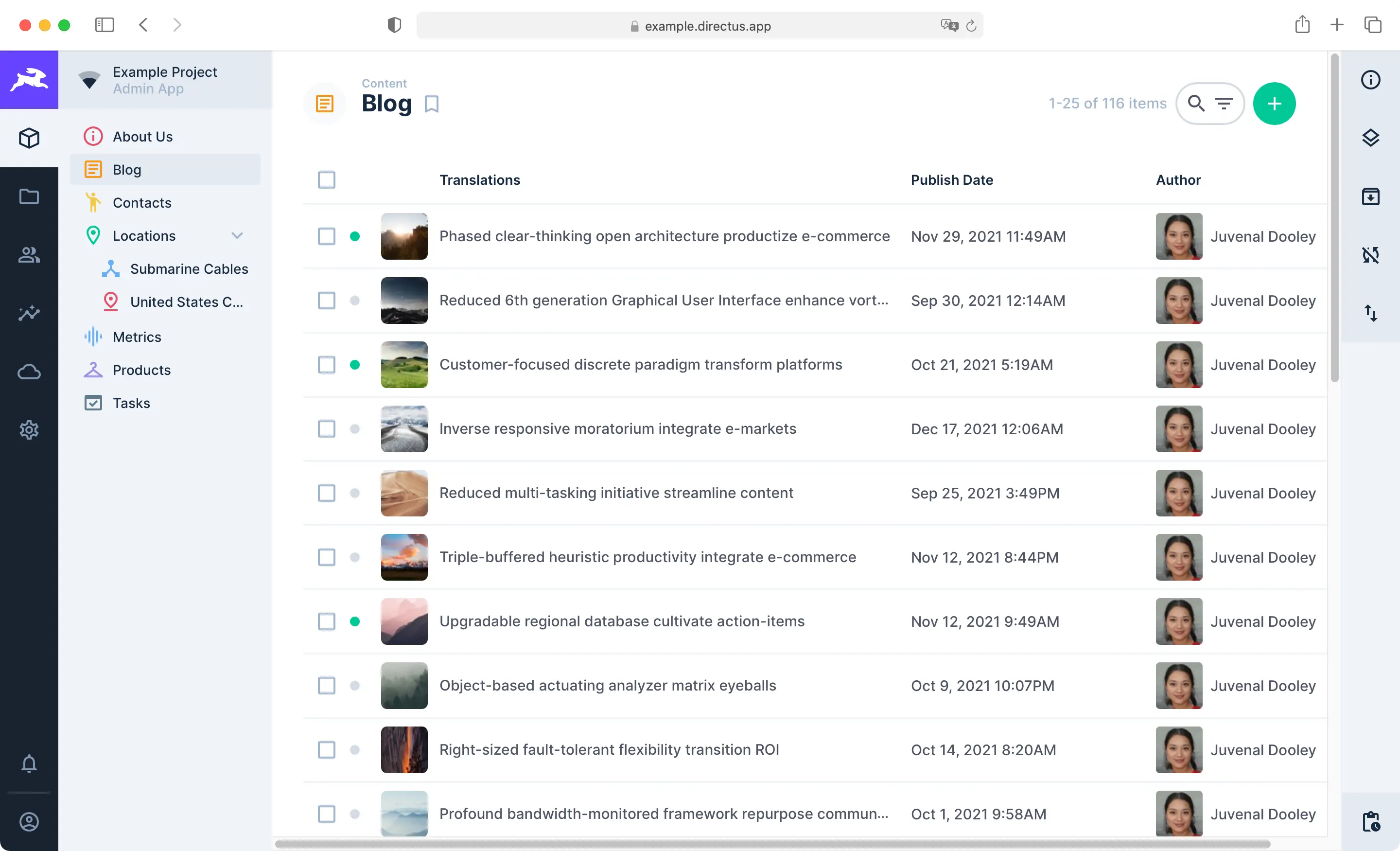
The Content Module is composed of Collection Pages and Item Pages. Use the Navigation Bar on the left to move between
|
|
Collections. Each Collection Page displays all Items in its Collection and comes with highly configurable
|
|
[Layouts](/getting-started/glossary/#layouts) for browsing, visualizing, and managing Items. The Page Header includes
|
|
key action buttons for sorting, searching, filtering, creating, editing, archiving, and deleting multiple Items. To
|
|
learn more, see our guide on the [Collection Page](/app/content/collections).
|
|
|
|
:::tip
|
|
|
|
This Module is for management of Items. Collections are not managed through this Module, as that creates changes in the
|
|
fundamental data model. Administrators manage Collections via the Settings menu. To learn more, see our guide on
|
|
[data model configuration](/configuration/data-model).
|
|
|
|
:::
|
|
|
|
## Item Page
|
|
|
|

|
|
|
|
When an Item is clicked on the Collection Page, its Item Details Page is opened. This is a form primarily for viewing,
|
|
editing and deleting an Item's Field Values. Options for commenting on, sharing, archiving, and reverting the Item are
|
|
included as well. To learn more, see our guide on the [Item Page](/app/content/items).
|
|
|
|
::: tip Manage Items via the API
|
|
|
|
This section explains how to create, view, update, and delete Items within the Directus App. However, all actions
|
|
performed in the app can also be done programmatically.\
|
|
Learn how to [manage Items via the API](/reference/items/).
|
|
|
|
:::
|
|
|
|
## Data Sharing
|
|
|
|
<video title="Data Sharing" autoplay muted loop controls>
|
|
<source src="https://cdn.directus.io/docs/v9/app-guide/content/content/content-20220415A/data-shares-20220415A.mp4" type="video/mp4" />
|
|
</video>
|
|
|
|
In a given Project, some Collections will likely be hidden for the Public as well as other Roles. There may be cases
|
|
when you want to share an Item with a person _(or people)_ that don't have the permissions to see it. This is where
|
|
Shares come in to play. You can share Item from a Collection with anyone, regardless of their permissions and even if
|
|
they are not Users within the project. To learn more, see our guide on [Data Sharing](/app/content/data-sharing).
|