mirror of
https://github.com/directus/directus.git
synced 2026-02-16 13:45:01 -05:00
 ae25bca518
* Text edits

Edited for grammar, style.

* text changes

Edits for grammar, style, consistency.

* text changes

Edited for grammar, style, consistency

* text edits

Edited for grammar, style and consistency

* a few more changes

punctuation

* text edits

Edited for grammar, style, consistency.

* fixed type-errors

* fixed type errors and widows

* fixed type errors

* fixed type errors

* fixed type errors

* Update docs/cloud/glossary.md

Co-authored-by: lmaupas <103216525+lmaupas@users.noreply.github.com>
Co-authored-by: Azri Kahar <42867097+azrikahar@users.noreply.github.com>
266 lines
12 KiB
Markdown
266 lines
12 KiB
Markdown
# Glossary
|
|
|
|
[[toc]]
|
|
|
|
## Asset Storage
|
|
|
|
Directus Core allows asset storage for any type of file. This applies to all Cloud Projects. However, on Directus Cloud,
|
|
certain hard technical limits apply to file uploads, such as limits on size per asset and total asset storage per
|
|
Project. For more details, see [Cloud Policies](https://directus.io/cloud-policies/#)
|
|
|
|
## Automatic Updates
|
|
|
|
Software updates on any app can be a time-consuming chore, taking developer energy and focus away from core business
|
|
logic. Cloud Projects are updated every two weeks in rolling releases _(i.e. done with no downtime)_. These updates keep
|
|
your Project on the latest version and fully up to date with all [Cloud Exclusives](#cloud-exclusives), dependencies and
|
|
security patches.
|
|
|
|
:::tip Version-locking
|
|
|
|
Version-locking is available on Enterprise Projects.
|
|
|
|
:::
|
|
|
|
## Backups
|
|
|
|
By default, file assets and databases are backed up once per day on all Standard and Enterprise Projects. Additionally,
|
|
Enterprise customers can work with our team for more tailored backup solutions. In the event of an emergency, such as
|
|
your Node crashing, don't worry! Your data will be safe. If you need access to your backed-up data,
|
|
[contact us](https://directus.io/contact/)
|
|
|
|
:::warning
|
|
|
|
Please note that Community Projects are not backed up.
|
|
|
|
:::
|
|
|
|
## Caching
|
|
|
|
Caching is enabled on Cloud Projects. Public data is cached in the CDN for a short period of time. All Directus Cloud
|
|
Projects are running behind a [Global CDN](#global-cdn), but Enterprise Projects offer advanced caching strategies, as
|
|
well.
|
|
|
|
## Cloud Exclusives
|
|
|
|
Our managed service includes several Cloud-Exclusive [Extensions](#extensions) that are not available to self-hosted
|
|
users. It's important to note that these are **not** paywalled Core features, but are progressive enhancements that add
|
|
to the base offering. Our team is always adding new exclusives, so check back often to stay up to date with the latest
|
|
and greatest features! Cloud Exclusives development is managed by the Core Team, so these will stay up to date with the
|
|
[latest version of Directus](#automatic-updates). Examples include:
|
|
|
|
- Kanban Layout
|
|
|
|
:::tip
|
|
|
|
Looking to sponsor development of an Extension or Cloud Exclusive? [Contact Us](https://directus.io/contact/)
|
|
|
|
:::
|
|
|
|
## Data Portability
|
|
|
|
Directus Core is totally detached from the database. Data can be cleanly imported and exported on Projects with the API
|
|
via the schema endpoints. Enterprise clients: the Directus Team will work with you to help you through this process.
|
|
|
|
## Datacenter Regions
|
|
|
|
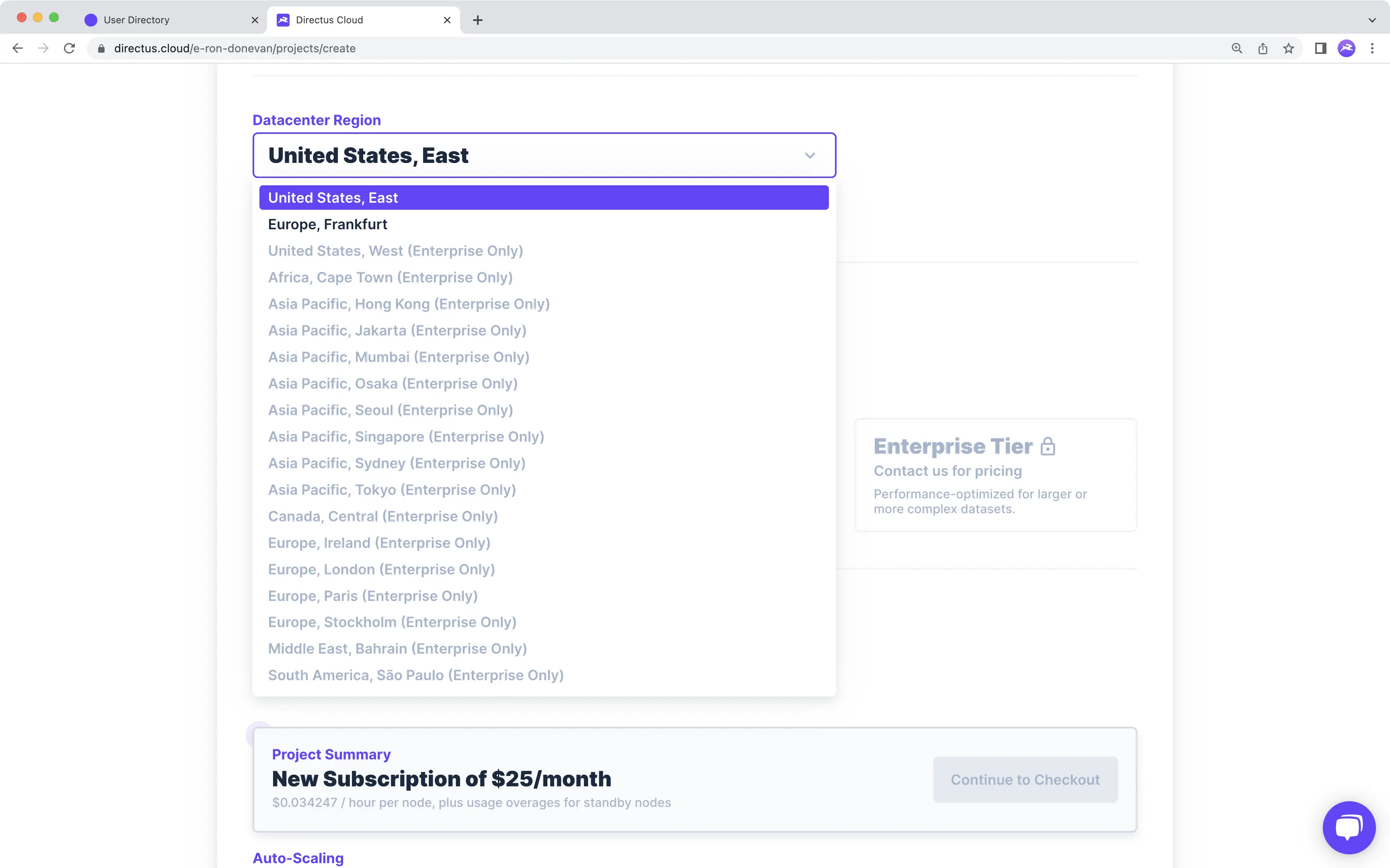
The location you choose to host your Project can have measurable impact. To optimize your Project and meet any local
|
|
data compliance laws such as GDPR, Standard and Enterprise, you can choose the region your Project is hosted in. There
|
|
are 19 Datacenter Regions available to Enterprise Projects and two available to Standard Projects.
|
|
|
|
|
|
|
|
:::tip
|
|
|
|
Community Projects are hosted in the `United States, East` Region.
|
|
|
|
:::
|
|
|
|
## Encryption and Security
|
|
|
|
[Asset Storage](#asset-storage), data storage and in-transit encryption are included on all Cloud Projects. All data at
|
|
rest remains encrypted, and HTTPS/TLS protocols are enabled on all in-transit data. Cloud Projects are created with
|
|
secure and safe [tenancy architectures](#multi-tenancy).
|
|
|
|
:::tip Directus Core Security Features
|
|
|
|
Directus core comes with even more security features out-of-the-box, including IP address whitelabeling, 2FA enabling,
|
|
SSO options, customization for Password Rule requirements and the flexibility to use any access token paradigm desired.
|
|
|
|
:::
|
|
|
|
## Extensions
|
|
|
|
The term _Extension_ refers to any feature or component that adds to the functionality of Directus Core. Directus has
|
|
been architected to be [completely modular and extensible](/extensions/introduction) to ensure you will never hit a hard
|
|
feature ceiling within the platform.
|
|
|
|
All Cloud Projects have access to the [Cloud Exclusive Extensions](#cloud-exclusives), which are developed and
|
|
maintained by the Core Team. Enterprise Projects get all Cloud Exclusives, but also have the option to implement their
|
|
own custom Extensions as needed.
|
|
|
|
## Global CDN
|
|
|
|
A Global CDN is provided for all Cloud Projects, out-of-the-box, with over 300 cache locations. This means assets and
|
|
data will be delivered with the lowest possible latency.
|
|
|
|
## Infrastructure
|
|
|
|
In the context of these docs, Infrastructure refers to the hardware running your Project, including the
|
|
[database](#multi-tenancy), [serverless nodes](#nodes), [asset storage](#asset-storage) and [global CDN](#global-cdn).
|
|
Infrastructure differs by Project tier. Please refer to [Projects](/cloud/projects) as well as the Infrastructure
|
|
section on the [Pricing page](https://directus.io/pricing/) for side-by-side comparisons.
|
|
|
|
## Nodes
|
|
|
|
Directus Cloud provides you with options for configuring processing power of your Node as well as the number of Nodes
|
|
your Project runs on. You can configure and reconfigure Nodes to meet traffic needs at any scale. In general, there are
|
|
two approaches to scale performance: vertical-scaling and horizontal-scaling. Vertical-scaling refers to the use of
|
|
improved hardware _(e.g. better CPUs and more RAM)_ to scale up. In Directus Cloud, configuring the Node Type will
|
|
provide vertical-scaling. Horizontal-scaling refers to increasing the number of Nodes to scale up. In Directus Cloud,
|
|
adding more Active and Standby Nodes will provide horizontal-scaling.
|
|
|
|
### Node Types
|
|
|
|
Each Node Type provides a different level of processing power.
|
|
|
|
- **Community**\
|
|
Community Projects come equipped with one Node, which can handle basic web traffic required for hobby projects, learning
|
|
and demoing Directus Cloud, and other non-production use cases. Community Nodes will pause after 3 days of [inactivity](/cloud/projects/#resume-a-community-project).
|
|
|
|
- **General Purpose**\
|
|
General Purpose Nodes are the basic Node Type offered on Standard Projects. These Nodes are the right choice for most
|
|
small- to medium- scale, production-ready use cases.
|
|
|
|
- **Performance Tier**\
|
|
Performance Tier Nodes are the upgraded Node Type offered on Standard Projects, which may provide better performance under
|
|
certain conditions, such as for handling Image transformations as well as fetching deeply nested or complex relationships
|
|
via the API.
|
|
|
|
- **Enterprise**\
|
|
Node configuration options are flexible and customizable, tailored to your Project's needs.
|
|
|
|
:::tip
|
|
|
|
In Standard Projects, the Node Type configured [and associated cost per hour](/cloud/teams/#manage-billing) will apply
|
|
to both Active and Standby Nodes.
|
|
|
|
:::
|
|
|
|
### Active Nodes
|
|
|
|
Active Nodes stay on constantly. Projects must have at least one Active Node in order to function.
|
|
|
|
:::warning
|
|
|
|
Community Nodes paused due to [inactivity](/cloud/projects/#resume-a-community-project) can't receive requests until
|
|
unpaused.
|
|
|
|
:::
|
|
|
|
### Load Balancing
|
|
|
|
Similar to the term horizontal scaling, the term load balancing refers to the instantaneous distribution of load across
|
|
the Active Nodes on which your Project is running.
|
|
|
|
### Standby Nodes
|
|
|
|
Standby Nodes stay turned-off until traffic starts to take up significant system capacity, at which point Standby Nodes
|
|
activate one-by-one, as needed, to safely handle the increase in traffic. Activation occurs within just a few moments.
|
|
|
|
Standby Nodes are not required, however you don't pay for usage when Standby Nodes are disabled. For more pricing
|
|
information, see [billing](/cloud/teams/#manage-billing).
|
|
|
|
### Auto-scaling
|
|
|
|
Auto-scaling refers to the automatic horizontal scaling provided by Standby Nodes, which helps to keep system capacity
|
|
at safe levels.
|
|
|
|
:::tip Optimal Node Configuration
|
|
|
|
As noted under [Billing](/cloud/teams/#manage-billing), Projects can be reconfigured as needed. Check out the
|
|
[Project Monitor page](/cloud/projects/#monitor-a-project) for performance analytics that can help inform Node
|
|
configuration decisions.
|
|
|
|
:::
|
|
|
|
## Quotas
|
|
|
|
Directus does not impose _arbitrary_ software-based limits of any kind. So for things like Collections, Roles or Users -
|
|
whether you have 10 or 10,000 of them - you are free to build out your Project as needed, with no up-charge. However,
|
|
actual Project performance is going to depend on Node configuration, so there are hard technical limits. For details,
|
|
see [Cloud Policies](https://directus.io/cloud-policies/)
|
|
|
|
## Rate Limiting
|
|
|
|
Rate limiting refers to technical limitations within Directus Cloud as well as Cloud Projects.\
|
|
For details, see [Cloud Policies](https://directus.io/cloud-policies/#)
|
|
|
|
## Support Options
|
|
|
|
There are three types of support for Directus:
|
|
|
|
### Community Support
|
|
|
|
Because Directus is an open-source Project, you're encouraged to reach out to the Community for help on Projects, _and
|
|
of course help others as well_. Find us on [GitHub](https://github.com/directus/directus/discussions) and
|
|
[Discord](https://directus.chat/) to join the thousands of other developers all discussing and guiding the future of the
|
|
Directus platform. Most common questions have already been asked and answered and can be easily searched.
|
|
|
|
:::warning No Guaranteed Response Time
|
|
|
|
While the Directus Core Team plays an active and engaged role in community discussions and aims to answer questions
|
|
within a few days, there is no guaranteed response time for Community Support.
|
|
|
|
:::
|
|
|
|
### Basic and Premium Support
|
|
|
|
Basic and Premium Support offer direct communication with the Directus Core Team. Basic support is included on all
|
|
Enterprise Projects, and Premium Support adds 24/7 response times for critical software issues only.
|
|
|
|
:::tip Add-on Support
|
|
|
|
Looking for Basic or Premium Support on a self-hosted Project? [Contact Sales](https://directus.io/contact/)
|
|
|
|
:::
|
|
|
|
## System Status
|
|
|
|
<video alt="System Status" loop muted controls autoplay>
|
|
<source src="https://cdn.directus.io/docs/v9/cloud/glossary/glossary-20220322A/system-status-20220329A.mp4" type="video/mp4">
|
|
</video>
|
|
|
|
Click <span mi icon>check</span> in the Dashboard Header to navigate to the System Status page. This page is where to
|
|
_find out what happened_ in the super rare event that the network slows down or goes offline. Here you can view the
|
|
current connectivity status of Directus Cloud, the status on individual Projects by URL and a daily Incidents log. For
|
|
more information, see [Cloud Policies](https://directus.io/cloud-policies/#)
|
|
|
|
## Multi-tenancy
|
|
|
|
Tenancy refers to how client data is stored within a database. In single-tenancy architecture, a database stores data
|
|
from only one tenant. In multi-tenancy architecture, a database stores data from multiple tenants, with mechanisms in
|
|
place to protect data privacy. In the context of Directus Cloud, each Project represents a tenant.
|
|
|
|
**Community**\
|
|
Community project databases are technically single-tenant, but also file-based, and therefore may be too limited on power
|
|
for a production-ready environment.
|
|
|
|
**Standard**\
|
|
Standard Projects are created using a multi-tenant architecture. However, if your neighbor's Project gets busy, it will not
|
|
impact your Project, because each Standard Project is scoped to one container per Project with dedicated minimum resources.
|
|
Projects also have the ability to scale beyond this minimum allocation based on currently available resources within the
|
|
multitenant pool. However, these additional resources are not guaranteed and are offered on a dynamic first-come, first-serve
|
|
basis. For end-to-end, single-tenant infrastructure with fully dedicated resources, [contact us about our Enterprise Tier](https://directus.io/contact/)
|
|
|
|
**Enterprise**\
|
|
Databases on Enterprise Projects are single-tenant, 100% dedicated to your Project - no neighbors! Ready to upgrade to Enterprise?
|
|
[Contact us](https://directus.io/contact/)
|
|
|
|
:::tip
|
|
|
|
This section refers to how your Cloud Project is stored alongside other Cloud Projects and has nothing to do with how
|
|
you design your Project's data model. You can implement single or multi-tenant architecture within any Directus Cloud
|
|
Project.
|
|
|
|
:::
|