mirror of
https://github.com/directus/directus.git
synced 2026-01-31 12:48:23 -05:00
 1bc7da6967
* .gitignored package-lock.json that was created in the docs subfolder

* tweaked color names, except the ones in in vue files

* converted terminal screencaps into markdown

* updated images in 'Content'

* updated user-directory images

* updated media in file-library

* moved picsto cloud in reference>files

* updated images in config > datamodels > relationships

* updated primary colors in app-overview.svg

* updated insights images

* swapped quickstart-guide media and touched up copy

* Update last colors, remove linting from docs temporarily

* Fix theme color

* Update homepage header image

Co-authored-by: rijkvanzanten <rijkvanzanten@me.com>
328 lines
16 KiB
Markdown
328 lines
16 KiB
Markdown
# Relationships
|
||
|
||
> As you might have guessed, relationships are a crucial part of any relational database. Directus supports all standard
|
||
> relationship types, as well as a few more _compound_ types that offer greater flexibility.
|
||
|
||
[[toc]]
|
||
|
||
### Introduction
|
||
|
||
While it may seem complex at first, relational data is actually quite straightforward once you understand what's
|
||
happening behind the sometimes confusing terminology. Before diving into the details of each type, let's first cover a
|
||
few basics that will help you better visualize them in your mind's eye.
|
||
|
||
### Primary and Foreign Keys
|
||
|
||
Every [Item](/getting-started/glossary/#items) in a relational database has a unique
|
||
[Primary Key](/getting-started/glossary/#primary-key-pk) (or "PK") that identifies it within its
|
||
[Collection](/getting-started/glossary/#collections). Because it's required, the key is the first
|
||
[field](/getting-started/glossary/#fields) created within a collection, typically storing an "auto-increment" number, an
|
||
automatically generated unique hash, or a manually entered value. They are often abbreviated to "PK" (Primary Key), "ID"
|
||
(Identifier), "UID" (Unique Identifier), or "UUID" (Universally Unique Identifier), depending on the type of value they
|
||
store. After it's created, the value of an item's PK should _never_ change.
|
||
|
||
To link items together relationally, you simply save a reference to an item's PK in a different field. That _reference_
|
||
is called a Foreign Key (FK). If the primary key is a _person_, the foreign key is like their _business card_. It
|
||
references the actual person, providing just enough information to find them.
|
||
|
||
::: tip Composite & Compound Keys
|
||
|
||
In the above explanation we've ignored _composite_ and _compound_ keys, which are essentially unique keys created by
|
||
combining _multiple_ field/column values.
|
||
|
||
:::
|
||
|
||
### Perspective Matters
|
||
|
||
Just like primary and foreign keys, relationships are always described relative to their "parent" collection. Looking at
|
||
the same relationship/key from the perspective of the opposite collection would reverse it. This means that a
|
||
many-to-one relationship can also be seen as a one-to-many relationship, it just depends on which collection is
|
||
considered the parent.
|
||
|
||
## Many-to-One (M2O)
|
||
|
||
The Many-to-One is the only relationship type with an actual field on the parent Collection. This field saves the
|
||
foreign key to a single related item. For example, a _city_ can only be in one _country_, but a _country_ can have many
|
||
_cities_.
|
||
|
||
Below is an example of a M2O relationship:
|
||
|
||
```
|
||
cities (the "Many" Collection)
|
||
- id (Primary Key)
|
||
- name
|
||
- country (the M2O field that stores the country key)
|
||
|
||
countries (the "One" Collection)
|
||
- id (Primary Key)
|
||
- name
|
||
```
|
||
|
||
### Setup
|
||
|
||
|
||
|
||
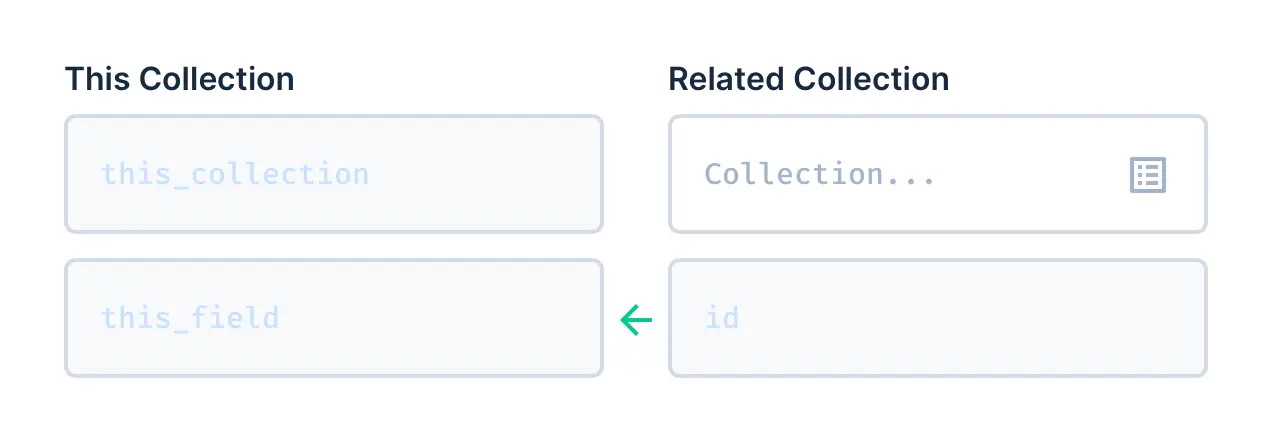
The parent collection and field are already known (it's the field you're currently creating), so configuring those are
|
||
disabled. All you need to configure is the related collection and its primary key field.
|
||
|
||
If you select or enter an **existing** Related Collection (highlights green) then the primary key field is known and
|
||
automatically selected. If you enter the name of a **new** Related Collection (doesn't already exist), you will also be
|
||
prompted to enter the name of its primary key field, which will default to an auto-increment integer type.
|
||
|
||
You also have the option to create a **Corresponding Field** during this process. This allows you to more easily create
|
||
the O2M alias (see below) that pairs with this M2O.
|
||
|
||
**Relational Triggers** allow for control over what happens when a relationship is broken. There is one option:
|
||
|
||
- **On Delete of [Related Collection]** — When the related item (O2M) is deleted...
|
||
- Nullify the parent M2O field (default)
|
||
- Set the parent M2O field to its default value
|
||
- Delete the parent collection's item (cascade)
|
||
- Prevent the deletion
|
||
|
||
## One-to-Many (O2M)
|
||
|
||
The One-to-Many relationship is the **exact same relationship** as a Many-to-One (above), just seen from the opposite
|
||
collection's perspective. The O2M is stored as an [Alias](/getting-started/glossary/#alias) field on its parent
|
||
Collection that dynamically lists all items connected via the opposite Many-to-One. So, while the M2O will show a single
|
||
country for the parent city, the O2M shows all cities for the parent country.
|
||
|
||
Below is an example of a O2M relationship:
|
||
|
||
```
|
||
countries (the "One" Collection)
|
||
- id (Primary Key)
|
||
- name
|
||
- *cities* (the O2M alias field that lists references from "cities.country")
|
||
|
||
cities (the "Many" Collection)
|
||
- id (Primary Key)
|
||
- name
|
||
- country (the M2O field that stores the country key)
|
||
```
|
||
|
||
### Setup
|
||
|
||
|
||
|
||
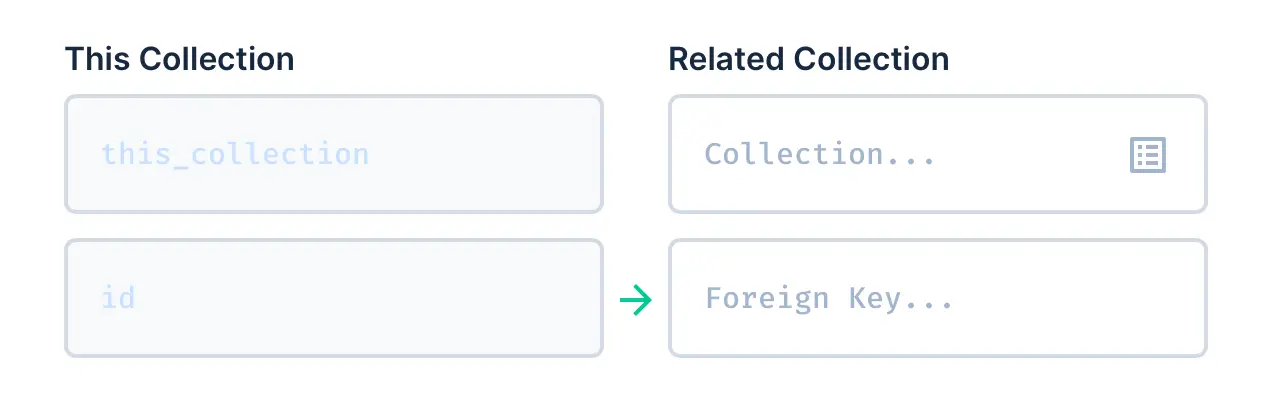
The parent collection and field are already known (it's the field you're currently creating), so configuring those are
|
||
disabled. All you need to configure is the related collection and its M2O field.
|
||
|
||
You can select or enter an **existing** Related Collection (highlights green) or create a **new** one by entering a
|
||
unique collection name. Next, you can select an existing field (highlights green) or create a new one by entering a
|
||
field name unique to its collection.
|
||
|
||
The related field will store the value of this collection's primary key field, so both must have the same type. For this
|
||
reason, when selecting existing fields, options will be disabled if they don't have a matching type.
|
||
|
||
You also have the option to create a **Corresponding Field** during this process. This allows you to more easily create
|
||
the M2O field (see above) that pairs with this O2M.
|
||
|
||
The optional **Sort Field** can be used to enable manual reordering of items within this O2M field. This is configured
|
||
by selecting an existing numeric type field (highlights green) from the Related Collection, or entering the name of a
|
||
new field to be created.
|
||
|
||
**Relational Triggers** allow for control over what happens when a relationship is broken. There are two options:
|
||
|
||
- **On Deselect of [Related Collection]** — When the value of the M2O is deselected...
|
||
- Nullify the M2O field value (default)
|
||
- Delete the M2O item (cascade)
|
||
- **On Delete of [Parent Collection Item]** — When this O2M item is deleted...
|
||
- Nullify the related M2O field (default)
|
||
- Set the related M2O field to its default value
|
||
- Delete the related collection's item (cascade)
|
||
- Prevent the deletion
|
||
|
||
## Translations (O2M)
|
||
|
||
The Translations relationship is just a special version of the standard O2M. Just like the O2M, it creates an
|
||
[Alias](/getting-started/glossary/#alias) field that is used to list all related items (the translations). Translations
|
||
themselves are stored in a separate collection, which is then further related to a _third_ collection that stores all
|
||
languages.
|
||
|
||
### Setup
|
||
|
||

|
||
|
||
The easiest way to add translations is to use the wizard, which only asks for the Translation field name. All required
|
||
fields and relationships will then be automatically created and configured.
|
||
|
||

|
||
|
||
If you choose to switch to **manual setup**, you will be presented with a similar relationship setup to O2M or M2M. The
|
||
parent collection and primary key are known, so those fields are disabled.
|
||
|
||
Next, we configure the Translation Collection. Set to "Auto Fill" by default, this will enter intelligent naming based
|
||
on related names, and disables all fields. Disabling Auto Fill will enable all fields, allowing you to name the
|
||
collection that holds the translations, as well as the two fields (each a M2O) that store foreign keys to the parent
|
||
item and language.
|
||
|
||
Lastly, you would select/create the Languages collection, which stores the languages available for this translations
|
||
field. It is common practice to reuse a single languages collection throughout your project, unless translation fields
|
||
need to support different language sets. For the language `code` we recommend using the IETF language tag (eg: `en-US`)
|
||
which combines the ISO 639-1 and ISO 3166‑1 standards, but anything can be used (eg: `english`).
|
||
|
||
## Many-to-Many (M2M)
|
||
|
||
The Many-to-Many relationship is actually just **two relationships combined** (O2M+M2O) that join together three
|
||
different collections. The M2M is stored as an [Alias](/getting-started/glossary/#alias) field on its parent Collection
|
||
that dynamically lists all items connected via a [junction collection](/getting-started/glossary/#junction-collections).
|
||
For example, a _recipe_ can have many _ingredients_, and _ingredients_ can be in many _recipes_.
|
||
|
||
Below is an example of a M2M relationship:
|
||
|
||
```
|
||
recipes (Collection)
|
||
- id (Primary Key)
|
||
- name
|
||
- *ingredients* (M2M/O2M alias field that lists references from "recipe_ingredients")
|
||
|
||
ingredients (Collection)
|
||
- id (Primary Key)
|
||
- name
|
||
- *recipes* (M2M/O2M alias field that lists references from "recipe_ingredients")
|
||
|
||
recipe_ingredients (Junction Collection)
|
||
- id (Primary Key)
|
||
- recipe (stores the recipe key)
|
||
- ingredient (stores ingredient key)
|
||
- quantity (other optional data on the connection)
|
||
```
|
||
|
||
Notice that the example above also has a `quantity` field on the Junction Collection, which tracks how much of each
|
||
ingredient is needed for the recipe. You can add any other _contextual_ fields to the junction, and they will also be
|
||
included at the top of the App's relational Item Page form.
|
||
|
||
::: tip Self-Referencing
|
||
|
||
You can also have a M2M relationship that connects items within the _same_ collection. An example of this is "Related
|
||
Articles", where an article might relate to many other articles.
|
||
|
||
:::
|
||
|
||
### Setup
|
||
|
||
|
||
|
||
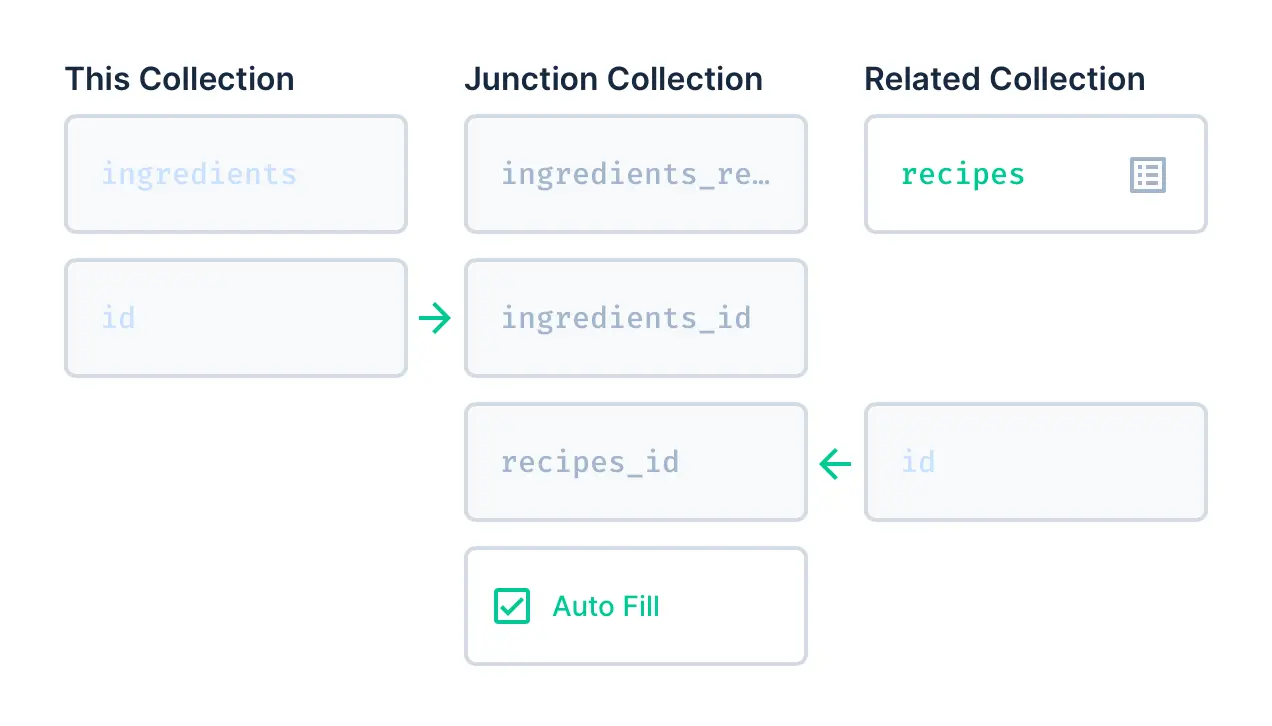
The parent collection and field are already known (it's the field you're currently creating), so configuring those are
|
||
disabled.
|
||
|
||
Next you should configure the Related Collection. If you select or enter an **existing** Related Collection (highlights
|
||
green) then the primary key field is known and automatically selected. If you enter the name of a **new** Related
|
||
Collection (doesn't already exist), you will also be prompted to enter the name of its primary key field, which will
|
||
default to an auto-increment integer type.
|
||
|
||
Lastly, we configure the [Junction Collection](/getting-started/glossary/#junction-collections), which sits between the
|
||
two related collections, storing all links between the two. You can leave this set to "Auto-Fill", which sets
|
||
intelligent naming defaults, or disable it to select existing options or enter custom names.
|
||
|
||
You also have the option to create a **Corresponding Field** during this process. This allows you to more easily create
|
||
the reverse M2M field on the _related_ collection.
|
||
|
||
The optional **Sort Field** can be used to enable manual reordering of items within this O2M field. This is configured
|
||
by selecting an existing numeric type field (highlights green) from the Junction Collection, or entering the name of a
|
||
new field to be created.
|
||
|
||
**Relational Triggers** allow for control over what happens when a relationship is broken. There are three options:
|
||
|
||
- **On Deselect of [Junction Collection]** — When the value of this M2M is deselected...
|
||
- Nullify the junction field (default)
|
||
- Delete the junction item (cascade)
|
||
- **On Delete of [Parent Collection Item]** — When this M2M item is deleted...
|
||
- Nullify the junction field (default)
|
||
- Set the junction field to its default value
|
||
- Delete the related junction item (cascade)
|
||
- Prevent the deletion
|
||
- **On Delete of [Related Collection Item]** — When the related M2M item is deleted...
|
||
- Nullify the junction field (default)
|
||
- Set the junction field to its default value
|
||
- Delete the related junction item (cascade)
|
||
- Prevent the deletion
|
||
|
||
## Many-to-Any (M2A)
|
||
|
||
Sometimes called a "matrix field" or "replicator". Like the M2M, the M2A is stored as an
|
||
[Alias](/getting-started/glossary/#alias) field on its parent Collection that dynamically lists all items connected via
|
||
a [junction collection](/getting-started/glossary/#junction-collections). However, there is one key difference: one side
|
||
of the junction also stores a **collection key**. This combination of collection name and primary key means that you can
|
||
effectively store a reference to _any_ item in the database. You can then artificially limit which collections are valid
|
||
through a related collections "allow list".
|
||
|
||
A common example of a M2A is a "Page Builder", which has a _Pages_ collection that includes any number of different
|
||
"section" Collections, such as: "Heading", "Text", and "Image". In this example the junction table will link different
|
||
sections (from different collections) with a page, creating relational layouts.
|
||
|
||
Below is an example of a M2A relationship:
|
||
|
||
```
|
||
pages (Collection)
|
||
- id
|
||
- name
|
||
- *sections* (O2M/M2A alias field that lists references from "page_sections")
|
||
|
||
page_sections (Junction Collection)
|
||
- id
|
||
- pages_id (stores the primary key of the parent page)
|
||
- collection (stores name of the related collection, for example "headings", "text", or "images")
|
||
- item (stores the primary key of the related item)
|
||
|
||
headings (Collection)
|
||
- id
|
||
- title
|
||
|
||
text (Collection)
|
||
- id
|
||
- text
|
||
|
||
images (Collection)
|
||
- id
|
||
- file
|
||
```
|
||
|
||
### Setup
|
||
|
||

|
||
|
||
The parent collection and field are already known (it's the field you're currently creating), so configuring those are
|
||
disabled.
|
||
|
||
Next, we configure the [Junction Collection](/getting-started/glossary/#junction-collections), which sits between the
|
||
related collections, storing all links between them. You can leave this set to "Auto-Fill", which sets intelligent
|
||
naming defaults, or disable it to select existing options or enter custom names.
|
||
|
||
Lastly, you should select any desired Related Collections. Unlike other relationships, you can't _create_ these related
|
||
collections here, so ensure all related collections you need are created beforehand.
|
||
|
||
::: tip Auto-generating
|
||
|
||
If you enter a collection/field name that doesn't exist yet, Directus will auto-generate these collections/fields once
|
||
you save the changes on the new M2A field.
|
||
|
||
:::
|
||
|
||
The optional **Sort Field** can be used to enable manual reordering of items within this M2A field. This is configured
|
||
by selecting an existing numeric type field (highlights green) from the Junction Collection, or entering the name of a
|
||
new field to be created.
|
||
|
||
**Relational Triggers** allow for control over what happens when a relationship is broken. There are three options:
|
||
|
||
- **On Delete of [Parent Collection Item]** — When a M2A item is deleted...
|
||
- Nullify the junction field (default)
|
||
- Set the junction field to its default value
|
||
- Delete the related junction item (cascade)
|
||
- Prevent the deletion
|
||
- **On Deselect of [Junction Collection]** — When the value of this M2A is deselected...
|
||
- Nullify the junction field (default)
|
||
- Delete the junction item (cascade)
|
||
|
||
## One-to-One (O2O)
|
||
|
||
Directus does not include a dedicated One-to-One (O2O) relationship type or interface. However, O2O is essentially the
|
||
same as a M2O (storing a foreign key). The only difference is that a O2O enforces the cardinality. In other words,
|
||
selecting a relational item in a O2O means that item can not be selected elsewhere (it can only be used once). This
|
||
functionality can be added by checking and constraining uniqueness via a [custom event hook](/extensions/hooks/) or
|
||
[custom interface](/extensions/interfaces/).
|
||
|
||
An example of this is a _person_ only has one unique set of _fingerprints_, and those _fingerprints_ only belong to one
|
||
_person_.
|