mirror of
https://github.com/directus/directus.git
synced 2026-02-14 03:25:00 -05:00
 988edbab0c
* Update flows.md

Minor edits made

* Update triggers.md

Minor changes

* Update operations.md

Added minor changes

* reviewed lori's changes

* comparison tweaks

* widows

Co-authored-by: lmaupas <103216525+lmaupas@users.noreply.github.com>
70 lines
3.1 KiB
Markdown
70 lines
3.1 KiB
Markdown
# Triggers
|
|
|
|
> Triggers allow you to activate Flows on just about any conceivable internal or external event, including any in-app
|
|
> activities, incoming webhooks, cron jobs, Operations in other Flows, or the manual click of a button in the Directus
|
|
> App.
|
|
|
|
[[toc]]
|
|
|
|
:::tip Before You Begin
|
|
|
|
Please be sure to read the documentation on [Flows](/configuration/flows).
|
|
|
|
:::
|
|
|
|
## Event Hook
|
|
|
|
|
|
|
|
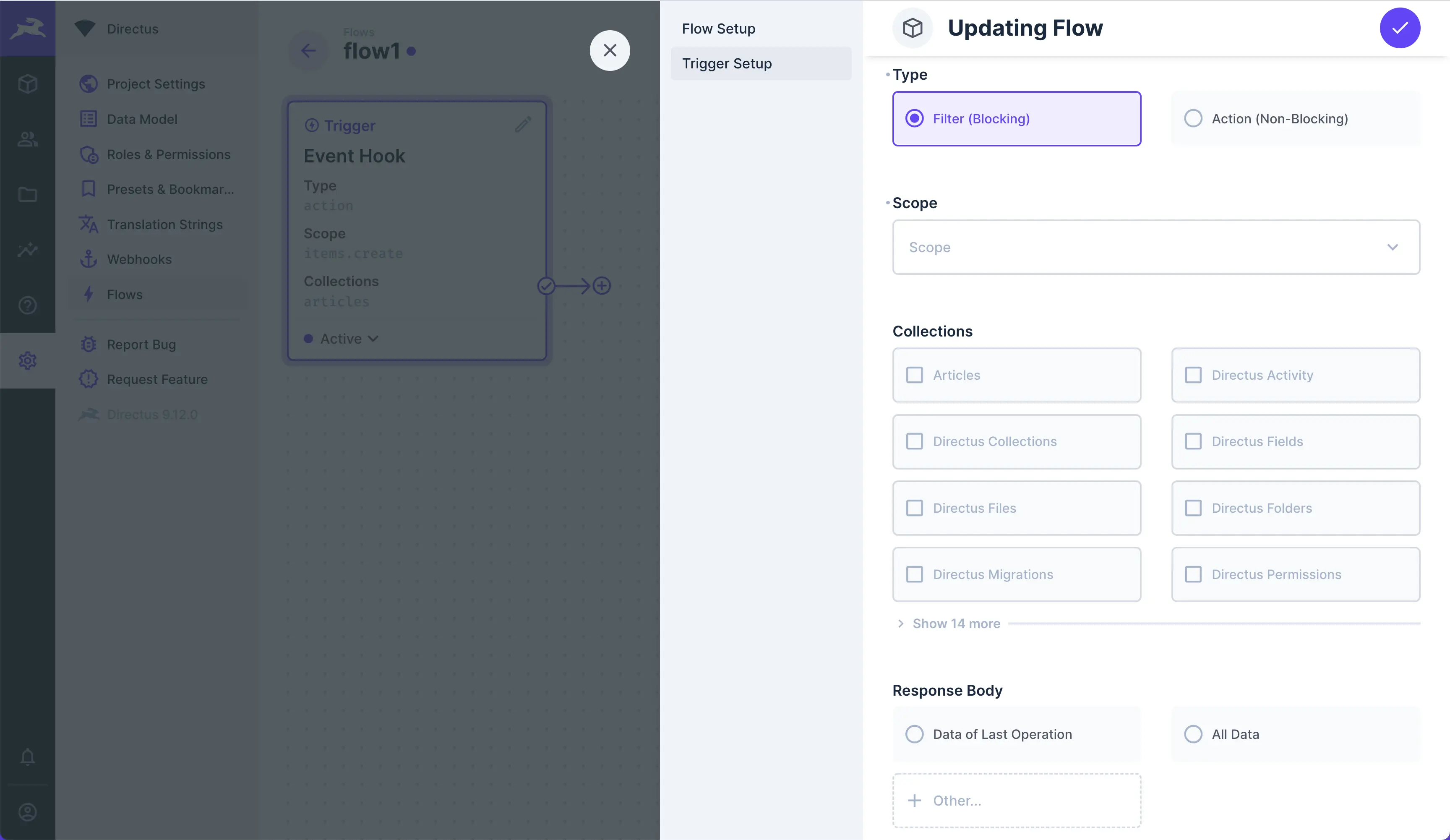
Event Hooks are triggered by platform or data events. The logic is based on [Custom API Hooks](/extensions/hooks/). If
|
|
your event generates data, this will be stored in the Flow Object.
|
|
|
|
- **Type** — Choose the type of Event Hook:
|
|
- **Filter (Blocking)** — Fires "blocking" right before the database transaction is committed, allowing you to tweak
|
|
the payload or prevent completion outright.
|
|
- **Action (Non-Blocking)** — Does not block anything. Therefore, a non-blocking action is mostly useful for
|
|
completing tasks in response to an event, without slowing down the API.
|
|
- **Scope** — Set the specific events that trip this Trigger.
|
|
- **Collections** — Set the Collections that trip this Trigger.
|
|
- **Response Body** — Send Data for the last Operation, all Flow Object data, or the Flow key.
|
|
|
|
## Webhook
|
|
|
|

|
|
|
|
Triggers on an incoming HTTP request to: `/flows/trigger/:this-webhook-trigger-id`.
|
|
|
|
- **Method** — Choose to make a GET, POST, PATCH, DELETE or other request from the dropdown.
|
|
- **Asynchronous** — Toggle whether or not the Trigger responds asynchronously.
|
|
- **Response Body** — Choose to send Data of last Operation, all Flow Object data, or some other key from the Flow
|
|
object.
|
|
|
|
## Schedule
|
|
|
|

|
|
|
|
This Trigger enables you to create Data at scheduled intervals, via 6-point cron job syntax.
|
|
|
|
- **Interval** — Set the cron job interval to schedule when the Flow triggers.
|
|
|
|
## Another Flow
|
|
|
|

|
|
|
|
This Trigger executes a Flow via the [Trigger Flow](/configuration/flows/operations/#another-flow) Operation, allowing
|
|
you to chain Flows together.
|
|
|
|
- **Response Body** — Select data to return in the response to the Trigger Flow.
|
|
|
|
## Manual
|
|
|
|

|
|
|
|
This Trigger starts your Flow on a manual click of a button within the Directus App. When you use this Trigger, a
|
|
**Flows** menu containing a button will appear in the Sidebar of the specified Collection Page(s) and/or Item Pages,
|
|
based on your **Location** configuration.
|
|
|
|
- **Collections** — Choose the Collection(s) to add the Button to.
|
|
- **Location** — Choose to add the button into the Item Page, Collection Page, or both.
|
|
- **Asynchronous** — Toggle whether or not the Flow executes asynchronously.
|