






Garmin Connect Integration
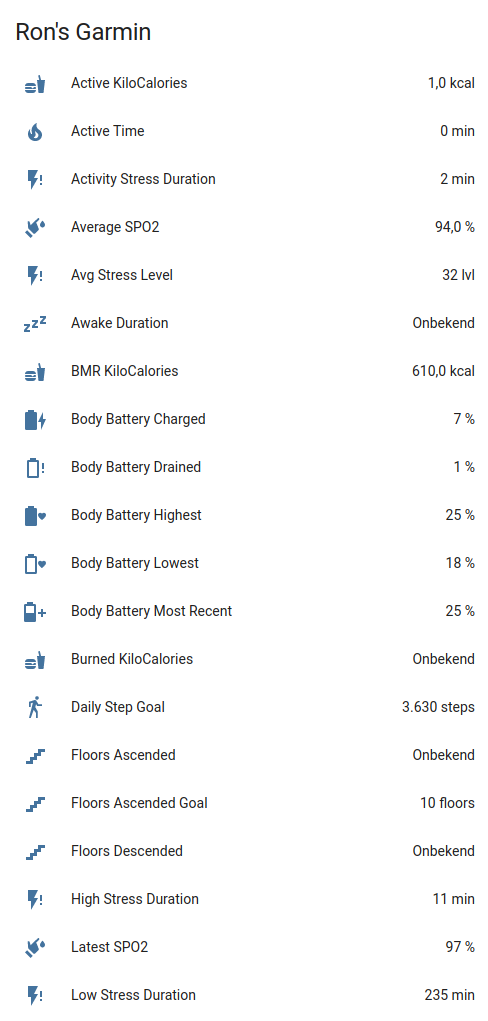
Integrate your Garmin Connect fitness data with Home Assistant. Access 97+ sensors covering health metrics, activities, body composition, and gear tracking—plus add measurements directly to Garmin Connect via services.
Supported Features
- Health Metrics - Steps, calories, heart rate, stress, sleep, body battery, SpO2
- Body Composition - Weight, BMI, body fat, muscle mass, hydration
- Fitness Tracking - Activities, intensity minutes, fitness age, endurance score
- Gear Management - Track usage of shoes, bikes, and other equipment
- Services - Add body composition and blood pressure data, manage gear defaults
Available Sensors
Note: All sensors are enabled by default. You can disable sensors using Home Assistant's sensor configuration. Sensor values depend on your Garmin devices and connected apps.
Activity & Steps
| Sensor | Description |
|---|---|
| Total Steps | Daily step count |
| Daily Step Goal | Your configured step target |
| Total Distance | Distance walked/run in meters |
| Floors Ascended/Descended | Floors climbed |
Calories & Nutrition
| Sensor | Description |
|---|---|
| Total/Active/BMR Calories | Daily calorie metrics |
| Burned/Consumed Calories | Calorie tracking |
Heart Rate
| Sensor | Description |
|---|---|
| Resting Heart Rate | Daily resting HR |
| Min/Max Heart Rate | Daily HR range |
| Last 7 Days Avg HR | Weekly average |
Stress & Recovery
| Sensor | Description |
|---|---|
| Avg/Max Stress Level | Stress measurements (0-100) |
| Stress Durations | Time in rest/activity/low/medium/high stress |
Sleep
| Sensor | Description |
|---|---|
| Sleep Score | Overall sleep quality score |
| Sleep/Awake Duration | Time asleep and awake |
Body Battery
| Sensor | Description |
|---|---|
| Body Battery Most Recent | Current energy level (0-100) |
| Charged/Drained | Energy gained/spent |
| Highest/Lowest | Daily peak and low |
Body Composition
| Sensor | Description |
|---|---|
| Weight/BMI | Body weight and mass index |
| Body Fat/Water | Percentage measurements |
| Muscle/Bone Mass | Mass measurements |
| Metabolic Age | Estimated metabolic age |
Hydration
| Sensor | Description |
|---|---|
| Hydration | Daily water intake (ml) |
| Hydration Goal | Target intake |
| Sweat Loss | Estimated fluid loss |
Health Monitoring
| Sensor | Description |
|---|---|
| SpO2 (Avg/Low/Latest) | Blood oxygen levels |
| HRV Status | Heart rate variability |
| Respiration Rate | Breathing measurements |
Fitness & Performance
| Sensor | Description |
|---|---|
| Fitness Age | Estimated fitness age |
| Chronological Age | Your actual age |
| Endurance Score | Overall endurance rating |
Activity Tracking
| Sensor | Description |
|---|---|
| Next Alarm | Next scheduled alarm time |
| Last Activity/Activities | Recent activity info |
| Badges/User Points/Level | Gamification metrics |
Gear Tracking
Gear sensors are dynamically created for each piece of equipment registered in Garmin Connect (shoes, bikes, etc.). They track total distance and usage statistics.
Screenshots
Requirements
- A Garmin Connect account.
- A device that syncs to the Garmin Connect website.
HACS (Recommended)

Alternatively:
- Install HACS if not already installed
- Search for "Garmin Connect" in HACS
- Click Download
- Restart Home Assistant
- Add via Settings → Devices & Services
Manual Installation
- Copy
custom_components/garmin_connectto your<config>/custom_components/directory - Restart Home Assistant
- Add via Settings → Devices & Services
Configuration
Adding the Integration
- Navigate to Settings → Devices & Services
- Click + Add Integration
- Search for "Garmin Connect"
- Enter your configuration:
- Username: Your Garmin Connect username
- Password: Your Garmin Connect password
- MFA Code: Your Garmin Connect MFA code (optional)
Advanced Usage
Automation Examples
Add Body Composition
action: garmin_connect.add_body_composition
target:
  entity_id: sensor.garmin_connect_weight
data:
  weight: 87
  bmi: 25.5
  bone_mass: 4.8
See the action template for other available values to add.
Note: You need to enable the Weight entity first.
Full Automation Example (Withings to Garmin):
alias: WithingsToGarmin
description: Sync weight from Withings to Garmin Connect
triggers:
  - trigger: state
    entity_id:
      - sensor.withings_weight
conditions:
  - condition: numeric_state
    entity_id: sensor.withings_weight
    above: 55
    below: 100
actions:
  - action: garmin_connect.add_body_composition
    target:
      entity_id: sensor.garmin_connect_weight
    data:
      weight: "{{ states('sensor.withings_weight') }}"
      timestamp: "{{ now().isoformat() }}"
      bmi: >-
        {{ (states('sensor.withings_weight') | float(0) / 1.72**2) | round(1) }}
      bone_mass: "{{ states('sensor.withings_bone_mass') }}"
      muscle_mass: "{{ states('sensor.withings_muscle_mass') }}"
      percent_fat: "{{ states('sensor.withings_fat_ratio') }}"
mode: single
Set Active Gear
action: garmin_connect.set_active_gear
target:
  entity_id: sensor.garmin_connect_adidas_running_shoes
data:
  activity_type: running
  setting: set as default
Add Blood Pressure
action: garmin_connect.add_blood_pressure
target:
  entity_id: sensor.garmin_connect_resting_heart_rate
data:
  systolic: 120
  diastolic: 80
  pulse: 60
  timestamp: "2025-01-21T07:34:00"
  notes: Measured with Beurer BC54
Enable Debug Logging
Add the relevant lines below to the configuration.yaml:
logger:
  default: info
  logs:
    custom_components.garmin_connect: debug
Alternatively, enable debug logging via the UI in Settings → Devices & Services → Garmin Connect → Enable debug logging:

Then perform any steps to reproduce the issue and disable debug logging again. It will download the relevant log file automatically.
Development
Quick-start (from project root):
python3 -m venv .venv
source .venv/bin/activate
python -m pip install --upgrade pip
pip install -r requirements_lint.txt
./scripts/lint    # runs pre-commit + vulture
# or: ruff check .
# to auto-fix: ruff check . --fix
💖 Support This Project
If you find this library useful for your projects, please consider supporting its continued development and maintenance:
🌟 Ways to Support
- ⭐ Star this repository - Help others discover the project
- 💰 Financial Support - Contribute to development and hosting costs
- 🐛 Report Issues - Help improve stability and compatibility
- 📖 Spread the Word - Share with other developers
💳 Financial Support Options
Why Support?
- Keeps the project actively maintained
- Enables faster bug fixes and new features
- Supports infrastructure costs (testing, AI, CI/CD)
- Shows appreciation for hundreds of hours of development
Every contribution, no matter the size, makes a difference and is greatly appreciated! 🙏
License
This project is licensed under the MIT License - see the LICENSE file for details.