
ESLint-plugin-Meteor
Meteor specific linting rules for ESLint










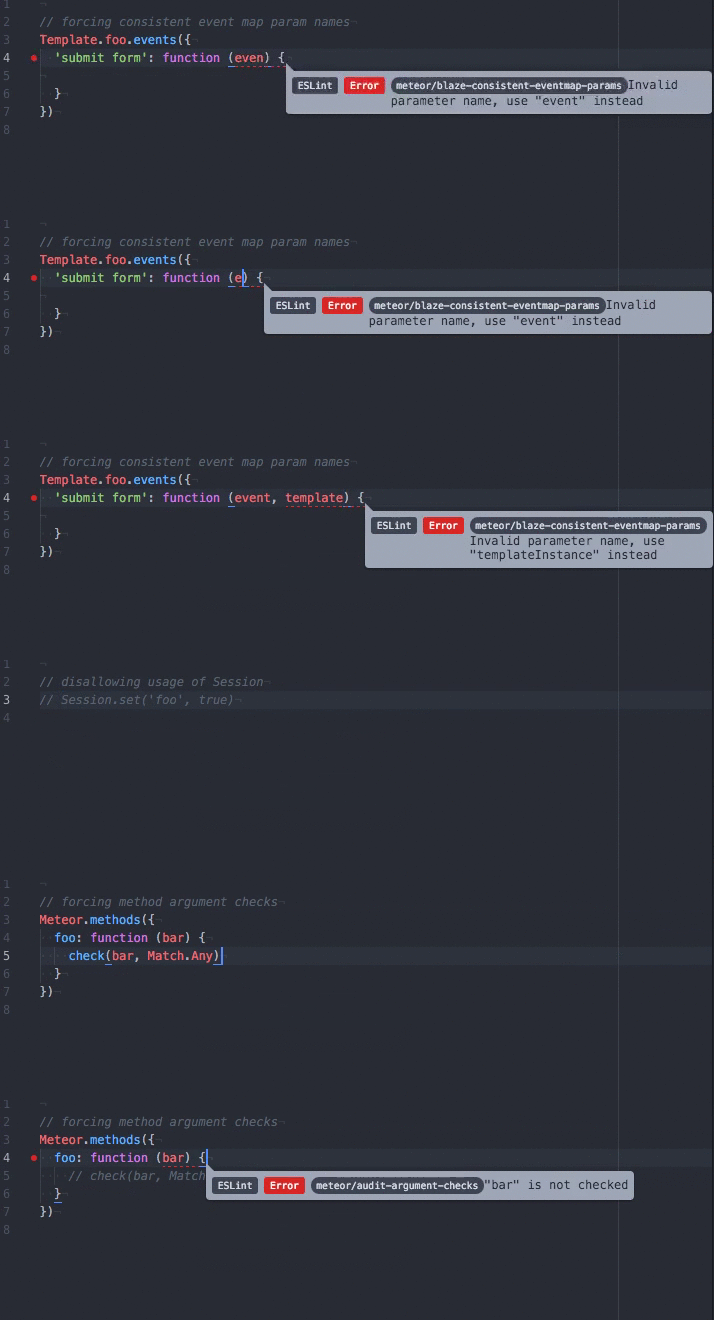
This gif shows integration of ESLint-plugin-Meteor into Atom. Find out more in the integration guide.
Quickstart
Installation
Install ESLint and this plugin either locally or globally.
$ npm install eslint --save-dev
$ npm install eslint-plugin-meteor --save-dev
Configuration
Create an .eslintrc.json file with this content at the root of your project:
{
  "plugins": ["meteor"],
  "extends": ["plugin:meteor/recommended"]
}
For a more thorough introduction, read the setup guide.
An article with detailed setup instructions can be found here.
List of supported rules
Best Practices
- General
- no-zero-timeout: Prevent usage of Meteor.setTimeout with zero delay
- Session
- no-session: Prevent usage of Session
- prefer-session-equals: Prefer
Session.equalsin conditions
- Security
- audit-argument-checks: Enforce check on all arguments passed to methods and publish functions
- Blaze
- template-names: Naming convention for templates
- no-template-lifecycle-assignments: Prevent deprecated template lifecycle callback assignments
- eventmap-params: Force consistent event handler parameter names in event maps
- prefix-eventmap-selectors: Convention for eventmap selectors
- scope-dom-lookups: Scope DOM lookups to the template instance
- no-dom-lookup-on-created: Forbid DOM lookups in template creation callback
- no-template-parent-data: Avoid accessing template parent data
Core API
- currently no rules implemented
Recommended Configuration
This plugin exports a recommended configuration which enforces good Meteor practices.
The rules enabled in this configuration can be found in lib/index.js.
To enable the recommended configuration use the extends property in your .eslintrc.json config file:
{
  "plugins": [
    "meteor"
  ],
  "extends": ["eslint:recommended", "plugin:meteor/recommended"]
}
You probably also want to enable ESLint to parse ECMAScript 2015 and to support React templates.
Add the following to your .eslintrc.json config file
{
  "parserOptions": {
    "ecmaVersion": 6,
    "sourceType": "module",
    "ecmaFeatures": {
        "jsx": true
    }
  }
}
See ESLint documentation for more information about extending configuration files.
Limitations
ESLint-plugin-Meteor is not aware of where files are going to be executed, to keep the plugin simple. It will not warn when accessing client-only features on the server and vice versa.
Contributing
Read about set up of the development environment.
Thanks
This plugin is inspired by eslint-plugin-react.
License
ESLint-plugin-Meteor is licensed under the MIT License.