mirror of
https://github.com/invoke-ai/InvokeAI.git
synced 2026-01-20 23:18:25 -05:00
Compare commits
313 Commits
feat/dynam
...
v3.1.1
| Author | SHA1 | Date | |
|---|---|---|---|

|
0ec7ac94b8 | ||
|
|
e6dc8937c0 | ||
|
|
dccf291f64 | ||
|
|
d3a94e5853 | ||
|
|
0166d7ba2b | ||
|
|
b700809e14 | ||
|
|
501cb4c1e2 | ||
|
|
56399a650a | ||
|
|
e4035a51af | ||
|
|
cf83ddea15 | ||
|
|
a79d5901c7 | ||
|
|
a98c37b7a3 | ||
|
|
252adb9e70 | ||
|
|
40a0b2c366 | ||
|
|
cfc4caf231 | ||
|
|
e16598c48a | ||
|
|
6506ce3e68 | ||
|
|
3afa73cd33 | ||
|
|
81ea742aea | ||
|
|
15d28bfdbf | ||
|
|
0e5eac7c21 | ||
|
|
0a1c5bea05 | ||
|
|
9c290f4575 | ||
|
|
500f3046a9 | ||
|
|
53f2369d18 | ||
|
|
357912285a | ||
|
|
0f2b8dd7df | ||
|
|
ba2ce72584 | ||
|
|
c54c1f603b | ||
|
|
9caa2a2043 | ||
|
|
86185f2fe3 | ||
|
|
dfbcb773da | ||
|
|
04c0a83bff | ||
|
|
7a30162583 | ||
|
|
2c65ffa305 | ||
|
|
331a6227cc | ||
|
|
eb90ea41fd | ||
|
|
f134804fe7 | ||
|
|
c59c3ae499 | ||
|
|
42ee95ee97 | ||
|
|
b008fd4a5f | ||
|
|
6b850d506a | ||
|
|
3f3e0ab9f5 | ||
|
|
8b305651f9 | ||
|
|
52bd2bbb13 | ||
|
|
a9fafad5b5 | ||
|
|
c5b9c8fc3a | ||
|
|
fb5ac78191 | ||
|
|
871b9286d1 | ||
|
|
c49b436f06 | ||
|
|
d2e327add9 | ||
|
|
2ab75bc52e | ||
|
|
384ad2df6a | ||
|
|
94115b5217 | ||
|
|
10eec546ad | ||
|
|
ac3bf81ca4 | ||
|
|
edd64bd537 | ||
|
|
8795ea8b06 | ||
|
|
b1ef3370fa | ||
|
|
db4af7c287 | ||
|
|
78cc5a7825 | ||
|
|
438bc70dfd | ||
|
|
1f6c868212 | ||
|
|
52d15e06bf | ||
|
|
3dbb0e1bfb | ||
|
|
d6317bc53f | ||
|
|
4aca264308 | ||
|
|
d9148fb619 | ||
|
|
59cb6305b9 | ||
|
|
945b9e3a0a | ||
|
|
920fc0e751 | ||
|
|
34e3c2e000 | ||
|
|
d65553841e | ||
|
|
446dc6bea1 | ||
|
|
92975130bd | ||
|
|
a765f01c08 | ||
|
|
09803b075d | ||
|
|
1062fc4796 | ||
|
|
17170e9dab | ||
|
|
d69f3a03bb | ||
|
|
95f44ff343 | ||
|
|
f9c3c07d98 | ||
|
|
c91ba2dbe7 | ||
|
|
917c2c480e | ||
|
|
fee5cd9c7e | ||
|
|
b0cce8008a | ||
|
|
368c2bf08b | ||
|
|
0a70a856e5 | ||
|
|
56204e84bc | ||
|
|
f1a01c473d | ||
|
|
e27819f18f | ||
|
|
f1f7778e73 | ||
|
|
7763594839 | ||
|
|
c965d3eb6b | ||
|
|
85879d3013 | ||
|
|
4fa66b2ba8 | ||
|
|
6cfabc585a | ||
|
|
b5f42bedce | ||
|
|
fded8bee39 | ||
|
|
ec09e21fc2 | ||
|
|
7d50e413bc | ||
|
|
625b08cff7 | ||
|
|
89b724d222 | ||
|
|
6f6d920686 | ||
|
|
699dfa222e | ||
|
|
288aec7080 | ||
|
|
2c754cfce7 | ||
|
|
8fa2302956 | ||
|
|
ec2b44bfbd | ||
|
|
f8bb1f7a3e | ||
|
|
9c3405e0c0 | ||
|
|
4b78deba92 | ||
|
|
d099924ae9 | ||
|
|
45259894e0 | ||
|
|
94473c541d | ||
|
|
0a7d06f8c6 | ||
|
|
3288d9b31a | ||
|
|
9cb04f6f80 | ||
|
|
7269ed2a0a | ||
|
|
4092d051e8 | ||
|
|
46bc6968b8 | ||
|
|
48484e9fc8 | ||
|
|
26f7adeaa3 | ||
|
|
a12fbc7406 | ||
|
|
ba2048dbc6 | ||
|
|
497f66e682 | ||
|
|
b73216ef81 | ||
|
|
469fc49a2f | ||
|
|
a36cf2f1dd | ||
|
|
5151798a16 | ||
|
|
1a9f552a75 | ||
|
|
10e4d8b72d | ||
|
|
6c2786201b | ||
|
|
2cb57ef301 | ||
|
|
44b49c7f2d | ||
|
|
52a5f1f56f | ||
|
|
7a295cbfd5 | ||
|
|
6f162c5dec | ||
|
|
b94ec14853 | ||
|
|
54cda8ea42 | ||
|
|
0d3d880323 | ||
|
|
a74e2108bb | ||
|
|
ca5689dc54 | ||
|
|
b567d65032 | ||
|
|
35ac8e78bd | ||
|
|
e90fd96eee | ||
|
|
ed72d51969 | ||
|
|
d5267357b1 | ||
|
|
e085eb63bd | ||
|
|
8e470f9b6f | ||
|
|
83163ddd9a | ||
|
|
715686477e | ||
|
|
05e203570d | ||
|
|
2bd3cf28ea | ||
|
|
3cd2d3b764 | ||
|
|
4bac36356a | ||
|
|
97763f778a | ||
|
|
754666ed09 | ||
|
|
4c407328f2 | ||
|
|
943bedadf2 | ||
|
|
667d4deeb7 | ||
|
|
adfdb02c1b | ||
|
|
24d44ca559 | ||
|
|
216dff143e | ||
|
|
4047343503 | ||
|
|
f2334ec302 | ||
|
|
044d4c107a | ||
|
|
ae05d34584 | ||
|
|
94d0c18cbd | ||
|
|
7b49f96472 | ||
|
|
9a2c0554de | ||
|
|
68fd07a606 | ||
|
|
71591d0bee | ||
|
|
8014fc2f4f | ||
|
|
29112f96d2 | ||
|
|
4405c39e48 | ||
|
|
1d6be7f7fd | ||
|
|
64723f0628 | ||
|
|
8982543312 | ||
|
|
d8ce20c06f | ||
|
|
0ed6a141f1 | ||
|
|
33cb6cb4d8 | ||
|
|
600e9ecf8d | ||
|
|
ca15b8b33e | ||
|
|
8562dbaaa8 | ||
|
|
db4d35ed45 | ||
|
|
65fb6af01f | ||
|
|
c6bab14043 | ||
|
|
55f19aff3a | ||
|
|
1b6586dd8c | ||
|
|
b5da7faafb | ||
|
|
b13a06f650 | ||
|
|
8e4d288f02 | ||
|
|
8d4caaabb0 | ||
|
|
171a0eaf51 | ||
|
|
2469859c01 | ||
|
|
cff391aa1d | ||
|
|
4fd4aee2ab | ||
|
|
f5c5f59220 | ||
|
|
9afc909ff0 | ||
|
|
176d41d624 | ||
|
|
9eed8cdc27 | ||
|
|
98e905ee48 | ||
|
|
52c2397498 | ||
|
|
9f9807d7f7 | ||
|
|
11fa87388b | ||
|
|
258b0814a8 | ||
|
|
dd2057322c | ||
|
|
41c5963e41 | ||
|
|
ed1456e0cc | ||
|
|
15a927b517 | ||
|
|
121396f844 | ||
|
|
d251124196 | ||
|
|
243e76dd80 | ||
|
|
cfee8d9804 | ||
|
|
68dc3c6cb4 | ||
|
|
4196c669a0 | ||
|
|
a1398dec91 | ||
|
|
c4bec0e81b | ||
|
|
a03233bd8a | ||
|
|
6fdeeb8ce8 | ||
|
|
9993e4b02e | ||
|
|
e6b677873a | ||
|
|
44e77589b7 | ||
|
|
d0c74822eb | ||
|
|
383d008529 | ||
|
|
59511783fc | ||
|
|
605e13eac0 | ||
|
|
2a1d7342a7 | ||
|
|
d1efabaf2f | ||
|
|
577464091c | ||
|
|
aaae471910 | ||
|
|
56ed76fd95 | ||
|
|
5133825efb | ||
|
|
99475ab800 | ||
|
|
50a266e064 | ||
|
|
87bb4d8f6e | ||
|
|
fcb60a7a59 | ||
|
|
b5dac99411 | ||
|
|
a08d22587b | ||
|
|
0ea67050f1 | ||
|
|
6db19a8dee | ||
|
|
ef58635a76 | ||
|
|
594e547c3b | ||
|
|
2bf747caf6 | ||
|
|
cd548f73fd | ||
|
|
bb085c5fba | ||
|
|
3efb1f6f17 | ||
|
|
1ed0d7bf3c | ||
|
|
a5fe6c8af6 | ||
|
|
3c37245804 | ||
|
|
e60af40c8d | ||
|
|
421f5b7d75 | ||
|
|
3ef36707a8 | ||
|
|
00ca9b027a | ||
|
|
e81e17ccb6 | ||
|
|
b9731cb434 | ||
|
|
502570e083 | ||
|
|
1f476692da | ||
|
|
5fdd25501b | ||
|
|
4f00dbe704 | ||
|
|
b65c9ad612 | ||
|
|
ef3bf2803f | ||
|
|
f87b2364b7 | ||
|
|
3e6c49001c | ||
|
|
19e0f360e7 | ||
|
|
ea40a7844a | ||
|
|
0d2e194213 | ||
|
|
c6d00387a7 | ||
|
|
3de45af734 | ||
|
|
526c7e7737 | ||
|
|
1811b54727 | ||
|
|
95883c2efd | ||
|
|
b5a83bbc8a | ||
|
|
38851ae19a | ||
|
|
71c3955530 | ||
|
|
3f8d17d6b7 | ||
|
|
b18695df6f | ||
|
|
249048aae7 | ||
|
|
521da555d6 | ||
|
|
c923d094c6 | ||
|
|
226721ce51 | ||
|
|
af3e316cee | ||
|
|
382a55afd3 | ||
|
|
e9633a3adb | ||
|
|
61224e5cfe | ||
|
|
dc581350e6 | ||
|
|
64c5b20ce3 | ||
|
|
8a79798fa6 | ||
|
|
7ab3d3861c | ||
|
|
8e90468637 | ||
|
|
ac942a2034 | ||
|
|
d52a096607 | ||
|
|
7caccb11fa | ||
|
|
e22c797fa3 | ||
|
|
0c5736d9c9 | ||
|
|
2d8f7d425c | ||
|
|
7d1942e9f0 | ||
|
|
5d8cd62e44 | ||
|
|
b6dc5c0fee | ||
|
|
c1b8e4b501 | ||
|
|
65feb92286 | ||
|
|
3798c8bdb0 | ||
|
|
c49851e027 | ||
|
|
3c43594c26 | ||
|
|
cfd827cfad | ||
|
|
e9a294f733 | ||
|
|
b213335316 | ||
|
|
ff5c725586 | ||
|
|
bf0dfcac2f | ||
|
|
5aa7bfebd4 | ||
|
|
e7d9e552a7 | ||
|
|
d2c55dc011 |
38
.github/CODEOWNERS
vendored
38
.github/CODEOWNERS
vendored
@@ -1,34 +1,34 @@
|
||||
# continuous integration
|
||||
/.github/workflows/ @lstein @blessedcoolant
|
||||
/.github/workflows/ @lstein @blessedcoolant @hipsterusername
|
||||
|
||||
# documentation
|
||||
/docs/ @lstein @blessedcoolant @hipsterusername
|
||||
/mkdocs.yml @lstein @blessedcoolant
|
||||
/docs/ @lstein @blessedcoolant @hipsterusername @Millu
|
||||
/mkdocs.yml @lstein @blessedcoolant @hipsterusername @Millu
|
||||
|
||||
# nodes
|
||||
/invokeai/app/ @Kyle0654 @blessedcoolant @psychedelicious @brandonrising
|
||||
/invokeai/app/ @Kyle0654 @blessedcoolant @psychedelicious @brandonrising @hipsterusername
|
||||
|
||||
# installation and configuration
|
||||
/pyproject.toml @lstein @blessedcoolant
|
||||
/docker/ @lstein @blessedcoolant
|
||||
/scripts/ @ebr @lstein
|
||||
/installer/ @lstein @ebr
|
||||
/invokeai/assets @lstein @ebr
|
||||
/invokeai/configs @lstein
|
||||
/invokeai/version @lstein @blessedcoolant
|
||||
/pyproject.toml @lstein @blessedcoolant @hipsterusername
|
||||
/docker/ @lstein @blessedcoolant @hipsterusername
|
||||
/scripts/ @ebr @lstein @hipsterusername
|
||||
/installer/ @lstein @ebr @hipsterusername
|
||||
/invokeai/assets @lstein @ebr @hipsterusername
|
||||
/invokeai/configs @lstein @hipsterusername
|
||||
/invokeai/version @lstein @blessedcoolant @hipsterusername
|
||||
|
||||
# web ui
|
||||
/invokeai/frontend @blessedcoolant @psychedelicious @lstein @maryhipp
|
||||
/invokeai/backend @blessedcoolant @psychedelicious @lstein @maryhipp
|
||||
/invokeai/frontend @blessedcoolant @psychedelicious @lstein @maryhipp @hipsterusername
|
||||
/invokeai/backend @blessedcoolant @psychedelicious @lstein @maryhipp @hipsterusername
|
||||
|
||||
# generation, model management, postprocessing
|
||||
/invokeai/backend @damian0815 @lstein @blessedcoolant @gregghelt2 @StAlKeR7779 @brandonrising
|
||||
/invokeai/backend @damian0815 @lstein @blessedcoolant @gregghelt2 @StAlKeR7779 @brandonrising @ryanjdick @hipsterusername
|
||||
|
||||
# front ends
|
||||
/invokeai/frontend/CLI @lstein
|
||||
/invokeai/frontend/install @lstein @ebr
|
||||
/invokeai/frontend/merge @lstein @blessedcoolant
|
||||
/invokeai/frontend/training @lstein @blessedcoolant
|
||||
/invokeai/frontend/web @psychedelicious @blessedcoolant @maryhipp
|
||||
/invokeai/frontend/CLI @lstein @hipsterusername
|
||||
/invokeai/frontend/install @lstein @ebr @hipsterusername
|
||||
/invokeai/frontend/merge @lstein @blessedcoolant @hipsterusername
|
||||
/invokeai/frontend/training @lstein @blessedcoolant @hipsterusername
|
||||
/invokeai/frontend/web @psychedelicious @blessedcoolant @maryhipp @hipsterusername
|
||||
|
||||
|
||||
|
||||
12
.github/ISSUE_TEMPLATE/FEATURE_REQUEST.yml
vendored
12
.github/ISSUE_TEMPLATE/FEATURE_REQUEST.yml
vendored
@@ -1,5 +1,5 @@
|
||||
name: Feature Request
|
||||
description: Commit a idea or Request a new feature
|
||||
description: Contribute a idea or request a new feature
|
||||
title: '[enhancement]: '
|
||||
labels: ['enhancement']
|
||||
# assignees:
|
||||
@@ -9,14 +9,14 @@ body:
|
||||
- type: markdown
|
||||
attributes:
|
||||
value: |
|
||||
Thanks for taking the time to fill out this Feature request!
|
||||
Thanks for taking the time to fill out this feature request!
|
||||
|
||||
- type: checkboxes
|
||||
attributes:
|
||||
label: Is there an existing issue for this?
|
||||
description: |
|
||||
Please make use of the [search function](https://github.com/invoke-ai/InvokeAI/labels/enhancement)
|
||||
to see if a simmilar issue already exists for the feature you want to request
|
||||
to see if a similar issue already exists for the feature you want to request
|
||||
options:
|
||||
- label: I have searched the existing issues
|
||||
required: true
|
||||
@@ -36,7 +36,7 @@ body:
|
||||
label: What should this feature add?
|
||||
description: Please try to explain the functionality this feature should add
|
||||
placeholder: |
|
||||
Instead of one huge textfield, it would be nice to have forms for bug-reports, feature-requests, ...
|
||||
Instead of one huge text field, it would be nice to have forms for bug-reports, feature-requests, ...
|
||||
Great benefits with automatic labeling, assigning and other functionalitys not available in that form
|
||||
via old-fashioned markdown-templates. I would also love to see the use of a moderator bot 🤖 like
|
||||
https://github.com/marketplace/actions/issue-moderator-with-commands to auto close old issues and other things
|
||||
@@ -51,6 +51,6 @@ body:
|
||||
|
||||
- type: textarea
|
||||
attributes:
|
||||
label: Aditional Content
|
||||
label: Additional Content
|
||||
description: Add any other context or screenshots about the feature request here.
|
||||
placeholder: This is a Mockup of the design how I imagine it <screenshot>
|
||||
placeholder: This is a mockup of the design how I imagine it <screenshot>
|
||||
|
||||
@@ -29,12 +29,13 @@ The first set of things we need to do when creating a new Invocation are -
|
||||
|
||||
- Create a new class that derives from a predefined parent class called
|
||||
`BaseInvocation`.
|
||||
- The name of every Invocation must end with the word `Invocation` in order for
|
||||
it to be recognized as an Invocation.
|
||||
- Every Invocation must have a `docstring` that describes what this Invocation
|
||||
does.
|
||||
- Every Invocation must have a unique `type` field defined which becomes its
|
||||
indentifier.
|
||||
- While not strictly required, we suggest every invocation class name ends in
|
||||
"Invocation", eg "CropImageInvocation".
|
||||
- Every Invocation must use the `@invocation` decorator to provide its unique
|
||||
invocation type. You may also provide its title, tags and category using the
|
||||
decorator.
|
||||
- Invocations are strictly typed. We make use of the native
|
||||
[typing](https://docs.python.org/3/library/typing.html) library and the
|
||||
installed [pydantic](https://pydantic-docs.helpmanual.io/) library for
|
||||
@@ -43,12 +44,11 @@ The first set of things we need to do when creating a new Invocation are -
|
||||
So let us do that.
|
||||
|
||||
```python
|
||||
from typing import Literal
|
||||
from .baseinvocation import BaseInvocation
|
||||
from .baseinvocation import BaseInvocation, invocation
|
||||
|
||||
@invocation('resize')
|
||||
class ResizeInvocation(BaseInvocation):
|
||||
'''Resizes an image'''
|
||||
type: Literal['resize'] = 'resize'
|
||||
```
|
||||
|
||||
That's great.
|
||||
@@ -62,8 +62,10 @@ our Invocation takes.
|
||||
|
||||
### **Inputs**
|
||||
|
||||
Every Invocation input is a pydantic `Field` and like everything else should be
|
||||
strictly typed and defined.
|
||||
Every Invocation input must be defined using the `InputField` function. This is
|
||||
a wrapper around the pydantic `Field` function, which handles a few extra things
|
||||
and provides type hints. Like everything else, this should be strictly typed and
|
||||
defined.
|
||||
|
||||
So let us create these inputs for our Invocation. First up, the `image` input we
|
||||
need. Generally, we can use standard variable types in Python but InvokeAI
|
||||
@@ -76,55 +78,51 @@ create your own custom field types later in this guide. For now, let's go ahead
|
||||
and use it.
|
||||
|
||||
```python
|
||||
from typing import Literal, Union
|
||||
from pydantic import Field
|
||||
|
||||
from .baseinvocation import BaseInvocation
|
||||
from ..models.image import ImageField
|
||||
from .baseinvocation import BaseInvocation, InputField, invocation
|
||||
from .primitives import ImageField
|
||||
|
||||
@invocation('resize')
|
||||
class ResizeInvocation(BaseInvocation):
|
||||
'''Resizes an image'''
|
||||
type: Literal['resize'] = 'resize'
|
||||
|
||||
# Inputs
|
||||
image: Union[ImageField, None] = Field(description="The input image", default=None)
|
||||
image: ImageField = InputField(description="The input image")
|
||||
```
|
||||
|
||||
Let us break down our input code.
|
||||
|
||||
```python
|
||||
image: Union[ImageField, None] = Field(description="The input image", default=None)
|
||||
image: ImageField = InputField(description="The input image")
|
||||
```
|
||||
|
||||
| Part | Value | Description |
|
||||
| --------- | ---------------------------------------------------- | -------------------------------------------------------------------------------------------------- |
|
||||
| Name | `image` | The variable that will hold our image |
|
||||
| Type Hint | `Union[ImageField, None]` | The types for our field. Indicates that the image can either be an `ImageField` type or `None` |
|
||||
| Field | `Field(description="The input image", default=None)` | The image variable is a field which needs a description and a default value that we set to `None`. |
|
||||
| Part | Value | Description |
|
||||
| --------- | ------------------------------------------- | ------------------------------------------------------------------------------- |
|
||||
| Name | `image` | The variable that will hold our image |
|
||||
| Type Hint | `ImageField` | The types for our field. Indicates that the image must be an `ImageField` type. |
|
||||
| Field | `InputField(description="The input image")` | The image variable is an `InputField` which needs a description. |
|
||||
|
||||
Great. Now let us create our other inputs for `width` and `height`
|
||||
|
||||
```python
|
||||
from typing import Literal, Union
|
||||
from pydantic import Field
|
||||
|
||||
from .baseinvocation import BaseInvocation
|
||||
from ..models.image import ImageField
|
||||
from .baseinvocation import BaseInvocation, InputField, invocation
|
||||
from .primitives import ImageField
|
||||
|
||||
@invocation('resize')
|
||||
class ResizeInvocation(BaseInvocation):
|
||||
'''Resizes an image'''
|
||||
type: Literal['resize'] = 'resize'
|
||||
|
||||
# Inputs
|
||||
image: Union[ImageField, None] = Field(description="The input image", default=None)
|
||||
width: int = Field(default=512, ge=64, le=2048, description="Width of the new image")
|
||||
height: int = Field(default=512, ge=64, le=2048, description="Height of the new image")
|
||||
image: ImageField = InputField(description="The input image")
|
||||
width: int = InputField(default=512, ge=64, le=2048, description="Width of the new image")
|
||||
height: int = InputField(default=512, ge=64, le=2048, description="Height of the new image")
|
||||
```
|
||||
|
||||
As you might have noticed, we added two new parameters to the field type for
|
||||
`width` and `height` called `gt` and `le`. These basically stand for _greater
|
||||
than or equal to_ and _less than or equal to_. There are various other param
|
||||
types for field that you can find on the **pydantic** documentation.
|
||||
As you might have noticed, we added two new arguments to the `InputField`
|
||||
definition for `width` and `height`, called `gt` and `le`. They stand for
|
||||
_greater than or equal to_ and _less than or equal to_.
|
||||
|
||||
These impose contraints on those fields, and will raise an exception if the
|
||||
values do not meet the constraints. Field constraints are provided by
|
||||
**pydantic**, so anything you see in the **pydantic docs** will work.
|
||||
|
||||
**Note:** _Any time it is possible to define constraints for our field, we
|
||||
should do it so the frontend has more information on how to parse this field._
|
||||
@@ -141,20 +139,17 @@ that are provided by it by InvokeAI.
|
||||
Let us create this function first.
|
||||
|
||||
```python
|
||||
from typing import Literal, Union
|
||||
from pydantic import Field
|
||||
|
||||
from .baseinvocation import BaseInvocation, InvocationContext
|
||||
from ..models.image import ImageField
|
||||
from .baseinvocation import BaseInvocation, InputField, invocation
|
||||
from .primitives import ImageField
|
||||
|
||||
@invocation('resize')
|
||||
class ResizeInvocation(BaseInvocation):
|
||||
'''Resizes an image'''
|
||||
type: Literal['resize'] = 'resize'
|
||||
|
||||
# Inputs
|
||||
image: Union[ImageField, None] = Field(description="The input image", default=None)
|
||||
width: int = Field(default=512, ge=64, le=2048, description="Width of the new image")
|
||||
height: int = Field(default=512, ge=64, le=2048, description="Height of the new image")
|
||||
image: ImageField = InputField(description="The input image")
|
||||
width: int = InputField(default=512, ge=64, le=2048, description="Width of the new image")
|
||||
height: int = InputField(default=512, ge=64, le=2048, description="Height of the new image")
|
||||
|
||||
def invoke(self, context: InvocationContext):
|
||||
pass
|
||||
@@ -173,21 +168,18 @@ all the necessary info related to image outputs. So let us use that.
|
||||
We will cover how to create your own output types later in this guide.
|
||||
|
||||
```python
|
||||
from typing import Literal, Union
|
||||
from pydantic import Field
|
||||
|
||||
from .baseinvocation import BaseInvocation, InvocationContext
|
||||
from ..models.image import ImageField
|
||||
from .baseinvocation import BaseInvocation, InputField, invocation
|
||||
from .primitives import ImageField
|
||||
from .image import ImageOutput
|
||||
|
||||
@invocation('resize')
|
||||
class ResizeInvocation(BaseInvocation):
|
||||
'''Resizes an image'''
|
||||
type: Literal['resize'] = 'resize'
|
||||
|
||||
# Inputs
|
||||
image: Union[ImageField, None] = Field(description="The input image", default=None)
|
||||
width: int = Field(default=512, ge=64, le=2048, description="Width of the new image")
|
||||
height: int = Field(default=512, ge=64, le=2048, description="Height of the new image")
|
||||
image: ImageField = InputField(description="The input image")
|
||||
width: int = InputField(default=512, ge=64, le=2048, description="Width of the new image")
|
||||
height: int = InputField(default=512, ge=64, le=2048, description="Height of the new image")
|
||||
|
||||
def invoke(self, context: InvocationContext) -> ImageOutput:
|
||||
pass
|
||||
@@ -195,39 +187,34 @@ class ResizeInvocation(BaseInvocation):
|
||||
|
||||
Perfect. Now that we have our Invocation setup, let us do what we want to do.
|
||||
|
||||
- We will first load the image. Generally we do this using the `PIL` library but
|
||||
we can use one of the services provided by InvokeAI to load the image.
|
||||
- We will first load the image using one of the services provided by InvokeAI to
|
||||
load the image.
|
||||
- We will resize the image using `PIL` to our input data.
|
||||
- We will output this image in the format we set above.
|
||||
|
||||
So let's do that.
|
||||
|
||||
```python
|
||||
from typing import Literal, Union
|
||||
from pydantic import Field
|
||||
|
||||
from .baseinvocation import BaseInvocation, InvocationContext
|
||||
from ..models.image import ImageField, ResourceOrigin, ImageCategory
|
||||
from .baseinvocation import BaseInvocation, InputField, invocation
|
||||
from .primitives import ImageField
|
||||
from .image import ImageOutput
|
||||
|
||||
@invocation("resize")
|
||||
class ResizeInvocation(BaseInvocation):
|
||||
'''Resizes an image'''
|
||||
type: Literal['resize'] = 'resize'
|
||||
"""Resizes an image"""
|
||||
|
||||
# Inputs
|
||||
image: Union[ImageField, None] = Field(description="The input image", default=None)
|
||||
width: int = Field(default=512, ge=64, le=2048, description="Width of the new image")
|
||||
height: int = Field(default=512, ge=64, le=2048, description="Height of the new image")
|
||||
image: ImageField = InputField(description="The input image")
|
||||
width: int = InputField(default=512, ge=64, le=2048, description="Width of the new image")
|
||||
height: int = InputField(default=512, ge=64, le=2048, description="Height of the new image")
|
||||
|
||||
def invoke(self, context: InvocationContext) -> ImageOutput:
|
||||
# Load the image using InvokeAI's predefined Image Service.
|
||||
image = context.services.images.get_pil_image(self.image.image_origin, self.image.image_name)
|
||||
# Load the image using InvokeAI's predefined Image Service. Returns the PIL image.
|
||||
image = context.services.images.get_pil_image(self.image.image_name)
|
||||
|
||||
# Resizing the image
|
||||
# Because we used the above service, we already have a PIL image. So we can simply resize.
|
||||
resized_image = image.resize((self.width, self.height))
|
||||
|
||||
# Preparing the image for output using InvokeAI's predefined Image Service.
|
||||
# Save the image using InvokeAI's predefined Image Service. Returns the prepared PIL image.
|
||||
output_image = context.services.images.create(
|
||||
image=resized_image,
|
||||
image_origin=ResourceOrigin.INTERNAL,
|
||||
@@ -241,7 +228,6 @@ class ResizeInvocation(BaseInvocation):
|
||||
return ImageOutput(
|
||||
image=ImageField(
|
||||
image_name=output_image.image_name,
|
||||
image_origin=output_image.image_origin,
|
||||
),
|
||||
width=output_image.width,
|
||||
height=output_image.height,
|
||||
@@ -253,6 +239,24 @@ certain way that the images need to be dispatched in order to be stored and read
|
||||
correctly. In 99% of the cases when dealing with an image output, you can simply
|
||||
copy-paste the template above.
|
||||
|
||||
### Customization
|
||||
|
||||
We can use the `@invocation` decorator to provide some additional info to the
|
||||
UI, like a custom title, tags and category.
|
||||
|
||||
We also encourage providing a version. This must be a
|
||||
[semver](https://semver.org/) version string ("$MAJOR.$MINOR.$PATCH"). The UI
|
||||
will let users know if their workflow is using a mismatched version of the node.
|
||||
|
||||
```python
|
||||
@invocation("resize", title="My Resizer", tags=["resize", "image"], category="My Invocations", version="1.0.0")
|
||||
class ResizeInvocation(BaseInvocation):
|
||||
"""Resizes an image"""
|
||||
|
||||
image: ImageField = InputField(description="The input image")
|
||||
...
|
||||
```
|
||||
|
||||
That's it. You made your own **Resize Invocation**.
|
||||
|
||||
## Result
|
||||
@@ -271,10 +275,55 @@ new Invocation ready to be used.
|
||||

|
||||
|
||||
## Contributing Nodes
|
||||
Once you've created a Node, the next step is to share it with the community! The best way to do this is to submit a Pull Request to add the Node to the [Community Nodes](nodes/communityNodes) list. If you're not sure how to do that, take a look a at our [contributing nodes overview](contributingNodes).
|
||||
|
||||
Once you've created a Node, the next step is to share it with the community! The
|
||||
best way to do this is to submit a Pull Request to add the Node to the
|
||||
[Community Nodes](nodes/communityNodes) list. If you're not sure how to do that,
|
||||
take a look a at our [contributing nodes overview](contributingNodes).
|
||||
|
||||
## Advanced
|
||||
|
||||
### Custom Output Types
|
||||
|
||||
Like with custom inputs, sometimes you might find yourself needing custom
|
||||
outputs that InvokeAI does not provide. We can easily set one up.
|
||||
|
||||
Now that you are familiar with Invocations and Inputs, let us use that knowledge
|
||||
to create an output that has an `image` field, a `color` field and a `string`
|
||||
field.
|
||||
|
||||
- An invocation output is a class that derives from the parent class of
|
||||
`BaseInvocationOutput`.
|
||||
- All invocation outputs must use the `@invocation_output` decorator to provide
|
||||
their unique output type.
|
||||
- Output fields must use the provided `OutputField` function. This is very
|
||||
similar to the `InputField` function described earlier - it's a wrapper around
|
||||
`pydantic`'s `Field()`.
|
||||
- It is not mandatory but we recommend using names ending with `Output` for
|
||||
output types.
|
||||
- It is not mandatory but we highly recommend adding a `docstring` to describe
|
||||
what your output type is for.
|
||||
|
||||
Now that we know the basic rules for creating a new output type, let us go ahead
|
||||
and make it.
|
||||
|
||||
```python
|
||||
from .baseinvocation import BaseInvocationOutput, OutputField, invocation_output
|
||||
from .primitives import ImageField, ColorField
|
||||
|
||||
@invocation_output('image_color_string_output')
|
||||
class ImageColorStringOutput(BaseInvocationOutput):
|
||||
'''Base class for nodes that output a single image'''
|
||||
|
||||
image: ImageField = OutputField(description="The image")
|
||||
color: ColorField = OutputField(description="The color")
|
||||
text: str = OutputField(description="The string")
|
||||
```
|
||||
|
||||
That's all there is to it.
|
||||
|
||||
<!-- TODO: DANGER - we probably do not want people to create their own field types, because this requires a lot of work on the frontend to accomodate.
|
||||
|
||||
### Custom Input Fields
|
||||
|
||||
Now that you know how to create your own Invocations, let us dive into slightly
|
||||
@@ -329,172 +378,6 @@ like this.
|
||||
color: ColorField = Field(default=ColorField(r=0, g=0, b=0, a=0), description='Background color of an image')
|
||||
```
|
||||
|
||||
**Extra Config**
|
||||
|
||||
All input fields also take an additional `Config` class that you can use to do
|
||||
various advanced things like setting required parameters and etc.
|
||||
|
||||
Let us do that for our _ColorField_ and enforce all the values because we did
|
||||
not define any defaults for our fields.
|
||||
|
||||
```python
|
||||
class ColorField(BaseModel):
|
||||
'''A field that holds the rgba values of a color'''
|
||||
r: int = Field(ge=0, le=255, description="The red channel")
|
||||
g: int = Field(ge=0, le=255, description="The green channel")
|
||||
b: int = Field(ge=0, le=255, description="The blue channel")
|
||||
a: int = Field(ge=0, le=255, description="The alpha channel")
|
||||
|
||||
class Config:
|
||||
schema_extra = {"required": ["r", "g", "b", "a"]}
|
||||
```
|
||||
|
||||
Now it becomes mandatory for the user to supply all the values required by our
|
||||
input field.
|
||||
|
||||
We will discuss the `Config` class in extra detail later in this guide and how
|
||||
you can use it to make your Invocations more robust.
|
||||
|
||||
### Custom Output Types
|
||||
|
||||
Like with custom inputs, sometimes you might find yourself needing custom
|
||||
outputs that InvokeAI does not provide. We can easily set one up.
|
||||
|
||||
Now that you are familiar with Invocations and Inputs, let us use that knowledge
|
||||
to put together a custom output type for an Invocation that returns _width_,
|
||||
_height_ and _background_color_ that we need to create a blank image.
|
||||
|
||||
- A custom output type is a class that derives from the parent class of
|
||||
`BaseInvocationOutput`.
|
||||
- It is not mandatory but we recommend using names ending with `Output` for
|
||||
output types. So we'll call our class `BlankImageOutput`
|
||||
- It is not mandatory but we highly recommend adding a `docstring` to describe
|
||||
what your output type is for.
|
||||
- Like Invocations, each output type should have a `type` variable that is
|
||||
**unique**
|
||||
|
||||
Now that we know the basic rules for creating a new output type, let us go ahead
|
||||
and make it.
|
||||
|
||||
```python
|
||||
from typing import Literal
|
||||
from pydantic import Field
|
||||
|
||||
from .baseinvocation import BaseInvocationOutput
|
||||
|
||||
class BlankImageOutput(BaseInvocationOutput):
|
||||
'''Base output type for creating a blank image'''
|
||||
type: Literal['blank_image_output'] = 'blank_image_output'
|
||||
|
||||
# Inputs
|
||||
width: int = Field(description='Width of blank image')
|
||||
height: int = Field(description='Height of blank image')
|
||||
bg_color: ColorField = Field(description='Background color of blank image')
|
||||
|
||||
class Config:
|
||||
schema_extra = {"required": ["type", "width", "height", "bg_color"]}
|
||||
```
|
||||
|
||||
All set. We now have an output type that requires what we need to create a
|
||||
blank_image. And if you noticed it, we even used the `Config` class to ensure
|
||||
the fields are required.
|
||||
|
||||
### Custom Configuration
|
||||
|
||||
As you might have noticed when making inputs and outputs, we used a class called
|
||||
`Config` from _pydantic_ to further customize them. Because our inputs and
|
||||
outputs essentially inherit from _pydantic_'s `BaseModel` class, all
|
||||
[configuration options](https://docs.pydantic.dev/latest/usage/schema/#schema-customization)
|
||||
that are valid for _pydantic_ classes are also valid for our inputs and outputs.
|
||||
You can do the same for your Invocations too but InvokeAI makes our life a
|
||||
little bit easier on that end.
|
||||
|
||||
InvokeAI provides a custom configuration class called `InvocationConfig`
|
||||
particularly for configuring Invocations. This is exactly the same as the raw
|
||||
`Config` class from _pydantic_ with some extra stuff on top to help faciliate
|
||||
parsing of the scheme in the frontend UI.
|
||||
|
||||
At the current moment, tihs `InvocationConfig` class is further improved with
|
||||
the following features related the `ui`.
|
||||
|
||||
| Config Option | Field Type | Example |
|
||||
| ------------- | ------------------------------------------------------------------------------------------------------------- | --------------------------------------------------------------------------------------------------------------------- |
|
||||
| type_hints | `Dict[str, Literal["integer", "float", "boolean", "string", "enum", "image", "latents", "model", "control"]]` | `type_hint: "model"` provides type hints related to the model like displaying a list of available models |
|
||||
| tags | `List[str]` | `tags: ['resize', 'image']` will classify your invocation under the tags of resize and image. |
|
||||
| title | `str` | `title: 'Resize Image` will rename your to this custom title rather than infer from the name of the Invocation class. |
|
||||
|
||||
So let us update your `ResizeInvocation` with some extra configuration and see
|
||||
how that works.
|
||||
|
||||
```python
|
||||
from typing import Literal, Union
|
||||
from pydantic import Field
|
||||
|
||||
from .baseinvocation import BaseInvocation, InvocationContext, InvocationConfig
|
||||
from ..models.image import ImageField, ResourceOrigin, ImageCategory
|
||||
from .image import ImageOutput
|
||||
|
||||
class ResizeInvocation(BaseInvocation):
|
||||
'''Resizes an image'''
|
||||
type: Literal['resize'] = 'resize'
|
||||
|
||||
# Inputs
|
||||
image: Union[ImageField, None] = Field(description="The input image", default=None)
|
||||
width: int = Field(default=512, ge=64, le=2048, description="Width of the new image")
|
||||
height: int = Field(default=512, ge=64, le=2048, description="Height of the new image")
|
||||
|
||||
class Config(InvocationConfig):
|
||||
schema_extra: {
|
||||
ui: {
|
||||
tags: ['resize', 'image'],
|
||||
title: ['My Custom Resize']
|
||||
}
|
||||
}
|
||||
|
||||
def invoke(self, context: InvocationContext) -> ImageOutput:
|
||||
# Load the image using InvokeAI's predefined Image Service.
|
||||
image = context.services.images.get_pil_image(self.image.image_origin, self.image.image_name)
|
||||
|
||||
# Resizing the image
|
||||
# Because we used the above service, we already have a PIL image. So we can simply resize.
|
||||
resized_image = image.resize((self.width, self.height))
|
||||
|
||||
# Preparing the image for output using InvokeAI's predefined Image Service.
|
||||
output_image = context.services.images.create(
|
||||
image=resized_image,
|
||||
image_origin=ResourceOrigin.INTERNAL,
|
||||
image_category=ImageCategory.GENERAL,
|
||||
node_id=self.id,
|
||||
session_id=context.graph_execution_state_id,
|
||||
is_intermediate=self.is_intermediate,
|
||||
)
|
||||
|
||||
# Returning the Image
|
||||
return ImageOutput(
|
||||
image=ImageField(
|
||||
image_name=output_image.image_name,
|
||||
image_origin=output_image.image_origin,
|
||||
),
|
||||
width=output_image.width,
|
||||
height=output_image.height,
|
||||
)
|
||||
```
|
||||
|
||||
We now customized our code to let the frontend know that our Invocation falls
|
||||
under `resize` and `image` categories. So when the user searches for these
|
||||
particular words, our Invocation will show up too.
|
||||
|
||||
We also set a custom title for our Invocation. So instead of being called
|
||||
`Resize`, it will be called `My Custom Resize`.
|
||||
|
||||
As simple as that.
|
||||
|
||||
As time goes by, InvokeAI will further improve and add more customizability for
|
||||
Invocation configuration. We will have more documentation regarding this at a
|
||||
later time.
|
||||
|
||||
# **[TODO]**
|
||||
|
||||
### Custom Components For Frontend
|
||||
|
||||
Every backend input type should have a corresponding frontend component so the
|
||||
@@ -513,282 +396,4 @@ Let us create a new component for our custom color field we created above. When
|
||||
we use a color field, let us say we want the UI to display a color picker for
|
||||
the user to pick from rather than entering values. That is what we will build
|
||||
now.
|
||||
|
||||
---
|
||||
|
||||
<!-- # OLD -- TO BE DELETED OR MOVED LATER
|
||||
|
||||
---
|
||||
|
||||
## Creating a new invocation
|
||||
|
||||
To create a new invocation, either find the appropriate module file in
|
||||
`/ldm/invoke/app/invocations` to add your invocation to, or create a new one in
|
||||
that folder. All invocations in that folder will be discovered and made
|
||||
available to the CLI and API automatically. Invocations make use of
|
||||
[typing](https://docs.python.org/3/library/typing.html) and
|
||||
[pydantic](https://pydantic-docs.helpmanual.io/) for validation and integration
|
||||
into the CLI and API.
|
||||
|
||||
An invocation looks like this:
|
||||
|
||||
```py
|
||||
class UpscaleInvocation(BaseInvocation):
|
||||
"""Upscales an image."""
|
||||
|
||||
# fmt: off
|
||||
type: Literal["upscale"] = "upscale"
|
||||
|
||||
# Inputs
|
||||
image: Union[ImageField, None] = Field(description="The input image", default=None)
|
||||
strength: float = Field(default=0.75, gt=0, le=1, description="The strength")
|
||||
level: Literal[2, 4] = Field(default=2, description="The upscale level")
|
||||
# fmt: on
|
||||
|
||||
# Schema customisation
|
||||
class Config(InvocationConfig):
|
||||
schema_extra = {
|
||||
"ui": {
|
||||
"tags": ["upscaling", "image"],
|
||||
},
|
||||
}
|
||||
|
||||
def invoke(self, context: InvocationContext) -> ImageOutput:
|
||||
image = context.services.images.get_pil_image(
|
||||
self.image.image_origin, self.image.image_name
|
||||
)
|
||||
results = context.services.restoration.upscale_and_reconstruct(
|
||||
image_list=[[image, 0]],
|
||||
upscale=(self.level, self.strength),
|
||||
strength=0.0, # GFPGAN strength
|
||||
save_original=False,
|
||||
image_callback=None,
|
||||
)
|
||||
|
||||
# Results are image and seed, unwrap for now
|
||||
# TODO: can this return multiple results?
|
||||
image_dto = context.services.images.create(
|
||||
image=results[0][0],
|
||||
image_origin=ResourceOrigin.INTERNAL,
|
||||
image_category=ImageCategory.GENERAL,
|
||||
node_id=self.id,
|
||||
session_id=context.graph_execution_state_id,
|
||||
is_intermediate=self.is_intermediate,
|
||||
)
|
||||
|
||||
return ImageOutput(
|
||||
image=ImageField(
|
||||
image_name=image_dto.image_name,
|
||||
image_origin=image_dto.image_origin,
|
||||
),
|
||||
width=image_dto.width,
|
||||
height=image_dto.height,
|
||||
)
|
||||
|
||||
```
|
||||
|
||||
Each portion is important to implement correctly.
|
||||
|
||||
### Class definition and type
|
||||
|
||||
```py
|
||||
class UpscaleInvocation(BaseInvocation):
|
||||
"""Upscales an image."""
|
||||
type: Literal['upscale'] = 'upscale'
|
||||
```
|
||||
|
||||
All invocations must derive from `BaseInvocation`. They should have a docstring
|
||||
that declares what they do in a single, short line. They should also have a
|
||||
`type` with a type hint that's `Literal["command_name"]`, where `command_name`
|
||||
is what the user will type on the CLI or use in the API to create this
|
||||
invocation. The `command_name` must be unique. The `type` must be assigned to
|
||||
the value of the literal in the type hint.
|
||||
|
||||
### Inputs
|
||||
|
||||
```py
|
||||
# Inputs
|
||||
image: Union[ImageField,None] = Field(description="The input image")
|
||||
strength: float = Field(default=0.75, gt=0, le=1, description="The strength")
|
||||
level: Literal[2,4] = Field(default=2, description="The upscale level")
|
||||
```
|
||||
|
||||
Inputs consist of three parts: a name, a type hint, and a `Field` with default,
|
||||
description, and validation information. For example:
|
||||
|
||||
| Part | Value | Description |
|
||||
| --------- | ------------------------------------------------------------- | ------------------------------------------------------------------------------------------------------------------------- |
|
||||
| Name | `strength` | This field is referred to as `strength` |
|
||||
| Type Hint | `float` | This field must be of type `float` |
|
||||
| Field | `Field(default=0.75, gt=0, le=1, description="The strength")` | The default value is `0.75`, the value must be in the range (0,1], and help text will show "The strength" for this field. |
|
||||
|
||||
Notice that `image` has type `Union[ImageField,None]`. The `Union` allows this
|
||||
field to be parsed with `None` as a value, which enables linking to previous
|
||||
invocations. All fields should either provide a default value or allow `None` as
|
||||
a value, so that they can be overwritten with a linked output from another
|
||||
invocation.
|
||||
|
||||
The special type `ImageField` is also used here. All images are passed as
|
||||
`ImageField`, which protects them from pydantic validation errors (since images
|
||||
only ever come from links).
|
||||
|
||||
Finally, note that for all linking, the `type` of the linked fields must match.
|
||||
If the `name` also matches, then the field can be **automatically linked** to a
|
||||
previous invocation by name and matching.
|
||||
|
||||
### Config
|
||||
|
||||
```py
|
||||
# Schema customisation
|
||||
class Config(InvocationConfig):
|
||||
schema_extra = {
|
||||
"ui": {
|
||||
"tags": ["upscaling", "image"],
|
||||
},
|
||||
}
|
||||
```
|
||||
|
||||
This is an optional configuration for the invocation. It inherits from
|
||||
pydantic's model `Config` class, and it used primarily to customize the
|
||||
autogenerated OpenAPI schema.
|
||||
|
||||
The UI relies on the OpenAPI schema in two ways:
|
||||
|
||||
- An API client & Typescript types are generated from it. This happens at build
|
||||
time.
|
||||
- The node editor parses the schema into a template used by the UI to create the
|
||||
node editor UI. This parsing happens at runtime.
|
||||
|
||||
In this example, a `ui` key has been added to the `schema_extra` dict to provide
|
||||
some tags for the UI, to facilitate filtering nodes.
|
||||
|
||||
See the Schema Generation section below for more information.
|
||||
|
||||
### Invoke Function
|
||||
|
||||
```py
|
||||
def invoke(self, context: InvocationContext) -> ImageOutput:
|
||||
image = context.services.images.get_pil_image(
|
||||
self.image.image_origin, self.image.image_name
|
||||
)
|
||||
results = context.services.restoration.upscale_and_reconstruct(
|
||||
image_list=[[image, 0]],
|
||||
upscale=(self.level, self.strength),
|
||||
strength=0.0, # GFPGAN strength
|
||||
save_original=False,
|
||||
image_callback=None,
|
||||
)
|
||||
|
||||
# Results are image and seed, unwrap for now
|
||||
# TODO: can this return multiple results?
|
||||
image_dto = context.services.images.create(
|
||||
image=results[0][0],
|
||||
image_origin=ResourceOrigin.INTERNAL,
|
||||
image_category=ImageCategory.GENERAL,
|
||||
node_id=self.id,
|
||||
session_id=context.graph_execution_state_id,
|
||||
is_intermediate=self.is_intermediate,
|
||||
)
|
||||
|
||||
return ImageOutput(
|
||||
image=ImageField(
|
||||
image_name=image_dto.image_name,
|
||||
image_origin=image_dto.image_origin,
|
||||
),
|
||||
width=image_dto.width,
|
||||
height=image_dto.height,
|
||||
)
|
||||
```
|
||||
|
||||
The `invoke` function is the last portion of an invocation. It is provided an
|
||||
`InvocationContext` which contains services to perform work as well as a
|
||||
`session_id` for use as needed. It should return a class with output values that
|
||||
derives from `BaseInvocationOutput`.
|
||||
|
||||
Before being called, the invocation will have all of its fields set from
|
||||
defaults, inputs, and finally links (overriding in that order).
|
||||
|
||||
Assume that this invocation may be running simultaneously with other
|
||||
invocations, may be running on another machine, or in other interesting
|
||||
scenarios. If you need functionality, please provide it as a service in the
|
||||
`InvocationServices` class, and make sure it can be overridden.
|
||||
|
||||
### Outputs
|
||||
|
||||
```py
|
||||
class ImageOutput(BaseInvocationOutput):
|
||||
"""Base class for invocations that output an image"""
|
||||
|
||||
# fmt: off
|
||||
type: Literal["image_output"] = "image_output"
|
||||
image: ImageField = Field(default=None, description="The output image")
|
||||
width: int = Field(description="The width of the image in pixels")
|
||||
height: int = Field(description="The height of the image in pixels")
|
||||
# fmt: on
|
||||
|
||||
class Config:
|
||||
schema_extra = {"required": ["type", "image", "width", "height"]}
|
||||
```
|
||||
|
||||
Output classes look like an invocation class without the invoke method. Prefer
|
||||
to use an existing output class if available, and prefer to name inputs the same
|
||||
as outputs when possible, to promote automatic invocation linking.
|
||||
|
||||
## Schema Generation
|
||||
|
||||
Invocation, output and related classes are used to generate an OpenAPI schema.
|
||||
|
||||
### Required Properties
|
||||
|
||||
The schema generation treat all properties with default values as optional. This
|
||||
makes sense internally, but when when using these classes via the generated
|
||||
schema, we end up with e.g. the `ImageOutput` class having its `image` property
|
||||
marked as optional.
|
||||
|
||||
We know that this property will always be present, so the additional logic
|
||||
needed to always check if the property exists adds a lot of extraneous cruft.
|
||||
|
||||
To fix this, we can leverage `pydantic`'s
|
||||
[schema customisation](https://docs.pydantic.dev/usage/schema/#schema-customization)
|
||||
to mark properties that we know will always be present as required.
|
||||
|
||||
Here's that `ImageOutput` class, without the needed schema customisation:
|
||||
|
||||
```python
|
||||
class ImageOutput(BaseInvocationOutput):
|
||||
"""Base class for invocations that output an image"""
|
||||
|
||||
# fmt: off
|
||||
type: Literal["image_output"] = "image_output"
|
||||
image: ImageField = Field(default=None, description="The output image")
|
||||
width: int = Field(description="The width of the image in pixels")
|
||||
height: int = Field(description="The height of the image in pixels")
|
||||
# fmt: on
|
||||
```
|
||||
|
||||
The OpenAPI schema that results from this `ImageOutput` will have the `type`,
|
||||
`image`, `width` and `height` properties marked as optional, even though we know
|
||||
they will always have a value.
|
||||
|
||||
```python
|
||||
class ImageOutput(BaseInvocationOutput):
|
||||
"""Base class for invocations that output an image"""
|
||||
|
||||
# fmt: off
|
||||
type: Literal["image_output"] = "image_output"
|
||||
image: ImageField = Field(default=None, description="The output image")
|
||||
width: int = Field(description="The width of the image in pixels")
|
||||
height: int = Field(description="The height of the image in pixels")
|
||||
# fmt: on
|
||||
|
||||
# Add schema customization
|
||||
class Config:
|
||||
schema_extra = {"required": ["type", "image", "width", "height"]}
|
||||
```
|
||||
|
||||
With the customization in place, the schema will now show these properties as
|
||||
required, obviating the need for extensive null checks in client code.
|
||||
|
||||
See this `pydantic` issue for discussion on this solution:
|
||||
<https://github.com/pydantic/pydantic/discussions/4577> -->
|
||||
|
||||
-->
|
||||
|
||||
@@ -57,6 +57,30 @@ familiar with containerization technologies such as Docker.
|
||||
For downloads and instructions, visit the [NVIDIA CUDA Container
|
||||
Runtime Site](https://developer.nvidia.com/nvidia-container-runtime)
|
||||
|
||||
### cuDNN Installation for 40/30 Series Optimization* (Optional)
|
||||
|
||||
1. Find the InvokeAI folder
|
||||
2. Click on .venv folder - e.g., YourInvokeFolderHere\\.venv
|
||||
3. Click on Lib folder - e.g., YourInvokeFolderHere\\.venv\Lib
|
||||
4. Click on site-packages folder - e.g., YourInvokeFolderHere\\.venv\Lib\site-packages
|
||||
5. Click on Torch directory - e.g., YourInvokeFolderHere\InvokeAI\\.venv\Lib\site-packages\torch
|
||||
6. Click on the lib folder - e.g., YourInvokeFolderHere\\.venv\Lib\site-packages\torch\lib
|
||||
7. Copy everything inside the folder and save it elsewhere as a backup.
|
||||
8. Go to __https://developer.nvidia.com/cudnn__
|
||||
9. Login or create an Account.
|
||||
10. Choose the newer version of cuDNN. **Note:**
|
||||
There are two versions, 11.x or 12.x for the differents architectures(Turing,Maxwell Etc...) of GPUs.
|
||||
You can find which version you should download from [this link](https://docs.nvidia.com/deeplearning/cudnn/support-matrix/index.html).
|
||||
13. Download the latest version and extract it from the download location
|
||||
14. Find the bin folder E\cudnn-windows-x86_64-__Whatever Version__\bin
|
||||
15. Copy and paste the .dll files into YourInvokeFolderHere\\.venv\Lib\site-packages\torch\lib **Make sure to copy, and not move the files**
|
||||
16. If prompted, replace any existing files
|
||||
|
||||
**Notes:**
|
||||
* If no change is seen or any issues are encountered, follow the same steps as above and paste the torch/lib backup folder you made earlier and replace it. If you didn't make a backup, you can also uninstall and reinstall torch through the command line to repair this folder.
|
||||
* This optimization is intended for the newer version of graphics card (40/30 series) but results have been seen with older graphics card.
|
||||
|
||||
|
||||
### Torch Installation
|
||||
|
||||
When installing torch and torchvision manually with `pip`, remember to provide
|
||||
|
||||
@@ -22,16 +22,28 @@ To use a community node graph, download the the `.json` node graph file and load
|
||||

|
||||
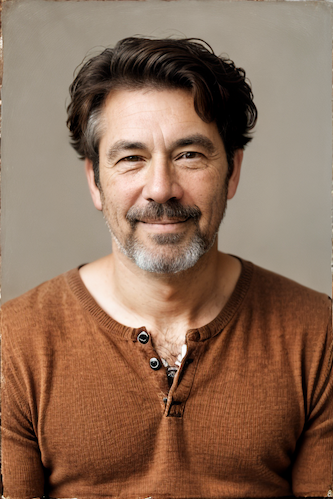
|
||||
|
||||
<hr>
|
||||
|
||||
--------------------------------
|
||||
### Ideal Size
|
||||
|
||||
**Description:** This node calculates an ideal image size for a first pass of a multi-pass upscaling. The aim is to avoid duplication that results from choosing a size larger than the model is capable of.
|
||||
|
||||
**Node Link:** https://github.com/JPPhoto/ideal-size-node
|
||||
|
||||
<hr>
|
||||
--------------------------------
|
||||
### Film Grain
|
||||
|
||||
**Description:** This node adds a film grain effect to the input image based on the weights, seeds, and blur radii parameters. It works with RGB input images only.
|
||||
|
||||
**Node Link:** https://github.com/JPPhoto/film-grain-node
|
||||
|
||||
--------------------------------
|
||||
### Image Picker
|
||||
|
||||
**Description:** This InvokeAI node takes in a collection of images and randomly chooses one. This can be useful when you have a number of poses to choose from for a ControlNet node, or a number of input images for another purpose.
|
||||
|
||||
**Node Link:** https://github.com/JPPhoto/image-picker-node
|
||||
|
||||
--------------------------------
|
||||
### Retroize
|
||||
|
||||
**Description:** Retroize is a collection of nodes for InvokeAI to "Retroize" images. Any image can be given a fresh coat of retro paint with these nodes, either from your gallery or from within the graph itself. It includes nodes to pixelize, quantize, palettize, and ditherize images; as well as to retrieve palettes from existing images.
|
||||
@@ -55,9 +67,135 @@ Generated Prompt: An enchanted weapon will be usable by any character regardless
|
||||
|
||||
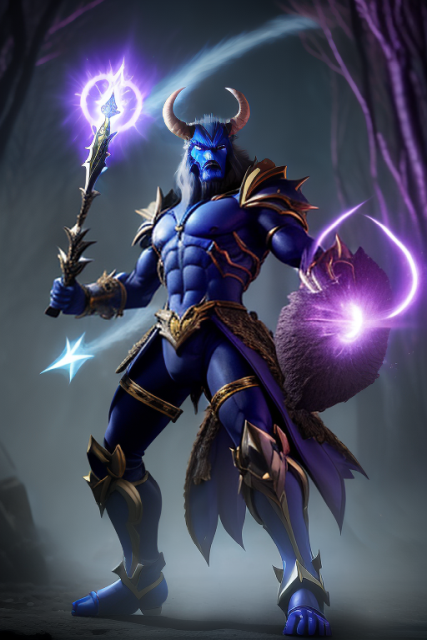
|
||||
|
||||
--------------------------------
|
||||
### Load Video Frame
|
||||
|
||||
**Description:** This is a video frame image provider + indexer/video creation nodes for hooking up to iterators and ranges and ControlNets and such for invokeAI node experimentation. Think animation + ControlNet outputs.
|
||||
|
||||
**Node Link:** https://github.com/helix4u/load_video_frame
|
||||
|
||||
**Example Node Graph:** https://github.com/helix4u/load_video_frame/blob/main/Example_Workflow.json
|
||||
|
||||
**Output Example:**
|
||||
=======
|
||||

|
||||
[Full mp4 of Example Output test.mp4](https://github.com/helix4u/load_video_frame/blob/main/test.mp4)
|
||||
|
||||
--------------------------------
|
||||
|
||||
### Oobabooga
|
||||
|
||||
**Description:** asks a local LLM running in Oobabooga's Text-Generation-Webui to write a prompt based on the user input.
|
||||
|
||||
**Link:** https://github.com/sammyf/oobabooga-node
|
||||
|
||||
|
||||
**Example:**
|
||||
|
||||
"describe a new mystical creature in its natural environment"
|
||||
|
||||
*can return*
|
||||
|
||||
"The mystical creature I am describing to you is called the "Glimmerwing". It is a majestic, iridescent being that inhabits the depths of the most enchanted forests and glimmering lakes. Its body is covered in shimmering scales that reflect every color of the rainbow, and it has delicate, translucent wings that sparkle like diamonds in the sunlight. The Glimmerwing's home is a crystal-clear lake, surrounded by towering trees with leaves that shimmer like jewels. In this serene environment, the Glimmerwing spends its days swimming gracefully through the water, chasing schools of glittering fish and playing with the gentle ripples of the lake's surface.
|
||||
As the sun sets, the Glimmerwing perches on a branch of one of the trees, spreading its wings to catch the last rays of light. The creature's scales glow softly, casting a rainbow of colors across the forest floor. The Glimmerwing sings a haunting melody, its voice echoing through the stillness of the night air. Its song is said to have the power to heal the sick and bring peace to troubled souls. Those who are lucky enough to hear the Glimmerwing's song are forever changed by its beauty and grace."
|
||||
|
||||

|
||||
|
||||
**Requirement**
|
||||
|
||||
a Text-Generation-Webui instance (might work remotely too, but I never tried it) and obviously InvokeAI 3.x
|
||||
|
||||
**Note**
|
||||
|
||||
This node works best with SDXL models, especially as the style can be described independantly of the LLM's output.
|
||||
|
||||
--------------------------------
|
||||
### Depth Map from Wavefront OBJ
|
||||
|
||||
**Description:** Render depth maps from Wavefront .obj files (triangulated) using this simple 3D renderer utilizing numpy and matplotlib to compute and color the scene. There are simple parameters to change the FOV, camera position, and model orientation.
|
||||
|
||||
To be imported, an .obj must use triangulated meshes, so make sure to enable that option if exporting from a 3D modeling program. This renderer makes each triangle a solid color based on its average depth, so it will cause anomalies if your .obj has large triangles. In Blender, the Remesh modifier can be helpful to subdivide a mesh into small pieces that work well given these limitations.
|
||||
|
||||
**Node Link:** https://github.com/dwringer/depth-from-obj-node
|
||||
|
||||
**Example Usage:**
|
||||
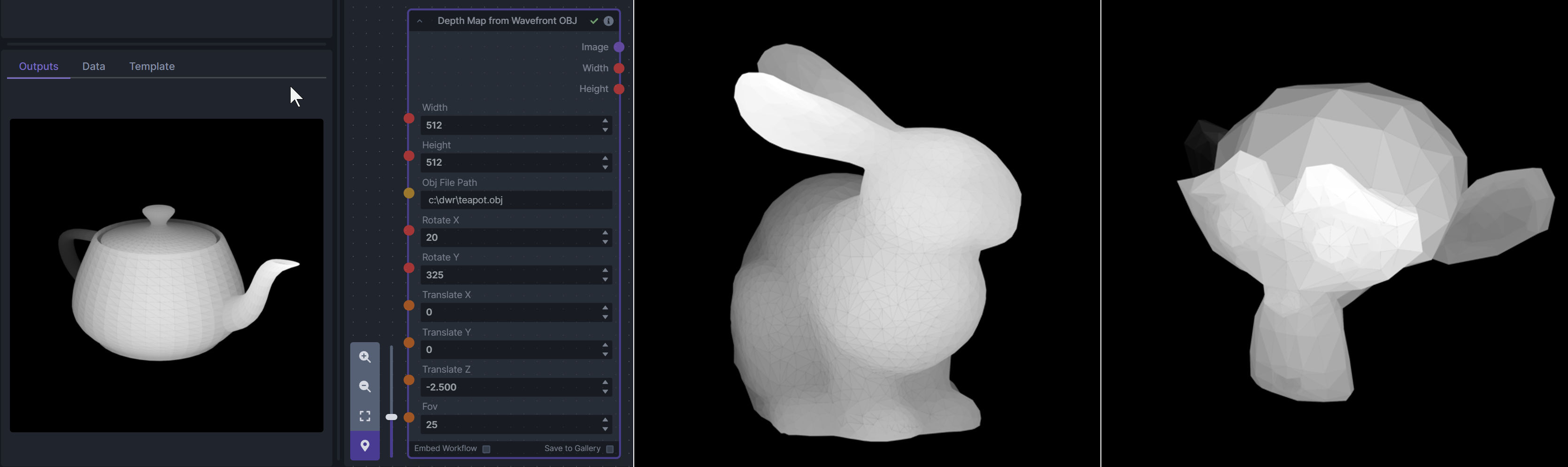
|
||||
|
||||
--------------------------------
|
||||
### Enhance Image (simple adjustments)
|
||||
|
||||
**Description:** Boost or reduce color saturation, contrast, brightness, sharpness, or invert colors of any image at any stage with this simple wrapper for pillow [PIL]'s ImageEnhance module.
|
||||
|
||||
Color inversion is toggled with a simple switch, while each of the four enhancer modes are activated by entering a value other than 1 in each corresponding input field. Values less than 1 will reduce the corresponding property, while values greater than 1 will enhance it.
|
||||
|
||||
**Node Link:** https://github.com/dwringer/image-enhance-node
|
||||
|
||||
**Example Usage:**
|
||||
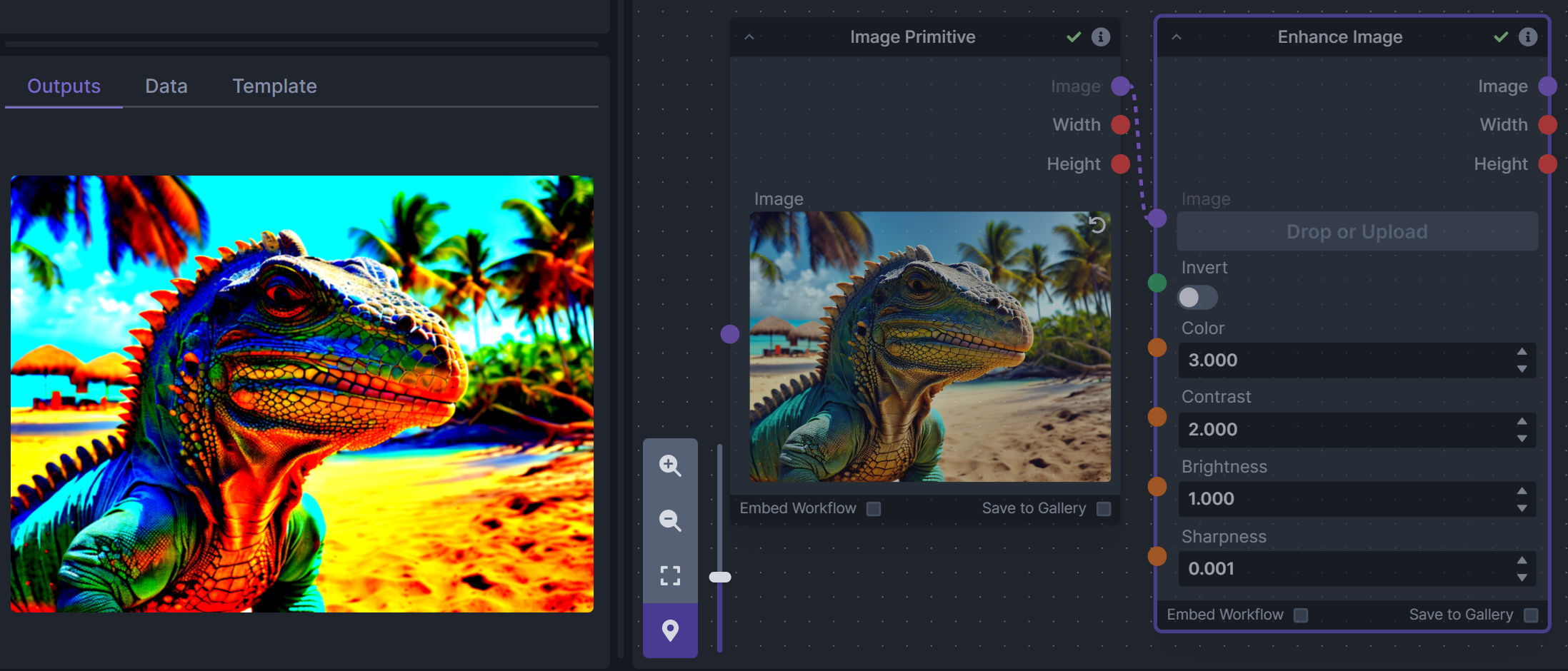
|
||||
|
||||
--------------------------------
|
||||
### Generative Grammar-Based Prompt Nodes
|
||||
|
||||
**Description:** This set of 3 nodes generates prompts from simple user-defined grammar rules (loaded from custom files - examples provided below). The prompts are made by recursively expanding a special template string, replacing nonterminal "parts-of-speech" until no more nonterminal terms remain in the string.
|
||||
|
||||
This includes 3 Nodes:
|
||||
- *Lookup Table from File* - loads a YAML file "prompt" section (or of a whole folder of YAML's) into a JSON-ified dictionary (Lookups output)
|
||||
- *Lookups Entry from Prompt* - places a single entry in a new Lookups output under the specified heading
|
||||
- *Prompt from Lookup Table* - uses a Collection of Lookups as grammar rules from which to randomly generate prompts.
|
||||
|
||||
**Node Link:** https://github.com/dwringer/generative-grammar-prompt-nodes
|
||||
|
||||
**Example Usage:**
|
||||
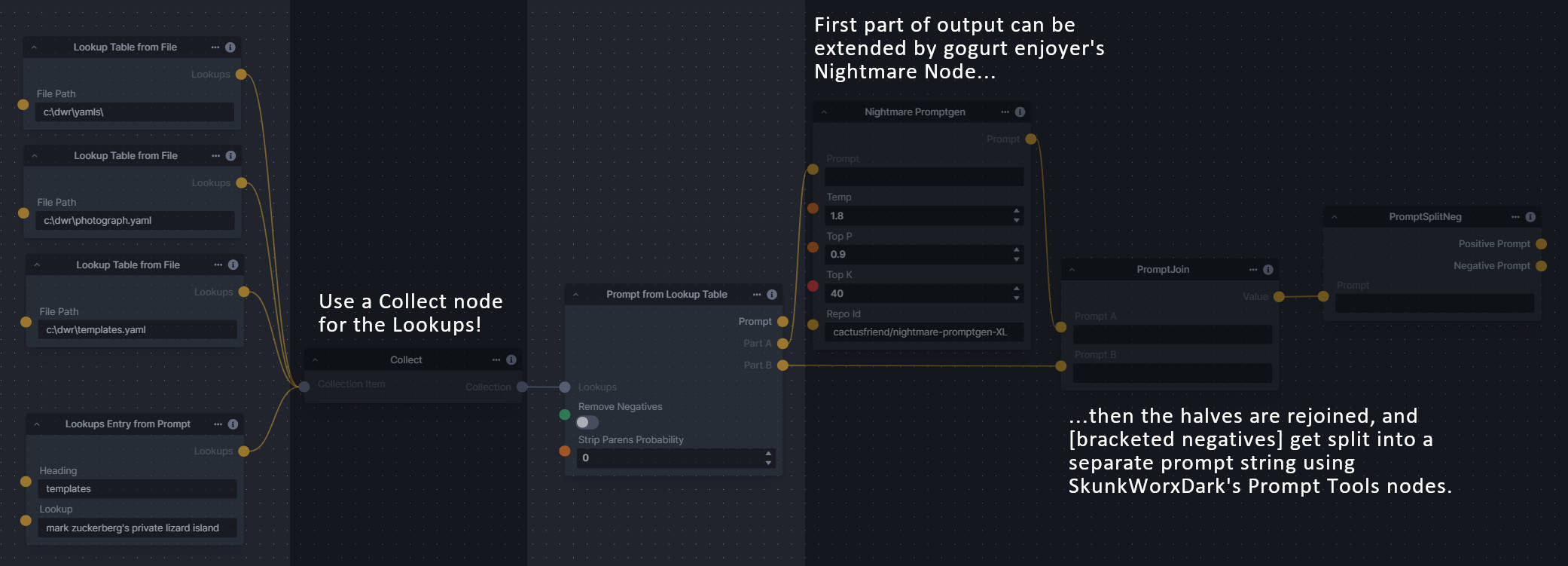
|
||||
|
||||
--------------------------------
|
||||
### Image and Mask Composition Pack
|
||||
|
||||
**Description:** This is a pack of nodes for composing masks and images, including a simple text mask creator and both image and latent offset nodes. The offsets wrap around, so these can be used in conjunction with the Seamless node to progressively generate centered on different parts of the seamless tiling.
|
||||
|
||||
This includes 4 Nodes:
|
||||
- *Text Mask (simple 2D)* - create and position a white on black (or black on white) line of text using any font locally available to Invoke.
|
||||
- *Image Compositor* - Take a subject from an image with a flat backdrop and layer it on another image using a chroma key or flood select background removal.
|
||||
- *Offset Latents* - Offset a latents tensor in the vertical and/or horizontal dimensions, wrapping it around.
|
||||
- *Offset Image* - Offset an image in the vertical and/or horizontal dimensions, wrapping it around.
|
||||
|
||||
**Node Link:** https://github.com/dwringer/composition-nodes
|
||||
|
||||
**Example Usage:**
|
||||
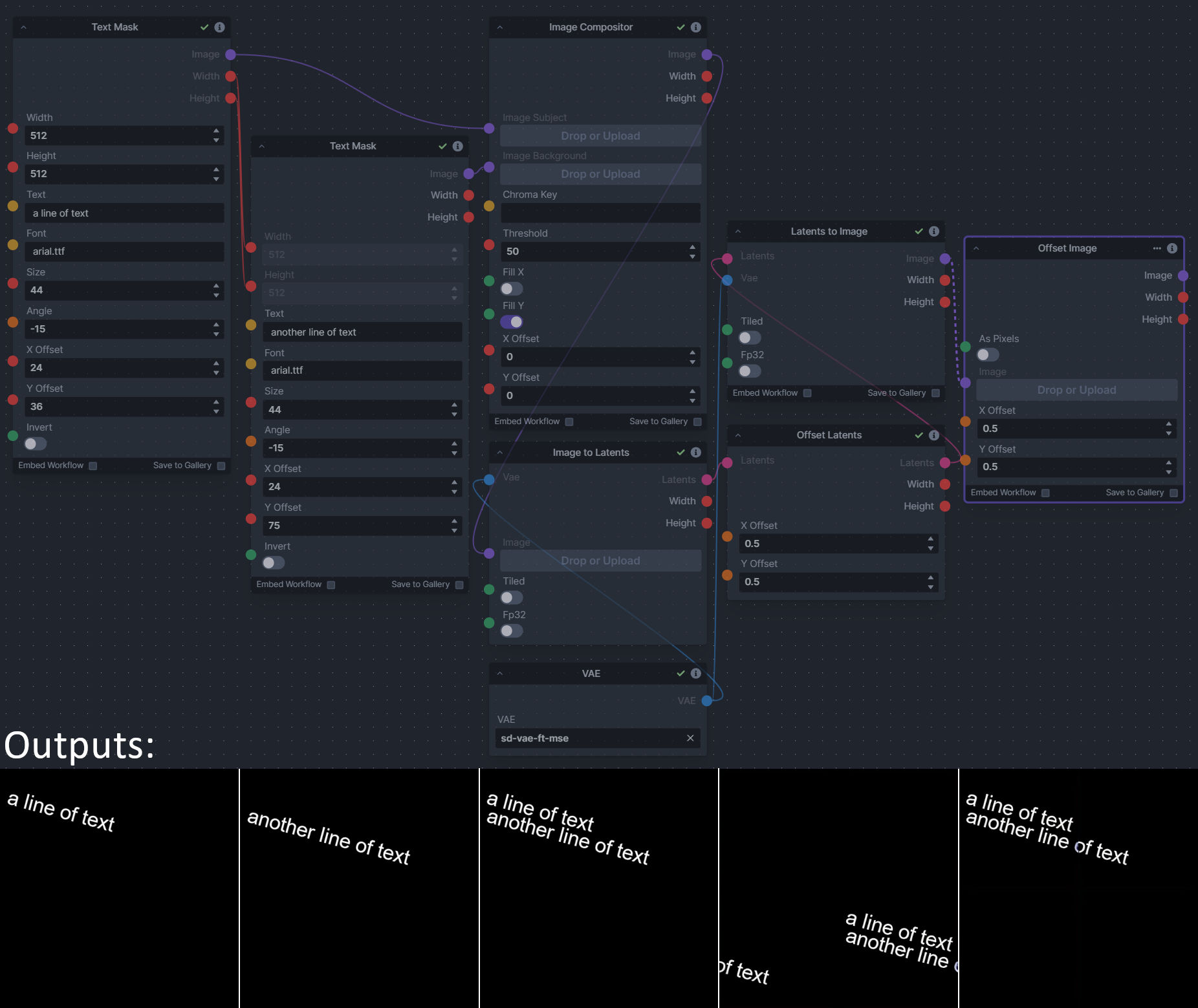
|
||||
|
||||
--------------------------------
|
||||
### Size Stepper Nodes
|
||||
|
||||
**Description:** This is a set of nodes for calculating the necessary size increments for doing upscaling workflows. Use the *Final Size & Orientation* node to enter your full size dimensions and orientation (portrait/landscape/random), then plug that and your initial generation dimensions into the *Ideal Size Stepper* and get 1, 2, or 3 intermediate pairs of dimensions for upscaling. Note this does not output the initial size or full size dimensions: the 1, 2, or 3 outputs of this node are only the intermediate sizes.
|
||||
|
||||
A third node is included, *Random Switch (Integers)*, which is just a generic version of Final Size with no orientation selection.
|
||||
|
||||
**Node Link:** https://github.com/dwringer/size-stepper-nodes
|
||||
|
||||
**Example Usage:**
|
||||
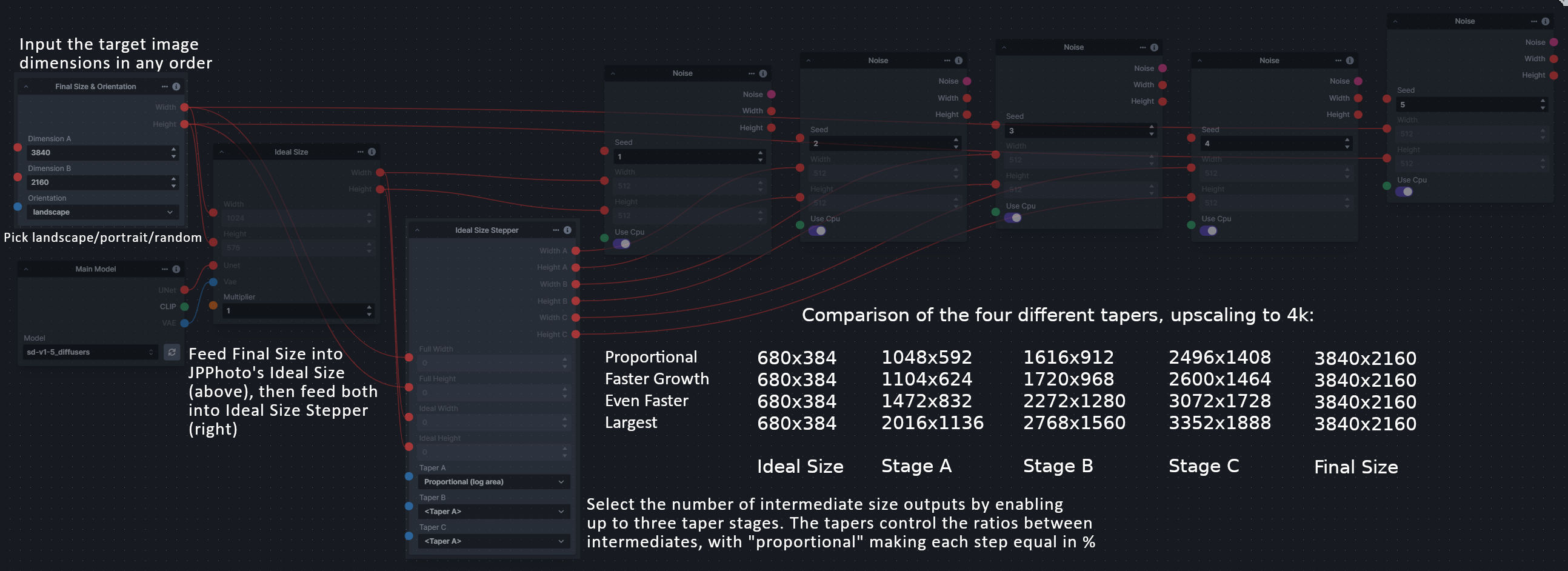
|
||||
|
||||
--------------------------------
|
||||
|
||||
### Text font to Image
|
||||
|
||||
**Description:** text font to text image node for InvokeAI, download a font to use (or if in font cache uses it from there), the text is always resized to the image size, but can control that with padding, optional 2nd line
|
||||
|
||||
**Node Link:** https://github.com/mickr777/textfontimage
|
||||
|
||||
**Output Examples**
|
||||
|
||||

|
||||
|
||||
Results after using the depth controlnet
|
||||
|
||||

|
||||

|
||||

|
||||
|
||||
--------------------------------
|
||||
|
||||
### Example Node Template
|
||||
|
||||
**Description:** This node allows you to do super cool things with InvokeAI.
|
||||
|
||||
@@ -35,13 +35,13 @@ The table below contains a list of the default nodes shipped with InvokeAI and t
|
||||
|Inverse Lerp Image | Inverse linear interpolation of all pixels of an image|
|
||||
|Image Primitive | An image primitive value|
|
||||
|Lerp Image | Linear interpolation of all pixels of an image|
|
||||
|Image Luminosity Adjustment | Adjusts the Luminosity (Value) of an image.|
|
||||
|Offset Image Channel | Add to or subtract from an image color channel by a uniform value.|
|
||||
|Multiply Image Channel | Multiply or Invert an image color channel by a scalar value.|
|
||||
|Multiply Images | Multiplies two images together using `PIL.ImageChops.multiply()`.|
|
||||
|Blur NSFW Image | Add blur to NSFW-flagged images|
|
||||
|Paste Image | Pastes an image into another image.|
|
||||
|ImageProcessor | Base class for invocations that preprocess images for ControlNet|
|
||||
|Resize Image | Resizes an image to specific dimensions|
|
||||
|Image Saturation Adjustment | Adjusts the Saturation of an image.|
|
||||
|Scale Image | Scales an image by a factor|
|
||||
|Image to Latents | Encodes an image into latents.|
|
||||
|Add Invisible Watermark | Add an invisible watermark to an image|
|
||||
|
||||
@@ -14,7 +14,7 @@ fi
|
||||
VERSION=$(cd ..; python -c "from invokeai.version import __version__ as version; print(version)")
|
||||
PATCH=""
|
||||
VERSION="v${VERSION}${PATCH}"
|
||||
LATEST_TAG="v3.0-latest"
|
||||
LATEST_TAG="v3-latest"
|
||||
|
||||
echo Building installer for version $VERSION
|
||||
echo "Be certain that you're in the 'installer' directory before continuing."
|
||||
@@ -46,6 +46,7 @@ if [[ $(python -c 'from importlib.util import find_spec; print(find_spec("build"
|
||||
pip install --user build
|
||||
fi
|
||||
|
||||
rm -r ../build
|
||||
python -m build --wheel --outdir dist/ ../.
|
||||
|
||||
# ----------------------
|
||||
|
||||
@@ -1,19 +1,19 @@
|
||||
import typing
|
||||
from enum import Enum
|
||||
from pathlib import Path
|
||||
|
||||
from fastapi import Body
|
||||
from fastapi.routing import APIRouter
|
||||
from pathlib import Path
|
||||
from pydantic import BaseModel, Field
|
||||
|
||||
from invokeai.app.invocations.upscale import ESRGAN_MODELS
|
||||
from invokeai.backend.image_util.invisible_watermark import InvisibleWatermark
|
||||
from invokeai.backend.image_util.patchmatch import PatchMatch
|
||||
from invokeai.backend.image_util.safety_checker import SafetyChecker
|
||||
from invokeai.backend.image_util.invisible_watermark import InvisibleWatermark
|
||||
from invokeai.app.invocations.upscale import ESRGAN_MODELS
|
||||
|
||||
from invokeai.backend.util.logging import logging
|
||||
from invokeai.version import __version__
|
||||
|
||||
from ..dependencies import ApiDependencies
|
||||
from invokeai.backend.util.logging import logging
|
||||
|
||||
|
||||
class LogLevel(int, Enum):
|
||||
@@ -55,7 +55,7 @@ async def get_version() -> AppVersion:
|
||||
|
||||
@app_router.get("/config", operation_id="get_config", status_code=200, response_model=AppConfig)
|
||||
async def get_config() -> AppConfig:
|
||||
infill_methods = ["tile", "lama"]
|
||||
infill_methods = ["tile", "lama", "cv2"]
|
||||
if PatchMatch.patchmatch_available():
|
||||
infill_methods.append("patchmatch")
|
||||
|
||||
|
||||
@@ -1,24 +1,22 @@
|
||||
# Copyright (c) 2022 Kyle Schouviller (https://github.com/kyle0654)
|
||||
|
||||
from typing import Annotated, Literal, Optional, Union
|
||||
from typing import Annotated, Optional, Union
|
||||
|
||||
from fastapi import Body, HTTPException, Path, Query, Response
|
||||
from fastapi.routing import APIRouter
|
||||
from pydantic.fields import Field
|
||||
|
||||
from invokeai.app.services.item_storage import PaginatedResults
|
||||
|
||||
# Importing * is bad karma but needed here for node detection
|
||||
from ...invocations import * # noqa: F401 F403
|
||||
from ...invocations.baseinvocation import BaseInvocation, BaseInvocationOutput
|
||||
from ...invocations.baseinvocation import BaseInvocation
|
||||
from ...services.graph import (
|
||||
Edge,
|
||||
EdgeConnection,
|
||||
Graph,
|
||||
GraphExecutionState,
|
||||
NodeAlreadyExecutedError,
|
||||
update_invocations_union,
|
||||
)
|
||||
from ...services.item_storage import PaginatedResults
|
||||
from ..dependencies import ApiDependencies
|
||||
|
||||
session_router = APIRouter(prefix="/v1/sessions", tags=["sessions"])
|
||||
@@ -40,24 +38,6 @@ async def create_session(
|
||||
return session
|
||||
|
||||
|
||||
@session_router.post(
|
||||
"/update_nodes",
|
||||
operation_id="update_nodes",
|
||||
)
|
||||
async def update_nodes() -> None:
|
||||
class TestFromRouterOutput(BaseInvocationOutput):
|
||||
type: Literal["test_from_router"] = "test_from_router"
|
||||
|
||||
class TestInvocationFromRouter(BaseInvocation):
|
||||
type: Literal["test_from_router_output"] = "test_from_router_output"
|
||||
|
||||
def invoke(self, context) -> TestFromRouterOutput:
|
||||
return TestFromRouterOutput()
|
||||
|
||||
# doesn't work from here... hmm...
|
||||
update_invocations_union()
|
||||
|
||||
|
||||
@session_router.get(
|
||||
"/",
|
||||
operation_id="list_sessions",
|
||||
|
||||
@@ -1,13 +1,10 @@
|
||||
# Copyright (c) 2022-2023 Kyle Schouviller (https://github.com/kyle0654) and the InvokeAI Team
|
||||
import asyncio
|
||||
import logging
|
||||
import mimetypes
|
||||
import socket
|
||||
from inspect import signature
|
||||
from pathlib import Path
|
||||
from typing import Literal
|
||||
|
||||
import torch
|
||||
import uvicorn
|
||||
from fastapi import FastAPI
|
||||
from fastapi.middleware.cors import CORSMiddleware
|
||||
@@ -18,17 +15,23 @@ from fastapi_events.handlers.local import local_handler
|
||||
from fastapi_events.middleware import EventHandlerASGIMiddleware
|
||||
from pydantic.schema import schema
|
||||
|
||||
# noinspection PyUnresolvedReferences
|
||||
import invokeai.backend.util.hotfixes # noqa: F401 (monkeypatching on import)
|
||||
import invokeai.frontend.web as web_dir
|
||||
from invokeai.app.services.graph import update_invocations_union
|
||||
from .services.config import InvokeAIAppConfig
|
||||
from ..backend.util.logging import InvokeAILogger
|
||||
|
||||
from invokeai.version.invokeai_version import __version__
|
||||
|
||||
import invokeai.frontend.web as web_dir
|
||||
import mimetypes
|
||||
|
||||
from .api.dependencies import ApiDependencies
|
||||
from .api.routers import sessions, models, images, boards, board_images, app_info
|
||||
from .api.sockets import SocketIO
|
||||
from .invocations.baseinvocation import BaseInvocation, _InputField, _OutputField, BaseInvocationOutput, UIConfigBase
|
||||
from .services.config import InvokeAIAppConfig
|
||||
from ..backend.util.logging import InvokeAILogger
|
||||
from .invocations.baseinvocation import BaseInvocation, _InputField, _OutputField, UIConfigBase
|
||||
|
||||
import torch
|
||||
|
||||
# noinspection PyUnresolvedReferences
|
||||
import invokeai.backend.util.hotfixes # noqa: F401 (monkeypatching on import)
|
||||
|
||||
if torch.backends.mps.is_available():
|
||||
# noinspection PyUnresolvedReferences
|
||||
@@ -101,8 +104,8 @@ app.include_router(app_info.app_router, prefix="/api")
|
||||
# Build a custom OpenAPI to include all outputs
|
||||
# TODO: can outputs be included on metadata of invocation schemas somehow?
|
||||
def custom_openapi():
|
||||
# if app.openapi_schema:
|
||||
# return app.openapi_schema
|
||||
if app.openapi_schema:
|
||||
return app.openapi_schema
|
||||
openapi_schema = get_openapi(
|
||||
title=app.title,
|
||||
description="An API for invoking AI image operations",
|
||||
@@ -137,9 +140,6 @@ def custom_openapi():
|
||||
invoker_name = invoker.__name__
|
||||
output_type = signature(invoker.invoke).return_annotation
|
||||
output_type_title = output_type_titles[output_type.__name__]
|
||||
if invoker_name not in openapi_schema["components"]["schemas"]:
|
||||
openapi_schema["components"]["schemas"][invoker_name] = invoker.schema()
|
||||
|
||||
invoker_schema = openapi_schema["components"]["schemas"][invoker_name]
|
||||
outputs_ref = {"$ref": f"#/components/schemas/{output_type_title}"}
|
||||
invoker_schema["output"] = outputs_ref
|
||||
@@ -211,14 +211,14 @@ def invoke_api():
|
||||
|
||||
if app_config.dev_reload:
|
||||
try:
|
||||
from invokeai.app.util.dev_reload import start_reloader
|
||||
import jurigged
|
||||
except ImportError as e:
|
||||
logger.error(
|
||||
'Can\'t start `--dev_reload` because jurigged is not found; `pip install -e ".[dev]"` to include development dependencies.',
|
||||
exc_info=e,
|
||||
)
|
||||
else:
|
||||
start_reloader()
|
||||
jurigged.watch(logger=InvokeAILogger.getLogger(name="jurigged").info)
|
||||
|
||||
port = find_port(app_config.port)
|
||||
if port != app_config.port:
|
||||
@@ -242,26 +242,6 @@ def invoke_api():
|
||||
for ch in logger.handlers:
|
||||
log.addHandler(ch)
|
||||
|
||||
class Test1Output(BaseInvocationOutput):
|
||||
type: Literal["test1_output"] = "test1_output"
|
||||
|
||||
class Test1Invocation(BaseInvocation):
|
||||
type: Literal["test1"] = "test1"
|
||||
|
||||
def invoke(self, context) -> Test1Output:
|
||||
return Test1Output()
|
||||
|
||||
class Test2Output(BaseInvocationOutput):
|
||||
type: Literal["test2_output"] = "test2_output"
|
||||
|
||||
class TestInvocation2(BaseInvocation):
|
||||
type: Literal["test2"] = "test2"
|
||||
|
||||
def invoke(self, context) -> Test2Output:
|
||||
return Test2Output()
|
||||
|
||||
update_invocations_union()
|
||||
|
||||
loop.run_until_complete(server.serve())
|
||||
|
||||
|
||||
|
||||
@@ -2,15 +2,18 @@
|
||||
|
||||
from __future__ import annotations
|
||||
|
||||
import json
|
||||
from abc import ABC, abstractmethod
|
||||
from enum import Enum
|
||||
from inspect import signature
|
||||
import re
|
||||
from typing import (
|
||||
TYPE_CHECKING,
|
||||
AbstractSet,
|
||||
Any,
|
||||
Callable,
|
||||
ClassVar,
|
||||
Literal,
|
||||
Mapping,
|
||||
Optional,
|
||||
Type,
|
||||
@@ -20,14 +23,19 @@ from typing import (
|
||||
get_type_hints,
|
||||
)
|
||||
|
||||
from pydantic import BaseModel, Field
|
||||
from pydantic.fields import Undefined
|
||||
from pydantic import BaseModel, Field, validator
|
||||
from pydantic.fields import Undefined, ModelField
|
||||
from pydantic.typing import NoArgAnyCallable
|
||||
import semver
|
||||
|
||||
if TYPE_CHECKING:
|
||||
from ..services.invocation_services import InvocationServices
|
||||
|
||||
|
||||
class InvalidVersionError(ValueError):
|
||||
pass
|
||||
|
||||
|
||||
class FieldDescriptions:
|
||||
denoising_start = "When to start denoising, expressed a percentage of total steps"
|
||||
denoising_end = "When to stop denoising, expressed a percentage of total steps"
|
||||
@@ -102,24 +110,39 @@ class UIType(str, Enum):
|
||||
"""
|
||||
|
||||
# region Primitives
|
||||
Integer = "integer"
|
||||
Float = "float"
|
||||
Boolean = "boolean"
|
||||
String = "string"
|
||||
Array = "array"
|
||||
Image = "ImageField"
|
||||
Latents = "LatentsField"
|
||||
Color = "ColorField"
|
||||
Conditioning = "ConditioningField"
|
||||
Control = "ControlField"
|
||||
Color = "ColorField"
|
||||
ImageCollection = "ImageCollection"
|
||||
ConditioningCollection = "ConditioningCollection"
|
||||
ColorCollection = "ColorCollection"
|
||||
LatentsCollection = "LatentsCollection"
|
||||
IntegerCollection = "IntegerCollection"
|
||||
FloatCollection = "FloatCollection"
|
||||
StringCollection = "StringCollection"
|
||||
Float = "float"
|
||||
Image = "ImageField"
|
||||
Integer = "integer"
|
||||
Latents = "LatentsField"
|
||||
String = "string"
|
||||
# endregion
|
||||
|
||||
# region Collection Primitives
|
||||
BooleanCollection = "BooleanCollection"
|
||||
ColorCollection = "ColorCollection"
|
||||
ConditioningCollection = "ConditioningCollection"
|
||||
ControlCollection = "ControlCollection"
|
||||
FloatCollection = "FloatCollection"
|
||||
ImageCollection = "ImageCollection"
|
||||
IntegerCollection = "IntegerCollection"
|
||||
LatentsCollection = "LatentsCollection"
|
||||
StringCollection = "StringCollection"
|
||||
# endregion
|
||||
|
||||
# region Polymorphic Primitives
|
||||
BooleanPolymorphic = "BooleanPolymorphic"
|
||||
ColorPolymorphic = "ColorPolymorphic"
|
||||
ConditioningPolymorphic = "ConditioningPolymorphic"
|
||||
ControlPolymorphic = "ControlPolymorphic"
|
||||
FloatPolymorphic = "FloatPolymorphic"
|
||||
ImagePolymorphic = "ImagePolymorphic"
|
||||
IntegerPolymorphic = "IntegerPolymorphic"
|
||||
LatentsPolymorphic = "LatentsPolymorphic"
|
||||
StringPolymorphic = "StringPolymorphic"
|
||||
# endregion
|
||||
|
||||
# region Models
|
||||
@@ -141,9 +164,11 @@ class UIType(str, Enum):
|
||||
# endregion
|
||||
|
||||
# region Misc
|
||||
FilePath = "FilePath"
|
||||
Enum = "enum"
|
||||
Scheduler = "Scheduler"
|
||||
WorkflowField = "WorkflowField"
|
||||
IsIntermediate = "IsIntermediate"
|
||||
MetadataField = "MetadataField"
|
||||
# endregion
|
||||
|
||||
|
||||
@@ -171,6 +196,7 @@ class _InputField(BaseModel):
|
||||
ui_type: Optional[UIType]
|
||||
ui_component: Optional[UIComponent]
|
||||
ui_order: Optional[int]
|
||||
item_default: Optional[Any]
|
||||
|
||||
|
||||
class _OutputField(BaseModel):
|
||||
@@ -218,6 +244,7 @@ def InputField(
|
||||
ui_component: Optional[UIComponent] = None,
|
||||
ui_hidden: bool = False,
|
||||
ui_order: Optional[int] = None,
|
||||
item_default: Optional[Any] = None,
|
||||
**kwargs: Any,
|
||||
) -> Any:
|
||||
"""
|
||||
@@ -244,6 +271,11 @@ def InputField(
|
||||
For this case, you could provide `UIComponent.Textarea`.
|
||||
|
||||
: param bool ui_hidden: [False] Specifies whether or not this field should be hidden in the UI.
|
||||
|
||||
: param int ui_order: [None] Specifies the order in which this field should be rendered in the UI. \
|
||||
|
||||
: param bool item_default: [None] Specifies the default item value, if this is a collection input. \
|
||||
Ignored for non-collection fields..
|
||||
"""
|
||||
return Field(
|
||||
*args,
|
||||
@@ -277,6 +309,7 @@ def InputField(
|
||||
ui_component=ui_component,
|
||||
ui_hidden=ui_hidden,
|
||||
ui_order=ui_order,
|
||||
item_default=item_default,
|
||||
**kwargs,
|
||||
)
|
||||
|
||||
@@ -327,6 +360,8 @@ def OutputField(
|
||||
`UIType.SDXLMainModelField` to indicate that the field is an SDXL main model field.
|
||||
|
||||
: param bool ui_hidden: [False] Specifies whether or not this field should be hidden in the UI. \
|
||||
|
||||
: param int ui_order: [None] Specifies the order in which this field should be rendered in the UI. \
|
||||
"""
|
||||
return Field(
|
||||
*args,
|
||||
@@ -365,12 +400,15 @@ def OutputField(
|
||||
class UIConfigBase(BaseModel):
|
||||
"""
|
||||
Provides additional node configuration to the UI.
|
||||
This is used internally by the @tags and @title decorator logic. You probably want to use those
|
||||
decorators, though you may add this class to a node definition to specify the title and tags.
|
||||
This is used internally by the @invocation decorator logic. Do not use this directly.
|
||||
"""
|
||||
|
||||
tags: Optional[list[str]] = Field(default_factory=None, description="The tags to display in the UI")
|
||||
title: Optional[str] = Field(default=None, description="The display name of the node")
|
||||
tags: Optional[list[str]] = Field(default_factory=None, description="The node's tags")
|
||||
title: Optional[str] = Field(default=None, description="The node's display name")
|
||||
category: Optional[str] = Field(default=None, description="The node's category")
|
||||
version: Optional[str] = Field(
|
||||
default=None, description='The node\'s version. Should be a valid semver string e.g. "1.0.0" or "3.8.13".'
|
||||
)
|
||||
|
||||
|
||||
class InvocationContext:
|
||||
@@ -383,10 +421,11 @@ class InvocationContext:
|
||||
|
||||
|
||||
class BaseInvocationOutput(BaseModel):
|
||||
"""Base class for all invocation outputs"""
|
||||
"""
|
||||
Base class for all invocation outputs.
|
||||
|
||||
# All outputs must include a type name like this:
|
||||
# type: Literal['your_output_name'] # noqa f821
|
||||
All invocation outputs must use the `@invocation_output` decorator to provide their unique type.
|
||||
"""
|
||||
|
||||
@classmethod
|
||||
def get_all_subclasses_tuple(cls):
|
||||
@@ -422,12 +461,12 @@ class MissingInputException(Exception):
|
||||
|
||||
|
||||
class BaseInvocation(ABC, BaseModel):
|
||||
"""A node to process inputs and produce outputs.
|
||||
May use dependency injection in __init__ to receive providers.
|
||||
"""
|
||||
A node to process inputs and produce outputs.
|
||||
May use dependency injection in __init__ to receive providers.
|
||||
|
||||
# All invocations must include a type name like this:
|
||||
# type: Literal['your_output_name'] # noqa f821
|
||||
All invocations must use the `@invocation` decorator to provide their unique type.
|
||||
"""
|
||||
|
||||
@classmethod
|
||||
def get_all_subclasses(cls):
|
||||
@@ -466,6 +505,10 @@ class BaseInvocation(ABC, BaseModel):
|
||||
schema["title"] = uiconfig.title
|
||||
if uiconfig and hasattr(uiconfig, "tags"):
|
||||
schema["tags"] = uiconfig.tags
|
||||
if uiconfig and hasattr(uiconfig, "category"):
|
||||
schema["category"] = uiconfig.category
|
||||
if uiconfig and hasattr(uiconfig, "version"):
|
||||
schema["version"] = uiconfig.version
|
||||
if "required" not in schema or not isinstance(schema["required"], list):
|
||||
schema["required"] = list()
|
||||
schema["required"].extend(["type", "id"])
|
||||
@@ -505,37 +548,124 @@ class BaseInvocation(ABC, BaseModel):
|
||||
raise MissingInputException(self.__fields__["type"].default, field_name)
|
||||
return self.invoke(context)
|
||||
|
||||
id: str = Field(description="The id of this node. Must be unique among all nodes.")
|
||||
is_intermediate: bool = InputField(
|
||||
default=False, description="Whether or not this node is an intermediate node.", input=Input.Direct
|
||||
id: str = Field(
|
||||
description="The id of this instance of an invocation. Must be unique among all instances of invocations."
|
||||
)
|
||||
is_intermediate: bool = InputField(
|
||||
default=False, description="Whether or not this is an intermediate invocation.", ui_type=UIType.IsIntermediate
|
||||
)
|
||||
workflow: Optional[str] = InputField(
|
||||
default=None,
|
||||
description="The workflow to save with the image",
|
||||
ui_type=UIType.WorkflowField,
|
||||
)
|
||||
|
||||
@validator("workflow", pre=True)
|
||||
def validate_workflow_is_json(cls, v):
|
||||
if v is None:
|
||||
return None
|
||||
try:
|
||||
json.loads(v)
|
||||
except json.decoder.JSONDecodeError:
|
||||
raise ValueError("Workflow must be valid JSON")
|
||||
return v
|
||||
|
||||
UIConfig: ClassVar[Type[UIConfigBase]]
|
||||
|
||||
|
||||
T = TypeVar("T", bound=BaseInvocation)
|
||||
GenericBaseInvocation = TypeVar("GenericBaseInvocation", bound=BaseInvocation)
|
||||
|
||||
|
||||
def title(title: str) -> Callable[[Type[T]], Type[T]]:
|
||||
"""Adds a title to the invocation. Use this to override the default title generation, which is based on the class name."""
|
||||
def invocation(
|
||||
invocation_type: str,
|
||||
title: Optional[str] = None,
|
||||
tags: Optional[list[str]] = None,
|
||||
category: Optional[str] = None,
|
||||
version: Optional[str] = None,
|
||||
) -> Callable[[Type[GenericBaseInvocation]], Type[GenericBaseInvocation]]:
|
||||
"""
|
||||
Adds metadata to an invocation.
|
||||
|
||||
def wrapper(cls: Type[T]) -> Type[T]:
|
||||
:param str invocation_type: The type of the invocation. Must be unique among all invocations.
|
||||
:param Optional[str] title: Adds a title to the invocation. Use if the auto-generated title isn't quite right. Defaults to None.
|
||||
:param Optional[list[str]] tags: Adds tags to the invocation. Invocations may be searched for by their tags. Defaults to None.
|
||||
:param Optional[str] category: Adds a category to the invocation. Used to group the invocations in the UI. Defaults to None.
|
||||
"""
|
||||
|
||||
def wrapper(cls: Type[GenericBaseInvocation]) -> Type[GenericBaseInvocation]:
|
||||
# Validate invocation types on creation of invocation classes
|
||||
# TODO: ensure unique?
|
||||
if re.compile(r"^\S+$").match(invocation_type) is None:
|
||||
raise ValueError(f'"invocation_type" must consist of non-whitespace characters, got "{invocation_type}"')
|
||||
|
||||
# Add OpenAPI schema extras
|
||||
uiconf_name = cls.__qualname__ + ".UIConfig"
|
||||
if not hasattr(cls, "UIConfig") or cls.UIConfig.__qualname__ != uiconf_name:
|
||||
cls.UIConfig = type(uiconf_name, (UIConfigBase,), dict())
|
||||
cls.UIConfig.title = title
|
||||
if title is not None:
|
||||
cls.UIConfig.title = title
|
||||
if tags is not None:
|
||||
cls.UIConfig.tags = tags
|
||||
if category is not None:
|
||||
cls.UIConfig.category = category
|
||||
if version is not None:
|
||||
try:
|
||||
semver.Version.parse(version)
|
||||
except ValueError as e:
|
||||
raise InvalidVersionError(f'Invalid version string for node "{invocation_type}": "{version}"') from e
|
||||
cls.UIConfig.version = version
|
||||
|
||||
# Add the invocation type to the pydantic model of the invocation
|
||||
invocation_type_annotation = Literal[invocation_type] # type: ignore
|
||||
invocation_type_field = ModelField.infer(
|
||||
name="type",
|
||||
value=invocation_type,
|
||||
annotation=invocation_type_annotation,
|
||||
class_validators=None,
|
||||
config=cls.__config__,
|
||||
)
|
||||
cls.__fields__.update({"type": invocation_type_field})
|
||||
# to support 3.9, 3.10 and 3.11, as described in https://docs.python.org/3/howto/annotations.html
|
||||
if annotations := cls.__dict__.get("__annotations__", None):
|
||||
annotations.update({"type": invocation_type_annotation})
|
||||
return cls
|
||||
|
||||
return wrapper
|
||||
|
||||
|
||||
def tags(*tags: str) -> Callable[[Type[T]], Type[T]]:
|
||||
"""Adds tags to the invocation. Use this to improve the streamline finding the invocation in the UI."""
|
||||
GenericBaseInvocationOutput = TypeVar("GenericBaseInvocationOutput", bound=BaseInvocationOutput)
|
||||
|
||||
|
||||
def invocation_output(
|
||||
output_type: str,
|
||||
) -> Callable[[Type[GenericBaseInvocationOutput]], Type[GenericBaseInvocationOutput]]:
|
||||
"""
|
||||
Adds metadata to an invocation output.
|
||||
|
||||
:param str output_type: The type of the invocation output. Must be unique among all invocation outputs.
|
||||
"""
|
||||
|
||||
def wrapper(cls: Type[GenericBaseInvocationOutput]) -> Type[GenericBaseInvocationOutput]:
|
||||
# Validate output types on creation of invocation output classes
|
||||
# TODO: ensure unique?
|
||||
if re.compile(r"^\S+$").match(output_type) is None:
|
||||
raise ValueError(f'"output_type" must consist of non-whitespace characters, got "{output_type}"')
|
||||
|
||||
# Add the output type to the pydantic model of the invocation output
|
||||
output_type_annotation = Literal[output_type] # type: ignore
|
||||
output_type_field = ModelField.infer(
|
||||
name="type",
|
||||
value=output_type,
|
||||
annotation=output_type_annotation,
|
||||
class_validators=None,
|
||||
config=cls.__config__,
|
||||
)
|
||||
cls.__fields__.update({"type": output_type_field})
|
||||
|
||||
# to support 3.9, 3.10 and 3.11, as described in https://docs.python.org/3/howto/annotations.html
|
||||
if annotations := cls.__dict__.get("__annotations__", None):
|
||||
annotations.update({"type": output_type_annotation})
|
||||
|
||||
def wrapper(cls: Type[T]) -> Type[T]:
|
||||
uiconf_name = cls.__qualname__ + ".UIConfig"
|
||||
if not hasattr(cls, "UIConfig") or cls.UIConfig.__qualname__ != uiconf_name:
|
||||
cls.UIConfig = type(uiconf_name, (UIConfigBase,), dict())
|
||||
cls.UIConfig.tags = list(tags)
|
||||
return cls
|
||||
|
||||
return wrapper
|
||||
|
||||
@@ -1,6 +1,5 @@
|
||||
# Copyright (c) 2023 Kyle Schouviller (https://github.com/kyle0654) and the InvokeAI Team
|
||||
|
||||
from typing import Literal
|
||||
|
||||
import numpy as np
|
||||
from pydantic import validator
|
||||
@@ -8,17 +7,15 @@ from pydantic import validator
|
||||
from invokeai.app.invocations.primitives import IntegerCollectionOutput
|
||||
from invokeai.app.util.misc import SEED_MAX, get_random_seed
|
||||
|
||||
from .baseinvocation import BaseInvocation, InputField, InvocationContext, tags, title
|
||||
from .baseinvocation import BaseInvocation, InputField, InvocationContext, invocation
|
||||
|
||||
|
||||
@title("Integer Range")
|
||||
@tags("collection", "integer", "range")
|
||||
@invocation(
|
||||
"range", title="Integer Range", tags=["collection", "integer", "range"], category="collections", version="1.0.0"
|
||||
)
|
||||
class RangeInvocation(BaseInvocation):
|
||||
"""Creates a range of numbers from start to stop with step"""
|
||||
|
||||
type: Literal["range"] = "range"
|
||||
|
||||
# Inputs
|
||||
start: int = InputField(default=0, description="The start of the range")
|
||||
stop: int = InputField(default=10, description="The stop of the range")
|
||||
step: int = InputField(default=1, description="The step of the range")
|
||||
@@ -33,14 +30,16 @@ class RangeInvocation(BaseInvocation):
|
||||
return IntegerCollectionOutput(collection=list(range(self.start, self.stop, self.step)))
|
||||
|
||||
|
||||
@title("Integer Range of Size")
|
||||
@tags("range", "integer", "size", "collection")
|
||||
@invocation(
|
||||
"range_of_size",
|
||||
title="Integer Range of Size",
|
||||
tags=["collection", "integer", "size", "range"],
|
||||
category="collections",
|
||||
version="1.0.0",
|
||||
)
|
||||
class RangeOfSizeInvocation(BaseInvocation):
|
||||
"""Creates a range from start to start + size with step"""
|
||||
|
||||
type: Literal["range_of_size"] = "range_of_size"
|
||||
|
||||
# Inputs
|
||||
start: int = InputField(default=0, description="The start of the range")
|
||||
size: int = InputField(default=1, description="The number of values")
|
||||
step: int = InputField(default=1, description="The step of the range")
|
||||
@@ -49,14 +48,16 @@ class RangeOfSizeInvocation(BaseInvocation):
|
||||
return IntegerCollectionOutput(collection=list(range(self.start, self.start + self.size, self.step)))
|
||||
|
||||
|
||||
@title("Random Range")
|
||||
@tags("range", "integer", "random", "collection")
|
||||
@invocation(
|
||||
"random_range",
|
||||
title="Random Range",
|
||||
tags=["range", "integer", "random", "collection"],
|
||||
category="collections",
|
||||
version="1.0.0",
|
||||
)
|
||||
class RandomRangeInvocation(BaseInvocation):
|
||||
"""Creates a collection of random numbers"""
|
||||
|
||||
type: Literal["random_range"] = "random_range"
|
||||
|
||||
# Inputs
|
||||
low: int = InputField(default=0, description="The inclusive low value")
|
||||
high: int = InputField(default=np.iinfo(np.int32).max, description="The exclusive high value")
|
||||
size: int = InputField(default=1, description="The number of values to generate")
|
||||
|
||||
@@ -1,6 +1,6 @@
|
||||
import re
|
||||
from dataclasses import dataclass
|
||||
from typing import List, Literal, Union
|
||||
from typing import List, Union
|
||||
|
||||
import torch
|
||||
from compel import Compel, ReturnedEmbeddingsType
|
||||
@@ -26,8 +26,8 @@ from .baseinvocation import (
|
||||
InvocationContext,
|
||||
OutputField,
|
||||
UIComponent,
|
||||
tags,
|
||||
title,
|
||||
invocation,
|
||||
invocation_output,
|
||||
)
|
||||
from .model import ClipField
|
||||
|
||||
@@ -44,13 +44,10 @@ class ConditioningFieldData:
|
||||
# PerpNeg = "perp_neg"
|
||||
|
||||
|
||||
@title("Compel Prompt")
|
||||
@tags("prompt", "compel")
|
||||
@invocation("compel", title="Prompt", tags=["prompt", "compel"], category="conditioning", version="1.0.0")
|
||||
class CompelInvocation(BaseInvocation):
|
||||
"""Parse prompt using compel package to conditioning."""
|
||||
|
||||
type: Literal["compel"] = "compel"
|
||||
|
||||
prompt: str = InputField(
|
||||
default="",
|
||||
description=FieldDescriptions.compel_prompt,
|
||||
@@ -116,16 +113,15 @@ class CompelInvocation(BaseInvocation):
|
||||
text_encoder=text_encoder,
|
||||
textual_inversion_manager=ti_manager,
|
||||
dtype_for_device_getter=torch_dtype,
|
||||
truncate_long_prompts=True,
|
||||
truncate_long_prompts=False,
|
||||
)
|
||||
|
||||
conjunction = Compel.parse_prompt_string(self.prompt)
|
||||
prompt: Union[FlattenedPrompt, Blend] = conjunction.prompts[0]
|
||||
|
||||
if context.services.configuration.log_tokenization:
|
||||
log_tokenization_for_prompt_object(prompt, tokenizer)
|
||||
log_tokenization_for_conjunction(conjunction, tokenizer)
|
||||
|
||||
c, options = compel.build_conditioning_tensor_for_prompt_object(prompt)
|
||||
c, options = compel.build_conditioning_tensor_for_conjunction(conjunction)
|
||||
|
||||
ec = InvokeAIDiffuserComponent.ExtraConditioningInfo(
|
||||
tokens_count_including_eos_bos=get_max_token_count(tokenizer, conjunction),
|
||||
@@ -231,7 +227,7 @@ class SDXLPromptInvocationBase:
|
||||
text_encoder=text_encoder,
|
||||
textual_inversion_manager=ti_manager,
|
||||
dtype_for_device_getter=torch_dtype,
|
||||
truncate_long_prompts=True, # TODO:
|
||||
truncate_long_prompts=False, # TODO:
|
||||
returned_embeddings_type=ReturnedEmbeddingsType.PENULTIMATE_HIDDEN_STATES_NON_NORMALIZED, # TODO: clip skip
|
||||
requires_pooled=get_pooled,
|
||||
)
|
||||
@@ -240,8 +236,7 @@ class SDXLPromptInvocationBase:
|
||||
|
||||
if context.services.configuration.log_tokenization:
|
||||
# TODO: better logging for and syntax
|
||||
for prompt_obj in conjunction.prompts:
|
||||
log_tokenization_for_prompt_object(prompt_obj, tokenizer)
|
||||
log_tokenization_for_conjunction(conjunction, tokenizer)
|
||||
|
||||
# TODO: ask for optimizations? to not run text_encoder twice
|
||||
c, options = compel.build_conditioning_tensor_for_conjunction(conjunction)
|
||||
@@ -267,13 +262,16 @@ class SDXLPromptInvocationBase:
|
||||
return c, c_pooled, ec
|
||||
|
||||
|
||||
@title("SDXL Compel Prompt")
|
||||
@tags("sdxl", "compel", "prompt")
|
||||
@invocation(
|
||||
"sdxl_compel_prompt",
|
||||
title="SDXL Prompt",
|
||||
tags=["sdxl", "compel", "prompt"],
|
||||
category="conditioning",
|
||||
version="1.0.0",
|
||||
)
|
||||
class SDXLCompelPromptInvocation(BaseInvocation, SDXLPromptInvocationBase):
|
||||
"""Parse prompt using compel package to conditioning."""
|
||||
|
||||
type: Literal["sdxl_compel_prompt"] = "sdxl_compel_prompt"
|
||||
|
||||
prompt: str = InputField(default="", description=FieldDescriptions.compel_prompt, ui_component=UIComponent.Textarea)
|
||||
style: str = InputField(default="", description=FieldDescriptions.compel_prompt, ui_component=UIComponent.Textarea)
|
||||
original_width: int = InputField(default=1024, description="")
|
||||
@@ -282,8 +280,8 @@ class SDXLCompelPromptInvocation(BaseInvocation, SDXLPromptInvocationBase):
|
||||
crop_left: int = InputField(default=0, description="")
|
||||
target_width: int = InputField(default=1024, description="")
|
||||
target_height: int = InputField(default=1024, description="")
|
||||
clip: ClipField = InputField(description=FieldDescriptions.clip, input=Input.Connection)
|
||||
clip2: ClipField = InputField(description=FieldDescriptions.clip, input=Input.Connection)
|
||||
clip: ClipField = InputField(description=FieldDescriptions.clip, input=Input.Connection, title="CLIP 1")
|
||||
clip2: ClipField = InputField(description=FieldDescriptions.clip, input=Input.Connection, title="CLIP 2")
|
||||
|
||||
@torch.no_grad()
|
||||
def invoke(self, context: InvocationContext) -> ConditioningOutput:
|
||||
@@ -305,6 +303,29 @@ class SDXLCompelPromptInvocation(BaseInvocation, SDXLPromptInvocationBase):
|
||||
|
||||
add_time_ids = torch.tensor([original_size + crop_coords + target_size])
|
||||
|
||||
# [1, 77, 768], [1, 154, 1280]
|
||||
if c1.shape[1] < c2.shape[1]:
|
||||
c1 = torch.cat(
|
||||
[
|
||||
c1,
|
||||
torch.zeros(
|
||||
(c1.shape[0], c2.shape[1] - c1.shape[1], c1.shape[2]), device=c1.device, dtype=c1.dtype
|
||||
),
|
||||
],
|
||||
dim=1,
|
||||
)
|
||||
|
||||
elif c1.shape[1] > c2.shape[1]:
|
||||
c2 = torch.cat(
|
||||
[
|
||||
c2,
|
||||
torch.zeros(
|
||||
(c2.shape[0], c1.shape[1] - c2.shape[1], c2.shape[2]), device=c2.device, dtype=c2.dtype
|
||||
),
|
||||
],
|
||||
dim=1,
|
||||
)
|
||||
|
||||
conditioning_data = ConditioningFieldData(
|
||||
conditionings=[
|
||||
SDXLConditioningInfo(
|
||||
@@ -326,13 +347,16 @@ class SDXLCompelPromptInvocation(BaseInvocation, SDXLPromptInvocationBase):
|
||||
)
|
||||
|
||||
|
||||
@title("SDXL Refiner Compel Prompt")
|
||||
@tags("sdxl", "compel", "prompt")
|
||||
@invocation(
|
||||
"sdxl_refiner_compel_prompt",
|
||||
title="SDXL Refiner Prompt",
|
||||
tags=["sdxl", "compel", "prompt"],
|
||||
category="conditioning",
|
||||
version="1.0.0",
|
||||
)
|
||||
class SDXLRefinerCompelPromptInvocation(BaseInvocation, SDXLPromptInvocationBase):
|
||||
"""Parse prompt using compel package to conditioning."""
|
||||
|
||||
type: Literal["sdxl_refiner_compel_prompt"] = "sdxl_refiner_compel_prompt"
|
||||
|
||||
style: str = InputField(
|
||||
default="", description=FieldDescriptions.compel_prompt, ui_component=UIComponent.Textarea
|
||||
) # TODO: ?
|
||||
@@ -374,20 +398,17 @@ class SDXLRefinerCompelPromptInvocation(BaseInvocation, SDXLPromptInvocationBase
|
||||
)
|
||||
|
||||
|
||||
@invocation_output("clip_skip_output")
|
||||
class ClipSkipInvocationOutput(BaseInvocationOutput):
|
||||
"""Clip skip node output"""
|
||||
|
||||
type: Literal["clip_skip_output"] = "clip_skip_output"
|
||||
clip: ClipField = OutputField(default=None, description=FieldDescriptions.clip, title="CLIP")
|
||||
|
||||
|
||||
@title("CLIP Skip")
|
||||
@tags("clipskip", "clip", "skip")
|
||||
@invocation("clip_skip", title="CLIP Skip", tags=["clipskip", "clip", "skip"], category="conditioning", version="1.0.0")
|
||||
class ClipSkipInvocation(BaseInvocation):
|
||||
"""Skip layers in clip text_encoder model."""
|
||||
|
||||
type: Literal["clip_skip"] = "clip_skip"
|
||||
|
||||
clip: ClipField = InputField(description=FieldDescriptions.clip, input=Input.Connection, title="CLIP")
|
||||
skipped_layers: int = InputField(default=0, description=FieldDescriptions.skipped_layers)
|
||||
|
||||
|
||||
@@ -40,8 +40,8 @@ from .baseinvocation import (
|
||||
InvocationContext,
|
||||
OutputField,
|
||||
UIType,
|
||||
tags,
|
||||
title,
|
||||
invocation,
|
||||
invocation_output,
|
||||
)
|
||||
|
||||
|
||||
@@ -87,27 +87,20 @@ class ControlField(BaseModel):
|
||||
return v
|
||||
|
||||
|
||||
@invocation_output("control_output")
|
||||
class ControlOutput(BaseInvocationOutput):
|
||||
"""node output for ControlNet info"""
|
||||
|
||||
type: Literal["control_output"] = "control_output"
|
||||
|
||||
# Outputs
|
||||
control: ControlField = OutputField(description=FieldDescriptions.control)
|
||||
|
||||
|
||||
@title("ControlNet")
|
||||
@tags("controlnet")
|
||||
@invocation("controlnet", title="ControlNet", tags=["controlnet"], category="controlnet", version="1.0.0")
|
||||
class ControlNetInvocation(BaseInvocation):
|
||||
"""Collects ControlNet info to pass to other nodes"""
|
||||
|
||||
type: Literal["controlnet"] = "controlnet"
|
||||
|
||||
# Inputs
|
||||
image: ImageField = InputField(description="The control image")
|
||||
control_model: ControlNetModelField = InputField(
|
||||
default="lllyasviel/sd-controlnet-canny", description=FieldDescriptions.controlnet_model, input=Input.Direct
|
||||
)
|
||||
control_model: ControlNetModelField = InputField(description=FieldDescriptions.controlnet_model, input=Input.Direct)
|
||||
control_weight: Union[float, List[float]] = InputField(
|
||||
default=1.0, description="The weight given to the ControlNet", ui_type=UIType.Float
|
||||
)
|
||||
@@ -134,12 +127,12 @@ class ControlNetInvocation(BaseInvocation):
|
||||
)
|
||||
|
||||
|
||||
@invocation(
|
||||
"image_processor", title="Base Image Processor", tags=["controlnet"], category="controlnet", version="1.0.0"
|
||||
)
|
||||
class ImageProcessorInvocation(BaseInvocation):
|
||||
"""Base class for invocations that preprocess images for ControlNet"""
|
||||
|
||||
type: Literal["image_processor"] = "image_processor"
|
||||
|
||||
# Inputs
|
||||
image: ImageField = InputField(description="The image to process")
|
||||
|
||||
def run_processor(self, image):
|
||||
@@ -151,11 +144,6 @@ class ImageProcessorInvocation(BaseInvocation):
|
||||
# image type should be PIL.PngImagePlugin.PngImageFile ?
|
||||
processed_image = self.run_processor(raw_image)
|
||||
|
||||
# FIXME: what happened to image metadata?
|
||||
# metadata = context.services.metadata.build_metadata(
|
||||
# session_id=context.graph_execution_state_id, node=self
|
||||
# )
|
||||
|
||||
# currently can't see processed image in node UI without a showImage node,
|
||||
# so for now setting image_type to RESULT instead of INTERMEDIATE so will get saved in gallery
|
||||
image_dto = context.services.images.create(
|
||||
@@ -165,6 +153,7 @@ class ImageProcessorInvocation(BaseInvocation):
|
||||
session_id=context.graph_execution_state_id,
|
||||
node_id=self.id,
|
||||
is_intermediate=self.is_intermediate,
|
||||
workflow=self.workflow,
|
||||
)
|
||||
|
||||
"""Builds an ImageOutput and its ImageField"""
|
||||
@@ -179,14 +168,16 @@ class ImageProcessorInvocation(BaseInvocation):
|
||||
)
|
||||
|
||||
|
||||
@title("Canny Processor")
|
||||
@tags("controlnet", "canny")
|
||||
@invocation(
|
||||
"canny_image_processor",
|
||||
title="Canny Processor",
|
||||
tags=["controlnet", "canny"],
|
||||
category="controlnet",
|
||||
version="1.0.0",
|
||||
)
|
||||
class CannyImageProcessorInvocation(ImageProcessorInvocation):
|
||||
"""Canny edge detection for ControlNet"""
|
||||
|
||||
type: Literal["canny_image_processor"] = "canny_image_processor"
|
||||
|
||||
# Input
|
||||
low_threshold: int = InputField(
|
||||
default=100, ge=0, le=255, description="The low threshold of the Canny pixel gradient (0-255)"
|
||||
)
|
||||
@@ -200,14 +191,16 @@ class CannyImageProcessorInvocation(ImageProcessorInvocation):
|
||||
return processed_image
|
||||
|
||||
|
||||
@title("HED (softedge) Processor")
|
||||
@tags("controlnet", "hed", "softedge")
|
||||
@invocation(
|
||||
"hed_image_processor",
|
||||
title="HED (softedge) Processor",
|
||||
tags=["controlnet", "hed", "softedge"],
|
||||
category="controlnet",
|
||||
version="1.0.0",
|
||||
)
|
||||
class HedImageProcessorInvocation(ImageProcessorInvocation):
|
||||
"""Applies HED edge detection to image"""
|
||||
|
||||
type: Literal["hed_image_processor"] = "hed_image_processor"
|
||||
|
||||
# Inputs
|
||||
detect_resolution: int = InputField(default=512, ge=0, description=FieldDescriptions.detect_res)
|
||||
image_resolution: int = InputField(default=512, ge=0, description=FieldDescriptions.image_res)
|
||||
# safe not supported in controlnet_aux v0.0.3
|
||||
@@ -227,14 +220,16 @@ class HedImageProcessorInvocation(ImageProcessorInvocation):
|
||||
return processed_image
|
||||
|
||||
|
||||
@title("Lineart Processor")
|
||||
@tags("controlnet", "lineart")
|
||||
@invocation(
|
||||
"lineart_image_processor",
|
||||
title="Lineart Processor",
|
||||
tags=["controlnet", "lineart"],
|
||||
category="controlnet",
|
||||
version="1.0.0",
|
||||
)
|
||||
class LineartImageProcessorInvocation(ImageProcessorInvocation):
|
||||
"""Applies line art processing to image"""
|
||||
|
||||
type: Literal["lineart_image_processor"] = "lineart_image_processor"
|
||||
|
||||
# Inputs
|
||||
detect_resolution: int = InputField(default=512, ge=0, description=FieldDescriptions.detect_res)
|
||||
image_resolution: int = InputField(default=512, ge=0, description=FieldDescriptions.image_res)
|
||||
coarse: bool = InputField(default=False, description="Whether to use coarse mode")
|
||||
@@ -247,14 +242,16 @@ class LineartImageProcessorInvocation(ImageProcessorInvocation):
|
||||
return processed_image
|
||||
|
||||
|
||||
@title("Lineart Anime Processor")
|
||||
@tags("controlnet", "lineart", "anime")
|
||||
@invocation(
|
||||
"lineart_anime_image_processor",
|
||||
title="Lineart Anime Processor",
|
||||
tags=["controlnet", "lineart", "anime"],
|
||||
category="controlnet",
|
||||
version="1.0.0",
|
||||
)
|
||||
class LineartAnimeImageProcessorInvocation(ImageProcessorInvocation):
|
||||
"""Applies line art anime processing to image"""
|
||||
|
||||
type: Literal["lineart_anime_image_processor"] = "lineart_anime_image_processor"
|
||||
|
||||
# Inputs
|
||||
detect_resolution: int = InputField(default=512, ge=0, description=FieldDescriptions.detect_res)
|
||||
image_resolution: int = InputField(default=512, ge=0, description=FieldDescriptions.image_res)
|
||||
|
||||
@@ -268,14 +265,16 @@ class LineartAnimeImageProcessorInvocation(ImageProcessorInvocation):
|
||||
return processed_image
|
||||
|
||||
|
||||
@title("Openpose Processor")
|
||||
@tags("controlnet", "openpose", "pose")
|
||||
@invocation(
|
||||
"openpose_image_processor",
|
||||
title="Openpose Processor",
|
||||
tags=["controlnet", "openpose", "pose"],
|
||||
category="controlnet",
|
||||
version="1.0.0",
|
||||
)
|
||||
class OpenposeImageProcessorInvocation(ImageProcessorInvocation):
|
||||
"""Applies Openpose processing to image"""
|
||||
|
||||
type: Literal["openpose_image_processor"] = "openpose_image_processor"
|
||||
|
||||
# Inputs
|
||||
hand_and_face: bool = InputField(default=False, description="Whether to use hands and face mode")
|
||||
detect_resolution: int = InputField(default=512, ge=0, description=FieldDescriptions.detect_res)
|
||||
image_resolution: int = InputField(default=512, ge=0, description=FieldDescriptions.image_res)
|
||||
@@ -291,14 +290,16 @@ class OpenposeImageProcessorInvocation(ImageProcessorInvocation):
|
||||
return processed_image
|
||||
|
||||
|
||||
@title("Midas (Depth) Processor")
|
||||
@tags("controlnet", "midas", "depth")
|
||||
@invocation(
|
||||
"midas_depth_image_processor",
|
||||
title="Midas Depth Processor",
|
||||
tags=["controlnet", "midas"],
|
||||
category="controlnet",
|
||||
version="1.0.0",
|
||||
)
|
||||
class MidasDepthImageProcessorInvocation(ImageProcessorInvocation):
|
||||
"""Applies Midas depth processing to image"""
|
||||
|
||||
type: Literal["midas_depth_image_processor"] = "midas_depth_image_processor"
|
||||
|
||||
# Inputs
|
||||
a_mult: float = InputField(default=2.0, ge=0, description="Midas parameter `a_mult` (a = a_mult * PI)")
|
||||
bg_th: float = InputField(default=0.1, ge=0, description="Midas parameter `bg_th`")
|
||||
# depth_and_normal not supported in controlnet_aux v0.0.3
|
||||
@@ -316,14 +317,16 @@ class MidasDepthImageProcessorInvocation(ImageProcessorInvocation):
|
||||
return processed_image
|
||||
|
||||
|
||||
@title("Normal BAE Processor")
|
||||
@tags("controlnet", "normal", "bae")
|
||||
@invocation(
|
||||
"normalbae_image_processor",
|
||||
title="Normal BAE Processor",
|
||||
tags=["controlnet"],
|
||||
category="controlnet",
|
||||
version="1.0.0",
|
||||
)
|
||||
class NormalbaeImageProcessorInvocation(ImageProcessorInvocation):
|
||||
"""Applies NormalBae processing to image"""
|
||||
|
||||
type: Literal["normalbae_image_processor"] = "normalbae_image_processor"
|
||||
|
||||
# Inputs
|
||||
detect_resolution: int = InputField(default=512, ge=0, description=FieldDescriptions.detect_res)
|
||||
image_resolution: int = InputField(default=512, ge=0, description=FieldDescriptions.image_res)
|
||||
|
||||
@@ -335,14 +338,12 @@ class NormalbaeImageProcessorInvocation(ImageProcessorInvocation):
|
||||
return processed_image
|
||||
|
||||
|
||||
@title("MLSD Processor")
|
||||
@tags("controlnet", "mlsd")
|
||||
@invocation(
|
||||
"mlsd_image_processor", title="MLSD Processor", tags=["controlnet", "mlsd"], category="controlnet", version="1.0.0"
|
||||
)
|
||||
class MlsdImageProcessorInvocation(ImageProcessorInvocation):
|
||||
"""Applies MLSD processing to image"""
|
||||
|
||||
type: Literal["mlsd_image_processor"] = "mlsd_image_processor"
|
||||
|
||||
# Inputs
|
||||
detect_resolution: int = InputField(default=512, ge=0, description=FieldDescriptions.detect_res)
|
||||
image_resolution: int = InputField(default=512, ge=0, description=FieldDescriptions.image_res)
|
||||
thr_v: float = InputField(default=0.1, ge=0, description="MLSD parameter `thr_v`")
|
||||
@@ -360,14 +361,12 @@ class MlsdImageProcessorInvocation(ImageProcessorInvocation):
|
||||
return processed_image
|
||||
|
||||
|
||||
@title("PIDI Processor")
|
||||
@tags("controlnet", "pidi")
|
||||
@invocation(
|
||||
"pidi_image_processor", title="PIDI Processor", tags=["controlnet", "pidi"], category="controlnet", version="1.0.0"
|
||||
)
|
||||
class PidiImageProcessorInvocation(ImageProcessorInvocation):
|
||||
"""Applies PIDI processing to image"""
|
||||
|
||||
type: Literal["pidi_image_processor"] = "pidi_image_processor"
|
||||
|
||||
# Inputs
|
||||
detect_resolution: int = InputField(default=512, ge=0, description=FieldDescriptions.detect_res)
|
||||
image_resolution: int = InputField(default=512, ge=0, description=FieldDescriptions.image_res)
|
||||
safe: bool = InputField(default=False, description=FieldDescriptions.safe_mode)
|
||||
@@ -385,14 +384,16 @@ class PidiImageProcessorInvocation(ImageProcessorInvocation):
|
||||
return processed_image
|
||||
|
||||
|
||||
@title("Content Shuffle Processor")
|
||||
@tags("controlnet", "contentshuffle")
|
||||
@invocation(
|
||||
"content_shuffle_image_processor",
|
||||
title="Content Shuffle Processor",
|
||||
tags=["controlnet", "contentshuffle"],
|
||||
category="controlnet",
|
||||
version="1.0.0",
|
||||
)
|
||||
class ContentShuffleImageProcessorInvocation(ImageProcessorInvocation):
|
||||
"""Applies content shuffle processing to image"""
|
||||
|
||||
type: Literal["content_shuffle_image_processor"] = "content_shuffle_image_processor"
|
||||
|
||||
# Inputs
|
||||
detect_resolution: int = InputField(default=512, ge=0, description=FieldDescriptions.detect_res)
|
||||
image_resolution: int = InputField(default=512, ge=0, description=FieldDescriptions.image_res)
|
||||
h: Optional[int] = InputField(default=512, ge=0, description="Content shuffle `h` parameter")
|
||||
@@ -413,27 +414,32 @@ class ContentShuffleImageProcessorInvocation(ImageProcessorInvocation):
|
||||
|
||||
|
||||
# should work with controlnet_aux >= 0.0.4 and timm <= 0.6.13
|
||||
@title("Zoe (Depth) Processor")
|
||||
@tags("controlnet", "zoe", "depth")
|
||||
@invocation(
|
||||
"zoe_depth_image_processor",
|
||||
title="Zoe (Depth) Processor",
|
||||
tags=["controlnet", "zoe", "depth"],
|
||||
category="controlnet",
|
||||
version="1.0.0",
|
||||
)
|
||||
class ZoeDepthImageProcessorInvocation(ImageProcessorInvocation):
|
||||
"""Applies Zoe depth processing to image"""
|
||||
|
||||
type: Literal["zoe_depth_image_processor"] = "zoe_depth_image_processor"
|
||||
|
||||
def run_processor(self, image):
|
||||
zoe_depth_processor = ZoeDetector.from_pretrained("lllyasviel/Annotators")
|
||||
processed_image = zoe_depth_processor(image)
|
||||
return processed_image
|
||||
|
||||
|
||||
@title("Mediapipe Face Processor")
|
||||
@tags("controlnet", "mediapipe", "face")
|
||||
@invocation(
|
||||
"mediapipe_face_processor",
|
||||
title="Mediapipe Face Processor",
|
||||
tags=["controlnet", "mediapipe", "face"],
|
||||
category="controlnet",
|
||||
version="1.0.0",
|
||||
)
|
||||
class MediapipeFaceProcessorInvocation(ImageProcessorInvocation):
|
||||
"""Applies mediapipe face processing to image"""
|
||||
|
||||
type: Literal["mediapipe_face_processor"] = "mediapipe_face_processor"
|
||||
|
||||
# Inputs
|
||||
max_faces: int = InputField(default=1, ge=1, description="Maximum number of faces to detect")
|
||||
min_confidence: float = InputField(default=0.5, ge=0, le=1, description="Minimum confidence for face detection")
|
||||
|
||||
@@ -447,14 +453,16 @@ class MediapipeFaceProcessorInvocation(ImageProcessorInvocation):
|
||||
return processed_image
|
||||
|
||||
|
||||
@title("Leres (Depth) Processor")
|
||||
@tags("controlnet", "leres", "depth")
|
||||
@invocation(
|
||||
"leres_image_processor",
|
||||
title="Leres (Depth) Processor",
|
||||
tags=["controlnet", "leres", "depth"],
|
||||
category="controlnet",
|
||||
version="1.0.0",
|
||||
)
|
||||
class LeresImageProcessorInvocation(ImageProcessorInvocation):
|
||||
"""Applies leres processing to image"""
|
||||
|
||||
type: Literal["leres_image_processor"] = "leres_image_processor"
|
||||
|
||||
# Inputs
|
||||
thr_a: float = InputField(default=0, description="Leres parameter `thr_a`")
|
||||
thr_b: float = InputField(default=0, description="Leres parameter `thr_b`")
|
||||
boost: bool = InputField(default=False, description="Whether to use boost mode")
|
||||
@@ -474,14 +482,16 @@ class LeresImageProcessorInvocation(ImageProcessorInvocation):
|
||||
return processed_image
|
||||
|
||||
|
||||
@title("Tile Resample Processor")
|
||||
@tags("controlnet", "tile")
|
||||
@invocation(
|
||||
"tile_image_processor",
|
||||
title="Tile Resample Processor",
|
||||
tags=["controlnet", "tile"],
|
||||
category="controlnet",
|
||||
version="1.0.0",
|
||||
)
|
||||
class TileResamplerProcessorInvocation(ImageProcessorInvocation):
|
||||
"""Tile resampler processor"""
|
||||
|
||||
type: Literal["tile_image_processor"] = "tile_image_processor"
|
||||
|
||||
# Inputs
|
||||
# res: int = InputField(default=512, ge=0, le=1024, description="The pixel resolution for each tile")
|
||||
down_sampling_rate: float = InputField(default=1.0, ge=1.0, le=8.0, description="Down sampling rate")
|
||||
|
||||
@@ -512,13 +522,16 @@ class TileResamplerProcessorInvocation(ImageProcessorInvocation):
|
||||
return processed_image
|
||||
|
||||
|
||||
@title("Segment Anything Processor")
|
||||
@tags("controlnet", "segmentanything")
|
||||
@invocation(
|
||||
"segment_anything_processor",
|
||||
title="Segment Anything Processor",
|
||||
tags=["controlnet", "segmentanything"],
|
||||
category="controlnet",
|
||||
version="1.0.0",
|
||||
)
|
||||
class SegmentAnythingProcessorInvocation(ImageProcessorInvocation):
|
||||
"""Applies segment anything processing to image"""
|
||||
|
||||
type: Literal["segment_anything_processor"] = "segment_anything_processor"
|
||||
|
||||
def run_processor(self, image):
|
||||
# segment_anything_processor = SamDetector.from_pretrained("ybelkada/segment-anything", subfolder="checkpoints")
|
||||
segment_anything_processor = SamDetectorReproducibleColors.from_pretrained(
|
||||
|
||||
@@ -1,6 +1,5 @@
|
||||
# Copyright (c) 2022 Kyle Schouviller (https://github.com/kyle0654)
|
||||
|
||||
from typing import Literal
|
||||
|
||||
import cv2 as cv
|
||||
import numpy
|
||||
@@ -8,17 +7,13 @@ from PIL import Image, ImageOps
|
||||
from invokeai.app.invocations.primitives import ImageField, ImageOutput
|
||||
|
||||
from invokeai.app.models.image import ImageCategory, ResourceOrigin
|
||||
from .baseinvocation import BaseInvocation, InputField, InvocationContext, tags, title
|
||||
from .baseinvocation import BaseInvocation, InputField, InvocationContext, invocation
|
||||
|
||||
|
||||
@title("OpenCV Inpaint")
|
||||
@tags("opencv", "inpaint")
|
||||
@invocation("cv_inpaint", title="OpenCV Inpaint", tags=["opencv", "inpaint"], category="inpaint", version="1.0.0")
|
||||
class CvInpaintInvocation(BaseInvocation):
|
||||
"""Simple inpaint using opencv."""
|
||||
|
||||
type: Literal["cv_inpaint"] = "cv_inpaint"
|
||||
|
||||
# Inputs
|
||||
image: ImageField = InputField(description="The image to inpaint")
|
||||
mask: ImageField = InputField(description="The mask to use when inpainting")
|
||||
|
||||
@@ -45,6 +40,7 @@ class CvInpaintInvocation(BaseInvocation):
|
||||
node_id=self.id,
|
||||
session_id=context.graph_execution_state_id,
|
||||
is_intermediate=self.is_intermediate,
|
||||
workflow=self.workflow,
|
||||
)
|
||||
|
||||
return ImageOutput(
|
||||
|
||||
@@ -13,18 +13,13 @@ from invokeai.backend.image_util.invisible_watermark import InvisibleWatermark
|
||||
from invokeai.backend.image_util.safety_checker import SafetyChecker
|
||||
|
||||
from ..models.image import ImageCategory, ResourceOrigin
|
||||
from .baseinvocation import BaseInvocation, FieldDescriptions, InputField, InvocationContext, tags, title
|
||||
from .baseinvocation import BaseInvocation, FieldDescriptions, InputField, InvocationContext, invocation
|
||||
|
||||
|
||||
@title("Show Image")
|
||||
@tags("image")
|
||||
@invocation("show_image", title="Show Image", tags=["image"], category="image", version="1.0.0")
|
||||
class ShowImageInvocation(BaseInvocation):
|
||||
"""Displays a provided image, and passes it forward in the pipeline."""
|
||||
"""Displays a provided image using the OS image viewer, and passes it forward in the pipeline."""
|
||||
|
||||
# Metadata
|
||||
type: Literal["show_image"] = "show_image"
|
||||
|
||||
# Inputs
|
||||
image: ImageField = InputField(description="The image to show")
|
||||
|
||||
def invoke(self, context: InvocationContext) -> ImageOutput:
|
||||
@@ -41,15 +36,10 @@ class ShowImageInvocation(BaseInvocation):
|
||||
)
|
||||
|
||||
|
||||
@title("Blank Image")
|
||||
@tags("image")
|
||||
@invocation("blank_image", title="Blank Image", tags=["image"], category="image", version="1.0.0")
|
||||
class BlankImageInvocation(BaseInvocation):
|
||||
"""Creates a blank image and forwards it to the pipeline"""
|
||||
|
||||
# Metadata
|
||||
type: Literal["blank_image"] = "blank_image"
|
||||
|
||||
# Inputs
|
||||
width: int = InputField(default=512, description="The width of the image")
|
||||
height: int = InputField(default=512, description="The height of the image")
|
||||
mode: Literal["RGB", "RGBA"] = InputField(default="RGB", description="The mode of the image")
|
||||
@@ -65,6 +55,7 @@ class BlankImageInvocation(BaseInvocation):
|
||||
node_id=self.id,
|
||||
session_id=context.graph_execution_state_id,
|
||||
is_intermediate=self.is_intermediate,
|
||||
workflow=self.workflow,
|
||||
)
|
||||
|
||||
return ImageOutput(
|
||||
@@ -74,15 +65,10 @@ class BlankImageInvocation(BaseInvocation):
|
||||
)
|
||||
|
||||
|
||||
@title("Crop Image")
|
||||
@tags("image", "crop")
|
||||
@invocation("img_crop", title="Crop Image", tags=["image", "crop"], category="image", version="1.0.0")
|
||||
class ImageCropInvocation(BaseInvocation):
|
||||
"""Crops an image to a specified box. The box can be outside of the image."""
|
||||
|
||||
# Metadata
|
||||
type: Literal["img_crop"] = "img_crop"
|
||||
|
||||
# Inputs
|
||||
image: ImageField = InputField(description="The image to crop")
|
||||
x: int = InputField(default=0, description="The left x coordinate of the crop rectangle")
|
||||
y: int = InputField(default=0, description="The top y coordinate of the crop rectangle")
|
||||
@@ -102,6 +88,7 @@ class ImageCropInvocation(BaseInvocation):
|
||||
node_id=self.id,
|
||||
session_id=context.graph_execution_state_id,
|
||||
is_intermediate=self.is_intermediate,
|
||||
workflow=self.workflow,
|
||||
)
|
||||
|
||||
return ImageOutput(
|
||||
@@ -111,15 +98,10 @@ class ImageCropInvocation(BaseInvocation):
|
||||
)
|
||||
|
||||
|
||||
@title("Paste Image")
|
||||
@tags("image", "paste")
|
||||
@invocation("img_paste", title="Paste Image", tags=["image", "paste"], category="image", version="1.0.0")
|
||||
class ImagePasteInvocation(BaseInvocation):
|
||||
"""Pastes an image into another image."""
|
||||
|
||||
# Metadata
|
||||
type: Literal["img_paste"] = "img_paste"
|
||||
|
||||
# Inputs
|
||||
base_image: ImageField = InputField(description="The base image")
|
||||
image: ImageField = InputField(description="The image to paste")
|
||||
mask: Optional[ImageField] = InputField(
|
||||
@@ -154,6 +136,7 @@ class ImagePasteInvocation(BaseInvocation):
|
||||
node_id=self.id,
|
||||
session_id=context.graph_execution_state_id,
|
||||
is_intermediate=self.is_intermediate,
|
||||
workflow=self.workflow,
|
||||
)
|
||||
|
||||
return ImageOutput(
|
||||
@@ -163,15 +146,10 @@ class ImagePasteInvocation(BaseInvocation):
|
||||
)
|
||||
|
||||
|
||||
@title("Mask from Alpha")
|
||||
@tags("image", "mask")
|
||||
@invocation("tomask", title="Mask from Alpha", tags=["image", "mask"], category="image", version="1.0.0")
|
||||
class MaskFromAlphaInvocation(BaseInvocation):
|
||||
"""Extracts the alpha channel of an image as a mask."""
|
||||
|
||||
# Metadata
|
||||
type: Literal["tomask"] = "tomask"
|
||||
|
||||
# Inputs
|
||||
image: ImageField = InputField(description="The image to create the mask from")
|
||||
invert: bool = InputField(default=False, description="Whether or not to invert the mask")
|
||||
|
||||
@@ -189,6 +167,7 @@ class MaskFromAlphaInvocation(BaseInvocation):
|
||||
node_id=self.id,
|
||||
session_id=context.graph_execution_state_id,
|
||||
is_intermediate=self.is_intermediate,
|
||||
workflow=self.workflow,
|
||||
)
|
||||
|
||||
return ImageOutput(
|
||||
@@ -198,15 +177,10 @@ class MaskFromAlphaInvocation(BaseInvocation):
|
||||
)
|
||||
|
||||
|
||||
@title("Multiply Images")
|
||||
@tags("image", "multiply")
|
||||
@invocation("img_mul", title="Multiply Images", tags=["image", "multiply"], category="image", version="1.0.0")
|
||||
class ImageMultiplyInvocation(BaseInvocation):
|
||||
"""Multiplies two images together using `PIL.ImageChops.multiply()`."""
|
||||
|
||||
# Metadata
|
||||
type: Literal["img_mul"] = "img_mul"
|
||||
|
||||
# Inputs
|
||||
image1: ImageField = InputField(description="The first image to multiply")
|
||||
image2: ImageField = InputField(description="The second image to multiply")
|
||||
|
||||
@@ -223,6 +197,7 @@ class ImageMultiplyInvocation(BaseInvocation):
|
||||
node_id=self.id,
|
||||
session_id=context.graph_execution_state_id,
|
||||
is_intermediate=self.is_intermediate,
|
||||
workflow=self.workflow,
|
||||
)
|
||||
|
||||
return ImageOutput(
|
||||
@@ -235,15 +210,10 @@ class ImageMultiplyInvocation(BaseInvocation):
|
||||
IMAGE_CHANNELS = Literal["A", "R", "G", "B"]
|
||||
|
||||
|
||||
@title("Extract Image Channel")
|
||||
@tags("image", "channel")
|
||||
@invocation("img_chan", title="Extract Image Channel", tags=["image", "channel"], category="image", version="1.0.0")
|
||||
class ImageChannelInvocation(BaseInvocation):
|
||||
"""Gets a channel from an image."""
|
||||
|
||||
# Metadata
|
||||
type: Literal["img_chan"] = "img_chan"
|
||||
|
||||
# Inputs
|
||||
image: ImageField = InputField(description="The image to get the channel from")
|
||||
channel: IMAGE_CHANNELS = InputField(default="A", description="The channel to get")
|
||||
|
||||
@@ -259,6 +229,7 @@ class ImageChannelInvocation(BaseInvocation):
|
||||
node_id=self.id,
|
||||
session_id=context.graph_execution_state_id,
|
||||
is_intermediate=self.is_intermediate,
|
||||
workflow=self.workflow,
|
||||
)
|
||||
|
||||
return ImageOutput(
|
||||
@@ -271,15 +242,10 @@ class ImageChannelInvocation(BaseInvocation):
|
||||
IMAGE_MODES = Literal["L", "RGB", "RGBA", "CMYK", "YCbCr", "LAB", "HSV", "I", "F"]
|
||||
|
||||
|
||||
@title("Convert Image Mode")
|
||||
@tags("image", "convert")
|
||||
@invocation("img_conv", title="Convert Image Mode", tags=["image", "convert"], category="image", version="1.0.0")
|
||||
class ImageConvertInvocation(BaseInvocation):
|
||||
"""Converts an image to a different mode."""
|
||||
|
||||
# Metadata
|
||||
type: Literal["img_conv"] = "img_conv"
|
||||
|
||||
# Inputs
|
||||
image: ImageField = InputField(description="The image to convert")
|
||||
mode: IMAGE_MODES = InputField(default="L", description="The mode to convert to")
|
||||
|
||||
@@ -295,6 +261,7 @@ class ImageConvertInvocation(BaseInvocation):
|
||||
node_id=self.id,
|
||||
session_id=context.graph_execution_state_id,
|
||||
is_intermediate=self.is_intermediate,
|
||||
workflow=self.workflow,
|
||||
)
|
||||
|
||||
return ImageOutput(
|
||||
@@ -304,15 +271,10 @@ class ImageConvertInvocation(BaseInvocation):
|
||||
)
|
||||
|
||||
|
||||
@title("Blur Image")
|
||||
@tags("image", "blur")
|
||||
@invocation("img_blur", title="Blur Image", tags=["image", "blur"], category="image", version="1.0.0")
|
||||
class ImageBlurInvocation(BaseInvocation):
|
||||
"""Blurs an image"""
|
||||
|
||||
# Metadata
|
||||
type: Literal["img_blur"] = "img_blur"
|
||||
|
||||
# Inputs
|
||||
image: ImageField = InputField(description="The image to blur")
|
||||
radius: float = InputField(default=8.0, ge=0, description="The blur radius")
|
||||
# Metadata
|
||||
@@ -333,6 +295,7 @@ class ImageBlurInvocation(BaseInvocation):
|
||||
node_id=self.id,
|
||||
session_id=context.graph_execution_state_id,
|
||||
is_intermediate=self.is_intermediate,
|
||||
workflow=self.workflow,
|
||||
)
|
||||
|
||||
return ImageOutput(
|
||||
@@ -362,19 +325,17 @@ PIL_RESAMPLING_MAP = {
|
||||
}
|
||||
|
||||
|
||||
@title("Resize Image")
|
||||
@tags("image", "resize")
|
||||
@invocation("img_resize", title="Resize Image", tags=["image", "resize"], category="image", version="1.0.0")
|
||||
class ImageResizeInvocation(BaseInvocation):
|
||||
"""Resizes an image to specific dimensions"""
|
||||
|
||||
# Metadata
|
||||
type: Literal["img_resize"] = "img_resize"
|
||||
|
||||
# Inputs
|
||||
image: ImageField = InputField(description="The image to resize")
|
||||
width: int = InputField(default=512, ge=64, multiple_of=8, description="The width to resize to (px)")
|
||||
height: int = InputField(default=512, ge=64, multiple_of=8, description="The height to resize to (px)")
|
||||
resample_mode: PIL_RESAMPLING_MODES = InputField(default="bicubic", description="The resampling mode")
|
||||
metadata: Optional[CoreMetadata] = InputField(
|
||||
default=None, description=FieldDescriptions.core_metadata, ui_hidden=True
|
||||
)
|
||||
|
||||
def invoke(self, context: InvocationContext) -> ImageOutput:
|
||||
image = context.services.images.get_pil_image(self.image.image_name)
|
||||
@@ -393,6 +354,8 @@ class ImageResizeInvocation(BaseInvocation):
|
||||
node_id=self.id,
|
||||
session_id=context.graph_execution_state_id,
|
||||
is_intermediate=self.is_intermediate,
|
||||
metadata=self.metadata.dict() if self.metadata else None,
|
||||
workflow=self.workflow,
|
||||
)
|
||||
|
||||
return ImageOutput(
|
||||
@@ -402,15 +365,10 @@ class ImageResizeInvocation(BaseInvocation):
|
||||
)
|
||||
|
||||
|
||||
@title("Scale Image")
|
||||
@tags("image", "scale")
|
||||
@invocation("img_scale", title="Scale Image", tags=["image", "scale"], category="image", version="1.0.0")
|
||||
class ImageScaleInvocation(BaseInvocation):
|
||||
"""Scales an image by a factor"""
|
||||
|
||||
# Metadata
|
||||
type: Literal["img_scale"] = "img_scale"
|
||||
|
||||
# Inputs
|
||||
image: ImageField = InputField(description="The image to scale")
|
||||
scale_factor: float = InputField(
|
||||
default=2.0,
|
||||
@@ -438,6 +396,7 @@ class ImageScaleInvocation(BaseInvocation):
|
||||
node_id=self.id,
|
||||
session_id=context.graph_execution_state_id,
|
||||
is_intermediate=self.is_intermediate,
|
||||
workflow=self.workflow,
|
||||
)
|
||||
|
||||
return ImageOutput(
|
||||
@@ -447,15 +406,10 @@ class ImageScaleInvocation(BaseInvocation):
|
||||
)
|
||||
|
||||
|
||||
@title("Lerp Image")
|
||||
@tags("image", "lerp")
|
||||
@invocation("img_lerp", title="Lerp Image", tags=["image", "lerp"], category="image", version="1.0.0")
|
||||
class ImageLerpInvocation(BaseInvocation):
|
||||
"""Linear interpolation of all pixels of an image"""
|
||||
|
||||
# Metadata
|
||||
type: Literal["img_lerp"] = "img_lerp"
|
||||
|
||||
# Inputs
|
||||
image: ImageField = InputField(description="The image to lerp")
|
||||
min: int = InputField(default=0, ge=0, le=255, description="The minimum output value")
|
||||
max: int = InputField(default=255, ge=0, le=255, description="The maximum output value")
|
||||
@@ -475,6 +429,7 @@ class ImageLerpInvocation(BaseInvocation):
|
||||
node_id=self.id,
|
||||
session_id=context.graph_execution_state_id,
|
||||
is_intermediate=self.is_intermediate,
|
||||
workflow=self.workflow,
|
||||
)
|
||||
|
||||
return ImageOutput(
|
||||
@@ -484,15 +439,10 @@ class ImageLerpInvocation(BaseInvocation):
|
||||
)
|
||||
|
||||
|
||||
@title("Inverse Lerp Image")
|
||||
@tags("image", "ilerp")
|
||||
@invocation("img_ilerp", title="Inverse Lerp Image", tags=["image", "ilerp"], category="image", version="1.0.0")
|
||||
class ImageInverseLerpInvocation(BaseInvocation):
|
||||
"""Inverse linear interpolation of all pixels of an image"""
|
||||
|
||||
# Metadata
|
||||
type: Literal["img_ilerp"] = "img_ilerp"
|
||||
|
||||
# Inputs
|
||||
image: ImageField = InputField(description="The image to lerp")
|
||||
min: int = InputField(default=0, ge=0, le=255, description="The minimum input value")
|
||||
max: int = InputField(default=255, ge=0, le=255, description="The maximum input value")
|
||||
@@ -512,6 +462,7 @@ class ImageInverseLerpInvocation(BaseInvocation):
|
||||
node_id=self.id,
|
||||
session_id=context.graph_execution_state_id,
|
||||
is_intermediate=self.is_intermediate,
|
||||
workflow=self.workflow,
|
||||
)
|
||||
|
||||
return ImageOutput(
|
||||
@@ -521,15 +472,10 @@ class ImageInverseLerpInvocation(BaseInvocation):
|
||||
)
|
||||
|
||||
|
||||
@title("Blur NSFW Image")
|
||||
@tags("image", "nsfw")
|
||||
@invocation("img_nsfw", title="Blur NSFW Image", tags=["image", "nsfw"], category="image", version="1.0.0")
|
||||
class ImageNSFWBlurInvocation(BaseInvocation):
|
||||
"""Add blur to NSFW-flagged images"""
|
||||
|
||||
# Metadata
|
||||
type: Literal["img_nsfw"] = "img_nsfw"
|
||||
|
||||
# Inputs
|
||||
image: ImageField = InputField(description="The image to check")
|
||||
metadata: Optional[CoreMetadata] = InputField(
|
||||
default=None, description=FieldDescriptions.core_metadata, ui_hidden=True
|
||||
@@ -555,6 +501,7 @@ class ImageNSFWBlurInvocation(BaseInvocation):
|
||||
session_id=context.graph_execution_state_id,
|
||||
is_intermediate=self.is_intermediate,
|
||||
metadata=self.metadata.dict() if self.metadata else None,
|
||||
workflow=self.workflow,
|
||||
)
|
||||
|
||||
return ImageOutput(
|
||||
@@ -570,15 +517,12 @@ class ImageNSFWBlurInvocation(BaseInvocation):
|
||||
return caution.resize((caution.width // 2, caution.height // 2))
|
||||
|
||||
|
||||
@title("Add Invisible Watermark")
|
||||
@tags("image", "watermark")
|
||||
@invocation(
|
||||
"img_watermark", title="Add Invisible Watermark", tags=["image", "watermark"], category="image", version="1.0.0"
|
||||
)
|
||||
class ImageWatermarkInvocation(BaseInvocation):
|
||||
"""Add an invisible watermark to an image"""
|
||||
|
||||
# Metadata
|
||||
type: Literal["img_watermark"] = "img_watermark"
|
||||
|
||||
# Inputs
|
||||
image: ImageField = InputField(description="The image to check")
|
||||
text: str = InputField(default="InvokeAI", description="Watermark text")
|
||||
metadata: Optional[CoreMetadata] = InputField(
|
||||
@@ -596,6 +540,7 @@ class ImageWatermarkInvocation(BaseInvocation):
|
||||
session_id=context.graph_execution_state_id,
|
||||
is_intermediate=self.is_intermediate,
|
||||
metadata=self.metadata.dict() if self.metadata else None,
|
||||
workflow=self.workflow,
|
||||
)
|
||||
|
||||
return ImageOutput(
|
||||
@@ -605,14 +550,10 @@ class ImageWatermarkInvocation(BaseInvocation):
|
||||
)
|
||||
|
||||
|
||||
@title("Mask Edge")
|
||||
@tags("image", "mask", "inpaint")
|
||||
@invocation("mask_edge", title="Mask Edge", tags=["image", "mask", "inpaint"], category="image", version="1.0.0")
|
||||
class MaskEdgeInvocation(BaseInvocation):
|
||||
"""Applies an edge mask to an image"""
|
||||
|
||||
type: Literal["mask_edge"] = "mask_edge"
|
||||
|
||||
# Inputs
|
||||
image: ImageField = InputField(description="The image to apply the mask to")
|
||||
edge_size: int = InputField(description="The size of the edge")
|
||||
edge_blur: int = InputField(description="The amount of blur on the edge")
|
||||
@@ -622,7 +563,7 @@ class MaskEdgeInvocation(BaseInvocation):
|
||||
)
|
||||
|
||||
def invoke(self, context: InvocationContext) -> ImageOutput:
|
||||
mask = context.services.images.get_pil_image(self.image.image_name)
|
||||
mask = context.services.images.get_pil_image(self.image.image_name).convert("L")
|
||||
|
||||
npimg = numpy.asarray(mask, dtype=numpy.uint8)
|
||||
npgradient = numpy.uint8(255 * (1.0 - numpy.floor(numpy.abs(0.5 - numpy.float32(npimg) / 255.0) * 2.0)))
|
||||
@@ -644,6 +585,7 @@ class MaskEdgeInvocation(BaseInvocation):
|
||||
node_id=self.id,
|
||||
session_id=context.graph_execution_state_id,
|
||||
is_intermediate=self.is_intermediate,
|
||||
workflow=self.workflow,
|
||||
)
|
||||
|
||||
return ImageOutput(
|
||||
@@ -653,14 +595,12 @@ class MaskEdgeInvocation(BaseInvocation):
|
||||
)
|
||||
|
||||
|
||||
@title("Combine Mask")
|
||||
@tags("image", "mask", "multiply")
|
||||
@invocation(
|
||||
"mask_combine", title="Combine Masks", tags=["image", "mask", "multiply"], category="image", version="1.0.0"
|
||||
)
|
||||
class MaskCombineInvocation(BaseInvocation):
|
||||
"""Combine two masks together by multiplying them using `PIL.ImageChops.multiply()`."""
|
||||
|
||||
type: Literal["mask_combine"] = "mask_combine"
|
||||
|
||||
# Inputs
|
||||
mask1: ImageField = InputField(description="The first mask to combine")
|
||||
mask2: ImageField = InputField(description="The second image to combine")
|
||||
|
||||
@@ -677,6 +617,7 @@ class MaskCombineInvocation(BaseInvocation):
|
||||
node_id=self.id,
|
||||
session_id=context.graph_execution_state_id,
|
||||
is_intermediate=self.is_intermediate,
|
||||
workflow=self.workflow,
|
||||
)
|
||||
|
||||
return ImageOutput(
|
||||
@@ -686,17 +627,13 @@ class MaskCombineInvocation(BaseInvocation):
|
||||
)
|
||||
|
||||
|
||||
@title("Color Correct")
|
||||
@tags("image", "color")
|
||||
@invocation("color_correct", title="Color Correct", tags=["image", "color"], category="image", version="1.0.0")
|
||||
class ColorCorrectInvocation(BaseInvocation):
|
||||
"""
|
||||
Shifts the colors of a target image to match the reference image, optionally
|
||||
using a mask to only color-correct certain regions of the target image.
|
||||
"""
|
||||
|
||||
type: Literal["color_correct"] = "color_correct"
|
||||
|
||||
# Inputs
|
||||
image: ImageField = InputField(description="The image to color-correct")
|
||||
reference: ImageField = InputField(description="Reference image for color-correction")
|
||||
mask: Optional[ImageField] = InputField(default=None, description="Mask to use when applying color-correction")
|
||||
@@ -763,8 +700,13 @@ class ColorCorrectInvocation(BaseInvocation):
|
||||
# Blur the mask out (into init image) by specified amount
|
||||
if self.mask_blur_radius > 0:
|
||||
nm = numpy.asarray(pil_init_mask, dtype=numpy.uint8)
|
||||
inverted_nm = 255 - nm
|
||||
dilation_size = int(round(self.mask_blur_radius) + 20)
|
||||
dilating_kernel = cv2.getStructuringElement(cv2.MORPH_ELLIPSE, (dilation_size, dilation_size))
|
||||
inverted_dilated_nm = cv2.dilate(inverted_nm, dilating_kernel)
|
||||
dilated_nm = 255 - inverted_dilated_nm
|
||||
nmd = cv2.erode(
|
||||
nm,
|
||||
dilated_nm,
|
||||
kernel=numpy.ones((3, 3), dtype=numpy.uint8),
|
||||
iterations=int(self.mask_blur_radius / 2),
|
||||
)
|
||||
@@ -785,6 +727,7 @@ class ColorCorrectInvocation(BaseInvocation):
|
||||
node_id=self.id,
|
||||
session_id=context.graph_execution_state_id,
|
||||
is_intermediate=self.is_intermediate,
|
||||
workflow=self.workflow,
|
||||
)
|
||||
|
||||
return ImageOutput(
|
||||
@@ -794,14 +737,10 @@ class ColorCorrectInvocation(BaseInvocation):
|
||||
)
|
||||
|
||||
|
||||
@title("Image Hue Adjustment")
|
||||
@tags("image", "hue", "hsl")
|
||||
@invocation("img_hue_adjust", title="Adjust Image Hue", tags=["image", "hue"], category="image", version="1.0.0")
|
||||
class ImageHueAdjustmentInvocation(BaseInvocation):
|
||||
"""Adjusts the Hue of an image."""
|
||||
|
||||
type: Literal["img_hue_adjust"] = "img_hue_adjust"
|
||||
|
||||
# Inputs
|
||||
image: ImageField = InputField(description="The image to adjust")
|
||||
hue: int = InputField(default=0, description="The degrees by which to rotate the hue, 0-360")
|
||||
|
||||
@@ -827,6 +766,7 @@ class ImageHueAdjustmentInvocation(BaseInvocation):
|
||||
node_id=self.id,
|
||||
is_intermediate=self.is_intermediate,
|
||||
session_id=context.graph_execution_state_id,
|
||||
workflow=self.workflow,
|
||||
)
|
||||
|
||||
return ImageOutput(
|
||||
@@ -838,37 +778,95 @@ class ImageHueAdjustmentInvocation(BaseInvocation):
|
||||
)
|
||||
|
||||
|
||||
@title("Image Luminosity Adjustment")
|
||||
@tags("image", "luminosity", "hsl")
|
||||
class ImageLuminosityAdjustmentInvocation(BaseInvocation):
|
||||
"""Adjusts the Luminosity (Value) of an image."""
|
||||
COLOR_CHANNELS = Literal[
|
||||
"Red (RGBA)",
|
||||
"Green (RGBA)",
|
||||
"Blue (RGBA)",
|
||||
"Alpha (RGBA)",
|
||||
"Cyan (CMYK)",
|
||||
"Magenta (CMYK)",
|
||||
"Yellow (CMYK)",
|
||||
"Black (CMYK)",
|
||||
"Hue (HSV)",
|
||||
"Saturation (HSV)",
|
||||
"Value (HSV)",
|
||||
"Luminosity (LAB)",
|
||||
"A (LAB)",
|
||||
"B (LAB)",
|
||||
"Y (YCbCr)",
|
||||
"Cb (YCbCr)",
|
||||
"Cr (YCbCr)",
|
||||
]
|
||||
|
||||
type: Literal["img_luminosity_adjust"] = "img_luminosity_adjust"
|
||||
CHANNEL_FORMATS = {
|
||||
"Red (RGBA)": ("RGBA", 0),
|
||||
"Green (RGBA)": ("RGBA", 1),
|
||||
"Blue (RGBA)": ("RGBA", 2),
|
||||
"Alpha (RGBA)": ("RGBA", 3),
|
||||
"Cyan (CMYK)": ("CMYK", 0),
|
||||
"Magenta (CMYK)": ("CMYK", 1),
|
||||
"Yellow (CMYK)": ("CMYK", 2),
|
||||
"Black (CMYK)": ("CMYK", 3),
|
||||
"Hue (HSV)": ("HSV", 0),
|
||||
"Saturation (HSV)": ("HSV", 1),
|
||||
"Value (HSV)": ("HSV", 2),
|
||||
"Luminosity (LAB)": ("LAB", 0),
|
||||
"A (LAB)": ("LAB", 1),
|
||||
"B (LAB)": ("LAB", 2),
|
||||
"Y (YCbCr)": ("YCbCr", 0),
|
||||
"Cb (YCbCr)": ("YCbCr", 1),
|
||||
"Cr (YCbCr)": ("YCbCr", 2),
|
||||
}
|
||||
|
||||
|
||||
@invocation(
|
||||
"img_channel_offset",
|
||||
title="Offset Image Channel",
|
||||
tags=[
|
||||
"image",
|
||||
"offset",
|
||||
"red",
|
||||
"green",
|
||||
"blue",
|
||||
"alpha",
|
||||
"cyan",
|
||||
"magenta",
|
||||
"yellow",
|
||||
"black",
|
||||
"hue",
|
||||
"saturation",
|
||||
"luminosity",
|
||||
"value",
|
||||
],
|
||||
category="image",
|
||||
version="1.0.0",
|
||||
)
|
||||
class ImageChannelOffsetInvocation(BaseInvocation):
|
||||
"""Add or subtract a value from a specific color channel of an image."""
|
||||
|
||||
# Inputs
|
||||
image: ImageField = InputField(description="The image to adjust")
|
||||
luminosity: float = InputField(
|
||||
default=1.0, ge=0, le=1, description="The factor by which to adjust the luminosity (value)"
|
||||
)
|
||||
channel: COLOR_CHANNELS = InputField(description="Which channel to adjust")
|
||||
offset: int = InputField(default=0, ge=-255, le=255, description="The amount to adjust the channel by")
|
||||
|
||||
def invoke(self, context: InvocationContext) -> ImageOutput:
|
||||
pil_image = context.services.images.get_pil_image(self.image.image_name)
|
||||
|
||||
# Convert PIL image to OpenCV format (numpy array), note color channel
|
||||
# ordering is changed from RGB to BGR
|
||||
image = numpy.array(pil_image.convert("RGB"))[:, :, ::-1]
|
||||
# extract the channel and mode from the input and reference tuple
|
||||
mode = CHANNEL_FORMATS[self.channel][0]
|
||||
channel_number = CHANNEL_FORMATS[self.channel][1]
|
||||
|
||||
# Convert image to HSV color space
|
||||
hsv_image = cv2.cvtColor(image, cv2.COLOR_BGR2HSV)
|
||||
# Convert PIL image to new format
|
||||
converted_image = numpy.array(pil_image.convert(mode)).astype(int)
|
||||
image_channel = converted_image[:, :, channel_number]
|
||||
|
||||
# Adjust the luminosity (value)
|
||||
hsv_image[:, :, 2] = numpy.clip(hsv_image[:, :, 2] * self.luminosity, 0, 255)
|
||||
# Adjust the value, clipping to 0..255
|
||||
image_channel = numpy.clip(image_channel + self.offset, 0, 255)
|
||||
|
||||
# Convert image back to BGR color space
|
||||
image = cv2.cvtColor(hsv_image, cv2.COLOR_HSV2BGR)
|
||||
# Put the channel back into the image
|
||||
converted_image[:, :, channel_number] = image_channel
|
||||
|
||||
# Convert back to PIL format and to original color mode
|
||||
pil_image = Image.fromarray(image[:, :, ::-1], "RGB").convert("RGBA")
|
||||
# Convert back to RGBA format and output
|
||||
pil_image = Image.fromarray(converted_image.astype(numpy.uint8), mode=mode).convert("RGBA")
|
||||
|
||||
image_dto = context.services.images.create(
|
||||
image=pil_image,
|
||||
@@ -877,6 +875,7 @@ class ImageLuminosityAdjustmentInvocation(BaseInvocation):
|
||||
node_id=self.id,
|
||||
is_intermediate=self.is_intermediate,
|
||||
session_id=context.graph_execution_state_id,
|
||||
workflow=self.workflow,
|
||||
)
|
||||
|
||||
return ImageOutput(
|
||||
@@ -888,35 +887,61 @@ class ImageLuminosityAdjustmentInvocation(BaseInvocation):
|
||||
)
|
||||
|
||||
|
||||
@title("Image Saturation Adjustment")
|
||||
@tags("image", "saturation", "hsl")
|
||||
class ImageSaturationAdjustmentInvocation(BaseInvocation):
|
||||
"""Adjusts the Saturation of an image."""
|
||||
@invocation(
|
||||
"img_channel_multiply",
|
||||
title="Multiply Image Channel",
|
||||
tags=[
|
||||
"image",
|
||||
"invert",
|
||||
"scale",
|
||||
"multiply",
|
||||
"red",
|
||||
"green",
|
||||
"blue",
|
||||
"alpha",
|
||||
"cyan",
|
||||
"magenta",
|
||||
"yellow",
|
||||
"black",
|
||||
"hue",
|
||||
"saturation",
|
||||
"luminosity",
|
||||
"value",
|
||||
],
|
||||
category="image",
|
||||
version="1.0.0",
|
||||
)
|
||||
class ImageChannelMultiplyInvocation(BaseInvocation):
|
||||
"""Scale a specific color channel of an image."""
|
||||
|
||||
type: Literal["img_saturation_adjust"] = "img_saturation_adjust"
|
||||
|
||||
# Inputs
|
||||
image: ImageField = InputField(description="The image to adjust")
|
||||
saturation: float = InputField(default=1.0, ge=0, le=1, description="The factor by which to adjust the saturation")
|
||||
channel: COLOR_CHANNELS = InputField(description="Which channel to adjust")
|
||||
scale: float = InputField(default=1.0, ge=0.0, description="The amount to scale the channel by.")
|
||||
invert_channel: bool = InputField(default=False, description="Invert the channel after scaling")
|
||||
|
||||
def invoke(self, context: InvocationContext) -> ImageOutput:
|
||||
pil_image = context.services.images.get_pil_image(self.image.image_name)
|
||||
|
||||
# Convert PIL image to OpenCV format (numpy array), note color channel
|
||||
# ordering is changed from RGB to BGR
|
||||
image = numpy.array(pil_image.convert("RGB"))[:, :, ::-1]
|
||||
# extract the channel and mode from the input and reference tuple
|
||||
mode = CHANNEL_FORMATS[self.channel][0]
|
||||
channel_number = CHANNEL_FORMATS[self.channel][1]
|
||||
|
||||
# Convert image to HSV color space
|
||||
hsv_image = cv2.cvtColor(image, cv2.COLOR_BGR2HSV)
|
||||
# Convert PIL image to new format
|
||||
converted_image = numpy.array(pil_image.convert(mode)).astype(float)
|
||||
image_channel = converted_image[:, :, channel_number]
|
||||
|
||||
# Adjust the saturation
|
||||
hsv_image[:, :, 1] = numpy.clip(hsv_image[:, :, 1] * self.saturation, 0, 255)
|
||||
# Adjust the value, clipping to 0..255
|
||||
image_channel = numpy.clip(image_channel * self.scale, 0, 255)
|
||||
|
||||
# Convert image back to BGR color space
|
||||
image = cv2.cvtColor(hsv_image, cv2.COLOR_HSV2BGR)
|
||||
# Invert the channel if requested
|
||||
if self.invert_channel:
|
||||
image_channel = 255 - image_channel
|
||||
|
||||
# Convert back to PIL format and to original color mode
|
||||
pil_image = Image.fromarray(image[:, :, ::-1], "RGB").convert("RGBA")
|
||||
# Put the channel back into the image
|
||||
converted_image[:, :, channel_number] = image_channel
|
||||
|
||||
# Convert back to RGBA format and output
|
||||
pil_image = Image.fromarray(converted_image.astype(numpy.uint8), mode=mode).convert("RGBA")
|
||||
|
||||
image_dto = context.services.images.create(
|
||||
image=pil_image,
|
||||
@@ -925,6 +950,7 @@ class ImageSaturationAdjustmentInvocation(BaseInvocation):
|
||||
node_id=self.id,
|
||||
is_intermediate=self.is_intermediate,
|
||||
session_id=context.graph_execution_state_id,
|
||||
workflow=self.workflow,
|
||||
)
|
||||
|
||||
return ImageOutput(
|
||||
|
||||
@@ -8,19 +8,17 @@ from PIL import Image, ImageOps
|
||||
|
||||
from invokeai.app.invocations.primitives import ColorField, ImageField, ImageOutput
|
||||
from invokeai.app.util.misc import SEED_MAX, get_random_seed
|
||||
from invokeai.backend.image_util.cv2_inpaint import cv2_inpaint
|
||||
from invokeai.backend.image_util.lama import LaMA
|
||||
from invokeai.backend.image_util.patchmatch import PatchMatch
|
||||
|
||||
from ..models.image import ImageCategory, ResourceOrigin
|
||||
from .baseinvocation import BaseInvocation, InputField, InvocationContext, tags, title
|
||||
from .baseinvocation import BaseInvocation, InputField, InvocationContext, invocation
|
||||
from .image import PIL_RESAMPLING_MAP, PIL_RESAMPLING_MODES
|
||||
|
||||
|
||||
def infill_methods() -> list[str]:
|
||||
methods = [
|
||||
"tile",
|
||||
"solid",
|
||||
"lama",
|
||||
]
|
||||
methods = ["tile", "solid", "lama", "cv2"]
|
||||
if PatchMatch.patchmatch_available():
|
||||
methods.insert(0, "patchmatch")
|
||||
return methods
|
||||
@@ -49,6 +47,10 @@ def infill_patchmatch(im: Image.Image) -> Image.Image:
|
||||
return im_patched
|
||||
|
||||
|
||||
def infill_cv2(im: Image.Image) -> Image.Image:
|
||||
return cv2_inpaint(im)
|
||||
|
||||
|
||||
def get_tile_images(image: np.ndarray, width=8, height=8):
|
||||
_nrows, _ncols, depth = image.shape
|
||||
_strides = image.strides
|
||||
@@ -116,14 +118,10 @@ def tile_fill_missing(im: Image.Image, tile_size: int = 16, seed: Optional[int]
|
||||
return si
|
||||
|
||||
|
||||
@title("Solid Color Infill")
|
||||
@tags("image", "inpaint")
|
||||
@invocation("infill_rgba", title="Solid Color Infill", tags=["image", "inpaint"], category="inpaint", version="1.0.0")
|
||||
class InfillColorInvocation(BaseInvocation):
|
||||
"""Infills transparent areas of an image with a solid color"""
|
||||
|
||||
type: Literal["infill_rgba"] = "infill_rgba"
|
||||
|
||||
# Inputs
|
||||
image: ImageField = InputField(description="The image to infill")
|
||||
color: ColorField = InputField(
|
||||
default=ColorField(r=127, g=127, b=127, a=255),
|
||||
@@ -145,6 +143,7 @@ class InfillColorInvocation(BaseInvocation):
|
||||
node_id=self.id,
|
||||
session_id=context.graph_execution_state_id,
|
||||
is_intermediate=self.is_intermediate,
|
||||
workflow=self.workflow,
|
||||
)
|
||||
|
||||
return ImageOutput(
|
||||
@@ -154,14 +153,10 @@ class InfillColorInvocation(BaseInvocation):
|
||||
)
|
||||
|
||||
|
||||
@title("Tile Infill")
|
||||
@tags("image", "inpaint")
|
||||
@invocation("infill_tile", title="Tile Infill", tags=["image", "inpaint"], category="inpaint", version="1.0.0")
|
||||
class InfillTileInvocation(BaseInvocation):
|
||||
"""Infills transparent areas of an image with tiles of the image"""
|
||||
|
||||
type: Literal["infill_tile"] = "infill_tile"
|
||||
|
||||
# Input
|
||||
image: ImageField = InputField(description="The image to infill")
|
||||
tile_size: int = InputField(default=32, ge=1, description="The tile size (px)")
|
||||
seed: int = InputField(
|
||||
@@ -184,6 +179,7 @@ class InfillTileInvocation(BaseInvocation):
|
||||
node_id=self.id,
|
||||
session_id=context.graph_execution_state_id,
|
||||
is_intermediate=self.is_intermediate,
|
||||
workflow=self.workflow,
|
||||
)
|
||||
|
||||
return ImageOutput(
|
||||
@@ -193,24 +189,42 @@ class InfillTileInvocation(BaseInvocation):
|
||||
)
|
||||
|
||||
|
||||
@title("PatchMatch Infill")
|
||||
@tags("image", "inpaint")
|
||||
@invocation(
|
||||
"infill_patchmatch", title="PatchMatch Infill", tags=["image", "inpaint"], category="inpaint", version="1.0.0"
|
||||
)
|
||||
class InfillPatchMatchInvocation(BaseInvocation):
|
||||
"""Infills transparent areas of an image using the PatchMatch algorithm"""
|
||||
|
||||
type: Literal["infill_patchmatch"] = "infill_patchmatch"
|
||||
|
||||
# Inputs
|
||||
image: ImageField = InputField(description="The image to infill")
|
||||
downscale: float = InputField(default=2.0, gt=0, description="Run patchmatch on downscaled image to speedup infill")
|
||||
resample_mode: PIL_RESAMPLING_MODES = InputField(default="bicubic", description="The resampling mode")
|
||||
|
||||
def invoke(self, context: InvocationContext) -> ImageOutput:
|
||||
image = context.services.images.get_pil_image(self.image.image_name)
|
||||
image = context.services.images.get_pil_image(self.image.image_name).convert("RGBA")
|
||||
|
||||
resample_mode = PIL_RESAMPLING_MAP[self.resample_mode]
|
||||
|
||||
infill_image = image.copy()
|
||||
width = int(image.width / self.downscale)
|
||||
height = int(image.height / self.downscale)
|
||||
infill_image = infill_image.resize(
|
||||
(width, height),
|
||||
resample=resample_mode,
|
||||
)
|
||||
|
||||
if PatchMatch.patchmatch_available():
|
||||
infilled = infill_patchmatch(image.copy())
|
||||
infilled = infill_patchmatch(infill_image)
|
||||
else:
|
||||
raise ValueError("PatchMatch is not available on this system")
|
||||
|
||||
infilled = infilled.resize(
|
||||
(image.width, image.height),
|
||||
resample=resample_mode,
|
||||
)
|
||||
|
||||
infilled.paste(image, (0, 0), mask=image.split()[-1])
|
||||
# image.paste(infilled, (0, 0), mask=image.split()[-1])
|
||||
|
||||
image_dto = context.services.images.create(
|
||||
image=infilled,
|
||||
image_origin=ResourceOrigin.INTERNAL,
|
||||
@@ -218,6 +232,7 @@ class InfillPatchMatchInvocation(BaseInvocation):
|
||||
node_id=self.id,
|
||||
session_id=context.graph_execution_state_id,
|
||||
is_intermediate=self.is_intermediate,
|
||||
workflow=self.workflow,
|
||||
)
|
||||
|
||||
return ImageOutput(
|
||||
@@ -227,14 +242,10 @@ class InfillPatchMatchInvocation(BaseInvocation):
|
||||
)
|
||||
|
||||
|
||||
@title("LaMa Infill")
|
||||
@tags("image", "inpaint")
|
||||
@invocation("infill_lama", title="LaMa Infill", tags=["image", "inpaint"], category="inpaint", version="1.0.0")
|
||||
class LaMaInfillInvocation(BaseInvocation):
|
||||
"""Infills transparent areas of an image using the LaMa model"""
|
||||
|
||||
type: Literal["infill_lama"] = "infill_lama"
|
||||
|
||||
# Inputs
|
||||
image: ImageField = InputField(description="The image to infill")
|
||||
|
||||
def invoke(self, context: InvocationContext) -> ImageOutput:
|
||||
@@ -256,3 +267,30 @@ class LaMaInfillInvocation(BaseInvocation):
|
||||
width=image_dto.width,
|
||||
height=image_dto.height,
|
||||
)
|
||||
|
||||
|
||||
@invocation("infill_cv2", title="CV2 Infill", tags=["image", "inpaint"], category="inpaint")
|
||||
class CV2InfillInvocation(BaseInvocation):
|
||||
"""Infills transparent areas of an image using OpenCV Inpainting"""
|
||||
|
||||
image: ImageField = InputField(description="The image to infill")
|
||||
|
||||
def invoke(self, context: InvocationContext) -> ImageOutput:
|
||||
image = context.services.images.get_pil_image(self.image.image_name)
|
||||
|
||||
infilled = infill_cv2(image.copy())
|
||||
|
||||
image_dto = context.services.images.create(
|
||||
image=infilled,
|
||||
image_origin=ResourceOrigin.INTERNAL,
|
||||
image_category=ImageCategory.GENERAL,
|
||||
node_id=self.id,
|
||||
session_id=context.graph_execution_state_id,
|
||||
is_intermediate=self.is_intermediate,
|
||||
)
|
||||
|
||||
return ImageOutput(
|
||||
image=ImageField(image_name=image_dto.image_name),
|
||||
width=image_dto.width,
|
||||
height=image_dto.height,
|
||||
)
|
||||
|
||||
@@ -21,6 +21,8 @@ from torchvision.transforms.functional import resize as tv_resize
|
||||
|
||||
from invokeai.app.invocations.metadata import CoreMetadata
|
||||
from invokeai.app.invocations.primitives import (
|
||||
DenoiseMaskField,
|
||||
DenoiseMaskOutput,
|
||||
ImageField,
|
||||
ImageOutput,
|
||||
LatentsField,
|
||||
@@ -31,8 +33,9 @@ from invokeai.app.util.controlnet_utils import prepare_control_image
|
||||
from invokeai.app.util.step_callback import stable_diffusion_step_callback
|
||||
from invokeai.backend.model_management.models import ModelType, SilenceWarnings
|
||||
|
||||
from ...backend.model_management.models import BaseModelType
|
||||
from ...backend.model_management.lora import ModelPatcher
|
||||
from ...backend.model_management.seamless import set_seamless
|
||||
from ...backend.model_management.models import BaseModelType
|
||||
from ...backend.stable_diffusion import PipelineIntermediateState
|
||||
from ...backend.stable_diffusion.diffusers_pipeline import (
|
||||
ConditioningData,
|
||||
@@ -46,13 +49,15 @@ from ...backend.util.devices import choose_precision, choose_torch_device
|
||||
from ..models.image import ImageCategory, ResourceOrigin
|
||||
from .baseinvocation import (
|
||||
BaseInvocation,
|
||||
BaseInvocationOutput,
|
||||
FieldDescriptions,
|
||||
Input,
|
||||
InputField,
|
||||
InvocationContext,
|
||||
OutputField,
|
||||
UIType,
|
||||
tags,
|
||||
title,
|
||||
invocation,
|
||||
invocation_output,
|
||||
)
|
||||
from .compel import ConditioningField
|
||||
from .controlnet_image_processors import ControlField
|
||||
@@ -64,6 +69,86 @@ DEFAULT_PRECISION = choose_precision(choose_torch_device())
|
||||
SAMPLER_NAME_VALUES = Literal[tuple(list(SCHEDULER_MAP.keys()))]
|
||||
|
||||
|
||||
@invocation_output("scheduler_output")
|
||||
class SchedulerOutput(BaseInvocationOutput):
|
||||
scheduler: SAMPLER_NAME_VALUES = OutputField(description=FieldDescriptions.scheduler, ui_type=UIType.Scheduler)
|
||||
|
||||
|
||||
@invocation("scheduler", title="Scheduler", tags=["scheduler"], category="latents", version="1.0.0")
|
||||
class SchedulerInvocation(BaseInvocation):
|
||||
"""Selects a scheduler."""
|
||||
|
||||
scheduler: SAMPLER_NAME_VALUES = InputField(
|
||||
default="euler", description=FieldDescriptions.scheduler, ui_type=UIType.Scheduler
|
||||
)
|
||||
|
||||
def invoke(self, context: InvocationContext) -> SchedulerOutput:
|
||||
return SchedulerOutput(scheduler=self.scheduler)
|
||||
|
||||
|
||||
@invocation(
|
||||
"create_denoise_mask", title="Create Denoise Mask", tags=["mask", "denoise"], category="latents", version="1.0.0"
|
||||
)
|
||||
class CreateDenoiseMaskInvocation(BaseInvocation):
|
||||
"""Creates mask for denoising model run."""
|
||||
|
||||
vae: VaeField = InputField(description=FieldDescriptions.vae, input=Input.Connection, ui_order=0)
|
||||
image: Optional[ImageField] = InputField(default=None, description="Image which will be masked", ui_order=1)
|
||||
mask: ImageField = InputField(description="The mask to use when pasting", ui_order=2)
|
||||
tiled: bool = InputField(default=False, description=FieldDescriptions.tiled, ui_order=3)
|
||||
fp32: bool = InputField(default=DEFAULT_PRECISION == "float32", description=FieldDescriptions.fp32, ui_order=4)
|
||||
|
||||
def prep_mask_tensor(self, mask_image):
|
||||
if mask_image.mode != "L":
|
||||
mask_image = mask_image.convert("L")
|
||||
mask_tensor = image_resized_to_grid_as_tensor(mask_image, normalize=False)
|
||||
if mask_tensor.dim() == 3:
|
||||
mask_tensor = mask_tensor.unsqueeze(0)
|
||||
# if shape is not None:
|
||||
# mask_tensor = tv_resize(mask_tensor, shape, T.InterpolationMode.BILINEAR)
|
||||
return mask_tensor
|
||||
|
||||
@torch.no_grad()
|
||||
def invoke(self, context: InvocationContext) -> DenoiseMaskOutput:
|
||||
if self.image is not None:
|
||||
image = context.services.images.get_pil_image(self.image.image_name)
|
||||
image = image_resized_to_grid_as_tensor(image.convert("RGB"))
|
||||
if image.dim() == 3:
|
||||
image = image.unsqueeze(0)
|
||||
else:
|
||||
image = None
|
||||
|
||||
mask = self.prep_mask_tensor(
|
||||
context.services.images.get_pil_image(self.mask.image_name),
|
||||
)
|
||||
|
||||
if image is not None:
|
||||
vae_info = context.services.model_manager.get_model(
|
||||
**self.vae.vae.dict(),
|
||||
context=context,
|
||||
)
|
||||
|
||||
img_mask = tv_resize(mask, image.shape[-2:], T.InterpolationMode.BILINEAR, antialias=False)
|
||||
masked_image = image * torch.where(img_mask < 0.5, 0.0, 1.0)
|
||||
# TODO:
|
||||
masked_latents = ImageToLatentsInvocation.vae_encode(vae_info, self.fp32, self.tiled, masked_image.clone())
|
||||
|
||||
masked_latents_name = f"{context.graph_execution_state_id}__{self.id}_masked_latents"
|
||||
context.services.latents.save(masked_latents_name, masked_latents)
|
||||
else:
|
||||
masked_latents_name = None
|
||||
|
||||
mask_name = f"{context.graph_execution_state_id}__{self.id}_mask"
|
||||
context.services.latents.save(mask_name, mask)
|
||||
|
||||
return DenoiseMaskOutput(
|
||||
denoise_mask=DenoiseMaskField(
|
||||
mask_name=mask_name,
|
||||
masked_latents_name=masked_latents_name,
|
||||
),
|
||||
)
|
||||
|
||||
|
||||
def get_scheduler(
|
||||
context: InvocationContext,
|
||||
scheduler_info: ModelInfo,
|
||||
@@ -98,14 +183,16 @@ def get_scheduler(
|
||||
return scheduler
|
||||
|
||||
|
||||
@title("Denoise Latents")
|
||||
@tags("latents", "denoise", "txt2img", "t2i", "t2l", "img2img", "i2i", "l2l")
|
||||
@invocation(
|
||||
"denoise_latents",
|
||||
title="Denoise Latents",
|
||||
tags=["latents", "denoise", "txt2img", "t2i", "t2l", "img2img", "i2i", "l2l"],
|
||||
category="latents",
|
||||
version="1.0.0",
|
||||
)
|
||||
class DenoiseLatentsInvocation(BaseInvocation):
|
||||
"""Denoises noisy latents to decodable images"""
|
||||
|
||||
type: Literal["denoise_latents"] = "denoise_latents"
|
||||
|
||||
# Inputs
|
||||
positive_conditioning: ConditioningField = InputField(
|
||||
description=FieldDescriptions.positive_cond, input=Input.Connection, ui_order=0
|
||||
)
|
||||
@@ -124,14 +211,14 @@ class DenoiseLatentsInvocation(BaseInvocation):
|
||||
)
|
||||
unet: UNetField = InputField(description=FieldDescriptions.unet, input=Input.Connection, title="UNet", ui_order=2)
|
||||
control: Union[ControlField, list[ControlField]] = InputField(
|
||||
default=None, description=FieldDescriptions.control, input=Input.Connection, ui_order=5
|
||||
)
|
||||
latents: Optional[LatentsField] = InputField(
|
||||
description=FieldDescriptions.latents, input=Input.Connection, ui_order=4
|
||||
)
|
||||
mask: Optional[ImageField] = InputField(
|
||||
default=None,
|
||||
description=FieldDescriptions.mask,
|
||||
description=FieldDescriptions.control,
|
||||
input=Input.Connection,
|
||||
ui_order=5,
|
||||
)
|
||||
latents: Optional[LatentsField] = InputField(description=FieldDescriptions.latents, input=Input.Connection)
|
||||
denoise_mask: Optional[DenoiseMaskField] = InputField(
|
||||
default=None, description=FieldDescriptions.mask, input=Input.Connection, ui_order=6
|
||||
)
|
||||
|
||||
@validator("cfg_scale")
|
||||
@@ -235,7 +322,7 @@ class DenoiseLatentsInvocation(BaseInvocation):
|
||||
context: InvocationContext,
|
||||
# really only need model for dtype and device
|
||||
model: StableDiffusionGeneratorPipeline,
|
||||
control_input: List[ControlField],
|
||||
control_input: Union[ControlField, List[ControlField]],
|
||||
latents_shape: List[int],
|
||||
exit_stack: ExitStack,
|
||||
do_classifier_free_guidance: bool = True,
|
||||
@@ -309,52 +396,46 @@ class DenoiseLatentsInvocation(BaseInvocation):
|
||||
# original idea by https://github.com/AmericanPresidentJimmyCarter
|
||||
# TODO: research more for second order schedulers timesteps
|
||||
def init_scheduler(self, scheduler, device, steps, denoising_start, denoising_end):
|
||||
num_inference_steps = steps
|
||||
if scheduler.config.get("cpu_only", False):
|
||||
scheduler.set_timesteps(num_inference_steps, device="cpu")
|
||||
scheduler.set_timesteps(steps, device="cpu")
|
||||
timesteps = scheduler.timesteps.to(device=device)
|
||||
else:
|
||||
scheduler.set_timesteps(num_inference_steps, device=device)
|
||||
scheduler.set_timesteps(steps, device=device)
|
||||
timesteps = scheduler.timesteps
|
||||
|
||||
# apply denoising_start
|
||||
# skip greater order timesteps
|
||||
_timesteps = timesteps[:: scheduler.order]
|
||||
|
||||
# get start timestep index
|
||||
t_start_val = int(round(scheduler.config.num_train_timesteps * (1 - denoising_start)))
|
||||
t_start_idx = len(list(filter(lambda ts: ts >= t_start_val, timesteps)))
|
||||
timesteps = timesteps[t_start_idx:]
|
||||
if scheduler.order == 2 and t_start_idx > 0:
|
||||
timesteps = timesteps[1:]
|
||||
t_start_idx = len(list(filter(lambda ts: ts >= t_start_val, _timesteps)))
|
||||
|
||||
# save start timestep to apply noise
|
||||
init_timestep = timesteps[:1]
|
||||
|
||||
# apply denoising_end
|
||||
# get end timestep index
|
||||
t_end_val = int(round(scheduler.config.num_train_timesteps * (1 - denoising_end)))
|
||||
t_end_idx = len(list(filter(lambda ts: ts >= t_end_val, timesteps)))
|
||||
if scheduler.order == 2 and t_end_idx > 0:
|
||||
t_end_idx += 1
|
||||
timesteps = timesteps[:t_end_idx]
|
||||
t_end_idx = len(list(filter(lambda ts: ts >= t_end_val, _timesteps[t_start_idx:])))
|
||||
|
||||
# calculate step count based on scheduler order
|
||||
num_inference_steps = len(timesteps)
|
||||
if scheduler.order == 2:
|
||||
num_inference_steps += num_inference_steps % 2
|
||||
num_inference_steps = num_inference_steps // 2
|
||||
# apply order to indexes
|
||||
t_start_idx *= scheduler.order
|
||||
t_end_idx *= scheduler.order
|
||||
|
||||
init_timestep = timesteps[t_start_idx : t_start_idx + 1]
|
||||
timesteps = timesteps[t_start_idx : t_start_idx + t_end_idx]
|
||||
num_inference_steps = len(timesteps) // scheduler.order
|
||||
|
||||
return num_inference_steps, timesteps, init_timestep
|
||||
|
||||
def prep_mask_tensor(self, mask, context, lantents):
|
||||
if mask is None:
|
||||
return None
|
||||
def prep_inpaint_mask(self, context, latents):
|
||||
if self.denoise_mask is None:
|
||||
return None, None
|
||||
|
||||
mask_image = context.services.images.get_pil_image(mask.image_name)
|
||||
if mask_image.mode != "L":
|
||||
# FIXME: why do we get passed an RGB image here? We can only use single-channel.
|
||||
mask_image = mask_image.convert("L")
|
||||
mask_tensor = image_resized_to_grid_as_tensor(mask_image, normalize=False)
|
||||
if mask_tensor.dim() == 3:
|
||||
mask_tensor = mask_tensor.unsqueeze(0)
|
||||
mask_tensor = tv_resize(mask_tensor, lantents.shape[-2:], T.InterpolationMode.BILINEAR)
|
||||
return 1 - mask_tensor
|
||||
mask = context.services.latents.get(self.denoise_mask.mask_name)
|
||||
mask = tv_resize(mask, latents.shape[-2:], T.InterpolationMode.BILINEAR, antialias=False)
|
||||
if self.denoise_mask.masked_latents_name is not None:
|
||||
masked_latents = context.services.latents.get(self.denoise_mask.masked_latents_name)
|
||||
else:
|
||||
masked_latents = None
|
||||
|
||||
return 1 - mask, masked_latents
|
||||
|
||||
@torch.no_grad()
|
||||
def invoke(self, context: InvocationContext) -> LatentsOutput:
|
||||
@@ -369,13 +450,19 @@ class DenoiseLatentsInvocation(BaseInvocation):
|
||||
latents = context.services.latents.get(self.latents.latents_name)
|
||||
if seed is None:
|
||||
seed = self.latents.seed
|
||||
else:
|
||||
|
||||
if noise is not None and noise.shape[1:] != latents.shape[1:]:
|
||||
raise Exception(f"Incompatable 'noise' and 'latents' shapes: {latents.shape=} {noise.shape=}")
|
||||
|
||||
elif noise is not None:
|
||||
latents = torch.zeros_like(noise)
|
||||
else:
|
||||
raise Exception("'latents' or 'noise' must be provided!")
|
||||
|
||||
if seed is None:
|
||||
seed = 0
|
||||
|
||||
mask = self.prep_mask_tensor(self.mask, context, latents)
|
||||
mask, masked_latents = self.prep_inpaint_mask(context, latents)
|
||||
|
||||
# Get the source node id (we are invoking the prepared node)
|
||||
graph_execution_state = context.services.graph_execution_manager.get(context.graph_execution_state_id)
|
||||
@@ -400,12 +487,14 @@ class DenoiseLatentsInvocation(BaseInvocation):
|
||||
)
|
||||
with ExitStack() as exit_stack, ModelPatcher.apply_lora_unet(
|
||||
unet_info.context.model, _lora_loader()
|
||||
), unet_info as unet:
|
||||
), set_seamless(unet_info.context.model, self.unet.seamless_axes), unet_info as unet:
|
||||
latents = latents.to(device=unet.device, dtype=unet.dtype)
|
||||
if noise is not None:
|
||||
noise = noise.to(device=unet.device, dtype=unet.dtype)
|
||||
if mask is not None:
|
||||
mask = mask.to(device=unet.device, dtype=unet.dtype)
|
||||
if masked_latents is not None:
|
||||
masked_latents = masked_latents.to(device=unet.device, dtype=unet.dtype)
|
||||
|
||||
scheduler = get_scheduler(
|
||||
context=context,
|
||||
@@ -442,6 +531,7 @@ class DenoiseLatentsInvocation(BaseInvocation):
|
||||
noise=noise,
|
||||
seed=seed,
|
||||
mask=mask,
|
||||
masked_latents=masked_latents,
|
||||
num_inference_steps=num_inference_steps,
|
||||
conditioning_data=conditioning_data,
|
||||
control_data=control_data, # list[ControlNetData]
|
||||
@@ -457,14 +547,12 @@ class DenoiseLatentsInvocation(BaseInvocation):
|
||||
return build_latents_output(latents_name=name, latents=result_latents, seed=seed)
|
||||
|
||||
|
||||
@title("Latents to Image")
|
||||
@tags("latents", "image", "vae", "l2i")
|
||||
@invocation(
|
||||
"l2i", title="Latents to Image", tags=["latents", "image", "vae", "l2i"], category="latents", version="1.0.0"
|
||||
)
|
||||
class LatentsToImageInvocation(BaseInvocation):
|
||||
"""Generates an image from latents."""
|
||||
|
||||
type: Literal["l2i"] = "l2i"
|
||||
|
||||
# Inputs
|
||||
latents: LatentsField = InputField(
|
||||
description=FieldDescriptions.latents,
|
||||
input=Input.Connection,
|
||||
@@ -490,7 +578,7 @@ class LatentsToImageInvocation(BaseInvocation):
|
||||
context=context,
|
||||
)
|
||||
|
||||
with vae_info as vae:
|
||||
with set_seamless(vae_info.context.model, self.vae.seamless_axes), vae_info as vae:
|
||||
latents = latents.to(vae.device)
|
||||
if self.fp32:
|
||||
vae.to(dtype=torch.float32)
|
||||
@@ -545,6 +633,7 @@ class LatentsToImageInvocation(BaseInvocation):
|
||||
session_id=context.graph_execution_state_id,
|
||||
is_intermediate=self.is_intermediate,
|
||||
metadata=self.metadata.dict() if self.metadata else None,
|
||||
workflow=self.workflow,
|
||||
)
|
||||
|
||||
return ImageOutput(
|
||||
@@ -557,14 +646,10 @@ class LatentsToImageInvocation(BaseInvocation):
|
||||
LATENTS_INTERPOLATION_MODE = Literal["nearest", "linear", "bilinear", "bicubic", "trilinear", "area", "nearest-exact"]
|
||||
|
||||
|
||||
@title("Resize Latents")
|
||||
@tags("latents", "resize")
|
||||
@invocation("lresize", title="Resize Latents", tags=["latents", "resize"], category="latents", version="1.0.0")
|
||||
class ResizeLatentsInvocation(BaseInvocation):
|
||||
"""Resizes latents to explicit width/height (in pixels). Provided dimensions are floor-divided by 8."""
|
||||
|
||||
type: Literal["lresize"] = "lresize"
|
||||
|
||||
# Inputs
|
||||
latents: LatentsField = InputField(
|
||||
description=FieldDescriptions.latents,
|
||||
input=Input.Connection,
|
||||
@@ -605,14 +690,10 @@ class ResizeLatentsInvocation(BaseInvocation):
|
||||
return build_latents_output(latents_name=name, latents=resized_latents, seed=self.latents.seed)
|
||||
|
||||
|
||||
@title("Scale Latents")
|
||||
@tags("latents", "resize")
|
||||
@invocation("lscale", title="Scale Latents", tags=["latents", "resize"], category="latents", version="1.0.0")
|
||||
class ScaleLatentsInvocation(BaseInvocation):
|
||||
"""Scales latents by a given factor."""
|
||||
|
||||
type: Literal["lscale"] = "lscale"
|
||||
|
||||
# Inputs
|
||||
latents: LatentsField = InputField(
|
||||
description=FieldDescriptions.latents,
|
||||
input=Input.Connection,
|
||||
@@ -645,14 +726,12 @@ class ScaleLatentsInvocation(BaseInvocation):
|
||||
return build_latents_output(latents_name=name, latents=resized_latents, seed=self.latents.seed)
|
||||
|
||||
|
||||
@title("Image to Latents")
|
||||
@tags("latents", "image", "vae", "i2l")
|
||||
@invocation(
|
||||
"i2l", title="Image to Latents", tags=["latents", "image", "vae", "i2l"], category="latents", version="1.0.0"
|
||||
)
|
||||
class ImageToLatentsInvocation(BaseInvocation):
|
||||
"""Encodes an image into latents."""
|
||||
|
||||
type: Literal["i2l"] = "i2l"
|
||||
|
||||
# Inputs
|
||||
image: ImageField = InputField(
|
||||
description="The image to encode",
|
||||
)
|
||||
@@ -663,26 +742,11 @@ class ImageToLatentsInvocation(BaseInvocation):
|
||||
tiled: bool = InputField(default=False, description=FieldDescriptions.tiled)
|
||||
fp32: bool = InputField(default=DEFAULT_PRECISION == "float32", description=FieldDescriptions.fp32)
|
||||
|
||||
@torch.no_grad()
|
||||
def invoke(self, context: InvocationContext) -> LatentsOutput:
|
||||
# image = context.services.images.get(
|
||||
# self.image.image_type, self.image.image_name
|
||||
# )
|
||||
image = context.services.images.get_pil_image(self.image.image_name)
|
||||
|
||||
# vae_info = context.services.model_manager.get_model(**self.vae.vae.dict())
|
||||
vae_info = context.services.model_manager.get_model(
|
||||
**self.vae.vae.dict(),
|
||||
context=context,
|
||||
)
|
||||
|
||||
image_tensor = image_resized_to_grid_as_tensor(image.convert("RGB"))
|
||||
if image_tensor.dim() == 3:
|
||||
image_tensor = einops.rearrange(image_tensor, "c h w -> 1 c h w")
|
||||
|
||||
@staticmethod
|
||||
def vae_encode(vae_info, upcast, tiled, image_tensor):
|
||||
with vae_info as vae:
|
||||
orig_dtype = vae.dtype
|
||||
if self.fp32:
|
||||
if upcast:
|
||||
vae.to(dtype=torch.float32)
|
||||
|
||||
use_torch_2_0_or_xformers = isinstance(
|
||||
@@ -707,7 +771,7 @@ class ImageToLatentsInvocation(BaseInvocation):
|
||||
vae.to(dtype=torch.float16)
|
||||
# latents = latents.half()
|
||||
|
||||
if self.tiled:
|
||||
if tiled:
|
||||
vae.enable_tiling()
|
||||
else:
|
||||
vae.disable_tiling()
|
||||
@@ -721,20 +785,33 @@ class ImageToLatentsInvocation(BaseInvocation):
|
||||
latents = vae.config.scaling_factor * latents
|
||||
latents = latents.to(dtype=orig_dtype)
|
||||
|
||||
return latents
|
||||
|
||||
@torch.no_grad()
|
||||
def invoke(self, context: InvocationContext) -> LatentsOutput:
|
||||
image = context.services.images.get_pil_image(self.image.image_name)
|
||||
|
||||
vae_info = context.services.model_manager.get_model(
|
||||
**self.vae.vae.dict(),
|
||||
context=context,
|
||||
)
|
||||
|
||||
image_tensor = image_resized_to_grid_as_tensor(image.convert("RGB"))
|
||||
if image_tensor.dim() == 3:
|
||||
image_tensor = einops.rearrange(image_tensor, "c h w -> 1 c h w")
|
||||
|
||||
latents = self.vae_encode(vae_info, self.fp32, self.tiled, image_tensor)
|
||||
|
||||
name = f"{context.graph_execution_state_id}__{self.id}"
|
||||
latents = latents.to("cpu")
|
||||
context.services.latents.save(name, latents)
|
||||
return build_latents_output(latents_name=name, latents=latents, seed=None)
|
||||
|
||||
|
||||
@title("Blend Latents")
|
||||
@tags("latents", "blend")
|
||||
@invocation("lblend", title="Blend Latents", tags=["latents", "blend"], category="latents", version="1.0.0")
|
||||
class BlendLatentsInvocation(BaseInvocation):
|
||||
"""Blend two latents using a given alpha. Latents must have same size."""
|
||||
|
||||
type: Literal["lblend"] = "lblend"
|
||||
|
||||
# Inputs
|
||||
latents_a: LatentsField = InputField(
|
||||
description=FieldDescriptions.latents,
|
||||
input=Input.Connection,
|
||||
|
||||
@@ -1,22 +1,16 @@
|
||||
# Copyright (c) 2023 Kyle Schouviller (https://github.com/kyle0654)
|
||||
|
||||
from typing import Literal
|
||||
|
||||
import numpy as np
|
||||
|
||||
from invokeai.app.invocations.primitives import IntegerOutput
|
||||
|
||||
from .baseinvocation import BaseInvocation, FieldDescriptions, InputField, InvocationContext, tags, title
|
||||
from .baseinvocation import BaseInvocation, FieldDescriptions, InputField, InvocationContext, invocation
|
||||
|
||||
|
||||
@title("Add Integers")
|
||||
@tags("math")
|
||||
@invocation("add", title="Add Integers", tags=["math", "add"], category="math", version="1.0.0")
|
||||
class AddInvocation(BaseInvocation):
|
||||
"""Adds two numbers"""
|
||||
|
||||
type: Literal["add"] = "add"
|
||||
|
||||
# Inputs
|
||||
a: int = InputField(default=0, description=FieldDescriptions.num_1)
|
||||
b: int = InputField(default=0, description=FieldDescriptions.num_2)
|
||||
|
||||
@@ -24,14 +18,10 @@ class AddInvocation(BaseInvocation):
|
||||
return IntegerOutput(value=self.a + self.b)
|
||||
|
||||
|
||||
@title("Subtract Integers")
|
||||
@tags("math")
|
||||
@invocation("sub", title="Subtract Integers", tags=["math", "subtract"], category="math", version="1.0.0")
|
||||
class SubtractInvocation(BaseInvocation):
|
||||
"""Subtracts two numbers"""
|
||||
|
||||
type: Literal["sub"] = "sub"
|
||||
|
||||
# Inputs
|
||||
a: int = InputField(default=0, description=FieldDescriptions.num_1)
|
||||
b: int = InputField(default=0, description=FieldDescriptions.num_2)
|
||||
|
||||
@@ -39,14 +29,10 @@ class SubtractInvocation(BaseInvocation):
|
||||
return IntegerOutput(value=self.a - self.b)
|
||||
|
||||
|
||||
@title("Multiply Integers")
|
||||
@tags("math")
|
||||
@invocation("mul", title="Multiply Integers", tags=["math", "multiply"], category="math", version="1.0.0")
|
||||
class MultiplyInvocation(BaseInvocation):
|
||||
"""Multiplies two numbers"""
|
||||
|
||||
type: Literal["mul"] = "mul"
|
||||
|
||||
# Inputs
|
||||
a: int = InputField(default=0, description=FieldDescriptions.num_1)
|
||||
b: int = InputField(default=0, description=FieldDescriptions.num_2)
|
||||
|
||||
@@ -54,14 +40,10 @@ class MultiplyInvocation(BaseInvocation):
|
||||
return IntegerOutput(value=self.a * self.b)
|
||||
|
||||
|
||||
@title("Divide Integers")
|
||||
@tags("math")
|
||||
@invocation("div", title="Divide Integers", tags=["math", "divide"], category="math", version="1.0.0")
|
||||
class DivideInvocation(BaseInvocation):
|
||||
"""Divides two numbers"""
|
||||
|
||||
type: Literal["div"] = "div"
|
||||
|
||||
# Inputs
|
||||
a: int = InputField(default=0, description=FieldDescriptions.num_1)
|
||||
b: int = InputField(default=0, description=FieldDescriptions.num_2)
|
||||
|
||||
@@ -69,14 +51,10 @@ class DivideInvocation(BaseInvocation):
|
||||
return IntegerOutput(value=int(self.a / self.b))
|
||||
|
||||
|
||||
@title("Random Integer")
|
||||
@tags("math")
|
||||
@invocation("rand_int", title="Random Integer", tags=["math", "random"], category="math", version="1.0.0")
|
||||
class RandomIntInvocation(BaseInvocation):
|
||||
"""Outputs a single random integer."""
|
||||
|
||||
type: Literal["rand_int"] = "rand_int"
|
||||
|
||||
# Inputs
|
||||
low: int = InputField(default=0, description="The inclusive low value")
|
||||
high: int = InputField(default=np.iinfo(np.int32).max, description="The exclusive high value")
|
||||
|
||||
|
||||
@@ -1,4 +1,4 @@
|
||||
from typing import Literal, Optional
|
||||
from typing import Optional
|
||||
|
||||
from pydantic import Field
|
||||
|
||||
@@ -8,8 +8,8 @@ from invokeai.app.invocations.baseinvocation import (
|
||||
InputField,
|
||||
InvocationContext,
|
||||
OutputField,
|
||||
tags,
|
||||
title,
|
||||
invocation,
|
||||
invocation_output,
|
||||
)
|
||||
from invokeai.app.invocations.controlnet_image_processors import ControlField
|
||||
from invokeai.app.invocations.model import LoRAModelField, MainModelField, VAEModelField
|
||||
@@ -72,10 +72,10 @@ class CoreMetadata(BaseModelExcludeNull):
|
||||
)
|
||||
refiner_steps: Optional[int] = Field(default=None, description="The number of steps used for the refiner")
|
||||
refiner_scheduler: Optional[str] = Field(default=None, description="The scheduler used for the refiner")
|
||||
refiner_positive_aesthetic_store: Optional[float] = Field(
|
||||
refiner_positive_aesthetic_score: Optional[float] = Field(
|
||||
default=None, description="The aesthetic score used for the refiner"
|
||||
)
|
||||
refiner_negative_aesthetic_store: Optional[float] = Field(
|
||||
refiner_negative_aesthetic_score: Optional[float] = Field(
|
||||
default=None, description="The aesthetic score used for the refiner"
|
||||
)
|
||||
refiner_start: Optional[float] = Field(default=None, description="The start value used for refiner denoising")
|
||||
@@ -91,21 +91,19 @@ class ImageMetadata(BaseModelExcludeNull):
|
||||
graph: Optional[dict] = Field(default=None, description="The graph that created the image")
|
||||
|
||||
|
||||
@invocation_output("metadata_accumulator_output")
|
||||
class MetadataAccumulatorOutput(BaseInvocationOutput):
|
||||
"""The output of the MetadataAccumulator node"""
|
||||
|
||||
type: Literal["metadata_accumulator_output"] = "metadata_accumulator_output"
|
||||
|
||||
metadata: CoreMetadata = OutputField(description="The core metadata for the image")
|
||||
|
||||
|
||||
@title("Metadata Accumulator")
|
||||
@tags("metadata")
|
||||
@invocation(
|
||||
"metadata_accumulator", title="Metadata Accumulator", tags=["metadata"], category="metadata", version="1.0.0"
|
||||
)
|
||||
class MetadataAccumulatorInvocation(BaseInvocation):
|
||||
"""Outputs a Core Metadata Object"""
|
||||
|
||||
type: Literal["metadata_accumulator"] = "metadata_accumulator"
|
||||
|
||||
generation_mode: str = InputField(
|
||||
description="The generation mode that output this image",
|
||||
)
|
||||
@@ -164,11 +162,11 @@ class MetadataAccumulatorInvocation(BaseInvocation):
|
||||
default=None,
|
||||
description="The scheduler used for the refiner",
|
||||
)
|
||||
refiner_positive_aesthetic_store: Optional[float] = InputField(
|
||||
refiner_positive_aesthetic_score: Optional[float] = InputField(
|
||||
default=None,
|
||||
description="The aesthetic score used for the refiner",
|
||||
)
|
||||
refiner_negative_aesthetic_store: Optional[float] = InputField(
|
||||
refiner_negative_aesthetic_score: Optional[float] = InputField(
|
||||
default=None,
|
||||
description="The aesthetic score used for the refiner",
|
||||
)
|
||||
|
||||
@@ -1,5 +1,5 @@
|
||||
import copy
|
||||
from typing import List, Literal, Optional
|
||||
from typing import List, Optional
|
||||
|
||||
from pydantic import BaseModel, Field
|
||||
|
||||
@@ -8,13 +8,13 @@ from .baseinvocation import (
|
||||
BaseInvocation,
|
||||
BaseInvocationOutput,
|
||||
FieldDescriptions,
|
||||
InputField,
|
||||
Input,
|
||||
InputField,
|
||||
InvocationContext,
|
||||
OutputField,
|
||||
UIType,
|
||||
tags,
|
||||
title,
|
||||
invocation,
|
||||
invocation_output,
|
||||
)
|
||||
|
||||
|
||||
@@ -33,6 +33,7 @@ class UNetField(BaseModel):
|
||||
unet: ModelInfo = Field(description="Info to load unet submodel")
|
||||
scheduler: ModelInfo = Field(description="Info to load scheduler submodel")
|
||||
loras: List[LoraInfo] = Field(description="Loras to apply on model loading")
|
||||
seamless_axes: List[str] = Field(default_factory=list, description='Axes("x" and "y") to which apply seamless')
|
||||
|
||||
|
||||
class ClipField(BaseModel):
|
||||
@@ -45,13 +46,13 @@ class ClipField(BaseModel):
|
||||
class VaeField(BaseModel):
|
||||
# TODO: better naming?
|
||||
vae: ModelInfo = Field(description="Info to load vae submodel")
|
||||
seamless_axes: List[str] = Field(default_factory=list, description='Axes("x" and "y") to which apply seamless')
|
||||
|
||||
|
||||
@invocation_output("model_loader_output")
|
||||
class ModelLoaderOutput(BaseInvocationOutput):
|
||||
"""Model loader output"""
|
||||
|
||||
type: Literal["model_loader_output"] = "model_loader_output"
|
||||
|
||||
unet: UNetField = OutputField(description=FieldDescriptions.unet, title="UNet")
|
||||
clip: ClipField = OutputField(description=FieldDescriptions.clip, title="CLIP")
|
||||
vae: VaeField = OutputField(description=FieldDescriptions.vae, title="VAE")
|
||||
@@ -72,14 +73,10 @@ class LoRAModelField(BaseModel):
|
||||
base_model: BaseModelType = Field(description="Base model")
|
||||
|
||||
|
||||
@title("Main Model")
|
||||
@tags("model")
|
||||
@invocation("main_model_loader", title="Main Model", tags=["model"], category="model", version="1.0.0")
|
||||
class MainModelLoaderInvocation(BaseInvocation):
|
||||
"""Loads a main model, outputting its submodels."""
|
||||
|
||||
type: Literal["main_model_loader"] = "main_model_loader"
|
||||
|
||||
# Inputs
|
||||
model: MainModelField = InputField(description=FieldDescriptions.main_model, input=Input.Direct)
|
||||
# TODO: precision?
|
||||
|
||||
@@ -168,25 +165,18 @@ class MainModelLoaderInvocation(BaseInvocation):
|
||||
)
|
||||
|
||||
|
||||
@invocation_output("lora_loader_output")
|
||||
class LoraLoaderOutput(BaseInvocationOutput):
|
||||
"""Model loader output"""
|
||||
|
||||
# fmt: off
|
||||
type: Literal["lora_loader_output"] = "lora_loader_output"
|
||||
|
||||
unet: Optional[UNetField] = OutputField(default=None, description=FieldDescriptions.unet, title="UNet")
|
||||
clip: Optional[ClipField] = OutputField(default=None, description=FieldDescriptions.clip, title="CLIP")
|
||||
# fmt: on
|
||||
|
||||
|
||||
@title("LoRA")
|
||||
@tags("lora", "model")
|
||||
@invocation("lora_loader", title="LoRA", tags=["model"], category="model", version="1.0.0")
|
||||
class LoraLoaderInvocation(BaseInvocation):
|
||||
"""Apply selected lora to unet and text_encoder."""
|
||||
|
||||
type: Literal["lora_loader"] = "lora_loader"
|
||||
|
||||
# Inputs
|
||||
lora: LoRAModelField = InputField(description=FieldDescriptions.lora_model, input=Input.Direct, title="LoRA")
|
||||
weight: float = InputField(default=0.75, description=FieldDescriptions.lora_weight)
|
||||
unet: Optional[UNetField] = InputField(
|
||||
@@ -245,34 +235,28 @@ class LoraLoaderInvocation(BaseInvocation):
|
||||
return output
|
||||
|
||||
|
||||
@invocation_output("sdxl_lora_loader_output")
|
||||
class SDXLLoraLoaderOutput(BaseInvocationOutput):
|
||||
"""SDXL LoRA Loader Output"""
|
||||
|
||||
# fmt: off
|
||||
type: Literal["sdxl_lora_loader_output"] = "sdxl_lora_loader_output"
|
||||
|
||||
unet: Optional[UNetField] = OutputField(default=None, description=FieldDescriptions.unet, title="UNet")
|
||||
clip: Optional[ClipField] = OutputField(default=None, description=FieldDescriptions.clip, title="CLIP 1")
|
||||
clip2: Optional[ClipField] = OutputField(default=None, description=FieldDescriptions.clip, title="CLIP 2")
|
||||
# fmt: on
|
||||
|
||||
|
||||
@title("SDXL LoRA")
|
||||
@tags("sdxl", "lora", "model")
|
||||
@invocation("sdxl_lora_loader", title="SDXL LoRA", tags=["lora", "model"], category="model", version="1.0.0")
|
||||
class SDXLLoraLoaderInvocation(BaseInvocation):
|
||||
"""Apply selected lora to unet and text_encoder."""
|
||||
|
||||
type: Literal["sdxl_lora_loader"] = "sdxl_lora_loader"
|
||||
|
||||
lora: LoRAModelField = InputField(description=FieldDescriptions.lora_model, input=Input.Direct, title="LoRA")
|
||||
weight: float = Field(default=0.75, description=FieldDescriptions.lora_weight)
|
||||
unet: Optional[UNetField] = Field(
|
||||
default=None, description=FieldDescriptions.unet, input=Input.Connection, title="UNET"
|
||||
weight: float = InputField(default=0.75, description=FieldDescriptions.lora_weight)
|
||||
unet: Optional[UNetField] = InputField(
|
||||
default=None, description=FieldDescriptions.unet, input=Input.Connection, title="UNet"
|
||||
)
|
||||
clip: Optional[ClipField] = Field(
|
||||
clip: Optional[ClipField] = InputField(
|
||||
default=None, description=FieldDescriptions.clip, input=Input.Connection, title="CLIP 1"
|
||||
)
|
||||
clip2: Optional[ClipField] = Field(
|
||||
clip2: Optional[ClipField] = InputField(
|
||||
default=None, description=FieldDescriptions.clip, input=Input.Connection, title="CLIP 2"
|
||||
)
|
||||
|
||||
@@ -347,23 +331,17 @@ class VAEModelField(BaseModel):
|
||||
base_model: BaseModelType = Field(description="Base model")
|
||||
|
||||
|
||||
@invocation_output("vae_loader_output")
|
||||
class VaeLoaderOutput(BaseInvocationOutput):
|
||||
"""Model loader output"""
|
||||
"""VAE output"""
|
||||
|
||||
type: Literal["vae_loader_output"] = "vae_loader_output"
|
||||
|
||||
# Outputs
|
||||
vae: VaeField = OutputField(description=FieldDescriptions.vae, title="VAE")
|
||||
|
||||
|
||||
@title("VAE")
|
||||
@tags("vae", "model")
|
||||
@invocation("vae_loader", title="VAE", tags=["vae", "model"], category="model", version="1.0.0")
|
||||
class VaeLoaderInvocation(BaseInvocation):
|
||||
"""Loads a VAE model, outputting a VaeLoaderOutput"""
|
||||
|
||||
type: Literal["vae_loader"] = "vae_loader"
|
||||
|
||||
# Inputs
|
||||
vae_model: VAEModelField = InputField(
|
||||
description=FieldDescriptions.vae_model, input=Input.Direct, ui_type=UIType.VaeModel, title="VAE"
|
||||
)
|
||||
@@ -388,3 +366,44 @@ class VaeLoaderInvocation(BaseInvocation):
|
||||
)
|
||||
)
|
||||
)
|
||||
|
||||
|
||||
@invocation_output("seamless_output")
|
||||
class SeamlessModeOutput(BaseInvocationOutput):
|
||||
"""Modified Seamless Model output"""
|
||||
|
||||
unet: Optional[UNetField] = OutputField(description=FieldDescriptions.unet, title="UNet")
|
||||
vae: Optional[VaeField] = OutputField(description=FieldDescriptions.vae, title="VAE")
|
||||
|
||||
|
||||
@invocation("seamless", title="Seamless", tags=["seamless", "model"], category="model", version="1.0.0")
|
||||
class SeamlessModeInvocation(BaseInvocation):
|
||||
"""Applies the seamless transformation to the Model UNet and VAE."""
|
||||
|
||||
unet: Optional[UNetField] = InputField(
|
||||
default=None, description=FieldDescriptions.unet, input=Input.Connection, title="UNet"
|
||||
)
|
||||
vae: Optional[VaeField] = InputField(
|
||||
default=None, description=FieldDescriptions.vae_model, input=Input.Connection, title="VAE"
|
||||
)
|
||||
seamless_y: bool = InputField(default=True, input=Input.Any, description="Specify whether Y axis is seamless")
|
||||
seamless_x: bool = InputField(default=True, input=Input.Any, description="Specify whether X axis is seamless")
|
||||
|
||||
def invoke(self, context: InvocationContext) -> SeamlessModeOutput:
|
||||
# Conditionally append 'x' and 'y' based on seamless_x and seamless_y
|
||||
unet = copy.deepcopy(self.unet)
|
||||
vae = copy.deepcopy(self.vae)
|
||||
|
||||
seamless_axes_list = []
|
||||
|
||||
if self.seamless_x:
|
||||
seamless_axes_list.append("x")
|
||||
if self.seamless_y:
|
||||
seamless_axes_list.append("y")
|
||||
|
||||
if unet is not None:
|
||||
unet.seamless_axes = seamless_axes_list
|
||||
if vae is not None:
|
||||
vae.seamless_axes = seamless_axes_list
|
||||
|
||||
return SeamlessModeOutput(unet=unet, vae=vae)
|
||||
|
||||
@@ -1,6 +1,5 @@
|
||||
# Copyright (c) 2023 Kyle Schouviller (https://github.com/kyle0654) & the InvokeAI Team
|
||||
|
||||
from typing import Literal
|
||||
|
||||
import torch
|
||||
from pydantic import validator
|
||||
@@ -16,8 +15,8 @@ from .baseinvocation import (
|
||||
InputField,
|
||||
InvocationContext,
|
||||
OutputField,
|
||||
tags,
|
||||
title,
|
||||
invocation,
|
||||
invocation_output,
|
||||
)
|
||||
|
||||
"""
|
||||
@@ -62,12 +61,10 @@ Nodes
|
||||
"""
|
||||
|
||||
|
||||
@invocation_output("noise_output")
|
||||
class NoiseOutput(BaseInvocationOutput):
|
||||
"""Invocation noise output"""
|
||||
|
||||
type: Literal["noise_output"] = "noise_output"
|
||||
|
||||
# Inputs
|
||||
noise: LatentsField = OutputField(default=None, description=FieldDescriptions.noise)
|
||||
width: int = OutputField(description=FieldDescriptions.width)
|
||||
height: int = OutputField(description=FieldDescriptions.height)
|
||||
@@ -81,14 +78,10 @@ def build_noise_output(latents_name: str, latents: torch.Tensor, seed: int):
|
||||
)
|
||||
|
||||
|
||||
@title("Noise")
|
||||
@tags("latents", "noise")
|
||||
@invocation("noise", title="Noise", tags=["latents", "noise"], category="latents", version="1.0.0")
|
||||
class NoiseInvocation(BaseInvocation):
|
||||
"""Generates latent noise."""
|
||||
|
||||
type: Literal["noise"] = "noise"
|
||||
|
||||
# Inputs
|
||||
seed: int = InputField(
|
||||
ge=0,
|
||||
le=SEED_MAX,
|
||||
|
||||
@@ -31,8 +31,8 @@ from .baseinvocation import (
|
||||
OutputField,
|
||||
UIComponent,
|
||||
UIType,
|
||||
tags,
|
||||
title,
|
||||
invocation,
|
||||
invocation_output,
|
||||
)
|
||||
from .controlnet_image_processors import ControlField
|
||||
from .latent import SAMPLER_NAME_VALUES, LatentsField, LatentsOutput, build_latents_output, get_scheduler
|
||||
@@ -56,11 +56,8 @@ ORT_TO_NP_TYPE = {
|
||||
PRECISION_VALUES = Literal[tuple(list(ORT_TO_NP_TYPE.keys()))]
|
||||
|
||||
|
||||
@title("ONNX Prompt (Raw)")
|
||||
@tags("onnx", "prompt")
|
||||
@invocation("prompt_onnx", title="ONNX Prompt (Raw)", tags=["prompt", "onnx"], category="conditioning", version="1.0.0")
|
||||
class ONNXPromptInvocation(BaseInvocation):
|
||||
type: Literal["prompt_onnx"] = "prompt_onnx"
|
||||
|
||||
prompt: str = InputField(default="", description=FieldDescriptions.raw_prompt, ui_component=UIComponent.Textarea)
|
||||
clip: ClipField = InputField(description=FieldDescriptions.clip, input=Input.Connection)
|
||||
|
||||
@@ -141,14 +138,16 @@ class ONNXPromptInvocation(BaseInvocation):
|
||||
|
||||
|
||||
# Text to image
|
||||
@title("ONNX Text to Latents")
|
||||
@tags("latents", "inference", "txt2img", "onnx")
|
||||
@invocation(
|
||||
"t2l_onnx",
|
||||
title="ONNX Text to Latents",
|
||||
tags=["latents", "inference", "txt2img", "onnx"],
|
||||
category="latents",
|
||||
version="1.0.0",
|
||||
)
|
||||
class ONNXTextToLatentsInvocation(BaseInvocation):
|
||||
"""Generates latents from conditionings."""
|
||||
|
||||
type: Literal["t2l_onnx"] = "t2l_onnx"
|
||||
|
||||
# Inputs
|
||||
positive_conditioning: ConditioningField = InputField(
|
||||
description=FieldDescriptions.positive_cond,
|
||||
input=Input.Connection,
|
||||
@@ -316,14 +315,16 @@ class ONNXTextToLatentsInvocation(BaseInvocation):
|
||||
|
||||
|
||||
# Latent to image
|
||||
@title("ONNX Latents to Image")
|
||||
@tags("latents", "image", "vae", "onnx")
|
||||
@invocation(
|
||||
"l2i_onnx",
|
||||
title="ONNX Latents to Image",
|
||||
tags=["latents", "image", "vae", "onnx"],
|
||||
category="image",
|
||||
version="1.0.0",
|
||||
)
|
||||
class ONNXLatentsToImageInvocation(BaseInvocation):
|
||||
"""Generates an image from latents."""
|
||||
|
||||
type: Literal["l2i_onnx"] = "l2i_onnx"
|
||||
|
||||
# Inputs
|
||||
latents: LatentsField = InputField(
|
||||
description=FieldDescriptions.denoised_latents,
|
||||
input=Input.Connection,
|
||||
@@ -376,6 +377,7 @@ class ONNXLatentsToImageInvocation(BaseInvocation):
|
||||
session_id=context.graph_execution_state_id,
|
||||
is_intermediate=self.is_intermediate,
|
||||
metadata=self.metadata.dict() if self.metadata else None,
|
||||
workflow=self.workflow,
|
||||
)
|
||||
|
||||
return ImageOutput(
|
||||
@@ -385,17 +387,14 @@ class ONNXLatentsToImageInvocation(BaseInvocation):
|
||||
)
|
||||
|
||||
|
||||
@invocation_output("model_loader_output_onnx")
|
||||
class ONNXModelLoaderOutput(BaseInvocationOutput):
|
||||
"""Model loader output"""
|
||||
|
||||
# fmt: off
|
||||
type: Literal["model_loader_output_onnx"] = "model_loader_output_onnx"
|
||||
|
||||
unet: UNetField = OutputField(default=None, description=FieldDescriptions.unet, title="UNet")
|
||||
clip: ClipField = OutputField(default=None, description=FieldDescriptions.clip, title="CLIP")
|
||||
vae_decoder: VaeField = OutputField(default=None, description=FieldDescriptions.vae, title="VAE Decoder")
|
||||
vae_encoder: VaeField = OutputField(default=None, description=FieldDescriptions.vae, title="VAE Encoder")
|
||||
# fmt: on
|
||||
|
||||
|
||||
class OnnxModelField(BaseModel):
|
||||
@@ -406,14 +405,10 @@ class OnnxModelField(BaseModel):
|
||||
model_type: ModelType = Field(description="Model Type")
|
||||
|
||||
|
||||
@title("ONNX Main Model")
|
||||
@tags("onnx", "model")
|
||||
@invocation("onnx_model_loader", title="ONNX Main Model", tags=["onnx", "model"], category="model", version="1.0.0")
|
||||
class OnnxModelLoaderInvocation(BaseInvocation):
|
||||
"""Loads a main model, outputting its submodels."""
|
||||
|
||||
type: Literal["onnx_model_loader"] = "onnx_model_loader"
|
||||
|
||||
# Inputs
|
||||
model: OnnxModelField = InputField(
|
||||
description=FieldDescriptions.onnx_main_model, input=Input.Direct, ui_type=UIType.ONNXModel
|
||||
)
|
||||
|
||||
@@ -42,17 +42,13 @@ from matplotlib.ticker import MaxNLocator
|
||||
|
||||
from invokeai.app.invocations.primitives import FloatCollectionOutput
|
||||
|
||||
from .baseinvocation import BaseInvocation, InputField, InvocationContext, tags, title
|
||||
from .baseinvocation import BaseInvocation, InputField, InvocationContext, invocation
|
||||
|
||||
|
||||
@title("Float Range")
|
||||
@tags("math", "range")
|
||||
@invocation("float_range", title="Float Range", tags=["math", "range"], category="math", version="1.0.0")
|
||||
class FloatLinearRangeInvocation(BaseInvocation):
|
||||
"""Creates a range"""
|
||||
|
||||
type: Literal["float_range"] = "float_range"
|
||||
|
||||
# Inputs
|
||||
start: float = InputField(default=5, description="The first value of the range")
|
||||
stop: float = InputField(default=10, description="The last value of the range")
|
||||
steps: int = InputField(default=30, description="number of values to interpolate over (including start and stop)")
|
||||
@@ -100,14 +96,10 @@ EASING_FUNCTION_KEYS = Literal[tuple(list(EASING_FUNCTIONS_MAP.keys()))]
|
||||
|
||||
|
||||
# actually I think for now could just use CollectionOutput (which is list[Any]
|
||||
@title("Step Param Easing")
|
||||
@tags("step", "easing")
|
||||
@invocation("step_param_easing", title="Step Param Easing", tags=["step", "easing"], category="step", version="1.0.0")
|
||||
class StepParamEasingInvocation(BaseInvocation):
|
||||
"""Experimental per-step parameter easing for denoising steps"""
|
||||
|
||||
type: Literal["step_param_easing"] = "step_param_easing"
|
||||
|
||||
# Inputs
|
||||
easing: EASING_FUNCTION_KEYS = InputField(default="Linear", description="The easing function to use")
|
||||
num_steps: int = InputField(default=20, description="number of denoising steps")
|
||||
start_value: float = InputField(default=0.0, description="easing starting value")
|
||||
|
||||
@@ -1,6 +1,6 @@
|
||||
# Copyright (c) 2023 Kyle Schouviller (https://github.com/kyle0654)
|
||||
|
||||
from typing import Literal, Optional, Tuple
|
||||
from typing import Optional, Tuple
|
||||
|
||||
import torch
|
||||
from pydantic import BaseModel, Field
|
||||
@@ -14,9 +14,8 @@ from .baseinvocation import (
|
||||
InvocationContext,
|
||||
OutputField,
|
||||
UIComponent,
|
||||
UIType,
|
||||
tags,
|
||||
title,
|
||||
invocation,
|
||||
invocation_output,
|
||||
)
|
||||
|
||||
"""
|
||||
@@ -29,47 +28,45 @@ Primitives: Boolean, Integer, Float, String, Image, Latents, Conditioning, Color
|
||||
# region Boolean
|
||||
|
||||
|
||||
@invocation_output("boolean_output")
|
||||
class BooleanOutput(BaseInvocationOutput):
|
||||
"""Base class for nodes that output a single boolean"""
|
||||
|
||||
type: Literal["boolean_output"] = "boolean_output"
|
||||
value: bool = OutputField(description="The output boolean")
|
||||
|
||||
|
||||
@invocation_output("boolean_collection_output")
|
||||
class BooleanCollectionOutput(BaseInvocationOutput):
|
||||
"""Base class for nodes that output a collection of booleans"""
|
||||
|
||||
type: Literal["boolean_collection_output"] = "boolean_collection_output"
|
||||
|
||||
# Outputs
|
||||
collection: list[bool] = OutputField(description="The output boolean collection", ui_type=UIType.BooleanCollection)
|
||||
collection: list[bool] = OutputField(
|
||||
description="The output boolean collection",
|
||||
)
|
||||
|
||||
|
||||
@title("Boolean Primitive")
|
||||
@tags("primitives", "boolean")
|
||||
@invocation(
|
||||
"boolean", title="Boolean Primitive", tags=["primitives", "boolean"], category="primitives", version="1.0.0"
|
||||
)
|
||||
class BooleanInvocation(BaseInvocation):
|
||||
"""A boolean primitive value"""
|
||||
|
||||
type: Literal["boolean"] = "boolean"
|
||||
|
||||
# Inputs
|
||||
value: bool = InputField(default=False, description="The boolean value")
|
||||
|
||||
def invoke(self, context: InvocationContext) -> BooleanOutput:
|
||||
return BooleanOutput(value=self.value)
|
||||
|
||||
|
||||
@title("Boolean Primitive Collection")
|
||||
@tags("primitives", "boolean", "collection")
|
||||
@invocation(
|
||||
"boolean_collection",
|
||||
title="Boolean Collection Primitive",
|
||||
tags=["primitives", "boolean", "collection"],
|
||||
category="primitives",
|
||||
version="1.0.0",
|
||||
)
|
||||
class BooleanCollectionInvocation(BaseInvocation):
|
||||
"""A collection of boolean primitive values"""
|
||||
|
||||
type: Literal["boolean_collection"] = "boolean_collection"
|
||||
|
||||
# Inputs
|
||||
collection: list[bool] = InputField(
|
||||
default_factory=list, description="The collection of boolean values", ui_type=UIType.BooleanCollection
|
||||
)
|
||||
collection: list[bool] = InputField(default_factory=list, description="The collection of boolean values")
|
||||
|
||||
def invoke(self, context: InvocationContext) -> BooleanCollectionOutput:
|
||||
return BooleanCollectionOutput(collection=self.collection)
|
||||
@@ -80,47 +77,45 @@ class BooleanCollectionInvocation(BaseInvocation):
|
||||
# region Integer
|
||||
|
||||
|
||||
@invocation_output("integer_output")
|
||||
class IntegerOutput(BaseInvocationOutput):
|
||||
"""Base class for nodes that output a single integer"""
|
||||
|
||||
type: Literal["integer_output"] = "integer_output"
|
||||
value: int = OutputField(description="The output integer")
|
||||
|
||||
|
||||
@invocation_output("integer_collection_output")
|
||||
class IntegerCollectionOutput(BaseInvocationOutput):
|
||||
"""Base class for nodes that output a collection of integers"""
|
||||
|
||||
type: Literal["integer_collection_output"] = "integer_collection_output"
|
||||
|
||||
# Outputs
|
||||
collection: list[int] = OutputField(description="The int collection", ui_type=UIType.IntegerCollection)
|
||||
collection: list[int] = OutputField(
|
||||
description="The int collection",
|
||||
)
|
||||
|
||||
|
||||
@title("Integer Primitive")
|
||||
@tags("primitives", "integer")
|
||||
@invocation(
|
||||
"integer", title="Integer Primitive", tags=["primitives", "integer"], category="primitives", version="1.0.0"
|
||||
)
|
||||
class IntegerInvocation(BaseInvocation):
|
||||
"""An integer primitive value"""
|
||||
|
||||
type: Literal["integer"] = "integer"
|
||||
|
||||
# Inputs
|
||||
value: int = InputField(default=0, description="The integer value")
|
||||
|
||||
def invoke(self, context: InvocationContext) -> IntegerOutput:
|
||||
return IntegerOutput(value=self.value)
|
||||
|
||||
|
||||
@title("Integer Primitive Collection")
|
||||
@tags("primitives", "integer", "collection")
|
||||
@invocation(
|
||||
"integer_collection",
|
||||
title="Integer Collection Primitive",
|
||||
tags=["primitives", "integer", "collection"],
|
||||
category="primitives",
|
||||
version="1.0.0",
|
||||
)
|
||||
class IntegerCollectionInvocation(BaseInvocation):
|
||||
"""A collection of integer primitive values"""
|
||||
|
||||
type: Literal["integer_collection"] = "integer_collection"
|
||||
|
||||
# Inputs
|
||||
collection: list[int] = InputField(
|
||||
default=0, description="The collection of integer values", ui_type=UIType.IntegerCollection
|
||||
)
|
||||
collection: list[int] = InputField(default_factory=list, description="The collection of integer values")
|
||||
|
||||
def invoke(self, context: InvocationContext) -> IntegerCollectionOutput:
|
||||
return IntegerCollectionOutput(collection=self.collection)
|
||||
@@ -131,47 +126,43 @@ class IntegerCollectionInvocation(BaseInvocation):
|
||||
# region Float
|
||||
|
||||
|
||||
@invocation_output("float_output")
|
||||
class FloatOutput(BaseInvocationOutput):
|
||||
"""Base class for nodes that output a single float"""
|
||||
|
||||
type: Literal["float_output"] = "float_output"
|
||||
value: float = OutputField(description="The output float")
|
||||
|
||||
|
||||
@invocation_output("float_collection_output")
|
||||
class FloatCollectionOutput(BaseInvocationOutput):
|
||||
"""Base class for nodes that output a collection of floats"""
|
||||
|
||||
type: Literal["float_collection_output"] = "float_collection_output"
|
||||
|
||||
# Outputs
|
||||
collection: list[float] = OutputField(description="The float collection", ui_type=UIType.FloatCollection)
|
||||
collection: list[float] = OutputField(
|
||||
description="The float collection",
|
||||
)
|
||||
|
||||
|
||||
@title("Float Primitive")
|
||||
@tags("primitives", "float")
|
||||
@invocation("float", title="Float Primitive", tags=["primitives", "float"], category="primitives", version="1.0.0")
|
||||
class FloatInvocation(BaseInvocation):
|
||||
"""A float primitive value"""
|
||||
|
||||
type: Literal["float"] = "float"
|
||||
|
||||
# Inputs
|
||||
value: float = InputField(default=0.0, description="The float value")
|
||||
|
||||
def invoke(self, context: InvocationContext) -> FloatOutput:
|
||||
return FloatOutput(value=self.value)
|
||||
|
||||
|
||||
@title("Float Primitive Collection")
|
||||
@tags("primitives", "float", "collection")
|
||||
@invocation(
|
||||
"float_collection",
|
||||
title="Float Collection Primitive",
|
||||
tags=["primitives", "float", "collection"],
|
||||
category="primitives",
|
||||
version="1.0.0",
|
||||
)
|
||||
class FloatCollectionInvocation(BaseInvocation):
|
||||
"""A collection of float primitive values"""
|
||||
|
||||
type: Literal["float_collection"] = "float_collection"
|
||||
|
||||
# Inputs
|
||||
collection: list[float] = InputField(
|
||||
default_factory=list, description="The collection of float values", ui_type=UIType.FloatCollection
|
||||
)
|
||||
collection: list[float] = InputField(default_factory=list, description="The collection of float values")
|
||||
|
||||
def invoke(self, context: InvocationContext) -> FloatCollectionOutput:
|
||||
return FloatCollectionOutput(collection=self.collection)
|
||||
@@ -182,47 +173,43 @@ class FloatCollectionInvocation(BaseInvocation):
|
||||
# region String
|
||||
|
||||
|
||||
@invocation_output("string_output")
|
||||
class StringOutput(BaseInvocationOutput):
|
||||
"""Base class for nodes that output a single string"""
|
||||
|
||||
type: Literal["string_output"] = "string_output"
|
||||
value: str = OutputField(description="The output string")
|
||||
|
||||
|
||||
@invocation_output("string_collection_output")
|
||||
class StringCollectionOutput(BaseInvocationOutput):
|
||||
"""Base class for nodes that output a collection of strings"""
|
||||
|
||||
type: Literal["string_collection_output"] = "string_collection_output"
|
||||
|
||||
# Outputs
|
||||
collection: list[str] = OutputField(description="The output strings", ui_type=UIType.StringCollection)
|
||||
collection: list[str] = OutputField(
|
||||
description="The output strings",
|
||||
)
|
||||
|
||||
|
||||
@title("String Primitive")
|
||||
@tags("primitives", "string")
|
||||
@invocation("string", title="String Primitive", tags=["primitives", "string"], category="primitives", version="1.0.0")
|
||||
class StringInvocation(BaseInvocation):
|
||||
"""A string primitive value"""
|
||||
|
||||
type: Literal["string"] = "string"
|
||||
|
||||
# Inputs
|
||||
value: str = InputField(default="", description="The string value", ui_component=UIComponent.Textarea)
|
||||
|
||||
def invoke(self, context: InvocationContext) -> StringOutput:
|
||||
return StringOutput(value=self.value)
|
||||
|
||||
|
||||
@title("String Primitive Collection")
|
||||
@tags("primitives", "string", "collection")
|
||||
@invocation(
|
||||
"string_collection",
|
||||
title="String Collection Primitive",
|
||||
tags=["primitives", "string", "collection"],
|
||||
category="primitives",
|
||||
version="1.0.0",
|
||||
)
|
||||
class StringCollectionInvocation(BaseInvocation):
|
||||
"""A collection of string primitive values"""
|
||||
|
||||
type: Literal["string_collection"] = "string_collection"
|
||||
|
||||
# Inputs
|
||||
collection: list[str] = InputField(
|
||||
default_factory=list, description="The collection of string values", ui_type=UIType.StringCollection
|
||||
)
|
||||
collection: list[str] = InputField(default_factory=list, description="The collection of string values")
|
||||
|
||||
def invoke(self, context: InvocationContext) -> StringCollectionOutput:
|
||||
return StringCollectionOutput(collection=self.collection)
|
||||
@@ -239,33 +226,28 @@ class ImageField(BaseModel):
|
||||
image_name: str = Field(description="The name of the image")
|
||||
|
||||
|
||||
@invocation_output("image_output")
|
||||
class ImageOutput(BaseInvocationOutput):
|
||||
"""Base class for nodes that output a single image"""
|
||||
|
||||
type: Literal["image_output"] = "image_output"
|
||||
image: ImageField = OutputField(description="The output image")
|
||||
width: int = OutputField(description="The width of the image in pixels")
|
||||
height: int = OutputField(description="The height of the image in pixels")
|
||||
|
||||
|
||||
@invocation_output("image_collection_output")
|
||||
class ImageCollectionOutput(BaseInvocationOutput):
|
||||
"""Base class for nodes that output a collection of images"""
|
||||
|
||||
type: Literal["image_collection_output"] = "image_collection_output"
|
||||
|
||||
# Outputs
|
||||
collection: list[ImageField] = OutputField(description="The output images", ui_type=UIType.ImageCollection)
|
||||
collection: list[ImageField] = OutputField(
|
||||
description="The output images",
|
||||
)
|
||||
|
||||
|
||||
@title("Image Primitive")
|
||||
@tags("primitives", "image")
|
||||
@invocation("image", title="Image Primitive", tags=["primitives", "image"], category="primitives", version="1.0.0")
|
||||
class ImageInvocation(BaseInvocation):
|
||||
"""An image primitive value"""
|
||||
|
||||
# Metadata
|
||||
type: Literal["image"] = "image"
|
||||
|
||||
# Inputs
|
||||
image: ImageField = InputField(description="The image to load")
|
||||
|
||||
def invoke(self, context: InvocationContext) -> ImageOutput:
|
||||
@@ -278,22 +260,41 @@ class ImageInvocation(BaseInvocation):
|
||||
)
|
||||
|
||||
|
||||
@title("Image Primitive Collection")
|
||||
@tags("primitives", "image", "collection")
|
||||
@invocation(
|
||||
"image_collection",
|
||||
title="Image Collection Primitive",
|
||||
tags=["primitives", "image", "collection"],
|
||||
category="primitives",
|
||||
version="1.0.0",
|
||||
)
|
||||
class ImageCollectionInvocation(BaseInvocation):
|
||||
"""A collection of image primitive values"""
|
||||
|
||||
type: Literal["image_collection"] = "image_collection"
|
||||
|
||||
# Inputs
|
||||
collection: list[ImageField] = InputField(
|
||||
default=0, description="The collection of image values", ui_type=UIType.ImageCollection
|
||||
)
|
||||
collection: list[ImageField] = InputField(description="The collection of image values")
|
||||
|
||||
def invoke(self, context: InvocationContext) -> ImageCollectionOutput:
|
||||
return ImageCollectionOutput(collection=self.collection)
|
||||
|
||||
|
||||
# endregion
|
||||
|
||||
# region DenoiseMask
|
||||
|
||||
|
||||
class DenoiseMaskField(BaseModel):
|
||||
"""An inpaint mask field"""
|
||||
|
||||
mask_name: str = Field(description="The name of the mask image")
|
||||
masked_latents_name: Optional[str] = Field(description="The name of the masked image latents")
|
||||
|
||||
|
||||
@invocation_output("denoise_mask_output")
|
||||
class DenoiseMaskOutput(BaseInvocationOutput):
|
||||
"""Base class for nodes that output a single image"""
|
||||
|
||||
denoise_mask: DenoiseMaskField = OutputField(description="Mask for denoise model run")
|
||||
|
||||
|
||||
# endregion
|
||||
|
||||
# region Latents
|
||||
@@ -306,11 +307,10 @@ class LatentsField(BaseModel):
|
||||
seed: Optional[int] = Field(default=None, description="Seed used to generate this latents")
|
||||
|
||||
|
||||
@invocation_output("latents_output")
|
||||
class LatentsOutput(BaseInvocationOutput):
|
||||
"""Base class for nodes that output a single latents tensor"""
|
||||
|
||||
type: Literal["latents_output"] = "latents_output"
|
||||
|
||||
latents: LatentsField = OutputField(
|
||||
description=FieldDescriptions.latents,
|
||||
)
|
||||
@@ -318,25 +318,21 @@ class LatentsOutput(BaseInvocationOutput):
|
||||
height: int = OutputField(description=FieldDescriptions.height)
|
||||
|
||||
|
||||
@invocation_output("latents_collection_output")
|
||||
class LatentsCollectionOutput(BaseInvocationOutput):
|
||||
"""Base class for nodes that output a collection of latents tensors"""
|
||||
|
||||
type: Literal["latents_collection_output"] = "latents_collection_output"
|
||||
|
||||
collection: list[LatentsField] = OutputField(
|
||||
description=FieldDescriptions.latents,
|
||||
ui_type=UIType.LatentsCollection,
|
||||
)
|
||||
|
||||
|
||||
@title("Latents Primitive")
|
||||
@tags("primitives", "latents")
|
||||
@invocation(
|
||||
"latents", title="Latents Primitive", tags=["primitives", "latents"], category="primitives", version="1.0.0"
|
||||
)
|
||||
class LatentsInvocation(BaseInvocation):
|
||||
"""A latents tensor primitive value"""
|
||||
|
||||
type: Literal["latents"] = "latents"
|
||||
|
||||
# Inputs
|
||||
latents: LatentsField = InputField(description="The latents tensor", input=Input.Connection)
|
||||
|
||||
def invoke(self, context: InvocationContext) -> LatentsOutput:
|
||||
@@ -345,16 +341,18 @@ class LatentsInvocation(BaseInvocation):
|
||||
return build_latents_output(self.latents.latents_name, latents)
|
||||
|
||||
|
||||
@title("Latents Primitive Collection")
|
||||
@tags("primitives", "latents", "collection")
|
||||
@invocation(
|
||||
"latents_collection",
|
||||
title="Latents Collection Primitive",
|
||||
tags=["primitives", "latents", "collection"],
|
||||
category="primitives",
|
||||
version="1.0.0",
|
||||
)
|
||||
class LatentsCollectionInvocation(BaseInvocation):
|
||||
"""A collection of latents tensor primitive values"""
|
||||
|
||||
type: Literal["latents_collection"] = "latents_collection"
|
||||
|
||||
# Inputs
|
||||
collection: list[LatentsField] = InputField(
|
||||
description="The collection of latents tensors", ui_type=UIType.LatentsCollection
|
||||
description="The collection of latents tensors",
|
||||
)
|
||||
|
||||
def invoke(self, context: InvocationContext) -> LatentsCollectionOutput:
|
||||
@@ -386,30 +384,26 @@ class ColorField(BaseModel):
|
||||
return (self.r, self.g, self.b, self.a)
|
||||
|
||||
|
||||
@invocation_output("color_output")
|
||||
class ColorOutput(BaseInvocationOutput):
|
||||
"""Base class for nodes that output a single color"""
|
||||
|
||||
type: Literal["color_output"] = "color_output"
|
||||
color: ColorField = OutputField(description="The output color")
|
||||
|
||||
|
||||
@invocation_output("color_collection_output")
|
||||
class ColorCollectionOutput(BaseInvocationOutput):
|
||||
"""Base class for nodes that output a collection of colors"""
|
||||
|
||||
type: Literal["color_collection_output"] = "color_collection_output"
|
||||
|
||||
# Outputs
|
||||
collection: list[ColorField] = OutputField(description="The output colors", ui_type=UIType.ColorCollection)
|
||||
collection: list[ColorField] = OutputField(
|
||||
description="The output colors",
|
||||
)
|
||||
|
||||
|
||||
@title("Color Primitive")
|
||||
@tags("primitives", "color")
|
||||
@invocation("color", title="Color Primitive", tags=["primitives", "color"], category="primitives", version="1.0.0")
|
||||
class ColorInvocation(BaseInvocation):
|
||||
"""A color primitive value"""
|
||||
|
||||
type: Literal["color"] = "color"
|
||||
|
||||
# Inputs
|
||||
color: ColorField = InputField(default=ColorField(r=0, g=0, b=0, a=255), description="The color value")
|
||||
|
||||
def invoke(self, context: InvocationContext) -> ColorOutput:
|
||||
@@ -427,49 +421,51 @@ class ConditioningField(BaseModel):
|
||||
conditioning_name: str = Field(description="The name of conditioning tensor")
|
||||
|
||||
|
||||
@invocation_output("conditioning_output")
|
||||
class ConditioningOutput(BaseInvocationOutput):
|
||||
"""Base class for nodes that output a single conditioning tensor"""
|
||||
|
||||
type: Literal["conditioning_output"] = "conditioning_output"
|
||||
|
||||
conditioning: ConditioningField = OutputField(description=FieldDescriptions.cond)
|
||||
|
||||
|
||||
@invocation_output("conditioning_collection_output")
|
||||
class ConditioningCollectionOutput(BaseInvocationOutput):
|
||||
"""Base class for nodes that output a collection of conditioning tensors"""
|
||||
|
||||
type: Literal["conditioning_collection_output"] = "conditioning_collection_output"
|
||||
|
||||
# Outputs
|
||||
collection: list[ConditioningField] = OutputField(
|
||||
description="The output conditioning tensors",
|
||||
ui_type=UIType.ConditioningCollection,
|
||||
)
|
||||
|
||||
|
||||
@title("Conditioning Primitive")
|
||||
@tags("primitives", "conditioning")
|
||||
@invocation(
|
||||
"conditioning",
|
||||
title="Conditioning Primitive",
|
||||
tags=["primitives", "conditioning"],
|
||||
category="primitives",
|
||||
version="1.0.0",
|
||||
)
|
||||
class ConditioningInvocation(BaseInvocation):
|
||||
"""A conditioning tensor primitive value"""
|
||||
|
||||
type: Literal["conditioning"] = "conditioning"
|
||||
|
||||
conditioning: ConditioningField = InputField(description=FieldDescriptions.cond, input=Input.Connection)
|
||||
|
||||
def invoke(self, context: InvocationContext) -> ConditioningOutput:
|
||||
return ConditioningOutput(conditioning=self.conditioning)
|
||||
|
||||
|
||||
@title("Conditioning Primitive Collection")
|
||||
@tags("primitives", "conditioning", "collection")
|
||||
@invocation(
|
||||
"conditioning_collection",
|
||||
title="Conditioning Collection Primitive",
|
||||
tags=["primitives", "conditioning", "collection"],
|
||||
category="primitives",
|
||||
version="1.0.0",
|
||||
)
|
||||
class ConditioningCollectionInvocation(BaseInvocation):
|
||||
"""A collection of conditioning tensor primitive values"""
|
||||
|
||||
type: Literal["conditioning_collection"] = "conditioning_collection"
|
||||
|
||||
# Inputs
|
||||
collection: list[ConditioningField] = InputField(
|
||||
default=0, description="The collection of conditioning tensors", ui_type=UIType.ConditioningCollection
|
||||
default_factory=list,
|
||||
description="The collection of conditioning tensors",
|
||||
)
|
||||
|
||||
def invoke(self, context: InvocationContext) -> ConditioningCollectionOutput:
|
||||
|
||||
@@ -1,5 +1,5 @@
|
||||
from os.path import exists
|
||||
from typing import Literal, Optional, Union
|
||||
from typing import Optional, Union
|
||||
|
||||
import numpy as np
|
||||
from dynamicprompts.generators import CombinatorialPromptGenerator, RandomPromptGenerator
|
||||
@@ -7,17 +7,13 @@ from pydantic import validator
|
||||
|
||||
from invokeai.app.invocations.primitives import StringCollectionOutput
|
||||
|
||||
from .baseinvocation import BaseInvocation, InputField, InvocationContext, UIComponent, UIType, tags, title
|
||||
from .baseinvocation import BaseInvocation, InputField, InvocationContext, UIComponent, invocation
|
||||
|
||||
|
||||
@title("Dynamic Prompt")
|
||||
@tags("prompt", "collection")
|
||||
@invocation("dynamic_prompt", title="Dynamic Prompt", tags=["prompt", "collection"], category="prompt", version="1.0.0")
|
||||
class DynamicPromptInvocation(BaseInvocation):
|
||||
"""Parses a prompt using adieyal/dynamicprompts' random or combinatorial generator"""
|
||||
|
||||
type: Literal["dynamic_prompt"] = "dynamic_prompt"
|
||||
|
||||
# Inputs
|
||||
prompt: str = InputField(description="The prompt to parse with dynamicprompts", ui_component=UIComponent.Textarea)
|
||||
max_prompts: int = InputField(default=1, description="The number of prompts to generate")
|
||||
combinatorial: bool = InputField(default=False, description="Whether to use the combinatorial generator")
|
||||
@@ -33,15 +29,11 @@ class DynamicPromptInvocation(BaseInvocation):
|
||||
return StringCollectionOutput(collection=prompts)
|
||||
|
||||
|
||||
@title("Prompts from File")
|
||||
@tags("prompt", "file")
|
||||
@invocation("prompt_from_file", title="Prompts from File", tags=["prompt", "file"], category="prompt", version="1.0.0")
|
||||
class PromptsFromFileInvocation(BaseInvocation):
|
||||
"""Loads prompts from a text file"""
|
||||
|
||||
type: Literal["prompt_from_file"] = "prompt_from_file"
|
||||
|
||||
# Inputs
|
||||
file_path: str = InputField(description="Path to prompt text file", ui_type=UIType.FilePath)
|
||||
file_path: str = InputField(description="Path to prompt text file")
|
||||
pre_prompt: Optional[str] = InputField(
|
||||
default=None, description="String to prepend to each prompt", ui_component=UIComponent.Textarea
|
||||
)
|
||||
|
||||
@@ -1,5 +1,3 @@
|
||||
from typing import Literal
|
||||
|
||||
from ...backend.model_management import ModelType, SubModelType
|
||||
from .baseinvocation import (
|
||||
BaseInvocation,
|
||||
@@ -10,41 +8,35 @@ from .baseinvocation import (
|
||||
InvocationContext,
|
||||
OutputField,
|
||||
UIType,
|
||||
tags,
|
||||
title,
|
||||
invocation,
|
||||
invocation_output,
|
||||
)
|
||||
from .model import ClipField, MainModelField, ModelInfo, UNetField, VaeField
|
||||
|
||||
|
||||
@invocation_output("sdxl_model_loader_output")
|
||||
class SDXLModelLoaderOutput(BaseInvocationOutput):
|
||||
"""SDXL base model loader output"""
|
||||
|
||||
type: Literal["sdxl_model_loader_output"] = "sdxl_model_loader_output"
|
||||
|
||||
unet: UNetField = OutputField(description=FieldDescriptions.unet, title="UNet")
|
||||
clip: ClipField = OutputField(description=FieldDescriptions.clip, title="CLIP 1")
|
||||
clip2: ClipField = OutputField(description=FieldDescriptions.clip, title="CLIP 2")
|
||||
vae: VaeField = OutputField(description=FieldDescriptions.vae, title="VAE")
|
||||
|
||||
|
||||
@invocation_output("sdxl_refiner_model_loader_output")
|
||||
class SDXLRefinerModelLoaderOutput(BaseInvocationOutput):
|
||||
"""SDXL refiner model loader output"""
|
||||
|
||||
type: Literal["sdxl_refiner_model_loader_output"] = "sdxl_refiner_model_loader_output"
|
||||
|
||||
unet: UNetField = OutputField(description=FieldDescriptions.unet, title="UNet")
|
||||
clip2: ClipField = OutputField(description=FieldDescriptions.clip, title="CLIP 2")
|
||||
vae: VaeField = OutputField(description=FieldDescriptions.vae, title="VAE")
|
||||
|
||||
|
||||
@title("SDXL Main Model")
|
||||
@tags("model", "sdxl")
|
||||
@invocation("sdxl_model_loader", title="SDXL Main Model", tags=["model", "sdxl"], category="model", version="1.0.0")
|
||||
class SDXLModelLoaderInvocation(BaseInvocation):
|
||||
"""Loads an sdxl base model, outputting its submodels."""
|
||||
|
||||
type: Literal["sdxl_model_loader"] = "sdxl_model_loader"
|
||||
|
||||
# Inputs
|
||||
model: MainModelField = InputField(
|
||||
description=FieldDescriptions.sdxl_main_model, input=Input.Direct, ui_type=UIType.SDXLMainModel
|
||||
)
|
||||
@@ -122,14 +114,16 @@ class SDXLModelLoaderInvocation(BaseInvocation):
|
||||
)
|
||||
|
||||
|
||||
@title("SDXL Refiner Model")
|
||||
@tags("model", "sdxl", "refiner")
|
||||
@invocation(
|
||||
"sdxl_refiner_model_loader",
|
||||
title="SDXL Refiner Model",
|
||||
tags=["model", "sdxl", "refiner"],
|
||||
category="model",
|
||||
version="1.0.0",
|
||||
)
|
||||
class SDXLRefinerModelLoaderInvocation(BaseInvocation):
|
||||
"""Loads an sdxl refiner model, outputting its submodels."""
|
||||
|
||||
type: Literal["sdxl_refiner_model_loader"] = "sdxl_refiner_model_loader"
|
||||
|
||||
# Inputs
|
||||
model: MainModelField = InputField(
|
||||
description=FieldDescriptions.sdxl_refiner_model,
|
||||
input=Input.Direct,
|
||||
|
||||
@@ -11,7 +11,7 @@ from invokeai.app.invocations.primitives import ImageField, ImageOutput
|
||||
|
||||
from invokeai.app.models.image import ImageCategory, ResourceOrigin
|
||||
|
||||
from .baseinvocation import BaseInvocation, InputField, InvocationContext, title, tags
|
||||
from .baseinvocation import BaseInvocation, InputField, InvocationContext, invocation
|
||||
|
||||
# TODO: Populate this from disk?
|
||||
# TODO: Use model manager to load?
|
||||
@@ -23,14 +23,10 @@ ESRGAN_MODELS = Literal[
|
||||
]
|
||||
|
||||
|
||||
@title("Upscale (RealESRGAN)")
|
||||
@tags("esrgan", "upscale")
|
||||
@invocation("esrgan", title="Upscale (RealESRGAN)", tags=["esrgan", "upscale"], category="esrgan", version="1.0.0")
|
||||
class ESRGANInvocation(BaseInvocation):
|
||||
"""Upscales an image using RealESRGAN."""
|
||||
|
||||
type: Literal["esrgan"] = "esrgan"
|
||||
|
||||
# Inputs
|
||||
image: ImageField = InputField(description="The input image")
|
||||
model_name: ESRGAN_MODELS = InputField(default="RealESRGAN_x4plus.pth", description="The Real-ESRGAN model to use")
|
||||
|
||||
@@ -110,6 +106,7 @@ class ESRGANInvocation(BaseInvocation):
|
||||
node_id=self.id,
|
||||
session_id=context.graph_execution_state_id,
|
||||
is_intermediate=self.is_intermediate,
|
||||
workflow=self.workflow,
|
||||
)
|
||||
|
||||
return ImageOutput(
|
||||
|
||||
@@ -6,3 +6,4 @@ from .invokeai_config import ( # noqa F401
|
||||
InvokeAIAppConfig,
|
||||
get_invokeai_config,
|
||||
)
|
||||
from .base import PagingArgumentParser # noqa F401
|
||||
|
||||
@@ -3,22 +3,24 @@
|
||||
import copy
|
||||
import itertools
|
||||
import uuid
|
||||
from typing import Annotated, Any, Literal, Optional, Union, get_args, get_origin, get_type_hints
|
||||
from typing import Annotated, Any, Optional, Union, get_args, get_origin, get_type_hints
|
||||
|
||||
import networkx as nx
|
||||
from pydantic import BaseModel, root_validator, validator
|
||||
from pydantic.fields import Field, ModelField
|
||||
from pydantic.fields import Field
|
||||
|
||||
# Importing * is bad karma but needed here for node detection
|
||||
from ..invocations import * # noqa: F401 F403
|
||||
from ..invocations.baseinvocation import (
|
||||
BaseInvocation,
|
||||
BaseInvocationOutput,
|
||||
invocation,
|
||||
Input,
|
||||
InputField,
|
||||
InvocationContext,
|
||||
OutputField,
|
||||
UIType,
|
||||
invocation_output,
|
||||
)
|
||||
|
||||
# in 3.10 this would be "from types import NoneType"
|
||||
@@ -110,6 +112,10 @@ def are_connection_types_compatible(from_type: Any, to_type: Any) -> bool:
|
||||
if to_type in get_args(from_type):
|
||||
return True
|
||||
|
||||
# allow int -> float, pydantic will cast for us
|
||||
if from_type is int and to_type is float:
|
||||
return True
|
||||
|
||||
# if not issubclass(from_type, to_type):
|
||||
if not is_union_subtype(from_type, to_type):
|
||||
return False
|
||||
@@ -148,24 +154,16 @@ class NodeAlreadyExecutedError(Exception):
|
||||
|
||||
|
||||
# TODO: Create and use an Empty output?
|
||||
@invocation_output("graph_output")
|
||||
class GraphInvocationOutput(BaseInvocationOutput):
|
||||
type: Literal["graph_output"] = "graph_output"
|
||||
|
||||
class Config:
|
||||
schema_extra = {
|
||||
"required": [
|
||||
"type",
|
||||
"image",
|
||||
]
|
||||
}
|
||||
pass
|
||||
|
||||
|
||||
# TODO: Fill this out and move to invocations
|
||||
@invocation("graph")
|
||||
class GraphInvocation(BaseInvocation):
|
||||
"""Execute a graph"""
|
||||
|
||||
type: Literal["graph"] = "graph"
|
||||
|
||||
# TODO: figure out how to create a default here
|
||||
graph: "Graph" = Field(description="The graph to run", default=None)
|
||||
|
||||
@@ -174,22 +172,20 @@ class GraphInvocation(BaseInvocation):
|
||||
return GraphInvocationOutput()
|
||||
|
||||
|
||||
@invocation_output("iterate_output")
|
||||
class IterateInvocationOutput(BaseInvocationOutput):
|
||||
"""Used to connect iteration outputs. Will be expanded to a specific output."""
|
||||
|
||||
type: Literal["iterate_output"] = "iterate_output"
|
||||
|
||||
item: Any = OutputField(
|
||||
description="The item being iterated over", title="Collection Item", ui_type=UIType.CollectionItem
|
||||
)
|
||||
|
||||
|
||||
# TODO: Fill this out and move to invocations
|
||||
@invocation("iterate", version="1.0.0")
|
||||
class IterateInvocation(BaseInvocation):
|
||||
"""Iterates over a list of items"""
|
||||
|
||||
type: Literal["iterate"] = "iterate"
|
||||
|
||||
collection: list[Any] = InputField(
|
||||
description="The list of items to iterate over", default_factory=list, ui_type=UIType.Collection
|
||||
)
|
||||
@@ -200,19 +196,17 @@ class IterateInvocation(BaseInvocation):
|
||||
return IterateInvocationOutput(item=self.collection[self.index])
|
||||
|
||||
|
||||
@invocation_output("collect_output")
|
||||
class CollectInvocationOutput(BaseInvocationOutput):
|
||||
type: Literal["collect_output"] = "collect_output"
|
||||
|
||||
collection: list[Any] = OutputField(
|
||||
description="The collection of input items", title="Collection", ui_type=UIType.Collection
|
||||
)
|
||||
|
||||
|
||||
@invocation("collect", version="1.0.0")
|
||||
class CollectInvocation(BaseInvocation):
|
||||
"""Collects values into a collection"""
|
||||
|
||||
type: Literal["collect"] = "collect"
|
||||
|
||||
item: Any = InputField(
|
||||
description="The item to collect (all inputs must be of the same type)",
|
||||
ui_type=UIType.CollectionItem,
|
||||
@@ -232,39 +226,7 @@ InvocationsUnion = Union[BaseInvocation.get_invocations()] # type: ignore
|
||||
InvocationOutputsUnion = Union[BaseInvocationOutput.get_all_subclasses_tuple()] # type: ignore
|
||||
|
||||
|
||||
class DynamicBaseModel(BaseModel):
|
||||
"""https://github.com/pydantic/pydantic/issues/1937#issuecomment-695313040"""
|
||||
|
||||
@classmethod
|
||||
def add_fields(cls, **field_definitions: Any):
|
||||
new_fields: dict[str, ModelField] = {}
|
||||
new_annotations: dict[str, Optional[type]] = {}
|
||||
|
||||
for f_name, f_def in field_definitions.items():
|
||||
if isinstance(f_def, tuple):
|
||||
try:
|
||||
f_annotation, f_value = f_def
|
||||
except ValueError as e:
|
||||
raise Exception(
|
||||
"field definitions should either be a tuple of (<type>, <default>) or just a "
|
||||
"default value, unfortunately this means tuples as "
|
||||
"default values are not allowed"
|
||||
) from e
|
||||
else:
|
||||
f_annotation, f_value = None, f_def
|
||||
|
||||
if f_annotation:
|
||||
new_annotations[f_name] = f_annotation
|
||||
|
||||
new_fields[f_name] = ModelField.infer(
|
||||
name=f_name, value=f_value, annotation=f_annotation, class_validators=None, config=cls.__config__
|
||||
)
|
||||
|
||||
cls.__fields__.update(new_fields)
|
||||
cls.__annotations__.update(new_annotations)
|
||||
|
||||
|
||||
class Graph(DynamicBaseModel):
|
||||
class Graph(BaseModel):
|
||||
id: str = Field(description="The id of this graph", default_factory=lambda: uuid.uuid4().__str__())
|
||||
# TODO: use a list (and never use dict in a BaseModel) because pydantic/fastapi hates me
|
||||
nodes: dict[str, Annotated[InvocationsUnion, Field(discriminator="type")]] = Field(
|
||||
@@ -732,7 +694,7 @@ class Graph(DynamicBaseModel):
|
||||
return g
|
||||
|
||||
|
||||
class GraphExecutionState(DynamicBaseModel):
|
||||
class GraphExecutionState(BaseModel):
|
||||
"""Tracks the state of a graph execution"""
|
||||
|
||||
id: str = Field(description="The id of the execution state", default_factory=lambda: uuid.uuid4().__str__())
|
||||
@@ -1163,24 +1125,3 @@ class LibraryGraph(BaseModel):
|
||||
|
||||
|
||||
GraphInvocation.update_forward_refs()
|
||||
|
||||
|
||||
def update_invocations_union() -> None:
|
||||
global InvocationsUnion
|
||||
global InvocationOutputsUnion
|
||||
InvocationsUnion = Union[BaseInvocation.get_invocations()] # type: ignore
|
||||
InvocationOutputsUnion = Union[BaseInvocationOutput.get_all_subclasses_tuple()] # type: ignore
|
||||
|
||||
Graph.add_fields(
|
||||
nodes=(
|
||||
dict[str, Annotated[InvocationsUnion, Field(discriminator="type")]],
|
||||
Field(description="The nodes in this graph", default_factory=dict),
|
||||
)
|
||||
)
|
||||
|
||||
GraphExecutionState.add_fields(
|
||||
results=(
|
||||
dict[str, Annotated[InvocationOutputsUnion, Field(discriminator="type")]],
|
||||
Field(description="The results of node executions", default_factory=dict),
|
||||
)
|
||||
)
|
||||
|
||||
@@ -60,7 +60,7 @@ class ImageFileStorageBase(ABC):
|
||||
image: PILImageType,
|
||||
image_name: str,
|
||||
metadata: Optional[dict] = None,
|
||||
graph: Optional[dict] = None,
|
||||
workflow: Optional[str] = None,
|
||||
thumbnail_size: int = 256,
|
||||
) -> None:
|
||||
"""Saves an image and a 256x256 WEBP thumbnail. Returns a tuple of the image name, thumbnail name, and created timestamp."""
|
||||
@@ -110,7 +110,7 @@ class DiskImageFileStorage(ImageFileStorageBase):
|
||||
image: PILImageType,
|
||||
image_name: str,
|
||||
metadata: Optional[dict] = None,
|
||||
graph: Optional[dict] = None,
|
||||
workflow: Optional[str] = None,
|
||||
thumbnail_size: int = 256,
|
||||
) -> None:
|
||||
try:
|
||||
@@ -119,12 +119,23 @@ class DiskImageFileStorage(ImageFileStorageBase):
|
||||
|
||||
pnginfo = PngImagePlugin.PngInfo()
|
||||
|
||||
if metadata is not None:
|
||||
pnginfo.add_text("invokeai_metadata", json.dumps(metadata))
|
||||
if graph is not None:
|
||||
pnginfo.add_text("invokeai_graph", json.dumps(graph))
|
||||
if metadata is not None or workflow is not None:
|
||||
if metadata is not None:
|
||||
pnginfo.add_text("invokeai_metadata", json.dumps(metadata))
|
||||
if workflow is not None:
|
||||
pnginfo.add_text("invokeai_workflow", workflow)
|
||||
else:
|
||||
# For uploaded images, we want to retain metadata. PIL strips it on save; manually add it back
|
||||
# TODO: retain non-invokeai metadata on save...
|
||||
original_metadata = image.info.get("invokeai_metadata", None)
|
||||
if original_metadata is not None:
|
||||
pnginfo.add_text("invokeai_metadata", original_metadata)
|
||||
original_workflow = image.info.get("invokeai_workflow", None)
|
||||
if original_workflow is not None:
|
||||
pnginfo.add_text("invokeai_workflow", original_workflow)
|
||||
|
||||
image.save(image_path, "PNG", pnginfo=pnginfo)
|
||||
|
||||
thumbnail_name = get_thumbnail_name(image_name)
|
||||
thumbnail_path = self.get_path(thumbnail_name, thumbnail=True)
|
||||
thumbnail_image = make_thumbnail(image, thumbnail_size)
|
||||
|
||||
@@ -54,6 +54,7 @@ class ImageServiceABC(ABC):
|
||||
board_id: Optional[str] = None,
|
||||
is_intermediate: bool = False,
|
||||
metadata: Optional[dict] = None,
|
||||
workflow: Optional[str] = None,
|
||||
) -> ImageDTO:
|
||||
"""Creates an image, storing the file and its metadata."""
|
||||
pass
|
||||
@@ -177,6 +178,7 @@ class ImageService(ImageServiceABC):
|
||||
board_id: Optional[str] = None,
|
||||
is_intermediate: bool = False,
|
||||
metadata: Optional[dict] = None,
|
||||
workflow: Optional[str] = None,
|
||||
) -> ImageDTO:
|
||||
if image_origin not in ResourceOrigin:
|
||||
raise InvalidOriginException
|
||||
@@ -186,16 +188,16 @@ class ImageService(ImageServiceABC):
|
||||
|
||||
image_name = self._services.names.create_image_name()
|
||||
|
||||
graph = None
|
||||
|
||||
if session_id is not None:
|
||||
session_raw = self._services.graph_execution_manager.get_raw(session_id)
|
||||
if session_raw is not None:
|
||||
try:
|
||||
graph = get_metadata_graph_from_raw_session(session_raw)
|
||||
except Exception as e:
|
||||
self._services.logger.warn(f"Failed to parse session graph: {e}")
|
||||
graph = None
|
||||
# TODO: Do we want to store the graph in the image at all? I don't think so...
|
||||
# graph = None
|
||||
# if session_id is not None:
|
||||
# session_raw = self._services.graph_execution_manager.get_raw(session_id)
|
||||
# if session_raw is not None:
|
||||
# try:
|
||||
# graph = get_metadata_graph_from_raw_session(session_raw)
|
||||
# except Exception as e:
|
||||
# self._services.logger.warn(f"Failed to parse session graph: {e}")
|
||||
# graph = None
|
||||
|
||||
(width, height) = image.size
|
||||
|
||||
@@ -217,7 +219,7 @@ class ImageService(ImageServiceABC):
|
||||
)
|
||||
if board_id is not None:
|
||||
self._services.board_image_records.add_image_to_board(board_id=board_id, image_name=image_name)
|
||||
self._services.image_files.save(image_name=image_name, image=image, metadata=metadata, graph=graph)
|
||||
self._services.image_files.save(image_name=image_name, image=image, metadata=metadata, workflow=workflow)
|
||||
image_dto = self.get_dto(image_name)
|
||||
|
||||
return image_dto
|
||||
|
||||
@@ -53,7 +53,7 @@ class ImageRecordChanges(BaseModelExcludeNull, extra=Extra.forbid):
|
||||
- `starred`: change whether the image is starred
|
||||
"""
|
||||
|
||||
image_category: Optional[ImageCategory] = Field(description="The image's new category.")
|
||||
image_category: Optional[ImageCategory] = Field(default=None, description="The image's new category.")
|
||||
"""The image's new category."""
|
||||
session_id: Optional[StrictStr] = Field(
|
||||
default=None,
|
||||
|
||||
@@ -1,31 +0,0 @@
|
||||
import jurigged
|
||||
from jurigged.codetools import ClassDefinition
|
||||
|
||||
from invokeai.app.invocations.baseinvocation import BaseInvocation
|
||||
from invokeai.backend.util.logging import InvokeAILogger
|
||||
|
||||
logger = InvokeAILogger.getLogger(name=__name__)
|
||||
|
||||
|
||||
def reload_nodes(path: str, codefile: jurigged.CodeFile):
|
||||
"""Callback function for jurigged post-run events."""
|
||||
# Things we have access to here:
|
||||
# codefile.module:module - the module object associated with this file
|
||||
# codefile.module_name:str - the full module name (its key in sys.modules)
|
||||
# codefile.root:ModuleCode - an AST of the current source
|
||||
|
||||
# This is only reading top-level statements, not walking the whole AST, but class definition should be top-level, right?
|
||||
class_names = [statement.name for statement in codefile.root.children if isinstance(statement, ClassDefinition)]
|
||||
classes = [getattr(codefile.module, name) for name in class_names]
|
||||
invocations = [cls for cls in classes if issubclass(cls, BaseInvocation)]
|
||||
# outputs = [cls for cls in classes if issubclass(cls, BaseInvocationOutput)]
|
||||
|
||||
# We should assume jurigged has already replaced all references to methods of these classes,
|
||||
# but it hasn't re-executed any annotations on them (like @title or @tags).
|
||||
# We need to re-do anything that involved introspection like BaseInvocation.get_all_subclasses()
|
||||
logger.info("File reloaded: %s contains invocation classes %s", path, invocations)
|
||||
|
||||
|
||||
def start_reloader():
|
||||
watcher = jurigged.watch(logger=InvokeAILogger.getLogger(name="jurigged").info)
|
||||
watcher.postrun.register(reload_nodes, apply_history=False)
|
||||
20
invokeai/backend/image_util/cv2_inpaint.py
Normal file
20
invokeai/backend/image_util/cv2_inpaint.py
Normal file
@@ -0,0 +1,20 @@
|
||||
import cv2
|
||||
import numpy as np
|
||||
from PIL import Image
|
||||
|
||||
|
||||
def cv2_inpaint(image: Image.Image) -> Image.Image:
|
||||
# Prepare Image
|
||||
image_array = np.array(image.convert("RGB"))
|
||||
image_cv = cv2.cvtColor(image_array, cv2.COLOR_RGB2BGR)
|
||||
|
||||
# Prepare Mask From Alpha Channel
|
||||
mask = image.split()[3].convert("RGB")
|
||||
mask_array = np.array(mask)
|
||||
mask_cv = cv2.cvtColor(mask_array, cv2.COLOR_BGR2GRAY)
|
||||
mask_inv = cv2.bitwise_not(mask_cv)
|
||||
|
||||
# Inpaint Image
|
||||
inpainted_result = cv2.inpaint(image_cv, mask_inv, 3, cv2.INPAINT_TELEA)
|
||||
inpainted_image = Image.fromarray(cv2.cvtColor(inpainted_result, cv2.COLOR_BGR2RGB))
|
||||
return inpainted_image
|
||||
@@ -5,6 +5,7 @@ import numpy as np
|
||||
import torch
|
||||
from PIL import Image
|
||||
|
||||
import invokeai.backend.util.logging as logger
|
||||
from invokeai.app.services.config import get_invokeai_config
|
||||
from invokeai.backend.util.devices import choose_torch_device
|
||||
|
||||
@@ -19,7 +20,7 @@ def norm_img(np_img):
|
||||
|
||||
def load_jit_model(url_or_path, device):
|
||||
model_path = url_or_path
|
||||
print(f"Loading model from: {model_path}")
|
||||
logger.info(f"Loading model from: {model_path}")
|
||||
model = torch.jit.load(model_path, map_location="cpu").to(device)
|
||||
model.eval()
|
||||
return model
|
||||
@@ -52,5 +53,6 @@ class LaMA:
|
||||
|
||||
del model
|
||||
gc.collect()
|
||||
torch.cuda.empty_cache()
|
||||
|
||||
return infilled_image
|
||||
|
||||
@@ -20,7 +20,8 @@ def _conv_forward_asymmetric(self, input, weight, bias):
|
||||
|
||||
def configure_model_padding(model, seamless, seamless_axes):
|
||||
"""
|
||||
Modifies the 2D convolution layers to use a circular padding mode based on the `seamless` and `seamless_axes` options.
|
||||
Modifies the 2D convolution layers to use a circular padding mode based on
|
||||
the `seamless` and `seamless_axes` options.
|
||||
"""
|
||||
# TODO: get an explicit interface for this in diffusers: https://github.com/huggingface/diffusers/issues/556
|
||||
for m in model.modules():
|
||||
|
||||
@@ -290,9 +290,20 @@ def download_realesrgan():
|
||||
download_with_progress_bar(model["url"], config.models_path / model["dest"], model["description"])
|
||||
|
||||
|
||||
# ---------------------------------------------
|
||||
def download_lama():
|
||||
logger.info("Installing lama infill model")
|
||||
download_with_progress_bar(
|
||||
"https://github.com/Sanster/models/releases/download/add_big_lama/big-lama.pt",
|
||||
config.models_path / "core/misc/lama/lama.pt",
|
||||
"lama infill model",
|
||||
)
|
||||
|
||||
|
||||
# ---------------------------------------------
|
||||
def download_support_models():
|
||||
download_realesrgan()
|
||||
download_lama()
|
||||
download_conversion_models()
|
||||
|
||||
|
||||
@@ -496,7 +507,7 @@ Use cursor arrows to make a checkbox selection, and space to toggle.
|
||||
scroll_exit=True,
|
||||
)
|
||||
else:
|
||||
self.vram_cache_size = DummyWidgetValue.zero
|
||||
self.vram = DummyWidgetValue.zero
|
||||
self.nextrely += 1
|
||||
self.outdir = self.add_widget_intelligent(
|
||||
FileBox,
|
||||
@@ -594,7 +605,8 @@ https://huggingface.co/stabilityai/stable-diffusion-xl-base-1.0/blob/main/LICENS
|
||||
"vram",
|
||||
"outdir",
|
||||
]:
|
||||
setattr(new_opts, attr, getattr(self, attr).value)
|
||||
if hasattr(self, attr):
|
||||
setattr(new_opts, attr, getattr(self, attr).value)
|
||||
|
||||
for attr in self.autoimport_dirs:
|
||||
directory = Path(self.autoimport_dirs[attr].value)
|
||||
|
||||
@@ -492,10 +492,10 @@ def _parse_legacy_yamlfile(root: Path, initfile: Path) -> ModelPaths:
|
||||
loras = paths.get("lora_dir", "loras")
|
||||
controlnets = paths.get("controlnet_dir", "controlnets")
|
||||
return ModelPaths(
|
||||
models=root / models,
|
||||
embeddings=root / embeddings,
|
||||
loras=root / loras,
|
||||
controlnets=root / controlnets,
|
||||
models=root / models if models else None,
|
||||
embeddings=root / embeddings if embeddings else None,
|
||||
loras=root / loras if loras else None,
|
||||
controlnets=root / controlnets if controlnets else None,
|
||||
)
|
||||
|
||||
|
||||
|
||||
@@ -50,6 +50,7 @@ class ModelProbe(object):
|
||||
"StableDiffusionInpaintPipeline": ModelType.Main,
|
||||
"StableDiffusionXLPipeline": ModelType.Main,
|
||||
"StableDiffusionXLImg2ImgPipeline": ModelType.Main,
|
||||
"StableDiffusionXLInpaintPipeline": ModelType.Main,
|
||||
"AutoencoderKL": ModelType.Vae,
|
||||
"ControlNetModel": ModelType.ControlNet,
|
||||
}
|
||||
|
||||
102
invokeai/backend/model_management/seamless.py
Normal file
102
invokeai/backend/model_management/seamless.py
Normal file
@@ -0,0 +1,102 @@
|
||||
from __future__ import annotations
|
||||
|
||||
from contextlib import contextmanager
|
||||
from typing import List, Union
|
||||
|
||||
import torch.nn as nn
|
||||
from diffusers.models import AutoencoderKL, UNet2DConditionModel
|
||||
|
||||
|
||||
def _conv_forward_asymmetric(self, input, weight, bias):
|
||||
"""
|
||||
Patch for Conv2d._conv_forward that supports asymmetric padding
|
||||
"""
|
||||
working = nn.functional.pad(input, self.asymmetric_padding["x"], mode=self.asymmetric_padding_mode["x"])
|
||||
working = nn.functional.pad(working, self.asymmetric_padding["y"], mode=self.asymmetric_padding_mode["y"])
|
||||
return nn.functional.conv2d(
|
||||
working,
|
||||
weight,
|
||||
bias,
|
||||
self.stride,
|
||||
nn.modules.utils._pair(0),
|
||||
self.dilation,
|
||||
self.groups,
|
||||
)
|
||||
|
||||
|
||||
@contextmanager
|
||||
def set_seamless(model: Union[UNet2DConditionModel, AutoencoderKL], seamless_axes: List[str]):
|
||||
try:
|
||||
to_restore = []
|
||||
|
||||
for m_name, m in model.named_modules():
|
||||
if isinstance(model, UNet2DConditionModel):
|
||||
if ".attentions." in m_name:
|
||||
continue
|
||||
|
||||
if ".resnets." in m_name:
|
||||
if ".conv2" in m_name:
|
||||
continue
|
||||
if ".conv_shortcut" in m_name:
|
||||
continue
|
||||
|
||||
"""
|
||||
if isinstance(model, UNet2DConditionModel):
|
||||
if False and ".upsamplers." in m_name:
|
||||
continue
|
||||
|
||||
if False and ".downsamplers." in m_name:
|
||||
continue
|
||||
|
||||
if True and ".resnets." in m_name:
|
||||
if True and ".conv1" in m_name:
|
||||
if False and "down_blocks" in m_name:
|
||||
continue
|
||||
if False and "mid_block" in m_name:
|
||||
continue
|
||||
if False and "up_blocks" in m_name:
|
||||
continue
|
||||
|
||||
if True and ".conv2" in m_name:
|
||||
continue
|
||||
|
||||
if True and ".conv_shortcut" in m_name:
|
||||
continue
|
||||
|
||||
if True and ".attentions." in m_name:
|
||||
continue
|
||||
|
||||
if False and m_name in ["conv_in", "conv_out"]:
|
||||
continue
|
||||
"""
|
||||
|
||||
if isinstance(m, (nn.Conv2d, nn.ConvTranspose2d)):
|
||||
m.asymmetric_padding_mode = {}
|
||||
m.asymmetric_padding = {}
|
||||
m.asymmetric_padding_mode["x"] = "circular" if ("x" in seamless_axes) else "constant"
|
||||
m.asymmetric_padding["x"] = (
|
||||
m._reversed_padding_repeated_twice[0],
|
||||
m._reversed_padding_repeated_twice[1],
|
||||
0,
|
||||
0,
|
||||
)
|
||||
m.asymmetric_padding_mode["y"] = "circular" if ("y" in seamless_axes) else "constant"
|
||||
m.asymmetric_padding["y"] = (
|
||||
0,
|
||||
0,
|
||||
m._reversed_padding_repeated_twice[2],
|
||||
m._reversed_padding_repeated_twice[3],
|
||||
)
|
||||
|
||||
to_restore.append((m, m._conv_forward))
|
||||
m._conv_forward = _conv_forward_asymmetric.__get__(m, nn.Conv2d)
|
||||
|
||||
yield
|
||||
|
||||
finally:
|
||||
for module, orig_conv_forward in to_restore:
|
||||
module._conv_forward = orig_conv_forward
|
||||
if hasattr(m, "asymmetric_padding_mode"):
|
||||
del m.asymmetric_padding_mode
|
||||
if hasattr(m, "asymmetric_padding"):
|
||||
del m.asymmetric_padding
|
||||
@@ -144,7 +144,7 @@ def image_resized_to_grid_as_tensor(image: PIL.Image.Image, normalize: bool = Tr
|
||||
w, h = trim_to_multiple_of(*image.size, multiple_of=multiple_of)
|
||||
transformation = T.Compose(
|
||||
[
|
||||
T.Resize((h, w), T.InterpolationMode.LANCZOS),
|
||||
T.Resize((h, w), T.InterpolationMode.LANCZOS, antialias=True),
|
||||
T.ToTensor(),
|
||||
]
|
||||
)
|
||||
@@ -358,6 +358,7 @@ class StableDiffusionGeneratorPipeline(StableDiffusionPipeline):
|
||||
callback: Callable[[PipelineIntermediateState], None] = None,
|
||||
control_data: List[ControlNetData] = None,
|
||||
mask: Optional[torch.Tensor] = None,
|
||||
masked_latents: Optional[torch.Tensor] = None,
|
||||
seed: Optional[int] = None,
|
||||
) -> tuple[torch.Tensor, Optional[AttentionMapSaver]]:
|
||||
if init_timestep.shape[0] == 0:
|
||||
@@ -376,28 +377,28 @@ class StableDiffusionGeneratorPipeline(StableDiffusionPipeline):
|
||||
latents = self.scheduler.add_noise(latents, noise, batched_t)
|
||||
|
||||
if mask is not None:
|
||||
# if no noise provided, noisify unmasked area based on seed(or 0 as fallback)
|
||||
if noise is None:
|
||||
noise = torch.randn(
|
||||
orig_latents.shape,
|
||||
dtype=torch.float32,
|
||||
device="cpu",
|
||||
generator=torch.Generator(device="cpu").manual_seed(seed or 0),
|
||||
).to(device=orig_latents.device, dtype=orig_latents.dtype)
|
||||
|
||||
latents = self.scheduler.add_noise(latents, noise, batched_t)
|
||||
latents = torch.lerp(
|
||||
orig_latents, latents.to(dtype=orig_latents.dtype), mask.to(dtype=orig_latents.dtype)
|
||||
)
|
||||
|
||||
if is_inpainting_model(self.unet):
|
||||
# You'd think the inpainting model wouldn't be paying attention to the area it is going to repaint
|
||||
# (that's why there's a mask!) but it seems to really want that blanked out.
|
||||
# masked_latents = latents * torch.where(mask < 0.5, 1, 0) TODO: inpaint/outpaint/infill
|
||||
if masked_latents is None:
|
||||
raise Exception("Source image required for inpaint mask when inpaint model used!")
|
||||
|
||||
# TODO: we should probably pass this in so we don't have to try/finally around setting it.
|
||||
self.invokeai_diffuser.model_forward_callback = AddsMaskLatents(self._unet_forward, mask, orig_latents)
|
||||
self.invokeai_diffuser.model_forward_callback = AddsMaskLatents(
|
||||
self._unet_forward, mask, masked_latents
|
||||
)
|
||||
else:
|
||||
# if no noise provided, noisify unmasked area based on seed(or 0 as fallback)
|
||||
if noise is None:
|
||||
noise = torch.randn(
|
||||
orig_latents.shape,
|
||||
dtype=torch.float32,
|
||||
device="cpu",
|
||||
generator=torch.Generator(device="cpu").manual_seed(seed or 0),
|
||||
).to(device=orig_latents.device, dtype=orig_latents.dtype)
|
||||
|
||||
latents = self.scheduler.add_noise(latents, noise, batched_t)
|
||||
latents = torch.lerp(
|
||||
orig_latents, latents.to(dtype=orig_latents.dtype), mask.to(dtype=orig_latents.dtype)
|
||||
)
|
||||
|
||||
additional_guidance.append(AddsMaskGuidance(mask, orig_latents, self.scheduler, noise))
|
||||
|
||||
try:
|
||||
@@ -557,12 +558,22 @@ class StableDiffusionGeneratorPipeline(StableDiffusionPipeline):
|
||||
# compute the previous noisy sample x_t -> x_t-1
|
||||
step_output = self.scheduler.step(noise_pred, timestep, latents, **conditioning_data.scheduler_args)
|
||||
|
||||
# TODO: issue to diffusers?
|
||||
# undo internal counter increment done by scheduler.step, so timestep can be resolved as before call
|
||||
# this needed to be able call scheduler.add_noise with current timestep
|
||||
if self.scheduler.order == 2:
|
||||
self.scheduler._index_counter[timestep.item()] -= 1
|
||||
|
||||
# TODO: this additional_guidance extension point feels redundant with InvokeAIDiffusionComponent.
|
||||
# But the way things are now, scheduler runs _after_ that, so there was
|
||||
# no way to use it to apply an operation that happens after the last scheduler.step.
|
||||
for guidance in additional_guidance:
|
||||
step_output = guidance(step_output, timestep, conditioning_data)
|
||||
|
||||
# restore internal counter
|
||||
if self.scheduler.order == 2:
|
||||
self.scheduler._index_counter[timestep.item()] += 1
|
||||
|
||||
return step_output
|
||||
|
||||
def _unet_forward(
|
||||
|
||||
@@ -1,6 +0,0 @@
|
||||
from ldm.modules.image_degradation.bsrgan import ( # noqa: F401
|
||||
degradation_bsrgan_variant as degradation_fn_bsr,
|
||||
)
|
||||
from ldm.modules.image_degradation.bsrgan_light import ( # noqa: F401
|
||||
degradation_bsrgan_variant as degradation_fn_bsr_light,
|
||||
)
|
||||
@@ -1,794 +0,0 @@
|
||||
# -*- coding: utf-8 -*-
|
||||
"""
|
||||
# --------------------------------------------
|
||||
# Super-Resolution
|
||||
# --------------------------------------------
|
||||
#
|
||||
# Kai Zhang (cskaizhang@gmail.com)
|
||||
# https://github.com/cszn
|
||||
# From 2019/03--2021/08
|
||||
# --------------------------------------------
|
||||
"""
|
||||
|
||||
import random
|
||||
from functools import partial
|
||||
|
||||
import albumentations
|
||||
import cv2
|
||||
import ldm.modules.image_degradation.utils_image as util
|
||||
import numpy as np
|
||||
import scipy
|
||||
import scipy.stats as ss
|
||||
import torch
|
||||
from scipy import ndimage
|
||||
from scipy.interpolate import interp2d
|
||||
from scipy.linalg import orth
|
||||
|
||||
|
||||
def modcrop_np(img, sf):
|
||||
"""
|
||||
Args:
|
||||
img: numpy image, WxH or WxHxC
|
||||
sf: scale factor
|
||||
Return:
|
||||
cropped image
|
||||
"""
|
||||
w, h = img.shape[:2]
|
||||
im = np.copy(img)
|
||||
return im[: w - w % sf, : h - h % sf, ...]
|
||||
|
||||
|
||||
"""
|
||||
# --------------------------------------------
|
||||
# anisotropic Gaussian kernels
|
||||
# --------------------------------------------
|
||||
"""
|
||||
|
||||
|
||||
def analytic_kernel(k):
|
||||
"""Calculate the X4 kernel from the X2 kernel (for proof see appendix in paper)"""
|
||||
k_size = k.shape[0]
|
||||
# Calculate the big kernels size
|
||||
big_k = np.zeros((3 * k_size - 2, 3 * k_size - 2))
|
||||
# Loop over the small kernel to fill the big one
|
||||
for r in range(k_size):
|
||||
for c in range(k_size):
|
||||
big_k[2 * r : 2 * r + k_size, 2 * c : 2 * c + k_size] += k[r, c] * k
|
||||
# Crop the edges of the big kernel to ignore very small values and increase run time of SR
|
||||
crop = k_size // 2
|
||||
cropped_big_k = big_k[crop:-crop, crop:-crop]
|
||||
# Normalize to 1
|
||||
return cropped_big_k / cropped_big_k.sum()
|
||||
|
||||
|
||||
def anisotropic_Gaussian(ksize=15, theta=np.pi, l1=6, l2=6):
|
||||
"""generate an anisotropic Gaussian kernel
|
||||
Args:
|
||||
ksize : e.g., 15, kernel size
|
||||
theta : [0, pi], rotation angle range
|
||||
l1 : [0.1,50], scaling of eigenvalues
|
||||
l2 : [0.1,l1], scaling of eigenvalues
|
||||
If l1 = l2, will get an isotropic Gaussian kernel.
|
||||
Returns:
|
||||
k : kernel
|
||||
"""
|
||||
|
||||
v = np.dot(
|
||||
np.array([[np.cos(theta), -np.sin(theta)], [np.sin(theta), np.cos(theta)]]),
|
||||
np.array([1.0, 0.0]),
|
||||
)
|
||||
V = np.array([[v[0], v[1]], [v[1], -v[0]]])
|
||||
D = np.array([[l1, 0], [0, l2]])
|
||||
Sigma = np.dot(np.dot(V, D), np.linalg.inv(V))
|
||||
k = gm_blur_kernel(mean=[0, 0], cov=Sigma, size=ksize)
|
||||
|
||||
return k
|
||||
|
||||
|
||||
def gm_blur_kernel(mean, cov, size=15):
|
||||
center = size / 2.0 + 0.5
|
||||
k = np.zeros([size, size])
|
||||
for y in range(size):
|
||||
for x in range(size):
|
||||
cy = y - center + 1
|
||||
cx = x - center + 1
|
||||
k[y, x] = ss.multivariate_normal.pdf([cx, cy], mean=mean, cov=cov)
|
||||
|
||||
k = k / np.sum(k)
|
||||
return k
|
||||
|
||||
|
||||
def shift_pixel(x, sf, upper_left=True):
|
||||
"""shift pixel for super-resolution with different scale factors
|
||||
Args:
|
||||
x: WxHxC or WxH
|
||||
sf: scale factor
|
||||
upper_left: shift direction
|
||||
"""
|
||||
h, w = x.shape[:2]
|
||||
shift = (sf - 1) * 0.5
|
||||
xv, yv = np.arange(0, w, 1.0), np.arange(0, h, 1.0)
|
||||
if upper_left:
|
||||
x1 = xv + shift
|
||||
y1 = yv + shift
|
||||
else:
|
||||
x1 = xv - shift
|
||||
y1 = yv - shift
|
||||
|
||||
x1 = np.clip(x1, 0, w - 1)
|
||||
y1 = np.clip(y1, 0, h - 1)
|
||||
|
||||
if x.ndim == 2:
|
||||
x = interp2d(xv, yv, x)(x1, y1)
|
||||
if x.ndim == 3:
|
||||
for i in range(x.shape[-1]):
|
||||
x[:, :, i] = interp2d(xv, yv, x[:, :, i])(x1, y1)
|
||||
|
||||
return x
|
||||
|
||||
|
||||
def blur(x, k):
|
||||
"""
|
||||
x: image, NxcxHxW
|
||||
k: kernel, Nx1xhxw
|
||||
"""
|
||||
n, c = x.shape[:2]
|
||||
p1, p2 = (k.shape[-2] - 1) // 2, (k.shape[-1] - 1) // 2
|
||||
x = torch.nn.functional.pad(x, pad=(p1, p2, p1, p2), mode="replicate")
|
||||
k = k.repeat(1, c, 1, 1)
|
||||
k = k.view(-1, 1, k.shape[2], k.shape[3])
|
||||
x = x.view(1, -1, x.shape[2], x.shape[3])
|
||||
x = torch.nn.functional.conv2d(x, k, bias=None, stride=1, padding=0, groups=n * c)
|
||||
x = x.view(n, c, x.shape[2], x.shape[3])
|
||||
|
||||
return x
|
||||
|
||||
|
||||
def gen_kernel(
|
||||
k_size=np.array([15, 15]),
|
||||
scale_factor=np.array([4, 4]),
|
||||
min_var=0.6,
|
||||
max_var=10.0,
|
||||
noise_level=0,
|
||||
):
|
||||
""" "
|
||||
# modified version of https://github.com/assafshocher/BlindSR_dataset_generator
|
||||
# Kai Zhang
|
||||
# min_var = 0.175 * sf # variance of the gaussian kernel will be sampled between min_var and max_var
|
||||
# max_var = 2.5 * sf
|
||||
"""
|
||||
# Set random eigen-vals (lambdas) and angle (theta) for COV matrix
|
||||
lambda_1 = min_var + np.random.rand() * (max_var - min_var)
|
||||
lambda_2 = min_var + np.random.rand() * (max_var - min_var)
|
||||
theta = np.random.rand() * np.pi # random theta
|
||||
noise = -noise_level + np.random.rand(*k_size) * noise_level * 2
|
||||
|
||||
# Set COV matrix using Lambdas and Theta
|
||||
LAMBDA = np.diag([lambda_1, lambda_2])
|
||||
Q = np.array([[np.cos(theta), -np.sin(theta)], [np.sin(theta), np.cos(theta)]])
|
||||
SIGMA = Q @ LAMBDA @ Q.T
|
||||
INV_SIGMA = np.linalg.inv(SIGMA)[None, None, :, :]
|
||||
|
||||
# Set expectation position (shifting kernel for aligned image)
|
||||
MU = k_size // 2 - 0.5 * (scale_factor - 1) # - 0.5 * (scale_factor - k_size % 2)
|
||||
MU = MU[None, None, :, None]
|
||||
|
||||
# Create meshgrid for Gaussian
|
||||
[X, Y] = np.meshgrid(range(k_size[0]), range(k_size[1]))
|
||||
Z = np.stack([X, Y], 2)[:, :, :, None]
|
||||
|
||||
# Calcualte Gaussian for every pixel of the kernel
|
||||
ZZ = Z - MU
|
||||
ZZ_t = ZZ.transpose(0, 1, 3, 2)
|
||||
raw_kernel = np.exp(-0.5 * np.squeeze(ZZ_t @ INV_SIGMA @ ZZ)) * (1 + noise)
|
||||
|
||||
# shift the kernel so it will be centered
|
||||
# raw_kernel_centered = kernel_shift(raw_kernel, scale_factor)
|
||||
|
||||
# Normalize the kernel and return
|
||||
# kernel = raw_kernel_centered / np.sum(raw_kernel_centered)
|
||||
kernel = raw_kernel / np.sum(raw_kernel)
|
||||
return kernel
|
||||
|
||||
|
||||
def fspecial_gaussian(hsize, sigma):
|
||||
hsize = [hsize, hsize]
|
||||
siz = [(hsize[0] - 1.0) / 2.0, (hsize[1] - 1.0) / 2.0]
|
||||
std = sigma
|
||||
[x, y] = np.meshgrid(np.arange(-siz[1], siz[1] + 1), np.arange(-siz[0], siz[0] + 1))
|
||||
arg = -(x * x + y * y) / (2 * std * std)
|
||||
h = np.exp(arg)
|
||||
h[h < scipy.finfo(float).eps * h.max()] = 0
|
||||
sumh = h.sum()
|
||||
if sumh != 0:
|
||||
h = h / sumh
|
||||
return h
|
||||
|
||||
|
||||
def fspecial_laplacian(alpha):
|
||||
alpha = max([0, min([alpha, 1])])
|
||||
h1 = alpha / (alpha + 1)
|
||||
h2 = (1 - alpha) / (alpha + 1)
|
||||
h = [[h1, h2, h1], [h2, -4 / (alpha + 1), h2], [h1, h2, h1]]
|
||||
h = np.array(h)
|
||||
return h
|
||||
|
||||
|
||||
def fspecial(filter_type, *args, **kwargs):
|
||||
"""
|
||||
python code from:
|
||||
https://github.com/ronaldosena/imagens-medicas-2/blob/40171a6c259edec7827a6693a93955de2bd39e76/Aulas/aula_2_-_uniform_filter/matlab_fspecial.py
|
||||
"""
|
||||
if filter_type == "gaussian":
|
||||
return fspecial_gaussian(*args, **kwargs)
|
||||
if filter_type == "laplacian":
|
||||
return fspecial_laplacian(*args, **kwargs)
|
||||
|
||||
|
||||
"""
|
||||
# --------------------------------------------
|
||||
# degradation models
|
||||
# --------------------------------------------
|
||||
"""
|
||||
|
||||
|
||||
def bicubic_degradation(x, sf=3):
|
||||
"""
|
||||
Args:
|
||||
x: HxWxC image, [0, 1]
|
||||
sf: down-scale factor
|
||||
Return:
|
||||
bicubicly downsampled LR image
|
||||
"""
|
||||
x = util.imresize_np(x, scale=1 / sf)
|
||||
return x
|
||||
|
||||
|
||||
def srmd_degradation(x, k, sf=3):
|
||||
"""blur + bicubic downsampling
|
||||
Args:
|
||||
x: HxWxC image, [0, 1]
|
||||
k: hxw, double
|
||||
sf: down-scale factor
|
||||
Return:
|
||||
downsampled LR image
|
||||
Reference:
|
||||
@inproceedings{zhang2018learning,
|
||||
title={Learning a single convolutional super-resolution network for multiple degradations},
|
||||
author={Zhang, Kai and Zuo, Wangmeng and Zhang, Lei},
|
||||
booktitle={IEEE Conference on Computer Vision and Pattern Recognition},
|
||||
pages={3262--3271},
|
||||
year={2018}
|
||||
}
|
||||
"""
|
||||
x = ndimage.filters.convolve(x, np.expand_dims(k, axis=2), mode="wrap") # 'nearest' | 'mirror'
|
||||
x = bicubic_degradation(x, sf=sf)
|
||||
return x
|
||||
|
||||
|
||||
def dpsr_degradation(x, k, sf=3):
|
||||
"""bicubic downsampling + blur
|
||||
Args:
|
||||
x: HxWxC image, [0, 1]
|
||||
k: hxw, double
|
||||
sf: down-scale factor
|
||||
Return:
|
||||
downsampled LR image
|
||||
Reference:
|
||||
@inproceedings{zhang2019deep,
|
||||
title={Deep Plug-and-Play Super-Resolution for Arbitrary Blur Kernels},
|
||||
author={Zhang, Kai and Zuo, Wangmeng and Zhang, Lei},
|
||||
booktitle={IEEE Conference on Computer Vision and Pattern Recognition},
|
||||
pages={1671--1681},
|
||||
year={2019}
|
||||
}
|
||||
"""
|
||||
x = bicubic_degradation(x, sf=sf)
|
||||
x = ndimage.filters.convolve(x, np.expand_dims(k, axis=2), mode="wrap")
|
||||
return x
|
||||
|
||||
|
||||
def classical_degradation(x, k, sf=3):
|
||||
"""blur + downsampling
|
||||
Args:
|
||||
x: HxWxC image, [0, 1]/[0, 255]
|
||||
k: hxw, double
|
||||
sf: down-scale factor
|
||||
Return:
|
||||
downsampled LR image
|
||||
"""
|
||||
x = ndimage.filters.convolve(x, np.expand_dims(k, axis=2), mode="wrap")
|
||||
# x = filters.correlate(x, np.expand_dims(np.flip(k), axis=2))
|
||||
st = 0
|
||||
return x[st::sf, st::sf, ...]
|
||||
|
||||
|
||||
def add_sharpening(img, weight=0.5, radius=50, threshold=10):
|
||||
"""USM sharpening. borrowed from real-ESRGAN
|
||||
Input image: I; Blurry image: B.
|
||||
1. K = I + weight * (I - B)
|
||||
2. Mask = 1 if abs(I - B) > threshold, else: 0
|
||||
3. Blur mask:
|
||||
4. Out = Mask * K + (1 - Mask) * I
|
||||
Args:
|
||||
img (Numpy array): Input image, HWC, BGR; float32, [0, 1].
|
||||
weight (float): Sharp weight. Default: 1.
|
||||
radius (float): Kernel size of Gaussian blur. Default: 50.
|
||||
threshold (int):
|
||||
"""
|
||||
if radius % 2 == 0:
|
||||
radius += 1
|
||||
blur = cv2.GaussianBlur(img, (radius, radius), 0)
|
||||
residual = img - blur
|
||||
mask = np.abs(residual) * 255 > threshold
|
||||
mask = mask.astype("float32")
|
||||
soft_mask = cv2.GaussianBlur(mask, (radius, radius), 0)
|
||||
|
||||
K = img + weight * residual
|
||||
K = np.clip(K, 0, 1)
|
||||
return soft_mask * K + (1 - soft_mask) * img
|
||||
|
||||
|
||||
def add_blur(img, sf=4):
|
||||
wd2 = 4.0 + sf
|
||||
wd = 2.0 + 0.2 * sf
|
||||
if random.random() < 0.5:
|
||||
l1 = wd2 * random.random()
|
||||
l2 = wd2 * random.random()
|
||||
k = anisotropic_Gaussian(
|
||||
ksize=2 * random.randint(2, 11) + 3,
|
||||
theta=random.random() * np.pi,
|
||||
l1=l1,
|
||||
l2=l2,
|
||||
)
|
||||
else:
|
||||
k = fspecial("gaussian", 2 * random.randint(2, 11) + 3, wd * random.random())
|
||||
img = ndimage.filters.convolve(img, np.expand_dims(k, axis=2), mode="mirror")
|
||||
|
||||
return img
|
||||
|
||||
|
||||
def add_resize(img, sf=4):
|
||||
rnum = np.random.rand()
|
||||
if rnum > 0.8: # up
|
||||
sf1 = random.uniform(1, 2)
|
||||
elif rnum < 0.7: # down
|
||||
sf1 = random.uniform(0.5 / sf, 1)
|
||||
else:
|
||||
sf1 = 1.0
|
||||
img = cv2.resize(
|
||||
img,
|
||||
(int(sf1 * img.shape[1]), int(sf1 * img.shape[0])),
|
||||
interpolation=random.choice([1, 2, 3]),
|
||||
)
|
||||
img = np.clip(img, 0.0, 1.0)
|
||||
|
||||
return img
|
||||
|
||||
|
||||
# def add_Gaussian_noise(img, noise_level1=2, noise_level2=25):
|
||||
# noise_level = random.randint(noise_level1, noise_level2)
|
||||
# rnum = np.random.rand()
|
||||
# if rnum > 0.6: # add color Gaussian noise
|
||||
# img += np.random.normal(0, noise_level / 255.0, img.shape).astype(np.float32)
|
||||
# elif rnum < 0.4: # add grayscale Gaussian noise
|
||||
# img += np.random.normal(0, noise_level / 255.0, (*img.shape[:2], 1)).astype(np.float32)
|
||||
# else: # add noise
|
||||
# L = noise_level2 / 255.
|
||||
# D = np.diag(np.random.rand(3))
|
||||
# U = orth(np.random.rand(3, 3))
|
||||
# conv = np.dot(np.dot(np.transpose(U), D), U)
|
||||
# img += np.random.multivariate_normal([0, 0, 0], np.abs(L ** 2 * conv), img.shape[:2]).astype(np.float32)
|
||||
# img = np.clip(img, 0.0, 1.0)
|
||||
# return img
|
||||
|
||||
|
||||
def add_Gaussian_noise(img, noise_level1=2, noise_level2=25):
|
||||
noise_level = random.randint(noise_level1, noise_level2)
|
||||
rnum = np.random.rand()
|
||||
if rnum > 0.6: # add color Gaussian noise
|
||||
img = img + np.random.normal(0, noise_level / 255.0, img.shape).astype(np.float32)
|
||||
elif rnum < 0.4: # add grayscale Gaussian noise
|
||||
img = img + np.random.normal(0, noise_level / 255.0, (*img.shape[:2], 1)).astype(np.float32)
|
||||
else: # add noise
|
||||
L = noise_level2 / 255.0
|
||||
D = np.diag(np.random.rand(3))
|
||||
U = orth(np.random.rand(3, 3))
|
||||
conv = np.dot(np.dot(np.transpose(U), D), U)
|
||||
img = img + np.random.multivariate_normal([0, 0, 0], np.abs(L**2 * conv), img.shape[:2]).astype(np.float32)
|
||||
img = np.clip(img, 0.0, 1.0)
|
||||
return img
|
||||
|
||||
|
||||
def add_speckle_noise(img, noise_level1=2, noise_level2=25):
|
||||
noise_level = random.randint(noise_level1, noise_level2)
|
||||
img = np.clip(img, 0.0, 1.0)
|
||||
rnum = random.random()
|
||||
if rnum > 0.6:
|
||||
img += img * np.random.normal(0, noise_level / 255.0, img.shape).astype(np.float32)
|
||||
elif rnum < 0.4:
|
||||
img += img * np.random.normal(0, noise_level / 255.0, (*img.shape[:2], 1)).astype(np.float32)
|
||||
else:
|
||||
L = noise_level2 / 255.0
|
||||
D = np.diag(np.random.rand(3))
|
||||
U = orth(np.random.rand(3, 3))
|
||||
conv = np.dot(np.dot(np.transpose(U), D), U)
|
||||
img += img * np.random.multivariate_normal([0, 0, 0], np.abs(L**2 * conv), img.shape[:2]).astype(np.float32)
|
||||
img = np.clip(img, 0.0, 1.0)
|
||||
return img
|
||||
|
||||
|
||||
def add_Poisson_noise(img):
|
||||
img = np.clip((img * 255.0).round(), 0, 255) / 255.0
|
||||
vals = 10 ** (2 * random.random() + 2.0) # [2, 4]
|
||||
if random.random() < 0.5:
|
||||
img = np.random.poisson(img * vals).astype(np.float32) / vals
|
||||
else:
|
||||
img_gray = np.dot(img[..., :3], [0.299, 0.587, 0.114])
|
||||
img_gray = np.clip((img_gray * 255.0).round(), 0, 255) / 255.0
|
||||
noise_gray = np.random.poisson(img_gray * vals).astype(np.float32) / vals - img_gray
|
||||
img += noise_gray[:, :, np.newaxis]
|
||||
img = np.clip(img, 0.0, 1.0)
|
||||
return img
|
||||
|
||||
|
||||
def add_JPEG_noise(img):
|
||||
quality_factor = random.randint(30, 95)
|
||||
img = cv2.cvtColor(util.single2uint(img), cv2.COLOR_RGB2BGR)
|
||||
result, encimg = cv2.imencode(".jpg", img, [int(cv2.IMWRITE_JPEG_QUALITY), quality_factor])
|
||||
img = cv2.imdecode(encimg, 1)
|
||||
img = cv2.cvtColor(util.uint2single(img), cv2.COLOR_BGR2RGB)
|
||||
return img
|
||||
|
||||
|
||||
def random_crop(lq, hq, sf=4, lq_patchsize=64):
|
||||
h, w = lq.shape[:2]
|
||||
rnd_h = random.randint(0, h - lq_patchsize)
|
||||
rnd_w = random.randint(0, w - lq_patchsize)
|
||||
lq = lq[rnd_h : rnd_h + lq_patchsize, rnd_w : rnd_w + lq_patchsize, :]
|
||||
|
||||
rnd_h_H, rnd_w_H = int(rnd_h * sf), int(rnd_w * sf)
|
||||
hq = hq[
|
||||
rnd_h_H : rnd_h_H + lq_patchsize * sf,
|
||||
rnd_w_H : rnd_w_H + lq_patchsize * sf,
|
||||
:,
|
||||
]
|
||||
return lq, hq
|
||||
|
||||
|
||||
def degradation_bsrgan(img, sf=4, lq_patchsize=72, isp_model=None):
|
||||
"""
|
||||
This is the degradation model of BSRGAN from the paper
|
||||
"Designing a Practical Degradation Model for Deep Blind Image Super-Resolution"
|
||||
----------
|
||||
img: HXWXC, [0, 1], its size should be large than (lq_patchsizexsf)x(lq_patchsizexsf)
|
||||
sf: scale factor
|
||||
isp_model: camera ISP model
|
||||
Returns
|
||||
-------
|
||||
img: low-quality patch, size: lq_patchsizeXlq_patchsizeXC, range: [0, 1]
|
||||
hq: corresponding high-quality patch, size: (lq_patchsizexsf)X(lq_patchsizexsf)XC, range: [0, 1]
|
||||
"""
|
||||
isp_prob, jpeg_prob, scale2_prob = 0.25, 0.9, 0.25
|
||||
sf_ori = sf
|
||||
|
||||
h1, w1 = img.shape[:2]
|
||||
img = img.copy()[: w1 - w1 % sf, : h1 - h1 % sf, ...] # mod crop
|
||||
h, w = img.shape[:2]
|
||||
|
||||
if h < lq_patchsize * sf or w < lq_patchsize * sf:
|
||||
raise ValueError(f"img size ({h1}X{w1}) is too small!")
|
||||
|
||||
hq = img.copy()
|
||||
|
||||
if sf == 4 and random.random() < scale2_prob: # downsample1
|
||||
if np.random.rand() < 0.5:
|
||||
img = cv2.resize(
|
||||
img,
|
||||
(int(1 / 2 * img.shape[1]), int(1 / 2 * img.shape[0])),
|
||||
interpolation=random.choice([1, 2, 3]),
|
||||
)
|
||||
else:
|
||||
img = util.imresize_np(img, 1 / 2, True)
|
||||
img = np.clip(img, 0.0, 1.0)
|
||||
sf = 2
|
||||
|
||||
shuffle_order = random.sample(range(7), 7)
|
||||
idx1, idx2 = shuffle_order.index(2), shuffle_order.index(3)
|
||||
if idx1 > idx2: # keep downsample3 last
|
||||
shuffle_order[idx1], shuffle_order[idx2] = (
|
||||
shuffle_order[idx2],
|
||||
shuffle_order[idx1],
|
||||
)
|
||||
|
||||
for i in shuffle_order:
|
||||
if i == 0:
|
||||
img = add_blur(img, sf=sf)
|
||||
|
||||
elif i == 1:
|
||||
img = add_blur(img, sf=sf)
|
||||
|
||||
elif i == 2:
|
||||
a, b = img.shape[1], img.shape[0]
|
||||
# downsample2
|
||||
if random.random() < 0.75:
|
||||
sf1 = random.uniform(1, 2 * sf)
|
||||
img = cv2.resize(
|
||||
img,
|
||||
(int(1 / sf1 * img.shape[1]), int(1 / sf1 * img.shape[0])),
|
||||
interpolation=random.choice([1, 2, 3]),
|
||||
)
|
||||
else:
|
||||
k = fspecial("gaussian", 25, random.uniform(0.1, 0.6 * sf))
|
||||
k_shifted = shift_pixel(k, sf)
|
||||
k_shifted = k_shifted / k_shifted.sum() # blur with shifted kernel
|
||||
img = ndimage.filters.convolve(img, np.expand_dims(k_shifted, axis=2), mode="mirror")
|
||||
img = img[0::sf, 0::sf, ...] # nearest downsampling
|
||||
img = np.clip(img, 0.0, 1.0)
|
||||
|
||||
elif i == 3:
|
||||
# downsample3
|
||||
img = cv2.resize(
|
||||
img,
|
||||
(int(1 / sf * a), int(1 / sf * b)),
|
||||
interpolation=random.choice([1, 2, 3]),
|
||||
)
|
||||
img = np.clip(img, 0.0, 1.0)
|
||||
|
||||
elif i == 4:
|
||||
# add Gaussian noise
|
||||
img = add_Gaussian_noise(img, noise_level1=2, noise_level2=25)
|
||||
|
||||
elif i == 5:
|
||||
# add JPEG noise
|
||||
if random.random() < jpeg_prob:
|
||||
img = add_JPEG_noise(img)
|
||||
|
||||
elif i == 6:
|
||||
# add processed camera sensor noise
|
||||
if random.random() < isp_prob and isp_model is not None:
|
||||
with torch.no_grad():
|
||||
img, hq = isp_model.forward(img.copy(), hq)
|
||||
|
||||
# add final JPEG compression noise
|
||||
img = add_JPEG_noise(img)
|
||||
|
||||
# random crop
|
||||
img, hq = random_crop(img, hq, sf_ori, lq_patchsize)
|
||||
|
||||
return img, hq
|
||||
|
||||
|
||||
# todo no isp_model?
|
||||
def degradation_bsrgan_variant(image, sf=4, isp_model=None):
|
||||
"""
|
||||
This is the degradation model of BSRGAN from the paper
|
||||
"Designing a Practical Degradation Model for Deep Blind Image Super-Resolution"
|
||||
----------
|
||||
sf: scale factor
|
||||
isp_model: camera ISP model
|
||||
Returns
|
||||
-------
|
||||
img: low-quality patch, size: lq_patchsizeXlq_patchsizeXC, range: [0, 1]
|
||||
hq: corresponding high-quality patch, size: (lq_patchsizexsf)X(lq_patchsizexsf)XC, range: [0, 1]
|
||||
"""
|
||||
image = util.uint2single(image)
|
||||
jpeg_prob, scale2_prob = 0.9, 0.25
|
||||
# isp_prob = 0.25 # uncomment with `if i== 6` block below
|
||||
# sf_ori = sf # uncomment with `if i== 6` block below
|
||||
|
||||
h1, w1 = image.shape[:2]
|
||||
image = image.copy()[: w1 - w1 % sf, : h1 - h1 % sf, ...] # mod crop
|
||||
h, w = image.shape[:2]
|
||||
|
||||
# hq = image.copy() # uncomment with `if i== 6` block below
|
||||
|
||||
if sf == 4 and random.random() < scale2_prob: # downsample1
|
||||
if np.random.rand() < 0.5:
|
||||
image = cv2.resize(
|
||||
image,
|
||||
(int(1 / 2 * image.shape[1]), int(1 / 2 * image.shape[0])),
|
||||
interpolation=random.choice([1, 2, 3]),
|
||||
)
|
||||
else:
|
||||
image = util.imresize_np(image, 1 / 2, True)
|
||||
image = np.clip(image, 0.0, 1.0)
|
||||
sf = 2
|
||||
|
||||
shuffle_order = random.sample(range(7), 7)
|
||||
idx1, idx2 = shuffle_order.index(2), shuffle_order.index(3)
|
||||
if idx1 > idx2: # keep downsample3 last
|
||||
shuffle_order[idx1], shuffle_order[idx2] = (
|
||||
shuffle_order[idx2],
|
||||
shuffle_order[idx1],
|
||||
)
|
||||
|
||||
for i in shuffle_order:
|
||||
if i == 0:
|
||||
image = add_blur(image, sf=sf)
|
||||
|
||||
elif i == 1:
|
||||
image = add_blur(image, sf=sf)
|
||||
|
||||
elif i == 2:
|
||||
a, b = image.shape[1], image.shape[0]
|
||||
# downsample2
|
||||
if random.random() < 0.75:
|
||||
sf1 = random.uniform(1, 2 * sf)
|
||||
image = cv2.resize(
|
||||
image,
|
||||
(
|
||||
int(1 / sf1 * image.shape[1]),
|
||||
int(1 / sf1 * image.shape[0]),
|
||||
),
|
||||
interpolation=random.choice([1, 2, 3]),
|
||||
)
|
||||
else:
|
||||
k = fspecial("gaussian", 25, random.uniform(0.1, 0.6 * sf))
|
||||
k_shifted = shift_pixel(k, sf)
|
||||
k_shifted = k_shifted / k_shifted.sum() # blur with shifted kernel
|
||||
image = ndimage.filters.convolve(image, np.expand_dims(k_shifted, axis=2), mode="mirror")
|
||||
image = image[0::sf, 0::sf, ...] # nearest downsampling
|
||||
image = np.clip(image, 0.0, 1.0)
|
||||
|
||||
elif i == 3:
|
||||
# downsample3
|
||||
image = cv2.resize(
|
||||
image,
|
||||
(int(1 / sf * a), int(1 / sf * b)),
|
||||
interpolation=random.choice([1, 2, 3]),
|
||||
)
|
||||
image = np.clip(image, 0.0, 1.0)
|
||||
|
||||
elif i == 4:
|
||||
# add Gaussian noise
|
||||
image = add_Gaussian_noise(image, noise_level1=2, noise_level2=25)
|
||||
|
||||
elif i == 5:
|
||||
# add JPEG noise
|
||||
if random.random() < jpeg_prob:
|
||||
image = add_JPEG_noise(image)
|
||||
|
||||
# elif i == 6:
|
||||
# # add processed camera sensor noise
|
||||
# if random.random() < isp_prob and isp_model is not None:
|
||||
# with torch.no_grad():
|
||||
# img, hq = isp_model.forward(img.copy(), hq)
|
||||
|
||||
# add final JPEG compression noise
|
||||
image = add_JPEG_noise(image)
|
||||
image = util.single2uint(image)
|
||||
example = {"image": image}
|
||||
return example
|
||||
|
||||
|
||||
# TODO incase there is a pickle error one needs to replace a += x with a = a + x in add_speckle_noise etc...
|
||||
def degradation_bsrgan_plus(
|
||||
img,
|
||||
sf=4,
|
||||
shuffle_prob=0.5,
|
||||
use_sharp=True,
|
||||
lq_patchsize=64,
|
||||
isp_model=None,
|
||||
):
|
||||
"""
|
||||
This is an extended degradation model by combining
|
||||
the degradation models of BSRGAN and Real-ESRGAN
|
||||
----------
|
||||
img: HXWXC, [0, 1], its size should be large than (lq_patchsizexsf)x(lq_patchsizexsf)
|
||||
sf: scale factor
|
||||
use_shuffle: the degradation shuffle
|
||||
use_sharp: sharpening the img
|
||||
Returns
|
||||
-------
|
||||
img: low-quality patch, size: lq_patchsizeXlq_patchsizeXC, range: [0, 1]
|
||||
hq: corresponding high-quality patch, size: (lq_patchsizexsf)X(lq_patchsizexsf)XC, range: [0, 1]
|
||||
"""
|
||||
|
||||
h1, w1 = img.shape[:2]
|
||||
img = img.copy()[: w1 - w1 % sf, : h1 - h1 % sf, ...] # mod crop
|
||||
h, w = img.shape[:2]
|
||||
|
||||
if h < lq_patchsize * sf or w < lq_patchsize * sf:
|
||||
raise ValueError(f"img size ({h1}X{w1}) is too small!")
|
||||
|
||||
if use_sharp:
|
||||
img = add_sharpening(img)
|
||||
hq = img.copy()
|
||||
|
||||
if random.random() < shuffle_prob:
|
||||
shuffle_order = random.sample(range(13), 13)
|
||||
else:
|
||||
shuffle_order = list(range(13))
|
||||
# local shuffle for noise, JPEG is always the last one
|
||||
shuffle_order[2:6] = random.sample(shuffle_order[2:6], len(range(2, 6)))
|
||||
shuffle_order[9:13] = random.sample(shuffle_order[9:13], len(range(9, 13)))
|
||||
|
||||
poisson_prob, speckle_prob, isp_prob = 0.1, 0.1, 0.1
|
||||
|
||||
for i in shuffle_order:
|
||||
if i == 0:
|
||||
img = add_blur(img, sf=sf)
|
||||
elif i == 1:
|
||||
img = add_resize(img, sf=sf)
|
||||
elif i == 2:
|
||||
img = add_Gaussian_noise(img, noise_level1=2, noise_level2=25)
|
||||
elif i == 3:
|
||||
if random.random() < poisson_prob:
|
||||
img = add_Poisson_noise(img)
|
||||
elif i == 4:
|
||||
if random.random() < speckle_prob:
|
||||
img = add_speckle_noise(img)
|
||||
elif i == 5:
|
||||
if random.random() < isp_prob and isp_model is not None:
|
||||
with torch.no_grad():
|
||||
img, hq = isp_model.forward(img.copy(), hq)
|
||||
elif i == 6:
|
||||
img = add_JPEG_noise(img)
|
||||
elif i == 7:
|
||||
img = add_blur(img, sf=sf)
|
||||
elif i == 8:
|
||||
img = add_resize(img, sf=sf)
|
||||
elif i == 9:
|
||||
img = add_Gaussian_noise(img, noise_level1=2, noise_level2=25)
|
||||
elif i == 10:
|
||||
if random.random() < poisson_prob:
|
||||
img = add_Poisson_noise(img)
|
||||
elif i == 11:
|
||||
if random.random() < speckle_prob:
|
||||
img = add_speckle_noise(img)
|
||||
elif i == 12:
|
||||
if random.random() < isp_prob and isp_model is not None:
|
||||
with torch.no_grad():
|
||||
img, hq = isp_model.forward(img.copy(), hq)
|
||||
else:
|
||||
print("check the shuffle!")
|
||||
|
||||
# resize to desired size
|
||||
img = cv2.resize(
|
||||
img,
|
||||
(int(1 / sf * hq.shape[1]), int(1 / sf * hq.shape[0])),
|
||||
interpolation=random.choice([1, 2, 3]),
|
||||
)
|
||||
|
||||
# add final JPEG compression noise
|
||||
img = add_JPEG_noise(img)
|
||||
|
||||
# random crop
|
||||
img, hq = random_crop(img, hq, sf, lq_patchsize)
|
||||
|
||||
return img, hq
|
||||
|
||||
|
||||
if __name__ == "__main__":
|
||||
print("hey")
|
||||
img = util.imread_uint("utils/test.png", 3)
|
||||
print(img)
|
||||
img = util.uint2single(img)
|
||||
print(img)
|
||||
img = img[:448, :448]
|
||||
h = img.shape[0] // 4
|
||||
print("resizing to", h)
|
||||
sf = 4
|
||||
deg_fn = partial(degradation_bsrgan_variant, sf=sf)
|
||||
for i in range(20):
|
||||
print(i)
|
||||
img_lq = deg_fn(img)
|
||||
print(img_lq)
|
||||
img_lq_bicubic = albumentations.SmallestMaxSize(max_size=h, interpolation=cv2.INTER_CUBIC)(image=img)["image"]
|
||||
print(img_lq.shape)
|
||||
print("bicubic", img_lq_bicubic.shape)
|
||||
# print(img_hq.shape)
|
||||
lq_nearest = cv2.resize(
|
||||
util.single2uint(img_lq),
|
||||
(int(sf * img_lq.shape[1]), int(sf * img_lq.shape[0])),
|
||||
interpolation=0,
|
||||
)
|
||||
lq_bicubic_nearest = cv2.resize(
|
||||
util.single2uint(img_lq_bicubic),
|
||||
(int(sf * img_lq.shape[1]), int(sf * img_lq.shape[0])),
|
||||
interpolation=0,
|
||||
)
|
||||
# img_concat = np.concatenate([lq_bicubic_nearest, lq_nearest, util.single2uint(img_hq)], axis=1)
|
||||
img_concat = np.concatenate([lq_bicubic_nearest, lq_nearest], axis=1)
|
||||
util.imsave(img_concat, str(i) + ".png")
|
||||
@@ -1,704 +0,0 @@
|
||||
# -*- coding: utf-8 -*-
|
||||
import random
|
||||
from functools import partial
|
||||
|
||||
import albumentations
|
||||
import cv2
|
||||
import ldm.modules.image_degradation.utils_image as util
|
||||
import numpy as np
|
||||
import scipy
|
||||
import scipy.stats as ss
|
||||
import torch
|
||||
from scipy import ndimage
|
||||
from scipy.interpolate import interp2d
|
||||
from scipy.linalg import orth
|
||||
|
||||
"""
|
||||
# --------------------------------------------
|
||||
# Super-Resolution
|
||||
# --------------------------------------------
|
||||
#
|
||||
# Kai Zhang (cskaizhang@gmail.com)
|
||||
# https://github.com/cszn
|
||||
# From 2019/03--2021/08
|
||||
# --------------------------------------------
|
||||
"""
|
||||
|
||||
|
||||
def modcrop_np(img, sf):
|
||||
"""
|
||||
Args:
|
||||
img: numpy image, WxH or WxHxC
|
||||
sf: scale factor
|
||||
Return:
|
||||
cropped image
|
||||
"""
|
||||
w, h = img.shape[:2]
|
||||
im = np.copy(img)
|
||||
return im[: w - w % sf, : h - h % sf, ...]
|
||||
|
||||
|
||||
"""
|
||||
# --------------------------------------------
|
||||
# anisotropic Gaussian kernels
|
||||
# --------------------------------------------
|
||||
"""
|
||||
|
||||
|
||||
def analytic_kernel(k):
|
||||
"""Calculate the X4 kernel from the X2 kernel (for proof see appendix in paper)"""
|
||||
k_size = k.shape[0]
|
||||
# Calculate the big kernels size
|
||||
big_k = np.zeros((3 * k_size - 2, 3 * k_size - 2))
|
||||
# Loop over the small kernel to fill the big one
|
||||
for r in range(k_size):
|
||||
for c in range(k_size):
|
||||
big_k[2 * r : 2 * r + k_size, 2 * c : 2 * c + k_size] += k[r, c] * k
|
||||
# Crop the edges of the big kernel to ignore very small values and increase run time of SR
|
||||
crop = k_size // 2
|
||||
cropped_big_k = big_k[crop:-crop, crop:-crop]
|
||||
# Normalize to 1
|
||||
return cropped_big_k / cropped_big_k.sum()
|
||||
|
||||
|
||||
def anisotropic_Gaussian(ksize=15, theta=np.pi, l1=6, l2=6):
|
||||
"""generate an anisotropic Gaussian kernel
|
||||
Args:
|
||||
ksize : e.g., 15, kernel size
|
||||
theta : [0, pi], rotation angle range
|
||||
l1 : [0.1,50], scaling of eigenvalues
|
||||
l2 : [0.1,l1], scaling of eigenvalues
|
||||
If l1 = l2, will get an isotropic Gaussian kernel.
|
||||
Returns:
|
||||
k : kernel
|
||||
"""
|
||||
|
||||
v = np.dot(
|
||||
np.array([[np.cos(theta), -np.sin(theta)], [np.sin(theta), np.cos(theta)]]),
|
||||
np.array([1.0, 0.0]),
|
||||
)
|
||||
V = np.array([[v[0], v[1]], [v[1], -v[0]]])
|
||||
D = np.array([[l1, 0], [0, l2]])
|
||||
Sigma = np.dot(np.dot(V, D), np.linalg.inv(V))
|
||||
k = gm_blur_kernel(mean=[0, 0], cov=Sigma, size=ksize)
|
||||
|
||||
return k
|
||||
|
||||
|
||||
def gm_blur_kernel(mean, cov, size=15):
|
||||
center = size / 2.0 + 0.5
|
||||
k = np.zeros([size, size])
|
||||
for y in range(size):
|
||||
for x in range(size):
|
||||
cy = y - center + 1
|
||||
cx = x - center + 1
|
||||
k[y, x] = ss.multivariate_normal.pdf([cx, cy], mean=mean, cov=cov)
|
||||
|
||||
k = k / np.sum(k)
|
||||
return k
|
||||
|
||||
|
||||
def shift_pixel(x, sf, upper_left=True):
|
||||
"""shift pixel for super-resolution with different scale factors
|
||||
Args:
|
||||
x: WxHxC or WxH
|
||||
sf: scale factor
|
||||
upper_left: shift direction
|
||||
"""
|
||||
h, w = x.shape[:2]
|
||||
shift = (sf - 1) * 0.5
|
||||
xv, yv = np.arange(0, w, 1.0), np.arange(0, h, 1.0)
|
||||
if upper_left:
|
||||
x1 = xv + shift
|
||||
y1 = yv + shift
|
||||
else:
|
||||
x1 = xv - shift
|
||||
y1 = yv - shift
|
||||
|
||||
x1 = np.clip(x1, 0, w - 1)
|
||||
y1 = np.clip(y1, 0, h - 1)
|
||||
|
||||
if x.ndim == 2:
|
||||
x = interp2d(xv, yv, x)(x1, y1)
|
||||
if x.ndim == 3:
|
||||
for i in range(x.shape[-1]):
|
||||
x[:, :, i] = interp2d(xv, yv, x[:, :, i])(x1, y1)
|
||||
|
||||
return x
|
||||
|
||||
|
||||
def blur(x, k):
|
||||
"""
|
||||
x: image, NxcxHxW
|
||||
k: kernel, Nx1xhxw
|
||||
"""
|
||||
n, c = x.shape[:2]
|
||||
p1, p2 = (k.shape[-2] - 1) // 2, (k.shape[-1] - 1) // 2
|
||||
x = torch.nn.functional.pad(x, pad=(p1, p2, p1, p2), mode="replicate")
|
||||
k = k.repeat(1, c, 1, 1)
|
||||
k = k.view(-1, 1, k.shape[2], k.shape[3])
|
||||
x = x.view(1, -1, x.shape[2], x.shape[3])
|
||||
x = torch.nn.functional.conv2d(x, k, bias=None, stride=1, padding=0, groups=n * c)
|
||||
x = x.view(n, c, x.shape[2], x.shape[3])
|
||||
|
||||
return x
|
||||
|
||||
|
||||
def gen_kernel(
|
||||
k_size=np.array([15, 15]),
|
||||
scale_factor=np.array([4, 4]),
|
||||
min_var=0.6,
|
||||
max_var=10.0,
|
||||
noise_level=0,
|
||||
):
|
||||
""" "
|
||||
# modified version of https://github.com/assafshocher/BlindSR_dataset_generator
|
||||
# Kai Zhang
|
||||
# min_var = 0.175 * sf # variance of the gaussian kernel will be sampled between min_var and max_var
|
||||
# max_var = 2.5 * sf
|
||||
"""
|
||||
# Set random eigen-vals (lambdas) and angle (theta) for COV matrix
|
||||
lambda_1 = min_var + np.random.rand() * (max_var - min_var)
|
||||
lambda_2 = min_var + np.random.rand() * (max_var - min_var)
|
||||
theta = np.random.rand() * np.pi # random theta
|
||||
noise = -noise_level + np.random.rand(*k_size) * noise_level * 2
|
||||
|
||||
# Set COV matrix using Lambdas and Theta
|
||||
LAMBDA = np.diag([lambda_1, lambda_2])
|
||||
Q = np.array([[np.cos(theta), -np.sin(theta)], [np.sin(theta), np.cos(theta)]])
|
||||
SIGMA = Q @ LAMBDA @ Q.T
|
||||
INV_SIGMA = np.linalg.inv(SIGMA)[None, None, :, :]
|
||||
|
||||
# Set expectation position (shifting kernel for aligned image)
|
||||
MU = k_size // 2 - 0.5 * (scale_factor - 1) # - 0.5 * (scale_factor - k_size % 2)
|
||||
MU = MU[None, None, :, None]
|
||||
|
||||
# Create meshgrid for Gaussian
|
||||
[X, Y] = np.meshgrid(range(k_size[0]), range(k_size[1]))
|
||||
Z = np.stack([X, Y], 2)[:, :, :, None]
|
||||
|
||||
# Calcualte Gaussian for every pixel of the kernel
|
||||
ZZ = Z - MU
|
||||
ZZ_t = ZZ.transpose(0, 1, 3, 2)
|
||||
raw_kernel = np.exp(-0.5 * np.squeeze(ZZ_t @ INV_SIGMA @ ZZ)) * (1 + noise)
|
||||
|
||||
# shift the kernel so it will be centered
|
||||
# raw_kernel_centered = kernel_shift(raw_kernel, scale_factor)
|
||||
|
||||
# Normalize the kernel and return
|
||||
# kernel = raw_kernel_centered / np.sum(raw_kernel_centered)
|
||||
kernel = raw_kernel / np.sum(raw_kernel)
|
||||
return kernel
|
||||
|
||||
|
||||
def fspecial_gaussian(hsize, sigma):
|
||||
hsize = [hsize, hsize]
|
||||
siz = [(hsize[0] - 1.0) / 2.0, (hsize[1] - 1.0) / 2.0]
|
||||
std = sigma
|
||||
[x, y] = np.meshgrid(np.arange(-siz[1], siz[1] + 1), np.arange(-siz[0], siz[0] + 1))
|
||||
arg = -(x * x + y * y) / (2 * std * std)
|
||||
h = np.exp(arg)
|
||||
h[h < scipy.finfo(float).eps * h.max()] = 0
|
||||
sumh = h.sum()
|
||||
if sumh != 0:
|
||||
h = h / sumh
|
||||
return h
|
||||
|
||||
|
||||
def fspecial_laplacian(alpha):
|
||||
alpha = max([0, min([alpha, 1])])
|
||||
h1 = alpha / (alpha + 1)
|
||||
h2 = (1 - alpha) / (alpha + 1)
|
||||
h = [[h1, h2, h1], [h2, -4 / (alpha + 1), h2], [h1, h2, h1]]
|
||||
h = np.array(h)
|
||||
return h
|
||||
|
||||
|
||||
def fspecial(filter_type, *args, **kwargs):
|
||||
"""
|
||||
python code from:
|
||||
https://github.com/ronaldosena/imagens-medicas-2/blob/40171a6c259edec7827a6693a93955de2bd39e76/Aulas/aula_2_-_uniform_filter/matlab_fspecial.py
|
||||
"""
|
||||
if filter_type == "gaussian":
|
||||
return fspecial_gaussian(*args, **kwargs)
|
||||
if filter_type == "laplacian":
|
||||
return fspecial_laplacian(*args, **kwargs)
|
||||
|
||||
|
||||
"""
|
||||
# --------------------------------------------
|
||||
# degradation models
|
||||
# --------------------------------------------
|
||||
"""
|
||||
|
||||
|
||||
def bicubic_degradation(x, sf=3):
|
||||
"""
|
||||
Args:
|
||||
x: HxWxC image, [0, 1]
|
||||
sf: down-scale factor
|
||||
Return:
|
||||
bicubicly downsampled LR image
|
||||
"""
|
||||
x = util.imresize_np(x, scale=1 / sf)
|
||||
return x
|
||||
|
||||
|
||||
def srmd_degradation(x, k, sf=3):
|
||||
"""blur + bicubic downsampling
|
||||
Args:
|
||||
x: HxWxC image, [0, 1]
|
||||
k: hxw, double
|
||||
sf: down-scale factor
|
||||
Return:
|
||||
downsampled LR image
|
||||
Reference:
|
||||
@inproceedings{zhang2018learning,
|
||||
title={Learning a single convolutional super-resolution network for multiple degradations},
|
||||
author={Zhang, Kai and Zuo, Wangmeng and Zhang, Lei},
|
||||
booktitle={IEEE Conference on Computer Vision and Pattern Recognition},
|
||||
pages={3262--3271},
|
||||
year={2018}
|
||||
}
|
||||
"""
|
||||
x = ndimage.filters.convolve(x, np.expand_dims(k, axis=2), mode="wrap") # 'nearest' | 'mirror'
|
||||
x = bicubic_degradation(x, sf=sf)
|
||||
return x
|
||||
|
||||
|
||||
def dpsr_degradation(x, k, sf=3):
|
||||
"""bicubic downsampling + blur
|
||||
Args:
|
||||
x: HxWxC image, [0, 1]
|
||||
k: hxw, double
|
||||
sf: down-scale factor
|
||||
Return:
|
||||
downsampled LR image
|
||||
Reference:
|
||||
@inproceedings{zhang2019deep,
|
||||
title={Deep Plug-and-Play Super-Resolution for Arbitrary Blur Kernels},
|
||||
author={Zhang, Kai and Zuo, Wangmeng and Zhang, Lei},
|
||||
booktitle={IEEE Conference on Computer Vision and Pattern Recognition},
|
||||
pages={1671--1681},
|
||||
year={2019}
|
||||
}
|
||||
"""
|
||||
x = bicubic_degradation(x, sf=sf)
|
||||
x = ndimage.filters.convolve(x, np.expand_dims(k, axis=2), mode="wrap")
|
||||
return x
|
||||
|
||||
|
||||
def classical_degradation(x, k, sf=3):
|
||||
"""blur + downsampling
|
||||
Args:
|
||||
x: HxWxC image, [0, 1]/[0, 255]
|
||||
k: hxw, double
|
||||
sf: down-scale factor
|
||||
Return:
|
||||
downsampled LR image
|
||||
"""
|
||||
x = ndimage.filters.convolve(x, np.expand_dims(k, axis=2), mode="wrap")
|
||||
# x = filters.correlate(x, np.expand_dims(np.flip(k), axis=2))
|
||||
st = 0
|
||||
return x[st::sf, st::sf, ...]
|
||||
|
||||
|
||||
def add_sharpening(img, weight=0.5, radius=50, threshold=10):
|
||||
"""USM sharpening. borrowed from real-ESRGAN
|
||||
Input image: I; Blurry image: B.
|
||||
1. K = I + weight * (I - B)
|
||||
2. Mask = 1 if abs(I - B) > threshold, else: 0
|
||||
3. Blur mask:
|
||||
4. Out = Mask * K + (1 - Mask) * I
|
||||
Args:
|
||||
img (Numpy array): Input image, HWC, BGR; float32, [0, 1].
|
||||
weight (float): Sharp weight. Default: 1.
|
||||
radius (float): Kernel size of Gaussian blur. Default: 50.
|
||||
threshold (int):
|
||||
"""
|
||||
if radius % 2 == 0:
|
||||
radius += 1
|
||||
blur = cv2.GaussianBlur(img, (radius, radius), 0)
|
||||
residual = img - blur
|
||||
mask = np.abs(residual) * 255 > threshold
|
||||
mask = mask.astype("float32")
|
||||
soft_mask = cv2.GaussianBlur(mask, (radius, radius), 0)
|
||||
|
||||
K = img + weight * residual
|
||||
K = np.clip(K, 0, 1)
|
||||
return soft_mask * K + (1 - soft_mask) * img
|
||||
|
||||
|
||||
def add_blur(img, sf=4):
|
||||
wd2 = 4.0 + sf
|
||||
wd = 2.0 + 0.2 * sf
|
||||
|
||||
wd2 = wd2 / 4
|
||||
wd = wd / 4
|
||||
|
||||
if random.random() < 0.5:
|
||||
l1 = wd2 * random.random()
|
||||
l2 = wd2 * random.random()
|
||||
k = anisotropic_Gaussian(
|
||||
ksize=random.randint(2, 11) + 3,
|
||||
theta=random.random() * np.pi,
|
||||
l1=l1,
|
||||
l2=l2,
|
||||
)
|
||||
else:
|
||||
k = fspecial("gaussian", random.randint(2, 4) + 3, wd * random.random())
|
||||
img = ndimage.filters.convolve(img, np.expand_dims(k, axis=2), mode="mirror")
|
||||
|
||||
return img
|
||||
|
||||
|
||||
def add_resize(img, sf=4):
|
||||
rnum = np.random.rand()
|
||||
if rnum > 0.8: # up
|
||||
sf1 = random.uniform(1, 2)
|
||||
elif rnum < 0.7: # down
|
||||
sf1 = random.uniform(0.5 / sf, 1)
|
||||
else:
|
||||
sf1 = 1.0
|
||||
img = cv2.resize(
|
||||
img,
|
||||
(int(sf1 * img.shape[1]), int(sf1 * img.shape[0])),
|
||||
interpolation=random.choice([1, 2, 3]),
|
||||
)
|
||||
img = np.clip(img, 0.0, 1.0)
|
||||
|
||||
return img
|
||||
|
||||
|
||||
# def add_Gaussian_noise(img, noise_level1=2, noise_level2=25):
|
||||
# noise_level = random.randint(noise_level1, noise_level2)
|
||||
# rnum = np.random.rand()
|
||||
# if rnum > 0.6: # add color Gaussian noise
|
||||
# img += np.random.normal(0, noise_level / 255.0, img.shape).astype(np.float32)
|
||||
# elif rnum < 0.4: # add grayscale Gaussian noise
|
||||
# img += np.random.normal(0, noise_level / 255.0, (*img.shape[:2], 1)).astype(np.float32)
|
||||
# else: # add noise
|
||||
# L = noise_level2 / 255.
|
||||
# D = np.diag(np.random.rand(3))
|
||||
# U = orth(np.random.rand(3, 3))
|
||||
# conv = np.dot(np.dot(np.transpose(U), D), U)
|
||||
# img += np.random.multivariate_normal([0, 0, 0], np.abs(L ** 2 * conv), img.shape[:2]).astype(np.float32)
|
||||
# img = np.clip(img, 0.0, 1.0)
|
||||
# return img
|
||||
|
||||
|
||||
def add_Gaussian_noise(img, noise_level1=2, noise_level2=25):
|
||||
noise_level = random.randint(noise_level1, noise_level2)
|
||||
rnum = np.random.rand()
|
||||
if rnum > 0.6: # add color Gaussian noise
|
||||
img = img + np.random.normal(0, noise_level / 255.0, img.shape).astype(np.float32)
|
||||
elif rnum < 0.4: # add grayscale Gaussian noise
|
||||
img = img + np.random.normal(0, noise_level / 255.0, (*img.shape[:2], 1)).astype(np.float32)
|
||||
else: # add noise
|
||||
L = noise_level2 / 255.0
|
||||
D = np.diag(np.random.rand(3))
|
||||
U = orth(np.random.rand(3, 3))
|
||||
conv = np.dot(np.dot(np.transpose(U), D), U)
|
||||
img = img + np.random.multivariate_normal([0, 0, 0], np.abs(L**2 * conv), img.shape[:2]).astype(np.float32)
|
||||
img = np.clip(img, 0.0, 1.0)
|
||||
return img
|
||||
|
||||
|
||||
def add_speckle_noise(img, noise_level1=2, noise_level2=25):
|
||||
noise_level = random.randint(noise_level1, noise_level2)
|
||||
img = np.clip(img, 0.0, 1.0)
|
||||
rnum = random.random()
|
||||
if rnum > 0.6:
|
||||
img += img * np.random.normal(0, noise_level / 255.0, img.shape).astype(np.float32)
|
||||
elif rnum < 0.4:
|
||||
img += img * np.random.normal(0, noise_level / 255.0, (*img.shape[:2], 1)).astype(np.float32)
|
||||
else:
|
||||
L = noise_level2 / 255.0
|
||||
D = np.diag(np.random.rand(3))
|
||||
U = orth(np.random.rand(3, 3))
|
||||
conv = np.dot(np.dot(np.transpose(U), D), U)
|
||||
img += img * np.random.multivariate_normal([0, 0, 0], np.abs(L**2 * conv), img.shape[:2]).astype(np.float32)
|
||||
img = np.clip(img, 0.0, 1.0)
|
||||
return img
|
||||
|
||||
|
||||
def add_Poisson_noise(img):
|
||||
img = np.clip((img * 255.0).round(), 0, 255) / 255.0
|
||||
vals = 10 ** (2 * random.random() + 2.0) # [2, 4]
|
||||
if random.random() < 0.5:
|
||||
img = np.random.poisson(img * vals).astype(np.float32) / vals
|
||||
else:
|
||||
img_gray = np.dot(img[..., :3], [0.299, 0.587, 0.114])
|
||||
img_gray = np.clip((img_gray * 255.0).round(), 0, 255) / 255.0
|
||||
noise_gray = np.random.poisson(img_gray * vals).astype(np.float32) / vals - img_gray
|
||||
img += noise_gray[:, :, np.newaxis]
|
||||
img = np.clip(img, 0.0, 1.0)
|
||||
return img
|
||||
|
||||
|
||||
def add_JPEG_noise(img):
|
||||
quality_factor = random.randint(80, 95)
|
||||
img = cv2.cvtColor(util.single2uint(img), cv2.COLOR_RGB2BGR)
|
||||
result, encimg = cv2.imencode(".jpg", img, [int(cv2.IMWRITE_JPEG_QUALITY), quality_factor])
|
||||
img = cv2.imdecode(encimg, 1)
|
||||
img = cv2.cvtColor(util.uint2single(img), cv2.COLOR_BGR2RGB)
|
||||
return img
|
||||
|
||||
|
||||
def random_crop(lq, hq, sf=4, lq_patchsize=64):
|
||||
h, w = lq.shape[:2]
|
||||
rnd_h = random.randint(0, h - lq_patchsize)
|
||||
rnd_w = random.randint(0, w - lq_patchsize)
|
||||
lq = lq[rnd_h : rnd_h + lq_patchsize, rnd_w : rnd_w + lq_patchsize, :]
|
||||
|
||||
rnd_h_H, rnd_w_H = int(rnd_h * sf), int(rnd_w * sf)
|
||||
hq = hq[
|
||||
rnd_h_H : rnd_h_H + lq_patchsize * sf,
|
||||
rnd_w_H : rnd_w_H + lq_patchsize * sf,
|
||||
:,
|
||||
]
|
||||
return lq, hq
|
||||
|
||||
|
||||
def degradation_bsrgan(img, sf=4, lq_patchsize=72, isp_model=None):
|
||||
"""
|
||||
This is the degradation model of BSRGAN from the paper
|
||||
"Designing a Practical Degradation Model for Deep Blind Image Super-Resolution"
|
||||
----------
|
||||
img: HXWXC, [0, 1], its size should be large than (lq_patchsizexsf)x(lq_patchsizexsf)
|
||||
sf: scale factor
|
||||
isp_model: camera ISP model
|
||||
Returns
|
||||
-------
|
||||
img: low-quality patch, size: lq_patchsizeXlq_patchsizeXC, range: [0, 1]
|
||||
hq: corresponding high-quality patch, size: (lq_patchsizexsf)X(lq_patchsizexsf)XC, range: [0, 1]
|
||||
"""
|
||||
isp_prob, jpeg_prob, scale2_prob = 0.25, 0.9, 0.25
|
||||
sf_ori = sf
|
||||
|
||||
h1, w1 = img.shape[:2]
|
||||
img = img.copy()[: w1 - w1 % sf, : h1 - h1 % sf, ...] # mod crop
|
||||
h, w = img.shape[:2]
|
||||
|
||||
if h < lq_patchsize * sf or w < lq_patchsize * sf:
|
||||
raise ValueError(f"img size ({h1}X{w1}) is too small!")
|
||||
|
||||
hq = img.copy()
|
||||
|
||||
if sf == 4 and random.random() < scale2_prob: # downsample1
|
||||
if np.random.rand() < 0.5:
|
||||
img = cv2.resize(
|
||||
img,
|
||||
(int(1 / 2 * img.shape[1]), int(1 / 2 * img.shape[0])),
|
||||
interpolation=random.choice([1, 2, 3]),
|
||||
)
|
||||
else:
|
||||
img = util.imresize_np(img, 1 / 2, True)
|
||||
img = np.clip(img, 0.0, 1.0)
|
||||
sf = 2
|
||||
|
||||
shuffle_order = random.sample(range(7), 7)
|
||||
idx1, idx2 = shuffle_order.index(2), shuffle_order.index(3)
|
||||
if idx1 > idx2: # keep downsample3 last
|
||||
shuffle_order[idx1], shuffle_order[idx2] = (
|
||||
shuffle_order[idx2],
|
||||
shuffle_order[idx1],
|
||||
)
|
||||
|
||||
for i in shuffle_order:
|
||||
if i == 0:
|
||||
img = add_blur(img, sf=sf)
|
||||
|
||||
elif i == 1:
|
||||
img = add_blur(img, sf=sf)
|
||||
|
||||
elif i == 2:
|
||||
a, b = img.shape[1], img.shape[0]
|
||||
# downsample2
|
||||
if random.random() < 0.75:
|
||||
sf1 = random.uniform(1, 2 * sf)
|
||||
img = cv2.resize(
|
||||
img,
|
||||
(int(1 / sf1 * img.shape[1]), int(1 / sf1 * img.shape[0])),
|
||||
interpolation=random.choice([1, 2, 3]),
|
||||
)
|
||||
else:
|
||||
k = fspecial("gaussian", 25, random.uniform(0.1, 0.6 * sf))
|
||||
k_shifted = shift_pixel(k, sf)
|
||||
k_shifted = k_shifted / k_shifted.sum() # blur with shifted kernel
|
||||
img = ndimage.filters.convolve(img, np.expand_dims(k_shifted, axis=2), mode="mirror")
|
||||
img = img[0::sf, 0::sf, ...] # nearest downsampling
|
||||
img = np.clip(img, 0.0, 1.0)
|
||||
|
||||
elif i == 3:
|
||||
# downsample3
|
||||
img = cv2.resize(
|
||||
img,
|
||||
(int(1 / sf * a), int(1 / sf * b)),
|
||||
interpolation=random.choice([1, 2, 3]),
|
||||
)
|
||||
img = np.clip(img, 0.0, 1.0)
|
||||
|
||||
elif i == 4:
|
||||
# add Gaussian noise
|
||||
img = add_Gaussian_noise(img, noise_level1=2, noise_level2=8)
|
||||
|
||||
elif i == 5:
|
||||
# add JPEG noise
|
||||
if random.random() < jpeg_prob:
|
||||
img = add_JPEG_noise(img)
|
||||
|
||||
elif i == 6:
|
||||
# add processed camera sensor noise
|
||||
if random.random() < isp_prob and isp_model is not None:
|
||||
with torch.no_grad():
|
||||
img, hq = isp_model.forward(img.copy(), hq)
|
||||
|
||||
# add final JPEG compression noise
|
||||
img = add_JPEG_noise(img)
|
||||
|
||||
# random crop
|
||||
img, hq = random_crop(img, hq, sf_ori, lq_patchsize)
|
||||
|
||||
return img, hq
|
||||
|
||||
|
||||
# todo no isp_model?
|
||||
def degradation_bsrgan_variant(image, sf=4, isp_model=None):
|
||||
"""
|
||||
This is the degradation model of BSRGAN from the paper
|
||||
"Designing a Practical Degradation Model for Deep Blind Image Super-Resolution"
|
||||
----------
|
||||
sf: scale factor
|
||||
isp_model: camera ISP model
|
||||
Returns
|
||||
-------
|
||||
img: low-quality patch, size: lq_patchsizeXlq_patchsizeXC, range: [0, 1]
|
||||
hq: corresponding high-quality patch, size: (lq_patchsizexsf)X(lq_patchsizexsf)XC, range: [0, 1]
|
||||
"""
|
||||
image = util.uint2single(image)
|
||||
jpeg_prob, scale2_prob = 0.9, 0.25
|
||||
# isp_prob = 0.25 # uncomment with `if i== 6` block below
|
||||
# sf_ori = sf # uncomment with `if i== 6` block below
|
||||
|
||||
h1, w1 = image.shape[:2]
|
||||
image = image.copy()[: w1 - w1 % sf, : h1 - h1 % sf, ...] # mod crop
|
||||
h, w = image.shape[:2]
|
||||
|
||||
# hq = image.copy() # uncomment with `if i== 6` block below
|
||||
|
||||
if sf == 4 and random.random() < scale2_prob: # downsample1
|
||||
if np.random.rand() < 0.5:
|
||||
image = cv2.resize(
|
||||
image,
|
||||
(int(1 / 2 * image.shape[1]), int(1 / 2 * image.shape[0])),
|
||||
interpolation=random.choice([1, 2, 3]),
|
||||
)
|
||||
else:
|
||||
image = util.imresize_np(image, 1 / 2, True)
|
||||
image = np.clip(image, 0.0, 1.0)
|
||||
sf = 2
|
||||
|
||||
shuffle_order = random.sample(range(7), 7)
|
||||
idx1, idx2 = shuffle_order.index(2), shuffle_order.index(3)
|
||||
if idx1 > idx2: # keep downsample3 last
|
||||
shuffle_order[idx1], shuffle_order[idx2] = (
|
||||
shuffle_order[idx2],
|
||||
shuffle_order[idx1],
|
||||
)
|
||||
|
||||
for i in shuffle_order:
|
||||
if i == 0:
|
||||
image = add_blur(image, sf=sf)
|
||||
|
||||
# elif i == 1:
|
||||
# image = add_blur(image, sf=sf)
|
||||
|
||||
if i == 0:
|
||||
pass
|
||||
|
||||
elif i == 2:
|
||||
a, b = image.shape[1], image.shape[0]
|
||||
# downsample2
|
||||
if random.random() < 0.8:
|
||||
sf1 = random.uniform(1, 2 * sf)
|
||||
image = cv2.resize(
|
||||
image,
|
||||
(
|
||||
int(1 / sf1 * image.shape[1]),
|
||||
int(1 / sf1 * image.shape[0]),
|
||||
),
|
||||
interpolation=random.choice([1, 2, 3]),
|
||||
)
|
||||
else:
|
||||
k = fspecial("gaussian", 25, random.uniform(0.1, 0.6 * sf))
|
||||
k_shifted = shift_pixel(k, sf)
|
||||
k_shifted = k_shifted / k_shifted.sum() # blur with shifted kernel
|
||||
image = ndimage.filters.convolve(image, np.expand_dims(k_shifted, axis=2), mode="mirror")
|
||||
image = image[0::sf, 0::sf, ...] # nearest downsampling
|
||||
|
||||
image = np.clip(image, 0.0, 1.0)
|
||||
|
||||
elif i == 3:
|
||||
# downsample3
|
||||
image = cv2.resize(
|
||||
image,
|
||||
(int(1 / sf * a), int(1 / sf * b)),
|
||||
interpolation=random.choice([1, 2, 3]),
|
||||
)
|
||||
image = np.clip(image, 0.0, 1.0)
|
||||
|
||||
elif i == 4:
|
||||
# add Gaussian noise
|
||||
image = add_Gaussian_noise(image, noise_level1=1, noise_level2=2)
|
||||
|
||||
elif i == 5:
|
||||
# add JPEG noise
|
||||
if random.random() < jpeg_prob:
|
||||
image = add_JPEG_noise(image)
|
||||
#
|
||||
# elif i == 6:
|
||||
# # add processed camera sensor noise
|
||||
# if random.random() < isp_prob and isp_model is not None:
|
||||
# with torch.no_grad():
|
||||
# img, hq = isp_model.forward(img.copy(), hq)
|
||||
|
||||
# add final JPEG compression noise
|
||||
image = add_JPEG_noise(image)
|
||||
image = util.single2uint(image)
|
||||
example = {"image": image}
|
||||
return example
|
||||
|
||||
|
||||
if __name__ == "__main__":
|
||||
print("hey")
|
||||
img = util.imread_uint("utils/test.png", 3)
|
||||
img = img[:448, :448]
|
||||
h = img.shape[0] // 4
|
||||
print("resizing to", h)
|
||||
sf = 4
|
||||
deg_fn = partial(degradation_bsrgan_variant, sf=sf)
|
||||
for i in range(20):
|
||||
print(i)
|
||||
img_hq = img
|
||||
img_lq = deg_fn(img)["image"]
|
||||
img_hq, img_lq = util.uint2single(img_hq), util.uint2single(img_lq)
|
||||
print(img_lq)
|
||||
img_lq_bicubic = albumentations.SmallestMaxSize(max_size=h, interpolation=cv2.INTER_CUBIC)(image=img_hq)[
|
||||
"image"
|
||||
]
|
||||
print(img_lq.shape)
|
||||
print("bicubic", img_lq_bicubic.shape)
|
||||
print(img_hq.shape)
|
||||
lq_nearest = cv2.resize(
|
||||
util.single2uint(img_lq),
|
||||
(int(sf * img_lq.shape[1]), int(sf * img_lq.shape[0])),
|
||||
interpolation=0,
|
||||
)
|
||||
lq_bicubic_nearest = cv2.resize(
|
||||
util.single2uint(img_lq_bicubic),
|
||||
(int(sf * img_lq.shape[1]), int(sf * img_lq.shape[0])),
|
||||
interpolation=0,
|
||||
)
|
||||
img_concat = np.concatenate([lq_bicubic_nearest, lq_nearest, util.single2uint(img_hq)], axis=1)
|
||||
util.imsave(img_concat, str(i) + ".png")
|
||||

Binary file not shown.
|
Before Width: | Height: | Size: 431 KiB |
@@ -1,968 +0,0 @@
|
||||
import math
|
||||
import os
|
||||
import random
|
||||
from datetime import datetime
|
||||
|
||||
import cv2
|
||||
import numpy as np
|
||||
import torch
|
||||
from torchvision.utils import make_grid
|
||||
|
||||
import invokeai.backend.util.logging as logger
|
||||
|
||||
os.environ["KMP_DUPLICATE_LIB_OK"] = "TRUE"
|
||||
|
||||
|
||||
"""
|
||||
# --------------------------------------------
|
||||
# Kai Zhang (github: https://github.com/cszn)
|
||||
# 03/Mar/2019
|
||||
# --------------------------------------------
|
||||
# https://github.com/twhui/SRGAN-pyTorch
|
||||
# https://github.com/xinntao/BasicSR
|
||||
# --------------------------------------------
|
||||
"""
|
||||
|
||||
|
||||
IMG_EXTENSIONS = [
|
||||
".jpg",
|
||||
".JPG",
|
||||
".jpeg",
|
||||
".JPEG",
|
||||
".png",
|
||||
".PNG",
|
||||
".ppm",
|
||||
".PPM",
|
||||
".bmp",
|
||||
".BMP",
|
||||
".tif",
|
||||
]
|
||||
|
||||
|
||||
def is_image_file(filename):
|
||||
return any(filename.endswith(extension) for extension in IMG_EXTENSIONS)
|
||||
|
||||
|
||||
def get_timestamp():
|
||||
return datetime.now().strftime("%y%m%d-%H%M%S")
|
||||
|
||||
|
||||
def imshow(x, title=None, cbar=False, figsize=None):
|
||||
import matplotlib.pyplot as plt
|
||||
|
||||
plt.figure(figsize=figsize)
|
||||
plt.imshow(np.squeeze(x), interpolation="nearest", cmap="gray")
|
||||
if title:
|
||||
plt.title(title)
|
||||
if cbar:
|
||||
plt.colorbar()
|
||||
plt.show()
|
||||
|
||||
|
||||
def surf(Z, cmap="rainbow", figsize=None):
|
||||
import matplotlib.pyplot as plt
|
||||
|
||||
plt.figure(figsize=figsize)
|
||||
ax3 = plt.axes(projection="3d")
|
||||
|
||||
w, h = Z.shape[:2]
|
||||
xx = np.arange(0, w, 1)
|
||||
yy = np.arange(0, h, 1)
|
||||
X, Y = np.meshgrid(xx, yy)
|
||||
ax3.plot_surface(X, Y, Z, cmap=cmap)
|
||||
# ax3.contour(X,Y,Z, zdim='z',offset=-2,cmap=cmap)
|
||||
plt.show()
|
||||
|
||||
|
||||
"""
|
||||
# --------------------------------------------
|
||||
# get image pathes
|
||||
# --------------------------------------------
|
||||
"""
|
||||
|
||||
|
||||
def get_image_paths(dataroot):
|
||||
paths = None # return None if dataroot is None
|
||||
if dataroot is not None:
|
||||
paths = sorted(_get_paths_from_images(dataroot))
|
||||
return paths
|
||||
|
||||
|
||||
def _get_paths_from_images(path):
|
||||
assert os.path.isdir(path), "{:s} is not a valid directory".format(path)
|
||||
images = []
|
||||
for dirpath, _, fnames in sorted(os.walk(path, followlinks=True)):
|
||||
for fname in sorted(fnames):
|
||||
if is_image_file(fname):
|
||||
img_path = os.path.join(dirpath, fname)
|
||||
images.append(img_path)
|
||||
assert images, "{:s} has no valid image file".format(path)
|
||||
return images
|
||||
|
||||
|
||||
"""
|
||||
# --------------------------------------------
|
||||
# split large images into small images
|
||||
# --------------------------------------------
|
||||
"""
|
||||
|
||||
|
||||
def patches_from_image(img, p_size=512, p_overlap=64, p_max=800):
|
||||
w, h = img.shape[:2]
|
||||
patches = []
|
||||
if w > p_max and h > p_max:
|
||||
w1 = list(np.arange(0, w - p_size, p_size - p_overlap, dtype=np.int))
|
||||
h1 = list(np.arange(0, h - p_size, p_size - p_overlap, dtype=np.int))
|
||||
w1.append(w - p_size)
|
||||
h1.append(h - p_size)
|
||||
# print(w1)
|
||||
# print(h1)
|
||||
for i in w1:
|
||||
for j in h1:
|
||||
patches.append(img[i : i + p_size, j : j + p_size, :])
|
||||
else:
|
||||
patches.append(img)
|
||||
|
||||
return patches
|
||||
|
||||
|
||||
def imssave(imgs, img_path):
|
||||
"""
|
||||
imgs: list, N images of size WxHxC
|
||||
"""
|
||||
img_name, ext = os.path.splitext(os.path.basename(img_path))
|
||||
|
||||
for i, img in enumerate(imgs):
|
||||
if img.ndim == 3:
|
||||
img = img[:, :, [2, 1, 0]]
|
||||
new_path = os.path.join(
|
||||
os.path.dirname(img_path),
|
||||
img_name + str("_s{:04d}".format(i)) + ".png",
|
||||
)
|
||||
cv2.imwrite(new_path, img)
|
||||
|
||||
|
||||
def split_imageset(
|
||||
original_dataroot,
|
||||
taget_dataroot,
|
||||
n_channels=3,
|
||||
p_size=800,
|
||||
p_overlap=96,
|
||||
p_max=1000,
|
||||
):
|
||||
"""
|
||||
split the large images from original_dataroot into small overlapped images with size (p_size)x(p_size),
|
||||
and save them into taget_dataroot; only the images with larger size than (p_max)x(p_max)
|
||||
will be splitted.
|
||||
Args:
|
||||
original_dataroot:
|
||||
taget_dataroot:
|
||||
p_size: size of small images
|
||||
p_overlap: patch size in training is a good choice
|
||||
p_max: images with smaller size than (p_max)x(p_max) keep unchanged.
|
||||
"""
|
||||
paths = get_image_paths(original_dataroot)
|
||||
for img_path in paths:
|
||||
# img_name, ext = os.path.splitext(os.path.basename(img_path))
|
||||
img = imread_uint(img_path, n_channels=n_channels)
|
||||
patches = patches_from_image(img, p_size, p_overlap, p_max)
|
||||
imssave(patches, os.path.join(taget_dataroot, os.path.basename(img_path)))
|
||||
# if original_dataroot == taget_dataroot:
|
||||
# del img_path
|
||||
|
||||
|
||||
"""
|
||||
# --------------------------------------------
|
||||
# makedir
|
||||
# --------------------------------------------
|
||||
"""
|
||||
|
||||
|
||||
def mkdir(path):
|
||||
if not os.path.exists(path):
|
||||
os.makedirs(path)
|
||||
|
||||
|
||||
def mkdirs(paths):
|
||||
if isinstance(paths, str):
|
||||
mkdir(paths)
|
||||
else:
|
||||
for path in paths:
|
||||
mkdir(path)
|
||||
|
||||
|
||||
def mkdir_and_rename(path):
|
||||
if os.path.exists(path):
|
||||
new_name = path + "_archived_" + get_timestamp()
|
||||
logger.error("Path already exists. Rename it to [{:s}]".format(new_name))
|
||||
os.replace(path, new_name)
|
||||
os.makedirs(path)
|
||||
|
||||
|
||||
"""
|
||||
# --------------------------------------------
|
||||
# read image from path
|
||||
# opencv is fast, but read BGR numpy image
|
||||
# --------------------------------------------
|
||||
"""
|
||||
|
||||
|
||||
# --------------------------------------------
|
||||
# get uint8 image of size HxWxn_channles (RGB)
|
||||
# --------------------------------------------
|
||||
def imread_uint(path, n_channels=3):
|
||||
# input: path
|
||||
# output: HxWx3(RGB or GGG), or HxWx1 (G)
|
||||
if n_channels == 1:
|
||||
img = cv2.imread(path, 0) # cv2.IMREAD_GRAYSCALE
|
||||
img = np.expand_dims(img, axis=2) # HxWx1
|
||||
elif n_channels == 3:
|
||||
img = cv2.imread(path, cv2.IMREAD_UNCHANGED) # BGR or G
|
||||
if img.ndim == 2:
|
||||
img = cv2.cvtColor(img, cv2.COLOR_GRAY2RGB) # GGG
|
||||
else:
|
||||
img = cv2.cvtColor(img, cv2.COLOR_BGR2RGB) # RGB
|
||||
return img
|
||||
|
||||
|
||||
# --------------------------------------------
|
||||
# matlab's imwrite
|
||||
# --------------------------------------------
|
||||
def imsave(img, img_path):
|
||||
img = np.squeeze(img)
|
||||
if img.ndim == 3:
|
||||
img = img[:, :, [2, 1, 0]]
|
||||
cv2.imwrite(img_path, img)
|
||||
|
||||
|
||||
def imwrite(img, img_path):
|
||||
img = np.squeeze(img)
|
||||
if img.ndim == 3:
|
||||
img = img[:, :, [2, 1, 0]]
|
||||
cv2.imwrite(img_path, img)
|
||||
|
||||
|
||||
# --------------------------------------------
|
||||
# get single image of size HxWxn_channles (BGR)
|
||||
# --------------------------------------------
|
||||
def read_img(path):
|
||||
# read image by cv2
|
||||
# return: Numpy float32, HWC, BGR, [0,1]
|
||||
img = cv2.imread(path, cv2.IMREAD_UNCHANGED) # cv2.IMREAD_GRAYSCALE
|
||||
img = img.astype(np.float32) / 255.0
|
||||
if img.ndim == 2:
|
||||
img = np.expand_dims(img, axis=2)
|
||||
# some images have 4 channels
|
||||
if img.shape[2] > 3:
|
||||
img = img[:, :, :3]
|
||||
return img
|
||||
|
||||
|
||||
"""
|
||||
# --------------------------------------------
|
||||
# image format conversion
|
||||
# --------------------------------------------
|
||||
# numpy(single) <---> numpy(unit)
|
||||
# numpy(single) <---> tensor
|
||||
# numpy(unit) <---> tensor
|
||||
# --------------------------------------------
|
||||
"""
|
||||
|
||||
|
||||
# --------------------------------------------
|
||||
# numpy(single) [0, 1] <---> numpy(unit)
|
||||
# --------------------------------------------
|
||||
|
||||
|
||||
def uint2single(img):
|
||||
return np.float32(img / 255.0)
|
||||
|
||||
|
||||
def single2uint(img):
|
||||
return np.uint8((img.clip(0, 1) * 255.0).round())
|
||||
|
||||
|
||||
def uint162single(img):
|
||||
return np.float32(img / 65535.0)
|
||||
|
||||
|
||||
def single2uint16(img):
|
||||
return np.uint16((img.clip(0, 1) * 65535.0).round())
|
||||
|
||||
|
||||
# --------------------------------------------
|
||||
# numpy(unit) (HxWxC or HxW) <---> tensor
|
||||
# --------------------------------------------
|
||||
|
||||
|
||||
# convert uint to 4-dimensional torch tensor
|
||||
def uint2tensor4(img):
|
||||
if img.ndim == 2:
|
||||
img = np.expand_dims(img, axis=2)
|
||||
return torch.from_numpy(np.ascontiguousarray(img)).permute(2, 0, 1).float().div(255.0).unsqueeze(0)
|
||||
|
||||
|
||||
# convert uint to 3-dimensional torch tensor
|
||||
def uint2tensor3(img):
|
||||
if img.ndim == 2:
|
||||
img = np.expand_dims(img, axis=2)
|
||||
return torch.from_numpy(np.ascontiguousarray(img)).permute(2, 0, 1).float().div(255.0)
|
||||
|
||||
|
||||
# convert 2/3/4-dimensional torch tensor to uint
|
||||
def tensor2uint(img):
|
||||
img = img.data.squeeze().float().clamp_(0, 1).cpu().numpy()
|
||||
if img.ndim == 3:
|
||||
img = np.transpose(img, (1, 2, 0))
|
||||
return np.uint8((img * 255.0).round())
|
||||
|
||||
|
||||
# --------------------------------------------
|
||||
# numpy(single) (HxWxC) <---> tensor
|
||||
# --------------------------------------------
|
||||
|
||||
|
||||
# convert single (HxWxC) to 3-dimensional torch tensor
|
||||
def single2tensor3(img):
|
||||
return torch.from_numpy(np.ascontiguousarray(img)).permute(2, 0, 1).float()
|
||||
|
||||
|
||||
# convert single (HxWxC) to 4-dimensional torch tensor
|
||||
def single2tensor4(img):
|
||||
return torch.from_numpy(np.ascontiguousarray(img)).permute(2, 0, 1).float().unsqueeze(0)
|
||||
|
||||
|
||||
# convert torch tensor to single
|
||||
def tensor2single(img):
|
||||
img = img.data.squeeze().float().cpu().numpy()
|
||||
if img.ndim == 3:
|
||||
img = np.transpose(img, (1, 2, 0))
|
||||
|
||||
return img
|
||||
|
||||
|
||||
# convert torch tensor to single
|
||||
def tensor2single3(img):
|
||||
img = img.data.squeeze().float().cpu().numpy()
|
||||
if img.ndim == 3:
|
||||
img = np.transpose(img, (1, 2, 0))
|
||||
elif img.ndim == 2:
|
||||
img = np.expand_dims(img, axis=2)
|
||||
return img
|
||||
|
||||
|
||||
def single2tensor5(img):
|
||||
return torch.from_numpy(np.ascontiguousarray(img)).permute(2, 0, 1, 3).float().unsqueeze(0)
|
||||
|
||||
|
||||
def single32tensor5(img):
|
||||
return torch.from_numpy(np.ascontiguousarray(img)).float().unsqueeze(0).unsqueeze(0)
|
||||
|
||||
|
||||
def single42tensor4(img):
|
||||
return torch.from_numpy(np.ascontiguousarray(img)).permute(2, 0, 1, 3).float()
|
||||
|
||||
|
||||
# from skimage.io import imread, imsave
|
||||
def tensor2img(tensor, out_type=np.uint8, min_max=(0, 1)):
|
||||
"""
|
||||
Converts a torch Tensor into an image Numpy array of BGR channel order
|
||||
Input: 4D(B,(3/1),H,W), 3D(C,H,W), or 2D(H,W), any range, RGB channel order
|
||||
Output: 3D(H,W,C) or 2D(H,W), [0,255], np.uint8 (default)
|
||||
"""
|
||||
tensor = tensor.squeeze().float().cpu().clamp_(*min_max) # squeeze first, then clamp
|
||||
tensor = (tensor - min_max[0]) / (min_max[1] - min_max[0]) # to range [0,1]
|
||||
n_dim = tensor.dim()
|
||||
if n_dim == 4:
|
||||
n_img = len(tensor)
|
||||
img_np = make_grid(tensor, nrow=int(math.sqrt(n_img)), normalize=False).numpy()
|
||||
img_np = np.transpose(img_np[[2, 1, 0], :, :], (1, 2, 0)) # HWC, BGR
|
||||
elif n_dim == 3:
|
||||
img_np = tensor.numpy()
|
||||
img_np = np.transpose(img_np[[2, 1, 0], :, :], (1, 2, 0)) # HWC, BGR
|
||||
elif n_dim == 2:
|
||||
img_np = tensor.numpy()
|
||||
else:
|
||||
raise TypeError("Only support 4D, 3D and 2D tensor. But received with dimension: {:d}".format(n_dim))
|
||||
if out_type == np.uint8:
|
||||
img_np = (img_np * 255.0).round()
|
||||
# Important. Unlike matlab, numpy.unit8() WILL NOT round by default.
|
||||
return img_np.astype(out_type)
|
||||
|
||||
|
||||
"""
|
||||
# --------------------------------------------
|
||||
# Augmentation, flipe and/or rotate
|
||||
# --------------------------------------------
|
||||
# The following two are enough.
|
||||
# (1) augmet_img: numpy image of WxHxC or WxH
|
||||
# (2) augment_img_tensor4: tensor image 1xCxWxH
|
||||
# --------------------------------------------
|
||||
"""
|
||||
|
||||
|
||||
def augment_img(img, mode=0):
|
||||
"""Kai Zhang (github: https://github.com/cszn)"""
|
||||
if mode == 0:
|
||||
return img
|
||||
elif mode == 1:
|
||||
return np.flipud(np.rot90(img))
|
||||
elif mode == 2:
|
||||
return np.flipud(img)
|
||||
elif mode == 3:
|
||||
return np.rot90(img, k=3)
|
||||
elif mode == 4:
|
||||
return np.flipud(np.rot90(img, k=2))
|
||||
elif mode == 5:
|
||||
return np.rot90(img)
|
||||
elif mode == 6:
|
||||
return np.rot90(img, k=2)
|
||||
elif mode == 7:
|
||||
return np.flipud(np.rot90(img, k=3))
|
||||
|
||||
|
||||
def augment_img_tensor4(img, mode=0):
|
||||
"""Kai Zhang (github: https://github.com/cszn)"""
|
||||
if mode == 0:
|
||||
return img
|
||||
elif mode == 1:
|
||||
return img.rot90(1, [2, 3]).flip([2])
|
||||
elif mode == 2:
|
||||
return img.flip([2])
|
||||
elif mode == 3:
|
||||
return img.rot90(3, [2, 3])
|
||||
elif mode == 4:
|
||||
return img.rot90(2, [2, 3]).flip([2])
|
||||
elif mode == 5:
|
||||
return img.rot90(1, [2, 3])
|
||||
elif mode == 6:
|
||||
return img.rot90(2, [2, 3])
|
||||
elif mode == 7:
|
||||
return img.rot90(3, [2, 3]).flip([2])
|
||||
|
||||
|
||||
def augment_img_tensor(img, mode=0):
|
||||
"""Kai Zhang (github: https://github.com/cszn)"""
|
||||
img_size = img.size()
|
||||
img_np = img.data.cpu().numpy()
|
||||
if len(img_size) == 3:
|
||||
img_np = np.transpose(img_np, (1, 2, 0))
|
||||
elif len(img_size) == 4:
|
||||
img_np = np.transpose(img_np, (2, 3, 1, 0))
|
||||
img_np = augment_img(img_np, mode=mode)
|
||||
img_tensor = torch.from_numpy(np.ascontiguousarray(img_np))
|
||||
if len(img_size) == 3:
|
||||
img_tensor = img_tensor.permute(2, 0, 1)
|
||||
elif len(img_size) == 4:
|
||||
img_tensor = img_tensor.permute(3, 2, 0, 1)
|
||||
|
||||
return img_tensor.type_as(img)
|
||||
|
||||
|
||||
def augment_img_np3(img, mode=0):
|
||||
if mode == 0:
|
||||
return img
|
||||
elif mode == 1:
|
||||
return img.transpose(1, 0, 2)
|
||||
elif mode == 2:
|
||||
return img[::-1, :, :]
|
||||
elif mode == 3:
|
||||
img = img[::-1, :, :]
|
||||
img = img.transpose(1, 0, 2)
|
||||
return img
|
||||
elif mode == 4:
|
||||
return img[:, ::-1, :]
|
||||
elif mode == 5:
|
||||
img = img[:, ::-1, :]
|
||||
img = img.transpose(1, 0, 2)
|
||||
return img
|
||||
elif mode == 6:
|
||||
img = img[:, ::-1, :]
|
||||
img = img[::-1, :, :]
|
||||
return img
|
||||
elif mode == 7:
|
||||
img = img[:, ::-1, :]
|
||||
img = img[::-1, :, :]
|
||||
img = img.transpose(1, 0, 2)
|
||||
return img
|
||||
|
||||
|
||||
def augment_imgs(img_list, hflip=True, rot=True):
|
||||
# horizontal flip OR rotate
|
||||
hflip = hflip and random.random() < 0.5
|
||||
vflip = rot and random.random() < 0.5
|
||||
rot90 = rot and random.random() < 0.5
|
||||
|
||||
def _augment(img):
|
||||
if hflip:
|
||||
img = img[:, ::-1, :]
|
||||
if vflip:
|
||||
img = img[::-1, :, :]
|
||||
if rot90:
|
||||
img = img.transpose(1, 0, 2)
|
||||
return img
|
||||
|
||||
return [_augment(img) for img in img_list]
|
||||
|
||||
|
||||
"""
|
||||
# --------------------------------------------
|
||||
# modcrop and shave
|
||||
# --------------------------------------------
|
||||
"""
|
||||
|
||||
|
||||
def modcrop(img_in, scale):
|
||||
# img_in: Numpy, HWC or HW
|
||||
img = np.copy(img_in)
|
||||
if img.ndim == 2:
|
||||
H, W = img.shape
|
||||
H_r, W_r = H % scale, W % scale
|
||||
img = img[: H - H_r, : W - W_r]
|
||||
elif img.ndim == 3:
|
||||
H, W, C = img.shape
|
||||
H_r, W_r = H % scale, W % scale
|
||||
img = img[: H - H_r, : W - W_r, :]
|
||||
else:
|
||||
raise ValueError("Wrong img ndim: [{:d}].".format(img.ndim))
|
||||
return img
|
||||
|
||||
|
||||
def shave(img_in, border=0):
|
||||
# img_in: Numpy, HWC or HW
|
||||
img = np.copy(img_in)
|
||||
h, w = img.shape[:2]
|
||||
img = img[border : h - border, border : w - border]
|
||||
return img
|
||||
|
||||
|
||||
"""
|
||||
# --------------------------------------------
|
||||
# image processing process on numpy image
|
||||
# channel_convert(in_c, tar_type, img_list):
|
||||
# rgb2ycbcr(img, only_y=True):
|
||||
# bgr2ycbcr(img, only_y=True):
|
||||
# ycbcr2rgb(img):
|
||||
# --------------------------------------------
|
||||
"""
|
||||
|
||||
|
||||
def rgb2ycbcr(img, only_y=True):
|
||||
"""same as matlab rgb2ycbcr
|
||||
only_y: only return Y channel
|
||||
Input:
|
||||
uint8, [0, 255]
|
||||
float, [0, 1]
|
||||
"""
|
||||
in_img_type = img.dtype
|
||||
img.astype(np.float32)
|
||||
if in_img_type != np.uint8:
|
||||
img *= 255.0
|
||||
# convert
|
||||
if only_y:
|
||||
rlt = np.dot(img, [65.481, 128.553, 24.966]) / 255.0 + 16.0
|
||||
else:
|
||||
rlt = np.matmul(
|
||||
img,
|
||||
[
|
||||
[65.481, -37.797, 112.0],
|
||||
[128.553, -74.203, -93.786],
|
||||
[24.966, 112.0, -18.214],
|
||||
],
|
||||
) / 255.0 + [16, 128, 128]
|
||||
if in_img_type == np.uint8:
|
||||
rlt = rlt.round()
|
||||
else:
|
||||
rlt /= 255.0
|
||||
return rlt.astype(in_img_type)
|
||||
|
||||
|
||||
def ycbcr2rgb(img):
|
||||
"""same as matlab ycbcr2rgb
|
||||
Input:
|
||||
uint8, [0, 255]
|
||||
float, [0, 1]
|
||||
"""
|
||||
in_img_type = img.dtype
|
||||
img.astype(np.float32)
|
||||
if in_img_type != np.uint8:
|
||||
img *= 255.0
|
||||
# convert
|
||||
rlt = np.matmul(
|
||||
img,
|
||||
[
|
||||
[0.00456621, 0.00456621, 0.00456621],
|
||||
[0, -0.00153632, 0.00791071],
|
||||
[0.00625893, -0.00318811, 0],
|
||||
],
|
||||
) * 255.0 + [-222.921, 135.576, -276.836]
|
||||
if in_img_type == np.uint8:
|
||||
rlt = rlt.round()
|
||||
else:
|
||||
rlt /= 255.0
|
||||
return rlt.astype(in_img_type)
|
||||
|
||||
|
||||
def bgr2ycbcr(img, only_y=True):
|
||||
"""bgr version of rgb2ycbcr
|
||||
only_y: only return Y channel
|
||||
Input:
|
||||
uint8, [0, 255]
|
||||
float, [0, 1]
|
||||
"""
|
||||
in_img_type = img.dtype
|
||||
img.astype(np.float32)
|
||||
if in_img_type != np.uint8:
|
||||
img *= 255.0
|
||||
# convert
|
||||
if only_y:
|
||||
rlt = np.dot(img, [24.966, 128.553, 65.481]) / 255.0 + 16.0
|
||||
else:
|
||||
rlt = np.matmul(
|
||||
img,
|
||||
[
|
||||
[24.966, 112.0, -18.214],
|
||||
[128.553, -74.203, -93.786],
|
||||
[65.481, -37.797, 112.0],
|
||||
],
|
||||
) / 255.0 + [16, 128, 128]
|
||||
if in_img_type == np.uint8:
|
||||
rlt = rlt.round()
|
||||
else:
|
||||
rlt /= 255.0
|
||||
return rlt.astype(in_img_type)
|
||||
|
||||
|
||||
def channel_convert(in_c, tar_type, img_list):
|
||||
# conversion among BGR, gray and y
|
||||
if in_c == 3 and tar_type == "gray": # BGR to gray
|
||||
gray_list = [cv2.cvtColor(img, cv2.COLOR_BGR2GRAY) for img in img_list]
|
||||
return [np.expand_dims(img, axis=2) for img in gray_list]
|
||||
elif in_c == 3 and tar_type == "y": # BGR to y
|
||||
y_list = [bgr2ycbcr(img, only_y=True) for img in img_list]
|
||||
return [np.expand_dims(img, axis=2) for img in y_list]
|
||||
elif in_c == 1 and tar_type == "RGB": # gray/y to BGR
|
||||
return [cv2.cvtColor(img, cv2.COLOR_GRAY2BGR) for img in img_list]
|
||||
else:
|
||||
return img_list
|
||||
|
||||
|
||||
"""
|
||||
# --------------------------------------------
|
||||
# metric, PSNR and SSIM
|
||||
# --------------------------------------------
|
||||
"""
|
||||
|
||||
|
||||
# --------------------------------------------
|
||||
# PSNR
|
||||
# --------------------------------------------
|
||||
def calculate_psnr(img1, img2, border=0):
|
||||
# img1 and img2 have range [0, 255]
|
||||
# img1 = img1.squeeze()
|
||||
# img2 = img2.squeeze()
|
||||
if not img1.shape == img2.shape:
|
||||
raise ValueError("Input images must have the same dimensions.")
|
||||
h, w = img1.shape[:2]
|
||||
img1 = img1[border : h - border, border : w - border]
|
||||
img2 = img2[border : h - border, border : w - border]
|
||||
|
||||
img1 = img1.astype(np.float64)
|
||||
img2 = img2.astype(np.float64)
|
||||
mse = np.mean((img1 - img2) ** 2)
|
||||
if mse == 0:
|
||||
return float("inf")
|
||||
return 20 * math.log10(255.0 / math.sqrt(mse))
|
||||
|
||||
|
||||
# --------------------------------------------
|
||||
# SSIM
|
||||
# --------------------------------------------
|
||||
def calculate_ssim(img1, img2, border=0):
|
||||
"""calculate SSIM
|
||||
the same outputs as MATLAB's
|
||||
img1, img2: [0, 255]
|
||||
"""
|
||||
# img1 = img1.squeeze()
|
||||
# img2 = img2.squeeze()
|
||||
if not img1.shape == img2.shape:
|
||||
raise ValueError("Input images must have the same dimensions.")
|
||||
h, w = img1.shape[:2]
|
||||
img1 = img1[border : h - border, border : w - border]
|
||||
img2 = img2[border : h - border, border : w - border]
|
||||
|
||||
if img1.ndim == 2:
|
||||
return ssim(img1, img2)
|
||||
elif img1.ndim == 3:
|
||||
if img1.shape[2] == 3:
|
||||
ssims = []
|
||||
for i in range(3):
|
||||
ssims.append(ssim(img1[:, :, i], img2[:, :, i]))
|
||||
return np.array(ssims).mean()
|
||||
elif img1.shape[2] == 1:
|
||||
return ssim(np.squeeze(img1), np.squeeze(img2))
|
||||
else:
|
||||
raise ValueError("Wrong input image dimensions.")
|
||||
|
||||
|
||||
def ssim(img1, img2):
|
||||
C1 = (0.01 * 255) ** 2
|
||||
C2 = (0.03 * 255) ** 2
|
||||
|
||||
img1 = img1.astype(np.float64)
|
||||
img2 = img2.astype(np.float64)
|
||||
kernel = cv2.getGaussianKernel(11, 1.5)
|
||||
window = np.outer(kernel, kernel.transpose())
|
||||
|
||||
mu1 = cv2.filter2D(img1, -1, window)[5:-5, 5:-5] # valid
|
||||
mu2 = cv2.filter2D(img2, -1, window)[5:-5, 5:-5]
|
||||
mu1_sq = mu1**2
|
||||
mu2_sq = mu2**2
|
||||
mu1_mu2 = mu1 * mu2
|
||||
sigma1_sq = cv2.filter2D(img1**2, -1, window)[5:-5, 5:-5] - mu1_sq
|
||||
sigma2_sq = cv2.filter2D(img2**2, -1, window)[5:-5, 5:-5] - mu2_sq
|
||||
sigma12 = cv2.filter2D(img1 * img2, -1, window)[5:-5, 5:-5] - mu1_mu2
|
||||
|
||||
ssim_map = ((2 * mu1_mu2 + C1) * (2 * sigma12 + C2)) / ((mu1_sq + mu2_sq + C1) * (sigma1_sq + sigma2_sq + C2))
|
||||
return ssim_map.mean()
|
||||
|
||||
|
||||
"""
|
||||
# --------------------------------------------
|
||||
# matlab's bicubic imresize (numpy and torch) [0, 1]
|
||||
# --------------------------------------------
|
||||
"""
|
||||
|
||||
|
||||
# matlab 'imresize' function, now only support 'bicubic'
|
||||
def cubic(x):
|
||||
absx = torch.abs(x)
|
||||
absx2 = absx**2
|
||||
absx3 = absx**3
|
||||
return (1.5 * absx3 - 2.5 * absx2 + 1) * ((absx <= 1).type_as(absx)) + (
|
||||
-0.5 * absx3 + 2.5 * absx2 - 4 * absx + 2
|
||||
) * (((absx > 1) * (absx <= 2)).type_as(absx))
|
||||
|
||||
|
||||
def calculate_weights_indices(in_length, out_length, scale, kernel, kernel_width, antialiasing):
|
||||
if (scale < 1) and (antialiasing):
|
||||
# Use a modified kernel to simultaneously interpolate and antialias- larger kernel width
|
||||
kernel_width = kernel_width / scale
|
||||
|
||||
# Output-space coordinates
|
||||
x = torch.linspace(1, out_length, out_length)
|
||||
|
||||
# Input-space coordinates. Calculate the inverse mapping such that 0.5
|
||||
# in output space maps to 0.5 in input space, and 0.5+scale in output
|
||||
# space maps to 1.5 in input space.
|
||||
u = x / scale + 0.5 * (1 - 1 / scale)
|
||||
|
||||
# What is the left-most pixel that can be involved in the computation?
|
||||
left = torch.floor(u - kernel_width / 2)
|
||||
|
||||
# What is the maximum number of pixels that can be involved in the
|
||||
# computation? Note: it's OK to use an extra pixel here; if the
|
||||
# corresponding weights are all zero, it will be eliminated at the end
|
||||
# of this function.
|
||||
P = math.ceil(kernel_width) + 2
|
||||
|
||||
# The indices of the input pixels involved in computing the k-th output
|
||||
# pixel are in row k of the indices matrix.
|
||||
indices = left.view(out_length, 1).expand(out_length, P) + torch.linspace(0, P - 1, P).view(1, P).expand(
|
||||
out_length, P
|
||||
)
|
||||
|
||||
# The weights used to compute the k-th output pixel are in row k of the
|
||||
# weights matrix.
|
||||
distance_to_center = u.view(out_length, 1).expand(out_length, P) - indices
|
||||
# apply cubic kernel
|
||||
if (scale < 1) and (antialiasing):
|
||||
weights = scale * cubic(distance_to_center * scale)
|
||||
else:
|
||||
weights = cubic(distance_to_center)
|
||||
# Normalize the weights matrix so that each row sums to 1.
|
||||
weights_sum = torch.sum(weights, 1).view(out_length, 1)
|
||||
weights = weights / weights_sum.expand(out_length, P)
|
||||
|
||||
# If a column in weights is all zero, get rid of it. only consider the first and last column.
|
||||
weights_zero_tmp = torch.sum((weights == 0), 0)
|
||||
if not math.isclose(weights_zero_tmp[0], 0, rel_tol=1e-6):
|
||||
indices = indices.narrow(1, 1, P - 2)
|
||||
weights = weights.narrow(1, 1, P - 2)
|
||||
if not math.isclose(weights_zero_tmp[-1], 0, rel_tol=1e-6):
|
||||
indices = indices.narrow(1, 0, P - 2)
|
||||
weights = weights.narrow(1, 0, P - 2)
|
||||
weights = weights.contiguous()
|
||||
indices = indices.contiguous()
|
||||
sym_len_s = -indices.min() + 1
|
||||
sym_len_e = indices.max() - in_length
|
||||
indices = indices + sym_len_s - 1
|
||||
return weights, indices, int(sym_len_s), int(sym_len_e)
|
||||
|
||||
|
||||
# --------------------------------------------
|
||||
# imresize for tensor image [0, 1]
|
||||
# --------------------------------------------
|
||||
def imresize(img, scale, antialiasing=True):
|
||||
# Now the scale should be the same for H and W
|
||||
# input: img: pytorch tensor, CHW or HW [0,1]
|
||||
# output: CHW or HW [0,1] w/o round
|
||||
need_squeeze = True if img.dim() == 2 else False
|
||||
if need_squeeze:
|
||||
img.unsqueeze_(0)
|
||||
in_C, in_H, in_W = img.size()
|
||||
out_C, out_H, out_W = (
|
||||
in_C,
|
||||
math.ceil(in_H * scale),
|
||||
math.ceil(in_W * scale),
|
||||
)
|
||||
kernel_width = 4
|
||||
kernel = "cubic"
|
||||
|
||||
# Return the desired dimension order for performing the resize. The
|
||||
# strategy is to perform the resize first along the dimension with the
|
||||
# smallest scale factor.
|
||||
# Now we do not support this.
|
||||
|
||||
# get weights and indices
|
||||
weights_H, indices_H, sym_len_Hs, sym_len_He = calculate_weights_indices(
|
||||
in_H, out_H, scale, kernel, kernel_width, antialiasing
|
||||
)
|
||||
weights_W, indices_W, sym_len_Ws, sym_len_We = calculate_weights_indices(
|
||||
in_W, out_W, scale, kernel, kernel_width, antialiasing
|
||||
)
|
||||
# process H dimension
|
||||
# symmetric copying
|
||||
img_aug = torch.FloatTensor(in_C, in_H + sym_len_Hs + sym_len_He, in_W)
|
||||
img_aug.narrow(1, sym_len_Hs, in_H).copy_(img)
|
||||
|
||||
sym_patch = img[:, :sym_len_Hs, :]
|
||||
inv_idx = torch.arange(sym_patch.size(1) - 1, -1, -1).long()
|
||||
sym_patch_inv = sym_patch.index_select(1, inv_idx)
|
||||
img_aug.narrow(1, 0, sym_len_Hs).copy_(sym_patch_inv)
|
||||
|
||||
sym_patch = img[:, -sym_len_He:, :]
|
||||
inv_idx = torch.arange(sym_patch.size(1) - 1, -1, -1).long()
|
||||
sym_patch_inv = sym_patch.index_select(1, inv_idx)
|
||||
img_aug.narrow(1, sym_len_Hs + in_H, sym_len_He).copy_(sym_patch_inv)
|
||||
|
||||
out_1 = torch.FloatTensor(in_C, out_H, in_W)
|
||||
kernel_width = weights_H.size(1)
|
||||
for i in range(out_H):
|
||||
idx = int(indices_H[i][0])
|
||||
for j in range(out_C):
|
||||
out_1[j, i, :] = img_aug[j, idx : idx + kernel_width, :].transpose(0, 1).mv(weights_H[i])
|
||||
|
||||
# process W dimension
|
||||
# symmetric copying
|
||||
out_1_aug = torch.FloatTensor(in_C, out_H, in_W + sym_len_Ws + sym_len_We)
|
||||
out_1_aug.narrow(2, sym_len_Ws, in_W).copy_(out_1)
|
||||
|
||||
sym_patch = out_1[:, :, :sym_len_Ws]
|
||||
inv_idx = torch.arange(sym_patch.size(2) - 1, -1, -1).long()
|
||||
sym_patch_inv = sym_patch.index_select(2, inv_idx)
|
||||
out_1_aug.narrow(2, 0, sym_len_Ws).copy_(sym_patch_inv)
|
||||
|
||||
sym_patch = out_1[:, :, -sym_len_We:]
|
||||
inv_idx = torch.arange(sym_patch.size(2) - 1, -1, -1).long()
|
||||
sym_patch_inv = sym_patch.index_select(2, inv_idx)
|
||||
out_1_aug.narrow(2, sym_len_Ws + in_W, sym_len_We).copy_(sym_patch_inv)
|
||||
|
||||
out_2 = torch.FloatTensor(in_C, out_H, out_W)
|
||||
kernel_width = weights_W.size(1)
|
||||
for i in range(out_W):
|
||||
idx = int(indices_W[i][0])
|
||||
for j in range(out_C):
|
||||
out_2[j, :, i] = out_1_aug[j, :, idx : idx + kernel_width].mv(weights_W[i])
|
||||
if need_squeeze:
|
||||
out_2.squeeze_()
|
||||
return out_2
|
||||
|
||||
|
||||
# --------------------------------------------
|
||||
# imresize for numpy image [0, 1]
|
||||
# --------------------------------------------
|
||||
def imresize_np(img, scale, antialiasing=True):
|
||||
# Now the scale should be the same for H and W
|
||||
# input: img: Numpy, HWC or HW [0,1]
|
||||
# output: HWC or HW [0,1] w/o round
|
||||
img = torch.from_numpy(img)
|
||||
need_squeeze = True if img.dim() == 2 else False
|
||||
if need_squeeze:
|
||||
img.unsqueeze_(2)
|
||||
|
||||
in_H, in_W, in_C = img.size()
|
||||
out_C, out_H, out_W = (
|
||||
in_C,
|
||||
math.ceil(in_H * scale),
|
||||
math.ceil(in_W * scale),
|
||||
)
|
||||
kernel_width = 4
|
||||
kernel = "cubic"
|
||||
|
||||
# Return the desired dimension order for performing the resize. The
|
||||
# strategy is to perform the resize first along the dimension with the
|
||||
# smallest scale factor.
|
||||
# Now we do not support this.
|
||||
|
||||
# get weights and indices
|
||||
weights_H, indices_H, sym_len_Hs, sym_len_He = calculate_weights_indices(
|
||||
in_H, out_H, scale, kernel, kernel_width, antialiasing
|
||||
)
|
||||
weights_W, indices_W, sym_len_Ws, sym_len_We = calculate_weights_indices(
|
||||
in_W, out_W, scale, kernel, kernel_width, antialiasing
|
||||
)
|
||||
# process H dimension
|
||||
# symmetric copying
|
||||
img_aug = torch.FloatTensor(in_H + sym_len_Hs + sym_len_He, in_W, in_C)
|
||||
img_aug.narrow(0, sym_len_Hs, in_H).copy_(img)
|
||||
|
||||
sym_patch = img[:sym_len_Hs, :, :]
|
||||
inv_idx = torch.arange(sym_patch.size(0) - 1, -1, -1).long()
|
||||
sym_patch_inv = sym_patch.index_select(0, inv_idx)
|
||||
img_aug.narrow(0, 0, sym_len_Hs).copy_(sym_patch_inv)
|
||||
|
||||
sym_patch = img[-sym_len_He:, :, :]
|
||||
inv_idx = torch.arange(sym_patch.size(0) - 1, -1, -1).long()
|
||||
sym_patch_inv = sym_patch.index_select(0, inv_idx)
|
||||
img_aug.narrow(0, sym_len_Hs + in_H, sym_len_He).copy_(sym_patch_inv)
|
||||
|
||||
out_1 = torch.FloatTensor(out_H, in_W, in_C)
|
||||
kernel_width = weights_H.size(1)
|
||||
for i in range(out_H):
|
||||
idx = int(indices_H[i][0])
|
||||
for j in range(out_C):
|
||||
out_1[i, :, j] = img_aug[idx : idx + kernel_width, :, j].transpose(0, 1).mv(weights_H[i])
|
||||
|
||||
# process W dimension
|
||||
# symmetric copying
|
||||
out_1_aug = torch.FloatTensor(out_H, in_W + sym_len_Ws + sym_len_We, in_C)
|
||||
out_1_aug.narrow(1, sym_len_Ws, in_W).copy_(out_1)
|
||||
|
||||
sym_patch = out_1[:, :sym_len_Ws, :]
|
||||
inv_idx = torch.arange(sym_patch.size(1) - 1, -1, -1).long()
|
||||
sym_patch_inv = sym_patch.index_select(1, inv_idx)
|
||||
out_1_aug.narrow(1, 0, sym_len_Ws).copy_(sym_patch_inv)
|
||||
|
||||
sym_patch = out_1[:, -sym_len_We:, :]
|
||||
inv_idx = torch.arange(sym_patch.size(1) - 1, -1, -1).long()
|
||||
sym_patch_inv = sym_patch.index_select(1, inv_idx)
|
||||
out_1_aug.narrow(1, sym_len_Ws + in_W, sym_len_We).copy_(sym_patch_inv)
|
||||
|
||||
out_2 = torch.FloatTensor(out_H, out_W, in_C)
|
||||
kernel_width = weights_W.size(1)
|
||||
for i in range(out_W):
|
||||
idx = int(indices_W[i][0])
|
||||
for j in range(out_C):
|
||||
out_2[:, i, j] = out_1_aug[:, idx : idx + kernel_width, j].mv(weights_W[i])
|
||||
if need_squeeze:
|
||||
out_2.squeeze_()
|
||||
|
||||
return out_2.numpy()
|
||||
|
||||
|
||||
if __name__ == "__main__":
|
||||
print("---")
|
||||
# img = imread_uint('test.bmp', 3)
|
||||
# img = uint2single(img)
|
||||
# img_bicubic = imresize_np(img, 1/4)
|
||||
@@ -10,7 +10,6 @@ from .devices import ( # noqa: F401
|
||||
normalize_device,
|
||||
torch_dtype,
|
||||
)
|
||||
from .log import write_log # noqa: F401
|
||||
from .util import ( # noqa: F401
|
||||
ask_user,
|
||||
download_with_resume,
|
||||
|
||||
@@ -1,11 +1,11 @@
|
||||
from typing import Any, Dict, List, Optional, Tuple, Union
|
||||
|
||||
import diffusers
|
||||
import torch
|
||||
from torch import nn
|
||||
|
||||
from diffusers.configuration_utils import ConfigMixin, register_to_config
|
||||
from diffusers.loaders import FromOriginalControlnetMixin
|
||||
from diffusers.models.attention_processor import AttentionProcessor, AttnProcessor
|
||||
from diffusers.models.controlnet import ControlNetConditioningEmbedding, ControlNetOutput, zero_module
|
||||
from diffusers.models.embeddings import (
|
||||
TextImageProjection,
|
||||
TextImageTimeEmbedding,
|
||||
@@ -14,16 +14,9 @@ from diffusers.models.embeddings import (
|
||||
Timesteps,
|
||||
)
|
||||
from diffusers.models.modeling_utils import ModelMixin
|
||||
from diffusers.models.unet_2d_blocks import (
|
||||
CrossAttnDownBlock2D,
|
||||
DownBlock2D,
|
||||
UNetMidBlock2DCrossAttn,
|
||||
get_down_block,
|
||||
)
|
||||
from diffusers.models.unet_2d_blocks import CrossAttnDownBlock2D, DownBlock2D, UNetMidBlock2DCrossAttn, get_down_block
|
||||
from diffusers.models.unet_2d_condition import UNet2DConditionModel
|
||||
|
||||
import diffusers
|
||||
from diffusers.models.controlnet import ControlNetConditioningEmbedding, ControlNetOutput, zero_module
|
||||
from torch import nn
|
||||
|
||||
from invokeai.backend.util.logging import InvokeAILogger
|
||||
|
||||
@@ -45,7 +38,8 @@ class ControlNetModel(ModelMixin, ConfigMixin, FromOriginalControlnetMixin):
|
||||
Whether to flip the sin to cos in the time embedding.
|
||||
freq_shift (`int`, defaults to 0):
|
||||
The frequency shift to apply to the time embedding.
|
||||
down_block_types (`tuple[str]`, defaults to `("CrossAttnDownBlock2D", "CrossAttnDownBlock2D", "CrossAttnDownBlock2D", "DownBlock2D")`):
|
||||
down_block_types (`tuple[str]`, defaults to `("CrossAttnDownBlock2D", "CrossAttnDownBlock2D", \
|
||||
"CrossAttnDownBlock2D", "DownBlock2D")`):
|
||||
The tuple of downsample blocks to use.
|
||||
only_cross_attention (`Union[bool, Tuple[bool]]`, defaults to `False`):
|
||||
block_out_channels (`tuple[int]`, defaults to `(320, 640, 1280, 1280)`):
|
||||
@@ -147,7 +141,9 @@ class ControlNetModel(ModelMixin, ConfigMixin, FromOriginalControlnetMixin):
|
||||
# If `num_attention_heads` is not defined (which is the case for most models)
|
||||
# it will default to `attention_head_dim`. This looks weird upon first reading it and it is.
|
||||
# The reason for this behavior is to correct for incorrectly named variables that were introduced
|
||||
# when this library was created. The incorrect naming was only discovered much later in https://github.com/huggingface/diffusers/issues/2011#issuecomment-1547958131
|
||||
# when this library was created...
|
||||
# The incorrect naming was only discovered much ...
|
||||
# later in https://github.com/huggingface/diffusers/issues/2011#issuecomment-1547958131
|
||||
# Changing `attention_head_dim` to `num_attention_heads` for 40,000+ configurations is too backwards breaking
|
||||
# which is why we correct for the naming here.
|
||||
num_attention_heads = num_attention_heads or attention_head_dim
|
||||
@@ -155,17 +151,20 @@ class ControlNetModel(ModelMixin, ConfigMixin, FromOriginalControlnetMixin):
|
||||
# Check inputs
|
||||
if len(block_out_channels) != len(down_block_types):
|
||||
raise ValueError(
|
||||
f"Must provide the same number of `block_out_channels` as `down_block_types`. `block_out_channels`: {block_out_channels}. `down_block_types`: {down_block_types}."
|
||||
f"Must provide the same number of `block_out_channels` as `down_block_types`. \
|
||||
`block_out_channels`: {block_out_channels}. `down_block_types`: {down_block_types}."
|
||||
)
|
||||
|
||||
if not isinstance(only_cross_attention, bool) and len(only_cross_attention) != len(down_block_types):
|
||||
raise ValueError(
|
||||
f"Must provide the same number of `only_cross_attention` as `down_block_types`. `only_cross_attention`: {only_cross_attention}. `down_block_types`: {down_block_types}."
|
||||
f"Must provide the same number of `only_cross_attention` as `down_block_types`. \
|
||||
`only_cross_attention`: {only_cross_attention}. `down_block_types`: {down_block_types}."
|
||||
)
|
||||
|
||||
if not isinstance(num_attention_heads, int) and len(num_attention_heads) != len(down_block_types):
|
||||
raise ValueError(
|
||||
f"Must provide the same number of `num_attention_heads` as `down_block_types`. `num_attention_heads`: {num_attention_heads}. `down_block_types`: {down_block_types}."
|
||||
f"Must provide the same number of `num_attention_heads` as `down_block_types`. \
|
||||
`num_attention_heads`: {num_attention_heads}. `down_block_types`: {down_block_types}."
|
||||
)
|
||||
|
||||
if isinstance(transformer_layers_per_block, int):
|
||||
@@ -202,7 +201,8 @@ class ControlNetModel(ModelMixin, ConfigMixin, FromOriginalControlnetMixin):
|
||||
self.encoder_hid_proj = nn.Linear(encoder_hid_dim, cross_attention_dim)
|
||||
elif encoder_hid_dim_type == "text_image_proj":
|
||||
# image_embed_dim DOESN'T have to be `cross_attention_dim`. To not clutter the __init__ too much
|
||||
# they are set to `cross_attention_dim` here as this is exactly the required dimension for the currently only use
|
||||
# they are set to `cross_attention_dim` here as this is exactly the required dimension ...
|
||||
# for the currently only use
|
||||
# case when `addition_embed_type == "text_image_proj"` (Kadinsky 2.1)`
|
||||
self.encoder_hid_proj = TextImageProjection(
|
||||
text_embed_dim=encoder_hid_dim,
|
||||
@@ -250,8 +250,10 @@ class ControlNetModel(ModelMixin, ConfigMixin, FromOriginalControlnetMixin):
|
||||
text_time_embedding_from_dim, time_embed_dim, num_heads=addition_embed_type_num_heads
|
||||
)
|
||||
elif addition_embed_type == "text_image":
|
||||
# text_embed_dim and image_embed_dim DON'T have to be `cross_attention_dim`. To not clutter the __init__ too much
|
||||
# they are set to `cross_attention_dim` here as this is exactly the required dimension for the currently only use
|
||||
# text_embed_dim and image_embed_dim DON'T have to be `cross_attention_dim`.
|
||||
# To not clutter the __init__ too much
|
||||
# they are set to `cross_attention_dim` here as this is exactly the required dimension...
|
||||
# for the currently only use
|
||||
# case when `addition_embed_type == "text_image"` (Kadinsky 2.1)`
|
||||
self.add_embedding = TextImageTimeEmbedding(
|
||||
text_embed_dim=cross_attention_dim, image_embed_dim=cross_attention_dim, time_embed_dim=time_embed_dim
|
||||
@@ -673,12 +675,14 @@ class ControlNetModel(ModelMixin, ConfigMixin, FromOriginalControlnetMixin):
|
||||
elif self.config.addition_embed_type == "text_time":
|
||||
if "text_embeds" not in added_cond_kwargs:
|
||||
raise ValueError(
|
||||
f"{self.__class__} has the config param `addition_embed_type` set to 'text_time' which requires the keyword argument `text_embeds` to be passed in `added_cond_kwargs`"
|
||||
f"{self.__class__} has the config param `addition_embed_type` set to 'text_time' which \
|
||||
requires the keyword argument `text_embeds` to be passed in `added_cond_kwargs`"
|
||||
)
|
||||
text_embeds = added_cond_kwargs.get("text_embeds")
|
||||
if "time_ids" not in added_cond_kwargs:
|
||||
raise ValueError(
|
||||
f"{self.__class__} has the config param `addition_embed_type` set to 'text_time' which requires the keyword argument `time_ids` to be passed in `added_cond_kwargs`"
|
||||
f"{self.__class__} has the config param `addition_embed_type` set to 'text_time' which \
|
||||
requires the keyword argument `time_ids` to be passed in `added_cond_kwargs`"
|
||||
)
|
||||
time_ids = added_cond_kwargs.get("time_ids")
|
||||
time_embeds = self.add_time_proj(time_ids.flatten())
|
||||
@@ -761,3 +765,64 @@ class ControlNetModel(ModelMixin, ConfigMixin, FromOriginalControlnetMixin):
|
||||
|
||||
diffusers.ControlNetModel = ControlNetModel
|
||||
diffusers.models.controlnet.ControlNetModel = ControlNetModel
|
||||
|
||||
|
||||
# patch LoRACompatibleConv to use original Conv2D forward function
|
||||
# this needed to make work seamless patch
|
||||
# NOTE: with this patch, torch.compile crashes on 2.0 torch(already fixed in nightly)
|
||||
# https://github.com/huggingface/diffusers/pull/4315
|
||||
# https://github.com/huggingface/diffusers/blob/main/src/diffusers/models/lora.py#L96C18-L96C18
|
||||
def new_LoRACompatibleConv_forward(self, x):
|
||||
if self.lora_layer is None:
|
||||
return super(diffusers.models.lora.LoRACompatibleConv, self).forward(x)
|
||||
else:
|
||||
return super(diffusers.models.lora.LoRACompatibleConv, self).forward(x) + self.lora_layer(x)
|
||||
|
||||
|
||||
diffusers.models.lora.LoRACompatibleConv.forward = new_LoRACompatibleConv_forward
|
||||
|
||||
try:
|
||||
import xformers
|
||||
|
||||
xformers_available = True
|
||||
except Exception:
|
||||
xformers_available = False
|
||||
|
||||
|
||||
if xformers_available:
|
||||
# TODO: remove when fixed in diffusers
|
||||
_xformers_memory_efficient_attention = xformers.ops.memory_efficient_attention
|
||||
|
||||
def new_memory_efficient_attention(
|
||||
query: torch.Tensor,
|
||||
key: torch.Tensor,
|
||||
value: torch.Tensor,
|
||||
attn_bias=None,
|
||||
p: float = 0.0,
|
||||
scale: Optional[float] = None,
|
||||
*,
|
||||
op=None,
|
||||
):
|
||||
# diffusers not align shape to 8, which is required by xformers
|
||||
if attn_bias is not None and type(attn_bias) is torch.Tensor:
|
||||
orig_size = attn_bias.shape[-1]
|
||||
new_size = ((orig_size + 7) // 8) * 8
|
||||
aligned_attn_bias = torch.zeros(
|
||||
(attn_bias.shape[0], attn_bias.shape[1], new_size),
|
||||
device=attn_bias.device,
|
||||
dtype=attn_bias.dtype,
|
||||
)
|
||||
aligned_attn_bias[:, :, :orig_size] = attn_bias
|
||||
attn_bias = aligned_attn_bias[:, :, :orig_size]
|
||||
|
||||
return _xformers_memory_efficient_attention(
|
||||
query=query,
|
||||
key=key,
|
||||
value=value,
|
||||
attn_bias=attn_bias,
|
||||
p=p,
|
||||
scale=scale,
|
||||
op=op,
|
||||
)
|
||||
|
||||
xformers.ops.memory_efficient_attention = new_memory_efficient_attention
|
||||
|
||||
@@ -1,7 +1,7 @@
|
||||
import math
|
||||
import torch
|
||||
import diffusers
|
||||
|
||||
import diffusers
|
||||
import torch
|
||||
|
||||
if torch.backends.mps.is_available():
|
||||
torch.empty = torch.zeros
|
||||
|
||||
@@ -4,14 +4,14 @@ sd-1/main/stable-diffusion-v1-5:
|
||||
repo_id: runwayml/stable-diffusion-v1-5
|
||||
recommended: True
|
||||
default: True
|
||||
sd-1/main/stable-diffusion-inpainting:
|
||||
sd-1/main/stable-diffusion-v1-5-inpainting:
|
||||
description: RunwayML SD 1.5 model optimized for inpainting, diffusers version (4.27 GB)
|
||||
repo_id: runwayml/stable-diffusion-inpainting
|
||||
recommended: True
|
||||
sd-2/main/stable-diffusion-2-1:
|
||||
description: Stable Diffusion version 2.1 diffusers model, trained on 768 pixel images (5.21 GB)
|
||||
repo_id: stabilityai/stable-diffusion-2-1
|
||||
recommended: True
|
||||
recommended: False
|
||||
sd-2/main/stable-diffusion-2-inpainting:
|
||||
description: Stable Diffusion version 2.0 inpainting model (5.21 GB)
|
||||
repo_id: stabilityai/stable-diffusion-2-inpainting
|
||||
@@ -19,19 +19,19 @@ sd-2/main/stable-diffusion-2-inpainting:
|
||||
sdxl/main/stable-diffusion-xl-base-1-0:
|
||||
description: Stable Diffusion XL base model (12 GB)
|
||||
repo_id: stabilityai/stable-diffusion-xl-base-1.0
|
||||
recommended: False
|
||||
recommended: True
|
||||
sdxl-refiner/main/stable-diffusion-xl-refiner-1-0:
|
||||
description: Stable Diffusion XL refiner model (12 GB)
|
||||
repo_id: stabilityai/stable-diffusion-xl-refiner-1.0
|
||||
recommended: false
|
||||
recommended: False
|
||||
sdxl/vae/sdxl-1-0-vae-fix:
|
||||
description: Fine tuned version of the SDXL-1.0 VAE
|
||||
repo_id: madebyollin/sdxl-vae-fp16-fix
|
||||
recommended: true
|
||||
recommended: True
|
||||
sd-1/main/Analog-Diffusion:
|
||||
description: An SD-1.5 model trained on diverse analog photographs (2.13 GB)
|
||||
repo_id: wavymulder/Analog-Diffusion
|
||||
recommended: false
|
||||
recommended: False
|
||||
sd-1/main/Deliberate:
|
||||
description: Versatile model that produces detailed images up to 768px (4.27 GB)
|
||||
repo_id: XpucT/Deliberate
|
||||
|
||||
@@ -60,7 +60,7 @@ class Config:
|
||||
thumbnail_path = None
|
||||
|
||||
def find_and_load(self):
|
||||
"""find the yaml config file and load"""
|
||||
"""Find the yaml config file and load"""
|
||||
root = app_config.root_path
|
||||
if not self.confirm_and_load(os.path.abspath(root)):
|
||||
print("\r\nSpecify custom database and outputs paths:")
|
||||
@@ -70,7 +70,7 @@ class Config:
|
||||
self.thumbnail_path = os.path.join(self.outputs_path, "thumbnails")
|
||||
|
||||
def confirm_and_load(self, invoke_root):
|
||||
"""Validates a yaml path exists, confirms the user wants to use it and loads config."""
|
||||
"""Validate a yaml path exists, confirms the user wants to use it and loads config."""
|
||||
yaml_path = os.path.join(invoke_root, self.YAML_FILENAME)
|
||||
if os.path.exists(yaml_path):
|
||||
db_dir, outdir = self.load_paths_from_yaml(yaml_path)
|
||||
@@ -337,33 +337,24 @@ class InvokeAIMetadataParser:
|
||||
|
||||
def map_scheduler(self, old_scheduler):
|
||||
"""Convert the legacy sampler names to matching 3.0 schedulers"""
|
||||
|
||||
# this was more elegant as a case statement, but that's not available in python 3.9
|
||||
if old_scheduler is None:
|
||||
return None
|
||||
|
||||
match (old_scheduler):
|
||||
case "ddim":
|
||||
return "ddim"
|
||||
case "plms":
|
||||
return "pnmd"
|
||||
case "k_lms":
|
||||
return "lms"
|
||||
case "k_dpm_2":
|
||||
return "kdpm_2"
|
||||
case "k_dpm_2_a":
|
||||
return "kdpm_2_a"
|
||||
case "dpmpp_2":
|
||||
return "dpmpp_2s"
|
||||
case "k_dpmpp_2":
|
||||
return "dpmpp_2m"
|
||||
case "k_dpmpp_2_a":
|
||||
return None # invalid, in 2.3.x, selecting this sample would just fallback to last run or plms if new session
|
||||
case "k_euler":
|
||||
return "euler"
|
||||
case "k_euler_a":
|
||||
return "euler_a"
|
||||
case "k_heun":
|
||||
return "heun"
|
||||
return None
|
||||
scheduler_map = dict(
|
||||
ddim="ddim",
|
||||
plms="pnmd",
|
||||
k_lms="lms",
|
||||
k_dpm_2="kdpm_2",
|
||||
k_dpm_2_a="kdpm_2_a",
|
||||
dpmpp_2="dpmpp_2s",
|
||||
k_dpmpp_2="dpmpp_2m",
|
||||
k_dpmpp_2_a=None, # invalid, in 2.3.x, selecting this sample would just fallback to last run or plms if new session
|
||||
k_euler="euler",
|
||||
k_euler_a="euler_a",
|
||||
k_heun="heun",
|
||||
)
|
||||
return scheduler_map.get(old_scheduler)
|
||||
|
||||
def split_prompt(self, raw_prompt: str):
|
||||
"""Split the unified prompt strings by extracting all negative prompt blocks out into the negative prompt."""
|
||||
@@ -524,27 +515,27 @@ class MediaImportProcessor:
|
||||
"5) Create/add to board named 'IMPORT' with a the original file app_version appended (.e.g IMPORT_2.2.5)."
|
||||
)
|
||||
input_option = input("Specify desired board option: ")
|
||||
match (input_option):
|
||||
case "1":
|
||||
if len(board_names) < 1:
|
||||
print("\r\nThere are no existing board names to choose from. Select another option!")
|
||||
continue
|
||||
board_name = self.select_item_from_list(
|
||||
board_names, "board name", True, "Cancel, go back and choose a different board option."
|
||||
)
|
||||
if board_name is not None:
|
||||
# This was more elegant as a case statement, but not supported in python 3.9
|
||||
if input_option == "1":
|
||||
if len(board_names) < 1:
|
||||
print("\r\nThere are no existing board names to choose from. Select another option!")
|
||||
continue
|
||||
board_name = self.select_item_from_list(
|
||||
board_names, "board name", True, "Cancel, go back and choose a different board option."
|
||||
)
|
||||
if board_name is not None:
|
||||
return board_name
|
||||
elif input_option == "2":
|
||||
while True:
|
||||
board_name = input("Specify new/existing board name: ")
|
||||
if board_name:
|
||||
return board_name
|
||||
case "2":
|
||||
while True:
|
||||
board_name = input("Specify new/existing board name: ")
|
||||
if board_name:
|
||||
return board_name
|
||||
case "3":
|
||||
return "IMPORT"
|
||||
case "4":
|
||||
return f"IMPORT_{timestamp_string}"
|
||||
case "5":
|
||||
return "IMPORT_APPVERSION"
|
||||
elif input_option == "3":
|
||||
return "IMPORT"
|
||||
elif input_option == "4":
|
||||
return f"IMPORT_{timestamp_string}"
|
||||
elif input_option == "5":
|
||||
return "IMPORT_APPVERSION"
|
||||
|
||||
def select_item_from_list(self, items, entity_name, allow_cancel, cancel_string):
|
||||
"""A general function to render a list of items to select in the console, prompt the user for a selection and ensure a valid entry is selected."""
|
||||
|
||||
@@ -54,13 +54,15 @@ def welcome(versions: dict):
|
||||
def text():
|
||||
yield f"InvokeAI Version: [bold yellow]{__version__}"
|
||||
yield ""
|
||||
yield "This script will update InvokeAI to the latest release, or to a development version of your choice."
|
||||
yield "This script will update InvokeAI to the latest release, or to the development version of your choice."
|
||||
yield ""
|
||||
yield "When updating to an arbitrary tag or branch, be aware that the front end may be mismatched to the backend,"
|
||||
yield "making the web frontend unusable. Please downgrade to the latest release if this happens."
|
||||
yield ""
|
||||
yield "[bold yellow]Options:"
|
||||
yield f"""[1] Update to the latest official release ([italic]{versions[0]['tag_name']}[/italic])
|
||||
[2] Update to the bleeding-edge development version ([italic]main[/italic])
|
||||
[3] Manually enter the [bold]tag name[/bold] for the version you wish to update to
|
||||
[4] Manually enter the [bold]branch name[/bold] for the version you wish to update to"""
|
||||
[2] Manually enter the [bold]tag name[/bold] for the version you wish to update to
|
||||
[3] Manually enter the [bold]branch name[/bold] for the version you wish to update to"""
|
||||
|
||||
console.rule()
|
||||
print(
|
||||
@@ -104,11 +106,11 @@ def main():
|
||||
if choice == "1":
|
||||
release = versions[0]["tag_name"]
|
||||
elif choice == "2":
|
||||
release = "main"
|
||||
while not tag:
|
||||
tag = Prompt.ask("Enter an InvokeAI tag name")
|
||||
elif choice == "3":
|
||||
tag = Prompt.ask("Enter an InvokeAI tag name")
|
||||
elif choice == "4":
|
||||
branch = Prompt.ask("Enter an InvokeAI branch name")
|
||||
while not branch:
|
||||
branch = Prompt.ask("Enter an InvokeAI branch name")
|
||||
|
||||
extras = get_extras()
|
||||
|
||||
|
||||
@@ -7,5 +7,4 @@ stats.html
|
||||
index.html
|
||||
.yarn/
|
||||
*.scss
|
||||
src/services/api/
|
||||
src/services/fixtures/*
|
||||
src/services/api/schema.d.ts
|
||||
|
||||
@@ -7,8 +7,7 @@ index.html
|
||||
.yarn/
|
||||
.yalc/
|
||||
*.scss
|
||||
src/services/api/
|
||||
src/services/fixtures/*
|
||||
src/services/api/schema.d.ts
|
||||
docs/
|
||||
static/
|
||||
src/theme/css/overlayscrollbars.css
|
||||
|
||||
169
invokeai/frontend/web/dist/assets/App-7d912410.js
vendored
169
invokeai/frontend/web/dist/assets/App-7d912410.js
vendored
File diff suppressed because one or more lines are too long
169
invokeai/frontend/web/dist/assets/App-d1567775.js
vendored
Normal file
169
invokeai/frontend/web/dist/assets/App-d1567775.js
vendored
Normal file
File diff suppressed because one or more lines are too long
310
invokeai/frontend/web/dist/assets/ThemeLocaleProvider-374b1ae5.js
vendored
Normal file
310
invokeai/frontend/web/dist/assets/ThemeLocaleProvider-374b1ae5.js
vendored
Normal file
File diff suppressed because one or more lines are too long
@@ -1,4 +1,4 @@
|
||||
@font-face{font-family:Inter Variable;font-style:normal;font-display:swap;font-weight:100 900;src:url(./inter-cyrillic-ext-wght-normal-848492d3.woff2) format("woff2-variations");unicode-range:U+0460-052F,U+1C80-1C88,U+20B4,U+2DE0-2DFF,U+A640-A69F,U+FE2E-FE2F}@font-face{font-family:Inter Variable;font-style:normal;font-display:swap;font-weight:100 900;src:url(./inter-cyrillic-wght-normal-262a1054.woff2) format("woff2-variations");unicode-range:U+0301,U+0400-045F,U+0490-0491,U+04B0-04B1,U+2116}@font-face{font-family:Inter Variable;font-style:normal;font-display:swap;font-weight:100 900;src:url(./inter-greek-ext-wght-normal-fe977ddb.woff2) format("woff2-variations");unicode-range:U+1F00-1FFF}@font-face{font-family:Inter Variable;font-style:normal;font-display:swap;font-weight:100 900;src:url(./inter-greek-wght-normal-89b4a3fe.woff2) format("woff2-variations");unicode-range:U+0370-03FF}@font-face{font-family:Inter Variable;font-style:normal;font-display:swap;font-weight:100 900;src:url(./inter-vietnamese-wght-normal-ac4e131c.woff2) format("woff2-variations");unicode-range:U+0102-0103,U+0110-0111,U+0128-0129,U+0168-0169,U+01A0-01A1,U+01AF-01B0,U+0300-0301,U+0303-0304,U+0308-0309,U+0323,U+0329,U+1EA0-1EF9,U+20AB}@font-face{font-family:Inter Variable;font-style:normal;font-display:swap;font-weight:100 900;src:url(./inter-latin-ext-wght-normal-45606f83.woff2) format("woff2-variations");unicode-range:U+0100-02AF,U+0300-0301,U+0303-0304,U+0308-0309,U+0323,U+0329,U+1E00-1EFF,U+2020,U+20A0-20AB,U+20AD-20CF,U+2113,U+2C60-2C7F,U+A720-A7FF}@font-face{font-family:Inter Variable;font-style:normal;font-display:swap;font-weight:100 900;src:url(./inter-latin-wght-normal-450f3ba4.woff2) format("woff2-variations");unicode-range:U+0000-00FF,U+0131,U+0152-0153,U+02BB-02BC,U+02C6,U+02DA,U+02DC,U+0300-0301,U+0303-0304,U+0308-0309,U+0323,U+0329,U+2000-206F,U+2074,U+20AC,U+2122,U+2191,U+2193,U+2212,U+2215,U+FEFF,U+FFFD}/*!
|
||||
@font-face{font-family:Inter Variable;font-style:normal;font-display:swap;font-weight:100 900;src:url(./inter-cyrillic-ext-wght-normal-848492d3.woff2) format("woff2-variations");unicode-range:U+0460-052F,U+1C80-1C88,U+20B4,U+2DE0-2DFF,U+A640-A69F,U+FE2E-FE2F}@font-face{font-family:Inter Variable;font-style:normal;font-display:swap;font-weight:100 900;src:url(./inter-cyrillic-wght-normal-262a1054.woff2) format("woff2-variations");unicode-range:U+0301,U+0400-045F,U+0490-0491,U+04B0-04B1,U+2116}@font-face{font-family:Inter Variable;font-style:normal;font-display:swap;font-weight:100 900;src:url(./inter-greek-ext-wght-normal-fe977ddb.woff2) format("woff2-variations");unicode-range:U+1F00-1FFF}@font-face{font-family:Inter Variable;font-style:normal;font-display:swap;font-weight:100 900;src:url(./inter-greek-wght-normal-89b4a3fe.woff2) format("woff2-variations");unicode-range:U+0370-03FF}@font-face{font-family:Inter Variable;font-style:normal;font-display:swap;font-weight:100 900;src:url(./inter-vietnamese-wght-normal-ac4e131c.woff2) format("woff2-variations");unicode-range:U+0102-0103,U+0110-0111,U+0128-0129,U+0168-0169,U+01A0-01A1,U+01AF-01B0,U+0300-0301,U+0303-0304,U+0308-0309,U+0323,U+0329,U+1EA0-1EF9,U+20AB}@font-face{font-family:Inter Variable;font-style:normal;font-display:swap;font-weight:100 900;src:url(./inter-latin-ext-wght-normal-45606f83.woff2) format("woff2-variations");unicode-range:U+0100-02AF,U+0304,U+0308,U+0329,U+1E00-1E9F,U+1EF2-1EFF,U+2020,U+20A0-20AB,U+20AD-20CF,U+2113,U+2C60-2C7F,U+A720-A7FF}@font-face{font-family:Inter Variable;font-style:normal;font-display:swap;font-weight:100 900;src:url(./inter-latin-wght-normal-450f3ba4.woff2) format("woff2-variations");unicode-range:U+0000-00FF,U+0131,U+0152-0153,U+02BB-02BC,U+02C6,U+02DA,U+02DC,U+0304,U+0308,U+0329,U+2000-206F,U+2074,U+20AC,U+2122,U+2191,U+2193,U+2212,U+2215,U+FEFF,U+FFFD}/*!
|
||||
* OverlayScrollbars
|
||||
* Version: 2.2.1
|
||||
*
|
||||
File diff suppressed because one or more lines are too long
151
invokeai/frontend/web/dist/assets/index-2c171c8f.js
vendored
151
invokeai/frontend/web/dist/assets/index-2c171c8f.js
vendored
File diff suppressed because one or more lines are too long
128
invokeai/frontend/web/dist/assets/index-f83c2c5c.js
vendored
Normal file
128
invokeai/frontend/web/dist/assets/index-f83c2c5c.js
vendored
Normal file
File diff suppressed because one or more lines are too long
1
invokeai/frontend/web/dist/assets/menu-31376327.js
vendored
Normal file
1
invokeai/frontend/web/dist/assets/menu-31376327.js
vendored
Normal file
File diff suppressed because one or more lines are too long
File diff suppressed because one or more lines are too long
2
invokeai/frontend/web/dist/index.html
vendored
2
invokeai/frontend/web/dist/index.html
vendored
@@ -12,7 +12,7 @@
|
||||
margin: 0;
|
||||
}
|
||||
</style>
|
||||
<script type="module" crossorigin src="./assets/index-2c171c8f.js"></script>
|
||||
<script type="module" crossorigin src="./assets/index-f83c2c5c.js"></script>
|
||||
</head>
|
||||
|
||||
<body dir="ltr">
|
||||
|
||||
44
invokeai/frontend/web/dist/locales/en.json
vendored
44
invokeai/frontend/web/dist/locales/en.json
vendored
@@ -19,7 +19,7 @@
|
||||
"toggleAutoscroll": "Toggle autoscroll",
|
||||
"toggleLogViewer": "Toggle Log Viewer",
|
||||
"showGallery": "Show Gallery",
|
||||
"showOptionsPanel": "Show Options Panel",
|
||||
"showOptionsPanel": "Show Side Panel",
|
||||
"menu": "Menu"
|
||||
},
|
||||
"common": {
|
||||
@@ -52,7 +52,7 @@
|
||||
"img2img": "Image To Image",
|
||||
"unifiedCanvas": "Unified Canvas",
|
||||
"linear": "Linear",
|
||||
"nodes": "Node Editor",
|
||||
"nodes": "Workflow Editor",
|
||||
"batch": "Batch Manager",
|
||||
"modelManager": "Model Manager",
|
||||
"postprocessing": "Post Processing",
|
||||
@@ -95,7 +95,6 @@
|
||||
"statusModelConverted": "Model Converted",
|
||||
"statusMergingModels": "Merging Models",
|
||||
"statusMergedModels": "Models Merged",
|
||||
"pinOptionsPanel": "Pin Options Panel",
|
||||
"loading": "Loading",
|
||||
"loadingInvokeAI": "Loading Invoke AI",
|
||||
"random": "Random",
|
||||
@@ -116,7 +115,6 @@
|
||||
"maintainAspectRatio": "Maintain Aspect Ratio",
|
||||
"autoSwitchNewImages": "Auto-Switch to New Images",
|
||||
"singleColumnLayout": "Single Column Layout",
|
||||
"pinGallery": "Pin Gallery",
|
||||
"allImagesLoaded": "All Images Loaded",
|
||||
"loadMore": "Load More",
|
||||
"noImagesInGallery": "No Images to Display",
|
||||
@@ -133,6 +131,7 @@
|
||||
"generalHotkeys": "General Hotkeys",
|
||||
"galleryHotkeys": "Gallery Hotkeys",
|
||||
"unifiedCanvasHotkeys": "Unified Canvas Hotkeys",
|
||||
"nodesHotkeys": "Nodes Hotkeys",
|
||||
"invoke": {
|
||||
"title": "Invoke",
|
||||
"desc": "Generate an image"
|
||||
@@ -332,6 +331,10 @@
|
||||
"acceptStagingImage": {
|
||||
"title": "Accept Staging Image",
|
||||
"desc": "Accept Current Staging Area Image"
|
||||
},
|
||||
"addNodes": {
|
||||
"title": "Add Nodes",
|
||||
"desc": "Opens the add node menu"
|
||||
}
|
||||
},
|
||||
"modelManager": {
|
||||
@@ -503,18 +506,22 @@
|
||||
"hiresStrength": "High Res Strength",
|
||||
"imageFit": "Fit Initial Image To Output Size",
|
||||
"codeformerFidelity": "Fidelity",
|
||||
"compositingSettingsHeader": "Compositing Settings",
|
||||
"maskAdjustmentsHeader": "Mask Adjustments",
|
||||
"maskBlur": "Mask Blur",
|
||||
"maskBlurMethod": "Mask Blur Method",
|
||||
"seamSize": "Seam Size",
|
||||
"seamBlur": "Seam Blur",
|
||||
"seamStrength": "Seam Strength",
|
||||
"seamSteps": "Seam Steps",
|
||||
"maskBlur": "Blur",
|
||||
"maskBlurMethod": "Blur Method",
|
||||
"coherencePassHeader": "Coherence Pass",
|
||||
"coherenceMode": "Mode",
|
||||
"coherenceSteps": "Steps",
|
||||
"coherenceStrength": "Strength",
|
||||
"seamLowThreshold": "Low",
|
||||
"seamHighThreshold": "High",
|
||||
"scaleBeforeProcessing": "Scale Before Processing",
|
||||
"scaledWidth": "Scaled W",
|
||||
"scaledHeight": "Scaled H",
|
||||
"infillMethod": "Infill Method",
|
||||
"tileSize": "Tile Size",
|
||||
"patchmatchDownScaleSize": "Downscale",
|
||||
"boundingBoxHeader": "Bounding Box",
|
||||
"seamCorrectionHeader": "Seam Correction",
|
||||
"infillScalingHeader": "Infill and Scaling",
|
||||
@@ -565,10 +572,11 @@
|
||||
"useSlidersForAll": "Use Sliders For All Options",
|
||||
"showProgressInViewer": "Show Progress Images in Viewer",
|
||||
"antialiasProgressImages": "Antialias Progress Images",
|
||||
"autoChangeDimensions": "Update W/H To Model Defaults On Change",
|
||||
"resetWebUI": "Reset Web UI",
|
||||
"resetWebUIDesc1": "Resetting the web UI only resets the browser's local cache of your images and remembered settings. It does not delete any images from disk.",
|
||||
"resetWebUIDesc2": "If images aren't showing up in the gallery or something else isn't working, please try resetting before submitting an issue on GitHub.",
|
||||
"resetComplete": "Web UI has been reset. Refresh the page to reload.",
|
||||
"resetComplete": "Web UI has been reset.",
|
||||
"consoleLogLevel": "Log Level",
|
||||
"shouldLogToConsole": "Console Logging",
|
||||
"developer": "Developer",
|
||||
@@ -708,14 +716,16 @@
|
||||
"ui": {
|
||||
"showProgressImages": "Show Progress Images",
|
||||
"hideProgressImages": "Hide Progress Images",
|
||||
"swapSizes": "Swap Sizes"
|
||||
"swapSizes": "Swap Sizes",
|
||||
"lockRatio": "Lock Ratio"
|
||||
},
|
||||
"nodes": {
|
||||
"reloadSchema": "Reload Schema",
|
||||
"saveGraph": "Save Graph",
|
||||
"loadGraph": "Load Graph (saved from Node Editor) (Do not copy-paste metadata)",
|
||||
"clearGraph": "Clear Graph",
|
||||
"clearGraphDesc": "Are you sure you want to clear all nodes?",
|
||||
"reloadNodeTemplates": "Reload Node Templates",
|
||||
"downloadWorkflow": "Download Workflow JSON",
|
||||
"loadWorkflow": "Load Workflow",
|
||||
"resetWorkflow": "Reset Workflow",
|
||||
"resetWorkflowDesc": "Are you sure you want to reset this workflow?",
|
||||
"resetWorkflowDesc2": "Resetting the workflow will clear all nodes, edges and workflow details.",
|
||||
"zoomInNodes": "Zoom In",
|
||||
"zoomOutNodes": "Zoom Out",
|
||||
"fitViewportNodes": "Fit View",
|
||||
|
||||
@@ -74,6 +74,8 @@
|
||||
"@nanostores/react": "^0.7.1",
|
||||
"@reduxjs/toolkit": "^1.9.5",
|
||||
"@roarr/browser-log-writer": "^1.1.5",
|
||||
"@stevebel/png": "^1.5.1",
|
||||
"compare-versions": "^6.1.0",
|
||||
"dateformat": "^5.0.3",
|
||||
"formik": "^2.4.3",
|
||||
"framer-motion": "^10.16.1",
|
||||
@@ -110,6 +112,7 @@
|
||||
"roarr": "^7.15.1",
|
||||
"serialize-error": "^11.0.1",
|
||||
"socket.io-client": "^4.7.2",
|
||||
"type-fest": "^4.2.0",
|
||||
"use-debounce": "^9.0.4",
|
||||
"use-image": "^1.1.1",
|
||||
"uuid": "^9.0.0",
|
||||
|
||||
@@ -506,12 +506,14 @@
|
||||
"hiresStrength": "High Res Strength",
|
||||
"imageFit": "Fit Initial Image To Output Size",
|
||||
"codeformerFidelity": "Fidelity",
|
||||
"compositingSettingsHeader": "Compositing Settings",
|
||||
"maskAdjustmentsHeader": "Mask Adjustments",
|
||||
"maskBlur": "Mask Blur",
|
||||
"maskBlurMethod": "Mask Blur Method",
|
||||
"maskBlur": "Blur",
|
||||
"maskBlurMethod": "Blur Method",
|
||||
"coherencePassHeader": "Coherence Pass",
|
||||
"coherenceSteps": "Coherence Pass Steps",
|
||||
"coherenceStrength": "Coherence Pass Strength",
|
||||
"coherenceMode": "Mode",
|
||||
"coherenceSteps": "Steps",
|
||||
"coherenceStrength": "Strength",
|
||||
"seamLowThreshold": "Low",
|
||||
"seamHighThreshold": "High",
|
||||
"scaleBeforeProcessing": "Scale Before Processing",
|
||||
@@ -519,6 +521,7 @@
|
||||
"scaledHeight": "Scaled H",
|
||||
"infillMethod": "Infill Method",
|
||||
"tileSize": "Tile Size",
|
||||
"patchmatchDownScaleSize": "Downscale",
|
||||
"boundingBoxHeader": "Bounding Box",
|
||||
"seamCorrectionHeader": "Seam Correction",
|
||||
"infillScalingHeader": "Infill and Scaling",
|
||||
@@ -569,6 +572,7 @@
|
||||
"useSlidersForAll": "Use Sliders For All Options",
|
||||
"showProgressInViewer": "Show Progress Images in Viewer",
|
||||
"antialiasProgressImages": "Antialias Progress Images",
|
||||
"autoChangeDimensions": "Update W/H To Model Defaults On Change",
|
||||
"resetWebUI": "Reset Web UI",
|
||||
"resetWebUIDesc1": "Resetting the web UI only resets the browser's local cache of your images and remembered settings. It does not delete any images from disk.",
|
||||
"resetWebUIDesc2": "If images aren't showing up in the gallery or something else isn't working, please try resetting before submitting an issue on GitHub.",
|
||||
@@ -712,11 +716,12 @@
|
||||
"ui": {
|
||||
"showProgressImages": "Show Progress Images",
|
||||
"hideProgressImages": "Hide Progress Images",
|
||||
"swapSizes": "Swap Sizes"
|
||||
"swapSizes": "Swap Sizes",
|
||||
"lockRatio": "Lock Ratio"
|
||||
},
|
||||
"nodes": {
|
||||
"reloadNodeTemplates": "Reload Node Templates",
|
||||
"saveWorkflow": "Save Workflow",
|
||||
"downloadWorkflow": "Download Workflow JSON",
|
||||
"loadWorkflow": "Load Workflow",
|
||||
"resetWorkflow": "Reset Workflow",
|
||||
"resetWorkflowDesc": "Are you sure you want to reset this workflow?",
|
||||
|
||||
@@ -14,6 +14,7 @@ import i18n from 'i18n';
|
||||
import { size } from 'lodash-es';
|
||||
import { ReactNode, memo, useCallback, useEffect } from 'react';
|
||||
import { ErrorBoundary } from 'react-error-boundary';
|
||||
import { usePreselectedImage } from '../../features/parameters/hooks/usePreselectedImage';
|
||||
import AppErrorBoundaryFallback from './AppErrorBoundaryFallback';
|
||||
import GlobalHotkeys from './GlobalHotkeys';
|
||||
import Toaster from './Toaster';
|
||||
@@ -23,13 +24,22 @@ const DEFAULT_CONFIG = {};
|
||||
interface Props {
|
||||
config?: PartialAppConfig;
|
||||
headerComponent?: ReactNode;
|
||||
selectedImage?: {
|
||||
imageName: string;
|
||||
action: 'sendToImg2Img' | 'sendToCanvas' | 'useAllParameters';
|
||||
};
|
||||
}
|
||||
|
||||
const App = ({ config = DEFAULT_CONFIG, headerComponent }: Props) => {
|
||||
const App = ({
|
||||
config = DEFAULT_CONFIG,
|
||||
headerComponent,
|
||||
selectedImage,
|
||||
}: Props) => {
|
||||
const language = useAppSelector(languageSelector);
|
||||
|
||||
const logger = useLogger('system');
|
||||
const dispatch = useAppDispatch();
|
||||
const { handlePreselectedImage } = usePreselectedImage();
|
||||
const handleReset = useCallback(() => {
|
||||
localStorage.clear();
|
||||
location.reload();
|
||||
@@ -51,6 +61,10 @@ const App = ({ config = DEFAULT_CONFIG, headerComponent }: Props) => {
|
||||
dispatch(appStarted());
|
||||
}, [dispatch]);
|
||||
|
||||
useEffect(() => {
|
||||
handlePreselectedImage(selectedImage);
|
||||
}, [handlePreselectedImage, selectedImage]);
|
||||
|
||||
return (
|
||||
<ErrorBoundary
|
||||
onReset={handleReset}
|
||||
|
||||
@@ -26,6 +26,10 @@ interface Props extends PropsWithChildren {
|
||||
headerComponent?: ReactNode;
|
||||
middleware?: Middleware[];
|
||||
projectId?: string;
|
||||
selectedImage?: {
|
||||
imageName: string;
|
||||
action: 'sendToImg2Img' | 'sendToCanvas' | 'useAllParameters';
|
||||
};
|
||||
}
|
||||
|
||||
const InvokeAIUI = ({
|
||||
@@ -35,6 +39,7 @@ const InvokeAIUI = ({
|
||||
headerComponent,
|
||||
middleware,
|
||||
projectId,
|
||||
selectedImage,
|
||||
}: Props) => {
|
||||
useEffect(() => {
|
||||
// configure API client token
|
||||
@@ -81,7 +86,11 @@ const InvokeAIUI = ({
|
||||
<React.Suspense fallback={<Loading />}>
|
||||
<ThemeLocaleProvider>
|
||||
<AppDndContext>
|
||||
<App config={config} headerComponent={headerComponent} />
|
||||
<App
|
||||
config={config}
|
||||
headerComponent={headerComponent}
|
||||
selectedImage={selectedImage}
|
||||
/>
|
||||
</AppDndContext>
|
||||
</ThemeLocaleProvider>
|
||||
</React.Suspense>
|
||||
|
||||
@@ -15,7 +15,9 @@ import { addDeleteBoardAndImagesFulfilledListener } from './listeners/boardAndIm
|
||||
import { addBoardIdSelectedListener } from './listeners/boardIdSelected';
|
||||
import { addCanvasCopiedToClipboardListener } from './listeners/canvasCopiedToClipboard';
|
||||
import { addCanvasDownloadedAsImageListener } from './listeners/canvasDownloadedAsImage';
|
||||
import { addCanvasImageToControlNetListener } from './listeners/canvasImageToControlNet';
|
||||
import { addCanvasMaskSavedToGalleryListener } from './listeners/canvasMaskSavedToGallery';
|
||||
import { addCanvasMaskToControlNetListener } from './listeners/canvasMaskToControlNet';
|
||||
import { addCanvasMergedListener } from './listeners/canvasMerged';
|
||||
import { addCanvasSavedToGalleryListener } from './listeners/canvasSavedToGallery';
|
||||
import { addControlNetAutoProcessListener } from './listeners/controlNetAutoProcess';
|
||||
@@ -41,6 +43,8 @@ import {
|
||||
addImageUploadedFulfilledListener,
|
||||
addImageUploadedRejectedListener,
|
||||
} from './listeners/imageUploaded';
|
||||
import { addImagesStarredListener } from './listeners/imagesStarred';
|
||||
import { addImagesUnstarredListener } from './listeners/imagesUnstarred';
|
||||
import { addInitialImageSelectedListener } from './listeners/initialImageSelected';
|
||||
import { addModelSelectedListener } from './listeners/modelSelected';
|
||||
import { addModelsLoadedListener } from './listeners/modelsLoaded';
|
||||
@@ -80,8 +84,7 @@ import { addUserInvokedCanvasListener } from './listeners/userInvokedCanvas';
|
||||
import { addUserInvokedImageToImageListener } from './listeners/userInvokedImageToImage';
|
||||
import { addUserInvokedNodesListener } from './listeners/userInvokedNodes';
|
||||
import { addUserInvokedTextToImageListener } from './listeners/userInvokedTextToImage';
|
||||
import { addImagesStarredListener } from './listeners/imagesStarred';
|
||||
import { addImagesUnstarredListener } from './listeners/imagesUnstarred';
|
||||
import { addWorkflowLoadedListener } from './listeners/workflowLoaded';
|
||||
|
||||
export const listenerMiddleware = createListenerMiddleware();
|
||||
|
||||
@@ -137,6 +140,8 @@ addSessionReadyToInvokeListener();
|
||||
// Canvas actions
|
||||
addCanvasSavedToGalleryListener();
|
||||
addCanvasMaskSavedToGalleryListener();
|
||||
addCanvasImageToControlNetListener();
|
||||
addCanvasMaskToControlNetListener();
|
||||
addCanvasDownloadedAsImageListener();
|
||||
addCanvasCopiedToClipboardListener();
|
||||
addCanvasMergedListener();
|
||||
@@ -198,6 +203,9 @@ addBoardIdSelectedListener();
|
||||
// Node schemas
|
||||
addReceivedOpenAPISchemaListener();
|
||||
|
||||
// Workflows
|
||||
addWorkflowLoadedListener();
|
||||
|
||||
// DND
|
||||
addImageDroppedListener();
|
||||
|
||||
|
||||
@@ -0,0 +1,58 @@
|
||||
import { logger } from 'app/logging/logger';
|
||||
import { canvasImageToControlNet } from 'features/canvas/store/actions';
|
||||
import { getBaseLayerBlob } from 'features/canvas/util/getBaseLayerBlob';
|
||||
import { controlNetImageChanged } from 'features/controlNet/store/controlNetSlice';
|
||||
import { addToast } from 'features/system/store/systemSlice';
|
||||
import { imagesApi } from 'services/api/endpoints/images';
|
||||
import { startAppListening } from '..';
|
||||
|
||||
export const addCanvasImageToControlNetListener = () => {
|
||||
startAppListening({
|
||||
actionCreator: canvasImageToControlNet,
|
||||
effect: async (action, { dispatch, getState }) => {
|
||||
const log = logger('canvas');
|
||||
const state = getState();
|
||||
|
||||
const blob = await getBaseLayerBlob(state);
|
||||
|
||||
if (!blob) {
|
||||
log.error('Problem getting base layer blob');
|
||||
dispatch(
|
||||
addToast({
|
||||
title: 'Problem Saving Canvas',
|
||||
description: 'Unable to export base layer',
|
||||
status: 'error',
|
||||
})
|
||||
);
|
||||
return;
|
||||
}
|
||||
|
||||
const { autoAddBoardId } = state.gallery;
|
||||
|
||||
const imageDTO = await dispatch(
|
||||
imagesApi.endpoints.uploadImage.initiate({
|
||||
file: new File([blob], 'savedCanvas.png', {
|
||||
type: 'image/png',
|
||||
}),
|
||||
image_category: 'mask',
|
||||
is_intermediate: false,
|
||||
board_id: autoAddBoardId === 'none' ? undefined : autoAddBoardId,
|
||||
crop_visible: true,
|
||||
postUploadAction: {
|
||||
type: 'TOAST',
|
||||
toastOptions: { title: 'Canvas Sent to ControlNet & Assets' },
|
||||
},
|
||||
})
|
||||
).unwrap();
|
||||
|
||||
const { image_name } = imageDTO;
|
||||
|
||||
dispatch(
|
||||
controlNetImageChanged({
|
||||
controlNetId: action.payload.controlNet.controlNetId,
|
||||
controlImage: image_name,
|
||||
})
|
||||
);
|
||||
},
|
||||
});
|
||||
};
|
||||
@@ -0,0 +1,70 @@
|
||||
import { logger } from 'app/logging/logger';
|
||||
import { canvasMaskToControlNet } from 'features/canvas/store/actions';
|
||||
import { getCanvasData } from 'features/canvas/util/getCanvasData';
|
||||
import { controlNetImageChanged } from 'features/controlNet/store/controlNetSlice';
|
||||
import { addToast } from 'features/system/store/systemSlice';
|
||||
import { imagesApi } from 'services/api/endpoints/images';
|
||||
import { startAppListening } from '..';
|
||||
|
||||
export const addCanvasMaskToControlNetListener = () => {
|
||||
startAppListening({
|
||||
actionCreator: canvasMaskToControlNet,
|
||||
effect: async (action, { dispatch, getState }) => {
|
||||
const log = logger('canvas');
|
||||
const state = getState();
|
||||
|
||||
const canvasBlobsAndImageData = await getCanvasData(
|
||||
state.canvas.layerState,
|
||||
state.canvas.boundingBoxCoordinates,
|
||||
state.canvas.boundingBoxDimensions,
|
||||
state.canvas.isMaskEnabled,
|
||||
state.canvas.shouldPreserveMaskedArea
|
||||
);
|
||||
|
||||
if (!canvasBlobsAndImageData) {
|
||||
return;
|
||||
}
|
||||
|
||||
const { maskBlob } = canvasBlobsAndImageData;
|
||||
|
||||
if (!maskBlob) {
|
||||
log.error('Problem getting mask layer blob');
|
||||
dispatch(
|
||||
addToast({
|
||||
title: 'Problem Importing Mask',
|
||||
description: 'Unable to export mask',
|
||||
status: 'error',
|
||||
})
|
||||
);
|
||||
return;
|
||||
}
|
||||
|
||||
const { autoAddBoardId } = state.gallery;
|
||||
|
||||
const imageDTO = await dispatch(
|
||||
imagesApi.endpoints.uploadImage.initiate({
|
||||
file: new File([maskBlob], 'canvasMaskImage.png', {
|
||||
type: 'image/png',
|
||||
}),
|
||||
image_category: 'mask',
|
||||
is_intermediate: false,
|
||||
board_id: autoAddBoardId === 'none' ? undefined : autoAddBoardId,
|
||||
crop_visible: true,
|
||||
postUploadAction: {
|
||||
type: 'TOAST',
|
||||
toastOptions: { title: 'Mask Sent to ControlNet & Assets' },
|
||||
},
|
||||
})
|
||||
).unwrap();
|
||||
|
||||
const { image_name } = imageDTO;
|
||||
|
||||
dispatch(
|
||||
controlNetImageChanged({
|
||||
controlNetId: action.payload.controlNet.controlNetId,
|
||||
controlImage: image_name,
|
||||
})
|
||||
);
|
||||
},
|
||||
});
|
||||
};
|
||||
@@ -1,9 +1,12 @@
|
||||
import { logger } from 'app/logging/logger';
|
||||
import { setBoundingBoxDimensions } from 'features/canvas/store/canvasSlice';
|
||||
import { controlNetRemoved } from 'features/controlNet/store/controlNetSlice';
|
||||
import { loraRemoved } from 'features/lora/store/loraSlice';
|
||||
import { modelSelected } from 'features/parameters/store/actions';
|
||||
import {
|
||||
modelChanged,
|
||||
setHeight,
|
||||
setWidth,
|
||||
vaeSelected,
|
||||
} from 'features/parameters/store/generationSlice';
|
||||
import { zMainOrOnnxModel } from 'features/parameters/types/parameterSchemas';
|
||||
@@ -74,6 +77,22 @@ export const addModelSelectedListener = () => {
|
||||
}
|
||||
}
|
||||
|
||||
// Update Width / Height / Bounding Box Dimensions on Model Change
|
||||
if (
|
||||
state.generation.model?.base_model !== newModel.base_model &&
|
||||
state.ui.shouldAutoChangeDimensions
|
||||
) {
|
||||
if (['sdxl', 'sdxl-refiner'].includes(newModel.base_model)) {
|
||||
dispatch(setWidth(1024));
|
||||
dispatch(setHeight(1024));
|
||||
dispatch(setBoundingBoxDimensions({ width: 1024, height: 1024 }));
|
||||
} else {
|
||||
dispatch(setWidth(512));
|
||||
dispatch(setHeight(512));
|
||||
dispatch(setBoundingBoxDimensions({ width: 512, height: 512 }));
|
||||
}
|
||||
}
|
||||
|
||||
dispatch(modelChanged(newModel));
|
||||
},
|
||||
});
|
||||
|
||||
@@ -0,0 +1,55 @@
|
||||
import { logger } from 'app/logging/logger';
|
||||
import { workflowLoadRequested } from 'features/nodes/store/actions';
|
||||
import { workflowLoaded } from 'features/nodes/store/nodesSlice';
|
||||
import { $flow } from 'features/nodes/store/reactFlowInstance';
|
||||
import { validateWorkflow } from 'features/nodes/util/validateWorkflow';
|
||||
import { addToast } from 'features/system/store/systemSlice';
|
||||
import { makeToast } from 'features/system/util/makeToast';
|
||||
import { setActiveTab } from 'features/ui/store/uiSlice';
|
||||
import { startAppListening } from '..';
|
||||
|
||||
export const addWorkflowLoadedListener = () => {
|
||||
startAppListening({
|
||||
actionCreator: workflowLoadRequested,
|
||||
effect: (action, { dispatch, getState }) => {
|
||||
const log = logger('nodes');
|
||||
const workflow = action.payload;
|
||||
const nodeTemplates = getState().nodes.nodeTemplates;
|
||||
|
||||
const { workflow: validatedWorkflow, errors } = validateWorkflow(
|
||||
workflow,
|
||||
nodeTemplates
|
||||
);
|
||||
|
||||
dispatch(workflowLoaded(validatedWorkflow));
|
||||
|
||||
if (!errors.length) {
|
||||
dispatch(
|
||||
addToast(
|
||||
makeToast({
|
||||
title: 'Workflow Loaded',
|
||||
status: 'success',
|
||||
})
|
||||
)
|
||||
);
|
||||
} else {
|
||||
dispatch(
|
||||
addToast(
|
||||
makeToast({
|
||||
title: 'Workflow Loaded with Warnings',
|
||||
status: 'warning',
|
||||
})
|
||||
)
|
||||
);
|
||||
errors.forEach(({ message, ...rest }) => {
|
||||
log.warn(rest, message);
|
||||
});
|
||||
}
|
||||
|
||||
dispatch(setActiveTab('nodes'));
|
||||
requestAnimationFrame(() => {
|
||||
$flow.get()?.fitView();
|
||||
});
|
||||
},
|
||||
});
|
||||
};
|
||||
@@ -6,11 +6,11 @@ import {
|
||||
configureStore,
|
||||
} from '@reduxjs/toolkit';
|
||||
import canvasReducer from 'features/canvas/store/canvasSlice';
|
||||
import changeBoardModalReducer from 'features/changeBoardModal/store/slice';
|
||||
import controlNetReducer from 'features/controlNet/store/controlNetSlice';
|
||||
import deleteImageModalReducer from 'features/deleteImageModal/store/slice';
|
||||
import dynamicPromptsReducer from 'features/dynamicPrompts/store/dynamicPromptsSlice';
|
||||
import galleryReducer from 'features/gallery/store/gallerySlice';
|
||||
import deleteImageModalReducer from 'features/deleteImageModal/store/slice';
|
||||
import changeBoardModalReducer from 'features/changeBoardModal/store/slice';
|
||||
import loraReducer from 'features/lora/store/loraSlice';
|
||||
import nodesReducer from 'features/nodes/store/nodesSlice';
|
||||
import generationReducer from 'features/parameters/store/generationSlice';
|
||||
|
||||
@@ -45,6 +45,7 @@ export type AppConfig = {
|
||||
* Whether or not we should update image urls when image loading errors
|
||||
*/
|
||||
shouldUpdateImagesOnConnect: boolean;
|
||||
shouldFetchMetadataFromApi: boolean;
|
||||
disabledTabs: InvokeTabName[];
|
||||
disabledFeatures: AppFeature[];
|
||||
disabledSDFeatures: SDFeature[];
|
||||
|
||||
@@ -86,8 +86,8 @@ const IAICollapse = (props: IAIToggleCollapseProps) => {
|
||||
<Collapse in={isOpen} animateOpacity style={{ overflow: 'unset' }}>
|
||||
<Box
|
||||
sx={{
|
||||
p: 2,
|
||||
pt: 3,
|
||||
p: 4,
|
||||
pb: 4,
|
||||
borderBottomRadius: 'base',
|
||||
bg: 'base.150',
|
||||
_dark: {
|
||||
|
||||
@@ -1,10 +1,12 @@
|
||||
import { Box } from '@chakra-ui/react';
|
||||
import { createSelector } from '@reduxjs/toolkit';
|
||||
import { useAppToaster } from 'app/components/Toaster';
|
||||
import { stateSelector } from 'app/store/store';
|
||||
import { useAppSelector } from 'app/store/storeHooks';
|
||||
import { defaultSelectorOptions } from 'app/store/util/defaultMemoizeOptions';
|
||||
import { selectIsBusy } from 'features/system/store/systemSelectors';
|
||||
import { activeTabNameSelector } from 'features/ui/store/uiSelectors';
|
||||
import { AnimatePresence, motion } from 'framer-motion';
|
||||
import {
|
||||
KeyboardEvent,
|
||||
ReactNode,
|
||||
@@ -18,8 +20,6 @@ import { useTranslation } from 'react-i18next';
|
||||
import { useUploadImageMutation } from 'services/api/endpoints/images';
|
||||
import { PostUploadAction } from 'services/api/types';
|
||||
import ImageUploadOverlay from './ImageUploadOverlay';
|
||||
import { AnimatePresence, motion } from 'framer-motion';
|
||||
import { stateSelector } from 'app/store/store';
|
||||
|
||||
const selector = createSelector(
|
||||
[stateSelector, activeTabNameSelector],
|
||||
|
||||
@@ -0,0 +1,56 @@
|
||||
import { Box } from '@chakra-ui/react';
|
||||
import { memo, useMemo } from 'react';
|
||||
|
||||
type Props = {
|
||||
isSelected: boolean;
|
||||
isHovered: boolean;
|
||||
};
|
||||
const SelectionOverlay = ({ isSelected, isHovered }: Props) => {
|
||||
const shadow = useMemo(() => {
|
||||
if (isSelected && isHovered) {
|
||||
return 'nodeHoveredSelected.light';
|
||||
}
|
||||
if (isSelected) {
|
||||
return 'nodeSelected.light';
|
||||
}
|
||||
if (isHovered) {
|
||||
return 'nodeHovered.light';
|
||||
}
|
||||
return undefined;
|
||||
}, [isHovered, isSelected]);
|
||||
const shadowDark = useMemo(() => {
|
||||
if (isSelected && isHovered) {
|
||||
return 'nodeHoveredSelected.dark';
|
||||
}
|
||||
if (isSelected) {
|
||||
return 'nodeSelected.dark';
|
||||
}
|
||||
if (isHovered) {
|
||||
return 'nodeHovered.dark';
|
||||
}
|
||||
return undefined;
|
||||
}, [isHovered, isSelected]);
|
||||
return (
|
||||
<Box
|
||||
className="selection-box"
|
||||
sx={{
|
||||
position: 'absolute',
|
||||
top: 0,
|
||||
insetInlineEnd: 0,
|
||||
bottom: 0,
|
||||
insetInlineStart: 0,
|
||||
borderRadius: 'base',
|
||||
opacity: isSelected || isHovered ? 1 : 0.5,
|
||||
transitionProperty: 'common',
|
||||
transitionDuration: '0.1s',
|
||||
pointerEvents: 'none',
|
||||
shadow,
|
||||
_dark: {
|
||||
shadow: shadowDark,
|
||||
},
|
||||
}}
|
||||
/>
|
||||
);
|
||||
};
|
||||
|
||||
export default memo(SelectionOverlay);
|
||||
@@ -31,48 +31,54 @@ const selector = createSelector(
|
||||
reasons.push('No initial image selected');
|
||||
}
|
||||
|
||||
if (activeTabName === 'nodes' && nodes.shouldValidateGraph) {
|
||||
if (!nodes.nodes.length) {
|
||||
reasons.push('No nodes in graph');
|
||||
}
|
||||
|
||||
nodes.nodes.forEach((node) => {
|
||||
if (!isInvocationNode(node)) {
|
||||
return;
|
||||
if (activeTabName === 'nodes') {
|
||||
if (nodes.shouldValidateGraph) {
|
||||
if (!nodes.nodes.length) {
|
||||
reasons.push('No nodes in graph');
|
||||
}
|
||||
|
||||
const nodeTemplate = nodes.nodeTemplates[node.data.type];
|
||||
|
||||
if (!nodeTemplate) {
|
||||
// Node type not found
|
||||
reasons.push('Missing node template');
|
||||
return;
|
||||
}
|
||||
|
||||
const connectedEdges = getConnectedEdges([node], nodes.edges);
|
||||
|
||||
forEach(node.data.inputs, (field) => {
|
||||
const fieldTemplate = nodeTemplate.inputs[field.name];
|
||||
const hasConnection = connectedEdges.some(
|
||||
(edge) =>
|
||||
edge.target === node.id && edge.targetHandle === field.name
|
||||
);
|
||||
|
||||
if (!fieldTemplate) {
|
||||
reasons.push('Missing field template');
|
||||
nodes.nodes.forEach((node) => {
|
||||
if (!isInvocationNode(node)) {
|
||||
return;
|
||||
}
|
||||
|
||||
if (fieldTemplate.required && !field.value && !hasConnection) {
|
||||
reasons.push(
|
||||
`${node.data.label || nodeTemplate.title} -> ${
|
||||
field.label || fieldTemplate.title
|
||||
} missing input`
|
||||
const nodeTemplate = nodes.nodeTemplates[node.data.type];
|
||||
|
||||
if (!nodeTemplate) {
|
||||
// Node type not found
|
||||
reasons.push('Missing node template');
|
||||
return;
|
||||
}
|
||||
|
||||
const connectedEdges = getConnectedEdges([node], nodes.edges);
|
||||
|
||||
forEach(node.data.inputs, (field) => {
|
||||
const fieldTemplate = nodeTemplate.inputs[field.name];
|
||||
const hasConnection = connectedEdges.some(
|
||||
(edge) =>
|
||||
edge.target === node.id && edge.targetHandle === field.name
|
||||
);
|
||||
return;
|
||||
}
|
||||
|
||||
if (!fieldTemplate) {
|
||||
reasons.push('Missing field template');
|
||||
return;
|
||||
}
|
||||
|
||||
if (
|
||||
fieldTemplate.required &&
|
||||
field.value === undefined &&
|
||||
!hasConnection
|
||||
) {
|
||||
reasons.push(
|
||||
`${node.data.label || nodeTemplate.title} -> ${
|
||||
field.label || fieldTemplate.title
|
||||
} missing input`
|
||||
);
|
||||
return;
|
||||
}
|
||||
});
|
||||
});
|
||||
});
|
||||
}
|
||||
} else {
|
||||
if (!model) {
|
||||
reasons.push('No model selected');
|
||||
|
||||
@@ -1,2 +1,2 @@
|
||||
export const colorTokenToCssVar = (colorToken: string) =>
|
||||
`var(--invokeai-colors-${colorToken.split('.').join('-')}`;
|
||||
`var(--invokeai-colors-${colorToken.split('.').join('-')})`;
|
||||
|
||||
@@ -118,7 +118,11 @@ const IAICanvasToolChooserOptions = () => {
|
||||
useHotkeys(
|
||||
['BracketLeft'],
|
||||
() => {
|
||||
dispatch(setBrushSize(Math.max(brushSize - 5, 5)));
|
||||
if (brushSize - 5 <= 5) {
|
||||
dispatch(setBrushSize(Math.max(brushSize - 1, 1)));
|
||||
} else {
|
||||
dispatch(setBrushSize(Math.max(brushSize - 5, 1)));
|
||||
}
|
||||
},
|
||||
{
|
||||
enabled: () => !isStaging,
|
||||
|
||||
@@ -1,4 +1,5 @@
|
||||
import { createAction } from '@reduxjs/toolkit';
|
||||
import { ControlNetConfig } from 'features/controlNet/store/controlNetSlice';
|
||||
import { ImageDTO } from 'services/api/types';
|
||||
|
||||
export const canvasSavedToGallery = createAction('canvas/canvasSavedToGallery');
|
||||
@@ -20,3 +21,11 @@ export const canvasMerged = createAction('canvas/canvasMerged');
|
||||
export const stagingAreaImageSaved = createAction<{ imageDTO: ImageDTO }>(
|
||||
'canvas/stagingAreaImageSaved'
|
||||
);
|
||||
|
||||
export const canvasMaskToControlNet = createAction<{
|
||||
controlNet: ControlNetConfig;
|
||||
}>('canvas/canvasMaskToControlNet');
|
||||
|
||||
export const canvasImageToControlNet = createAction<{
|
||||
controlNet: ControlNetConfig;
|
||||
}>('canvas/canvasImageToControlNet');
|
||||
|
||||
@@ -235,10 +235,18 @@ export const canvasSlice = createSlice({
|
||||
state.boundingBoxDimensions.width,
|
||||
state.boundingBoxDimensions.height,
|
||||
];
|
||||
const [currScaledWidth, currScaledHeight] = [
|
||||
state.scaledBoundingBoxDimensions.width,
|
||||
state.scaledBoundingBoxDimensions.height,
|
||||
];
|
||||
state.boundingBoxDimensions = {
|
||||
width: currHeight,
|
||||
height: currWidth,
|
||||
};
|
||||
state.scaledBoundingBoxDimensions = {
|
||||
width: currScaledHeight,
|
||||
height: currScaledWidth,
|
||||
};
|
||||
},
|
||||
setBoundingBoxCoordinates: (state, action: PayloadAction<Vector2d>) => {
|
||||
state.boundingBoxCoordinates = floorCoordinates(action.payload);
|
||||
@@ -788,6 +796,10 @@ export const canvasSlice = createSlice({
|
||||
state.boundingBoxDimensions.width / ratio,
|
||||
64
|
||||
);
|
||||
state.scaledBoundingBoxDimensions.height = roundToMultiple(
|
||||
state.scaledBoundingBoxDimensions.width / ratio,
|
||||
64
|
||||
);
|
||||
}
|
||||
});
|
||||
},
|
||||
|
||||
@@ -17,11 +17,13 @@ import { stateSelector } from 'app/store/store';
|
||||
import { defaultSelectorOptions } from 'app/store/util/defaultMemoizeOptions';
|
||||
import IAIIconButton from 'common/components/IAIIconButton';
|
||||
import IAISwitch from 'common/components/IAISwitch';
|
||||
import { activeTabNameSelector } from 'features/ui/store/uiSelectors';
|
||||
import { useToggle } from 'react-use';
|
||||
import { v4 as uuidv4 } from 'uuid';
|
||||
import ControlNetImagePreview from './ControlNetImagePreview';
|
||||
import ControlNetProcessorComponent from './ControlNetProcessorComponent';
|
||||
import ParamControlNetShouldAutoConfig from './ParamControlNetShouldAutoConfig';
|
||||
import ControlNetCanvasImageImports from './imports/ControlNetCanvasImageImports';
|
||||
import ParamControlNetBeginEnd from './parameters/ParamControlNetBeginEnd';
|
||||
import ParamControlNetControlMode from './parameters/ParamControlNetControlMode';
|
||||
import ParamControlNetProcessorSelect from './parameters/ParamControlNetProcessorSelect';
|
||||
@@ -36,6 +38,8 @@ const ControlNet = (props: ControlNetProps) => {
|
||||
const { controlNetId } = controlNet;
|
||||
const dispatch = useAppDispatch();
|
||||
|
||||
const activeTabName = useAppSelector(activeTabNameSelector);
|
||||
|
||||
const selector = createSelector(
|
||||
stateSelector,
|
||||
({ controlNet }) => {
|
||||
@@ -108,6 +112,9 @@ const ControlNet = (props: ControlNetProps) => {
|
||||
>
|
||||
<ParamControlNetModel controlNet={controlNet} />
|
||||
</Box>
|
||||
{activeTabName === 'unifiedCanvas' && (
|
||||
<ControlNetCanvasImageImports controlNet={controlNet} />
|
||||
)}
|
||||
<IAIIconButton
|
||||
size="sm"
|
||||
tooltip="Duplicate"
|
||||
@@ -167,6 +174,7 @@ const ControlNet = (props: ControlNetProps) => {
|
||||
/>
|
||||
)}
|
||||
</Flex>
|
||||
|
||||
<Flex sx={{ w: 'full', flexDirection: 'column', gap: 3 }}>
|
||||
<Flex sx={{ gap: 4, w: 'full', alignItems: 'center' }}>
|
||||
<Flex
|
||||
|
||||
@@ -5,13 +5,21 @@ import { stateSelector } from 'app/store/store';
|
||||
import { useAppDispatch, useAppSelector } from 'app/store/storeHooks';
|
||||
import { defaultSelectorOptions } from 'app/store/util/defaultMemoizeOptions';
|
||||
import IAIDndImage from 'common/components/IAIDndImage';
|
||||
import { setBoundingBoxDimensions } from 'features/canvas/store/canvasSlice';
|
||||
import {
|
||||
TypesafeDraggableData,
|
||||
TypesafeDroppableData,
|
||||
} from 'features/dnd/types';
|
||||
import { setHeight, setWidth } from 'features/parameters/store/generationSlice';
|
||||
import { activeTabNameSelector } from 'features/ui/store/uiSelectors';
|
||||
import { memo, useCallback, useMemo, useState } from 'react';
|
||||
import { FaUndo } from 'react-icons/fa';
|
||||
import { useGetImageDTOQuery } from 'services/api/endpoints/images';
|
||||
import { FaRulerVertical, FaSave, FaUndo } from 'react-icons/fa';
|
||||
import {
|
||||
useAddImageToBoardMutation,
|
||||
useChangeImageIsIntermediateMutation,
|
||||
useGetImageDTOQuery,
|
||||
useRemoveImageFromBoardMutation,
|
||||
} from 'services/api/endpoints/images';
|
||||
import { PostUploadAction } from 'services/api/types';
|
||||
import IAIDndImageIcon from '../../../common/components/IAIDndImageIcon';
|
||||
import {
|
||||
@@ -26,11 +34,13 @@ type Props = {
|
||||
|
||||
const selector = createSelector(
|
||||
stateSelector,
|
||||
({ controlNet }) => {
|
||||
({ controlNet, gallery }) => {
|
||||
const { pendingControlImages } = controlNet;
|
||||
const { autoAddBoardId } = gallery;
|
||||
|
||||
return {
|
||||
pendingControlImages,
|
||||
autoAddBoardId,
|
||||
};
|
||||
},
|
||||
defaultSelectorOptions
|
||||
@@ -47,7 +57,8 @@ const ControlNetImagePreview = ({ isSmall, controlNet }: Props) => {
|
||||
|
||||
const dispatch = useAppDispatch();
|
||||
|
||||
const { pendingControlImages } = useAppSelector(selector);
|
||||
const { pendingControlImages, autoAddBoardId } = useAppSelector(selector);
|
||||
const activeTabName = useAppSelector(activeTabNameSelector);
|
||||
|
||||
const [isMouseOverImage, setIsMouseOverImage] = useState(false);
|
||||
|
||||
@@ -59,9 +70,57 @@ const ControlNetImagePreview = ({ isSmall, controlNet }: Props) => {
|
||||
processedControlImageName ?? skipToken
|
||||
);
|
||||
|
||||
const [changeIsIntermediate] = useChangeImageIsIntermediateMutation();
|
||||
const [addToBoard] = useAddImageToBoardMutation();
|
||||
const [removeFromBoard] = useRemoveImageFromBoardMutation();
|
||||
const handleResetControlImage = useCallback(() => {
|
||||
dispatch(controlNetImageChanged({ controlNetId, controlImage: null }));
|
||||
}, [controlNetId, dispatch]);
|
||||
|
||||
const handleSaveControlImage = useCallback(async () => {
|
||||
if (!processedControlImage) {
|
||||
return;
|
||||
}
|
||||
|
||||
await changeIsIntermediate({
|
||||
imageDTO: processedControlImage,
|
||||
is_intermediate: false,
|
||||
}).unwrap();
|
||||
|
||||
if (autoAddBoardId !== 'none') {
|
||||
addToBoard({
|
||||
imageDTO: processedControlImage,
|
||||
board_id: autoAddBoardId,
|
||||
});
|
||||
} else {
|
||||
removeFromBoard({ imageDTO: processedControlImage });
|
||||
}
|
||||
}, [
|
||||
processedControlImage,
|
||||
changeIsIntermediate,
|
||||
autoAddBoardId,
|
||||
addToBoard,
|
||||
removeFromBoard,
|
||||
]);
|
||||
|
||||
const handleSetControlImageToDimensions = useCallback(() => {
|
||||
if (!controlImage) {
|
||||
return;
|
||||
}
|
||||
|
||||
if (activeTabName === 'unifiedCanvas') {
|
||||
dispatch(
|
||||
setBoundingBoxDimensions({
|
||||
width: controlImage.width,
|
||||
height: controlImage.height,
|
||||
})
|
||||
);
|
||||
} else {
|
||||
dispatch(setWidth(controlImage.width));
|
||||
dispatch(setHeight(controlImage.height));
|
||||
}
|
||||
}, [controlImage, activeTabName, dispatch]);
|
||||
|
||||
const handleMouseEnter = useCallback(() => {
|
||||
setIsMouseOverImage(true);
|
||||
}, []);
|
||||
@@ -121,13 +180,7 @@ const ControlNetImagePreview = ({ isSmall, controlNet }: Props) => {
|
||||
imageDTO={controlImage}
|
||||
isDropDisabled={shouldShowProcessedImage || !isEnabled}
|
||||
postUploadAction={postUploadAction}
|
||||
>
|
||||
<IAIDndImageIcon
|
||||
onClick={handleResetControlImage}
|
||||
icon={controlImage ? <FaUndo /> : undefined}
|
||||
tooltip="Reset Control Image"
|
||||
/>
|
||||
</IAIDndImage>
|
||||
/>
|
||||
|
||||
<Box
|
||||
sx={{
|
||||
@@ -148,14 +201,29 @@ const ControlNetImagePreview = ({ isSmall, controlNet }: Props) => {
|
||||
imageDTO={processedControlImage}
|
||||
isUploadDisabled={true}
|
||||
isDropDisabled={!isEnabled}
|
||||
>
|
||||
<IAIDndImageIcon
|
||||
onClick={handleResetControlImage}
|
||||
icon={controlImage ? <FaUndo /> : undefined}
|
||||
tooltip="Reset Control Image"
|
||||
/>
|
||||
</IAIDndImage>
|
||||
/>
|
||||
</Box>
|
||||
|
||||
<>
|
||||
<IAIDndImageIcon
|
||||
onClick={handleResetControlImage}
|
||||
icon={controlImage ? <FaUndo /> : undefined}
|
||||
tooltip="Reset Control Image"
|
||||
/>
|
||||
<IAIDndImageIcon
|
||||
onClick={handleSaveControlImage}
|
||||
icon={controlImage ? <FaSave size={16} /> : undefined}
|
||||
tooltip="Save Control Image"
|
||||
styleOverrides={{ marginTop: 6 }}
|
||||
/>
|
||||
<IAIDndImageIcon
|
||||
onClick={handleSetControlImageToDimensions}
|
||||
icon={controlImage ? <FaRulerVertical size={16} /> : undefined}
|
||||
tooltip="Set Control Image Dimensions To W/H"
|
||||
styleOverrides={{ marginTop: 12 }}
|
||||
/>
|
||||
</>
|
||||
|
||||
{pendingControlImages.includes(controlNetId) && (
|
||||
<Flex
|
||||
sx={{
|
||||
|
||||
@@ -0,0 +1,54 @@
|
||||
import { Flex } from '@chakra-ui/react';
|
||||
import { useAppDispatch } from 'app/store/storeHooks';
|
||||
import IAIIconButton from 'common/components/IAIIconButton';
|
||||
import {
|
||||
canvasImageToControlNet,
|
||||
canvasMaskToControlNet,
|
||||
} from 'features/canvas/store/actions';
|
||||
import { ControlNetConfig } from 'features/controlNet/store/controlNetSlice';
|
||||
import { memo, useCallback } from 'react';
|
||||
import { FaImage, FaMask } from 'react-icons/fa';
|
||||
|
||||
type ControlNetCanvasImageImportsProps = {
|
||||
controlNet: ControlNetConfig;
|
||||
};
|
||||
|
||||
const ControlNetCanvasImageImports = (
|
||||
props: ControlNetCanvasImageImportsProps
|
||||
) => {
|
||||
const { controlNet } = props;
|
||||
const dispatch = useAppDispatch();
|
||||
|
||||
const handleImportImageFromCanvas = useCallback(() => {
|
||||
dispatch(canvasImageToControlNet({ controlNet }));
|
||||
}, [controlNet, dispatch]);
|
||||
|
||||
const handleImportMaskFromCanvas = useCallback(() => {
|
||||
dispatch(canvasMaskToControlNet({ controlNet }));
|
||||
}, [controlNet, dispatch]);
|
||||
|
||||
return (
|
||||
<Flex
|
||||
sx={{
|
||||
gap: 2,
|
||||
}}
|
||||
>
|
||||
<IAIIconButton
|
||||
size="sm"
|
||||
icon={<FaImage />}
|
||||
tooltip="Import Image From Canvas"
|
||||
aria-label="Import Image From Canvas"
|
||||
onClick={handleImportImageFromCanvas}
|
||||
/>
|
||||
<IAIIconButton
|
||||
size="sm"
|
||||
icon={<FaMask />}
|
||||
tooltip="Import Mask From Canvas"
|
||||
aria-label="Import Mask From Canvas"
|
||||
onClick={handleImportMaskFromCanvas}
|
||||
/>
|
||||
</Flex>
|
||||
);
|
||||
};
|
||||
|
||||
export default memo(ControlNetCanvasImageImports);
|
||||
@@ -4,11 +4,11 @@ import { stateSelector } from 'app/store/store';
|
||||
import { useAppSelector } from 'app/store/storeHooks';
|
||||
import { defaultSelectorOptions } from 'app/store/util/defaultMemoizeOptions';
|
||||
import IAICollapse from 'common/components/IAICollapse';
|
||||
import { memo } from 'react';
|
||||
import { useFeatureStatus } from '../../system/hooks/useFeatureStatus';
|
||||
import ParamDynamicPromptsCombinatorial from './ParamDynamicPromptsCombinatorial';
|
||||
import ParamDynamicPromptsToggle from './ParamDynamicPromptsEnabled';
|
||||
import ParamDynamicPromptsMaxPrompts from './ParamDynamicPromptsMaxPrompts';
|
||||
import { useFeatureStatus } from '../../system/hooks/useFeatureStatus';
|
||||
import { memo } from 'react';
|
||||
|
||||
const selector = createSelector(
|
||||
stateSelector,
|
||||
|
||||
@@ -15,6 +15,7 @@ import { BoardDTO } from 'services/api/types';
|
||||
import { menuListMotionProps } from 'theme/components/menu';
|
||||
import GalleryBoardContextMenuItems from './GalleryBoardContextMenuItems';
|
||||
import NoBoardContextMenuItems from './NoBoardContextMenuItems';
|
||||
import { defaultSelectorOptions } from 'app/store/util/defaultMemoizeOptions';
|
||||
|
||||
type Props = {
|
||||
board?: BoardDTO;
|
||||
@@ -33,12 +34,16 @@ const BoardContextMenu = ({
|
||||
|
||||
const selector = useMemo(
|
||||
() =>
|
||||
createSelector(stateSelector, ({ gallery, system }) => {
|
||||
const isAutoAdd = gallery.autoAddBoardId === board_id;
|
||||
const isProcessing = system.isProcessing;
|
||||
const autoAssignBoardOnClick = gallery.autoAssignBoardOnClick;
|
||||
return { isAutoAdd, isProcessing, autoAssignBoardOnClick };
|
||||
}),
|
||||
createSelector(
|
||||
stateSelector,
|
||||
({ gallery, system }) => {
|
||||
const isAutoAdd = gallery.autoAddBoardId === board_id;
|
||||
const isProcessing = system.isProcessing;
|
||||
const autoAssignBoardOnClick = gallery.autoAssignBoardOnClick;
|
||||
return { isAutoAdd, isProcessing, autoAssignBoardOnClick };
|
||||
},
|
||||
defaultSelectorOptions
|
||||
),
|
||||
[board_id]
|
||||
);
|
||||
|
||||
|
||||
@@ -9,14 +9,15 @@ import {
|
||||
MenuButton,
|
||||
MenuList,
|
||||
} from '@chakra-ui/react';
|
||||
import { useAppDispatch, useAppSelector } from 'app/store/storeHooks';
|
||||
import IAIIconButton from 'common/components/IAIIconButton';
|
||||
import { skipToken } from '@reduxjs/toolkit/dist/query';
|
||||
import { useAppToaster } from 'app/components/Toaster';
|
||||
import { upscaleRequested } from 'app/store/middleware/listenerMiddleware/listeners/upscaleRequested';
|
||||
import { stateSelector } from 'app/store/store';
|
||||
import { useAppDispatch, useAppSelector } from 'app/store/storeHooks';
|
||||
import IAIIconButton from 'common/components/IAIIconButton';
|
||||
import { DeleteImageButton } from 'features/deleteImageModal/components/DeleteImageButton';
|
||||
import { imagesToDeleteSelected } from 'features/deleteImageModal/store/slice';
|
||||
import { workflowLoadRequested } from 'features/nodes/store/actions';
|
||||
import ParamUpscalePopover from 'features/parameters/components/Parameters/Upscale/ParamUpscaleSettings';
|
||||
import { useRecallParameters } from 'features/parameters/hooks/useRecallParameters';
|
||||
import { initialImageSelected } from 'features/parameters/store/actions';
|
||||
@@ -26,7 +27,7 @@ import {
|
||||
setShouldShowImageDetails,
|
||||
setShouldShowProgressInViewer,
|
||||
} from 'features/ui/store/uiSlice';
|
||||
import { memo, useCallback } from 'react';
|
||||
import { memo, useCallback, useMemo } from 'react';
|
||||
import { useHotkeys } from 'react-hotkeys-hook';
|
||||
import { useTranslation } from 'react-i18next';
|
||||
import {
|
||||
@@ -37,18 +38,18 @@ import {
|
||||
FaSeedling,
|
||||
FaShareAlt,
|
||||
} from 'react-icons/fa';
|
||||
import { MdDeviceHub } from 'react-icons/md';
|
||||
import {
|
||||
useGetImageDTOQuery,
|
||||
useGetImageMetadataQuery,
|
||||
useGetImageMetadataFromFileQuery,
|
||||
} from 'services/api/endpoints/images';
|
||||
import { menuListMotionProps } from 'theme/components/menu';
|
||||
import { useDebounce } from 'use-debounce';
|
||||
import { sentImageToImg2Img } from '../../store/actions';
|
||||
import SingleSelectionMenuItems from '../ImageContextMenu/SingleSelectionMenuItems';
|
||||
|
||||
const currentImageButtonsSelector = createSelector(
|
||||
[stateSelector, activeTabNameSelector],
|
||||
({ gallery, system, ui }, activeTabName) => {
|
||||
({ gallery, system, ui, config }, activeTabName) => {
|
||||
const { isProcessing, isConnected, shouldConfirmOnDelete, progressImage } =
|
||||
system;
|
||||
|
||||
@@ -58,6 +59,8 @@ const currentImageButtonsSelector = createSelector(
|
||||
shouldShowProgressInViewer,
|
||||
} = ui;
|
||||
|
||||
const { shouldFetchMetadataFromApi } = config;
|
||||
|
||||
const lastSelectedImage = gallery.selection[gallery.selection.length - 1];
|
||||
|
||||
return {
|
||||
@@ -71,6 +74,7 @@ const currentImageButtonsSelector = createSelector(
|
||||
shouldHidePreview,
|
||||
shouldShowProgressInViewer,
|
||||
lastSelectedImage,
|
||||
shouldFetchMetadataFromApi,
|
||||
};
|
||||
},
|
||||
{
|
||||
@@ -91,6 +95,7 @@ const CurrentImageButtons = (props: CurrentImageButtonsProps) => {
|
||||
shouldShowImageDetails,
|
||||
lastSelectedImage,
|
||||
shouldShowProgressInViewer,
|
||||
shouldFetchMetadataFromApi,
|
||||
} = useAppSelector(currentImageButtonsSelector);
|
||||
|
||||
const isUpscalingEnabled = useFeatureStatus('upscaling').isFeatureEnabled;
|
||||
@@ -101,22 +106,35 @@ const CurrentImageButtons = (props: CurrentImageButtonsProps) => {
|
||||
const { recallBothPrompts, recallSeed, recallAllParameters } =
|
||||
useRecallParameters();
|
||||
|
||||
const [debouncedMetadataQueryArg, debounceState] = useDebounce(
|
||||
lastSelectedImage,
|
||||
500
|
||||
);
|
||||
|
||||
const { currentData: imageDTO } = useGetImageDTOQuery(
|
||||
lastSelectedImage?.image_name ?? skipToken
|
||||
);
|
||||
|
||||
const { currentData: metadataData } = useGetImageMetadataQuery(
|
||||
debounceState.isPending()
|
||||
? skipToken
|
||||
: debouncedMetadataQueryArg?.image_name ?? skipToken
|
||||
const getMetadataArg = useMemo(() => {
|
||||
if (lastSelectedImage) {
|
||||
return { image: lastSelectedImage, shouldFetchMetadataFromApi };
|
||||
} else {
|
||||
return skipToken;
|
||||
}
|
||||
}, [lastSelectedImage, shouldFetchMetadataFromApi]);
|
||||
|
||||
const { metadata, workflow, isLoading } = useGetImageMetadataFromFileQuery(
|
||||
getMetadataArg,
|
||||
{
|
||||
selectFromResult: (res) => ({
|
||||
isLoading: res.isFetching,
|
||||
metadata: res?.currentData?.metadata,
|
||||
workflow: res?.currentData?.workflow,
|
||||
}),
|
||||
}
|
||||
);
|
||||
|
||||
const metadata = metadataData?.metadata;
|
||||
const handleLoadWorkflow = useCallback(() => {
|
||||
if (!workflow) {
|
||||
return;
|
||||
}
|
||||
dispatch(workflowLoadRequested(workflow));
|
||||
}, [dispatch, workflow]);
|
||||
|
||||
const handleClickUseAllParameters = useCallback(() => {
|
||||
recallAllParameters(metadata);
|
||||
@@ -153,6 +171,8 @@ const CurrentImageButtons = (props: CurrentImageButtonsProps) => {
|
||||
|
||||
useHotkeys('p', handleUsePrompt, [imageDTO]);
|
||||
|
||||
useHotkeys('w', handleLoadWorkflow, [workflow]);
|
||||
|
||||
const handleSendToImageToImage = useCallback(() => {
|
||||
dispatch(sentImageToImg2Img());
|
||||
dispatch(initialImageSelected(imageDTO));
|
||||
@@ -259,22 +279,31 @@ const CurrentImageButtons = (props: CurrentImageButtonsProps) => {
|
||||
|
||||
<ButtonGroup isAttached={true} isDisabled={shouldDisableToolbarButtons}>
|
||||
<IAIIconButton
|
||||
isLoading={isLoading}
|
||||
icon={<MdDeviceHub />}
|
||||
tooltip={`${t('nodes.loadWorkflow')} (W)`}
|
||||
aria-label={`${t('nodes.loadWorkflow')} (W)`}
|
||||
isDisabled={!workflow}
|
||||
onClick={handleLoadWorkflow}
|
||||
/>
|
||||
<IAIIconButton
|
||||
isLoading={isLoading}
|
||||
icon={<FaQuoteRight />}
|
||||
tooltip={`${t('parameters.usePrompt')} (P)`}
|
||||
aria-label={`${t('parameters.usePrompt')} (P)`}
|
||||
isDisabled={!metadata?.positive_prompt}
|
||||
onClick={handleUsePrompt}
|
||||
/>
|
||||
|
||||
<IAIIconButton
|
||||
isLoading={isLoading}
|
||||
icon={<FaSeedling />}
|
||||
tooltip={`${t('parameters.useSeed')} (S)`}
|
||||
aria-label={`${t('parameters.useSeed')} (S)`}
|
||||
isDisabled={!metadata?.seed}
|
||||
onClick={handleUseSeed}
|
||||
/>
|
||||
|
||||
<IAIIconButton
|
||||
isLoading={isLoading}
|
||||
icon={<FaAsterisk />}
|
||||
tooltip={`${t('parameters.useAll')} (A)`}
|
||||
aria-label={`${t('parameters.useAll')} (A)`}
|
||||
|
||||
@@ -1,7 +1,6 @@
|
||||
import { Flex, MenuItem, Text } from '@chakra-ui/react';
|
||||
import { skipToken } from '@reduxjs/toolkit/dist/query';
|
||||
import { Flex, MenuItem, Spinner } from '@chakra-ui/react';
|
||||
import { useAppToaster } from 'app/components/Toaster';
|
||||
import { useAppDispatch } from 'app/store/storeHooks';
|
||||
import { useAppDispatch, useAppSelector } from 'app/store/storeHooks';
|
||||
import { setInitialCanvasImage } from 'features/canvas/store/canvasSlice';
|
||||
import {
|
||||
imagesToChangeSelected,
|
||||
@@ -26,15 +25,16 @@ import {
|
||||
FaShare,
|
||||
FaTrash,
|
||||
} from 'react-icons/fa';
|
||||
import { MdStar, MdStarBorder } from 'react-icons/md';
|
||||
import { MdDeviceHub, MdStar, MdStarBorder } from 'react-icons/md';
|
||||
import {
|
||||
useGetImageMetadataQuery,
|
||||
useGetImageMetadataFromFileQuery,
|
||||
useStarImagesMutation,
|
||||
useUnstarImagesMutation,
|
||||
} from 'services/api/endpoints/images';
|
||||
import { ImageDTO } from 'services/api/types';
|
||||
import { useDebounce } from 'use-debounce';
|
||||
import { sentImageToCanvas, sentImageToImg2Img } from '../../store/actions';
|
||||
import { workflowLoadRequested } from 'features/nodes/store/actions';
|
||||
import { configSelector } from '../../../system/store/configSelectors';
|
||||
|
||||
type SingleSelectionMenuItemsProps = {
|
||||
imageDTO: ImageDTO;
|
||||
@@ -49,16 +49,17 @@ const SingleSelectionMenuItems = (props: SingleSelectionMenuItemsProps) => {
|
||||
const toaster = useAppToaster();
|
||||
|
||||
const isCanvasEnabled = useFeatureStatus('unifiedCanvas').isFeatureEnabled;
|
||||
const { shouldFetchMetadataFromApi } = useAppSelector(configSelector);
|
||||
|
||||
const [debouncedMetadataQueryArg, debounceState] = useDebounce(
|
||||
imageDTO.image_name,
|
||||
500
|
||||
);
|
||||
|
||||
const { currentData } = useGetImageMetadataQuery(
|
||||
debounceState.isPending()
|
||||
? skipToken
|
||||
: debouncedMetadataQueryArg ?? skipToken
|
||||
const { metadata, workflow, isLoading } = useGetImageMetadataFromFileQuery(
|
||||
{ image: imageDTO, shouldFetchMetadataFromApi },
|
||||
{
|
||||
selectFromResult: (res) => ({
|
||||
isLoading: res.isFetching,
|
||||
metadata: res?.currentData?.metadata,
|
||||
workflow: res?.currentData?.workflow,
|
||||
}),
|
||||
}
|
||||
);
|
||||
|
||||
const [starImages] = useStarImagesMutation();
|
||||
@@ -67,8 +68,6 @@ const SingleSelectionMenuItems = (props: SingleSelectionMenuItemsProps) => {
|
||||
const { isClipboardAPIAvailable, copyImageToClipboard } =
|
||||
useCopyImageToClipboard();
|
||||
|
||||
const metadata = currentData?.metadata;
|
||||
|
||||
const handleDelete = useCallback(() => {
|
||||
if (!imageDTO) {
|
||||
return;
|
||||
@@ -99,6 +98,13 @@ const SingleSelectionMenuItems = (props: SingleSelectionMenuItemsProps) => {
|
||||
recallSeed(metadata?.seed);
|
||||
}, [metadata?.seed, recallSeed]);
|
||||
|
||||
const handleLoadWorkflow = useCallback(() => {
|
||||
if (!workflow) {
|
||||
return;
|
||||
}
|
||||
dispatch(workflowLoadRequested(workflow));
|
||||
}, [dispatch, workflow]);
|
||||
|
||||
const handleSendToImageToImage = useCallback(() => {
|
||||
dispatch(sentImageToImg2Img());
|
||||
dispatch(initialImageSelected(imageDTO));
|
||||
@@ -118,7 +124,6 @@ const SingleSelectionMenuItems = (props: SingleSelectionMenuItemsProps) => {
|
||||
}, [dispatch, imageDTO, t, toaster]);
|
||||
|
||||
const handleUseAllParameters = useCallback(() => {
|
||||
console.log(metadata);
|
||||
recallAllParameters(metadata);
|
||||
}, [metadata, recallAllParameters]);
|
||||
|
||||
@@ -169,27 +174,34 @@ const SingleSelectionMenuItems = (props: SingleSelectionMenuItemsProps) => {
|
||||
{t('parameters.downloadImage')}
|
||||
</MenuItem>
|
||||
<MenuItem
|
||||
icon={<FaQuoteRight />}
|
||||
icon={isLoading ? <SpinnerIcon /> : <MdDeviceHub />}
|
||||
onClickCapture={handleLoadWorkflow}
|
||||
isDisabled={isLoading || !workflow}
|
||||
>
|
||||
{t('nodes.loadWorkflow')}
|
||||
</MenuItem>
|
||||
<MenuItem
|
||||
icon={isLoading ? <SpinnerIcon /> : <FaQuoteRight />}
|
||||
onClickCapture={handleRecallPrompt}
|
||||
isDisabled={
|
||||
metadata?.positive_prompt === undefined &&
|
||||
metadata?.negative_prompt === undefined
|
||||
isLoading ||
|
||||
(metadata?.positive_prompt === undefined &&
|
||||
metadata?.negative_prompt === undefined)
|
||||
}
|
||||
>
|
||||
{t('parameters.usePrompt')}
|
||||
</MenuItem>
|
||||
|
||||
<MenuItem
|
||||
icon={<FaSeedling />}
|
||||
icon={isLoading ? <SpinnerIcon /> : <FaSeedling />}
|
||||
onClickCapture={handleRecallSeed}
|
||||
isDisabled={metadata?.seed === undefined}
|
||||
isDisabled={isLoading || metadata?.seed === undefined}
|
||||
>
|
||||
{t('parameters.useSeed')}
|
||||
</MenuItem>
|
||||
<MenuItem
|
||||
icon={<FaAsterisk />}
|
||||
icon={isLoading ? <SpinnerIcon /> : <FaAsterisk />}
|
||||
onClickCapture={handleUseAllParameters}
|
||||
isDisabled={!metadata}
|
||||
isDisabled={isLoading || !metadata}
|
||||
>
|
||||
{t('parameters.useAll')}
|
||||
</MenuItem>
|
||||
@@ -228,20 +240,14 @@ const SingleSelectionMenuItems = (props: SingleSelectionMenuItemsProps) => {
|
||||
>
|
||||
{t('gallery.deleteImage')}
|
||||
</MenuItem>
|
||||
{metadata?.created_by && (
|
||||
<Flex
|
||||
sx={{
|
||||
padding: '5px 10px',
|
||||
marginTop: '5px',
|
||||
}}
|
||||
>
|
||||
<Text fontSize="xs" fontWeight="bold">
|
||||
Created by {metadata?.created_by}
|
||||
</Text>
|
||||
</Flex>
|
||||
)}
|
||||
</>
|
||||
);
|
||||
};
|
||||
|
||||
export default memo(SingleSelectionMenuItems);
|
||||
|
||||
const SpinnerIcon = () => (
|
||||
<Flex w="14px" alignItems="center" justifyContent="center">
|
||||
<Spinner size="xs" />
|
||||
</Flex>
|
||||
);
|
||||
|
||||
@@ -39,7 +39,7 @@ const ImageGalleryContent = () => {
|
||||
const { galleryView } = useAppSelector(selector);
|
||||
const dispatch = useAppDispatch();
|
||||
const { isOpen: isBoardListOpen, onToggle: onToggleBoardList } =
|
||||
useDisclosure();
|
||||
useDisclosure({ defaultIsOpen: true });
|
||||
|
||||
const handleClickImages = useCallback(() => {
|
||||
dispatch(galleryViewChanged('images'));
|
||||
|
||||
@@ -8,7 +8,7 @@ import {
|
||||
ImageDraggableData,
|
||||
TypesafeDraggableData,
|
||||
} from 'features/dnd/types';
|
||||
import { useMultiselect } from 'features/gallery/hooks/useMultiselect.ts';
|
||||
import { useMultiselect } from 'features/gallery/hooks/useMultiselect';
|
||||
import { MouseEvent, memo, useCallback, useMemo, useState } from 'react';
|
||||
import { FaTrash } from 'react-icons/fa';
|
||||
import { MdStar, MdStarBorder } from 'react-icons/md';
|
||||
|
||||
@@ -2,7 +2,7 @@ import { Box, Flex, IconButton, Tooltip } from '@chakra-ui/react';
|
||||
import { isString } from 'lodash-es';
|
||||
import { OverlayScrollbarsComponent } from 'overlayscrollbars-react';
|
||||
import { memo, useCallback, useMemo } from 'react';
|
||||
import { FaCopy, FaSave } from 'react-icons/fa';
|
||||
import { FaCopy, FaDownload } from 'react-icons/fa';
|
||||
|
||||
type Props = {
|
||||
label: string;
|
||||
@@ -23,7 +23,7 @@ const DataViewer = (props: Props) => {
|
||||
navigator.clipboard.writeText(dataString);
|
||||
}, [dataString]);
|
||||
|
||||
const handleSave = useCallback(() => {
|
||||
const handleDownload = useCallback(() => {
|
||||
const blob = new Blob([dataString]);
|
||||
const a = document.createElement('a');
|
||||
a.href = URL.createObjectURL(blob);
|
||||
@@ -73,13 +73,13 @@ const DataViewer = (props: Props) => {
|
||||
</Box>
|
||||
<Flex sx={{ position: 'absolute', top: 0, insetInlineEnd: 0, p: 2 }}>
|
||||
{withDownload && (
|
||||
<Tooltip label={`Save ${label} JSON`}>
|
||||
<Tooltip label={`Download ${label} JSON`}>
|
||||
<IconButton
|
||||
aria-label={`Save ${label} JSON`}
|
||||
icon={<FaSave />}
|
||||
aria-label={`Download ${label} JSON`}
|
||||
icon={<FaDownload />}
|
||||
variant="ghost"
|
||||
opacity={0.7}
|
||||
onClick={handleSave}
|
||||
onClick={handleDownload}
|
||||
/>
|
||||
</Tooltip>
|
||||
)}
|
||||
|
||||
@@ -1,10 +1,10 @@
|
||||
import { CoreMetadata } from 'features/nodes/types/types';
|
||||
import { useRecallParameters } from 'features/parameters/hooks/useRecallParameters';
|
||||
import { memo, useCallback } from 'react';
|
||||
import { UnsafeImageMetadata } from 'services/api/types';
|
||||
import ImageMetadataItem from './ImageMetadataItem';
|
||||
|
||||
type Props = {
|
||||
metadata?: UnsafeImageMetadata['metadata'];
|
||||
metadata?: CoreMetadata;
|
||||
};
|
||||
|
||||
const ImageMetadataActions = (props: Props) => {
|
||||
@@ -94,20 +94,22 @@ const ImageMetadataActions = (props: Props) => {
|
||||
onClick={handleRecallNegativePrompt}
|
||||
/>
|
||||
)}
|
||||
{metadata.seed !== undefined && (
|
||||
{metadata.seed !== undefined && metadata.seed !== null && (
|
||||
<ImageMetadataItem
|
||||
label="Seed"
|
||||
value={metadata.seed}
|
||||
onClick={handleRecallSeed}
|
||||
/>
|
||||
)}
|
||||
{metadata.model !== undefined && (
|
||||
<ImageMetadataItem
|
||||
label="Model"
|
||||
value={metadata.model.model_name}
|
||||
onClick={handleRecallModel}
|
||||
/>
|
||||
)}
|
||||
{metadata.model !== undefined &&
|
||||
metadata.model !== null &&
|
||||
metadata.model.model_name && (
|
||||
<ImageMetadataItem
|
||||
label="Model"
|
||||
value={metadata.model.model_name}
|
||||
onClick={handleRecallModel}
|
||||
/>
|
||||
)}
|
||||
{metadata.width && (
|
||||
<ImageMetadataItem
|
||||
label="Width"
|
||||
@@ -150,7 +152,7 @@ const ImageMetadataActions = (props: Props) => {
|
||||
onClick={handleRecallSteps}
|
||||
/>
|
||||
)}
|
||||
{metadata.cfg_scale !== undefined && (
|
||||
{metadata.cfg_scale !== undefined && metadata.cfg_scale !== null && (
|
||||
<ImageMetadataItem
|
||||
label="CFG scale"
|
||||
value={metadata.cfg_scale}
|
||||
|
||||
@@ -9,14 +9,14 @@ import {
|
||||
Tabs,
|
||||
Text,
|
||||
} from '@chakra-ui/react';
|
||||
import { skipToken } from '@reduxjs/toolkit/dist/query';
|
||||
import { IAINoContentFallback } from 'common/components/IAIImageFallback';
|
||||
import { memo } from 'react';
|
||||
import { useGetImageMetadataQuery } from 'services/api/endpoints/images';
|
||||
import { useGetImageMetadataFromFileQuery } from 'services/api/endpoints/images';
|
||||
import { ImageDTO } from 'services/api/types';
|
||||
import { useDebounce } from 'use-debounce';
|
||||
import ImageMetadataActions from './ImageMetadataActions';
|
||||
import DataViewer from './DataViewer';
|
||||
import ImageMetadataActions from './ImageMetadataActions';
|
||||
import { useAppSelector } from '../../../../app/store/storeHooks';
|
||||
import { configSelector } from '../../../system/store/configSelectors';
|
||||
|
||||
type ImageMetadataViewerProps = {
|
||||
image: ImageDTO;
|
||||
@@ -29,18 +29,17 @@ const ImageMetadataViewer = ({ image }: ImageMetadataViewerProps) => {
|
||||
// dispatch(setShouldShowImageDetails(false));
|
||||
// });
|
||||
|
||||
const [debouncedMetadataQueryArg, debounceState] = useDebounce(
|
||||
image.image_name,
|
||||
500
|
||||
);
|
||||
const { shouldFetchMetadataFromApi } = useAppSelector(configSelector);
|
||||
|
||||
const { currentData } = useGetImageMetadataQuery(
|
||||
debounceState.isPending()
|
||||
? skipToken
|
||||
: debouncedMetadataQueryArg ?? skipToken
|
||||
const { metadata, workflow } = useGetImageMetadataFromFileQuery(
|
||||
{ image, shouldFetchMetadataFromApi },
|
||||
{
|
||||
selectFromResult: (res) => ({
|
||||
metadata: res?.currentData?.metadata,
|
||||
workflow: res?.currentData?.workflow,
|
||||
}),
|
||||
}
|
||||
);
|
||||
const metadata = currentData?.metadata;
|
||||
const graph = currentData?.graph;
|
||||
|
||||
return (
|
||||
<Flex
|
||||
@@ -71,17 +70,17 @@ const ImageMetadataViewer = ({ image }: ImageMetadataViewerProps) => {
|
||||
sx={{ display: 'flex', flexDir: 'column', w: 'full', h: 'full' }}
|
||||
>
|
||||
<TabList>
|
||||
<Tab>Core Metadata</Tab>
|
||||
<Tab>Metadata</Tab>
|
||||
<Tab>Image Details</Tab>
|
||||
<Tab>Graph</Tab>
|
||||
<Tab>Workflow</Tab>
|
||||
</TabList>
|
||||
|
||||
<TabPanels>
|
||||
<TabPanel>
|
||||
{metadata ? (
|
||||
<DataViewer data={metadata} label="Core Metadata" />
|
||||
<DataViewer data={metadata} label="Metadata" />
|
||||
) : (
|
||||
<IAINoContentFallback label="No core metadata found" />
|
||||
<IAINoContentFallback label="No metadata found" />
|
||||
)}
|
||||
</TabPanel>
|
||||
<TabPanel>
|
||||
@@ -92,10 +91,10 @@ const ImageMetadataViewer = ({ image }: ImageMetadataViewerProps) => {
|
||||
)}
|
||||
</TabPanel>
|
||||
<TabPanel>
|
||||
{graph ? (
|
||||
<DataViewer data={graph} label="Graph" />
|
||||
{workflow ? (
|
||||
<DataViewer data={workflow} label="Workflow" />
|
||||
) : (
|
||||
<IAINoContentFallback label="No graph found" />
|
||||
<IAINoContentFallback label="No workflow found" />
|
||||
)}
|
||||
</TabPanel>
|
||||
</TabPanels>
|
||||
|
||||
@@ -3,6 +3,7 @@ import { createSelector } from '@reduxjs/toolkit';
|
||||
import { stateSelector } from 'app/store/store';
|
||||
import { useAppDispatch, useAppSelector } from 'app/store/storeHooks';
|
||||
import { defaultSelectorOptions } from 'app/store/util/defaultMemoizeOptions';
|
||||
import { $flow } from 'features/nodes/store/reactFlowInstance';
|
||||
import { contextMenusClosed } from 'features/ui/store/uiSlice';
|
||||
import { useCallback } from 'react';
|
||||
import { useHotkeys } from 'react-hotkeys-hook';
|
||||
@@ -13,6 +14,7 @@ import {
|
||||
OnConnectStart,
|
||||
OnEdgesChange,
|
||||
OnEdgesDelete,
|
||||
OnInit,
|
||||
OnMoveEnd,
|
||||
OnNodesChange,
|
||||
OnNodesDelete,
|
||||
@@ -147,6 +149,11 @@ export const Flow = () => {
|
||||
dispatch(contextMenusClosed());
|
||||
}, [dispatch]);
|
||||
|
||||
const onInit: OnInit = useCallback((flow) => {
|
||||
$flow.set(flow);
|
||||
flow.fitView();
|
||||
}, []);
|
||||
|
||||
useHotkeys(['Ctrl+c', 'Meta+c'], (e) => {
|
||||
e.preventDefault();
|
||||
dispatch(selectionCopied());
|
||||
@@ -170,6 +177,7 @@ export const Flow = () => {
|
||||
edgeTypes={edgeTypes}
|
||||
nodes={nodes}
|
||||
edges={edges}
|
||||
onInit={onInit}
|
||||
onNodesChange={onNodesChange}
|
||||
onEdgesChange={onEdgesChange}
|
||||
onEdgesDelete={onEdgesDelete}
|
||||
|
||||
@@ -1,13 +1,15 @@
|
||||
import { Flex, Image, Text } from '@chakra-ui/react';
|
||||
import { useState, PropsWithChildren, memo } from 'react';
|
||||
import { useSelector } from 'react-redux';
|
||||
import { createSelector } from '@reduxjs/toolkit';
|
||||
import { stateSelector } from 'app/store/store';
|
||||
import { Flex, Image, Text } from '@chakra-ui/react';
|
||||
import { motion } from 'framer-motion';
|
||||
import { NodeProps } from 'reactflow';
|
||||
import NodeWrapper from '../common/NodeWrapper';
|
||||
import NextPrevImageButtons from 'features/gallery/components/NextPrevImageButtons';
|
||||
import IAIDndImage from 'common/components/IAIDndImage';
|
||||
import { IAINoContentFallback } from 'common/components/IAIImageFallback';
|
||||
import { DRAG_HANDLE_CLASSNAME } from 'features/nodes/types/constants';
|
||||
import { PropsWithChildren, memo } from 'react';
|
||||
import { useSelector } from 'react-redux';
|
||||
import { NodeProps } from 'reactflow';
|
||||
import NodeWrapper from '../common/NodeWrapper';
|
||||
import { stateSelector } from 'app/store/store';
|
||||
|
||||
const selector = createSelector(stateSelector, ({ system, gallery }) => {
|
||||
const imageDTO = gallery.selection[gallery.selection.length - 1];
|
||||
@@ -54,44 +56,90 @@ const CurrentImageNode = (props: NodeProps) => {
|
||||
|
||||
export default memo(CurrentImageNode);
|
||||
|
||||
const Wrapper = (props: PropsWithChildren<{ nodeProps: NodeProps }>) => (
|
||||
<NodeWrapper
|
||||
nodeId={props.nodeProps.data.id}
|
||||
selected={props.nodeProps.selected}
|
||||
width={384}
|
||||
>
|
||||
<Flex
|
||||
className={DRAG_HANDLE_CLASSNAME}
|
||||
sx={{
|
||||
flexDirection: 'column',
|
||||
}}
|
||||
const Wrapper = (props: PropsWithChildren<{ nodeProps: NodeProps }>) => {
|
||||
const [isHovering, setIsHovering] = useState(false);
|
||||
|
||||
const handleMouseEnter = () => {
|
||||
setIsHovering(true);
|
||||
};
|
||||
|
||||
const handleMouseLeave = () => {
|
||||
setIsHovering(false);
|
||||
};
|
||||
|
||||
return (
|
||||
<NodeWrapper
|
||||
nodeId={props.nodeProps.id}
|
||||
selected={props.nodeProps.selected}
|
||||
width={384}
|
||||
>
|
||||
<Flex
|
||||
layerStyle="nodeHeader"
|
||||
onMouseEnter={handleMouseEnter}
|
||||
onMouseLeave={handleMouseLeave}
|
||||
className={DRAG_HANDLE_CLASSNAME}
|
||||
sx={{
|
||||
borderTopRadius: 'base',
|
||||
alignItems: 'center',
|
||||
justifyContent: 'center',
|
||||
h: 8,
|
||||
position: 'relative',
|
||||
flexDirection: 'column',
|
||||
}}
|
||||
>
|
||||
<Text
|
||||
<Flex
|
||||
layerStyle="nodeHeader"
|
||||
sx={{
|
||||
fontSize: 'sm',
|
||||
fontWeight: 600,
|
||||
color: 'base.700',
|
||||
_dark: { color: 'base.200' },
|
||||
borderTopRadius: 'base',
|
||||
alignItems: 'center',
|
||||
justifyContent: 'center',
|
||||
h: 8,
|
||||
}}
|
||||
>
|
||||
Current Image
|
||||
</Text>
|
||||
<Text
|
||||
sx={{
|
||||
fontSize: 'sm',
|
||||
fontWeight: 600,
|
||||
color: 'base.700',
|
||||
_dark: { color: 'base.200' },
|
||||
}}
|
||||
>
|
||||
Current Image
|
||||
</Text>
|
||||
</Flex>
|
||||
<Flex
|
||||
layerStyle="nodeBody"
|
||||
sx={{
|
||||
w: 'full',
|
||||
h: 'full',
|
||||
borderBottomRadius: 'base',
|
||||
p: 2,
|
||||
}}
|
||||
>
|
||||
{props.children}
|
||||
{isHovering && (
|
||||
<motion.div
|
||||
key="nextPrevButtons"
|
||||
initial={{
|
||||
opacity: 0,
|
||||
}}
|
||||
animate={{
|
||||
opacity: 1,
|
||||
transition: { duration: 0.1 },
|
||||
}}
|
||||
exit={{
|
||||
opacity: 0,
|
||||
transition: { duration: 0.1 },
|
||||
}}
|
||||
style={{
|
||||
position: 'absolute',
|
||||
top: 40,
|
||||
left: -2,
|
||||
right: -2,
|
||||
bottom: 0,
|
||||
pointerEvents: 'none',
|
||||
}}
|
||||
>
|
||||
<NextPrevImageButtons />
|
||||
</motion.div>
|
||||
)}
|
||||
</Flex>
|
||||
</Flex>
|
||||
<Flex
|
||||
layerStyle="nodeBody"
|
||||
sx={{ w: 'full', h: 'full', borderBottomRadius: 'base', p: 2 }}
|
||||
>
|
||||
{props.children}
|
||||
</Flex>
|
||||
</Flex>
|
||||
</NodeWrapper>
|
||||
);
|
||||
</NodeWrapper>
|
||||
);
|
||||
};
|
||||
|
||||
Some files were not shown because too many files have changed in this diff Show More
Reference in New Issue
Block a user