TBH not sure exactly why this broke. Fixed by rollback back the use of a render prop in favor of global state. Also revised the API of `useBoolean` and `buildUseBoolean`.
- Canvas generation mode is replace with a boolean `sendToCanvas` flag. When off, images generated on the canvas go to the gallery. When on, they get added to the staging area.
- When an image result is received, if its destination is the canvas, staging is automatically started.
- Updated queue list to show the destination column.
- Added `IconSwitch` component to represent binary choices, used for the new `sendToCanvas` flag and image viewer toggle.
- Remove the queue actions menu in `QueueControls`. Move the queue count badge to the cancel button.
- Redo layout of `QueueControls` to prevent duplicate queue count badges.
- Fix issue where gallery and options panels could show thru transparent regions of queue tab.
- Disable panel hotkeys when on mm/queue tabs.
The frontend needs to know where queue items came from (i.e. which tab), and where results are going to (i.e. send images to gallery or canvas). The `origin` column is not quite enough to represent this cleanly.
A `destination` column provides the frontend what it needs to handle incoming generations.
This hook forcibly updates _all_ portals with `data-hidden=true` when the modal opens - then reverts it when the modal closes. It's intended to help screen readers. Unfortunately, this absolutely tanks performance because we have many portals. React needs to do alot of layout calculations (not re-renders).
IMO this behaviour is a bug in chakra. The modals which generated the portals are hidden by default, so this data attr should really be set by default. Dunno why it isn't.
Previously this badge, floating over the queue menu button next to the invoke button, was rendered within the existing layout. When I initially positioned it, the app layout interfered - it would extend into an area reserved for a flex gap, which cut off the badge.
As a (bad) workaround, I had shifted the whole app down a few pixels to make room for it. What I should have done is what I've done in this commit - render the badge in a portal to take it out of the layout so we don't need that extra vertical padding.
Sleekified some styling a bit too.
The canvas size was dynamic based on the container div's size. When the div was hidden (e.g. when selecting another tab), the container's effective size is 0. This resulted in the preview image canvas being drawn at a scale of 0.
Fixed by using an absolute size for the canvas container.
- Add lock toggle
- Tweak lock and enabled styles
- Update entity list action bar w/ delete & delete all
- Move add layer menu to action bar
- Adjust opacity slider style
- Throttle pushing to history for actions of the same type, starting with 1000ms throttle.
- History has a limit of 64 items, same as workflow editor
- Add clear history button
- Fix an issue where entity transformers would reset the entity state when the entity is fully transparent, resetting the redo stack. This could happen when you undo to the starting state of a layer
I learned that the inline selector syntax recreates the selector function on every render:
```ts
const val = useAppSelector((s) => s.slice.val)
```
Not good! Better is to create a selector outside the function and use it. Doing that for all selectors now, most of the way through now. Feels snappier.
Things like `$lastCursorPos` are now created within the canvas drawing classes. Consumers in react access them via `useCanvasManager`.
For example:
```tsx
const canvasManager = useCanvasManager();
const lastCursorPos = useStore(canvasManager.stateApi.$lastCursorPos);
```
Previously, canvas actions specific to an entity type only needed the id of that entity type. This allowed you to pass in the id of an entity of the wrong type.
All actions for a specific entity now take a full entity identifier, and the entity identifier type can be narrowed.
`selectEntity` and `selectEntityOrThrow` now need a full entity identifier, and narrow their return values to a specific entity type _if_ the entity identifier is narrowed.
The types for canvas entities are updated with optional type parameters for this purpose.
All reducers, actions and components have been updated.
While we lose the benefit of the caches persisting across reloads, this is a much simpler way to handle things. If we need a persistent cache, we can explore it in the future.
- use `stable-hash` to generate stable, non-crypto hashes for cache entries, instead of using deep object comparisons
- use an object to store image name caches
Sequence of events causing the race condition:
- Enqueue batch
- Invalidate `SessionQueueStatus` tag
- Request updated queue status via HTTP - batch still processing at this point
- Batch completes
- Event emitted saying so
- Optimistically update the queue status cache, it is correct
- HTTP request makes it back and overwrites the optimistic update, indicating the batch is still in progress
FIxed by not invalidating the cache.
Download events and invocation status events (including progress images) are very frequent. There's no real need for these to pass through redux. Handling them outside redux is a significant performance win - far fewer store subscription calls, far fewer trips through middleware.
All event handling is moved outside middleware. Cleanup of unused actions and listeners to follow.
- create a context for entity identifiers, massively simplifying UI for each entity int he list
- consolidate common redux actions
- remove now-unused code
The origin is an optional field indicating the queue item's origin. For example, "canvas" when the queue item originated from the canvas or "workflows" when the queue item originated from the workflows tab. If omitted, we assume the queue item originated from the API directly.
- Add migration to add the nullable column to the `session_queue` table.
- Update relevant event payloads with the new field.
- Add `cancel_by_origin` method to `session_queue` service and corresponding route. This is required for the canvas to bail out early when staging images.
- Add `origin` to both `SessionQueueItem` and `Batch` - it needs to be provided initially via the batch and then passed onto the queue item.
-
Instead of chaining konva `find` and `findOne` methods, all konva nodes are added to a mapping object. Finding and manipulating them is much simpler.
Done for regions and layers, wip for control adapters.
Subscribe to redux store directly, skipping all the react overhead.
With react in dev mode, a typical frame while using the brush tool on almost-empty canvas is reduced from ~7.5ms to ~3.5ms. All things considered, this still feels slow, but it's a massive improvement.
- Create separate object types for brush and eraser lines, instead of a single type that has a `tool` field.
- Create new object type for rect shapes.
- Add logic to schemas to migrate old object types to new.
- Update renderers & reducers.
## Summary
This PR contains several improvements to memory management for FLUX
workflows.
It is now possible to achieve better FLUX model caching performance, but
this still requires users to manually configure their `ram`/`vram`
settings. E.g. a `vram` setting of 16.0 should allow for all quantized
FLUX models to be kept in memory on the GPU.
Changes:
- Check the size of a model on disk and free the requisite space in the
model cache before loading it. (This behaviour existed previously, but
was removed in https://github.com/invoke-ai/InvokeAI/pull/6072/files.
The removal did not seem to be intentional).
- Removed the hack to free 24GB of space in the cache before loading the
FLUX model.
- Split the T5 embedding and CLIP embedding steps into separate
functions so that the two models don't both have to be held in RAM at
the same time.
- Fix a bug in `InvokeLinear8bitLt` that was causing some tensors to be
left on the GPU when the model was offloaded to the CPU. (This class is
getting very messy due to the non-standard state_dict handling in
`bnb.nn.Linear8bitLt`. )
- Tidy up some dtype handling in FluxTextToImageInvocation to avoid
situations where we hold references to two copies of the same tensor
unnecessarily.
- (minor) Misc cleanup of ModelCache: improve docs and remove unused
vars.
Future:
We should revisit our default ram/vram configs. The current defaults are
very conservative, and users could see major performance improvements
from tuning these values.
## QA Instructions
I tested the FLUX workflow with the following configurations and
verified that the cache hit rates and memory usage matched the expected
behaviour:
- `ram = 16` and `vram = 16`
- `ram = 16` and `vram = 1`
- `ram = 1` and `vram = 1`
Note that the changes in this PR are not isolated to FLUX. Since we now
check the size of models on disk, we may see slight changes in model
cache offload patterns for other models as well.
## Checklist
- [x] _The PR has a short but descriptive title, suitable for a
changelog_
- [x] _Tests added / updated (if applicable)_
- [x] _Documentation added / updated (if applicable)_
## Summary
- Add selectedStylePreset to app parameters
<!--A description of the changes in this PR. Include the kind of change
(fix, feature, docs, etc), the "why" and the "how". Screenshots or
videos are useful for frontend changes.-->
## Related Issues / Discussions
<!--WHEN APPLICABLE: List any related issues or discussions on github or
discord. If this PR closes an issue, please use the "Closes #1234"
format, so that the issue will be automatically closed when the PR
merges.-->
## QA Instructions
<!--WHEN APPLICABLE: Describe how you have tested the changes in this
PR. Provide enough detail that a reviewer can reproduce your tests.-->
## Merge Plan
<!--WHEN APPLICABLE: Large PRs, or PRs that touch sensitive things like
DB schemas, may need some care when merging. For example, a careful
rebase by the change author, timing to not interfere with a pending
release, or a message to contributors on discord after merging.-->
## Checklist
- [ ] _The PR has a short but descriptive title, suitable for a
changelog_
- [ ] _Tests added / updated (if applicable)_
- [ ] _Documentation added / updated (if applicable)_
These two scripts are broken and can cause data loss. Remove them.
They are not in the launcher script, but _are_ available to users in the terminal/file browser.
Hopefully, when we removing them here, `pip` will delete them on next installation of the package...
The root cause was the active style preset not being reset when it was deleted, or no longer present in the list of style presets.
- Add extra reducer to `stylePresetSlice` to reset the active preset if it is deleted or otherwise unavailable
- Update the dynamic prompts listener to trigger on delete/update/list of style presets
When invoke.sh is executed using a symlink with a working directory outside of InvokeAI's root directory, it will fail.
invoke.sh attempts to cd into the correct directory at the start of the script, but will cd into the directory of the symlink instead. This commit fixes that.
## Summary
Adds option to download all prompt templates to a CSV
## Related Issues / Discussions
<!--WHEN APPLICABLE: List any related issues or discussions on github or
discord. If this PR closes an issue, please use the "Closes #1234"
format, so that the issue will be automatically closed when the PR
merges.-->
## QA Instructions
<!--WHEN APPLICABLE: Describe how you have tested the changes in this
PR. Provide enough detail that a reviewer can reproduce your tests.-->
## Merge Plan
<!--WHEN APPLICABLE: Large PRs, or PRs that touch sensitive things like
DB schemas, may need some care when merging. For example, a careful
rebase by the change author, timing to not interfere with a pending
release, or a message to contributors on discord after merging.-->
## Checklist
- [ ] _The PR has a short but descriptive title, suitable for a
changelog_
- [ ] _Tests added / updated (if applicable)_
- [ ] _Documentation added / updated (if applicable)_
## Summary
added a base prop for selectedWorkflow to allow loading a workflow on
launch
<!--A description of the changes in this PR. Include the kind of change
(fix, feature, docs, etc), the "why" and the "how". Screenshots or
videos are useful for frontend changes.-->
## Related Issues / Discussions
<!--WHEN APPLICABLE: List any related issues or discussions on github or
discord. If this PR closes an issue, please use the "Closes #1234"
format, so that the issue will be automatically closed when the PR
merges.-->
## QA Instructions
can test by loading InvokeAIUI with a selectedWorkflow prop of the
workflow ID
<!--WHEN APPLICABLE: Describe how you have tested the changes in this
PR. Provide enough detail that a reviewer can reproduce your tests.-->
## Merge Plan
<!--WHEN APPLICABLE: Large PRs, or PRs that touch sensitive things like
DB schemas, may need some care when merging. For example, a careful
rebase by the change author, timing to not interfere with a pending
release, or a message to contributors on discord after merging.-->
## Checklist
- [ ] _The PR has a short but descriptive title, suitable for a
changelog_
- [ ] _Tests added / updated (if applicable)_
- [ ] _Documentation added / updated (if applicable)_
- Enforce name is present and not an empty string
- Provide empty string as default for positive and negative prompt
- Add `positive_prompt` as validation alias for `prompt` field
- Strip whitespace automatically
- Create `TypeAdapter` to validate the whole list in one go
Currently translated at 98.5% (1336 of 1355 strings)
translationBot(ui): update translation (Italian)
Currently translated at 98.5% (1302 of 1321 strings)
translationBot(ui): update translation (Italian)
Currently translated at 98.6% (1302 of 1320 strings)
Co-authored-by: Riccardo Giovanetti <riccardo.giovanetti@gmail.com>
Translate-URL: https://hosted.weblate.org/projects/invokeai/web-ui/it/
Translation: InvokeAI/Web UI
## Summary
Adds prompt templates to the UI. Demo video is attached.
* added default prompt templates to seed database on startup (these
cannot be edited or deleted by users via the UI)
* can create fresh prompt template, create from an image in gallery that
has prompt metadata, or copy an existing prompt template and modify
* if a template is active, can view what your prompt will be invoked as
by switching to "view mode"
https://github.com/user-attachments/assets/32d84e0c-b04c-48da-bae5-aa6eb685d209
## Related Issues / Discussions
<!--WHEN APPLICABLE: List any related issues or discussions on github or
discord. If this PR closes an issue, please use the "Closes #1234"
format, so that the issue will be automatically closed when the PR
merges.-->
## QA Instructions
<!--WHEN APPLICABLE: Describe how you have tested the changes in this
PR. Provide enough detail that a reviewer can reproduce your tests.-->
## Merge Plan
<!--WHEN APPLICABLE: Large PRs, or PRs that touch sensitive things like
DB schemas, may need some care when merging. For example, a careful
rebase by the change author, timing to not interfere with a pending
release, or a message to contributors on discord after merging.-->
## Checklist
- [ ] _The PR has a short but descriptive title, suitable for a
changelog_
- [ ] _Tests added / updated (if applicable)_
- [ ] _Documentation added / updated (if applicable)_
Around the time we (I) implemented pydantic events, I noticed a short pause between progress images every 4 or 5 steps when generating with SDXL. It didn't happen with SD1.5, but I did notice that with SD1.5, we'd get 4 or 5 progress events simultaneously. I'd expect one event every ~25ms, matching my it/s with SD1.5. Mysterious!
Digging in, I found an issue is related to our use of a synchronous queue for events. When the event queue is empty, we must call `asyncio.sleep` before checking again. We were sleeping for 100ms.
Said another way, every time we clear the event queue, we have to wait 100ms before another event can be dispatched, even if it is put on the queue immediately after we start waiting. In practice, this means our events get buffered into batches, dispatched once every 100ms.
This explains why I was getting batches of 4 or 5 SD1.5 progress events at once, but not the intermittent SDXL delay.
But this 100ms wait has another effect when the events are put on the queue in intervals that don't perfectly line up with the 100ms wait. This is most noticeable when the time between events is >100ms, and can add up to 100ms delay before the event is dispatched.
For example, say the queue is empty and we start a 100ms wait. Then, immediately after - like 0.01ms later - we push an event on to the queue. We still need to wait another 99.9ms before that event will be dispatched. That's the SDXL delay.
The easy fix is to reduce the sleep to something like 0.01 seconds, but this feels kinda dirty. Can't we just wait on the queue and dispatch every event immediately? Not with the normal synchronous queue - but we can with `asyncio.Queue`.
I switched the events queue to use `asyncio.Queue` (as seen in this commit), which lets us asynchronous wait on the queue in a loop.
Unfortunately, I ran into another issue - events now felt like their timing was inconsistent, but in a different way than with the 100ms sleep. The time between pushing events on the queue and dispatching them was not consistently ~0ms as I'd expect - it was highly variable from ~0ms up to ~100ms.
This is resolved by passing the asyncio loop directly into the events service and using its methods to create the task and interact with the queue. I don't fully understand why this resolved the issue, because either way we are interacting with the same event loop (as shown by `asyncio.get_running_loop()`). I suppose there's some scheduling magic happening.
There's a FastAPI bug that results in the OpenAPI spec outputting the same operation id for each operation when specifying multiple HTTP methods.
- Discussion: https://github.com/tiangolo/fastapi/discussions/8449
- Pending PR to fix: https://github.com/tiangolo/fastapi/pull/10694
In our case, we have a `get_image_full` endpoint that handles GET and HEAD.
This results in an invalid OpenAPI schema. A workaround is to use two route decorators for the operation handler. This works as expected - HEAD requests get the header, and GET requests get the resource. And the OpenAPI schema is valid.
- Updated the previous DepthAnything manual implementation to use the
`transformers` implementation instead. So we can get upstream features.
- Plugged in the DepthAnything models to be handled by Invoke's Model
Manager.
- `small_v2` model will use DepthAnythingV2. This has been added as a
new model option and is now also the default in the Linear UI.

# Merge
Review and merge.
Currently translated at 98.6% (1303 of 1321 strings)
translationBot(ui): update translation (Italian)
Currently translated at 98.6% (1302 of 1320 strings)
translationBot(ui): update translation (Italian)
Currently translated at 98.6% (1294 of 1312 strings)
Co-authored-by: Riccardo Giovanetti <riccardo.giovanetti@gmail.com>
Translate-URL: https://hosted.weblate.org/projects/invokeai/web-ui/it/
Translation: InvokeAI/Web UI
There was a problem w/ this release on windows and the builds were pulled from pypi. When installing invoke on windows, pip attempts to build from source, but most (all?) systems won't have the prerequisites for this and installs fail.
This also affects GH actions.
The simple fix is to exclude version 3.9.1 from our deps.
For more information, see https://github.com/matplotlib/matplotlib/issues/28551
## Summary
This PR enables Grounded SAM workflows
(https://arxiv.org/pdf/2401.14159) via the following:
- `GroundingDinoInvocation` for running a Grounding DINO model.
- `SegmentAnythingModelInvocation` for running a SAM model.
- `MaskTensorToImageInvocation` for convenient visualization.
Other notes:
- Uses the transformers implementation of Grounding DINO and SAM.
- The new models are treated as 'utility models' meaning that they are
not visible in the Models tab, and are downloaded automatically the
first time that they are used.
<img width="874" alt="image"
src="https://github.com/user-attachments/assets/1cbaa97d-0e27-4943-86b1-dc7327ba8675">
## Example
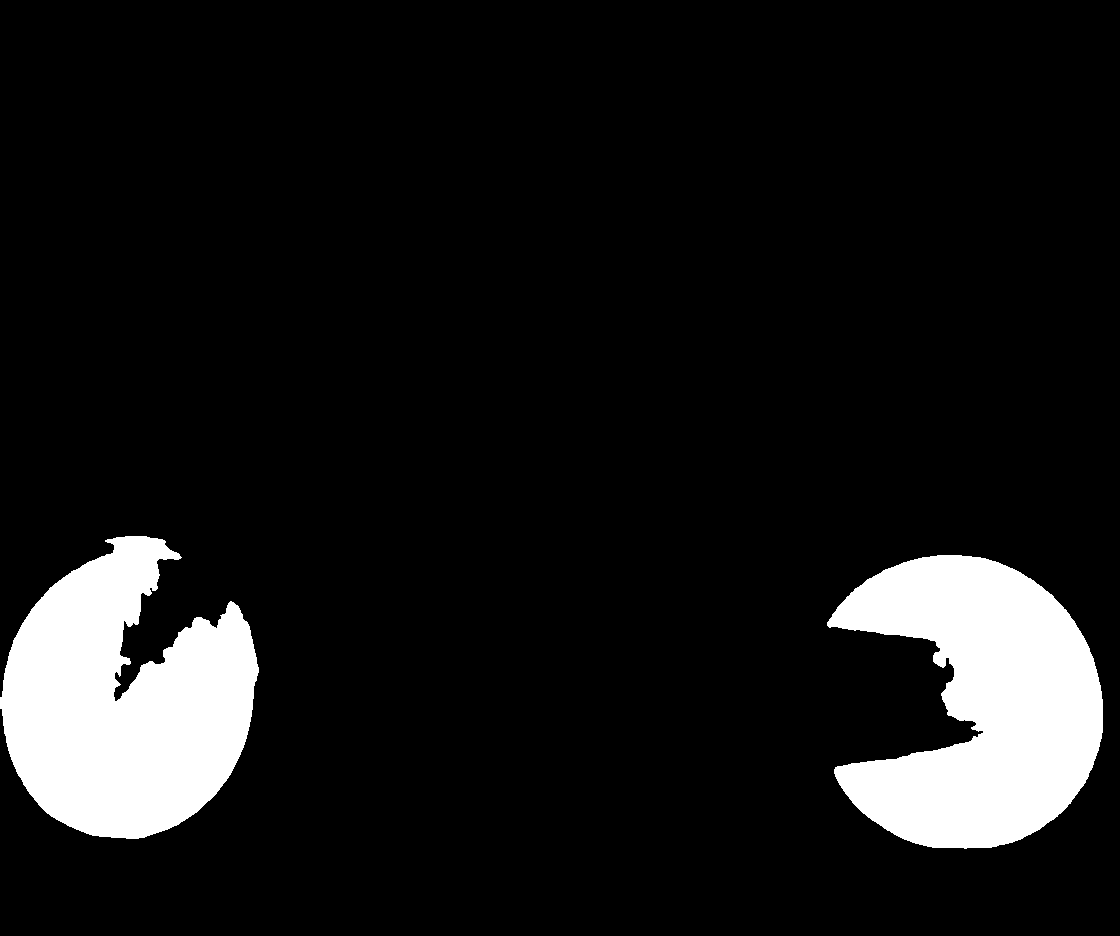
Input image

Prompt: "wheels", all other configs default
Result:
## Related Issues / Discussions
Thanks to @blessedcoolant for the initial draft here:
https://github.com/invoke-ai/InvokeAI/pull/6678
## QA Instructions
Manual tests:
- [ ] Test that default settings work well.
- [ ] Test with / without apply_polygon_refinement
- [ ] Test mask_filter options
- [ ] Test detection_threshold values
- [ ] Test RGB input image
- [ ] Test RGBA input image
- [ ] Test grayscale input image
- [ ] Smoke test that an empty mask is returned when 0 objects are
detected
- [ ] Test on CPU
- [ ] Test on MPS (Works on Mac OS, but had to force both models to run
on CPU instead of MPS)
Performance:
- Peak GPU memory utilization with both Grounding DINO and SAM models
loaded is ~4.5GB. (The models do not need to be loaded at the same time,
so could be offloaded by the MM if needed.)
- On an RTX4090, with the models already cached, node execution takes
~0.6 secs.
- On my CPU, with the models cached, node execution takes ~10secs.
## Merge Plan
No special instructions.
## Checklist
- [x] _The PR has a short but descriptive title, suitable for a
changelog_
- [ ] _Tests added / updated (if applicable)_
- [x] _Documentation added / updated (if applicable)_
## Summary
- we want a way to load the studio while being directed to a specific
tab, introduced a destination prop to achieve that
<!--A description of the changes in this PR. Include the kind of change
(fix, feature, docs, etc), the "why" and the "how". Screenshots or
videos are useful for frontend changes.-->
## Related Issues / Discussions
<!--WHEN APPLICABLE: List any related issues or discussions on github or
discord. If this PR closes an issue, please use the "Closes #1234"
format, so that the issue will be automatically closed when the PR
merges.-->
## QA Instructions
<!--WHEN APPLICABLE: Describe how you have tested the changes in this
PR. Provide enough detail that a reviewer can reproduce your tests.-->
## Merge Plan
<!--WHEN APPLICABLE: Large PRs, or PRs that touch sensitive things like
DB schemas, may need some care when merging. For example, a careful
rebase by the change author, timing to not interfere with a pending
release, or a message to contributors on discord after merging.-->
## Checklist
- [ ] _The PR has a short but descriptive title, suitable for a
changelog_
- [ ] _Tests added / updated (if applicable)_
- [ ] _Documentation added / updated (if applicable)_
## Summary
Code for lora patching from #6577.
Additionally made it the way, that lora can patch not only `weight`, but
also `bias`, because saw some loras which doing it.
## Related Issues / Discussions
#6606https://invokeai.notion.site/Modular-Stable-Diffusion-Backend-Design-Document-e8952daab5d5472faecdc4a72d377b0d
## QA Instructions
Run with and without set `USE_MODULAR_DENOISE` environment.
## Merge Plan
Replace old lora patcher with new after review done.
If you think that there should be some kind of tests - feel free to add.
## Checklist
- [x] _The PR has a short but descriptive title, suitable for a
changelog_
- [ ] _Tests added / updated (if applicable)_
- [ ] _Documentation added / updated (if applicable)_
## Summary
Gradient mask node outputs mask tensor with values in range [-1, 1],
which unexpected range for mask.
It handled in denoise node the way it translates to [0, 2] mask, which
looks even more wrongly)
From discussion with @dunkeroni I understand him as he thought that
negative values will be treated same as 0, so clamping values not change
intended node logic.
## Related Issues / Discussions
#6643
## QA Instructions
\-
## Merge Plan
\-
## Checklist
- [x] _The PR has a short but descriptive title, suitable for a
changelog_
- [ ] _Tests added / updated (if applicable)_
- [ ] _Documentation added / updated (if applicable)_
## Summary
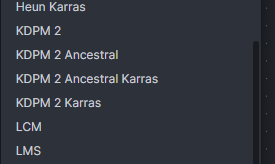
Add karras variants of `deis`, `unipc`, `kdpm2` and `kdpm_2_a`
schedulers.
Also added `dpmpp_3` schedulers, but `dpmpp_3s` currently bugged, so
added only 3m:
https://github.com/huggingface/diffusers/issues/9007
## Related Issues / Discussions
\-
## QA Instructions
\-
## Merge Plan
~@psychedelicious We need to decide what to do with schedulers order, as
it looks a bit broken:~
## Checklist
- [x] _The PR has a short but descriptive title, suitable for a
changelog_
- [ ] _Tests added / updated (if applicable)_
- [ ] _Documentation added / updated (if applicable)_
## Summary
<!--A description of the changes in this PR. Include the kind of change
(fix, feature, docs, etc), the "why" and the "how". Screenshots or
videos are useful for frontend changes.-->
## Related Issues / Discussions
<!--WHEN APPLICABLE: List any related issues or discussions on github or
discord. If this PR closes an issue, please use the "Closes #1234"
format, so that the issue will be automatically closed when the PR
merges.-->
## QA Instructions
<!--WHEN APPLICABLE: Describe how you have tested the changes in this
PR. Provide enough detail that a reviewer can reproduce your tests.-->
## Merge Plan
<!--WHEN APPLICABLE: Large PRs, or PRs that touch sensitive things like
DB schemas, may need some care when merging. For example, a careful
rebase by the change author, timing to not interfere with a pending
release, or a message to contributors on discord after merging.-->
## Checklist
- [ ] _The PR has a short but descriptive title, suitable for a
changelog_
- [ ] _Tests added / updated (if applicable)_
- [ ] _Documentation added / updated (if applicable)_
## Summary
Code for inpainting and inpaint models handling from
https://github.com/invoke-ai/InvokeAI/pull/6577.
Separated in 2 extensions as discussed briefly before, so wait for
discussion about such implementation.
## Related Issues / Discussions
#6606https://invokeai.notion.site/Modular-Stable-Diffusion-Backend-Design-Document-e8952daab5d5472faecdc4a72d377b0d
## QA Instructions
Run with and without set `USE_MODULAR_DENOISE` environment.
Try and compare outputs between backends in cases:
- Normal generation on inpaint model
- Inpainting on inpaint model
- Inpainting on normal model
## Merge Plan
Nope.
If you think that there should be some kind of tests - feel free to add.
## Checklist
- [x] _The PR has a short but descriptive title, suitable for a
changelog_
- [ ] _Tests added / updated (if applicable)_
- [ ] _Documentation added / updated (if applicable)_
We were checking the selected and auto-add board ids against the query cache to see if they still exist. If not, we reset.
This only works if the query cache is updated by the time we do the check - race condition!
We already have the board id from the query args, so there's no need to check the query cache - just compare the deleted board ID directly.
Previously this file's several listeners were all in a single one and I had adapted/split its logic up a bit wonkily, introducing these problems.
The logic was incorrect in two ways:
1. We only ran the logic if we _enable_ showing archived boards. It should be run we we _disable_ showing archived boards.
2. If we couldn't find the selected board in the query cache, we didn't do the reset. This is wrong - if the board isn't in the query cache, we _should_ do the reset. This inverted logic makes more sense before the fix for issue 1.
## Summary
T2I Adapter code from #6577.
## Related Issues / Discussions
#6606https://invokeai.notion.site/Modular-Stable-Diffusion-Backend-Design-Document-e8952daab5d5472faecdc4a72d377b0d
## QA Instructions
Run with and without set `USE_MODULAR_DENOISE` environment.
## Merge Plan
Nope.
If you think that there should be some kind of tests - feel free to add.
## Checklist
- [x] _The PR has a short but descriptive title, suitable for a
changelog_
- [ ] _Tests added / updated (if applicable)_
- [ ] _Documentation added / updated (if applicable)_
## Summary
Seamless code from #6577.
## Related Issues / Discussions
#6606https://invokeai.notion.site/Modular-Stable-Diffusion-Backend-Design-Document-e8952daab5d5472faecdc4a72d377b0d
## QA Instructions
Run with and without set `USE_MODULAR_DENOISE` environment.
## Merge Plan
Nope.
If you think that there should be some kind of tests - feel free to add.
## Checklist
- [x] _The PR has a short but descriptive title, suitable for a
changelog_
- [ ] _Tests added / updated (if applicable)_
- [ ] _Documentation added / updated (if applicable)_
The model edit UI's composition allows for the model edit form to be instantiated before the model's config has been received. This results in the form having no values - all the fields are blank instead of populated by the model config.
Part of the fix is to pass the model config around directly instead of relying on _all_ components to fetch the model directly.
I also fixed a crapload of performance issues related to improper use of redux selectors.
Problems this was causing:
- Deleting an edge was a copy of another edge deletes both edges
- Deleting a node that was a copy-with-edges of another node deletes its edges and it's original edges, leaving what I will call "ghost noodles" behind
Previously you could spam the next/prev buttons and really thrash the server. Throttled to 500ms, which feels like a happy medium between responsive and not-thrash-y.
- Autofocus on popover open
- Autoselect number on popover open
- Enter works to change page when input is focused
- Esc works to close popover when input is focused
It was possible to clear the search term while a debounced setSearchTerm is still pending. This resulted in the gallery getting out of sync w/ the search term.
To fix this, we need to lift the state up a bit and cancel any pending debounced setSearchTerm calls when closing the search or clearing the search term box.
`spandrel_image_to_image` now just runs the model with no changes.
`spandrel_image_to_image_autoscale` runs the model repeatedly until the desired scale is reached. previously, `spandrel_image_to_image` did this.
* [MM2] replace untyped config dict passed to install_model with typed ModelRecordChanges
- adjusted frontend to work with new schema
- used this facility to assign "starter model" names and descriptions to the installed
models.
* documentation fix
* [MM2] replace untyped config dict passed to install_model with typed ModelRecordChanges
- adjusted frontend to work with new schema
- used this facility to assign "starter model" names and descriptions to the installed
models.
* documentation fix
* remove v9 pnpm lockfile
* [MM2] replace untyped config dict passed to install_model with typed ModelRecordChanges
- adjusted frontend to work with new schema
- used this facility to assign "starter model" names and descriptions to the installed
models.
* [MM2] replace untyped config dict passed to install_model with typed ModelRecordChanges
- adjusted frontend to work with new schema
- used this facility to assign "starter model" names and descriptions to the installed
models.
* remove v9 pnpm lockfile
* regenerate schema.ts
* prettified
---------
Co-authored-by: Lincoln Stein <lstein@gmail.com>
## Summary
Update Simple Upscale Button to work with spandrel models, add
UpscaleWarning when models aren't available, clean up ESRGAN logic
<!--A description of the changes in this PR. Include the kind of change
(fix, feature, docs, etc), the "why" and the "how". Screenshots or
videos are useful for frontend changes.-->
## Related Issues / Discussions
<!--WHEN APPLICABLE: List any related issues or discussions on github or
discord. If this PR closes an issue, please use the "Closes #1234"
format, so that the issue will be automatically closed when the PR
merges.-->
## QA Instructions
<!--WHEN APPLICABLE: Describe how you have tested the changes in this
PR. Provide enough detail that a reviewer can reproduce your tests.-->
## Merge Plan
<!--WHEN APPLICABLE: Large PRs, or PRs that touch sensitive things like
DB schemas, may need some care when merging. For example, a careful
rebase by the change author, timing to not interfere with a pending
release, or a message to contributors on discord after merging.-->
## Checklist
- [ ] _The PR has a short but descriptive title, suitable for a
changelog_
- [ ] _Tests added / updated (if applicable)_
- [ ] _Documentation added / updated (if applicable)_
## Summary
ControlNet code from #6577.
## Related Issues / Discussions
#6606https://invokeai.notion.site/Modular-Stable-Diffusion-Backend-Design-Document-e8952daab5d5472faecdc4a72d377b0d
## QA Instructions
Run with and without set `USE_MODULAR_DENOISE` environment.
## Merge Plan
Merge #6641 firstly, to be able see output difference properly.
If you think that there should be some kind of tests - feel free to add.
## Checklist
- [x] _The PR has a short but descriptive title, suitable for a
changelog_
- [ ] _Tests added / updated (if applicable)_
- [ ] _Documentation added / updated (if applicable)_
## Summary
Rescale CFG code from #6577.
## Related Issues / Discussions
#6606https://invokeai.notion.site/Modular-Stable-Diffusion-Backend-Design-Document-e8952daab5d5472faecdc4a72d377b0d
## QA Instructions
Run with and without set `USE_MODULAR_DENOISE` environment.
~~Note: for some reasons there slightly different output from run to
run, but I able sometimes to get same output on main and this branch.~~
Fix presented in #6641.
## Merge Plan
~~Nope.~~ Merge #6641 firstly, to be able see output difference
properly.
If you think that there should be some kind of tests - feel free to add.
## Checklist
- [x] _The PR has a short but descriptive title, suitable for a
changelog_
- [ ] _Tests added / updated (if applicable)_
- [ ] _Documentation added / updated (if applicable)_
## Summary
- currently the total for uncategorized images is not updating when
moving and deleting images, this will update that count when making
those actions
<!--A description of the changes in this PR. Include the kind of change
(fix, feature, docs, etc), the "why" and the "how". Screenshots or
videos are useful for frontend changes.-->
## Related Issues / Discussions
<!--WHEN APPLICABLE: List any related issues or discussions on github or
discord. If this PR closes an issue, please use the "Closes #1234"
format, so that the issue will be automatically closed when the PR
merges.-->
## QA Instructions
<!--WHEN APPLICABLE: Describe how you have tested the changes in this
PR. Provide enough detail that a reviewer can reproduce your tests.-->
## Merge Plan
<!--WHEN APPLICABLE: Large PRs, or PRs that touch sensitive things like
DB schemas, may need some care when merging. For example, a careful
rebase by the change author, timing to not interfere with a pending
release, or a message to contributors on discord after merging.-->
## Checklist
- [ ] _The PR has a short but descriptive title, suitable for a
changelog_
- [ ] _Tests added / updated (if applicable)_
- [ ] _Documentation added / updated (if applicable)_
## Summary
Fix function call that we forgot to update in #6606
## QA Instructions
Run a TiledMultiDiffusionDenoiseLatents invocation and make sure it
doesn't crash.
## Checklist
- [x] _The PR has a short but descriptive title, suitable for a
changelog_
- [x] _Tests added / updated (if applicable)_
- [x] _Documentation added / updated (if applicable)_
## Summary
Base code of new modular backend from #6577.
Contains normal generation and regional prompts support.
Also preview extension included to test if extensions logic works.
## Related Issues / Discussions
https://invokeai.notion.site/Modular-Stable-Diffusion-Backend-Design-Document-e8952daab5d5472faecdc4a72d377b0d
## QA Instructions
Run with and without set `USE_MODULAR_DENOISE` environment.
Currently only normal and regional conditionings supported, so just
generate some images and compare with main output.
## Merge Plan
Discuss a bit more about injection point names?
As if for example in future unet will be overridable, current
`pre_unet`/`post_unet` assumes to name override as `unet` what feels a
bit odd.
Also `apply_cfg` - future implementation could ignore/not use cfg, so in
this case `combine_noise_predictions`/`combine_noise` seems more
suitable.
## Checklist
- [x] _The PR has a short but descriptive title, suitable for a
changelog_
- [x] _Tests added / updated (if applicable)_
- [ ] _Documentation added / updated (if applicable)_
## Summary
This PR adds some spandrel upscale models to the starter model list.
In the future we may also want to add:
- Some DAT models
(https://drive.google.com/drive/folders/1iBdf_-LVZuz_PAbFtuxSKd_11RL1YKxM)
## QA Instructions
I installed the starter models via the model manager UI, and tested that
I could use them in a workflow.
## Merge Plan
- [ ] Merge the preceding Spandrel PRs first, then change the target
branch to `main`.
## Checklist
- [x] _The PR has a short but descriptive title, suitable for a
changelog_
- [x] _Tests added / updated (if applicable)_
- [x] _Documentation added / updated (if applicable)_
## Summary
Add tiling to the `SpandrelImageToImageInvocation` node so that it can
process large images.
Tiling enables this node to run on effectively any input image
dimension. Of course, the computation time increases quadratically with
the image dimension.
Some profiling results on an RTX4090:
- Input 1024x1024, 4x upscale, 4x UltraSharp ESRGAN: `13 secs`, `<4 GB
VRAM`
- Input 4096x4096, 4x upscale, 4x UltraSharop ESRGAN: `46 secs`, `<4 GB
VRAM`
- Input 4096x4096, 2x upscale, SwinIR: `165 secs`, `<5 GB VRAM`
A lot of the time is spent PNG encoding the final image:
- PNG encoding of a 16384x16384 image takes `83secs @
pil_compress_level=7`, `24secs @ pil_compress_level=1`
Callout: If we want to start building workflows that pass large images
between nodes, we are going to have to find a way to avoid the PNG
encode/decode roundtrip that we are currently doing. As is, we will be
incurring a huge penalty for every node that receives/produces a large
image.
## QA Instructions
- [x] Tested with tiling up to 4096x4096 -> 16384x16384.
- [x] Test on images with an alpha channel (the alpha channel is
dropped).
- [x] Test on images with odd dimension.
- [x] Test no tiling (`tile_size=0`)
## Merge Plan
- [x] Merge #6556 first, and change the target branch to `main`.
## Checklist
- [x] _The PR has a short but descriptive title, suitable for a
changelog_
- [ ] _Tests added / updated (if applicable)_
- [x] _Documentation added / updated (if applicable)_
## Summary
- Add support for all
[spandrel](https://github.com/chaiNNer-org/spandrel) image-to-image
models - this is a collection of many popular super-resolution models
(e.g. ESRGAN, Real-ESRGAN, SwinIR, DAT, etc.)
Examples of supported models:
- DAT:
https://drive.google.com/drive/folders/1iBdf_-LVZuz_PAbFtuxSKd_11RL1YKxM
- SwinIR: https://github.com/JingyunLiang/SwinIR/releases
- Any ESRGAN / Real-ESRGAN model
## Related Issues
Closes#6394
## QA Instructions
- [x] Test that unsupported models still fail the probe (i.e. no false
positive spandrel models)
- [x] Test adding a few non-spandrel model types
- [x] Test adding a handful of spandrel model types: ESRGAN,
Real-ESRGAN, SwinIR, DAT
- [x] Verify model size estimation for the model cache
- [x] Test using the spandrel models in a practical image upscaling
workflow
## Merge Plan
- [x] Get approval from @brandonrising and @maryhipp before merging -
this PR has commercial implications.
- [x] Merge #6571 and change the target branch to `main`
## Checklist
- [x] _The PR has a short but descriptive title, suitable for a
changelog_
- [x] _Tests added / updated (if applicable)_
- [x] _Documentation added / updated (if applicable)_
In #6490 we enabled non-blocking torch device transfers throughout the model manager's memory management code. When using this torch feature, torch attempts to wait until the tensor transfer has completed before allowing any access to the tensor. Theoretically, that should make this a safe feature to use.
This provides a small performance improvement but causes race conditions in some situations. Specific platforms/systems are affected, and complicated data dependencies can make this unsafe.
- Intermittent black images on MPS devices - reported on discord and #6545, fixed with special handling in #6549.
- Intermittent OOMs and black images on a P4000 GPU on Windows - reported in #6613, fixed in this commit.
On my system, I haven't experience any issues with generation, but targeted testing of non-blocking ops did expose a race condition when moving tensors from CUDA to CPU.
One workaround is to use torch streams with manual sync points. Our application logic is complicated enough that this would be a lot of work and feels ripe for edge cases and missed spots.
Much safer is to fully revert non-locking - which is what this change does.
This issue is caused by a race condition. When a large image is served to the client, it is done using a streaming `FileResponse`. This concurrently serves the image straight from disk. The file is kept open by FastAPI until the image is fully served.
When a user deletes an image before the file is done serving, the delete fails because the file is still held by FastAPI.
To reproduce the issue:
- Create a very large image (8k reliably creates the issue).
- Create a smaller image, so that the first image in the gallery is not the large image.
- Refresh the app. The small image should be selected.
- Select the large image and immediately delete it. You have to be fast, to delete it before it finishes loading.
- In the terminal, we expect to see an error saying `Failed to delete image file`, and the image does not disappear from the UI.
- After a short wait, once the image has fully loaded, try deleting it again. We expect this to work.
The workaround is to instead serve the image from memory.
Loading the image to memory is very fast, so there is only a tiny window in which we could create the race condition, but it technically could still occur, because FastAPI is asynchronous and handles requests concurrently.
Once we load the image into memory, deletions of that image will work. Then we return a normal `Response` object with the image bytes. This is essentially what `FileResponse` does - except it uses `anyio.open_file`, which is async.
The tradeoff is that the server thread is blocked while opening the file. I think this is a fair tradeoff.
A future enhancement could be to implement soft deletion of images (db is already set up for this), and then clean up deleted image files on startup/shutdown. We could move back to using the async `FileResponse` for best responsiveness in the server without any risk of race conditions.
For some reason, I started getting this indefinite hang when the app checks if port 9090 is available. After some fiddling around, I found that adding a timeout resolves the issue.
I confirmed that the util still works by starting the app on 9090, then starting a second instance. The second instance correctly saw 9090 in use and moved to 9091.
## Summary
This PR changes the handling of invalid model configs in the DB to log a
warning rather than crashing the app.
This change is being made in preparation for some upcoming new model
additions. Previously, if a user rolled back from an app version that
added a new model type, the app would not launch until the DB was fixed.
This PR changes this behaviour to allow rollbacks of this type (with
warnings).
**Keep in mind that this change is only helpful to users _rolling back
to a version that has this fix_. I.e. it offers no help in the first
version that includes it.**
## QA Instructions
1. Run the Spandrel model branch, which adds a new model type
https://github.com/invoke-ai/InvokeAI/pull/6556.
2. Add a spandrel model via the model manager.
3. Rollback to main. The app will crash on launch due to the invalid
spandrel model config.
4. Checkout this branch. The app should now run with warnings about the
invalid model config.
## Checklist
- [x] _The PR has a short but descriptive title, suitable for a
changelog_
- [ ] _Tests added / updated (if applicable)_
- [x] _Documentation added / updated (if applicable)_
Currently translated at 100.0% (1282 of 1282 strings)
translationBot(ui): update translation (Russian)
Currently translated at 100.0% (1280 of 1280 strings)
translationBot(ui): update translation (Russian)
Currently translated at 100.0% (1275 of 1275 strings)
translationBot(ui): update translation (Russian)
Currently translated at 100.0% (1273 of 1273 strings)
Co-authored-by: Васянатор <ilabulanov339@gmail.com>
Translate-URL: https://hosted.weblate.org/projects/invokeai/web-ui/ru/
Translation: InvokeAI/Web UI
Currently translated at 98.2% (1260 of 1282 strings)
translationBot(ui): update translation (Italian)
Currently translated at 98.4% (1260 of 1280 strings)
translationBot(ui): update translation (Italian)
Currently translated at 98.4% (1255 of 1275 strings)
translationBot(ui): update translation (Italian)
Currently translated at 98.4% (1253 of 1273 strings)
translationBot(ui): update translation (Italian)
Currently translated at 98.4% (1245 of 1265 strings)
Co-authored-by: Riccardo Giovanetti <riccardo.giovanetti@gmail.com>
Translate-URL: https://hosted.weblate.org/projects/invokeai/web-ui/it/
Translation: InvokeAI/Web UI
- Refine layout
- Update colors - more minimal, fewer shaded boxes
- Add indicator for search icons showing a search term is entered
- Handle new `projectName` and `projectUrl` ui props
## Summary
Update Boards UI in the gallery and adds support for creating and
displaying private boards
<!--A description of the changes in this PR. Include the kind of change
(fix, feature, docs, etc), the "why" and the "how". Screenshots or
videos are useful for frontend changes.-->
## Related Issues / Discussions
<!--WHEN APPLICABLE: List any related issues or discussions on github or
discord. If this PR closes an issue, please use the "Closes #1234"
format, so that the issue will be automatically closed when the PR
merges.-->
## QA Instructions
Can view private boards by setting config.allowPrivateBoards to true
<!--WHEN APPLICABLE: Describe how you have tested the changes in this
PR. Provide enough detail that a reviewer can reproduce your tests.-->
## Merge Plan
<!--WHEN APPLICABLE: Large PRs, or PRs that touch sensitive things like
DB schemas, may need some care when merging. For example, a careful
rebase by the change author, timing to not interfere with a pending
release, or a message to contributors on discord after merging.-->
## Checklist
- [ ] _The PR has a short but descriptive title, suitable for a
changelog_
- [ ] _Tests added / updated (if applicable)_
- [ ] _Documentation added / updated (if applicable)_
## Summary
Demote error log to warning for models treated as having size 0.
## Related Issues / Discussions
Closes#6587
I looked into handling ESRGAN model sizes properly. They load a
state_dict with a bit of an unusual nested-dict structure. Rather than
figure out how to accurately calculate their size, we can just wait for
https://github.com/invoke-ai/InvokeAI/pull/6556. ESRGAN model size
handling should work properly when loaded through that pathway.
## QA Instructions
Loaded an ESRGAN model, and confirmed that the warning log is at the
warning level.
## Merge Plan
No special instructions.
## Checklist
- [x] _The PR has a short but descriptive title, suitable for a
changelog_
- [x] _Tests added / updated (if applicable)_
- [x] _Documentation added / updated (if applicable)_
This commit corrects a broken link on line 16 that was pointing to the latest release but causing a 404 error (page not found) when clicked. The issue was identified as a trailing dot at the end of the URL, which has now been removed. This ensures users can access the intended latest release page.
## Summary
This PR tweaks the wording of the PR template QA instructions with the
goals of:
1. Make it more clear that PR authors are responsible for testing their
PRs.
2. Encouraging sufficient detail in the test descriptions.
## Checklist
- [x] _The PR has a short but descriptive title, suitable for a
changelog_
- [x] _Tests added / updated (if applicable)_
- [x] _Documentation added / updated (if applicable)_
## Summary
Delete an unused duplicate libc_util.py file. The active version is at
`invokeai/backend/model_manager/libc_util.py`
## QA Instructions
I ran a smoke test to confirm that memory snapshotting still works.
## Merge Plan
- [x] Change target branch to `main` before merging.
## Checklist
- [x] _The PR has a short but descriptive title, suitable for a
changelog_
- [x] _Tests added / updated (if applicable)_
- [x] _Documentation added / updated (if applicable)_
## Summary
This PR migrates all relative imports to absolute imports, and adds a
ruff check to enforce this going forward.
The justification for this change is here:
https://github.com/invoke-ai/InvokeAI/issues/6575
## QA Instructions
Smoke test all common workflows. Most of the relative -> absolute
conversions could be completed automatically, so the risk is relatively
low.
## Merge Plan
As with any far-reaching change like this, it is likely to cause some
merge conflicts with some in-flight branches. Unfortunately, there's no
way around this, but let me know if you can think of in-flight work that
will be significantly disrupted by this.
## Checklist
- [x] _The PR has a short but descriptive title, suitable for a
changelog_
- [x] _Tests added / updated (if applicable)_ N/A
- [x] _Documentation added / updated (if applicable)_ N/A
## Summary
This PR fixes a regression that caused the following models to be
treated as having size 0 in the model cache: `(TextualInversionModelRaw,
IPAdapter, LoRAModelRaw)`.
Changes:
- Call the correct model size calculation for all supported model types.
- Log an error message if an unexpected model type is loaded, to prevent
similar regressions in the future.
## QA Instructions
I tested the following features and verified that no models fell back to
using a size of 0 unexpectedly:
- Test-to-image
- Textual Inversion
- LoRA
- IP-Adapter
- ControlNet
(All tested with both SD1.5 and SDXL.)
I compared the model cache switching behavior before and after this
change with a large number of LoRAs (10). Since LoRAs are small compared
to the main models, the changes in behaviour are minimal. Nonetheless,
it makes sense to get this in for correctness. And it might make a
difference for some usage patterns with limited RAM.
## Merge Plan
No special instructions.
## Checklist
- [x] _The PR has a short but descriptive title, suitable for a
changelog_
- [x] _Tests added / updated (if applicable)_
- [x] _Documentation added / updated (if applicable)_
- For single image deletion, select the image in the same slot as the deleted image
- For multiple image deletion, empty selection
- On list images, if no images are currently selected, select the first image
## Summary
- This PR exposes a `tile_size` field on `ImageToLatentsInvocation` and
`LatentsToImageInvocation`.
- Setting `tile_size = 0` preserves the default behaviour.
- This feature is primarily intended to support upscaling workflows that
require VAE encoding/decoding high resolution images. In the future, we
may want to expose the tile size as a global application config, but
that's a separate conversation.
- As a general rule, larger tile sizes produce better results at the
cost of higher memory usage.
### Example:
Original (5472x5472)

VAE roundtrip with 512x512 tiles (note the discoloration)

VAE roundtrip with 1024x1024 tiles (some discoloration still present,
but less severe than at 512x512)

## Related Issues / Discussions
Related: #6144
## QA Instructions
- [x] Test image generation via the Linear tab
- [x] Test VAE roundtrip with tiling disabled
- [x] Test VAE roundtrip with tiling and tile_size = 0
- [x] Test VAE roundtrip with tiling and tile_size > 0
## Merge Plan
No special instructions.
## Checklist
- [x] _The PR has a short but descriptive title, suitable for a
changelog_
- [x] _Tests added / updated (if applicable)_
- [x] _Documentation added / updated (if applicable)_
The selection logic is a bit complicated. We have image selection and pagination, both of which can be triggered using the mouse or hotkeys. We have viewer image selection and comparison image selection, which is determined by the alt key.
This change ties the room together with these behaviours:
- Changing the page using pagination buttons never changes the selection.
- Changing the selected image using arrows may change the page, if the arrow key pressed would select an image off the current page.
- `right` on the last image of the current page goes to the next page
- `down` on the last row of images goes to the next page
- `left` on the first image of the current page goes to the previous page
- `up` on the first row of images goes to the previous page
- If `alt` is held when using arrow keys, we change the page, but we only change the comparison image selection.
- When using arrow keys, if the page has changed since the last image was selected, the selection is reset to the first image on the page.
- The next/previous buttons on the image viewer do the same thing as `left` and `right` without `alt`.
- When clicking an image in the gallery:
- If no modifier keys are held, the image is exclusively selected.
- If `ctrl` or `meta` are held, the image's selection status is toggled.
- If `shift` is held, all images from the last-selected image to the image are selected. If there are no images on the current page, the selection is unchanged.
- If `alt` is held, the image is set as the compare image.
- `ctrl+a` and `meta+a` add the current page to the selection.
The logic for gallery navigation and selection is now pretty hairy. It's spread across 3 hooks, a listener, redux slice, components.
When we next make changes to this part of the app, we should consider consolidating some of the related logic. Probably most of it can go into a single listener and make it much simpler to grok.
Don't like this UI (even though I suggested it). No need to prevent the user from interacting with the search term field during fetching. Let's figure out a nicer way to present this in a followup.
## Summary
Python 3.11 has a wonderfully devious breaking change where _sometimes_
using enum classes that inherit from `str` or `int` do not work the same
way as they do in 3.10 when used within string formatting/interpolation.
This breaks the new gallery sort queries. The fix is to use
`order_dir.value` instead of `order_dir` in the query.
This was not an issue during development because the feature was
developed w/ python 3.10.
## Related Issues / Discussions
Thanks to @JPPhoto for reporting and troubleshooting:
https://discord.com/channels/1020123559063990373/1149513625321603162/1256211815982039173
## QA Instructions
JP's fancy python 3.11 system should work on this PR.
## Merge Plan
n/a
## Checklist
- [x] _The PR has a short but descriptive title, suitable for a
changelog_
- [ ] _Tests added / updated (if applicable)_
- [ ] _Documentation added / updated (if applicable)_
If the currently selected or auto-add board is archived or deleted, we should reset them. There are some edge cases taht weren't handled in the previous implementation.
All handling of this logic is moved to the (renamed) listener.
Before this change, if you attempt to create an image that with a nonexistent board, we'd get an unhandled error when adding the image to a board. The record would be created, but file not, due to the structure of the code.
With this change, we now log a warning if we have a problem adding the image to the board, but the record and file are still created.
A future improvement would be to create a transaction for this part of the code, preventing some other situation that could result in only the record or only the file beings saved.
* use model_class.load_singlefile() instead of converting; works, but performance is poor
* adjust the convert api - not right just yet
* working, needs sql migrator update
* rename migration_11 before conflict merge with main
* Update invokeai/backend/model_manager/load/model_loaders/stable_diffusion.py
Co-authored-by: Ryan Dick <ryanjdick3@gmail.com>
* Update invokeai/backend/model_manager/load/model_loaders/stable_diffusion.py
Co-authored-by: Ryan Dick <ryanjdick3@gmail.com>
* implement lightweight version-by-version config migration
* simplified config schema migration code
* associate sdxl config with sdxl VAEs
* remove use of original_config_file in load_single_file()
---------
Co-authored-by: Lincoln Stein <lstein@gmail.com>
Co-authored-by: Ryan Dick <ryanjdick3@gmail.com>
## Summary
We can get black outputs when moving tensors from CPU to MPS. It appears
MPS to CPU is fine. See:
- https://github.com/pytorch/pytorch/issues/107455
-
https://discuss.pytorch.org/t/should-we-set-non-blocking-to-true/38234/28
Changes:
- Add properties for each device on `TorchDevice` as a convenience.
- Add `get_non_blocking` static method on `TorchDevice`. This utility
takes a torch device and returns the flag to be used for non_blocking
when moving a tensor to the device provided.
- Update model patching and caching APIs to use this new utility.
## Related Issues / Discussions
Fixes: #6545
## QA Instructions
For both MPS and CUDA:
- Generate at least 5 images using LoRAs
- Generate at least 5 images using IP Adapters
## Merge Plan
We have pagination merged into `main` but aren't ready for that to be
released.
Once this fix is tested and merged, we will probably want to create a
`v4.2.5post1` branch off the `v4.2.5` tag, cherry-pick the fix and do a
release from the hotfix branch.
## Checklist
- [x] _The PR has a short but descriptive title, suitable for a
changelog_
- [ ] _Tests added / updated (if applicable)_ @RyanJDick @lstein This
feels testable but I'm not sure how.
- [ ] _Documentation added / updated (if applicable)_
We can get black outputs when moving tensors from CPU to MPS. It appears MPS to CPU is fine. See:
- https://github.com/pytorch/pytorch/issues/107455
- https://discuss.pytorch.org/t/should-we-set-non-blocking-to-true/38234/28
Changes:
- Add properties for each device on `TorchDevice` as a convenience.
- Add `get_non_blocking` static method on `TorchDevice`. This utility takes a torch device and returns the flag to be used for non_blocking when moving a tensor to the device provided.
- Update model patching and caching APIs to use this new utility.
Fixes: #6545
We only need to show the totals in the tooltip. Tooltips accpet a component for the tooltip label. The component isn't rendered until the tooltip is triggered.
Move the board total fetching into a tooltip component for the boards. Now we only fire these requests when the user mouses over the board
- Simplify the gallery layout
- Set an initial gallery limit to load _some_ images immediately.
- Refactor the resize observer to use the actual rendered image component to calculate the number of images per row/col. This prevents inaccuracies caused by image padding that could result in the wrong number of images.
- Debounce the limit update to not thrash teh API
- Use absolute positioning trick to ensure the gallery container is always exactly the right size
- Minimum of `imagesPerRow` images loaded at all times
This is one of those unexpected CSS quirks. Flex containers need min-width or min-height for their children to not overflow. Add `minH={0}` to gallery container.
## Summary
https://github.com/invoke-ai/InvokeAI/pull/6522 introduced a change in
behavior in cases where start/end were set such that there are 0
timesteps. This PR reverts that change.
cc @StAlKeR7779
## QA Instructions
Run with euler, 5 steps, start: 0.0, end: 0.05. I ran this test before
#6522, after #6522, and on this branch. This branch restores the
behavior to pre-#6522 i.e. noise is injected even if no denoising steps
are applied.
## Checklist
- [x] _The PR has a short but descriptive title, suitable for a
changelog_
- [x] _Tests added / updated (if applicable)_
- [x] _Documentation added / updated (if applicable)_
* add support for probing and loading SDXL VAE checkpoint files
* broaden regexp probe for SDXL VAEs
---------
Co-authored-by: Lincoln Stein <lstein@gmail.com>
## Summary
No functional changes, just cleaning some things up as I touch the code.
This PR cleans up the `SilenceWarnings` context manager:
- Fix type errors
- Enable SilenceWarnings to be used as both a context manager and a
decorator
- Remove duplicate implementation
- Check the initial verbosity on `__enter__()` rather than `__init__()`
- Save an indentation level in DenoiseLatents
## QA Instructions
I generated an image to confirm that warnings are still muted.
## Merge Plan
- [x] ⚠️ Merge https://github.com/invoke-ai/InvokeAI/pull/6492 first,
then change the target branch to `main`.
## Checklist
- [x] _The PR has a short but descriptive title, suitable for a
changelog_
- [x] _Tests added / updated (if applicable)_
- [x] _Documentation added / updated (if applicable)_
- Fix type errors
- Enable SilenceWarnings to be used as both a context manager and a decorator
- Remove duplicate implementation
- Check the initial verbosity on __enter__() rather than __init__()
## Summary
added route to install huggingface models from model marketplace
<!--A description of the changes in this PR. Include the kind of change
(fix, feature, docs, etc), the "why" and the "how". Screenshots or
videos are useful for frontend changes.-->
## Related Issues / Discussions
<!--WHEN APPLICABLE: List any related issues or discussions on github or
discord. If this PR closes an issue, please use the "Closes #1234"
format, so that the issue will be automatically closed when the PR
merges.-->
## QA Instructions
test by going to
http://localhost:5173/api/v2/models/install/huggingface?source=${hfRepo}
<!--WHEN APPLICABLE: Describe how we can test the changes in this PR.-->
## Merge Plan
<!--WHEN APPLICABLE: Large PRs, or PRs that touch sensitive things like
DB schemas, may need some care when merging. For example, a careful
rebase by the change author, timing to not interfere with a pending
release, or a message to contributors on discord after merging.-->
## Checklist
- [ ] _The PR has a short but descriptive title, suitable for a
changelog_
- [ ] _Tests added / updated (if applicable)_
- [ ] _Documentation added / updated (if applicable)_
When a model install is initiated from outside the client, we now trigger the model manager tab's model install list to update.
- Handle new `model_install_download_started` event
- Handle `model_install_download_complete` event (this event is not new but was never handled)
- Update optimistic updates/cache invalidation logic to efficiently update the model install list
Previously, we used `model_install_download_progress` for both download starting and progressing. When handling this event, we don't know which actual thing it represents.
Add `model_install_download_started` event to explicitly represent a model download started event.
* allow model patcher to optimize away the unpatching step when feasible
* remove lazy_offloading functionality
* allow model patcher to optimize away the unpatching step when feasible
* remove lazy_offloading functionality
* do not save original weights if there is a CPU copy of state dict
* Update invokeai/backend/model_manager/load/load_base.py
Co-authored-by: Ryan Dick <ryanjdick3@gmail.com>
* documentation fixes requested during penultimate review
* add non-blocking=True parameters to several torch.nn.Module.to() calls, for slight performance increases
* fix ruff errors
* prevent crash on non-cuda-enabled systems
---------
Co-authored-by: Lincoln Stein <lstein@gmail.com>
Co-authored-by: Kent Keirsey <31807370+hipsterusername@users.noreply.github.com>
Co-authored-by: Ryan Dick <ryanjdick3@gmail.com>
## Summary
This three two model manager-related methods to the InvocationContext
uniform API. They are accessible via `context.models.*`:
1. **`load_local_model(model_path: Path, loader:
Optional[Callable[[Path], AnyModel]] = None) ->
LoadedModelWithoutConfig`**
*Load the model located at the indicated path.*
This will load a local model (.safetensors, .ckpt or diffusers
directory) into the model manager RAM cache and return its
`LoadedModelWithoutConfig`. If the optional loader argument is provided,
the loader will be invoked to load the model into memory. Otherwise the
method will call `safetensors.torch.load_file()` `torch.load()` (with a
pickle scan), or `from_pretrained()` as appropriate to the path type.
Be aware that the `LoadedModelWithoutConfig` object differs from
`LoadedModel` by having no `config` attribute.
Here is an example of usage:
```
def invoke(self, context: InvocatinContext) -> ImageOutput:
model_path = Path('/opt/models/RealESRGAN_x4plus.pth')
loadnet = context.models.load_local_model(model_path)
with loadnet as loadnet_model:
upscaler = RealESRGAN(loadnet=loadnet_model,...)
```
---
2. **`load_remote_model(source: str | AnyHttpUrl, loader:
Optional[Callable[[Path], AnyModel]] = None) ->
LoadedModelWithoutConfig`**
*Load the model located at the indicated URL or repo_id.*
This is similar to `load_local_model()` but it accepts either a
HugginFace repo_id (as a string), or a URL. The model's file(s) will be
downloaded to `models/.download_cache` and then loaded, returning a
```
def invoke(self, context: InvocatinContext) -> ImageOutput:
model_url = 'https://github.com/xinntao/Real-ESRGAN/releases/download/v0.1.0/RealESRGAN_x4plus.pth'
loadnet = context.models.load_remote_model(model_url)
with loadnet as loadnet_model:
upscaler = RealESRGAN(loadnet=loadnet_model,...)
```
---
3. **`download_and_cache_model( source: str | AnyHttpUrl, access_token:
Optional[str] = None, timeout: Optional[int] = 0) -> Path`**
Download the model file located at source to the models cache and return
its Path. This will check `models/.download_cache` for the desired model
file and download it from the indicated source if not already present.
The local Path to the downloaded file is then returned.
---
## Other Changes
This PR performs a migration, in which it renames `models/.cache` to
`models/.convert_cache`, and migrates previously-downloaded ESRGAN,
openpose, DepthAnything and Lama inpaint models from the `models/core`
directory into `models/.download_cache`.
There are a number of legacy model files in `models/core`, such as
GFPGAN, which are no longer used. This PR deletes them and tidies up the
`models/core` directory.
## Related Issues / Discussions
I have systematically replaced all the calls to
`download_with_progress_bar()`. This function is no longer used
elsewhere and has been removed.
<!--WHEN APPLICABLE: List any related issues or discussions on github or
discord. If this PR closes an issue, please use the "Closes #1234"
format, so that the issue will be automatically closed when the PR
merges.-->
## QA Instructions
I have added unit tests for the three new calls. You may test that the
`load_and_cache_model()` call is working by running the upscaler within
the web app. On first try, you will see the model file being downloaded
into the models `.cache` directory. On subsequent tries, the model will
either load from RAM (if it hasn't been displaced) or will be loaded
from the filesystem.
<!--WHEN APPLICABLE: Describe how we can test the changes in this PR.-->
## Merge Plan
Squash merge when approved.
<!--WHEN APPLICABLE: Large PRs, or PRs that touch sensitive things like
DB schemas, may need some care when merging. For example, a careful
rebase by the change author, timing to not interfere with a pending
release, or a message to contributors on discord after merging.-->
## Checklist
- [X] _The PR has a short but descriptive title, suitable for a
changelog_
- [X] _Tests added / updated (if applicable)_
- [X] _Documentation added / updated (if applicable)_
## Summary
I've started working towards a better tiled upscaling implementation. It
is going to require some refactoring of `DenoiseLatentsInvocation`. As a
first step, this PR splits up all of the invocations in latent.py into
their own files. That file had become a bit of a dumping ground - it
should be a bit more manageable to work with now.
This PR just re-organizes the code. There should be no functional
changes.
## QA Instructions
I've done some light smoke testing. I'll do some more before merging.
The main risk is that I missed a broken import, or some other copy-paste
error.
## Checklist
- [x] _The PR has a short but descriptive title, suitable for a
changelog_
- [x] _Tests added / updated (if applicable)_: N/A
- [x] _Documentation added / updated (if applicable)_: N/A
* allow model patcher to optimize away the unpatching step when feasible
* remove lazy_offloading functionality
* allow model patcher to optimize away the unpatching step when feasible
* remove lazy_offloading functionality
* do not save original weights if there is a CPU copy of state dict
* Update invokeai/backend/model_manager/load/load_base.py
Co-authored-by: Ryan Dick <ryanjdick3@gmail.com>
* documentation fixes added during penultimate review
---------
Co-authored-by: Lincoln Stein <lstein@gmail.com>
Co-authored-by: Kent Keirsey <31807370+hipsterusername@users.noreply.github.com>
Co-authored-by: Ryan Dick <ryanjdick3@gmail.com>
Create intermediary nanostores for values required by the event handlers. This allows the event handlers to be purely imperative, with no reactivity: instead of recreating/setting the handlers when a dependent piece of state changes, we use nanostores' imperative API to access dependent state.
For example, some handlers depend on brush size. If we used the standard declarative `useSelector` API, we'd need to recreate the event handler callback each time the brush size changed. This can be costly.
An intermediate `$brushSize` nanostore is set in a `useLayoutEffect()`, which responds to changes to the redux store. Then, in the event handler, we use the imperative API to access the brush size: `$brushSize.get()`.
This change allows the event handler logic to be shared with the pending canvas v2, and also more easily tested. It's a noticeable perf improvement, too, especially when changing brush size.
Currently translated at 98.5% (1243 of 1261 strings)
translationBot(ui): update translation (Italian)
Currently translated at 98.5% (1243 of 1261 strings)
translationBot(ui): update translation (Italian)
Currently translated at 98.5% (1225 of 1243 strings)
translationBot(ui): update translation (Italian)
Currently translated at 98.5% (1225 of 1243 strings)
Co-authored-by: Riccardo Giovanetti <riccardo.giovanetti@gmail.com>
Translate-URL: https://hosted.weblate.org/projects/invokeai/web-ui/it/
Translation: InvokeAI/Web UI
- Pass the seed from `latents_a` to the output latents. Fixed an issue where using `BlendLatentsInvocation` could result in different outputs during denoising even when the alpha or slerp weight was 0.
## Explanation
`LatentsField` has an optional `seed` field. During denoising, if this `seed` field is not present, we **fall back to 0 for the seed**. The seed is used during denoising in a few ways:
1. Initializing the scheduler.
The seed is used in two places in `invokeai/app/invocations/latent.py`.
The `get_scheduler()` utility function has special handling for `DPMSolverSDEScheduler`, which appears to need a seed for deterministic outputs.
`DenoiseLatentsInvocation.init_scheduler()` has special handling for schedulers that accept a generator - the generator needs to be seeded in a particular way. At the time of this commit, these are the Invoke-supported schedulers that need this seed:
- DDIMScheduler
- DDPMScheduler
- DPMSolverMultistepScheduler
- EulerAncestralDiscreteScheduler
- EulerDiscreteScheduler
- KDPM2AncestralDiscreteScheduler
- LCMScheduler
- TCDScheduler
2. Adding noise during inpainting.
If a mask is used for denoising, and we are not using an inpainting model, we add noise to the unmasked area. If, for some reason, we have a mask but no noise, the seed is used to add noise.
I wonder if we should instead assert that if a mask is provided, we also have noise.
This is done in `invokeai/backend/stable_diffusion/diffusers_pipeline.py` in `StableDiffusionGeneratorPipeline.latents_from_embeddings()`.
When we create noise to be used in denoising, we are expected to set `LatentsField.seed` to the seed used to create the noise. This introduces some awkwardness when we manipulate any "latents" that will be used for denoising. We have to pass the seed along for every operation.
If the wrong seed or no seed is passed along, we can get unexpected outputs during denoising. One notable case relates to blending latents (slerping tensors).
If we slerp two noise tensors (`LatentsField`s) _without_ passing along the seed from the source latents, when we denoise with a seed-dependent scheduler*, the schedulers use the fallback seed of 0 and we get the wrong output. This is most obvious when slerping with a weight of 0, in which case we expect the exact same output after denoising.
*It looks like only the DPMSolver* schedulers are affected, but I haven't tested all of them.
Passing the seed along in the output fixes this issue.
This required some minor reworking of of the logic to recall multiple items. I split this into a utility function that includes some special handling for concat.
Closes#6478
When the model in metadata's key no longer exists, fall back to fetching by name, base and type. This was the intention all along but the logic was never put in place.
- Any mypy issues are a misconfiguration of mypy
- Use simple conditionals instead of ternaries
- Consistent & standards-compliant docstring formatting
- Use `dict` instead of `typing.Dict`
It doesn't make sense to allow context menu here, because the context menu will technically be on a div and not an image - there won't be any image options there.
## Summary
Fix some issues with openapi schema generation. See commits for details.
## Related Issues / Discussions
https://discord.com/channels/1020123559063990373/1049495067846524939/1245141831394529352
## QA Instructions
App should work, workflows should work.
## Merge Plan
n/a
## Checklist
- [x] _The PR has a short but descriptive title, suitable for a
changelog_
- [ ] _Tests added / updated (if applicable)_
- [x] _Documentation added / updated (if applicable)_
Some tech debt related to dynamic pydantic schemas for invocations became problematic. Including the invocations and results in the event schemas was breaking pydantic's handling of ref schemas. I don't really understand why - I think it's a pydantic bug in a remote edge case that we are hitting.
After many failed attempts I landed on this implementation, which is actually much tidier than what was in there before.
- Create pydantic-enabled types for `AnyInvocation` and `AnyInvocationOutput` and use these in place of the janky dynamic unions. Actually, they are kinda the same, but better encapsulated. Use these in `Graph`, `GraphExecutionState`, `InvocationEventBase` and `InvocationCompleteEvent`.
- Revise the custom openapi function to work with the new models.
- Split out the custom openapi function to a separate file. Add a `post_transform` callback so consumers can customize the output schema.
- Update makefile scripts.
## Summary
- Updated the documentation for `TextualInversionManager`
- Updated the `self.tokenizer.model_max_length` access to work with the
latest transformers version. Thanks to @skunkworxdark for looking into
this here:
https://github.com/invoke-ai/InvokeAI/issues/6445#issuecomment-2133098342
## Related Issues / Discussions
Closes#6445
## QA Instructions
I tested with `transformers==4.41.1`, and compared the results against a
recent InvokeAI version before updating tranformers - no change, as
expected.
## Checklist
- [x] _The PR has a short but descriptive title, suitable for a
changelog_
- [ ] _Tests added / updated (if applicable)_
- [x] _Documentation added / updated (if applicable)_
This is required to get these event fields to deserialize correctly. If omitted, pydantic uses `BaseInvocation`/`BaseInvocationOutput`, which is not correct.
This is similar to the workaround in the `Graph` and `GraphExecutionState` classes where we need to fanagle pydantic with manual validation handling.
Note about the huge diff: I had a different version of pydantic installed at some point, which slightly altered a _ton_ of schema components. This typegen was done on the correct version of pydantic and un-does those alterations, in addition to the intentional changes to event models.
There's no longer any need for session-scoped events now that we have the session queue. Session started/completed/canceled map 1-to-1 to queue item status events, but queue item status events also have an event for failed state.
We can simplify queue and processor handling substantially by removing session events and instead using queue item events.
- Remove the session-scoped events entirely.
- Remove all event handling from session queue. The processor still needs to respond to some events from the queue: `QueueClearedEvent`, `BatchEnqueuedEvent` and `QueueItemStatusChangedEvent`.
- Pass an `is_canceled` callback to the invocation context instead of the cancel event
- Update processor logic to ensure the local instance of the current queue item is synced with the instance in the database. This prevents race conditions and ensures lifecycle callback do not get stale callbacks.
- Update docstrings and comments
- Add `complete_queue_item` method to session queue service as an explicit way to mark a queue item as successfully completed. Previously, the queue listened for session complete events to do this.
Closes#6442
- Restore calculation of step percentage but in the backend instead of client
- Simplify signatures for denoise progress event callbacks
- Clean up `step_callback.py` (types, do not recreate constant matrix on every step, formatting)
We don't need to use the payload schema registry. All our events are dispatched as pydantic models, which are already validated on instantiation.
We do want to add all events to the OpenAPI schema, and we referred to the payload schema registry for this. To get all events, add a simple helper to EventBase. This is functionally identical to using the schema registry.
The model loader emits events. During testing, it doesn't have access to a fully-mocked events service, so the test fails when attempting to call a nonexistent method. There was a check for this previously, but I accidentally removed it. Restored.
- Remove ABCs, they do not work well with pydantic
- Remove the event type classvar - unused
- Remove clever logic to require an event name - we already get validation for this during schema registration.
- Rename event bases to all end in "Base"
Our events handling and implementation has a couple pain points:
- Adding or removing data from event payloads requires changes wherever the events are dispatched from.
- We have no type safety for events and need to rely on string matching and dict access when interacting with events.
- Frontend types for socket events must be manually typed. This has caused several bugs.
`fastapi-events` has a neat feature where you can create a pydantic model as an event payload, give it an `__event_name__` attr, and then dispatch the model directly.
This allows us to eliminate a layer of indirection and some unpleasant complexity:
- Event handler callbacks get type hints for their event payloads, and can use `isinstance` on them if needed.
- Event payload construction is now the responsibility of the event itself (a pydantic model), not the service. Every event model has a `build` class method, encapsulating this logic. The build methods are provided as few args as possible. For example, `InvocationStartedEvent.build()` gets the invocation instance and queue item, and can choose the data it wants to include in the event payload.
- Frontend event types may be autogenerated from the OpenAPI schema. We use the payload registry feature of `fastapi-events` to collect all payload models into one place, making it trivial to keep our schema and frontend types in sync.
This commit moves the backend over to this improved event handling setup.
* avoid copying model back from cuda to cpu
* handle models that don't have state dicts
* add assertions that models need a `device()` method
* do not rely on torch.nn.Module having the device() method
* apply all patches after model is on the execution device
* fix model patching in latents too
* log patched tokenizer
* closes#6375
---------
Co-authored-by: Lincoln Stein <lstein@gmail.com>
Show error toasts on queue item error events instead of invocation error events. This allows errors that occurred outside node execution to be surfaced to the user.
The error description component is updated to show the new error message if available. Commercial handling is retained, but local now uses the same component to display the error message itself.
I had set the cancel event at some point during troubleshooting an unrelated issue. It seemed logical that it should be set there, and didn't seem to break anything. However, this is not correct.
The cancel event should not be set in response to a queue status change event. Doing so can cause a race condition when nodes are executed very quickly.
It's possible that a previously-executed session's queue item status change event is handled after the next session starts executing. The cancel event is set and the session runner sees it aborting the session run early.
In hindsight, it doesn't make sense to set the cancel event here either. It should be set in response to user action, e.g. the user cancelled the session or cleared the queue (which implicitly cancels the current session). These events actually trigger the queue item status changed event, so if we set the cancel event here, we'd be setting it twice per cancellation.
There's a race condition where a canceled session may emit a progress event or two after it's been canceled, and the progress image isn't cleared out.
To resolve this, the system slice tracks canceled session ids. When a progress event comes in, we check the cancellations and skip setting the progress if canceled.
- Add handling for new error columns `error_type`, `error_message`, `error_traceback`.
- Update queue item model to include the new data. The `error_traceback` field has an alias of `error` for backwards compatibility.
- Add `fail_queue_item` method. This was previously handled by `cancel_queue_item`. Splitting this functionality makes failing a queue item a bit more explicit. We also don't need to handle multiple optional error args.
-
We were not handling node preparation errors as node errors before. Here's the explanation, copied from a comment that is no longer required:
---
TODO(psyche): Sessions only support errors on nodes, not on the session itself. When an error occurs outside
node execution, it bubbles up to the processor where it is treated as a queue item error.
Nodes are pydantic models. When we prepare a node in `session.next()`, we set its inputs. This can cause a
pydantic validation error. For example, consider a resize image node which has a constraint on its `width`
input field - it must be greater than zero. During preparation, if the width is set to zero, pydantic will
raise a validation error.
When this happens, it breaks the flow before `invocation` is set. We can't set an error on the invocation
because we didn't get far enough to get it - we don't know its id. Hence, we just set it as a queue item error.
---
This change wraps the node preparation step with exception handling. A new `NodeInputError` exception is raised when there is a validation error. This error has the node (in the state it was in just prior to the error) and an identifier of the input that failed.
This allows us to mark the node that failed preparation as errored, correctly making such errors _node_ errors and not _processor_ errors. It's much easier to diagnose these situations. The error messages look like this:
> Node b5ac87c6-0678-4b8c-96b9-d215aee12175 has invalid incoming input for height
Some of the exception handling logic is cleaned up.
- Use protocol to define callbacks, this allows them to have kwargs
- Shuffle the profiler around a bit
- Move `thread_limit` and `polling_interval` to `__init__`; `start` is called programmatically and will never get these args in practice
- Add `OnNodeError` and `OnNonFatalProcessorError` callbacks
- Move all session/node callbacks to `SessionRunner` - this ensures we dump perf stats before resetting them and generally makes sense to me
- Remove `complete` event from `SessionRunner`, it's essentially the same as `OnAfterRunSession`
- Remove extraneous `next_invocation` block, which would treat a processor error as a node error
- Simplify loops
- Add some callbacks for testing, to be removed before merge
This query is only subscribed-to in the `QueueItemDetail` component - when is rendered only when the user clicks on a queue item in the queue. Invalidating this tag instead of optimistically updating it won't cause any meaningful change to network traffic.
The session is never updated in the queue after it is first enqueued. As a result, the queue detail view in the frontend never never updates and the session itself doesn't show outputs, execution graph, etc.
We need a new method on the queue service to update a queue item's session, then call it before updating the queue item's status.
Queue item status may be updated via a session-type event _or_ queue-type event. Adding the updated session to all these events is a hairy - simpler to just update the session before we do anything that could trigger a queue item status change event:
- Before calling `emit_session_complete` in the processor (handles session error, completed and cancel events and the corresponding queue events)
- Before calling `cancel_queue_item` in the processor (handles another way queue items can be canceled, outside the session execution loop)
When serializing the session, both in the new service method and the `get_queue_item` endpoint, we need to use `exclude_none=True` to prevent unexpected validation errors.
## Summary
TIL if you add `undefined` to a form data object, it gets stringified to
`'undefined'`. Whoops!
## Related Issues / Discussions
n/a
## QA Instructions
n/a
## Merge Plan
n/a
## Checklist
- [x] _The PR has a short but descriptive title, suitable for a
changelog_
- [ ] _Tests added / updated (if applicable)_
- [ ] _Documentation added / updated (if applicable)_
Currently translated at 98.5% (1210 of 1228 strings)
translationBot(ui): update translation (Italian)
Currently translated at 98.5% (1206 of 1224 strings)
translationBot(ui): update translation (Italian)
Currently translated at 98.5% (1204 of 1222 strings)
Co-authored-by: Riccardo Giovanetti <riccardo.giovanetti@gmail.com>
Translate-URL: https://hosted.weblate.org/projects/invokeai/web-ui/it/
Translation: InvokeAI/Web UI
## Summary
Notes nodes used some overly-strict redux selectors. The selectors are
now more chill. Also fixed an issue where you couldn't edit a notes node
title.
Found another class of error related to the overly strict reducers that
caused errors when loading a workflow that had missing templates. Fixed
this with fallback wrapper component, works like an error boundary when
a template isn't found.
## Related Issues / Discussions
https://discord.com/channels/1020123559063990373/1149506274971631688/1242256425527545949
## QA Instructions
- Add a notes node to a workflow. Edit the notes title.
- Load a workflow that has nodes that aren't installed. Should get a
fallback UI for each missing node.
- Load a workflow that references a node with different inputs than are
in the template - like an old version of a node. Should get a fallback
field warning for both missing templates, or missing inputs.
## Merge Plan
n/a
## Checklist
- [x] _The PR has a short but descriptive title, suitable for a
changelog_
- [ ] _Tests added / updated (if applicable)_
- [ ] _Documentation added / updated (if applicable)_
Some asserts were bubbling up in places where they shouldn't have, causing errors when a node has a field without a matching template, or vice-versa.
To resolve this without sacrificing the runtime safety provided by asserts, a `InvocationFieldCheck` component now wraps all field components. This component renders a fallback when a field doesn't exist, so the inner components can safely use the asserts.
At some point, I made a mistake and imported the wrong types to some files for the old v1 and v2 workflow schema migration data.
The relevant zod schemas and inferred types have been restored.
This change doesn't alter runtime behaviour. Only type annotations.
Replace the `isCollection` and `isCollectionOrScalar` flags with a single enum value `cardinality`. Valid values are `SINGLE`, `COLLECTION` and `SINGLE_OR_COLLECTION`.
Why:
- The two flags were mutually exclusive, but this wasn't enforce. You could create a field type that had both `isCollection` and `isCollectionOrScalar` set to true, whuch makes no sense.
- There was no explicit declaration for scalar/single types.
- Checking if a type had only a single flag was tedious.
Thanks to a change a couple months back in which the workflows schema was revised, field types are internal implementation details. Changes to them are non-breaking.
Canvas images are saved by uploading a blob generated from the HTML canvas element. This means the existing metadata handling, inside the graph execution engine, is not available.
To save metadata to canvas images, we need to provide it when uploading that blob.
The upload route now has a `metadata` body param. If this is provided, we use it over any metadata embedded in the image.
Depending on the user behaviour and network conditions, it's possible that we could try to load a workflow before the invocation templates are available.
Fix is simple:
- Use the RTKQ query hook for openAPI schema in App.tsx
- Disable the load workflow buttons until w have templates parsed
Remove our DIY'd reducers, consolidating all node and edge mutations to use `edgesChanged` and `nodesChanged`, which are called by reactflow. This makes the API for manipulating nodes and edges less tangly and error-prone.
We now keep track of the original field type, derived from the python type annotation in addition to the override type provided by `ui_type`.
This makes `ui_type` work more like it sound like it should work - change the UI input component only.
Connection validation is extend to also check the original types. If there is any match between two fields' "final" or original types, we consider the connection valid.This change is backwards-compatible; there is no workflow migration needed.
When clearing the processor config, we shouldn't re-process the image. This logic wasn't handled correctly, but coincidentally the bug didn't cause a user-facing issue.
Without a config, we had a runtime error when trying to build the node for the processor graph and the listener failed.
So while we didn't re-process the image, it was because there was an error, not because the logic was correct.
Fix this by bailing if there is no image or config.
If you change the control model and the new model has the same default processor, we would still re-process the image, even if there was no need to do so.
With this change, if the image and processor config are unchanged, we bail out.
Graph, metadata and workflow all take stringified JSON only. This makes the API consistent and means we don't need to do a round-trip of pydantic parsing when handling this data.
It also prevents a failure mode where an uploaded image's metadata, workflow or graph are old and don't match the current schema.
As before, the frontend does strict validation and parsing when loading these values.
The previous super-minimal implementation had a major issue - the saved workflow didn't take into account batched field values. When generating with multiple iterations or dynamic prompts, the same workflow with the first prompt, seed, etc was stored in each image.
As a result, when the batch results in multiple queue items, only one of the images has the correct workflow - the others are mismatched.
To work around this, we can store the _graph_ in the image metadata (alongside the workflow, if generated via workflow editor). When loading a workflow from an image, we can choose to load the workflow or the graph, preferring the workflow.
Internally, we need to update images router image-saving services. The changes are minimal.
To avoid pydantic errors deserializing the graph, when we extract it from the image, we will leave it as stringified JSON and let the frontend's more sophisticated and flexible parsing handle it. The worklow is also changed to just return stringified JSON, so the API is consistent.
These simplify loading multiple LoRAs. Instead of requiring chained lora loader nodes, configure each LoRA (model & weight) with a selector, collect them, then send the collection to the collection loader to apply all of the LoRAs to the UNet/CLIP models.
The collection loaders accept a single lora or collection of loras.
This stateful class provides abstractions for building a graph. It exposes graph methods like adding and removing nodes and edges.
The methods are documented, tested, and strongly typed.
## Summary
Bump to v4.2.1
## Related Issues / Discussions
n/a
## QA Instructions
n/a
## Merge Plan
Do the release after merging.
## Checklist
- [x] _The PR has a short but descriptive title, suitable for a
changelog_
- [ ] _Tests added / updated (if applicable)_
- [ ] _Documentation added / updated (if applicable)_
Currently translated at 98.5% (1192 of 1210 strings)
translationBot(ui): update translation (Italian)
Currently translated at 98.5% (1192 of 1210 strings)
translationBot(ui): update translation (Italian)
Currently translated at 98.5% (1192 of 1210 strings)
translationBot(ui): update translation (Italian)
Currently translated at 98.5% (1192 of 1210 strings)
Co-authored-by: Riccardo Giovanetti <riccardo.giovanetti@gmail.com>
Translate-URL: https://hosted.weblate.org/projects/invokeai/web-ui/it/
Translation: InvokeAI/Web UI
Currently translated at 100.0% (1209 of 1209 strings)
translationBot(ui): update translation (Russian)
Currently translated at 100.0% (1209 of 1209 strings)
translationBot(ui): update translation (Russian)
Currently translated at 100.0% (1188 of 1188 strings)
translationBot(ui): update translation (Russian)
Currently translated at 100.0% (1185 of 1185 strings)
Co-authored-by: Васянатор <ilabulanov339@gmail.com>
Translate-URL: https://hosted.weblate.org/projects/invokeai/web-ui/ru/
Translation: InvokeAI/Web UI
Currently translated at 97.3% (1154 of 1185 strings)
translationBot(ui): update translation (Russian)
Currently translated at 100.0% (1174 of 1174 strings)
translationBot(ui): update translation (Russian)
Currently translated at 100.0% (1173 of 1173 strings)
translationBot(ui): update translation (Russian)
Currently translated at 100.0% (1166 of 1166 strings)
translationBot(ui): update translation (Russian)
Currently translated at 100.0% (1165 of 1165 strings)
translationBot(ui): update translation (Russian)
Currently translated at 100.0% (1149 of 1149 strings)
translationBot(ui): update translation (Russian)
Currently translated at 100.0% (1147 of 1147 strings)
Co-authored-by: Васянатор <ilabulanov339@gmail.com>
Translate-URL: https://hosted.weblate.org/projects/invokeai/web-ui/ru/
Translation: InvokeAI/Web UI
Currently translated at 96.0% (1138 of 1185 strings)
translationBot(ui): update translation (Italian)
Currently translated at 98.4% (1156 of 1174 strings)
translationBot(ui): update translation (Italian)
Currently translated at 98.3% (1155 of 1174 strings)
translationBot(ui): update translation (Italian)
Currently translated at 98.4% (1129 of 1147 strings)
Co-authored-by: Riccardo Giovanetti <riccardo.giovanetti@gmail.com>
Translate-URL: https://hosted.weblate.org/projects/invokeai/web-ui/it/
Translation: InvokeAI/Web UI
Make the Invoke button show a loading spinner while queueing.
The queue mutations need to be awaited else the `isLoading` state doesn't work as expected. I feel like I should understand why, but I don't...
## Summary
Do not listen for mouse events on CA and II layers (which are not
interact-able).
## Related Issues / Discussions
Closes#6331
## QA Instructions
Move a CA or II layer above a regional guidance layer. The move tool
should now work.
## Merge Plan
n/a
## Checklist
- [x] _The PR has a short but descriptive title, suitable for a
changelog_
- [ ] _Tests added / updated (if applicable)_
- [ ] _Documentation added / updated (if applicable)_
## Summary
Use translations instead of plain strings.
## Related Issues / Discussions
https://discord.com/channels/1020123559063990373/1054129386447716433/1239181243078279208
## QA Instructions
The layer select should still work.
## Merge Plan
n/a
## Checklist
- [x] _The PR has a short but descriptive title, suitable for a
changelog_
- [ ] _Tests added / updated (if applicable)_
- [ ] _Documentation added / updated (if applicable)_
## Summary
The select had a default search value, which meant it only showed
"small" as an option on first load.
## Related Issues / Discussions
n/a
## QA Instructions
- Add a CA layer
- Expand advanced
- Set processor to depth anything
- Click the model size dropdown, it should show all 3 sizes
## Merge Plan
n/a
## Checklist
- [x] _The PR has a short but descriptive title, suitable for a
changelog_
- [ ] _Tests added / updated (if applicable)_
- [ ] _Documentation added / updated (if applicable)_
This allows comboboxes for models to have more granular groupings. For example, Control Adapter models can be grouped by base model & model type.
Before:
- `SD-1`
- `SDXL`
After:
- `SD-1 / ControlNet`
- `SD-1 / T2I Adapter`
- `SDXL / ControlNet`
- `SDXL / T2I Adapter`
When a control adapter processor config is changed, if we were already processing an image, that batch is immediately canceled. This prevents the processed image from getting stuck in a weird state if you change or reset the processor at the right (err, wrong?) moment.
- Update internal state for control adapters to track processor batches, instead of just having a flag indicating if the image is processing. Add a slice migration to not break the user's existing app state.
- Update preprocessor listener with more sophisticated logic to handle canceling the batch and resetting the processed image when the config changes or is reset.
- Fixed error handling that erroneously showed "failed to queue graph" errors when an active listener instance is canceled, need to check the abort signal.
This is largely an internal change, and it should have been this way from the start - less tip-toeing around layer types. The user-facing change is when you click an IP Adapter layer, it is highlighted. That's it.
Turns out, it's more efficient to just use the bbox logic for empty mask calculations. We already track if if the bbox needs updating, so this calculation does minimal work.
The dedicated calculation wasn't able to use the bbox tracking so it ran far more often than the bbox calculation.
Removed the "fast" bbox calculation logic, bc the new logic means we are continually updating the bbox in the background - not only when the user switches to the move tool and/or selects a layer.
The bbox calculation logic is split out from the bbox rendering logic to support this.
Result - better perf overall, with the empty mask handling retained.
Mask vector data includes additive (brush, rect) shapes and subtractive (eraser) shapes. A different composite operation is used to draw a shape, depending on whether it is additive or subtractive.
This means that a mask may have vector objects, but once rendered, is _visually_ empty (fully transparent). The only way determine if a mask is visually empty is to render it and check every pixel.
When we generate and save layer metadata, these fully erased masks are still used. Generating with an empty mask is a no-op in the backend, so we want to avoid this and not pollute graphs/metadata.
Previously, we did that pixel-based when calculating the bbox, which we only did when using the move tool, and only for the selected layer.
This change introduces a simpler function to check if a mask is transparent, and if so, deletes all its objects to reset it. This allows us skip these no-op layers entirely.
This check is debounced to 300 ms, trailing edge only.
When layer metadata is stored, the layer IDs are included. When recalling the metadata, we need to assign fresh IDs, else we can end up with multiple layers with the same ID, which of course causes all sorts of issues.
- Viewer only exists on Generation tab
- Viewer defaults to open
- When clicking the Control Layers tab on the left panel, close the viewer (i.e. open the CL editor)
- Do not switch to editor when adding layers (this is handled by clicking the Control Layers tab)
- Do not open viewer when single-clicking images in gallery
- _Do_ open viewer when _double_-clicking images in gallery
- Do not change viewer state when switching between app tabs (this no longer makes sense; the viewer only exists on generation tab)
- Change the button to a drop down menu that states what you are currently doing, e.g. Viewing vs Editing
There are unresolved platform-specific issues with this component, and its utility is debatable.
Should be easy to just revert this commit to add it back in the future if desired.
There are a number of bugs with `framer-motion` that can result in sync issues with AnimatePresence and the conditionally rendered component.
You can see this if you rapidly click an accordion, occasionally it gets out of sync and is closed when it should be open.
This is a bigger problem with the viewer where the user may hold down the `z` key. It's trivial to get it to lock up.
For now, just remove the animation entirely.
Upstream issues for reference:
https://github.com/framer/motion/issues/2023https://github.com/framer/motion/issues/2618https://github.com/framer/motion/issues/2554
- Rects snap to stage edge when within a threshold (10 screen pixels)
- When mouse leaves stage, set last mousedown pos to null, preventing nonfunctional rect outlines
Partially addresses #6306.
There's a technical challenge to fully address the issue - mouse event are not fired when the mouse is outside the stage. While we could draw the rect even if the mouse leaves, we cannot update the rect's dimensions on mouse move, or complete the drawing on mouse up.
To fully address the issue, we'd need to a way to forward window events back to the stage, or at least handle window events. We can explore this later.
When invoking with control layers, we were creating and uploading the mask images on every enqueue, even when the mask didn't change. The mask image can be cached to greatly reduce the number of uploads.
With this change, we are a bit smarter about the mask images:
- Check if there is an uploaded mask image name
- If so, attempt to retrieve its DTO. Typically it will be in the RTKQ cache, so there is no network request, but it will make a network request if not cached to confirm the image actually exists on the server.
- If we don't have an uploaded mask image name, or the request fails, we go ahead and upload the generated blob
- Update the layer's state with a reference to this uploaded image for next time
- Continue as before
Any time we modify the mask (drawing/erasing, resetting the layer), we invalidate that cached image name (set it to null).
We now only upload images when we need to and generation starts faster.
- Rework styling
- Replace "CurrentImageDisplay" entirely
- Add a super short fade to reduce jarring transition
- Make the viewer a singleton component, overlaid on everything else - reduces change when switching tabs
- Works on txt2img, canvas and workflows tabs, img2img has its own side-by-side view
- In workflow editor, the is closeable only if you are in edit mode, else it's always there
- Press `i` to open
- Press `esc` to close
- Selecting an image or changing image selection opens the viewer
- When generating, if auto-switch to new image is enabled, the viewer opens when an image comes in
To support this change, I organized and restructured some tab stuff.
When recalling metadata and/or using control image dimensions, it was possible to set a width or height that was not a multiple of 8, resulting in generation failures.
Added a `clamp` option to the w/h actions to fix this. The option is used for all untrusted sources - everything except for the w/h number inputs, which clamp the values themselves.
Firefox v125.0.3 and below has a bug where `mouseenter` events are fired continually during mouse moves. The issue isn't present on FF v126.0b6 Developer Edition. It's not clear if the issue is present on FF nightly, and we're not sure if it will actually be fixed in the stable v126 release.
The control layers drawing logic relied on on `mouseenter` events to create new lines, and `mousemove` to extend existing lines. On the affected version of FF, all line extensions are turned into new lines, resulting in very poor performance, noncontiguous lines, and way-too-big internal state.
To resolve this, the drawing handling was updated to not use `mouseenter` at all. As a bonus, resolving this issue has resulted in simpler logic for drawing on the canvas.
- Add set of metadata handlers for the control layers CAs
- Use these conditionally depending on the active tab - when recalling on txt2img, the CAs go to control layers, else they go to the old CA area.
These changes were left over from the previous attempt to handle control adapters in control layers with the same logic. Control Layers are now handled totally separately, so these changes may be reverted.
There were some invalid constraints with the processors - minimum of 0 for resolution or multiple of 64 for resolution.
Made minimum 1px and no multiple ofs.
When typing in a number into the w/h number inputs, if the number is less than the step, it appears the value of 0 is used. This is unexpected; it means Chakra isn't clamping the value correctly (or maybe our wrapper isn't clamping it).
Add checks to never bail if the width or height value from the number input component is 0.
- Revise control adapter config types
- Recreate all control adapter mutations in control layers slice
- Bit of renaming along the way - typing 'RegionalGuidanceLayer' over and over again was getting tedious
Konva doesn't react to changes to window zoom/scale. If you open the tab at, say, 90%, then bump to 100%, the pixel ratio of the canvas doesn't change. This results in lower-quality renders on the canvas (generation is unaffected).
`PC_PATH_MAX` doesn't exist for (some?) external drives on macOS. We need error handling when retrieving this value.
Also added error handling for `PC_NAME_MAX` just in case. This does work for me for external drives on macOS, though.
Closes#6277
There are only a couple SDXL inpainting models, and my tests indicate they are not as good as SD1.5 inpainting, but at least we support them now.
- Add the config file. This matches what is used in A1111. The only difference from the non-inpainting SDXL config is the number of in-channels.
- Update the legacy config maps to use this config file.
Pending:
- Move model install calls into model manager and create passthrus in invocation_context.
- Consider splitting load_model_from_url() into a call to get the path and a call to load the path.
- Use the our adaptation of the HWC3 function with better types
- Extraction some of the util functions, name them better, add comments
- Improve type annotations
- Remove unreachable codepaths
## Summary
<!--A description of the changes in this PR. Include the kind of change
(fix, feature, docs, etc), the "why" and the "how". Screenshots or
videos are useful for frontend changes.-->
## Related Issues / Discussions
<!--WHEN APPLICABLE: List any related issues or discussions on github or
discord. If this PR closes an issue, please use the "Closes #1234"
format, so that the issue will be automatically closed when the PR
merges.-->
## QA Instructions
<!--WHEN APPLICABLE: Describe how we can test the changes in this PR.-->
## Merge Plan
<!--WHEN APPLICABLE: Large PRs, or PRs that touch sensitive things like
DB schemas, may need some care when merging. For example, a careful
rebase by the change author, timing to not interfere with a pending
release, or a message to contributors on discord after merging.-->
## Checklist
- [ ] _The PR has a short but descriptive title, suitable for a
changelog_
- [ ] _Tests added / updated (if applicable)_
- [ ] _Documentation added / updated (if applicable)_
- Shift+C: Reset selected layer mask (same as canvas)
- Shift+D: Delete selected layer (cannot be Del, that deletes an image in gallery)
- Shift+A: Add layer (cannot be Ctrl+Shift+N, that opens a new window)
- Ctrl/Cmd+Wheel: Brush size (same as canvas)
Trying a lot of different things as I iterated, so this is smooshed into one big commit... too hard to split it now.
- Iterated on IP adapter handling and UI. Unfortunately there is an bug related to undo/redo. The IP adapter state is split across the `controlAdapters` slice and the `regionalPrompts` slice, but only the `regionalPrompts` slice supports undo/redo. If you delete the IP adapter and then undo/redo to a history state where it existed, you'll get an error. The fix is likely to merge the slices... Maybe there's a workaround.
- Iterated on UI. I think the layers are OK now.
- Removed ability to disable RP globally for now. It's enabled if you have enabled RP layers.
- Many minor tweaks and fixes.
- Keep track of whether the bbox needs to be recalculated (e.g. had lines/points added)
- Keep track of whether the bbox has eraser strokes - if yes, we need to do the full pixel-perfect bbox calculation, otherwise we can use the faster getClientRect
- Use comparison rather than Math.min/max in bbox calculation (slightly faster)
- Return `null` if no pixel data at all in bbox
Adds an additional negative conditioning using the inverted mask of the positive conditioning and the positive prompt. May be useful for mutually exclusive regions.
## Summary
Until now IP Adapter had complete control on the contents of the output.
With this PR, users are now able to select "Style Only" or "Composition
Only" to draw just the style or layout of the reference image.
Based off: https://arxiv.org/abs/2404.02733
### New IP Method Option
- `Full` - Both style and layout of the refence image are used.
- `Style Only` - Only the style of the image is used
- `Composition Only` - Only the composition of the image is used.

### Example Result

### Notes
- Supports both SDXL and SD1.5
### Testing
- Just check and test if it works as expected with all IP Adapter models
- both SDXL and SD1.5
## Merge Plan
Good to merge once tested for all edge cases.
* introduce new abstraction layer for GPU devices
* add unit test for device abstraction
* fix ruff
* convert TorchDeviceSelect into a stateless class
* move logic to select context-specific execution device into context API
* add mock hardware environments to pytest
* remove dangling mocker fixture
* fix unit test for running on non-CUDA systems
* remove unimplemented get_execution_device() call
* remove autocast precision
* Multiple changes:
1. Remove TorchDeviceSelect.get_execution_device(), as well as calls to
context.models.get_execution_device().
2. Rename TorchDeviceSelect to TorchDevice
3. Added back the legacy public API defined in `invocation_api`, including
choose_precision().
4. Added a config file migration script to accommodate removal of precision=autocast.
* add deprecation warnings to choose_torch_device() and choose_precision()
* fix test crash
* remove app_config argument from choose_torch_device() and choose_torch_dtype()
---------
Co-authored-by: Lincoln Stein <lstein@gmail.com>
Currently translated at 98.4% (1122 of 1140 strings)
translationBot(ui): update translation (Italian)
Currently translated at 98.4% (1120 of 1138 strings)
translationBot(ui): update translation (Italian)
Currently translated at 98.4% (1115 of 1133 strings)
Co-authored-by: Riccardo Giovanetti <riccardo.giovanetti@gmail.com>
Translate-URL: https://hosted.weblate.org/projects/invokeai/web-ui/it/
Translation: InvokeAI/Web UI
When using refiner with a mask (i.e. inpainting), we don't have noise provided as an input to the node.
This situation uniquely hits a code path that wasn't reviewed when gradient denoising was implemented.
That code path does two things wrong:
- It lerp'd the input latents. This was fixed in 5a1f4cb1ce.
- It added noise to the latents an extra time. This is fixed in this change.
We don't need to add noise in `latents_from_embeddings` because we do it just a lines later in `AddsMaskGuidance`.
- Remove the extraneous call to `add_noise`
- Make `seed` a required arg. We never call the function without seed anyways. If we refactor this in the future, it will be clearer that we need to look at how seed is handled.
- Move the call to create the noise to a deeper conditional, just before we call `AddsMaskGuidance`. The created noise tensor is now only used in that function, no need to create it every time.
Note: Whether or not having both noise and latents as inputs on the node is correct is a separate conversation. This change just fixes the issue with the current setup.
`LatentsField` objects have an optional `seed` field. This should only be populated when the latents are noise, generated from a seed.
`DenoiseLatentsInvocation` needs a seed value for scheduler initialization. It's used in a few places, and there is some logic for determining the seed to use with a series of fallbacks:
- Use the seed from the noise (a `LatentsField` object)
- Use the seed from the latents (a `LatentsField` object - normally it won't have a seed)
- Use `0` as a final fallback
In `DenoisLatentsInvocation`, we set the seed in the `LatentsOutput`, even though the output latents are not noise.
This is normally fine, but when we use refiner, we re-use the those same latents for the refiner denoise. This causes that characteristic same-seed-fried look on the refiner pass.
Simple fix - do not set the field in the output latents.
Handful of intertwined fixes.
- Create and use helper function to reset staging area.
- Clear staging area when queue items are canceled, failed, cleared, etc. Fixes a bug where the bbox ends up offset and images are put into the wrong spot.
- Fix a number of similar bugs where canvas would "forget" it had pending generations, but they continued to generate. Canvas needs to track batches that should be displayed in it using `state.canvas.batchIds`, and this was getting cleared without actually canceling those batches.
- Disable the `discard current image` button on canvas if there is only one image. Prevents accidentally canceling all canvas batches if you spam the button.
Changed fields to go in w/h x/y order.
## Summary
The prior ordering of height, then width, and y, then x, doesn't match
up with the expected UX. This has been changed.
## Checklist
- [X] _The PR has a short but descriptive title, suitable for a
changelog_
- [ ] _Tests added / updated (if applicable)_
- [ ] _Documentation added / updated (if applicable)_
This is intended for debug usage, so it's hidden away in the workflow library `...` menu. Hold shift to see the button for it.
- Paste a graph (from a network request, for example) and then click the convert button to convert it to a workflow.
- Disable auto layout to stack the nodes with an offset (try it out). If you change this, you must re-convert to get the changes.
- Edit the workflow JSON if you need to tweak something before loading it.
- Allow user-defined precision on MPS.
- Use more explicit logic to handle all possible cases.
- Add comments.
- Remove the app_config args (they were effectively unused, just get the config using the singleton getter util)
This data is already in the template but it wasn't ever used.
One big place where this improves UX is the noise node. Previously, the UI let you change width and height in increments of 1, despite the template requiring a multiple of 8. It now works in multiples of 8.
Retrieving the DTO happens as part of the metadata parsing, not recall. This way, we don't show the option to recall a nonexistent image.
This matches the flow for other metadata entities like models - we don't show the model recall button if the model isn't available.
The previous algorithm errored if the image wasn't divisible by the tile size. I've reimplemented it from scratch to mitigate this issue.
The new algorithm is simpler. We create a pool of tiles, then use them to create an image composed completely of tiles. If there is any awkwardly sized space on the edge of the image, the tiles are cropped to fit.
Finally, paste the original image over the tile image.
I've added a jupyter notebook to do a smoke test of infilling methods, and 10 test images.
The other infill algorithms can be easily tested with the notebook on the same images, though I didn't set that up yet.
Tested and confirmed this gives results just as good as the earlier infill, though of course they aren't the same due to the change in the algorithm.
We have had a few bugs with v4 related to file encodings, especially on Windows.
Windows uses its own character encodings instead of `utf-8`, often `cp1252`. Some characters cannot be decoded using `utf-8`, causing `UnicodeDecodeError`.
There are a couple places where this can cause problems:
- In the installer bootstrap, we install or upgrade `pip` and decode the result, using `subprocess`.
The input to this includes the user's home dir. In #6105, the user had one of the problematic characters in their username. `subprocess` attempts and fails to decode the username, which crashes the installer.
To fix this, we need to use `locale.getpreferredencoding()` when executing the command.
- Similarly, in the model install service and config class, we attempt to load a yaml config file. If a problematic character is in the path to the file (which often includes the user's home dir), we can get the same error.
One example is #6129 in which the models.yaml migration fails.
To fix this, we need to open the file with `locale.getpreferredencoding()`.
- Remove `CUDA_AND_DML`. This was for onnx, which we have since removed.
- Remove `AUTODETECT`. This option causes problems for windows users, as it falls back on default pypi index resulting in a non-CUDA torch being installed.
- Add more explicit settings for extra index URL, based on the torch website
- Fix bug where `xformers` wasn't installed on linux and/or windows when autodetect was selected
This will be fairly common in v4 updates. The root cause is models not being added to the `models.yaml` file in v3, so we don't correctly migrate the models to the db.
The docs describe how to use `Scan Folder` to restore missing models.
Compare the installed paths to determine if the model is already installed. Fixes an issue where installed models showed up as uninstalled or vice-versa. Related to relative vs absolute path handling.
Renaming the model file to the model name introduces unnecessary contraints on model names.
For example, a model name can technically be any length, but a model _filename_ cannot be too long.
There are also constraints on valid characters for filenames which shouldn't be applied to model record names.
I believe the old behaviour is a holdover from the old system.
## Summary
This PR adds support for IP Adapter safetensor files for direct usage
inside InvokeAI.
# TEST
You can download the [Composition
Adapters](https://huggingface.co/ostris/ip-composition-adapter) which
weren't previously supported in Invoke and try them out. Every other IP
Adapter model should work too.
If you pick a Safetensor IP Adapter model, you will also need to set
ViT-H or ViT-G next to it. This is a raw implementation. Can refine it
further based on feedback.
Prompt: `Spiderman holding a bunny` -- Exact same composition as the
adapter image.

Setting to 'auto' works only for InvokeAI config and auto detects the SD model but will override if user explicitly sets it. If auto used with checkpoint models, we raise an error. Checkpoints will always need to set to non-auto.
The valid values for this parameter changed when inpainting changed to gradient denoise. The generation slice's redux migration wasn't updated, resulting in a generation error until you change the setting or reset web UI.
- Add and use more performant `deepClone` method for deep copying throughout the UI.
Benchmarks indicate the Really Fast Deep Clone library (`rfdc`) is the best all-around way to deep-clone large objects.
This is particularly relevant in canvas. When drawing or otherwise manipulating canvas objects, we need to do a lot of deep cloning of the canvas layer state objects.
Previously, we were using lodash's `cloneDeep`.
I did some fairly realistic benchmarks with a handful of deep-cloning algorithms/libraries (including the native `structuredClone`). I used a snapshot of the canvas state as the data to be copied:
On Chromium, `rfdc` is by far the fastest, over an order of magnitude faster than `cloneDeep`.
On FF, `fastest-json-copy` and `recursiveDeepCopy` are even faster, but are rather limited in data types. `rfdc`, while only half as fast as the former 2, is still nearly an order of magnitude faster than `cloneDeep`.
On Safari, `structuredClone` is the fastest, about 2x as fast as `cloneDeep`. `rfdc` is only 30% faster than `cloneDeep`.
`rfdc`'s peak memory usage is about 10% more than `cloneDeep` on Chrome. I couldn't get memory measurements from FF and Safari, but let's just assume the memory usage is similar relative to the other algos.
Overall, `rfdc` is the best choice for a single algo for all browsers. It's definitely the best for Chromium, by far the most popular desktop browser and thus our primary target.
A future enhancement might be to detect the browser and use that to determine which algorithm to use.
There were two ways the canvas history could grow too large (past the `MAX_HISTORY` setting):
- Sometimes, when pushing to history, we didn't `shift` an item out when we exceeded the max history size.
- If the max history size was exceeded by more than one item, we still only `shift`, which removes one item.
These issue could appear after an extended canvas session, resulting in a memory leak and recurring major GCs/browser performance issues.
To fix these issues, a helper function is added for both past and future layer states, which uses slicing to ensure history never grows too large.
Previously, exceptions raised as custom nodes are initialized were fatal errors, causing the app to exit.
With this change, any error on import is caught and the error message printed. App continues to start up without the node.
For example, a custom node that isn't updated for v4.0.0 may raise an error on import if it is attempting to import things that no longer exist.
Add `dump_path` arg to the converter function & save the model to disk inside the conversion function. This is the same pattern as in the other conversion functions.
Prefer an early return/continue to reduce the indentation of the processor loop. Easier to read.
There are other ways to improve its structure but at first glance, they seem to involve changing the logic in scarier ways.
This must not have been tested after the processors were unified. Needed to shift the logic around so the resume event is handled correctly. Clear and easy fix.
* pass model config to _load_model
* make conversion work again
* do not write diffusers to disk when convert_cache set to 0
* adding same model to cache twice is a no-op, not an assertion error
* fix issues identified by psychedelicious during pr review
* following conversion, avoid redundant read of cached submodels
* fix error introduced while merging
---------
Co-authored-by: Lincoln Stein <lstein@gmail.com>
We switched all model paths to be absolute in #5900. In hindsight, this is a mistake, because it makes the `models_dir` non-portable.
This change reverts to the previous model pathing:
- Invoke-managed models (in the `models_dir`) are stored with relative paths
- Non-invoke-managed models (outside the `models_dir`, i.e. in-place installed models) still have absolute paths.
## Why absolute paths make things non-portable
Let's say my `models_dir` is `/media/rhino/invokeai/models/`. In the DB, all model paths will be absolute children of this path, like this:
- `/media/rhino/invokeai/models/sd-1/main/model1.ckpt`
I want to change my `models_dir` to `/home/bat/invokeai/models/`. I update my `invokeai.yaml` file and physically move the files to that directory.
On startup, the app checks for missing models. Because all of my model paths were absolute, they now point to a nonexistent path. All models are broken.
There are a couple options to recover from this situation, neither of which are reasonable:
1. The user must manually update every model's path. Unacceptable UX.
2. On startup, we check for missing models. For each missing model, we compare its path with the last-known models dir. If there is a match, we replace that portion of the path with the new models dir. Then we re-check to see if the path exists. If it does, we update the models DB entry. Brittle and requires a new DB entry for last-known models dir.
It's better to use relative paths for Invoke-managed models.
Setting to 'auto' works only for InvokeAI config and auto detects the SD model but will override if user explicitly sets it. If auto used with checkpoint models, we raise an error. Checkpoints will always need to set to non-auto.
The seamless logic errors when a second GPU is selected. I don't understand why, but a workaround is to skip the model patching when there there are no seamless axes specified.
This is also just a good practice regardless - don't patch the model unless we need to. Probably a negligible perf impact.
Closes#6010
The build workflow was naming the file `InvokeAI-installer-v4.0.0rc6.zip.zip` (note the double ".zip"). This caused some confusion when creating releases on GitHub.
Name the build artifact `installer`. This results in `installer.zip`, which it's clear needs to be extracted first before uploading to the GH release.
`scripts/get_external_contributions.py` gets all commits between two refs and outputs a summary.
Useful for getting all external contributions for release notes.
There's still a few references in `WEB.md` but this doc is very outdated and needs to be totally redone. It's hard to just remove the references without redoing a lot more.
Will need to follow up revising this doc.
These two changes are interrelated.
## Autoimport
The autoimport feature can be easily replicated using the scan folder tab in the model manager. Removing the implicit autoimport reduces surface area and unifies all model installation into the UI.
This functionality is removed, and the `autoimport_dir` config setting is removed.
## Startup model dir scanning
We scanned the invoke-managed models dir on startup and took certain actions:
- Register orphaned model files
- Remove model records from the db when the model path doesn't exist
### Orphaned model files
We should never have orphaned model files during normal use - we manage the models directory, and we only delete files when the user requests it.
During testing or development, when a fresh DB or memory DB is used, we could end up with orphaned models that should be registered.
Instead of always scanning for orphaned models and registering them, we now only do the scan if the new `scan_models_on_startup` config flag is set.
The description for this setting indicates it is intended for use for testing only.
### Remove records for missing model files
This functionality could unexpectedly wipe models from the db.
For example, if your models dir was on external media, and that media was inaccessible during startup, the scan would see all your models as missing and delete them from the db.
The "proactive" scan is removed. Instead, we will scan for missing models and log a warning if we find a model whose path doesn't exist. No possibility for data loss.
I had added this because I mistakenly believed the HF token was required to download HF models.
Turns out this is not the case, and the vast majority of HF models do not need the API token to download.
"Normal" models have 4 in-channels, while "Depth" models have 5 and "Inpaint" models have 9.
We need to explicitly tell diffusers the channel count when converting models.
Closes #6058
It's possible for a model's state dict to have integer keys, though we do not actually support such models.
As part of probing, we call `key.startswith(...)` on the state dict keys. This raises an `AttributeError` for integer keys.
This logic is in `invokeai/backend/model_manager/probe.py:get_model_type_from_checkpoint`
To fix this, we can cast the keys to strings first. The models w/ integer keys will still fail to be probed, but we'll get a `InvalidModelConfigException` instead of `AttributeError`.
Closes#6044
Previously we only handled expected error types. If a different error was raised, the install job would end up in an unexpected state where it has failed and isn't doing anything, but its status is still running.
This indirectly prevents the installer threads from exiting - they are waiting for all jobs to be completed, including the failed-but-still-running job.
We need to handle any error here to prevent this.
This allows us to easily test the installer without needing the desired version to be published on PyPI:
```sh
python3 installer/lib/main.py --wheel installer/dist/InvokeAI-4.0.0rc6-py3-none-any.whl
```
A warning message and confirmation are displayed when the arg is used.
The rest of the installer is unchanged.
Updating should always be done via the installer. We initially planned to only deprecate the updater, but given the scale of changes for v4, there's no point in waiting to remove it entirely.
Loading default workflows sometimes requires we mutate the workflow object in order to change the category or ID of the workflow.
This happens in `invokeai/frontend/web/src/features/nodes/util/workflow/validateWorkflow.ts`
The data we get back from the query hooks is frozen and sealed by redux, because they are part of redux state. We need to clone the workflow before operating on it.
It's not clear how this ever worked in the past, because redux state has always been frozen and sealed.
Add `extra="forbid"` to the default settings models.
Closes#6035.
Pydantic has some quirks related to unions. This affected how the union of default settings was evaluated. See https://github.com/pydantic/pydantic/issues/9095 for a detailed description of the behaviour that this change addresses.
- Enriched dependencies to not just be a string - allows reuse of a dependency as a starter model _and_ dependency of another model. For example, all the SDXL models have the fp16 VAE as a dependency, but you can also download it on its own.
- Looked at popular models on the major model sites to select the list. No SD2 models. All hosted on HF.
* Fix minor bugs involving model manager handling of model paths
- Leave models found in the `autoimport` directory there. Do not move them
into the `models` hierarchy.
- If model name, type or base is updated and model is in the `models` directory,
update its path as appropriate.
- On startup during model scanning, if a model's path is a symbolic link, then resolve
to an absolute path before deciding it is a new model that must be hashed and
registered. (This prevents needless hashing at startup time).
* fix issue with dropped suffix
---------
Co-authored-by: Lincoln Stein <lstein@gmail.com>
Currently translated at 98.2% (1102 of 1122 strings)
translationBot(ui): update translation (Italian)
Currently translated at 97.9% (1099 of 1122 strings)
translationBot(ui): update translation (Italian)
Currently translated at 97.9% (1099 of 1122 strings)
Co-authored-by: Riccardo Giovanetti <riccardo.giovanetti@gmail.com>
Translate-URL: https://hosted.weblate.org/projects/invokeai/web-ui/it/
Translation: InvokeAI/Web UI
- Add patched rootdir fixture to all config tests. I think this isn't strictly necessary but it does ensure that any config tests that need to write files don't accidentally write to user data locations.
- Be more careful when calling `get_config()` in the tests, by clearing the LRU cache before and after. This ensures a test doesn't reference the singleton config created by a previously run test.
- Add test for env var parsing.
- Add test for config writing in the context of `get_config()`. This is effectively a mini e2e test for the config lifecycle.
Add class `DefaultInvokeAIAppConfig`, which inherits from `InvokeAIAppConfig`. When instantiated, this class does not parse environment variables, so it outputs a "clean" default config. That's the only difference.
Then, we can use this new class in the 3 places:
- When creating the example config file (no env vars should be here)
- When migrating a v3 config (we want to instantiate the migrated config without env vars, so that when we write it out, they are not written to disk)
- When creating a fresh config file (i.e. on first run with an uninitialized root or new config file path - no env vars here!)
For SSDs, `blake3` is about 10x faster than `blake3_single` - 3 files/second vs 30 files/second.
For spinning HDDs, `blake3` is about 100x slower than `blake3_single` - 300 seconds/file vs 3 seconds/file.
For external drives, `blake3` is always worse, but the difference is highly variable. For external spinning drives, it's probably way worse than internal.
The least offensive algorithm is `blake3_single`, and it's still _much_ faster than any other algorithm.
With the change to model identifiers from v3 to v4, if a user had persisted redux state with the old format, we could get unexpected runtime errors when rehydrating state if we try to access model attributes that no longer exist.
For example, the CLIP Skip component does this:
```ts
CLIP_SKIP_MAP[model.base].maxClip
```
In v3, models had a `base_type` attribute, but it is renamed to `base` in v4. This code therefore causes a runtime error:
- `model.base` is `undefined`
- `CLIP_SKIP_MAP[undefined]` is also undefined
- `undefined.maxClip` is a runtime error!
Resolved by adding a migration for the redux slices that have model identifiers. The migration simply resets the slice or the part of the slice that is affected, when it's simple to do a partial reset.
Closes#6000
If you switch between different branches, by the time you get back to `main`, a different version of `ruff` might be installed that has slightly different formatting rules. This leads to incorrect formatting changes.
Pinning `ruff` avoids this issue.
* add probe for SDXL controlnet models
* Update invokeai/backend/model_management/model_probe.py
Co-authored-by: Ryan Dick <ryanjdick3@gmail.com>
* Update invokeai/backend/model_manager/probe.py
Co-authored-by: Ryan Dick <ryanjdick3@gmail.com>
---------
Co-authored-by: Lincoln Stein <lstein@gmail.com>
Co-authored-by: Ryan Dick <ryanjdick3@gmail.com>
These all support controlnet processors.
- `pil_to_cv2`
- `cv2_to_pil`
- `pil_to_np`
- `np_to_pil`
- `normalize_image_channel_count` (a readable version of `HWC3` from the controlnet repo)
- `fit_image_to_resolution` (a readable version of `resize_image` from the controlnet repo)
- `non_maximum_suppression` (a readable version of `nms` from the controlnet repo)
- `safe_step` (a readable version of `safe_step` from the controlnet repo)
Some processors, like Canny, didn't use `detect_resolution`. The resultant control images were then resized by the processors from 512x512 to the desired dimensions. The result is that the control images are the right size, but very low quality.
Using detect_resolution fixes this.
<!--A description of the changes in this PR. Include the kind of change (fix, feature, docs, etc), the "why" and the "how". Screenshots or videos are useful for frontend changes.-->
## Related Issues / Discussions
<!--List any related issues or discussions on github or discord. If this PR closes an issue, please use the "Closes #1234" format, so that the issue will be automatically closed when the PR merges.-->
<!--WHEN APPLICABLE: List any related issues or discussions on github or discord. If this PR closes an issue, please use the "Closes #1234" format, so that the issue will be automatically closed when the PR merges.-->
## QA Instructions
<!--WHEN APPLICABLE: Describe how we can test the changes in this PR.-->
<!--WHEN APPLICABLE: Describe how you have tested the changes in this PR. Provide enough detail that a reviewer can reproduce your tests.-->
## Merge Plan
@@ -18,8 +16,6 @@
## Checklist
<!--If any of these are not completed or not applicable to the change, please add a note.-->
- [ ]The PR has a short but descriptive title
- [ ] Tests added / updated
- [ ] Documentation added / updated
- [ ]_The PR has a short but descriptive title, suitable for a changelog_
# Invoke - Professional Creative AI Tools for Visual Media
## To learn more about Invoke, or implement our Business solutions, visit [invoke.com](https://www.invoke.com/about)
# Invoke - Professional Creative AI Tools for Visual Media
#### To learn more about Invoke, or implement our Business solutions, visit [invoke.com]
[![discord badge]][discord link] [![latest release badge]][latest release link] [![github stars badge]][github stars link] [![github forks badge]][github forks link] [![CI checks on main badge]][CI checks on main link] [![latest commit to main badge]][latest commit to main link] [![github open issues badge]][github open issues link] [![github open prs badge]][github open prs link] [![translation status badge]][translation status link]
</div>
Invoke is a leading creative engine built to empower professionals and enthusiasts alike. Generate and create stunning visual media using the latest AI-driven technologies. Invoke offers an industry leading web-based UI, and serves as the foundation for multiple commercial products.
| **For users looking for a locally installed, self-hosted and self-managed service** | **For users or teams looking for a cloud-hosted, fully managed service** |
| - Free to use under a commercially-friendly license | - Monthly subscription fee with three different plan levels |
| - Download and install on compatible hardware | - Offers additional benefits, including multi-user support, improved model training, and more |
| - Includes all core studio features: generate, refine, iterate on images, and build workflows | - Hosted in the cloud for easy, secure model access and scalability |
| Quick Start -> [Installation and Updates][installation docs] | More Information -> [www.invoke.com/pricing](https://www.invoke.com/pricing) |
[![discord badge]][discord link]

| [Installation and Updates][installation docs] - [Documentation and Tutorials][docs home] - [Bug Reports][github issues] - [Contributing][contributing docs] |
[![CI checks on main badge]][CI checks on main link] [![latest commit to main badge]][latest commit to main link]
</div>
[![github open issues badge]][github open issues link] [![github open prs badge]][github open prs link] [![translation status badge]][translation status link]
## Quick Start
1. Download and unzip the installer from the bottom of the [latest release][latest release link].
2. Run the installer script.
- **Windows**: Double-click on the `install.bat` script.
- **macOS**: Open a Terminal window, drag the file `install.sh` from Finder into the Terminal, and press enter.
- **Linux**: Run `install.sh`.
3. When prompted, enter a location for the install and select your GPU type.
4. Once the install finishes, find the directory you selected during install. The default location is `C:\Users\Username\invokeai` for Windows or `~/invokeai` for Linux/macOS.
5. Run the launcher script (`invoke.bat` for Windows, `invoke.sh` for macOS and Linux) the same way you ran the installer script in step 2.
6. Select option 1 to start the application. Once it starts up, open your browser and go to <http://localhost:9090>.
7. Open the model manager tab to install a starter model and then you'll be ready to generate.
More detail, including hardware requirements and manual install instructions, are available in the [installation documentation][installation docs].
## Docker Container
We publish official container images in Github Container Registry: https://github.com/invoke-ai/InvokeAI/pkgs/container/invokeai. Both CUDA and ROCm images are available. Check the above link for relevant tags.
> [!IMPORTANT]
> Ensure that Docker is set up to use the GPU. Refer to [NVIDIA][nvidia docker docs] or [AMD][amd docker docs] documentation.
### Generate!
Run the container, modifying the command as necessary:
```bash
docker run --runtime=nvidia --gpus=all --publish 9090:9090 ghcr.io/invoke-ai/invokeai
```
Then open `http://localhost:9090` and install some models using the Model Manager tab to begin generating.
For ROCm, add `--device /dev/kfd --device /dev/dri` to the `docker run` command.
### Persist your data
You will likely want to persist your workspace outside of the container. Use the `--volume /home/myuser/invokeai:/invokeai` flag to mount some local directory (using its **absolute** path) to the `/invokeai` path inside the container. Your generated images and models will reside there. You can use this directory with other InvokeAI installations, or switch between runtime directories as needed.
### DIY
Build your own image and customize the environment to match your needs using our `docker-compose` stack. See [README.md](./docker/README.md) in the [docker](./docker) directory.
## Troubleshooting, FAQ and Support
Please review our [FAQ][faq] for solutions to common installation problems and other issues.
For more help, please join our [Discord][discord link].
## Features
Full details on features can be found in [our documentation][features docs].
### Web Server & UI
Invoke runs a locally hosted web server & React UI with an industry-leading user experience.
### Unified Canvas
The Unified Canvas is a fully integrated canvas implementation with support for all core generation capabilities, in/out-painting, brush tools, and more. This creative tool unlocks the capability for artists to create with AI as a creative collaborator, and can be used to augment AI-generated imagery, sketches, photography, renders, and more.
### Workflows & Nodes
Invoke offers a fully featured workflow management solution, enabling users to combine the power of node-based workflows with the easy of a UI. This allows for customizable generation pipelines to be developed and shared by users looking to create specific workflows to support their production use-cases.
### Board & Gallery Management
Invoke features an organized gallery system for easily storing, accessing, and remixing your content in the Invoke workspace. Images can be dragged/dropped onto any Image-base UI element in the application, and rich metadata within the Image allows for easy recall of key prompts or settings used in your workflow.
### Other features
- Support for both ckpt and diffusers models
- SD1.5, SD2.0, and SDXL support
- Upscaling Tools
- Embedding Manager & Support
- Model Manager & Support
- Workflow creation & management
- Node-Based Architecture
## Contributing
Anyone who wishes to contribute to this project - whether documentation, features, bug fixes, code cleanup, testing, or code reviews - is very much encouraged to do so.
Get started with contributing by reading our [contribution documentation][contributing docs], joining the [#dev-chat] or the GitHub discussion board.
We hope you enjoy using Invoke as much as we enjoy creating it, and we hope you will elect to become part of our community.
## Thanks
Invoke is a combined effort of [passionate and talented people from across the world][contributors]. We thank them for their time, hard work and effort.
[latest commit to main badge]: https://flat.badgen.net/github/last-commit/invoke-ai/InvokeAI/main?icon=github&color=yellow&label=last%20dev%20commit&cache=900
[latest commit to main link]: https://github.com/invoke-ai/InvokeAI/commits/main
(Replace `v3.0.0` with the current release number if this document is out of date).
The first command will install and upgrade new software to run
InvokeAI. The second will prepare the 2.3 directory for use with 3.0.
You may now launch the WebUI in the usual way, by selecting option [1]
from the launcher script
#### Migrating Images
The migration script will migrate your invokeai settings and models,
including textual inversion models, LoRAs and merges that you may have
installed previously. However it does **not** migrate the generated
images stored in your 2.3-format outputs directory. To do this, you
need to run an additional step:
1. From a working InvokeAI 3.0 root directory, start the launcher and
enter menu option [8] to open the "developer's console".
2. At the developer's console command line, type the command:
```bash
invokeai-import-images
```
3. This will lead you through the process of confirming the desired
source and destination for the imported images. The images will
appear in the gallery board of your choice, and contain the
original prompt, model name, and other parameters used to generate
the image.
(Many kudos to **techjedi** for contributing this script.)
## Hardware Requirements
InvokeAI is supported across Linux, Windows and macOS. Linux
users can use either an Nvidia-based card (with CUDA support) or an
AMD card (using the ROCm driver).
### System
You will need one of the following:
- An NVIDIA-based graphics card with 4 GB or more VRAM memory. 6-8 GB
of VRAM is highly recommended for rendering using the Stable
Diffusion XL models
- An Apple computer with an M1 chip.
- An AMD-based graphics card with 4GB or more VRAM memory (Linux
only), 6-8 GB for XL rendering.
We do not recommend the GTX 1650 or 1660 series video cards. They are
unable to run in half-precision mode and do not have sufficient VRAM
to render 512x512 images.
**Memory** - At least 12 GB Main Memory RAM.
**Disk** - At least 12 GB of free disk space for the machine learning model, Python, and all its dependencies.
## Features
Feature documentation can be reviewed by navigating to [the InvokeAI Documentation page](https://invoke-ai.github.io/InvokeAI/features/)
### *Web Server & UI*
InvokeAI offers a locally hosted Web Server & React Frontend, with an industry leading user experience. The Web-based UI allows for simple and intuitive workflows, and is responsive for use on mobile devices and tablets accessing the web server.
### *Unified Canvas*
The Unified Canvas is a fully integrated canvas implementation with support for all core generation capabilities, in/outpainting, brush tools, and more. This creative tool unlocks the capability for artists to create with AI as a creative collaborator, and can be used to augment AI-generated imagery, sketches, photography, renders, and more.
### *Workflows & Nodes*
InvokeAI offers a fully featured workflow management solution, enabling users to combine the power of nodes based workflows with the easy of a UI. This allows for customizable generation pipelines to be developed and shared by users looking to create specific workflows to support their production use-cases.
### *Board & Gallery Management*
Invoke AI provides an organized gallery system for easily storing, accessing, and remixing your content in the Invoke workspace. Images can be dragged/dropped onto any Image-base UI element in the application, and rich metadata within the Image allows for easy recall of key prompts or settings used in your workflow.
### Other features
- *Support for both ckpt and diffusers models*
- *SD 2.0, 2.1, XL support*
- *Upscaling Tools*
- *Embedding Manager & Support*
- *Model Manager & Support*
- *Workflow creation & management*
- *Node-Based Architecture*
### Latest Changes
For our latest changes, view our [Release
Notes](https://github.com/invoke-ai/InvokeAI/releases) and the
[CHANGELOG](docs/CHANGELOG.md).
### Troubleshooting
Please check out our **[Troubleshooting Guide](https://invoke-ai.github.io/InvokeAI/installation/010_INSTALL_AUTOMATED/#troubleshooting)** to get solutions for common installation
problems and other issues. For more help, please join our [Discord][discord link]
## Contributing
Anyone who wishes to contribute to this project, whether documentation, features, bug fixes, code
cleanup, testing, or code reviews, is very much encouraged to do so.
Get started with contributing by reading our [Contribution documentation](https://invoke-ai.github.io/InvokeAI/contributing/CONTRIBUTING/), joining the [#dev-chat](https://discord.com/channels/1020123559063990373/1049495067846524939) or the GitHub discussion board.
If you are unfamiliar with how
to contribute to GitHub projects, we have a new contributor checklist you can follow to get started contributing:
All commands should be run within the `docker` directory: `cd docker`
First things first:
## Quickstart :rocket:
- Ensure that Docker can use your [NVIDIA][nvidia docker docs] or [AMD][amd docker docs] GPU.
- This document assumes a Linux system, but should work similarly under Windows with WSL2.
- We don't recommend running Invoke in Docker on macOS at this time. It works, but very slowly.
On a known working Linux+Docker+CUDA (Nvidia) system, execute `./run.sh` in this directory. It will take a few minutes - depending on your internet speed - to install the core models. Once the application starts up, open `http://localhost:9090` in your browser to Invoke!
## Quickstart
For more configuration options (using an AMD GPU, custom root directory location, etc): read on.
No `docker compose`, no persistence, single command, using the official images:
## Detailed setup
**CUDA (NVIDIA GPU):**
```bash
docker run --runtime=nvidia --gpus=all --publish 9090:9090 ghcr.io/invoke-ai/invokeai
```
**ROCm (AMD GPU):**
```bash
docker run --device /dev/kfd --device /dev/dri --publish 9090:9090 ghcr.io/invoke-ai/invokeai:main-rocm
```
Open `http://localhost:9090` in your browser once the container finishes booting, install some models, and generate away!
### Data persistence
To persist your generated images and downloaded models outside of the container, add a `--volume/-v` flag to the above command, e.g.:
```bash
docker run --volume /some/local/path:/invokeai {...etc...}
```
`/some/local/path/invokeai` will contain all your data.
It can *usually* be reused between different installs of Invoke. Tread with caution and read the release notes!
## Customize the container
The included `run.sh` script is a convenience wrapper around `docker compose`. It can be helpful for passing additional build arguments to `docker compose`. Alternatively, the familiar `docker compose` commands work just as well.
```bash
cd docker
cp .env.sample .env
# edit .env to your liking if you need to; it is well commented.
./run.sh
```
It will take a few minutes to build the image the first time. Once the application starts up, open `http://localhost:9090` in your browser to invoke!
>[!TIP]
>When using the `run.sh` script, the container will continue running after Ctrl+C. To shut it down, use the `docker compose down` command.
## Docker setup in detail
#### Linux
1. Ensure builkit is enabled in the Docker daemon settings (`/etc/docker/daemon.json`)
1. Ensure buildkit is enabled in the Docker daemon settings (`/etc/docker/daemon.json`)
2. Install the `docker compose` plugin using your package manager, or follow a [tutorial](https://docs.docker.com/compose/install/linux/#install-using-the-repository).
- The deprecated `docker-compose` (hyphenated) CLI continues to work for now.
- The deprecated `docker-compose` (hyphenated) CLI probably won't work. Update to a recent version.
3. Ensure docker daemon is able to access the GPU.
-You may need to install [nvidia-container-toolkit](https://docs.nvidia.com/datacenter/cloud-native/container-toolkit/latest/install-guide.html)
> You'll be better off installing Invoke directly on your system, because Docker can not use the GPU on macOS.
If you are still reading:
1. Ensure Docker has at least 16GB RAM
2. Enable VirtioFS for file sharing
3. Enable `docker compose` V2 support
This is done via Docker Desktop preferences
This is done via Docker Desktop preferences.
### Configure Invoke environment
### Configure the Invoke Environment
1. Make a copy of `.env.sample` and name it `.env` (`cp .env.sample .env` (Mac/Linux) or `copy example.env .env` (Windows)). Make changes as necessary. Set `INVOKEAI_ROOT` to an absolute path to:
a. the desired location of the InvokeAI runtime directory, or
b. an existing, v3.0.0 compatible runtime directory.
1. Make a copy of `.env.sample` and name it `.env` (`cp .env.sample .env` (Mac/Linux) or `copy example.env .env` (Windows)). Make changes as necessary. Set `INVOKEAI_ROOT` to an absolute path to the desired location of the InvokeAI runtime directory. It may be an existing directory from a previous installation (post 4.0.0).
1. Execute `run.sh`
The image will be built automatically if needed.
The runtime directory (holding models and outputs) will be created in the location specified by `INVOKEAI_ROOT`. The default location is `~/invokeai`. The runtime directory will be populated with the base configs and models necessary to start generating.
The runtime directory (holding models and outputs) will be created in the location specified by `INVOKEAI_ROOT`. The default location is `~/invokeai`. Navigate to the Model Manager tab and install some models before generating.
### Use a GPU
@@ -43,9 +90,9 @@ The runtime directory (holding models and outputs) will be created in the locati
- WSL2 is *required* for Windows.
- only `x86_64` architecture is supported.
The Docker daemon on the system must be already set up to use the GPU. In case of Linux, this involves installing `nvidia-docker-runtime` and configuring the `nvidia` runtime as default. Steps will be different for AMD. Please see Docker documentation for the most up-to-date instructions for using your GPU with Docker.
The Docker daemon on the system must be already set up to use the GPU. In case of Linux, this involves installing `nvidia-docker-runtime` and configuring the `nvidia` runtime as default. Steps will be different for AMD. Please see Docker/NVIDIA/AMD documentation for the most up-to-date instructions for using your GPU with Docker.
To use an AMD GPU, set `GPU_DRIVER=rocm` in your `.env` file.
To use an AMD GPU, set `GPU_DRIVER=rocm` in your `.env` file before running `./run.sh`.
## Customize
@@ -59,30 +106,12 @@ Values are optional, but setting `INVOKEAI_ROOT` is highly recommended. The defa
INVOKEAI_ROOT=/Volumes/WorkDrive/invokeai
HUGGINGFACE_TOKEN=the_actual_token
CONTAINER_UID=1000
GPU_DRIVER=nvidia
GPU_DRIVER=cuda
```
Any environment variables supported by InvokeAI can be set here - please see the [Configuration docs](https://invoke-ai.github.io/InvokeAI/features/CONFIGURATION/) for further detail.
Any environment variables supported by InvokeAI can be set here. See the [Configuration docs](https://invoke-ai.github.io/InvokeAI/features/CONFIGURATION/) for further detail.
## Even Moar Customizing!
---
See the `docker-compose.yml` file. The `command` instruction can be uncommented and used to run arbitrary startup commands. Some examples below.
### Reconfigure the runtime directory
Can be used to download additional models from the supported model list
In conjunction with `INVOKEAI_ROOT` can be also used to initialize a runtime directory
@@ -61,11 +61,33 @@ This sets up both python and frontend dependencies and builds the python package
#### Sanity Check & Smoke Test
At this point, the release workflow pauses as the remaining publish jobs require approval.
At this point, the release workflow pauses as the remaining publish jobs require approval. Time to test the installer.
A maintainer should go to the **Summary** tab of the workflow, download the installer and test it. Ensure the app loads and generates.
Because the installer pulls from PyPI, and we haven't published to PyPI yet, you will need to install from the wheel:
> The same wheel file is bundled in the installer and in the `dist` artifact, which is uploaded to PyPI. You should end up with the exactly the same installation of the `invokeai` package from any of these methods.
- Download and unzip `dist.zip` and the installer from the **Summary** tab of the workflow
- Run the installer script using the `--wheel` CLI arg, pointing at the wheel:
- Install to a temporary directory so you get the new user experience
- Download a model and generate
> The same wheel file is bundled in the installer and in the `dist` artifact, which is uploaded to PyPI. You should end up with the exactly the same installation as if the installer got the wheel from PyPI.
##### Something isn't right
If testing reveals any issues, no worries. Cancel the workflow, which will cancel the pending publish jobs (you didn't approve them prematurely, right?).
Now you can start from the top:
- Fix the issues and PR the fixes per usual
- Get the PR approved and merged per usual
- Switch to `main` and pull in the fixes
- Run `make tag-release` to move the tag to `HEAD` (which has the fixes) and kick off the release workflow again
- Re-do the sanity check
#### PyPI Publish Jobs
@@ -81,6 +103,12 @@ Both jobs require a maintainer to approve them from the workflow's **Summary** t
> **If the version already exists on PyPI, the publish jobs will fail.** PyPI only allows a given version to be published once - you cannot change it. If version published on PyPI has a problem, you'll need to "fail forward" by bumping the app version and publishing a followup release.
##### Failing PyPI Publish
Check the [python infrastructure status page] for incidents.
If there are no incidents, contact @hipsterusername or @lstein, who have owner access to GH and PyPI, to see if access has expired or something like that.
#### `publish-testpypi` Job
Publishes the distribution on the [Test PyPI] index, using the `testpypi` GitHub environment.
@@ -110,11 +138,13 @@ Publishes the distribution on the production PyPI index, using the `pypi` GitHub
Once the release is published to PyPI, it's time to publish the GitHub release.
1. [Draft a new release] on GitHub, choosing the tag that triggered the release.
2. Write the release notes, describing important changes. The **Generate release notes** button automatically inserts the changelog and new contributors, and you can copy/paste the intro from previous releases.
3. Upload the zip file created in **`build`** job into the Assets section of the release notes. You can also upload the zip into the body of the release notes, since it can be hard for users to find the Assets section.
4. Check the **Set as a pre-release** and **Create a discussion for this release** checkboxes at the bottom of the release page.
5. Publish the pre-release.
6. Announce the pre-release in Discord.
1. Write the release notes, describing important changes. The **Generate release notes** button automatically inserts the changelog and new contributors, and you can copy/paste the intro from previous releases.
1. Use `scripts/get_external_contributions.py` to get a list of external contributions to shout out in the release notes.
1. Upload the zip file created in **`build`** job into the Assets section of the release notes.
1. Check **Set as a pre-release** if it's a pre-release.
1. Check **Create a discussion for this release**.
1. Publish the release.
1. Announce the release in Discord.
> **TODO** Workflows can create a GitHub release from a template and upload release assets. One popular action to handle this is [ncipollo/release-action]. A future enhancement to the release process could set this up.
@@ -140,3 +170,4 @@ This functionality is available as a fallback in case something goes wonky. Typi
@@ -117,13 +117,13 @@ Stateless fields do not store their value in the node, so their field instances
"Custom" fields will always be treated as stateless fields.
##### Collection and Scalar Fields
##### Single and Collection Fields
Field types have a name and two flags which may identify it as a **collection** or **collection or scalar** field.
Field types have a name and cardinality property which may identify it as a **SINGLE**, **COLLECTION** or **SINGLE_OR_COLLECTION** field.
If a field is annotated in python as a list, its field type is parsed and flagged as a **collection** type (e.g. `list[int]`).
If it is annotated as a union of a type and list, the type will be flagged as a **collection or scalar** type (e.g. `Union[int, list[int]]`). Fields may not be unions of different types (e.g. `Union[int, list[str]]` and `Union[int, str]` are not allowed).
-If a field is annotated in python as a singular value or class, its field type is parsed as a **SINGLE** type (e.g. `int`, `ImageField`, `str`).
- If a field is annotated in python as a list, its field type is parsed as a **COLLECTION** type (e.g. `list[int]`).
-If it is annotated as a union of a type and list, the type will be parsed as a **SINGLE_OR_COLLECTION** type (e.g. `Union[int, list[int]]`). Fields may not be unions of different types (e.g. `Union[int, list[str]]` and `Union[int, str]` are not allowed).
## Implementation
@@ -173,8 +173,7 @@ Field types are represented as structured objects:
@@ -186,7 +185,7 @@ There are 4 general cases for field type parsing.
When a field is annotated as a primitive values (e.g. `int`, `str`, `float`), the field type parsing is fairly straightforward. The field is represented by a simple OpenAPI **schema object**, which has a `type` property.
We create a field type name from this `type` string (e.g. `string` -> `StringField`).
We create a field type name from this `type` string (e.g. `string` -> `StringField`). The cardinality is `"SINGLE"`.
##### Complex Types
@@ -200,13 +199,13 @@ We need to **dereference** the schema to pull these out. Dereferencing may requi
When a field is annotated as a list of a single type, the schema object has an `items` property. They may be a schema object or reference object and must be parsed to determine the item type.
We use the item type for field type name, adding `isCollection: true` to the field type.
We use the item type for field type name. The cardinality is `"COLLECTION"`.
##### Collection or Scalar Types
##### Single or Collection Types
When a field is annotated as a union of a type and list of that type, the schema object has an `anyOf` property, which holds a list of valid types for the union.
After verifying that the union has two members (a type and list of the same type), we use the type for field type name, adding `isCollectionOrScalar: true` to the field type.
After verifying that the union has two members (a type and list of the same type), we use the type for field type name, with cardinality `"SINGLE_OR_COLLECTION"`.
| `--prompt_as_dir` | `-p` | `False` | Name output directories using the prompt text. |
| `--from_file <path>` | | `None` | Read list of prompts from a file. Use `-` to read from standard input |
| `--model <modelname>` | | `stable-diffusion-1.5` | Loads the initial model specified in configs/models.yaml. |
| `--ckpt_convert ` | | `False` | If provided both .ckpt and .safetensors files will be auto-converted into diffusers format in memory |
| `--autoconvert <path>` | | `None` | On startup, scan the indicated directory for new .ckpt/.safetensor files and automatically convert and import them |
| `--precision` | | `fp16` | Provide `fp32` for full precision mode, `fp16` for half-precision. `fp32` needed for Macintoshes and some NVidia cards. |
| `--png_compression <0-9>` | `-z<0-9>` | `6` | Select level of compression for output files, from 0 (no compression) to 9 (max compression) |
| `--safety-checker` | | `False` | Activate safety checker for NSFW and other potentially disturbing imagery |
| `--height <int>` | `-H<int>` | `512` | Height of generated image | `--steps <int>` | `-s<int>` | `50` | How many steps of refinement to apply |
| `--strength <float>` | `-s<float>` | `0.75` | For img2img: how hard to try to match the prompt to the initial image. Ranges from 0.0-0.99, with higher values replacing the initial image completely. |
| `--fit` | `-F` | `False` | For img2img: scale the init image to fit into the specified -H and -W dimensions |
| `--grid` | `-g` | `False` | Save all image series as a grid rather than individually. |
| `--sampler <sampler>` | `-A<sampler>` | `k_lms` | Sampler to use. Use `-h` to get list of available samplers. |
| `--seamless` | | `False` | Create interesting effects by tiling elements of the image. |
| `--embedding_path <path>` | | `None` | Path to pre-trained embedding manager checkpoints, for custom models |
| `--gfpgan_model_path` | | `experiments/pretrained_models/GFPGANv1.4.pth` | Path to GFPGAN model file. |
| `--free_gpu_mem` | | `False` | Free GPU memory after sampling, to allow image decoding and saving in low VRAM conditions |
| `--precision` | | `auto` | Set model precision, default is selected by device. Options: auto, float32, float16, autocast |
!!! warning "These arguments are deprecated but still work"
| `--iterations <int>` | `-n<int>` | `1` | How many images to generate from this prompt |
| `--steps <int>` | `-s<int>` | `50` | How many steps of refinement to apply |
| `--cfg_scale <float>` | `-C<float>` | `7.5` | How hard to try to match the prompt to the generated image; any number greater than 1.0 works, but the useful range is roughly 5.0 to 20.0 |
| `--seed <int>` | `-S<int>` | `None` | Set the random seed for the next series of images. This can be used to recreate an image generated previously. |
| `--sampler <sampler>` | `-A<sampler>` | `k_lms` | Sampler to use. Use -h to get list of available samplers. |
| `--karras_max <int>` | | `29` | When using k\_\* samplers, set the maximum number of steps before shifting from using the Karras noise schedule (good for low step counts) to the LatentDiffusion noise schedule (good for high step counts) This value is sticky. [29] |
| `--hires_fix` | | | Larger images often have duplication artefacts. This option suppresses duplicates by generating the image at low res, and then using img2img to increase the resolution |
| `--png_compression <0-9>` | `-z<0-9>` | `6` | Select level of compression for output files, from 0 (no compression) to 9 (max compression) |
| `--grid` | `-g` | `False` | Turn on grid mode to return a single image combining all the images generated by this prompt |
| `--individual` | `-i` | `True` | Turn off grid mode (deprecated; leave off --grid instead) |
| `--outdir <path>` | `-o<path>` | `outputs/img_samples` | Temporarily change the location of these images |
| `--seamless_axes` | | `x,y` | Specify which axes to use circular convolution on. |
| `--log_tokenization` | `-t` | `False` | Display a color-coded list of the parsed tokens derived from the prompt |
| `--skip_normalization` | `-x` | `False` | Weighted subprompts will not be normalized. See [Weighted Prompts](../features/OTHER.md#weighted-prompts) |
| `--upscale <int> <float>` | `-U <int> <float>` | `-U 1 0.75` | Upscale image by magnification factor (2, 4), and set strength of upscaling (0.0-1.0). If strength not set, will default to 0.75. |
| `--facetool_strength <float>` | `-G <float> ` | `-G0` | Fix faces (defaults to using the GFPGAN algorithm); argument indicates how hard the algorithm should try (0.0-1.0) |
| `--facetool <name>` | `-ft <name>` | `-ft gfpgan` | Select face restoration algorithm to use: gfpgan, codeformer |
| `--codeformer_fidelity` | `-cf <float>` | `0.75` | Used along with CodeFormer. Takes values between 0 and 1. 0 produces high quality but low accuracy. 1 produces high accuracy but low quality |
| `--save_original` | `-save_orig` | `False` | When upscaling or fixing faces, this will cause the original image to be saved rather than replaced. |
| `--variation <float>` | `-v<float>` | `0.0` | Add a bit of noise (0.0=none, 1.0=high) to the image in order to generate a series of variations. Usually used in combination with `-S<seed>` and `-n<int>` to generate a series a riffs on a starting image. See [Variations](VARIATIONS.md). |
| `--with_variations <pattern>` | | `None` | Combine two or more variations. See [Variations](VARIATIONS.md) for now to use this. |
| `--save_intermediates <n>` | | `None` | Save the image from every nth step into an "intermediates" folder inside the output directory |
| `--h_symmetry_time_pct <float>` | | `None` | Create symmetry along the X axis at the desired percent complete of the generation process. (Must be between 0.0 and 1.0; set to a very small number like 0.0001 for just after the first step of generation.) |
| `--v_symmetry_time_pct <float>` | | `None` | Create symmetry along the Y axis at the desired percent complete of the generation process. (Must be between 0.0 and 1.0; set to a very small number like 0.0001 for just after the first step of generation.) |
!!! note
the width and height of the image must be multiples of 64. You can
provide different values, but they will be rounded down to the nearest multiple
of 64.
!!! example "This is a example of img2img"
```bash
invoke> waterfall and rainbow -I./vacation-photo.png -W640 -H480 --fit
```
This will modify the indicated vacation photograph by making it more like the
prompt. Results will vary greatly depending on what is in the image. We also ask
to --fit the image into a box no bigger than 640x480. Otherwise the image size
will be identical to the provided photo and you may run out of memory if it is
large.
In addition to the command-line options recognized by txt2img, img2img accepts
| `--init_img <path>` | `-I<path>` | `None` | Path to the initialization image |
| `--fit` | `-F` | `False` | Scale the image to fit into the specified -H and -W dimensions |
| `--strength <float>` | `-s<float>` | `0.75` | How hard to try to match the prompt to the initial image. Ranges from 0.0-0.99, with higher values replacing the initial image completely. |
### inpainting
!!! example ""
```bash
invoke> waterfall and rainbow -I./vacation-photo.png -M./vacation-mask.png -W640 -H480 --fit
```
This will do the same thing as img2img, but image alterations will
only occur within transparent areas defined by the mask file specified
by `-M`. You may also supply just a single initial image with the areas
to overpaint made transparent, but you must be careful not to destroy
the pixels underneath when you create the transparent areas. See
[Inpainting](INPAINTING.md) for details.
inpainting accepts all the arguments used for txt2img and img2img, as well as
InvokeAI uses [Weblate](https://weblate.org) for translation. Weblate is a FOSS project providing a scalable translation service. Weblate automates the tedious parts of managing translation of a growing project, and the service is generously provided at no cost to FOSS projects like InvokeAI.
## Contributing
If you'd like to contribute by adding or updating a translation, please visit our [Weblate project](https://hosted.weblate.org/engage/invokeai/). You'll need to sign in with your GitHub account (a number of other accounts are supported, including Google).
Once signed in, select a language and then the Web UI component. From here you can Browse and Translate strings from English to your chosen language. Zen mode offers a simpler translation experience.
Your changes will be attributed to you in the automated PR process; you don't need to do anything else.
## Help & Questions
Please check Weblate's [documentation](https://docs.weblate.org/en/latest/index.html) or ping @psychedelicious or @blessedcoolant on Discord if you have any questions.
## Thanks
Thanks to the InvokeAI community for their efforts to translate the project!
@@ -51,13 +51,11 @@ The settings in this file will override the defaults. You only need
to change this file if the default for a particular setting doesn't
work for you.
You'll find an example file next to `invokeai.yaml` that shows the default values.
Some settings, like [Model Marketplace API Keys], require the YAML
to be formatted correctly. Here is a [basic guide to YAML files].
You can fix a broken `invokeai.yaml` by deleting it and running the
configuration script again -- option [6] in the launcher, "Re-run the
configure script".
#### Custom Config File Location
You can use any config file with the `--config` CLI arg. Pass in the path to the `invokeai.yaml` file you want to use.
@@ -119,33 +117,25 @@ The provided token will be added as a `Bearer` token to the network requests to
#### Model Hashing
Models are hashed during installation, providing a stable identifier for models across all platforms. The default algorithm is `blake3`, with a multi-threaded implementation.
If your models are stored on a spinning hard drive, we suggest using `blake3_single`, the single-threaded implementation. The hashes are the same, but it's much faster on spinning disks.
Models are hashed during installation, providing a stable identifier for models across all platforms. Hashing is a one-time operation.
```yaml
hashing_algorithm:blake3_single
hashing_algorithm:blake3_single# default value
```
Model hashing is a one-time operation, but it may take a couple minutes to hash a large model collection. You may opt out of model hashing entirely by setting the algorithm to `random`.
You might want to change this setting, depending on your system:
```yaml
hashing_algorithm:random
```
-`blake3_single` (default): Single-threaded - best for spinning HDDs, still OK for SSDs
-`blake3_multi`: Parallelized, memory-mapped implementation - best for SSDs, terrible for spinning disks
-`random`: Skip hashing entirely - fastest but of course no hash
Most common algorithms are supported, like `md5`, `sha256`, and `sha512`. These are typically much, much slower than `blake3`.
During the first startup after upgrading to v4, all of your models will be hashed. This can take a few minutes.
Most common algorithms are supported, like `md5`, `sha256`, and `sha512`. These are typically much, much slower than either of the BLAKE3 variants.
#### Path Settings
These options set the paths of various directories and files used by
InvokeAI. Relative paths are interpreted relative to the root directory, so
if root is `/home/fred/invokeai` and the path is
`autoimport/main`, then the corresponding directory will be located at
`/home/fred/invokeai/autoimport/main`.
Note that the autoimport directory will be searched recursively,
allowing you to organize the models into folders and subfolders in any
way you wish.
These options set the paths of various directories and files used by InvokeAI. Any user-defined paths should be absolute paths.
@@ -165,7 +165,7 @@ Additionally, each section can be expanded with the "Show Advanced" button in o
There are several ways to install IP-Adapter models with an existing InvokeAI installation:
1. Through the command line interface launched from the invoke.sh / invoke.bat scripts, option [4] to download models.
2. Through the Model Manager UI with models from the *Tools* section of [www.models.invoke.ai](https://www.models.invoke.ai). To do this, copy the repo ID from the desired model page, and paste it in the Add Model field of the model manager. **Note** Both the IP-Adapter and the Image Encoder must be installed for IP-Adapter to work. For example, the [SD 1.5 IP-Adapter](https://models.invoke.ai/InvokeAI/ip_adapter_plus_sd15) and [SD1.5 Image Encoder](https://models.invoke.ai/InvokeAI/ip_adapter_sd_image_encoder) must be installed to use IP-Adapter with SD1.5 based models.
2. Through the Model Manager UI with models from the *Tools* section of [models.invoke.ai](https://models.invoke.ai). To do this, copy the repo ID from the desired model page, and paste it in the Add Model field of the model manager. **Note** Both the IP-Adapter and the Image Encoder must be installed for IP-Adapter to work. For example, the [SD 1.5 IP-Adapter](https://models.invoke.ai/InvokeAI/ip_adapter_plus_sd15) and [SD1.5 Image Encoder](https://models.invoke.ai/InvokeAI/ip_adapter_sd_image_encoder) must be installed to use IP-Adapter with SD1.5 based models.
3.**Advanced -- Not recommended ** Manually downloading the IP-Adapter and Image Encoder files - Image Encoder folders shouid be placed in the `models\any\clip_vision` folders. IP Adapter Model folders should be placed in the relevant `ip-adapter` folder of relevant base model folder of Invoke root directory. For example, for the SDXL IP-Adapter, files should be added to the `model/sdxl/ip_adapter/` folder.
## Quick guided walkthrough of the Gallery Panel's features
The Gallery Panel is a fast way to review, find, and make use of images you've
generated and loaded. The Gallery is divided into Boards. The Uncategorized board is always
present but you can create your own for better organization.

### Board Display and Settings
At the very top of the Gallery Panel are the boards disclosure and settings buttons.

The disclosure button shows the name of the currently selected board and allows you to show and hide the board thumbnails (shown in the image below).

The settings button opens a list of options.

- ***Image Size*** this slider lets you control the size of the image previews (images of three different sizes).
- ***Auto-Switch to New Images*** if you turn this on, whenever a new image is generated, it will automatically be loaded into the current image panel on the Text to Image tab and into the result panel on the [Image to Image](IMG2IMG.md) tab. This will happen invisibly if you are on any other tab when the image is generated.
- ***Auto-Assign Board on Click*** whenever an image is generated or saved, it always gets put in a board. The board it gets put into is marked with AUTO (image of board marked). Turning on Auto-Assign Board on Click will make whichever board you last selected be the destination when you click Invoke. That means you can click Invoke, select a different board, and then click Invoke again and the two images will be put in two different boards. (bold)It's the board selected when Invoke is clicked that's used, not the board that's selected when the image is finished generating.(bold) Turning this off, enables the Auto-Add Board drop down which lets you set one specific board to always put generated images into. This also enables and disables the Auto-add to this Board menu item described below.
- ***Always Show Image Size Badge*** this toggles whether to show image sizes for each image preview (show two images, one with sizes shown, one without)
Below these two buttons, you'll see the Search Boards text entry area. You use this to search for specific boards by the name of the board.
Next to it is the Add Board (+) button which lets you add new boards. Boards can be renamed by clicking on the name of the board under its thumbnail and typing in the new name.
### Board Thumbnail Menu
Each board has a context menu (ctrl+click / right-click).

- ***Auto-add to this Board*** if you've disabled Auto-Assign Board on Click in the board settings, you can use this option to set this board to be where new images are put.
- ***Download Board*** this will add all the images in the board into a zip file and provide a link to it in a notification (image of notification)
- ***Delete Board*** this will delete the board
> [!CAUTION]
> This will delete all the images in the board and the board itself.
### Board Contents
Every board is organized by two tabs, Images and Assets.

Images are the Invoke-generated images that are placed into the board. Assets are images that you upload into Invoke to be used as an [Image Prompt](https://support.invoke.ai/support/solutions/articles/151000159340-using-the-image-prompt-adapter-ip-adapter-) or in the [Image to Image](IMG2IMG.md) tab.
### Image Thumbnail Menu
Every image generated by Invoke has its generation information stored as text inside the image file itself. This can be read directly by selecting the image and clicking on the Info button  in any of the image result panels.
Each image also has a context menu (ctrl+click / right-click).

The options are (items marked with an * will not work with images that lack generation information):
- ***Open in New Tab*** this will open the image alone in a new browser tab, separate from the Invoke interface.
- ***Download Image*** this will trigger your browser to download the image.
- ***Load Workflow **** this will load any workflow settings into the Workflow tab and automatically open it.
- ***Remix Image **** this will load all of the image's generation information, (bold)excluding its Seed, into the left hand control panel
- ***Use Prompt **** this will load only the image's text prompts into the left-hand control panel
- ***Use Seed **** this will load only the image's Seed into the left-hand control panel
- ***Use All **** this will load all of the image's generation information into the left-hand control panel
- ***Send to Image to Image*** this will put the image into the left-hand panel in the Image to Image tab ana automatically open it
- ***Send to Unified Canvas*** This will (bold)replace whatever is already present(bold) in the Unified Canvas tab with the image and automatically open the tab
- ***Change Board*** this will oipen a small window that will let you move the image to a different board. This is the same as dragging the image to that board's thumbnail.
- ***Star Image*** this will add the image to the board's list of starred images that are always kept at the top of the gallery. This is the same as clicking on the star on the top right-hand side of the image that appears when you hover over the image with the mouse
- ***Delete Image*** this will delete the image from the board
> [!CAUTION]
> This will delete the image entirely from Invoke.
## Summary
This walkthrough only covers the Gallery interface and Boards. Actually generating images is handled by [Prompts](PROMPTS.md), the [Image to Image](IMG2IMG.md) tab, and the [Unified Canvas](UNIFIED_CANVAS.md).
## Acknowledgements
A huge shout-out to the core team working to make the Web GUI a reality,
including [psychedelicious](https://github.com/psychedelicious),
Each will give you different results - try them out and see what you prefer!
### Cross-Attention Control ('prompt2prompt')
Sometimes an image you generate is almost right, and you just want to change one
detail without affecting the rest. You could use a photo editor and inpainting
to overpaint the area, but that's a pain. Here's where `prompt2prompt` comes in
handy.
Generate an image with a given prompt, record the seed of the image, and then
use the `prompt2prompt` syntax to substitute words in the original prompt for
words in a new prompt. This works for `img2img` as well.
For example, consider the prompt `a cat.swap(dog) playing with a ball in the forest`. Normally, because the words interact with each other when doing a stable diffusion image generation, these two prompts would generate different compositions:
-`a cat playing with a ball in the forest`
-`a dog playing with a ball in the forest`
| `a cat playing with a ball in the forest` | `a dog playing with a ball in the forest` |
| --- | --- |
| img | img |
- For multiple word swaps, use parentheses: `a (fluffy cat).swap(barking dog) playing with a ball in the forest`.
- To swap a comma, use quotes: `a ("fluffy, grey cat").swap("big, barking dog") playing with a ball in the forest`.
- Supports options `t_start` and `t_end` (each 0-1) loosely corresponding to (bloc97's)[(https://github.com/bloc97/CrossAttentionControl)] `prompt_edit_tokens_start/_end` but with the math swapped to make it easier to
intuitively understand. `t_start` and `t_end` are used to control on which steps cross-attention control should run. With the default values `t_start=0` and `t_end=1`, cross-attention control is active on every step of image generation. Other values can be used to turn cross-attention control off for part of the image generation process.
- For example, if doing a diffusion with 10 steps for the prompt is `a cat.swap(dog, t_start=0.3, t_end=1.0) playing with a ball in the forest`, the first 3 steps will be run as `a cat playing with a ball in the forest`, while the last 7 steps will run as `a dog playing with a ball in the forest`, but the pixels that represent `dog` will be locked to the pixels that would have represented `cat` if the `cat` prompt had been used instead.
- Conversely, for `a cat.swap(dog, t_start=0, t_end=0.7) playing with a ball in the forest`, the first 7 steps will run as `a dog playing with a ball in the forest` with the pixels that represent `dog` locked to the same pixels that would have represented `cat` if the `cat` prompt was being used instead. The final 3 steps will just run `a cat playing with a ball in the forest`.
> For img2img, the step sequence does not start at 0 but instead at `(1.0-strength)` - so if the img2img `strength` is `0.7`, `t_start` and `t_end` must both be greater than `0.3` (`1.0-0.7`) to have any effect.
Prompt2prompt `.swap()` is not compatible with xformers, which will be temporarily disabled when doing a `.swap()` - so you should expect to use more VRAM and run slower that with xformers enabled.
**Where do I get started? How can I install Invoke?**
!!! info "How to Reinstall"
- You can download the latest installers [here](https://github.com/invoke-ai/InvokeAI/releases) - Note that any releases marked as *pre-release* are in a beta state. You may experience some issues, but we appreciate your help testing those! For stable/reliable installations, please install the **[Latest Release](https://github.com/invoke-ai/InvokeAI/releases/latest)**
Many issues can be resolved by re-installing the application. You won't lose any data by re-installing. We suggest downloading the [latest release](https://github.com/invoke-ai/InvokeAI/releases/latest) and using it to re-install the application. Consult the [installer guide](../installation/010_INSTALL_AUTOMATED.md) for more information.
**How can I download models? Can I use models I already have downloaded?**
When you run the installer, you'll have an option to select the version to install. If you aren't ready to upgrade, you choose the current version to fix a broken install.
- Models can be downloaded through the model manager, or through option [4] in the invoke.bat/invoke.sh launcher script. To download a model through the Model Manager, use the HuggingFace Repo ID by pressing the “Copy” button next to the repository name. Alternatively, to download a model from CivitAi, use the download link in the Model Manager.
- Models that are already downloaded can be used by creating a symlink to the model location in the `autoimport` folder or by using the Model Manger’s “Scan for Models” function.
If the troubleshooting steps on this page don't get you up and running, please either [create an issue] or hop on [discord] for help.
**My images are taking a long time to generate. How can I speed up generation?**
## How to Install
- A common solution is to reduce the size of your RAM & VRAM cache to 0.25. This ensures your system has enough memory to generate images.
- Additionally, check the [hardware requirements](https://invoke-ai.github.io/InvokeAI/#hardware-requirements) to ensure that your system is capable of generating images.
- Lastly, double check your generations are happening on your GPU (if you have one). InvokeAI will log what is being used for generation upon startup.
You can download the latest installers [here](https://github.com/invoke-ai/InvokeAI/releases).
**I’ve installed Python on Windows but the installer says it can’t find it?**
Note that any releases marked as _pre-release_ are in a beta state. You may experience some issues, but we appreciate your help testing those! For stable/reliable installations, please install the [latest release].
- Then ensure that you checked **'Add python.exe to PATH'** when installing Python. This can be found at the bottom of the Python Installer window. If you already have Python installed, this can be done with the modify / repair feature of the installer.
## Downloading models and using existing models
**I’ve installed everything successfully but I still get an error about Triton when starting Invoke?**
The Model Manager tab in the UI provides a few ways to install models, including using your already-downloaded models. You'll see a popup directing you there on first startup. For more information, see the [model install docs].
- This can be safely ignored. InvokeAI doesn't use Triton, but if you are on Linux and wish to dismiss the error, you can install Triton.
## Missing models after updating to v4
**I updated to 3.4.0 and now xFormers can’t load C++/CUDA?**
If you find some models are missing after updating to v4, it's likely they weren't correctly registered before the update and didn't get picked up in the migration.
- An issue occurred with your PyTorch update. Follow these steps to fix :
1. Launch your invoke.bat / invoke.sh and select the option to open the developer console
- If you run into an error with `typing_extensions`, re-open the developer console and run: `pip install -U typing-extensions`
You can use the `Scan Folder` tab in the Model Manager UI to fix this. The models will either be in the old, now-unused `autoimport` folder, or your `models` folder.
**It says my pip is out of date - is that why my install isn't working?**
-An out of date won't cause an installation to fail. The cause of the error can likely be found above the message that says pip is out of date.
-If you saw that warning but the install went well, don't worry about it (but you can update pip afterwards if you'd like).
- Find and copy your install's old `autoimport` folder path, install the main install folder.
-Go to the Model Manager and click `Scan Folder`.
-Paste the path and scan.
- IMPORTANT: Uncheck `Inplace install`.
- Click `Install All` to install all found models, or just install the models you want.
Next, find and copy your install's `models` folder path (this could be your custom models folder path, or the `models` folder inside the main install folder).
Follow the same steps to scan and import the missing models.
## Slow generation
- Check the [system requirements] to ensure that your system is capable of generating images.
- Check the `ram` setting in `invokeai.yaml`. This setting tells Invoke how much of your system RAM can be used to cache models. Having this too high or too low can slow things down. That said, it's generally safest to not set this at all and instead let Invoke manage it.
- Check the `vram` setting in `invokeai.yaml`. This setting tells Invoke how much of your GPU VRAM can be used to cache models. Counter-intuitively, if this setting is too high, Invoke will need to do a lot of shuffling of models as it juggles the VRAM cache and the currently-loaded model. The default value of 0.25 is generally works well for GPUs without 16GB or more VRAM. Even on a 24GB card, the default works well.
- Check that your generations are happening on your GPU (if you have one). InvokeAI will log what is being used for generation upon startup. If your GPU isn't used, re-install to ensure the correct versions of torch get installed.
- If you are on Windows, you may have exceeded your GPU's VRAM capacity and are using slower [shared GPU memory](#shared-gpu-memory-windows). There's a guide to opt out of this behaviour in the linked FAQ entry.
## Shared GPU Memory (Windows)
!!! tip "Nvidia GPUs with driver 536.40"
This only applies to current Nvidia cards with driver 536.40 or later, released in June 2023.
When the GPU doesn't have enough VRAM for a task, Windows is able to allocate some of its CPU RAM to the GPU. This is much slower than VRAM, but it does allow the system to generate when it otherwise might no have enough VRAM.
When shared GPU memory is used, generation slows down dramatically - but at least it doesn't crash.
If you'd like to opt out of this behavior and instead get an error when you exceed your GPU's VRAM, follow [this guide from Nvidia](https://nvidia.custhelp.com/app/answers/detail/a_id/5490).
Here's how to get the python path required in the linked guide:
- Run `invoke.bat`.
- Select option 2 for developer console.
- At least one python path will be printed. Copy the path that includes your invoke installation directory (typically the first).
## Installer cannot find python (Windows)
Ensure that you checked **Add python.exe to PATH** when installing Python. This can be found at the bottom of the Python Installer window. If you already have Python installed, you can re-run the python installer, choose the Modify option and check the box.
## Triton error on startup
This can be safely ignored. InvokeAI doesn't use Triton, but if you are on Linux and wish to dismiss the error, you can install Triton.
## Updated to 3.4.0 and xformers can’t load C++/CUDA
An issue occurred with your PyTorch update. Follow these steps to fix :
1. Launch your invoke.bat / invoke.sh and select the option to open the developer console
- If you run into an error with `typing_extensions`, re-open the developer console and run: `pip install -U typing-extensions`
Note that v3.4.0 is an old, unsupported version. Please upgrade to the [latest release].
## Install failed and says `pip` is out of date
An out of date `pip` typically won't cause an installation to fail. The cause of the error can likely be found above the message that says `pip` is out of date.
If you saw that warning but the install went well, don't worry about it (but you can update `pip` afterwards if you'd like).
## Replicate image found online
**How can I generate the exact same that I found on the internet?**
Most example images with prompts that you'll find on the internet have been generated using different software, so you can't expect to get identical results. In order to reproduce an image, you need to replicate the exact settings and processing steps, including (but not limited to) the model, the positive and negative prompts, the seed, the sampler, the exact image size, any upscaling steps, etc.
## OSErrors on Windows while installing dependencies
**Where can I get more help?**
During a zip file installation or an update, installation stops with an error like this:
- Create an issue on [GitHub](https://github.com/invoke-ai/InvokeAI/issues) or post in the [#help channel](https://discord.com/channels/1020123559063990373/1149510134058471514) of the InvokeAI Discord
- Paste your access token when prompted and press Enter. You won't see anything when you paste it.
- Type `n` if prompted about git credentials.
If you get an error, try the command again - maybe the token didn't paste correctly.
Once your token is set, start Invoke and try downloading the model again. The installer will automatically use the access token.
If the install still fails, you may not have access to the model.
## Stable Diffusion XL generation fails after trying to load UNet
InvokeAI is working in other respects, but when trying to generate
images with Stable Diffusion XL you get a "Server Error". The text log
in the launch window contains this log line above several more lines of
error messages:
`INFO --> Loading model:D:\LONG\PATH\TO\MODEL, type sdxl:main:unet`
This failure mode occurs when there is a network glitch during
downloading the very large SDXL model.
To address this, first go to the Model Manager and delete the
Stable-Diffusion-XL-base-1.X model. Then, click the HuggingFace tab,
paste the Repo ID stabilityai/stable-diffusion-xl-base-1.0 and install
the model.
## Package dependency conflicts during installation or update
If you have previously installed InvokeAI or another Stable Diffusion
package, the installer may occasionally pick up outdated libraries and
either the installer or `invoke` will fail with complaints about
library conflicts.
To resolve this, re-install the application as described above.
## Invalid configuration file
Everything seems to install ok, you get a `ValidationError` when starting up the app.
This is caused by an invalid setting in the `invokeai.yaml` configuration file. The error message should tell you what is wrong.
Check the [configuration docs] for more detail about the settings and how to specify them.
## `ModuleNotFoundError: No module named 'controlnet_aux'`
`controlnet_aux` is a dependency of Invoke and appears to have been packaged or distributed strangely. Sometimes, it doesn't install correctly. This is outside our control.
If you encounter this error, the solution is to remove the package from the `pip` cache and re-run the Invoke installer so a fresh, working version of `controlnet_aux` can be downloaded and installed:
- Run the Invoke launcher
- Choose the developer console option
- Run this command: `pip cache remove controlnet_aux`
- Close the terminal window
- Download and run the [installer](https://github.com/invoke-ai/InvokeAI/releases/latest), selecting your current install location
## Out of Memory Issues
The models are large, VRAM is expensive, and you may find yourself
faced with Out of Memory errors when generating images. Here are some
tips to reduce the problem:
!!! info "Optimizing for GPU VRAM"
=== "4GB VRAM GPU"
This should be adequate for 512x512 pixel images using Stable Diffusion 1.5
and derived models, provided that you do not use the NSFW checker. It won't be loaded unless you go into the UI settings and turn it on.
If you are on a CUDA-enabled GPU, we will automatically use xformers or torch-sdp to reduce VRAM requirements, though you can explicitly configure this. See the [configuration docs].
=== "6GB VRAM GPU"
This is a border case. Using the SD 1.5 series you should be able to
generate images up to 640x640 with the NSFW checker enabled, and up to
1024x1024 with it disabled.
If you run into persistent memory issues there are a series of
environment variables that you can set before launching InvokeAI that
alter how the PyTorch machine learning library manages memory. See
<https://pytorch.org/docs/stable/notes/cuda.html#memory-management> for
a list of these tweaks.
=== "12GB VRAM GPU"
This should be sufficient to generate larger images up to about 1280x1280.
## Memory Leak (Linux)
If you notice a memory leak, it could be caused to memory fragmentation as models are loaded and/or moved from CPU to GPU.
A workaround is to tune memory allocation with an environment variable:
```bash
# Force blocks >1MB to be allocated with `mmap` so that they are released to the system immediately when they are freed.
MALLOC_MMAP_THRESHOLD_=1048576
```
!!! warning "Speed vs Memory Tradeoff"
Your generations may be slower overall when setting this environment variable.
!!! info "Possibly dependent on `libc` implementation"
It's not known if this issue occurs with other `libc` implementations such as `musl`.
If you encounter this issue and your system uses a different implementation, please try this environment variable and let us know if it fixes the issue.
<h3>Detailed Discussion</h3>
Python (and PyTorch) relies on the memory allocator from the C Standard Library (`libc`). On linux, with the GNU C Standard Library implementation (`glibc`), our memory access patterns have been observed to cause severe memory fragmentation.
This fragmentation results in large amounts of memory that has been freed but can't be released back to the OS. Loading models from disk and moving them between CPU/CUDA seem to be the operations that contribute most to the fragmentation.
This memory fragmentation issue can result in OOM crashes during frequent model switching, even if `ram` (the max RAM cache size) is set to a reasonable value (e.g. a OOM crash with `ram=16` on a system with 32GB of RAM).
This problem may also exist on other OSes, and other `libc` implementations. But, at the time of writing, it has only been investigated on linux with `glibc`.
To better understand how the `glibc` memory allocator works, see these references:
Note the differences between memory allocated as chunks in an arena vs. memory allocated with `mmap`. Under `glibc`'s default configuration, most model tensors get allocated as chunks in an arena making them vulnerable to the problem of fragmentation.
@@ -20,7 +20,7 @@ When you generate an image using text-to-image, multiple steps occur in latent s
4. The VAE decodes the final latent image from latent space into image space.
Image-to-image is a similar process, with only step 1 being different:
1. The input image is encoded from image space into latent space by the VAE. Noise is then added to the input latent image. Denoising Strength dictates how may noise steps are added, and the amount of noise added at each step. A Denoising Strength of 0 means there are 0 steps and no noise added, resulting in an unchanged image, while a Denoising Strength of 1 results in the image being completely replaced with noise and a full set of denoising steps are performance. The process is then the same as steps 2-4 in the text-to-image process.
1. The input image is encoded from image space into latent space by the VAE. Noise is then added to the input latent image. Denoising Strength dictates how many noise steps are added, and the amount of noise added at each step. A Denoising Strength of 0 means there are 0 steps and no noise added, resulting in an unchanged image, while a Denoising Strength of 1 results in the image being completely replaced with noise and a full set of denoising steps are performance. The process is then the same as steps 2-4 in the text-to-image process.
Furthermore, a model provides the CLIP prompt tokenizer, the VAE, and a U-Net (where noise prediction occurs given a prompt and initial noise tensor).
You may need to install the Xcode command line tools. These
are a set of tools that are needed to run certain applications in a
Terminal, including InvokeAI. This package is provided
directly by Apple. To install, open a terminal window and run `xcode-select --install`. You will get a macOS system popup guiding you through the
install. If you already have them installed, you will instead see some
output in the Terminal advising you that the tools are already installed. More information can be found at [FreeCode Camp](https://www.freecodecamp.org/news/install-xcode-command-line-tools/)
3. **Download the Installer**: The InvokeAI installer is distributed as a ZIP files. Go to the
10. **Running InvokeAI for the first time**: The script will now exit and you'll be ready to generate some images. Look
for the directory `invokeai` installed in the location you chose at the
beginning of the install session. Look for a shell script named `invoke.sh`
(Linux/Mac) or `invoke.bat` (Windows). Launch the script by double-clicking
it or typing its name at the command-line:
```cmd
C:\Documents\Linco> cd invokeai
C:\Documents\Linco\invokeAI> invoke.bat
```sh
install.sh
```
- The `invoke.bat` (`invoke.sh`) script will give you the choice
of starting (1) the command-line interface, (2) the web GUI, (3)
textual inversion training, and (4) model merging.
!!! info "Running the Installer from the commandline"
- By default, the script will launch the web interface. When you
do this, you'll see a series of startup messages ending with
instructions to point your browser at
http://localhost:9090. Click on this link to open up a browser
and start exploring InvokeAI's features.
You can also run the install script from cmd/powershell (Windows) or terminal (Linux/macOS).
12. **InvokeAI Options**: You can configure using the `invokeai.yaml` config file.
For example, you can change the location of the
image output directory or balance memory usage vs performance. See
[Configuration](../features/CONFIGURATION.md) for a full list of the options.
!!! warning "Untrusted Publisher (Windows)"
- To set defaults that will take effect every time you launch InvokeAI,
use a text editor (e.g. Notepad) to exit the file
`invokeai\invokeai.yaml`. It contains a variety of examples that you can
follow to add and modify launch options.
You may get a popup saying the file comes from an `Untrusted Publisher`. Click `More Info` and `Run Anyway` to get past this.
- The launcher script also offers you an option labeled "open the developer
console". If you choose this option, you will be dropped into a
command-line interface in which you can run python commands directly,
access developer tools, and launch InvokeAI with customized options.
The installation process is simple, with a few prompts:
- Select the version to install. Unless you have a specific reason to install a specific version, select the default (the latest version).
- Select location for the install. Be sure you have enough space in this folder for the base application, as described in the [installation requirements].
- Select a GPU device.
!!! warning "Do not move or remove the `invokeai` directory"
The `invokeai` directory contains the `invokeai` application, its
configuration files, the model weight files, and outputs of image generation.
Once InvokeAI is installed, do not move or remove this directory."
!!! info "Slow Installation"
The installer needs to download several GB of data and install it all. It may appear to get stuck at 99.9% when installing `pytorch` or during a step labeled "Installing collected packages".
<a name="troubleshooting"></a>
## Troubleshooting
If it is stuck for over 10 minutes, something has probably gone wrong and you should close the window and restart.
### _OSErrors on Windows while installing dependencies_
## Running the Application
During a zip file installation or an online update, installation stops
with an error like this:
Find the install location you selected earlier. Double-click the launcher script to run the app:
You will need to [install some models] before you can generate.
This will create the `invoke.bat` script needed to launch InvokeAI and
its related programs.
Check the [configuration docs] for details on configuring the application.
## Updating
### _Stable Diffusion XL Generation Fails after Trying to Load unet_
Updating is exactly the same as installing - download the latest installer, choose the latest version and off you go.
InvokeAI is working in other respects, but when trying to generate
images with Stable Diffusion XL you get a "Server Error". The text log
in the launch window contains this log line above several more lines of
error messages:
!!! info "Dependency Resolution Issues"
```INFO --> Loading model:D:\LONG\PATH\TO\MODEL, type sdxl:main:unet```
We've found that pip's dependency resolution can cause issues when upgrading packages. One very common problem was pip "downgrading" torch from CUDA to CPU, but things broke in other novel ways.
This failure mode occurs when there is a network glitch during
downloading the very large SDXL model.
The installer doesn't have this kind of problem, so we use it for updating as well.
To address this, first go to the Model Manager and delete the
Stable-Diffusion-XL-base-1.X model. Then, click the HuggingFace tab,
paste the Repo ID stabilityai/stable-diffusion-xl-base-1.0 and install
the model.
## Installation Issues
### _Package dependency conflicts_
If you have installation issues, please review the [FAQ]. You can also [create an issue] or ask for help on [discord].
If you have previously installed InvokeAI or another Stable Diffusion
package, the installer may occasionally pick up outdated libraries and
either the installer or `invoke` will fail with complaints about
library conflicts. In this case, run the `invoke.sh`/`invoke.bat`
command and enter the Developer's Console by picking option (5). This
will take you to a command-line prompt.
Then give this command:
`pip install InvokeAI --force-reinstall`
This should fix the issues.
### InvokeAI runs extremely slowly on Linux or Windows systems
The most frequent cause of this problem is when the installation
process installed the CPU-only version of the torch machine-learning
library, rather than a version that takes advantage of GPU
acceleration. To confirm this issue, look at the InvokeAI startup
messages. If you see a message saying ">> Using device CPU", then
this is what happened.
To fix this problem, first determine whether you have an NVidia or an
AMD GPU. The former uses the CUDA driver, and the latter uses ROCm
(only available on Linux). Then run the `invoke.sh`/`invoke.bat`
command and enter the Developer's Console by picking option (5). This
# :fontawesome-brands-linux: Linux | :fontawesome-brands-apple: macOS | :fontawesome-brands-windows: Windows
</figure>
# Manual Install
!!! warning "This is for Advanced Users"
**Python experience is mandatory**
**Python experience is mandatory.**
## Introduction
!!! tip "Conda"
As of InvokeAI v2.3.0 installation using the `conda` package manager is no longer being supported. It will likely still work, but we are not testing this installation method.
InvokeAI is distributed as a python package on PyPI, installable with `pip`. There are a few things that are handled by the installer and launcher that you'll need to manage manually, described in this guide.
On Windows systems, you areencouraged to install and use the
3. Enter the root (invokeai) directory and create a virtual Python
environment within it named `.venv`. If the command `python`
doesn't work, try `python3`. Note that while you may create the
virtual environment anywhere in the file system, we recommend that
you create it within the root directory as shown here. This makes
it possible for the InvokeAI applications to find the model data
and configuration. If you do not choose to install the virtual
environment inside the root directory, then you **must** set the
`INVOKEAI_ROOT` environment variable in your shell environment, for
example, by editing `~/.bashrc` or `~/.zshrc` files, or setting the
Windows environment variable using the Advanced System Settings dialogue.
Refer to your operating system documentation for details.
1. Enter the root (invokeai) directory and create a virtual Python environment within it named `.venv`.
!!! warning "Virtual Environment Location"
While you may create the virtual environment anywhere in the file system, we recommend that you create it within the root directory as shown here. This allows the application to automatically detect its data directories.
If you choose a different location for the venv, then you _must_ set the `INVOKEAI_ROOT` environment variable or specify the root directory using the `--root` CLI arg.
```terminal
cd $INVOKEAI_ROOT
python -m venv .venv --prompt InvokeAI
python3 -m venv .venv --prompt InvokeAI
```
4. Activate the new environment:
1. Activate the new environment:
=== "Linux/Mac"
=== "Linux/macOS"
```bash
source .venv/bin/activate
@@ -128,51 +61,43 @@ manager, please follow these steps:
.venv\Scripts\activate
```
!!! info "Permissions Error (Windows)"
If you get a permissions error at this point, run this command and try again
The command-line prompt should change to to show `(InvokeAI)` at the
beginning of the prompt. Note that all the following steps should be
run while inside the INVOKEAI_ROOT directory
The command-line prompt should change to to show `(InvokeAI)` at the beginning of the prompt.
5. Make sure that pip is installed in your virtual environment and up to date:
The following steps should be run while inside the `INVOKEAI_ROOT` directory.
1. Make sure that pip is installed in your virtual environment and up to date:
```bash
python -m pip install --upgrade pip
python3 -m pip install --upgrade pip
```
6. Install the InvokeAI Package. The `--extra-index-url` option is used to select among
CUDA, ROCm and CPU/MPS drivers as shown below:
1. Install the InvokeAI Package. The base command is `pip install InvokeAI --use-pep517`, but you may need to change this depending on your system and the desired features.
=== "CUDA (NVidia)"
- You may need to provide an [extra index URL](https://pip.pypa.io/en/stable/cli/pip_install/#cmdoption-extra-index-url). Select your platform configuration using [this tool on the PyTorch website](https://pytorch.org/get-started/locally/). Copy the `--extra-index-url` string from this and append it to your install command.
- If you have a CUDA GPU and want to install with `xformers`, you need to add an option to the package name. Note that `xformers` is not necessary. PyTorch includes an implementation of the SDP attention algorithm with the same performance.
1. Deactivate and reactivate your runtime directory so that the invokeai-specific commands become available in the environment:
```bash
pip install InvokeAI --use-pep517
```
7. Deactivate and reactivate your runtime directory so that the invokeai-specific commands
become available in the environment
=== "Linux/Macintosh"
=== "Linux/macOS"
```bash
deactivate && source .venv/bin/activate
@@ -185,221 +110,10 @@ manager, please follow these steps:
.venv\Scripts\activate
```
8. Set up the runtime directory
1. Run the application:
In this step you will initialize your runtime directory with the downloaded
models, model config files, directory for textual inversion embeddings, and
your outputs.
```terminal
invokeai-configure --root .
```
Don't miss the dot at the end of the command!
The script `invokeai-configure` will interactively guide you through the
process of downloading and installing the weights files needed for InvokeAI.
Note that the main Stable Diffusion weights file is protected by a license
agreement that you have to agree to. The script will list the steps you need
to take to create an account on the site that hosts the weights files,
accept the agreement, and provide an access token that allows InvokeAI to
legally download and install the weights files.
If you get an error message about a module not being installed, check that
the `invokeai` environment is active and if not, repeat step 5.
!!! tip
If you have already downloaded the weights file(s) for another Stable
Diffusion distribution, you may skip this step (by selecting "skip" when
prompted) and configure InvokeAI to use the previously-downloaded files. The
process for this is described in [Installing Models](050_INSTALLING_MODELS.md).
9. Run the command-line- or the web- interface:
From within INVOKEAI_ROOT, activate the environment
(with `source .venv/bin/activate` or `.venv\scripts\activate`), and then run
the script `invokeai`. If the virtual environment you selected is NOT inside
INVOKEAI_ROOT, then you must specify the path to the root directory by adding
`--root_dir \path\to\invokeai` to the commands below:
!!! example ""
!!! warning "Make sure that the virtual environment is activated, which should create `(.venv)` in front of your prompt!"
=== "local Webserver"
```bash
invokeai-web
```
=== "Public Webserver"
```bash
invokeai-web --host 0.0.0.0
```
=== "CLI"
```bash
invokeai
```
If you choose the run the web interface, point your browser at
http://localhost:9090 in order to load the GUI.
!!! tip
You can permanently set the location of the runtime directory
by setting the environment variable `INVOKEAI_ROOT` to the
path of the directory. As mentioned previously, this is
*highly recommended** if your virtual environment is located outside of
your runtime directory.
!!! tip
On linux, it is recommended to run invokeai with the following env var: `MALLOC_MMAP_THRESHOLD_=1048576`. For example: `MALLOC_MMAP_THRESHOLD_=1048576 invokeai --web`. This helps to prevent memory fragmentation that can lead to memory accumulation over time. This env var is set automatically when running via `invoke.sh`.
10. Render away!
Browse the [features](../features/index.md) section to learn about all the
things you can do with InvokeAI.
11. Subsequently, to relaunch the script, activate the virtual environment, and
then launch `invokeai` command. If you forget to activate the virtual
environment you will most likeley receive a `command not found` error.
Run `invokeai-web` to start the UI. You must activate the virtual environment before running the app.
!!! warning
Do not move the runtime directory after installation. The virtual environment will get confused if the directory is moved.
12. Other scripts
The [Textual Inversion](../features/TRAINING.md) script can be launched with the command:
```bash
invokeai-ti --gui
```
Similarly, the [Model Merging](../features/MODEL_MERGING.md) script can be launched with the command:
```bash
invokeai-merge --gui
```
Leave off the `--gui` option to run the script using command-line arguments. Pass the `--help` argument
to get usage instructions.
## Developer Install
!!! warning
InvokeAI uses a SQLite database. By running on `main`, you accept responsibility for your database. This
means making regular backups (especially before pulling) and/or fixing it yourself in the event that a
PR introduces a schema change.
If you don't need persistent backend storage, you can use an ephemeral in-memory database by setting
`use_memory_db: true` under `Path:` in your `invokeai.yaml` file.
If this is untenable, you should run the application via the official installer or a manual install of the
python package from pypi. These releases will not break your database.
If you have an interest in how InvokeAI works, or you would like to
add features or bugfixes, you are encouraged to install the source
code for InvokeAI. For this to work, you will need to install the
`git` source code management program. If it is not already installed
on your system, please see the [Git Installation
Guide](https://github.com/git-guides/install-git)
You will also need to install the [frontend development toolchain](https://github.com/invoke-ai/InvokeAI/blob/main/invokeai/frontend/web/README.md).
If you have a "normal" installation, you should create a totally separate virtual environment for the git-based installation, else the two may interfere.
> **Why do I need the frontend toolchain**?
>
> The InvokeAI project uses trunk-based development. That means our `main` branch is the development branch, and releases are tags on that branch. Because development is very active, we don't keep an updated build of the UI in `main` - we only build it for production releases.
>
> That means that between releases, to have a functioning application when running directly from the repo, you will need to run the UI in dev mode or build it regularly (any time the UI code changes).
1. Create a fork of the InvokeAI repository through the GitHub UI or [this link](https://github.com/invoke-ai/InvokeAI/fork)
Be sure to pass `-e` (for an editable install) and don't forget the
dot ("."). It is part of the command.
5. Install the [frontend toolchain](https://github.com/invoke-ai/InvokeAI/blob/main/invokeai/frontend/web/README.md) and do a production build of the UI as described.
6. You can now run `invokeai` and its related commands. The code will be
read from the repository, so that you can edit the .py source files
and watch the code's behavior change.
When you pull in new changes to the repo, be sure to re-build the UI.
7. If you wish to contribute to the InvokeAI project, you are
encouraged to establish a GitHub account and "fork"
https://github.com/invoke-ai/InvokeAI into your own copy of the
repository. You can then use GitHub functions to create and submit
pull requests to contribute improvements to the project.
Please see [Contributing](../index.md#contributing) for hints
on getting started.
### Unsupported Conda Install
Congratulations, you found the "secret" Conda installation
instructions. If you really **really** want to use Conda with InvokeAI
If the virtual environment is _not_ inside the root directory, then you _must_ specify the path to the root directory with `--root \path\to\invokeai` or the `INVOKEAI_ROOT` environment variable.
### cuDNN Installation for 40/30 Series Optimization* (Optional)
1. Find the InvokeAI folder
2. Click on .venv folder - e.g., YourInvokeFolderHere\\.venv
3. Click on Lib folder - e.g., YourInvokeFolderHere\\.venv\Lib
4. Click on site-packages folder - e.g., YourInvokeFolderHere\\.venv\Lib\site-packages
5. Click on Torch directory - e.g., YourInvokeFolderHere\InvokeAI\\.venv\Lib\site-packages\torch
6. Click on the lib folder - e.g., YourInvokeFolderHere\\.venv\Lib\site-packages\torch\lib
7. Copy everything inside the folder and save it elsewhere as a backup.
8. Go to __https://developer.nvidia.com/cudnn__
9. Login or create an Account.
10. Choose the newer version of cuDNN. **Note:**
There are two versions, 11.x or 12.x for the differents architectures(Turing,Maxwell Etc...) of GPUs.
You can find which version you should download from [this link](https://docs.nvidia.com/deeplearning/cudnn/support-matrix/index.html).
13. Download the latest version and extract it from the download location
14. Find the bin folder E\cudnn-windows-x86_64-__Whatever Version__\bin
15. Copy and paste the .dll files into YourInvokeFolderHere\\.venv\Lib\site-packages\torch\lib **Make sure to copy, and not move the files**
16. If prompted, replace any existing files
**Notes:**
* If no change is seen or any issues are encountered, follow the same steps as above and paste the torch/lib backup folder you made earlier and replace it. If you didn't make a backup, you can also uninstall and reinstall torch through the command line to repair this folder.
* This optimization is intended for the newer version of graphics card (40/30 series) but results have been seen with older graphics card.
### Torch Installation
When installing torch and torchvision manually with `pip`, remember to provide
the argument `--extra-index-url
https://download.pytorch.org/whl/cu121` as described in the [Manual
Installation Guide](020_INSTALL_MANUAL.md).
## :simple-amd: ROCm
### Linux Install
AMD GPUs are only supported on Linux platforms due to the lack of a
Windows ROCm driver at the current time. Also be aware that support
for newer AMD GPUs is spotty. Your mileage may vary.
It is possible that the ROCm driver is already installed on your
machine. To test, open up a terminal window and issue the following
command:
```
rocm-smi
```
If you get a table labeled "ROCm System Management Interface" the
driver is installed and you are done. If you get "command not found,"
We highly recommend to Install InvokeAI locally using [these instructions](INSTALLATION.md),
because Docker containers can not access the GPU on macOS.
!!! warning "AMD GPU Users"
Container support for AMD GPUs has been reported to work by the community, but has not received
extensive testing. Please make sure to set the `GPU_DRIVER=rocm` environment variable (see below), and
use the `build.sh` script to build the image for this to take effect at build time.
Docker can not access the GPU on macOS, so your generation speeds will be slow. [Install InvokeAI](INSTALLATION.md) instead.
!!! tip "Linux and Windows Users"
For optimal performance, configure your Docker daemon to access your machine's GPU.
Configure Docker to access your machine's GPU.
Docker Desktop on Windows [includes GPU support](https://www.docker.com/blog/wsl-2-gpu-support-for-docker-desktop-on-nvidia-gpus/).
Linux users should install and configure the [NVIDIA Container Toolkit](https://docs.nvidia.com/datacenter/cloud-native/container-toolkit/latest/install-guide.html)
## Why containers?
They provide a flexible, reliable way to build and deploy InvokeAI.
See [Processes](https://12factor.net/processes) under the Twelve-Factor App
methodology for details on why running applications in such a stateless fashion is important.
The container is configured for CUDA by default, but can be built to support AMD GPUs
by setting the `GPU_DRIVER=rocm` environment variable at Docker image build time.
Developers on Apple silicon (M1/M2/M3): You
[can't access your GPU cores from Docker containers](https://github.com/pytorch/pytorch/issues/81224)
and performance is reduced compared with running it directly on macOS but for
development purposes it's fine. Once you're done with development tasks on your
laptop you can build for the target platform and architecture and deploy to
another environment with NVIDIA GPUs on-premises or in the cloud.
Linux users should follow the [NVIDIA](https://docs.nvidia.com/datacenter/cloud-native/container-toolkit/latest/install-guide.html) or [AMD](https://rocm.docs.amd.com/projects/install-on-linux/en/latest/how-to/docker.html) documentation.
## TL;DR
This assumes properly configured Docker on Linux or Windows/WSL2. Read on for detailed customization options.
Ensure your Docker setup is able to use your GPU. Then:
```bash
docker run --runtime=nvidia --gpus=all --publish 9090:9090 ghcr.io/invoke-ai/invokeai
```
Once the container starts up, open http://localhost:9090 in your browser, install some models, and start generating.
## Build-It-Yourself
All the docker materials are located inside the [docker](https://github.com/invoke-ai/InvokeAI/tree/main/docker) directory in the Git repo.
```bash
# docker compose commands should be run from the `docker` directory
cd docker
cp .env.sample .env
docker compose up
```
## Installation in a Linux container (desktop)
We also ship the `run.sh` convenience script. See the `docker/README.md` file for detailed instructions on how to customize the docker setup to your needs.
### Prerequisites
@@ -58,18 +45,9 @@ Preferences, Resources, Advanced. Increase the CPUs and Memory to avoid this
[Issue](https://github.com/invoke-ai/InvokeAI/issues/342). You may need to
increase Swap and Disk image size too.
#### Get a Huggingface-Token
Besides the Docker Agent you will need an Account on
[huggingface.co](https://huggingface.co/join).
After you succesfully registered your account, go to
a token and copy it, since you will need in for the next step.
### Setup
Set up your environmnent variables. In the `docker` directory, make a copy of `.env.sample` and name it `.env`. Make changes as necessary.
Set up your environment variables. In the `docker` directory, make a copy of `.env.sample` and name it `.env`. Make changes as necessary.
Any environment variables supported by InvokeAI can be set here - please see the [CONFIGURATION](../features/CONFIGURATION.md) for further detail.
@@ -103,10 +81,9 @@ Once the container starts up (and configures the InvokeAI root directory if this
## Troubleshooting / FAQ
- Q: I am running on Windows under WSL2, and am seeing a "no such file or directory" error.
- A: Your `docker-entrypoint.sh` file likely has Windows (CRLF) as opposed to Unix (LF) line endings,
and you may have cloned this repository before the issue was fixed. To solve this, please change
the line endings in the `docker-entrypoint.sh` file to `LF`. You can do this in VSCode
- A: Your `docker-entrypoint.sh` might have has Windows (CRLF) line endings, depending how you cloned the repository.
To solve this, change the line endings in the `docker-entrypoint.sh` file to `LF`. You can do this in VSCode
(`Ctrl+P` and search for "line endings"), or by using the `dos2unix` utility in WSL.
Finally, you may delete `docker-entrypoint.sh` followed by `git pull; git checkout docker/docker-entrypoint.sh`
to reset the file to its most recent version.
For more information on this issue, please see the [Docker Desktop documentation](https://docs.docker.com/desktop/troubleshoot/topics/#avoid-unexpected-syntax-errors-use-unix-style-line-endings-for-files-in-containers)
For more information on this issue, see [Docker Desktop documentation](https://docs.docker.com/desktop/troubleshoot/topics/#avoid-unexpected-syntax-errors-use-unix-style-line-endings-for-files-in-containers)
The model checkpoint files ('\*.ckpt') are the Stable Diffusion
"secret sauce". They are the product of training the AI on millions of
captioned images gathered from multiple sources.
The model checkpoint files (`*.ckpt`) are the Stable Diffusion "secret sauce". They are the product of training the AI on millions of captioned images gathered from multiple sources.
Originally there was only a single Stable Diffusion weights file,
which many people named `model.ckpt`. Now there are dozens or more
that have been fine tuned to provide particulary styles, genres, or
other features. In addition, there are several new formats that
improve on the original checkpoint format: a `.safetensors` format
which prevents malware from masquerading as a model, and `diffusers`
models, the most recent innovation.
Originally there was only a single Stable Diffusion weights file, which many people named `model.ckpt`.
InvokeAI supports all three formats but strongly prefers the
`diffusers` format. These are distributed as directories containing
multiple subfolders, each of which contains a different aspect of the
model. The advantage of this is that the models load from disk really
fast. Another advantage is that `diffusers` models are supported by a
large and active set of open source developers working at and with
HuggingFace organization, and improvements in both rendering quality
and performance are being made at a rapid pace. Among other features
is the ability to download and install a `diffusers` model just by
providing its HuggingFace repository ID.
Today, there are thousands of models, fine tuned to excel at specific styles, genres, or themes.
While InvokeAI will continue to support `.ckpt` and `.safetensors`
models for the near future, these are deprecated and support will
likely be withdrawn at some point in the not-too-distant future.
!!! tip "Model Formats"
This manual will guide you through installing and configuring model
weight files and converting legacy `.ckpt` and `.safetensors` files
into performant `diffusers` models.
We also have two more popular model formats, both created [HuggingFace](https://huggingface.co/):
## Base Models
-`safetensors`: Single file, like `.ckpt` files. Prevents malware from lurking in a model.
-`diffusers`: Splits the model components into separate files, allowing very fast loading.
InvokeAI comes with support for a good set of starter models. You'll
find them listed in the master models file
`configs/INITIAL_MODELS.yaml` in the InvokeAI root directory. The
subset that are currently installed are found in
`configs/models.yaml`.
InvokeAI supports all three formats. Our backend will convert models to `diffusers` format before running them. This is a transparent process.
Note that these files are covered by an "Ethical AI" license which
forbids certain uses. When you initially download them, you are asked
to accept the license terms. In addition, some of these models carry
additional license terms that limit their use in commercial
applications or on public servers. Be sure to familiarize yourself
with the model terms by visiting the URLs in the table above.
## Starter Models
## Community-Contributed Models
When you first start InvokeAI, you'll see a popup prompting you to install some starter models from the Model Manager. Click the `Starter Models` tab to see the list.
of embedding (".bin") models that add subjects and/or styles to your
images. The latter are automatically installed on the fly when you
include the text `<concept-name>` in your prompt. See [Concepts
Library](../features/CONCEPTS.md) for more information.
You'll find a collection of popular and high-quality models available for easy download.
Another popular site for community-contributed models is
[CIVITAI](https://civitai.com). This extensive site currently supports
only `.safetensors` and `.ckpt` models, but they can be easily loaded
into InvokeAI and/or converted into optimized `diffusers` models. Be
aware that CIVITAI hosts many models that generate NSFW content.
Some models carry license terms that limit their use in commercial applications or on public servers. It's your responsibility to adhere to the license terms.
## Installation
## Other Models
There are two ways to install and manage models:
You can install other models using the Model Manager. You'll find tabs for the following install methods:
1. The `invokeai-model-install` script which will download and install
them for you. In addition to supporting main models, you can install
ControlNet, LoRA and Textual Inversion models.
- **URL or Local Path**: Provide the path to a model on your computer, or a direct link to the model. Some sites require you to use an API token to download models, which you can [set up in the config file].
- **HuggingFace**: Paste a HF Repo ID to install it. If there are multiple models in the repo, you'll get a list to choose from. Repo IDs look like this: `XpucT/Deliberate`. There is a copy button on each repo to copy the ID.
- **Scan Folder**: Scan a local folder for models. You can install all of the detected models in one click.
2. The web interface (WebUI) has a GUI for importing and managing
models.
!!! tip "Autoimport"
3. By placing models (or symbolic links to models) inside one of the
InvokeAI root directory's `autoimport` folder.
The dedicated autoimport folder is removed as of v4.0.0. You can do the same thing on the **Scan Folder** tab - paste the folder you'd like to import from and then click `Install All`.
### Installation via `invokeai-model-install`
### Diffusers models in HF repo subfolders
From the `invoke` launcher, choose option [4] "Download and install
models." This will launch the same script that prompted you to select
models at install time. You can use this to add models that you
skipped the first time around. It is all right to specify a model that
was previously downloaded; the script will just confirm that the files
are complete.
HuggingFace repos can be structured in any way. Some model authors include multiple models within the same folder.
The installer has different panels for installing main models from
HuggingFace, models from Civitai and other arbitrary web sites,
ControlNet models, LoRA/LyCORIS models, and Textual Inversion
embeddings. Each section has a text box in which you can enter a new
model to install. You can refer to a model using its:
In this situation, you may need to provide some additionalinformation to identify the model you want, by adding `:subfolder_name` to the repo ID.
1. Local path to the .ckpt, .safetensors or diffusers folder on your local machine
2. A directory on your machine that contains multiple models
3. A URL that points to a downloadable model
4. A HuggingFace repo id
!!! example
Previously-installed models are shown with checkboxes. Uncheck a box
to unregister the model from InvokeAI. Models that are physically
installed inside the InvokeAI root directory will be deleted and
purged (after a confirmation warning). Models that are located outside
the InvokeAI root directory will be unregistered but not deleted.
Say you have a repo ID `monster-labs/control_v1p_sd15_qrcode_monster`, and the model you want is inside the `v2` subfolder.
Note: The installer script uses a console-based text interface that requires
significant amounts of horizontal and vertical space. If the display
looks messed up, just enlarge the terminal window and/or relaunch the
script.
Add `:v2` to the repo ID and use that when installing the model: `monster-labs/control_v1p_sd15_qrcode_monster:v2`
If you wish you can script model addition and deletion, as well as
listing installed models. Start the "developer's console" and give the
command `invokeai-model-install --help`. This will give you a series
of command-line parameters that will let you control model
✅ This is the recommended installation method for first-time users.
✅ The automatic install is the best way to run InvokeAI. Check out the [installation guide] to get started.
This is a script that will install all of InvokeAI's essential
third party libraries and InvokeAI itself.
⬆️ The same installer is also the best way to update InvokeAI - Simply rerun it for the same folder you installed to.
🖥️ **Download the latest installer .zip file here** : https://github.com/invoke-ai/InvokeAI/releases/latest
- *Look for the file labelled "InvokeAI-installer-v4.X.X.zip" at the bottom of the page*
- If you experience issues, read through the full [installation instructions](010_INSTALL_AUTOMATED.md) to make sure you have met all of the installation requirements. If you need more help, join the [Discord](discord.gg/invoke-ai) or create an issue on [Github](https://github.com/invoke-ai/InvokeAI).
The installation process simply manages installation for the core libraries & application dependencies that run Invoke.
Any models, images, or other assets in the Invoke root folder won't be affected by the installation process.
<h2>Manual Install</h2>
If you are familiar with python and want more control over the packages that are installed, you can [install InvokeAI manually via PyPI].
This method is recommended for those familiar with running Docker containers.
We offer a method for creating Docker containers containing InvokeAI and its dependencies. This method is recommended for individuals with experience with Docker containers and understand the pluses and minuses of a container-based install.
## Other Installation Guides
- [PyPatchMatch](060_INSTALL_PATCHMATCH.md)
- [XFormers](070_INSTALL_XFORMERS.md)
- [CUDA and ROCm Drivers](030_INSTALL_CUDA_AND_ROCM.md)
- [Installing New Models](050_INSTALLING_MODELS.md)
InvokeAI uses a SQLite database. By running on `main`, you accept responsibility for your database. This
means making regular backups (especially before pulling) and/or fixing it yourself in the event that a
PR introduces a schema change.
If you don't need persistent backend storage, you can use an ephemeral in-memory database by setting
`use_memory_db: true` in your `invokeai.yaml` file. You'll also want to set `scan_models_on_startup: true`
so that your models are registered on startup.
If this is untenable, you should run the application via the official installer or a manual install of the
python package from PyPI. These releases will not break your database.
If you have an interest in how InvokeAI works, or you would like to add features or bugfixes, you are encouraged to install the source code for InvokeAI.
!!! info "Why do I need the frontend toolchain?"
The repo doesn't contain a build of the frontend. You'll be responsible for rebuilding it (or running it in dev mode) to use the app, as described in the [frontend dev toolchain] docs.
<h2> Installation </h2>
1. [Fork and clone] the [InvokeAI repo].
1. Follow the [manual installation] docs to create a new virtual environment for the development install.
- Create a new folder outside the repo root for the installation and create the venv inside that folder.
- When installing the InvokeAI package, add `-e` to the command so you get an [editable install].
1. Install the [frontend dev toolchain] and do a production build of the UI as described.
1. You can now run the app as described in the [manual installation] docs.
As described in the [frontend dev toolchain] docs, you can run the UI using a dev server. If you do this, you won't need to continually rebuild the frontend. Instead, you run the dev server and use the app with the server URL it provides.
[Fork and clone]: https://docs.github.com/en/pull-requests/collaborating-with-pull-requests/working-with-forks/fork-a-repo
We do not recommend these GPUs. They cannot operate with half precision, but have insufficient VRAM to generate 512x512 images at full precision.
- NVIDIA 10xx series cards such as the 1080 TI
- GTX 1650 series cards
- GTX 1660 series cards
Invoke runs best with a dedicated GPU, but will fall back to running on CPU, albeit much slower. You'll need a beefier GPU for SDXL.
!!! example "Stable Diffusion 1.5"
=== "Nvidia"
```
Any GPU with at least 4GB VRAM.
```
=== "AMD"
```
Any GPU with at least 4GB VRAM. Linux only.
```
=== "Mac"
```
Any Apple Silicon Mac with at least 8GB memory.
```
!!! example "Stable Diffusion XL"
=== "Nvidia"
```
Any GPU with at least 8GB VRAM.
```
=== "AMD"
```
Any GPU with at least 16GB VRAM. Linux only.
```
=== "Mac"
```
Any Apple Silicon Mac with at least 16GB memory.
```
## RAM
At least 12GB of RAM.
## Disk
SSDs will, of course, offer the best performance.
The base application disk usage depends on the torch backend.
!!! example "Disk"
=== "Nvidia (CUDA)"
```
~6.5GB
```
=== "AMD (ROCm)"
```
~12GB
```
=== "Mac (MPS)"
```
~3.5GB
```
You'll need to set aside some space for images, depending on how much you generate. A couple GB is enough to get started.
You'll need a good chunk of space for models. Even if you only install the most popular models and the usual support models (ControlNet, IP Adapter ,etc), you will quickly hit 50GB of models.
!!! info "`tmpfs` on Linux"
If your temporary directory is mounted as a `tmpfs`, ensure it has sufficient space.
## Python
Invoke requires python 3.10 or 3.11. If you don't already have one of these versions installed, we suggest installing 3.11, as it will be supported for longer.
Check that your system has an up-to-date Python installed by running `python --version` in the terminal (Linux, macOS) or cmd/powershell (Windows).
<h3>Installing Python (Windows)</h3>
- Install python 3.11 with [an official installer].
- The installer includes an option to add python to your PATH. Be sure to enable this. If you missed it, re-run the installer, choose to modify an existing installation, and tick that checkbox.
- You may need to install [Microsoft Visual C++ Redistributable].
<h3>Installing Python (macOS)</h3>
- Install python 3.11 with [an official installer].
- If model installs fail with a certificate error, you may need to run this command (changing the python version to match what you have installed): `/Applications/Python\ 3.10/Install\ Certificates.command`
- If you haven't already, you will need to install the XCode CLI Tools by running `xcode-select --install` in a terminal.
<h3>Installing Python (Linux)</h3>
- Follow the [linux install instructions], being sure to install python 3.11.
- You'll need to install `libglib2.0-0` and `libgl1-mesa-glx` for OpenCV to work. For example, on a Debian system: `sudo apt update && sudo apt install -y libglib2.0-0 libgl1-mesa-glx`
## Drivers
If you have an Nvidia or AMD GPU, you may need to manually install drivers or other support packages for things to work well or at all.
### Nvidia
Run `nvidia-smi` on your system's command line to verify that drivers and CUDA are installed. If this command fails, or doesn't report versions, you will need to install drivers.
Go to the [CUDA Toolkit Downloads] and carefully follow the instructions for your system to get everything installed.
Confirm that `nvidia-smi` displays driver and CUDA versions after installation.
#### Linux - via Nvidia Container Runtime
An alternative to installing CUDA locally is to use the [Nvidia Container Runtime] to run the application in a container.
#### Windows - Nvidia cuDNN DLLs
An out-of-date cuDNN library can greatly hamper performance on 30-series and 40-series cards. Check with the community on discord to compare your `it/s` if you think you may need this fix.
First, locate the destination for the DLL files and make a quick back up:
1. Find your InvokeAI installation folder, e.g. `C:\Users\Username\InvokeAI\`.
1. Open the `.venv` folder, e.g. `C:\Users\Username\InvokeAI\.venv` (you may need to show hidden files to see it).
1. Navigate deeper to the `torch` package, e.g. `C:\Users\Username\InvokeAI\.venv\Lib\site-packages\torch`.
1. Copy the `lib` folder inside `torch` and back it up somewhere.
Next, download and copy the updated cuDNN DLLs:
1. Go to <https://developer.nvidia.com/cudnn>.
1. Create an account if needed and log in.
1. Choose the newest version of cuDNN that works with your GPU architecture. Consult the [cuDNN support matrix] to determine the correct version for your GPU.
1. Download the latest version and extract it.
1. Find the `bin` folder, e.g. `cudnn-windows-x86_64-SOME_VERSION\bin`.
1. Copy and paste the `.dll` files into the `lib` folder you located earlier. Replace files when prompted.
If, after restarting the app, this doesn't improve your performance, either restore your back up or re-run the installer to reset `torch` back to its original state.
### AMD
!!! info "Linux Only"
AMD GPUs are supported on Linux only, due to ROCm (the AMD equivalent of CUDA) support being Linux only.
!!! warning "Bumps Ahead"
While the application does run on AMD GPUs, there are occasional bumps related to spotty torch support.
Run `rocm-smi` on your system's command line verify that drivers and ROCm are installed. If this command fails, or doesn't report versions, you will need to install them.
Go to the [ROCm Documentation] and carefully follow the instructions for your system to get everything installed.
Confirm that `rocm-smi` displays driver and CUDA versions after installation.
#### Linux - via Docker Container
An alternative to installing ROCm locally is to use a [ROCm docker container] to run the application in a container.
with cell-by-cell installation steps. It will download the code in
this repo as one of the steps, so instead of cloning this repo, simply
download the notebook from the link above and load it up in VSCode
(with the appropriate extensions installed)/Jupyter/JupyterLab and
start running the cells one-by-one.
!!! Note "you will need NVIDIA drivers, Python 3.10, and Git installed beforehand"
## Running Online On Google Colabotary
[](https://colab.research.google.com/github/invoke-ai/InvokeAI/blob/main/notebooks/Stable_Diffusion_AI_Notebook.ipynb)
## Running Locally (Cloning)
1. Install the Jupyter Notebook python library (one-time):
# Activate the environment (you need to do this every time you want to run SD)
conda activate invokeai
```
!!! info
`export PIP_EXISTS_ACTION=w` is a precaution to fix `conda env
create -f environment-mac.yml` never finishing in some situations. So
it isn't required but won't hurt.
!!! todo "Download the model weight files"
The `configure_invokeai.py` script downloads and installs the model weight
files for you. It will lead you through the process of getting a Hugging Face
account, accepting the Stable Diffusion model weight license agreement, and
creating a download token:
```bash
# This will take some time, depending on the speed of your internet connection
# and will consume about 10GB of space
python scripts/configure_invokeai.py
```
!!! todo "Run InvokeAI!"
!!! warning "IMPORTANT"
Make sure that the conda environment is activated, which should create
`(invokeai)` in front of your prompt!
=== "CLI"
```bash
python scripts/invoke.py
```
=== "local Webserver"
```bash
python scripts/invoke.py --web
```
=== "Public Webserver"
```bash
python scripts/invoke.py --web --host 0.0.0.0
```
To use an alternative model you may invoke the `!switch` command in
the CLI, or pass `--model <model_name>` during `invoke.py` launch for
either the CLI or the Web UI. See [Command Line
Client](../../deprecated/CLI.md#model-selection-and-importation). The
model names are defined in `configs/models.yaml`.
---
## Common problems
After you followed all the instructions and try to run invoke.py, you might get
several errors. Here's the errors I've seen and found solutions for.
### Is it slow?
```bash title="Be sure to specify 1 sample and 1 iteration."
python ./scripts/orig_scripts/txt2img.py \
--prompt "ocean" \
--ddim_steps 5 \
--n_samples 1 \
--n_iter 1
```
---
### Doesn't work anymore?
PyTorch nightly includes support for MPS. Because of this, this setup is
inherently unstable. One morning I woke up and it no longer worked no matter
what I did until I switched to miniforge. However, I have another Mac that works
just fine with Anaconda. If you can't get it to work, please search a little
first because many of the errors will get posted and solved. If you can't find a
solution please [create an issue](https://github.com/invoke-ai/InvokeAI/issues).
One debugging step is to update to the latest version of PyTorch nightly.
```bash
conda install \
pytorch \
torchvision \
-c pytorch-nightly \
-n invokeai
```
If it takes forever to run `conda env create -f environment-mac.yml`, try this:
```bash
git clean -f
conda clean \
--yes \
--all
```
Or you could try to completley reset Anaconda:
```bash
conda update \
--force-reinstall \
-y \
-n base \
-c defaults conda
```
---
### "No module named cv2", torch, 'invokeai', 'transformers', 'taming', etc
There are several causes of these errors:
1. Did you remember to `conda activate invokeai`? If your terminal prompt begins
with "(invokeai)" then you activated it. If it begins with "(base)" or
something else you haven't.
2. You might've run `./scripts/configure_invokeai.py` or `./scripts/invoke.py`
instead of `python ./scripts/configure_invokeai.py` or
`python ./scripts/invoke.py`. The cause of this error is long so it's below.
<!-- I could not find out where the error is, otherwise would have marked it as a footnote -->
3. if it says you're missing taming you need to rebuild your virtual
environment.
```bash
conda deactivate
conda env remove -n invokeai
conda env create -f environment-mac.yml
```
4. If you have activated the invokeai virtual environment and tried rebuilding
it, maybe the problem could be that I have something installed that you don't
and you'll just need to manually install it. Make sure you activate the
virtual environment so it installs there instead of globally.
```bash
conda activate invokeai
pip install <package name>
```
You might also need to install Rust (I mention this again below).
---
### How many snakes are living in your computer?
You might have multiple Python installations on your system, in which case it's
important to be explicit and consistent about which one to use for a given
project. This is because virtual environments are coupled to the Python that
created it (and all the associated 'system-level' modules).
When you run `python` or `python3`, your shell searches the colon-delimited
locations in the `PATH` environment variable (`echo $PATH` to see that list) in
that order - first match wins. You can ask for the location of the first
`python3` found in your `PATH` with the `which` command like this:
```bash
% which python3
/usr/bin/python3
```
Anything in `/usr/bin` is
[part of the OS](https://developer.apple.com/library/archive/documentation/FileManagement/Conceptual/FileSystemProgrammingGuide/FileSystemOverview/FileSystemOverview.html#//apple_ref/doc/uid/TP40010672-CH2-SW6).
However, `/usr/bin/python3` is not actually python3, but rather a stub that
offers to install Xcode (which includes python 3). If you have Xcode installed
already, `/usr/bin/python3` will execute
`/Library/Developer/CommandLineTools/usr/bin/python3` or
`/Applications/Xcode.app/Contents/Developer/usr/bin/python3` (depending on which
Xcode you've selected with `xcode-select`).
Note that `/usr/bin/python` is an entirely different python - specifically,
python 2. Note: starting in macOS 12.3, `/usr/bin/python` no longer exists.
```bash
% which python3
/opt/homebrew/bin/python3
```
If you installed python3 with Homebrew and you've modified your path to search
for Homebrew binaries before system ones, you'll see the above path.
```bash
% which python
/opt/anaconda3/bin/python
```
If you have Anaconda installed, you will see the above path. There is a
`/opt/anaconda3/bin/python3` also.
We expect that `/opt/anaconda3/bin/python` and `/opt/anaconda3/bin/python3`
should actually be the _same python_, which you can verify by comparing the
output of `python3 -V` and `python -V`.
```bash
(invokeai) % which python
/Users/name/miniforge3/envs/invokeai/bin/python
```
The above is what you'll see if you have miniforge and correctly activated the
invokeai environment, while usingd the standalone setup instructions above.
If you otherwise installed via pyenv, you will get this result:
```bash
(anaconda3-2022.05) % which python
/Users/name/.pyenv/shims/python
```
It's all a mess and you should know
[how to modify the path environment variable](https://support.apple.com/guide/terminal/use-environment-variables-apd382cc5fa-4f58-4449-b20a-41c53c006f8f/mac)
if you want to fix it. Here's a brief hint of the most common ways you can
modify it (don't really have the time to explain it all here).
- ~/.zshrc
- ~/.bash_profile
- ~/.bashrc
- /etc/paths.d
- /etc/path
Which one you use will depend on what you have installed, except putting a file
in /etc/paths.d - which also is the way I prefer to do.
Finally, to answer the question posed by this section's title, it may help to
list all of the `python` / `python3` things found in `$PATH` instead of just the
first hit. To do so, add the `-a` switch to `which`:
```bash
% which -a python3
...
```
This will show a list of all binaries which are actually available in your PATH.
---
### Debugging?
Tired of waiting for your renders to finish before you can see if it works?
Reduce the steps! The image quality will be horrible but at least you'll get
quick feedback.
```bash
python ./scripts/txt2img.py \
--prompt "ocean" \
--ddim_steps 5 \
--n_samples 1 \
--n_iter 1
```
---
### OSError: Can't load tokenizer for 'openai/clip-vit-large-patch14'
```bash
python scripts/configure_invokeai.py
```
---
### "The operator [name] is not current implemented for the MPS device." (sic)
!!! example "example error"
```bash
... NotImplementedError: The operator 'aten::_index_put_impl_' is not current
implemented for the MPS device. If you want this op to be added in priority
during the prototype phase of this feature, please comment on
https://github.com/pytorch/pytorch/issues/77764.
As a temporary fix, you can set the environment variable
`PYTORCH_ENABLE_MPS_FALLBACK=1` to use the CPU as a fallback for this op.
WARNING: this will be slower than running natively on MPS.
RuntimeError: view size is not compatible with input tensor's size and stride (at least one dimension spans across two contiguous subspaces). Use .reshape(...) instead.
```
Update to the latest version of invoke-ai/InvokeAI. We were patching pytorch but
we found a file in stable-diffusion that we could change instead. This is a
32-bit vs 16-bit problem.
### The processor must support the Intel bla bla bla
What? Intel? On an Apple Silicon?
```bash
Intel MKL FATAL ERROR: This system does not meet the minimum requirements for use of the Intel(R) Math Kernel Library. The processor must support the Intel(R) Supplemental Streaming SIMD Extensions 3 (Intel(R) SSSE3) instructions. The processor must support the Intel(R) Streaming SIMD Extensions 4.2 (Intel(R) SSE4.2) instructions. The processor must support the Intel(R) Advanced Vector Extensions (Intel(R) AVX) instructions.
```
This is due to the Intel `mkl` package getting picked up when you try to install
something that depends on it-- Rosetta can translate some Intel instructions but
not the specialized ones here. To avoid this, make sure to use the environment
variable `CONDA_SUBDIR=osx-arm64`, which restricts the Conda environment to only
use ARM packages, and use `nomkl` as described above.
---
### input types 'tensor<2x1280xf32>' and 'tensor<\*xf16>' are not broadcast compatible
May appear when just starting to generate, e.g.:
```bash
invoke> clouds
Generating: 0%| | 0/1 [00:00<?, ?it/s]/Users/[...]/dev/stable-diffusion/ldm/modules/embedding_manager.py:152: UserWarning: The operator 'aten::nonzero' is not currently supported on the MPS backend and will fall back to run on the CPU. This may have performance implications. (Triggered internally at /Users/runner/work/_temp/anaconda/conda-bld/pytorch_1662016319283/work/aten/src/ATen/mps/MPSFallback.mm:11.)
placeholder_idx = torch.where(
loc("mps_add"("(mpsFileLoc): /AppleInternal/Library/BuildRoots/20d6c351-ee94-11ec-bcaf-7247572f23b4/Library/Caches/com.apple.xbs/Sources/MetalPerformanceShadersGraph/mpsgraph/MetalPerformanceShadersGraph/Core/Files/MPSGraphUtilities.mm":219:0)): error: input types 'tensor<2x1280xf32>' and 'tensor<*xf16>' are not broadcast compatible
LLVM ERROR: Failed to infer result type(s).
Abort trap: 6
/Users/[...]/opt/anaconda3/envs/invokeai/lib/python3.9/multiprocessing/resource_tracker.py:216: UserWarning: resource_tracker: There appear to be 1 leaked semaphore objects to clean up at shutdown
warnings.warn('resource_tracker: There appear to be %d '
help="Version of InvokeAI to install. Default to the latest stable release. A special 'pre' value will install the latest published pre-release version.",
"--find-links",
dest="find_links",
help="Specifies a directory of local wheel files to be searched prior to searching the online repositories.",
type=Path,
default=None,
)
parser.add_argument(
"--find-links",
dest="find_links",
help="Specifies a directory of local wheel files to be searched prior to searching the online repositories.",
"--wheel",
dest="wheel",
help="Specifies a wheel for the InvokeAI package. Used for troubleshooting or testing prereleases.",
"No problem. We will install CUDA support first :crossed_fingers: If Invoke does not detect a GPU, please re-run the installer and select one of the other GPU types."
# Ensure we're in the correct folder in case user's CWD is somewhere else
scriptdir=$(dirname "$0")
scriptdir=$(dirname $(readlink -f "$0"))
cd"$scriptdir"
. .venv/bin/activate
exportINVOKEAI_ROOT="$scriptdir"
# Stash the CLI args - when we prompt for user input, `$@` is overwritten
PARAMS=$@
# Check to see if dialog is installed (it seems to be fairly standard, but good to check regardless) and if the user has passed the --no-tui argument to disable the dialog TUI
tui=true
ifcommand -v dialog &>/dev/null;then
# This must use $@ to properly loop through the arguments passed by the user
for arg in "$@";do
if["$arg"=="--no-tui"];then
tui=false
# Remove the --no-tui argument to avoid errors later on when passing arguments to InvokeAI
PARAMS=$(echo"$PARAMS"| sed 's/--no-tui//')
break
fi
done
else
tui=false
fi
# Set required env var for torch on mac MPS
# This setting allows torch to fall back to CPU for operations that are not supported by MPS on macOS.
if["$(uname -s)"=="Darwin"];then
exportPYTORCH_ENABLE_MPS_FALLBACK=1
fi
# Avoid glibc memory fragmentation. See invokeai/backend/model_management/README.md for details.
exportMALLOC_MMAP_THRESHOLD_=1048576
# Primary function for the case statement to determine user input
do_choice(){
case$1 in
@@ -64,18 +47,6 @@ do_choice() {
bash --init-file "$file_name"
;;
3)
clear
printf"UPDATING FROM WITHIN THE APP IS BEING DEPRECATED\n"
printf"Please download the installer from https://github.com/invoke-ai/InvokeAI/releases/latest and run it to update your installation.\n"
heading="There was an problem installing this model."
message='Please use the Model Manager directly to install this model. If the issue persists, ask for help on <a href="https://discord.gg/ZmtBAhwWhy">discord</a>.'
lora_weight="The weight at which the LoRA is applied to each model"
compel_prompt="Prompt to be parsed by Compel to create a conditioning tensor"
raw_prompt="Raw prompt text (no parsing)"
@@ -160,6 +170,7 @@ class FieldDescriptions:
fp32="Whether or not to use full float32 precision"
precision="Precision to use"
tiled="Processing using overlapping tiles (reduce memory consumption)"
vae_tile_size="The tile size for VAE tiling in pixels (image space). If set to 0, the default tile size for the model will be used. Larger tile sizes generally produce better results at the cost of higher memory usage."
detect_res="Pixel resolution for detection"
image_res="Pixel resolution for output image"
safe_mode="Whether or not to use safe mode"
@@ -203,6 +214,12 @@ class DenoiseMaskField(BaseModel):
gradient:bool=Field(default=False,description="Used for gradient inpainting")
classTensorField(BaseModel):
"""A tensor primitive field."""
tensor_name:str=Field(description="The name of a tensor.")
classLatentsField(BaseModel):
"""A latents tensor primitive field"""
@@ -222,11 +239,46 @@ class ColorField(BaseModel):
return(self.r,self.g,self.b,self.a)
classFluxConditioningField(BaseModel):
"""A conditioning tensor primitive value"""
conditioning_name:str=Field(description="The name of conditioning tensor")
classConditioningField(BaseModel):
"""A conditioning tensor primitive value"""
conditioning_name:str=Field(description="The name of conditioning tensor")
# endregion
mask:Optional[TensorField]=Field(
default=None,
description="The mask associated with this conditioning tensor. Excluded regions should be set to False, "
"included regions should be set to True.",
)
classBoundingBoxField(BaseModel):
"""A bounding box primitive value."""
x_min:int=Field(ge=0,description="The minimum x-coordinate of the bounding box (inclusive).")
x_max:int=Field(ge=0,description="The maximum x-coordinate of the bounding box (exclusive).")
y_min:int=Field(ge=0,description="The minimum y-coordinate of the bounding box (inclusive).")
y_max:int=Field(ge=0,description="The maximum y-coordinate of the bounding box (exclusive).")
score:Optional[float]=Field(
default=None,
ge=0.0,
le=1.0,
description="The score associated with the bounding box. In the range [0, 1]. This value is typically set "
"when the bounding box was produced by a detector and has an associated confidence score.",
)
@model_validator(mode="after")
defcheck_coords(self):
ifself.x_min>self.x_max:
raiseValueError(f"x_min ({self.x_min}) is greater than x_max ({self.x_max}).")
ifself.y_min>self.y_max:
raiseValueError(f"y_min ({self.y_min}) is greater than y_max ({self.y_max}).")
width:int=InputField(default=1024,multiple_of=16,description="Width of the generated image.")
height:int=InputField(default=1024,multiple_of=16,description="Height of the generated image.")
num_steps:int=InputField(
default=4,description="Number of diffusion steps. Recommend values are schnell: 4, dev: 50."
)
guidance:float=InputField(
default=4.0,
description="The guidance strength. Higher values adhere more strictly to the prompt, and will produce less diverse images. FLUX dev only, ignored for schnell.",
)
seed:int=InputField(default=0,description="Randomness seed for reproducibility.")
File diff suppressed because it is too large
Load Diff
Some files were not shown because too many files have changed in this diff
Show More
Reference in New Issue
Block a user
Blocking a user prevents them from interacting with repositories, such as opening or commenting on pull requests or issues. Learn more about blocking a user.