mirror of
https://github.com/All-Hands-AI/OpenHands.git
synced 2026-04-29 03:00:45 -04:00
Compare commits
1060 Commits
| Author | SHA1 | Date | |
|---|---|---|---|
 openhands openhands
|
434c644ff1 | ||
|
openhands
|
ae2b03976e | ||
|
Engel Nyst
|
c830177207 | ||
|
Xingyao Wang
|
e4ccd4057d | ||
|
chuckbutkus
|
c3d60b31d1 | ||
|
mamoodi
|
35b70ca915 | ||
|
Ivan Dagelic
|
a8d65c11e0 | ||
|
Xingyao Wang
|
a4746a53d8 | ||
|
Zaid Sheikh
|
13bb474623 | ||
|
blacksmith-sh[bot]
|
09aa62f1c3 | ||
|
Robert Brennan
|
cbc26a5e40 | ||
|
Graham Neubig
|
6824d14ed8 | ||
|
Engel Nyst
|
d9e40f721c | ||
|
Jason Burt
|
8a73184801 | ||
|
Rohit Malhotra
|
06e8c4dad4 | ||
|
Rohit Malhotra
|
e2521743b6 | ||
|
Xingyao Wang
|
f2a54f4e23 | ||
|
Graham Neubig
|
a594595fea | ||
|
Joseph Turian
|
0620679d11 | ||
|
Nick
|
78708efbf1 | ||
|
Jason Burt
|
cf06f20a0e | ||
|
dependabot[bot]
|
c68fba01a8 | ||
|
mamoodi
|
f2c7f8a6da | ||
|
Engel Nyst
|
259140ffc9 | ||
|
Rohit Malhotra
|
3150af1ad7 | ||
|
Xingyao Wang
|
dde90fc636 | ||
|
Engel Nyst
|
83458f5146 | ||
|
mamoodi
|
f1149defc9 | ||
|
kjain14
|
507afd7f06 | ||
|
chuckbutkus
|
1a755c3fdb | ||
|
dependabot[bot]
|
41c8c9230b | ||
|
Xingyao Wang
|
9b9e728cf6 | ||
|
Engel Nyst
|
a4b836b5f9 | ||
|
Xingyao Wang
|
a4d632498c | ||
|
Engel Nyst
|
4f017081fc | ||
|
Engel Nyst
|
51fb1fae88 | ||
|
Graham Neubig
|
106b230fea | ||
|
Xingyao Wang
|
9b262dd057 | ||
|
chuckbutkus
|
8074b261d3 | ||
|
dependabot[bot]
|
999a59f938 | ||
|
chuckbutkus
|
fbba57d3b5 | ||
|
Engel Nyst
|
3f6c8a2338 | ||
|
Engel Nyst
|
dd09d46ccb | ||
|
tofarr
|
8897b45eeb | ||
|
Ryan H. Tran
|
30109e8f20 | ||
|
Engel Nyst
|
cc45f5d9c3 | ||
|
tofarr
|
e34a771e66 | ||
|
tofarr
|
ec763f8105 | ||
|
Ryan H. Tran
|
165c0cc42e | ||
|
dependabot[bot]
|
1b4f15235e | ||
|
Calvin Smith
|
303b7ab180 | ||
|
Rohit Malhotra
|
78d185b102 | ||
|
Ryan H. Tran
|
300bfbdf2d | ||
|
Xingyao Wang
|
e2f414bf26 | ||
|
Calvin Smith
|
3b955dd9d5 | ||
|
sp.wack
|
f1eb1f59c3 | ||
|
sp.wack
|
e1f6929d98 | ||
|
Engel Nyst
|
2a7f926591 | ||
|
Xingyao Wang
|
b8daab721d | ||
|
Robert Brennan
|
b3cac69121 | ||
|
Boxuan Li
|
49a29c19cb | ||
|
Robert Brennan
|
7084b0238c | ||
|
Elena Chistova
|
38e866cde4 | ||
|
sp.wack
|
6ec4bc74bf | ||
|
juanmichelini
|
b36deca265 | ||
|
Engel Nyst
|
09d73d96c8 | ||
|
dependabot[bot]
|
966c11f205 | ||
|
Robert Brennan
|
5128377baa | ||
|
Engel Nyst
|
924acb182b | ||
|
tofarr
|
8043612420 | ||
|
Calvin Smith
|
637a1d5c17 | ||
|
AutoLTX
|
5e521a4a6e | ||
|
chuckbutkus
|
2cb5b91300 | ||
|
answer-huang
|
d6e601ea2e | ||
|
Rohit Malhotra
|
ac680e7688 | ||
|
mamoodi
|
4b04f09035 | ||
|
mamoodi
|
e99f503e0f | ||
|
Rohit Malhotra
|
f51eb93d3e | ||
|
mamoodi
|
7c2a98d1ce | ||
|
Ray Myers
|
dc9489ddcd | ||
|
sp.wack
|
83851c398d | ||
|
Xingyao Wang
|
a4908f9a75 | ||
|
Robert Brennan
|
366fd7ab8a | ||
|
dependabot[bot]
|
318fcbcfc7 | ||
|
sp.wack
|
521492f8f9 | ||
|
mamoodi
|
71f6b0b4a9 | ||
|
Xingyao Wang
|
b146b63380 | ||
|
Engel Nyst
|
22064d5555 | ||
|
sp.wack
|
08735a9b72 | ||
|
tofarr
|
54f982589a | ||
|
Nan Jiang
|
ec087993f1 | ||
|
chuckbutkus
|
f12e9e94f7 | ||
|
Xingyao Wang
|
9f720a9d69 | ||
|
Xingyao Wang
|
bbf40c6576 | ||
|
Ivan Dagelic
|
1ffee80dcb | ||
|
dependabot[bot]
|
43bc944ac4 | ||
|
Xingyao Wang
|
4be33a079b | ||
|
Aditya Bharat Soni
|
c76a659cde | ||
|
dependabot[bot]
|
0f68a18cbb | ||
|
Robert Brennan
|
c9ebabd82d | ||
|
mamoodi
|
ad932e45e8 | ||
|
sp.wack
|
3278caf3c2 | ||
|
He Du
|
896d7b8b96 | ||
|
Ryan H. Tran
|
cb61282c39 | ||
|
Graham Neubig
|
7a235ce6ff | ||
|
Rohit Malhotra
|
5ffb1ef704 | ||
|
chuckbutkus
|
4e4f4d64f8 | ||
|
Engel Nyst
|
3d38a105cf | ||
|
chuckbutkus
|
b1ab4d342e | ||
|
Rohit Malhotra
|
3e91899720 | ||
|
dependabot[bot]
|
959fa3ed64 | ||
|
tofarr
|
c51f07bd1f | ||
|
tofarr
|
b8ef68dc60 | ||
|
Ivan Dagelic
|
d21bd49f08 | ||
|
Engel Nyst
|
4c265515d2 | ||
|
Engel Nyst
|
e4acfa68ec | ||
|
mamoodi
|
d395b5e11f | ||
|
tawago
|
6d75647c40 | ||
|
Engel Nyst
|
285010b48f | ||
|
Engel Nyst
|
395c1ea9e3 | ||
|
Graham Neubig
|
91ad59dc24 | ||
|
Engel Nyst
|
62750c07e5 | ||
|
Ivan Dagelic
|
cf439fa89c | ||
|
Ivan Dagelic
|
85c0864802 | ||
|
mamoodi
|
ff5d8094de | ||
|
Engel Nyst
|
660d1d1e64 | ||
|
David Thompson
|
78cc27a18f | ||
|
Engel Nyst
|
2db7a50e43 | ||
|
きわみざむらい
|
f3702cec35 | ||
|
Robert Brennan
|
d0cde6baf2 | ||
|
Ray Myers
|
2e4911dc59 | ||
|
chuckbutkus
|
5378932017 | ||
|
Xingyao Wang
|
4502b009c2 | ||
|
Xingyao Wang
|
d3ef98bb4e | ||
|
Christopher Pereira
|
06cc1ef297 | ||
|
chuckbutkus
|
17644fedd7 | ||
|
Christopher Pereira
|
de4cf07d4d | ||
|
Calvin Smith
|
2eec4cea6f | ||
|
Ryan H. Tran
|
32ee6a5a64 | ||
|
Fredy Sierra
|
2b3c38d061 | ||
|
Xingyao Wang
|
7810d8c4a0 | ||
|
dependabot[bot]
|
a8f1feee5d | ||
|
Engel Nyst
|
0f07805a1b | ||
|
Magic Mai
|
8a58e724c6 | ||
|
Engel Nyst
|
996757f4f5 | ||
|
Xingyao Wang
|
02bc7de36d | ||
|
Xingyao Wang
|
42332294a1 | ||
|
Engel Nyst
|
6e3e9e397e | ||
|
dependabot[bot]
|
fb8de1f98c | ||
|
jaybutera
|
9e5f767571 | ||
|
tofarr
|
ce30d63510 | ||
|
Xingyao Wang
|
616ff49787 | ||
|
mamoodi
|
0aa508c382 | ||
|
tofarr
|
f32f683f92 | ||
|
zchn
|
fd5e1e0b0b | ||
|
sp.wack
|
f02d55ae8b | ||
|
tofarr
|
be73792230 | ||
|
tofarr
|
f437d06e81 | ||
|
Engel Nyst
|
9e0fee1890 | ||
|
Xingyao Wang
|
33780f97d0 | ||
|
dependabot[bot]
|
0137600988 | ||
|
Xingyao Wang
|
6b1a937024 | ||
|
Ray Myers
|
34febafae4 | ||
|
Engel Nyst
|
8b234ae57c | ||
|
dependabot[bot]
|
7ea418d020 | ||
|
Xingyao Wang
|
c4ba54122e | ||
|
Engel Nyst
|
4b7cca9bdf | ||
|
Engel Nyst
|
544e756f5f | ||
|
sp.wack
|
d5f7dde7c9 | ||
|
Engel Nyst
|
4f98bce6df | ||
|
tofarr
|
b38039e626 | ||
|
Ray Myers
|
db1f5a8df2 | ||
|
Engel Nyst
|
f8045784b6 | ||
|
Ryan H. Tran
|
34fa9ed4db | ||
|
Rohit Malhotra
|
e49b9243af | ||
|
Robert Brennan
|
ef62ccde36 | ||
|
Graham Neubig
|
6ba79c454b | ||
|
sp.wack
|
fbc06f42aa | ||
|
mamoodi
|
f35ed5e277 | ||
|
mamoodi
|
6787a3adf7 | ||
|
celek
|
fa50e0c9b9 | ||
|
tofarr
|
f4c5bbda19 | ||
|
Mateusz Kwiatkowski
|
6562297615 | ||
|
Xingyao Wang
|
0217a7cfbd | ||
|
Christopher Pereira
|
aa15c9d385 | ||
|
Engel Nyst
|
8ad89e368a | ||
|
tofarr
|
29ba94fc0f | ||
|
Graham Neubig
|
8956f92f6a | ||
|
Graham Neubig
|
753e3c4205 | ||
|
Ivan Dagelic
|
ecd573febc | ||
|
sp.wack
|
325a558fbc | ||
|
Engel Nyst
|
666c186826 | ||
|
Engel Nyst
|
2d2dbf1561 | ||
|
Engel Nyst
|
abac25cc4c | ||
|
tofarr
|
70b21d16bd | ||
|
Engel Nyst
|
bf82f75ae4 | ||
|
tofarr
|
a8bce3724f | ||
|
Dai Dao
|
e109f7e58e | ||
|
tofarr
|
a20f299579 | ||
|
Robert Brennan
|
bf77da7849 | ||
|
Calvin Smith
|
869ea59ecd | ||
|
Graham Neubig
|
f093c14ad3 | ||
|
Graham Neubig
|
9d3a0a02b8 | ||
|
sp.wack
|
35bab5070d | ||
|
tofarr
|
d03b9775b5 | ||
|
Boxuan Li
|
fab4532f6b | ||
|
Boxuan Li
|
d33913e036 | ||
|
Xingyao Wang
|
e52aee168e | ||
|
dependabot[bot]
|
c27b191358 | ||
|
Engel Nyst
|
22c5ad85d9 | ||
|
Rohit Malhotra
|
0180ce77b1 | ||
|
sp.wack
|
2f14e53746 | ||
|
Robert Brennan
|
52723061b1 | ||
|
tofarr
|
42f1fc92fa | ||
|
sp.wack
|
3f8bc8a7ea | ||
|
sp.wack
|
f869ad995c | ||
|
Calvin Smith
|
74c942c911 | ||
|
Engel Nyst
|
eed7e2dd6e | ||
|
Engel Nyst
|
663e36109c | ||
|
mamoodi
|
e92e4a1cbc | ||
|
mamoodi
|
61ce673400 | ||
|
Engel Nyst
|
b95840db0c | ||
|
Xingyao Wang
|
003ebc0ded | ||
|
Ryan H. Tran
|
df8bbc2b67 | ||
|
diwu-sf
|
eb5be2ab63 | ||
|
Calvin Smith
|
81f2b08a89 | ||
|
Graham Neubig
|
cb72a06ca3 | ||
|
Ryan H. Tran
|
340c2310d1 | ||
|
Graham Neubig
|
f4e5fb2873 | ||
|
Xingyao Wang
|
1a7003a705 | ||
|
Calvin Smith
|
8d097efb4f | ||
|
sp.wack
|
2e98fc8fb3 | ||
|
sp.wack
|
e3e00ed70a | ||
|
sp.wack
|
96d1992823 | ||
|
dependabot[bot]
|
7a3a0d8c0c | ||
|
sp.wack
|
fdffca18e0 | ||
|
sp.wack
|
b10416e0a3 | ||
|
nottherealironman
|
1f462d2417 | ||
|
tofarr
|
0a6ff463db | ||
|
Rohit Malhotra
|
9ff15bf94f | ||
|
mamoodi
|
6c48013601 | ||
|
Graham Neubig
|
07fcb786af | ||
|
Rohit Malhotra
|
ce42e22105 | ||
|
Rohit Malhotra
|
14ee6d7afe | ||
|
tofarr
|
57391d6e66 | ||
|
Xingyao Wang
|
a7bb73ded2 | ||
|
tofarr
|
f4b123f73b | ||
|
Robert Brennan
|
ae31a24c29 | ||
|
Robert Brennan
|
3a478c2303 | ||
|
tofarr
|
82b5325792 | ||
|
tofarr
|
265e8ae5f4 | ||
|
李师胡
|
0cbf50576d | ||
|
dependabot[bot]
|
745038b394 | ||
|
Arpan Koirala
|
b018567d53 | ||
|
Christopher Pereira
|
30e39e85d0 | ||
|
Boxuan Li
|
4443417c75 | ||
|
Boxuan Li
|
efbff2e655 | ||
|
Cheng Yang
|
63565982aa | ||
|
dependabot[bot]
|
b07fddcb71 | ||
|
Ryan H. Tran
|
99b50d038e | ||
|
Rohit Malhotra
|
1ddfa99c57 | ||
|
sp.wack
|
0c03e257b7 | ||
|
Rohit Malhotra
|
85e3a00d9d | ||
|
Rohit Malhotra
|
edd51102ad | ||
|
wtiger9218
|
f5fccab1f6 | ||
|
Boxuan Li
|
ef12bc5381 | ||
|
dependabot[bot]
|
b197e0af47 | ||
|
Calvin Smith
|
341b695ad3 | ||
|
tofarr
|
d46d99a35e | ||
|
mamoodi
|
653168fc3d | ||
|
tofarr
|
cb5e7f0130 | ||
|
Rohit Malhotra
|
312b9fbfb1 | ||
|
sp.wack
|
ba599c7dd6 | ||
|
tofarr
|
7e359eda4a | ||
|
Xingyao Wang
|
f7c806c119 | ||
|
sp.wack
|
ff25e794ef | ||
|
Xingyao Wang
|
a371562d94 | ||
|
dependabot[bot]
|
425ccc9b1f | ||
|
Robert Brennan
|
1afe7f1058 | ||
|
Xingyao Wang
|
3188646195 | ||
|
Eric Zhang
|
6772227c9d | ||
|
Xingyao Wang
|
6a6dc93e03 | ||
|
Engel Nyst
|
1a715d2ec4 | ||
|
Xingyao Wang
|
4615548477 | ||
|
sp.wack
|
b12b426e3d | ||
|
dependabot[bot]
|
a1107a2c30 | ||
|
dependabot[bot]
|
af0becd65b | ||
|
Fredy Sierra
|
13839b4273 | ||
|
Graham Neubig
|
7860055f8c | ||
|
tofarr
|
2b40a92943 | ||
|
Graham Neubig
|
6c88b10c59 | ||
|
Rohit Malhotra
|
8688634950 | ||
|
dependabot[bot]
|
6e35ac49c1 | ||
|
Rohit Malhotra
|
9bdc8dda6c | ||
|
Robert Brennan
|
75f3f282af | ||
|
Rohit Malhotra
|
4a5891cbea | ||
|
tofarr
|
707cb07f4f | ||
|
dependabot[bot]
|
61c709b7c7 | ||
|
zchn
|
1c72676483 | ||
|
Xingyao Wang
|
52ac2729f7 | ||
|
sp.wack
|
5fa2634d60 | ||
|
Xingyao Wang
|
478b225d11 | ||
|
tofarr
|
ce82545437 | ||
|
Graham Neubig
|
93d2e4a338 | ||
|
mamoodi
|
ff48f8beba | ||
|
Graham Neubig
|
e930cd0aef | ||
|
sp.wack
|
6655ec0731 | ||
|
mamoodi
|
669e284dc5 | ||
|
dependabot[bot]
|
8140d2e05a | ||
|
Peter Dave Hello
|
ed68034427 | ||
|
Graham Neubig
|
2832dba27a | ||
|
Graham Neubig
|
5491ad3318 | ||
|
Calvin Smith
|
e47aaba4ca | ||
|
OpenHands
|
fe8b92743b | ||
|
Engel Nyst
|
0d312a645a | ||
|
mamoodi
|
f564939780 | ||
|
Akim Tsvigun
|
be7007bcca | ||
|
sp.wack
|
240d1c972c | ||
|
Rohit Malhotra
|
a7239ce799 | ||
|
dependabot[bot]
|
7c16ca8f27 | ||
|
Rohit Malhotra
|
7151f75340 | ||
|
tofarr
|
f24fbec165 | ||
|
dependabot[bot]
|
4dbe831d42 | ||
|
Xingyao Wang
|
90bbd4edbe | ||
|
tofarr
|
cc104b2e44 | ||
|
Rohit Malhotra
|
4adef574c0 | ||
|
Rohit Malhotra
|
7d09a158c3 | ||
|
tofarr
|
bbfdc62139 | ||
|
Xingyao Wang
|
622fc5213d | ||
|
sp.wack
|
6d62be518b | ||
|
Boxuan Li
|
e487008e74 | ||
|
Boxuan Li
|
62402cd617 | ||
|
Engel Nyst
|
be522f1fb9 | ||
|
Rick van Hattem
|
4ef09ab897 | ||
|
Ryan Peach
|
32c5fde562 | ||
|
Aditya Bharat Soni
|
a593d9bc6d | ||
|
Engel Nyst
|
eb8d1600c3 | ||
|
mamoodi
|
3b0bbce54a | ||
|
Rohit Malhotra
|
19e0c32eb7 | ||
|
Rohit Malhotra
|
17a4100feb | ||
|
mamoodi
|
47b84189a3 | ||
|
Robert Brennan
|
7f4b5476dc | ||
|
Xingyao Wang
|
0c84fe58dd | ||
|
sp.wack
|
575f4fd347 | ||
|
sp.wack
|
f7934bed80 | ||
|
sp.wack
|
e01fdf2a11 | ||
|
Ray Myers
|
fd73f4210e | ||
|
Robert Brennan
|
1bccfb3492 | ||
|
Robert Brennan
|
27fdae6ecc | ||
|
mamoodi
|
5dd4810f58 | ||
|
Ray Myers
|
83724100e5 | ||
|
sp.wack
|
6b243155f4 | ||
|
tofarr
|
173f824704 | ||
|
dependabot[bot]
|
8f881c4df1 | ||
|
Engel Nyst
|
d0276d1925 | ||
|
mamoodi
|
6e90c30be4 | ||
|
Graham Neubig
|
8ff0e027a6 | ||
|
sp.wack
|
c54911d877 | ||
|
sp.wack
|
0afe889ccd | ||
|
Boxuan Li
|
c9f16248d0 | ||
|
Boxuan Li
|
99d2d01e1a | ||
|
Calvin Smith
|
36090ad8ff | ||
|
Xingyao Wang
|
1a9971b1bf | ||
|
Calvin Smith
|
473fcae57e | ||
|
Rohit Malhotra
|
a6eed5b7e9 | ||
|
Robert Brennan
|
b64d130a6e | ||
|
mamoodi
|
a253713ce2 | ||
|
sp.wack
|
94d833cb5f | ||
|
dependabot[bot]
|
6909075be8 | ||
|
sp.wack
|
28d7127257 | ||
|
dependabot[bot]
|
1509f4ce56 | ||
|
sp.wack
|
a7bb6720ba | ||
|
sp.wack
|
b987f33a67 | ||
|
Rohit Malhotra
|
eb760f32c7 | ||
|
sp.wack
|
35346068d1 | ||
|
Chriest Yu
|
8ae5655157 | ||
|
dependabot[bot]
|
de786f930d | ||
|
Xingyao Wang
|
7bf354be53 | ||
|
Rohit Malhotra
|
f18729f5f8 | ||
|
Robert Brennan
|
f3b8bad09f | ||
|
Robert Brennan
|
41e5d12f63 | ||
|
dependabot[bot]
|
fa009f0a57 | ||
|
Xingyao Wang
|
391200510c | ||
|
sp.wack
|
36c2abadc2 | ||
|
dependabot[bot]
|
d6655f3470 | ||
|
Engel Nyst
|
f2427d7ffa | ||
|
Rohit Malhotra
|
94a64a47f2 | ||
|
Rohit Malhotra
|
0ba96ce69e | ||
|
Engel Nyst
|
89c7bf59a7 | ||
|
Rohit Malhotra
|
604534905f | ||
|
Xingyao Wang
|
4bde644fab | ||
|
tofarr
|
ffdab28abc | ||
|
Calvin Smith
|
12dd23ba1c | ||
|
Robert Brennan
|
9611093458 | ||
|
tofarr
|
8a65df6bce | ||
|
tofarr
|
c997495200 | ||
|
Calvin Smith
|
23348af431 | ||
|
dependabot[bot]
|
5b53dbd85c | ||
|
Ray Myers
|
e619929909 | ||
|
Ryan H. Tran
|
93753ac2e0 | ||
|
Robert Brennan
|
38e19d214d | ||
|
dependabot[bot]
|
19a4f1c3ec | ||
|
Rohit Malhotra
|
45a048f9e3 | ||
|
sp.wack
|
358d9cb3f4 | ||
|
Xingyao Wang
|
e6a2fd3fd4 | ||
|
OpenHands
|
c2f308f397 | ||
|
Rohit Malhotra
|
a1f1c802d9 | ||
|
Xiaohua Zhang
|
ad2237d7dd | ||
|
Xiaohua Zhang
|
aa0cd51967 | ||
|
Graham Neubig
|
081a1305f0 | ||
|
Xiaohua Zhang
|
9912e28576 | ||
|
tofarr
|
b19a33ccad | ||
|
tofarr
|
21e912d6fb | ||
|
Robert Brennan
|
0dd9b95dbe | ||
|
Aditya Bharat Soni
|
aebb583779 | ||
|
chuckbutkus
|
2ff9ba1229 | ||
|
Michael Jewell
|
a7e6068ba8 | ||
|
dependabot[bot]
|
24adcee9e3 | ||
|
tofarr
|
21d4ba0bbd | ||
|
tofarr
|
5ba9a6d321 | ||
|
tofarr
|
aa223734d4 | ||
|
sp.wack
|
053723a4d4 | ||
|
mamoodi
|
5a6dbac5a3 | ||
|
Robert Brennan
|
93d74e9b41 | ||
|
tofarr
|
1337d03816 | ||
|
Robert Brennan
|
04e36df4d7 | ||
|
Boxuan Li
|
f9ba16b648 | ||
|
Engel Nyst
|
f0dbb02ee1 | ||
|
tofarr
|
318c811817 | ||
|
Xingyao Wang
|
b468150f2a | ||
|
Engel Nyst
|
b9a3f1c753 | ||
|
tofarr
|
09e8a1eeba | ||
|
Xingyao Wang
|
ff3880c76d | ||
|
Calvin Smith
|
8bd7613724 | ||
|
Engel Nyst
|
5b7fcfbe1a | ||
|
Robert Brennan
|
8ae36481df | ||
|
Robert Brennan
|
25fdb0c3bf | ||
|
louria
|
7f57dbebda | ||
|
dependabot[bot]
|
54589d7e83 | ||
|
Boxuan Li
|
b7f34c3f8d | ||
|
dependabot[bot]
|
210eeee94a | ||
|
Robert Brennan
|
509892cf0e | ||
|
Engel Nyst
|
89963e93d8 | ||
|
tofarr
|
b6804f9e1e | ||
|
mamoodi
|
d30211da18 | ||
|
Boxuan Li
|
06121bf20f | ||
|
tofarr
|
541a445dfc | ||
|
dependabot[bot]
|
03e496fb60 | ||
|
Xingyao Wang
|
1b6e444ecb | ||
|
Xingyao Wang
|
2b04ee2e62 | ||
|
Boxuan Li
|
4383be1ab4 | ||
|
tofarr
|
b4d20e3e18 | ||
|
mamoodi
|
532c7cdf02 | ||
|
mamoodi
|
987861b5e7 | ||
|
Calvin Smith
|
f07ec7a09c | ||
|
Xingyao Wang
|
b1fa6301f0 | ||
|
Graham Neubig
|
62fbe4c622 | ||
|
dependabot[bot]
|
a1a87af69d | ||
|
Calvin Smith
|
a12087243a | ||
|
Xingyao Wang
|
899c1f8360 | ||
|
manna_and_poem
|
c5d7caf01f | ||
|
Engel Nyst
|
85a760e561 | ||
|
dependabot[bot]
|
8e9c315729 | ||
|
Rohit Malhotra
|
000055ba73 | ||
|
Aleksandr Kadykov
|
2edb2337c2 | ||
|
Amaechi-Okorie Onyedikachi Hope
|
7c8a0162ae | ||
|
Robert Brennan
|
c10f18b3bd | ||
|
tofarr
|
313c8eca20 | ||
|
tofarr
|
eff9e07272 | ||
|
Xingyao Wang
|
f8a3aeccd6 | ||
|
Robert Brennan
|
9375e0d756 | ||
|
Xingyao Wang
|
72af7bbba2 | ||
|
OpenHands
|
0661c69bd3 | ||
|
Xingyao Wang
|
0c961bfd8b | ||
|
Xingyao Wang
|
0bed17758f | ||
|
Ryan H. Tran
|
da1a6035ac | ||
|
Rohit Malhotra
|
df050e4786 | ||
|
Xingyao Wang
|
e211647eba | ||
|
Alejandro Cuadron Lafuente
|
8579710c82 | ||
|
dependabot[bot]
|
8c35150c3e | ||
|
Alejandro Cuadron Lafuente
|
578291e961 | ||
|
Xingyao Wang
|
efe04baf34 | ||
|
dependabot[bot]
|
6e089619e0 | ||
|
Xingyao Wang
|
179a89a211 | ||
|
tofarr
|
8795ee6c6e | ||
|
Engel Nyst
|
97e938d545 | ||
|
Engel Nyst
|
b9a70c8d5c | ||
|
Ray Myers
|
082d0b25c5 | ||
|
Engel Nyst
|
c5797d1d5a | ||
|
Xingyao Wang
|
7ce1fb85ff | ||
|
Robert Brennan
|
fa6792e5a6 | ||
|
dependabot[bot]
|
3d9b4c4af6 | ||
|
tofarr
|
e21cbf67ee | ||
|
Xingyao Wang
|
6b2e3f938f | ||
|
Rohit Malhotra
|
580d7b938c | ||
|
mamoodi
|
28178a2940 | ||
|
sp.wack
|
04382b2b19 | ||
|
Robert Brennan
|
4da812c781 | ||
|
mamoodi
|
37b7173481 | ||
|
Graham Neubig
|
f0ebf3eba8 | ||
|
Boxuan Li
|
92b8d55c2d | ||
|
dependabot[bot]
|
a125b6cd43 | ||
|
tofarr
|
01ac207b92 | ||
|
Ray Myers
|
6d015a5dca | ||
|
dependabot[bot]
|
275512305d | ||
|
mamoodi
|
3a4bc10b29 | ||
|
sp.wack
|
bbd31b32f3 | ||
|
Joseph O'Connor
|
295c6fd629 | ||
|
tofarr
|
5a809c9b53 | ||
|
sp.wack
|
0b74fd71d9 | ||
|
tofarr
|
4fa5c329d6 | ||
|
tofarr
|
5b1dcf83a6 | ||
|
tofarr
|
b9884f7609 | ||
|
dependabot[bot]
|
99eda0e571 | ||
|
Ryan H. Tran
|
5832463088 | ||
|
tofarr
|
045ec2b95d | ||
|
tofarr
|
23473070b9 | ||
|
mamoodi
|
63133c0ba9 | ||
|
dependabot[bot]
|
2023fb767f | ||
|
Ryan H. Tran
|
23f40a1c01 | ||
|
Calvin Smith
|
873dddb4e8 | ||
|
Ryan H. Tran
|
fe50cd1f9f | ||
|
Boxuan Li
|
516e2da520 | ||
|
jmtatsch
|
1dd6f544bc | ||
|
Graham Neubig
|
40c52feb5b | ||
|
Xingyao Wang
|
f31ccad48b | ||
|
Xingyao Wang
|
828d169b82 | ||
|
dependabot[bot]
|
a622d27016 | ||
|
sp.wack
|
5507b131fe | ||
|
sp.wack
|
0f102e4c71 | ||
|
sp.wack
|
157a1a24f6 | ||
|
dependabot[bot]
|
fcfbcb64d4 | ||
|
Xingyao Wang
|
931792e87a | ||
|
Robert Brennan
|
ee701eacc2 | ||
|
Ray Myers
|
8907fed78e | ||
|
Robert Brennan
|
3cc20a2576 | ||
|
dependabot[bot]
|
01cf0d433c | ||
|
sp.wack
|
f6bed82ae2 | ||
|
sp.wack
|
3eae2e2aca | ||
|
sp.wack
|
b45fc522c7 | ||
|
sp.wack
|
0d409c8c24 | ||
|
Graham Neubig
|
5458ebbd7d | ||
|
Robert Brennan
|
c411a29db4 | ||
|
ross
|
386e04a2ba | ||
|
sp.wack
|
62c4bab6ba | ||
|
sp.wack
|
e308b6fb6f | ||
|
Engel Nyst
|
27a660fb6b | ||
|
sp.wack
|
27d761a1fe | ||
|
Robert Brennan
|
8028e2c2dd | ||
|
dependabot[bot]
|
ff9058e28a | ||
|
dependabot[bot]
|
c45caaef1f | ||
|
dependabot[bot]
|
a3c107daa4 | ||
|
Boxuan Li
|
040839bdd1 | ||
|
Engel Nyst
|
aabbbb6c6a | ||
|
mamoodi
|
9747c9e9f8 | ||
|
mamoodi
|
bb85542aca | ||
|
Calvin Smith
|
6e4ff56934 | ||
|
Ray Myers
|
561f308401 | ||
|
Robert Brennan
|
3733c646af | ||
|
sp.wack
|
cf0f6e5e38 | ||
|
Xingyao Wang
|
77aa843d53 | ||
|
Robert Brennan
|
affbc49b08 | ||
|
sp.wack
|
9016b9c434 | ||
|
Robert Brennan
|
e3a96097ba | ||
|
dependabot[bot]
|
6a41a3cb4f | ||
|
sp.wack
|
d1555e093c | ||
|
dependabot[bot]
|
5469d5311d | ||
|
tofarr
|
eaf4c610b2 | ||
|
Mark Watson
|
aad7a612c1 | ||
|
OpenHands
|
23425c85aa | ||
|
Boxuan Li
|
fb53ae43c0 | ||
|
Graham Neubig
|
1f8a0180d3 | ||
|
Robert Brennan
|
8cfcdd7ba3 | ||
|
tofarr
|
9515ac5e62 | ||
|
Xingyao Wang
|
cebd391b7a | ||
|
Robert Brennan
|
343b86429e | ||
|
sp.wack
|
09734467c0 | ||
|
Dmitry Kozlov
|
17d722f3b3 | ||
|
tofarr
|
e310f6b776 | ||
|
dependabot[bot]
|
5626a22e42 | ||
|
tofarr
|
cde8aad47f | ||
|
stefand678
|
efd0267919 | ||
|
Xingyao Wang
|
f8735efadf | ||
|
Boxuan Li
|
00d7395e09 | ||
|
மனோஜ்குமார் பழனிச்சாமி
|
150463e629 | ||
|
Xingyao Wang
|
b7bbf0f5eb | ||
|
f-diao
|
d2790c8b21 | ||
|
Engel Nyst
|
3d2138d9ce | ||
|
OpenHands
|
e4cf2eee2d | ||
|
dependabot[bot]
|
79551e67f6 | ||
|
Xingyao Wang
|
f5f988e552 | ||
|
Talut Salako
|
0c58f469b4 | ||
|
Xingyao Wang
|
56d7dccec9 | ||
|
Graham Neubig
|
411b63159f | ||
|
OpenHands
|
5ca0beadfb | ||
|
Xingyao Wang
|
aaff3dd075 | ||
|
sai krishna rohith k
|
ef2053011d | ||
|
siu
|
e6499a68f6 | ||
|
Ryan H. Tran
|
33cb1d5f3c | ||
|
Graham Neubig
|
5bdebac741 | ||
|
Robert Brennan
|
510c1644dd | ||
|
Xingyao Wang
|
ec70af9412 | ||
|
Robert Brennan
|
761a574b09 | ||
|
Robert Brennan
|
825a9ba893 | ||
|
tofarr
|
a6d392322a | ||
|
Xingyao Wang
|
1ddf398a81 | ||
|
mamoodi
|
4de6c782cc | ||
|
dependabot[bot]
|
9fef6f909a | ||
|
sp.wack
|
ff466d0f17 | ||
|
sp.wack
|
4c59cff2a3 | ||
|
dependabot[bot]
|
fa44bdb390 | ||
|
Xingyao Wang
|
dd10f37f66 | ||
|
Robert Brennan
|
3b26678a77 | ||
|
Xingyao Wang
|
f14f75b064 | ||
|
Robert Brennan
|
ef8e04aee3 | ||
|
Robert Brennan
|
23df4a09d2 | ||
|
sp.wack
|
eb93113b7a | ||
|
Xingyao Wang
|
c40b0b9ae1 | ||
|
Xingyao Wang
|
61ebec9ff7 | ||
|
Engel Nyst
|
c567c11267 | ||
|
Robert Brennan
|
e628615094 | ||
|
tofarr
|
50f821f9b9 | ||
|
Xingyao Wang
|
15e0a50ff4 | ||
|
dependabot[bot]
|
e52cdfd70a | ||
|
Xingyao Wang
|
c1b514e9d3 | ||
|
Robert Brennan
|
8983d719bd | ||
|
Xingyao Wang
|
9dd5463e06 | ||
|
Cheng Yang
|
d5b2ce18cb | ||
|
Cheng Yang
|
8d627e52cb | ||
|
mamoodi
|
a1b59b6185 | ||
|
mamoodi
|
b73bac62f2 | ||
|
mamoodi
|
ee88af8563 | ||
|
Robert Brennan
|
f846b31eb8 | ||
|
Robert Brennan
|
50a0b1d91d | ||
|
dependabot[bot]
|
3d4d66a8c2 | ||
|
Robert Brennan
|
f3885cadc1 | ||
|
Engel Nyst
|
2ec2f2538f | ||
|
Engel Nyst
|
40d8245089 | ||
|
Robert Brennan
|
d29cc61aa2 | ||
|
Engel Nyst
|
a2e9e206e8 | ||
|
Robert Brennan
|
7ae1f768fc | ||
|
sp.wack
|
e692e06acf | ||
|
dependabot[bot]
|
6f80dc5eee | ||
|
sp.wack
|
aa6070624b | ||
|
sp.wack
|
b6c8aa27fa | ||
|
Robert Brennan
|
3e9ba40a92 | ||
|
sp.wack
|
ab0eabd88c | ||
|
sp.wack
|
4de0a27ed2 | ||
|
tofarr
|
c37e865c56 | ||
|
sp.wack
|
6523fcae6b | ||
|
tofarr
|
d7a3ec69d9 | ||
|
Robert Brennan
|
bb578a2e9d | ||
|
sp.wack
|
d8b33c4e78 | ||
|
dependabot[bot]
|
0e8e3c87f3 | ||
|
diwu-sf
|
5e8c20f406 | ||
|
tofarr
|
4dd40049ab | ||
|
Cheng Yang
|
c7a8dcf079 | ||
|
Vaishakh
|
2869d646b6 | ||
|
Robert Brennan
|
0e4e1b3316 | ||
|
dependabot[bot]
|
37363a0a8d | ||
|
OpenHands
|
14dc04474c | ||
|
OpenHands
|
5502a9c448 | ||
|
Engel Nyst
|
e718089802 | ||
|
Boxuan Li
|
95f7a6a4dc | ||
|
Boxuan Li
|
7318c22928 | ||
|
mamoodi
|
78aef2b150 | ||
|
Ketan Ramaneti
|
194181a420 | ||
|
Rohit Malhotra
|
2933f07440 | ||
|
OpenHands
|
037457dec9 | ||
|
Graham Neubig
|
7f665c2fb6 | ||
|
Boxuan Li
|
ebb2d86ce3 | ||
|
Boxuan Li
|
6a4442e590 | ||
|
mamoodi
|
157ff4a4b9 | ||
|
mamoodi
|
cc928e6d3f | ||
|
Robert Brennan
|
6a75800e1b | ||
|
tofarr
|
c9cecbc461 | ||
|
Robert Brennan
|
97b1867ea1 | ||
|
dependabot[bot]
|
9bdc1df2df | ||
|
sp.wack
|
9d984aaa30 | ||
|
Boxuan Li
|
5ed80b5c32 | ||
|
mamoodi
|
df82202178 | ||
|
tofarr
|
500598666e | ||
|
Robert Brennan
|
69a9080480 | ||
|
Robert Brennan
|
b72f50cc4a | ||
|
mamoodi
|
f1a8be3817 | ||
|
Robert Brennan
|
b34209c9a0 | ||
|
Xingyao Wang
|
a021045dce | ||
|
Robert Brennan
|
ad45f8dab0 | ||
|
Rohit Malhotra
|
3bf5956493 | ||
|
sp.wack
|
d86b536d2f | ||
|
Robert Brennan
|
e2a25f1b31 | ||
|
sp.wack
|
32ee500c65 | ||
|
dependabot[bot]
|
03d8a263ac | ||
|
mamoodi
|
5b0883ca0d | ||
|
tofarr
|
31bf9360fd | ||
|
tofarr
|
c195e467ee | ||
|
OpenHands
|
8975fcd714 | ||
|
Robert Brennan
|
95b416f092 | ||
|
Ryan H. Tran
|
172183f1af | ||
|
Robert Brennan
|
ee766f6e39 | ||
|
dependabot[bot]
|
1668d58aec | ||
|
dependabot[bot]
|
0d3188914a | ||
|
dependabot[bot]
|
f045c6eb17 | ||
|
dependabot[bot]
|
44d12f8f42 | ||
|
Scott Brenner
|
ff418a77dc | ||
|
sp.wack
|
3dee207529 | ||
|
mamoodi
|
b6448b9575 | ||
|
OpenHands
|
bfb191b5c7 | ||
|
dependabot[bot]
|
3dd39c59b6 | ||
|
Robert Brennan
|
642e962f89 | ||
|
Robert Brennan
|
d4e670a3e7 | ||
|
Robert Brennan
|
f9cc0bce53 | ||
|
dependabot[bot]
|
2c8b1ee136 | ||
|
Robert Brennan
|
31dda63f43 | ||
|
Boxuan Li
|
ecff5c67fb | ||
|
mamoodi
|
725e71ad22 | ||
|
OpenHands
|
200270ba8f | ||
|
Robert Brennan
|
5bf55a0035 | ||
|
Robert Brennan
|
96329190d1 | ||
|
Robert Brennan
|
faf8b5829c | ||
|
sp.wack
|
d62cf7e731 | ||
|
Engel Nyst
|
4a8bf3d2d0 | ||
|
Robert Brennan
|
2cfbd26df7 | ||
|
tofarr
|
b51dd3bc75 | ||
|
Boxuan Li
|
b1719bb3db | ||
|
Rohit Malhotra
|
ee5f49afc1 | ||
|
Rohit Malhotra
|
7fe692a7bd | ||
|
OpenHands
|
21948fa81b | ||
|
Robert Brennan
|
d646b2089d | ||
|
Robert Brennan
|
f54d953fe1 | ||
|
Rohit Malhotra
|
4e7af78b39 | ||
|
Rohit Malhotra
|
252c70984c | ||
|
Rohit Malhotra
|
5ea096e95b | ||
|
Robert Brennan
|
a01fb9dca3 | ||
|
Rohit Malhotra
|
51af29208f | ||
|
mamoodi
|
e77f435901 | ||
|
mamoodi
|
5fb0eec61e | ||
|
Rohit Malhotra
|
4af84a29dc | ||
|
Ryan H. Tran
|
7a0488c012 | ||
|
Xingyao Wang
|
581d5ec7a8 | ||
|
Xingyao Wang
|
cfbe77b367 | ||
|
sp.wack
|
3236602919 | ||
|
dependabot[bot]
|
aa2f34a1f5 | ||
|
Robert Brennan
|
73c38f1163 | ||
|
dependabot[bot]
|
0dd919bacf | ||
|
d-walsh
|
5ad361623d | ||
|
Xingyao Wang
|
c333938384 | ||
|
tofarr
|
ebf3bf606a | ||
|
dependabot[bot]
|
c2293ad1dd | ||
|
mamoodi
|
6f7d054385 | ||
|
Xingyao Wang
|
e9cafb0372 | ||
|
mamoodi
|
13097f9d1d | ||
|
OpenHands
|
2a66439ca6 | ||
|
Rohit Malhotra
|
3876f4a59c | ||
|
Rohit Malhotra
|
3db118f3d9 | ||
|
tofarr
|
fe1bb1c233 | ||
|
mamoodi
|
154ef7391a | ||
|
tofarr
|
5498ca1f8b | ||
|
Xingyao Wang
|
2cc6a51fe8 | ||
|
dependabot[bot]
|
409d132747 | ||
|
Rohit Malhotra
|
2c47a1b33f | ||
|
Xingyao Wang
|
8983eb4cc1 | ||
|
Robert Brennan
|
bd3e38fe67 | ||
|
Calvin Smith
|
8488dd2a03 | ||
|
Rohit Malhotra
|
d16842f413 | ||
|
Xingyao Wang
|
9cdb8d06c0 | ||
|
Engel Nyst
|
3297e4d5a8 | ||
|
Rohit Malhotra
|
f9d052c493 | ||
|
dependabot[bot]
|
dc3e43b999 | ||
|
Robert Brennan
|
8bd2205258 | ||
|
Robert Brennan
|
6ae84bf992 | ||
|
mamoodi
|
afea9f4bec | ||
|
sp.wack
|
8b1a7dff7e | ||
|
Ryan H. Tran
|
5e3123964f | ||
|
Motin
|
1ffd66f62e | ||
|
sp.wack
|
b04ec03062 | ||
|
Frank Xu
|
ee8438cd59 | ||
|
Rohit Malhotra
|
7071742d4a | ||
|
tofarr
|
d76e83b55e | ||
|
OpenHands
|
239619a0a1 | ||
|
Robert Brennan
|
50478c7d21 | ||
|
OpenHands
|
4998b5de32 | ||
|
sp.wack
|
dd79acdae1 | ||
|
Engel Nyst
|
b295f5775c | ||
|
sp.wack
|
dabf0ce3af | ||
|
OpenHands
|
09735c7869 | ||
|
Xingyao Wang
|
e0b231092a | ||
|
Xingyao Wang
|
d6a2c4b167 | ||
|
dependabot[bot]
|
6db32025b4 | ||
|
OpenHands
|
fdc00fbca0 | ||
|
sp.wack
|
08b1031666 | ||
|
Engel Nyst
|
ad822a31e1 | ||
|
Engel Nyst
|
590ebb6e47 | ||
|
Engel Nyst
|
4716955960 | ||
|
Engel Nyst
|
f0257c793b | ||
|
Calvin Smith
|
7ef6fa666d | ||
|
Robert Brennan
|
e0626a5741 | ||
|
Robert Brennan
|
deb2d330b6 | ||
|
Engel Nyst
|
d733bc6bdd | ||
|
tofarr
|
d782bdf691 | ||
|
OpenHands
|
9c950f499e | ||
|
Ryan H. Tran
|
8ae2fb636e | ||
|
sp.wack
|
de75bd0690 | ||
|
tofarr
|
2fb45d410d | ||
|
mamoodi
|
8300cf0436 | ||
|
mamoodi
|
7dd2bc569f | ||
|
Robert Brennan
|
6e1fae29c9 | ||
|
sp.wack
|
19525a487c | ||
|
Engel Nyst
|
7d0405282a | ||
|
OpenHands
|
92c166551f | ||
|
Xingyao Wang
|
ebb68b33db | ||
|
sp.wack
|
37c46f1ed8 | ||
|
Engel Nyst
|
ac5190c283 | ||
|
dependabot[bot]
|
ed3916b79b | ||
|
mamoodi
|
27a647cd3e | ||
|
sp.wack
|
42a536d450 | ||
|
dependabot[bot]
|
41e564dc41 | ||
|
Graham Neubig
|
e979f51ea5 | ||
|
Engel Nyst
|
425ccb0fbb | ||
|
Cheng Yang
|
7e4c1c733b | ||
|
Engel Nyst
|
ffd472d6b8 | ||
|
mamoodi
|
2f2ea9ec91 | ||
|
OpenHands
|
6a6ce5f3ee | ||
|
Xingyao Wang
|
907c65cc00 | ||
|
tofarr
|
a6d1a4c98f | ||
|
Robert Brennan
|
a60ee09881 | ||
|
Graham Neubig
|
246107c618 | ||
|
Robert Brennan
|
5fa18511b3 | ||
|
Rohit Malhotra
|
a482182a9e | ||
|
tofarr
|
58d22a1905 | ||
|
dependabot[bot]
|
17bbfa29a1 | ||
|
tofarr
|
5fe116cfb1 | ||
|
Xingyao Wang
|
e9637d40b9 | ||
|
OpenHands
|
6de177521f | ||
|
Xingyao Wang
|
9d36b80b96 | ||
|
Engel Nyst
|
b11e905988 | ||
|
dependabot[bot]
|
39e5311233 | ||
|
Engel Nyst
|
651ed1c3c8 | ||
|
tofarr
|
e27c2e9c99 | ||
|
Rohit Malhotra
|
cfe222e1d5 | ||
|
tofarr
|
c872af4658 | ||
|
OpenHands
|
99fa6c6a4a | ||
|
OpenHands
|
3946f813a4 | ||
|
Engel Nyst
|
455e667739 | ||
|
Engel Nyst
|
2874041381 | ||
|
Engel Nyst
|
279e1d7abc | ||
|
Graham Neubig
|
a7e4a7aa63 | ||
|
Engel Nyst
|
2466d903df | ||
|
Cheng Yang
|
424cdf121a | ||
|
Graham Neubig
|
6972f4806f | ||
|
Graham Neubig
|
78cc552e3a | ||
|
Graham Neubig
|
a241b9ff98 | ||
|
Regis David Souza Mesquita
|
c757d7c613 | ||
|
Raj Maheshwari
|
2b06e4e5d0 | ||
|
diwu-sf
|
cf157c86b3 | ||
|
mamoodi
|
f2dc3663d7 | ||
|
mamoodi
|
e4e3e4abb8 | ||
|
dependabot[bot]
|
22292f72cd | ||
|
Engel Nyst
|
f4ee3a4cb6 | ||
|
STF-Zero
|
2df426732a | ||
|
Engel Nyst
|
e81623110d | ||
|
tofarr
|
de81020a8d | ||
|
Engel Nyst
|
1146b6248b | ||
|
tofarr
|
c3ddb26e43 | ||
|
dependabot[bot]
|
3d853f7db3 | ||
|
tofarr
|
027c642268 | ||
|
sp.wack
|
910b2a9b9e | ||
|
Robert Brennan
|
ea96ffca9b | ||
|
sp.wack
|
7ec407dc50 | ||
|
Graham Neubig
|
83b94786a3 | ||
|
dependabot[bot]
|
786cde39fd | ||
|
tofarr
|
ceb60b9a37 | ||
|
OpenHands
|
794408cd31 | ||
|
tofarr
|
9aa89e8f2f | ||
|
Engel Nyst
|
3314b97cb2 | ||
|
Cheng Yang
|
8f47547b08 | ||
|
Ryan H. Tran
|
c5117bc48d | ||
|
mamoodi
|
851d88593c | ||
|
Xingyao Wang
|
9908e1b285 | ||
|
Robert Brennan
|
793e142c4a | ||
|
Robert Brennan
|
d617f6f6d8 | ||
|
sp.wack
|
438f19c80e | ||
|
Robert Brennan
|
1b8104ba14 | ||
|
dependabot[bot]
|
f07a4c6074 | ||
|
tofarr
|
26a38fce98 | ||
|
Cheng Yang
|
05cc6d4fc3 | ||
|
sp.wack
|
43e074c3ed | ||
|
tofarr
|
0dde1602c2 | ||
|
Xingyao Wang
|
d0b5dd3000 | ||
|
Rohit Malhotra
|
bf2688de7e | ||
|
Xingyao Wang
|
990f277132 | ||
|
Xingyao Wang
|
2f11634cca | ||
|
Mislav Balunovic
|
871c544b74 | ||
|
tofarr
|
92b38dcea1 | ||
|
sp.wack
|
a378ff0965 | ||
|
sp.wack
|
5069a8700a | ||
|
sp.wack
|
96c429df00 | ||
|
OpenHands
|
d96118af4d | ||
|
OpenHands
|
809b58de89 | ||
|
Engel Nyst
|
cd22817004 | ||
|
dependabot[bot]
|
4b633782e5 | ||
|
sp.wack
|
b9b6cfd406 | ||
|
OpenHands
|
3e49f0f827 | ||
|
sp.wack
|
3e4220b66d | ||
|
Rohit Malhotra
|
64a7fef57e | ||
|
OpenHands
|
59c57ac2f0 | ||
|
Graham Neubig
|
5672a317ac | ||
|
Graham Neubig
|
afc94a2f0c | ||
|
mamoodi
|
6a79f19c8f | ||
|
Cheng Yang
|
eb5f4f5ebc | ||
|
OpenHands
|
6ee9028d4a | ||
|
Rohit Malhotra
|
b156b237ec | ||
|
mamoodi
|
4c432d35e2 | ||
|
Engel Nyst
|
7afdf0659e | ||
|
tofarr
|
16a7dd52ae | ||
|
Engel Nyst
|
ea994b6209 | ||
|
ross
|
8f750de752 | ||
|
mamoodi
|
59532c916e | ||
|
Robert Brennan
|
3ac57a61a7 | ||
|
Cheng Yang
|
b808a639d9 | ||
|
S. Aniruddha
|
4374b4aba4 | ||
|
Xingyao Wang
|
4d3b035e00 | ||
|
OpenHands
|
f0ca2239f3 | ||
|
Engel Nyst
|
082a55195f | ||
|
Ryan H. Tran
|
9fab9ae8a6 | ||
|
tofarr
|
1a06906743 | ||
|
tofarr
|
c70d160637 | ||
|
sp.wack
|
5d366129d1 | ||
|
mamoodi
|
9a96e9f1e4 | ||
|
sp.wack
|
f4ef6ab50f | ||
|
sp.wack
|
8fad6e6e36 | ||
|
sp.wack
|
a8bb35eccb | ||
|
Robert Brennan
|
cac3b6d7f7 | ||
|
tofarr
|
be6ca4a3ce | ||
|
Cheng Yang
|
71be744f2e | ||
|
Faraz Shamim
|
0aa4a7184f | ||
|
Graham Neubig
|
12dd3352c5 | ||
|
tofarr
|
c7d89713e8 | ||
|
Xingyao Wang
|
0b05c296d8 | ||
|
Cheng Yang
|
3b18d77d31 | ||
|
Xingyao Wang
|
c9315d6447 | ||
|
OpenHands
|
6184b9d7f4 | ||
|
sp.wack
|
cd47100888 | ||
|
OpenHands
|
d267c066e7 | ||
|
OpenHands
|
678436da30 | ||
|
sp.wack
|
1725627c7d | ||
|
dependabot[bot]
|
066547cfe8 | ||
|
dependabot[bot]
|
5460a666fa | ||
|
Engel Nyst
|
36d85b65c8 | ||
|
dependabot[bot]
|
eb2a0b13d9 | ||
|
Engel Nyst
|
da7963eb5a | ||
|
Rohit Malhotra
|
a2779fe2f6 | ||
|
Rohit Malhotra
|
4b0faaf79b | ||
|
Xingyao Wang
|
7db0a35305 | ||
|
Raymond Xu
|
98b2994af2 | ||
|
Nan Jiang
|
463d4e9a46 | ||
|
Xingyao Wang
|
1021e0c416 | ||
|
sp.wack
|
becb17f0c8 | ||
|
Xingyao Wang
|
bb8b4a0b18 | ||
|
mamoodi
|
36e3dc5c19 | ||
|
Raymond Xu
|
24d5facec5 | ||
|
Rohit Malhotra
|
135a62ca9c | ||
|
dependabot[bot]
|
83add62991 | ||
|
niliy01
|
68d1e76ccd | ||
|
mamoodi
|
39dad706ca | ||
|
diwu-sf
|
ea6809b283 | ||
|
Engel Nyst
|
d08886f30e | ||
|
Cheng Yang
|
68e52a9c62 | ||
|
Cheng Yang
|
7e38297732 | ||
|
Graham Neubig
|
12ed523c01 | ||
|
OpenHands
|
ebce77ab56 | ||
|
Rohit Malhotra
|
f4a2df859f | ||
|
Robert Brennan
|
94a8f58ece | ||
|
young010101
|
746722e1b5 | ||
|
Robert Brennan
|
27f136b802 | ||
|
OpenHands
|
e211152f93 | ||
|
Graham Neubig
|
07b96cc8c9 | ||
|
young010101
|
3a65b7b07d | ||
|
young010101
|
5c83698524 | ||
|
Robert Brennan
|
cde7ce49be | ||
|
dependabot[bot]
|
24a83eb52d | ||
|
Rohit Malhotra
|
2a78b3323b | ||
|
Robert Brennan
|
a3977621ed | ||
|
Robert Brennan
|
018080aae0 | ||
|
mamoodi
|
302e41d7bb | ||
|
Robert Brennan
|
3c61a9521b | ||
|
Robert Brennan
|
c9ed9b166b | ||
|
Robert Brennan
|
e052c25572 | ||
|
Rohit Malhotra
|
f0ca45c59e | ||
|
Rohit Malhotra
|
7f5022c8fe | ||
|
Rohit Malhotra
|
de07fcfddc | ||
|
Xingyao Wang
|
ff84a3eede | ||
|
Rohit Malhotra
|
1f723293db | ||
|
Raymond Xu
|
2c580387c5 | ||
|
young010101
|
ca64c69b4a | ||
|
Xingyao Wang
|
a531413d86 | ||
|
Xingyao Wang
|
422104c877 | ||
|
Rohit Malhotra
|
c75ca7d976 | ||
|
Robert Brennan
|
6b89386398 | ||
|
Graham Neubig
|
a87b8599eb | ||
|
mamoodi
|
de821718fd | ||
|
Faraz Shamim
|
088e895a3d | ||
|
Graham Neubig
|
104f52bcdd | ||
|
Ryan H. Tran
|
97f3249205 | ||
|
sp.wack
|
9d47ddba38 | ||
|
OpenHands
|
f7652bd558 | ||
|
OpenHands
|
2b7932b46c | ||
|
OpenHands
|
7074e45ec3 | ||
|
Raymond Xu
|
a679fcc3b5 | ||
|
Raymond Xu
|
8b1d5f5a3b | ||
|
mamoodi
|
9882b62777 | ||
|
OpenHands
|
b49bdb9d85 | ||
|
mamoodi
|
00ffc33d1b | ||
|
sp.wack
|
1acb66c2b3 | ||
|
Xingyao Wang
|
5b3db1bd33 | ||
|
Xingyao Wang
|
bdc4513937 | ||
|
sp.wack
|
ffc4d32440 | ||
|
sp.wack
|
9cd248d475 | ||
|
OpenHands
|
5f52eebb40 | ||
|
Graham Neubig
|
b0c4580999 | ||
|
Robert Brennan
|
f3b35663e9 | ||
|
OpenHands
|
be92965209 | ||
|
sp.wack
|
89b304ccb7 | ||
|
sp.wack
|
01cacf7c33 | ||
|
Engel Nyst
|
fac5237c69 | ||
|
Robert Brennan
|
c784151765 | ||
|
Graham Neubig
|
ce6f99d80e | ||
|
Ketan Ramaneti
|
852c90f64a | ||
|
Ketan Ramaneti
|
42b49e6c43 | ||
|
Xingyao Wang
|
07f0d1ccb3 | ||
|
Robert Brennan
|
52a428d74a | ||
|
OpenHands
|
27cd507cd2 | ||
|
Graham Neubig
|
a753babb7a | ||
|
Rohit Malhotra
|
38dc41ca42 | ||
|
Engel Nyst
|
8dee334236 | ||
|
Engel Nyst
|
a93f1402de | ||
|
Robert Brennan
|
bc3f0ac24a | ||
|
Robert Brennan
|
f55ddbed0e | ||
|
Xingyao Wang
|
fd81670ba8 | ||
|
sp.wack
|
79ed4e3567 | ||
|
sp.wack
|
b3fbbbaa9d | ||
|
tofarr
|
87c02177d7 | ||
|
OpenHands
|
207df9dd30 | ||
|
tofarr
|
59f7093428 | ||
|
sp.wack
|
123fb4b75d | ||
|
mamoodi
|
40e2d28e87 | ||
|
OpenHands
|
c555611d58 | ||
|
Calvin Smith
|
50e7da9c3d | ||
|
sp.wack
|
0cfb132ab7 | ||
|
Robert Brennan
|
17f4c6e1a9 | ||
|
Xingyao Wang
|
910b283ac2 | ||
|
OpenHands
|
b54724ac3f | ||
|
Robert Brennan
|
0633a99298 | ||
|
Ryan H. Tran
|
d9c5f11046 | ||
|
Engel Nyst
|
32fdcd58e5 | ||
|
sp.wack
|
de71b7cdb8 | ||
|
sp.wack
|
04aeccfb69 | ||
|
Faraz Shamim
|
4eea1286d4 | ||
|
Robert Brennan
|
488a320ffd | ||
|
Robert Brennan
|
377fadc2eb |
@@ -1 +0,0 @@
|
||||
The files in this directory configure a development container for GitHub Codespaces.
|
||||
@@ -1,15 +0,0 @@
|
||||
{
|
||||
"name": "OpenHands Codespaces",
|
||||
"image": "mcr.microsoft.com/devcontainers/universal",
|
||||
"customizations":{
|
||||
"vscode":{
|
||||
"extensions": [
|
||||
"ms-python.python"
|
||||
]
|
||||
}
|
||||
},
|
||||
"onCreateCommand": "sh ./.devcontainer/on_create.sh",
|
||||
"postCreateCommand": "make build",
|
||||
"postStartCommand": "USE_HOST_NETWORK=True nohup bash -c 'make run &'"
|
||||
|
||||
}
|
||||
@@ -1,6 +0,0 @@
|
||||
#!/usr/bin/env bash
|
||||
sudo apt update
|
||||
sudo apt install -y netcat
|
||||
sudo add-apt-repository -y ppa:deadsnakes/ppa
|
||||
sudo apt install -y python3.12
|
||||
curl -sSL https://install.python-poetry.org | python3.12 -
|
||||
@@ -30,6 +30,7 @@ body:
|
||||
description: How are you running OpenHands?
|
||||
options:
|
||||
- Docker command in README
|
||||
- GitHub resolver
|
||||
- Development workflow
|
||||
- app.all-hands.dev
|
||||
- Other
|
||||
|
||||
@@ -10,12 +10,9 @@ updates:
|
||||
pre-commit:
|
||||
patterns:
|
||||
- "pre-commit"
|
||||
llama:
|
||||
browsergym:
|
||||
patterns:
|
||||
- "llama*"
|
||||
chromadb:
|
||||
patterns:
|
||||
- "chromadb"
|
||||
- "browsergym*"
|
||||
security-all:
|
||||
applies-to: "security-updates"
|
||||
patterns:
|
||||
@@ -67,3 +64,8 @@ updates:
|
||||
applies-to: "version-updates"
|
||||
patterns:
|
||||
- "*"
|
||||
|
||||
- package-ecosystem: "github-actions"
|
||||
directory: "/"
|
||||
schedule:
|
||||
interval: "weekly"
|
||||
|
||||
@@ -1,11 +1,12 @@
|
||||
**End-user friendly description of the problem this fixes or functionality that this introduces**
|
||||
|
||||
- [ ] Include this change in the Release Notes. If checked, you must provide an **end-user friendly** description for your change below
|
||||
|
||||
---
|
||||
**Give a summary of what the PR does, explaining any non-trivial design decisions**
|
||||
- [ ] This change is worth documenting at https://docs.all-hands.dev/
|
||||
- [ ] Include this change in the Release Notes. If checked, you **must** provide an **end-user friendly** description for your change below
|
||||
|
||||
**End-user friendly description of the problem this fixes or functionality that this introduces.**
|
||||
|
||||
|
||||
---
|
||||
**Link of any specific issues this addresses**
|
||||
**Give a summary of what the PR does, explaining any non-trivial design decisions.**
|
||||
|
||||
|
||||
---
|
||||
**Link of any specific issues this addresses.**
|
||||
|
||||
Executable
+66
@@ -0,0 +1,66 @@
|
||||
#!/usr/bin/env python3
|
||||
import os
|
||||
import re
|
||||
import sys
|
||||
from typing import Set, Tuple
|
||||
|
||||
|
||||
def find_version_references(directory: str) -> Tuple[Set[str], Set[str]]:
|
||||
openhands_versions = set()
|
||||
runtime_versions = set()
|
||||
|
||||
version_pattern_openhands = re.compile(r'openhands:(\d{1})\.(\d{2})')
|
||||
version_pattern_runtime = re.compile(r'runtime:(\d{1})\.(\d{2})')
|
||||
|
||||
for root, _, files in os.walk(directory):
|
||||
# Skip .git directory
|
||||
if '.git' in root:
|
||||
continue
|
||||
|
||||
for file in files:
|
||||
if file.endswith(
|
||||
('.md', '.yml', '.yaml', '.txt', '.html', '.py', '.js', '.ts')
|
||||
):
|
||||
file_path = os.path.join(root, file)
|
||||
try:
|
||||
with open(file_path, 'r', encoding='utf-8') as f:
|
||||
content = f.read()
|
||||
|
||||
# Find all openhands version references
|
||||
matches = version_pattern_openhands.findall(content)
|
||||
openhands_versions.update(matches)
|
||||
|
||||
# Find all runtime version references
|
||||
matches = version_pattern_runtime.findall(content)
|
||||
runtime_versions.update(matches)
|
||||
except Exception as e:
|
||||
print(f'Error reading {file_path}: {e}', file=sys.stderr)
|
||||
|
||||
return openhands_versions, runtime_versions
|
||||
|
||||
|
||||
def main():
|
||||
repo_root = os.path.abspath(os.path.join(os.path.dirname(__file__), '..', '..'))
|
||||
openhands_versions, runtime_versions = find_version_references(repo_root)
|
||||
|
||||
exit_code = 0
|
||||
|
||||
if len(openhands_versions) > 1:
|
||||
print('Error: Multiple openhands versions found:', file=sys.stderr)
|
||||
print('Found versions:', sorted(openhands_versions), file=sys.stderr)
|
||||
exit_code = 1
|
||||
elif len(openhands_versions) == 0:
|
||||
print('Warning: No openhands version references found', file=sys.stderr)
|
||||
|
||||
if len(runtime_versions) > 1:
|
||||
print('Error: Multiple runtime versions found:', file=sys.stderr)
|
||||
print('Found versions:', sorted(runtime_versions), file=sys.stderr)
|
||||
exit_code = 1
|
||||
elif len(runtime_versions) == 0:
|
||||
print('Warning: No runtime version references found', file=sys.stderr)
|
||||
|
||||
sys.exit(exit_code)
|
||||
|
||||
|
||||
if __name__ == '__main__':
|
||||
main()
|
||||
@@ -46,7 +46,7 @@ on:
|
||||
|
||||
jobs:
|
||||
del_runs:
|
||||
runs-on: ubuntu-latest
|
||||
runs-on: blacksmith-4vcpu-ubuntu-2204
|
||||
permissions:
|
||||
actions: write
|
||||
contents: read
|
||||
|
||||
@@ -24,22 +24,20 @@ jobs:
|
||||
build:
|
||||
if: github.repository == 'All-Hands-AI/OpenHands'
|
||||
name: Build Docusaurus
|
||||
runs-on: ubuntu-latest
|
||||
runs-on: blacksmith-4vcpu-ubuntu-2204
|
||||
steps:
|
||||
- uses: actions/checkout@v4
|
||||
with:
|
||||
fetch-depth: 0
|
||||
- uses: actions/setup-node@v4
|
||||
- uses: useblacksmith/setup-node@v5
|
||||
with:
|
||||
node-version: 18
|
||||
cache: npm
|
||||
cache-dependency-path: docs/package-lock.json
|
||||
- name: Set up Python
|
||||
uses: actions/setup-python@v5
|
||||
uses: useblacksmith/setup-python@v6
|
||||
with:
|
||||
python-version: '3.12'
|
||||
- name: Generate Python Docs
|
||||
run: rm -rf docs/modules/python && pip install pydoc-markdown && pydoc-markdown
|
||||
- name: Install dependencies
|
||||
run: cd docs && npm ci
|
||||
- name: Build website
|
||||
@@ -54,7 +52,7 @@ jobs:
|
||||
deploy:
|
||||
if: github.ref == 'refs/heads/main' && github.repository == 'All-Hands-AI/OpenHands'
|
||||
name: Deploy to GitHub Pages
|
||||
runs-on: ubuntu-latest
|
||||
runs-on: blacksmith-4vcpu-ubuntu-2204
|
||||
# This job only runs on "main" so only run one of these jobs at a time
|
||||
# otherwise it will fail if one is already running
|
||||
concurrency:
|
||||
|
||||
@@ -16,35 +16,27 @@ concurrency:
|
||||
|
||||
jobs:
|
||||
test:
|
||||
runs-on: ubuntu-latest
|
||||
runs-on: blacksmith-4vcpu-ubuntu-2204
|
||||
steps:
|
||||
- uses: actions/checkout@v4
|
||||
- name: Free Disk Space (Ubuntu)
|
||||
uses: jlumbroso/free-disk-space@main
|
||||
with:
|
||||
# this might remove tools that are actually needed,
|
||||
# if set to "true" but frees about 6 GB
|
||||
tool-cache: true
|
||||
# all of these default to true, but feel free to set to
|
||||
# "false" if necessary for your workflow
|
||||
android: true
|
||||
dotnet: true
|
||||
haskell: true
|
||||
large-packages: true
|
||||
docker-images: false
|
||||
swap-storage: true
|
||||
- name: Set up Docker Buildx
|
||||
id: buildx
|
||||
uses: docker/setup-buildx-action@v3
|
||||
- name: Install tmux
|
||||
run: sudo apt-get update && sudo apt-get install -y tmux
|
||||
- name: Setup Node.js
|
||||
uses: useblacksmith/setup-node@v5
|
||||
with:
|
||||
node-version: '22.x'
|
||||
- name: Install poetry via pipx
|
||||
run: pipx install poetry
|
||||
- name: Set up Python
|
||||
uses: actions/setup-python@v5
|
||||
uses: useblacksmith/setup-python@v6
|
||||
with:
|
||||
python-version: '3.12'
|
||||
cache: 'poetry'
|
||||
- name: Install Python dependencies using Poetry
|
||||
run: poetry install --without evaluation,llama-index
|
||||
run: poetry install --without evaluation
|
||||
- name: Build Environment
|
||||
run: make build
|
||||
- name: Run tests
|
||||
|
||||
@@ -1,160 +0,0 @@
|
||||
name: Run Evaluation
|
||||
|
||||
on:
|
||||
pull_request:
|
||||
types: [labeled]
|
||||
schedule:
|
||||
- cron: "0 1 * * *" # Run daily at 1 AM UTC
|
||||
workflow_dispatch:
|
||||
inputs:
|
||||
reason:
|
||||
description: "Reason for manual trigger"
|
||||
required: true
|
||||
default: ""
|
||||
|
||||
env:
|
||||
N_PROCESSES: 32 # Global configuration for number of parallel processes for evaluation
|
||||
|
||||
jobs:
|
||||
run-evaluation:
|
||||
if: github.event.label.name == 'eval-this' || github.event_name != 'pull_request'
|
||||
runs-on: ubuntu-latest
|
||||
permissions:
|
||||
contents: "read"
|
||||
id-token: "write"
|
||||
pull-requests: "write"
|
||||
issues: "write"
|
||||
strategy:
|
||||
matrix:
|
||||
python-version: ["3.12"]
|
||||
steps:
|
||||
- name: Checkout repository
|
||||
uses: actions/checkout@v4
|
||||
|
||||
- name: Install poetry via pipx
|
||||
run: pipx install poetry
|
||||
|
||||
- name: Set up Python
|
||||
uses: actions/setup-python@v5
|
||||
with:
|
||||
python-version: ${{ matrix.python-version }}
|
||||
cache: "poetry"
|
||||
|
||||
- name: Comment on PR if 'eval-this' label is present
|
||||
if: github.event_name == 'pull_request' && github.event.label.name == 'eval-this'
|
||||
uses: KeisukeYamashita/create-comment@v1
|
||||
with:
|
||||
unique: false
|
||||
comment: |
|
||||
Hi! I started running the evaluation on your PR. You will receive a comment with the results shortly.
|
||||
|
||||
- name: Install Python dependencies using Poetry
|
||||
run: poetry install
|
||||
|
||||
- name: Configure config.toml for evaluation
|
||||
env:
|
||||
DEEPSEEK_API_KEY: ${{ secrets.DEEPSEEK_LLM_API_KEY }}
|
||||
run: |
|
||||
echo "[llm.eval]" > config.toml
|
||||
echo "model = \"deepseek/deepseek-chat\"" >> config.toml
|
||||
echo "api_key = \"$DEEPSEEK_API_KEY\"" >> config.toml
|
||||
echo "temperature = 0.0" >> config.toml
|
||||
|
||||
- name: Run integration test evaluation
|
||||
env:
|
||||
ALLHANDS_API_KEY: ${{ secrets.ALLHANDS_EVAL_RUNTIME_API_KEY }}
|
||||
RUNTIME: remote
|
||||
SANDBOX_REMOTE_RUNTIME_API_URL: https://runtime.eval.all-hands.dev
|
||||
EVAL_DOCKER_IMAGE_PREFIX: us-central1-docker.pkg.dev/evaluation-092424/swe-bench-images
|
||||
|
||||
run: |
|
||||
poetry run ./evaluation/integration_tests/scripts/run_infer.sh llm.eval HEAD CodeActAgent '' $N_PROCESSES
|
||||
|
||||
# get evaluation report
|
||||
REPORT_FILE=$(find evaluation/evaluation_outputs/outputs/integration_tests/CodeActAgent/deepseek-chat_maxiter_10_N* -name "report.md" -type f | head -n 1)
|
||||
echo "REPORT_FILE: $REPORT_FILE"
|
||||
echo "INTEGRATION_TEST_REPORT<<EOF" >> $GITHUB_ENV
|
||||
cat $REPORT_FILE >> $GITHUB_ENV
|
||||
echo >> $GITHUB_ENV
|
||||
echo "EOF" >> $GITHUB_ENV
|
||||
|
||||
- name: Run SWE-Bench evaluation
|
||||
env:
|
||||
ALLHANDS_API_KEY: ${{ secrets.ALLHANDS_EVAL_RUNTIME_API_KEY }}
|
||||
RUNTIME: remote
|
||||
SANDBOX_REMOTE_RUNTIME_API_URL: https://runtime.eval.all-hands.dev
|
||||
EVAL_DOCKER_IMAGE_PREFIX: us-central1-docker.pkg.dev/evaluation-092424/swe-bench-images
|
||||
|
||||
run: |
|
||||
poetry run ./evaluation/swe_bench/scripts/run_infer.sh llm.eval HEAD CodeActAgent 300 30 $N_PROCESSES "princeton-nlp/SWE-bench_Lite" test
|
||||
OUTPUT_FOLDER=$(find evaluation/evaluation_outputs/outputs/princeton-nlp__SWE-bench_Lite-test/CodeActAgent -name "deepseek-chat_maxiter_50_N_*-no-hint-run_1" -type d | head -n 1)
|
||||
echo "OUTPUT_FOLDER for SWE-bench evaluation: $OUTPUT_FOLDER"
|
||||
poetry run ./evaluation/swe_bench/scripts/eval_infer_remote.sh $OUTPUT_FOLDER/output.jsonl $N_PROCESSES "princeton-nlp/SWE-bench_Lite" test
|
||||
|
||||
poetry run ./evaluation/swe_bench/scripts/eval/summarize_outputs.py $OUTPUT_FOLDER/output.jsonl > summarize_outputs.log 2>&1
|
||||
echo "SWEBENCH_REPORT<<EOF" >> $GITHUB_ENV
|
||||
cat summarize_outputs.log >> $GITHUB_ENV
|
||||
echo "EOF" >> $GITHUB_ENV
|
||||
|
||||
- name: Create tar.gz of evaluation outputs
|
||||
run: |
|
||||
TIMESTAMP=$(date +'%y-%m-%d-%H-%M')
|
||||
tar -czvf evaluation_outputs_${TIMESTAMP}.tar.gz evaluation/evaluation_outputs/outputs
|
||||
|
||||
- name: Upload evaluation results as artifact
|
||||
uses: actions/upload-artifact@v4
|
||||
id: upload_results_artifact
|
||||
with:
|
||||
name: evaluation-outputs
|
||||
path: evaluation_outputs_*.tar.gz
|
||||
|
||||
- name: Get artifact URL
|
||||
run: echo "ARTIFACT_URL=${{ steps.upload_results_artifact.outputs.artifact-url }}" >> $GITHUB_ENV
|
||||
|
||||
- name: Authenticate to Google Cloud
|
||||
uses: 'google-github-actions/auth@v2'
|
||||
with:
|
||||
credentials_json: ${{ secrets.GCP_RESEARCH_OBJECT_CREATOR_SA_KEY }}
|
||||
|
||||
- name: Set timestamp and trigger reason
|
||||
run: |
|
||||
echo "TIMESTAMP=$(date +'%Y-%m-%d-%H-%M')" >> $GITHUB_ENV
|
||||
if [[ "${{ github.event_name }}" == "pull_request" ]]; then
|
||||
echo "TRIGGER_REASON=pr-${{ github.event.pull_request.number }}" >> $GITHUB_ENV
|
||||
elif [[ "${{ github.event_name }}" == "schedule" ]]; then
|
||||
echo "TRIGGER_REASON=schedule" >> $GITHUB_ENV
|
||||
else
|
||||
echo "TRIGGER_REASON=manual-${{ github.event.inputs.reason }}" >> $GITHUB_ENV
|
||||
fi
|
||||
|
||||
- name: Upload evaluation results to Google Cloud Storage
|
||||
uses: 'google-github-actions/upload-cloud-storage@v2'
|
||||
with:
|
||||
path: 'evaluation/evaluation_outputs/outputs'
|
||||
destination: 'openhands-oss-eval-results/${{ env.TIMESTAMP }}-${{ env.TRIGGER_REASON }}'
|
||||
|
||||
- name: Comment with evaluation results and artifact link
|
||||
id: create_comment
|
||||
uses: KeisukeYamashita/create-comment@v1
|
||||
with:
|
||||
number: ${{ github.event_name == 'pull_request' && github.event.pull_request.number || 4504 }}
|
||||
unique: false
|
||||
comment: |
|
||||
Trigger by: ${{ github.event_name == 'pull_request' && format('Pull Request (eval-this label on PR #{0})', github.event.pull_request.number) || github.event_name == 'schedule' && 'Daily Schedule' || format('Manual Trigger: {0}', github.event.inputs.reason) }}
|
||||
Commit: ${{ github.sha }}
|
||||
**SWE-Bench Evaluation Report**
|
||||
${{ env.SWEBENCH_REPORT }}
|
||||
---
|
||||
**Integration Tests Evaluation Report**
|
||||
${{ env.INTEGRATION_TEST_REPORT }}
|
||||
---
|
||||
You can download the full evaluation outputs [here](${{ env.ARTIFACT_URL }}).
|
||||
|
||||
- name: Post to a Slack channel
|
||||
id: slack
|
||||
uses: slackapi/slack-github-action@v1.27.0
|
||||
with:
|
||||
channel-id: 'C07SVQSCR6F'
|
||||
slack-message: "*Evaluation Trigger:* ${{ github.event_name == 'pull_request' && format('Pull Request (eval-this label on PR #{0})', github.event.pull_request.number) || github.event_name == 'schedule' && 'Daily Schedule' || format('Manual Trigger: {0}', github.event.inputs.reason) }}\n\nLink to summary: [here](https://github.com/${{ github.repository }}/issues/${{ github.event_name == 'pull_request' && github.event.pull_request.number || 4504 }}#issuecomment-${{ steps.create_comment.outputs.comment-id }})"
|
||||
env:
|
||||
SLACK_BOT_TOKEN: ${{ secrets.EVAL_NOTIF_SLACK_BOT_TOKEN }}
|
||||
@@ -21,24 +21,28 @@ jobs:
|
||||
# Run frontend unit tests
|
||||
fe-test:
|
||||
name: FE Unit Tests
|
||||
runs-on: ubuntu-latest
|
||||
runs-on: blacksmith-4vcpu-ubuntu-2204
|
||||
strategy:
|
||||
matrix:
|
||||
node-version: [20]
|
||||
node-version: [20, 22]
|
||||
fail-fast: true
|
||||
steps:
|
||||
- name: Checkout
|
||||
uses: actions/checkout@v4
|
||||
- name: Set up Node.js
|
||||
uses: actions/setup-node@v4
|
||||
uses: useblacksmith/setup-node@v5
|
||||
with:
|
||||
node-version: ${{ matrix.node-version }}
|
||||
- name: Install dependencies
|
||||
working-directory: ./frontend
|
||||
run: npm ci
|
||||
- name: Run TypeScript compilation
|
||||
working-directory: ./frontend
|
||||
run: npm run make-i18n && tsc
|
||||
- name: Run tests and collect coverage
|
||||
working-directory: ./frontend
|
||||
run: npm run test:coverage
|
||||
- name: Upload coverage to Codecov
|
||||
uses: codecov/codecov-action@v4
|
||||
uses: codecov/codecov-action@v5
|
||||
env:
|
||||
CODECOV_TOKEN: ${{ secrets.CODECOV_TOKEN }}
|
||||
|
||||
@@ -32,7 +32,7 @@ jobs:
|
||||
# Builds the OpenHands Docker images
|
||||
ghcr_build_app:
|
||||
name: Build App Image
|
||||
runs-on: ubuntu-latest
|
||||
runs-on: blacksmith-4vcpu-ubuntu-2204
|
||||
permissions:
|
||||
contents: read
|
||||
packages: write
|
||||
@@ -41,22 +41,10 @@ jobs:
|
||||
steps:
|
||||
- name: Checkout
|
||||
uses: actions/checkout@v4
|
||||
- name: Free Disk Space (Ubuntu)
|
||||
uses: jlumbroso/free-disk-space@main
|
||||
with:
|
||||
# this might remove tools that are actually needed,
|
||||
# if set to "true" but frees about 6 GB
|
||||
tool-cache: true
|
||||
# all of these default to true, but feel free to set to
|
||||
# "false" if necessary for your workflow
|
||||
android: true
|
||||
dotnet: true
|
||||
haskell: true
|
||||
large-packages: true
|
||||
docker-images: false
|
||||
swap-storage: true
|
||||
ref: ${{ github.event.pull_request.head.sha }}
|
||||
- name: Set up QEMU
|
||||
uses: docker/setup-qemu-action@v3.0.0
|
||||
uses: docker/setup-qemu-action@v3.6.0
|
||||
with:
|
||||
image: tonistiigi/binfmt:latest
|
||||
- name: Login to GHCR
|
||||
@@ -68,22 +56,22 @@ jobs:
|
||||
- name: Set up Docker Buildx
|
||||
id: buildx
|
||||
uses: docker/setup-buildx-action@v3
|
||||
- name: Lowercase Repository Owner
|
||||
run: |
|
||||
echo REPO_OWNER=$(echo ${{ github.repository_owner }} | tr '[:upper:]' '[:lower:]') >> $GITHUB_ENV
|
||||
- name: Build and push app image
|
||||
if: "!github.event.pull_request.head.repo.fork"
|
||||
run: |
|
||||
./containers/build.sh -i openhands -o ${{ github.repository_owner }} --push
|
||||
./containers/build.sh -i openhands -o ${{ env.REPO_OWNER }} --push
|
||||
- name: Build app image
|
||||
if: "github.event.pull_request.head.repo.fork"
|
||||
run: |
|
||||
./containers/build.sh -i openhands -o ${{ github.repository_owner }} --load
|
||||
./containers/build.sh -i openhands -o ${{ env.REPO_OWNER }} --load
|
||||
- name: Get hash in App Image
|
||||
id: get_hash_in_app_image
|
||||
run: |
|
||||
# Lowercase the repository owner
|
||||
export REPO_OWNER=${{ github.repository_owner }}
|
||||
REPO_OWNER=$(echo $REPO_OWNER | tr '[:upper:]' '[:lower:]')
|
||||
# Run the build script in the app image
|
||||
docker run -e SANDBOX_USER_ID=0 -v /var/run/docker.sock:/var/run/docker.sock ghcr.io/${REPO_OWNER}/openhands:${{ env.RELEVANT_SHA }} /bin/bash -c "mkdir -p containers/runtime; python3 openhands/runtime/utils/runtime_build.py --base_image ${{ env.BASE_IMAGE_FOR_HASH_EQUIVALENCE_TEST }} --build_folder containers/runtime --force_rebuild" 2>&1 | tee docker-outputs.txt
|
||||
docker run -e SANDBOX_USER_ID=0 -v /var/run/docker.sock:/var/run/docker.sock ghcr.io/${{ env.REPO_OWNER }}/openhands:${{ env.RELEVANT_SHA }} /bin/bash -c "mkdir -p containers/runtime; python3 openhands/runtime/utils/runtime_build.py --base_image ${{ env.BASE_IMAGE_FOR_HASH_EQUIVALENCE_TEST }} --build_folder containers/runtime --force_rebuild" 2>&1 | tee docker-outputs.txt
|
||||
# Get the hash from the build script
|
||||
hash_from_app_image=$(cat docker-outputs.txt | grep "Hash for docker build directory" | awk -F "): " '{print $2}' | uniq | head -n1)
|
||||
echo "hash_from_app_image=$hash_from_app_image" >> $GITHUB_OUTPUT
|
||||
@@ -92,7 +80,7 @@ jobs:
|
||||
# Builds the runtime Docker images
|
||||
ghcr_build_runtime:
|
||||
name: Build Image
|
||||
runs-on: ubuntu-latest
|
||||
runs-on: blacksmith-4vcpu-ubuntu-2204
|
||||
permissions:
|
||||
contents: read
|
||||
packages: write
|
||||
@@ -104,22 +92,10 @@ jobs:
|
||||
steps:
|
||||
- name: Checkout
|
||||
uses: actions/checkout@v4
|
||||
- name: Free Disk Space (Ubuntu)
|
||||
uses: jlumbroso/free-disk-space@main
|
||||
with:
|
||||
# this might remove tools that are actually needed,
|
||||
# if set to "true" but frees about 6 GB
|
||||
tool-cache: true
|
||||
# all of these default to true, but feel free to set to
|
||||
# "false" if necessary for your workflow
|
||||
android: true
|
||||
dotnet: true
|
||||
haskell: true
|
||||
large-packages: true
|
||||
docker-images: false
|
||||
swap-storage: true
|
||||
ref: ${{ github.event.pull_request.head.sha }}
|
||||
- name: Set up QEMU
|
||||
uses: docker/setup-qemu-action@v3.0.0
|
||||
uses: docker/setup-qemu-action@v3.6.0
|
||||
with:
|
||||
image: tonistiigi/binfmt:latest
|
||||
- name: Login to GHCR
|
||||
@@ -132,11 +108,11 @@ jobs:
|
||||
id: buildx
|
||||
uses: docker/setup-buildx-action@v3
|
||||
- name: Set up Python
|
||||
uses: actions/setup-python@v5
|
||||
uses: useblacksmith/setup-python@v6
|
||||
with:
|
||||
python-version: '3.12'
|
||||
- name: Cache Poetry dependencies
|
||||
uses: actions/cache@v4
|
||||
uses: useblacksmith/cache@v5
|
||||
with:
|
||||
path: |
|
||||
~/.cache/pypoetry
|
||||
@@ -150,16 +126,19 @@ jobs:
|
||||
run: make install-python-dependencies
|
||||
- name: Create source distribution and Dockerfile
|
||||
run: poetry run python3 openhands/runtime/utils/runtime_build.py --base_image ${{ matrix.base_image.image }} --build_folder containers/runtime --force_rebuild
|
||||
- name: Lowercase Repository Owner
|
||||
run: |
|
||||
echo REPO_OWNER=$(echo ${{ github.repository_owner }} | tr '[:upper:]' '[:lower:]') >> $GITHUB_ENV
|
||||
- name: Build and push runtime image ${{ matrix.base_image.image }}
|
||||
if: github.event.pull_request.head.repo.fork != true
|
||||
run: |
|
||||
./containers/build.sh -i runtime -o ${{ github.repository_owner }} --push -t ${{ matrix.base_image.tag }}
|
||||
./containers/build.sh -i runtime -o ${{ env.REPO_OWNER }} --push -t ${{ matrix.base_image.tag }}
|
||||
# Forked repos can't push to GHCR, so we need to upload the image as an artifact
|
||||
- name: Build runtime image ${{ matrix.base_image.image }} for fork
|
||||
if: github.event.pull_request.head.repo.fork
|
||||
uses: docker/build-push-action@v6
|
||||
with:
|
||||
tags: ghcr.io/all-hands-ai/runtime:${{ env.RELEVANT_SHA }}-${{ matrix.base_image.tag }}
|
||||
tags: ghcr.io/${{ env.REPO_OWNER }}/runtime:${{ env.RELEVANT_SHA }}-${{ matrix.base_image.tag }}
|
||||
outputs: type=docker,dest=/tmp/runtime-${{ matrix.base_image.tag }}.tar
|
||||
context: containers/runtime
|
||||
- name: Upload runtime image for fork
|
||||
@@ -171,7 +150,7 @@ jobs:
|
||||
|
||||
verify_hash_equivalence_in_runtime_and_app:
|
||||
name: Verify Hash Equivalence in Runtime and Docker images
|
||||
runs-on: ubuntu-latest
|
||||
runs-on: blacksmith-4vcpu-ubuntu-2204
|
||||
needs: [ghcr_build_runtime, ghcr_build_app]
|
||||
strategy:
|
||||
fail-fast: false
|
||||
@@ -179,8 +158,10 @@ jobs:
|
||||
base_image: ['nikolaik']
|
||||
steps:
|
||||
- uses: actions/checkout@v4
|
||||
with:
|
||||
ref: ${{ github.event.pull_request.head.sha }}
|
||||
- name: Cache Poetry dependencies
|
||||
uses: actions/cache@v4
|
||||
uses: useblacksmith/cache@v5
|
||||
with:
|
||||
path: |
|
||||
~/.cache/pypoetry
|
||||
@@ -189,7 +170,7 @@ jobs:
|
||||
restore-keys: |
|
||||
${{ runner.os }}-poetry-
|
||||
- name: Set up Python
|
||||
uses: actions/setup-python@v5
|
||||
uses: useblacksmith/setup-python@v6
|
||||
with:
|
||||
python-version: '3.12'
|
||||
- name: Install poetry via pipx
|
||||
@@ -219,31 +200,17 @@ jobs:
|
||||
exit 1
|
||||
fi
|
||||
|
||||
# Run unit tests with the EventStream runtime Docker images as root
|
||||
# Run unit tests with the Docker runtime Docker images as root
|
||||
test_runtime_root:
|
||||
name: RT Unit Tests (Root)
|
||||
needs: [ghcr_build_runtime]
|
||||
runs-on: ubuntu-latest
|
||||
runs-on: blacksmith-4vcpu-ubuntu-2204
|
||||
strategy:
|
||||
fail-fast: false
|
||||
matrix:
|
||||
base_image: ['nikolaik']
|
||||
steps:
|
||||
- uses: actions/checkout@v4
|
||||
- name: Free Disk Space (Ubuntu)
|
||||
uses: jlumbroso/free-disk-space@main
|
||||
with:
|
||||
# this might remove tools that are actually needed,
|
||||
# if set to "true" but frees about 6 GB
|
||||
tool-cache: true
|
||||
# all of these default to true, but feel free to set to
|
||||
# "false" if necessary for your workflow
|
||||
android: true
|
||||
dotnet: true
|
||||
haskell: true
|
||||
large-packages: true
|
||||
docker-images: false
|
||||
swap-storage: true
|
||||
- name: Set up Docker Buildx
|
||||
id: buildx
|
||||
uses: docker/setup-buildx-action@v3
|
||||
@@ -259,7 +226,7 @@ jobs:
|
||||
run: |
|
||||
docker load --input /tmp/runtime-${{ matrix.base_image }}.tar
|
||||
- name: Cache Poetry dependencies
|
||||
uses: actions/cache@v4
|
||||
uses: useblacksmith/cache@v5
|
||||
with:
|
||||
path: |
|
||||
~/.cache/pypoetry
|
||||
@@ -268,14 +235,17 @@ jobs:
|
||||
restore-keys: |
|
||||
${{ runner.os }}-poetry-
|
||||
- name: Set up Python
|
||||
uses: actions/setup-python@v5
|
||||
uses: useblacksmith/setup-python@v6
|
||||
with:
|
||||
python-version: '3.12'
|
||||
- name: Install poetry via pipx
|
||||
run: pipx install poetry
|
||||
- name: Install Python dependencies using Poetry
|
||||
run: make install-python-dependencies
|
||||
- name: Run runtime tests
|
||||
- name: Lowercase Repository Owner
|
||||
run: |
|
||||
echo REPO_OWNER=$(echo ${{ github.repository_owner }} | tr '[:upper:]' '[:lower:]') >> $GITHUB_ENV
|
||||
- name: Run docker runtime tests
|
||||
run: |
|
||||
# We install pytest-xdist in order to run tests across CPUs
|
||||
poetry run pip install pytest-xdist
|
||||
@@ -283,45 +253,29 @@ jobs:
|
||||
# Install to be able to retry on failures for flaky tests
|
||||
poetry run pip install pytest-rerunfailures
|
||||
|
||||
image_name=ghcr.io/${{ github.repository_owner }}/runtime:${{ env.RELEVANT_SHA }}-${{ matrix.base_image }}
|
||||
image_name=$(echo $image_name | tr '[:upper:]' '[:lower:]')
|
||||
image_name=ghcr.io/${{ env.REPO_OWNER }}/runtime:${{ env.RELEVANT_SHA }}-${{ matrix.base_image }}
|
||||
|
||||
SKIP_CONTAINER_LOGS=true \
|
||||
TEST_RUNTIME=eventstream \
|
||||
TEST_RUNTIME=docker \
|
||||
SANDBOX_USER_ID=$(id -u) \
|
||||
SANDBOX_RUNTIME_CONTAINER_IMAGE=$image_name \
|
||||
TEST_IN_CI=true \
|
||||
RUN_AS_OPENHANDS=false \
|
||||
poetry run pytest -n 3 -raRs --reruns 2 --reruns-delay 5 --cov=openhands --cov-report=xml -s ./tests/runtime
|
||||
poetry run pytest -n 3 -raRs --reruns 2 --reruns-delay 5 --cov=openhands --cov-report=xml -s ./tests/runtime --ignore=tests/runtime/test_browsergym_envs.py
|
||||
- name: Upload coverage to Codecov
|
||||
uses: codecov/codecov-action@v4
|
||||
uses: codecov/codecov-action@v5
|
||||
env:
|
||||
CODECOV_TOKEN: ${{ secrets.CODECOV_TOKEN }}
|
||||
|
||||
# Run unit tests with the EventStream runtime Docker images as openhands user
|
||||
# Run unit tests with the Docker runtime Docker images as openhands user
|
||||
test_runtime_oh:
|
||||
name: RT Unit Tests (openhands)
|
||||
runs-on: ubuntu-latest
|
||||
runs-on: blacksmith-4vcpu-ubuntu-2204
|
||||
needs: [ghcr_build_runtime]
|
||||
strategy:
|
||||
matrix:
|
||||
base_image: ['nikolaik']
|
||||
steps:
|
||||
- uses: actions/checkout@v4
|
||||
- name: Free Disk Space (Ubuntu)
|
||||
uses: jlumbroso/free-disk-space@main
|
||||
with:
|
||||
# this might remove tools that are actually needed,
|
||||
# if set to "true" but frees about 6 GB
|
||||
tool-cache: true
|
||||
# all of these default to true, but feel free to set to
|
||||
# "false" if necessary for your workflow
|
||||
android: true
|
||||
dotnet: true
|
||||
haskell: true
|
||||
large-packages: true
|
||||
docker-images: false
|
||||
swap-storage: true
|
||||
- name: Set up Docker Buildx
|
||||
id: buildx
|
||||
uses: docker/setup-buildx-action@v3
|
||||
@@ -337,7 +291,7 @@ jobs:
|
||||
run: |
|
||||
docker load --input /tmp/runtime-${{ matrix.base_image }}.tar
|
||||
- name: Cache Poetry dependencies
|
||||
uses: actions/cache@v4
|
||||
uses: useblacksmith/cache@v5
|
||||
with:
|
||||
path: |
|
||||
~/.cache/pypoetry
|
||||
@@ -346,13 +300,16 @@ jobs:
|
||||
restore-keys: |
|
||||
${{ runner.os }}-poetry-
|
||||
- name: Set up Python
|
||||
uses: actions/setup-python@v5
|
||||
uses: useblacksmith/setup-python@v6
|
||||
with:
|
||||
python-version: '3.12'
|
||||
- name: Install poetry via pipx
|
||||
run: pipx install poetry
|
||||
- name: Install Python dependencies using Poetry
|
||||
run: make install-python-dependencies
|
||||
- name: Lowercase Repository Owner
|
||||
run: |
|
||||
echo REPO_OWNER=$(echo ${{ github.repository_owner }} | tr '[:upper:]' '[:lower:]') >> $GITHUB_ENV
|
||||
- name: Run runtime tests
|
||||
run: |
|
||||
# We install pytest-xdist in order to run tests across CPUs
|
||||
@@ -361,18 +318,16 @@ jobs:
|
||||
# Install to be able to retry on failures for flaky tests
|
||||
poetry run pip install pytest-rerunfailures
|
||||
|
||||
image_name=ghcr.io/${{ github.repository_owner }}/runtime:${{ env.RELEVANT_SHA }}-${{ matrix.base_image }}
|
||||
image_name=$(echo $image_name | tr '[:upper:]' '[:lower:]')
|
||||
image_name=ghcr.io/${{ env.REPO_OWNER }}/runtime:${{ env.RELEVANT_SHA }}-${{ matrix.base_image }}
|
||||
|
||||
SKIP_CONTAINER_LOGS=true \
|
||||
TEST_RUNTIME=eventstream \
|
||||
TEST_RUNTIME=docker \
|
||||
SANDBOX_USER_ID=$(id -u) \
|
||||
SANDBOX_RUNTIME_CONTAINER_IMAGE=$image_name \
|
||||
TEST_IN_CI=true \
|
||||
RUN_AS_OPENHANDS=true \
|
||||
poetry run pytest -n 3 -raRs --reruns 2 --reruns-delay 5 --cov=openhands --cov-report=xml -s ./tests/runtime
|
||||
poetry run pytest -n 3 -raRs --reruns 2 --reruns-delay 5 --cov=openhands --cov-report=xml -s ./tests/runtime --ignore=tests/runtime/test_browsergym_envs.py
|
||||
- name: Upload coverage to Codecov
|
||||
uses: codecov/codecov-action@v4
|
||||
uses: codecov/codecov-action@v5
|
||||
env:
|
||||
CODECOV_TOKEN: ${{ secrets.CODECOV_TOKEN }}
|
||||
|
||||
@@ -383,7 +338,7 @@ jobs:
|
||||
runtime_tests_check_success:
|
||||
name: All Runtime Tests Passed
|
||||
if: ${{ !cancelled() && !contains(needs.*.result, 'failure') && !contains(needs.*.result, 'cancelled') }}
|
||||
runs-on: ubuntu-latest
|
||||
runs-on: blacksmith-4vcpu-ubuntu-2204
|
||||
needs: [test_runtime_root, test_runtime_oh, verify_hash_equivalence_in_runtime_and_app]
|
||||
steps:
|
||||
- name: All tests passed
|
||||
@@ -392,7 +347,7 @@ jobs:
|
||||
runtime_tests_check_fail:
|
||||
name: All Runtime Tests Passed
|
||||
if: ${{ cancelled() || contains(needs.*.result, 'failure') || contains(needs.*.result, 'cancelled') }}
|
||||
runs-on: ubuntu-latest
|
||||
runs-on: blacksmith-4vcpu-ubuntu-2204
|
||||
needs: [test_runtime_root, test_runtime_oh, verify_hash_equivalence_in_runtime_and_app]
|
||||
steps:
|
||||
- name: Some tests failed
|
||||
@@ -403,7 +358,7 @@ jobs:
|
||||
name: Update PR Description
|
||||
if: github.event_name == 'pull_request' && !github.event.pull_request.head.repo.fork && github.actor != 'dependabot[bot]'
|
||||
needs: [ghcr_build_runtime]
|
||||
runs-on: ubuntu-latest
|
||||
runs-on: blacksmith-4vcpu-ubuntu-2204
|
||||
steps:
|
||||
- name: Checkout
|
||||
uses: actions/checkout@v4
|
||||
|
||||
@@ -0,0 +1,199 @@
|
||||
name: Run Integration Tests
|
||||
|
||||
on:
|
||||
pull_request:
|
||||
types: [labeled]
|
||||
workflow_dispatch:
|
||||
inputs:
|
||||
reason:
|
||||
description: 'Reason for manual trigger'
|
||||
required: true
|
||||
default: ''
|
||||
schedule:
|
||||
- cron: '30 22 * * *' # Runs at 10:30pm UTC every day
|
||||
|
||||
env:
|
||||
N_PROCESSES: 10 # Global configuration for number of parallel processes for evaluation
|
||||
|
||||
jobs:
|
||||
run-integration-tests:
|
||||
if: github.event.label.name == 'integration-test' || github.event_name == 'workflow_dispatch' || github.event_name == 'schedule'
|
||||
runs-on: blacksmith-4vcpu-ubuntu-2204
|
||||
permissions:
|
||||
contents: "read"
|
||||
id-token: "write"
|
||||
pull-requests: "write"
|
||||
issues: "write"
|
||||
strategy:
|
||||
matrix:
|
||||
python-version: ["3.12"]
|
||||
steps:
|
||||
- name: Checkout repository
|
||||
uses: actions/checkout@v4
|
||||
|
||||
- name: Install poetry via pipx
|
||||
run: pipx install poetry
|
||||
|
||||
- name: Set up Python
|
||||
uses: useblacksmith/setup-python@v6
|
||||
with:
|
||||
python-version: ${{ matrix.python-version }}
|
||||
cache: "poetry"
|
||||
|
||||
- name: Setup Node.js
|
||||
uses: useblacksmith/setup-node@v5
|
||||
with:
|
||||
node-version: '22.x'
|
||||
|
||||
- name: Comment on PR if 'integration-test' label is present
|
||||
if: github.event_name == 'pull_request' && github.event.label.name == 'integration-test'
|
||||
uses: KeisukeYamashita/create-comment@v1
|
||||
with:
|
||||
unique: false
|
||||
comment: |
|
||||
Hi! I started running the integration tests on your PR. You will receive a comment with the results shortly.
|
||||
|
||||
- name: Install Python dependencies using Poetry
|
||||
run: poetry install --without evaluation
|
||||
|
||||
- name: Configure config.toml for testing with Haiku
|
||||
env:
|
||||
LLM_MODEL: "litellm_proxy/claude-3-5-haiku-20241022"
|
||||
LLM_API_KEY: ${{ secrets.LLM_API_KEY }}
|
||||
LLM_BASE_URL: ${{ secrets.LLM_BASE_URL }}
|
||||
MAX_ITERATIONS: 10
|
||||
run: |
|
||||
echo "[llm.eval]" > config.toml
|
||||
echo "model = \"$LLM_MODEL\"" >> config.toml
|
||||
echo "api_key = \"$LLM_API_KEY\"" >> config.toml
|
||||
echo "base_url = \"$LLM_BASE_URL\"" >> config.toml
|
||||
echo "temperature = 0.0" >> config.toml
|
||||
|
||||
- name: Build environment
|
||||
run: make build
|
||||
|
||||
- name: Run integration test evaluation for Haiku
|
||||
env:
|
||||
SANDBOX_FORCE_REBUILD_RUNTIME: True
|
||||
run: |
|
||||
poetry run ./evaluation/integration_tests/scripts/run_infer.sh llm.eval HEAD CodeActAgent '' 10 $N_PROCESSES '' 'haiku_run'
|
||||
|
||||
# get integration tests report
|
||||
REPORT_FILE_HAIKU=$(find evaluation/evaluation_outputs/outputs/integration_tests/CodeActAgent/*haiku*_maxiter_10_N* -name "report.md" -type f | head -n 1)
|
||||
echo "REPORT_FILE: $REPORT_FILE_HAIKU"
|
||||
echo "INTEGRATION_TEST_REPORT_HAIKU<<EOF" >> $GITHUB_ENV
|
||||
cat $REPORT_FILE_HAIKU >> $GITHUB_ENV
|
||||
echo >> $GITHUB_ENV
|
||||
echo "EOF" >> $GITHUB_ENV
|
||||
|
||||
- name: Wait a little bit
|
||||
run: sleep 10
|
||||
|
||||
- name: Configure config.toml for testing with DeepSeek
|
||||
env:
|
||||
LLM_MODEL: "litellm_proxy/deepseek-chat"
|
||||
LLM_API_KEY: ${{ secrets.LLM_API_KEY }}
|
||||
LLM_BASE_URL: ${{ secrets.LLM_BASE_URL }}
|
||||
MAX_ITERATIONS: 10
|
||||
run: |
|
||||
echo "[llm.eval]" > config.toml
|
||||
echo "model = \"$LLM_MODEL\"" >> config.toml
|
||||
echo "api_key = \"$LLM_API_KEY\"" >> config.toml
|
||||
echo "base_url = \"$LLM_BASE_URL\"" >> config.toml
|
||||
echo "temperature = 0.0" >> config.toml
|
||||
|
||||
- name: Run integration test evaluation for DeepSeek
|
||||
env:
|
||||
SANDBOX_FORCE_REBUILD_RUNTIME: True
|
||||
run: |
|
||||
poetry run ./evaluation/integration_tests/scripts/run_infer.sh llm.eval HEAD CodeActAgent '' 10 $N_PROCESSES '' 'deepseek_run'
|
||||
|
||||
# get integration tests report
|
||||
REPORT_FILE_DEEPSEEK=$(find evaluation/evaluation_outputs/outputs/integration_tests/CodeActAgent/deepseek*_maxiter_10_N* -name "report.md" -type f | head -n 1)
|
||||
echo "REPORT_FILE: $REPORT_FILE_DEEPSEEK"
|
||||
echo "INTEGRATION_TEST_REPORT_DEEPSEEK<<EOF" >> $GITHUB_ENV
|
||||
cat $REPORT_FILE_DEEPSEEK >> $GITHUB_ENV
|
||||
echo >> $GITHUB_ENV
|
||||
echo "EOF" >> $GITHUB_ENV
|
||||
|
||||
# -------------------------------------------------------------
|
||||
# Run VisualBrowsingAgent tests for DeepSeek, limited to t05 and t06
|
||||
- name: Wait a little bit (again)
|
||||
run: sleep 5
|
||||
|
||||
- name: Configure config.toml for testing VisualBrowsingAgent (DeepSeek)
|
||||
env:
|
||||
LLM_MODEL: "litellm_proxy/deepseek-chat"
|
||||
LLM_API_KEY: ${{ secrets.LLM_API_KEY }}
|
||||
LLM_BASE_URL: ${{ secrets.LLM_BASE_URL }}
|
||||
MAX_ITERATIONS: 15
|
||||
run: |
|
||||
echo "[llm.eval]" > config.toml
|
||||
echo "model = \"$LLM_MODEL\"" >> config.toml
|
||||
echo "api_key = \"$LLM_API_KEY\"" >> config.toml
|
||||
echo "base_url = \"$LLM_BASE_URL\"" >> config.toml
|
||||
echo "temperature = 0.0" >> config.toml
|
||||
- name: Run integration test evaluation for VisualBrowsingAgent (DeepSeek)
|
||||
env:
|
||||
SANDBOX_FORCE_REBUILD_RUNTIME: True
|
||||
run: |
|
||||
poetry run ./evaluation/integration_tests/scripts/run_infer.sh llm.eval HEAD VisualBrowsingAgent '' 15 $N_PROCESSES "t05_simple_browsing,t06_github_pr_browsing.py" 'visualbrowsing_deepseek_run'
|
||||
|
||||
# Find and export the visual browsing agent test results
|
||||
REPORT_FILE_VISUALBROWSING_DEEPSEEK=$(find evaluation/evaluation_outputs/outputs/integration_tests/VisualBrowsingAgent/deepseek*_maxiter_15_N* -name "report.md" -type f | head -n 1)
|
||||
echo "REPORT_FILE_VISUALBROWSING_DEEPSEEK: $REPORT_FILE_VISUALBROWSING_DEEPSEEK"
|
||||
echo "INTEGRATION_TEST_REPORT_VISUALBROWSING_DEEPSEEK<<EOF" >> $GITHUB_ENV
|
||||
cat $REPORT_FILE_VISUALBROWSING_DEEPSEEK >> $GITHUB_ENV
|
||||
echo >> $GITHUB_ENV
|
||||
echo "EOF" >> $GITHUB_ENV
|
||||
|
||||
- name: Create archive of evaluation outputs
|
||||
run: |
|
||||
TIMESTAMP=$(date +'%y-%m-%d-%H-%M')
|
||||
cd evaluation/evaluation_outputs/outputs # Change to the outputs directory
|
||||
tar -czvf ../../../integration_tests_${TIMESTAMP}.tar.gz integration_tests/CodeActAgent/* integration_tests/VisualBrowsingAgent/* # Only include the actual result directories
|
||||
|
||||
- name: Upload evaluation results as artifact
|
||||
uses: actions/upload-artifact@v4
|
||||
id: upload_results_artifact
|
||||
with:
|
||||
name: integration-test-outputs-${{ github.run_id }}-${{ github.run_attempt }}
|
||||
path: integration_tests_*.tar.gz
|
||||
|
||||
- name: Get artifact URLs
|
||||
run: |
|
||||
echo "ARTIFACT_URL=${{ steps.upload_results_artifact.outputs.artifact-url }}" >> $GITHUB_ENV
|
||||
|
||||
- name: Set timestamp and trigger reason
|
||||
run: |
|
||||
echo "TIMESTAMP=$(date +'%Y-%m-%d-%H-%M')" >> $GITHUB_ENV
|
||||
if [[ "${{ github.event_name }}" == "pull_request" ]]; then
|
||||
echo "TRIGGER_REASON=pr-${{ github.event.pull_request.number }}" >> $GITHUB_ENV
|
||||
elif [[ "${{ github.event_name }}" == "workflow_dispatch" ]]; then
|
||||
echo "TRIGGER_REASON=manual-${{ github.event.inputs.reason }}" >> $GITHUB_ENV
|
||||
else
|
||||
echo "TRIGGER_REASON=nightly-scheduled" >> $GITHUB_ENV
|
||||
fi
|
||||
|
||||
- name: Comment with results and artifact link
|
||||
id: create_comment
|
||||
uses: KeisukeYamashita/create-comment@v1
|
||||
with:
|
||||
# if triggered by PR, use PR number, otherwise use 5318 as fallback issue number for manual triggers
|
||||
number: ${{ github.event_name == 'pull_request' && github.event.pull_request.number || 5318 }}
|
||||
unique: false
|
||||
comment: |
|
||||
Trigger by: ${{ github.event_name == 'pull_request' && format('Pull Request (integration-test label on PR #{0})', github.event.pull_request.number) || (github.event_name == 'workflow_dispatch' && format('Manual Trigger: {0}', github.event.inputs.reason)) || 'Nightly Scheduled Run' }}
|
||||
Commit: ${{ github.sha }}
|
||||
**Integration Tests Report (Haiku)**
|
||||
Haiku LLM Test Results:
|
||||
${{ env.INTEGRATION_TEST_REPORT_HAIKU }}
|
||||
---
|
||||
**Integration Tests Report (DeepSeek)**
|
||||
DeepSeek LLM Test Results:
|
||||
${{ env.INTEGRATION_TEST_REPORT_DEEPSEEK }}
|
||||
---
|
||||
**Integration Tests Report VisualBrowsing (DeepSeek)**
|
||||
${{ env.INTEGRATION_TEST_REPORT_VISUALBROWSING_DEEPSEEK }}
|
||||
---
|
||||
Download testing outputs (includes both Haiku and DeepSeek results): [Download](${{ steps.upload_results_artifact.outputs.artifact-url }})
|
||||
@@ -0,0 +1,91 @@
|
||||
name: Lint Fix
|
||||
|
||||
on:
|
||||
pull_request:
|
||||
types: [labeled]
|
||||
|
||||
jobs:
|
||||
# Frontend lint fixes
|
||||
lint-fix-frontend:
|
||||
if: github.event.label.name == 'lint-fix'
|
||||
name: Fix frontend linting issues
|
||||
runs-on: blacksmith-4vcpu-ubuntu-2204
|
||||
permissions:
|
||||
contents: write
|
||||
pull-requests: write
|
||||
steps:
|
||||
- uses: actions/checkout@v4
|
||||
with:
|
||||
ref: ${{ github.head_ref }}
|
||||
repository: ${{ github.event.pull_request.head.repo.full_name }}
|
||||
fetch-depth: 0
|
||||
token: ${{ secrets.GITHUB_TOKEN }}
|
||||
|
||||
- name: Install Node.js 20
|
||||
uses: useblacksmith/setup-node@v5
|
||||
with:
|
||||
node-version: 20
|
||||
- name: Install frontend dependencies
|
||||
run: |
|
||||
cd frontend
|
||||
npm install --frozen-lockfile
|
||||
- name: Fix frontend lint issues
|
||||
run: |
|
||||
cd frontend
|
||||
npm run lint:fix
|
||||
|
||||
# Commit and push changes if any
|
||||
- name: Check for changes
|
||||
id: git-check
|
||||
run: |
|
||||
git diff --quiet || echo "changes=true" >> $GITHUB_OUTPUT
|
||||
- name: Commit and push if there are changes
|
||||
if: steps.git-check.outputs.changes == 'true'
|
||||
run: |
|
||||
git config --local user.email "openhands@all-hands.dev"
|
||||
git config --local user.name "OpenHands Bot"
|
||||
git add -A
|
||||
git commit -m "🤖 Auto-fix frontend linting issues"
|
||||
git push
|
||||
|
||||
# Python lint fixes
|
||||
lint-fix-python:
|
||||
if: github.event.label.name == 'lint-fix'
|
||||
name: Fix Python linting issues
|
||||
runs-on: blacksmith-4vcpu-ubuntu-2204
|
||||
permissions:
|
||||
contents: write
|
||||
pull-requests: write
|
||||
steps:
|
||||
- uses: actions/checkout@v4
|
||||
with:
|
||||
ref: ${{ github.head_ref }}
|
||||
repository: ${{ github.event.pull_request.head.repo.full_name }}
|
||||
fetch-depth: 0
|
||||
token: ${{ secrets.GITHUB_TOKEN }}
|
||||
|
||||
- name: Set up python
|
||||
uses: useblacksmith/setup-python@v6
|
||||
with:
|
||||
python-version: 3.12
|
||||
cache: 'pip'
|
||||
- name: Install pre-commit
|
||||
run: pip install pre-commit==3.7.0
|
||||
- name: Fix python lint issues
|
||||
run: |
|
||||
# Run all pre-commit hooks and continue even if they modify files (exit code 1)
|
||||
pre-commit run --config ./dev_config/python/.pre-commit-config.yaml --files openhands/**/* evaluation/**/* tests/**/* || true
|
||||
|
||||
# Commit and push changes if any
|
||||
- name: Check for changes
|
||||
id: git-check
|
||||
run: |
|
||||
git diff --quiet || echo "changes=true" >> $GITHUB_OUTPUT
|
||||
- name: Commit and push if there are changes
|
||||
if: steps.git-check.outputs.changes == 'true'
|
||||
run: |
|
||||
git config --local user.email "openhands@all-hands.dev"
|
||||
git config --local user.name "OpenHands Bot"
|
||||
git add -A
|
||||
git commit -m "🤖 Auto-fix Python linting issues"
|
||||
git push
|
||||
@@ -19,32 +19,33 @@ jobs:
|
||||
# Run lint on the frontend code
|
||||
lint-frontend:
|
||||
name: Lint frontend
|
||||
runs-on: ubuntu-latest
|
||||
runs-on: blacksmith-4vcpu-ubuntu-2204
|
||||
steps:
|
||||
- uses: actions/checkout@v4
|
||||
- name: Install Node.js 20
|
||||
uses: actions/setup-node@v4
|
||||
uses: useblacksmith/setup-node@v5
|
||||
with:
|
||||
node-version: 20
|
||||
- name: Install dependencies
|
||||
run: |
|
||||
cd frontend
|
||||
npm install --frozen-lockfile
|
||||
- name: Lint
|
||||
- name: Lint and TypeScript compilation
|
||||
run: |
|
||||
cd frontend
|
||||
npm run lint
|
||||
npm run make-i18n && tsc
|
||||
|
||||
# Run lint on the python code
|
||||
lint-python:
|
||||
name: Lint python
|
||||
runs-on: ubuntu-latest
|
||||
runs-on: blacksmith-4vcpu-ubuntu-2204
|
||||
steps:
|
||||
- uses: actions/checkout@v4
|
||||
with:
|
||||
fetch-depth: 0
|
||||
- name: Set up python
|
||||
uses: actions/setup-python@v5
|
||||
uses: useblacksmith/setup-python@v6
|
||||
with:
|
||||
python-version: 3.12
|
||||
cache: 'pip'
|
||||
@@ -52,3 +53,16 @@ jobs:
|
||||
run: pip install pre-commit==3.7.0
|
||||
- name: Run pre-commit hooks
|
||||
run: pre-commit run --files openhands/**/* evaluation/**/* tests/**/* --show-diff-on-failure --config ./dev_config/python/.pre-commit-config.yaml
|
||||
|
||||
# Check version consistency across documentation
|
||||
check-version-consistency:
|
||||
name: Check version consistency
|
||||
runs-on: blacksmith-4vcpu-ubuntu-2204
|
||||
steps:
|
||||
- uses: actions/checkout@v4
|
||||
- name: Set up python
|
||||
uses: useblacksmith/setup-python@v6
|
||||
with:
|
||||
python-version: 3.12
|
||||
- name: Run version consistency check
|
||||
run: .github/scripts/check_version_consistency.py
|
||||
|
||||
@@ -1,15 +1,419 @@
|
||||
name: Resolve Issues with OpenHands
|
||||
name: Auto-Fix Tagged Issue with OpenHands
|
||||
|
||||
on:
|
||||
workflow_call:
|
||||
inputs:
|
||||
max_iterations:
|
||||
required: false
|
||||
type: number
|
||||
default: 50
|
||||
macro:
|
||||
required: false
|
||||
type: string
|
||||
default: "@openhands-agent"
|
||||
target_branch:
|
||||
required: false
|
||||
type: string
|
||||
default: "main"
|
||||
description: "Target branch to pull and create PR against"
|
||||
LLM_MODEL:
|
||||
required: false
|
||||
type: string
|
||||
default: "anthropic/claude-3-5-sonnet-20241022"
|
||||
LLM_API_VERSION:
|
||||
required: false
|
||||
type: string
|
||||
default: ""
|
||||
base_container_image:
|
||||
required: false
|
||||
type: string
|
||||
default: ""
|
||||
description: "Custom sandbox env"
|
||||
secrets:
|
||||
LLM_MODEL:
|
||||
required: false
|
||||
LLM_API_KEY:
|
||||
required: true
|
||||
LLM_BASE_URL:
|
||||
required: false
|
||||
PAT_TOKEN:
|
||||
required: false
|
||||
PAT_USERNAME:
|
||||
required: false
|
||||
|
||||
issues:
|
||||
types: [labeled]
|
||||
pull_request:
|
||||
types: [labeled]
|
||||
issue_comment:
|
||||
types: [created]
|
||||
pull_request_review_comment:
|
||||
types: [created]
|
||||
pull_request_review:
|
||||
types: [submitted]
|
||||
|
||||
permissions:
|
||||
contents: write
|
||||
pull-requests: write
|
||||
issues: write
|
||||
|
||||
jobs:
|
||||
call-openhands-resolver:
|
||||
uses: All-Hands-AI/openhands-resolver/.github/workflows/openhands-resolver.yml@main
|
||||
if: github.event.label.name == 'fix-me'
|
||||
with:
|
||||
max_iterations: 50
|
||||
secrets: inherit
|
||||
auto-fix:
|
||||
if: |
|
||||
github.event_name == 'workflow_call' ||
|
||||
github.event.label.name == 'fix-me' ||
|
||||
github.event.label.name == 'fix-me-experimental' ||
|
||||
(
|
||||
((github.event_name == 'issue_comment' || github.event_name == 'pull_request_review_comment') &&
|
||||
contains(github.event.comment.body, inputs.macro || '@openhands-agent') &&
|
||||
(github.event.comment.author_association == 'OWNER' || github.event.comment.author_association == 'COLLABORATOR' || github.event.comment.author_association == 'MEMBER')
|
||||
) ||
|
||||
|
||||
(github.event_name == 'pull_request_review' &&
|
||||
contains(github.event.review.body, inputs.macro || '@openhands-agent') &&
|
||||
(github.event.review.author_association == 'OWNER' || github.event.review.author_association == 'COLLABORATOR' || github.event.review.author_association == 'MEMBER')
|
||||
)
|
||||
)
|
||||
runs-on: blacksmith-4vcpu-ubuntu-2204
|
||||
steps:
|
||||
- name: Checkout repository
|
||||
uses: actions/checkout@v4
|
||||
|
||||
- name: Set up Python
|
||||
uses: useblacksmith/setup-python@v6
|
||||
with:
|
||||
python-version: "3.12"
|
||||
|
||||
- name: Get latest versions and create requirements.txt
|
||||
run: |
|
||||
python -m pip index versions openhands-ai > openhands_versions.txt
|
||||
OPENHANDS_VERSION=$(head -n 1 openhands_versions.txt | awk '{print $2}' | tr -d '()')
|
||||
|
||||
# Create a new requirements.txt locally within the workflow, ensuring no reference to the repo's file
|
||||
echo "openhands-ai==${OPENHANDS_VERSION}" > /tmp/requirements.txt
|
||||
cat /tmp/requirements.txt
|
||||
|
||||
- name: Cache pip dependencies
|
||||
if: |
|
||||
!(
|
||||
github.event.label.name == 'fix-me-experimental' ||
|
||||
(
|
||||
(github.event_name == 'issue_comment' || github.event_name == 'pull_request_review_comment') &&
|
||||
contains(github.event.comment.body, '@openhands-agent-exp')
|
||||
) ||
|
||||
(
|
||||
github.event_name == 'pull_request_review' &&
|
||||
contains(github.event.review.body, '@openhands-agent-exp')
|
||||
)
|
||||
)
|
||||
uses: useblacksmith/cache@v5
|
||||
with:
|
||||
path: ${{ env.pythonLocation }}/lib/python3.12/site-packages/*
|
||||
key: ${{ runner.os }}-pip-openhands-resolver-${{ hashFiles('/tmp/requirements.txt') }}
|
||||
restore-keys: |
|
||||
${{ runner.os }}-pip-openhands-resolver-${{ hashFiles('/tmp/requirements.txt') }}
|
||||
|
||||
- name: Check required environment variables
|
||||
env:
|
||||
LLM_MODEL: ${{ secrets.LLM_MODEL || inputs.LLM_MODEL }}
|
||||
LLM_API_KEY: ${{ secrets.LLM_API_KEY }}
|
||||
LLM_BASE_URL: ${{ secrets.LLM_BASE_URL }}
|
||||
LLM_API_VERSION: ${{ inputs.LLM_API_VERSION }}
|
||||
PAT_TOKEN: ${{ secrets.PAT_TOKEN }}
|
||||
PAT_USERNAME: ${{ secrets.PAT_USERNAME }}
|
||||
GITHUB_TOKEN: ${{ github.token }}
|
||||
run: |
|
||||
required_vars=("LLM_API_KEY")
|
||||
for var in "${required_vars[@]}"; do
|
||||
if [ -z "${!var}" ]; then
|
||||
echo "Error: Required environment variable $var is not set."
|
||||
exit 1
|
||||
fi
|
||||
done
|
||||
|
||||
# Check optional variables and warn about fallbacks
|
||||
if [ -z "$LLM_BASE_URL" ]; then
|
||||
echo "Warning: LLM_BASE_URL is not set, will use default API endpoint"
|
||||
fi
|
||||
|
||||
if [ -z "$PAT_TOKEN" ]; then
|
||||
echo "Warning: PAT_TOKEN is not set, falling back to GITHUB_TOKEN"
|
||||
fi
|
||||
|
||||
if [ -z "$PAT_USERNAME" ]; then
|
||||
echo "Warning: PAT_USERNAME is not set, will use openhands-agent"
|
||||
fi
|
||||
|
||||
- name: Set environment variables
|
||||
run: |
|
||||
# Handle pull request events first
|
||||
if [ -n "${{ github.event.pull_request.number }}" ]; then
|
||||
echo "ISSUE_NUMBER=${{ github.event.pull_request.number }}" >> $GITHUB_ENV
|
||||
echo "ISSUE_TYPE=pr" >> $GITHUB_ENV
|
||||
# Handle pull request review events
|
||||
elif [ -n "${{ github.event.review.body }}" ]; then
|
||||
echo "ISSUE_NUMBER=${{ github.event.pull_request.number }}" >> $GITHUB_ENV
|
||||
echo "ISSUE_TYPE=pr" >> $GITHUB_ENV
|
||||
# Handle issue comment events that reference a PR
|
||||
elif [ -n "${{ github.event.issue.pull_request }}" ]; then
|
||||
echo "ISSUE_NUMBER=${{ github.event.issue.number }}" >> $GITHUB_ENV
|
||||
echo "ISSUE_TYPE=pr" >> $GITHUB_ENV
|
||||
# Handle regular issue events
|
||||
else
|
||||
echo "ISSUE_NUMBER=${{ github.event.issue.number }}" >> $GITHUB_ENV
|
||||
echo "ISSUE_TYPE=issue" >> $GITHUB_ENV
|
||||
fi
|
||||
|
||||
if [ -n "${{ github.event.review.body }}" ]; then
|
||||
echo "COMMENT_ID=${{ github.event.review.id || 'None' }}" >> $GITHUB_ENV
|
||||
else
|
||||
echo "COMMENT_ID=${{ github.event.comment.id || 'None' }}" >> $GITHUB_ENV
|
||||
fi
|
||||
|
||||
echo "MAX_ITERATIONS=${{ inputs.max_iterations || 50 }}" >> $GITHUB_ENV
|
||||
echo "SANDBOX_ENV_GITHUB_TOKEN=${{ secrets.PAT_TOKEN || github.token }}" >> $GITHUB_ENV
|
||||
echo "SANDBOX_ENV_BASE_CONTAINER_IMAGE=${{ inputs.base_container_image }}" >> $GITHUB_ENV
|
||||
|
||||
# Set branch variables
|
||||
echo "TARGET_BRANCH=${{ inputs.target_branch || 'main' }}" >> $GITHUB_ENV
|
||||
|
||||
- name: Comment on issue with start message
|
||||
uses: actions/github-script@v7
|
||||
with:
|
||||
github-token: ${{ secrets.PAT_TOKEN || github.token }}
|
||||
script: |
|
||||
const issueType = process.env.ISSUE_TYPE;
|
||||
github.rest.issues.createComment({
|
||||
issue_number: ${{ env.ISSUE_NUMBER }},
|
||||
owner: context.repo.owner,
|
||||
repo: context.repo.repo,
|
||||
body: `[OpenHands](https://github.com/All-Hands-AI/OpenHands) started fixing the ${issueType}! You can monitor the progress [here](https://github.com/${context.repo.owner}/${context.repo.repo}/actions/runs/${context.runId}).`
|
||||
});
|
||||
|
||||
- name: Install OpenHands
|
||||
id: install_openhands
|
||||
uses: actions/github-script@v7
|
||||
env:
|
||||
COMMENT_BODY: ${{ github.event.comment.body || '' }}
|
||||
REVIEW_BODY: ${{ github.event.review.body || '' }}
|
||||
LABEL_NAME: ${{ github.event.label.name || '' }}
|
||||
EVENT_NAME: ${{ github.event_name }}
|
||||
with:
|
||||
script: |
|
||||
const commentBody = process.env.COMMENT_BODY.trim();
|
||||
const reviewBody = process.env.REVIEW_BODY.trim();
|
||||
const labelName = process.env.LABEL_NAME.trim();
|
||||
const eventName = process.env.EVENT_NAME.trim();
|
||||
// Check conditions
|
||||
const isExperimentalLabel = labelName === "fix-me-experimental";
|
||||
const isIssueCommentExperimental =
|
||||
(eventName === "issue_comment" || eventName === "pull_request_review_comment") &&
|
||||
commentBody.includes("@openhands-agent-exp");
|
||||
const isReviewCommentExperimental =
|
||||
eventName === "pull_request_review" && reviewBody.includes("@openhands-agent-exp");
|
||||
|
||||
// Set output variable
|
||||
core.setOutput('isExperimental', isExperimentalLabel || isIssueCommentExperimental || isReviewCommentExperimental);
|
||||
|
||||
// Perform package installation
|
||||
if (isExperimentalLabel || isIssueCommentExperimental || isReviewCommentExperimental) {
|
||||
console.log("Installing experimental OpenHands...");
|
||||
await exec.exec("python -m pip install --upgrade pip");
|
||||
await exec.exec("pip install git+https://github.com/all-hands-ai/openhands.git");
|
||||
} else {
|
||||
console.log("Installing from requirements.txt...");
|
||||
await exec.exec("python -m pip install --upgrade pip");
|
||||
await exec.exec("pip install -r /tmp/requirements.txt");
|
||||
}
|
||||
|
||||
- name: Attempt to resolve issue
|
||||
env:
|
||||
GITHUB_TOKEN: ${{ secrets.PAT_TOKEN || github.token }}
|
||||
GITHUB_USERNAME: ${{ secrets.PAT_USERNAME || 'openhands-agent' }}
|
||||
GIT_USERNAME: ${{ secrets.PAT_USERNAME || 'openhands-agent' }}
|
||||
LLM_MODEL: ${{ secrets.LLM_MODEL || inputs.LLM_MODEL }}
|
||||
LLM_API_KEY: ${{ secrets.LLM_API_KEY }}
|
||||
LLM_BASE_URL: ${{ secrets.LLM_BASE_URL }}
|
||||
LLM_API_VERSION: ${{ inputs.LLM_API_VERSION }}
|
||||
PYTHONPATH: ""
|
||||
run: |
|
||||
cd /tmp && python -m openhands.resolver.resolve_issue \
|
||||
--repo ${{ github.repository }} \
|
||||
--issue-number ${{ env.ISSUE_NUMBER }} \
|
||||
--issue-type ${{ env.ISSUE_TYPE }} \
|
||||
--max-iterations ${{ env.MAX_ITERATIONS }} \
|
||||
--comment-id ${{ env.COMMENT_ID }} \
|
||||
--is-experimental ${{ steps.install_openhands.outputs.isExperimental }}
|
||||
|
||||
- name: Check resolution result
|
||||
id: check_result
|
||||
run: |
|
||||
if cd /tmp && grep -q '"success":true' output/output.jsonl; then
|
||||
echo "RESOLUTION_SUCCESS=true" >> $GITHUB_OUTPUT
|
||||
else
|
||||
echo "RESOLUTION_SUCCESS=false" >> $GITHUB_OUTPUT
|
||||
fi
|
||||
|
||||
- name: Upload output.jsonl as artifact
|
||||
uses: actions/upload-artifact@v4
|
||||
if: always() # Upload even if the previous steps fail
|
||||
with:
|
||||
name: resolver-output
|
||||
path: /tmp/output/output.jsonl
|
||||
retention-days: 30 # Keep the artifact for 30 days
|
||||
|
||||
- name: Create draft PR or push branch
|
||||
if: always() # Create PR or branch even if the previous steps fail
|
||||
env:
|
||||
GITHUB_TOKEN: ${{ secrets.PAT_TOKEN || github.token }}
|
||||
GITHUB_USERNAME: ${{ secrets.PAT_USERNAME || 'openhands-agent' }}
|
||||
GIT_USERNAME: ${{ secrets.PAT_USERNAME || 'openhands-agent' }}
|
||||
LLM_MODEL: ${{ secrets.LLM_MODEL || inputs.LLM_MODEL }}
|
||||
LLM_API_KEY: ${{ secrets.LLM_API_KEY }}
|
||||
LLM_BASE_URL: ${{ secrets.LLM_BASE_URL }}
|
||||
LLM_API_VERSION: ${{ inputs.LLM_API_VERSION }}
|
||||
PYTHONPATH: ""
|
||||
run: |
|
||||
if [ "${{ steps.check_result.outputs.RESOLUTION_SUCCESS }}" == "true" ]; then
|
||||
cd /tmp && python -m openhands.resolver.send_pull_request \
|
||||
--issue-number ${{ env.ISSUE_NUMBER }} \
|
||||
--target-branch ${{ env.TARGET_BRANCH }} \
|
||||
--pr-type draft \
|
||||
--reviewer ${{ github.actor }} | tee pr_result.txt && \
|
||||
grep "draft created" pr_result.txt | sed 's/.*\///g' > pr_number.txt
|
||||
else
|
||||
cd /tmp && python -m openhands.resolver.send_pull_request \
|
||||
--issue-number ${{ env.ISSUE_NUMBER }} \
|
||||
--pr-type branch \
|
||||
--send-on-failure | tee branch_result.txt && \
|
||||
grep "branch created" branch_result.txt | sed 's/.*\///g; s/.expand=1//g' > branch_name.txt
|
||||
fi
|
||||
|
||||
# Step leaves comment for when agent is invoked on PR
|
||||
- name: Analyze Push Logs (Updated PR or No Changes) # Skip comment if PR update was successful OR leave comment if the agent made no code changes
|
||||
uses: actions/github-script@v7
|
||||
if: always()
|
||||
env:
|
||||
AGENT_RESPONDED: ${{ env.AGENT_RESPONDED || 'false' }}
|
||||
ISSUE_NUMBER: ${{ env.ISSUE_NUMBER }}
|
||||
with:
|
||||
github-token: ${{ secrets.PAT_TOKEN || github.token }}
|
||||
script: |
|
||||
const fs = require('fs');
|
||||
const issueNumber = process.env.ISSUE_NUMBER;
|
||||
let logContent = '';
|
||||
|
||||
try {
|
||||
logContent = fs.readFileSync('/tmp/pr_result.txt', 'utf8').trim();
|
||||
} catch (error) {
|
||||
console.error('Error reading pr_result.txt file:', error);
|
||||
}
|
||||
|
||||
const noChangesMessage = `No changes to commit for issue #${issueNumber}. Skipping commit.`;
|
||||
|
||||
// Check logs from send_pull_request.py (pushes code to GitHub)
|
||||
if (logContent.includes("Updated pull request")) {
|
||||
console.log("Updated pull request found. Skipping comment.");
|
||||
process.env.AGENT_RESPONDED = 'true';
|
||||
} else if (logContent.includes(noChangesMessage)) {
|
||||
github.rest.issues.createComment({
|
||||
issue_number: issueNumber,
|
||||
owner: context.repo.owner,
|
||||
repo: context.repo.repo,
|
||||
body: `The workflow to fix this issue encountered an error. Openhands failed to create any code changes.`
|
||||
});
|
||||
process.env.AGENT_RESPONDED = 'true';
|
||||
}
|
||||
|
||||
# Step leaves comment for when agent is invoked on issue
|
||||
- name: Comment on issue # Comment link to either PR or branch created by agent
|
||||
uses: actions/github-script@v7
|
||||
if: always() # Comment on issue even if the previous steps fail
|
||||
env:
|
||||
AGENT_RESPONDED: ${{ env.AGENT_RESPONDED || 'false' }}
|
||||
ISSUE_NUMBER: ${{ env.ISSUE_NUMBER }}
|
||||
RESOLUTION_SUCCESS: ${{ steps.check_result.outputs.RESOLUTION_SUCCESS }}
|
||||
with:
|
||||
github-token: ${{ secrets.PAT_TOKEN || github.token }}
|
||||
script: |
|
||||
const fs = require('fs');
|
||||
const path = require('path');
|
||||
const issueNumber = process.env.ISSUE_NUMBER;
|
||||
const success = process.env.RESOLUTION_SUCCESS === 'true';
|
||||
|
||||
let prNumber = '';
|
||||
let branchName = '';
|
||||
let resultExplanation = '';
|
||||
|
||||
try {
|
||||
if (success) {
|
||||
prNumber = fs.readFileSync('/tmp/pr_number.txt', 'utf8').trim();
|
||||
} else {
|
||||
branchName = fs.readFileSync('/tmp/branch_name.txt', 'utf8').trim();
|
||||
}
|
||||
} catch (error) {
|
||||
console.error('Error reading file:', error);
|
||||
}
|
||||
|
||||
|
||||
try {
|
||||
if (!success){
|
||||
// Read result_explanation from JSON file for failed resolution
|
||||
const outputFilePath = path.resolve('/tmp/output/output.jsonl');
|
||||
if (fs.existsSync(outputFilePath)) {
|
||||
const outputContent = fs.readFileSync(outputFilePath, 'utf8');
|
||||
const jsonLines = outputContent.split('\n').filter(line => line.trim() !== '');
|
||||
|
||||
if (jsonLines.length > 0) {
|
||||
// First entry in JSON lines has the key 'result_explanation'
|
||||
const firstEntry = JSON.parse(jsonLines[0]);
|
||||
resultExplanation = firstEntry.result_explanation || '';
|
||||
}
|
||||
}
|
||||
}
|
||||
} catch (error){
|
||||
console.error('Error reading file:', error);
|
||||
}
|
||||
|
||||
// Check "success" log from resolver output
|
||||
if (success && prNumber) {
|
||||
github.rest.issues.createComment({
|
||||
issue_number: issueNumber,
|
||||
owner: context.repo.owner,
|
||||
repo: context.repo.repo,
|
||||
body: `A potential fix has been generated and a draft PR #${prNumber} has been created. Please review the changes.`
|
||||
});
|
||||
process.env.AGENT_RESPONDED = 'true';
|
||||
} else if (!success && branchName) {
|
||||
let commentBody = `An attempt was made to automatically fix this issue, but it was unsuccessful. A branch named '${branchName}' has been created with the attempted changes. You can view the branch [here](https://github.com/${context.repo.owner}/${context.repo.repo}/tree/${branchName}). Manual intervention may be required.`;
|
||||
|
||||
if (resultExplanation) {
|
||||
commentBody += `\n\nAdditional details about the failure:\n${resultExplanation}`;
|
||||
}
|
||||
|
||||
github.rest.issues.createComment({
|
||||
issue_number: issueNumber,
|
||||
owner: context.repo.owner,
|
||||
repo: context.repo.repo,
|
||||
body: commentBody
|
||||
});
|
||||
process.env.AGENT_RESPONDED = 'true';
|
||||
}
|
||||
|
||||
# Leave error comment when both PR/Issue comment handling fail
|
||||
- name: Fallback Error Comment
|
||||
uses: actions/github-script@v7
|
||||
if: ${{ env.AGENT_RESPONDED == 'false' }} # Only run if no conditions were met in previous steps
|
||||
env:
|
||||
ISSUE_NUMBER: ${{ env.ISSUE_NUMBER }}
|
||||
with:
|
||||
github-token: ${{ secrets.PAT_TOKEN || github.token }}
|
||||
script: |
|
||||
const issueNumber = process.env.ISSUE_NUMBER;
|
||||
|
||||
github.rest.issues.createComment({
|
||||
issue_number: issueNumber,
|
||||
owner: context.repo.owner,
|
||||
repo: context.repo.repo,
|
||||
body: `The workflow to fix this issue encountered an error. Please check the [workflow logs](https://github.com/${context.repo.owner}/${context.repo.repo}/actions/runs/${context.runId}) for more information.`
|
||||
});
|
||||
|
||||
@@ -1,96 +0,0 @@
|
||||
# Workflow that runs python unit tests on mac
|
||||
name: Run Python Unit Tests Mac
|
||||
|
||||
# This job is flaky so only run it nightly
|
||||
on:
|
||||
schedule:
|
||||
- cron: '0 0 * * *'
|
||||
|
||||
jobs:
|
||||
# Run python unit tests on macOS
|
||||
test-on-macos:
|
||||
name: Python Unit Tests on macOS
|
||||
runs-on: macos-14
|
||||
env:
|
||||
INSTALL_DOCKER: '1' # Set to '0' to skip Docker installation
|
||||
strategy:
|
||||
matrix:
|
||||
python-version: ['3.12']
|
||||
steps:
|
||||
- uses: actions/checkout@v4
|
||||
- name: Set up Python ${{ matrix.python-version }}
|
||||
uses: actions/setup-python@v5
|
||||
with:
|
||||
python-version: ${{ matrix.python-version }}
|
||||
- name: Cache Poetry dependencies
|
||||
uses: actions/cache@v4
|
||||
with:
|
||||
path: |
|
||||
~/.cache/pypoetry
|
||||
~/.virtualenvs
|
||||
key: ${{ runner.os }}-poetry-${{ hashFiles('**/poetry.lock') }}
|
||||
restore-keys: |
|
||||
${{ runner.os }}-poetry-
|
||||
- name: Install poetry via pipx
|
||||
run: pipx install poetry
|
||||
- name: Install Python dependencies using Poetry
|
||||
run: poetry install --without evaluation,llama-index
|
||||
- name: Install & Start Docker
|
||||
if: env.INSTALL_DOCKER == '1'
|
||||
run: |
|
||||
INSTANCE_NAME="colima-${GITHUB_RUN_ID}"
|
||||
|
||||
# Uninstall colima to upgrade to the latest version
|
||||
if brew list colima &>/dev/null; then
|
||||
brew uninstall colima
|
||||
# unlinking colima dependency: go
|
||||
brew uninstall go@1.21
|
||||
fi
|
||||
rm -rf ~/.colima ~/.lima
|
||||
brew install --HEAD colima
|
||||
brew install docker
|
||||
|
||||
start_colima() {
|
||||
# Find a free port in the range 10000-20000
|
||||
RANDOM_PORT=$((RANDOM % 10001 + 10000))
|
||||
|
||||
# Original line:
|
||||
if ! colima start --network-address --arch x86_64 --cpu=1 --memory=1 --verbose --ssh-port $RANDOM_PORT; then
|
||||
echo "Failed to start Colima."
|
||||
return 1
|
||||
fi
|
||||
return 0
|
||||
}
|
||||
|
||||
# Attempt to start Colima for 5 total attempts:
|
||||
ATTEMPT_LIMIT=5
|
||||
for ((i=1; i<=ATTEMPT_LIMIT; i++)); do
|
||||
|
||||
if start_colima; then
|
||||
echo "Colima started successfully."
|
||||
break
|
||||
else
|
||||
colima stop -f
|
||||
sleep 10
|
||||
colima delete -f
|
||||
if [ $i -eq $ATTEMPT_LIMIT ]; then
|
||||
exit 1
|
||||
fi
|
||||
sleep 10
|
||||
fi
|
||||
done
|
||||
|
||||
# For testcontainers to find the Colima socket
|
||||
# https://github.com/abiosoft/colima/blob/main/docs/FAQ.md#cannot-connect-to-the-docker-daemon-at-unixvarrundockersock-is-the-docker-daemon-running
|
||||
sudo ln -sf $HOME/.colima/default/docker.sock /var/run/docker.sock
|
||||
- name: Build Environment
|
||||
run: make build
|
||||
- name: Set up Docker Buildx
|
||||
id: buildx
|
||||
uses: docker/setup-buildx-action@v3
|
||||
- name: Run Tests
|
||||
run: poetry run pytest --forked --cov=openhands --cov-report=xml ./tests/unit --ignore=tests/unit/test_memory.py
|
||||
- name: Upload coverage to Codecov
|
||||
uses: codecov/codecov-action@v4
|
||||
env:
|
||||
CODECOV_TOKEN: ${{ secrets.CODECOV_TOKEN }}
|
||||
@@ -19,7 +19,7 @@ jobs:
|
||||
# Run python unit tests on Linux
|
||||
test-on-linux:
|
||||
name: Python Unit Tests on Linux
|
||||
runs-on: ubuntu-latest
|
||||
runs-on: blacksmith-4vcpu-ubuntu-2204
|
||||
env:
|
||||
INSTALL_DOCKER: '0' # Set to '0' to skip Docker installation
|
||||
strategy:
|
||||
@@ -30,20 +30,26 @@ jobs:
|
||||
- name: Set up Docker Buildx
|
||||
id: buildx
|
||||
uses: docker/setup-buildx-action@v3
|
||||
- name: Install tmux
|
||||
run: sudo apt-get update && sudo apt-get install -y tmux
|
||||
- name: Setup Node.js
|
||||
uses: useblacksmith/setup-node@v5
|
||||
with:
|
||||
node-version: '22.x'
|
||||
- name: Install poetry via pipx
|
||||
run: pipx install poetry
|
||||
- name: Set up Python
|
||||
uses: actions/setup-python@v5
|
||||
uses: useblacksmith/setup-python@v6
|
||||
with:
|
||||
python-version: ${{ matrix.python-version }}
|
||||
cache: 'poetry'
|
||||
- name: Install Python dependencies using Poetry
|
||||
run: poetry install --without evaluation,llama-index
|
||||
run: poetry install --without evaluation
|
||||
- name: Build Environment
|
||||
run: make build
|
||||
- name: Run Tests
|
||||
run: poetry run pytest --forked --cov=openhands --cov-report=xml -svv ./tests/unit --ignore=tests/unit/test_memory.py
|
||||
run: poetry run pytest --forked -n auto --cov=openhands --cov-report=xml -svv ./tests/unit
|
||||
- name: Upload coverage to Codecov
|
||||
uses: codecov/codecov-action@v4
|
||||
uses: codecov/codecov-action@v5
|
||||
env:
|
||||
CODECOV_TOKEN: ${{ secrets.CODECOV_TOKEN }}
|
||||
|
||||
@@ -12,10 +12,10 @@ on:
|
||||
|
||||
jobs:
|
||||
release:
|
||||
runs-on: ubuntu-latest
|
||||
runs-on: blacksmith-4vcpu-ubuntu-2204
|
||||
steps:
|
||||
- uses: actions/checkout@v4
|
||||
- uses: actions/setup-python@v5
|
||||
- uses: useblacksmith/setup-python@v6
|
||||
with:
|
||||
python-version: 3.12
|
||||
- name: Install Poetry
|
||||
|
||||
@@ -1,81 +0,0 @@
|
||||
# Workflow that uses OpenHands to review a pull request. PR must be labeled 'review-this'
|
||||
name: Use OpenHands to Review Pull Request
|
||||
|
||||
on:
|
||||
pull_request:
|
||||
types: [synchronize, labeled]
|
||||
|
||||
permissions:
|
||||
contents: write
|
||||
pull-requests: write
|
||||
|
||||
jobs:
|
||||
dogfood:
|
||||
if: contains(github.event.pull_request.labels.*.name, 'review-this')
|
||||
runs-on: ubuntu-latest
|
||||
steps:
|
||||
- uses: actions/checkout@v4
|
||||
- name: Set up Docker Buildx
|
||||
id: buildx
|
||||
uses: docker/setup-buildx-action@v3
|
||||
- name: Set up Python
|
||||
uses: actions/setup-python@v5
|
||||
with:
|
||||
python-version: '3.12'
|
||||
- name: install git, github cli
|
||||
run: |
|
||||
sudo apt-get install -y git gh
|
||||
git config --global --add safe.directory $PWD
|
||||
- name: Checkout Repository
|
||||
uses: actions/checkout@v4
|
||||
with:
|
||||
ref: ${{ github.event.pull_request.base.ref }} # check out the target branch
|
||||
- name: Download Diff
|
||||
run: |
|
||||
curl -O "${{ github.event.pull_request.diff_url }}" -L
|
||||
- name: Write Task File
|
||||
run: |
|
||||
echo "Your coworker wants to apply a pull request to this project." > task.txt
|
||||
echo "Read and review ${{ github.event.pull_request.number }}.diff file. Create a review-${{ github.event.pull_request.number }}.txt and write your concise comments and suggestions there." >> task.txt
|
||||
echo "Do not ask me for confirmation at any point." >> task.txt
|
||||
echo "" >> task.txt
|
||||
echo "Title" >> task.txt
|
||||
echo "${{ github.event.pull_request.title }}" >> task.txt
|
||||
echo "" >> task.txt
|
||||
echo "Description" >> task.txt
|
||||
echo "${{ github.event.pull_request.body }}" >> task.txt
|
||||
echo "" >> task.txt
|
||||
echo "Diff file is: ${{ github.event.pull_request.number }}.diff" >> task.txt
|
||||
- name: Set up environment
|
||||
run: |
|
||||
curl -sSL https://install.python-poetry.org | python3 -
|
||||
export PATH="/github/home/.local/bin:$PATH"
|
||||
poetry install --without evaluation,llama-index
|
||||
poetry run playwright install --with-deps chromium
|
||||
- name: Run OpenHands
|
||||
env:
|
||||
LLM_API_KEY: ${{ secrets.LLM_API_KEY }}
|
||||
LLM_MODEL: ${{ vars.LLM_MODEL }}
|
||||
run: |
|
||||
# Append path to launch poetry
|
||||
export PATH="/github/home/.local/bin:$PATH"
|
||||
# Append path to correctly import package, note: must set pwd at first
|
||||
export PYTHONPATH=$(pwd):$PYTHONPATH
|
||||
export WORKSPACE_MOUNT_PATH=$GITHUB_WORKSPACE
|
||||
export WORKSPACE_BASE=$GITHUB_WORKSPACE
|
||||
echo -e "/exit\n" | poetry run python openhands/core/main.py -i 50 -f task.txt
|
||||
rm task.txt
|
||||
- name: Check if review file is non-empty
|
||||
id: check_file
|
||||
run: |
|
||||
ls -la
|
||||
if [[ -s review-${{ github.event.pull_request.number }}.txt ]]; then
|
||||
echo "non_empty=true" >> $GITHUB_OUTPUT
|
||||
fi
|
||||
shell: bash
|
||||
- name: Create PR review if file is non-empty
|
||||
env:
|
||||
GH_TOKEN: ${{ github.token }}
|
||||
if: steps.check_file.outputs.non_empty == 'true'
|
||||
run: |
|
||||
gh pr review ${{ github.event.pull_request.number }} --comment --body-file "review-${{ github.event.pull_request.number }}.txt"
|
||||
@@ -0,0 +1,53 @@
|
||||
# Run evaluation on a PR
|
||||
name: Run Eval
|
||||
|
||||
# Runs when a PR is labeled with one of the "run-eval-" labels
|
||||
on:
|
||||
pull_request:
|
||||
types: [labeled]
|
||||
|
||||
jobs:
|
||||
trigger-job:
|
||||
name: Trigger remote eval job
|
||||
if: ${{ github.event.label.name == 'run-eval-xs' || github.event.label.name == 'run-eval-s' || github.event.label.name == 'run-eval-m' }}
|
||||
runs-on: blacksmith-4vcpu-ubuntu-2204
|
||||
|
||||
steps:
|
||||
- name: Checkout PR branch
|
||||
uses: actions/checkout@v4
|
||||
with:
|
||||
ref: ${{ github.head_ref }}
|
||||
|
||||
- name: Trigger remote job
|
||||
run: |
|
||||
REPO_URL="https://github.com/${{ github.repository }}"
|
||||
PR_BRANCH="${{ github.head_ref }}"
|
||||
echo "Repository URL: $REPO_URL"
|
||||
echo "PR Branch: $PR_BRANCH"
|
||||
|
||||
if [[ "${{ github.event.label.name }}" == "run-eval-xs" ]]; then
|
||||
EVAL_INSTANCES="1"
|
||||
elif [[ "${{ github.event.label.name }}" == "run-eval-s" ]]; then
|
||||
EVAL_INSTANCES="5"
|
||||
elif [[ "${{ github.event.label.name }}" == "run-eval-m" ]]; then
|
||||
EVAL_INSTANCES="30"
|
||||
fi
|
||||
|
||||
curl -X POST \
|
||||
-H "Authorization: Bearer ${{ secrets.PAT_TOKEN }}" \
|
||||
-H "Accept: application/vnd.github+json" \
|
||||
-d "{\"ref\": \"main\", \"inputs\": {\"github-repo\": \"${REPO_URL}\", \"github-branch\": \"${PR_BRANCH}\", \"pr-number\": \"${{ github.event.pull_request.number }}\", \"eval-instances\": \"${EVAL_INSTANCES}\"}}" \
|
||||
https://api.github.com/repos/All-Hands-AI/evaluation/actions/workflows/create-branch.yml/dispatches
|
||||
|
||||
# Send Slack message
|
||||
PR_URL="https://github.com/${{ github.repository }}/pull/${{ github.event.pull_request.number }}"
|
||||
slack_text="PR $PR_URL has triggered evaluation on $EVAL_INSTANCES instances..."
|
||||
curl -X POST -H 'Content-type: application/json' --data '{"text":"'"$slack_text"'"}' \
|
||||
https://hooks.slack.com/services/${{ secrets.SLACK_TOKEN }}
|
||||
|
||||
- name: Comment on PR
|
||||
uses: KeisukeYamashita/create-comment@v1
|
||||
with:
|
||||
unique: false
|
||||
comment: |
|
||||
Running evaluation on the PR. Once eval is done, the results will be posted.
|
||||
@@ -8,7 +8,7 @@ on:
|
||||
|
||||
jobs:
|
||||
stale:
|
||||
runs-on: ubuntu-latest
|
||||
runs-on: blacksmith-4vcpu-ubuntu-2204
|
||||
steps:
|
||||
- uses: actions/stale@v9
|
||||
with:
|
||||
@@ -19,3 +19,4 @@ jobs:
|
||||
close-issue-message: 'This issue was closed because it has been stalled for over 30 days with no activity.'
|
||||
close-pr-message: 'This PR was closed because it has been stalled for over 30 days with no activity.'
|
||||
days-before-close: 7
|
||||
operations-per-run: 150
|
||||
|
||||
@@ -175,6 +175,10 @@ evaluation/gaia/data
|
||||
evaluation/gorilla/data
|
||||
evaluation/toolqa/data
|
||||
evaluation/scienceagentbench/benchmark
|
||||
evaluation/commit0_bench/repos
|
||||
|
||||
# openhands resolver
|
||||
output/
|
||||
|
||||
# frontend
|
||||
|
||||
|
||||
@@ -0,0 +1,172 @@
|
||||
# OpenHands Glossary
|
||||
|
||||
### Agent
|
||||
The core AI entity in OpenHands that can perform software development tasks by interacting with tools, browsing the web, and modifying code.
|
||||
|
||||
#### Agent Controller
|
||||
A component that manages the agent's lifecycle, handles its state, and coordinates interactions between the agent and various tools.
|
||||
|
||||
#### Agent Delegation
|
||||
The ability of an agent to hand off specific tasks to other specialized agents for better task completion.
|
||||
|
||||
#### Agent Hub
|
||||
A central registry of different agent types and their capabilities, allowing for easy agent selection and instantiation.
|
||||
|
||||
#### Agent Skill
|
||||
A specific capability or function that an agent can perform, such as file manipulation, web browsing, or code editing.
|
||||
|
||||
#### Agent State
|
||||
The current context and status of an agent, including its memory, active tools, and ongoing tasks.
|
||||
|
||||
#### CodeAct Agent
|
||||
[A generalist agent in OpenHands](https://arxiv.org/abs/2407.16741) designed to perform tasks by editing and executing code.
|
||||
|
||||
### Browser
|
||||
A system for web-based interactions and tasks.
|
||||
|
||||
#### Browser Gym
|
||||
A testing and evaluation environment for browser-based agent interactions and tasks.
|
||||
|
||||
#### Web Browser Tool
|
||||
A tool that enables agents to interact with web pages and perform web-based tasks.
|
||||
|
||||
### Commands
|
||||
Terminal and execution related functionality.
|
||||
|
||||
#### Bash Session
|
||||
A persistent terminal session that maintains state and history for bash command execution.
|
||||
This uses tmux under the hood.
|
||||
|
||||
### Configuration
|
||||
System-wide settings and options.
|
||||
|
||||
#### Agent Configuration
|
||||
Settings that define an agent's behavior, capabilities, and limitations, including available tools and runtime settings.
|
||||
|
||||
#### Configuration Options
|
||||
Settings that control various aspects of OpenHands behavior, including runtime, security, and agent settings.
|
||||
|
||||
#### LLM Config
|
||||
Configuration settings for language models used by agents, including model selection and parameters.
|
||||
|
||||
#### LLM Draft Config
|
||||
Settings for draft mode operations with language models, typically used for faster, lower-quality responses.
|
||||
|
||||
#### Runtime Configuration
|
||||
Settings that define how the runtime environment should be set up and operated.
|
||||
|
||||
#### Security Options
|
||||
Configuration settings that control security features and restrictions.
|
||||
|
||||
### Conversation
|
||||
A sequence of interactions between a user and an agent, including messages, actions, and their results.
|
||||
|
||||
#### Conversation Info
|
||||
Metadata about a conversation, including its status, participants, and timeline.
|
||||
|
||||
#### Conversation Manager
|
||||
A component that handles the creation, storage, and retrieval of conversations.
|
||||
|
||||
#### Conversation Metadata
|
||||
Additional information about conversations, such as tags, timestamps, and related resources.
|
||||
|
||||
#### Conversation Status
|
||||
The current state of a conversation, including whether it's active, completed, or failed.
|
||||
|
||||
#### Conversation Store
|
||||
A storage system for maintaining conversation history and related data.
|
||||
|
||||
### Events
|
||||
|
||||
#### Event
|
||||
Every Conversation comprises a series of Events. Each Event is either an Action or an Observation.
|
||||
|
||||
#### Event Stream
|
||||
A continuous flow of events that represents the ongoing activities and interactions in the system.
|
||||
|
||||
#### Action
|
||||
A specific operation or command that an agent executes through available tools, such as running a command or editing a file.
|
||||
|
||||
#### Observation
|
||||
The response or result returned by a tool after an agent's action, providing feedback about the action's outcome.
|
||||
|
||||
### Interface
|
||||
Different ways to interact with OpenHands.
|
||||
|
||||
#### CLI Mode
|
||||
A command-line interface mode for interacting with OpenHands agents without a graphical interface.
|
||||
|
||||
#### GUI Mode
|
||||
A graphical user interface mode for interacting with OpenHands agents through a web interface.
|
||||
|
||||
#### Headless Mode
|
||||
A mode of operation where OpenHands runs without a user interface, suitable for automation and scripting.
|
||||
|
||||
### Agent Memory
|
||||
The system that decides which parts of the Event Stream (i.e. the conversation history) should be passed into each LLM prompt.
|
||||
|
||||
#### Memory Store
|
||||
A storage system for maintaining agent memory and context across sessions.
|
||||
|
||||
#### Condenser
|
||||
A component that processes and summarizes conversation history to maintain context while staying within token limits.
|
||||
|
||||
#### Truncation
|
||||
A very simple Condenser strategy. Reduces conversation history or content to stay within token limits.
|
||||
|
||||
### Microagent
|
||||
A specialized prompt that enhances OpenHands with domain-specific knowledge, repository-specific context, and task-specific workflows.
|
||||
|
||||
#### Microagent Registry
|
||||
A central repository of available microagents and their configurations.
|
||||
|
||||
#### Public Microagent
|
||||
A general-purpose microagent available to all OpenHands users, triggered by specific keywords.
|
||||
|
||||
#### Repository Microagent
|
||||
A type of microagent that provides repository-specific context and guidelines, stored in the `.openhands/microagents/` directory.
|
||||
|
||||
### Prompt
|
||||
Components for managing and processing prompts.
|
||||
|
||||
#### Prompt Caching
|
||||
A system for caching and reusing common prompts to improve performance.
|
||||
|
||||
#### Prompt Manager
|
||||
A component that handles the loading, processing, and management of prompts used by agents, including microagents.
|
||||
|
||||
#### Response Parsing
|
||||
The process of interpreting and structuring responses from language models and tools.
|
||||
|
||||
### Runtime
|
||||
The execution environment where agents perform their tasks, which can be local, remote, or containerized.
|
||||
|
||||
#### Action Execution Server
|
||||
A REST API that receives agent actions (e.g. bash commands, python code, browsing actions), executes them in the runtime environment, and returns the results.
|
||||
|
||||
#### Action Execution Client
|
||||
A component that handles the execution of actions in the runtime environment, managing the communication between the agent and the runtime.
|
||||
|
||||
#### Docker Runtime
|
||||
A containerized runtime environment that provides isolation and reproducibility for agent operations.
|
||||
|
||||
#### E2B Runtime
|
||||
A specialized runtime environment built on E2B for secure and isolated code execution.
|
||||
|
||||
#### Local Runtime
|
||||
A runtime environment that executes on the local machine, suitable for development and testing.
|
||||
|
||||
#### Modal Runtime
|
||||
A runtime environment built on Modal for scalable and distributed agent operations.
|
||||
|
||||
#### Remote Runtime
|
||||
A sandboxed environment that executes code and commands remotely, providing isolation and security for agent operations.
|
||||
|
||||
#### Runtime Builder
|
||||
A component that builds a Docker image for the Action Execution Server based on a user-specified base image.
|
||||
|
||||
### Security
|
||||
Security-related components and features.
|
||||
|
||||
#### Security Analyzer
|
||||
A component that checks agent actions for potential security risks.
|
||||
@@ -0,0 +1,42 @@
|
||||
---
|
||||
name: repo
|
||||
type: repo
|
||||
agent: CodeActAgent
|
||||
---
|
||||
This repository contains the code for OpenHands, an automated AI software engineer. It has a Python backend
|
||||
(in the `openhands` directory) and React frontend (in the `frontend` directory).
|
||||
|
||||
## General Setup:
|
||||
To set up the entire repo, including frontend and backend, run `make build`.
|
||||
You don't need to do this unless the user asks you to, or if you're trying to run the entire application.
|
||||
|
||||
Before pushing any changes, you should ensure that any lint errors or simple test errors have been fixed.
|
||||
|
||||
* If you've made changes to the backend, you should run `pre-commit run --all-files --config ./dev_config/python/.pre-commit-config.yaml`
|
||||
* If you've made changes to the frontend, you should run `cd frontend && npm run lint:fix && npm run build ; cd ..`
|
||||
|
||||
If either command fails, it may have automatically fixed some issues. You should fix any issues that weren't automatically fixed,
|
||||
then re-run the command to ensure it passes.
|
||||
|
||||
## Repository Structure
|
||||
Backend:
|
||||
- Located in the `openhands` directory
|
||||
- Testing:
|
||||
- All tests are in `tests/unit/test_*.py`
|
||||
- To test new code, run `poetry run pytest tests/unit/test_xxx.py` where `xxx` is the appropriate file for the current functionality
|
||||
- Write all tests with pytest
|
||||
|
||||
Frontend:
|
||||
- Located in the `frontend` directory
|
||||
- Prerequisites: A recent version of NodeJS / NPM
|
||||
- Setup: Run `npm install` in the frontend directory
|
||||
- Testing:
|
||||
- Run tests: `npm run test`
|
||||
- To run specific tests: `npm run test -- -t "TestName"`
|
||||
- Building:
|
||||
- Build for production: `npm run build`
|
||||
- Environment Variables:
|
||||
- Set in `frontend/.env` or as environment variables
|
||||
- Available variables: VITE_BACKEND_HOST, VITE_USE_TLS, VITE_INSECURE_SKIP_VERIFY, VITE_FRONTEND_PORT
|
||||
- Internationalization:
|
||||
- Generate i18n declaration file: `npm run make-i18n`
|
||||
@@ -1,28 +0,0 @@
|
||||
OpenHands is an automated AI software engineer. It is a repo with a Python backend
|
||||
(in the `openhands` directory) and TypeScript frontend (in the `frontend` directory).
|
||||
|
||||
General Setup:
|
||||
- To set up the entire repo, including frontend and backend, run `make build`
|
||||
- To run linting and type-checking before finishing the job, run `poetry run pre-commit run --all-files --config ./dev_config/python/.pre-commit-config.yaml`
|
||||
|
||||
Backend:
|
||||
- Located in the `openhands` directory
|
||||
- Testing:
|
||||
- All tests are in `tests/unit/test_*.py`
|
||||
- To test new code, run `poetry run pytest tests/unit/test_xxx.py` where `xxx` is the appropriate file for the current functionality
|
||||
- Write all tests with pytest
|
||||
|
||||
Frontend:
|
||||
- Located in the `frontend` directory
|
||||
- Prerequisites: A recent version of NodeJS / NPM
|
||||
- Setup: Run `npm install` in the frontend directory
|
||||
- Testing:
|
||||
- Run tests: `npm run test`
|
||||
- To run specific tests: `npm run test -- -t "TestName"`
|
||||
- Building:
|
||||
- Build for production: `npm run build`
|
||||
- Environment Variables:
|
||||
- Set in `frontend/.env` or as environment variables
|
||||
- Available variables: VITE_BACKEND_HOST, VITE_USE_TLS, VITE_INSECURE_SKIP_VERIFY, VITE_FRONTEND_PORT
|
||||
- Internationalization:
|
||||
- Generate i18n declaration file: `npm run make-i18n`
|
||||
@@ -0,0 +1,55 @@
|
||||
cff-version: 1.2.0
|
||||
message: "If you use this software, please cite it using the following metadata."
|
||||
title: "OpenHands: An Open Platform for AI Software Developers as Generalist Agents"
|
||||
authors:
|
||||
- family-names: Wang
|
||||
given-names: Xingyao
|
||||
- family-names: Li
|
||||
given-names: Boxuan
|
||||
- family-names: Song
|
||||
given-names: Yufan
|
||||
- family-names: Xu
|
||||
given-names: Frank F.
|
||||
- family-names: Tang
|
||||
given-names: Xiangru
|
||||
- family-names: Zhuge
|
||||
given-names: Mingchen
|
||||
- family-names: Pan
|
||||
given-names: Jiayi
|
||||
- family-names: Song
|
||||
given-names: Yueqi
|
||||
- family-names: Li
|
||||
given-names: Bowen
|
||||
- family-names: Singh
|
||||
given-names: Jaskirat
|
||||
- family-names: Tran
|
||||
given-names: Hoang H.
|
||||
- family-names: Li
|
||||
given-names: Fuqiang
|
||||
- family-names: Ma
|
||||
given-names: Ren
|
||||
- family-names: Zheng
|
||||
given-names: Mingzhang
|
||||
- family-names: Qian
|
||||
given-names: Bill
|
||||
- family-names: Shao
|
||||
given-names: Yanjun
|
||||
- family-names: Muennighoff
|
||||
given-names: Niklas
|
||||
- family-names: Zhang
|
||||
given-names: Yizhe
|
||||
- family-names: Hui
|
||||
given-names: Binyuan
|
||||
- family-names: Lin
|
||||
given-names: Junyang
|
||||
- family-names: Brennan
|
||||
given-names: Robert
|
||||
- family-names: Peng
|
||||
given-names: Hao
|
||||
- family-names: Ji
|
||||
given-names: Heng
|
||||
- family-names: Neubig
|
||||
given-names: Graham
|
||||
year: 2024
|
||||
doi: "10.48550/arXiv.2407.16741"
|
||||
url: "https://arxiv.org/abs/2407.16741"
|
||||
+25
-11
@@ -18,24 +18,24 @@ diverse, inclusive, and healthy community.
|
||||
Examples of behavior that contributes to a positive environment for our
|
||||
community include:
|
||||
|
||||
* Demonstrating empathy and kindness toward other people
|
||||
* Being respectful of differing opinions, viewpoints, and experiences
|
||||
* Giving and gracefully accepting constructive feedback
|
||||
* Demonstrating empathy and kindness toward other people.
|
||||
* Being respectful of differing opinions, viewpoints, and experiences.
|
||||
* Giving and gracefully accepting constructive feedback.
|
||||
* Accepting responsibility and apologizing to those affected by our mistakes,
|
||||
and learning from the experience
|
||||
and learning from the experience.
|
||||
* Focusing on what is best not just for us as individuals, but for the overall
|
||||
community
|
||||
community.
|
||||
|
||||
Examples of unacceptable behavior include:
|
||||
|
||||
* The use of sexualized language or imagery, and sexual attention or advances of
|
||||
any kind
|
||||
* Trolling, insulting or derogatory comments, and personal or political attacks
|
||||
* Public or private harassment
|
||||
any kind.
|
||||
* Trolling, insulting or derogatory comments, and personal or political attacks.
|
||||
* Public or private harassment.
|
||||
* Publishing others' private information, such as a physical or email address,
|
||||
without their explicit permission
|
||||
without their explicit permission.
|
||||
* Other conduct which could reasonably be considered inappropriate in a
|
||||
professional setting
|
||||
professional setting.
|
||||
|
||||
## Enforcement Responsibilities
|
||||
|
||||
@@ -61,7 +61,7 @@ representative at an online or offline event.
|
||||
|
||||
Instances of abusive, harassing, or otherwise unacceptable behavior may be
|
||||
reported to the community leaders responsible for enforcement at
|
||||
contact@all-hands.dev
|
||||
contact@all-hands.dev.
|
||||
All complaints will be reviewed and investigated promptly and fairly.
|
||||
|
||||
All community leaders are obligated to respect the privacy and security of the
|
||||
@@ -113,6 +113,20 @@ individual, or aggression toward or disparagement of classes of individuals.
|
||||
**Consequence**: A permanent ban from any sort of public interaction within the
|
||||
community.
|
||||
|
||||
### Slack and Discord Etiquettes
|
||||
|
||||
These Slack and Discord etiquette guidelines are designed to foster an inclusive, respectful, and productive environment for all community members. By following these best practices, we ensure effective communication and collaboration while minimizing disruptions. Let’s work together to build a supportive and welcoming community!
|
||||
|
||||
- Communicate respectfully and professionally, avoiding sarcasm or harsh language, and remember that tone can be difficult to interpret in text.
|
||||
- Use threads for specific discussions to keep channels organized and easier to follow.
|
||||
- Tag others only when their input is critical or urgent, and use @here, @channel or @everyone sparingly to minimize disruptions.
|
||||
- Be patient, as open-source contributors and maintainers often have other commitments and may need time to respond.
|
||||
- Post questions or discussions in the most relevant channel (e.g., for [slack - #general](https://app.slack.com/client/T06P212QSEA/C06P5NCGSFP) for general topics, [slack - #questions](https://openhands-ai.slack.com/archives/C06U8UTKSAD) for queries/questions, [discord - #general](https://discord.com/channels/1222935860639563850/1222935861386018885)).
|
||||
- When asking for help or raising issues, include necessary details like links, screenshots, or clear explanations to provide context.
|
||||
- Keep discussions in public channels whenever possible to allow others to benefit from the conversation, unless the matter is sensitive or private.
|
||||
- Always adhere to [our standards](https://github.com/All-Hands-AI/OpenHands/blob/main/CODE_OF_CONDUCT.md#our-standards) to ensure a welcoming and collaborative environment.
|
||||
- If you choose to mute a channel, consider setting up alerts for topics that still interest you to stay engaged. For Slack, Go to Settings → Notifications → My Keywords to add specific keywords that will notify you when mentioned. For example, if you're here for discussions about LLMs, mute the channel if it’s too busy, but set notifications to alert you only when “LLMs” appears in messages. Also for Discord, go to the channel notifications and choose the option that best describes your need.
|
||||
|
||||
## Attribution
|
||||
|
||||
This Code of Conduct is adapted from the [Contributor Covenant][homepage],
|
||||
|
||||
@@ -0,0 +1,43 @@
|
||||
# 🙌 The OpenHands Community
|
||||
|
||||
The OpenHands community is built around the belief that (1) AI and AI agents are going to fundamentally change the way
|
||||
we build software, and (2) if this is true, we should do everything we can to make sure that the benefits provided by
|
||||
such powerful technology are accessible to everyone.
|
||||
|
||||
If this resonates with you, we'd love to have you join us in our quest!
|
||||
|
||||
## 🤝 How to Join
|
||||
|
||||
Check out our [How to Join the Community section.](https://github.com/All-Hands-AI/OpenHands?tab=readme-ov-file#-how-to-join-the-community)
|
||||
|
||||
## 💪 Becoming a Contributor
|
||||
|
||||
We welcome contributions from everyone! Whether you're a developer, a researcher, or simply enthusiastic about advancing
|
||||
the field of software engineering with AI, there are many ways to get involved:
|
||||
|
||||
- **Code Contributions:** Help us develop new core functionality, improve our agents, improve the frontend and other
|
||||
interfaces, or anything else that would help make OpenHands better.
|
||||
- **Research and Evaluation:** Contribute to our understanding of LLMs in software engineering, participate in
|
||||
evaluating the models, or suggest improvements.
|
||||
- **Feedback and Testing:** Use the OpenHands toolset, report bugs, suggest features, or provide feedback on usability.
|
||||
|
||||
For details, please check [CONTRIBUTING.md](./CONTRIBUTING.md).
|
||||
|
||||
## Code of Conduct
|
||||
|
||||
We have a [Code of Conduct](./CODE_OF_CONDUCT.md) that we expect all contributors to adhere to.
|
||||
Long story short, we are aiming for an open, welcoming, diverse, inclusive, and healthy community.
|
||||
All contributors are expected to contribute to building this sort of community.
|
||||
|
||||
## 🛠️ Becoming a Maintainer
|
||||
|
||||
For contributors who have made significant and sustained contributions to the project, there is a possibility of joining
|
||||
the maintainer team. The process for this is as follows:
|
||||
|
||||
1. Any contributor who has made sustained and high-quality contributions to the codebase can be nominated by any
|
||||
maintainer. If you feel that you may qualify you can reach out to any of the maintainers that have reviewed your PRs and ask if you can be nominated.
|
||||
2. Once a maintainer nominates a new maintainer, there will be a discussion period among the maintainers for at least 3 days.
|
||||
3. If no concerns are raised the nomination will be accepted by acclamation, and if concerns are raised there will be a discussion and possible vote.
|
||||
|
||||
Note that just making many PRs does not immediately imply that you will become a maintainer. We will be looking
|
||||
at sustained high-quality contributions over a period of time, as well as good teamwork and adherence to our [Code of Conduct](./CODE_OF_CONDUCT.md).
|
||||
+40
-11
@@ -11,31 +11,31 @@ To understand the codebase, please refer to the README in each module:
|
||||
- [agenthub](./openhands/agenthub/README.md)
|
||||
- [server](./openhands/server/README.md)
|
||||
|
||||
## Setting up your development environment
|
||||
## Setting up Your Development Environment
|
||||
|
||||
We have a separate doc [Development.md](https://github.com/All-Hands-AI/OpenHands/blob/main/Development.md) that tells you how to set up a development workflow.
|
||||
|
||||
## How can I contribute?
|
||||
## How Can I Contribute?
|
||||
|
||||
There are many ways that you can contribute:
|
||||
|
||||
1. **Download and use** OpenHands, and send [issues](https://github.com/All-Hands-AI/OpenHands/issues) when you encounter something that isn't working or a feature that you'd like to see.
|
||||
2. **Send feedback** after each session by [clicking the thumbs-up thumbs-down buttons](https://docs.all-hands.dev/modules/usage/feedback), so we can see where things are working and failing, and also build an open dataset for training code agents.
|
||||
3. **Improve the Codebase** by sending PRs (see details below). In particular, we have some [good first issues](https://github.com/All-Hands-AI/OpenHands/labels/good%20first%20issue) that may be ones to start on.
|
||||
3. **Improve the Codebase** by sending [PRs](#sending-pull-requests-to-openhands) (see details below). In particular, we have some [good first issues](https://github.com/All-Hands-AI/OpenHands/labels/good%20first%20issue) that may be ones to start on.
|
||||
|
||||
## What can I build?
|
||||
## What Can I Build?
|
||||
Here are a few ways you can help improve the codebase.
|
||||
|
||||
#### UI/UX
|
||||
We're always looking to improve the look and feel of the application. If you've got a small fix
|
||||
for something that's bugging you, feel free to open up a PR that changes the `./frontend` directory.
|
||||
for something that's bugging you, feel free to open up a PR that changes the [`./frontend`](./frontend) directory.
|
||||
|
||||
If you're looking to make a bigger change, add a new UI element, or significantly alter the style
|
||||
of the application, please open an issue first, or better, join the #frontend channel in our Slack
|
||||
to gather consensus from our design team first.
|
||||
|
||||
#### Improving the agent
|
||||
Our main agent is the CodeAct agent. You can [see its prompts here](https://github.com/All-Hands-AI/OpenHands/tree/main/openhands/agenthub/codeact_agent)
|
||||
Our main agent is the CodeAct agent. You can [see its prompts here](https://github.com/All-Hands-AI/OpenHands/tree/main/openhands/agenthub/codeact_agent).
|
||||
|
||||
Changes to these prompts, and to the underlying behavior in Python, can have a huge impact on user experience.
|
||||
You can try modifying the prompts to see how they change the behavior of the agent as you use the app
|
||||
@@ -46,7 +46,7 @@ We use the [SWE-bench](https://www.swebench.com/) benchmark to test our agent. Y
|
||||
channel in Slack to learn more.
|
||||
|
||||
#### Adding a new agent
|
||||
You may want to experiment with building new types of agents. You can add an agent to `openhands/agenthub`
|
||||
You may want to experiment with building new types of agents. You can add an agent to [`openhands/agenthub`](./openhands/agenthub)
|
||||
to help expand the capabilities of OpenHands.
|
||||
|
||||
#### Adding a new runtime
|
||||
@@ -54,16 +54,16 @@ The agent needs a place to run code and commands. When you run OpenHands on your
|
||||
to do this by default. But there are other ways of creating a sandbox for the agent.
|
||||
|
||||
If you work for a company that provides a cloud-based runtime, you could help us add support for that runtime
|
||||
by implementing the [interface specified here](https://github.com/All-Hands-AI/OpenHands/blob/main/openhands/runtime/runtime.py).
|
||||
by implementing the [interface specified here](https://github.com/All-Hands-AI/OpenHands/blob/main/openhands/runtime/base.py).
|
||||
|
||||
#### Testing
|
||||
When you write code, it is also good to write tests. Please navigate to the `tests` folder to see existing test suites.
|
||||
At the moment, we have two kinds of tests: `unit` and `integration`. Please refer to the README for each test suite. These tests also run on GitHub's continuous integration to ensure quality of the project.
|
||||
When you write code, it is also good to write tests. Please navigate to the [`./tests`](./tests) folder to see existing test suites.
|
||||
At the moment, we have two kinds of tests: [`unit`](./tests/unit) and [`integration`](./evaluation/integration_tests). Please refer to the README for each test suite. These tests also run on GitHub's continuous integration to ensure quality of the project.
|
||||
|
||||
## Sending Pull Requests to OpenHands
|
||||
|
||||
You'll need to fork our repository to send us a Pull Request. You can learn more
|
||||
about how to fork a GitHub repo and open a PR with your changes in [this article](https://medium.com/swlh/forks-and-pull-requests-how-to-contribute-to-github-repos-8843fac34ce8)
|
||||
about how to fork a GitHub repo and open a PR with your changes in [this article](https://medium.com/swlh/forks-and-pull-requests-how-to-contribute-to-github-repos-8843fac34ce8).
|
||||
|
||||
### Pull Request title
|
||||
As described [here](https://github.com/commitizen/conventional-commit-types/blob/master/index.json), a valid PR title should begin with one of the following prefixes:
|
||||
@@ -92,3 +92,32 @@ You may also check out previous PRs in the [PR list](https://github.com/All-Hand
|
||||
|
||||
If your changes are user-facing (e.g. a new feature in the UI, a change in behavior, or a bugfix)
|
||||
please include a short message that we can add to our changelog.
|
||||
|
||||
## How to Make Effective Contributions
|
||||
|
||||
### Opening Issues
|
||||
|
||||
If you notice any bugs or have any feature requests please open them via the [issues page](https://github.com/All-Hands-AI/OpenHands/issues). We will triage based on how critical the bug is or how potentially useful the improvement is, discuss, and implement the ones that the community has interest/effort for.
|
||||
|
||||
Further, if you see an issue you like, please leave a "thumbs-up" or a comment, which will help us prioritize.
|
||||
|
||||
### Making Pull Requests
|
||||
|
||||
We're generally happy to consider all pull requests with the evaluation process varying based on the type of change:
|
||||
|
||||
#### For Small Improvements
|
||||
|
||||
Small improvements with few downsides are typically reviewed and approved quickly.
|
||||
One thing to check when making changes is to ensure that all continuous integration tests pass, which you can check before getting a review.
|
||||
|
||||
#### For Core Agent Changes
|
||||
|
||||
We need to be more careful with changes to the core agent, as it is imperative to maintain high quality. These PRs are evaluated based on three key metrics:
|
||||
|
||||
1. **Accuracy**
|
||||
2. **Efficiency**
|
||||
3. **Code Complexity**
|
||||
|
||||
If it improves accuracy, efficiency, or both with only a minimal change to code quality, that's great we're happy to merge it in!
|
||||
If there are bigger tradeoffs (e.g. helping efficiency a lot and hurting accuracy a little) we might want to put it behind a feature flag.
|
||||
Either way, please feel free to discuss on github issues or slack, and we will give guidance and preliminary feedback.
|
||||
|
||||
+34
-18
@@ -3,12 +3,12 @@ This guide is for people working on OpenHands and editing the source code.
|
||||
If you wish to contribute your changes, check out the [CONTRIBUTING.md](https://github.com/All-Hands-AI/OpenHands/blob/main/CONTRIBUTING.md) on how to clone and setup the project initially before moving on.
|
||||
Otherwise, you can clone the OpenHands project directly.
|
||||
|
||||
## Start the server for development
|
||||
## Start the Server for Development
|
||||
### 1. Requirements
|
||||
* Linux, Mac OS, or [WSL on Windows](https://learn.microsoft.com/en-us/windows/wsl/install) [Ubuntu <= 22.04]
|
||||
* Linux, Mac OS, or [WSL on Windows](https://learn.microsoft.com/en-us/windows/wsl/install) [Ubuntu >= 22.04]
|
||||
* [Docker](https://docs.docker.com/engine/install/) (For those on MacOS, make sure to allow the default Docker socket to be used from advanced settings!)
|
||||
* [Python](https://www.python.org/downloads/) = 3.12
|
||||
* [NodeJS](https://nodejs.org/en/download/package-manager) >= 18.17.1
|
||||
* [NodeJS](https://nodejs.org/en/download/package-manager) >= 20.x
|
||||
* [Poetry](https://python-poetry.org/docs/#installing-with-the-official-installer) >= 1.8
|
||||
* OS-specific dependencies:
|
||||
- Ubuntu: build-essential => `sudo apt-get install build-essential`
|
||||
@@ -38,7 +38,9 @@ make build
|
||||
```
|
||||
|
||||
### 3. Configuring the Language Model
|
||||
OpenHands supports a diverse array of Language Models (LMs) through the powerful [litellm](https://docs.litellm.ai) library. By default, we've chosen the mighty GPT-4 from OpenAI as our go-to model, but the world is your oyster! You can unleash the potential of Anthropic's suave Claude, the enigmatic Llama, or any other LM that piques your interest.
|
||||
OpenHands supports a diverse array of Language Models (LMs) through the powerful [litellm](https://docs.litellm.ai) library.
|
||||
By default, we've chosen Claude Sonnet 3.5 as our go-to model, but the world is your oyster! You can unleash the
|
||||
potential of any other LM that piques your interest.
|
||||
|
||||
To configure the LM of your choice, run:
|
||||
|
||||
@@ -52,14 +54,11 @@ To configure the LM of your choice, run:
|
||||
Environment variables > config.toml variables > default variables
|
||||
|
||||
**Note on Alternative Models:**
|
||||
Some alternative models may prove more challenging to tame than others. Fear not, brave adventurer! We shall soon unveil LLM-specific documentation to guide you on your quest.
|
||||
And if you've already mastered the art of wielding a model other than OpenAI's GPT, we encourage you to share your setup instructions with us by creating instructions and adding it [to our documentation](https://github.com/All-Hands-AI/OpenHands/tree/main/docs/modules/usage/llms).
|
||||
|
||||
For a full list of the LM providers and models available, please consult the [litellm documentation](https://docs.litellm.ai/docs/providers).
|
||||
See [our documentation](https://docs.all-hands.dev/modules/usage/llms) for recommended models.
|
||||
|
||||
### 4. Running the application
|
||||
#### Option A: Run the Full Application
|
||||
Once the setup is complete, launching OpenHands is as simple as running a single command. This command starts both the backend and frontend servers seamlessly, allowing you to interact with OpenHands:
|
||||
Once the setup is complete, this command starts both the backend and frontend servers, allowing you to interact with OpenHands:
|
||||
```bash
|
||||
make run
|
||||
```
|
||||
@@ -76,11 +75,11 @@ make run
|
||||
```
|
||||
|
||||
### 6. LLM Debugging
|
||||
If you encounter any issues with the Language Model (LM) or you're simply curious, you can inspect the actual LLM prompts and responses. To do so, export DEBUG=1 in the environment and restart the backend.
|
||||
OpenHands will then log the prompts and responses in the logs/llm/CURRENT_DATE directory, allowing you to identify the causes.
|
||||
If you encounter any issues with the Language Model (LM) or you're simply curious, export DEBUG=1 in the environment and restart the backend.
|
||||
OpenHands will log the prompts and responses in the logs/llm/CURRENT_DATE directory, allowing you to identify the causes.
|
||||
|
||||
### 7. Help
|
||||
Need assistance or information on available targets and commands? The help command provides all the necessary guidance to ensure a smooth experience with OpenHands.
|
||||
Need help or info on available targets and commands? Use the help command for all the guidance you need with OpenHands.
|
||||
```bash
|
||||
make help
|
||||
```
|
||||
@@ -94,13 +93,14 @@ poetry run pytest ./tests/unit/test_*.py
|
||||
```
|
||||
|
||||
### 9. Add or update dependency
|
||||
1. Add your dependency in `pyproject.toml` or use `poetry add xxx`
|
||||
2. Update the poetry.lock file via `poetry lock --no-update`
|
||||
1. Add your dependency in `pyproject.toml` or use `poetry add xxx`.
|
||||
2. Update the poetry.lock file via `poetry lock --no-update`.
|
||||
|
||||
### 9. Use existing Docker image
|
||||
To reduce build time (e.g., if no changes were made to the client-runtime component), you can use an existing Docker container image. Follow these steps:
|
||||
1. Set the SANDBOX_RUNTIME_CONTAINER_IMAGE environment variable to the desired Docker image.
|
||||
2. Example: export SANDBOX_RUNTIME_CONTAINER_IMAGE=ghcr.io/all-hands-ai/runtime:0.13-nikolaik
|
||||
To reduce build time (e.g., if no changes were made to the client-runtime component), you can use an existing Docker container image by
|
||||
setting the SANDBOX_RUNTIME_CONTAINER_IMAGE environment variable to the desired Docker image.
|
||||
|
||||
Example: `export SANDBOX_RUNTIME_CONTAINER_IMAGE=ghcr.io/all-hands-ai/runtime:0.29-nikolaik`
|
||||
|
||||
## Develop inside Docker container
|
||||
|
||||
@@ -110,7 +110,7 @@ TL;DR
|
||||
make docker-dev
|
||||
```
|
||||
|
||||
See more details [here](./containers/dev/README.md)
|
||||
See more details [here](./containers/dev/README.md).
|
||||
|
||||
If you are just interested in running `OpenHands` without installing all the required tools on your host.
|
||||
|
||||
@@ -126,3 +126,19 @@ cd ./containers/dev
|
||||
```
|
||||
|
||||
You do need [Docker](https://docs.docker.com/engine/install/) installed on your host though.
|
||||
|
||||
## Key Documentation Resources
|
||||
Here's a guide to the important documentation files in the repository:
|
||||
|
||||
- `/README.md`: Main project overview, features, and basic setup instructions
|
||||
- `/Development.md` (this file): Comprehensive guide for developers working on OpenHands
|
||||
- `/CONTRIBUTING.md`: Guidelines for contributing to the project, including code style and PR process
|
||||
- `/docs/DOC_STYLE_GUIDE.md`: Standards for writing and maintaining project documentation
|
||||
- `/openhands/README.md`: Details about the backend Python implementation
|
||||
- `/frontend/README.md`: Frontend React application setup and development guide
|
||||
- `/containers/README.md`: Information about Docker containers and deployment
|
||||
- `/tests/unit/README.md`: Guide to writing and running unit tests
|
||||
- `/evaluation/README.md`: Documentation for the evaluation framework and benchmarks
|
||||
- `/microagents/README.md`: Information about the microagents architecture and implementation
|
||||
- `/openhands/server/README.md`: Server implementation details and API documentation
|
||||
- `/openhands/runtime/README.md`: Documentation for the runtime environment and execution model
|
||||
|
||||
+18
-11
@@ -2,24 +2,31 @@
|
||||
These are the procedures and guidelines on how issues are triaged in this repo by the maintainers.
|
||||
|
||||
## General
|
||||
* Most issues must be tagged with **enhancement** or **bug**
|
||||
* Issues may be tagged with what it relates to (**backend**, **frontend**, **agent quality**, etc.)
|
||||
* All issues must be tagged with **enhancement**, **bug** or **troubleshooting/help**.
|
||||
* Issues may be tagged with what it relates to (**agent quality**, **frontend**, **resolver**, etc.).
|
||||
|
||||
## Severity
|
||||
* **Low**: Minor issues, single user report
|
||||
* **Medium**: Affecting multiple users
|
||||
* **Critical**: Affecting all users or potential security issues
|
||||
* **Low**: Minor issues or affecting single user.
|
||||
* **Medium**: Affecting multiple users.
|
||||
* **High**: High visibility issues or affecting many users.
|
||||
* **Critical**: Affecting all users or potential security issues.
|
||||
|
||||
## Effort
|
||||
* Issues may be estimated with effort required (**small effort**, **medium effort**, **large effort**)
|
||||
* Issues may be estimated with effort required (**small effort**, **medium effort**, **large effort**).
|
||||
|
||||
## Difficulty
|
||||
* Issues with low implementation difficulty may be tagged with **good first issue**
|
||||
* Issues with low implementation difficulty may be tagged with **good first issue**.
|
||||
|
||||
## Not Enough Information
|
||||
* User is asked to provide more information (logs, how to reproduce, etc.) when the issue is not clear
|
||||
* If an issue is unclear and the author does not provide more information or respond to a request, the issue may be closed as **not planned** (Usually after a week)
|
||||
* User is asked to provide more information (logs, how to reproduce, etc.) when the issue is not clear.
|
||||
* If an issue is unclear and the author does not provide more information or respond to a request,
|
||||
the issue may be closed as **not planned** (Usually after a week).
|
||||
|
||||
## Multiple Requests/Fixes in One Issue
|
||||
* These issues will be narrowed down to one request/fix so the issue is more easily tracked and fixed
|
||||
* Issues may be broken down into multiple issues if required
|
||||
* These issues will be narrowed down to one request/fix so the issue is more easily tracked and fixed.
|
||||
* Issues may be broken down into multiple issues if required.
|
||||
|
||||
## Stale and Auto Closures
|
||||
* In order to keep a maintainable backlog, issues that have no activity within 30 days are automatically marked as **Stale**.
|
||||
* If issues marked as **Stale** continue to have no activity for 7 more days, they will automatically be closed as not planned.
|
||||
* Issues may be reopened by maintainers if deemed important.
|
||||
|
||||
@@ -1,4 +1,4 @@
|
||||
SHELL=/bin/bash
|
||||
SHELL=/usr/bin/env bash
|
||||
# Makefile for OpenHands project
|
||||
|
||||
# Variables
|
||||
@@ -81,10 +81,10 @@ check-nodejs:
|
||||
@if command -v node > /dev/null; then \
|
||||
NODE_VERSION=$(shell node --version | sed -E 's/v//g'); \
|
||||
IFS='.' read -r -a NODE_VERSION_ARRAY <<< "$$NODE_VERSION"; \
|
||||
if [ "$${NODE_VERSION_ARRAY[0]}" -gt 18 ] || ([ "$${NODE_VERSION_ARRAY[0]}" -eq 18 ] && [ "$${NODE_VERSION_ARRAY[1]}" -gt 17 ]) || ([ "$${NODE_VERSION_ARRAY[0]}" -eq 18 ] && [ "$${NODE_VERSION_ARRAY[1]}" -eq 17 ] && [ "$${NODE_VERSION_ARRAY[2]}" -ge 1 ]); then \
|
||||
if [ "$${NODE_VERSION_ARRAY[0]}" -ge 22 ]; then \
|
||||
echo "$(BLUE)Node.js $$NODE_VERSION is already installed.$(RESET)"; \
|
||||
else \
|
||||
echo "$(RED)Node.js 18.17.1 or later is required. Please install Node.js 18.17.1 or later to continue.$(RESET)"; \
|
||||
echo "$(RED)Node.js 22.x or later is required. Please install Node.js 22.x or later to continue.$(RESET)"; \
|
||||
exit 1; \
|
||||
fi; \
|
||||
else \
|
||||
@@ -106,7 +106,7 @@ check-poetry:
|
||||
@if command -v poetry > /dev/null; then \
|
||||
POETRY_VERSION=$(shell poetry --version 2>&1 | sed -E 's/Poetry \(version ([0-9]+\.[0-9]+\.[0-9]+)\)/\1/'); \
|
||||
IFS='.' read -r -a POETRY_VERSION_ARRAY <<< "$$POETRY_VERSION"; \
|
||||
if [ $${POETRY_VERSION_ARRAY[0]} -ge 1 ] && [ $${POETRY_VERSION_ARRAY[1]} -ge 8 ]; then \
|
||||
if [ $${POETRY_VERSION_ARRAY[0]} -gt 1 ] || ([ $${POETRY_VERSION_ARRAY[0]} -eq 1 ] && [ $${POETRY_VERSION_ARRAY[1]} -ge 8 ]); then \
|
||||
echo "$(BLUE)$(shell poetry --version) is already installed.$(RESET)"; \
|
||||
else \
|
||||
echo "$(RED)Poetry 1.8 or later is required. You can install poetry by running the following command, then adding Poetry to your PATH:"; \
|
||||
@@ -133,7 +133,7 @@ install-python-dependencies:
|
||||
export HNSWLIB_NO_NATIVE=1; \
|
||||
poetry run pip install chroma-hnswlib; \
|
||||
fi
|
||||
@poetry install --without llama-index
|
||||
@poetry install
|
||||
@if [ -f "/etc/manjaro-release" ]; then \
|
||||
echo "$(BLUE)Detected Manjaro Linux. Installing Playwright dependencies...$(RESET)"; \
|
||||
poetry run pip install playwright; \
|
||||
@@ -190,7 +190,7 @@ build-frontend:
|
||||
# Start backend
|
||||
start-backend:
|
||||
@echo "$(YELLOW)Starting backend...$(RESET)"
|
||||
@poetry run uvicorn openhands.server.listen:app --host $(BACKEND_HOST) --port $(BACKEND_PORT) --reload --reload-exclude "$(shell pwd)/workspace"
|
||||
@poetry run uvicorn openhands.server.listen:app --host $(BACKEND_HOST) --port $(BACKEND_PORT) --reload --reload-exclude "./workspace"
|
||||
|
||||
# Start frontend
|
||||
start-frontend:
|
||||
@@ -265,35 +265,6 @@ setup-config-prompts:
|
||||
@read -p "Enter your LLM base URL [mostly used for local LLMs, leave blank if not needed - example: http://localhost:5001/v1/]: " llm_base_url; \
|
||||
if [[ ! -z "$$llm_base_url" ]]; then echo "base_url=\"$$llm_base_url\"" >> $(CONFIG_FILE).tmp; fi
|
||||
|
||||
@echo "Enter your LLM Embedding Model"; \
|
||||
echo "Choices are:"; \
|
||||
echo " - openai"; \
|
||||
echo " - azureopenai"; \
|
||||
echo " - Embeddings available only with OllamaEmbedding:"; \
|
||||
echo " - llama2"; \
|
||||
echo " - mxbai-embed-large"; \
|
||||
echo " - nomic-embed-text"; \
|
||||
echo " - all-minilm"; \
|
||||
echo " - stable-code"; \
|
||||
echo " - bge-m3"; \
|
||||
echo " - bge-large"; \
|
||||
echo " - paraphrase-multilingual"; \
|
||||
echo " - snowflake-arctic-embed"; \
|
||||
echo " - Leave blank to default to 'BAAI/bge-small-en-v1.5' via huggingface"; \
|
||||
read -p "> " llm_embedding_model; \
|
||||
echo "embedding_model=\"$$llm_embedding_model\"" >> $(CONFIG_FILE).tmp; \
|
||||
if [ "$$llm_embedding_model" = "llama2" ] || [ "$$llm_embedding_model" = "mxbai-embed-large" ] || [ "$$llm_embedding_model" = "nomic-embed-text" ] || [ "$$llm_embedding_model" = "all-minilm" ] || [ "$$llm_embedding_model" = "stable-code" ]; then \
|
||||
read -p "Enter the local model URL for the embedding model (will set llm.embedding_base_url): " llm_embedding_base_url; \
|
||||
echo "embedding_base_url=\"$$llm_embedding_base_url\"" >> $(CONFIG_FILE).tmp; \
|
||||
elif [ "$$llm_embedding_model" = "azureopenai" ]; then \
|
||||
read -p "Enter the Azure endpoint URL (will overwrite llm.base_url): " llm_base_url; \
|
||||
echo "base_url=\"$$llm_base_url\"" >> $(CONFIG_FILE).tmp; \
|
||||
read -p "Enter the Azure LLM Embedding Deployment Name: " llm_embedding_deployment_name; \
|
||||
echo "embedding_deployment_name=\"$$llm_embedding_deployment_name\"" >> $(CONFIG_FILE).tmp; \
|
||||
read -p "Enter the Azure API Version: " llm_api_version; \
|
||||
echo "api_version=\"$$llm_api_version\"" >> $(CONFIG_FILE).tmp; \
|
||||
fi
|
||||
|
||||
|
||||
# Develop in container
|
||||
docker-dev:
|
||||
|
||||
@@ -12,7 +12,7 @@
|
||||
<a href="https://codecov.io/github/All-Hands-AI/OpenHands?branch=main"><img alt="CodeCov" src="https://img.shields.io/codecov/c/github/All-Hands-AI/OpenHands?style=for-the-badge&color=blue"></a>
|
||||
<a href="https://github.com/All-Hands-AI/OpenHands/blob/main/LICENSE"><img src="https://img.shields.io/github/license/All-Hands-AI/OpenHands?style=for-the-badge&color=blue" alt="MIT License"></a>
|
||||
<br/>
|
||||
<a href="https://join.slack.com/t/openhands-ai/shared_invite/zt-2tom0er4l-JeNUGHt_AxpEfIBstbLPiw"><img src="https://img.shields.io/badge/Slack-Join%20Us-red?logo=slack&logoColor=white&style=for-the-badge" alt="Join our Slack community"></a>
|
||||
<a href="https://join.slack.com/t/openhands-ai/shared_invite/zt-2ngejmfw6-9gW4APWOC9XUp1n~SiQ6iw"><img src="https://img.shields.io/badge/Slack-Join%20Us-red?logo=slack&logoColor=white&style=for-the-badge" alt="Join our Slack community"></a>
|
||||
<a href="https://discord.gg/ESHStjSjD4"><img src="https://img.shields.io/badge/Discord-Join%20Us-purple?logo=discord&logoColor=white&style=for-the-badge" alt="Join our Discord community"></a>
|
||||
<a href="https://github.com/All-Hands-AI/OpenHands/blob/main/CREDITS.md"><img src="https://img.shields.io/badge/Project-Credits-blue?style=for-the-badge&color=FFE165&logo=github&logoColor=white" alt="Credits"></a>
|
||||
<br/>
|
||||
@@ -29,25 +29,31 @@ call APIs, and yes—even copy code snippets from StackOverflow.
|
||||
|
||||
Learn more at [docs.all-hands.dev](https://docs.all-hands.dev), or jump to the [Quick Start](#-quick-start).
|
||||
|
||||
> [!IMPORTANT]
|
||||
> Using OpenHands for work? We'd love to chat! Fill out
|
||||
> [this short form](https://docs.google.com/forms/d/e/1FAIpQLSet3VbGaz8z32gW9Wm-Grl4jpt5WgMXPgJ4EDPVmCETCBpJtQ/viewform)
|
||||
> to join our Design Partner program, where you'll get early access to commercial features and the opportunity to provide input on our product roadmap.
|
||||
|
||||

|
||||
|
||||
## ⚡ Quick Start
|
||||
|
||||
The easiest way to run OpenHands is in Docker.
|
||||
See the [Installation](https://docs.all-hands.dev/modules/usage/installation) guide for
|
||||
See the [Running OpenHands](https://docs.all-hands.dev/modules/usage/installation) guide for
|
||||
system requirements and more information.
|
||||
|
||||
```bash
|
||||
docker pull docker.all-hands.dev/all-hands-ai/runtime:0.13-nikolaik
|
||||
docker pull docker.all-hands.dev/all-hands-ai/runtime:0.29-nikolaik
|
||||
|
||||
docker run -it --pull=always \
|
||||
-e SANDBOX_RUNTIME_CONTAINER_IMAGE=docker.all-hands.dev/all-hands-ai/runtime:0.13-nikolaik \
|
||||
-v /var/run/docker.sock:/var/run/docker.sock \
|
||||
-p 3000:3000 \
|
||||
docker run -it --rm --pull=always \
|
||||
-e SANDBOX_RUNTIME_CONTAINER_IMAGE=docker.all-hands.dev/all-hands-ai/runtime:0.29-nikolaik \
|
||||
-e LOG_ALL_EVENTS=true \
|
||||
-v /var/run/docker.sock:/var/run/docker.sock \
|
||||
-v ~/.openhands-state:/.openhands-state \
|
||||
-p 3000:3000 \
|
||||
--add-host host.docker.internal:host-gateway \
|
||||
--name openhands-app \
|
||||
docker.all-hands.dev/all-hands-ai/openhands:0.13
|
||||
docker.all-hands.dev/all-hands-ai/openhands:0.29
|
||||
```
|
||||
|
||||
You'll find OpenHands running at [http://localhost:3000](http://localhost:3000)!
|
||||
@@ -58,12 +64,20 @@ works best, but you have [many options](https://docs.all-hands.dev/modules/usage
|
||||
|
||||
---
|
||||
|
||||
You can also [connect OpenHands to your local filesystem](https://docs.all-hands.dev/modules/usage/runtimes),
|
||||
You can also [connect OpenHands to your local filesystem](https://docs.all-hands.dev/modules/usage/runtimes#connecting-to-your-filesystem),
|
||||
run OpenHands in a scriptable [headless mode](https://docs.all-hands.dev/modules/usage/how-to/headless-mode),
|
||||
interact with it via a [friendly CLI](https://docs.all-hands.dev/modules/usage/how-to/cli-mode),
|
||||
or run it on tagged issues with [a github action](https://github.com/All-Hands-AI/OpenHands-resolver).
|
||||
or run it on tagged issues with [a github action](https://docs.all-hands.dev/modules/usage/how-to/github-action).
|
||||
|
||||
Visit [Installation](https://docs.all-hands.dev/modules/usage/installation) for more information and setup instructions.
|
||||
Visit [Running OpenHands](https://docs.all-hands.dev/modules/usage/installation) for more information and setup instructions.
|
||||
|
||||
> [!CAUTION]
|
||||
> OpenHands is meant to be run by a single user on their local workstation.
|
||||
> It is not appropriate for multi-tenant deployments where multiple users share the same instance. There is no built-in isolation or scalability.
|
||||
>
|
||||
> If you're interested in running OpenHands in a multi-tenant environment, please
|
||||
> [get in touch with us](https://docs.google.com/forms/d/e/1FAIpQLSet3VbGaz8z32gW9Wm-Grl4jpt5WgMXPgJ4EDPVmCETCBpJtQ/viewform)
|
||||
> for advanced deployment options.
|
||||
|
||||
If you want to modify the OpenHands source code, check out [Development.md](https://github.com/All-Hands-AI/OpenHands/blob/main/Development.md).
|
||||
|
||||
@@ -72,33 +86,26 @@ Having issues? The [Troubleshooting Guide](https://docs.all-hands.dev/modules/us
|
||||
## 📖 Documentation
|
||||
|
||||
To learn more about the project, and for tips on using OpenHands,
|
||||
**check out our [documentation](https://docs.all-hands.dev/modules/usage/getting-started)**.
|
||||
check out our [documentation](https://docs.all-hands.dev/modules/usage/getting-started).
|
||||
|
||||
There you'll find resources on how to use different LLM providers,
|
||||
troubleshooting resources, and advanced configuration options.
|
||||
|
||||
## 🤝 How to Contribute
|
||||
## 🤝 How to Join the Community
|
||||
|
||||
OpenHands is a community-driven project, and we welcome contributions from everyone.
|
||||
Whether you're a developer, a researcher, or simply enthusiastic about advancing the field of
|
||||
software engineering with AI, there are many ways to get involved:
|
||||
OpenHands is a community-driven project, and we welcome contributions from everyone. We do most of our communication
|
||||
through Slack, so this is the best place to start, but we also are happy to have you contact us on Discord or Github:
|
||||
|
||||
- **Code Contributions:** Help us develop new agents, core functionality, the frontend and other interfaces, or sandboxing solutions.
|
||||
- **Research and Evaluation:** Contribute to our understanding of LLMs in software engineering, participate in evaluating the models, or suggest improvements.
|
||||
- **Feedback and Testing:** Use the OpenHands toolset, report bugs, suggest features, or provide feedback on usability.
|
||||
- [Join our Slack workspace](https://join.slack.com/t/openhands-ai/shared_invite/zt-2ngejmfw6-9gW4APWOC9XUp1n~SiQ6iw) - Here we talk about research, architecture, and future development.
|
||||
- [Join our Discord server](https://discord.gg/ESHStjSjD4) - This is a community-run server for general discussion, questions, and feedback.
|
||||
- [Read or post Github Issues](https://github.com/All-Hands-AI/OpenHands/issues) - Check out the issues we're working on, or add your own ideas.
|
||||
|
||||
For details, please check [CONTRIBUTING.md](./CONTRIBUTING.md).
|
||||
|
||||
## 🤖 Join Our Community
|
||||
|
||||
Whether you're a developer, a researcher, or simply enthusiastic about OpenHands, we'd love to have you in our community.
|
||||
Let's make software engineering better together!
|
||||
|
||||
- [Slack workspace](https://join.slack.com/t/openhands-ai/shared_invite/zt-2tom0er4l-JeNUGHt_AxpEfIBstbLPiw) - Here we talk about research, architecture, and future development.
|
||||
- [Discord server](https://discord.gg/ESHStjSjD4) - This is a community-run server for general discussion, questions, and feedback.
|
||||
See more about the community in [COMMUNITY.md](./COMMUNITY.md) or find details on contributing in [CONTRIBUTING.md](./CONTRIBUTING.md).
|
||||
|
||||
## 📈 Progress
|
||||
|
||||
See the monthly OpenHands roadmap [here](https://github.com/orgs/All-Hands-AI/projects/1) (updated at the maintainer's meeting at the end of each month).
|
||||
|
||||
<p align="center">
|
||||
<a href="https://star-history.com/#All-Hands-AI/OpenHands&Date">
|
||||
<img src="https://api.star-history.com/svg?repos=All-Hands-AI/OpenHands&type=Date" width="500" alt="Star History Chart">
|
||||
|
||||
@@ -1,5 +1,4 @@
|
||||
#!/bin/bash
|
||||
#!/usr/bin/env bash
|
||||
set -e
|
||||
|
||||
cp pyproject.toml poetry.lock openhands
|
||||
poetry build -v
|
||||
|
||||
+163
-30
@@ -17,24 +17,35 @@
|
||||
#modal_api_token_id = ""
|
||||
#modal_api_token_secret = ""
|
||||
|
||||
# API key for Daytona
|
||||
#daytona_api_key = ""
|
||||
|
||||
# Daytona Target
|
||||
#daytona_target = ""
|
||||
|
||||
# Base path for the workspace
|
||||
workspace_base = "./workspace"
|
||||
|
||||
# Cache directory path
|
||||
#cache_dir = "/tmp/cache"
|
||||
|
||||
# Reasoning effort for o1 models (low, medium, high, or not set)
|
||||
#reasoning_effort = "medium"
|
||||
|
||||
# Debugging enabled
|
||||
#debug = false
|
||||
|
||||
# Disable color in terminal output
|
||||
#disable_color = false
|
||||
|
||||
# Enable saving and restoring the session when run from CLI
|
||||
#enable_cli_session = false
|
||||
|
||||
# Path to store trajectories, can be a folder or a file
|
||||
# If it's a folder, the session id will be used as the file name
|
||||
#trajectories_path="./trajectories"
|
||||
#save_trajectory_path="./trajectories"
|
||||
|
||||
# Path to replay a trajectory, must be a file path
|
||||
# If provided, trajectory will be loaded and replayed before the
|
||||
# agent responds to any user instruction
|
||||
#replay_trajectory_path = ""
|
||||
|
||||
# File store path
|
||||
#file_store_path = "/tmp/file_store"
|
||||
@@ -42,9 +53,6 @@ workspace_base = "./workspace"
|
||||
# File store type
|
||||
#file_store = "memory"
|
||||
|
||||
# List of allowed file extensions for uploads
|
||||
#file_uploads_allowed_extensions = [".*"]
|
||||
|
||||
# Maximum file size for uploads, in megabytes
|
||||
#file_uploads_max_file_size_mb = 0
|
||||
|
||||
@@ -67,7 +75,7 @@ workspace_base = "./workspace"
|
||||
#run_as_openhands = true
|
||||
|
||||
# Runtime environment
|
||||
#runtime = "eventstream"
|
||||
#runtime = "docker"
|
||||
|
||||
# Name of the default agent
|
||||
#default_agent = "CodeActAgent"
|
||||
@@ -81,6 +89,17 @@ workspace_base = "./workspace"
|
||||
# List of allowed file extensions for uploads
|
||||
#file_uploads_allowed_extensions = [".*"]
|
||||
|
||||
# Whether to enable the default LLM summarizing condenser when no condenser is specified in config
|
||||
# When true, a LLMSummarizingCondenserConfig will be used as the default condenser
|
||||
# When false, a NoOpCondenserConfig (no summarization) will be used
|
||||
#enable_default_condenser = true
|
||||
|
||||
# Maximum number of concurrent conversations per user
|
||||
#max_concurrent_conversations = 3
|
||||
|
||||
# Maximum age of conversations in seconds before they are automatically closed
|
||||
#conversation_max_age_seconds = 864000 # 10 days
|
||||
|
||||
#################################### LLM #####################################
|
||||
# Configuration for LLM models (group name starts with 'llm')
|
||||
# use 'llm' for the default LLM config
|
||||
@@ -95,10 +114,10 @@ workspace_base = "./workspace"
|
||||
# AWS secret access key
|
||||
#aws_secret_access_key = ""
|
||||
|
||||
# API key to use
|
||||
api_key = "your-api-key"
|
||||
# API key to use (For Headless / CLI only - In Web this is overridden by Session Init)
|
||||
api_key = ""
|
||||
|
||||
# API base URL
|
||||
# API base URL (For Headless / CLI only - In Web this is overridden by Session Init)
|
||||
#base_url = ""
|
||||
|
||||
# API version
|
||||
@@ -113,15 +132,6 @@ api_key = "your-api-key"
|
||||
# Custom LLM provider
|
||||
#custom_llm_provider = ""
|
||||
|
||||
# Embedding API base URL
|
||||
#embedding_base_url = ""
|
||||
|
||||
# Embedding deployment name
|
||||
#embedding_deployment_name = ""
|
||||
|
||||
# Embedding model to use
|
||||
embedding_model = "local"
|
||||
|
||||
# Maximum number of characters in an observation's content
|
||||
#max_message_chars = 10000
|
||||
|
||||
@@ -131,7 +141,7 @@ embedding_model = "local"
|
||||
# Maximum number of output tokens
|
||||
#max_output_tokens = 0
|
||||
|
||||
# Model to use
|
||||
# Model to use. (For Headless / CLI only - In Web this is overridden by Session Init)
|
||||
model = "gpt-4o"
|
||||
|
||||
# Number of retries to attempt when an operation fails with the LLM.
|
||||
@@ -154,6 +164,10 @@ model = "gpt-4o"
|
||||
# Drop any unmapped (unsupported) params without causing an exception
|
||||
#drop_params = false
|
||||
|
||||
# Modify params for litellm to do transformations like adding a default message, when a message is empty.
|
||||
# Note: this setting is global, unlike drop_params, it cannot be overridden in each call to litellm.
|
||||
#modify_params = true
|
||||
|
||||
# Using the prompt caching feature if provided by the LLM and supported
|
||||
#caching_prompt = true
|
||||
|
||||
@@ -172,8 +186,20 @@ model = "gpt-4o"
|
||||
# If model is vision capable, this option allows to disable image processing (useful for cost reduction).
|
||||
#disable_vision = true
|
||||
|
||||
# Custom tokenizer to use for token counting
|
||||
# https://docs.litellm.ai/docs/completion/token_usage
|
||||
#custom_tokenizer = ""
|
||||
|
||||
# Whether to use native tool calling if supported by the model. Can be true, false, or None by default, which chooses the model's default behavior based on the evaluation.
|
||||
# ATTENTION: Based on evaluation, enabling native function calling may lead to worse results
|
||||
# in some scenarios. Use with caution and consider testing with your specific use case.
|
||||
# https://github.com/All-Hands-AI/OpenHands/pull/4711
|
||||
#native_tool_calling = None
|
||||
|
||||
|
||||
|
||||
[llm.gpt4o-mini]
|
||||
api_key = "your-api-key"
|
||||
api_key = ""
|
||||
model = "gpt-4o"
|
||||
|
||||
|
||||
@@ -184,18 +210,29 @@ model = "gpt-4o"
|
||||
# agent.CodeActAgent
|
||||
##############################################################################
|
||||
[agent]
|
||||
# Name of the micro agent to use for this agent
|
||||
#micro_agent_name = ""
|
||||
|
||||
# Memory enabled
|
||||
#memory_enabled = false
|
||||
# Whether the browsing tool is enabled
|
||||
codeact_enable_browsing = true
|
||||
|
||||
# Memory maximum threads
|
||||
#memory_max_threads = 3
|
||||
# Whether the LLM draft editor is enabled
|
||||
codeact_enable_llm_editor = false
|
||||
|
||||
# Whether the IPython tool is enabled
|
||||
codeact_enable_jupyter = true
|
||||
|
||||
# LLM config group to use
|
||||
#llm_config = 'your-llm-config-group'
|
||||
|
||||
# Whether to use prompt extension (e.g., microagent, repo/runtime info) at all
|
||||
#enable_prompt_extensions = true
|
||||
|
||||
# List of microagents to disable
|
||||
#disabled_microagents = []
|
||||
|
||||
# Whether history should be truncated to continue the session when hitting LLM context
|
||||
# length limit
|
||||
enable_history_truncation = true
|
||||
|
||||
[agent.RepoExplorerAgent]
|
||||
# Example: use a cheaper model for RepoExplorerAgent to reduce cost, especially
|
||||
# useful when an agent doesn't demand high quality but uses a lot of tokens
|
||||
@@ -217,6 +254,9 @@ llm_config = 'gpt3'
|
||||
# Use host network
|
||||
#use_host_network = false
|
||||
|
||||
# Runtime extra build args
|
||||
#runtime_extra_build_args = ["--network=host", "--add-host=host.docker.internal:host-gateway"]
|
||||
|
||||
# Enable auto linting after editing
|
||||
#enable_auto_lint = false
|
||||
|
||||
@@ -232,17 +272,110 @@ llm_config = 'gpt3'
|
||||
# BrowserGym environment to use for evaluation
|
||||
#browsergym_eval_env = ""
|
||||
|
||||
# Platform to use for building the runtime image (e.g., "linux/amd64")
|
||||
#platform = ""
|
||||
|
||||
# Force rebuild of runtime image even if it exists
|
||||
#force_rebuild_runtime = false
|
||||
|
||||
# Runtime container image to use (if not provided, will be built from base_container_image)
|
||||
#runtime_container_image = ""
|
||||
|
||||
# Keep runtime alive after session ends
|
||||
#keep_runtime_alive = false
|
||||
|
||||
# Pause closed runtimes instead of stopping them
|
||||
#pause_closed_runtimes = false
|
||||
|
||||
# Delay in seconds before closing idle runtimes
|
||||
#close_delay = 300
|
||||
|
||||
# Remove all containers when stopping the runtime
|
||||
#rm_all_containers = false
|
||||
|
||||
# Enable GPU support in the runtime
|
||||
#enable_gpu = false
|
||||
|
||||
# Additional Docker runtime kwargs
|
||||
#docker_runtime_kwargs = {}
|
||||
|
||||
#################################### Security ###################################
|
||||
# Configuration for security features
|
||||
##############################################################################
|
||||
[security]
|
||||
|
||||
# Enable confirmation mode
|
||||
# Enable confirmation mode (For Headless / CLI only - In Web this is overridden by Session Init)
|
||||
#confirmation_mode = false
|
||||
|
||||
# The security analyzer to use
|
||||
# The security analyzer to use (For Headless / CLI only - In Web this is overridden by Session Init)
|
||||
#security_analyzer = ""
|
||||
|
||||
# Whether to enable security analyzer
|
||||
#enable_security_analyzer = false
|
||||
|
||||
#################################### Condenser #################################
|
||||
# Condensers control how conversation history is managed and compressed when
|
||||
# the context grows too large. Each agent uses one condenser configuration.
|
||||
##############################################################################
|
||||
[condenser]
|
||||
# The type of condenser to use. Available options:
|
||||
# - "noop": No condensing, keeps full history (default)
|
||||
# - "observation_masking": Keeps full event structure but masks older observations
|
||||
# - "recent": Keeps only recent events and discards older ones
|
||||
# - "llm": Uses an LLM to summarize conversation history
|
||||
# - "amortized": Intelligently forgets older events while preserving important context
|
||||
# - "llm_attention": Uses an LLM to prioritize most relevant context
|
||||
type = "noop"
|
||||
|
||||
# Examples for each condenser type (uncomment and modify as needed):
|
||||
|
||||
# 1. NoOp Condenser - No additional settings needed
|
||||
#type = "noop"
|
||||
|
||||
# 2. Observation Masking Condenser
|
||||
#type = "observation_masking"
|
||||
# Number of most-recent events where observations will not be masked
|
||||
#attention_window = 100
|
||||
|
||||
# 3. Recent Events Condenser
|
||||
#type = "recent"
|
||||
# Number of initial events to always keep (typically includes task description)
|
||||
#keep_first = 1
|
||||
# Maximum number of events to keep in history
|
||||
#max_events = 100
|
||||
|
||||
# 4. LLM Summarizing Condenser
|
||||
#type = "llm"
|
||||
# Reference to an LLM config to use for summarization
|
||||
#llm_config = "condenser"
|
||||
# Number of initial events to always keep (typically includes task description)
|
||||
#keep_first = 1
|
||||
# Maximum size of history before triggering summarization
|
||||
#max_size = 100
|
||||
|
||||
# 5. Amortized Forgetting Condenser
|
||||
#type = "amortized"
|
||||
# Number of initial events to always keep (typically includes task description)
|
||||
#keep_first = 1
|
||||
# Maximum size of history before triggering forgetting
|
||||
#max_size = 100
|
||||
|
||||
# 6. LLM Attention Condenser
|
||||
#type = "llm_attention"
|
||||
# Reference to an LLM config to use for attention scoring
|
||||
#llm_config = "condenser"
|
||||
# Number of initial events to always keep (typically includes task description)
|
||||
#keep_first = 1
|
||||
# Maximum size of history before triggering attention mechanism
|
||||
#max_size = 100
|
||||
|
||||
# Example of a custom LLM configuration for condensers that require an LLM
|
||||
# If not provided, it falls back to the default LLM
|
||||
#[llm.condenser]
|
||||
#model = "gpt-4o"
|
||||
#temperature = 0.1
|
||||
#max_tokens = 1024
|
||||
|
||||
#################################### Eval ####################################
|
||||
# Configuration for the evaluation, please refer to the specific evaluation
|
||||
# plugin for the available options
|
||||
|
||||
@@ -26,7 +26,7 @@ RUN apt-get update -y \
|
||||
|
||||
COPY ./pyproject.toml ./poetry.lock ./
|
||||
RUN touch README.md
|
||||
RUN export POETRY_CACHE_DIR && poetry install --without evaluation,llama-index --no-root && rm -rf $POETRY_CACHE_DIR
|
||||
RUN export POETRY_CACHE_DIR && poetry install --without evaluation --no-root && rm -rf $POETRY_CACHE_DIR
|
||||
|
||||
FROM python:3.12.3-slim AS openhands-app
|
||||
|
||||
@@ -42,6 +42,9 @@ ENV USE_HOST_NETWORK=false
|
||||
ENV WORKSPACE_BASE=/opt/workspace_base
|
||||
ENV OPENHANDS_BUILD_VERSION=$OPENHANDS_BUILD_VERSION
|
||||
ENV SANDBOX_USER_ID=0
|
||||
ENV FILE_STORE=local
|
||||
ENV FILE_STORE_PATH=/.openhands-state
|
||||
RUN mkdir -p $FILE_STORE_PATH
|
||||
RUN mkdir -p $WORKSPACE_BASE
|
||||
|
||||
RUN apt-get update -y \
|
||||
@@ -68,6 +71,7 @@ ENV VIRTUAL_ENV=/app/.venv \
|
||||
COPY --chown=openhands:app --chmod=770 --from=backend-builder ${VIRTUAL_ENV} ${VIRTUAL_ENV}
|
||||
RUN playwright install --with-deps chromium
|
||||
|
||||
COPY --chown=openhands:app --chmod=770 ./microagents ./microagents
|
||||
COPY --chown=openhands:app --chmod=770 ./openhands ./openhands
|
||||
COPY --chown=openhands:app --chmod=777 ./openhands/runtime/plugins ./openhands/runtime/plugins
|
||||
COPY --chown=openhands:app --chmod=770 ./openhands/agenthub ./openhands/agenthub
|
||||
|
||||
+1
-1
@@ -1,4 +1,4 @@
|
||||
#!/bin/bash
|
||||
#!/usr/bin/env bash
|
||||
set -eo pipefail
|
||||
|
||||
# Initialize variables with default values
|
||||
|
||||
@@ -1,5 +1,8 @@
|
||||
# Develop in Docker
|
||||
|
||||
> [!WARNING]
|
||||
> This is not officially supported and may not work.
|
||||
|
||||
Install [Docker](https://docs.docker.com/engine/install/) on your host machine and run:
|
||||
|
||||
```bash
|
||||
|
||||
@@ -11,7 +11,7 @@ services:
|
||||
- BACKEND_HOST=${BACKEND_HOST:-"0.0.0.0"}
|
||||
- SANDBOX_API_HOSTNAME=host.docker.internal
|
||||
#
|
||||
- SANDBOX_RUNTIME_CONTAINER_IMAGE=${SANDBOX_RUNTIME_CONTAINER_IMAGE:-ghcr.io/all-hands-ai/runtime:0.13-nikolaik}
|
||||
- SANDBOX_RUNTIME_CONTAINER_IMAGE=${SANDBOX_RUNTIME_CONTAINER_IMAGE:-ghcr.io/all-hands-ai/runtime:0.29-nikolaik}
|
||||
- SANDBOX_USER_ID=${SANDBOX_USER_ID:-1234}
|
||||
- WORKSPACE_MOUNT_PATH=${WORKSPACE_BASE:-$PWD/workspace}
|
||||
ports:
|
||||
|
||||
@@ -1,4 +1,4 @@
|
||||
#!/bin/bash
|
||||
#!/usr/bin/env bash
|
||||
set -o pipefail
|
||||
|
||||
function get_docker() {
|
||||
|
||||
@@ -24,3 +24,6 @@ inline-quotes = "single"
|
||||
|
||||
[format]
|
||||
quote-style = "single"
|
||||
|
||||
[lint.flake8-bugbear]
|
||||
extend-immutable-calls = ["Depends", "fastapi.Depends", "fastapi.params.Depends"]
|
||||
|
||||
@@ -1,4 +1,4 @@
|
||||
#
|
||||
|
||||
services:
|
||||
openhands:
|
||||
build:
|
||||
@@ -7,8 +7,8 @@ services:
|
||||
image: openhands:latest
|
||||
container_name: openhands-app-${DATE:-}
|
||||
environment:
|
||||
- SANDBOX_RUNTIME_CONTAINER_IMAGE=${SANDBOX_RUNTIME_CONTAINER_IMAGE:-ghcr.io/all-hands-ai/runtime:0.13-nikolaik}
|
||||
- SANDBOX_USER_ID=${SANDBOX_USER_ID:-1234}
|
||||
- SANDBOX_RUNTIME_CONTAINER_IMAGE=${SANDBOX_RUNTIME_CONTAINER_IMAGE:-docker.all-hands.dev/all-hands-ai/runtime:0.29-nikolaik}
|
||||
#- SANDBOX_USER_ID=${SANDBOX_USER_ID:-1234} # enable this only if you want a specific non-root sandbox user but you will have to manually adjust permissions of openhands-state for this user
|
||||
- WORKSPACE_MOUNT_PATH=${WORKSPACE_BASE:-$PWD/workspace}
|
||||
ports:
|
||||
- "3000:3000"
|
||||
@@ -16,6 +16,7 @@ services:
|
||||
- "host.docker.internal:host-gateway"
|
||||
volumes:
|
||||
- /var/run/docker.sock:/var/run/docker.sock
|
||||
- ~/.openhands-state:/.openhands-state
|
||||
- ${WORKSPACE_BASE:-$PWD/workspace}:/opt/workspace_base
|
||||
pull_policy: build
|
||||
stdin_open: true
|
||||
@@ -0,0 +1,56 @@
|
||||
# Documentation Style Guide
|
||||
|
||||
## General Writing Principles
|
||||
|
||||
- **Clarity & Conciseness**: Always prioritize clarity and brevity. Avoid unnecessary jargon or overly complex explanations.
|
||||
Keep sentences short and to the point.
|
||||
- **Gradual Complexity**: Start with the simplest, most basic setup, and then gradually introduce more advanced
|
||||
concepts and configurations.
|
||||
|
||||
## Formatting Guidelines
|
||||
|
||||
### Headers
|
||||
|
||||
Use **Title Case** for the first and second level headers.
|
||||
|
||||
Example:
|
||||
- **Basic Usage**
|
||||
- **Advanced Configuration Options**
|
||||
|
||||
### Lists
|
||||
|
||||
When listing items or options, use bullet points to enhance readability.
|
||||
|
||||
Example:
|
||||
- Option A
|
||||
- Option B
|
||||
- Option C
|
||||
|
||||
### Procedures
|
||||
|
||||
For instructions or processes that need to be followed in a specific order, use numbered steps.
|
||||
|
||||
Example:
|
||||
1. Step one: Do this.
|
||||
2. Step two: Complete this action.
|
||||
3. Step three: Verify the result.
|
||||
|
||||
### Code Blocks
|
||||
|
||||
* Use code blocks for multi-line inputs, outputs, commands and code samples.
|
||||
|
||||
Example:
|
||||
```bash
|
||||
docker run -it \
|
||||
-e THIS=this \
|
||||
-e THAT=that
|
||||
...
|
||||
```
|
||||
|
||||
### Referring to UI Elements
|
||||
|
||||
When referencing UI elements, use ``.
|
||||
|
||||
Example:
|
||||
1. Toggle the `Advanced` option
|
||||
2. Enter your model in the `Custom Model` textbox.
|
||||
@@ -24,11 +24,52 @@ const config: Config = {
|
||||
// may want to replace "en" with "zh-Hans".
|
||||
i18n: {
|
||||
defaultLocale: 'en',
|
||||
locales: ['en', 'fr', 'zh-Hans'],
|
||||
locales: ['en', 'ar', 'de', 'es', 'fa', 'fr', 'it', 'ja', 'ko-KR', 'no', 'pt', 'tr', 'zh-Hans', 'zh-TW'],
|
||||
localeConfigs: {
|
||||
en: {
|
||||
htmlLang: 'en-GB',
|
||||
},
|
||||
ar: {
|
||||
htmlLang: 'ar',
|
||||
direction: 'rtl',
|
||||
},
|
||||
de: {
|
||||
htmlLang: 'de',
|
||||
},
|
||||
es: {
|
||||
htmlLang: 'es',
|
||||
},
|
||||
fa: {
|
||||
htmlLang: 'fa',
|
||||
direction: 'rtl',
|
||||
},
|
||||
fr: {
|
||||
htmlLang: 'fr',
|
||||
},
|
||||
it: {
|
||||
htmlLang: 'it',
|
||||
},
|
||||
ja: {
|
||||
htmlLang: 'ja',
|
||||
},
|
||||
'ko-KR': {
|
||||
htmlLang: 'ko-KR',
|
||||
},
|
||||
no: {
|
||||
htmlLang: 'no',
|
||||
},
|
||||
pt: {
|
||||
htmlLang: 'pt',
|
||||
},
|
||||
tr: {
|
||||
htmlLang: 'tr',
|
||||
},
|
||||
'zh-Hans': {
|
||||
htmlLang: 'zh-Hans',
|
||||
},
|
||||
'zh-TW': {
|
||||
htmlLang: 'zh-TW',
|
||||
},
|
||||
},
|
||||
},
|
||||
|
||||
@@ -75,12 +116,6 @@ const config: Config = {
|
||||
position: "left",
|
||||
label: "User Guides",
|
||||
},
|
||||
{
|
||||
type: "docSidebar",
|
||||
sidebarId: "apiSidebar",
|
||||
position: "left",
|
||||
label: "Python API",
|
||||
},
|
||||
{
|
||||
type: 'localeDropdown',
|
||||
position: 'left',
|
||||
|
||||
@@ -0,0 +1,50 @@
|
||||
# ✅ تقديم ملاحظات
|
||||
|
||||
عند استخدام OpenHands، ستواجه حالات تعمل فيها الأمور بشكل جيد، وأخرى لا تعمل بشكل جيد. نشجعك على
|
||||
تقديم ملاحظات عند استخدام OpenHands للمساعدة في تقديم ملاحظات لفريق التطوير، وربما الأهم من ذلك،
|
||||
إنشاء مجموعة مفتوحة من أمثلة تدريب وكيل الترميز -- Share-OpenHands!
|
||||
|
||||
## 📝 كيفية تقديم ملاحظات
|
||||
|
||||
تقديم الملاحظات سهل! عند استخدام OpenHands، يمكنك الضغط على زر الإبهام لأعلى أو الإبهام لأسفل في أي وقت
|
||||
خلال تفاعلك. سيُطلب منك تقديم عنوان بريدك الإلكتروني
|
||||
(على سبيل المثال حتى نتمكن من الاتصال بك إذا أردنا طرح أي أسئلة متابعة)، ويمكنك اختيار ما إذا كنت تريد تقديم ملاحظات بشكل عام أو خاص.
|
||||
|
||||
<iframe width="560" height="315" src="https://www.youtube.com/embed/5rFx-StMVV0?si=svo7xzp6LhGK_GXr" title="YouTube video player" frameborder="0" allow="accelerometer; autoplay; clipboard-write; encrypted-media; gyroscope; picture-in-picture; web-share" referrerpolicy="strict-origin-when-cross-origin" allowfullscreen></iframe>
|
||||
|
||||
## 📜 استخدام البيانات والخصوصية
|
||||
|
||||
### إعدادات مشاركة البيانات
|
||||
|
||||
عند إرسال البيانات، يمكنك إرسالها إما بشكل عام أو خاص.
|
||||
|
||||
- البيانات **العامة** سيتم توزيعها بموجب ترخيص MIT، مثل OpenHands نفسه، ويمكن للمجتمع استخدامها
|
||||
لتدريب واختبار النماذج. بالطبع، ستكون الملاحظات التي يمكنك جعلها عامة أكثر قيمة للمجتمع ككل،
|
||||
لذلك عندما لا تتعامل مع معلومات حساسة، نشجعك على اختيار هذا الخيار!
|
||||
- البيانات **الخاصة** ستكون متاحة لفريق OpenHands لغرض تحسين OpenHands.
|
||||
ومع ذلك، سيتم إنشاء رابط بمعرف فريد لا يزال بإمكانك مشاركته بشكل عام مع الآخرين.
|
||||
|
||||
### من يجمع البيانات ويخزنها؟
|
||||
|
||||
يتم جمع البيانات وتخزينها بواسطة [All Hands AI](https://all-hands.dev)، وهي شركة أسسها القائمون على صيانة OpenHands لدعم وتحسين OpenHands.
|
||||
|
||||
### كيف سيتم إصدار البيانات العامة؟
|
||||
|
||||
سيتم إصدار البيانات العامة عندما نصل إلى معالم ثابتة، مثل 1000 مثال عام، 10000 مثال عام، وما إلى ذلك.
|
||||
في هذا الوقت، سنتبع عملية الإصدار التالية:
|
||||
|
||||
1. سيتلقى جميع الأشخاص الذين ساهموا بملاحظات عامة بريدًا إلكترونيًا يصف إصدار البيانات ويمنحهم فرصة للانسحاب.
|
||||
2. سيقوم الشخص أو الأشخاص المسؤولون عن إصدار البيانات بإجراء مراقبة الجودة للبيانات، وإزالة الملاحظات منخفضة الجودة،
|
||||
وإزالة عناوين البريد الإلكتروني للمرسل، ومحاولة إزالة أي معلومات حساسة.
|
||||
3. سيتم إصدار البيانات بشكل عام بموجب ترخيص MIT من خلال مواقع شائعة الاستخدام مثل GitHub أو Hugging Face.
|
||||
|
||||
### ماذا لو أردت حذف بياناتي؟
|
||||
|
||||
بالنسبة للبيانات الموجودة على خوادم All Hands AI، يسعدنا حذفها عند الطلب:
|
||||
|
||||
**قطعة بيانات واحدة:** إذا كنت تريد حذف قطعة بيانات واحدة، فسنضيف قريبًا آلية لحذف قطع
|
||||
البيانات باستخدام الرابط وكلمة المرور التي يتم عرضها على الواجهة عند إرسال البيانات.
|
||||
|
||||
**كل البيانات:** إذا كنت ترغب في حذف جميع قطع بياناتك، أو إذا لم يكن لديك المعرف وكلمة المرور التي
|
||||
تلقيتها عند إرسال البيانات في الأصل، فيرجى الاتصال بـ `contact@all-hands.dev` من عنوان البريد الإلكتروني الذي سجلت به
|
||||
عند إرسال البيانات في الأصل.
|
||||
@@ -0,0 +1,170 @@
|
||||
# البدء مع OpenHands
|
||||
|
||||
لقد قمت بـ[تشغيل OpenHands](./installation) و
|
||||
[إعداد LLM الخاص بك](./installation#setup). والآن ماذا؟
|
||||
|
||||
يمكن أن يساعدك OpenHands في التعامل مع مجموعة واسعة من مهام الهندسة. لكن التكنولوجيا
|
||||
لا تزال جديدة، ونحن بعيدون عن امتلاك وكلاء يمكنهم تولي مهام هندسية كبيرة ومعقدة
|
||||
دون أي توجيه. لذلك من المهم الحصول على فكرة عما يقوم به الوكيل
|
||||
بشكل جيد، وأين قد يحتاج إلى بعض المساعدة.
|
||||
|
||||
## مرحبًا بالعالم
|
||||
|
||||
أول شيء قد ترغب في تجربته هو مثال بسيط "مرحبًا بالعالم".
|
||||
يمكن أن يكون هذا أكثر تعقيدًا مما يبدو!
|
||||
|
||||
جرب توجيه الوكيل بـ:
|
||||
<div dir="ltr">
|
||||
|
||||
> Please write a bash script hello.sh that prints "hello world!"
|
||||
|
||||
</div>
|
||||
|
||||
يجب أن ترى أن الوكيل لا يكتب البرنامج النصي فحسب، بل يضبط الأذونات الصحيحة
|
||||
ويقوم بتشغيل البرنامج النصي للتحقق من المخرجات.
|
||||
|
||||
يمكنك الاستمرار في توجيه الوكيل لتحسين التعليمات البرمجية الخاصة بك. هذه طريقة رائعة للعمل
|
||||
مع الوكلاء. ابدأ ببساطة وكرر.
|
||||
|
||||
<div dir="ltr">
|
||||
|
||||
> Please modify hello.sh so that it accepts a name as the first argument, but defaults to "world"
|
||||
|
||||
</div>
|
||||
|
||||
يمكنك أيضًا العمل بأي لغة تحتاجها، على الرغم من أن الوكيل قد يحتاج إلى بعض الوقت
|
||||
لإعداد بيئته!
|
||||
|
||||
<div dir="ltr">
|
||||
|
||||
> Please convert hello.sh to a Ruby script, and run it
|
||||
|
||||
</div>
|
||||
|
||||
## البناء من الصفر
|
||||
|
||||
يقوم الوكلاء بعمل استثنائي في مهام "المجال الأخضر" (المهام التي لا يحتاجون فيها
|
||||
إلى أي سياق حول قاعدة التعليمات البرمجية الموجودة) ويمكنهم فقط البدء من الصفر.
|
||||
|
||||
من الأفضل البدء بمهمة بسيطة، ثم التكرار عليها. كما أنه من الأفضل أن تكون
|
||||
محددًا قدر الإمكان بشأن ما تريده، وما يجب أن تكون عليه مكدس التقنية، إلخ.
|
||||
|
||||
على سبيل المثال، يمكننا بناء تطبيق TODO:
|
||||
|
||||
<div dir="ltr">
|
||||
|
||||
> Please build a basic TODO list app in React. It should be frontend-only, and all state
|
||||
> should be kept in localStorage.
|
||||
|
||||
</div>
|
||||
|
||||
يمكننا الاستمرار في التكرار على التطبيق بمجرد وجود الهيكل:
|
||||
|
||||
<div dir="ltr">
|
||||
|
||||
> Please allow adding an optional due date to every task.
|
||||
|
||||
</div>
|
||||
|
||||
تمامًا كما هو الحال مع التطوير العادي، من الجيد الالتزام ودفع التعليمات البرمجية الخاصة بك بشكل متكرر.
|
||||
بهذه الطريقة يمكنك دائمًا العودة إلى حالة قديمة إذا انحرف الوكيل عن المسار.
|
||||
يمكنك أن تطلب من الوكيل الالتزام والدفع نيابة عنك:
|
||||
|
||||
<div dir="ltr">
|
||||
|
||||
> Please commit the changes and push them to a new branch called "feature/due-dates"
|
||||
|
||||
</div>
|
||||
|
||||
## إضافة تعليمات برمجية جديدة
|
||||
|
||||
يمكن لـ OpenHands أيضًا القيام بعمل رائع في إضافة تعليمات برمجية جديدة إلى قاعدة التعليمات البرمجية الموجودة.
|
||||
|
||||
على سبيل المثال، يمكنك أن تطلب من OpenHands إضافة إجراء GitHub جديد إلى مشروعك
|
||||
والذي يقوم بتنظيف التعليمات البرمجية الخاصة بك. قد يلقي OpenHands نظرة على قاعدة التعليمات البرمجية الخاصة بك لمعرفة اللغة
|
||||
التي يجب استخدامها ثم إسقاط ملف جديد في `./github/workflows/lint.yml`.
|
||||
|
||||
<div dir="ltr">
|
||||
|
||||
> Please add a GitHub action that lints the code in this repository.
|
||||
|
||||
</div>
|
||||
|
||||
قد تتطلب بعض المهام سياقًا أكثر قليلاً. بينما يمكن لـ OpenHands استخدام `ls` و `grep`
|
||||
للبحث في قاعدة التعليمات البرمجية الخاصة بك، فإن توفير السياق مسبقًا يسمح له بالتحرك بشكل أسرع،
|
||||
وبدقة أكبر. وسيكلفك رموزًا أقل!
|
||||
|
||||
<div dir="ltr">
|
||||
|
||||
> Please modify ./backend/api/routes.js to add a new route that returns a list of all tasks.
|
||||
|
||||
</div>
|
||||
|
||||
<div dir="ltr">
|
||||
|
||||
> Please add a new React component that displays a list of Widgets to the ./frontend/components
|
||||
> directory. It should use the existing Widget component.
|
||||
|
||||
</div>
|
||||
|
||||
## إعادة هيكلة
|
||||
|
||||
يقوم OpenHands بعمل رائع في إعادة هيكلة التعليمات البرمجية الموجودة، خاصة في أجزاء صغيرة.
|
||||
ربما لا تريد محاولة إعادة هيكلة قاعدة التعليمات البرمجية بأكملها، ولكن تقسيم
|
||||
الملفات والوظائف الطويلة، وإعادة تسمية المتغيرات، وما إلى ذلك تميل إلى العمل بشكل جيد للغاية.
|
||||
|
||||
<div dir="ltr">
|
||||
|
||||
> Please rename all the single-letter variables in ./app.go.
|
||||
|
||||
</div>
|
||||
|
||||
<div dir="ltr">
|
||||
|
||||
> Please break the function `build_and_deploy_widgets` into two functions, `build_widgets` and `deploy_widgets` in widget.php.
|
||||
|
||||
</div>
|
||||
|
||||
<div dir="ltr">
|
||||
|
||||
> Please break ./api/routes.js into separate files for each route.
|
||||
|
||||
</div>
|
||||
|
||||
## إصلاح الأخطاء
|
||||
|
||||
يمكن لـ OpenHands أيضًا مساعدتك في تتبع الأخطاء وإصلاحها في التعليمات البرمجية الخاصة بك. ولكن كما يعلم أي
|
||||
مطور، يمكن أن يكون إصلاح الأخطاء صعبًا للغاية، وغالبًا ما يحتاج OpenHands إلى سياق أكثر.
|
||||
يساعد إذا قمت بتشخيص الخطأ، ولكن تريد من OpenHands معرفة المنطق.
|
||||
|
||||
<div dir="ltr">
|
||||
|
||||
> Currently the email field in the `/subscribe` endpoint is rejecting .io domains. Please fix this.
|
||||
|
||||
</div>
|
||||
|
||||
<div dir="ltr">
|
||||
|
||||
> The `search_widgets` function in ./app.py is doing a case-sensitive search. Please make it case-insensitive.
|
||||
|
||||
</div>
|
||||
|
||||
غالبًا ما يساعد القيام بالتطوير المدفوع بالاختبار عند إصلاح الأخطاء باستخدام وكيل.
|
||||
يمكنك أن تطلب من الوكيل كتابة اختبار جديد، ثم التكرار حتى يتم إصلاح الخطأ:
|
||||
|
||||
<div dir="ltr">
|
||||
|
||||
> The `hello` function crashes on the empty string. Please write a test that reproduces this bug, then fix the code so it passes.
|
||||
|
||||
</div>
|
||||
|
||||
## المزيد
|
||||
|
||||
OpenHands قادر على المساعدة في أي مهمة برمجية تقريبًا ولكنه يتطلب بعض الممارسة
|
||||
للحصول على أقصى استفادة منه. تذكر أن:
|
||||
* حافظ على مهامك صغيرة.
|
||||
* كن محددًا قدر الإمكان.
|
||||
* قدم أكبر قدر ممكن من السياق.
|
||||
* قم بالالتزام والدفع بشكل متكرر.
|
||||
|
||||
راجع [أفضل ممارسات التوجيه](./prompting/prompting-best-practices) للحصول على المزيد من النصائح حول كيفية الحصول على أقصى استفادة من OpenHands.
|
||||
@@ -0,0 +1,47 @@
|
||||
# ✅ Feedback geben
|
||||
|
||||
Wenn Sie OpenHands verwenden, werden Sie auf Fälle stoßen, in denen die Dinge gut funktionieren, und auf andere, in denen sie es nicht tun. Wir ermutigen Sie, Feedback zu geben, wenn Sie OpenHands verwenden, um dem Entwicklungsteam Rückmeldung zu geben und vielleicht noch wichtiger, einen offenen Korpus von Coding-Agent-Trainingsbeispielen zu erstellen -- Share-OpenHands!
|
||||
|
||||
## 📝 Wie man Feedback gibt
|
||||
|
||||
Feedback zu geben ist einfach! Wenn Sie OpenHands verwenden, können Sie jederzeit während Ihrer Interaktion auf die Schaltfläche mit dem Daumen nach oben oder nach unten klicken. Sie werden aufgefordert, Ihre E-Mail-Adresse anzugeben
|
||||
(z. B. damit wir Sie kontaktieren können, wenn wir Folgefragen stellen möchten), und Sie können wählen, ob Sie Ihr Feedback öffentlich oder privat abgeben möchten.
|
||||
|
||||
<iframe width="560" height="315" src="https://www.youtube.com/embed/5rFx-StMVV0?si=svo7xzp6LhGK_GXr" title="YouTube video player" frameborder="0" allow="accelerometer; autoplay; clipboard-write; encrypted-media; gyroscope; picture-in-picture; web-share" referrerpolicy="strict-origin-when-cross-origin" allowfullscreen></iframe>
|
||||
|
||||
## 📜 Datennutzung und Datenschutz
|
||||
|
||||
### Datenfreigabeeinstellungen
|
||||
|
||||
Wenn Sie Daten übermitteln, können Sie diese entweder öffentlich oder privat übermitteln.
|
||||
|
||||
- **Öffentliche** Daten werden unter der MIT-Lizenz verteilt, genau wie OpenHands selbst, und können von der Community zum
|
||||
Trainieren und Testen von Modellen verwendet werden. Offensichtlich ist Feedback, das Sie öffentlich machen können, für die Gemeinschaft als Ganzes wertvoller,
|
||||
wenn Sie also nicht mit sensiblen Informationen umgehen, würden wir Sie ermutigen, diese Option zu wählen!
|
||||
- **Private** Daten werden dem OpenHands-Team zum Zweck der Verbesserung von OpenHands zur Verfügung gestellt.
|
||||
Es wird jedoch trotzdem ein Link mit einer eindeutigen ID erstellt, den Sie öffentlich mit anderen teilen können.
|
||||
|
||||
### Wer sammelt und speichert die Daten?
|
||||
|
||||
Die Daten werden von [All Hands AI](https://all-hands.dev) gesammelt und gespeichert, einem Unternehmen, das von OpenHands-Maintainern gegründet wurde, um OpenHands zu unterstützen und zu verbessern.
|
||||
|
||||
### Wie werden öffentliche Daten veröffentlicht?
|
||||
|
||||
Die öffentlichen Daten werden veröffentlicht, wenn wir feste Meilensteine erreichen, z. B. 1.000 öffentliche Beispiele, 10.000 öffentliche Beispiele usw.
|
||||
Zu diesem Zeitpunkt werden wir den folgenden Veröffentlichungsprozess durchführen:
|
||||
|
||||
1. Alle Personen, die öffentliches Feedback beigetragen haben, erhalten eine E-Mail, in der die Datenveröffentlichung beschrieben wird und ihnen die Möglichkeit gegeben wird, sich abzumelden.
|
||||
2. Die für die Datenveröffentlichung verantwortliche(n) Person(en) führen eine Qualitätskontrolle der Daten durch, entfernen qualitativ minderwertiges Feedback,
|
||||
entfernen E-Mail-Adressen der Einsender und versuchen, alle sensiblen Informationen zu entfernen.
|
||||
3. Die Daten werden unter der MIT-Lizenz über häufig genutzte Seiten wie GitHub oder Hugging Face öffentlich freigegeben.
|
||||
|
||||
### Was ist, wenn ich möchte, dass meine Daten gelöscht werden?
|
||||
|
||||
Für Daten auf den Servern von All Hands AI löschen wir sie auf Anfrage gerne:
|
||||
|
||||
**Ein Datenelement:** Wenn Sie ein Datenelement löschen möchten, werden wir in Kürze einen Mechanismus hinzufügen, um Datenelemente
|
||||
mithilfe des Links und des Passworts zu löschen, die auf der Benutzeroberfläche angezeigt werden, wenn Sie Daten übermitteln.
|
||||
|
||||
**Alle Daten:** Wenn Sie möchten, dass alle Ihre Daten gelöscht werden, oder wenn Sie die ID und das Passwort nicht haben, die Sie
|
||||
erhalten haben, als Sie die Daten übermittelt haben, kontaktieren Sie bitte `contact@all-hands.dev` von der E-Mail-Adresse aus, die Sie registriert haben,
|
||||
als Sie die Daten ursprünglich übermittelt haben.
|
||||
@@ -0,0 +1,87 @@
|
||||
# Erste Schritte mit OpenHands
|
||||
|
||||
Sie haben [OpenHands ausgeführt](./installation) und [Ihr LLM eingerichtet](./installation#setup). Und jetzt?
|
||||
|
||||
OpenHands kann Ihnen bei einer Vielzahl von technischen Aufgaben helfen. Aber die Technologie ist noch neu und wir sind noch weit davon entfernt, Agenten zu haben, die große, komplizierte technische Aufgaben ohne Anleitung übernehmen können. Daher ist es wichtig, ein Gefühl dafür zu bekommen, was der Agent gut kann und wo er möglicherweise Hilfe benötigt.
|
||||
|
||||
## Hello World
|
||||
|
||||
Das erste, was Sie vielleicht ausprobieren möchten, ist ein einfaches "Hello World"-Beispiel. Das kann komplizierter sein, als es sich anhört!
|
||||
|
||||
Versuchen Sie, den Agenten mit folgendem Prompt zu versehen:
|
||||
> Bitte schreiben Sie ein Bash-Skript hello.sh, das "Hello World!" ausgibt
|
||||
|
||||
Sie sollten sehen, dass der Agent nicht nur das Skript schreibt, sondern auch die richtigen Berechtigungen setzt und das Skript ausführt, um die Ausgabe zu überprüfen.
|
||||
|
||||
Sie können den Agenten weiterhin auffordern, Ihren Code zu verfeinern. Das ist eine großartige Möglichkeit, mit Agenten zu arbeiten. Fangen Sie einfach an und iterieren Sie.
|
||||
|
||||
> Bitte ändern Sie hello.sh so, dass es einen Namen als erstes Argument akzeptiert, aber standardmäßig "world" verwendet
|
||||
|
||||
Sie können auch in jeder Sprache arbeiten, die Sie benötigen, obwohl der Agent möglicherweise etwas Zeit benötigt, um seine Umgebung einzurichten!
|
||||
|
||||
> Bitte konvertieren Sie hello.sh in ein Ruby-Skript und führen Sie es aus
|
||||
|
||||
## Von Grund auf neu entwickeln
|
||||
|
||||
Agenten sind außergewöhnlich gut bei "Greenfield"-Aufgaben (Aufgaben, bei denen sie keinen Kontext über eine bestehende Codebasis benötigen) und können einfach von Grund auf neu beginnen.
|
||||
|
||||
Es ist am besten, mit einer einfachen Aufgabe zu beginnen und dann darauf aufzubauen. Es ist auch am besten, so spezifisch wie möglich zu sein, was Sie wollen, welcher Tech-Stack verwendet werden soll usw.
|
||||
|
||||
Zum Beispiel könnten wir eine TODO-App erstellen:
|
||||
|
||||
> Bitte erstellen Sie eine einfache TODO-Listen-App in React. Sie sollte nur Frontend sein und der gesamte Zustand sollte in localStorage gespeichert werden.
|
||||
|
||||
Sobald das Grundgerüst vorhanden ist, können wir die App weiter iterieren:
|
||||
|
||||
> Bitte ermöglichen Sie das Hinzufügen eines optionalen Fälligkeitsdatums zu jeder Aufgabe.
|
||||
|
||||
Genau wie bei der normalen Entwicklung ist es gut, den Code häufig zu committen und zu pushen. Auf diese Weise können Sie immer zu einem alten Zustand zurückkehren, wenn der Agent vom Kurs abkommt. Sie können den Agenten bitten, für Sie zu committen und zu pushen:
|
||||
|
||||
> Bitte committen Sie die Änderungen und pushen Sie sie in einen neuen Branch namens "feature/due-dates"
|
||||
|
||||
|
||||
## Hinzufügen von neuem Code
|
||||
|
||||
OpenHands kann auch sehr gut neuen Code zu einer bestehenden Codebasis hinzufügen.
|
||||
|
||||
Zum Beispiel können Sie OpenHands bitten, Ihrem Projekt eine neue GitHub-Action hinzuzufügen, die Ihren Code lintet. OpenHands kann einen Blick auf Ihre Codebasis werfen, um zu sehen, welche Sprache es verwenden soll, und dann eine neue Datei in `./github/workflows/lint.yml` ablegen.
|
||||
|
||||
> Bitte fügen Sie eine GitHub-Action hinzu, die den Code in diesem Repository lintet.
|
||||
|
||||
Einige Aufgaben erfordern möglicherweise etwas mehr Kontext. Während OpenHands `ls` und `grep` verwenden kann, um Ihre Codebasis zu durchsuchen, ermöglicht das Bereitstellen von Kontext im Voraus, dass es sich schneller und genauer bewegt. Und es wird Sie weniger Token kosten!
|
||||
|
||||
> Bitte ändern Sie ./backend/api/routes.js, um eine neue Route hinzuzufügen, die eine Liste aller Aufgaben zurückgibt.
|
||||
|
||||
> Bitte fügen Sie eine neue React-Komponente hinzu, die eine Liste von Widgets im Verzeichnis ./frontend/components anzeigt. Sie sollte die vorhandene Widget-Komponente verwenden.
|
||||
|
||||
## Refactoring
|
||||
|
||||
OpenHands ist sehr gut darin, bestehenden Code zu refaktorisieren, insbesondere in kleinen Teilen. Sie sollten wahrscheinlich nicht versuchen, Ihre gesamte Codebasis neu zu strukturieren, aber das Aufteilen langer Dateien und Funktionen, das Umbenennen von Variablen usw. funktioniert in der Regel sehr gut.
|
||||
|
||||
> Bitte benennen Sie alle Variablen mit einem Buchstaben in ./app.go um.
|
||||
|
||||
> Bitte teilen Sie die Funktion `build_and_deploy_widgets` in zwei Funktionen auf, `build_widgets` und `deploy_widgets` in widget.php.
|
||||
|
||||
> Bitte teilen Sie ./api/routes.js in separate Dateien für jede Route auf.
|
||||
|
||||
## Fehlerbehebung
|
||||
|
||||
OpenHands kann Ihnen auch dabei helfen, Fehler in Ihrem Code zu finden und zu beheben. Aber wie jeder Entwickler weiß, kann die Fehlerbehebung extrem knifflig sein, und oft benötigt OpenHands mehr Kontext. Es hilft, wenn Sie den Fehler diagnostiziert haben, aber OpenHands die Logik herausfinden soll.
|
||||
|
||||
> Derzeit lehnt das E-Mail-Feld im `/subscribe`-Endpunkt .io-Domains ab. Bitte beheben Sie das.
|
||||
|
||||
> Die Funktion `search_widgets` in ./app.py führt eine Groß-/Kleinschreibung beachtende Suche durch. Bitte machen Sie sie unabhängig von der Groß-/Kleinschreibung.
|
||||
|
||||
Bei der Fehlerbehebung mit einem Agenten hilft es oft, testgetriebene Entwicklung durchzuführen. Sie können den Agenten bitten, einen neuen Test zu schreiben und dann zu iterieren, bis er den Fehler behebt:
|
||||
|
||||
> Die Funktion `hello` stürzt bei der leeren Zeichenfolge ab. Bitte schreiben Sie einen Test, der diesen Fehler reproduziert, und korrigieren Sie dann den Code, damit er bestanden wird.
|
||||
|
||||
## Mehr
|
||||
|
||||
OpenHands ist in der Lage, bei fast jeder Programmieraufgabe zu helfen, aber es braucht etwas Übung, um das Beste daraus zu machen. Denken Sie daran:
|
||||
* Halten Sie Ihre Aufgaben klein.
|
||||
* Seien Sie so spezifisch wie möglich.
|
||||
* Stellen Sie so viel Kontext wie möglich bereit.
|
||||
* Committen und pushen Sie häufig.
|
||||
|
||||
Weitere Tipps, wie Sie das Beste aus OpenHands herausholen, finden Sie unter [Prompting Best Practices](./prompting/prompting-best-practices).
|
||||
@@ -0,0 +1,38 @@
|
||||
# ✅ Proporcionando Feedback
|
||||
|
||||
Cuando uses OpenHands, encontrarás casos en los que las cosas funcionan bien y otros en los que no. Te animamos a proporcionar feedback cuando uses OpenHands para ayudar a dar feedback al equipo de desarrollo y, quizás más importante, crear un corpus abierto de ejemplos de entrenamiento de agentes de codificación -- ¡Share-OpenHands!
|
||||
|
||||
## 📝 Cómo Proporcionar Feedback
|
||||
|
||||
¡Proporcionar feedback es fácil! Cuando estés usando OpenHands, puedes presionar el botón de pulgar hacia arriba o pulgar hacia abajo en cualquier momento durante tu interacción. Se te pedirá que proporciones tu dirección de correo electrónico (por ejemplo, para que podamos contactarte si queremos hacer alguna pregunta de seguimiento), y puedes elegir si quieres proporcionar feedback de forma pública o privada.
|
||||
|
||||
<iframe width="560" height="315" src="https://www.youtube.com/embed/5rFx-StMVV0?si=svo7xzp6LhGK_GXr" title="YouTube video player" frameborder="0" allow="accelerometer; autoplay; clipboard-write; encrypted-media; gyroscope; picture-in-picture; web-share" referrerpolicy="strict-origin-when-cross-origin" allowfullscreen></iframe>
|
||||
|
||||
## 📜 Uso de Datos y Privacidad
|
||||
|
||||
### Configuración de compartir datos
|
||||
|
||||
Cuando envíes datos, puedes enviarlos de forma pública o privada.
|
||||
|
||||
- Los datos **Públicos** se distribuirán bajo la Licencia MIT, como OpenHands en sí, y pueden ser utilizados por la comunidad para entrenar y probar modelos. Obviamente, el feedback que puedas hacer público será más valioso para la comunidad en su conjunto, ¡así que cuando no estés tratando con información sensible, te animamos a elegir esta opción!
|
||||
- Los datos **Privados** estarán disponibles para el equipo de OpenHands con el propósito de mejorar OpenHands. Sin embargo, aún se creará un enlace con un ID único que podrás compartir públicamente con otros.
|
||||
|
||||
### ¿Quién recopila y almacena los datos?
|
||||
|
||||
Los datos son recopilados y almacenados por [All Hands AI](https://all-hands.dev), una empresa fundada por los mantenedores de OpenHands para apoyar y mejorar OpenHands.
|
||||
|
||||
### ¿Cómo se publicarán los datos públicos?
|
||||
|
||||
Los datos públicos se publicarán cuando alcancemos hitos fijos, como 1,000 ejemplos públicos, 10,000 ejemplos públicos, etc. En ese momento, seguiremos el siguiente proceso de publicación:
|
||||
|
||||
1. Todas las personas que contribuyeron con feedback público recibirán un correo electrónico describiendo la publicación de datos y se les dará la oportunidad de optar por no participar.
|
||||
2. La persona o personas a cargo de la publicación de datos realizarán un control de calidad de los datos, eliminando feedback de baja calidad, eliminando las direcciones de correo electrónico de los remitentes e intentando eliminar cualquier información sensible.
|
||||
3. Los datos se publicarán públicamente bajo la licencia MIT a través de sitios de uso común como GitHub o Hugging Face.
|
||||
|
||||
### ¿Qué pasa si quiero que mis datos sean eliminados?
|
||||
|
||||
Para los datos en los servidores de All Hands AI, nos complace eliminarlos a petición:
|
||||
|
||||
**Una Pieza de Datos:** Si deseas que se elimine una pieza de datos, pronto agregaremos un mecanismo para eliminar piezas de datos utilizando el enlace y la contraseña que se muestran en la interfaz cuando envías datos.
|
||||
|
||||
**Todos los Datos:** Si deseas que se eliminen todas tus piezas de datos, o no tienes el ID y la contraseña que recibiste al enviar los datos, comunícate con `contact@all-hands.dev` desde la dirección de correo electrónico que registraste cuando enviaste originalmente los datos.
|
||||
@@ -0,0 +1,111 @@
|
||||
# Primeros pasos con OpenHands
|
||||
|
||||
Así que has [ejecutado OpenHands](./installation) y has
|
||||
[configurado tu LLM](./installation#setup). ¿Y ahora qué?
|
||||
|
||||
OpenHands puede ayudarte a abordar una amplia variedad de tareas de ingeniería. Pero la tecnología
|
||||
todavía es nueva, y estamos lejos de tener agentes que puedan asumir tareas de ingeniería grandes y complicadas
|
||||
sin ninguna orientación. Por lo que es importante tener una idea de lo que el agente
|
||||
hace bien, y dónde podría necesitar algo de ayuda.
|
||||
|
||||
## Hola Mundo
|
||||
|
||||
Lo primero que podrías querer probar es un simple ejemplo de "hola mundo".
|
||||
¡Esto puede ser más complicado de lo que parece!
|
||||
|
||||
Intenta solicitar al agente con:
|
||||
> Por favor, escribe un script de bash hello.sh que imprima "¡hola mundo!"
|
||||
|
||||
Deberías ver que el agente no solo escribe el script, sino que también establece los
|
||||
permisos correctos y ejecuta el script para verificar la salida.
|
||||
|
||||
Puedes seguir solicitando al agente que refine tu código. Esta es una excelente manera de
|
||||
trabajar con agentes. Comienza de manera simple, e itera.
|
||||
|
||||
> Por favor, modifica hello.sh para que acepte un nombre como primer argumento, pero que por defecto sea "mundo"
|
||||
|
||||
También puedes trabajar en cualquier lenguaje que necesites, ¡aunque el agente podría necesitar algo de tiempo
|
||||
para configurar su entorno!
|
||||
|
||||
> Por favor, convierte hello.sh a un script de Ruby, y ejecútalo
|
||||
|
||||
## Construyendo desde cero
|
||||
|
||||
Los agentes se desempeñan excepcionalmente bien en tareas "greenfield" (tareas donde no necesitan
|
||||
ningún contexto sobre una base de código existente) y pueden comenzar desde cero.
|
||||
|
||||
Es mejor comenzar con una tarea simple, y luego iterar sobre ella. También es mejor ser
|
||||
lo más específico posible sobre lo que quieres, cuál debería ser el stack tecnológico, etc.
|
||||
|
||||
Por ejemplo, podríamos construir una aplicación de tareas pendientes (TODO):
|
||||
|
||||
> Por favor, construye una aplicación básica de lista de tareas pendientes en React. Debería ser solo frontend, y todo el estado
|
||||
> debería mantenerse en localStorage.
|
||||
|
||||
Podemos seguir iterando en la aplicación una vez que el esqueleto esté ahí:
|
||||
|
||||
> Por favor, permite agregar una fecha de vencimiento opcional a cada tarea.
|
||||
|
||||
Al igual que con el desarrollo normal, es bueno hacer commit y push de tu código con frecuencia.
|
||||
De esta manera, siempre puedes revertir a un estado anterior si el agente se desvía.
|
||||
Puedes pedirle al agente que haga commit y push por ti:
|
||||
|
||||
> Por favor, haz commit de los cambios y haz push a una nueva rama llamada "feature/due-dates"
|
||||
|
||||
|
||||
## Agregando nuevo código
|
||||
|
||||
OpenHands también puede hacer un gran trabajo agregando nuevo código a una base de código existente.
|
||||
|
||||
Por ejemplo, puedes pedirle a OpenHands que agregue una nueva acción de GitHub a tu proyecto
|
||||
que haga lint a tu código. OpenHands puede echar un vistazo a tu base de código para ver qué lenguaje
|
||||
debería usar y luego colocar un nuevo archivo en `./github/workflows/lint.yml`.
|
||||
|
||||
> Por favor, agrega una acción de GitHub que haga lint al código en este repositorio.
|
||||
|
||||
Algunas tareas podrían requerir un poco más de contexto. Si bien OpenHands puede usar `ls` y `grep`
|
||||
para buscar en tu base de código, proporcionar contexto por adelantado le permite moverse más rápido,
|
||||
y con mayor precisión. ¡Y te costará menos tokens!
|
||||
|
||||
> Por favor, modifica ./backend/api/routes.js para agregar una nueva ruta que devuelva una lista de todas las tareas.
|
||||
|
||||
> Por favor, agrega un nuevo componente de React que muestre una lista de Widgets en el directorio ./frontend/components.
|
||||
> Debería usar el componente Widget existente.
|
||||
|
||||
## Refactorización
|
||||
|
||||
OpenHands se desempeña muy bien en la refactorización de código existente, especialmente en pequeñas porciones.
|
||||
Probablemente no quieras intentar rediseñar toda tu base de código, pero dividir
|
||||
archivos y funciones largas, renombrar variables, etc. tienden a funcionar muy bien.
|
||||
|
||||
> Por favor, renombra todas las variables de una sola letra en ./app.go.
|
||||
|
||||
> Por favor, divide la función `build_and_deploy_widgets` en dos funciones, `build_widgets` y `deploy_widgets` en widget.php.
|
||||
|
||||
> Por favor, divide ./api/routes.js en archivos separados para cada ruta.
|
||||
|
||||
## Corrección de errores
|
||||
|
||||
OpenHands también puede ayudarte a rastrear y corregir errores en tu código. Pero como cualquier
|
||||
desarrollador sabe, la corrección de errores puede ser extremadamente complicada, y a menudo OpenHands necesitará más contexto.
|
||||
Ayuda si has diagnosticado el error, pero quieres que OpenHands descubra la lógica.
|
||||
|
||||
> Actualmente, el campo de correo electrónico en el endpoint `/subscribe` está rechazando los dominios .io. Por favor, arregla esto.
|
||||
|
||||
> La función `search_widgets` en ./app.py está haciendo una búsqueda sensible a mayúsculas y minúsculas. Por favor, hazla insensible a mayúsculas y minúsculas.
|
||||
|
||||
A menudo ayuda hacer desarrollo guiado por pruebas cuando se corrigen errores con un agente.
|
||||
Puedes pedirle al agente que escriba una nueva prueba y luego iterar hasta que corrija el error:
|
||||
|
||||
> La función `hello` se bloquea con la cadena vacía. Por favor, escribe una prueba que reproduzca este error, luego corrige el código para que pase.
|
||||
|
||||
## Más
|
||||
|
||||
OpenHands es capaz de ayudar en casi cualquier tarea de codificación, pero se necesita algo de práctica
|
||||
para sacarle el máximo provecho. Recuerda:
|
||||
* Mantén tus tareas pequeñas.
|
||||
* Sé lo más específico posible.
|
||||
* Proporciona tanto contexto como sea posible.
|
||||
* Haz commit y push con frecuencia.
|
||||
|
||||
Consulta [Mejores prácticas de solicitud](./prompting/prompting-best-practices) para obtener más consejos sobre cómo aprovechar al máximo OpenHands.
|
||||
@@ -0,0 +1,42 @@
|
||||
# ✅ ارائه بازخورد
|
||||
|
||||
هنگام استفاده از OpenHands، با مواردی مواجه خواهید شد که کارها به خوبی پیش میرود و مواردی که اینگونه نیست. ما شما را تشویق میکنیم هنگام استفاده از OpenHands بازخورد ارائه دهید تا به تیم توسعه بازخورد دهید و شاید مهمتر از آن، یک مجموعه آزاد از نمونههای آموزشی عامل کدنویسی ایجاد کنید -- Share-OpenHands!
|
||||
|
||||
## 📝 چگونه بازخورد ارائه دهیم
|
||||
|
||||
ارائه بازخورد آسان است! هنگامی که از OpenHands استفاده میکنید، میتوانید در هر مرحله از تعامل خود دکمه شست بالا یا شست پایین را فشار دهید. از شما خواسته خواهد شد آدرس ایمیل خود را وارد کنید
|
||||
(به عنوان مثال تا در صورت تمایل به پرسیدن سوالات پیگیری با شما تماس بگیریم) و میتوانید انتخاب کنید که آیا میخواهید به صورت عمومی یا خصوصی بازخورد ارائه دهید.
|
||||
|
||||
<iframe width="560" height="315" src="https://www.youtube.com/embed/5rFx-StMVV0?si=svo7xzp6LhGK_GXr" title="YouTube video player" frameborder="0" allow="accelerometer; autoplay; clipboard-write; encrypted-media; gyroscope; picture-in-picture; web-share" referrerpolicy="strict-origin-when-cross-origin" allowfullscreen></iframe>
|
||||
|
||||
## 📜 استفاده از دادهها و حریم خصوصی
|
||||
|
||||
### تنظیمات اشتراکگذاری دادهها
|
||||
|
||||
هنگام ارسال دادهها، میتوانید آنها را به صورت عمومی یا خصوصی ارسال کنید.
|
||||
|
||||
- دادههای **عمومی** تحت مجوز MIT، مانند خود OpenHands، توزیع خواهند شد و میتوانند توسط جامعه برای آموزش و آزمایش مدلها استفاده شوند. بدیهی است که بازخوردی که میتوانید به صورت عمومی ارائه دهید برای کل جامعه ارزشمندتر خواهد بود، بنابراین وقتی با اطلاعات حساس سروکار ندارید، توصیه میکنیم این گزینه را انتخاب کنید!
|
||||
- دادههای **خصوصی** برای بهبود OpenHands در اختیار تیم OpenHands قرار خواهند گرفت.
|
||||
با این حال، همچنان یک لینک با یک شناسه منحصر به فرد ایجاد میشود که میتوانید آن را به صورت عمومی با دیگران به اشتراک بگذارید.
|
||||
|
||||
### چه کسی دادهها را جمعآوری و ذخیره میکند؟
|
||||
|
||||
دادهها توسط [All Hands AI](https://all-hands.dev)، شرکتی که توسط نگهدارندگان OpenHands برای پشتیبانی و بهبود OpenHands تأسیس شده است، جمعآوری و ذخیره میشوند.
|
||||
|
||||
### دادههای عمومی چگونه منتشر خواهند شد؟
|
||||
|
||||
دادههای عمومی هنگامی که به نقاط عطف ثابتی مانند 1,000 نمونه عمومی، 10,000 نمونه عمومی و غیره برسیم، منتشر خواهند شد.
|
||||
در این زمان، ما فرآیند انتشار زیر را دنبال خواهیم کرد:
|
||||
|
||||
1. همه افرادی که بازخورد عمومی ارائه کردهاند، ایمیلی دریافت خواهند کرد که در آن انتشار دادهها توضیح داده شده و به آنها فرصت داده میشود از مشارکت انصراف دهند.
|
||||
2. فرد یا افرادی که مسئول انتشار دادهها هستند، کنترل کیفیت دادهها را انجام خواهند داد، بازخوردهای کم کیفیت را حذف خواهند کرد،
|
||||
آدرسهای ایمیل ارسالکنندگان را حذف خواهند کرد و تلاش خواهند کرد هرگونه اطلاعات حساس را حذف کنند.
|
||||
3. دادهها تحت مجوز MIT از طریق سایتهای رایج مانند GitHub یا Hugging Face به صورت عمومی منتشر خواهند شد.
|
||||
|
||||
### اگر بخواهم دادههایم حذف شوند چه؟
|
||||
|
||||
برای دادههای روی سرورهای All Hands AI، ما خوشحال میشویم که با درخواست شما آنها را حذف کنیم:
|
||||
|
||||
**یک قطعه داده:** اگر میخواهید یک قطعه داده حذف شود، به زودی مکانیزمی برای حذف قطعات داده با استفاده از لینک و رمز عبوری که هنگام ارسال دادهها در رابط کاربری نمایش داده میشود، اضافه خواهیم کرد.
|
||||
|
||||
**همه دادهها:** اگر میخواهید همه قطعات دادههای خود را حذف کنید، یا شناسه و رمز عبوری را که هنگام ارسال دادهها دریافت کردهاید ندارید، لطفاً از آدرس ایمیلی که هنگام ارسال اولیه دادهها ثبت کردهاید با `contact@all-hands.dev` تماس بگیرید.
|
||||
@@ -0,0 +1,96 @@
|
||||
# شروع به کار با OpenHands
|
||||
|
||||
بنابراین شما [OpenHands را اجرا کردهاید](./installation) و [LLM خود را تنظیم کردهاید](./installation#setup). حالا چه کار کنیم؟
|
||||
|
||||
OpenHands میتواند به شما در انجام طیف گستردهای از وظایف مهندسی کمک کند. اما این فناوری هنوز جدید است و ما هنوز فاصله زیادی تا داشتن عاملهایی که بتوانند وظایف مهندسی بزرگ و پیچیده را بدون هیچ راهنمایی انجام دهند، داریم. بنابراین مهم است که احساس کنید عامل چه کاری را به خوبی انجام میدهد و در کجا ممکن است به کمک نیاز داشته باشد.
|
||||
|
||||
## سلام دنیا
|
||||
|
||||
اولین چیزی که ممکن است بخواهید امتحان کنید یک مثال ساده "سلام دنیا" است.
|
||||
این میتواند پیچیدهتر از آن چیزی باشد که به نظر میرسد!
|
||||
|
||||
سعی کنید عامل را با این پیام تحریک کنید:
|
||||
> لطفاً یک اسکریپت bash به نام hello.sh بنویسید که "hello world!" را چاپ کند
|
||||
|
||||
باید ببینید که عامل نه تنها اسکریپت را مینویسد، بلکه مجوزهای صحیح را تنظیم میکند و اسکریپت را برای بررسی خروجی اجرا میکند.
|
||||
|
||||
میتوانید به تحریک عامل برای بهبود کد خود ادامه دهید. این روش عالی برای کار با عاملها است. ساده شروع کنید و تکرار کنید.
|
||||
|
||||
> لطفاً hello.sh را طوری تغییر دهید که یک نام را به عنوان اولین آرگومان بپذیرد، اما به طور پیشفرض "world" باشد
|
||||
|
||||
همچنین میتوانید در هر زبانی که نیاز دارید کار کنید، اگرچه ممکن است عامل نیاز داشته باشد مدتی را صرف تنظیم محیط خود کند!
|
||||
|
||||
> لطفاً hello.sh را به یک اسکریپت Ruby تبدیل کنید و آن را اجرا کنید
|
||||
|
||||
## ساخت از ابتدا
|
||||
|
||||
عاملها در وظایف "زمین سبز" (وظایفی که نیازی به زمینه در مورد یک کد موجود ندارند) بسیار خوب عمل میکنند و میتوانند فقط از ابتدا شروع کنند.
|
||||
|
||||
بهتر است با یک وظیفه ساده شروع کنید و سپس روی آن تکرار کنید. همچنین بهتر است تا حد ممکن در مورد آنچه میخواهید، فناوری مورد استفاده و غیره دقیق باشید.
|
||||
|
||||
به عنوان مثال، ما میتوانیم یک برنامه TODO بسازیم:
|
||||
|
||||
> لطفاً یک برنامه لیست TODO پایه در React بسازید. این باید فقط فرانتاند باشد و تمام حالتها باید در localStorage نگهداری شوند.
|
||||
|
||||
وقتی اسکلت آنجاست، میتوانیم به تکرار روی برنامه ادامه دهیم:
|
||||
|
||||
> لطفاً اجازه دهید یک تاریخ سررسید اختیاری به هر وظیفه اضافه شود.
|
||||
|
||||
درست مانند توسعه عادی، بهتر است کد خود را مرتباً کامیت و پوش کنید.
|
||||
به این ترتیب همیشه میتوانید به حالت قدیمی برگردید اگر عامل از مسیر خارج شد.
|
||||
میتوانید از عامل بخواهید تغییرات را برای شما کامیت و پوش کند:
|
||||
|
||||
> لطفاً تغییرات را کامیت کنید و آنها را به یک شاخه جدید به نام "feature/due-dates" پوش کنید
|
||||
|
||||
## اضافه کردن کد جدید
|
||||
|
||||
OpenHands همچنین میتواند کار عالی در اضافه کردن کد جدید به یک کد موجود انجام دهد.
|
||||
|
||||
به عنوان مثال، میتوانید از OpenHands بخواهید یک اکشن GitHub جدید به پروژه خود اضافه کند
|
||||
که کد شما را lint میکند. OpenHands ممکن است نگاهی به کد شما بیندازد تا ببیند از چه زبانی باید
|
||||
استفاده کند و سپس یک فایل جدید را در `./github/workflows/lint.yml` قرار دهد.
|
||||
|
||||
> لطفاً یک اکشن GitHub اضافه کنید که کد موجود در این مخزن را lint کند.
|
||||
|
||||
برخی وظایف ممکن است به زمینه بیشتری نیاز داشته باشند. در حالی که OpenHands میتواند از `ls` و `grep`
|
||||
برای جستجو در کد شما استفاده کند، ارائه زمینه از ابتدا به آن اجازه میدهد سریعتر و دقیقتر حرکت کند. و هزینه توکنهای کمتری برای شما خواهد داشت!
|
||||
|
||||
> لطفاً ./backend/api/routes.js را برای اضافه کردن یک مسیر جدید که لیستی از تمام وظایف را برمیگرداند، تغییر دهید.
|
||||
|
||||
> لطفاً یک کامپوننت React جدید که لیستی از ویجتها را نمایش میدهد به دایرکتوری ./frontend/components اضافه کنید. این باید از کامپوننت Widget موجود استفاده کند.
|
||||
|
||||
## بازنویسی کد
|
||||
|
||||
OpenHands در بازنویسی کد موجود، به ویژه در قطعات کوچک، عملکرد عالی دارد.
|
||||
احتمالاً نمیخواهید تلاش کنید کل کد خود را از نو بازطراحی کنید، اما تقسیم فایلها و توابع طولانی، تغییر نام متغیرها و غیره معمولاً بسیار خوب کار میکنند.
|
||||
|
||||
> لطفاً نام تمام متغیرهای تک حرفی در ./app.go را تغییر دهید.
|
||||
|
||||
> لطفاً تابع `build_and_deploy_widgets` را در widget.php به دو تابع `build_widgets` و `deploy_widgets` تقسیم کنید.
|
||||
|
||||
> لطفاً ./api/routes.js را به فایلهای جداگانه برای هر مسیر تقسیم کنید.
|
||||
|
||||
## رفع اشکال
|
||||
|
||||
OpenHands همچنین میتواند به شما در ردیابی و رفع اشکالات در کد خود کمک کند. اما همانطور که هر
|
||||
توسعهدهندهای میداند، رفع اشکال میتواند بسیار دشوار باشد و اغلب OpenHands به زمینه بیشتری نیاز خواهد داشت.
|
||||
اگر اشکال را تشخیص داده باشید کمک میکند، اما میخواهید OpenHands منطق را پیدا کند.
|
||||
|
||||
> در حال حاضر فیلد ایمیل در endpoint `/subscribe` دامنههای io را رد میکند. لطفاً این را برطرف کنید.
|
||||
|
||||
> تابع `search_widgets` در ./app.py یک جستجوی حساس به حروف بزرگ و کوچک انجام میدهد. لطفاً آن را به حالت غیرحساس به حروف تغییر دهید.
|
||||
|
||||
اغلب هنگام رفع اشکال با یک عامل، انجام توسعه مبتنی بر تست کمک میکند.
|
||||
میتوانید از عامل بخواهید یک تست جدید بنویسد و سپس تا زمانی که اشکال را برطرف کند، تکرار کنید:
|
||||
|
||||
> تابع `hello` روی رشته خالی خراب میشود. لطفاً تستی بنویسید که این اشکال را بازتولید کند، سپس کد را برطرف کنید تا تست پاس شود.
|
||||
|
||||
## بیشتر
|
||||
|
||||
OpenHands قادر به کمک در تقریباً هر وظیفه کدنویسی است اما برای بهترین استفاده از آن به کمی تمرین نیاز دارد. به یاد داشته باشید:
|
||||
* وظایف خود را کوچک نگه دارید.
|
||||
* تا حد ممکن دقیق باشید.
|
||||
* تا حد ممکن زمینه ارائه دهید.
|
||||
* مرتباً کامیت و پوش کنید.
|
||||
|
||||
برای نکات بیشتر در مورد نحوه بهترین استفاده از OpenHands، [بهترین شیوههای پیامدهی](./prompting/prompting-best-practices) را ببینید.
|
||||
@@ -1,42 +1,21 @@
|
||||
# 📚 Divers
|
||||
|
||||
## ⭐️ Stratégie de recherche
|
||||
|
||||
# À propos d'OpenHands
|
||||
|
||||
## Stratégie de recherche
|
||||
|
||||
La réplication complète d'applications de niveau production avec des LLM est une entreprise complexe. Notre stratégie implique :
|
||||
|
||||
1. **Recherche technique fondamentale :** Se concentrer sur la recherche fondamentale pour comprendre et améliorer les aspects techniques de la génération et de la gestion de code
|
||||
2. **Capacités spécialisées :** Améliorer l'efficacité des composants de base grâce à la curation de données, aux méthodes d'entraînement, etc.
|
||||
3. **Planification des tâches :** Développer des capacités de détection de bugs, de gestion de base de code et d'optimisation
|
||||
1. **Recherche technique fondamentale :** Se concentrer sur la recherche fondamentale pour comprendre et améliorer les aspects techniques de la génération et de la gestion du code
|
||||
2. **Capacités spécialisées :** Améliorer l'efficacité des composants de base grâce à la curation des données, aux méthodes d'entraînement, et plus encore
|
||||
3. **Planification des tâches :** Développer des capacités pour la détection des bugs, la gestion des bases de code et l'optimisation
|
||||
4. **Évaluation :** Établir des métriques d'évaluation complètes pour mieux comprendre et améliorer nos modèles
|
||||
|
||||
## 🚧 Agent par défaut
|
||||
## Agent par défaut
|
||||
|
||||
Notre Agent par défaut est actuellement le [CodeActAgent](agents), qui est capable de générer du code et de gérer des fichiers.
|
||||
|
||||
## 🤝 Comment contribuer
|
||||
|
||||
OpenHands est un projet communautaire et nous accueillons les contributions de tous. Que vous soyez développeur, chercheur ou simplement enthousiaste à l'idée de faire progresser le domaine de l'ingénierie logicielle avec l'IA, il existe de nombreuses façons de s'impliquer :
|
||||
|
||||
- **Contributions de code :** Aidez-nous à développer les fonctionnalités de base, l'interface frontend ou les solutions de sandboxing
|
||||
- **Recherche et évaluation :** Contribuez à notre compréhension des LLM dans l'ingénierie logicielle, participez à l'évaluation des modèles ou suggérez des améliorations
|
||||
- **Retours et tests :** Utilisez la boîte à outils OpenHands, signalez des bugs, suggérez des fonctionnalités ou donnez votre avis sur la facilité d'utilisation
|
||||
|
||||
Pour plus de détails, veuillez consulter [ce document](https://github.com/All-Hands-AI/OpenHands/blob/main/CONTRIBUTING.md).
|
||||
|
||||
## 🤖 Rejoignez notre communauté
|
||||
|
||||
Nous avons à la fois un espace de travail Slack pour la collaboration sur la construction d'OpenHands et un serveur Discord pour discuter de tout ce qui est lié, par exemple, à ce projet, LLM, agent, etc.
|
||||
|
||||
- [Espace de travail Slack](https://join.slack.com/t/opendevin/shared_invite/zt-2oikve2hu-UDxHeo8nsE69y6T7yFX_BA)
|
||||
- [Serveur Discord](https://discord.gg/ESHStjSjD4)
|
||||
|
||||
Si vous souhaitez contribuer, n'hésitez pas à rejoindre notre communauté. Simplifions ensemble l'ingénierie logicielle !
|
||||
|
||||
🐚 **Codez moins, faites plus avec OpenHands.**
|
||||
|
||||
[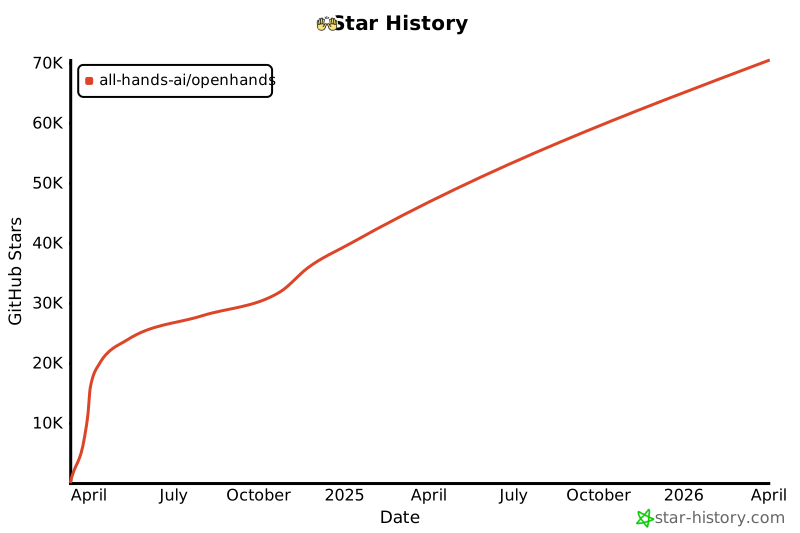](https://star-history.com/#All-Hands-AI/OpenHands&Date)
|
||||
|
||||
## 🛠️ Construit avec
|
||||
## Construit avec
|
||||
|
||||
OpenHands est construit en utilisant une combinaison de frameworks et de bibliothèques puissants, fournissant une base solide pour son développement. Voici les principales technologies utilisées dans le projet :
|
||||
|
||||
@@ -44,6 +23,6 @@ OpenHands est construit en utilisant une combinaison de frameworks et de bibliot
|
||||
|
||||
Veuillez noter que la sélection de ces technologies est en cours et que des technologies supplémentaires peuvent être ajoutées ou des technologies existantes peuvent être supprimées à mesure que le projet évolue. Nous nous efforçons d'adopter les outils les plus appropriés et les plus efficaces pour améliorer les capacités d'OpenHands.
|
||||
|
||||
## 📜 Licence
|
||||
## Licence
|
||||
|
||||
Distribué sous la licence MIT. Voir [notre licence](https://github.com/All-Hands-AI/OpenHands/blob/main/LICENSE) pour plus d'informations.
|
||||
Distribué sous la [Licence](https://github.com/All-Hands-AI/OpenHands/blob/main/LICENSE) MIT.
|
||||
|
||||
@@ -1,8 +1,8 @@
|
||||
|
||||
|
||||
# 📦 Runtime EventStream
|
||||
# 📦 Runtime Docker
|
||||
|
||||
Le Runtime EventStream d'OpenHands est le composant principal qui permet l'exécution sécurisée et flexible des actions des agents d'IA.
|
||||
Le Runtime Docker d'OpenHands est le composant principal qui permet l'exécution sécurisée et flexible des actions des agents d'IA.
|
||||
Il crée un environnement en bac à sable (sandbox) en utilisant Docker, où du code arbitraire peut être exécuté en toute sécurité sans risquer le système hôte.
|
||||
|
||||
## Pourquoi avons-nous besoin d'un runtime en bac à sable ?
|
||||
|
||||
@@ -0,0 +1,387 @@
|
||||
# Options de configuration
|
||||
|
||||
Ce guide détaille toutes les options de configuration disponibles pour OpenHands, vous aidant à personnaliser son comportement et à l'intégrer avec d'autres services.
|
||||
|
||||
:::note
|
||||
Si vous exécutez en [Mode GUI](https://docs.all-hands.dev/modules/usage/how-to/gui-mode), les paramètres disponibles dans l'interface utilisateur des paramètres auront toujours
|
||||
la priorité.
|
||||
:::
|
||||
|
||||
---
|
||||
|
||||
# Table des matières
|
||||
|
||||
1. [Configuration de base](#core-configuration)
|
||||
- [Clés API](#api-keys)
|
||||
- [Espace de travail](#workspace)
|
||||
- [Débogage et journalisation](#debugging-and-logging)
|
||||
- [Trajectoires](#trajectories)
|
||||
- [Stockage de fichiers](#file-store)
|
||||
- [Gestion des tâches](#task-management)
|
||||
- [Configuration du bac à sable](#sandbox-configuration)
|
||||
- [Divers](#miscellaneous)
|
||||
2. [Configuration LLM](#llm-configuration)
|
||||
- [Informations d'identification AWS](#aws-credentials)
|
||||
- [Configuration de l'API](#api-configuration)
|
||||
- [Fournisseur LLM personnalisé](#custom-llm-provider)
|
||||
- [Embeddings](#embeddings)
|
||||
- [Gestion des messages](#message-handling)
|
||||
- [Sélection du modèle](#model-selection)
|
||||
- [Nouvelles tentatives](#retrying)
|
||||
- [Options avancées](#advanced-options)
|
||||
3. [Configuration de l'agent](#agent-configuration)
|
||||
- [Configuration de la mémoire](#memory-configuration)
|
||||
- [Configuration LLM](#llm-configuration-1)
|
||||
- [Configuration de l'espace d'action](#actionspace-configuration)
|
||||
- [Utilisation du micro-agent](#microagent-usage)
|
||||
4. [Configuration du bac à sable](#sandbox-configuration-1)
|
||||
- [Exécution](#execution)
|
||||
- [Image de conteneur](#container-image)
|
||||
- [Mise en réseau](#networking)
|
||||
- [Linting et plugins](#linting-and-plugins)
|
||||
- [Dépendances et environnement](#dependencies-and-environment)
|
||||
- [Évaluation](#evaluation)
|
||||
5. [Configuration de sécurité](#security-configuration)
|
||||
- [Mode de confirmation](#confirmation-mode)
|
||||
- [Analyseur de sécurité](#security-analyzer)
|
||||
|
||||
---
|
||||
|
||||
## Configuration de base
|
||||
|
||||
Les options de configuration de base sont définies dans la section `[core]` du fichier `config.toml`.
|
||||
|
||||
**Clés API**
|
||||
- `e2b_api_key`
|
||||
- Type : `str`
|
||||
- Valeur par défaut : `""`
|
||||
- Description : Clé API pour E2B
|
||||
|
||||
- `modal_api_token_id`
|
||||
- Type : `str`
|
||||
- Valeur par défaut : `""`
|
||||
- Description : ID du jeton API pour Modal
|
||||
|
||||
- `modal_api_token_secret`
|
||||
- Type : `str`
|
||||
- Valeur par défaut : `""`
|
||||
- Description : Secret du jeton API pour Modal
|
||||
|
||||
**Espace de travail**
|
||||
- `workspace_base`
|
||||
- Type : `str`
|
||||
- Valeur par défaut : `"./workspace"`
|
||||
- Description : Chemin de base pour l'espace de travail
|
||||
|
||||
- `cache_dir`
|
||||
- Type : `str`
|
||||
- Valeur par défaut : `"/tmp/cache"`
|
||||
- Description : Chemin du répertoire de cache
|
||||
|
||||
**Débogage et journalisation**
|
||||
- `debug`
|
||||
- Type : `bool`
|
||||
- Valeur par défaut : `false`
|
||||
- Description : Activer le débogage
|
||||
|
||||
- `disable_color`
|
||||
- Type : `bool`
|
||||
- Valeur par défaut : `false`
|
||||
- Description : Désactiver la couleur dans la sortie du terminal
|
||||
|
||||
**Trajectoires**
|
||||
- `save_trajectory_path`
|
||||
- Type : `str`
|
||||
- Valeur par défaut : `"./trajectories"`
|
||||
- Description : Chemin pour stocker les trajectoires (peut être un dossier ou un fichier). Si c'est un dossier, les trajectoires seront enregistrées dans un fichier nommé avec l'ID de session et l'extension .json, dans ce dossier.
|
||||
|
||||
**Stockage de fichiers**
|
||||
- `file_store_path`
|
||||
- Type : `str`
|
||||
- Valeur par défaut : `"/tmp/file_store"`
|
||||
- Description : Chemin de stockage des fichiers
|
||||
|
||||
- `file_store`
|
||||
- Type : `str`
|
||||
- Valeur par défaut : `"memory"`
|
||||
- Description : Type de stockage de fichiers
|
||||
|
||||
- `file_uploads_allowed_extensions`
|
||||
- Type : `list of str`
|
||||
- Valeur par défaut : `[".*"]`
|
||||
- Description : Liste des extensions de fichiers autorisées pour les téléchargements
|
||||
|
||||
- `file_uploads_max_file_size_mb`
|
||||
- Type : `int`
|
||||
- Valeur par défaut : `0`
|
||||
- Description : Taille maximale des fichiers pour les téléchargements, en mégaoctets
|
||||
|
||||
- `file_uploads_restrict_file_types`
|
||||
- Type : `bool`
|
||||
- Valeur par défaut : `false`
|
||||
- Description : Restreindre les types de fichiers pour les téléchargements de fichiers
|
||||
|
||||
- `file_uploads_allowed_extensions`
|
||||
- Type : `list of str`
|
||||
- Valeur par défaut : `[".*"]`
|
||||
- Description : Liste des extensions de fichiers autorisées pour les téléchargements
|
||||
|
||||
**Gestion des tâches**
|
||||
- `max_budget_per_task`
|
||||
- Type : `float`
|
||||
- Valeur par défaut : `0.0`
|
||||
- Description : Budget maximal par tâche (0.0 signifie aucune limite)
|
||||
|
||||
- `max_iterations`
|
||||
- Type : `int`
|
||||
- Valeur par défaut : `100`
|
||||
- Description : Nombre maximal d'itérations
|
||||
|
||||
**Configuration du bac à sable**
|
||||
- `workspace_mount_path_in_sandbox`
|
||||
- Type : `str`
|
||||
- Valeur par défaut : `"/workspace"`
|
||||
- Description : Chemin de montage de l'espace de travail dans le bac à sable
|
||||
|
||||
- `workspace_mount_path`
|
||||
- Type : `str`
|
||||
- Valeur par défaut : `""`
|
||||
- Description : Chemin de montage de l'espace de travail
|
||||
|
||||
- `workspace_mount_rewrite`
|
||||
- Type : `str`
|
||||
- Valeur par défaut : `""`
|
||||
- Description : Chemin pour réécrire le chemin de montage de l'espace de travail. Vous pouvez généralement ignorer cela, cela fait référence à des cas spéciaux d'exécution à l'intérieur d'un autre conteneur.
|
||||
|
||||
**Divers**
|
||||
- `run_as_openhands`
|
||||
- Type : `bool`
|
||||
- Valeur par défaut : `true`
|
||||
- Description : Exécuter en tant qu'OpenHands
|
||||
|
||||
- `runtime`
|
||||
- Type : `str`
|
||||
- Valeur par défaut : `"docker"`
|
||||
- Description : Environnement d'exécution
|
||||
|
||||
- `default_agent`
|
||||
- Type : `str`
|
||||
- Valeur par défaut : `"CodeActAgent"`
|
||||
- Description : Nom de l'agent par défaut
|
||||
|
||||
- `jwt_secret`
|
||||
- Type : `str`
|
||||
- Valeur par défaut : `uuid.uuid4().hex`
|
||||
- Description : Secret JWT pour l'authentification. Veuillez le définir sur votre propre valeur.
|
||||
|
||||
## Configuration LLM
|
||||
|
||||
Les options de configuration LLM (Large Language Model) sont définies dans la section `[llm]` du fichier `config.toml`.
|
||||
|
||||
Pour les utiliser avec la commande docker, passez `-e LLM_<option>`. Exemple : `-e LLM_NUM_RETRIES`.
|
||||
|
||||
:::note
|
||||
Pour les configurations de développement, vous pouvez également définir des configurations LLM personnalisées. Voir [Configurations LLM personnalisées](./llms/custom-llm-configs) pour plus de détails.
|
||||
:::
|
||||
|
||||
**Informations d'identification AWS**
|
||||
- `aws_access_key_id`
|
||||
- Type : `str`
|
||||
- Valeur par défaut : `""`
|
||||
- Description : ID de clé d'accès AWS
|
||||
|
||||
- `aws_region_name`
|
||||
- Type : `str`
|
||||
- Valeur par défaut : `""`
|
||||
- Description : Nom de la région AWS
|
||||
|
||||
- `aws_secret_access_key`
|
||||
- Type : `str`
|
||||
- Valeur par défaut : `""`
|
||||
- Description : Clé d'accès secrète AWS
|
||||
|
||||
**Configuration de l'API**
|
||||
- `api_key`
|
||||
- Type : `str`
|
||||
- Valeur par défaut : `None`
|
||||
- Description : Clé API à utiliser
|
||||
|
||||
- `base_url`
|
||||
- Type : `str`
|
||||
- Valeur par défaut : `""`
|
||||
- Description : URL de base de l'API
|
||||
|
||||
- `api_version`
|
||||
- Type : `str`
|
||||
- Valeur par défaut : `""`
|
||||
- Description : Version de l'API
|
||||
|
||||
- `input_cost_per_token`
|
||||
- Type : `float`
|
||||
- Valeur par défaut : `0.0`
|
||||
- Description : Coût par jeton d'entrée
|
||||
|
||||
- `output_cost_per_token`
|
||||
- Type : `float`
|
||||
- Valeur par défaut : `0.0`
|
||||
- Description : Coût par jeton de sortie
|
||||
|
||||
**Fournisseur LLM personnalisé**
|
||||
- `custom_llm_provider`
|
||||
- Type : `str`
|
||||
- Valeur par défaut : `""`
|
||||
- Description : Fournisseur LLM personnalisé
|
||||
|
||||
**Embeddings**
|
||||
- `embedding_base_url`
|
||||
- Type : `str`
|
||||
- Valeur par défaut : `""`
|
||||
- Description : URL de base de l'API d'embedding
|
||||
|
||||
- `embedding_deployment_name`
|
||||
- Type : `str`
|
||||
- Valeur par défaut : `""`
|
||||
- Description : Nom du déploiement d'embedding
|
||||
|
||||
- `embedding_model`
|
||||
- Type : `str`
|
||||
- Valeur par défaut : `"local"`
|
||||
- Description : Modèle d'embedding à utiliser
|
||||
|
||||
**Gestion des messages**
|
||||
- `max_message_chars`
|
||||
- Type : `int`
|
||||
- Valeur par défaut : `30000`
|
||||
- Description : Le nombre maximum approximatif de caractères dans le contenu d'un événement inclus dans l'invite au LLM. Les observations plus grandes sont tronquées.
|
||||
|
||||
- `max_input_tokens`
|
||||
- Type : `int`
|
||||
- Valeur par défaut : `0`
|
||||
- Description : Nombre maximal de jetons d'entrée
|
||||
|
||||
- `max_output_tokens`
|
||||
- Type : `int`
|
||||
- Valeur par défaut : `0`
|
||||
- Description : Nombre maximal de jetons de sortie
|
||||
|
||||
**Sélection du modèle**
|
||||
- `model`
|
||||
- Type : `str`
|
||||
- Valeur par défaut : `"claude-3-5-sonnet-20241022"`
|
||||
- Description : Modèle à utiliser
|
||||
|
||||
**Nouvelles tentatives**
|
||||
- `num_retries`
|
||||
- Type : `int`
|
||||
- Valeur par défaut : `8`
|
||||
- Description : Nombre de nouvelles tentatives à effectuer
|
||||
|
||||
- `retry_max_wait`
|
||||
- Type : `int`
|
||||
- Valeur par défaut : `120`
|
||||
- Description : Temps d'attente maximal (en secondes) entre les tentatives de nouvelle tentative
|
||||
|
||||
- `retry_min_wait`
|
||||
- Type : `int`
|
||||
- Valeur par défaut : `15`
|
||||
- Description : Temps d'attente minimal (en secondes) entre les tentatives de nouvelle tentative
|
||||
|
||||
- `retry_multiplier`
|
||||
- Type : `float`
|
||||
- Valeur par défaut : `2.0`
|
||||
- Description : Multiplicateur pour le calcul du backoff exponentiel
|
||||
|
||||
**Options avancées**
|
||||
- `drop_params`
|
||||
- Type : `bool`
|
||||
- Valeur par défaut : `false`
|
||||
- Description : Supprimer tous les paramètres non mappés (non pris en charge) sans provoquer d'exception
|
||||
|
||||
- `caching_prompt`
|
||||
- Type : `bool`
|
||||
- Valeur par défaut : `true`
|
||||
- Description : Utiliser la fonctionnalité de mise en cache des invites si elle est fournie par le LLM et prise en charge
|
||||
|
||||
- `ollama_base_url`
|
||||
- Type : `str`
|
||||
- Valeur par défaut : `""`
|
||||
- Description : URL de base pour l'API OLLAMA
|
||||
|
||||
- `temperature`
|
||||
- Type : `float`
|
||||
- Valeur par défaut : `0.0`
|
||||
- Description : Température pour l'API
|
||||
|
||||
- `timeout`
|
||||
- Type : `int`
|
||||
- Valeur par défaut : `0`
|
||||
- Description : Délai d'expiration pour l'API
|
||||
|
||||
- `top_p`
|
||||
- Type : `float`
|
||||
- Valeur par défaut : `1.0`
|
||||
- Description : Top p pour l'API
|
||||
|
||||
- `disable_vision`
|
||||
- Type : `bool`
|
||||
- Valeur par défaut : `None`
|
||||
- Description : Si le modèle est capable de vision, cette option permet de désactiver le traitement des images (utile pour réduire les coûts)
|
||||
|
||||
## Configuration de l'agent
|
||||
|
||||
Les options de configuration de l'agent sont définies dans les sections `[agent]` et `[agent.<agent_name>]` du fichier `config.toml`.
|
||||
|
||||
**Configuration de la mémoire**
|
||||
- `memory_enabled`
|
||||
- Type : `bool`
|
||||
- Valeur par défaut : `false`
|
||||
- Description : Si la mémoire à long terme (embeddings) est activée
|
||||
|
||||
- `memory_max_threads`
|
||||
- Type : `int`
|
||||
- Valeur par défaut : `3`
|
||||
- Description : Le nombre maximum de threads indexant en même temps pour les embeddings
|
||||
|
||||
**Configuration LLM**
|
||||
- `llm_config`
|
||||
- Type : `str`
|
||||
- Valeur par défaut : `'your-llm-config-group'`
|
||||
- Description : Le nom de la configuration LLM à utiliser
|
||||
|
||||
**Configuration de l'espace d'action**
|
||||
- `function_calling`
|
||||
- Type : `bool`
|
||||
- Valeur par défaut : `true`
|
||||
- Description : Si l'appel de fonction est activé
|
||||
|
||||
- `codeact_enable_browsing`
|
||||
- Type : `bool`
|
||||
- Valeur par défaut : `false`
|
||||
- Description : Si le délégué de navigation est activé dans l'espace d'action (fonctionne uniquement avec l'appel de fonction)
|
||||
|
||||
- `codeact_enable_llm_editor`
|
||||
- Type : `bool`
|
||||
- Valeur par défaut : `false`
|
||||
- Description : Si l'éditeur LLM est activé dans l'espace d'action (fonctionne uniquement avec l'appel de fonction)
|
||||
|
||||
**Utilisation du micro-agent**
|
||||
- `enable_prompt_extensions`
|
||||
- Type : `bool`
|
||||
- Valeur par défaut : `true`
|
||||
- Description : Indique si l'utilisation des micro-agents est activée ou non
|
||||
|
||||
- `disabled_microagents`
|
||||
- Type : `list of str`
|
||||
- Valeur par défaut : `None`
|
||||
- Description : Liste des micro-agents à désactiver
|
||||
|
||||
### Exécution
|
||||
- `timeout`
|
||||
- Type : `int`
|
||||
- Valeur par défaut : `120`
|
||||
- Description : Délai d'expiration du bac à sable, en secondes
|
||||
|
||||
- `user_id`
|
||||
- Type : `int`
|
||||
- Valeur par défaut : `1000`
|
||||
- Description : ID de l'utilisateur du bac à sable
|
||||
@@ -42,10 +42,11 @@ Créez un fichier ```config.toml``` dans le répertoire OpenHands et entrez ces
|
||||
[core]
|
||||
workspace_base="./workspace"
|
||||
run_as_openhands=true
|
||||
sandbox_base_container_image="image_personnalisée"
|
||||
[sandbox]
|
||||
base_container_image="image_personnalisée"
|
||||
```
|
||||
|
||||
> Assurez-vous que ```sandbox_base_container_image``` est défini sur le nom de votre image personnalisée précédente.
|
||||
> Assurez-vous que ```base_container_image``` est défini sur le nom de votre image personnalisée précédente.
|
||||
|
||||
## Exécution
|
||||
|
||||
@@ -82,20 +83,17 @@ dockerfile_content = (
|
||||
## Dépannage / Erreurs
|
||||
|
||||
### Erreur: ```useradd: UID 1000 est non unique```
|
||||
Si vous voyez cette erreur dans la sortie de la console, il s'agit du fait que OpenHands essaie de créer le utilisateur openhands dans le sandbox avec un ID d'utilisateur de 1000, cependant cet ID d'utilisateur est déjà utilisé dans l'image (pour une raison inconnue). Pour résoudre ce problème, changez la valeur du champ sandbox_user_id dans le fichier config.toml en une valeur différente:
|
||||
Si vous voyez cette erreur dans la sortie de la console, il s'agit du fait que OpenHands essaie de créer le utilisateur openhands dans le sandbox avec un ID d'utilisateur de 1000, cependant cet ID d'utilisateur est déjà utilisé dans l'image (pour une raison inconnue). Pour résoudre ce problème, changez la valeur du champ user_id dans le fichier config.toml en une valeur différente:
|
||||
|
||||
```toml
|
||||
[core]
|
||||
workspace_base="./workspace"
|
||||
run_as_openhands=true
|
||||
sandbox_base_container_image="image_personnalisée"
|
||||
sandbox_user_id="1001"
|
||||
[sandbox]
|
||||
base_container_image="image_personnalisée"
|
||||
user_id="1001"
|
||||
```
|
||||
|
||||
### Erreurs de port d'utilisation
|
||||
|
||||
Si vous voyez un message d'erreur indiquant que le port est utilisé ou indisponible, essayez de supprimer toutes les containers docker en cours d'exécution (exécutez `docker ps` et `docker rm` des containers concernés) puis ré-exécutez ```make run```
|
||||
|
||||
## Discuter
|
||||
|
||||
Pour d'autres problèmes ou questions rejoignez le [Slack](https://join.slack.com/t/opendevin/shared_invite/zt-2oikve2hu-UDxHeo8nsE69y6T7yFX_BA) ou le [Discord](https://discord.gg/ESHStjSjD4) et demandez!
|
||||
|
||||
@@ -1,12 +1,12 @@
|
||||
|
||||
Voici la traduction en français :
|
||||
|
||||
# ✅ Fournir des commentaires
|
||||
|
||||
Lorsque vous utilisez OpenHands, vous rencontrerez des cas où les choses fonctionnent bien, et d'autres où elles ne fonctionnent pas. Nous vous encourageons à fournir des commentaires lorsque vous utilisez OpenHands pour aider à donner des retours à l'équipe de développement, et peut-être plus important encore, créer un corpus ouvert d'exemples d'entraînement d'agents de codage -- Share-OpenHands !
|
||||
Lorsque vous utilisez OpenHands, vous rencontrerez des cas où les choses fonctionnent bien, et d'autres où elles ne fonctionnent pas. Nous vous encourageons à fournir des commentaires lorsque vous utilisez OpenHands pour aider à donner un retour d'information à l'équipe de développement, et peut-être plus important encore, créer un corpus ouvert d'exemples d'entraînement d'agents de codage -- Share-OpenHands !
|
||||
|
||||
## 📝 Comment fournir des commentaires
|
||||
|
||||
Fournir des commentaires est facile ! Lorsque vous utilisez OpenHands, vous pouvez appuyer sur le bouton pouce vers le haut ou pouce vers le bas à tout moment pendant votre interaction. Vous serez invité à fournir votre adresse e-mail (par exemple, afin que nous puissions vous contacter si nous voulons poser des questions de suivi), et vous pouvez choisir si vous souhaitez fournir des commentaires publiquement ou en privé.
|
||||
Fournir des commentaires est facile ! Lorsque vous utilisez OpenHands, vous pouvez appuyer sur le bouton pouce vers le haut ou pouce vers le bas à tout moment pendant votre interaction. On vous demandera de fournir votre adresse e-mail (par exemple, pour que nous puissions vous contacter si nous voulons vous poser des questions de suivi), et vous pouvez choisir si vous souhaitez fournir des commentaires publiquement ou en privé.
|
||||
|
||||
<iframe width="560" height="315" src="https://www.youtube.com/embed/5rFx-StMVV0?si=svo7xzp6LhGK_GXr" title="YouTube video player" frameborder="0" allow="accelerometer; autoplay; clipboard-write; encrypted-media; gyroscope; picture-in-picture; web-share" referrerpolicy="strict-origin-when-cross-origin" allowfullscreen></iframe>
|
||||
|
||||
@@ -16,8 +16,8 @@ Fournir des commentaires est facile ! Lorsque vous utilisez OpenHands, vous pouv
|
||||
|
||||
Lorsque vous soumettez des données, vous pouvez les soumettre publiquement ou en privé.
|
||||
|
||||
* Les données **publiques** seront distribuées sous la licence MIT, comme OpenHands lui-même, et pourront être utilisées par la communauté pour entraîner et tester des modèles. Évidemment, les commentaires que vous pouvez rendre publics seront plus précieux pour la communauté dans son ensemble, donc lorsque vous ne traitez pas d'informations sensibles, nous vous encourageons à choisir cette option !
|
||||
* Les données **privées** ne seront partagées qu'avec l'équipe OpenHands dans le but d'améliorer OpenHands.
|
||||
- Les données **publiques** seront distribuées sous la licence MIT, comme OpenHands lui-même, et pourront être utilisées par la communauté pour entraîner et tester des modèles. De toute évidence, les commentaires que vous pouvez rendre publics seront plus précieux pour la communauté dans son ensemble, donc lorsque vous ne traitez pas d'informations sensibles, nous vous encourageons à choisir cette option !
|
||||
- Les données **privées** seront mises à la disposition de l'équipe OpenHands dans le but d'améliorer OpenHands. Cependant, un lien avec un ID unique sera toujours créé que vous pourrez partager publiquement avec d'autres.
|
||||
|
||||
### Qui collecte et stocke les données ?
|
||||
|
||||
@@ -25,8 +25,7 @@ Les données sont collectées et stockées par [All Hands AI](https://all-hands.
|
||||
|
||||
### Comment les données publiques seront-elles publiées ?
|
||||
|
||||
Les données publiques seront publiées lorsque nous atteindrons des jalons fixes, tels que 1 000 exemples publics, 10 000 exemples publics, etc.
|
||||
À ce moment-là, nous suivrons le processus de publication suivant :
|
||||
Les données publiques seront publiées lorsque nous atteindrons des jalons fixes, tels que 1 000 exemples publics, 10 000 exemples publics, etc. À ce moment-là, nous suivrons le processus de publication suivant :
|
||||
|
||||
1. Toutes les personnes qui ont contribué à des commentaires publics recevront un e-mail décrivant la publication des données et auront la possibilité de se retirer.
|
||||
2. La ou les personnes en charge de la publication des données effectueront un contrôle de la qualité des données, en supprimant les commentaires de mauvaise qualité, en supprimant les adresses e-mail des soumissionnaires et en essayant de supprimer toute information sensible.
|
||||
@@ -36,6 +35,6 @@ Les données publiques seront publiées lorsque nous atteindrons des jalons fixe
|
||||
|
||||
Pour les données sur les serveurs d'All Hands AI, nous sommes heureux de les supprimer sur demande :
|
||||
|
||||
**Une pièce de données :** Si vous souhaitez supprimer une pièce de données, nous ajouterons prochainement un mécanisme pour supprimer les pièces de données en utilisant le lien et le mot de passe qui s'affichent sur l'interface lorsque vous soumettez des données.
|
||||
**Une pièce de données :** Si vous souhaitez supprimer une pièce de données, nous ajouterons prochainement un mécanisme pour supprimer des pièces de données à l'aide du lien et du mot de passe qui s'affichent sur l'interface lorsque vous soumettez des données.
|
||||
|
||||
**Toutes les données :** Si vous souhaitez que toutes vos données soient supprimées, ou si vous n'avez pas l'ID et le mot de passe que vous avez reçus lors de la soumission des données, veuillez contacter `contact@all-hands.dev` à partir de l'adresse e-mail que vous avez enregistrée lorsque vous avez initialement soumis les données.
|
||||
**Toutes les données :** Si vous souhaitez que toutes vos données soient supprimées, ou si vous n'avez pas l'ID et le mot de passe que vous avez reçus lors de la soumission des données, veuillez contacter `contact@all-hands.dev` à partir de l'adresse e-mail que vous avez enregistrée lorsque vous avez initialement soumis les données.
|
||||
@@ -1,32 +1,32 @@
|
||||
|
||||
Voici la traduction en français, en préservant le formatage Markdown, les blocs de code et le front matter, ainsi que les balises {% jsx %} et autres éléments similaires. Les exemples de code, les URL et les termes techniques n'ont pas été traduits.
|
||||
|
||||
# Démarrer avec OpenHands
|
||||
|
||||
Vous avez donc [installé OpenHands](./installation) et avez
|
||||
Vous avez donc [exécuté OpenHands](./installation) et avez
|
||||
[configuré votre LLM](./installation#setup). Et maintenant ?
|
||||
|
||||
OpenHands peut vous aider à vous attaquer à une grande variété de tâches d'ingénierie. Mais la technologie
|
||||
OpenHands peut vous aider à aborder une grande variété de tâches d'ingénierie. Mais la technologie
|
||||
est encore nouvelle, et nous sommes loin d'avoir des agents capables de prendre en charge des tâches
|
||||
d'ingénierie vastes et compliquées sans aucune aide. Il est donc important de se faire une idée de ce que l'agent
|
||||
fait bien, et où il pourrait avoir besoin d'un coup de main.
|
||||
d'ingénierie vastes et compliquées sans aucune guidance. Il est donc important de se faire une idée de ce que l'agent
|
||||
fait bien, et où il pourrait avoir besoin d'aide.
|
||||
|
||||
## Hello World
|
||||
|
||||
La première chose que vous voudrez peut-être essayer est un simple exemple "hello world".
|
||||
La première chose que vous pourriez vouloir essayer est un simple exemple "hello world".
|
||||
Cela peut être plus compliqué qu'il n'y paraît !
|
||||
|
||||
Essayez de demander à l'agent :
|
||||
Essayez de donner à l'agent l'instruction suivante :
|
||||
> Please write a bash script hello.sh that prints "hello world!"
|
||||
|
||||
Vous devriez constater que l'agent non seulement écrit le script, mais définit également les
|
||||
permissions correctes et exécute le script pour vérifier la sortie.
|
||||
|
||||
Vous pouvez continuer à demander à l'agent d'affiner votre code. C'est une excellente façon de
|
||||
Vous pouvez continuer à donner des instructions à l'agent pour affiner votre code. C'est une excellente façon de
|
||||
travailler avec les agents. Commencez simplement, et itérez.
|
||||
|
||||
> Please modify hello.sh so that it accepts a name as the first argument, but defaults to "world"
|
||||
|
||||
Vous pouvez également travailler dans n'importe quel langage dont vous avez besoin, bien que l'agent puisse avoir besoin de passer un peu de
|
||||
Vous pouvez également travailler dans n'importe quel langage dont vous avez besoin, bien que l'agent puisse avoir besoin de passer du
|
||||
temps à configurer son environnement !
|
||||
|
||||
> Please convert hello.sh to a Ruby script, and run it
|
||||
@@ -46,7 +46,7 @@ Par exemple, nous pourrions construire une application TODO :
|
||||
|
||||
Nous pouvons continuer à itérer sur l'application une fois le squelette en place :
|
||||
|
||||
> Please allow adding an optional due date to every task
|
||||
> Please allow adding an optional due date to every task.
|
||||
|
||||
Tout comme avec le développement normal, il est bon de commiter et de pousser votre code fréquemment.
|
||||
De cette façon, vous pouvez toujours revenir à un ancien état si l'agent dévie.
|
||||
@@ -61,15 +61,15 @@ OpenHands peut également faire un excellent travail en ajoutant du nouveau code
|
||||
|
||||
Par exemple, vous pouvez demander à OpenHands d'ajouter une nouvelle action GitHub à votre projet
|
||||
qui analyse votre code. OpenHands peut jeter un coup d'œil à votre base de code pour voir quel langage
|
||||
il doit utiliser, mais ensuite il peut simplement déposer un nouveau fichier dans `./github/workflows/lint.yml`.
|
||||
il doit utiliser, puis déposer un nouveau fichier dans `./github/workflows/lint.yml`.
|
||||
|
||||
> Please add a GitHub action that lints the code in this repository
|
||||
> Please add a GitHub action that lints the code in this repository.
|
||||
|
||||
Certaines tâches peuvent nécessiter un peu plus de contexte. Bien qu'OpenHands puisse utiliser `ls` et `grep`
|
||||
pour rechercher dans votre base de code, fournir le contexte à l'avance lui permet d'aller plus vite,
|
||||
et plus précisément. Et cela vous coûtera moins de tokens !
|
||||
|
||||
> Please modify ./backend/api/routes.js to add a new route that returns a list of all tasks
|
||||
> Please modify ./backend/api/routes.js to add a new route that returns a list of all tasks.
|
||||
|
||||
> Please add a new React component that displays a list of Widgets to the ./frontend/components
|
||||
> directory. It should use the existing Widget component.
|
||||
@@ -80,17 +80,17 @@ OpenHands est excellent pour refactoriser du code existant, surtout par petits m
|
||||
Vous ne voulez probablement pas essayer de réarchitecturer toute votre base de code, mais diviser
|
||||
les longs fichiers et fonctions, renommer les variables, etc. ont tendance à très bien fonctionner.
|
||||
|
||||
> Please rename all the single-letter variables in ./app.go
|
||||
> Please rename all the single-letter variables in ./app.go.
|
||||
|
||||
> Please break the function `build_and_deploy_widgets` into two functions, `build_widgets` and `deploy_widgets` in widget.php
|
||||
> Please break the function `build_and_deploy_widgets` into two functions, `build_widgets` and `deploy_widgets` in widget.php.
|
||||
|
||||
> Please break ./api/routes.js into separate files for each route
|
||||
> Please break ./api/routes.js into separate files for each route.
|
||||
|
||||
## Corrections de bugs
|
||||
|
||||
OpenHands peut également vous aider à traquer et corriger des bugs dans votre code. Mais, comme tout
|
||||
OpenHands peut également vous aider à traquer et corriger des bugs dans votre code. Mais comme tout
|
||||
développeur le sait, la correction de bugs peut être extrêmement délicate, et souvent OpenHands aura besoin de plus de contexte.
|
||||
Cela aide si vous avez diagnostiqué le bug, mais que vous voulez qu'OpenHands trouve la logique.
|
||||
Cela aide si vous avez diagnostiqué le bug, mais que vous voulez qu'OpenHands comprenne la logique.
|
||||
|
||||
> Currently the email field in the `/subscribe` endpoint is rejecting .io domains. Please fix this.
|
||||
|
||||
@@ -103,11 +103,11 @@ Vous pouvez demander à l'agent d'écrire un nouveau test, puis d'itérer jusqu'
|
||||
|
||||
## Plus
|
||||
|
||||
OpenHands est capable d'aider sur à peu près n'importe quelle tâche de codage. Mais il faut un peu de pratique
|
||||
OpenHands est capable d'aider sur à peu près n'importe quelle tâche de codage, mais il faut de la pratique
|
||||
pour en tirer le meilleur parti. N'oubliez pas de :
|
||||
* Garder vos tâches petites
|
||||
* Être aussi précis que possible
|
||||
* Fournir autant de contexte que possible
|
||||
* Commiter et pousser fréquemment
|
||||
* Garder vos tâches petites.
|
||||
* Être aussi précis que possible.
|
||||
* Fournir autant de contexte que possible.
|
||||
* Commiter et pousser fréquemment.
|
||||
|
||||
Voir [Bonnes pratiques de prompting](./prompting-best-practices) pour plus de conseils sur la façon de tirer le meilleur parti d'OpenHands.
|
||||
Voir [Meilleures pratiques de prompting](./prompting/prompting-best-practices) pour plus de conseils sur la façon de tirer le meilleur parti d'OpenHands.
|
||||
@@ -28,16 +28,17 @@ Vous devrez vous assurer de définir votre modèle, votre clé API et d'autres p
|
||||
|
||||
Pour exécuter OpenHands en mode CLI avec Docker, suivez ces étapes :
|
||||
|
||||
1. Définissez `WORKSPACE_BASE` sur le répertoire que vous souhaitez qu'OpenHands modifie :
|
||||
1. Définissez `WORKSPACE_BASE` sur le répertoire que vous voulez qu'OpenHands modifie :
|
||||
|
||||
```bash
|
||||
WORKSPACE_BASE=$(pwd)/workspace
|
||||
```
|
||||
|
||||
2. Définissez `LLM_MODEL` sur le modèle que vous souhaitez utiliser :
|
||||
2. Définissez `LLM_MODEL` sur le modèle que vous voulez utiliser :
|
||||
|
||||
```bash
|
||||
LLM_MODEL="anthropic/claude-3-5-sonnet-20241022"
|
||||
|
||||
```
|
||||
|
||||
3. Définissez `LLM_API_KEY` sur votre clé API :
|
||||
@@ -51,6 +52,7 @@ LLM_API_KEY="sk_test_12345"
|
||||
```bash
|
||||
docker run -it \
|
||||
--pull=always \
|
||||
-e SANDBOX_RUNTIME_CONTAINER_IMAGE=docker.all-hands.dev/all-hands-ai/runtime:0.29-nikolaik \
|
||||
-e SANDBOX_USER_ID=$(id -u) \
|
||||
-e WORKSPACE_MOUNT_PATH=$WORKSPACE_BASE \
|
||||
-e LLM_API_KEY=$LLM_API_KEY \
|
||||
@@ -59,7 +61,7 @@ docker run -it \
|
||||
-v /var/run/docker.sock:/var/run/docker.sock \
|
||||
--add-host host.docker.internal:host-gateway \
|
||||
--name openhands-app-$(date +%Y%m%d%H%M%S) \
|
||||
ghcr.io/all-hands-ai/openhands:0.11 \
|
||||
docker.all-hands.dev/all-hands-ai/openhands:0.29 \
|
||||
python -m openhands.core.cli
|
||||
```
|
||||
|
||||
@@ -72,7 +74,7 @@ Voici quelques exemples de commandes CLI et leurs sorties attendues :
|
||||
### Exemple 1 : Tâche simple
|
||||
|
||||
```bash
|
||||
Comment puis-je vous aider ? >> Écrivez un script Python qui affiche "Hello, World!"
|
||||
How can I help? >> Écrivez un script Python qui affiche "Hello, World!"
|
||||
```
|
||||
|
||||
Sortie attendue :
|
||||
@@ -86,7 +88,7 @@ Sortie attendue :
|
||||
### Exemple 2 : Commande Bash
|
||||
|
||||
```bash
|
||||
Comment puis-je vous aider ? >> Créez un répertoire nommé "test_dir"
|
||||
How can I help? >> Créez un répertoire nommé "test_dir"
|
||||
```
|
||||
|
||||
Sortie attendue :
|
||||
@@ -100,7 +102,7 @@ Sortie attendue :
|
||||
### Exemple 3 : Gestion des erreurs
|
||||
|
||||
```bash
|
||||
Comment puis-je vous aider ? >> Supprimez un fichier inexistant
|
||||
How can I help? >> Supprimez un fichier inexistant
|
||||
```
|
||||
|
||||
Sortie attendue :
|
||||
|
||||
+6
-27
@@ -4,7 +4,7 @@
|
||||
|
||||
Le sandbox est l'endroit où l'agent effectue ses tâches. Au lieu d'exécuter des commandes directement sur votre ordinateur (ce qui pourrait être risqué), l'agent les exécute à l'intérieur d'un conteneur Docker.
|
||||
|
||||
Le sandbox OpenHands par défaut (`python-nodejs:python3.12-nodejs22` de [nikolaik/python-nodejs](https://hub.docker.com/r/nikolaik/python-nodejs)) est livré avec certains paquets installés tels que Python et Node.js, mais peut nécessiter l'installation d'autres logiciels par défaut.
|
||||
Le sandbox OpenHands par défaut (`python-nodejs:python3.12-nodejs22` de [nikolaik/python-nodejs](https://hub.docker.com/r/nikolaik/python-nodejs)) est livré avec certains paquets installés tels que Python et Node.js mais peut nécessiter l'installation d'autres logiciels par défaut.
|
||||
|
||||
Vous avez deux options pour la personnalisation :
|
||||
|
||||
@@ -36,7 +36,7 @@ Cela produira une nouvelle image appelée `custom-image`, qui sera disponible da
|
||||
|
||||
> Notez que dans la configuration décrite dans ce document, OpenHands s'exécutera en tant qu'utilisateur "openhands" à l'intérieur du sandbox et donc tous les paquets installés via le docker file devraient être disponibles pour tous les utilisateurs du système, pas seulement root.
|
||||
|
||||
## Utiliser le Workflow de Développement
|
||||
## Utilisation du Workflow de Développement
|
||||
|
||||
### Configuration
|
||||
|
||||
@@ -44,40 +44,19 @@ Tout d'abord, assurez-vous de pouvoir exécuter OpenHands en suivant les instruc
|
||||
|
||||
### Spécifier l'Image de Base du Sandbox
|
||||
|
||||
Dans le fichier `config.toml` dans le répertoire OpenHands, définissez `sandbox_base_container_image` sur l'image que vous souhaitez utiliser. Cela peut être une image que vous avez déjà extraite ou une que vous avez construite :
|
||||
Dans le fichier `config.toml` dans le répertoire OpenHands, définissez `base_container_image` sur l'image que vous souhaitez utiliser. Cela peut être une image que vous avez déjà extraite ou une que vous avez construite :
|
||||
|
||||
```bash
|
||||
[core]
|
||||
...
|
||||
sandbox_base_container_image="custom-image"
|
||||
[sandbox]
|
||||
base_container_image="custom-image"
|
||||
```
|
||||
|
||||
### Exécuter
|
||||
### Exécution
|
||||
|
||||
Exécutez OpenHands en exécutant ```make run``` dans le répertoire de niveau supérieur.
|
||||
|
||||
## Explication Technique
|
||||
|
||||
Veuillez vous référer à la [section image docker personnalisée de la documentation d'exécution](https://docs.all-hands.dev/modules/usage/architecture/runtime#advanced-how-openhands-builds-and-maintains-od-runtime-images) pour plus de détails.
|
||||
|
||||
## Dépannage / Erreurs
|
||||
|
||||
### Erreur : ```useradd: UID 1000 is not unique```
|
||||
|
||||
Si vous voyez cette erreur dans la sortie de la console, c'est parce qu'OpenHands essaie de créer l'utilisateur openhands dans le sandbox avec un UID de 1000, mais cet UID est déjà utilisé dans l'image (pour une raison quelconque). Pour corriger cela, changez le champ sandbox_user_id dans le fichier config.toml à une valeur différente :
|
||||
|
||||
```toml
|
||||
[core]
|
||||
workspace_base="./workspace"
|
||||
run_as_openhands=true
|
||||
sandbox_base_container_image="custom_image"
|
||||
sandbox_user_id="1001"
|
||||
```
|
||||
|
||||
### Erreurs d'utilisation de port
|
||||
|
||||
Si vous voyez une erreur concernant un port déjà utilisé ou indisponible, essayez de supprimer tous les conteneurs Docker en cours d'exécution (exécutez `docker ps` et `docker rm` sur les conteneurs pertinents) puis réexécutez ```make run```.
|
||||
|
||||
## Discuter
|
||||
|
||||
Pour d'autres problèmes ou questions, rejoignez le [Slack](https://join.slack.com/t/opendevin/shared_invite/zt-2oikve2hu-UDxHeo8nsE69y6T7yFX_BA) ou le [Discord](https://discord.gg/ESHStjSjD4) et demandez !
|
||||
|
||||
+6
-7
@@ -15,7 +15,6 @@ Voici un exemple de fichier de configuration que vous pouvez utiliser pour défi
|
||||
[llm]
|
||||
# IMPORTANT : ajoutez votre clé API ici et définissez le modèle que vous souhaitez évaluer
|
||||
model = "claude-3-5-sonnet-20241022"
|
||||
|
||||
api_key = "sk-XXX"
|
||||
|
||||
[llm.eval_gpt4_1106_preview_llm]
|
||||
@@ -76,7 +75,7 @@ La fonction `run_controller()` est le cœur de l'exécution d'OpenHands. Elle g
|
||||
|
||||
## Le moyen le plus simple de commencer : Explorer les benchmarks existants
|
||||
|
||||
Nous vous encourageons à examiner les différents benchmarks d'évaluation disponibles dans le [répertoire `evaluation/`](https://github.com/All-Hands-AI/OpenHands/blob/main/evaluation) de notre dépôt.
|
||||
Nous vous encourageons à examiner les différents benchmarks d'évaluation disponibles dans le [répertoire `evaluation/benchmarks/`](https://github.com/All-Hands-AI/OpenHands/blob/main/evaluation/benchmarks) de notre dépôt.
|
||||
|
||||
Pour intégrer votre propre benchmark, nous vous suggérons de commencer par celui qui ressemble le plus à vos besoins. Cette approche peut considérablement rationaliser votre processus d'intégration, vous permettant de vous appuyer sur les structures existantes et de les adapter à vos exigences spécifiques.
|
||||
|
||||
@@ -115,7 +114,7 @@ Pour créer un workflow d'évaluation pour votre benchmark, suivez ces étapes :
|
||||
def get_config(instance: pd.Series, metadata: EvalMetadata) -> AppConfig:
|
||||
config = AppConfig(
|
||||
default_agent=metadata.agent_class,
|
||||
runtime='eventstream',
|
||||
runtime='docker',
|
||||
max_iterations=metadata.max_iterations,
|
||||
sandbox=SandboxConfig(
|
||||
base_container_image='your_container_image',
|
||||
@@ -191,7 +190,7 @@ En suivant cette structure, vous pouvez créer un workflow d'évaluation robuste
|
||||
|
||||
## Comprendre la `user_response_fn`
|
||||
|
||||
La `user_response_fn` est un composant crucial dans le workflow d'évaluation d'OpenHands. Elle simule l'interaction de l'utilisateur avec l'agent, permettant des réponses automatisées pendant le processus d'évaluation. Cette fonction est particulièrement utile lorsque vous souhaitez fournir des réponses cohérentes et prédéfinies aux requêtes ou actions de l'agent.
|
||||
La `user_response_fn` est un composant crucial dans le workflow d'évaluation d'OpenHands. Elle simule l'interaction de l'utilisateur avec l'agent, permettant des réponses automatisées pendant le processus d'évaluation. Cette fonction est particulièrement utile lorsque vous voulez fournir des réponses cohérentes et prédéfinies aux requêtes ou actions de l'agent.
|
||||
|
||||
|
||||
### Workflow et interaction
|
||||
@@ -242,7 +241,7 @@ Dans ce workflow :
|
||||
- Les actions non exécutables (généralement lorsque l'agent veut communiquer ou demander des clarifications) sont gérées par la `user_response_fn`
|
||||
- L'agent traite ensuite le feedback, qu'il s'agisse d'une Observation du Runtime ou d'une réponse simulée de la `user_response_fn`
|
||||
|
||||
Cette approche permet une gestion automatisée des actions concrètes et des interactions utilisateur simulées, ce qui la rend adaptée aux scénarios d'évaluation où vous souhaitez tester la capacité de l'agent à effectuer des tâches avec une intervention humaine minimale.
|
||||
Cette approche permet une gestion automatisée des actions concrètes et des interactions utilisateur simulées, ce qui la rend adaptée aux scénarios d'évaluation où vous voulez tester la capacité de l'agent à accomplir des tâches avec une intervention humaine minimale.
|
||||
|
||||
### Exemple d'implémentation
|
||||
|
||||
@@ -264,7 +263,7 @@ def codeact_user_response(state: State | None) -> str:
|
||||
if isinstance(event, MessageAction) and event.source == 'user'
|
||||
]
|
||||
if len(user_msgs) >= 2:
|
||||
# faire savoir à l'agent qu'il peut abandonner lorsqu'il a essayé 3 fois
|
||||
# faire savoir à l'agent qu'il peut abandonner quand il a essayé 3 fois
|
||||
return (
|
||||
msg
|
||||
+ 'Si vous voulez abandonner, exécutez : <execute_bash> exit </execute_bash>.\n'
|
||||
@@ -278,4 +277,4 @@ Cette fonction fait ce qui suit :
|
||||
2. Vérifie combien de fois l'agent a tenté de communiquer avec l'utilisateur
|
||||
3. Si l'agent a fait plusieurs tentatives, il lui donne la possibilité d'abandonner
|
||||
|
||||
En utilisant cette fonction, vous pouvez garantir un comportement cohérent sur plusieurs exécutions d'évaluation et empêcher l'agent de rester bloqué en attendant une entrée humaine.
|
||||
En utilisant cette fonction, vous pouvez assurer un comportement cohérent sur plusieurs exécutions d'évaluation et empêcher l'agent de rester bloqué en attendant une entrée humaine.
|
||||
|
||||
@@ -6,12 +6,46 @@ Ce guide explique comment utiliser l'Action GitHub OpenHands, à la fois dans le
|
||||
|
||||
## Utilisation de l'Action dans le dépôt OpenHands
|
||||
|
||||
Pour utiliser l'Action GitHub OpenHands dans le dépôt OpenHands, un mainteneur OpenHands peut :
|
||||
Pour utiliser l'Action GitHub OpenHands dans un dépôt, vous pouvez :
|
||||
|
||||
1. Créer une issue dans le dépôt.
|
||||
2. Ajouter le label `fix-me` à l'issue.
|
||||
3. L'action se déclenchera automatiquement et tentera de résoudre l'issue.
|
||||
1. Créer un ticket dans le dépôt.
|
||||
2. Ajouter l'étiquette `fix-me` au ticket ou laisser un commentaire sur le ticket commençant par `@openhands-agent`.
|
||||
|
||||
L'action se déclenchera automatiquement et tentera de résoudre le ticket.
|
||||
|
||||
## Installation de l'Action dans un nouveau dépôt
|
||||
|
||||
Pour installer l'Action GitHub OpenHands dans votre propre dépôt, suivez les [instructions dans le dépôt OpenHands Resolver](https://github.com/All-Hands-AI/OpenHands-resolver?tab=readme-ov-file#using-the-github-actions-workflow).
|
||||
Pour installer l'Action GitHub OpenHands dans votre propre dépôt, suivez le [README pour le Resolver OpenHands](https://github.com/All-Hands-AI/OpenHands/blob/main/openhands/resolver/README.md).
|
||||
|
||||
## Conseils d'utilisation
|
||||
|
||||
### Résolution itérative
|
||||
|
||||
1. Créez un ticket dans le dépôt.
|
||||
2. Ajoutez l'étiquette `fix-me` au ticket, ou laissez un commentaire commençant par `@openhands-agent`
|
||||
3. Examinez la tentative de résolution du ticket en vérifiant la pull request
|
||||
4. Faites un suivi avec des commentaires via des commentaires généraux, des commentaires de revue ou des commentaires de fil en ligne
|
||||
5. Ajoutez l'étiquette `fix-me` à la pull request, ou adressez un commentaire spécifique en commençant par `@openhands-agent`
|
||||
|
||||
### Étiquette versus Macro
|
||||
|
||||
- Étiquette (`fix-me`) : Demande à OpenHands de traiter le ticket ou la pull request dans son **intégralité**.
|
||||
- Macro (`@openhands-agent`) : Demande à OpenHands de ne considérer que la description du ticket/de la pull request et **le commentaire spécifique**.
|
||||
|
||||
## Paramètres avancés
|
||||
|
||||
### Ajouter des paramètres de dépôt personnalisés
|
||||
|
||||
Vous pouvez fournir des instructions personnalisées pour OpenHands en suivant le [README pour le resolver](https://github.com/All-Hands-AI/OpenHands/blob/main/openhands/resolver/README.md#providing-custom-instructions).
|
||||
|
||||
### Configurations personnalisées
|
||||
|
||||
Le resolver Github vérifiera automatiquement les [secrets de dépôt](https://docs.github.com/en/actions/security-for-github-actions/security-guides/using-secrets-in-github-actions?tool=webui#creating-secrets-for-a-repository) ou les [variables de dépôt](https://docs.github.com/en/actions/writing-workflows/choosing-what-your-workflow-does/store-information-in-variables#creating-configuration-variables-for-a-repository) valides pour personnaliser son comportement.
|
||||
Les options de personnalisation que vous pouvez définir sont :
|
||||
|
||||
| **Nom de l'attribut** | **Type** | **Objectif** | **Exemple** |
|
||||
|----------------------------------| -------- |-------------------------------------------------------------------------------------------------------------|------------------------------------------------------|
|
||||
| `LLM_MODEL` | Variable | Définir le LLM à utiliser avec OpenHands | `LLM_MODEL="anthropic/claude-3-5-sonnet-20241022"` |
|
||||
| `OPENHANDS_MAX_ITER` | Variable | Définir la limite maximale pour les itérations de l'agent | `OPENHANDS_MAX_ITER=10` |
|
||||
| `OPENHANDS_MACRO` | Variable | Personnaliser la macro par défaut pour invoquer le resolver | `OPENHANDS_MACRO=@resolveit` |
|
||||
| `OPENHANDS_BASE_CONTAINER_IMAGE` | Variable | Sandbox personnalisé ([en savoir plus](https://docs.all-hands.dev/modules/usage/how-to/custom-sandbox-guide))| `OPENHANDS_BASE_CONTAINER_IMAGE="custom_image"` |
|
||||
|
||||
@@ -8,7 +8,7 @@ OpenHands fournit un mode Interface Graphique (GUI) convivial pour interagir ave
|
||||
|
||||
## Installation et Configuration
|
||||
|
||||
1. Suivez les instructions du guide d'[Installation](../installation) pour installer OpenHands.
|
||||
1. Suivez les instructions du guide [Installation](../installation) pour installer OpenHands.
|
||||
|
||||
2. Après avoir exécuté la commande, accédez à OpenHands à l'adresse [http://localhost:3000](http://localhost:3000).
|
||||
|
||||
@@ -21,33 +21,107 @@ OpenHands fournit un mode Interface Graphique (GUI) convivial pour interagir ave
|
||||
3. Entrez la `Clé API` correspondante pour le fournisseur choisi.
|
||||
4. Cliquez sur "Enregistrer" pour appliquer les paramètres.
|
||||
|
||||
### Configuration du Jeton GitHub
|
||||
|
||||
OpenHands exporte automatiquement un `GITHUB_TOKEN` vers l'environnement shell s'il est disponible. Cela peut se produire de deux manières :
|
||||
|
||||
1. **Localement (OSS)** : L'utilisateur saisit directement son jeton GitHub
|
||||
2. **En ligne (SaaS)** : Le jeton est obtenu via l'authentification OAuth GitHub
|
||||
|
||||
#### Configuration d'un Jeton GitHub Local
|
||||
|
||||
1. **Générer un Personal Access Token (PAT)** :
|
||||
- Allez dans Paramètres GitHub > Paramètres développeur > Personal Access Tokens > Tokens (classique)
|
||||
- Cliquez sur "Générer un nouveau jeton (classique)"
|
||||
- Portées requises :
|
||||
- `repo` (Contrôle total des dépôts privés)
|
||||
- `workflow` (Mettre à jour les workflows GitHub Action)
|
||||
- `read:org` (Lire les données de l'organisation)
|
||||
|
||||
2. **Entrer le Jeton dans OpenHands** :
|
||||
- Cliquez sur le bouton Paramètres (icône d'engrenage) en haut à droite
|
||||
- Accédez à la section "GitHub"
|
||||
- Collez votre jeton dans le champ "Jeton GitHub"
|
||||
- Cliquez sur "Enregistrer" pour appliquer les modifications
|
||||
|
||||
#### Politiques de Jetons Organisationnels
|
||||
|
||||
Si vous travaillez avec des dépôts organisationnels, une configuration supplémentaire peut être nécessaire :
|
||||
|
||||
1. **Vérifier les Exigences de l'Organisation** :
|
||||
- Les administrateurs de l'organisation peuvent appliquer des politiques de jetons spécifiques
|
||||
- Certaines organisations exigent que les jetons soient créés avec SSO activé
|
||||
- Consultez les [paramètres de politique de jetons](https://docs.github.com/en/organizations/managing-programmatic-access-to-your-organization/setting-a-personal-access-token-policy-for-your-organization) de votre organisation
|
||||
|
||||
2. **Vérifier l'Accès à l'Organisation** :
|
||||
- Allez dans les paramètres de votre jeton sur GitHub
|
||||
- Recherchez l'organisation sous "Accès à l'organisation"
|
||||
- Si nécessaire, cliquez sur "Activer SSO" à côté de votre organisation
|
||||
- Terminez le processus d'autorisation SSO
|
||||
|
||||
#### Authentification OAuth (Mode En Ligne)
|
||||
|
||||
Lorsque vous utilisez OpenHands en mode en ligne, le flux OAuth GitHub :
|
||||
|
||||
1. Demande les autorisations suivantes :
|
||||
- Accès au dépôt (lecture/écriture)
|
||||
- Gestion des workflows
|
||||
- Accès en lecture à l'organisation
|
||||
|
||||
2. Étapes d'authentification :
|
||||
- Cliquez sur "Se connecter avec GitHub" lorsque vous y êtes invité
|
||||
- Examinez les autorisations demandées
|
||||
- Autorisez OpenHands à accéder à votre compte GitHub
|
||||
- Si vous utilisez une organisation, autorisez l'accès à l'organisation si vous y êtes invité
|
||||
|
||||
#### Dépannage
|
||||
|
||||
Problèmes courants et solutions :
|
||||
|
||||
1. **Jeton Non Reconnu** :
|
||||
- Assurez-vous que le jeton est correctement enregistré dans les paramètres
|
||||
- Vérifiez que le jeton n'a pas expiré
|
||||
- Vérifiez que le jeton a les portées requises
|
||||
- Essayez de régénérer le jeton
|
||||
|
||||
2. **Accès à l'Organisation Refusé** :
|
||||
- Vérifiez si SSO est requis mais non activé
|
||||
- Vérifiez l'appartenance à l'organisation
|
||||
- Contactez l'administrateur de l'organisation si les politiques de jetons bloquent l'accès
|
||||
|
||||
3. **Vérifier que le Jeton Fonctionne** :
|
||||
- L'application affichera une coche verte si le jeton est valide
|
||||
- Essayez d'accéder à un dépôt pour confirmer les autorisations
|
||||
- Vérifiez la console du navigateur pour tout message d'erreur
|
||||
- Utilisez le bouton "Tester la connexion" dans les paramètres s'il est disponible
|
||||
|
||||
### Paramètres Avancés
|
||||
|
||||
1. Activez `Options Avancées` pour accéder aux paramètres supplémentaires.
|
||||
2. Utilisez la zone de texte `Modèle Personnalisé` pour entrer manuellement un modèle s'il n'est pas dans la liste.
|
||||
3. Spécifiez une `URL de Base` si requise par votre fournisseur LLM.
|
||||
1. Basculez sur `Options Avancées` pour accéder aux paramètres supplémentaires.
|
||||
2. Utilisez la zone de texte `Modèle Personnalisé` pour saisir manuellement un modèle s'il ne figure pas dans la liste.
|
||||
3. Spécifiez une `URL de Base` si requis par votre fournisseur LLM.
|
||||
|
||||
### Interface Principale
|
||||
|
||||
L'interface principale se compose de plusieurs éléments clés :
|
||||
L'interface principale se compose de plusieurs composants clés :
|
||||
|
||||
1. **Fenêtre de Chat** : La zone centrale où vous pouvez voir l'historique de conversation avec l'assistant IA.
|
||||
2. **Zone de Saisie** : Située en bas de l'écran, utilisez-la pour taper vos messages ou commandes à l'IA.
|
||||
3. **Bouton Envoyer** : Cliquez dessus pour envoyer votre message à l'IA.
|
||||
4. **Bouton Paramètres** : Une icône d'engrenage qui ouvre la fenêtre modale des paramètres, vous permettant d'ajuster votre configuration à tout moment.
|
||||
5. **Panneau Espace de Travail** : Affiche les fichiers et dossiers de votre espace de travail, vous permettant de naviguer et visualiser les fichiers, ou l'historique des commandes passées de l'agent ou de navigation web.
|
||||
5. **Panneau Espace de Travail** : Affiche les fichiers et dossiers de votre espace de travail, vous permettant de naviguer et de visualiser les fichiers, ou les commandes passées de l'agent ou l'historique de navigation web.
|
||||
|
||||
### Interagir avec l'IA
|
||||
|
||||
1. Tapez votre question, requête ou description de tâche dans la zone de saisie.
|
||||
2. Cliquez sur le bouton envoyer ou appuyez sur Entrée pour soumettre votre message.
|
||||
1. Tapez votre question, demande ou description de tâche dans la zone de saisie.
|
||||
2. Cliquez sur le bouton d'envoi ou appuyez sur Entrée pour soumettre votre message.
|
||||
3. L'IA traitera votre saisie et fournira une réponse dans la fenêtre de chat.
|
||||
4. Vous pouvez poursuivre la conversation en posant des questions de suivi ou en fournissant des informations supplémentaires.
|
||||
|
||||
## Conseils pour une Utilisation Efficace
|
||||
|
||||
1. Soyez spécifique dans vos requêtes pour obtenir les réponses les plus précises et utiles, comme décrit dans les [meilleures pratiques d'invite](../prompting-best-practices).
|
||||
1. Soyez précis dans vos demandes pour obtenir les réponses les plus précises et utiles, comme décrit dans les [meilleures pratiques d'incitation](../prompting/prompting-best-practices).
|
||||
2. Utilisez le panneau d'espace de travail pour explorer la structure de votre projet.
|
||||
3. Utilisez l'un des modèles recommandés, comme décrit dans la section [LLMs](usage/llms/llms.md).
|
||||
|
||||
N'oubliez pas, le mode Interface Graphique d'OpenHands est conçu pour rendre votre interaction avec l'assistant IA aussi fluide et intuitive que possible. N'hésitez pas à explorer ses fonctionnalités pour maximiser votre productivité.
|
||||
N'oubliez pas que le mode Interface Graphique d'OpenHands est conçu pour rendre votre interaction avec l'assistant IA aussi fluide et intuitive que possible. N'hésitez pas à explorer ses fonctionnalités pour maximiser votre productivité.
|
||||
|
||||
@@ -5,7 +5,7 @@
|
||||
Vous pouvez exécuter OpenHands avec une seule commande, sans démarrer l'application web.
|
||||
Cela facilite l'écriture de scripts et l'automatisation des tâches avec OpenHands.
|
||||
|
||||
Ceci est différent du [Mode CLI](cli-mode), qui est interactif et plus adapté au développement actif.
|
||||
Ceci est différent du [Mode CLI](cli-mode), qui est interactif et mieux adapté au développement actif.
|
||||
|
||||
## Avec Python
|
||||
|
||||
@@ -32,6 +32,7 @@ WORKSPACE_BASE=$(pwd)/workspace
|
||||
|
||||
```bash
|
||||
LLM_MODEL="anthropic/claude-3-5-sonnet-20241022"
|
||||
|
||||
```
|
||||
|
||||
3. Définissez `LLM_API_KEY` sur votre clé API :
|
||||
@@ -45,14 +46,16 @@ LLM_API_KEY="sk_test_12345"
|
||||
```bash
|
||||
docker run -it \
|
||||
--pull=always \
|
||||
-e SANDBOX_RUNTIME_CONTAINER_IMAGE=docker.all-hands.dev/all-hands-ai/runtime:0.29-nikolaik \
|
||||
-e SANDBOX_USER_ID=$(id -u) \
|
||||
-e WORKSPACE_MOUNT_PATH=$WORKSPACE_BASE \
|
||||
-e LLM_API_KEY=$LLM_API_KEY \
|
||||
-e LLM_MODEL=$LLM_MODEL \
|
||||
-e LOG_ALL_EVENTS=true \
|
||||
-v $WORKSPACE_BASE:/opt/workspace_base \
|
||||
-v /var/run/docker.sock:/var/run/docker.sock \
|
||||
--add-host host.docker.internal:host-gateway \
|
||||
--name openhands-app-$(date +%Y%m%d%H%M%S) \
|
||||
ghcr.io/all-hands-ai/openhands:0.11 \
|
||||
python -m openhands.core.main -t "write a bash script that prints hi"
|
||||
docker.all-hands.dev/all-hands-ai/openhands:0.29 \
|
||||
python -m openhands.core.main -t "write a bash script that prints hi" --no-auto-continue
|
||||
```
|
||||
|
||||
-338
@@ -1,338 +0,0 @@
|
||||
|
||||
|
||||
# Kubernetes
|
||||
|
||||
Il existe différentes façons d'exécuter OpenHands sur Kubernetes ou OpenShift. Ce guide présente une façon possible :
|
||||
1. Créer un PV "en tant qu'administrateur du cluster" pour mapper les données workspace_base et le répertoire docker au pod via le nœud worker
|
||||
2. Créer un PVC pour pouvoir monter ces PV sur le pod
|
||||
3. Créer un pod qui contient deux conteneurs : les conteneurs OpenHands et Sandbox
|
||||
|
||||
## Étapes détaillées pour l'exemple ci-dessus
|
||||
|
||||
> Remarque : Assurez-vous d'être connecté au cluster avec le compte approprié pour chaque étape. La création de PV nécessite un administrateur de cluster !
|
||||
|
||||
> Assurez-vous d'avoir les autorisations de lecture/écriture sur le hostPath utilisé ci-dessous (c'est-à-dire /tmp/workspace)
|
||||
|
||||
1. Créer le PV :
|
||||
Le fichier yaml d'exemple ci-dessous peut être utilisé par un administrateur de cluster pour créer le PV.
|
||||
- workspace-pv.yaml
|
||||
|
||||
```yamlfile
|
||||
apiVersion: v1
|
||||
kind: PersistentVolume
|
||||
metadata:
|
||||
name: workspace-pv
|
||||
spec:
|
||||
capacity:
|
||||
storage: 2Gi
|
||||
accessModes:
|
||||
- ReadWriteOnce
|
||||
persistentVolumeReclaimPolicy: Retain
|
||||
hostPath:
|
||||
path: /tmp/workspace
|
||||
```
|
||||
|
||||
```bash
|
||||
# appliquer le fichier yaml
|
||||
$ oc create -f workspace-pv.yaml
|
||||
persistentvolume/workspace-pv created
|
||||
|
||||
# vérifier :
|
||||
$ oc get pv
|
||||
NAME CAPACITY ACCESS MODES RECLAIM POLICY STATUS CLAIM STORAGECLASS REASON AGE
|
||||
workspace-pv 2Gi RWO Retain Available 7m23s
|
||||
```
|
||||
|
||||
- docker-pv.yaml
|
||||
|
||||
```yamlfile
|
||||
apiVersion: v1
|
||||
kind: PersistentVolume
|
||||
metadata:
|
||||
name: docker-pv
|
||||
spec:
|
||||
capacity:
|
||||
storage: 2Gi
|
||||
accessModes:
|
||||
- ReadWriteOnce
|
||||
persistentVolumeReclaimPolicy: Retain
|
||||
hostPath:
|
||||
path: /var/run/docker.sock
|
||||
```
|
||||
|
||||
```bash
|
||||
# appliquer le fichier yaml
|
||||
$ oc create -f docker-pv.yaml
|
||||
persistentvolume/docker-pv created
|
||||
|
||||
# vérifier :
|
||||
oc get pv
|
||||
NAME CAPACITY ACCESS MODES RECLAIM POLICY STATUS CLAIM STORAGECLASS REASON AGE
|
||||
docker-pv 2Gi RWO Retain Available 6m55s
|
||||
workspace-pv 2Gi RWO Retain Available 7m23s
|
||||
```
|
||||
|
||||
2. Créer le PVC :
|
||||
Exemple de fichier yaml PVC ci-dessous :
|
||||
|
||||
- workspace-pvc.yaml
|
||||
|
||||
```yamlfile
|
||||
apiVersion: v1
|
||||
kind: PersistentVolumeClaim
|
||||
metadata:
|
||||
name: workspace-pvc
|
||||
spec:
|
||||
accessModes:
|
||||
- ReadWriteOnce
|
||||
resources:
|
||||
requests:
|
||||
storage: 1Gi
|
||||
```
|
||||
|
||||
```bash
|
||||
# créer le pvc
|
||||
$ oc create -f workspace-pvc.yaml
|
||||
persistentvolumeclaim/workspace-pvc created
|
||||
|
||||
# vérifier
|
||||
$ oc get pvc
|
||||
NAME STATUS VOLUME CAPACITY ACCESS MODES STORAGECLASS AGE
|
||||
workspace-pvc Pending hcloud-volumes 4s
|
||||
|
||||
$ oc get events
|
||||
LAST SEEN TYPE REASON OBJECT MESSAGE
|
||||
8s Normal WaitForFirstConsumer persistentvolumeclaim/workspace-pvc waiting for first consumer to be created before binding
|
||||
```
|
||||
|
||||
- docker-pvc.yaml
|
||||
|
||||
```yamlfile
|
||||
apiVersion: v1
|
||||
kind: PersistentVolumeClaim
|
||||
metadata:
|
||||
name: docker-pvc
|
||||
spec:
|
||||
accessModes:
|
||||
- ReadWriteOnce
|
||||
resources:
|
||||
requests:
|
||||
storage: 1Gi
|
||||
```
|
||||
|
||||
```bash
|
||||
# créer le pvc
|
||||
$ oc create -f docker-pvc.yaml
|
||||
persistentvolumeclaim/docker-pvc created
|
||||
|
||||
# vérifier
|
||||
$ oc get pvc
|
||||
NAME STATUS VOLUME CAPACITY ACCESS MODES STORAGECLASS AGE
|
||||
docker-pvc Pending hcloud-volumes 4s
|
||||
workspace-pvc Pending hcloud-volumes 2m53s
|
||||
|
||||
$ oc get events
|
||||
LAST SEEN TYPE REASON OBJECT MESSAGE
|
||||
10s Normal WaitForFirstConsumer persistentvolumeclaim/docker-pvc waiting for first consumer to be created before binding
|
||||
10s Normal WaitForFirstConsumer persistentvolumeclaim/workspace-pvc waiting for first consumer to be created before binding
|
||||
```
|
||||
|
||||
3. Créer le fichier yaml du pod :
|
||||
Exemple de fichier yaml de pod ci-dessous :
|
||||
|
||||
- pod.yaml
|
||||
|
||||
```yamlfile
|
||||
apiVersion: v1
|
||||
kind: Pod
|
||||
metadata:
|
||||
name: openhands-app-2024
|
||||
labels:
|
||||
app: openhands-app-2024
|
||||
spec:
|
||||
containers:
|
||||
- name: openhands-app-2024
|
||||
image: ghcr.io/all-hands-ai/openhands:main
|
||||
env:
|
||||
- name: SANDBOX_USER_ID
|
||||
value: "1000"
|
||||
- name: WORKSPACE_MOUNT_PATH
|
||||
value: "/opt/workspace_base"
|
||||
volumeMounts:
|
||||
- name: workspace-volume
|
||||
mountPath: /opt/workspace_base
|
||||
- name: docker-sock
|
||||
mountPath: /var/run/docker.sock
|
||||
ports:
|
||||
- containerPort: 3000
|
||||
- name: openhands-sandbox-2024
|
||||
image: ghcr.io/all-hands-ai/sandbox:main
|
||||
ports:
|
||||
- containerPort: 51963
|
||||
command: ["/usr/sbin/sshd", "-D", "-p 51963", "-o", "PermitRootLogin=yes"]
|
||||
volumes:
|
||||
- name: workspace-volume
|
||||
persistentVolumeClaim:
|
||||
claimName: workspace-pvc
|
||||
- name: docker-sock
|
||||
persistentVolumeClaim:
|
||||
claimName: docker-pvc
|
||||
```
|
||||
|
||||
|
||||
```bash
|
||||
# créer le pod
|
||||
$ oc create -f pod.yaml
|
||||
W0716 11:22:07.776271 107626 warnings.go:70] would violate PodSecurity "restricted:v1.24": allowPrivilegeEscalation != false (containers "openhands-app-2024", "openhands-sandbox-2024" must set securityContext.allowPrivilegeEscalation=false), unrestricted capabilities (containers "openhands-app-2024", "openhands-sandbox-2024" must set securityContext.capabilities.drop=["ALL"]), runAsNonRoot != true (pod or containers "openhands-app-2024", "openhands-sandbox-2024" must set securityContext.runAsNonRoot=true), seccompProfile (pod or containers "openhands-app-2024", "openhands-sandbox-2024" must set securityContext.seccompProfile.type to "RuntimeDefault" or "Localhost")
|
||||
pod/openhands-app-2024 created
|
||||
|
||||
# L'avertissement ci-dessus peut être ignoré pour l'instant car nous ne modifierons pas les restrictions SCC.
|
||||
|
||||
# vérifier
|
||||
$ oc get pods
|
||||
NAME READY STATUS RESTARTS AGE
|
||||
openhands-app-2024 0/2 Pending 0 5s
|
||||
|
||||
$ oc get pods
|
||||
NAME READY STATUS RESTARTS AGE
|
||||
openhands-app-2024 0/2 ContainerCreating 0 15s
|
||||
|
||||
$ oc get events
|
||||
LAST SEEN TYPE REASON OBJECT MESSAGE
|
||||
38s Normal WaitForFirstConsumer persistentvolumeclaim/docker-pvc waiting for first consumer to be created before binding
|
||||
23s Normal ExternalProvisioning persistentvolumeclaim/docker-pvc waiting for a volume to be created, either by external provisioner "csi.hetzner.cloud" or manually created by system administrator
|
||||
27s Normal Provisioning persistentvolumeclaim/docker-pvc External provisioner is provisioning volume for claim "openhands/docker-pvc"
|
||||
17s Normal ProvisioningSucceeded persistentvolumeclaim/docker-pvc Successfully provisioned volume pvc-2b1d223a-1c8f-4990-8e3d-68061a9ae252
|
||||
16s Normal Scheduled pod/openhands-app-2024 Successfully assigned All-Hands-AI/OpenHands-app-2024 to worker1.hub.internal.blakane.com
|
||||
9s Normal SuccessfulAttachVolume pod/openhands-app-2024 AttachVolume.Attach succeeded for volume "pvc-2b1d223a-1c8f-4990-8e3d-68061a9ae252"
|
||||
9s Normal SuccessfulAttachVolume pod/openhands-app-2024 AttachVolume.Attach succeeded for volume "pvc-31f15b25-faad-4665-a25f-201a530379af"
|
||||
6s Normal AddedInterface pod/openhands-app-2024 Add eth0 [10.128.2.48/23] from openshift-sdn
|
||||
6s Normal Pulled pod/openhands-app-2024 Container image "ghcr.io/all-hands-ai/openhands:main" already present on machine
|
||||
6s Normal Created pod/openhands-app-2024 Created container openhands-app-2024
|
||||
6s Normal Started pod/openhands-app-2024 Started container openhands-app-2024
|
||||
6s Normal Pulled pod/openhands-app-2024 Container image "ghcr.io/all-hands-ai/sandbox:main" already present on machine
|
||||
5s Normal Created pod/openhands-app-2024 Created container openhands-sandbox-2024
|
||||
5s Normal Started pod/openhands-app-2024 Started container openhands-sandbox-2024
|
||||
83s Normal WaitForFirstConsumer persistentvolumeclaim/workspace-pvc waiting for first consumer to be created before binding
|
||||
27s Normal Provisioning persistentvolumeclaim/workspace-pvc External provisioner is provisioning volume for claim "openhands/workspace-pvc"
|
||||
17s Normal ProvisioningSucceeded persistentvolumeclaim/workspace-pvc Successfully provisioned volume pvc-31f15b25-faad-4665-a25f-201a530379af
|
||||
|
||||
$ oc get pods
|
||||
NAME READY STATUS RESTARTS AGE
|
||||
openhands-app-2024 2/2 Running 0 23s
|
||||
|
||||
$ oc get pvc
|
||||
NAME STATUS VOLUME CAPACITY ACCESS MODES STORAGECLASS AGE
|
||||
docker-pvc Bound pvc-2b1d223a-1c8f-4990-8e3d-68061a9ae252 10Gi RWO hcloud-volumes 10m
|
||||
workspace-pvc Bound pvc-31f15b25-faad-4665-a25f-201a530379af 10Gi RWO hcloud-volumes 13m
|
||||
|
||||
```
|
||||
|
||||
4. Créer un service NodePort.
|
||||
Exemple de commande de création de service ci-dessous :
|
||||
|
||||
```bash
|
||||
# créer le service de type NodePort
|
||||
$ oc create svc nodeport openhands-app-2024 --tcp=3000:3000
|
||||
service/openhands-app-2024 created
|
||||
|
||||
# vérifier
|
||||
|
||||
$ oc get svc
|
||||
NAME TYPE CLUSTER-IP EXTERNAL-IP PORT(S) AGE
|
||||
openhands-app-2024 NodePort 172.30.225.42 <none> 3000:30495/TCP 4s
|
||||
|
||||
$ oc describe svc openhands-app-2024
|
||||
Name: openhands-app-2024
|
||||
Namespace: openhands
|
||||
Labels: app=openhands-app-2024
|
||||
Annotations: <none>
|
||||
Selector: app=openhands-app-2024
|
||||
Type: NodePort
|
||||
IP Family Policy: SingleStack
|
||||
IP Families: IPv4
|
||||
IP: 172.30.225.42
|
||||
IPs: 172.30.225.42
|
||||
Port: 3000-3000 3000/TCP
|
||||
TargetPort: 3000/TCP
|
||||
NodePort: 3000-3000 30495/TCP
|
||||
Endpoints: 10.128.2.48:3000
|
||||
Session Affinity: None
|
||||
External Traffic Policy: Cluster
|
||||
Events: <none>
|
||||
```
|
||||
|
||||
6. Se connecter à l'interface utilisateur d'OpenHands, configurer l'Agent, puis tester :
|
||||
|
||||

|
||||
|
||||
|
||||
|
||||
## Déploiement d'Openhands sur GCP GKE
|
||||
|
||||
**Avertissement** : ce déploiement accorde à l'application OpenHands l'accès au socket docker de Kubernetes, ce qui crée un risque de sécurité. Utilisez à vos propres risques.
|
||||
1- Créer une politique pour l'accès privilégié
|
||||
2- Créer des informations d'identification gke (facultatif)
|
||||
3- Créer le déploiement openhands
|
||||
4- Commandes de vérification et d'accès à l'interface utilisateur
|
||||
5- Dépanner le pod pour vérifier le conteneur interne
|
||||
|
||||
1. créer une politique pour l'accès privilégié
|
||||
```bash
|
||||
apiVersion: rbac.authorization.k8s.io/v1
|
||||
kind: ClusterRole
|
||||
metadata:
|
||||
name: privileged-role
|
||||
rules:
|
||||
- apiGroups: [""]
|
||||
resources: ["pods"]
|
||||
verbs: ["create", "get", "list", "watch", "delete"]
|
||||
- apiGroups: ["apps"]
|
||||
resources: ["deployments"]
|
||||
verbs: ["create", "get", "list", "watch", "delete"]
|
||||
- apiGroups: [""]
|
||||
resources: ["pods/exec"]
|
||||
verbs: ["create"]
|
||||
- apiGroups: [""]
|
||||
resources: ["pods/log"]
|
||||
verbs: ["get"]
|
||||
---
|
||||
apiVersion: rbac.authorization.k8s.io/v1
|
||||
kind: ClusterRoleBinding
|
||||
metadata:
|
||||
name: privileged-role-binding
|
||||
roleRef:
|
||||
apiGroup: rbac.authorization.k8s.io
|
||||
kind: ClusterRole
|
||||
name: privileged-role
|
||||
subjects:
|
||||
- kind: ServiceAccount
|
||||
name: default # Remplacez par le nom de votre compte de service
|
||||
namespace: default
|
||||
```
|
||||
2. créer des informations d'identification gke (facultatif)
|
||||
```bash
|
||||
kubectl create secret generic google-cloud-key \
|
||||
--from-file=key.json=/path/to/your/google-cloud-key.json
|
||||
```
|
||||
3. créer le déploiement openhands
|
||||
## comme cela est testé pour le nœud worker unique, si vous en avez plusieurs, spécifiez l'indicateur pour le worker unique
|
||||
|
||||
```bash
|
||||
kind: Deployment
|
||||
metadata:
|
||||
name: openhands-app-2024
|
||||
labels:
|
||||
app: openhands-app-2024
|
||||
spec:
|
||||
replicas: 1 # Vous pouvez augmenter ce nombre pour plusieurs réplicas
|
||||
selector:
|
||||
matchLabels:
|
||||
app: openhands-app-2024
|
||||
template:
|
||||
metadata:
|
||||
labels:
|
||||
app: openhands-app-2024
|
||||
spec:
|
||||
containers:
|
||||
-
|
||||
+18
@@ -0,0 +1,18 @@
|
||||
|
||||
|
||||
# Persistance des données de session
|
||||
|
||||
Avec l'installation standard, les données de session sont stockées en mémoire. Actuellement, si le service OpenHands est redémarré,
|
||||
les sessions précédentes deviennent invalides (un nouveau secret est généré) et ne sont donc pas récupérables.
|
||||
|
||||
## Comment persister les données de session
|
||||
|
||||
### Workflow de développement
|
||||
Dans le fichier `config.toml`, spécifiez ce qui suit :
|
||||
```
|
||||
[core]
|
||||
...
|
||||
file_store="local"
|
||||
file_store_path="/absolute/path/to/openhands/cache/directory"
|
||||
jwt_secret="secretpass"
|
||||
```
|
||||
@@ -2,7 +2,7 @@
|
||||
|
||||
# Installation
|
||||
|
||||
## Configuration requise
|
||||
## Configuration système requise
|
||||
|
||||
* Docker version 26.0.0+ ou Docker Desktop 4.31.0+.
|
||||
* Vous devez utiliser Linux ou Mac OS.
|
||||
@@ -10,39 +10,31 @@
|
||||
|
||||
## Démarrer l'application
|
||||
|
||||
La façon la plus simple d'exécuter OpenHands est avec Docker. Vous pouvez modifier `WORKSPACE_BASE` ci-dessous pour pointer OpenHands vers
|
||||
du code existant que vous souhaitez modifier.
|
||||
La façon la plus simple d'exécuter OpenHands est avec Docker.
|
||||
|
||||
```bash
|
||||
export WORKSPACE_BASE=$(pwd)/workspace
|
||||
docker pull docker.all-hands.dev/all-hands-ai/runtime:0.29-nikolaik
|
||||
|
||||
docker pull ghcr.io/all-hands-ai/runtime:0.11-nikolaik
|
||||
|
||||
docker run -it --pull=always \
|
||||
-e SANDBOX_RUNTIME_CONTAINER_IMAGE=ghcr.io/all-hands-ai/runtime:0.11-nikolaik \
|
||||
-e SANDBOX_USER_ID=$(id -u) \
|
||||
-e WORKSPACE_MOUNT_PATH=$WORKSPACE_BASE \
|
||||
-v $WORKSPACE_BASE:/opt/workspace_base \
|
||||
docker run -it --rm --pull=always \
|
||||
-e SANDBOX_RUNTIME_CONTAINER_IMAGE=docker.all-hands.dev/all-hands-ai/runtime:0.29-nikolaik \
|
||||
-e LOG_ALL_EVENTS=true \
|
||||
-v /var/run/docker.sock:/var/run/docker.sock \
|
||||
-p 3000:3000 \
|
||||
--add-host host.docker.internal:host-gateway \
|
||||
--name openhands-app-$(date +%Y%m%d%H%M%S) \
|
||||
ghcr.io/all-hands-ai/openhands:0.11
|
||||
--name openhands-app \
|
||||
docker.all-hands.dev/all-hands-ai/openhands:0.29
|
||||
```
|
||||
|
||||
Vous pouvez également exécuter OpenHands en mode [headless scriptable](https://docs.all-hands.dev/modules/usage/how-to/headless-mode), comme un [CLI interactif](https://docs.all-hands.dev/modules/usage/how-to/cli-mode), ou en utilisant l'[Action GitHub OpenHands](https://docs.all-hands.dev/modules/usage/how-to/github-action).
|
||||
Vous pouvez également exécuter OpenHands en mode [headless scriptable](https://docs.all-hands.dev/modules/usage/how-to/headless-mode), en tant que [CLI interactive](https://docs.all-hands.dev/modules/usage/how-to/cli-mode), ou en utilisant l'[Action GitHub OpenHands](https://docs.all-hands.dev/modules/usage/how-to/github-action).
|
||||
|
||||
## Configuration
|
||||
|
||||
Après avoir exécuté la commande ci-dessus, vous trouverez OpenHands en cours d'exécution à l'adresse [http://localhost:3000](http://localhost:3000).
|
||||
|
||||
L'agent aura accès au dossier `./workspace` pour effectuer son travail. Vous pouvez copier du code existant ici, ou modifier `WORKSPACE_BASE` dans la
|
||||
commande pour pointer vers un dossier existant.
|
||||
Au lancement d'OpenHands, vous verrez une fenêtre modale de paramètres. Vous **devez** sélectionner un `Fournisseur LLM` et un `Modèle LLM`, et entrer une `Clé API` correspondante.
|
||||
Ces paramètres peuvent être modifiés à tout moment en sélectionnant le bouton `Paramètres` (icône d'engrenage) dans l'interface utilisateur.
|
||||
|
||||
Au lancement d'OpenHands, vous verrez une fenêtre modale de paramètres. Vous **devez** sélectionner un `Fournisseur LLM` et un `Modèle LLM` et entrer une `Clé API` correspondante.
|
||||
Ceux-ci peuvent être modifiés à tout moment en sélectionnant le bouton `Paramètres` (icône d'engrenage) dans l'interface utilisateur.
|
||||
|
||||
Si le `Modèle LLM` requis n'existe pas dans la liste, vous pouvez activer les `Options avancées` et le saisir manuellement avec le préfixe correct
|
||||
Si le `Modèle LLM` requis n'existe pas dans la liste, vous pouvez activer les `Options avancées` et l'entrer manuellement avec le préfixe correct
|
||||
dans la zone de texte `Modèle personnalisé`.
|
||||
Les `Options avancées` vous permettent également de spécifier une `URL de base` si nécessaire.
|
||||
|
||||
@@ -54,11 +46,11 @@ Les `Options avancées` vous permettent également de spécifier une `URL de bas
|
||||
## Versions
|
||||
|
||||
La commande ci-dessus récupère la version stable la plus récente d'OpenHands. Vous avez également d'autres options :
|
||||
- Pour une version spécifique, utilisez `ghcr.io/all-hands-ai/openhands:$VERSION`, en remplaçant $VERSION par le numéro de version.
|
||||
- Nous utilisons semver et publions des tags majeurs, mineurs et de correctifs. Ainsi, `0.9` pointera automatiquement vers la dernière version `0.9.x`, et `0` pointera vers la dernière version `0.x.x`.
|
||||
- Pour la version de développement la plus à jour, vous pouvez utiliser `ghcr.io/all-hands-ai/openhands:main`. Cette version est instable et n'est recommandée qu'à des fins de test ou de développement.
|
||||
- Pour une version spécifique, utilisez `docker.all-hands.dev/all-hands-ai/openhands:$VERSION`, en remplaçant $VERSION par le numéro de version.
|
||||
- Nous utilisons semver et publions des tags majeurs, mineurs et de patch. Ainsi, `0.9` pointera automatiquement vers la dernière version `0.9.x`, et `0` pointera vers la dernière version `0.x.x`.
|
||||
- Pour la version de développement la plus à jour, vous pouvez utiliser `docker.all-hands.dev/all-hands-ai/openhands:main`. Cette version est instable et n'est recommandée qu'à des fins de test ou de développement.
|
||||
|
||||
Vous pouvez choisir le tag qui correspond le mieux à vos besoins en fonction des exigences de stabilité et des fonctionnalités souhaitées.
|
||||
Vous pouvez choisir le tag qui convient le mieux à vos besoins en fonction des exigences de stabilité et des fonctionnalités souhaitées.
|
||||
|
||||
Pour le workflow de développement, consultez [Development.md](https://github.com/All-Hands-AI/OpenHands/blob/main/Development.md).
|
||||
|
||||
|
||||
@@ -42,7 +42,7 @@ Explorez le code source d'OpenHands sur [GitHub](https://github.com/All-Hands-AI
|
||||
/>
|
||||
</a>
|
||||
<br></br>
|
||||
<a href="https://join.slack.com/t/opendevin/shared_invite/zt-2oikve2hu-UDxHeo8nsE69y6T7yFX_BA">
|
||||
<a href="https://join.slack.com/t/openhands-ai/shared_invite/zt-2ngejmfw6-9gW4APWOC9XUp1n~SiQ6iw">
|
||||
<img
|
||||
src="https://img.shields.io/badge/Slack-Join%20Us-red?logo=slack&logoColor=white&style=for-the-badge"
|
||||
alt="Join our Slack community"
|
||||
|
||||
@@ -0,0 +1,106 @@
|
||||
# Configurations LLM personnalisées
|
||||
|
||||
OpenHands permet de définir plusieurs configurations LLM nommées dans votre fichier `config.toml`. Cette fonctionnalité vous permet d'utiliser différentes configurations LLM pour différents usages, comme utiliser un modèle moins coûteux pour les tâches qui ne nécessitent pas de réponses de haute qualité, ou utiliser différents modèles avec différents paramètres pour des agents spécifiques.
|
||||
|
||||
## Comment ça fonctionne
|
||||
|
||||
Les configurations LLM nommées sont définies dans le fichier `config.toml` en utilisant des sections qui commencent par `llm.`. Par exemple :
|
||||
|
||||
```toml
|
||||
# Configuration LLM par défaut
|
||||
[llm]
|
||||
model = "gpt-4"
|
||||
api_key = "votre-clé-api"
|
||||
temperature = 0.0
|
||||
|
||||
# Configuration LLM personnalisée pour un modèle moins coûteux
|
||||
[llm.gpt3]
|
||||
model = "gpt-3.5-turbo"
|
||||
api_key = "votre-clé-api"
|
||||
temperature = 0.2
|
||||
|
||||
# Une autre configuration personnalisée avec des paramètres différents
|
||||
[llm.haute-creativite]
|
||||
model = "gpt-4"
|
||||
api_key = "votre-clé-api"
|
||||
temperature = 0.8
|
||||
top_p = 0.9
|
||||
```
|
||||
|
||||
Chaque configuration nommée hérite de tous les paramètres de la section `[llm]` par défaut et peut remplacer n'importe lequel de ces paramètres. Vous pouvez définir autant de configurations personnalisées que nécessaire.
|
||||
|
||||
## Utilisation des configurations personnalisées
|
||||
|
||||
### Avec les agents
|
||||
|
||||
Vous pouvez spécifier quelle configuration LLM un agent doit utiliser en définissant le paramètre `llm_config` dans la section de configuration de l'agent :
|
||||
|
||||
```toml
|
||||
[agent.RepoExplorerAgent]
|
||||
# Utiliser la configuration GPT-3 moins coûteuse pour cet agent
|
||||
llm_config = 'gpt3'
|
||||
|
||||
[agent.CodeWriterAgent]
|
||||
# Utiliser la configuration haute créativité pour cet agent
|
||||
llm_config = 'haute-creativite'
|
||||
```
|
||||
|
||||
### Options de configuration
|
||||
|
||||
Chaque configuration LLM nommée prend en charge toutes les mêmes options que la configuration LLM par défaut. Celles-ci incluent :
|
||||
|
||||
- Sélection du modèle (`model`)
|
||||
- Configuration de l'API (`api_key`, `base_url`, etc.)
|
||||
- Paramètres du modèle (`temperature`, `top_p`, etc.)
|
||||
- Paramètres de nouvelle tentative (`num_retries`, `retry_multiplier`, etc.)
|
||||
- Limites de jetons (`max_input_tokens`, `max_output_tokens`)
|
||||
- Et toutes les autres options de configuration LLM
|
||||
|
||||
Pour une liste complète des options disponibles, consultez la section Configuration LLM dans la documentation des [Options de configuration](../configuration-options).
|
||||
|
||||
## Cas d'utilisation
|
||||
|
||||
Les configurations LLM personnalisées sont particulièrement utiles dans plusieurs scénarios :
|
||||
|
||||
- **Optimisation des coûts** : Utiliser des modèles moins coûteux pour les tâches qui ne nécessitent pas de réponses de haute qualité, comme l'exploration de dépôt ou les opérations simples sur les fichiers.
|
||||
- **Réglage spécifique aux tâches** : Configurer différentes valeurs de température et de top_p pour les tâches qui nécessitent différents niveaux de créativité ou de déterminisme.
|
||||
- **Différents fournisseurs** : Utiliser différents fournisseurs LLM ou points d'accès API pour différentes tâches.
|
||||
- **Tests et développement** : Basculer facilement entre différentes configurations de modèles pendant le développement et les tests.
|
||||
|
||||
## Exemple : Optimisation des coûts
|
||||
|
||||
Un exemple pratique d'utilisation des configurations LLM personnalisées pour optimiser les coûts :
|
||||
|
||||
```toml
|
||||
# Configuration par défaut utilisant GPT-4 pour des réponses de haute qualité
|
||||
[llm]
|
||||
model = "gpt-4"
|
||||
api_key = "votre-clé-api"
|
||||
temperature = 0.0
|
||||
|
||||
# Configuration moins coûteuse pour l'exploration de dépôt
|
||||
[llm.repo-explorer]
|
||||
model = "gpt-3.5-turbo"
|
||||
temperature = 0.2
|
||||
|
||||
# Configuration pour la génération de code
|
||||
[llm.code-gen]
|
||||
model = "gpt-4"
|
||||
temperature = 0.0
|
||||
max_output_tokens = 2000
|
||||
|
||||
[agent.RepoExplorerAgent]
|
||||
llm_config = 'repo-explorer'
|
||||
|
||||
[agent.CodeWriterAgent]
|
||||
llm_config = 'code-gen'
|
||||
```
|
||||
|
||||
Dans cet exemple :
|
||||
- L'exploration de dépôt utilise un modèle moins coûteux car il s'agit principalement de comprendre et de naviguer dans le code
|
||||
- La génération de code utilise GPT-4 avec une limite de jetons plus élevée pour générer des blocs de code plus importants
|
||||
- La configuration par défaut reste disponible pour les autres tâches
|
||||
|
||||
:::note
|
||||
Les configurations LLM personnalisées ne sont disponibles que lors de l'utilisation d'OpenHands en mode développement, via `main.py` ou `cli.py`. Lors de l'exécution via `docker run`, veuillez utiliser les options de configuration standard.
|
||||
:::
|
||||
@@ -0,0 +1,22 @@
|
||||
|
||||
|
||||
# Proxy LiteLLM
|
||||
|
||||
OpenHands prend en charge l'utilisation du [proxy LiteLLM](https://docs.litellm.ai/docs/proxy/quick_start) pour accéder à divers fournisseurs de LLM.
|
||||
|
||||
## Configuration
|
||||
|
||||
Pour utiliser le proxy LiteLLM avec OpenHands, vous devez :
|
||||
|
||||
1. Configurer un serveur proxy LiteLLM (voir la [documentation LiteLLM](https://docs.litellm.ai/docs/proxy/quick_start))
|
||||
2. Lors de l'exécution d'OpenHands, vous devrez définir les éléments suivants dans l'interface utilisateur d'OpenHands via les paramètres :
|
||||
* Activer les `Options avancées`
|
||||
* `Custom Model` au préfixe `litellm_proxy/` + le modèle que vous utiliserez (par exemple, `litellm_proxy/anthropic.claude-3-5-sonnet-20241022-v2:0`)
|
||||
* `Base URL` à l'URL de votre proxy LiteLLM (par exemple, `https://your-litellm-proxy.com`)
|
||||
* `API Key` à votre clé API du proxy LiteLLM
|
||||
|
||||
## Modèles pris en charge
|
||||
|
||||
Les modèles pris en charge dépendent de la configuration de votre proxy LiteLLM. OpenHands prend en charge tous les modèles que votre proxy LiteLLM est configuré pour gérer.
|
||||
|
||||
Reportez-vous à la configuration de votre proxy LiteLLM pour obtenir la liste des modèles disponibles et leurs noms.
|
||||
@@ -2,17 +2,17 @@
|
||||
|
||||
# 🤖 Backends LLM
|
||||
|
||||
OpenHands peut se connecter à n'importe quel LLM pris en charge par LiteLLM. Cependant, il nécessite un modèle puissant pour fonctionner.
|
||||
OpenHands peut se connecter à n'importe quel LLM supporté par LiteLLM. Cependant, il nécessite un modèle puissant pour fonctionner.
|
||||
|
||||
## Recommandations de modèles
|
||||
|
||||
Sur la base d'une évaluation récente des modèles de langage pour les tâches de codage (en utilisant le jeu de données SWE-bench), nous pouvons fournir quelques recommandations pour la sélection des modèles. L'analyse complète se trouve dans [cet article de blog](https://www.all-hands.dev/blog/evaluation-of-llms-as-coding-agents-on-swe-bench-at-30x-speed).
|
||||
Sur la base de nos évaluations des modèles de langage pour les tâches de codage (en utilisant le jeu de données SWE-bench), nous pouvons fournir quelques recommandations pour la sélection des modèles. Certaines analyses peuvent être trouvées dans [cet article de blog comparant les LLM](https://www.all-hands.dev/blog/evaluation-of-llms-as-coding-agents-on-swe-bench-at-30x-speed) et [cet article de blog avec des résultats plus récents](https://www.all-hands.dev/blog/openhands-codeact-21-an-open-state-of-the-art-software-development-agent).
|
||||
|
||||
Lors du choix d'un modèle, tenez compte à la fois de la qualité des sorties et des coûts associés. Voici un résumé des résultats :
|
||||
Lors du choix d'un modèle, considérez à la fois la qualité des sorties et les coûts associés. Voici un résumé des résultats :
|
||||
|
||||
- Claude 3.5 Sonnet est le meilleur d'une bonne marge, atteignant un taux de résolution de 27% avec l'agent par défaut dans OpenHands.
|
||||
- GPT-4o est à la traîne, et o1-mini a en fait obtenu des résultats légèrement inférieurs à ceux de GPT-4o. Nous avons analysé les résultats un peu, et brièvement, il semblait que o1 "réfléchissait trop" parfois, effectuant des tâches de configuration d'environnement supplémentaires alors qu'il aurait pu simplement aller de l'avant et terminer la tâche.
|
||||
- Enfin, les modèles ouverts les plus puissants étaient Llama 3.1 405 B et deepseek-v2.5, et ils ont obtenu des résultats raisonnables, surpassant même certains des modèles fermés.
|
||||
- Claude 3.5 Sonnet est le meilleur de loin, atteignant un taux de résolution de 53% sur SWE-Bench Verified avec l'agent par défaut dans OpenHands.
|
||||
- GPT-4o est à la traîne, et o1-mini a en fait obtenu des performances légèrement inférieures à celles de GPT-4o. Nous avons analysé les résultats un peu, et brièvement, il semblait que o1 "réfléchissait trop" parfois, effectuant des tâches de configuration d'environnement supplémentaires alors qu'il aurait pu simplement aller de l'avant et terminer la tâche.
|
||||
- Enfin, les modèles ouverts les plus puissants étaient Llama 3.1 405 B et deepseek-v2.5, et ils ont obtenu des performances raisonnables, surpassant même certains des modèles fermés.
|
||||
|
||||
Veuillez vous référer à [l'article complet](https://www.all-hands.dev/blog/evaluation-of-llms-as-coding-agents-on-swe-bench-at-30x-speed) pour plus de détails.
|
||||
|
||||
@@ -32,7 +32,7 @@ Si vous avez réussi à exécuter OpenHands avec des LLM spécifiques qui ne fig
|
||||
Pour une liste complète des fournisseurs et des modèles disponibles, veuillez consulter la [documentation litellm](https://docs.litellm.ai/docs/providers).
|
||||
|
||||
:::note
|
||||
La plupart des modèles locaux et open source actuels ne sont pas aussi puissants. Lorsque vous utilisez de tels modèles, vous pouvez constater de longs temps d'attente entre les messages, des réponses médiocres ou des erreurs concernant du JSON malformé. OpenHands ne peut être aussi puissant que les modèles qui le pilotent. Cependant, si vous en trouvez qui fonctionnent, veuillez les ajouter à la liste vérifiée ci-dessus.
|
||||
La plupart des modèles locaux et open source actuels ne sont pas aussi puissants. Lors de l'utilisation de tels modèles, vous pouvez constater de longs temps d'attente entre les messages, des réponses médiocres ou des erreurs concernant du JSON mal formé. OpenHands ne peut être aussi puissant que les modèles qui le pilotent. Cependant, si vous en trouvez qui fonctionnent, veuillez les ajouter à la liste vérifiée ci-dessus.
|
||||
:::
|
||||
|
||||
## Configuration LLM
|
||||
@@ -44,7 +44,7 @@ Les éléments suivants peuvent être définis dans l'interface utilisateur d'Op
|
||||
- `Clé API`
|
||||
- `URL de base` (via `Paramètres avancés`)
|
||||
|
||||
Certains paramètres peuvent être nécessaires pour certains LLM/fournisseurs qui ne peuvent pas être définis via l'interface utilisateur. Au lieu de cela, ceux-ci peuvent être définis via des variables d'environnement passées à la [commande docker run](/modules/usage/installation#start-the-app) en utilisant `-e` :
|
||||
Il existe certains paramètres qui peuvent être nécessaires pour certains LLM/fournisseurs et qui ne peuvent pas être définis via l'interface utilisateur. Au lieu de cela, ils peuvent être définis via des variables d'environnement passées à la [commande docker run](/modules/usage/installation#start-the-app) en utilisant `-e` :
|
||||
|
||||
- `LLM_API_VERSION`
|
||||
- `LLM_EMBEDDING_MODEL`
|
||||
@@ -58,6 +58,7 @@ Nous avons quelques guides pour exécuter OpenHands avec des fournisseurs de mod
|
||||
- [Azure](llms/azure-llms)
|
||||
- [Google](llms/google-llms)
|
||||
- [Groq](llms/groq)
|
||||
- [LiteLLM Proxy](llms/litellm-proxy)
|
||||
- [OpenAI](llms/openai-llms)
|
||||
- [OpenRouter](llms/openrouter)
|
||||
|
||||
|
||||
@@ -9,11 +9,11 @@ Lors de l'utilisation d'un LLM local, OpenHands peut avoir des fonctionnalités
|
||||
Assurez-vous que le serveur Ollama est opérationnel.
|
||||
Pour des instructions détaillées sur le démarrage, référez-vous à [ici](https://github.com/ollama/ollama).
|
||||
|
||||
Ce guide suppose que vous avez démarré ollama avec `ollama serve`. Si vous exécutez ollama différemment (par exemple, à l'intérieur de docker), les instructions peuvent nécessiter des modifications. Veuillez noter que si vous utilisez WSL, la configuration par défaut d'ollama bloque les requêtes provenant des conteneurs docker. Voir [ici](#configuring-ollama-service-wsl-fr).
|
||||
Ce guide suppose que vous avez démarré ollama avec `ollama serve`. Si vous exécutez ollama différemment (par exemple dans docker), les instructions peuvent nécessiter des modifications. Veuillez noter que si vous utilisez WSL, la configuration par défaut d'ollama bloque les requêtes provenant des conteneurs docker. Voir [ici](#configuring-ollama-service-wsl-fr).
|
||||
|
||||
## Récupérer les modèles
|
||||
|
||||
Les noms des modèles Ollama peuvent être trouvés [ici](https://ollama.com/library). Pour un petit exemple, vous pouvez utiliser le modèle `codellama:7b`. Les modèles plus grands auront généralement de meilleures performances.
|
||||
Les noms des modèles Ollama peuvent être trouvés [ici](https://ollama.com/library). Pour un petit exemple, vous pouvez utiliser le modèle `codellama:7b`. Les modèles plus gros auront généralement de meilleures performances.
|
||||
|
||||
```bash
|
||||
ollama pull codellama:7b
|
||||
@@ -36,46 +36,29 @@ Utilisez les instructions [ici](../getting-started) pour démarrer OpenHands en
|
||||
Mais lorsque vous exécutez `docker run`, vous devrez ajouter quelques arguments supplémentaires :
|
||||
|
||||
```bash
|
||||
--add-host host.docker.internal:host-gateway \
|
||||
-e LLM_OLLAMA_BASE_URL="http://host.docker.internal:11434" \
|
||||
```
|
||||
|
||||
LLM_OLLAMA_BASE_URL est facultatif. Si vous le définissez, il sera utilisé pour afficher les modèles installés disponibles dans l'interface utilisateur.
|
||||
|
||||
Exemple :
|
||||
|
||||
```bash
|
||||
# Le répertoire que vous voulez qu'OpenHands modifie. DOIT être un chemin absolu !
|
||||
export WORKSPACE_BASE=$(pwd)/workspace
|
||||
|
||||
docker run \
|
||||
-it \
|
||||
--pull=always \
|
||||
docker run # ...
|
||||
--add-host host.docker.internal:host-gateway \
|
||||
-e SANDBOX_USER_ID=$(id -u) \
|
||||
-e LLM_OLLAMA_BASE_URL="http://host.docker.internal:11434" \
|
||||
-e WORKSPACE_MOUNT_PATH=$WORKSPACE_BASE \
|
||||
-v $WORKSPACE_BASE:/opt/workspace_base \
|
||||
-v /var/run/docker.sock:/var/run/docker.sock \
|
||||
-p 3000:3000 \
|
||||
ghcr.io/all-hands-ai/openhands:main
|
||||
# ...
|
||||
```
|
||||
|
||||
Vous devriez maintenant pouvoir vous connecter à `http://localhost:3000/`
|
||||
LLM_OLLAMA_BASE_URL est optionnel. Si vous le définissez, il sera utilisé pour afficher
|
||||
les modèles installés disponibles dans l'interface utilisateur.
|
||||
|
||||
|
||||
### Configurer l'application Web
|
||||
|
||||
Lors de l'exécution d'`openhands`, vous devrez définir les éléments suivants dans l'interface utilisateur d'OpenHands via les paramètres :
|
||||
- le modèle à "ollama/<nom-du-modèle>"
|
||||
- l'URL de base à `http://host.docker.internal:11434`
|
||||
- la clé API est facultative, vous pouvez utiliser n'importe quelle chaîne, comme `ollama`.
|
||||
- la clé API est optionnelle, vous pouvez utiliser n'importe quelle chaîne, comme `ollama`.
|
||||
|
||||
|
||||
## Exécuter OpenHands en mode développement
|
||||
|
||||
### Construire à partir de la source
|
||||
### Compiler à partir du code source
|
||||
|
||||
Utilisez les instructions dans [Development.md](https://github.com/All-Hands-AI/OpenHands/blob/main/Development.md) pour construire OpenHands.
|
||||
Utilisez les instructions dans [Development.md](https://github.com/All-Hands-AI/OpenHands/blob/main/Development.md) pour compiler OpenHands.
|
||||
Assurez-vous que `config.toml` est présent en exécutant `make setup-config` qui en créera un pour vous. Dans `config.toml`, entrez ce qui suit :
|
||||
|
||||
```
|
||||
@@ -94,7 +77,7 @@ Terminé ! Vous pouvez maintenant démarrer OpenHands avec : `make run`. Vous de
|
||||
|
||||
Dans l'interface utilisateur d'OpenHands, cliquez sur la roue des paramètres dans le coin inférieur gauche.
|
||||
Ensuite, dans le champ `Model`, entrez `ollama/codellama:7b`, ou le nom du modèle que vous avez récupéré précédemment.
|
||||
S'il n'apparaît pas dans le menu déroulant, activez `Advanced Settings` et tapez-le. Veuillez noter : vous avez besoin du nom du modèle tel qu'il est listé par `ollama list`, avec le préfixe `ollama/`.
|
||||
S'il n'apparaît pas dans la liste déroulante, activez `Advanced Settings` et tapez-le. Veuillez noter : vous avez besoin du nom du modèle tel qu'il est listé par `ollama list`, avec le préfixe `ollama/`.
|
||||
|
||||
Dans le champ API Key, entrez `ollama` ou n'importe quelle valeur, puisque vous n'avez pas besoin d'une clé particulière.
|
||||
|
||||
@@ -104,24 +87,24 @@ Et maintenant vous êtes prêt à démarrer !
|
||||
|
||||
## Configurer le service ollama (WSL) {#configuring-ollama-service-wsl-fr}
|
||||
|
||||
La configuration par défaut pour ollama dans WSL ne sert que localhost. Cela signifie que vous ne pouvez pas y accéder depuis un conteneur docker. Par ex. cela ne fonctionnera pas avec OpenHands. Testons d'abord qu'ollama fonctionne correctement.
|
||||
La configuration par défaut d'ollama dans WSL ne sert que localhost. Cela signifie que vous ne pouvez pas y accéder depuis un conteneur docker. Par ex. cela ne fonctionnera pas avec OpenHands. Testons d'abord qu'ollama fonctionne correctement.
|
||||
|
||||
```bash
|
||||
ollama list # obtenir la liste des modèles installés
|
||||
curl http://localhost:11434/api/generate -d '{"model":"[NOM]","prompt":"hi"}'
|
||||
#ex. curl http://localhost:11434/api/generate -d '{"model":"codellama:7b","prompt":"hi"}'
|
||||
#ex. curl http://localhost:11434/api/generate -d '{"model":"codellama","prompt":"hi"}' #le tag est facultatif s'il n'y en a qu'un seul
|
||||
#ex. curl http://localhost:11434/api/generate -d '{"model":"codellama","prompt":"hi"}' #le tag est optionnel s'il n'y en a qu'un
|
||||
```
|
||||
|
||||
Une fois cela fait, testez qu'il autorise les requêtes "extérieures", comme celles provenant d'un conteneur docker.
|
||||
|
||||
```bash
|
||||
docker ps # obtenir la liste des conteneurs docker en cours d'exécution, pour un test plus précis, choisissez le conteneur sandbox OpenHands.
|
||||
docker ps # obtenir la liste des conteneurs docker en cours d'exécution, pour un test plus précis choisissez le conteneur sandbox OpenHands.
|
||||
docker exec [ID CONTENEUR] curl http://host.docker.internal:11434/api/generate -d '{"model":"[NOM]","prompt":"hi"}'
|
||||
#ex. docker exec cd9cc82f7a11 curl http://host.docker.internal:11434/api/generate -d '{"model":"codellama","prompt":"hi"}'
|
||||
```
|
||||
|
||||
## Le réparer
|
||||
## Résoudre le problème
|
||||
|
||||
Maintenant, faisons en sorte que cela fonctionne. Modifiez /etc/systemd/system/ollama.service avec des privilèges sudo. (Le chemin peut varier selon la distribution Linux)
|
||||
|
||||
@@ -135,14 +118,14 @@ ou
|
||||
sudo nano /etc/systemd/system/ollama.service
|
||||
```
|
||||
|
||||
Dans le crochet [Service], ajoutez ces lignes
|
||||
Dans le bloc [Service], ajoutez ces lignes
|
||||
|
||||
```
|
||||
Environment="OLLAMA_HOST=0.0.0.0:11434"
|
||||
Environment="OLLAMA_ORIGINS=*"
|
||||
```
|
||||
|
||||
Ensuite, enregistrez, rechargez la configuration et redémarrez le service.
|
||||
Ensuite, sauvegardez, rechargez la configuration et redémarrez le service.
|
||||
|
||||
```bash
|
||||
sudo systemctl daemon-reload
|
||||
@@ -153,7 +136,7 @@ Enfin, testez qu'ollama est accessible depuis le conteneur
|
||||
|
||||
```bash
|
||||
ollama list # obtenir la liste des modèles installés
|
||||
docker ps # obtenir la liste des conteneurs docker en cours d'exécution, pour un test plus précis, choisissez le conteneur sandbox OpenHands.
|
||||
docker ps # obtenir la liste des conteneurs docker en cours d'exécution, pour un test plus précis choisissez le conteneur sandbox OpenHands.
|
||||
docker exec [ID CONTENEUR] curl http://host.docker.internal:11434/api/generate -d '{"model":"[NOM]","prompt":"hi"}'
|
||||
```
|
||||
|
||||
@@ -164,7 +147,7 @@ docker exec [ID CONTENEUR] curl http://host.docker.internal:11434/api/generate -
|
||||
1. Ouvrez LM Studio
|
||||
2. Allez dans l'onglet Serveur local.
|
||||
3. Cliquez sur le bouton "Démarrer le serveur".
|
||||
4. Sélectionnez le modèle que vous souhaitez utiliser dans le menu déroulant.
|
||||
4. Sélectionnez le modèle que vous souhaitez utiliser dans la liste déroulante.
|
||||
|
||||
|
||||
Définissez les configurations suivantes :
|
||||
@@ -177,18 +160,11 @@ CUSTOM_LLM_PROVIDER="openai"
|
||||
### Docker
|
||||
|
||||
```bash
|
||||
docker run \
|
||||
-it \
|
||||
--pull=always \
|
||||
-e SANDBOX_USER_ID=$(id -u) \
|
||||
docker run # ...
|
||||
-e LLM_MODEL="openai/lmstudio" \
|
||||
-e LLM_BASE_URL="http://host.docker.internal:1234/v1" \
|
||||
-e CUSTOM_LLM_PROVIDER="openai" \
|
||||
-e WORKSPACE_MOUNT_PATH=$WORKSPACE_BASE \
|
||||
-v $WORKSPACE_BASE:/opt/workspace_base \
|
||||
-v /var/run/docker.sock:/var/run/docker.sock \
|
||||
-p 3000:3000 \
|
||||
ghcr.io/all-hands-ai/openhands:main
|
||||
# ...
|
||||
```
|
||||
|
||||
Vous devriez maintenant pouvoir vous connecter à `http://localhost:3000/`
|
||||
@@ -209,7 +185,7 @@ Terminé ! Vous pouvez maintenant démarrer OpenHands avec : `make run` sans Doc
|
||||
|
||||
# Note
|
||||
|
||||
Pour WSL, exécutez les commandes suivantes dans cmd pour configurer le mode réseau en mode miroir :
|
||||
Pour WSL, exécutez les commandes suivantes dans cmd pour configurer le mode réseau en miroir :
|
||||
|
||||
```
|
||||
python -c "print('[wsl2]\nnetworkingMode=mirrored',file=open(r'%UserProfile%\.wslconfig','w'))"
|
||||
|
||||
@@ -0,0 +1,66 @@
|
||||
|
||||
|
||||
# Personnalisation du comportement de l'agent
|
||||
|
||||
OpenHands peut être personnalisé pour fonctionner plus efficacement avec des dépôts spécifiques en fournissant un contexte et des directives propres à chaque dépôt. Cette section explique comment optimiser OpenHands pour votre projet.
|
||||
|
||||
## Configuration du dépôt
|
||||
|
||||
Vous pouvez personnaliser le comportement d'OpenHands pour votre dépôt en créant un répertoire `.openhands` à la racine de votre dépôt. Au minimum, il doit contenir le fichier `.openhands/microagents/repo.md`, qui comprend les instructions qui seront données à l'agent chaque fois qu'il travaillera avec ce dépôt.
|
||||
|
||||
Nous vous suggérons d'inclure les informations suivantes :
|
||||
1. **Aperçu du dépôt** : Une brève description de l'objectif et de l'architecture de votre projet
|
||||
2. **Structure des répertoires** : Les répertoires clés et leurs objectifs
|
||||
3. **Directives de développement** : Les normes et pratiques de codage spécifiques au projet
|
||||
4. **Exigences de test** : Comment exécuter les tests et quels types de tests sont requis
|
||||
5. **Instructions de configuration** : Les étapes nécessaires pour construire et exécuter le projet
|
||||
|
||||
### Exemple de configuration de dépôt
|
||||
Exemple de fichier `.openhands/microagents/repo.md` :
|
||||
```
|
||||
Repository: MonProjet
|
||||
Description: Une application web pour la gestion des tâches
|
||||
|
||||
Structure des répertoires :
|
||||
- src/ : Code principal de l'application
|
||||
- tests/ : Fichiers de test
|
||||
- docs/ : Documentation
|
||||
|
||||
Configuration :
|
||||
- Exécutez `npm install` pour installer les dépendances
|
||||
- Utilisez `npm run dev` pour le développement
|
||||
- Exécutez `npm test` pour les tests
|
||||
|
||||
Directives :
|
||||
- Suivez la configuration ESLint
|
||||
- Écrivez des tests pour toutes les nouvelles fonctionnalités
|
||||
- Utilisez TypeScript pour le nouveau code
|
||||
```
|
||||
|
||||
### Personnalisation des prompts
|
||||
|
||||
Lorsque vous travaillez avec un dépôt personnalisé :
|
||||
|
||||
1. **Référencez les normes du projet** : Mentionnez les normes ou les modèles de codage spécifiques utilisés dans votre projet
|
||||
2. **Incluez le contexte** : Faites référence à la documentation pertinente ou aux implémentations existantes
|
||||
3. **Spécifiez les exigences de test** : Incluez les exigences de test spécifiques au projet dans vos prompts
|
||||
|
||||
Exemple de prompt personnalisé :
|
||||
```
|
||||
Ajoutez une nouvelle fonctionnalité d'achèvement des tâches à src/components/TaskList.tsx en suivant nos modèles de composants existants.
|
||||
Incluez des tests unitaires dans tests/components/ et mettez à jour la documentation dans docs/features/.
|
||||
Le composant doit utiliser notre style partagé de src/styles/components.
|
||||
```
|
||||
|
||||
### Meilleures pratiques pour la personnalisation du dépôt
|
||||
|
||||
1. **Gardez les instructions à jour** : Mettez régulièrement à jour votre répertoire `.openhands` au fur et à mesure de l'évolution de votre projet
|
||||
2. **Soyez spécifique** : Incluez des chemins, des modèles et des exigences spécifiques à votre projet
|
||||
3. **Documentez les dépendances** : Énumérez tous les outils et dépendances nécessaires au développement
|
||||
4. **Incluez des exemples** : Fournissez des exemples de bons modèles de code de votre projet
|
||||
5. **Spécifiez les conventions** : Documentez les conventions de nommage, l'organisation des fichiers et les préférences de style de code
|
||||
|
||||
En personnalisant OpenHands pour votre dépôt, vous obtiendrez des résultats plus précis et cohérents qui s'alignent sur les normes et les exigences de votre projet.
|
||||
|
||||
## Autres microagents
|
||||
Vous pouvez créer d'autres instructions dans le répertoire `.openhands/microagents/` qui seront envoyées à l'agent si un mot-clé particulier est trouvé, comme `test`, `frontend` ou `migration`. Voir [Microagents](microagents.md) pour plus d'informations.
|
||||
@@ -0,0 +1,215 @@
|
||||
|
||||
|
||||
# Micro-Agents
|
||||
|
||||
OpenHands utilise des micro-agents spécialisés pour gérer efficacement des tâches et des contextes spécifiques. Ces micro-agents sont de petits composants ciblés qui fournissent un comportement et des connaissances spécialisés pour des scénarios particuliers.
|
||||
|
||||
## Aperçu
|
||||
|
||||
Les micro-agents sont définis dans des fichiers markdown sous le répertoire `openhands/agenthub/codeact_agent/micro/`. Chaque micro-agent est configuré avec :
|
||||
|
||||
- Un nom unique
|
||||
- Le type d'agent (généralement CodeActAgent)
|
||||
- Des mots-clés déclencheurs qui activent l'agent
|
||||
- Des instructions et des capacités spécifiques
|
||||
|
||||
## Micro-Agents Disponibles
|
||||
|
||||
### Agent GitHub
|
||||
**Fichier** : `github.md`
|
||||
**Déclencheurs** : `github`, `git`
|
||||
|
||||
L'agent GitHub se spécialise dans les interactions avec l'API GitHub et la gestion des dépôts. Il :
|
||||
- A accès à un `GITHUB_TOKEN` pour l'authentification API
|
||||
- Suit des directives strictes pour les interactions avec les dépôts
|
||||
- Gère les branches et les pull requests
|
||||
- Utilise l'API GitHub au lieu des interactions avec le navigateur web
|
||||
|
||||
Fonctionnalités clés :
|
||||
- Protection des branches (empêche les push directs vers main/master)
|
||||
- Création automatisée de PR
|
||||
- Gestion de la configuration Git
|
||||
- Approche API-first pour les opérations GitHub
|
||||
|
||||
### Agent NPM
|
||||
**Fichier** : `npm.md`
|
||||
**Déclencheurs** : `npm`
|
||||
|
||||
Se spécialise dans la gestion des packages npm avec un focus spécifique sur :
|
||||
- Les opérations shell non interactives
|
||||
- La gestion automatisée des confirmations en utilisant la commande Unix 'yes'
|
||||
- L'automatisation de l'installation des packages
|
||||
|
||||
### Micro-Agents Personnalisés
|
||||
|
||||
Vous pouvez créer vos propres micro-agents en ajoutant de nouveaux fichiers markdown dans le répertoire des micro-agents. Chaque fichier doit suivre cette structure :
|
||||
|
||||
```markdown
|
||||
---
|
||||
name: nom_de_l_agent
|
||||
agent: CodeActAgent
|
||||
triggers:
|
||||
- mot_declencheur1
|
||||
- mot_declencheur2
|
||||
---
|
||||
|
||||
Instructions et capacités pour le micro-agent...
|
||||
```
|
||||
|
||||
## Bonnes Pratiques
|
||||
|
||||
Lorsque vous travaillez avec des micro-agents :
|
||||
|
||||
1. **Utilisez les déclencheurs appropriés** : Assurez-vous que vos commandes incluent les mots-clés déclencheurs pertinents pour activer le bon micro-agent
|
||||
2. **Suivez les directives de l'agent** : Chaque agent a des instructions et des limitations spécifiques - respectez-les pour des résultats optimaux
|
||||
3. **Approche API-First** : Lorsque c'est possible, utilisez les endpoints d'API plutôt que les interfaces web
|
||||
4. **Automatisation conviviale** : Concevez des commandes qui fonctionnent bien dans des environnements non interactifs
|
||||
|
||||
## Intégration
|
||||
|
||||
Les micro-agents sont automatiquement intégrés dans le workflow d'OpenHands. Ils :
|
||||
- Surveillent les commandes entrantes pour détecter leurs mots-clés déclencheurs
|
||||
- S'activent lorsque des déclencheurs pertinents sont détectés
|
||||
- Appliquent leurs connaissances et capacités spécialisées
|
||||
- Suivent leurs directives et restrictions spécifiques
|
||||
|
||||
## Exemple d'utilisation
|
||||
|
||||
```bash
|
||||
# Exemple d'agent GitHub
|
||||
git checkout -b feature-branch
|
||||
git commit -m "Add new feature"
|
||||
git push origin feature-branch
|
||||
|
||||
# Exemple d'agent NPM
|
||||
yes | npm install package-name
|
||||
```
|
||||
|
||||
Pour plus d'informations sur des agents spécifiques, reportez-vous à leurs fichiers de documentation individuels dans le répertoire des micro-agents.
|
||||
|
||||
## Contribuer un Micro-Agent
|
||||
|
||||
Pour contribuer un nouveau micro-agent à OpenHands, suivez ces directives :
|
||||
|
||||
### 1. Planification de votre Micro-Agent
|
||||
|
||||
Avant de créer un micro-agent, considérez :
|
||||
- Quel problème ou cas d'utilisation spécifique va-t-il adresser ?
|
||||
- Quelles capacités ou connaissances uniques devrait-il avoir ?
|
||||
- Quels mots-clés déclencheurs ont du sens pour l'activer ?
|
||||
- Quelles contraintes ou directives devrait-il suivre ?
|
||||
|
||||
### 2. Structure du fichier
|
||||
|
||||
Créez un nouveau fichier markdown dans `openhands/agenthub/codeact_agent/micro/` avec un nom descriptif (par ex., `docker.md` pour un agent axé sur Docker).
|
||||
|
||||
### 3. Composants requis
|
||||
|
||||
Votre fichier de micro-agent doit inclure :
|
||||
|
||||
1. **Front Matter** : Métadonnées YAML au début du fichier :
|
||||
```markdown
|
||||
---
|
||||
name: nom_de_votre_agent
|
||||
agent: CodeActAgent
|
||||
triggers:
|
||||
- mot_declencheur1
|
||||
- mot_declencheur2
|
||||
---
|
||||
```
|
||||
|
||||
2. **Instructions** : Directives claires et spécifiques pour le comportement de l'agent :
|
||||
```markdown
|
||||
Vous êtes responsable de [tâche/domaine spécifique].
|
||||
|
||||
Responsabilités clés :
|
||||
1. [Responsabilité 1]
|
||||
2. [Responsabilité 2]
|
||||
|
||||
Directives :
|
||||
- [Directive 1]
|
||||
- [Directive 2]
|
||||
|
||||
Exemples d'utilisation :
|
||||
[Exemple 1]
|
||||
[Exemple 2]
|
||||
```
|
||||
|
||||
### 4. Bonnes pratiques pour le développement de Micro-Agents
|
||||
|
||||
1. **Portée claire** : Gardez l'agent concentré sur un domaine ou une tâche spécifique
|
||||
2. **Instructions explicites** : Fournissez des directives claires et sans ambiguïté
|
||||
3. **Exemples utiles** : Incluez des exemples pratiques de cas d'utilisation courants
|
||||
4. **Sécurité d'abord** : Incluez les avertissements et contraintes nécessaires
|
||||
5. **Conscience de l'intégration** : Considérez comment l'agent interagit avec les autres composants
|
||||
|
||||
### 5. Tester votre Micro-Agent
|
||||
|
||||
Avant de soumettre :
|
||||
1. Testez l'agent avec divers prompts
|
||||
2. Vérifiez que les mots-clés déclencheurs activent correctement l'agent
|
||||
3. Assurez-vous que les instructions sont claires et complètes
|
||||
4. Vérifiez les conflits potentiels avec les agents existants
|
||||
|
||||
### 6. Exemple d'implémentation
|
||||
|
||||
Voici un modèle pour un nouveau micro-agent :
|
||||
|
||||
```markdown
|
||||
---
|
||||
name: docker
|
||||
agent: CodeActAgent
|
||||
triggers:
|
||||
- docker
|
||||
- conteneur
|
||||
---
|
||||
|
||||
Vous êtes responsable de la gestion des conteneurs Docker et de la création de Dockerfiles.
|
||||
|
||||
Responsabilités clés :
|
||||
1. Créer et modifier des Dockerfiles
|
||||
2. Gérer le cycle de vie des conteneurs
|
||||
3. Gérer les configurations Docker Compose
|
||||
|
||||
Directives :
|
||||
- Utilisez toujours des images de base officielles lorsque possible
|
||||
- Incluez les considérations de sécurité nécessaires
|
||||
- Suivez les bonnes pratiques Docker pour l'optimisation des couches
|
||||
|
||||
Exemples :
|
||||
1. Créer un Dockerfile :
|
||||
```dockerfile
|
||||
FROM node:18-alpine
|
||||
WORKDIR /app
|
||||
COPY package*.json ./
|
||||
RUN npm install
|
||||
COPY . .
|
||||
CMD ["npm", "start"]
|
||||
```
|
||||
|
||||
2. Utilisation de Docker Compose :
|
||||
```yaml
|
||||
version: '3'
|
||||
services:
|
||||
web:
|
||||
build: .
|
||||
ports:
|
||||
- "3000:3000"
|
||||
```
|
||||
|
||||
N'oubliez pas de :
|
||||
- Valider la syntaxe du Dockerfile
|
||||
- Vérifier les vulnérabilités de sécurité
|
||||
- Optimiser le temps de build et la taille de l'image
|
||||
```
|
||||
|
||||
### 7. Processus de soumission
|
||||
|
||||
1. Créez votre fichier de micro-agent dans le bon répertoire
|
||||
2. Testez minutieusement
|
||||
3. Soumettez une pull request avec :
|
||||
- Le nouveau fichier de micro-agent
|
||||
- La documentation mise à jour si nécessaire
|
||||
- La description du but et des capacités de l'agent
|
||||
|
||||
N'oubliez pas que les micro-agents sont un moyen puissant d'étendre les capacités d'OpenHands dans des domaines spécifiques. Des agents bien conçus peuvent améliorer significativement la capacité du système à gérer des tâches spécialisées.
|
||||
+43
@@ -0,0 +1,43 @@
|
||||
|
||||
|
||||
# Meilleures pratiques pour les prompts
|
||||
|
||||
Lorsque vous travaillez avec le développeur de logiciels OpenHands AI, il est crucial de fournir des prompts clairs et efficaces. Ce guide décrit les meilleures pratiques pour créer des prompts qui produiront les réponses les plus précises et les plus utiles.
|
||||
|
||||
## Caractéristiques des bons prompts
|
||||
|
||||
Les bons prompts sont :
|
||||
|
||||
1. **Concrets** : Ils expliquent exactement quelle fonctionnalité doit être ajoutée ou quelle erreur doit être corrigée.
|
||||
2. **Spécifiques à l'emplacement** : Si connu, ils expliquent les emplacements dans la base de code qui doivent être modifiés.
|
||||
3. **Correctement dimensionnés** : Ils doivent avoir la taille d'une seule fonctionnalité, ne dépassant généralement pas 100 lignes de code.
|
||||
|
||||
## Exemples
|
||||
|
||||
### Exemples de bons prompts
|
||||
|
||||
1. "Ajoutez une fonction `calculate_average` dans `utils/math_operations.py` qui prend une liste de nombres en entrée et renvoie leur moyenne."
|
||||
|
||||
2. "Corrigez le TypeError dans `frontend/src/components/UserProfile.tsx` se produisant à la ligne 42. L'erreur suggère que nous essayons d'accéder à une propriété de undefined."
|
||||
|
||||
3. "Implémentez la validation des entrées pour le champ email dans le formulaire d'inscription. Mettez à jour `frontend/src/components/RegistrationForm.tsx` pour vérifier si l'email est dans un format valide avant la soumission."
|
||||
|
||||
### Exemples de mauvais prompts
|
||||
|
||||
1. "Améliorez le code." (Trop vague, pas concret)
|
||||
|
||||
2. "Réécrivez tout le backend pour utiliser un framework différent." (Pas correctement dimensionné)
|
||||
|
||||
3. "Il y a un bug quelque part dans l'authentification des utilisateurs. Pouvez-vous le trouver et le corriger ?" (Manque de spécificité et d'informations de localisation)
|
||||
|
||||
## Conseils pour des prompts efficaces
|
||||
|
||||
1. Soyez aussi précis que possible sur le résultat souhaité ou le problème à résoudre.
|
||||
2. Fournissez du contexte, y compris les chemins de fichiers et les numéros de ligne pertinents si disponibles.
|
||||
3. Décomposez les grandes tâches en prompts plus petits et gérables.
|
||||
4. Incluez tous les messages d'erreur ou logs pertinents.
|
||||
5. Spécifiez le langage de programmation ou le framework s'il n'est pas évident d'après le contexte.
|
||||
|
||||
N'oubliez pas, plus votre prompt est précis et informatif, mieux l'IA pourra vous aider à développer ou à modifier le logiciel OpenHands.
|
||||
|
||||
Voir [Démarrer avec OpenHands](../getting-started) pour plus d'exemples de prompts utiles.
|
||||
@@ -0,0 +1,78 @@
|
||||
|
||||
|
||||
# Configuration d'exécution
|
||||
|
||||
Un Runtime est un environnement où l'agent OpenHands peut modifier des fichiers et exécuter des commandes.
|
||||
|
||||
Par défaut, OpenHands utilise un runtime basé sur Docker, s'exécutant sur votre ordinateur local. Cela signifie que vous n'avez à payer que pour le LLM que vous utilisez, et votre code n'est envoyé qu'au LLM.
|
||||
|
||||
Nous prenons également en charge les runtimes "distants", qui sont généralement gérés par des tiers. Ils peuvent simplifier la configuration et la rendre plus évolutive, en particulier si vous exécutez de nombreuses conversations OpenHands en parallèle (par exemple pour faire de l'évaluation).
|
||||
|
||||
## Runtime Docker
|
||||
C'est le Runtime par défaut qui est utilisé lorsque vous démarrez OpenHands. Vous remarquerez peut-être que certains flags sont passés à `docker run` pour rendre cela possible :
|
||||
|
||||
```
|
||||
docker run # ...
|
||||
-e SANDBOX_RUNTIME_CONTAINER_IMAGE=docker.all-hands.dev/all-hands-ai/runtime:0.29-nikolaik \
|
||||
-v /var/run/docker.sock:/var/run/docker.sock \
|
||||
# ...
|
||||
```
|
||||
|
||||
Le `SANDBOX_RUNTIME_CONTAINER_IMAGE` de nikolaik est une image de runtime pré-construite qui contient notre serveur Runtime, ainsi que quelques utilitaires de base pour Python et NodeJS. Vous pouvez également [construire votre propre image de runtime](how-to/custom-sandbox-guide).
|
||||
|
||||
### Connexion à votre système de fichiers
|
||||
Une fonctionnalité utile ici est la possibilité de se connecter à votre système de fichiers local.
|
||||
|
||||
Pour monter votre système de fichiers dans le runtime, définissez d'abord WORKSPACE_BASE :
|
||||
```bash
|
||||
export WORKSPACE_BASE=/chemin/vers/votre/code
|
||||
|
||||
# Exemple Linux et Mac
|
||||
# export WORKSPACE_BASE=$HOME/OpenHands
|
||||
# Définira $WORKSPACE_BASE sur /home/<username>/OpenHands
|
||||
#
|
||||
# Exemple WSL sur Windows
|
||||
# export WORKSPACE_BASE=/mnt/c/dev/OpenHands
|
||||
# Définira $WORKSPACE_BASE sur C:\dev\OpenHands
|
||||
```
|
||||
|
||||
puis ajoutez les options suivantes à la commande `docker run` :
|
||||
|
||||
```bash
|
||||
docker run # ...
|
||||
-e SANDBOX_USER_ID=$(id -u) \
|
||||
-e WORKSPACE_MOUNT_PATH=$WORKSPACE_BASE \
|
||||
-v $WORKSPACE_BASE:/opt/workspace_base \
|
||||
# ...
|
||||
```
|
||||
|
||||
Attention ! Rien n'empêche l'agent OpenHands de supprimer ou de modifier les fichiers montés dans son espace de travail.
|
||||
|
||||
Cette configuration peut causer des problèmes de permissions de fichiers (d'où la variable `SANDBOX_USER_ID`) mais semble bien fonctionner sur la plupart des systèmes.
|
||||
|
||||
## Runtime All Hands
|
||||
Le Runtime All Hands est actuellement en version bêta. Vous pouvez demander l'accès en rejoignant le canal #remote-runtime-limited-beta sur Slack ([voir le README](https://github.com/All-Hands-AI/OpenHands?tab=readme-ov-file#-join-our-community) pour une invitation).
|
||||
|
||||
Pour utiliser le Runtime All Hands, définissez les variables d'environnement suivantes lors du démarrage d'OpenHands :
|
||||
|
||||
```bash
|
||||
docker run # ...
|
||||
-e RUNTIME=remote \
|
||||
-e SANDBOX_REMOTE_RUNTIME_API_URL="https://runtime.app.all-hands.dev" \
|
||||
-e SANDBOX_API_KEY="votre-clé-api-all-hands" \
|
||||
-e SANDBOX_KEEP_RUNTIME_ALIVE="true" \
|
||||
# ...
|
||||
```
|
||||
|
||||
## Runtime Modal
|
||||
Nos partenaires de [Modal](https://modal.com/) ont également fourni un runtime pour OpenHands.
|
||||
|
||||
Pour utiliser le Runtime Modal, créez un compte, puis [créez une clé API.](https://modal.com/settings)
|
||||
|
||||
Vous devrez ensuite définir les variables d'environnement suivantes lors du démarrage d'OpenHands :
|
||||
```bash
|
||||
docker run # ...
|
||||
-e RUNTIME=modal \
|
||||
-e MODAL_API_TOKEN_ID="votre-id" \
|
||||
-e MODAL_API_TOKEN_SECRET="votre-secret" \
|
||||
```
|
||||
+28
-133
@@ -2,150 +2,45 @@
|
||||
|
||||
# 🚧 Dépannage
|
||||
|
||||
Il y a certains messages d'erreur qui sont fréquemment signalés par les utilisateurs.
|
||||
Nous allons essayer de rendre le processus d'installation plus facile, mais pour l'instant vous pouvez rechercher votre message d'erreur ci-dessous et voir s'il y a des solutions de contournement.
|
||||
Si vous trouvez plus d'informations ou une solution de contournement pour l'un de ces problèmes, veuillez ouvrir une *PR* pour ajouter des détails à ce fichier.
|
||||
|
||||
:::tip
|
||||
OpenHands ne prend en charge Windows que via [WSL](https://learn.microsoft.com/en-us/windows/wsl/install).
|
||||
Veuillez vous assurer d'exécuter toutes les commandes à l'intérieur de votre terminal WSL.
|
||||
Consultez les [Notes pour les utilisateurs de WSL sur Windows](troubleshooting/windows) pour des guides de dépannage.
|
||||
OpenHands ne prend en charge Windows que via WSL. Veuillez vous assurer d'exécuter toutes les commandes dans votre terminal WSL.
|
||||
:::
|
||||
|
||||
## Problèmes courants
|
||||
### Échec du lancement du client docker
|
||||
|
||||
* [Impossible de se connecter à Docker](#impossible-de-se-connecter-à-docker)
|
||||
* [404 Ressource introuvable](#404-ressource-introuvable)
|
||||
* [`make build` bloqué sur les installations de paquets](#make-build-bloqué-sur-les-installations-de-paquets)
|
||||
* [Les sessions ne sont pas restaurées](#les-sessions-ne-sont-pas-restaurées)
|
||||
**Description**
|
||||
|
||||
### Impossible de se connecter à Docker
|
||||
|
||||
[GitHub Issue](https://github.com/All-Hands-AI/OpenHands/issues/1226)
|
||||
|
||||
**Symptômes**
|
||||
|
||||
```bash
|
||||
Error creating controller. Please check Docker is running and visit `https://docs.all-hands.dev/modules/usage/troubleshooting` for more debugging information.
|
||||
Lors de l'exécution d'OpenHands, l'erreur suivante est observée :
|
||||
```
|
||||
Launch docker client failed. Please make sure you have installed docker and started docker desktop/daemon.
|
||||
```
|
||||
|
||||
```bash
|
||||
docker.errors.DockerException: Error while fetching server API version: ('Connection aborted.', FileNotFoundError(2, 'No such file or directory'))
|
||||
```
|
||||
|
||||
**Détails**
|
||||
|
||||
OpenHands utilise un conteneur Docker pour faire son travail en toute sécurité, sans risquer de casser votre machine.
|
||||
|
||||
**Solutions de contournement**
|
||||
|
||||
* Exécutez `docker ps` pour vous assurer que docker est en cours d'exécution
|
||||
* Assurez-vous que vous n'avez pas besoin de `sudo` pour exécuter docker [voir ici](https://www.baeldung.com/linux/docker-run-without-sudo)
|
||||
* Si vous êtes sur un Mac, vérifiez les [exigences d'autorisation](https://docs.docker.com/desktop/mac/permission-requirements/) et en particulier envisagez d'activer `Allow the default Docker socket to be used` sous `Settings > Advanced` dans Docker Desktop.
|
||||
* De plus, mettez à niveau votre Docker vers la dernière version sous `Check for Updates`
|
||||
**Résolution**
|
||||
|
||||
Essayez ces étapes dans l'ordre :
|
||||
* Vérifiez que `docker` est en cours d'exécution sur votre système. Vous devriez pouvoir exécuter `docker ps` dans le terminal avec succès.
|
||||
* Si vous utilisez Docker Desktop, assurez-vous que `Settings > Advanced > Allow the default Docker socket to be used` est activé.
|
||||
* Selon votre configuration, vous devrez peut-être activer `Settings > Resources > Network > Enable host networking` dans Docker Desktop.
|
||||
* Réinstallez Docker Desktop.
|
||||
---
|
||||
### `404 Ressource introuvable`
|
||||
|
||||
**Symptômes**
|
||||
# Spécifique au flux de travail de développement
|
||||
### Erreur lors de la construction de l'image docker du runtime
|
||||
|
||||
```python
|
||||
Traceback (most recent call last):
|
||||
File "/app/.venv/lib/python3.12/site-packages/litellm/llms/openai.py", line 414, in completion
|
||||
raise e
|
||||
File "/app/.venv/lib/python3.12/site-packages/litellm/llms/openai.py", line 373, in completion
|
||||
response = openai_client.chat.completions.create(**data, timeout=timeout) # type: ignore
|
||||
^^^^^^^^^^^^^^^^^^^^^^^^^^^^^^^^^^^^^^^^^^^^^^^^^^^^^^^^^^^^^^
|
||||
File "/app/.venv/lib/python3.12/site-packages/openai/_utils/_utils.py", line 277, in wrapper
|
||||
return func(*args, **kwargs)
|
||||
^^^^^^^^^^^^^^^^^^^^^
|
||||
File "/app/.venv/lib/python3.12/site-packages/openai/resources/chat/completions.py", line 579, in create
|
||||
return self._post(
|
||||
^^^^^^^^^^^
|
||||
File "/app/.venv/lib/python3.12/site-packages/openai/_base_client.py", line 1232, in post
|
||||
return cast(ResponseT, self.request(cast_to, opts, stream=stream, stream_cls=stream_cls))
|
||||
^^^^^^^^^^^^^^^^^^^^^^^^^^^^^^^^^^^^^^^^^^^^^^^^^^^^^^^^^^^^^^^^^
|
||||
File "/app/.venv/lib/python3.12/site-packages/openai/_base_client.py", line 921, in request
|
||||
return self._request(
|
||||
^^^^^^^^^^^^^^
|
||||
File "/app/.venv/lib/python3.12/site-packages/openai/_base_client.py", line 1012, in _request
|
||||
raise self._make_status_error_from_response(err.response) from None
|
||||
openai.NotFoundError: Error code: 404 - {'error': {'code': '404', 'message': 'Resource not found'}}
|
||||
**Description**
|
||||
|
||||
Les tentatives de démarrage d'une nouvelle session échouent et des erreurs contenant des termes comme les suivants apparaissent dans les logs :
|
||||
```
|
||||
debian-security bookworm-security
|
||||
InRelease At least one invalid signature was encountered.
|
||||
```
|
||||
|
||||
**Détails**
|
||||
Cela semble se produire lorsque le hash d'une bibliothèque externe existante change et que votre instance docker locale a
|
||||
mis en cache une version précédente. Pour contourner ce problème, veuillez essayer ce qui suit :
|
||||
|
||||
Cela se produit lorsque LiteLLM (notre bibliothèque pour se connecter à différents fournisseurs de LLM) ne peut pas trouver le point de terminaison d'API auquel vous essayez de vous connecter. Le plus souvent, cela se produit pour les utilisateurs d'Azure ou d'ollama.
|
||||
|
||||
**Solutions de contournement**
|
||||
|
||||
* Vérifiez que vous avez correctement défini `LLM_BASE_URL`
|
||||
* Vérifiez que le modèle est correctement défini, en fonction de la [documentation de LiteLLM](https://docs.litellm.ai/docs/providers)
|
||||
* Si vous exécutez dans l'interface utilisateur, assurez-vous de définir le `model` dans la fenêtre modale des paramètres
|
||||
* Si vous exécutez en mode headless (via main.py), assurez-vous de définir `LLM_MODEL` dans votre env/config
|
||||
* Assurez-vous d'avoir suivi toutes les instructions spéciales pour votre fournisseur de LLM
|
||||
* [Azure](/modules/usage/llms/azure-llms)
|
||||
* [Google](/modules/usage/llms/google-llms)
|
||||
* Assurez-vous que votre clé API est correcte
|
||||
* Voyez si vous pouvez vous connecter au LLM en utilisant `curl`
|
||||
* Essayez de [vous connecter directement via LiteLLM](https://github.com/BerriAI/litellm) pour tester votre configuration
|
||||
|
||||
---
|
||||
### `make build` bloqué sur les installations de paquets
|
||||
|
||||
**Symptômes**
|
||||
|
||||
L'installation des paquets est bloquée sur `Pending...` sans aucun message d'erreur :
|
||||
|
||||
```bash
|
||||
Package operations: 286 installs, 0 updates, 0 removals
|
||||
|
||||
- Installing certifi (2024.2.2): Pending...
|
||||
- Installing h11 (0.14.0): Pending...
|
||||
- Installing idna (3.7): Pending...
|
||||
- Installing sniffio (1.3.1): Pending...
|
||||
- Installing typing-extensions (4.11.0): Pending...
|
||||
```
|
||||
|
||||
**Détails**
|
||||
|
||||
Dans de rares cas, `make build` peut sembler se bloquer sur les installations de paquets sans aucun message d'erreur.
|
||||
|
||||
**Solutions de contournement**
|
||||
|
||||
L'installateur de paquets Poetry peut manquer un paramètre de configuration pour savoir où rechercher les informations d'identification (keyring).
|
||||
|
||||
Vérifiez d'abord avec `env` si une valeur pour `PYTHON_KEYRING_BACKEND` existe.
|
||||
Si ce n'est pas le cas, exécutez la commande ci-dessous pour la définir sur une valeur connue et réessayez la construction :
|
||||
|
||||
```bash
|
||||
export PYTHON_KEYRING_BACKEND=keyring.backends.null.Keyring
|
||||
```
|
||||
|
||||
---
|
||||
### Les sessions ne sont pas restaurées
|
||||
|
||||
**Symptômes**
|
||||
|
||||
OpenHands demande généralement s'il faut reprendre ou démarrer une nouvelle session lors de l'ouverture de l'interface utilisateur.
|
||||
Mais cliquer sur "Reprendre" démarre quand même un nouveau chat.
|
||||
|
||||
**Détails**
|
||||
|
||||
Avec une installation standard à ce jour, les données de session sont stockées en mémoire.
|
||||
Actuellement, si le service OpenHands est redémarré, les sessions précédentes deviennent invalides (un nouveau secret est généré) et donc non récupérables.
|
||||
|
||||
**Solutions de contournement**
|
||||
|
||||
* Modifiez la configuration pour rendre les sessions persistantes en éditant le fichier `config.toml` (dans le dossier racine d'OpenHands) en spécifiant un `file_store` et un `file_store_path` absolu :
|
||||
|
||||
```toml
|
||||
file_store="local"
|
||||
file_store_path="/absolute/path/to/openhands/cache/directory"
|
||||
```
|
||||
|
||||
* Ajoutez un secret jwt fixe dans votre .bashrc, comme ci-dessous, afin que les ID de session précédents restent acceptés.
|
||||
|
||||
```bash
|
||||
EXPORT JWT_SECRET=A_CONST_VALUE
|
||||
```
|
||||
* Arrêtez tous les conteneurs dont le nom a le préfixe `openhands-runtime-` :
|
||||
`docker ps --filter name=openhands-runtime- --filter status=running -aq | xargs docker stop`
|
||||
* Supprimez tous les conteneurs dont le nom a le préfixe `openhands-runtime-` :
|
||||
`docker rmi $(docker images --filter name=openhands-runtime- -q --no-trunc)`
|
||||
* Arrêtez et supprimez tous les conteneurs / images dont le nom a le préfixe `openhands-runtime-`
|
||||
* Nettoyez les conteneurs / images : `docker container prune -f && docker image prune -f`
|
||||
|
||||
@@ -1,66 +0,0 @@
|
||||
|
||||
|
||||
# Notes pour les utilisateurs de WSL sur Windows
|
||||
|
||||
OpenHands ne prend en charge Windows que via [WSL](https://learn.microsoft.com/en-us/windows/wsl/install).
|
||||
Veuillez vous assurer d'exécuter toutes les commandes dans votre terminal WSL.
|
||||
|
||||
## Dépannage
|
||||
|
||||
### Recommandation : Ne pas exécuter en tant qu'utilisateur root
|
||||
|
||||
Pour des raisons de sécurité, il est fortement recommandé de ne pas exécuter OpenHands en tant qu'utilisateur root, mais en tant qu'utilisateur avec un UID non nul.
|
||||
|
||||
Références :
|
||||
|
||||
* [Pourquoi il est mauvais de se connecter en tant que root](https://askubuntu.com/questions/16178/why-is-it-bad-to-log-in-as-root)
|
||||
* [Définir l'utilisateur par défaut dans WSL](https://www.tenforums.com/tutorials/128152-set-default-user-windows-subsystem-linux-distro-windows-10-a.html#option2)
|
||||
Astuce concernant la 2ème référence : pour les utilisateurs d'Ubuntu, la commande pourrait en fait être "ubuntupreview" au lieu de "ubuntu".
|
||||
|
||||
---
|
||||
### Erreur : 'docker' n'a pas pu être trouvé dans cette distribution WSL 2.
|
||||
|
||||
Si vous utilisez Docker Desktop, assurez-vous de le démarrer avant d'appeler toute commande docker depuis WSL.
|
||||
Docker doit également avoir l'option d'intégration WSL activée.
|
||||
|
||||
---
|
||||
### Installation de Poetry
|
||||
|
||||
* Si vous rencontrez des problèmes pour exécuter Poetry même après l'avoir installé pendant le processus de build, vous devrez peut-être ajouter son chemin binaire à votre environnement :
|
||||
|
||||
```sh
|
||||
export PATH="$HOME/.local/bin:$PATH"
|
||||
```
|
||||
|
||||
* Si make build s'arrête sur une erreur comme celle-ci :
|
||||
|
||||
```sh
|
||||
ModuleNotFoundError: no module named <module-name>
|
||||
```
|
||||
|
||||
Cela pourrait être un problème avec le cache de Poetry.
|
||||
Essayez d'exécuter ces 2 commandes l'une après l'autre :
|
||||
|
||||
```sh
|
||||
rm -r ~/.cache/pypoetry
|
||||
make build
|
||||
```
|
||||
|
||||
---
|
||||
### L'objet NoneType n'a pas d'attribut 'request'
|
||||
|
||||
Si vous rencontrez des problèmes liés au réseau, tels que `NoneType object has no attribute 'request'` lors de l'exécution de `make run`, vous devrez peut-être configurer les paramètres réseau de WSL2. Suivez ces étapes :
|
||||
|
||||
* Ouvrez ou créez le fichier `.wslconfig` situé à `C:\Users\%username%\.wslconfig` sur votre machine hôte Windows.
|
||||
* Ajoutez la configuration suivante au fichier `.wslconfig` :
|
||||
|
||||
```sh
|
||||
[wsl2]
|
||||
networkingMode=mirrored
|
||||
localhostForwarding=true
|
||||
```
|
||||
|
||||
* Enregistrez le fichier `.wslconfig`.
|
||||
* Redémarrez complètement WSL2 en quittant toutes les instances WSL2 en cours d'exécution et en exécutant la commande `wsl --shutdown` dans votre invite de commande ou terminal.
|
||||
* Après avoir redémarré WSL, essayez d'exécuter à nouveau `make run`.
|
||||
Le problème de réseau devrait être résolu.
|
||||
@@ -0,0 +1,40 @@
|
||||
Ecco la traduzione in italiano:
|
||||
|
||||
# ✅ Fornire Feedback
|
||||
|
||||
Quando si utilizza OpenHands, si incontreranno casi in cui le cose funzionano bene e altri in cui non funzionano. Ti incoraggiamo a fornire feedback quando usi OpenHands per aiutare a dare feedback al team di sviluppo e, forse ancora più importante, creare un corpus aperto di esempi di addestramento per agenti di codifica -- Share-OpenHands!
|
||||
|
||||
## 📝 Come Fornire Feedback
|
||||
|
||||
Fornire feedback è facile! Quando stai usando OpenHands, puoi premere il pulsante pollice in su o pollice in giù in qualsiasi momento durante la tua interazione. Ti verrà chiesto di fornire il tuo indirizzo email (ad esempio, in modo che possiamo contattarti se vogliamo fare domande di follow-up), e puoi scegliere se vuoi fornire feedback pubblicamente o privatamente.
|
||||
|
||||
<iframe width="560" height="315" src="https://www.youtube.com/embed/5rFx-StMVV0?si=svo7xzp6LhGK_GXr" title="YouTube video player" frameborder="0" allow="accelerometer; autoplay; clipboard-write; encrypted-media; gyroscope; picture-in-picture; web-share" referrerpolicy="strict-origin-when-cross-origin" allowfullscreen></iframe>
|
||||
|
||||
## 📜 Utilizzo dei Dati e Privacy
|
||||
|
||||
### Impostazioni di condivisione dei dati
|
||||
|
||||
Quando invii i dati, puoi inviarli pubblicamente o privatamente.
|
||||
|
||||
- I dati **pubblici** saranno distribuiti sotto la licenza MIT, come OpenHands stesso, e possono essere utilizzati dalla comunità per addestrare e testare modelli. Ovviamente, il feedback che puoi rendere pubblico sarà più prezioso per la comunità nel suo insieme, quindi quando non stai trattando informazioni sensibili, ti incoraggiamo a scegliere questa opzione!
|
||||
- I dati **privati** saranno resi disponibili al team di OpenHands allo scopo di migliorare OpenHands. Tuttavia, verrà comunque creato un link con un ID univoco che puoi condividere pubblicamente con altri.
|
||||
|
||||
### Chi raccoglie e archivia i dati?
|
||||
|
||||
I dati vengono raccolti e archiviati da [All Hands AI](https://all-hands.dev), una società fondata dai manutentori di OpenHands per supportare e migliorare OpenHands.
|
||||
|
||||
### Come verranno rilasciati i dati pubblici?
|
||||
|
||||
I dati pubblici verranno rilasciati quando raggiungeremo traguardi fissi, come 1.000 esempi pubblici, 10.000 esempi pubblici, ecc. In quel momento, seguiremo il seguente processo di rilascio:
|
||||
|
||||
1. Tutte le persone che hanno contribuito con feedback pubblico riceveranno un'email che descrive il rilascio dei dati e avranno l'opportunità di rinunciare.
|
||||
2. La persona o le persone responsabili del rilascio dei dati eseguiranno il controllo di qualità dei dati, rimuovendo feedback di bassa qualità, rimuovendo gli indirizzi email dei mittenti e tentando di rimuovere eventuali informazioni sensibili.
|
||||
3. I dati verranno rilasciati pubblicamente sotto la licenza MIT attraverso siti comunemente utilizzati come GitHub o Hugging Face.
|
||||
|
||||
### Cosa succede se voglio che i miei dati vengano eliminati?
|
||||
|
||||
Per i dati sui server di All Hands AI, siamo felici di eliminarli su richiesta:
|
||||
|
||||
**Un Pezzo di Dati:** Se vuoi eliminare un pezzo di dati, a breve aggiungeremo un meccanismo per eliminare i pezzi di dati utilizzando il link e la password visualizzati sull'interfaccia quando invii i dati.
|
||||
|
||||
**Tutti i Dati:** Se desideri che tutti i tuoi dati vengano eliminati, o non hai l'ID e la password che hai ricevuto quando hai inviato i dati, contatta `contact@all-hands.dev` dall'indirizzo email che hai registrato quando hai originariamente inviato i dati.
|
||||
@@ -0,0 +1,111 @@
|
||||
# Iniziare con OpenHands
|
||||
|
||||
Quindi hai [eseguito OpenHands](./installation) e hai
|
||||
[configurato il tuo LLM](./installation#setup). E ora?
|
||||
|
||||
OpenHands può aiutarti ad affrontare un'ampia varietà di attività ingegneristiche. Ma la tecnologia
|
||||
è ancora nuova e siamo ancora lontani dall'avere agenti in grado di affrontare attività ingegneristiche
|
||||
grandi e complicate senza alcuna guida. Quindi è importante farsi un'idea di ciò che l'agente
|
||||
fa bene e dove potrebbe aver bisogno di aiuto.
|
||||
|
||||
## Hello World
|
||||
|
||||
La prima cosa che potresti voler provare è un semplice esempio di "hello world".
|
||||
Questo può essere più complicato di quanto sembri!
|
||||
|
||||
Prova a chiedere all'agente:
|
||||
> Per favore, scrivi uno script bash hello.sh che stampa "hello world!"
|
||||
|
||||
Dovresti vedere che l'agente non solo scrive lo script, ma imposta anche i permessi
|
||||
corretti ed esegue lo script per controllare l'output.
|
||||
|
||||
Puoi continuare a chiedere all'agente di perfezionare il tuo codice. Questo è un ottimo modo per
|
||||
lavorare con gli agenti. Inizia in modo semplice e itera.
|
||||
|
||||
> Per favore, modifica hello.sh in modo che accetti un nome come primo argomento, ma che di default sia "world"
|
||||
|
||||
Puoi anche lavorare in qualsiasi linguaggio di cui hai bisogno, anche se l'agente potrebbe aver bisogno di un po' di tempo
|
||||
per configurare il suo ambiente!
|
||||
|
||||
> Per favore, converti hello.sh in uno script Ruby ed eseguilo
|
||||
|
||||
## Costruire da zero
|
||||
|
||||
Gli agenti se la cavano eccezionalmente bene con le attività "greenfield" (attività in cui non hanno bisogno
|
||||
di alcun contesto su una codebase esistente) e possono semplicemente iniziare da zero.
|
||||
|
||||
È meglio iniziare con un'attività semplice e poi iterare su di essa. È anche meglio essere
|
||||
il più specifici possibile su ciò che si desidera, su quale dovrebbe essere lo stack tecnologico, ecc.
|
||||
|
||||
Ad esempio, potremmo costruire un'app TODO:
|
||||
|
||||
> Per favore, costruisci una semplice app per la lista delle cose da fare in React. Dovrebbe essere solo frontend e tutto lo stato
|
||||
> dovrebbe essere mantenuto in localStorage.
|
||||
|
||||
Possiamo continuare a iterare sull'app una volta che lo scheletro è pronto:
|
||||
|
||||
> Per favore, consenti di aggiungere una data di scadenza opzionale a ogni attività.
|
||||
|
||||
Proprio come nello sviluppo normale, è bene fare commit e push del codice frequentemente.
|
||||
In questo modo puoi sempre tornare a uno stato precedente se l'agente va fuori strada.
|
||||
Puoi chiedere all'agente di fare commit e push per te:
|
||||
|
||||
> Per favore, fai il commit delle modifiche e fai il push su un nuovo ramo chiamato "feature/due-dates"
|
||||
|
||||
|
||||
## Aggiungere nuovo codice
|
||||
|
||||
OpenHands può anche fare un ottimo lavoro nell'aggiungere nuovo codice a una codebase esistente.
|
||||
|
||||
Ad esempio, puoi chiedere a OpenHands di aggiungere una nuova azione GitHub al tuo progetto
|
||||
che effettua il linting del tuo codice. OpenHands potrebbe dare un'occhiata alla tua codebase per vedere quale linguaggio
|
||||
dovrebbe usare e poi inserire un nuovo file in `./github/workflows/lint.yml`.
|
||||
|
||||
> Per favore, aggiungi un'azione GitHub che effettua il linting del codice in questo repository.
|
||||
|
||||
Alcune attività potrebbero richiedere un po' più di contesto. Mentre OpenHands può usare `ls` e `grep`
|
||||
per cercare nella tua codebase, fornire il contesto in anticipo gli permette di muoversi più velocemente
|
||||
e in modo più accurato. E ti costerà meno token!
|
||||
|
||||
> Per favore, modifica ./backend/api/routes.js per aggiungere una nuova rotta che restituisce una lista di tutte le attività.
|
||||
|
||||
> Per favore, aggiungi un nuovo componente React che visualizza una lista di Widget nella directory ./frontend/components.
|
||||
> Dovrebbe utilizzare il componente Widget esistente.
|
||||
|
||||
## Refactoring
|
||||
|
||||
OpenHands se la cava alla grande nel refactoring del codice esistente, specialmente in piccole parti.
|
||||
Probabilmente non vorrai provare a riarchitettare l'intera codebase, ma suddividere
|
||||
file e funzioni lunghe, rinominare variabili, ecc. tendono a funzionare molto bene.
|
||||
|
||||
> Per favore, rinomina tutte le variabili a singola lettera in ./app.go.
|
||||
|
||||
> Per favore, dividi la funzione `build_and_deploy_widgets` in due funzioni, `build_widgets` e `deploy_widgets` in widget.php.
|
||||
|
||||
> Per favore, dividi ./api/routes.js in file separati per ogni rotta.
|
||||
|
||||
## Correzione di bug
|
||||
|
||||
OpenHands può anche aiutarti a individuare e correggere bug nel tuo codice. Ma come ogni
|
||||
sviluppatore sa, la correzione dei bug può essere estremamente complicata e spesso OpenHands avrà bisogno di più contesto.
|
||||
Aiuta se hai diagnosticato il bug, ma vuoi che OpenHands trovi la logica.
|
||||
|
||||
> Attualmente il campo email nell'endpoint `/subscribe` sta rifiutando i domini .io. Per favore, correggi questo problema.
|
||||
|
||||
> La funzione `search_widgets` in ./app.py sta effettuando una ricerca case-sensitive. Per favore, rendila case-insensitive.
|
||||
|
||||
Spesso aiuta fare sviluppo guidato dai test quando si corregge un bug con un agente.
|
||||
Puoi chiedere all'agente di scrivere un nuovo test e poi iterare fino a quando non corregge il bug:
|
||||
|
||||
> La funzione `hello` si blocca sulla stringa vuota. Per favore, scrivi un test che riproduca questo bug, poi correggi il codice in modo che passi.
|
||||
|
||||
## Altro
|
||||
|
||||
OpenHands è in grado di aiutare in quasi tutte le attività di codifica, ma ci vuole un po' di pratica
|
||||
per ottenere il massimo da esso. Ricorda di:
|
||||
* Mantenere le tue attività piccole.
|
||||
* Essere il più specifico possibile.
|
||||
* Fornire il maggior contesto possibile.
|
||||
* Fare commit e push frequentemente.
|
||||
|
||||
Vedi [Best practice per il prompting](./prompting/prompting-best-practices) per altri suggerimenti su come ottenere il massimo da OpenHands.
|
||||
@@ -0,0 +1,40 @@
|
||||
# ✅ フィードバックの提供
|
||||
|
||||
OpenHandsを使用する際、うまくいく場合もあれば、そうでない場合もあります。開発チームにフィードバックを提供し、おそらくより重要なことですが、コーディングエージェントのトレーニング例のオープンなコーパスを作成するために、OpenHandsを使用する際にフィードバックを提供することをお勧めします -- Share-OpenHands!
|
||||
|
||||
## 📝 フィードバックの提供方法
|
||||
|
||||
フィードバックの提供は簡単です! OpenHandsを使用している際、インタラクションの任意のポイントで親指を上または下に向けるボタンを押すことができます。メールアドレスの入力を求められます (例: フォローアップの質問をしたい場合に連絡できるように)。また、フィードバックを公開するか非公開にするかを選択できます。
|
||||
|
||||
<iframe width="560" height="315" src="https://www.youtube.com/embed/5rFx-StMVV0?si=svo7xzp6LhGK_GXr" title="YouTube video player" frameborder="0" allow="accelerometer; autoplay; clipboard-write; encrypted-media; gyroscope; picture-in-picture; web-share" referrerpolicy="strict-origin-when-cross-origin" allowfullscreen></iframe>
|
||||
|
||||
## 📜 データの使用とプライバシー
|
||||
|
||||
### データ共有設定
|
||||
|
||||
データを送信する際、公開または非公開で送信できます。
|
||||
|
||||
- **公開**データは、OpenHands自体と同様にMITライセンスの下で配布され、コミュニティがモデルのトレーニングとテストに使用できます。明らかに、公開できるフィードバックは、コミュニティ全体にとってより価値があるでしょう。機密情報を扱っていない場合は、このオプションを選択することをお勧めします!
|
||||
- **非公開**データは、OpenHandsの改善を目的としてOpenHandsチームが利用できるようになります。ただし、一意のIDを持つリンクが作成され、他の人と公開で共有できます。
|
||||
|
||||
### データの収集と保存は誰が行うのか?
|
||||
|
||||
データは、OpenHandsのメンテナーによって設立されたOpenHandsのサポートと改善を目的とする企業である[All Hands AI](https://all-hands.dev)によって収集および保存されます。
|
||||
|
||||
### 公開データはどのようにリリースされるのか?
|
||||
|
||||
公開データは、1,000件の公開例、10,000件の公開例などの固定されたマイルストーンに達した時点でリリースされます。
|
||||
その際、以下のリリースプロセスに従います:
|
||||
|
||||
1. 公開フィードバックを提供したすべての人に、データのリリースについて説明し、オプトアウトする機会を与えるメールが送信されます。
|
||||
2. データリリースを担当する人は、データの品質管理を行い、低品質のフィードバックを削除し、
|
||||
提出者のメールアドレスを削除し、機密情報を削除するよう試みます。
|
||||
3. データは、GitHubやHugging Faceなどの一般的に使用されているサイトを通じて、MITライセンスの下で公開されます。
|
||||
|
||||
### データを削除したい場合はどうすればよいですか?
|
||||
|
||||
All Hands AIのサーバー上のデータについては、リクエストに応じて削除いたします:
|
||||
|
||||
**1つのデータ:** 1つのデータを削除したい場合、データ送信時にインターフェイスに表示されるリンクとパスワードを使用してデータを削除するメカニズムを近日中に追加する予定です。
|
||||
|
||||
**すべてのデータ:** すべてのデータを削除したい場合、またはデータ送信時に受け取ったIDとパスワードがない場合は、元のデータ送信時に登録したメールアドレスから`contact@all-hands.dev`までご連絡ください。
|
||||
@@ -0,0 +1,95 @@
|
||||
# OpenHands入門
|
||||
|
||||
OpenHands を[実行](./installation)し、[LLMをセットアップ](./installation#setup)したら、次は何をすればいいでしょうか?
|
||||
|
||||
OpenHands は幅広いエンジニアリングタスクに役立ちます。しかし、この技術はまだ新しく、ガイダンスなしで大規模で複雑なエンジニアリングタスクを引き受けられるエージェントにはほど遠い状態です。そのため、エージェントが得意とすることと、サポートが必要な部分を把握することが重要です。
|
||||
|
||||
## Hello World
|
||||
|
||||
最初に試してみたいのは、シンプルな "hello world" の例です。
|
||||
これは思ったより複雑かもしれません!
|
||||
|
||||
エージェントに次のようにプロンプトを与えてみてください:
|
||||
> "hello world!" を出力する bash スクリプト hello.sh を書いてください
|
||||
|
||||
エージェントはスクリプトを書くだけでなく、正しいパーミッションを設定し、出力を確認するためにスクリプトを実行することがわかるでしょう。
|
||||
|
||||
コードを洗練させるために、エージェントにプロンプトを与え続けることができます。これはエージェントと協働する素晴らしい方法です。シンプルに始めて、反復していきましょう。
|
||||
|
||||
> hello.sh を修正して、最初の引数として名前を受け取るようにしてください。ただし、デフォルトは "world" とします
|
||||
|
||||
必要に応じて任意の言語で作業することもできますが、エージェントは環境のセットアップに時間を要するかもしれません!
|
||||
|
||||
> hello.sh を Ruby スクリプトに変換し、実行してください
|
||||
|
||||
## ゼロからの構築
|
||||
|
||||
エージェントは、既存のコードベースに関するコンテキストを必要とせず、ゼロから始められる「グリーンフィールド」タスク(新規開発タスク)に非常に適しています。
|
||||
|
||||
シンプルなタスクから始めて、反復していくのが最善です。また、必要なこと、技術スタック等について、できるだけ具体的に指示するのが最善です。
|
||||
|
||||
例えば、TODO アプリを構築してみましょう:
|
||||
|
||||
> React で基本的な TODO リストアプリを構築してください。フロントエンドのみで、すべての状態は localStorage に保持するようにしてください。
|
||||
|
||||
スケルトンができたら、アプリを反復し続けることができます:
|
||||
|
||||
> 各タスクにオプションの期限を追加できるようにしてください。
|
||||
|
||||
通常の開発と同様に、コードを頻繁にコミットしてプッシュすることをお勧めします。
|
||||
こうすることで、エージェントが脱線してしまった場合でも、いつでも古い状態に戻ることができます。
|
||||
エージェントにコミットとプッシュを依頼することができます:
|
||||
|
||||
> 変更をコミットし、"feature/due-dates" という名前の新しいブランチにプッシュしてください
|
||||
|
||||
|
||||
## 新しいコードの追加
|
||||
|
||||
OpenHands は、既存のコードベースに新しいコードを追加することも得意としています。
|
||||
|
||||
例えば、OpenHands にプロジェクトにコードをリントする新しい GitHub アクションを追加するよう依頼できます。
|
||||
OpenHands は、使用すべき言語を確認するためにコードベースを覗き込み、`./github/workflows/lint.yml` に新しいファイルをドロップします。
|
||||
|
||||
> このリポジトリのコードをリントする GitHub アクションを追加してください。
|
||||
|
||||
タスクによっては、もう少しコンテキストが必要な場合があります。OpenHands は `ls` や `grep` を使ってコードベースを検索できますが、事前にコンテキストを提供することで、より速く、より正確に動作できます。そして、トークン数を節約できます!
|
||||
|
||||
> ./backend/api/routes.js を修正して、すべてのタスクのリストを返す新しいルートを追加してください。
|
||||
|
||||
> ./frontend/components ディレクトリに、既存の Widget コンポーネントを使用して Widget のリストを表示する新しい React コンポーネントを追加してください。
|
||||
|
||||
## リファクタリング
|
||||
|
||||
OpenHands は、特に小さなチャンクで既存のコードをリファクタリングするのが得意です。
|
||||
コードベース全体のアーキテクチャを変更するのは避けたほうがいいでしょうが、長いファイルや関数を分割したり、変数の名前を変更したりするのは非常にうまくいきます。
|
||||
|
||||
> ./app.go の1文字の変数名をすべてリネームしてください。
|
||||
|
||||
> widget.php の関数 `build_and_deploy_widgets` を、`build_widgets` と `deploy_widgets` の2つの関数に分割してください。
|
||||
|
||||
> ./api/routes.js をルートごとに別々のファイルに分割してください。
|
||||
|
||||
## バグ修正
|
||||
|
||||
OpenHands は、コード内のバグを追跡して修正するのにも役立ちます。しかし、開発者なら誰でも知っているように、バグ修正は非常に厄介な場合があり、OpenHands にはより多くのコンテキストが必要になることがよくあります。
|
||||
バグを診断済みで、OpenHands にロジックを解決してほしい場合に役立ちます。
|
||||
|
||||
> 現在、`/subscribe` エンドポイントの email フィールドが .io ドメインを拒否しています。これを修正してください。
|
||||
|
||||
> ./app.py の `search_widgets` 関数が大文字と小文字を区別する検索を行っています。大文字と小文字を区別しないようにしてください。
|
||||
|
||||
エージェントを使ってバグ修正を行う際は、テスト駆動開発を行うと効果的です。
|
||||
エージェントに新しいテストを書くように依頼し、バグが修正されるまで反復することができます:
|
||||
|
||||
> `hello` 関数が空文字列でクラッシュします。このバグを再現するテストを書いてから、テストに合格するようにコードを修正してください。
|
||||
|
||||
## その他
|
||||
|
||||
OpenHands はあらゆるコーディングタスクをサポートできますが、最大限活用するにはある程度の練習が必要です。
|
||||
以下の点を忘れないでください:
|
||||
* タスクは小さく保つ
|
||||
* できるだけ具体的に指示する
|
||||
* できるだけ多くのコンテキストを提供する
|
||||
* 頻繁にコミットしてプッシュする
|
||||
|
||||
OpenHands を最大限活用するためのヒントについては、[プロンプトのベストプラクティス](./prompting/prompting-best-practices)を参照してください。
|
||||
@@ -0,0 +1,42 @@
|
||||
# ✅ 피드백 제공하기
|
||||
|
||||
OpenHands를 사용하다 보면 잘 작동하는 경우도 있고 그렇지 않은 경우도 있을 것입니다. OpenHands를 사용할 때 피드백을 제공하여 개발팀에게 피드백을 주고, 더 중요하게는 코딩 에이전트 훈련 예제의 개방형 코퍼스인 Share-OpenHands를 만드는 데 도움을 주시기를 권장합니다!
|
||||
|
||||
## 📝 피드백을 제공하는 방법
|
||||
|
||||
피드백 제공은 쉽습니다! OpenHands를 사용할 때 상호작용 중 언제든지 엄지손가락 위로 또는 아래로 버튼을 누를 수 있습니다. 이메일 주소를 입력하라는 메시지가 표시됩니다
|
||||
(예: 후속 질문을 하고 싶은 경우 연락할 수 있도록). 그리고 공개적으로 또는 비공개로 피드백을 제공할지 선택할 수 있습니다.
|
||||
|
||||
<iframe width="560" height="315" src="https://www.youtube.com/embed/5rFx-StMVV0?si=svo7xzp6LhGK_GXr" title="YouTube video player" frameborder="0" allow="accelerometer; autoplay; clipboard-write; encrypted-media; gyroscope; picture-in-picture; web-share" referrerpolicy="strict-origin-when-cross-origin" allowfullscreen></iframe>
|
||||
|
||||
## 📜 데이터 사용 및 개인정보 보호
|
||||
|
||||
### 데이터 공유 설정
|
||||
|
||||
데이터를 제출할 때 공개적으로 또는 비공개로 제출할 수 있습니다.
|
||||
|
||||
- **공개** 데이터는 OpenHands 자체와 마찬가지로 MIT 라이선스에 따라 배포되며 커뮤니티에서 모델을 훈련하고 테스트하는 데 사용할 수 있습니다. 공개할 수 있는 피드백이 전체 커뮤니티에 더 가치 있을 것이 분명하므로, 민감한 정보를 다루지 않을 때는 이 옵션을 선택하는 것이 좋습니다!
|
||||
- **비공개** 데이터는 OpenHands 팀이 OpenHands를 개선하는 목적으로 사용할 수 있게 됩니다.
|
||||
그러나 여전히 고유한 ID가 있는 링크가 생성되어 다른 사람과 공개적으로 공유할 수 있습니다.
|
||||
|
||||
### 누가 데이터를 수집하고 저장하나요?
|
||||
|
||||
데이터는 OpenHands 관리자가 OpenHands를 지원하고 개선하기 위해 설립한 회사인 [All Hands AI](https://all-hands.dev)에서 수집하고 저장합니다.
|
||||
|
||||
### 공개 데이터는 어떻게 공개되나요?
|
||||
|
||||
공개 데이터는 1,000개의 공개 예제, 10,000개의 공개 예제 등과 같은 고정된 이정표에 도달했을 때 공개됩니다.
|
||||
이때 다음과 같은 공개 프로세스를 따를 것입니다:
|
||||
|
||||
1. 공개 피드백을 제공한 모든 사람은 데이터 공개에 대해 설명하는 이메일을 받고 옵트아웃할 기회를 받게 됩니다.
|
||||
2. 데이터 공개를 담당하는 사람 또는 사람들은 데이터의 품질 관리를 수행하여 낮은 품질의 피드백을 제거하고,
|
||||
제출자 이메일 주소를 제거하고, 민감한 정보를 제거하려고 시도합니다.
|
||||
3. 데이터는 GitHub 또는 Hugging Face와 같이 일반적으로 사용되는 사이트를 통해 MIT 라이선스에 따라 공개적으로 공개됩니다.
|
||||
|
||||
### 내 데이터를 삭제하고 싶다면 어떻게 해야 하나요?
|
||||
|
||||
All Hands AI 서버의 데이터의 경우 요청 시 기꺼이 삭제해 드립니다:
|
||||
|
||||
**하나의 데이터 조각:** 하나의 데이터 조각을 삭제하려면 데이터를 제출할 때 인터페이스에 표시되는 링크와 비밀번호를 사용하여 데이터 조각을 삭제하는 메커니즘을 곧 추가할 예정입니다.
|
||||
|
||||
**모든 데이터:** 모든 데이터 조각을 삭제하려는 경우 또는 데이터를 제출할 때 받은 ID와 비밀번호가 없는 경우 원래 데이터를 제출할 때 등록한 이메일 주소에서 `contact@all-hands.dev`로 연락하시기 바랍니다.
|
||||
@@ -0,0 +1,50 @@
|
||||
# ✅ Gi tilbakemelding
|
||||
|
||||
Når du bruker OpenHands, vil du oppleve tilfeller hvor ting fungerer bra, og andre hvor de ikke gjør det. Vi oppfordrer deg til å
|
||||
gi tilbakemelding når du bruker OpenHands for å hjelpe til med å gi tilbakemelding til utviklingsteamet, og kanskje enda viktigere,
|
||||
skape et åpent korpus av treningseksempler for kodingsagenter -- Share-OpenHands!
|
||||
|
||||
## 📝 Hvordan gi tilbakemelding
|
||||
|
||||
Å gi tilbakemelding er enkelt! Når du bruker OpenHands, kan du trykke på tommel opp- eller tommel ned-knappen når som helst
|
||||
under interaksjonen din. Du vil bli bedt om å oppgi e-postadressen din
|
||||
(f.eks. slik at vi kan kontakte deg hvis vi ønsker å stille oppfølgingsspørsmål), og du kan velge om du vil gi tilbakemelding offentlig eller privat.
|
||||
|
||||
<iframe width="560" height="315" src="https://www.youtube.com/embed/5rFx-StMVV0?si=svo7xzp6LhGK_GXr" title="YouTube video player" frameborder="0" allow="accelerometer; autoplay; clipboard-write; encrypted-media; gyroscope; picture-in-picture; web-share" referrerpolicy="strict-origin-when-cross-origin" allowfullscreen></iframe>
|
||||
|
||||
## 📜 Databruk og personvern
|
||||
|
||||
### Innstillinger for datadeling
|
||||
|
||||
Når du sender inn data, kan du sende dem inn enten offentlig eller privat.
|
||||
|
||||
- **Offentlige** data vil bli distribuert under MIT-lisensen, som OpenHands selv, og kan brukes av fellesskapet til å
|
||||
trene og teste modeller. Åpenbart vil tilbakemelding som du kan gjøre offentlig være mer verdifull for fellesskapet som helhet,
|
||||
så når du ikke håndterer sensitiv informasjon, vil vi oppfordre deg til å velge dette alternativet!
|
||||
- **Private** data vil bli gjort tilgjengelig for OpenHands-teamet med det formål å forbedre OpenHands.
|
||||
En lenke med en unik ID vil imidlertid fortsatt bli opprettet som du kan dele offentlig med andre.
|
||||
|
||||
### Hvem samler inn og lagrer dataene?
|
||||
|
||||
Dataene samles inn og lagres av [All Hands AI](https://all-hands.dev), et selskap grunnlagt av OpenHands-vedlikeholdere for å støtte og forbedre OpenHands.
|
||||
|
||||
### Hvordan vil offentlige data bli utgitt?
|
||||
|
||||
De offentlige dataene vil bli utgitt når vi når faste milepæler, for eksempel 1000 offentlige eksempler, 10 000 offentlige eksempler osv.
|
||||
På dette tidspunktet vil vi følge følgende utgivelsesprosess:
|
||||
|
||||
1. Alle som bidro med offentlig tilbakemelding vil motta en e-post som beskriver datautgivelsen og gis mulighet til å reservere seg.
|
||||
2. Personen eller personene som er ansvarlige for datautgivelsen vil utføre kvalitetskontroll av dataene, fjerne tilbakemeldinger av lav kvalitet,
|
||||
fjerne e-postadresser til innsendere og forsøke å fjerne all sensitiv informasjon.
|
||||
3. Dataene vil bli utgitt offentlig under MIT-lisensen gjennom vanlig brukte nettsteder som GitHub eller Hugging Face.
|
||||
|
||||
### Hva hvis jeg vil at dataene mine skal slettes?
|
||||
|
||||
For data på All Hands AI-serverne, er vi glade for å slette dem på forespørsel:
|
||||
|
||||
**Ett dataelement:** Hvis du vil at ett dataelement skal slettes, vil vi snart legge til en mekanisme for å slette dataelementer
|
||||
ved hjelp av lenken og passordet som vises på grensesnittet når du sender inn data.
|
||||
|
||||
**Alle data:** Hvis du vil at alle dine dataelementer skal slettes, eller du ikke har ID-en og passordet som du
|
||||
mottok da du sendte inn dataene, kan du kontakte `contact@all-hands.dev` fra e-postadressen du registrerte
|
||||
da du opprinnelig sendte inn dataene.
|
||||
@@ -0,0 +1,38 @@
|
||||
# ✅ Fornecendo Feedback
|
||||
|
||||
Ao usar o OpenHands, você encontrará casos em que as coisas funcionam bem e outros em que não funcionam. Nós encorajamos você a fornecer feedback quando usar o OpenHands para ajudar a dar feedback para a equipe de desenvolvimento e, talvez mais importante, criar um corpus aberto de exemplos de treinamento de agentes de codificação -- Share-OpenHands!
|
||||
|
||||
## 📝 Como Fornecer Feedback
|
||||
|
||||
Fornecer feedback é fácil! Quando você estiver usando o OpenHands, você pode pressionar o botão de polegar para cima ou polegar para baixo a qualquer momento durante sua interação. Você será solicitado a fornecer seu endereço de e-mail (por exemplo, para que possamos entrar em contato com você se quisermos fazer alguma pergunta de acompanhamento), e você pode escolher se deseja fornecer feedback publicamente ou privadamente.
|
||||
|
||||
<iframe width="560" height="315" src="https://www.youtube.com/embed/5rFx-StMVV0?si=svo7xzp6LhGK_GXr" title="YouTube video player" frameborder="0" allow="accelerometer; autoplay; clipboard-write; encrypted-media; gyroscope; picture-in-picture; web-share" referrerpolicy="strict-origin-when-cross-origin" allowfullscreen></iframe>
|
||||
|
||||
## 📜 Uso de Dados e Privacidade
|
||||
|
||||
### Configurações de compartilhamento de dados
|
||||
|
||||
Quando você envia dados, você pode enviá-los publicamente ou privadamente.
|
||||
|
||||
- Dados **públicos** serão distribuídos sob a Licença MIT, como o próprio OpenHands, e podem ser usados pela comunidade para treinar e testar modelos. Obviamente, o feedback que você pode tornar público será mais valioso para a comunidade como um todo, então quando você não estiver lidando com informações confidenciais, nós encorajamos você a escolher esta opção!
|
||||
- Dados **privados** serão disponibilizados para a equipe do OpenHands com o propósito de melhorar o OpenHands. No entanto, um link com um ID único ainda será criado para que você possa compartilhar publicamente com outras pessoas.
|
||||
|
||||
### Quem coleta e armazena os dados?
|
||||
|
||||
Os dados são coletados e armazenados pela [All Hands AI](https://all-hands.dev), uma empresa fundada pelos mantenedores do OpenHands para apoiar e melhorar o OpenHands.
|
||||
|
||||
### Como os dados públicos serão lançados?
|
||||
|
||||
Os dados públicos serão lançados quando atingirmos marcos fixos, como 1.000 exemplos públicos, 10.000 exemplos públicos, etc. Neste momento, seguiremos o seguinte processo de lançamento:
|
||||
|
||||
1. Todas as pessoas que contribuíram com feedback público receberão um e-mail descrevendo o lançamento dos dados e terão a oportunidade de optar por não participar.
|
||||
2. A pessoa ou pessoas responsáveis pelo lançamento dos dados realizarão o controle de qualidade dos dados, removendo feedback de baixa qualidade, removendo endereços de e-mail dos remetentes e tentando remover quaisquer informações confidenciais.
|
||||
3. Os dados serão lançados publicamente sob a licença MIT por meio de sites comumente usados, como GitHub ou Hugging Face.
|
||||
|
||||
### E se eu quiser que meus dados sejam excluídos?
|
||||
|
||||
Para dados nos servidores da All Hands AI, teremos prazer em excluí-los mediante solicitação:
|
||||
|
||||
**Uma Parte dos Dados:** Se você deseja que uma parte dos dados seja excluída, em breve adicionaremos um mecanismo para excluir partes dos dados usando o link e a senha exibidos na interface quando você envia os dados.
|
||||
|
||||
**Todos os Dados:** Se você deseja que todas as partes de seus dados sejam excluídas, ou se você não possui o ID e a senha que recebeu ao enviar os dados, entre em contato com `contact@all-hands.dev` a partir do endereço de e-mail que você registrou quando enviou os dados originalmente.
|
||||
@@ -0,0 +1,41 @@
|
||||
# ✅ Geri Bildirim Sağlama
|
||||
|
||||
OpenHands'i kullanırken, işlerin iyi gittiği durumlarla karşılaşacaksınız ve diğerleriyle karşılaşmayacaksınız. Geliştirme ekibine geri bildirim sağlamak ve belki de daha da önemlisi, açık bir kodlama aracı eğitim örnekleri korpusu oluşturmak için OpenHands'i kullanırken geri bildirim sağlamanızı öneririz -- Share-OpenHands!
|
||||
|
||||
## 📝 Nasıl Geri Bildirim Sağlanır
|
||||
|
||||
Geri bildirim sağlamak kolaydır! OpenHands'i kullanırken, etkileşiminizin herhangi bir noktasında başparmak yukarı veya başparmak aşağı düğmesine basabilirsiniz. E-posta adresinizi sağlamanız istenecektir
|
||||
(örneğin, herhangi bir takip sorusu sormak istediğimizde sizinle iletişime geçebilmemiz için) ve geri bildiriminizi herkese açık olarak mı yoksa özel olarak mı sağlamak istediğinizi seçebilirsiniz.
|
||||
|
||||
<iframe width="560" height="315" src="https://www.youtube.com/embed/5rFx-StMVV0?si=svo7xzp6LhGK_GXr" title="YouTube video player" frameborder="0" allow="accelerometer; autoplay; clipboard-write; encrypted-media; gyroscope; picture-in-picture; web-share" referrerpolicy="strict-origin-when-cross-origin" allowfullscreen></iframe>
|
||||
|
||||
## 📜 Veri Kullanımı ve Gizlilik
|
||||
|
||||
### Veri paylaşım ayarları
|
||||
|
||||
Veri gönderirken, bunu herkese açık veya özel olarak gönderebilirsiniz.
|
||||
|
||||
- **Herkese açık** veriler, OpenHands'in kendisi gibi MIT Lisansı altında dağıtılacak ve topluluk tarafından modelleri eğitmek ve test etmek için kullanılabilecektir. Açıkçası, herkese açık hale getirebileceğiniz geri bildirim, bir bütün olarak topluluk için daha değerli olacaktır, bu nedenle hassas bilgilerle uğraşmadığınızda, bu seçeneği seçmenizi öneririz!
|
||||
- **Özel** veriler, OpenHands'i geliştirmek amacıyla OpenHands ekibine sunulacaktır.
|
||||
Ancak, herkese açık olarak başkalarıyla paylaşabileceğiniz benzersiz bir kimliğe sahip bir bağlantı yine de oluşturulacaktır.
|
||||
|
||||
### Verileri kim toplar ve depolar?
|
||||
|
||||
Veriler, OpenHands geliştiricileri tarafından OpenHands'i desteklemek ve geliştirmek için kurulan bir şirket olan [All Hands AI](https://all-hands.dev) tarafından toplanır ve depolanır.
|
||||
|
||||
### Herkese açık veriler nasıl yayınlanacak?
|
||||
|
||||
Herkese açık veriler, 1.000 herkese açık örnek, 10.000 herkese açık örnek vb. gibi sabit kilometre taşlarına ulaştığımızda yayınlanacaktır.
|
||||
Bu noktada, aşağıdaki yayın sürecini takip edeceğiz:
|
||||
|
||||
1. Herkese açık geri bildirimde bulunan tüm kişilere, veri yayınını açıklayan ve vazgeçme fırsatı veren bir e-posta gönderilecektir.
|
||||
2. Veri yayınından sorumlu kişi veya kişiler, düşük kaliteli geri bildirimleri kaldırarak, gönderen e-posta adreslerini kaldırarak ve hassas bilgileri kaldırmaya çalışarak verilerin kalite kontrolünü gerçekleştirecektir.
|
||||
3. Veriler, GitHub veya Hugging Face gibi yaygın olarak kullanılan siteler aracılığıyla MIT lisansı altında herkese açık olarak yayınlanacaktır.
|
||||
|
||||
### Verilerimin silinmesini istersem ne olur?
|
||||
|
||||
All Hands AI sunucularındaki veriler için, talep üzerine silmekten memnuniyet duyarız:
|
||||
|
||||
**Tek Bir Veri Parçası:** Tek bir veri parçasını silmek istiyorsanız, yakında veri gönderirken arayüzde görüntülenen bağlantıyı ve şifreyi kullanarak veri parçalarını silmek için bir mekanizma ekleyeceğiz.
|
||||
|
||||
**Tüm Veriler:** Tüm verilerinizin silinmesini istiyorsanız veya verileri gönderirken aldığınız kimlik ve şifreye sahip değilseniz, lütfen verileri ilk gönderdiğinizde kaydettiğiniz e-posta adresinden `contact@all-hands.dev` ile iletişime geçin.
|
||||
@@ -1,49 +1,26 @@
|
||||
# 📚 其他
|
||||
# 关于 OpenHands
|
||||
|
||||
## ⭐️ 研究策略
|
||||
## 研究策略
|
||||
|
||||
使用大语言模型完全复制生产级应用程序是一项复杂的工作。我们的策略包括:
|
||||
使用 LLM 实现生产级应用的完全复制是一项复杂的工作。我们的策略包括:
|
||||
|
||||
1. **核心技术研究:** 专注于基础研究,以理解和改进代码生成和处理的技术方面
|
||||
2. **专业能力:** 通过数据管理、训练方法等提高核心组件的效率
|
||||
3. **任务规划:** 开发错误检测、代码库管理和优化的能力
|
||||
2. **专业能力:** 通过数据整理、训练方法等提高核心组件的效率
|
||||
3. **任务规划:** 开发 bug 检测、代码库管理和优化的能力
|
||||
4. **评估:** 建立全面的评估指标,以更好地理解和改进我们的模型
|
||||
|
||||
## 🚧 默认代理
|
||||
## 默认 Agent
|
||||
|
||||
我们当前的默认代理是 [CodeActAgent](agents),它能够生成代码并处理文件。
|
||||
我们当前的默认 Agent 是 [CodeActAgent](agents),它能够生成代码并处理文件。
|
||||
|
||||
## 🤝 如何贡献
|
||||
|
||||
OpenHands 是一个社区驱动的项目,我们欢迎每个人的贡献。无论你是开发人员、研究人员,还是只是对用 AI 推进软件工程领域感兴趣,都有很多方式可以参与:
|
||||
|
||||
- **代码贡献:** 帮助我们开发核心功能、前端界面或沙盒解决方案
|
||||
- **研究和评估:** 为我们对大语言模型在软件工程中的应用的理解做出贡献,参与模型评估或提出改进建议
|
||||
- **反馈和测试:** 使用 OpenHands 工具集,报告错误,提出功能建议或提供可用性反馈
|
||||
|
||||
有关详细信息,请查看[此文档](https://github.com/All-Hands-AI/OpenHands/blob/main/CONTRIBUTING.md)。
|
||||
|
||||
## 🤖 加入我们的社区
|
||||
|
||||
我们有 Slack 工作区用于协作构建 OpenHands,也有 Discord 服务器用于讨论任何相关的内容,例如此项目、大语言模型、代理等。
|
||||
|
||||
- [Slack 工作区](https://join.slack.com/t/opendevin/shared_invite/zt-2oikve2hu-UDxHeo8nsE69y6T7yFX_BA)
|
||||
- [Discord 服务器](https://discord.gg/ESHStjSjD4)
|
||||
|
||||
如果你想做出贡献,欢迎加入我们的社区。让我们一起简化软件工程!
|
||||
|
||||
🐚 **用 OpenHands 写更少的代码,做更多的事。**
|
||||
|
||||
[](https://star-history.com/#All-Hands-AI/OpenHands&Date)
|
||||
|
||||
## 🛠️ 构建技术
|
||||
## 构建技术
|
||||
|
||||
OpenHands 使用强大的框架和库组合构建,为其开发提供了坚实的基础。以下是项目中使用的关键技术:
|
||||
|
||||
       
|
||||
|
||||
请注意,这些技术的选择正在进行中,随着项目的发展,可能会添加其他技术或删除现有技术。我们努力采用最合适和最有效的工具来增强 OpenHands 的功能。
|
||||
请注意,这些技术的选择正在进行中,随着项目的发展,可能会添加其他技术或删除现有技术。我们努力采用最合适和最有效的工具来增强 OpenHands 的能力。
|
||||
|
||||
## 📜 许可证
|
||||
## 许可证
|
||||
|
||||
根据 MIT 许可证分发。有关更多信息,请参阅[我们的许可证](https://github.com/All-Hands-AI/OpenHands/blob/main/LICENSE)。
|
||||
根据 MIT [许可证](https://github.com/All-Hands-AI/OpenHands/blob/main/LICENSE) 分发。
|
||||
|
||||
+2
-2
@@ -1,8 +1,8 @@
|
||||
以下是翻译后的内容:
|
||||
|
||||
# 📦 EventStream 运行时
|
||||
# 📦 Docker 运行时
|
||||
|
||||
OpenHands EventStream 运行时是实现 AI 代理操作安全灵活执行的核心组件。
|
||||
OpenHands Docker 运行时是实现 AI 代理操作安全灵活执行的核心组件。
|
||||
它使用 Docker 创建一个沙盒环境,可以安全地运行任意代码而不会危及主机系统。
|
||||
|
||||
## 为什么我们需要沙盒运行时?
|
||||
|
||||
+376
@@ -0,0 +1,376 @@
|
||||
# 配置选项
|
||||
|
||||
本指南详细介绍了 OpenHands 的所有可用配置选项,帮助您自定义其行为并与其他服务集成。
|
||||
|
||||
:::note
|
||||
如果您在 [GUI 模式](https://docs.all-hands.dev/modules/usage/how-to/gui-mode) 下运行,Settings UI 中的可用设置将始终优先。
|
||||
:::
|
||||
|
||||
---
|
||||
|
||||
# 目录
|
||||
|
||||
1. [核心配置](#core-configuration)
|
||||
- [API Keys](#api-keys)
|
||||
- [工作区](#workspace)
|
||||
- [调试和日志记录](#debugging-and-logging)
|
||||
- [轨迹](#trajectories)
|
||||
- [文件存储](#file-store)
|
||||
- [任务管理](#task-management)
|
||||
- [沙箱配置](#sandbox-configuration)
|
||||
- [其他](#miscellaneous)
|
||||
2. [LLM 配置](#llm-configuration)
|
||||
- [AWS 凭证](#aws-credentials)
|
||||
- [API 配置](#api-configuration)
|
||||
- [自定义 LLM Provider](#custom-llm-provider)
|
||||
- [Embeddings](#embeddings)
|
||||
- [消息处理](#message-handling)
|
||||
- [模型选择](#model-selection)
|
||||
- [重试](#retrying)
|
||||
- [高级选项](#advanced-options)
|
||||
3. [Agent 配置](#agent-configuration)
|
||||
- [内存配置](#memory-configuration)
|
||||
- [LLM 配置](#llm-configuration-1)
|
||||
- [ActionSpace 配置](#actionspace-configuration)
|
||||
- [Microagent 使用](#microagent-usage)
|
||||
4. [沙箱配置](#sandbox-configuration-1)
|
||||
- [执行](#execution)
|
||||
- [容器镜像](#container-image)
|
||||
- [网络](#networking)
|
||||
- [Linting 和插件](#linting-and-plugins)
|
||||
- [依赖和环境](#dependencies-and-environment)
|
||||
- [评估](#evaluation)
|
||||
5. [安全配置](#security-configuration)
|
||||
- [确认模式](#confirmation-mode)
|
||||
- [安全分析器](#security-analyzer)
|
||||
|
||||
---
|
||||
|
||||
## 核心配置
|
||||
|
||||
核心配置选项在 `config.toml` 文件的 `[core]` 部分中定义。
|
||||
|
||||
**API Keys**
|
||||
- `e2b_api_key`
|
||||
- 类型: `str`
|
||||
- 默认值: `""`
|
||||
- 描述: E2B 的 API key
|
||||
|
||||
- `modal_api_token_id`
|
||||
- 类型: `str`
|
||||
- 默认值: `""`
|
||||
- 描述: Modal 的 API token ID
|
||||
|
||||
- `modal_api_token_secret`
|
||||
- 类型: `str`
|
||||
- 默认值: `""`
|
||||
- 描述: Modal 的 API token secret
|
||||
|
||||
**工作区**
|
||||
- `workspace_base`
|
||||
- 类型: `str`
|
||||
- 默认值: `"./workspace"`
|
||||
- 描述: 工作区的基础路径
|
||||
|
||||
- `cache_dir`
|
||||
- 类型: `str`
|
||||
- 默认值: `"/tmp/cache"`
|
||||
- 描述: 缓存目录路径
|
||||
|
||||
**调试和日志记录**
|
||||
- `debug`
|
||||
- 类型: `bool`
|
||||
- 默认值: `false`
|
||||
- 描述: 启用调试
|
||||
|
||||
- `disable_color`
|
||||
- 类型: `bool`
|
||||
- 默认值: `false`
|
||||
- 描述: 禁用终端输出中的颜色
|
||||
|
||||
**轨迹**
|
||||
- `save_trajectory_path`
|
||||
- 类型: `str`
|
||||
- 默认值: `"./trajectories"`
|
||||
- 描述: 存储轨迹的路径(可以是文件夹或文件)。如果是文件夹,轨迹将保存在该文件夹中以会话 ID 命名的 .json 文件中。
|
||||
|
||||
**文件存储**
|
||||
- `file_store_path`
|
||||
- 类型: `str`
|
||||
- 默认值: `"/tmp/file_store"`
|
||||
- 描述: 文件存储路径
|
||||
|
||||
- `file_store`
|
||||
- 类型: `str`
|
||||
- 默认值: `"memory"`
|
||||
- 描述: 文件存储类型
|
||||
|
||||
- `file_uploads_allowed_extensions`
|
||||
- 类型: `list of str`
|
||||
- 默认值: `[".*"]`
|
||||
- 描述: 允许上传的文件扩展名列表
|
||||
|
||||
- `file_uploads_max_file_size_mb`
|
||||
- 类型: `int`
|
||||
- 默认值: `0`
|
||||
- 描述: 上传文件的最大文件大小,以 MB 为单位
|
||||
|
||||
- `file_uploads_restrict_file_types`
|
||||
- 类型: `bool`
|
||||
- 默认值: `false`
|
||||
- 描述: 限制文件上传的文件类型
|
||||
|
||||
- `file_uploads_allowed_extensions`
|
||||
- 类型: `list of str`
|
||||
- 默认值: `[".*"]`
|
||||
- 描述: 允许上传的文件扩展名列表
|
||||
|
||||
**任务管理**
|
||||
- `max_budget_per_task`
|
||||
- 类型: `float`
|
||||
- 默认值: `0.0`
|
||||
- 描述: 每个任务的最大预算(0.0 表示无限制)
|
||||
|
||||
- `max_iterations`
|
||||
- 类型: `int`
|
||||
- 默认值: `100`
|
||||
- 描述: 最大迭代次数
|
||||
|
||||
**沙箱配置**
|
||||
- `workspace_mount_path_in_sandbox`
|
||||
- 类型: `str`
|
||||
- 默认值: `"/workspace"`
|
||||
- 描述: 在沙箱中挂载工作区的路径
|
||||
|
||||
- `workspace_mount_path`
|
||||
- 类型: `str`
|
||||
- 默认值: `""`
|
||||
- 描述: 挂载工作区的路径
|
||||
|
||||
- `workspace_mount_rewrite`
|
||||
- 类型: `str`
|
||||
- 默认值: `""`
|
||||
- 描述: 重写工作区挂载路径的路径。通常可以忽略这个,它指的是在另一个容器内运行的特殊情况。
|
||||
|
||||
**其他**
|
||||
- `run_as_openhands`
|
||||
- 类型: `bool`
|
||||
- 默认值: `true`
|
||||
- 描述: 以 OpenHands 身份运行
|
||||
|
||||
- `runtime`
|
||||
- 类型: `str`
|
||||
- 默认值: `"docker"`
|
||||
- 描述: 运行时环境
|
||||
|
||||
- `default_agent`
|
||||
- 类型: `str`
|
||||
- 默认值: `"CodeActAgent"`
|
||||
- 描述: 默认 agent 的名称
|
||||
|
||||
- `jwt_secret`
|
||||
- 类型: `str`
|
||||
- 默认值: `uuid.uuid4().hex`
|
||||
- 描述: 用于身份验证的 JWT 密钥。请将其设置为您自己的值。
|
||||
|
||||
## LLM 配置
|
||||
|
||||
LLM(大语言模型)配置选项在 `config.toml` 文件的 `[llm]` 部分中定义。
|
||||
|
||||
要在 docker 命令中使用这些选项,请传入 `-e LLM_<option>`。例如: `-e LLM_NUM_RETRIES`。
|
||||
|
||||
**AWS 凭证**
|
||||
- `aws_access_key_id`
|
||||
- 类型: `str`
|
||||
- 默认值: `""`
|
||||
- 描述: AWS access key ID
|
||||
|
||||
- `aws_region_name`
|
||||
- 类型: `str`
|
||||
- 默认值: `""`
|
||||
- 描述: AWS region name
|
||||
|
||||
- `aws_secret_access_key`
|
||||
- 类型: `str`
|
||||
- 默认值: `""`
|
||||
- 描述: AWS secret access key
|
||||
|
||||
**API 配置**
|
||||
- `api_key`
|
||||
- 类型: `str`
|
||||
- 默认值: `None`
|
||||
- 描述: 要使用的 API key
|
||||
|
||||
- `base_url`
|
||||
- 类型: `str`
|
||||
- 默认值: `""`
|
||||
- 描述: API 基础 URL
|
||||
|
||||
- `api_version`
|
||||
- 类型: `str`
|
||||
- 默认值: `""`
|
||||
- 描述: API 版本
|
||||
|
||||
- `input_cost_per_token`
|
||||
- 类型: `float`
|
||||
- 默认值: `0.0`
|
||||
- 描述: 每个输入 token 的成本
|
||||
|
||||
- `output_cost_per_token`
|
||||
- 类型: `float`
|
||||
- 默认值: `0.0`
|
||||
- 描述: 每个输出 token 的成本
|
||||
|
||||
**自定义 LLM Provider**
|
||||
- `custom_llm_provider`
|
||||
- 类型: `str`
|
||||
- 默认值: `""`
|
||||
- 描述: 自定义 LLM provider
|
||||
|
||||
**Embeddings**
|
||||
- `embedding_base_url`
|
||||
- 类型: `str`
|
||||
- 默认值: `""`
|
||||
- 描述: Embedding API 基础 URL
|
||||
|
||||
- `embedding_deployment_name`
|
||||
- 类型: `str`
|
||||
- 默认值: `""`
|
||||
- 描述: Embedding 部署名称
|
||||
|
||||
- `embedding_model`
|
||||
- 类型: `str`
|
||||
- 默认值: `"local"`
|
||||
- 描述: 要使用的 Embedding 模型
|
||||
|
||||
**消息处理**
|
||||
- `max_message_chars`
|
||||
- 类型: `int`
|
||||
- 默认值: `30000`
|
||||
- 描述: 包含在提示 LLM 的事件内容中的最大字符数(近似值)。较大的观察结果会被截断。
|
||||
|
||||
- `max_input_tokens`
|
||||
- 类型: `int`
|
||||
- 默认值: `0`
|
||||
- 描述: 最大输入 token 数
|
||||
|
||||
- `max_output_tokens`
|
||||
- 类型: `int`
|
||||
- 默认值: `0`
|
||||
- 描述: 最大输出 token 数
|
||||
|
||||
**模型选择**
|
||||
- `model`
|
||||
- 类型: `str`
|
||||
- 默认值: `"claude-3-5-sonnet-20241022"`
|
||||
- 描述: 要使用的模型
|
||||
|
||||
**重试**
|
||||
- `num_retries`
|
||||
- 类型: `int`
|
||||
- 默认值: `8`
|
||||
- 描述: 尝试重试的次数
|
||||
|
||||
- `retry_max_wait`
|
||||
- 类型: `int`
|
||||
- 默认值: `120`
|
||||
- 描述: 重试尝试之间的最大等待时间(秒)
|
||||
|
||||
- `retry_min_wait`
|
||||
- 类型: `int`
|
||||
- 默认值: `15`
|
||||
- 描述: 重试尝试之间的最小等待时间(秒)
|
||||
|
||||
- `retry_multiplier`
|
||||
- 类型: `float`
|
||||
- 默认值: `2.0`
|
||||
- 描述: 指数退避计算的乘数
|
||||
|
||||
**高级选项**
|
||||
- `drop_params`
|
||||
- 类型: `bool`
|
||||
- 默认值: `false`
|
||||
- 描述: 丢弃任何未映射(不支持)的参数,而不会引发异常
|
||||
|
||||
- `caching_prompt`
|
||||
- 类型: `bool`
|
||||
- 默认值: `true`
|
||||
- 描述: 如果 LLM 提供并支持,则使用提示缓存功能
|
||||
|
||||
- `ollama_base_url`
|
||||
- 类型: `str`
|
||||
- 默认值: `""`
|
||||
- 描述: OLLAMA API 的基础 URL
|
||||
|
||||
- `temperature`
|
||||
- 类型: `float`
|
||||
- 默认值: `0.0`
|
||||
- 描述: API 的 temperature
|
||||
|
||||
- `timeout`
|
||||
- 类型: `int`
|
||||
- 默认值: `0`
|
||||
- 描述: API 的超时时间
|
||||
|
||||
- `top_p`
|
||||
- 类型: `float`
|
||||
- 默认值: `1.0`
|
||||
- 描述: API 的 top p
|
||||
|
||||
- `disable_vision`
|
||||
- 类型: `bool`
|
||||
- 默认值: `None`
|
||||
- 描述: 如果模型支持视觉,此选项允许禁用图像处理(对于降低成本很有用)
|
||||
|
||||
## Agent 配置
|
||||
|
||||
Agent 配置选项在 `config.toml` 文件的 `[agent]` 和 `[agent.<agent_name>]` 部分中定义。
|
||||
|
||||
**内存配置**
|
||||
- `memory_enabled`
|
||||
- 类型: `bool`
|
||||
- 默认值: `false`
|
||||
- 描述: 是否启用长期记忆(embeddings)
|
||||
|
||||
- `memory_max_threads`
|
||||
- 类型: `int`
|
||||
- 默认值: `3`
|
||||
- 描述: 同时为 embeddings 编制索引的最大线程数
|
||||
|
||||
**LLM 配置**
|
||||
- `llm_config`
|
||||
- 类型: `str`
|
||||
- 默认值: `'your-llm-config-group'`
|
||||
- 描述: 要使用的 LLM 配置的名称
|
||||
|
||||
**ActionSpace 配置**
|
||||
- `function_calling`
|
||||
- 类型: `bool`
|
||||
- 默认值: `true`
|
||||
- 描述: 是否启用函数调用
|
||||
|
||||
- `codeact_enable_browsing`
|
||||
- 类型: `bool`
|
||||
- 默认值: `false`
|
||||
- 描述: 是否在 action space 中启用浏览代理(仅适用于函数调用)
|
||||
|
||||
- `codeact_enable_llm_editor`
|
||||
- 类型: `bool`
|
||||
- 默认值: `false`
|
||||
- 描述: 是否在 action space 中启用 LLM 编辑器(仅适用于函数调用)
|
||||
|
||||
- `codeact_enable_jupyter`
|
||||
- 类型: `bool`
|
||||
- 默认值: `false`
|
||||
- 描述: 是否在 action space 中启用 Jupyter
|
||||
|
||||
**Microagent 使用**
|
||||
- `enable_prompt_extensions`
|
||||
- 类型: `bool`
|
||||
- 默认值: `true`
|
||||
- 描述: 是否使用 microagents
|
||||
|
||||
- `disabled_microagents`
|
||||
- 类型: `list of str`
|
||||
- 默认值: `None`
|
||||
- 描述: 要禁用
|
||||
+7
-9
@@ -58,10 +58,11 @@ docker build -t custom_image .
|
||||
[core]
|
||||
workspace_base="./workspace"
|
||||
run_as_openhands=true
|
||||
sandbox_base_container_image="custom_image"
|
||||
[sandbox]
|
||||
base_container_image="custom_image"
|
||||
```
|
||||
|
||||
对于 `sandbox_base_container_image` 的值, 您可以选择以下任意一项:
|
||||
对于 `base_container_image` 的值, 您可以选择以下任意一项:
|
||||
1. 在上一步中您构建的自定义镜像的名称(例如,`“custom_image”`)
|
||||
2. 从 Docker Hub 拉取的镜像(例如,`“node:20”`,如果你需要一个预装 `Node.js` 的沙箱环境)
|
||||
|
||||
@@ -83,20 +84,17 @@ sandbox_base_container_image="custom_image"
|
||||
|
||||
### 错误:```useradd: UID 1000 is not unique```
|
||||
|
||||
如果在控制台输出中看到此错误,说明 OpenHands 尝试在沙箱中以 UID 1000 创建 openhands 用户,但该 UID 已经被映像中的其他部分使用(不知何故)。要解决这个问题,请更改 config.toml 文件中的 sandbox_user_id 字段为不同的值:
|
||||
如果在控制台输出中看到此错误,说明 OpenHands 尝试在沙箱中以 UID 1000 创建 openhands 用户,但该 UID 已经被映像中的其他部分使用(不知何故)。要解决这个问题,请更改 config.toml 文件中的 user_id 字段为不同的值:
|
||||
|
||||
```
|
||||
[core]
|
||||
workspace_base="./workspace"
|
||||
run_as_openhands=true
|
||||
sandbox_base_container_image="custom_image"
|
||||
sandbox_user_id="1001"
|
||||
[sandbox]
|
||||
base_container_image="custom_image"
|
||||
user_id="1001"
|
||||
```
|
||||
|
||||
### 端口使用错误
|
||||
|
||||
如果您遇到端口被占用或不可用的错误提示,可以尝试先用`docker ps`命令列出所有运行中的 Docker 容器,然后使用`docker rm`命令删除相关容器,最后再重新执行```make run```命令。
|
||||
|
||||
## 讨论
|
||||
|
||||
对于其他问题或疑问,请加入 [Slack](https://join.slack.com/t/opendevin/shared_invite/zt-2oikve2hu-UDxHeo8nsE69y6T7yFX_BA) 或 [Discord](https://discord.gg/ESHStjSjD4) 提问!
|
||||
|
||||
@@ -2,9 +2,9 @@
|
||||
|
||||
在使用 OpenHands 时,您会遇到一些工作良好的情况,也会遇到一些不太理想的情况。我们鼓励您在使用 OpenHands 时提供反馈,以帮助向开发团队提供反馈,更重要的是,创建一个开放的编码智能体训练示例语料库——Share-OpenHands!
|
||||
|
||||
## 📝 如何提供反馈
|
||||
## 📝 如何提供反馈
|
||||
|
||||
提供反馈很容易!当您在使用 OpenHands 时,您可以在交互的任何时候按下竖起大拇指或竖起大拇指按钮。系统会提示您提供电子邮件地址(例如,以便我们在需要询问任何后续问题时与您联系),您可以选择公开或私下提供反馈。
|
||||
提供反馈很简单!当您在使用 OpenHands 时,您可以在交互的任何时候按下竖起大拇指或竖起大拇指按钮。系统会提示您提供电子邮件地址(例如,以便我们在需要询问任何后续问题时与您联系),您可以选择公开或私下提供反馈。
|
||||
|
||||
<iframe width="560" height="315" src="https://www.youtube.com/embed/5rFx-StMVV0?si=svo7xzp6LhGK_GXr" title="YouTube video player" frameborder="0" allow="accelerometer; autoplay; clipboard-write; encrypted-media; gyroscope; picture-in-picture; web-share" referrerpolicy="strict-origin-when-cross-origin" allowfullscreen></iframe>
|
||||
|
||||
@@ -14,8 +14,8 @@
|
||||
|
||||
在提交数据时,您可以选择公开或私下提交。
|
||||
|
||||
* **公开**数据将在 MIT 许可下发布,与 OpenHands 本身一样,社区可以使用这些数据来训练和测试模型。显然,您可以公开的反馈对整个社区来说会更有价值,因此当您不处理敏感信息时,我们鼓励您选择这个选项!
|
||||
* **私有**数据将仅与 OpenHands 团队共享,用于改进 OpenHands。
|
||||
- **公开**数据将在 MIT 许可下发布,与 OpenHands 本身一样,社区可以使用这些数据来训练和测试模型。显然,您可以公开的反馈对整个社区来说会更有价值,因此当您不处理敏感信息时,我们鼓励您选择这个选项!
|
||||
- **私有**数据将提供给 OpenHands 团队,用于改进 OpenHands。但是,仍然会创建一个带有唯一 ID 的链接,您可以与其他人公开分享。
|
||||
|
||||
### 谁收集和存储数据?
|
||||
|
||||
@@ -23,17 +23,16 @@
|
||||
|
||||
### 公开数据将如何发布?
|
||||
|
||||
公开数据将在我们达到固定的里程碑时发布,例如 1,000 个公开示例、10,000 个公开示例等。
|
||||
届时,我们将遵循以下发布流程:
|
||||
公开数据将在我们达到固定的里程碑时发布,例如 1,000 个公开示例、10,000 个公开示例等。届时,我们将遵循以下发布流程:
|
||||
|
||||
1. 所有提供公开反馈的人都将收到一封电子邮件,描述数据发布情况,并有机会选择退出。
|
||||
2. 负责数据发布的人员将对数据进行质量控制,删除低质量的反馈,删除提交者的电子邮件地址,并尝试删除任何敏感信息。
|
||||
3. 数据将通过 github 或 Hugging Face 等常用网站在 MIT 许可下公开发布。
|
||||
3. 数据将通过 GitHub 或 Hugging Face 等常用网站在 MIT 许可下公开发布。
|
||||
|
||||
### 如果我想删除我的数据怎么办?
|
||||
|
||||
对于 All Hands AI 服务器上的数据,我们很乐意根据要求删除它:
|
||||
对于 All Hands AI 服务器上的数据,我们很乐意按要求删除:
|
||||
|
||||
**一条数据:**如果您想删除一条数据,我们将很快添加一种机制,使用您在提交数据时显示在界面上的链接和密码来删除数据。
|
||||
|
||||
**所有数据:**如果您想删除所有数据,或者您没有在提交数据时收到的 ID 和密码,请从您最初提交数据时注册的电子邮件地址联系`contact@all-hands.dev`。
|
||||
**所有数据:**如果您想删除所有数据,或者您没有在提交数据时收到的 ID 和密码,请从您最初提交数据时注册的电子邮件地址联系`contact@all-hands.dev`。
|
||||
+49
-24
@@ -1,86 +1,111 @@
|
||||
# OpenHands 入门指南
|
||||
|
||||
你已经[安装了 OpenHands](./installation)并且[设置了你的 LLM](./installation#setup)。接下来呢?
|
||||
您已经[安装了 OpenHands](./installation)并且
|
||||
[设置了您的 LLM](./installation#setup)。接下来呢?
|
||||
|
||||
OpenHands 可以帮助你处理各种各样的工程任务。但这项技术仍然很新,我们还有很长的路要走,才能拥有无需任何指导就能承担大型、复杂工程任务的智能体。因此,了解智能体擅长什么,以及可能需要什么帮助非常重要。
|
||||
OpenHands 可以帮助您处理各种工程任务。但这项技术
|
||||
仍然很新,我们还有很长的路要走,才能拥有无需任何指导就能承担大型、复杂
|
||||
工程任务的智能体。因此,了解智能体擅长什么,以及
|
||||
它可能需要什么帮助非常重要。
|
||||
|
||||
## Hello World
|
||||
|
||||
你可能想尝试的第一件事是一个简单的 "hello world" 示例。这听起来可能比实际操作更复杂!
|
||||
您可能想尝试的第一件事是一个简单的 "hello world" 示例。
|
||||
这可能比听起来更复杂!
|
||||
|
||||
尝试提示智能体:
|
||||
> 请编写一个 bash 脚本 hello.sh,打印 "hello world!"
|
||||
|
||||
你会发现,智能体不仅编写了脚本,还设置了正确的权限并运行脚本来检查输出。
|
||||
您应该看到,智能体不仅编写了脚本,还设置了正确的
|
||||
权限并运行脚本以检查输出。
|
||||
|
||||
你可以继续提示智能体优化你的代码。这是一个与智能体合作的好方法。从简单开始,然后迭代。
|
||||
您可以继续提示智能体优化您的代码。这是一个很好的
|
||||
与智能体合作的方式。从简单开始,然后迭代。
|
||||
|
||||
> 请修改 hello.sh,使其接受一个名称作为第一个参数,但默认为 "world"
|
||||
|
||||
你也可以使用任何你需要的语言,尽管智能体可能需要花一些时间来设置环境!
|
||||
您还可以使用任何需要的语言,尽管智能体可能需要花一些
|
||||
时间来设置它的环境!
|
||||
|
||||
> 请将 hello.sh 转换为 Ruby 脚本,并运行它
|
||||
|
||||
## 从头开始构建
|
||||
|
||||
智能体在 "绿地" 任务(不需要任何关于现有代码库的上下文的任务)上表现得非常出色,它们可以从头开始。
|
||||
智能体在 "绿地" 任务(不需要
|
||||
任何关于现有代码库的上下文的任务)方面表现得非常出色,它们可以直接从头开始。
|
||||
|
||||
最好从一个简单的任务开始,然后迭代它。同时也最好尽可能具体地说明你想要什么,技术栈应该是什么等等。
|
||||
最好从一个简单的任务开始,然后迭代它。最好也要
|
||||
尽可能具体地说明您想要什么,技术栈应该是什么,等等。
|
||||
|
||||
例如,我们可以构建一个 TODO 应用:
|
||||
|
||||
> 请用 React 构建一个基本的 TODO 列表应用。它应该只有前端,所有状态都应该保存在 localStorage 中。
|
||||
> 请在 React 中构建一个基本的 TODO 列表应用。它应该只有前端,所有状态
|
||||
> 应该保存在 localStorage 中。
|
||||
|
||||
一旦骨架搭建好,我们就可以继续迭代应用:
|
||||
|
||||
> 请允许为每个任务添加一个可选的截止日期
|
||||
|
||||
就像普通开发一样,经常提交和推送代码是一个好习惯。这样,如果智能体偏离了轨道,你总是可以恢复到旧的状态。你可以让智能体为你提交和推送:
|
||||
就像正常开发一样,经常提交和推送代码是很好的做法。
|
||||
这样,如果智能体偏离轨道,您总是可以恢复到旧的状态。
|
||||
您可以要求智能体为您提交和推送:
|
||||
|
||||
> 请提交更改并将其推送到名为 "feature/due-dates" 的新分支
|
||||
|
||||
> 请提交更改并将其推送到一个名为 "feature/due-dates" 的新分支
|
||||
|
||||
## 添加新代码
|
||||
|
||||
OpenHands 也可以很好地向现有代码库添加新代码。
|
||||
OpenHands 还可以很好地将新代码添加到现有代码库中。
|
||||
|
||||
例如,你可以要求 OpenHands 向你的项目添加一个新的 GitHub action,用于检查你的代码。OpenHands 可能会查看你的代码库,看看它应该使用什么语言,然后它可以直接将一个新文件放入 `./github/workflows/lint.yml`
|
||||
例如,您可以要求 OpenHands 向您的项目添加一个新的 GitHub action
|
||||
来检查您的代码。OpenHands 可能会查看您的代码库以确定应该使用什么语言,
|
||||
但随后它可以直接将一个新文件放入 `./github/workflows/lint.yml`
|
||||
|
||||
> 请添加一个 GitHub action 来检查此仓库中的代码
|
||||
|
||||
有些任务可能需要更多的上下文。虽然 OpenHands 可以使用 `ls` 和 `grep` 来搜索你的代码库,但提前提供上下文可以让它移动得更快、更准确。而且这会让你花费更少的 tokens!
|
||||
某些任务可能需要更多上下文。虽然 OpenHands 可以使用 `ls` 和 `grep`
|
||||
在您的代码库中搜索,但提前提供上下文可以让它移动得更快、
|
||||
更准确。而且这会让您花费更少的 token!
|
||||
|
||||
> 请修改 ./backend/api/routes.js 以添加一个新路由,返回所有任务的列表
|
||||
|
||||
> 请在 ./frontend/components 目录中添加一个新的 React 组件,用于显示 Widgets 列表。它应该使用现有的 Widget 组件。
|
||||
> 请在 ./frontend/components 目录中添加一个新的 React 组件,用于显示 Widget 列表。
|
||||
> 它应该使用现有的 Widget 组件。
|
||||
|
||||
## 重构
|
||||
|
||||
OpenHands 在重构现有代码方面做得很好,尤其是小块的重构。你可能不想尝试重新设计整个代码库,但拆分长文件和函数、重命名变量等往往效果很好。
|
||||
OpenHands 在重构现有代码方面表现出色,尤其是在小块中。
|
||||
您可能不想尝试重新构建整个代码库,但拆分
|
||||
长文件和函数、重命名变量等往往效果很好。
|
||||
|
||||
> 请重命名 ./app.go 中所有单字母变量
|
||||
> 请重命名 ./app.go 中的所有单字母变量
|
||||
|
||||
> 请在 widget.php 中将函数 `build_and_deploy_widgets` 拆分为两个函数:`build_widgets` 和 `deploy_widgets`
|
||||
> 请将 widget.php 中的函数 `build_and_deploy_widgets` 拆分为两个函数:`build_widgets` 和 `deploy_widgets`
|
||||
|
||||
> 请将 ./api/routes.js 拆分为每个路由的单独文件
|
||||
|
||||
## Bug 修复
|
||||
|
||||
OpenHands 还可以帮助你跟踪和修复代码中的 bug。但是,正如任何开发人员都知道的那样,修复 bug 可能非常棘手,OpenHands 通常需要更多的上下文。如果你已经诊断出了 bug,但希望 OpenHands 来解决逻辑问题,这会有所帮助。
|
||||
OpenHands 还可以帮助您跟踪和修复代码中的错误。但是,任何
|
||||
开发人员都知道,修复错误可能非常棘手,通常 OpenHands 需要更多上下文。
|
||||
如果您已经诊断出错误,但希望 OpenHands 找出逻辑,这会有所帮助。
|
||||
|
||||
> 目前 `/subscribe` 端点中的 email 字段正在拒绝 .io 域名。请修复这个问题。
|
||||
> 目前 `/subscribe` 端点中的电子邮件字段拒绝 .io 域名。请修复这个问题。
|
||||
|
||||
> ./app.py 中的 `search_widgets` 函数正在执行区分大小写的搜索。请使其不区分大小写。
|
||||
|
||||
在使用智能体修复 bug 时,进行测试驱动开发通常很有帮助。你可以要求智能体编写一个新的测试,然后迭代直到它修复了 bug:
|
||||
在使用智能体进行错误修复时,进行测试驱动开发通常很有帮助。
|
||||
您可以要求智能体编写一个新测试,然后迭代直到修复错误:
|
||||
|
||||
> `hello` 函数在空字符串上崩溃。请编写一个测试来重现这个 bug,然后修复代码,使其通过测试。
|
||||
> `hello` 函数在空字符串上崩溃。请编写一个测试来重现此错误,然后修复代码以通过测试。
|
||||
|
||||
## 更多
|
||||
|
||||
OpenHands 能够在几乎任何编码任务上提供帮助。但是需要一些练习才能充分利用它。请记住:
|
||||
OpenHands 能够在几乎任何编码任务上提供帮助。但需要一些练习
|
||||
才能充分利用它。请记住:
|
||||
* 保持任务简单
|
||||
* 尽可能具体
|
||||
* 提供尽可能多的上下文
|
||||
* 经常提交和推送
|
||||
|
||||
有关如何充分利用 OpenHands 的更多提示,请参阅[提示最佳实践](./prompting-best-practices)。
|
||||
有关如何充分利用 OpenHands 的更多提示,请参阅[提示最佳实践](./prompting/prompting-best-practices)。
|
||||
|
||||
@@ -50,6 +50,7 @@ LLM_API_KEY="sk_test_12345"
|
||||
```bash
|
||||
docker run -it \
|
||||
--pull=always \
|
||||
-e SANDBOX_RUNTIME_CONTAINER_IMAGE=docker.all-hands.dev/all-hands-ai/runtime:0.29-nikolaik \
|
||||
-e SANDBOX_USER_ID=$(id -u) \
|
||||
-e WORKSPACE_MOUNT_PATH=$WORKSPACE_BASE \
|
||||
-e LLM_API_KEY=$LLM_API_KEY \
|
||||
@@ -58,17 +59,17 @@ docker run -it \
|
||||
-v /var/run/docker.sock:/var/run/docker.sock \
|
||||
--add-host host.docker.internal:host-gateway \
|
||||
--name openhands-app-$(date +%Y%m%d%H%M%S) \
|
||||
ghcr.io/all-hands-ai/openhands:0.11 \
|
||||
docker.all-hands.dev/all-hands-ai/openhands:0.29 \
|
||||
python -m openhands.core.cli
|
||||
```
|
||||
|
||||
该命令将在 Docker 中启动一个交互式会话,你可以在其中输入任务并接收来自 OpenHands 的响应。
|
||||
|
||||
## 命令行命令和预期输出示例
|
||||
## CLI 命令和预期输出示例
|
||||
|
||||
以下是一些命令行命令及其预期输出的示例:
|
||||
以下是一些 CLI 命令及其预期输出的示例:
|
||||
|
||||
### 示例 1: 简单任务
|
||||
### 示例 1:简单任务
|
||||
|
||||
```bash
|
||||
How can I help? >> Write a Python script that prints "Hello, World!"
|
||||
@@ -77,12 +78,12 @@ How can I help? >> Write a Python script that prints "Hello, World!"
|
||||
预期输出:
|
||||
|
||||
```bash
|
||||
🤖 Sure! Here is a Python script that prints "Hello, World!":
|
||||
🤖 当然!这是一个打印 "Hello, World!" 的 Python 脚本:
|
||||
|
||||
❯ print("Hello, World!")
|
||||
```
|
||||
|
||||
### 示例 2: Bash 命令
|
||||
### 示例 2:Bash 命令
|
||||
|
||||
```bash
|
||||
How can I help? >> Create a directory named "test_dir"
|
||||
@@ -91,12 +92,12 @@ How can I help? >> Create a directory named "test_dir"
|
||||
预期输出:
|
||||
|
||||
```bash
|
||||
🤖 Creating a directory named "test_dir":
|
||||
🤖 创建一个名为 "test_dir" 的目录:
|
||||
|
||||
❯ mkdir test_dir
|
||||
```
|
||||
|
||||
### 示例 3: 错误处理
|
||||
### 示例 3:错误处理
|
||||
|
||||
```bash
|
||||
How can I help? >> Delete a non-existent file
|
||||
@@ -105,5 +106,5 @@ How can I help? >> Delete a non-existent file
|
||||
预期输出:
|
||||
|
||||
```bash
|
||||
🤖 An error occurred. Please try again.
|
||||
🤖 发生错误。请重试。
|
||||
```
|
||||
|
||||
+5
-26
@@ -2,7 +2,7 @@
|
||||
|
||||
沙箱是代理执行任务的地方。代理不是直接在你的计算机上运行命令(这可能有风险),而是在 Docker 容器内运行。
|
||||
|
||||
默认的 OpenHands 沙箱(来自 [nikolaik/python-nodejs](https://hub.docker.com/r/nikolaik/python-nodejs) 的 `python-nodejs:python3.12-nodejs22`)预装了一些软件包,如 Python 和 Node.js,但可能需要默认安装其他软件。
|
||||
默认的 OpenHands 沙箱(`python-nodejs:python3.12-nodejs22`,来自 [nikolaik/python-nodejs](https://hub.docker.com/r/nikolaik/python-nodejs))预装了一些软件包,如 Python 和 Node.js,但可能需要默认安装其他软件。
|
||||
|
||||
你有两个自定义选项:
|
||||
|
||||
@@ -38,16 +38,17 @@ docker build -t custom-image .
|
||||
|
||||
### 设置
|
||||
|
||||
首先,按照 [Development.md](https://github.com/All-Hands-AI/OpenHands/blob/main/Development.md) 中的说明确保你可以运行 OpenHands。
|
||||
首先,按照 [Development.md](https://github.com/All-Hands-AI/OpenHands/blob/main/Development.md) 中的说明,确保你可以运行 OpenHands。
|
||||
|
||||
### 指定基础沙箱镜像
|
||||
|
||||
在 OpenHands 目录中的 `config.toml` 文件中,将 `sandbox_base_container_image` 设置为你要使用的镜像。这可以是你已经拉取的镜像或你构建的镜像:
|
||||
在 OpenHands 目录中的 `config.toml` 文件中,将 `base_container_image` 设置为你要使用的镜像。这可以是你已经拉取的镜像或你构建的镜像:
|
||||
|
||||
```bash
|
||||
[core]
|
||||
...
|
||||
sandbox_base_container_image="custom-image"
|
||||
[sandbox]
|
||||
base_container_image="custom-image"
|
||||
```
|
||||
|
||||
### 运行
|
||||
@@ -57,25 +58,3 @@ sandbox_base_container_image="custom-image"
|
||||
## 技术解释
|
||||
|
||||
请参阅[运行时文档的自定义 docker 镜像部分](https://docs.all-hands.dev/modules/usage/architecture/runtime#advanced-how-openhands-builds-and-maintains-od-runtime-images)以获取更多详细信息。
|
||||
|
||||
## 故障排除/错误
|
||||
|
||||
### 错误:```useradd: UID 1000 is not unique```
|
||||
|
||||
如果你在控制台输出中看到此错误,是因为 OpenHands 试图在沙箱中创建 UID 为 1000 的 openhands 用户,但此 UID 已在镜像中使用(出于某种原因)。要解决此问题,请将 config.toml 文件中的 sandbox_user_id 字段更改为其他值:
|
||||
|
||||
```toml
|
||||
[core]
|
||||
workspace_base="./workspace"
|
||||
run_as_openhands=true
|
||||
sandbox_base_container_image="custom_image"
|
||||
sandbox_user_id="1001"
|
||||
```
|
||||
|
||||
### 端口使用错误
|
||||
|
||||
如果你看到有关端口正在使用或不可用的错误,请尝试删除所有正在运行的 Docker 容器(运行 `docker ps` 和 `docker rm` 相关容器),然后重新运行 ```make run```。
|
||||
|
||||
## 讨论
|
||||
|
||||
对于其他问题或疑问,请加入 [Slack](https://join.slack.com/t/opendevin/shared_invite/zt-2oikve2hu-UDxHeo8nsE69y6T7yFX_BA) 或 [Discord](https://discord.gg/ESHStjSjD4) 并提问!
|
||||
|
||||
+4
-4
@@ -58,7 +58,7 @@ poetry run python ./openhands/core/main.py \
|
||||
|
||||
## OpenHands 如何工作
|
||||
|
||||
OpenHands 的主要入口点在 `openhands/core/main.py` 中。以下是它工作原理的简化流程:
|
||||
OpenHands 的主要入口点在 `openhands/core/main.py` 中。以下是它的简化工作流程:
|
||||
|
||||
1. 解析命令行参数并加载配置
|
||||
2. 使用 `create_runtime()` 创建运行时环境
|
||||
@@ -73,7 +73,7 @@ OpenHands 的主要入口点在 `openhands/core/main.py` 中。以下是它工
|
||||
|
||||
## 入门最简单的方法:探索现有基准
|
||||
|
||||
我们鼓励您查看我们仓库的 [`evaluation/` 目录](https://github.com/All-Hands-AI/OpenHands/blob/main/evaluation)中提供的各种评估基准。
|
||||
我们鼓励您查看我们仓库的 [`evaluation/benchmarks/` 目录](https://github.com/All-Hands-AI/OpenHands/blob/main/evaluation/benchmarks)中提供的各种评估基准。
|
||||
|
||||
要集成您自己的基准,我们建议从最接近您需求的基准开始。这种方法可以显著简化您的集成过程,允许您在现有结构的基础上进行构建并使其适应您的特定要求。
|
||||
|
||||
@@ -112,7 +112,7 @@ OpenHands 的主要入口点在 `openhands/core/main.py` 中。以下是它工
|
||||
def get_config(instance: pd.Series, metadata: EvalMetadata) -> AppConfig:
|
||||
config = AppConfig(
|
||||
default_agent=metadata.agent_class,
|
||||
runtime='eventstream',
|
||||
runtime='docker',
|
||||
max_iterations=metadata.max_iterations,
|
||||
sandbox=SandboxConfig(
|
||||
base_container_image='your_container_image',
|
||||
@@ -261,7 +261,7 @@ def codeact_user_response(state: State | None) -> str:
|
||||
if isinstance(event, MessageAction) and event.source == 'user'
|
||||
]
|
||||
if len(user_msgs) >= 2:
|
||||
# 让代理知道它在尝试 3 次后可以放弃
|
||||
# 当代理已尝试 3 次时,让它知道可以放弃
|
||||
return (
|
||||
msg
|
||||
+ 'If you want to give up, run: <execute_bash> exit </execute_bash>.\n'
|
||||
|
||||
+39
-5
@@ -1,15 +1,49 @@
|
||||
# 使用 OpenHands GitHub Action
|
||||
# 在 OpenHands 仓库中使用 GitHub Action
|
||||
|
||||
本指南解释了如何在 OpenHands 仓库内以及你自己的项目中使用 OpenHands GitHub Action。
|
||||
|
||||
## 在 OpenHands 仓库中使用 Action
|
||||
|
||||
要在 OpenHands 仓库中使用 OpenHands GitHub Action,OpenHands 维护者可以:
|
||||
要在仓库中使用 OpenHands GitHub Action,你可以:
|
||||
|
||||
1. 在仓库中创建一个 issue。
|
||||
2. 为该 issue 添加 `fix-me` 标签。
|
||||
3. Action 将自动触发并尝试解决该 issue。
|
||||
2. 为 issue 添加 `fix-me` 标签,或在 issue 中留下以 `@openhands-agent` 开头的评论。
|
||||
|
||||
该 action 将自动触发并尝试解决该 issue。
|
||||
|
||||
## 在新仓库中安装 Action
|
||||
|
||||
要在你自己的仓库中安装 OpenHands GitHub Action,请按照 [OpenHands Resolver 仓库中的说明](https://github.com/All-Hands-AI/OpenHands-resolver?tab=readme-ov-file#using-the-github-actions-workflow) 进行操作。
|
||||
要在你自己的仓库中安装 OpenHands GitHub Action,请按照 [OpenHands Resolver 的 README](https://github.com/All-Hands-AI/OpenHands/blob/main/openhands/resolver/README.md) 进行操作。
|
||||
|
||||
## 使用技巧
|
||||
|
||||
### 迭代解决
|
||||
|
||||
1. 在仓库中创建一个 issue。
|
||||
2. 为 issue 添加 `fix-me` 标签,或留下以 `@openhands-agent` 开头的评论。
|
||||
3. 通过检查 pull request 来审查解决 issue 的尝试。
|
||||
4. 通过一般评论、审查评论或内联线程评论提供反馈。
|
||||
5. 为 pull request 添加 `fix-me` 标签,或通过以 `@openhands-agent` 开头来解决特定的评论。
|
||||
|
||||
### 标签与宏
|
||||
|
||||
- 标签(`fix-me`):请求 OpenHands 解决**整个** issue 或 pull request。
|
||||
- 宏(`@openhands-agent`):请求 OpenHands 仅考虑 issue/pull request 描述和**特定评论**。
|
||||
|
||||
## 高级设置
|
||||
|
||||
### 添加自定义仓库设置
|
||||
|
||||
你可以按照 [resolver 的 README](https://github.com/All-Hands-AI/OpenHands/blob/main/openhands/resolver/README.md#providing-custom-instructions) 为 OpenHands 提供自定义指令。
|
||||
|
||||
### 自定义配置
|
||||
|
||||
Github resolver 将自动检查有效的 [仓库机密](https://docs.github.com/en/actions/security-for-github-actions/security-guides/using-secrets-in-github-actions?tool=webui#creating-secrets-for-a-repository) 或 [仓库变量](https://docs.github.com/en/actions/writing-workflows/choosing-what-your-workflow-does/store-information-in-variables#creating-configuration-variables-for-a-repository) 以自定义其行为。
|
||||
你可以设置的自定义选项有:
|
||||
|
||||
| **属性名称** | **类型** | **用途** | **示例** |
|
||||
|----------------------------------| -------- |-------------------------------------------------------------------------------------------|------------------------------------------------------|
|
||||
| `LLM_MODEL` | Variable | 设置与 OpenHands 一起使用的 LLM | `LLM_MODEL="anthropic/claude-3-5-sonnet-20241022"` |
|
||||
| `OPENHANDS_MAX_ITER` | Variable | 设置代理迭代的最大限制 | `OPENHANDS_MAX_ITER=10` |
|
||||
| `OPENHANDS_MACRO` | Variable | 自定义用于调用 resolver 的默认宏 | `OPENHANDS_MACRO=@resolveit` |
|
||||
| `OPENHANDS_BASE_CONTAINER_IMAGE` | Variable | 自定义沙箱 ([了解更多](https://docs.all-hands.dev/modules/usage/how-to/custom-sandbox-guide)) | `OPENHANDS_BASE_CONTAINER_IMAGE="custom_image"` |
|
||||
|
||||
@@ -1,53 +1,125 @@
|
||||
以下是翻译后的内容:
|
||||
|
||||
# 图形用户界面模式
|
||||
# GUI 模式
|
||||
|
||||
## 简介
|
||||
|
||||
OpenHands 提供了一个用户友好的图形用户界面 (GUI) 模式,用于与 AI 助手进行交互。该模式提供了一种直观的方式来设置环境、管理设置以及与 AI 进行通信。
|
||||
OpenHands 提供了一个用户友好的图形用户界面(GUI)模式,用于与 AI 助手交互。这种模式提供了一种直观的方式来设置环境、管理设置和与 AI 通信。
|
||||
|
||||
## 安装和设置
|
||||
|
||||
1. 按照[安装](../installation)指南中的说明安装 OpenHands。
|
||||
|
||||
2. 运行命令后,通过 [http://localhost:3000](http://localhost:3000) 访问 OpenHands。
|
||||
2. 运行命令后,通过 [http://localhost:3000](http://localhost:3000) 访问 OpenHands。
|
||||
|
||||
## 与 GUI 交互
|
||||
|
||||
### 初始设置
|
||||
|
||||
1. 首次启动时,您将看到一个设置模态框。
|
||||
2. 从下拉菜单中选择一个 `LLM Provider` 和 `LLM Model`。
|
||||
3. 输入您选择的提供商对应的 `API Key`。
|
||||
1. 首次启动时,您将看到一个设置模态框。
|
||||
2. 从下拉菜单中选择 `LLM Provider` 和 `LLM Model`。
|
||||
3. 输入所选提供商对应的 `API Key`。
|
||||
4. 点击"保存"应用设置。
|
||||
|
||||
### GitHub Token 设置
|
||||
|
||||
如果可用,OpenHands 会自动将 `GITHUB_TOKEN` 导出到 shell 环境中。这可以通过两种方式实现:
|
||||
|
||||
1. **本地(OSS)**:用户直接输入他们的 GitHub token
|
||||
2. **在线(SaaS)**:通过 GitHub OAuth 身份验证获取 token
|
||||
|
||||
#### 设置本地 GitHub Token
|
||||
|
||||
1. **生成个人访问令牌(PAT)**:
|
||||
- 转到 GitHub 设置 > 开发者设置 > 个人访问令牌 > 令牌(经典)
|
||||
- 点击"生成新令牌(经典)"
|
||||
- 所需范围:
|
||||
- `repo`(完全控制私有仓库)
|
||||
- `workflow`(更新 GitHub Action 工作流)
|
||||
- `read:org`(读取组织数据)
|
||||
|
||||
2. **在 OpenHands 中输入令牌**:
|
||||
- 点击右上角的设置按钮(齿轮图标)
|
||||
- 导航到"GitHub"部分
|
||||
- 将令牌粘贴到"GitHub Token"字段中
|
||||
- 点击"保存"应用更改
|
||||
|
||||
#### 组织令牌策略
|
||||
|
||||
如果您使用组织仓库,可能需要额外的设置:
|
||||
|
||||
1. **检查组织要求**:
|
||||
- 组织管理员可能会强制执行特定的令牌策略
|
||||
- 某些组织要求使用启用 SSO 的令牌
|
||||
- 查看您组织的[令牌策略设置](https://docs.github.com/en/organizations/managing-programmatic-access-to-your-organization/setting-a-personal-access-token-policy-for-your-organization)
|
||||
|
||||
2. **验证组织访问权限**:
|
||||
- 转到 GitHub 上的令牌设置
|
||||
- 在"组织访问"下查找组织
|
||||
- 如果需要,点击组织旁边的"启用 SSO"
|
||||
- 完成 SSO 授权过程
|
||||
|
||||
#### OAuth 身份验证(在线模式)
|
||||
|
||||
在在线模式下使用 OpenHands 时,GitHub OAuth 流程:
|
||||
|
||||
1. 请求以下权限:
|
||||
- 仓库访问(读/写)
|
||||
- 工作流管理
|
||||
- 组织读取访问
|
||||
|
||||
2. 身份验证步骤:
|
||||
- 出现提示时,点击"使用 GitHub 登录"
|
||||
- 查看请求的权限
|
||||
- 授权 OpenHands 访问您的 GitHub 帐户
|
||||
- 如果使用组织,在出现提示时授权组织访问
|
||||
|
||||
#### 故障排除
|
||||
|
||||
常见问题和解决方案:
|
||||
|
||||
1. **令牌无法识别**:
|
||||
- 确保令牌已正确保存在设置中
|
||||
- 检查令牌是否已过期
|
||||
- 验证令牌是否具有所需的范围
|
||||
- 尝试重新生成令牌
|
||||
|
||||
2. **组织访问被拒绝**:
|
||||
- 检查是否需要但未启用 SSO
|
||||
- 验证组织成员资格
|
||||
- 如果令牌策略阻止访问,请联系组织管理员
|
||||
|
||||
3. **验证令牌是否有效**:
|
||||
- 如果令牌有效,应用程序将显示绿色复选标记
|
||||
- 尝试访问仓库以确认权限
|
||||
- 检查浏览器控制台中是否有任何错误消息
|
||||
- 如果可用,使用设置中的"测试连接"按钮
|
||||
|
||||
### 高级设置
|
||||
|
||||
1. 切换 `Advanced Options` 以访问其他设置。
|
||||
2. 如果列表中没有您需要的模型,请使用 `Custom Model` 文本框手动输入模型。
|
||||
3. 如果您的 LLM 提供商需要,请指定一个 `Base URL`。
|
||||
1. 切换`高级选项`以访问其他设置。
|
||||
2. 如果列表中没有所需的模型,使用`自定义模型`文本框手动输入模型。
|
||||
3. 如果您的 LLM 提供商需要,请指定`基本 URL`。
|
||||
|
||||
### 主界面
|
||||
|
||||
主界面由几个关键组件组成:
|
||||
主界面由几个关键组件组成:
|
||||
|
||||
1. **聊天窗口**:您可以查看与 AI 助手的对话历史记录的中心区域。
|
||||
2. **输入框**:位于屏幕底部,用于输入您要发送给 AI 的消息或命令。
|
||||
3. **发送按钮**:点击此按钮将您的消息发送给 AI。
|
||||
4. **设置按钮**:打开设置模态框的齿轮图标,允许您随时调整配置。
|
||||
5. **工作区面板**:显示工作区中的文件和文件夹,允许您导航和查看文件,或查看代理的过去命令或网页浏览历史记录。
|
||||
1. **聊天窗口**:中央区域,您可以在其中查看与 AI 助手的对话历史记录。
|
||||
2. **输入框**:位于屏幕底部,用于输入您要发送给 AI 的消息或命令。
|
||||
3. **发送按钮**:点击此按钮将消息发送给 AI。
|
||||
4. **设置按钮**:打开设置模态框的齿轮图标,允许您随时调整配置。
|
||||
5. **工作区面板**:显示工作区中的文件和文件夹,允许您导航和查看文件,或查看代理的过去命令或网页浏览历史记录。
|
||||
|
||||
### 与 AI 交互
|
||||
|
||||
1. 在输入框中输入您的问题、请求或任务描述。
|
||||
2. 点击发送按钮或按回车键提交您的消息。
|
||||
2. 点击发送按钮或按 Enter 键提交消息。
|
||||
3. AI 将处理您的输入并在聊天窗口中提供响应。
|
||||
4. 您可以通过询问后续问题或提供额外信息来继续对话。
|
||||
|
||||
## 有效使用的提示
|
||||
|
||||
1. 在您的请求中要具体,以获得最准确和最有帮助的响应,如[提示最佳实践](../prompting-best-practices)中所述。
|
||||
2. 使用工作区面板探索您的项目结构。
|
||||
1. 在请求中要具体,以获得最准确和最有帮助的响应,如[提示最佳实践](../prompting/prompting-best-practices)中所述。
|
||||
2. 使用工作区面板探索项目结构。
|
||||
3. 使用[LLMs 部分](usage/llms/llms.md)中描述的推荐模型之一。
|
||||
|
||||
请记住,OpenHands 的 GUI 模式旨在使您与 AI 助手的交互尽可能流畅和直观。不要犹豫探索其功能以最大限度地提高您的工作效率。
|
||||
请记住,OpenHands 的 GUI 模式旨在使您与 AI 助手的交互尽可能流畅和直观。不要犹豫探索其功能以最大限度地提高您的工作效率。
|
||||
|
||||
Some files were not shown because too many files have changed in this diff Show More
Reference in New Issue
Block a user