mirror of
https://github.com/All-Hands-AI/OpenHands.git
synced 2026-04-29 03:00:45 -04:00
Compare commits
528 Commits
rb/random-
...
feature/ru
| Author | SHA1 | Date | |
|---|---|---|---|

|
86403a9446 | ||
|
|
3ecd214d69 | ||
|
|
c9a6402103 | ||
|
|
33a1dd89e7 | ||
|
|
2bdad7d910 | ||
|
|
d3f726df51 | ||
|
|
fc9bcc3511 | ||
|
|
642e962f89 | ||
|
|
5eecddbf13 | ||
|
|
333f9a5bdf | ||
|
|
9b61f38c4a | ||
|
|
076cb2d055 | ||
|
|
0d454d46f2 | ||
|
|
e7685f185c | ||
|
|
749da6367e | ||
|
|
4b497c8e64 | ||
|
|
42730014d5 | ||
|
|
81110671b2 | ||
|
|
25f3349e1a | ||
|
|
05dd9d7a06 | ||
|
|
42b2ccb985 | ||
|
|
c1278c9835 | ||
|
|
4bbb3572a6 | ||
|
|
b4bd940a63 | ||
|
|
cbd4f94a2d | ||
|
|
ef95ddc680 | ||
|
|
a287e5388c | ||
|
|
d4e670a3e7 | ||
|
|
30f6166bf6 | ||
|
|
1f706fe2f2 | ||
|
|
4123c65317 | ||
|
|
6dfd54be9f | ||
|
|
8eef9b2563 | ||
|
|
5d5978c6cb | ||
|
|
1a17972b4e | ||
|
|
4de7a4f85d | ||
|
|
f9cc0bce53 | ||
|
|
8befeca41d | ||
|
|
918139e886 | ||
|
|
6374174095 | ||
|
|
2c8b1ee136 | ||
|
|
138f6932eb | ||
|
|
7181efd26d | ||
|
|
3a52360ab0 | ||
|
|
cd9eb1d85c | ||
|
|
ada657b476 | ||
|
|
b630d65626 | ||
|
|
31dda63f43 | ||
|
|
ecff5c67fb | ||
|
|
725e71ad22 | ||
|
|
200270ba8f | ||
|
|
5bf55a0035 | ||
|
|
96329190d1 | ||
|
|
faf8b5829c | ||
|
|
d62cf7e731 | ||
|
|
4a8bf3d2d0 | ||
|
|
2cfbd26df7 | ||
|
|
b51dd3bc75 | ||
|
|
b1719bb3db | ||
|
|
ee5f49afc1 | ||
|
|
7fe692a7bd | ||
|
|
21948fa81b | ||
|
|
d646b2089d | ||
|
|
f54d953fe1 | ||
|
|
4e7af78b39 | ||
|
|
252c70984c | ||
|
|
5ea096e95b | ||
|
|
a01fb9dca3 | ||
|
|
51af29208f | ||
|
|
e77f435901 | ||
|
|
5fb0eec61e | ||
|
|
4af84a29dc | ||
|
|
7a0488c012 | ||
|
|
581d5ec7a8 | ||
|
|
cfbe77b367 | ||
|
|
3236602919 | ||
|
|
aa2f34a1f5 | ||
|
|
73c38f1163 | ||
|
|
0dd919bacf | ||
|
|
5ad361623d | ||
|
|
c333938384 | ||
|
|
ebf3bf606a | ||
|
|
c2293ad1dd | ||
|
|
6f7d054385 | ||
|
|
e9cafb0372 | ||
|
|
13097f9d1d | ||
|
|
2a66439ca6 | ||
|
|
3876f4a59c | ||
|
|
3db118f3d9 | ||
|
|
fe1bb1c233 | ||
|
|
154ef7391a | ||
|
|
5498ca1f8b | ||
|
|
2cc6a51fe8 | ||
|
|
409d132747 | ||
|
|
2c47a1b33f | ||
|
|
8983eb4cc1 | ||
|
|
bd3e38fe67 | ||
|
|
8488dd2a03 | ||
|
|
d16842f413 | ||
|
|
9cdb8d06c0 | ||
|
|
3297e4d5a8 | ||
|
|
f9d052c493 | ||
|
|
dc3e43b999 | ||
|
|
8bd2205258 | ||
|
|
6ae84bf992 | ||
|
|
afea9f4bec | ||
|
|
8b1a7dff7e | ||
|
|
5e3123964f | ||
|
|
1ffd66f62e | ||
|
|
b04ec03062 | ||
|
|
ee8438cd59 | ||
|
|
7071742d4a | ||
|
|
d76e83b55e | ||
|
|
239619a0a1 | ||
|
|
50478c7d21 | ||
|
|
4998b5de32 | ||
|
|
dd79acdae1 | ||
|
|
b295f5775c | ||
|
|
dabf0ce3af | ||
|
|
09735c7869 | ||
|
|
e0b231092a | ||
|
|
d6a2c4b167 | ||
|
|
6db32025b4 | ||
|
|
fdc00fbca0 | ||
|
|
08b1031666 | ||
|
|
ad822a31e1 | ||
|
|
590ebb6e47 | ||
|
|
4716955960 | ||
|
|
f0257c793b | ||
|
|
7ef6fa666d | ||
|
|
e0626a5741 | ||
|
|
deb2d330b6 | ||
|
|
d733bc6bdd | ||
|
|
d782bdf691 | ||
|
|
9c950f499e | ||
|
|
8ae2fb636e | ||
|
|
de75bd0690 | ||
|
|
2fb45d410d | ||
|
|
8300cf0436 | ||
|
|
7dd2bc569f | ||
|
|
6e1fae29c9 | ||
|
|
19525a487c | ||
|
|
7d0405282a | ||
|
|
92c166551f | ||
|
|
ebb68b33db | ||
|
|
37c46f1ed8 | ||
|
|
ac5190c283 | ||
|
|
ed3916b79b | ||
|
|
27a647cd3e | ||
|
|
42a536d450 | ||
|
|
41e564dc41 | ||
|
|
e979f51ea5 | ||
|
|
425ccb0fbb | ||
|
|
7e4c1c733b | ||
|
|
ffd472d6b8 | ||
|
|
2f2ea9ec91 | ||
|
|
6a6ce5f3ee | ||
|
|
907c65cc00 | ||
|
|
a6d1a4c98f | ||
|
|
a60ee09881 | ||
|
|
246107c618 | ||
|
|
5fa18511b3 | ||
|
|
a482182a9e | ||
|
|
58d22a1905 | ||
|
|
17bbfa29a1 | ||
|
|
5fe116cfb1 | ||
|
|
e9637d40b9 | ||
|
|
6de177521f | ||
|
|
9d36b80b96 | ||
|
|
b11e905988 | ||
|
|
39e5311233 | ||
|
|
651ed1c3c8 | ||
|
|
e27c2e9c99 | ||
|
|
cfe222e1d5 | ||
|
|
c872af4658 | ||
|
|
99fa6c6a4a | ||
|
|
3946f813a4 | ||
|
|
455e667739 | ||
|
|
2874041381 | ||
|
|
279e1d7abc | ||
|
|
a7e4a7aa63 | ||
|
|
2466d903df | ||
|
|
424cdf121a | ||
|
|
6972f4806f | ||
|
|
78cc552e3a | ||
|
|
a241b9ff98 | ||
|
|
c757d7c613 | ||
|
|
2b06e4e5d0 | ||
|
|
cf157c86b3 | ||
|
|
f2dc3663d7 | ||
|
|
e4e3e4abb8 | ||
|
|
22292f72cd | ||
|
|
f4ee3a4cb6 | ||
|
|
2df426732a | ||
|
|
e81623110d | ||
|
|
de81020a8d | ||
|
|
1146b6248b | ||
|
|
c3ddb26e43 | ||
|
|
3d853f7db3 | ||
|
|
027c642268 | ||
|
|
910b2a9b9e | ||
|
|
ea96ffca9b | ||
|
|
7ec407dc50 | ||
|
|
83b94786a3 | ||
|
|
786cde39fd | ||
|
|
ceb60b9a37 | ||
|
|
794408cd31 | ||
|
|
9aa89e8f2f | ||
|
|
3314b97cb2 | ||
|
|
8f47547b08 | ||
|
|
c5117bc48d | ||
|
|
851d88593c | ||
|
|
9908e1b285 | ||
|
|
793e142c4a | ||
|
|
d617f6f6d8 | ||
|
|
438f19c80e | ||
|
|
1b8104ba14 | ||
|
|
f07a4c6074 | ||
|
|
26a38fce98 | ||
|
|
05cc6d4fc3 | ||
|
|
43e074c3ed | ||
|
|
0dde1602c2 | ||
|
|
d0b5dd3000 | ||
|
|
bf2688de7e | ||
|
|
990f277132 | ||
|
|
2f11634cca | ||
|
|
871c544b74 | ||
|
|
92b38dcea1 | ||
|
|
a378ff0965 | ||
|
|
5069a8700a | ||
|
|
96c429df00 | ||
|
|
d96118af4d | ||
|
|
809b58de89 | ||
|
|
cd22817004 | ||
|
|
4b633782e5 | ||
|
|
b9b6cfd406 | ||
|
|
3e49f0f827 | ||
|
|
3e4220b66d | ||
|
|
64a7fef57e | ||
|
|
59c57ac2f0 | ||
|
|
5672a317ac | ||
|
|
afc94a2f0c | ||
|
|
6a79f19c8f | ||
|
|
eb5f4f5ebc | ||
|
|
6ee9028d4a | ||
|
|
b156b237ec | ||
|
|
4c432d35e2 | ||
|
|
7afdf0659e | ||
|
|
16a7dd52ae | ||
|
|
ea994b6209 | ||
|
|
8f750de752 | ||
|
|
59532c916e | ||
|
|
3ac57a61a7 | ||
|
|
b808a639d9 | ||
|
|
4374b4aba4 | ||
|
|
4d3b035e00 | ||
|
|
f0ca2239f3 | ||
|
|
082a55195f | ||
|
|
9fab9ae8a6 | ||
|
|
1a06906743 | ||
|
|
c70d160637 | ||
|
|
5d366129d1 | ||
|
|
9a96e9f1e4 | ||
|
|
f4ef6ab50f | ||
|
|
8fad6e6e36 | ||
|
|
a8bb35eccb | ||
|
|
cac3b6d7f7 | ||
|
|
be6ca4a3ce | ||
|
|
71be744f2e | ||
|
|
0aa4a7184f | ||
|
|
12dd3352c5 | ||
|
|
c7d89713e8 | ||
|
|
0b05c296d8 | ||
|
|
3b18d77d31 | ||
|
|
c9315d6447 | ||
|
|
6184b9d7f4 | ||
|
|
cd47100888 | ||
|
|
d267c066e7 | ||
|
|
678436da30 | ||
|
|
1725627c7d | ||
|
|
066547cfe8 | ||
|
|
5460a666fa | ||
|
|
36d85b65c8 | ||
|
|
eb2a0b13d9 | ||
|
|
da7963eb5a | ||
|
|
a2779fe2f6 | ||
|
|
4b0faaf79b | ||
|
|
7db0a35305 | ||
|
|
98b2994af2 | ||
|
|
463d4e9a46 | ||
|
|
1021e0c416 | ||
|
|
becb17f0c8 | ||
|
|
bb8b4a0b18 | ||
|
|
36e3dc5c19 | ||
|
|
24d5facec5 | ||
|
|
135a62ca9c | ||
|
|
83add62991 | ||
|
|
68d1e76ccd | ||
|
|
39dad706ca | ||
|
|
ea6809b283 | ||
|
|
d08886f30e | ||
|
|
68e52a9c62 | ||
|
|
7e38297732 | ||
|
|
12ed523c01 | ||
|
|
ebce77ab56 | ||
|
|
f4a2df859f | ||
|
|
94a8f58ece | ||
|
|
746722e1b5 | ||
|
|
27f136b802 | ||
|
|
e211152f93 | ||
|
|
07b96cc8c9 | ||
|
|
3a65b7b07d | ||
|
|
5c83698524 | ||
|
|
cde7ce49be | ||
|
|
24a83eb52d | ||
|
|
2a78b3323b | ||
|
|
a3977621ed | ||
|
|
018080aae0 | ||
|
|
302e41d7bb | ||
|
|
3c61a9521b | ||
|
|
c9ed9b166b | ||
|
|
e052c25572 | ||
|
|
f0ca45c59e | ||
|
|
7f5022c8fe | ||
|
|
de07fcfddc | ||
|
|
ff84a3eede | ||
|
|
1f723293db | ||
|
|
2c580387c5 | ||
|
|
ca64c69b4a | ||
|
|
a531413d86 | ||
|
|
422104c877 | ||
|
|
c75ca7d976 | ||
|
|
6b89386398 | ||
|
|
a87b8599eb | ||
|
|
de821718fd | ||
|
|
088e895a3d | ||
|
|
104f52bcdd | ||
|
|
97f3249205 | ||
|
|
9d47ddba38 | ||
|
|
f7652bd558 | ||
|
|
2b7932b46c | ||
|
|
7074e45ec3 | ||
|
|
a679fcc3b5 | ||
|
|
8b1d5f5a3b | ||
|
|
9882b62777 | ||
|
|
b49bdb9d85 | ||
|
|
00ffc33d1b | ||
|
|
1acb66c2b3 | ||
|
|
5b3db1bd33 | ||
|
|
bdc4513937 | ||
|
|
ffc4d32440 | ||
|
|
9cd248d475 | ||
|
|
5f52eebb40 | ||
|
|
b0c4580999 | ||
|
|
f3b35663e9 | ||
|
|
be92965209 | ||
|
|
89b304ccb7 | ||
|
|
01cacf7c33 | ||
|
|
fac5237c69 | ||
|
|
c784151765 | ||
|
|
ce6f99d80e | ||
|
|
852c90f64a | ||
|
|
42b49e6c43 | ||
|
|
07f0d1ccb3 | ||
|
|
52a428d74a | ||
|
|
27cd507cd2 | ||
|
|
a753babb7a | ||
|
|
38dc41ca42 | ||
|
|
8dee334236 | ||
|
|
a93f1402de | ||
|
|
bc3f0ac24a | ||
|
|
f55ddbed0e | ||
|
|
fd81670ba8 | ||
|
|
79ed4e3567 | ||
|
|
b3fbbbaa9d | ||
|
|
87c02177d7 | ||
|
|
207df9dd30 | ||
|
|
59f7093428 | ||
|
|
123fb4b75d | ||
|
|
40e2d28e87 | ||
|
|
c555611d58 | ||
|
|
50e7da9c3d | ||
|
|
0cfb132ab7 | ||
|
|
17f4c6e1a9 | ||
|
|
910b283ac2 | ||
|
|
b54724ac3f | ||
|
|
0633a99298 | ||
|
|
d9c5f11046 | ||
|
|
32fdcd58e5 | ||
|
|
de71b7cdb8 | ||
|
|
04aeccfb69 | ||
|
|
4eea1286d4 | ||
|
|
488a320ffd | ||
|
|
377fadc2eb | ||
|
|
7df7f43e3c | ||
|
|
a45aba512a | ||
|
|
a1a9d2f175 | ||
|
|
79492b6551 | ||
|
|
80fdb9a2f4 | ||
|
|
975e75531d | ||
|
|
1b5f5bcdad | ||
|
|
8c00d96024 | ||
|
|
bf8ccc8fc3 | ||
|
|
037d770f66 | ||
|
|
dd50246672 | ||
|
|
090771674c | ||
|
|
d8ab0208ba | ||
|
|
a07e8272da | ||
|
|
be82832eb1 | ||
|
|
67c8915d51 | ||
|
|
40b3ccb17c | ||
|
|
35c68863dc | ||
|
|
8bfee87bcf | ||
|
|
e1383afbc3 | ||
|
|
4ce3b9094a | ||
|
|
0a4e196670 | ||
|
|
8d32a59f55 | ||
|
|
38b92f4251 | ||
|
|
88dbe85594 | ||
|
|
f5003a7449 | ||
|
|
a6810fa6ad | ||
|
|
fc05d8d4eb | ||
|
|
1d6ef0e18e | ||
|
|
dc0e223d1a | ||
|
|
932de79154 | ||
|
|
fa625fed70 | ||
|
|
f9fa1d95cb | ||
|
|
5615d54f81 | ||
|
|
8166bf768a | ||
|
|
c3991c870d | ||
|
|
1a27619b39 | ||
|
|
cc15aee405 | ||
|
|
53390d9885 | ||
|
|
0335b1a634 | ||
|
|
bb362cd377 | ||
|
|
4405b109e3 | ||
|
|
47464a9cfa | ||
|
|
2b3fd94540 | ||
|
|
1bd46f3832 | ||
|
|
8a063fdf6a | ||
|
|
025dac5d8f | ||
|
|
0e5e754420 | ||
|
|
7a8e207985 | ||
|
|
a4de0f2142 | ||
|
|
27716171bf | ||
|
|
e5d7735d75 | ||
|
|
83ccb74d36 | ||
|
|
118957235d | ||
|
|
4a6406ed71 | ||
|
|
4bef974a89 | ||
|
|
e497438085 | ||
|
|
74b3335b7d | ||
|
|
55c41212c8 | ||
|
|
4374ea08d3 | ||
|
|
436ecb80a3 | ||
|
|
df9e9fca5a | ||
|
|
add0e7d05c | ||
|
|
145194c87b | ||
|
|
6eafe0d2a8 | ||
|
|
eeb2342509 | ||
|
|
edfba4618a | ||
|
|
98751a3ee2 | ||
|
|
24117143ae | ||
|
|
78f4712080 | ||
|
|
1d2a616be7 | ||
|
|
ba25b02978 | ||
|
|
966da7b7c8 | ||
|
|
f0af90bff3 | ||
|
|
1638968509 | ||
|
|
250fcbe62c | ||
|
|
0595d2336a | ||
|
|
387c8f1df3 | ||
|
|
f6c2b287bc | ||
|
|
ab188d026d | ||
|
|
316fc260f6 | ||
|
|
aab7fa483b | ||
|
|
496364ce53 | ||
|
|
4446d3180f | ||
|
|
7b8241e424 | ||
|
|
8857f02083 | ||
|
|
1747b3d6b2 | ||
|
|
36623a16da | ||
|
|
9d3b77bffc | ||
|
|
2682518d0e | ||
|
|
b27fabe504 | ||
|
|
adf7ab5849 | ||
|
|
456998175f | ||
|
|
b4afd9f170 | ||
|
|
73c7375b92 | ||
|
|
6414b1af6e | ||
|
|
dd55290f4e | ||
|
|
be77baea31 | ||
|
|
a812e2b5f1 | ||
|
|
4ebff5aaf3 | ||
|
|
0687608feb | ||
|
|
db4e1dbbec | ||
|
|
9442e4f9e3 | ||
|
|
e17f7b22a6 | ||
|
|
ce6939fc0d | ||
|
|
4705ef9ec2 | ||
|
|
9c2b48ff5d | ||
|
|
87906b96a7 | ||
|
|
c0a0d46eb2 | ||
|
|
0ea5dcc781 | ||
|
|
d9e0344619 | ||
|
|
1c9cdaf1a2 | ||
|
|
bde978cf0f | ||
|
|
2587220b12 | ||
|
|
87bc35d2c8 | ||
|
|
866ba6e3b2 | ||
|
|
2b0eada176 | ||
|
|
2e50a5bef5 | ||
|
|
3ae4bc0f8e | ||
|
|
faf774cdbd | ||
|
|
05645d1bbd | ||
|
|
e21abce786 | ||
|
|
75ee54bbc5 | ||
|
|
89406bac44 | ||
|
|
572b3ad682 | ||
|
|
981b05fc2b | ||
|
|
997dc80d18 | ||
|
|
e231776be8 | ||
|
|
d50425865a | ||
|
|
6d19c93d19 | ||
|
|
30eeaa641c | ||
|
|
ae13171194 | ||
|
|
421b4c108a | ||
|
|
affb2123d9 |
@@ -1 +0,0 @@
|
||||
The files in this directory configure a development container for GitHub Codespaces.
|
||||
@@ -1,15 +0,0 @@
|
||||
{
|
||||
"name": "OpenHands Codespaces",
|
||||
"image": "mcr.microsoft.com/devcontainers/universal",
|
||||
"customizations":{
|
||||
"vscode":{
|
||||
"extensions": [
|
||||
"ms-python.python"
|
||||
]
|
||||
}
|
||||
},
|
||||
"onCreateCommand": "sh ./.devcontainer/on_create.sh",
|
||||
"postCreateCommand": "make build",
|
||||
"postStartCommand": "USE_HOST_NETWORK=True nohup bash -c 'make run &'"
|
||||
|
||||
}
|
||||
@@ -1,6 +0,0 @@
|
||||
#!/usr/bin/env bash
|
||||
sudo apt update
|
||||
sudo apt install -y netcat
|
||||
sudo add-apt-repository -y ppa:deadsnakes/ppa
|
||||
sudo apt install -y python3.12
|
||||
curl -sSL https://install.python-poetry.org | python3.12 -
|
||||
2
.github/ISSUE_TEMPLATE/bug_template.yml
vendored
2
.github/ISSUE_TEMPLATE/bug_template.yml
vendored
@@ -31,6 +31,8 @@ body:
|
||||
options:
|
||||
- Docker command in README
|
||||
- Development workflow
|
||||
- app.all-hands.dev
|
||||
- Other
|
||||
default: 0
|
||||
|
||||
- type: input
|
||||
|
||||
3
.github/dependabot.yml
vendored
3
.github/dependabot.yml
vendored
@@ -16,6 +16,9 @@ updates:
|
||||
chromadb:
|
||||
patterns:
|
||||
- "chromadb"
|
||||
browsergym:
|
||||
patterns:
|
||||
- "browsergym*"
|
||||
security-all:
|
||||
applies-to: "security-updates"
|
||||
patterns:
|
||||
|
||||
137
.github/workflows/eval-runner.yml
vendored
Normal file
137
.github/workflows/eval-runner.yml
vendored
Normal file
@@ -0,0 +1,137 @@
|
||||
name: Run SWE-Bench Evaluation
|
||||
|
||||
on:
|
||||
pull_request:
|
||||
types: [labeled]
|
||||
workflow_dispatch:
|
||||
inputs:
|
||||
reason:
|
||||
description: "Reason for manual trigger"
|
||||
required: true
|
||||
default: ""
|
||||
|
||||
env:
|
||||
N_PROCESSES: 32 # Global configuration for number of parallel processes for evaluation
|
||||
|
||||
jobs:
|
||||
run-evaluation:
|
||||
if: github.event.label.name == 'eval-this' || github.event_name != 'pull_request'
|
||||
runs-on: ubuntu-latest
|
||||
permissions:
|
||||
contents: "read"
|
||||
id-token: "write"
|
||||
pull-requests: "write"
|
||||
issues: "write"
|
||||
strategy:
|
||||
matrix:
|
||||
python-version: ["3.12"]
|
||||
steps:
|
||||
- name: Checkout repository
|
||||
uses: actions/checkout@v4
|
||||
|
||||
- name: Install poetry via pipx
|
||||
run: pipx install poetry
|
||||
|
||||
- name: Set up Python
|
||||
uses: actions/setup-python@v5
|
||||
with:
|
||||
python-version: ${{ matrix.python-version }}
|
||||
cache: "poetry"
|
||||
|
||||
- name: Comment on PR if 'eval-this' label is present
|
||||
if: github.event_name == 'pull_request' && github.event.label.name == 'eval-this'
|
||||
uses: KeisukeYamashita/create-comment@v1
|
||||
with:
|
||||
unique: false
|
||||
comment: |
|
||||
Hi! I started running the evaluation on your PR. You will receive a comment with the results shortly.
|
||||
|
||||
- name: Install Python dependencies using Poetry
|
||||
run: poetry install
|
||||
|
||||
- name: Configure config.toml for evaluation
|
||||
env:
|
||||
DEEPSEEK_API_KEY: ${{ secrets.DEEPSEEK_LLM_API_KEY }}
|
||||
run: |
|
||||
echo "[llm.eval]" > config.toml
|
||||
echo "model = \"deepseek/deepseek-chat\"" >> config.toml
|
||||
echo "api_key = \"$DEEPSEEK_API_KEY\"" >> config.toml
|
||||
echo "temperature = 0.0" >> config.toml
|
||||
|
||||
- name: Run SWE-Bench evaluation
|
||||
env:
|
||||
ALLHANDS_API_KEY: ${{ secrets.ALLHANDS_EVAL_RUNTIME_API_KEY }}
|
||||
RUNTIME: remote
|
||||
SANDBOX_REMOTE_RUNTIME_API_URL: https://runtime.eval.all-hands.dev
|
||||
EVAL_DOCKER_IMAGE_PREFIX: us-central1-docker.pkg.dev/evaluation-092424/swe-bench-images
|
||||
|
||||
run: |
|
||||
poetry run ./evaluation/benchmarks/swe_bench/scripts/run_infer.sh llm.eval HEAD CodeActAgent 300 30 $N_PROCESSES "princeton-nlp/SWE-bench_Lite" test
|
||||
OUTPUT_FOLDER=$(find evaluation/evaluation_outputs/outputs/princeton-nlp__SWE-bench_Lite-test/CodeActAgent -name "deepseek-chat_maxiter_50_N_*-no-hint-run_1" -type d | head -n 1)
|
||||
echo "OUTPUT_FOLDER for SWE-bench evaluation: $OUTPUT_FOLDER"
|
||||
poetry run ./evaluation/benchmarks/swe_bench/scripts/eval_infer_remote.sh $OUTPUT_FOLDER/output.jsonl $N_PROCESSES "princeton-nlp/SWE-bench_Lite" test
|
||||
|
||||
poetry run ./evaluation/benchmarks/swe_bench/scripts/eval/summarize_outputs.py $OUTPUT_FOLDER/output.jsonl > summarize_outputs.log 2>&1
|
||||
echo "SWEBENCH_REPORT<<EOF" >> $GITHUB_ENV
|
||||
cat summarize_outputs.log >> $GITHUB_ENV
|
||||
echo "EOF" >> $GITHUB_ENV
|
||||
|
||||
- name: Create tar.gz of evaluation outputs
|
||||
run: |
|
||||
TIMESTAMP=$(date +'%y-%m-%d-%H-%M')
|
||||
tar -czvf evaluation_outputs_${TIMESTAMP}.tar.gz evaluation/evaluation_outputs/outputs
|
||||
|
||||
- name: Upload evaluation results as artifact
|
||||
uses: actions/upload-artifact@v4
|
||||
id: upload_results_artifact
|
||||
with:
|
||||
name: evaluation-outputs
|
||||
path: evaluation_outputs_*.tar.gz
|
||||
|
||||
- name: Get artifact URL
|
||||
run: echo "ARTIFACT_URL=${{ steps.upload_results_artifact.outputs.artifact-url }}" >> $GITHUB_ENV
|
||||
|
||||
- name: Authenticate to Google Cloud
|
||||
uses: 'google-github-actions/auth@v2'
|
||||
with:
|
||||
credentials_json: ${{ secrets.GCP_RESEARCH_OBJECT_CREATOR_SA_KEY }}
|
||||
|
||||
- name: Set timestamp and trigger reason
|
||||
run: |
|
||||
echo "TIMESTAMP=$(date +'%Y-%m-%d-%H-%M')" >> $GITHUB_ENV
|
||||
if [[ "${{ github.event_name }}" == "pull_request" ]]; then
|
||||
echo "TRIGGER_REASON=pr-${{ github.event.pull_request.number }}" >> $GITHUB_ENV
|
||||
elif [[ "${{ github.event_name }}" == "schedule" ]]; then
|
||||
echo "TRIGGER_REASON=schedule" >> $GITHUB_ENV
|
||||
else
|
||||
echo "TRIGGER_REASON=manual-${{ github.event.inputs.reason }}" >> $GITHUB_ENV
|
||||
fi
|
||||
|
||||
- name: Upload evaluation results to Google Cloud Storage
|
||||
uses: 'google-github-actions/upload-cloud-storage@v2'
|
||||
with:
|
||||
path: 'evaluation/evaluation_outputs/outputs'
|
||||
destination: 'openhands-oss-eval-results/${{ env.TIMESTAMP }}-${{ env.TRIGGER_REASON }}'
|
||||
|
||||
- name: Comment with evaluation results and artifact link
|
||||
id: create_comment
|
||||
uses: KeisukeYamashita/create-comment@v1
|
||||
with:
|
||||
number: ${{ github.event_name == 'pull_request' && github.event.pull_request.number || 4504 }}
|
||||
unique: false
|
||||
comment: |
|
||||
Trigger by: ${{ github.event_name == 'pull_request' && format('Pull Request (eval-this label on PR #{0})', github.event.pull_request.number) || github.event_name == 'schedule' && 'Daily Schedule' || format('Manual Trigger: {0}', github.event.inputs.reason) }}
|
||||
Commit: ${{ github.sha }}
|
||||
**SWE-Bench Evaluation Report**
|
||||
${{ env.SWEBENCH_REPORT }}
|
||||
---
|
||||
You can download the full evaluation outputs [here](${{ env.ARTIFACT_URL }}).
|
||||
|
||||
- name: Post to a Slack channel
|
||||
id: slack
|
||||
uses: slackapi/slack-github-action@v1.27.0
|
||||
with:
|
||||
channel-id: 'C07SVQSCR6F'
|
||||
slack-message: "*Evaluation Trigger:* ${{ github.event_name == 'pull_request' && format('Pull Request (eval-this label on PR #{0})', github.event.pull_request.number) || github.event_name == 'schedule' && 'Daily Schedule' || format('Manual Trigger: {0}', github.event.inputs.reason) }}\n\nLink to summary: [here](https://github.com/${{ github.repository }}/issues/${{ github.event_name == 'pull_request' && github.event.pull_request.number || 4504 }}#issuecomment-${{ steps.create_comment.outputs.comment-id }})"
|
||||
env:
|
||||
SLACK_BOT_TOKEN: ${{ secrets.EVAL_NOTIF_SLACK_BOT_TOKEN }}
|
||||
6
.github/workflows/fe-unit-tests.yml
vendored
6
.github/workflows/fe-unit-tests.yml
vendored
@@ -24,7 +24,8 @@ jobs:
|
||||
runs-on: ubuntu-latest
|
||||
strategy:
|
||||
matrix:
|
||||
node-version: [20]
|
||||
node-version: [20, 22]
|
||||
fail-fast: true
|
||||
steps:
|
||||
- name: Checkout
|
||||
uses: actions/checkout@v4
|
||||
@@ -35,6 +36,9 @@ jobs:
|
||||
- name: Install dependencies
|
||||
working-directory: ./frontend
|
||||
run: npm ci
|
||||
- name: Run TypeScript compilation
|
||||
working-directory: ./frontend
|
||||
run: npm run make-i18n && tsc
|
||||
- name: Run tests and collect coverage
|
||||
working-directory: ./frontend
|
||||
run: npm run test:coverage
|
||||
|
||||
54
.github/workflows/ghcr-build.yml
vendored
54
.github/workflows/ghcr-build.yml
vendored
@@ -1,5 +1,5 @@
|
||||
# Workflow that builds, tests and then pushes the OpenHands and runtime docker images to the ghcr.io repository
|
||||
name: Build, Test and Publish RT Image
|
||||
name: Docker
|
||||
|
||||
# Always run on "main"
|
||||
# Always run on tags
|
||||
@@ -286,13 +286,12 @@ jobs:
|
||||
image_name=ghcr.io/${{ github.repository_owner }}/runtime:${{ env.RELEVANT_SHA }}-${{ matrix.base_image }}
|
||||
image_name=$(echo $image_name | tr '[:upper:]' '[:lower:]')
|
||||
|
||||
SKIP_CONTAINER_LOGS=true \
|
||||
TEST_RUNTIME=eventstream \
|
||||
SANDBOX_USER_ID=$(id -u) \
|
||||
SANDBOX_RUNTIME_CONTAINER_IMAGE=$image_name \
|
||||
TEST_IN_CI=true \
|
||||
RUN_AS_OPENHANDS=false \
|
||||
poetry run pytest -n 3 -raRs --reruns 2 --reruns-delay 5 --cov=openhands --cov-report=xml -s ./tests/runtime
|
||||
poetry run pytest -n 3 -raRs --reruns 2 --reruns-delay 5 --cov=openhands --cov-report=xml -s ./tests/runtime --ignore=tests/runtime/test_browsergym_envs.py
|
||||
- name: Upload coverage to Codecov
|
||||
uses: codecov/codecov-action@v4
|
||||
env:
|
||||
@@ -364,13 +363,12 @@ jobs:
|
||||
image_name=ghcr.io/${{ github.repository_owner }}/runtime:${{ env.RELEVANT_SHA }}-${{ matrix.base_image }}
|
||||
image_name=$(echo $image_name | tr '[:upper:]' '[:lower:]')
|
||||
|
||||
SKIP_CONTAINER_LOGS=true \
|
||||
TEST_RUNTIME=eventstream \
|
||||
SANDBOX_USER_ID=$(id -u) \
|
||||
SANDBOX_RUNTIME_CONTAINER_IMAGE=$image_name \
|
||||
TEST_IN_CI=true \
|
||||
RUN_AS_OPENHANDS=true \
|
||||
poetry run pytest -n 3 -raRs --reruns 2 --reruns-delay 5 --cov=openhands --cov-report=xml -s ./tests/runtime
|
||||
poetry run pytest -n 3 -raRs --reruns 2 --reruns-delay 5 --cov=openhands --cov-report=xml -s ./tests/runtime --ignore=tests/runtime/test_browsergym_envs.py
|
||||
- name: Upload coverage to Codecov
|
||||
uses: codecov/codecov-action@v4
|
||||
env:
|
||||
@@ -399,3 +397,49 @@ jobs:
|
||||
run: |
|
||||
echo "Some runtime tests failed or were cancelled"
|
||||
exit 1
|
||||
update_pr_description:
|
||||
name: Update PR Description
|
||||
if: github.event_name == 'pull_request' && !github.event.pull_request.head.repo.fork && github.actor != 'dependabot[bot]'
|
||||
needs: [ghcr_build_runtime]
|
||||
runs-on: ubuntu-latest
|
||||
steps:
|
||||
- name: Checkout
|
||||
uses: actions/checkout@v4
|
||||
|
||||
- name: Get short SHA
|
||||
id: short_sha
|
||||
run: echo "SHORT_SHA=$(echo ${{ github.event.pull_request.head.sha }} | cut -c1-7)" >> $GITHUB_OUTPUT
|
||||
|
||||
- name: Update PR Description
|
||||
env:
|
||||
GH_TOKEN: ${{ secrets.GITHUB_TOKEN }}
|
||||
PR_NUMBER: ${{ github.event.pull_request.number }}
|
||||
REPO: ${{ github.repository }}
|
||||
SHORT_SHA: ${{ steps.short_sha.outputs.SHORT_SHA }}
|
||||
run: |
|
||||
echo "updating PR description"
|
||||
DOCKER_RUN_COMMAND="docker run -it --rm \
|
||||
-p 3000:3000 \
|
||||
-v /var/run/docker.sock:/var/run/docker.sock \
|
||||
--add-host host.docker.internal:host-gateway \
|
||||
-e SANDBOX_RUNTIME_CONTAINER_IMAGE=docker.all-hands.dev/all-hands-ai/runtime:$SHORT_SHA-nikolaik \
|
||||
--name openhands-app-$SHORT_SHA \
|
||||
docker.all-hands.dev/all-hands-ai/openhands:$SHORT_SHA"
|
||||
|
||||
PR_BODY=$(gh pr view $PR_NUMBER --json body --jq .body)
|
||||
|
||||
if echo "$PR_BODY" | grep -q "To run this PR locally, use the following command:"; then
|
||||
UPDATED_PR_BODY=$(echo "${PR_BODY}" | sed -E "s|docker run -it --rm.*|$DOCKER_RUN_COMMAND|")
|
||||
else
|
||||
UPDATED_PR_BODY="${PR_BODY}
|
||||
|
||||
---
|
||||
|
||||
To run this PR locally, use the following command:
|
||||
\`\`\`
|
||||
$DOCKER_RUN_COMMAND
|
||||
\`\`\`"
|
||||
fi
|
||||
|
||||
echo "updated body: $UPDATED_PR_BODY"
|
||||
gh pr edit $PR_NUMBER --body "$UPDATED_PR_BODY"
|
||||
|
||||
158
.github/workflows/integration-runner.yml
vendored
Normal file
158
.github/workflows/integration-runner.yml
vendored
Normal file
@@ -0,0 +1,158 @@
|
||||
name: Run Integration Tests
|
||||
|
||||
on:
|
||||
pull_request:
|
||||
types: [labeled]
|
||||
workflow_dispatch:
|
||||
inputs:
|
||||
reason:
|
||||
description: 'Reason for manual trigger'
|
||||
required: true
|
||||
default: ''
|
||||
schedule:
|
||||
- cron: '30 22 * * *' # Runs at 10:30pm UTC every day
|
||||
|
||||
env:
|
||||
N_PROCESSES: 10 # Global configuration for number of parallel processes for evaluation
|
||||
|
||||
jobs:
|
||||
run-integration-tests:
|
||||
if: github.event.label.name == 'integration-test' || github.event_name == 'workflow_dispatch' || github.event_name == 'schedule'
|
||||
runs-on: ubuntu-latest
|
||||
permissions:
|
||||
contents: "read"
|
||||
id-token: "write"
|
||||
pull-requests: "write"
|
||||
issues: "write"
|
||||
strategy:
|
||||
matrix:
|
||||
python-version: ["3.12"]
|
||||
steps:
|
||||
- name: Checkout repository
|
||||
uses: actions/checkout@v4
|
||||
|
||||
- name: Install poetry via pipx
|
||||
run: pipx install poetry
|
||||
|
||||
- name: Set up Python
|
||||
uses: actions/setup-python@v5
|
||||
with:
|
||||
python-version: ${{ matrix.python-version }}
|
||||
cache: "poetry"
|
||||
|
||||
- name: Comment on PR if 'integration-test' label is present
|
||||
if: github.event_name == 'pull_request' && github.event.label.name == 'integration-test'
|
||||
uses: KeisukeYamashita/create-comment@v1
|
||||
with:
|
||||
unique: false
|
||||
comment: |
|
||||
Hi! I started running the integration tests on your PR. You will receive a comment with the results shortly.
|
||||
|
||||
- name: Install Python dependencies using Poetry
|
||||
run: poetry install --without evaluation,llama-index
|
||||
|
||||
- name: Configure config.toml for testing with Haiku
|
||||
env:
|
||||
LLM_MODEL: "litellm_proxy/claude-3-5-haiku-20241022"
|
||||
LLM_API_KEY: ${{ secrets.LLM_API_KEY }}
|
||||
LLM_BASE_URL: ${{ secrets.LLM_BASE_URL }}
|
||||
run: |
|
||||
echo "[llm.eval]" > config.toml
|
||||
echo "model = \"$LLM_MODEL\"" >> config.toml
|
||||
echo "api_key = \"$LLM_API_KEY\"" >> config.toml
|
||||
echo "base_url = \"$LLM_BASE_URL\"" >> config.toml
|
||||
echo "temperature = 0.0" >> config.toml
|
||||
|
||||
- name: Build environment
|
||||
run: make build
|
||||
|
||||
- name: Run integration test evaluation for Haiku
|
||||
env:
|
||||
SANDBOX_FORCE_REBUILD_RUNTIME: True
|
||||
run: |
|
||||
poetry run ./evaluation/integration_tests/scripts/run_infer.sh llm.eval HEAD CodeActAgent '' $N_PROCESSES '' 'haiku_run'
|
||||
|
||||
# get integration tests report
|
||||
REPORT_FILE_HAIKU=$(find evaluation/evaluation_outputs/outputs/integration_tests/CodeActAgent/*haiku*_maxiter_10_N* -name "report.md" -type f | head -n 1)
|
||||
echo "REPORT_FILE: $REPORT_FILE_HAIKU"
|
||||
echo "INTEGRATION_TEST_REPORT_HAIKU<<EOF" >> $GITHUB_ENV
|
||||
cat $REPORT_FILE_HAIKU >> $GITHUB_ENV
|
||||
echo >> $GITHUB_ENV
|
||||
echo "EOF" >> $GITHUB_ENV
|
||||
|
||||
- name: Wait a little bit
|
||||
run: sleep 10
|
||||
|
||||
- name: Configure config.toml for testing with DeepSeek
|
||||
env:
|
||||
LLM_MODEL: "litellm_proxy/deepseek-chat"
|
||||
LLM_API_KEY: ${{ secrets.LLM_API_KEY }}
|
||||
LLM_BASE_URL: ${{ secrets.LLM_BASE_URL }}
|
||||
run: |
|
||||
echo "[llm.eval]" > config.toml
|
||||
echo "model = \"$LLM_MODEL\"" >> config.toml
|
||||
echo "api_key = \"$LLM_API_KEY\"" >> config.toml
|
||||
echo "base_url = \"$LLM_BASE_URL\"" >> config.toml
|
||||
echo "temperature = 0.0" >> config.toml
|
||||
|
||||
- name: Run integration test evaluation for DeepSeek
|
||||
env:
|
||||
SANDBOX_FORCE_REBUILD_RUNTIME: True
|
||||
run: |
|
||||
poetry run ./evaluation/integration_tests/scripts/run_infer.sh llm.eval HEAD CodeActAgent '' $N_PROCESSES '' 'deepseek_run'
|
||||
|
||||
# get integration tests report
|
||||
REPORT_FILE_DEEPSEEK=$(find evaluation/evaluation_outputs/outputs/integration_tests/CodeActAgent/deepseek*_maxiter_10_N* -name "report.md" -type f | head -n 1)
|
||||
echo "REPORT_FILE: $REPORT_FILE_DEEPSEEK"
|
||||
echo "INTEGRATION_TEST_REPORT_DEEPSEEK<<EOF" >> $GITHUB_ENV
|
||||
cat $REPORT_FILE_DEEPSEEK >> $GITHUB_ENV
|
||||
echo >> $GITHUB_ENV
|
||||
echo "EOF" >> $GITHUB_ENV
|
||||
|
||||
- name: Create archive of evaluation outputs
|
||||
run: |
|
||||
TIMESTAMP=$(date +'%y-%m-%d-%H-%M')
|
||||
cd evaluation/evaluation_outputs/outputs # Change to the outputs directory
|
||||
tar -czvf ../../../integration_tests_${TIMESTAMP}.tar.gz integration_tests/CodeActAgent/* # Only include the actual result directories
|
||||
|
||||
- name: Upload evaluation results as artifact
|
||||
uses: actions/upload-artifact@v4
|
||||
id: upload_results_artifact
|
||||
with:
|
||||
name: integration-test-outputs-${{ github.run_id }}-${{ github.run_attempt }}
|
||||
path: integration_tests_*.tar.gz
|
||||
|
||||
- name: Get artifact URLs
|
||||
run: |
|
||||
echo "ARTIFACT_URL=${{ steps.upload_results_artifact.outputs.artifact-url }}" >> $GITHUB_ENV
|
||||
|
||||
- name: Set timestamp and trigger reason
|
||||
run: |
|
||||
echo "TIMESTAMP=$(date +'%Y-%m-%d-%H-%M')" >> $GITHUB_ENV
|
||||
if [[ "${{ github.event_name }}" == "pull_request" ]]; then
|
||||
echo "TRIGGER_REASON=pr-${{ github.event.pull_request.number }}" >> $GITHUB_ENV
|
||||
elif [[ "${{ github.event_name }}" == "workflow_dispatch" ]]; then
|
||||
echo "TRIGGER_REASON=manual-${{ github.event.inputs.reason }}" >> $GITHUB_ENV
|
||||
else
|
||||
echo "TRIGGER_REASON=nightly-scheduled" >> $GITHUB_ENV
|
||||
fi
|
||||
|
||||
- name: Comment with results and artifact link
|
||||
id: create_comment
|
||||
uses: KeisukeYamashita/create-comment@v1
|
||||
with:
|
||||
# if triggered by PR, use PR number, otherwise use 5318 as fallback issue number for manual triggers
|
||||
number: ${{ github.event_name == 'pull_request' && github.event.pull_request.number || 5318 }}
|
||||
unique: false
|
||||
comment: |
|
||||
Trigger by: ${{ github.event_name == 'pull_request' && format('Pull Request (integration-test label on PR #{0})', github.event.pull_request.number) || (github.event_name == 'workflow_dispatch' && format('Manual Trigger: {0}', github.event.inputs.reason)) || 'Nightly Scheduled Run' }}
|
||||
Commit: ${{ github.sha }}
|
||||
**Integration Tests Report (Haiku)**
|
||||
Haiku LLM Test Results:
|
||||
${{ env.INTEGRATION_TEST_REPORT_HAIKU }}
|
||||
---
|
||||
**Integration Tests Report (DeepSeek)**
|
||||
DeepSeek LLM Test Results:
|
||||
${{ env.INTEGRATION_TEST_REPORT_DEEPSEEK }}
|
||||
---
|
||||
Download testing outputs (includes both Haiku and DeepSeek results): [Download](${{ steps.upload_results_artifact.outputs.artifact-url }})
|
||||
91
.github/workflows/lint-fix.yml
vendored
Normal file
91
.github/workflows/lint-fix.yml
vendored
Normal file
@@ -0,0 +1,91 @@
|
||||
name: Lint Fix
|
||||
|
||||
on:
|
||||
pull_request:
|
||||
types: [labeled]
|
||||
|
||||
jobs:
|
||||
# Frontend lint fixes
|
||||
lint-fix-frontend:
|
||||
if: github.event.label.name == 'lint-fix'
|
||||
name: Fix frontend linting issues
|
||||
runs-on: ubuntu-latest
|
||||
permissions:
|
||||
contents: write
|
||||
pull-requests: write
|
||||
steps:
|
||||
- uses: actions/checkout@v4
|
||||
with:
|
||||
ref: ${{ github.head_ref }}
|
||||
repository: ${{ github.event.pull_request.head.repo.full_name }}
|
||||
fetch-depth: 0
|
||||
token: ${{ secrets.GITHUB_TOKEN }}
|
||||
|
||||
- name: Install Node.js 20
|
||||
uses: actions/setup-node@v4
|
||||
with:
|
||||
node-version: 20
|
||||
- name: Install frontend dependencies
|
||||
run: |
|
||||
cd frontend
|
||||
npm install --frozen-lockfile
|
||||
- name: Fix frontend lint issues
|
||||
run: |
|
||||
cd frontend
|
||||
npm run lint:fix
|
||||
|
||||
# Commit and push changes if any
|
||||
- name: Check for changes
|
||||
id: git-check
|
||||
run: |
|
||||
git diff --quiet || echo "changes=true" >> $GITHUB_OUTPUT
|
||||
- name: Commit and push if there are changes
|
||||
if: steps.git-check.outputs.changes == 'true'
|
||||
run: |
|
||||
git config --local user.email "openhands@all-hands.dev"
|
||||
git config --local user.name "OpenHands Bot"
|
||||
git add -A
|
||||
git commit -m "🤖 Auto-fix frontend linting issues"
|
||||
git push
|
||||
|
||||
# Python lint fixes
|
||||
lint-fix-python:
|
||||
if: github.event.label.name == 'lint-fix'
|
||||
name: Fix Python linting issues
|
||||
runs-on: ubuntu-latest
|
||||
permissions:
|
||||
contents: write
|
||||
pull-requests: write
|
||||
steps:
|
||||
- uses: actions/checkout@v4
|
||||
with:
|
||||
ref: ${{ github.head_ref }}
|
||||
repository: ${{ github.event.pull_request.head.repo.full_name }}
|
||||
fetch-depth: 0
|
||||
token: ${{ secrets.GITHUB_TOKEN }}
|
||||
|
||||
- name: Set up python
|
||||
uses: actions/setup-python@v5
|
||||
with:
|
||||
python-version: 3.12
|
||||
cache: 'pip'
|
||||
- name: Install pre-commit
|
||||
run: pip install pre-commit==3.7.0
|
||||
- name: Fix python lint issues
|
||||
run: |
|
||||
# Run all pre-commit hooks and continue even if they modify files (exit code 1)
|
||||
pre-commit run --config ./dev_config/python/.pre-commit-config.yaml --files openhands/**/* evaluation/**/* tests/**/* || true
|
||||
|
||||
# Commit and push changes if any
|
||||
- name: Check for changes
|
||||
id: git-check
|
||||
run: |
|
||||
git diff --quiet || echo "changes=true" >> $GITHUB_OUTPUT
|
||||
- name: Commit and push if there are changes
|
||||
if: steps.git-check.outputs.changes == 'true'
|
||||
run: |
|
||||
git config --local user.email "openhands@all-hands.dev"
|
||||
git config --local user.name "OpenHands Bot"
|
||||
git add -A
|
||||
git commit -m "🤖 Auto-fix Python linting issues"
|
||||
git push
|
||||
3
.github/workflows/lint.yml
vendored
3
.github/workflows/lint.yml
vendored
@@ -30,10 +30,11 @@ jobs:
|
||||
run: |
|
||||
cd frontend
|
||||
npm install --frozen-lockfile
|
||||
- name: Lint
|
||||
- name: Lint and TypeScript compilation
|
||||
run: |
|
||||
cd frontend
|
||||
npm run lint
|
||||
npm run make-i18n && tsc
|
||||
|
||||
# Run lint on the python code
|
||||
lint-python:
|
||||
|
||||
394
.github/workflows/openhands-resolver.yml
vendored
394
.github/workflows/openhands-resolver.yml
vendored
@@ -1,13 +1,393 @@
|
||||
name: Resolve Issues with OpenHands
|
||||
name: Auto-Fix Tagged Issue with OpenHands
|
||||
|
||||
on:
|
||||
workflow_call:
|
||||
inputs:
|
||||
max_iterations:
|
||||
required: false
|
||||
type: number
|
||||
default: 50
|
||||
macro:
|
||||
required: false
|
||||
type: string
|
||||
default: "@openhands-agent"
|
||||
target_branch:
|
||||
required: false
|
||||
type: string
|
||||
default: "main"
|
||||
description: "Target branch to pull and create PR against"
|
||||
LLM_MODEL:
|
||||
required: false
|
||||
type: string
|
||||
default: "anthropic/claude-3-5-sonnet-20241022"
|
||||
base_container_image:
|
||||
required: false
|
||||
type: string
|
||||
default: ""
|
||||
description: "Custom sandbox env"
|
||||
secrets:
|
||||
LLM_MODEL:
|
||||
required: false
|
||||
LLM_API_KEY:
|
||||
required: true
|
||||
LLM_BASE_URL:
|
||||
required: false
|
||||
PAT_TOKEN:
|
||||
required: false
|
||||
PAT_USERNAME:
|
||||
required: false
|
||||
|
||||
issues:
|
||||
types: [labeled]
|
||||
pull_request:
|
||||
types: [labeled]
|
||||
issue_comment:
|
||||
types: [created]
|
||||
pull_request_review_comment:
|
||||
types: [created]
|
||||
pull_request_review:
|
||||
types: [submitted]
|
||||
|
||||
permissions:
|
||||
contents: write
|
||||
pull-requests: write
|
||||
issues: write
|
||||
|
||||
jobs:
|
||||
call-openhands-resolver:
|
||||
uses: All-Hands-AI/openhands-resolver/.github/workflows/openhands-resolver.yml@main
|
||||
if: github.event.label.name == 'fix-me'
|
||||
with:
|
||||
issue_number: ${{ github.event.issue.number }}
|
||||
secrets: inherit
|
||||
auto-fix:
|
||||
if: |
|
||||
github.event_name == 'workflow_call' ||
|
||||
github.event.label.name == 'fix-me' ||
|
||||
github.event.label.name == 'fix-me-experimental' ||
|
||||
(
|
||||
((github.event_name == 'issue_comment' || github.event_name == 'pull_request_review_comment') &&
|
||||
contains(github.event.comment.body, inputs.macro || '@openhands-agent') &&
|
||||
(github.event.comment.author_association == 'OWNER' || github.event.comment.author_association == 'COLLABORATOR' || github.event.comment.author_association == 'MEMBER')
|
||||
) ||
|
||||
|
||||
(github.event_name == 'pull_request_review' &&
|
||||
contains(github.event.review.body, inputs.macro || '@openhands-agent') &&
|
||||
(github.event.review.author_association == 'OWNER' || github.event.review.author_association == 'COLLABORATOR' || github.event.review.author_association == 'MEMBER')
|
||||
)
|
||||
)
|
||||
runs-on: ubuntu-latest
|
||||
steps:
|
||||
- name: Checkout repository
|
||||
uses: actions/checkout@v4
|
||||
|
||||
- name: Set up Python
|
||||
uses: actions/setup-python@v5
|
||||
with:
|
||||
python-version: "3.12"
|
||||
|
||||
- name: Get latest versions and create requirements.txt
|
||||
run: |
|
||||
python -m pip index versions openhands-ai > openhands_versions.txt
|
||||
OPENHANDS_VERSION=$(head -n 1 openhands_versions.txt | awk '{print $2}' | tr -d '()')
|
||||
echo "openhands-ai==${OPENHANDS_VERSION}" >> requirements.txt
|
||||
cat requirements.txt
|
||||
|
||||
- name: Cache pip dependencies
|
||||
if: |
|
||||
!(
|
||||
github.event.label.name == 'fix-me-experimental' ||
|
||||
(
|
||||
(github.event_name == 'issue_comment' || github.event_name == 'pull_request_review_comment') &&
|
||||
contains(github.event.comment.body, '@openhands-agent-exp')
|
||||
) ||
|
||||
(
|
||||
github.event_name == 'pull_request_review' &&
|
||||
contains(github.event.review.body, '@openhands-agent-exp')
|
||||
)
|
||||
)
|
||||
uses: actions/cache@v3
|
||||
with:
|
||||
path: ${{ env.pythonLocation }}/lib/python3.12/site-packages/*
|
||||
key: ${{ runner.os }}-pip-openhands-resolver-${{ hashFiles('requirements.txt') }}
|
||||
restore-keys: |
|
||||
${{ runner.os }}-pip-openhands-resolver-${{ hashFiles('requirements.txt') }}
|
||||
|
||||
- name: Check required environment variables
|
||||
env:
|
||||
LLM_MODEL: ${{ secrets.LLM_MODEL || inputs.LLM_MODEL }}
|
||||
LLM_API_KEY: ${{ secrets.LLM_API_KEY }}
|
||||
LLM_BASE_URL: ${{ secrets.LLM_BASE_URL }}
|
||||
PAT_TOKEN: ${{ secrets.PAT_TOKEN }}
|
||||
PAT_USERNAME: ${{ secrets.PAT_USERNAME }}
|
||||
GITHUB_TOKEN: ${{ github.token }}
|
||||
run: |
|
||||
required_vars=("LLM_API_KEY")
|
||||
for var in "${required_vars[@]}"; do
|
||||
if [ -z "${!var}" ]; then
|
||||
echo "Error: Required environment variable $var is not set."
|
||||
exit 1
|
||||
fi
|
||||
done
|
||||
|
||||
# Check optional variables and warn about fallbacks
|
||||
if [ -z "$LLM_BASE_URL" ]; then
|
||||
echo "Warning: LLM_BASE_URL is not set, will use default API endpoint"
|
||||
fi
|
||||
|
||||
if [ -z "$PAT_TOKEN" ]; then
|
||||
echo "Warning: PAT_TOKEN is not set, falling back to GITHUB_TOKEN"
|
||||
fi
|
||||
|
||||
if [ -z "$PAT_USERNAME" ]; then
|
||||
echo "Warning: PAT_USERNAME is not set, will use openhands-agent"
|
||||
fi
|
||||
|
||||
- name: Set environment variables
|
||||
run: |
|
||||
# Handle pull request events first
|
||||
if [ -n "${{ github.event.pull_request.number }}" ]; then
|
||||
echo "ISSUE_NUMBER=${{ github.event.pull_request.number }}" >> $GITHUB_ENV
|
||||
echo "ISSUE_TYPE=pr" >> $GITHUB_ENV
|
||||
# Handle pull request review events
|
||||
elif [ -n "${{ github.event.review.body }}" ]; then
|
||||
echo "ISSUE_NUMBER=${{ github.event.pull_request.number }}" >> $GITHUB_ENV
|
||||
echo "ISSUE_TYPE=pr" >> $GITHUB_ENV
|
||||
# Handle issue comment events that reference a PR
|
||||
elif [ -n "${{ github.event.issue.pull_request }}" ]; then
|
||||
echo "ISSUE_NUMBER=${{ github.event.issue.number }}" >> $GITHUB_ENV
|
||||
echo "ISSUE_TYPE=pr" >> $GITHUB_ENV
|
||||
# Handle regular issue events
|
||||
else
|
||||
echo "ISSUE_NUMBER=${{ github.event.issue.number }}" >> $GITHUB_ENV
|
||||
echo "ISSUE_TYPE=issue" >> $GITHUB_ENV
|
||||
fi
|
||||
|
||||
if [ -n "${{ github.event.review.body }}" ]; then
|
||||
echo "COMMENT_ID=${{ github.event.review.id || 'None' }}" >> $GITHUB_ENV
|
||||
else
|
||||
echo "COMMENT_ID=${{ github.event.comment.id || 'None' }}" >> $GITHUB_ENV
|
||||
fi
|
||||
|
||||
echo "MAX_ITERATIONS=${{ inputs.max_iterations || 50 }}" >> $GITHUB_ENV
|
||||
echo "SANDBOX_ENV_GITHUB_TOKEN=${{ secrets.PAT_TOKEN || github.token }}" >> $GITHUB_ENV
|
||||
echo "SANDBOX_ENV_BASE_CONTAINER_IMAGE=${{ inputs.base_container_image }}" >> $GITHUB_ENV
|
||||
|
||||
# Set branch variables
|
||||
echo "TARGET_BRANCH=${{ inputs.target_branch }}" >> $GITHUB_ENV
|
||||
|
||||
- name: Comment on issue with start message
|
||||
uses: actions/github-script@v7
|
||||
with:
|
||||
github-token: ${{ secrets.PAT_TOKEN || github.token }}
|
||||
script: |
|
||||
const issueType = process.env.ISSUE_TYPE;
|
||||
github.rest.issues.createComment({
|
||||
issue_number: ${{ env.ISSUE_NUMBER }},
|
||||
owner: context.repo.owner,
|
||||
repo: context.repo.repo,
|
||||
body: `[OpenHands](https://github.com/All-Hands-AI/OpenHands) started fixing the ${issueType}! You can monitor the progress [here](https://github.com/${context.repo.owner}/${context.repo.repo}/actions/runs/${context.runId}).`
|
||||
});
|
||||
|
||||
- name: Install OpenHands
|
||||
uses: actions/github-script@v7
|
||||
with:
|
||||
script: |
|
||||
const commentBody = `${{ github.event.comment.body || '' }}`.trim();
|
||||
const reviewBody = `${{ github.event.review.body || '' }}`.trim();
|
||||
const labelName = `${{ github.event.label.name || '' }}`.trim();
|
||||
const eventName = `${{ github.event_name }}`.trim();
|
||||
|
||||
// Check conditions
|
||||
const isExperimentalLabel = labelName === "fix-me-experimental";
|
||||
const isIssueCommentExperimental =
|
||||
(eventName === "issue_comment" || eventName === "pull_request_review_comment") &&
|
||||
commentBody.includes("@openhands-agent-exp");
|
||||
const isReviewCommentExperimental =
|
||||
eventName === "pull_request_review" && reviewBody.includes("@openhands-agent-exp");
|
||||
|
||||
// Perform package installation
|
||||
if (isExperimentalLabel || isIssueCommentExperimental || isReviewCommentExperimental) {
|
||||
console.log("Installing experimental OpenHands...");
|
||||
await exec.exec("python -m pip install --upgrade pip");
|
||||
await exec.exec("pip install git+https://github.com/all-hands-ai/openhands.git");
|
||||
} else {
|
||||
console.log("Installing from requirements.txt...");
|
||||
await exec.exec("python -m pip install --upgrade pip");
|
||||
await exec.exec("pip install -r requirements.txt");
|
||||
}
|
||||
|
||||
- name: Attempt to resolve issue
|
||||
env:
|
||||
GITHUB_TOKEN: ${{ secrets.PAT_TOKEN || github.token }}
|
||||
GITHUB_USERNAME: ${{ secrets.PAT_USERNAME || 'openhands-agent' }}
|
||||
LLM_MODEL: ${{ secrets.LLM_MODEL || inputs.LLM_MODEL }}
|
||||
LLM_API_KEY: ${{ secrets.LLM_API_KEY }}
|
||||
LLM_BASE_URL: ${{ secrets.LLM_BASE_URL }}
|
||||
PYTHONPATH: ""
|
||||
run: |
|
||||
cd /tmp && python -m openhands.resolver.resolve_issue \
|
||||
--repo ${{ github.repository }} \
|
||||
--issue-number ${{ env.ISSUE_NUMBER }} \
|
||||
--issue-type ${{ env.ISSUE_TYPE }} \
|
||||
--max-iterations ${{ env.MAX_ITERATIONS }} \
|
||||
--comment-id ${{ env.COMMENT_ID }}
|
||||
|
||||
- name: Check resolution result
|
||||
id: check_result
|
||||
run: |
|
||||
if cd /tmp && grep -q '"success":true' output/output.jsonl; then
|
||||
echo "RESOLUTION_SUCCESS=true" >> $GITHUB_OUTPUT
|
||||
else
|
||||
echo "RESOLUTION_SUCCESS=false" >> $GITHUB_OUTPUT
|
||||
fi
|
||||
|
||||
- name: Upload output.jsonl as artifact
|
||||
uses: actions/upload-artifact@v4
|
||||
if: always() # Upload even if the previous steps fail
|
||||
with:
|
||||
name: resolver-output
|
||||
path: /tmp/output/output.jsonl
|
||||
retention-days: 30 # Keep the artifact for 30 days
|
||||
|
||||
- name: Create draft PR or push branch
|
||||
if: always() # Create PR or branch even if the previous steps fail
|
||||
env:
|
||||
GITHUB_TOKEN: ${{ secrets.PAT_TOKEN || github.token }}
|
||||
GITHUB_USERNAME: ${{ secrets.PAT_USERNAME || 'openhands-agent' }}
|
||||
LLM_MODEL: ${{ secrets.LLM_MODEL || inputs.LLM_MODEL }}
|
||||
LLM_API_KEY: ${{ secrets.LLM_API_KEY }}
|
||||
LLM_BASE_URL: ${{ secrets.LLM_BASE_URL }}
|
||||
PYTHONPATH: ""
|
||||
run: |
|
||||
if [ "${{ steps.check_result.outputs.RESOLUTION_SUCCESS }}" == "true" ]; then
|
||||
cd /tmp && python -m openhands.resolver.send_pull_request \
|
||||
--issue-number ${{ env.ISSUE_NUMBER }} \
|
||||
--pr-type draft \
|
||||
--reviewer ${{ github.actor }} | tee pr_result.txt && \
|
||||
grep "draft created" pr_result.txt | sed 's/.*\///g' > pr_number.txt
|
||||
else
|
||||
cd /tmp && python -m openhands.resolver.send_pull_request \
|
||||
--issue-number ${{ env.ISSUE_NUMBER }} \
|
||||
--pr-type branch \
|
||||
--send-on-failure | tee branch_result.txt && \
|
||||
grep "branch created" branch_result.txt | sed 's/.*\///g; s/.expand=1//g' > branch_name.txt
|
||||
fi
|
||||
|
||||
# Step leaves comment for when agent is invoked on PR
|
||||
- name: Analyze Push Logs (Updated PR or No Changes) # Skip comment if PR update was successful OR leave comment if the agent made no code changes
|
||||
uses: actions/github-script@v7
|
||||
if: always()
|
||||
env:
|
||||
AGENT_RESPONDED: ${{ env.AGENT_RESPONDED || 'false' }}
|
||||
with:
|
||||
github-token: ${{ secrets.PAT_TOKEN || github.token }}
|
||||
script: |
|
||||
const fs = require('fs');
|
||||
const issueNumber = ${{ env.ISSUE_NUMBER }};
|
||||
let logContent = '';
|
||||
|
||||
try {
|
||||
logContent = fs.readFileSync('/tmp/pr_result.txt', 'utf8').trim();
|
||||
} catch (error) {
|
||||
console.error('Error reading pr_result.txt file:', error);
|
||||
}
|
||||
|
||||
const noChangesMessage = `No changes to commit for issue #${issueNumber}. Skipping commit.`;
|
||||
|
||||
// Check logs from send_pull_request.py (pushes code to GitHub)
|
||||
if (logContent.includes("Updated pull request")) {
|
||||
console.log("Updated pull request found. Skipping comment.");
|
||||
process.env.AGENT_RESPONDED = 'true';
|
||||
} else if (logContent.includes(noChangesMessage)) {
|
||||
github.rest.issues.createComment({
|
||||
issue_number: issueNumber,
|
||||
owner: context.repo.owner,
|
||||
repo: context.repo.repo,
|
||||
body: `The workflow to fix this issue encountered an error. Openhands failed to create any code changes.`
|
||||
});
|
||||
process.env.AGENT_RESPONDED = 'true';
|
||||
}
|
||||
|
||||
# Step leaves comment for when agent is invoked on issue
|
||||
- name: Comment on issue # Comment link to either PR or branch created by agent
|
||||
uses: actions/github-script@v7
|
||||
if: always() # Comment on issue even if the previous steps fail
|
||||
env:
|
||||
AGENT_RESPONDED: ${{ env.AGENT_RESPONDED || 'false' }}
|
||||
with:
|
||||
github-token: ${{ secrets.PAT_TOKEN || github.token }}
|
||||
script: |
|
||||
const fs = require('fs');
|
||||
const path = require('path');
|
||||
const issueNumber = ${{ env.ISSUE_NUMBER }};
|
||||
const success = ${{ steps.check_result.outputs.RESOLUTION_SUCCESS }};
|
||||
|
||||
let prNumber = '';
|
||||
let branchName = '';
|
||||
let resultExplanation = '';
|
||||
|
||||
try {
|
||||
if (success) {
|
||||
prNumber = fs.readFileSync('/tmp/pr_number.txt', 'utf8').trim();
|
||||
} else {
|
||||
branchName = fs.readFileSync('/tmp/branch_name.txt', 'utf8').trim();
|
||||
}
|
||||
} catch (error) {
|
||||
console.error('Error reading file:', error);
|
||||
}
|
||||
|
||||
|
||||
try {
|
||||
if (!success){
|
||||
// Read result_explanation from JSON file for failed resolution
|
||||
const outputFilePath = path.resolve('/tmp/output/output.jsonl');
|
||||
if (fs.existsSync(outputFilePath)) {
|
||||
const outputContent = fs.readFileSync(outputFilePath, 'utf8');
|
||||
const jsonLines = outputContent.split('\n').filter(line => line.trim() !== '');
|
||||
|
||||
if (jsonLines.length > 0) {
|
||||
// First entry in JSON lines has the key 'result_explanation'
|
||||
const firstEntry = JSON.parse(jsonLines[0]);
|
||||
resultExplanation = firstEntry.result_explanation || '';
|
||||
}
|
||||
}
|
||||
}
|
||||
} catch (error){
|
||||
console.error('Error reading file:', error);
|
||||
}
|
||||
|
||||
// Check "success" log from resolver output
|
||||
if (success && prNumber) {
|
||||
github.rest.issues.createComment({
|
||||
issue_number: issueNumber,
|
||||
owner: context.repo.owner,
|
||||
repo: context.repo.repo,
|
||||
body: `A potential fix has been generated and a draft PR #${prNumber} has been created. Please review the changes.`
|
||||
});
|
||||
process.env.AGENT_RESPONDED = 'true';
|
||||
} else if (!success && branchName) {
|
||||
let commentBody = `An attempt was made to automatically fix this issue, but it was unsuccessful. A branch named '${branchName}' has been created with the attempted changes. You can view the branch [here](https://github.com/${context.repo.owner}/${context.repo.repo}/tree/${branchName}). Manual intervention may be required.`;
|
||||
|
||||
if (resultExplanation) {
|
||||
commentBody += `\n\nAdditional details about the failure:\n${resultExplanation}`;
|
||||
}
|
||||
|
||||
github.rest.issues.createComment({
|
||||
issue_number: issueNumber,
|
||||
owner: context.repo.owner,
|
||||
repo: context.repo.repo,
|
||||
body: commentBody
|
||||
});
|
||||
process.env.AGENT_RESPONDED = 'true';
|
||||
}
|
||||
|
||||
# Leave error comment when both PR/Issue comment handling fail
|
||||
- name: Fallback Error Comment
|
||||
uses: actions/github-script@v7
|
||||
if: ${{ env.AGENT_RESPONDED == 'false' }} # Only run if no conditions were met in previous steps
|
||||
with:
|
||||
github-token: ${{ secrets.PAT_TOKEN || github.token }}
|
||||
script: |
|
||||
const issueNumber = ${{ env.ISSUE_NUMBER }};
|
||||
|
||||
github.rest.issues.createComment({
|
||||
issue_number: issueNumber,
|
||||
owner: context.repo.owner,
|
||||
repo: context.repo.repo,
|
||||
body: `The workflow to fix this issue encountered an error. Please check the [workflow logs](https://github.com/${context.repo.owner}/${context.repo.repo}/actions/runs/${context.runId}) for more information.`
|
||||
});
|
||||
|
||||
2
.github/workflows/py-unit-tests.yml
vendored
2
.github/workflows/py-unit-tests.yml
vendored
@@ -42,7 +42,7 @@ jobs:
|
||||
- name: Build Environment
|
||||
run: make build
|
||||
- name: Run Tests
|
||||
run: poetry run pytest --forked --cov=openhands --cov-report=xml -svv ./tests/unit --ignore=tests/unit/test_memory.py
|
||||
run: poetry run pytest --forked -n auto --cov=openhands --cov-report=xml -svv ./tests/unit --ignore=tests/unit/test_memory.py
|
||||
- name: Upload coverage to Codecov
|
||||
uses: codecov/codecov-action@v4
|
||||
env:
|
||||
|
||||
81
.github/workflows/review-pr.yml
vendored
81
.github/workflows/review-pr.yml
vendored
@@ -1,81 +0,0 @@
|
||||
# Workflow that uses OpenHands to review a pull request. PR must be labeled 'review-this'
|
||||
name: Use OpenHands to Review Pull Request
|
||||
|
||||
on:
|
||||
pull_request:
|
||||
types: [synchronize, labeled]
|
||||
|
||||
permissions:
|
||||
contents: write
|
||||
pull-requests: write
|
||||
|
||||
jobs:
|
||||
dogfood:
|
||||
if: contains(github.event.pull_request.labels.*.name, 'review-this')
|
||||
runs-on: ubuntu-latest
|
||||
steps:
|
||||
- uses: actions/checkout@v4
|
||||
- name: Set up Docker Buildx
|
||||
id: buildx
|
||||
uses: docker/setup-buildx-action@v3
|
||||
- name: Set up Python
|
||||
uses: actions/setup-python@v5
|
||||
with:
|
||||
python-version: '3.12'
|
||||
- name: install git, github cli
|
||||
run: |
|
||||
sudo apt-get install -y git gh
|
||||
git config --global --add safe.directory $PWD
|
||||
- name: Checkout Repository
|
||||
uses: actions/checkout@v4
|
||||
with:
|
||||
ref: ${{ github.event.pull_request.base.ref }} # check out the target branch
|
||||
- name: Download Diff
|
||||
run: |
|
||||
curl -O "${{ github.event.pull_request.diff_url }}" -L
|
||||
- name: Write Task File
|
||||
run: |
|
||||
echo "Your coworker wants to apply a pull request to this project." > task.txt
|
||||
echo "Read and review ${{ github.event.pull_request.number }}.diff file. Create a review-${{ github.event.pull_request.number }}.txt and write your concise comments and suggestions there." >> task.txt
|
||||
echo "Do not ask me for confirmation at any point." >> task.txt
|
||||
echo "" >> task.txt
|
||||
echo "Title" >> task.txt
|
||||
echo "${{ github.event.pull_request.title }}" >> task.txt
|
||||
echo "" >> task.txt
|
||||
echo "Description" >> task.txt
|
||||
echo "${{ github.event.pull_request.body }}" >> task.txt
|
||||
echo "" >> task.txt
|
||||
echo "Diff file is: ${{ github.event.pull_request.number }}.diff" >> task.txt
|
||||
- name: Set up environment
|
||||
run: |
|
||||
curl -sSL https://install.python-poetry.org | python3 -
|
||||
export PATH="/github/home/.local/bin:$PATH"
|
||||
poetry install --without evaluation,llama-index
|
||||
poetry run playwright install --with-deps chromium
|
||||
- name: Run OpenHands
|
||||
env:
|
||||
LLM_API_KEY: ${{ secrets.LLM_API_KEY }}
|
||||
LLM_MODEL: ${{ vars.LLM_MODEL }}
|
||||
run: |
|
||||
# Append path to launch poetry
|
||||
export PATH="/github/home/.local/bin:$PATH"
|
||||
# Append path to correctly import package, note: must set pwd at first
|
||||
export PYTHONPATH=$(pwd):$PYTHONPATH
|
||||
export WORKSPACE_MOUNT_PATH=$GITHUB_WORKSPACE
|
||||
export WORKSPACE_BASE=$GITHUB_WORKSPACE
|
||||
echo -e "/exit\n" | poetry run python openhands/core/main.py -i 50 -f task.txt
|
||||
rm task.txt
|
||||
- name: Check if review file is non-empty
|
||||
id: check_file
|
||||
run: |
|
||||
ls -la
|
||||
if [[ -s review-${{ github.event.pull_request.number }}.txt ]]; then
|
||||
echo "non_empty=true" >> $GITHUB_OUTPUT
|
||||
fi
|
||||
shell: bash
|
||||
- name: Create PR review if file is non-empty
|
||||
env:
|
||||
GH_TOKEN: ${{ github.token }}
|
||||
if: steps.check_file.outputs.non_empty == 'true'
|
||||
run: |
|
||||
gh pr review ${{ github.event.pull_request.number }} --comment --body-file "review-${{ github.event.pull_request.number }}.txt"
|
||||
53
.github/workflows/run-eval.yml
vendored
Normal file
53
.github/workflows/run-eval.yml
vendored
Normal file
@@ -0,0 +1,53 @@
|
||||
# Run evaluation on a PR
|
||||
name: Run Eval
|
||||
|
||||
# Runs when a PR is labeled with one of the "run-eval-" labels
|
||||
on:
|
||||
pull_request:
|
||||
types: [labeled]
|
||||
|
||||
jobs:
|
||||
trigger-job:
|
||||
name: Trigger remote eval job
|
||||
if: ${{ github.event.label.name == 'run-eval-xs' || github.event.label.name == 'run-eval-s' || github.event.label.name == 'run-eval-m' }}
|
||||
runs-on: ubuntu-latest
|
||||
|
||||
steps:
|
||||
- name: Checkout PR branch
|
||||
uses: actions/checkout@v3
|
||||
with:
|
||||
ref: ${{ github.head_ref }}
|
||||
|
||||
- name: Trigger remote job
|
||||
run: |
|
||||
REPO_URL="https://github.com/${{ github.repository }}"
|
||||
PR_BRANCH="${{ github.head_ref }}"
|
||||
echo "Repository URL: $REPO_URL"
|
||||
echo "PR Branch: $PR_BRANCH"
|
||||
|
||||
if [[ "${{ github.event.label.name }}" == "run-eval-xs" ]]; then
|
||||
EVAL_INSTANCES="1"
|
||||
elif [[ "${{ github.event.label.name }}" == "run-eval-s" ]]; then
|
||||
EVAL_INSTANCES="5"
|
||||
elif [[ "${{ github.event.label.name }}" == "run-eval-m" ]]; then
|
||||
EVAL_INSTANCES="30"
|
||||
fi
|
||||
|
||||
curl -X POST \
|
||||
-H "Authorization: Bearer ${{ secrets.PAT_TOKEN }}" \
|
||||
-H "Accept: application/vnd.github+json" \
|
||||
-d "{\"ref\": \"main\", \"inputs\": {\"github-repo\": \"${REPO_URL}\", \"github-branch\": \"${PR_BRANCH}\", \"pr-number\": \"${{ github.event.pull_request.number }}\", \"eval-instances\": \"${EVAL_INSTANCES}\"}}" \
|
||||
https://api.github.com/repos/All-Hands-AI/evaluation/actions/workflows/create-branch.yml/dispatches
|
||||
|
||||
# Send Slack message
|
||||
PR_URL="https://github.com/${{ github.repository }}/pull/${{ github.event.pull_request.number }}"
|
||||
slack_text="PR $PR_URL has triggered evaluation on $EVAL_INSTANCES instances..."
|
||||
curl -X POST -H 'Content-type: application/json' --data '{"text":"'"$slack_text"'"}' \
|
||||
https://hooks.slack.com/services/${{ secrets.SLACK_TOKEN }}
|
||||
|
||||
- name: Comment on PR
|
||||
uses: KeisukeYamashita/create-comment@v1
|
||||
with:
|
||||
unique: false
|
||||
comment: |
|
||||
Running evaluation on the PR. Once eval is done, the results will be posted.
|
||||
5
.gitignore
vendored
5
.gitignore
vendored
@@ -174,6 +174,11 @@ evaluation/bird/data
|
||||
evaluation/gaia/data
|
||||
evaluation/gorilla/data
|
||||
evaluation/toolqa/data
|
||||
evaluation/scienceagentbench/benchmark
|
||||
evaluation/commit0_bench/repos
|
||||
|
||||
# openhands resolver
|
||||
output/
|
||||
|
||||
# frontend
|
||||
|
||||
|
||||
43
COMMUNITY.md
Normal file
43
COMMUNITY.md
Normal file
@@ -0,0 +1,43 @@
|
||||
# 🙌 The OpenHands Community
|
||||
|
||||
The OpenHands community is built around the belief that (1) AI and AI agents are going to fundamentally change the way
|
||||
we build software, and (2) if this is true, we should do everything we can to make sure that the benefits provided by
|
||||
such powerful technology are accessible to everyone.
|
||||
|
||||
If this resonates with you, we'd love to have you join us in our quest!
|
||||
|
||||
## 🤝 How to Join
|
||||
|
||||
Check out our [How to Join the Community section.](https://github.com/All-Hands-AI/OpenHands?tab=readme-ov-file#-how-to-join-the-community)
|
||||
|
||||
## 💪 Becoming a Contributor
|
||||
|
||||
We welcome contributions from everyone! Whether you're a developer, a researcher, or simply enthusiastic about advancing
|
||||
the field of software engineering with AI, there are many ways to get involved:
|
||||
|
||||
- **Code Contributions:** Help us develop new core functionality, improve our agents, improve the frontend and other
|
||||
interfaces, or anything else that would help make OpenHands better.
|
||||
- **Research and Evaluation:** Contribute to our understanding of LLMs in software engineering, participate in
|
||||
evaluating the models, or suggest improvements.
|
||||
- **Feedback and Testing:** Use the OpenHands toolset, report bugs, suggest features, or provide feedback on usability.
|
||||
|
||||
For details, please check [CONTRIBUTING.md](./CONTRIBUTING.md).
|
||||
|
||||
## Code of Conduct
|
||||
|
||||
We have a [Code of Conduct](./CODE_OF_CONDUCT.md) that we expect all contributors to adhere to.
|
||||
Long story short, we are aiming for an open, welcoming, diverse, inclusive, and healthy community.
|
||||
All contributors are expected to contribute to building this sort of community.
|
||||
|
||||
## 🛠️ Becoming a Maintainer
|
||||
|
||||
For contributors who have made significant and sustained contributions to the project, there is a possibility of joining
|
||||
the maintainer team. The process for this is as follows:
|
||||
|
||||
1. Any contributor who has made sustained and high-quality contributions to the codebase can be nominated by any
|
||||
maintainer. If you feel that you may qualify you can reach out to any of the maintainers that have reviewed your PRs and ask if you can be nominated.
|
||||
2. Once a maintainer nominates a new maintainer, there will be a discussion period among the maintainers for at least 3 days.
|
||||
3. If no concerns are raised the nomination will be accepted by acclamation, and if concerns are raised there will be a discussion and possible vote.
|
||||
|
||||
Note that just making many PRs does not immediately imply that you will become a maintainer. We will be looking
|
||||
at sustained high-quality contributions over a period of time, as well as good teamwork and adherence to our [Code of Conduct](./CODE_OF_CONDUCT.md).
|
||||
@@ -21,14 +21,14 @@ There are many ways that you can contribute:
|
||||
|
||||
1. **Download and use** OpenHands, and send [issues](https://github.com/All-Hands-AI/OpenHands/issues) when you encounter something that isn't working or a feature that you'd like to see.
|
||||
2. **Send feedback** after each session by [clicking the thumbs-up thumbs-down buttons](https://docs.all-hands.dev/modules/usage/feedback), so we can see where things are working and failing, and also build an open dataset for training code agents.
|
||||
3. **Improve the Codebase** by sending PRs (see details below). In particular, we have some [good first issues](https://github.com/All-Hands-AI/OpenHands/labels/good%20first%20issue) that may be ones to start on.
|
||||
3. **Improve the Codebase** by sending [PRs](#sending-pull-requests-to-openhands) (see details below). In particular, we have some [good first issues](https://github.com/All-Hands-AI/OpenHands/labels/good%20first%20issue) that may be ones to start on.
|
||||
|
||||
## What can I build?
|
||||
Here are a few ways you can help improve the codebase.
|
||||
|
||||
#### UI/UX
|
||||
We're always looking to improve the look and feel of the application. If you've got a small fix
|
||||
for something that's bugging you, feel free to open up a PR that changes the `./frontend` directory.
|
||||
for something that's bugging you, feel free to open up a PR that changes the [`./frontend`](./frontend) directory.
|
||||
|
||||
If you're looking to make a bigger change, add a new UI element, or significantly alter the style
|
||||
of the application, please open an issue first, or better, join the #frontend channel in our Slack
|
||||
@@ -46,7 +46,7 @@ We use the [SWE-bench](https://www.swebench.com/) benchmark to test our agent. Y
|
||||
channel in Slack to learn more.
|
||||
|
||||
#### Adding a new agent
|
||||
You may want to experiment with building new types of agents. You can add an agent to `openhands/agenthub`
|
||||
You may want to experiment with building new types of agents. You can add an agent to [`openhands/agenthub`](./openhands/agenthub)
|
||||
to help expand the capabilities of OpenHands.
|
||||
|
||||
#### Adding a new runtime
|
||||
@@ -54,11 +54,11 @@ The agent needs a place to run code and commands. When you run OpenHands on your
|
||||
to do this by default. But there are other ways of creating a sandbox for the agent.
|
||||
|
||||
If you work for a company that provides a cloud-based runtime, you could help us add support for that runtime
|
||||
by implementing the [interface specified here](https://github.com/All-Hands-AI/OpenHands/blob/main/openhands/runtime/runtime.py).
|
||||
by implementing the [interface specified here](https://github.com/All-Hands-AI/OpenHands/blob/main/openhands/runtime/base.py).
|
||||
|
||||
#### Testing
|
||||
When you write code, it is also good to write tests. Please navigate to the `tests` folder to see existing test suites.
|
||||
At the moment, we have two kinds of tests: `unit` and `integration`. Please refer to the README for each test suite. These tests also run on GitHub's continuous integration to ensure quality of the project.
|
||||
When you write code, it is also good to write tests. Please navigate to the [`./tests`](./tests) folder to see existing test suites.
|
||||
At the moment, we have two kinds of tests: [`unit`](./tests/unit) and [`integration`](./evaluation/integration_tests). Please refer to the README for each test suite. These tests also run on GitHub's continuous integration to ensure quality of the project.
|
||||
|
||||
## Sending Pull Requests to OpenHands
|
||||
|
||||
@@ -92,3 +92,32 @@ You may also check out previous PRs in the [PR list](https://github.com/All-Hand
|
||||
|
||||
If your changes are user-facing (e.g. a new feature in the UI, a change in behavior, or a bugfix)
|
||||
please include a short message that we can add to our changelog.
|
||||
|
||||
## How to Make Effective Contributions
|
||||
|
||||
### Opening Issues
|
||||
|
||||
If you notice any bugs or have any feature requests please open them via the [issues page](https://github.com/All-Hands-AI/OpenHands/issues). We will triage based on how critical the bug is or how potentially useful the improvement is, discuss, and implement the ones that the community has interest/effort for.
|
||||
|
||||
Further, if you see an issue you like, please leave a "thumbs-up" or a comment, which will help us prioritize.
|
||||
|
||||
### Making Pull Requests
|
||||
|
||||
We're generally happy to consider all [PRs](https://github.com/All-Hands-AI/OpenHands/pulls), with the evaluation process varying based on the type of change:
|
||||
|
||||
#### For Small Improvements
|
||||
|
||||
Small improvements with few downsides are typically reviewed and approved quickly.
|
||||
One thing to check when making changes is to ensure that all continuous integration tests pass, which you can check before getting a review.
|
||||
|
||||
#### For Core Agent Changes
|
||||
|
||||
We need to be more careful with changes to the core agent, as it is imperative to maintain high quality. These PRs are evaluated based on three key metrics:
|
||||
|
||||
1. **Accuracy**
|
||||
2. **Efficiency**
|
||||
3. **Code Complexity**
|
||||
|
||||
If it improves accuracy, efficiency, or both with only a minimal change to code quality, that's great we're happy to merge it in!
|
||||
If there are bigger tradeoffs (e.g. helping efficiency a lot and hurting accuracy a little) we might want to put it behind a feature flag.
|
||||
Either way, please feel free to discuss on github issues or slack, and we will give guidance and preliminary feedback.
|
||||
|
||||
@@ -38,7 +38,9 @@ make build
|
||||
```
|
||||
|
||||
### 3. Configuring the Language Model
|
||||
OpenHands supports a diverse array of Language Models (LMs) through the powerful [litellm](https://docs.litellm.ai) library. By default, we've chosen the mighty GPT-4 from OpenAI as our go-to model, but the world is your oyster! You can unleash the potential of Anthropic's suave Claude, the enigmatic Llama, or any other LM that piques your interest.
|
||||
OpenHands supports a diverse array of Language Models (LMs) through the powerful [litellm](https://docs.litellm.ai) library.
|
||||
By default, we've chosen Claude Sonnet 3.5 as our go-to model, but the world is your oyster! You can unleash the
|
||||
potential of any other LM that piques your interest.
|
||||
|
||||
To configure the LM of your choice, run:
|
||||
|
||||
@@ -52,10 +54,7 @@ To configure the LM of your choice, run:
|
||||
Environment variables > config.toml variables > default variables
|
||||
|
||||
**Note on Alternative Models:**
|
||||
Some alternative models may prove more challenging to tame than others. Fear not, brave adventurer! We shall soon unveil LLM-specific documentation to guide you on your quest.
|
||||
And if you've already mastered the art of wielding a model other than OpenAI's GPT, we encourage you to share your setup instructions with us by creating instructions and adding it [to our documentation](https://github.com/All-Hands-AI/OpenHands/tree/main/docs/modules/usage/llms).
|
||||
|
||||
For a full list of the LM providers and models available, please consult the [litellm documentation](https://docs.litellm.ai/docs/providers).
|
||||
See [our documentation](https://docs.all-hands.dev/modules/usage/llms) for recommended models.
|
||||
|
||||
### 4. Running the application
|
||||
#### Option A: Run the Full Application
|
||||
@@ -98,9 +97,10 @@ poetry run pytest ./tests/unit/test_*.py
|
||||
2. Update the poetry.lock file via `poetry lock --no-update`
|
||||
|
||||
### 9. Use existing Docker image
|
||||
To reduce build time (e.g., if no changes were made to the client-runtime component), you can use an existing Docker container image. Follow these steps:
|
||||
1. Set the SANDBOX_RUNTIME_CONTAINER_IMAGE environment variable to the desired Docker image.
|
||||
2. Example: export SANDBOX_RUNTIME_CONTAINER_IMAGE=ghcr.io/all-hands-ai/runtime:0.9-nikolaik
|
||||
To reduce build time (e.g., if no changes were made to the client-runtime component), you can use an existing Docker container image by
|
||||
setting the SANDBOX_RUNTIME_CONTAINER_IMAGE environment variable to the desired Docker image.
|
||||
|
||||
Example: `export SANDBOX_RUNTIME_CONTAINER_IMAGE=ghcr.io/all-hands-ai/runtime:0.16-nikolaik`
|
||||
|
||||
## Develop inside Docker container
|
||||
|
||||
|
||||
@@ -6,9 +6,9 @@ These are the procedures and guidelines on how issues are triaged in this repo b
|
||||
* Issues may be tagged with what it relates to (**backend**, **frontend**, **agent quality**, etc.)
|
||||
|
||||
## Severity
|
||||
* **Low**: Minor issues, single user report
|
||||
* **Medium**: Affecting multiple users
|
||||
* **Critical**: Affecting all users or potential security issues
|
||||
* **Low**: Minor issues or affecting single user.
|
||||
* **Medium**: Affecting multiple users.
|
||||
* **Critical**: Affecting all users or potential security issues.
|
||||
|
||||
## Effort
|
||||
* Issues may be estimated with effort required (**small effort**, **medium effort**, **large effort**)
|
||||
@@ -17,9 +17,9 @@ These are the procedures and guidelines on how issues are triaged in this repo b
|
||||
* Issues with low implementation difficulty may be tagged with **good first issue**
|
||||
|
||||
## Not Enough Information
|
||||
* User is asked to provide more information (logs, how to reproduce, etc.) when the issue is not clear
|
||||
* If an issue is unclear and the author does not provide more information or respond to a request, the issue may be closed as **not planned** (Usually after a week)
|
||||
* User is asked to provide more information (logs, how to reproduce, etc.) when the issue is not clear.
|
||||
* If an issue is unclear and the author does not provide more information or respond to a request, the issue may be closed as **not planned** (Usually after a week).
|
||||
|
||||
## Multiple Requests/Fixes in One Issue
|
||||
* These issues will be narrowed down to one request/fix so the issue is more easily tracked and fixed
|
||||
* Issues may be broken down into multiple issues if required
|
||||
* These issues will be narrowed down to one request/fix so the issue is more easily tracked and fixed.
|
||||
* Issues may be broken down into multiple issues if required.
|
||||
|
||||
71
README.md
71
README.md
@@ -12,7 +12,7 @@
|
||||
<a href="https://codecov.io/github/All-Hands-AI/OpenHands?branch=main"><img alt="CodeCov" src="https://img.shields.io/codecov/c/github/All-Hands-AI/OpenHands?style=for-the-badge&color=blue"></a>
|
||||
<a href="https://github.com/All-Hands-AI/OpenHands/blob/main/LICENSE"><img src="https://img.shields.io/github/license/All-Hands-AI/OpenHands?style=for-the-badge&color=blue" alt="MIT License"></a>
|
||||
<br/>
|
||||
<a href="https://join.slack.com/t/opendevin/shared_invite/zt-2oikve2hu-UDxHeo8nsE69y6T7yFX_BA"><img src="https://img.shields.io/badge/Slack-Join%20Us-red?logo=slack&logoColor=white&style=for-the-badge" alt="Join our Slack community"></a>
|
||||
<a href="https://join.slack.com/t/openhands-ai/shared_invite/zt-2wkh4pklz-w~h_DVDtEe9H5kyQlcNxVw"><img src="https://img.shields.io/badge/Slack-Join%20Us-red?logo=slack&logoColor=white&style=for-the-badge" alt="Join our Slack community"></a>
|
||||
<a href="https://discord.gg/ESHStjSjD4"><img src="https://img.shields.io/badge/Discord-Join%20Us-purple?logo=discord&logoColor=white&style=for-the-badge" alt="Join our Discord community"></a>
|
||||
<a href="https://github.com/All-Hands-AI/OpenHands/blob/main/CREDITS.md"><img src="https://img.shields.io/badge/Project-Credits-blue?style=for-the-badge&color=FFE165&logo=github&logoColor=white" alt="Credits"></a>
|
||||
<br/>
|
||||
@@ -29,44 +29,56 @@ call APIs, and yes—even copy code snippets from StackOverflow.
|
||||
|
||||
Learn more at [docs.all-hands.dev](https://docs.all-hands.dev), or jump to the [Quick Start](#-quick-start).
|
||||
|
||||
> [!IMPORTANT]
|
||||
> Using OpenHands for work? We'd love to chat! Fill out
|
||||
> [this short form](https://docs.google.com/forms/d/e/1FAIpQLSet3VbGaz8z32gW9Wm-Grl4jpt5WgMXPgJ4EDPVmCETCBpJtQ/viewform)
|
||||
> to join our Design Partner program, where you'll get early access to commercial features and the opportunity to provide input on our product roadmap.
|
||||
|
||||

|
||||
|
||||
## ⚡ Quick Start
|
||||
|
||||
The easiest way to run OpenHands is in Docker. You can change `WORKSPACE_BASE` below to
|
||||
point OpenHands to existing code that you'd like to modify.
|
||||
|
||||
The easiest way to run OpenHands is in Docker.
|
||||
See the [Installation](https://docs.all-hands.dev/modules/usage/installation) guide for
|
||||
system requirements and more information.
|
||||
|
||||
```bash
|
||||
export WORKSPACE_BASE=$(pwd)/workspace
|
||||
docker pull docker.all-hands.dev/all-hands-ai/runtime:0.16-nikolaik
|
||||
|
||||
docker pull ghcr.io/all-hands-ai/runtime:0.11-nikolaik
|
||||
|
||||
docker run -it --pull=always \
|
||||
-e SANDBOX_RUNTIME_CONTAINER_IMAGE=ghcr.io/all-hands-ai/runtime:0.11-nikolaik \
|
||||
-e SANDBOX_USER_ID=$(id -u) \
|
||||
-e WORKSPACE_MOUNT_PATH=$WORKSPACE_BASE \
|
||||
-v $WORKSPACE_BASE:/opt/workspace_base \
|
||||
docker run -it --rm --pull=always \
|
||||
-e SANDBOX_RUNTIME_CONTAINER_IMAGE=docker.all-hands.dev/all-hands-ai/runtime:0.16-nikolaik \
|
||||
-e LOG_ALL_EVENTS=true \
|
||||
-v /var/run/docker.sock:/var/run/docker.sock \
|
||||
-v ~/.openhands:/home/openhands/.openhands \
|
||||
-p 3000:3000 \
|
||||
--add-host host.docker.internal:host-gateway \
|
||||
--name openhands-app-$(date +%Y%m%d%H%M%S) \
|
||||
ghcr.io/all-hands-ai/openhands:0.11
|
||||
--name openhands-app \
|
||||
docker.all-hands.dev/all-hands-ai/openhands:0.16
|
||||
```
|
||||
|
||||
You'll find OpenHands running at [http://localhost:3000](http://localhost:3000)!
|
||||
|
||||
You'll need a model provider and API key. One option that works well: [Claude 3.5 Sonnet](https://www.anthropic.com/api), but you have [many options](https://docs.all-hands.dev/modules/usage/llms).
|
||||
Finally, you'll need a model provider and API key.
|
||||
[Anthropic's Claude 3.5 Sonnet](https://www.anthropic.com/api) (`anthropic/claude-3-5-sonnet-20241022`)
|
||||
works best, but you have [many options](https://docs.all-hands.dev/modules/usage/llms).
|
||||
|
||||
---
|
||||
|
||||
You can also run OpenHands in a scriptable [headless mode](https://docs.all-hands.dev/modules/usage/how-to/headless-mode),
|
||||
or as an [interactive CLI](https://docs.all-hands.dev/modules/usage/how-to/cli-mode).
|
||||
You can also [connect OpenHands to your local filesystem](https://docs.all-hands.dev/modules/usage/runtimes),
|
||||
run OpenHands in a scriptable [headless mode](https://docs.all-hands.dev/modules/usage/how-to/headless-mode),
|
||||
interact with it via a [friendly CLI](https://docs.all-hands.dev/modules/usage/how-to/cli-mode),
|
||||
or run it on tagged issues with [a github action](https://github.com/All-Hands-AI/OpenHands/blob/main/openhands/resolver/README.md).
|
||||
|
||||
Visit [Installation](https://docs.all-hands.dev/modules/usage/installation) for more information and setup instructions.
|
||||
|
||||
> [!CAUTION]
|
||||
> OpenHands is meant to be run by a single user on their local workstation.
|
||||
> It is not appropriate for multi-tenant deployments, where multiple users share the same instance--there is no built-in isolation or scalability.
|
||||
>
|
||||
> If you're interested in running OpenHands in a multi-tenant environment, please
|
||||
> [get in touch with us](https://docs.google.com/forms/d/e/1FAIpQLSet3VbGaz8z32gW9Wm-Grl4jpt5WgMXPgJ4EDPVmCETCBpJtQ/viewform)
|
||||
> for advanced deployment options.
|
||||
|
||||
If you want to modify the OpenHands source code, check out [Development.md](https://github.com/All-Hands-AI/OpenHands/blob/main/Development.md).
|
||||
|
||||
Having issues? The [Troubleshooting Guide](https://docs.all-hands.dev/modules/usage/troubleshooting) can help.
|
||||
@@ -79,28 +91,21 @@ To learn more about the project, and for tips on using OpenHands,
|
||||
There you'll find resources on how to use different LLM providers,
|
||||
troubleshooting resources, and advanced configuration options.
|
||||
|
||||
## 🤝 How to Contribute
|
||||
## 🤝 How to Join the Community
|
||||
|
||||
OpenHands is a community-driven project, and we welcome contributions from everyone.
|
||||
Whether you're a developer, a researcher, or simply enthusiastic about advancing the field of
|
||||
software engineering with AI, there are many ways to get involved:
|
||||
OpenHands is a community-driven project, and we welcome contributions from everyone. We do most of our communication
|
||||
through Slack, so this is the best place to start, but we also are happy to have you contact us on Discord or Github:
|
||||
|
||||
- **Code Contributions:** Help us develop new agents, core functionality, the frontend and other interfaces, or sandboxing solutions.
|
||||
- **Research and Evaluation:** Contribute to our understanding of LLMs in software engineering, participate in evaluating the models, or suggest improvements.
|
||||
- **Feedback and Testing:** Use the OpenHands toolset, report bugs, suggest features, or provide feedback on usability.
|
||||
- [Join our Slack workspace](https://join.slack.com/t/openhands-ai/shared_invite/zt-2wkh4pklz-w~h_DVDtEe9H5kyQlcNxVw) - Here we talk about research, architecture, and future development.
|
||||
- [Join our Discord server](https://discord.gg/ESHStjSjD4) - This is a community-run server for general discussion, questions, and feedback.
|
||||
- [Read or post Github Issues](https://github.com/All-Hands-AI/OpenHands/issues) - Check out the issues we're working on, or add your own ideas.
|
||||
|
||||
For details, please check [CONTRIBUTING.md](./CONTRIBUTING.md).
|
||||
|
||||
## 🤖 Join Our Community
|
||||
|
||||
Whether you're a developer, a researcher, or simply enthusiastic about OpenHands, we'd love to have you in our community.
|
||||
Let's make software engineering better together!
|
||||
|
||||
- [Slack workspace](https://join.slack.com/t/opendevin/shared_invite/zt-2oikve2hu-UDxHeo8nsE69y6T7yFX_BA) - Here we talk about research, architecture, and future development.
|
||||
- [Discord server](https://discord.gg/ESHStjSjD4) - This is a community-run server for general discussion, questions, and feedback.
|
||||
See more about the community in [COMMUNITY.md](./COMMUNITY.md) or find details on contributing in [CONTRIBUTING.md](./CONTRIBUTING.md).
|
||||
|
||||
## 📈 Progress
|
||||
|
||||
See the monthly OpenHands roadmap [here](https://github.com/orgs/All-Hands-AI/projects/1) (updated at the maintainer's meeting at the end of each month).
|
||||
|
||||
<p align="center">
|
||||
<a href="https://star-history.com/#All-Hands-AI/OpenHands&Date">
|
||||
<img src="https://api.star-history.com/svg?repos=All-Hands-AI/OpenHands&type=Date" width="500" alt="Star History Chart">
|
||||
|
||||
@@ -7,7 +7,7 @@ services:
|
||||
image: openhands:latest
|
||||
container_name: openhands-app-${DATE:-}
|
||||
environment:
|
||||
- SANDBOX_RUNTIME_CONTAINER_IMAGE=${SANDBOX_RUNTIME_CONTAINER_IMAGE:-ghcr.io/all-hands-ai/runtime:0.9-nikolaik}
|
||||
- SANDBOX_RUNTIME_CONTAINER_IMAGE=${SANDBOX_RUNTIME_CONTAINER_IMAGE:-ghcr.io/all-hands-ai/runtime:0.16-nikolaik}
|
||||
- SANDBOX_USER_ID=${SANDBOX_USER_ID:-1234}
|
||||
- WORKSPACE_MOUNT_PATH=${WORKSPACE_BASE:-$PWD/workspace}
|
||||
ports:
|
||||
|
||||
@@ -32,7 +32,8 @@ workspace_base = "./workspace"
|
||||
# Enable saving and restoring the session when run from CLI
|
||||
#enable_cli_session = false
|
||||
|
||||
# Path to store trajectories
|
||||
# Path to store trajectories, can be a folder or a file
|
||||
# If it's a folder, the session id will be used as the file name
|
||||
#trajectories_path="./trajectories"
|
||||
|
||||
# File store path
|
||||
@@ -94,10 +95,10 @@ workspace_base = "./workspace"
|
||||
# AWS secret access key
|
||||
#aws_secret_access_key = ""
|
||||
|
||||
# API key to use
|
||||
# API key to use (For Headless / CLI only - In Web this is overridden by Session Init)
|
||||
api_key = "your-api-key"
|
||||
|
||||
# API base URL
|
||||
# API base URL (For Headless / CLI only - In Web this is overridden by Session Init)
|
||||
#base_url = ""
|
||||
|
||||
# API version
|
||||
@@ -130,7 +131,7 @@ embedding_model = "local"
|
||||
# Maximum number of output tokens
|
||||
#max_output_tokens = 0
|
||||
|
||||
# Model to use
|
||||
# Model to use. (For Headless / CLI only - In Web this is overridden by Session Init)
|
||||
model = "gpt-4o"
|
||||
|
||||
# Number of retries to attempt when an operation fails with the LLM.
|
||||
@@ -153,6 +154,10 @@ model = "gpt-4o"
|
||||
# Drop any unmapped (unsupported) params without causing an exception
|
||||
#drop_params = false
|
||||
|
||||
# Modify params for litellm to do transformations like adding a default message, when a message is empty.
|
||||
# Note: this setting is global, unlike drop_params, it cannot be overridden in each call to litellm.
|
||||
#modify_params = true
|
||||
|
||||
# Using the prompt caching feature if provided by the LLM and supported
|
||||
#caching_prompt = true
|
||||
|
||||
@@ -171,6 +176,10 @@ model = "gpt-4o"
|
||||
# If model is vision capable, this option allows to disable image processing (useful for cost reduction).
|
||||
#disable_vision = true
|
||||
|
||||
# Custom tokenizer to use for token counting
|
||||
# https://docs.litellm.ai/docs/completion/token_usage
|
||||
#custom_tokenizer = ""
|
||||
|
||||
[llm.gpt4o-mini]
|
||||
api_key = "your-api-key"
|
||||
model = "gpt-4o"
|
||||
@@ -216,6 +225,9 @@ llm_config = 'gpt3'
|
||||
# Use host network
|
||||
#use_host_network = false
|
||||
|
||||
# runtime extra build args
|
||||
#runtime_extra_build_args = ["--network=host", "--add-host=host.docker.internal:host-gateway"]
|
||||
|
||||
# Enable auto linting after editing
|
||||
#enable_auto_lint = false
|
||||
|
||||
@@ -236,10 +248,10 @@ llm_config = 'gpt3'
|
||||
##############################################################################
|
||||
[security]
|
||||
|
||||
# Enable confirmation mode
|
||||
# Enable confirmation mode (For Headless / CLI only - In Web this is overridden by Session Init)
|
||||
#confirmation_mode = false
|
||||
|
||||
# The security analyzer to use
|
||||
# The security analyzer to use (For Headless / CLI only - In Web this is overridden by Session Init)
|
||||
#security_analyzer = ""
|
||||
|
||||
#################################### Eval ####################################
|
||||
|
||||
@@ -41,6 +41,9 @@ ENV SANDBOX_LOCAL_RUNTIME_URL=http://host.docker.internal
|
||||
ENV USE_HOST_NETWORK=false
|
||||
ENV WORKSPACE_BASE=/opt/workspace_base
|
||||
ENV OPENHANDS_BUILD_VERSION=$OPENHANDS_BUILD_VERSION
|
||||
ENV SANDBOX_USER_ID=0
|
||||
ENV FILE_STORE=local
|
||||
ENV FILE_STORE_PATH=~/.openhands
|
||||
RUN mkdir -p $WORKSPACE_BASE
|
||||
|
||||
RUN apt-get update -y \
|
||||
|
||||
@@ -18,6 +18,11 @@ if [ -z "$SANDBOX_USER_ID" ]; then
|
||||
exit 1
|
||||
fi
|
||||
|
||||
if [ -z "$WORKSPACE_MOUNT_PATH" ]; then
|
||||
# This is set to /opt/workspace in the Dockerfile. But if the user isn't mounting, we want to unset it so that OpenHands doesn't mount at all
|
||||
unset WORKSPACE_BASE
|
||||
fi
|
||||
|
||||
if [[ "$SANDBOX_USER_ID" -eq 0 ]]; then
|
||||
echo "Running OpenHands as root"
|
||||
export RUN_AS_OPENHANDS=false
|
||||
|
||||
@@ -98,9 +98,9 @@ if [[ -n "$org_name" ]]; then
|
||||
DOCKER_ORG="$org_name"
|
||||
fi
|
||||
|
||||
# If $DOCKER_IMAGE_HASH_TAG is set, add it to the tags
|
||||
if [[ -n "$DOCKER_IMAGE_HASH_TAG" ]]; then
|
||||
tags+=("$DOCKER_IMAGE_HASH_TAG")
|
||||
# If $DOCKER_IMAGE_SOURCE_TAG is set, add it to the tags
|
||||
if [[ -n "$DOCKER_IMAGE_SOURCE_TAG" ]]; then
|
||||
tags+=("$DOCKER_IMAGE_SOURCE_TAG")
|
||||
fi
|
||||
# If $DOCKER_IMAGE_TAG is set, add it to the tags
|
||||
if [[ -n "$DOCKER_IMAGE_TAG" ]]; then
|
||||
|
||||
@@ -1,5 +1,8 @@
|
||||
# Develop in Docker
|
||||
|
||||
> [!WARNING]
|
||||
> This is not officially supported and may not work.
|
||||
|
||||
Install [Docker](https://docs.docker.com/engine/install/) on your host machine and run:
|
||||
|
||||
```bash
|
||||
|
||||
@@ -11,7 +11,7 @@ services:
|
||||
- BACKEND_HOST=${BACKEND_HOST:-"0.0.0.0"}
|
||||
- SANDBOX_API_HOSTNAME=host.docker.internal
|
||||
#
|
||||
- SANDBOX_RUNTIME_CONTAINER_IMAGE=${SANDBOX_RUNTIME_CONTAINER_IMAGE:-ghcr.io/all-hands-ai/runtime:0.9-nikolaik}
|
||||
- SANDBOX_RUNTIME_CONTAINER_IMAGE=${SANDBOX_RUNTIME_CONTAINER_IMAGE:-ghcr.io/all-hands-ai/runtime:0.16-nikolaik}
|
||||
- SANDBOX_USER_ID=${SANDBOX_USER_ID:-1234}
|
||||
- WORKSPACE_MOUNT_PATH=${WORKSPACE_BASE:-$PWD/workspace}
|
||||
ports:
|
||||
|
||||
@@ -4,4 +4,4 @@ DOCKER_BASE_DIR="./containers/runtime"
|
||||
DOCKER_IMAGE=runtime
|
||||
# These variables will be appended by the runtime_build.py script
|
||||
# DOCKER_IMAGE_TAG=
|
||||
# DOCKER_IMAGE_HASH_TAG=
|
||||
# DOCKER_IMAGE_SOURCE_TAG=
|
||||
|
||||
@@ -1,3 +1,5 @@
|
||||
|
||||
|
||||
# Documentation Python
|
||||
|
||||
Les documents apparaîtront ici après le déploiement.
|
||||
La documentation apparaîtra ici après le déploiement.
|
||||
|
||||
@@ -1,53 +1,49 @@
|
||||
---
|
||||
sidebar_position: 7
|
||||
---
|
||||
# 📚 Divers
|
||||
|
||||
# 📚 Divers {#misc}
|
||||
## ⭐️ Stratégie de recherche
|
||||
|
||||
## ⭐️ Stratégie de Recherche {#research-strategy}
|
||||
La réplication complète d'applications de niveau production avec des LLM est une entreprise complexe. Notre stratégie implique :
|
||||
|
||||
La réalisation d'une réplication complète des applications de production avec les LLM est une entreprise complexe. Notre stratégie implique :
|
||||
1. **Recherche technique fondamentale :** Se concentrer sur la recherche fondamentale pour comprendre et améliorer les aspects techniques de la génération et de la gestion de code
|
||||
2. **Capacités spécialisées :** Améliorer l'efficacité des composants de base grâce à la curation de données, aux méthodes d'entraînement, etc.
|
||||
3. **Planification des tâches :** Développer des capacités de détection de bugs, de gestion de base de code et d'optimisation
|
||||
4. **Évaluation :** Établir des métriques d'évaluation complètes pour mieux comprendre et améliorer nos modèles
|
||||
|
||||
1. **Recherche Technique de Base :** Se concentrer sur la recherche fondamentale pour comprendre et améliorer les aspects techniques de la génération et de la gestion de code.
|
||||
2. **Compétences Spécialisées :** Améliorer l'efficacité des composants de base grâce à la curation des données, aux méthodes de formation, et plus encore.
|
||||
3. **Planification des Tâches :** Développer des capacités pour la détection de bogues, la gestion du code source et l'optimisation.
|
||||
4. **Évaluation :** Établir des métriques d'évaluation complètes pour mieux comprendre et améliorer nos modèles.
|
||||
## 🚧 Agent par défaut
|
||||
|
||||
## 🚧 Agent Par Défaut {#default-agent}
|
||||
Notre Agent par défaut est actuellement le [CodeActAgent](agents), qui est capable de générer du code et de gérer des fichiers.
|
||||
|
||||
- Notre agent par défaut est actuellement le CodeActAgent, capable de générer du code et de gérer des fichiers. Nous travaillons sur d'autres implémentations d'agents, y compris [SWE Agent](https://swe-agent.com/). Vous pouvez [lire à propos de notre ensemble actuel d'agents ici](./agents).
|
||||
## 🤝 Comment contribuer
|
||||
|
||||
## 🤝 Comment Contribuer {#how-to-contribute}
|
||||
OpenHands est un projet communautaire et nous accueillons les contributions de tous. Que vous soyez développeur, chercheur ou simplement enthousiaste à l'idée de faire progresser le domaine de l'ingénierie logicielle avec l'IA, il existe de nombreuses façons de s'impliquer :
|
||||
|
||||
OpenHands est un projet communautaire, et nous accueillons les contributions de tout le monde. Que vous soyez développeur, chercheur, ou simplement enthousiaste à l'idée de faire progresser le domaine de l'ingénierie logicielle avec l'IA, il existe de nombreuses façons de vous impliquer :
|
||||
|
||||
- **Contributions de Code :** Aidez-nous à développer les fonctionnalités de base, l'interface frontend ou les solutions de sandboxing.
|
||||
- **Recherche et Évaluation :** Contribuez à notre compréhension des LLM en ingénierie logicielle, participez à l'évaluation des modèles ou suggérez des améliorations.
|
||||
- **Retour d'Information et Tests :** Utilisez l'ensemble d'outils OpenHands, signalez des bogues, suggérez des fonctionnalités ou fournissez des retours sur l'ergonomie.
|
||||
- **Contributions de code :** Aidez-nous à développer les fonctionnalités de base, l'interface frontend ou les solutions de sandboxing
|
||||
- **Recherche et évaluation :** Contribuez à notre compréhension des LLM dans l'ingénierie logicielle, participez à l'évaluation des modèles ou suggérez des améliorations
|
||||
- **Retours et tests :** Utilisez la boîte à outils OpenHands, signalez des bugs, suggérez des fonctionnalités ou donnez votre avis sur la facilité d'utilisation
|
||||
|
||||
Pour plus de détails, veuillez consulter [ce document](https://github.com/All-Hands-AI/OpenHands/blob/main/CONTRIBUTING.md).
|
||||
|
||||
## 🤖 Rejoignez Notre Communauté {#join-our-community}
|
||||
## 🤖 Rejoignez notre communauté
|
||||
|
||||
Nous avons maintenant à la fois un espace de travail Slack pour la collaboration sur la construction d'OpenHands et un serveur Discord pour discuter de tout ce qui est lié, par exemple, à ce projet, aux LLM, aux agents, etc.
|
||||
Nous avons à la fois un espace de travail Slack pour la collaboration sur la construction d'OpenHands et un serveur Discord pour discuter de tout ce qui est lié, par exemple, à ce projet, LLM, agent, etc.
|
||||
|
||||
- [Espace de travail Slack](https://join.slack.com/t/opendevin/shared_invite/zt-2oikve2hu-UDxHeo8nsE69y6T7yFX_BA)
|
||||
- [Espace de travail Slack](https://join.slack.com/t/openhands-ai/shared_invite/zt-2wkh4pklz-w~h_DVDtEe9H5kyQlcNxVw)
|
||||
- [Serveur Discord](https://discord.gg/ESHStjSjD4)
|
||||
|
||||
Si vous souhaitez contribuer, n'hésitez pas à rejoindre notre communauté. Simplifions l'ingénierie logicielle ensemble !
|
||||
Si vous souhaitez contribuer, n'hésitez pas à rejoindre notre communauté. Simplifions ensemble l'ingénierie logicielle !
|
||||
|
||||
🐚 **Codez moins, créez plus avec OpenHands.**
|
||||
🐚 **Codez moins, faites plus avec OpenHands.**
|
||||
|
||||
[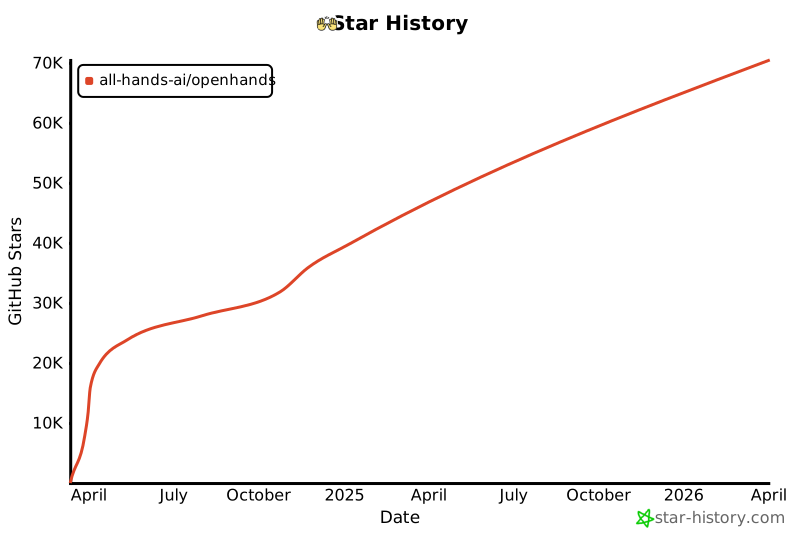](https://star-history.com/#All-Hands-AI/OpenHands&Date)
|
||||
|
||||
## 🛠️ Construit Avec {#built-with}
|
||||
## 🛠️ Construit avec
|
||||
|
||||
OpenHands est construit en utilisant une combinaison de cadres et de bibliothèques puissants, offrant une base robuste pour son développement. Voici les technologies clés utilisées dans le projet :
|
||||
OpenHands est construit en utilisant une combinaison de frameworks et de bibliothèques puissants, fournissant une base solide pour son développement. Voici les principales technologies utilisées dans le projet :
|
||||
|
||||
       
|
||||
|
||||
Veuillez noter que la sélection de ces technologies est en cours, et que des technologies supplémentaires peuvent être ajoutées ou des existantes supprimées au fur et à mesure de l'évolution du projet. Nous nous efforçons d'adopter les outils les plus adaptés et efficaces pour améliorer les capacités d'OpenHands.
|
||||
Veuillez noter que la sélection de ces technologies est en cours et que des technologies supplémentaires peuvent être ajoutées ou des technologies existantes peuvent être supprimées à mesure que le projet évolue. Nous nous efforçons d'adopter les outils les plus appropriés et les plus efficaces pour améliorer les capacités d'OpenHands.
|
||||
|
||||
## 📜 Licence {#license}
|
||||
## 📜 Licence
|
||||
|
||||
Distribué sous la licence MIT. Voir [notre licence](https://github.com/All-Hands-AI/OpenHands/blob/main/LICENSE) pour plus d'informations.
|
||||
|
||||
@@ -1,98 +1,25 @@
|
||||
---
|
||||
sidebar_position: 3
|
||||
---
|
||||
|
||||
# 🧠 Agents et Capacités
|
||||
|
||||
## Agent CodeAct
|
||||
# 🧠 Agent Principal et Capacités
|
||||
|
||||
## CodeActAgent
|
||||
|
||||
### Description
|
||||
|
||||
Cet agent implémente l'idée CodeAct ([article](https://arxiv.org/abs/2402.01030), [tweet](https://twitter.com/xingyaow_/status/1754556835703751087)) qui consolide les **act**ions des agents LLM en un espace d'action **code** unifié pour à la fois la _simplicité_ et la _performance_ (voir article pour plus de détails).
|
||||
Cet agent implémente l'idée de CodeAct ([article](https://arxiv.org/abs/2402.01030), [tweet](https://twitter.com/xingyaow_/status/1754556835703751087)) qui consolide les **act**ions des agents LLM dans un espace d'action de **code** unifié à la fois pour la _simplicité_ et la _performance_.
|
||||
|
||||
L'idée conceptuelle est illustrée ci-dessous. À chaque tour, l'agent peut :
|
||||
|
||||
1. **Converse** : Communiquer avec les humains en langage naturel pour demander des clarifications, des confirmations, etc.
|
||||
2. **CodeAct** : Choisir d'accomplir la tâche en exécutant du code
|
||||
1. **Converser** : Communiquer avec les humains en langage naturel pour demander des clarifications, des confirmations, etc.
|
||||
2. **CodeAct** : Choisir d'effectuer la tâche en exécutant du code
|
||||
|
||||
- Exécuter toute commande `bash` Linux valide
|
||||
- Exécuter tout code `Python` valide avec [un interpréteur Python interactif](https://ipython.org/). Cela est simulé à travers la commande `bash`, voir le système de plugin ci-dessous pour plus de détails.
|
||||
- Exécuter n'importe quelle commande Linux `bash` valide
|
||||
- Exécuter n'importe quel code `Python` valide avec [un interpréteur Python interactif](https://ipython.org/). Ceci est simulé via une commande `bash`, voir le système de plugin ci-dessous pour plus de détails.
|
||||
|
||||

|
||||
|
||||
### Système de Plugin
|
||||
|
||||
Pour rendre l'agent CodeAct plus puissant avec seulement l'accès à l'espace d'action `bash`, l'agent CodeAct exploite le système de plugins d'OpenHands:
|
||||
|
||||
- [Plugin Jupyter](https://github.com/All-Hands-AI/OpenHands/tree/main/openhands/runtime/plugins/jupyter) : pour l'exécution d'IPython via la commande bash
|
||||
- [Plugin outil agent SWE](https://github.com/All-Hands-AI/OpenHands/tree/main/openhands/runtime/plugins/swe_agent_commands) : Outils de ligne de commande bash puissants pour les tâches de développement logiciel introduits par [swe-agent](https://github.com/princeton-nlp/swe-agent).
|
||||
|
||||
### Démonstration
|
||||
### Démo
|
||||
|
||||
https://github.com/All-Hands-AI/OpenHands/assets/38853559/f592a192-e86c-4f48-ad31-d69282d5f6ac
|
||||
|
||||
_Exemple de CodeActAgent avec `gpt-4-turbo-2024-04-09` effectuant une tâche de science des données (régression linéaire)_
|
||||
|
||||
### Actions
|
||||
|
||||
`Action`,
|
||||
`CmdRunAction`,
|
||||
`IPythonRunCellAction`,
|
||||
`AgentEchoAction`,
|
||||
`AgentFinishAction`,
|
||||
`AgentTalkAction`
|
||||
|
||||
### Observations
|
||||
|
||||
`CmdOutputObservation`,
|
||||
`IPythonRunCellObservation`,
|
||||
`AgentMessageObservation`,
|
||||
`UserMessageObservation`
|
||||
|
||||
### Méthodes
|
||||
|
||||
| Méthode | Description |
|
||||
| ---------------- | ----------------------------------------------------------------------------------------------------------------------------------------------- |
|
||||
| `__init__` | Initialise un agent avec `llm` et une liste de messages `list[Mapping[str, str]]` |
|
||||
| `step` | Effectue une étape en utilisant l'agent CodeAct. Cela inclut la collecte d'informations sur les étapes précédentes et invite le modèle à exécuter une commande. |
|
||||
|
||||
### En cours de réalisation & prochaine étape
|
||||
|
||||
[] Support de la navigation sur le web
|
||||
[] Compléter le workflow pour l'agent CodeAct afin de soumettre des PRs Github
|
||||
|
||||
## Agent Planificateur
|
||||
|
||||
### Description
|
||||
|
||||
L'agent planificateur utilise une stratégie d'incitation spéciale pour créer des plans à long terme pour résoudre les problèmes.
|
||||
L'agent reçoit ses paires action-observation précédentes, la tâche actuelle, et un indice basé sur la dernière action effectuée à chaque étape.
|
||||
|
||||
### Actions
|
||||
|
||||
`NullAction`,
|
||||
`CmdRunAction`,
|
||||
`BrowseURLAction`,
|
||||
`GithubPushAction`,
|
||||
`FileReadAction`,
|
||||
`FileWriteAction`,
|
||||
`AgentThinkAction`,
|
||||
`AgentFinishAction`,
|
||||
`AgentSummarizeAction`,
|
||||
`AddTaskAction`,
|
||||
`ModifyTaskAction`,
|
||||
|
||||
### Observations
|
||||
|
||||
`Observation`,
|
||||
`NullObservation`,
|
||||
`CmdOutputObservation`,
|
||||
`FileReadObservation`,
|
||||
`BrowserOutputObservation`
|
||||
|
||||
### Méthodes
|
||||
|
||||
| Méthode | Description |
|
||||
| ---------------- | ----------------------------------------------------------------------------------------------------------------------------------------------------------------------------------------- |
|
||||
| `__init__` | Initialise un agent avec `llm` |
|
||||
| `step` | Vérifie si l'étape actuelle est terminée, retourne `AgentFinishAction` si oui. Sinon, crée une incitation de planification et l'envoie au modèle pour inférence, en ajoutant le résultat comme prochaine action. |
|
||||
_Exemple de CodeActAgent avec `gpt-4-turbo-2024-04-09` effectuant une tâche de science des données (régression linéaire)_.
|
||||
|
||||
@@ -0,0 +1,54 @@
|
||||
|
||||
|
||||
# 🏛️ Architecture du Système
|
||||
|
||||
<div style={{ textAlign: 'center' }}>
|
||||
<img src="https://github.com/All-Hands-AI/OpenHands/assets/16201837/97d747e3-29d8-4ccb-8d34-6ad1adb17f38" alt="OpenHands System Architecture Diagram Jul 4 2024" />
|
||||
<p><em>Diagramme de l'Architecture du Système OpenHands (4 juillet 2024)</em></p>
|
||||
</div>
|
||||
|
||||
Ceci est une vue d'ensemble de haut niveau de l'architecture du système. Le système est divisé en deux composants principaux : le frontend et le backend. Le frontend est responsable de la gestion des interactions utilisateur et de l'affichage des résultats. Le backend est responsable de la gestion de la logique métier et de l'exécution des agents.
|
||||
|
||||
# Architecture du Frontend {#frontend-architecture-fr}
|
||||
|
||||

|
||||
|
||||
Cette vue d'ensemble est simplifiée pour montrer les principaux composants et leurs interactions. Pour une vue plus détaillée de l'architecture du backend, voir la section Architecture du Backend ci-dessous.
|
||||
|
||||
# Architecture du Backend {#backend-architecture-fr}
|
||||
|
||||
_**Avertissement** : L'architecture du backend est en cours de développement et est sujette à changement. Le diagramme suivant montre l'architecture actuelle du backend basée sur le commit indiqué dans le pied de page du diagramme._
|
||||
|
||||

|
||||
|
||||
<details>
|
||||
<summary>Mise à jour de ce Diagramme</summary>
|
||||
<div>
|
||||
La génération du diagramme d'architecture du backend est partiellement automatisée.
|
||||
Le diagramme est généré à partir des indications de type dans le code en utilisant l'outil py2puml. Le diagramme est ensuite manuellement revu, ajusté et exporté en PNG et SVG.
|
||||
|
||||
## Prérequis
|
||||
|
||||
- Environnement python fonctionnel dans lequel openhands est exécutable
|
||||
(selon les instructions du fichier README.md à la racine du dépôt)
|
||||
- [py2puml](https://github.com/lucsorel/py2puml) installé
|
||||
|
||||
## Étapes
|
||||
|
||||
1. Générer automatiquement le diagramme en exécutant la commande suivante depuis la racine du dépôt :
|
||||
`py2puml openhands openhands > docs/architecture/backend_architecture.puml`
|
||||
|
||||
2. Ouvrir le fichier généré dans un éditeur PlantUML, par ex. Visual Studio Code avec l'extension PlantUML ou [PlantText](https://www.planttext.com/)
|
||||
|
||||
3. Revoir le PUML généré et effectuer tous les ajustements nécessaires au diagramme (ajouter les parties manquantes, corriger les erreurs, améliorer le positionnement).
|
||||
_py2puml crée le diagramme en se basant sur les indications de type dans le code, donc des indications manquantes ou incorrectes peuvent entraîner un diagramme incomplet ou incorrect._
|
||||
|
||||
4. Revoir la différence entre le nouveau diagramme et le précédent et vérifier manuellement si les changements sont corrects.
|
||||
_S'assurer de ne pas supprimer des parties qui ont été ajoutées manuellement au diagramme par le passé et qui sont toujours pertinentes._
|
||||
|
||||
5. Ajouter le hash du commit qui a été utilisé pour générer le diagramme dans le pied de page du diagramme.
|
||||
|
||||
6. Exporter le diagramme sous forme de fichiers PNG et SVG et remplacer les diagrammes existants dans le répertoire `docs/architecture`. Cela peut être fait avec (par ex. [PlantText](https://www.planttext.com/))
|
||||
|
||||
</div>
|
||||
</details>
|
||||
@@ -0,0 +1,138 @@
|
||||
|
||||
|
||||
# 📦 Runtime EventStream
|
||||
|
||||
Le Runtime EventStream d'OpenHands est le composant principal qui permet l'exécution sécurisée et flexible des actions des agents d'IA.
|
||||
Il crée un environnement en bac à sable (sandbox) en utilisant Docker, où du code arbitraire peut être exécuté en toute sécurité sans risquer le système hôte.
|
||||
|
||||
## Pourquoi avons-nous besoin d'un runtime en bac à sable ?
|
||||
|
||||
OpenHands doit exécuter du code arbitraire dans un environnement sécurisé et isolé pour plusieurs raisons :
|
||||
|
||||
1. Sécurité : L'exécution de code non fiable peut poser des risques importants pour le système hôte. Un environnement en bac à sable empêche le code malveillant d'accéder ou de modifier les ressources du système hôte
|
||||
2. Cohérence : Un environnement en bac à sable garantit que l'exécution du code est cohérente sur différentes machines et configurations, éliminant les problèmes du type "ça fonctionne sur ma machine"
|
||||
3. Contrôle des ressources : Le bac à sable permet un meilleur contrôle de l'allocation et de l'utilisation des ressources, empêchant les processus incontrôlés d'affecter le système hôte
|
||||
4. Isolation : Différents projets ou utilisateurs peuvent travailler dans des environnements isolés sans interférer les uns avec les autres ou avec le système hôte
|
||||
5. Reproductibilité : Les environnements en bac à sable facilitent la reproduction des bugs et des problèmes, car l'environnement d'exécution est cohérent et contrôlable
|
||||
|
||||
## Comment fonctionne le Runtime ?
|
||||
|
||||
Le système Runtime d'OpenHands utilise une architecture client-serveur implémentée avec des conteneurs Docker. Voici un aperçu de son fonctionnement :
|
||||
|
||||
```mermaid
|
||||
graph TD
|
||||
A[Image Docker personnalisée fournie par l'utilisateur] --> B[Backend OpenHands]
|
||||
B -->|Construit| C[Image OH Runtime]
|
||||
C -->|Lance| D[Exécuteur d'actions]
|
||||
D -->|Initialise| E[Navigateur]
|
||||
D -->|Initialise| F[Shell Bash]
|
||||
D -->|Initialise| G[Plugins]
|
||||
G -->|Initialise| L[Serveur Jupyter]
|
||||
|
||||
B -->|Génère| H[Agent]
|
||||
B -->|Génère| I[EventStream]
|
||||
I <--->|Exécute l'action pour
|
||||
obtenir l'observation
|
||||
via l'API REST
|
||||
| D
|
||||
|
||||
H -->|Génère l'action| I
|
||||
I -->|Obtient l'observation| H
|
||||
|
||||
subgraph "Conteneur Docker"
|
||||
D
|
||||
E
|
||||
F
|
||||
G
|
||||
L
|
||||
end
|
||||
```
|
||||
|
||||
1. Entrée utilisateur : L'utilisateur fournit une image Docker de base personnalisée
|
||||
2. Construction de l'image : OpenHands construit une nouvelle image Docker (l'"image OH runtime") basée sur l'image fournie par l'utilisateur. Cette nouvelle image inclut le code spécifique à OpenHands, principalement le "client runtime"
|
||||
3. Lancement du conteneur : Lorsqu'OpenHands démarre, il lance un conteneur Docker en utilisant l'image OH runtime
|
||||
4. Initialisation du serveur d'exécution des actions : Le serveur d'exécution des actions initialise un `ActionExecutor` à l'intérieur du conteneur, mettant en place les composants nécessaires comme un shell bash et chargeant les plugins spécifiés
|
||||
5. Communication : Le backend OpenHands (`openhands/runtime/impl/eventstream/eventstream_runtime.py`) communique avec le serveur d'exécution des actions via une API RESTful, envoyant des actions et recevant des observations
|
||||
6. Exécution des actions : Le client runtime reçoit les actions du backend, les exécute dans l'environnement en bac à sable et renvoie les observations
|
||||
7. Retour des observations : Le serveur d'exécution des actions renvoie les résultats d'exécution au backend OpenHands sous forme d'observations
|
||||
|
||||
|
||||
Le rôle du client :
|
||||
- Il agit comme un intermédiaire entre le backend OpenHands et l'environnement en bac à sable
|
||||
- Il exécute différents types d'actions (commandes shell, opérations sur les fichiers, code Python, etc.) en toute sécurité dans le conteneur
|
||||
- Il gère l'état de l'environnement en bac à sable, y compris le répertoire de travail courant et les plugins chargés
|
||||
- Il formate et renvoie les observations au backend, assurant une interface cohérente pour le traitement des résultats
|
||||
|
||||
|
||||
## Comment OpenHands construit et maintient les images OH Runtime
|
||||
|
||||
L'approche d'OpenHands pour la construction et la gestion des images runtime assure l'efficacité, la cohérence et la flexibilité dans la création et la maintenance des images Docker pour les environnements de production et de développement.
|
||||
|
||||
Consultez le [code pertinent](https://github.com/All-Hands-AI/OpenHands/blob/main/openhands/runtime/utils/runtime_build.py) si vous souhaitez plus de détails.
|
||||
|
||||
### Système de balises d'images
|
||||
|
||||
OpenHands utilise un système à trois balises pour ses images runtime afin d'équilibrer la reproductibilité et la flexibilité.
|
||||
Les balises peuvent être dans l'un des 2 formats suivants :
|
||||
|
||||
- **Balise versionnée** : `oh_v{openhands_version}_{base_image}` (ex : `oh_v0.9.9_nikolaik_s_python-nodejs_t_python3.12-nodejs22`)
|
||||
- **Balise de verrouillage** : `oh_v{openhands_version}_{16_digit_lock_hash}` (ex : `oh_v0.9.9_1234567890abcdef`)
|
||||
- **Balise source** : `oh_v{openhands_version}_{16_digit_lock_hash}_{16_digit_source_hash}`
|
||||
(ex : `oh_v0.9.9_1234567890abcdef_1234567890abcdef`)
|
||||
|
||||
|
||||
#### Balise source - La plus spécifique
|
||||
|
||||
Il s'agit des 16 premiers chiffres du MD5 du hash du répertoire pour le répertoire source. Cela donne un hash
|
||||
uniquement pour la source d'openhands
|
||||
|
||||
|
||||
#### Balise de verrouillage
|
||||
|
||||
Ce hash est construit à partir des 16 premiers chiffres du MD5 de :
|
||||
- Le nom de l'image de base sur laquelle l'image a été construite (ex : `nikolaik/python-nodejs:python3.12-nodejs22`)
|
||||
- Le contenu du `pyproject.toml` inclus dans l'image.
|
||||
- Le contenu du `poetry.lock` inclus dans l'image.
|
||||
|
||||
Cela donne effectivement un hash pour les dépendances d'Openhands indépendamment du code source.
|
||||
|
||||
#### Balise versionnée - La plus générique
|
||||
|
||||
Cette balise est une concaténation de la version d'openhands et du nom de l'image de base (transformé pour s'adapter au standard des balises).
|
||||
|
||||
#### Processus de construction
|
||||
|
||||
Lors de la génération d'une image...
|
||||
|
||||
- **Pas de reconstruction** : OpenHands vérifie d'abord si une image avec la même **balise source la plus spécifique** existe. S'il existe une telle image,
|
||||
aucune construction n'est effectuée - l'image existante est utilisée.
|
||||
- **Reconstruction la plus rapide** : OpenHands vérifie ensuite si une image avec la **balise de verrouillage générique** existe. S'il existe une telle image,
|
||||
OpenHands construit une nouvelle image basée sur celle-ci, en contournant toutes les étapes d'installation (comme `poetry install` et
|
||||
`apt-get`) sauf une opération finale pour copier le code source actuel. La nouvelle image est balisée avec une
|
||||
balise **source** uniquement.
|
||||
- **Reconstruction correcte** : Si ni une balise **source** ni une balise **de verrouillage** n'existe, une image sera construite sur la base de l'image avec la balise **versionnée**.
|
||||
Dans l'image avec la balise versionnée, la plupart des dépendances devraient déjà être installées, ce qui permet de gagner du temps.
|
||||
- **Reconstruction la plus lente** : Si les trois balises n'existent pas, une toute nouvelle image est construite à partir de
|
||||
l'image de base (ce qui est une opération plus lente). Cette nouvelle image est balisée avec toutes les balises **source**, **de verrouillage** et **versionnée**.
|
||||
|
||||
Cette approche de balisage permet à OpenHands de gérer efficacement les environnements de développement et de production.
|
||||
|
||||
1. Un code source et un Dockerfile identiques produisent toujours la même image (via des balises basées sur des hashs)
|
||||
2. Le système peut reconstruire rapidement les images lorsque des changements mineurs se produisent (en s'appuyant sur des images compatibles récentes)
|
||||
3. La balise **de verrouillage** (ex : `runtime:oh_v0.9.3_1234567890abcdef`) pointe toujours vers la dernière version pour une combinaison particulière d'image de base, de dépendances et de version d'OpenHands
|
||||
|
||||
## Système de plugins du Runtime
|
||||
|
||||
Le Runtime d'OpenHands prend en charge un système de plugins qui permet d'étendre les fonctionnalités et de personnaliser l'environnement d'exécution. Les plugins sont initialisés lorsque le client runtime démarre.
|
||||
|
||||
Consultez [un exemple de plugin Jupyter ici](https://github.com/All-Hands-AI/OpenHands/blob/ecf4aed28b0cf7c18d4d8ff554883ba182fc6bdd/openhands/runtime/plugins/jupyter/__init__.py#L21-L55) si vous souhaitez implémenter votre propre plugin.
|
||||
|
||||
*Plus de détails sur le système de plugins sont encore en construction - les contributions sont les bienvenues !*
|
||||
|
||||
Aspects clés du système de plugins :
|
||||
|
||||
1. Définition des plugins : Les plugins sont définis comme des classes Python qui héritent d'une classe de base `Plugin`
|
||||
2. Enregistrement des plugins : Les plugins disponibles sont enregistrés dans un dictionnaire `ALL_PLUGINS`
|
||||
3. Spécification des plugins : Les plugins sont associés à `Agent.sandbox_plugins: list[PluginRequirement]`. Les utilisateurs peuvent spécifier quels plugins charger lors de l'initialisation du runtime
|
||||
4. Initialisation : Les plugins sont initialisés de manière asynchrone lorsque le client runtime démarre
|
||||
5. Utilisation : Le client runtime peut utiliser les plugins initialisés pour étendre ses capacités (par exemple, le JupyterPlugin pour exécuter des cellules IPython)
|
||||
@@ -98,4 +98,4 @@ Si vous voyez un message d'erreur indiquant que le port est utilisé ou indispon
|
||||
|
||||
## Discuter
|
||||
|
||||
Pour d'autres problèmes ou questions rejoignez le [Slack](https://join.slack.com/t/opendevin/shared_invite/zt-2oikve2hu-UDxHeo8nsE69y6T7yFX_BA) ou le [Discord](https://discord.gg/ESHStjSjD4) et demandez!
|
||||
Pour d'autres problèmes ou questions rejoignez le [Slack](https://join.slack.com/t/openhands-ai/shared_invite/zt-2wkh4pklz-w~h_DVDtEe9H5kyQlcNxVw) ou le [Discord](https://discord.gg/ESHStjSjD4) et demandez!
|
||||
|
||||
@@ -1,18 +1,41 @@
|
||||
---
|
||||
sidebar_position: 6
|
||||
---
|
||||
|
||||
# ✅ Fournir des Commentaires
|
||||
|
||||
Lorsque vous utilisez OpenHands, vous rencontrerez sans aucun doute des cas où les choses fonctionnent bien et d'autres où elles ne fonctionnent pas. Nous vous encourageons à fournir des commentaires lorsque vous utilisez OpenHands pour aider l'équipe de développement et, peut-être plus important encore, créer un corpus ouvert d'exemples de formation pour les agents de codage -- Partagez-OpenHands !
|
||||
# ✅ Fournir des commentaires
|
||||
|
||||
## 📝 Comment Fournir des Commentaires
|
||||
Lorsque vous utilisez OpenHands, vous rencontrerez des cas où les choses fonctionnent bien, et d'autres où elles ne fonctionnent pas. Nous vous encourageons à fournir des commentaires lorsque vous utilisez OpenHands pour aider à donner des retours à l'équipe de développement, et peut-être plus important encore, créer un corpus ouvert d'exemples d'entraînement d'agents de codage -- Share-OpenHands !
|
||||
|
||||
Fournir des commentaires est simple ! Lorsque vous utilisez OpenHands, vous pouvez appuyer sur le bouton de pouce vers le haut ou vers le bas à n'importe quel moment de votre interaction. Vous serez invité à fournir votre adresse email (par exemple, afin que nous puissions vous contacter si nous voulons poser des questions de suivi), et vous pouvez choisir si vous souhaitez fournir des commentaires publiquement ou en privé.
|
||||
## 📝 Comment fournir des commentaires
|
||||
|
||||
<iframe width="560" height="315" src="https://www.youtube.com/embed/5rFx-StMVV0?si=svo7xzp6LhGK_GXr" title="Lecteur vidéo YouTube" frameborder="0" allow="accelerometer; autoplay; clipboard-write; encrypted-media; gyroscope; picture-in-picture; web-share" referrerpolicy="strict-origin-when-cross-origin" allowfullscreen></iframe>
|
||||
Fournir des commentaires est facile ! Lorsque vous utilisez OpenHands, vous pouvez appuyer sur le bouton pouce vers le haut ou pouce vers le bas à tout moment pendant votre interaction. Vous serez invité à fournir votre adresse e-mail (par exemple, afin que nous puissions vous contacter si nous voulons poser des questions de suivi), et vous pouvez choisir si vous souhaitez fournir des commentaires publiquement ou en privé.
|
||||
|
||||
## 📜 Licence de Données et Confidentialité
|
||||
<iframe width="560" height="315" src="https://www.youtube.com/embed/5rFx-StMVV0?si=svo7xzp6LhGK_GXr" title="YouTube video player" frameborder="0" allow="accelerometer; autoplay; clipboard-write; encrypted-media; gyroscope; picture-in-picture; web-share" referrerpolicy="strict-origin-when-cross-origin" allowfullscreen></iframe>
|
||||
|
||||
* Les données **publiques** seront distribuées sous la licence MIT, comme OpenHands lui-même, et pourront être utilisées par la communauté pour former et tester des modèles. Évidemment, les commentaires que vous pouvez rendre publics seront plus précieux pour la communauté dans son ensemble, donc lorsque vous ne traitez pas d'informations sensibles, nous vous encourageons à choisir cette option !
|
||||
## 📜 Utilisation des données et confidentialité
|
||||
|
||||
### Paramètres de partage des données
|
||||
|
||||
Lorsque vous soumettez des données, vous pouvez les soumettre publiquement ou en privé.
|
||||
|
||||
* Les données **publiques** seront distribuées sous la licence MIT, comme OpenHands lui-même, et pourront être utilisées par la communauté pour entraîner et tester des modèles. Évidemment, les commentaires que vous pouvez rendre publics seront plus précieux pour la communauté dans son ensemble, donc lorsque vous ne traitez pas d'informations sensibles, nous vous encourageons à choisir cette option !
|
||||
* Les données **privées** ne seront partagées qu'avec l'équipe OpenHands dans le but d'améliorer OpenHands.
|
||||
|
||||
### Qui collecte et stocke les données ?
|
||||
|
||||
Les données sont collectées et stockées par [All Hands AI](https://all-hands.dev), une entreprise fondée par les mainteneurs d'OpenHands pour soutenir et améliorer OpenHands.
|
||||
|
||||
### Comment les données publiques seront-elles publiées ?
|
||||
|
||||
Les données publiques seront publiées lorsque nous atteindrons des jalons fixes, tels que 1 000 exemples publics, 10 000 exemples publics, etc.
|
||||
À ce moment-là, nous suivrons le processus de publication suivant :
|
||||
|
||||
1. Toutes les personnes qui ont contribué à des commentaires publics recevront un e-mail décrivant la publication des données et auront la possibilité de se retirer.
|
||||
2. La ou les personnes en charge de la publication des données effectueront un contrôle de la qualité des données, en supprimant les commentaires de mauvaise qualité, en supprimant les adresses e-mail des soumissionnaires et en essayant de supprimer toute information sensible.
|
||||
3. Les données seront publiées publiquement sous la licence MIT via des sites couramment utilisés tels que GitHub ou Hugging Face.
|
||||
|
||||
### Que faire si je veux que mes données soient supprimées ?
|
||||
|
||||
Pour les données sur les serveurs d'All Hands AI, nous sommes heureux de les supprimer sur demande :
|
||||
|
||||
**Une pièce de données :** Si vous souhaitez supprimer une pièce de données, nous ajouterons prochainement un mécanisme pour supprimer les pièces de données en utilisant le lien et le mot de passe qui s'affichent sur l'interface lorsque vous soumettez des données.
|
||||
|
||||
**Toutes les données :** Si vous souhaitez que toutes vos données soient supprimées, ou si vous n'avez pas l'ID et le mot de passe que vous avez reçus lors de la soumission des données, veuillez contacter `contact@all-hands.dev` à partir de l'adresse e-mail que vous avez enregistrée lorsque vous avez initialement soumis les données.
|
||||
|
||||
@@ -0,0 +1,113 @@
|
||||
|
||||
|
||||
# Démarrer avec OpenHands
|
||||
|
||||
Vous avez donc [installé OpenHands](./installation) et avez
|
||||
[configuré votre LLM](./installation#setup). Et maintenant ?
|
||||
|
||||
OpenHands peut vous aider à vous attaquer à une grande variété de tâches d'ingénierie. Mais la technologie
|
||||
est encore nouvelle, et nous sommes loin d'avoir des agents capables de prendre en charge des tâches
|
||||
d'ingénierie vastes et compliquées sans aucune aide. Il est donc important de se faire une idée de ce que l'agent
|
||||
fait bien, et où il pourrait avoir besoin d'un coup de main.
|
||||
|
||||
## Hello World
|
||||
|
||||
La première chose que vous voudrez peut-être essayer est un simple exemple "hello world".
|
||||
Cela peut être plus compliqué qu'il n'y paraît !
|
||||
|
||||
Essayez de demander à l'agent :
|
||||
> Please write a bash script hello.sh that prints "hello world!"
|
||||
|
||||
Vous devriez constater que l'agent non seulement écrit le script, mais définit également les
|
||||
permissions correctes et exécute le script pour vérifier la sortie.
|
||||
|
||||
Vous pouvez continuer à demander à l'agent d'affiner votre code. C'est une excellente façon de
|
||||
travailler avec les agents. Commencez simplement, et itérez.
|
||||
|
||||
> Please modify hello.sh so that it accepts a name as the first argument, but defaults to "world"
|
||||
|
||||
Vous pouvez également travailler dans n'importe quel langage dont vous avez besoin, bien que l'agent puisse avoir besoin de passer un peu de
|
||||
temps à configurer son environnement !
|
||||
|
||||
> Please convert hello.sh to a Ruby script, and run it
|
||||
|
||||
## Construire à partir de zéro
|
||||
|
||||
Les agents se débrouillent exceptionnellement bien pour les tâches "greenfield" (tâches où ils n'ont pas besoin
|
||||
de contexte sur une base de code existante) et ils peuvent simplement commencer à partir de zéro.
|
||||
|
||||
Il est préférable de commencer par une tâche simple, puis d'itérer. Il est également préférable d'être
|
||||
aussi précis que possible sur ce que vous voulez, sur la pile technologique à utiliser, etc.
|
||||
|
||||
Par exemple, nous pourrions construire une application TODO :
|
||||
|
||||
> Please build a basic TODO list app in React. It should be frontend-only, and all state
|
||||
> should be kept in localStorage.
|
||||
|
||||
Nous pouvons continuer à itérer sur l'application une fois le squelette en place :
|
||||
|
||||
> Please allow adding an optional due date to every task
|
||||
|
||||
Tout comme avec le développement normal, il est bon de commiter et de pousser votre code fréquemment.
|
||||
De cette façon, vous pouvez toujours revenir à un ancien état si l'agent dévie.
|
||||
Vous pouvez demander à l'agent de commiter et de pousser pour vous :
|
||||
|
||||
> Please commit the changes and push them to a new branch called "feature/due-dates"
|
||||
|
||||
|
||||
## Ajouter du nouveau code
|
||||
|
||||
OpenHands peut également faire un excellent travail en ajoutant du nouveau code à une base de code existante.
|
||||
|
||||
Par exemple, vous pouvez demander à OpenHands d'ajouter une nouvelle action GitHub à votre projet
|
||||
qui analyse votre code. OpenHands peut jeter un coup d'œil à votre base de code pour voir quel langage
|
||||
il doit utiliser, mais ensuite il peut simplement déposer un nouveau fichier dans `./github/workflows/lint.yml`.
|
||||
|
||||
> Please add a GitHub action that lints the code in this repository
|
||||
|
||||
Certaines tâches peuvent nécessiter un peu plus de contexte. Bien qu'OpenHands puisse utiliser `ls` et `grep`
|
||||
pour rechercher dans votre base de code, fournir le contexte à l'avance lui permet d'aller plus vite,
|
||||
et plus précisément. Et cela vous coûtera moins de tokens !
|
||||
|
||||
> Please modify ./backend/api/routes.js to add a new route that returns a list of all tasks
|
||||
|
||||
> Please add a new React component that displays a list of Widgets to the ./frontend/components
|
||||
> directory. It should use the existing Widget component.
|
||||
|
||||
## Refactoring
|
||||
|
||||
OpenHands est excellent pour refactoriser du code existant, surtout par petits morceaux.
|
||||
Vous ne voulez probablement pas essayer de réarchitecturer toute votre base de code, mais diviser
|
||||
les longs fichiers et fonctions, renommer les variables, etc. ont tendance à très bien fonctionner.
|
||||
|
||||
> Please rename all the single-letter variables in ./app.go
|
||||
|
||||
> Please break the function `build_and_deploy_widgets` into two functions, `build_widgets` and `deploy_widgets` in widget.php
|
||||
|
||||
> Please break ./api/routes.js into separate files for each route
|
||||
|
||||
## Corrections de bugs
|
||||
|
||||
OpenHands peut également vous aider à traquer et corriger des bugs dans votre code. Mais, comme tout
|
||||
développeur le sait, la correction de bugs peut être extrêmement délicate, et souvent OpenHands aura besoin de plus de contexte.
|
||||
Cela aide si vous avez diagnostiqué le bug, mais que vous voulez qu'OpenHands trouve la logique.
|
||||
|
||||
> Currently the email field in the `/subscribe` endpoint is rejecting .io domains. Please fix this.
|
||||
|
||||
> The `search_widgets` function in ./app.py is doing a case-sensitive search. Please make it case-insensitive.
|
||||
|
||||
Il est souvent utile de faire du développement piloté par les tests lors de la correction de bugs avec un agent.
|
||||
Vous pouvez demander à l'agent d'écrire un nouveau test, puis d'itérer jusqu'à ce qu'il corrige le bug :
|
||||
|
||||
> The `hello` function crashes on the empty string. Please write a test that reproduces this bug, then fix the code so it passes.
|
||||
|
||||
## Plus
|
||||
|
||||
OpenHands est capable d'aider sur à peu près n'importe quelle tâche de codage. Mais il faut un peu de pratique
|
||||
pour en tirer le meilleur parti. N'oubliez pas de :
|
||||
* Garder vos tâches petites
|
||||
* Être aussi précis que possible
|
||||
* Fournir autant de contexte que possible
|
||||
* Commiter et pousser fréquemment
|
||||
|
||||
Voir [Bonnes pratiques de prompting](./prompting-best-practices) pour plus de conseils sur la façon de tirer le meilleur parti d'OpenHands.
|
||||
@@ -0,0 +1,110 @@
|
||||
|
||||
|
||||
# Mode CLI
|
||||
|
||||
OpenHands peut être exécuté en mode CLI interactif, ce qui permet aux utilisateurs de démarrer une session interactive via la ligne de commande.
|
||||
|
||||
Ce mode est différent du [mode headless](headless-mode), qui est non interactif et mieux adapté aux scripts.
|
||||
|
||||
## Avec Python
|
||||
|
||||
Pour démarrer une session OpenHands interactive via la ligne de commande, suivez ces étapes :
|
||||
|
||||
1. Assurez-vous d'avoir suivi les [instructions de configuration de développement](https://github.com/All-Hands-AI/OpenHands/blob/main/Development.md).
|
||||
|
||||
2. Exécutez la commande suivante :
|
||||
|
||||
```bash
|
||||
poetry run python -m openhands.core.cli
|
||||
```
|
||||
|
||||
Cette commande démarrera une session interactive où vous pourrez saisir des tâches et recevoir des réponses d'OpenHands.
|
||||
|
||||
Vous devrez vous assurer de définir votre modèle, votre clé API et d'autres paramètres via des variables d'environnement
|
||||
[ou le fichier `config.toml`](https://github.com/All-Hands-AI/OpenHands/blob/main/config.template.toml).
|
||||
|
||||
|
||||
## Avec Docker
|
||||
|
||||
Pour exécuter OpenHands en mode CLI avec Docker, suivez ces étapes :
|
||||
|
||||
1. Définissez `WORKSPACE_BASE` sur le répertoire que vous souhaitez qu'OpenHands modifie :
|
||||
|
||||
```bash
|
||||
WORKSPACE_BASE=$(pwd)/workspace
|
||||
```
|
||||
|
||||
2. Définissez `LLM_MODEL` sur le modèle que vous souhaitez utiliser :
|
||||
|
||||
```bash
|
||||
LLM_MODEL="anthropic/claude-3-5-sonnet-20241022"
|
||||
```
|
||||
|
||||
3. Définissez `LLM_API_KEY` sur votre clé API :
|
||||
|
||||
```bash
|
||||
LLM_API_KEY="sk_test_12345"
|
||||
```
|
||||
|
||||
4. Exécutez la commande Docker suivante :
|
||||
|
||||
```bash
|
||||
docker run -it \
|
||||
--pull=always \
|
||||
-e SANDBOX_USER_ID=$(id -u) \
|
||||
-e WORKSPACE_MOUNT_PATH=$WORKSPACE_BASE \
|
||||
-e LLM_API_KEY=$LLM_API_KEY \
|
||||
-e LLM_MODEL=$LLM_MODEL \
|
||||
-v $WORKSPACE_BASE:/opt/workspace_base \
|
||||
-v /var/run/docker.sock:/var/run/docker.sock \
|
||||
--add-host host.docker.internal:host-gateway \
|
||||
--name openhands-app-$(date +%Y%m%d%H%M%S) \
|
||||
ghcr.io/all-hands-ai/openhands:0.11 \
|
||||
python -m openhands.core.cli
|
||||
```
|
||||
|
||||
Cette commande démarrera une session interactive dans Docker où vous pourrez saisir des tâches et recevoir des réponses d'OpenHands.
|
||||
|
||||
## Exemples de commandes CLI et de sorties attendues
|
||||
|
||||
Voici quelques exemples de commandes CLI et leurs sorties attendues :
|
||||
|
||||
### Exemple 1 : Tâche simple
|
||||
|
||||
```bash
|
||||
Comment puis-je vous aider ? >> Écrivez un script Python qui affiche "Hello, World!"
|
||||
```
|
||||
|
||||
Sortie attendue :
|
||||
|
||||
```bash
|
||||
🤖 Bien sûr ! Voici un script Python qui affiche "Hello, World!" :
|
||||
|
||||
❯ print("Hello, World!")
|
||||
```
|
||||
|
||||
### Exemple 2 : Commande Bash
|
||||
|
||||
```bash
|
||||
Comment puis-je vous aider ? >> Créez un répertoire nommé "test_dir"
|
||||
```
|
||||
|
||||
Sortie attendue :
|
||||
|
||||
```bash
|
||||
🤖 Création d'un répertoire nommé "test_dir" :
|
||||
|
||||
❯ mkdir test_dir
|
||||
```
|
||||
|
||||
### Exemple 3 : Gestion des erreurs
|
||||
|
||||
```bash
|
||||
Comment puis-je vous aider ? >> Supprimez un fichier inexistant
|
||||
```
|
||||
|
||||
Sortie attendue :
|
||||
|
||||
```bash
|
||||
🤖 Une erreur s'est produite. Veuillez réessayer.
|
||||
```
|
||||
@@ -0,0 +1,83 @@
|
||||
|
||||
|
||||
# Sandbox Personnalisé
|
||||
|
||||
Le sandbox est l'endroit où l'agent effectue ses tâches. Au lieu d'exécuter des commandes directement sur votre ordinateur (ce qui pourrait être risqué), l'agent les exécute à l'intérieur d'un conteneur Docker.
|
||||
|
||||
Le sandbox OpenHands par défaut (`python-nodejs:python3.12-nodejs22` de [nikolaik/python-nodejs](https://hub.docker.com/r/nikolaik/python-nodejs)) est livré avec certains paquets installés tels que Python et Node.js, mais peut nécessiter l'installation d'autres logiciels par défaut.
|
||||
|
||||
Vous avez deux options pour la personnalisation :
|
||||
|
||||
1. Utiliser une image existante avec les logiciels requis.
|
||||
2. Créer votre propre image Docker personnalisée.
|
||||
|
||||
Si vous choisissez la première option, vous pouvez passer la section `Créer Votre Image Docker`.
|
||||
|
||||
## Créer Votre Image Docker
|
||||
|
||||
Pour créer une image Docker personnalisée, elle doit être basée sur Debian.
|
||||
|
||||
Par exemple, si vous voulez qu'OpenHands ait `ruby` installé, créez un `Dockerfile` avec le contenu suivant :
|
||||
|
||||
```dockerfile
|
||||
FROM debian:latest
|
||||
|
||||
# Installer les paquets requis
|
||||
RUN apt-get update && apt-get install -y ruby
|
||||
```
|
||||
|
||||
Enregistrez ce fichier dans un dossier. Ensuite, construisez votre image Docker (par exemple, nommée custom-image) en naviguant vers le dossier dans le terminal et en exécutant :
|
||||
|
||||
```bash
|
||||
docker build -t custom-image .
|
||||
```
|
||||
|
||||
Cela produira une nouvelle image appelée `custom-image`, qui sera disponible dans Docker.
|
||||
|
||||
> Notez que dans la configuration décrite dans ce document, OpenHands s'exécutera en tant qu'utilisateur "openhands" à l'intérieur du sandbox et donc tous les paquets installés via le docker file devraient être disponibles pour tous les utilisateurs du système, pas seulement root.
|
||||
|
||||
## Utiliser le Workflow de Développement
|
||||
|
||||
### Configuration
|
||||
|
||||
Tout d'abord, assurez-vous de pouvoir exécuter OpenHands en suivant les instructions dans [Development.md](https://github.com/All-Hands-AI/OpenHands/blob/main/Development.md).
|
||||
|
||||
### Spécifier l'Image de Base du Sandbox
|
||||
|
||||
Dans le fichier `config.toml` dans le répertoire OpenHands, définissez `sandbox_base_container_image` sur l'image que vous souhaitez utiliser. Cela peut être une image que vous avez déjà extraite ou une que vous avez construite :
|
||||
|
||||
```bash
|
||||
[core]
|
||||
...
|
||||
sandbox_base_container_image="custom-image"
|
||||
```
|
||||
|
||||
### Exécuter
|
||||
|
||||
Exécutez OpenHands en exécutant ```make run``` dans le répertoire de niveau supérieur.
|
||||
|
||||
## Explication Technique
|
||||
|
||||
Veuillez vous référer à la [section image docker personnalisée de la documentation d'exécution](https://docs.all-hands.dev/modules/usage/architecture/runtime#advanced-how-openhands-builds-and-maintains-od-runtime-images) pour plus de détails.
|
||||
|
||||
## Dépannage / Erreurs
|
||||
|
||||
### Erreur : ```useradd: UID 1000 is not unique```
|
||||
|
||||
Si vous voyez cette erreur dans la sortie de la console, c'est parce qu'OpenHands essaie de créer l'utilisateur openhands dans le sandbox avec un UID de 1000, mais cet UID est déjà utilisé dans l'image (pour une raison quelconque). Pour corriger cela, changez le champ sandbox_user_id dans le fichier config.toml à une valeur différente :
|
||||
|
||||
```toml
|
||||
[core]
|
||||
workspace_base="./workspace"
|
||||
run_as_openhands=true
|
||||
sandbox_base_container_image="custom_image"
|
||||
sandbox_user_id="1001"
|
||||
```
|
||||
|
||||
### Erreurs d'utilisation de port
|
||||
|
||||
Si vous voyez une erreur concernant un port déjà utilisé ou indisponible, essayez de supprimer tous les conteneurs Docker en cours d'exécution (exécutez `docker ps` et `docker rm` sur les conteneurs pertinents) puis réexécutez ```make run```.
|
||||
|
||||
## Discuter
|
||||
|
||||
Pour d'autres problèmes ou questions, rejoignez le [Slack](https://join.slack.com/t/openhands-ai/shared_invite/zt-2wkh4pklz-w~h_DVDtEe9H5kyQlcNxVw) ou le [Discord](https://discord.gg/ESHStjSjD4) et demandez !
|
||||
@@ -0,0 +1,73 @@
|
||||
|
||||
|
||||
# Débogage
|
||||
|
||||
Ce qui suit est destiné à servir d'introduction au débogage d'OpenHands à des fins de développement.
|
||||
|
||||
## Serveur / VSCode
|
||||
|
||||
Le `launch.json` suivant permettra de déboguer les éléments agent, contrôleur et serveur, mais pas le bac à sable (qui s'exécute dans docker). Il ignorera toutes les modifications à l'intérieur du répertoire `workspace/` :
|
||||
|
||||
```
|
||||
{
|
||||
"version": "0.2.0",
|
||||
"configurations": [
|
||||
{
|
||||
"name": "OpenHands CLI",
|
||||
"type": "debugpy",
|
||||
"request": "launch",
|
||||
"module": "openhands.core.cli",
|
||||
"justMyCode": false
|
||||
},
|
||||
{
|
||||
"name": "OpenHands WebApp",
|
||||
"type": "debugpy",
|
||||
"request": "launch",
|
||||
"module": "uvicorn",
|
||||
"args": [
|
||||
"openhands.server.listen:app",
|
||||
"--reload",
|
||||
"--reload-exclude",
|
||||
"${workspaceFolder}/workspace",
|
||||
"--port",
|
||||
"3000"
|
||||
],
|
||||
"justMyCode": false
|
||||
}
|
||||
]
|
||||
}
|
||||
```
|
||||
|
||||
Des configurations de débogage plus spécifiques qui incluent plus de paramètres peuvent être spécifiées :
|
||||
|
||||
```
|
||||
...
|
||||
{
|
||||
"name": "Debug CodeAct",
|
||||
"type": "debugpy",
|
||||
"request": "launch",
|
||||
"module": "openhands.core.main",
|
||||
"args": [
|
||||
"-t",
|
||||
"Demandez-moi quelle est votre tâche.",
|
||||
"-d",
|
||||
"${workspaceFolder}/workspace",
|
||||
"-c",
|
||||
"CodeActAgent",
|
||||
"-l",
|
||||
"llm.o1",
|
||||
"-n",
|
||||
"prompts"
|
||||
],
|
||||
"justMyCode": false
|
||||
}
|
||||
...
|
||||
```
|
||||
|
||||
Les valeurs dans l'extrait ci-dessus peuvent être mises à jour de telle sorte que :
|
||||
|
||||
* *t* : la tâche
|
||||
* *d* : le répertoire de l'espace de travail openhands
|
||||
* *c* : l'agent
|
||||
* *l* : la configuration LLM (prédéfinie dans config.toml)
|
||||
* *n* : le nom de la session (par exemple, le nom du flux d'événements)
|
||||
@@ -0,0 +1,281 @@
|
||||
|
||||
|
||||
# Évaluation
|
||||
|
||||
Ce guide fournit un aperçu de la façon d'intégrer votre propre benchmark d'évaluation dans le framework OpenHands.
|
||||
|
||||
## Configuration de l'environnement et de la configuration LLM
|
||||
|
||||
Veuillez suivre les instructions [ici](https://github.com/All-Hands-AI/OpenHands/blob/main/Development.md) pour configurer votre environnement de développement local.
|
||||
OpenHands en mode développement utilise `config.toml` pour garder une trace de la plupart des configurations.
|
||||
|
||||
Voici un exemple de fichier de configuration que vous pouvez utiliser pour définir et utiliser plusieurs LLMs :
|
||||
|
||||
```toml
|
||||
[llm]
|
||||
# IMPORTANT : ajoutez votre clé API ici et définissez le modèle que vous souhaitez évaluer
|
||||
model = "claude-3-5-sonnet-20241022"
|
||||
|
||||
api_key = "sk-XXX"
|
||||
|
||||
[llm.eval_gpt4_1106_preview_llm]
|
||||
model = "gpt-4-1106-preview"
|
||||
api_key = "XXX"
|
||||
temperature = 0.0
|
||||
|
||||
[llm.eval_some_openai_compatible_model_llm]
|
||||
model = "openai/MODEL_NAME"
|
||||
base_url = "https://OPENAI_COMPATIBLE_URL/v1"
|
||||
api_key = "XXX"
|
||||
temperature = 0.0
|
||||
```
|
||||
|
||||
|
||||
## Comment utiliser OpenHands en ligne de commande
|
||||
|
||||
OpenHands peut être exécuté depuis la ligne de commande en utilisant le format suivant :
|
||||
|
||||
```bash
|
||||
poetry run python ./openhands/core/main.py \
|
||||
-i <max_iterations> \
|
||||
-t "<task_description>" \
|
||||
-c <agent_class> \
|
||||
-l <llm_config>
|
||||
```
|
||||
|
||||
Par exemple :
|
||||
|
||||
```bash
|
||||
poetry run python ./openhands/core/main.py \
|
||||
-i 10 \
|
||||
-t "Écrivez-moi un script bash qui affiche hello world." \
|
||||
-c CodeActAgent \
|
||||
-l llm
|
||||
```
|
||||
|
||||
Cette commande exécute OpenHands avec :
|
||||
- Un maximum de 10 itérations
|
||||
- La description de tâche spécifiée
|
||||
- En utilisant CodeActAgent
|
||||
- Avec la configuration LLM définie dans la section `llm` de votre fichier `config.toml`
|
||||
|
||||
## Comment fonctionne OpenHands
|
||||
|
||||
Le point d'entrée principal d'OpenHands se trouve dans `openhands/core/main.py`. Voici un flux simplifié de son fonctionnement :
|
||||
|
||||
1. Analyse des arguments de ligne de commande et chargement de la configuration
|
||||
2. Création d'un environnement d'exécution à l'aide de `create_runtime()`
|
||||
3. Initialisation de l'agent spécifié
|
||||
4. Exécution du contrôleur à l'aide de `run_controller()`, qui :
|
||||
- Attache l'environnement d'exécution à l'agent
|
||||
- Exécute la tâche de l'agent
|
||||
- Renvoie un état final une fois terminé
|
||||
|
||||
La fonction `run_controller()` est le cœur de l'exécution d'OpenHands. Elle gère l'interaction entre l'agent, l'environnement d'exécution et la tâche, en gérant des choses comme la simulation d'entrée utilisateur et le traitement des événements.
|
||||
|
||||
|
||||
## Le moyen le plus simple de commencer : Explorer les benchmarks existants
|
||||
|
||||
Nous vous encourageons à examiner les différents benchmarks d'évaluation disponibles dans le [répertoire `evaluation/benchmarks/`](https://github.com/All-Hands-AI/OpenHands/blob/main/evaluation/benchmarks) de notre dépôt.
|
||||
|
||||
Pour intégrer votre propre benchmark, nous vous suggérons de commencer par celui qui ressemble le plus à vos besoins. Cette approche peut considérablement rationaliser votre processus d'intégration, vous permettant de vous appuyer sur les structures existantes et de les adapter à vos exigences spécifiques.
|
||||
|
||||
## Comment créer un workflow d'évaluation
|
||||
|
||||
|
||||
Pour créer un workflow d'évaluation pour votre benchmark, suivez ces étapes :
|
||||
|
||||
1. Importez les utilitaires OpenHands pertinents :
|
||||
```python
|
||||
import openhands.agenthub
|
||||
from evaluation.utils.shared import (
|
||||
EvalMetadata,
|
||||
EvalOutput,
|
||||
make_metadata,
|
||||
prepare_dataset,
|
||||
reset_logger_for_multiprocessing,
|
||||
run_evaluation,
|
||||
)
|
||||
from openhands.controller.state.state import State
|
||||
from openhands.core.config import (
|
||||
AppConfig,
|
||||
SandboxConfig,
|
||||
get_llm_config_arg,
|
||||
parse_arguments,
|
||||
)
|
||||
from openhands.core.logger import openhands_logger as logger
|
||||
from openhands.core.main import create_runtime, run_controller
|
||||
from openhands.events.action import CmdRunAction
|
||||
from openhands.events.observation import CmdOutputObservation, ErrorObservation
|
||||
from openhands.runtime.runtime import Runtime
|
||||
```
|
||||
|
||||
2. Créez une configuration :
|
||||
```python
|
||||
def get_config(instance: pd.Series, metadata: EvalMetadata) -> AppConfig:
|
||||
config = AppConfig(
|
||||
default_agent=metadata.agent_class,
|
||||
runtime='eventstream',
|
||||
max_iterations=metadata.max_iterations,
|
||||
sandbox=SandboxConfig(
|
||||
base_container_image='your_container_image',
|
||||
enable_auto_lint=True,
|
||||
timeout=300,
|
||||
),
|
||||
)
|
||||
config.set_llm_config(metadata.llm_config)
|
||||
return config
|
||||
```
|
||||
|
||||
3. Initialisez l'environnement d'exécution et configurez l'environnement d'évaluation :
|
||||
```python
|
||||
def initialize_runtime(runtime: Runtime, instance: pd.Series):
|
||||
# Configurez votre environnement d'évaluation ici
|
||||
# Par exemple, définir des variables d'environnement, préparer des fichiers, etc.
|
||||
pass
|
||||
```
|
||||
|
||||
4. Créez une fonction pour traiter chaque instance :
|
||||
```python
|
||||
from openhands.utils.async_utils import call_async_from_sync
|
||||
def process_instance(instance: pd.Series, metadata: EvalMetadata) -> EvalOutput:
|
||||
config = get_config(instance, metadata)
|
||||
runtime = create_runtime(config)
|
||||
call_async_from_sync(runtime.connect)
|
||||
initialize_runtime(runtime, instance)
|
||||
|
||||
instruction = get_instruction(instance, metadata)
|
||||
|
||||
state = run_controller(
|
||||
config=config,
|
||||
task_str=instruction,
|
||||
runtime=runtime,
|
||||
fake_user_response_fn=your_user_response_function,
|
||||
)
|
||||
|
||||
# Évaluez les actions de l'agent
|
||||
evaluation_result = await evaluate_agent_actions(runtime, instance)
|
||||
|
||||
return EvalOutput(
|
||||
instance_id=instance.instance_id,
|
||||
instruction=instruction,
|
||||
test_result=evaluation_result,
|
||||
metadata=metadata,
|
||||
history=compatibility_for_eval_history_pairs(state.history),
|
||||
metrics=state.metrics.get() if state.metrics else None,
|
||||
error=state.last_error if state and state.last_error else None,
|
||||
)
|
||||
```
|
||||
|
||||
5. Exécutez l'évaluation :
|
||||
```python
|
||||
metadata = make_metadata(llm_config, dataset_name, agent_class, max_iterations, eval_note, eval_output_dir)
|
||||
output_file = os.path.join(metadata.eval_output_dir, 'output.jsonl')
|
||||
instances = prepare_dataset(your_dataset, output_file, eval_n_limit)
|
||||
|
||||
await run_evaluation(
|
||||
instances,
|
||||
metadata,
|
||||
output_file,
|
||||
num_workers,
|
||||
process_instance
|
||||
)
|
||||
```
|
||||
|
||||
Ce workflow configure la configuration, initialise l'environnement d'exécution, traite chaque instance en exécutant l'agent et en évaluant ses actions, puis collecte les résultats dans un objet `EvalOutput`. La fonction `run_evaluation` gère la parallélisation et le suivi de la progression.
|
||||
|
||||
N'oubliez pas de personnaliser les fonctions `get_instruction`, `your_user_response_function` et `evaluate_agent_actions` en fonction des exigences spécifiques de votre benchmark.
|
||||
|
||||
En suivant cette structure, vous pouvez créer un workflow d'évaluation robuste pour votre benchmark dans le framework OpenHands.
|
||||
|
||||
|
||||
## Comprendre la `user_response_fn`
|
||||
|
||||
La `user_response_fn` est un composant crucial dans le workflow d'évaluation d'OpenHands. Elle simule l'interaction de l'utilisateur avec l'agent, permettant des réponses automatisées pendant le processus d'évaluation. Cette fonction est particulièrement utile lorsque vous souhaitez fournir des réponses cohérentes et prédéfinies aux requêtes ou actions de l'agent.
|
||||
|
||||
|
||||
### Workflow et interaction
|
||||
|
||||
Le workflow correct pour gérer les actions et la `user_response_fn` est le suivant :
|
||||
|
||||
1. L'agent reçoit une tâche et commence à la traiter
|
||||
2. L'agent émet une Action
|
||||
3. Si l'Action est exécutable (par exemple, CmdRunAction, IPythonRunCellAction) :
|
||||
- Le Runtime traite l'Action
|
||||
- Le Runtime renvoie une Observation
|
||||
4. Si l'Action n'est pas exécutable (généralement une MessageAction) :
|
||||
- La `user_response_fn` est appelée
|
||||
- Elle renvoie une réponse utilisateur simulée
|
||||
5. L'agent reçoit soit l'Observation, soit la réponse simulée
|
||||
6. Les étapes 2 à 5 se répètent jusqu'à ce que la tâche soit terminée ou que le nombre maximum d'itérations soit atteint
|
||||
|
||||
Voici une représentation visuelle plus précise :
|
||||
|
||||
```
|
||||
[Agent]
|
||||
|
|
||||
v
|
||||
[Émettre une Action]
|
||||
|
|
||||
v
|
||||
[L'Action est-elle exécutable ?]
|
||||
/ \
|
||||
Oui Non
|
||||
| |
|
||||
v v
|
||||
[Runtime] [user_response_fn]
|
||||
| |
|
||||
v v
|
||||
[Renvoyer une Observation] [Réponse simulée]
|
||||
\ /
|
||||
\ /
|
||||
v v
|
||||
[L'agent reçoit le feedback]
|
||||
|
|
||||
v
|
||||
[Continuer ou terminer la tâche]
|
||||
```
|
||||
|
||||
Dans ce workflow :
|
||||
|
||||
- Les actions exécutables (comme l'exécution de commandes ou de code) sont gérées directement par le Runtime
|
||||
- Les actions non exécutables (généralement lorsque l'agent veut communiquer ou demander des clarifications) sont gérées par la `user_response_fn`
|
||||
- L'agent traite ensuite le feedback, qu'il s'agisse d'une Observation du Runtime ou d'une réponse simulée de la `user_response_fn`
|
||||
|
||||
Cette approche permet une gestion automatisée des actions concrètes et des interactions utilisateur simulées, ce qui la rend adaptée aux scénarios d'évaluation où vous souhaitez tester la capacité de l'agent à effectuer des tâches avec une intervention humaine minimale.
|
||||
|
||||
### Exemple d'implémentation
|
||||
|
||||
Voici un exemple de `user_response_fn` utilisée dans l'évaluation SWE-Bench :
|
||||
|
||||
```python
|
||||
def codeact_user_response(state: State | None) -> str:
|
||||
msg = (
|
||||
'Veuillez continuer à travailler sur la tâche avec l\'approche que vous jugez appropriée.\n'
|
||||
'Si vous pensez avoir résolu la tâche, veuillez d\'abord envoyer votre réponse à l\'utilisateur via un message, puis <execute_bash> exit </execute_bash>.\n'
|
||||
'IMPORTANT : VOUS NE DEVEZ JAMAIS DEMANDER DE L\'AIDE HUMAINE.\n'
|
||||
)
|
||||
|
||||
if state and state.history:
|
||||
# vérifier si l'agent a essayé de parler à l'utilisateur 3 fois, si oui, faire savoir à l'agent qu'il peut abandonner
|
||||
user_msgs = [
|
||||
event
|
||||
for event in state.history
|
||||
if isinstance(event, MessageAction) and event.source == 'user'
|
||||
]
|
||||
if len(user_msgs) >= 2:
|
||||
# faire savoir à l'agent qu'il peut abandonner lorsqu'il a essayé 3 fois
|
||||
return (
|
||||
msg
|
||||
+ 'Si vous voulez abandonner, exécutez : <execute_bash> exit </execute_bash>.\n'
|
||||
)
|
||||
return msg
|
||||
```
|
||||
|
||||
Cette fonction fait ce qui suit :
|
||||
|
||||
1. Fournit un message standard encourageant l'agent à continuer à travailler
|
||||
2. Vérifie combien de fois l'agent a tenté de communiquer avec l'utilisateur
|
||||
3. Si l'agent a fait plusieurs tentatives, il lui donne la possibilité d'abandonner
|
||||
|
||||
En utilisant cette fonction, vous pouvez garantir un comportement cohérent sur plusieurs exécutions d'évaluation et empêcher l'agent de rester bloqué en attendant une entrée humaine.
|
||||
@@ -0,0 +1,17 @@
|
||||
|
||||
|
||||
# Utilisation de l'Action GitHub OpenHands
|
||||
|
||||
Ce guide explique comment utiliser l'Action GitHub OpenHands, à la fois dans le dépôt OpenHands et dans vos propres projets.
|
||||
|
||||
## Utilisation de l'Action dans le dépôt OpenHands
|
||||
|
||||
Pour utiliser l'Action GitHub OpenHands dans le dépôt OpenHands, un mainteneur OpenHands peut :
|
||||
|
||||
1. Créer une issue dans le dépôt.
|
||||
2. Ajouter le label `fix-me` à l'issue.
|
||||
3. L'action se déclenchera automatiquement et tentera de résoudre l'issue.
|
||||
|
||||
## Installation de l'Action dans un nouveau dépôt
|
||||
|
||||
Pour installer l'Action GitHub OpenHands dans votre propre dépôt, suivez les [instructions dans le dépôt OpenHands Resolver](https://github.com/All-Hands-AI/OpenHands/blob/main/openhands/resolver/README.md).
|
||||
@@ -0,0 +1,53 @@
|
||||
|
||||
|
||||
# Mode Interface Graphique
|
||||
|
||||
## Introduction
|
||||
|
||||
OpenHands fournit un mode Interface Graphique (GUI) convivial pour interagir avec l'assistant IA. Ce mode offre une façon intuitive de configurer l'environnement, gérer les paramètres et communiquer avec l'IA.
|
||||
|
||||
## Installation et Configuration
|
||||
|
||||
1. Suivez les instructions du guide d'[Installation](../installation) pour installer OpenHands.
|
||||
|
||||
2. Après avoir exécuté la commande, accédez à OpenHands à l'adresse [http://localhost:3000](http://localhost:3000).
|
||||
|
||||
## Interagir avec l'Interface Graphique
|
||||
|
||||
### Configuration Initiale
|
||||
|
||||
1. Lors du premier lancement, vous verrez une fenêtre modale de paramètres.
|
||||
2. Sélectionnez un `Fournisseur LLM` et un `Modèle LLM` dans les menus déroulants.
|
||||
3. Entrez la `Clé API` correspondante pour le fournisseur choisi.
|
||||
4. Cliquez sur "Enregistrer" pour appliquer les paramètres.
|
||||
|
||||
### Paramètres Avancés
|
||||
|
||||
1. Activez `Options Avancées` pour accéder aux paramètres supplémentaires.
|
||||
2. Utilisez la zone de texte `Modèle Personnalisé` pour entrer manuellement un modèle s'il n'est pas dans la liste.
|
||||
3. Spécifiez une `URL de Base` si requise par votre fournisseur LLM.
|
||||
|
||||
### Interface Principale
|
||||
|
||||
L'interface principale se compose de plusieurs éléments clés :
|
||||
|
||||
1. **Fenêtre de Chat** : La zone centrale où vous pouvez voir l'historique de conversation avec l'assistant IA.
|
||||
2. **Zone de Saisie** : Située en bas de l'écran, utilisez-la pour taper vos messages ou commandes à l'IA.
|
||||
3. **Bouton Envoyer** : Cliquez dessus pour envoyer votre message à l'IA.
|
||||
4. **Bouton Paramètres** : Une icône d'engrenage qui ouvre la fenêtre modale des paramètres, vous permettant d'ajuster votre configuration à tout moment.
|
||||
5. **Panneau Espace de Travail** : Affiche les fichiers et dossiers de votre espace de travail, vous permettant de naviguer et visualiser les fichiers, ou l'historique des commandes passées de l'agent ou de navigation web.
|
||||
|
||||
### Interagir avec l'IA
|
||||
|
||||
1. Tapez votre question, requête ou description de tâche dans la zone de saisie.
|
||||
2. Cliquez sur le bouton envoyer ou appuyez sur Entrée pour soumettre votre message.
|
||||
3. L'IA traitera votre saisie et fournira une réponse dans la fenêtre de chat.
|
||||
4. Vous pouvez poursuivre la conversation en posant des questions de suivi ou en fournissant des informations supplémentaires.
|
||||
|
||||
## Conseils pour une Utilisation Efficace
|
||||
|
||||
1. Soyez spécifique dans vos requêtes pour obtenir les réponses les plus précises et utiles, comme décrit dans les [meilleures pratiques d'invite](../prompting-best-practices).
|
||||
2. Utilisez le panneau d'espace de travail pour explorer la structure de votre projet.
|
||||
3. Utilisez l'un des modèles recommandés, comme décrit dans la section [LLMs](usage/llms/llms.md).
|
||||
|
||||
N'oubliez pas, le mode Interface Graphique d'OpenHands est conçu pour rendre votre interaction avec l'assistant IA aussi fluide et intuitive que possible. N'hésitez pas à explorer ses fonctionnalités pour maximiser votre productivité.
|
||||
@@ -0,0 +1,58 @@
|
||||
|
||||
|
||||
# Mode sans interface
|
||||
|
||||
Vous pouvez exécuter OpenHands avec une seule commande, sans démarrer l'application web.
|
||||
Cela facilite l'écriture de scripts et l'automatisation des tâches avec OpenHands.
|
||||
|
||||
Ceci est différent du [Mode CLI](cli-mode), qui est interactif et plus adapté au développement actif.
|
||||
|
||||
## Avec Python
|
||||
|
||||
Pour exécuter OpenHands en mode sans interface avec Python,
|
||||
[suivez les instructions de configuration de développement](https://github.com/All-Hands-AI/OpenHands/blob/main/Development.md),
|
||||
puis exécutez :
|
||||
|
||||
```bash
|
||||
poetry run python -m openhands.core.main -t "write a bash script that prints hi"
|
||||
```
|
||||
|
||||
Vous devrez vous assurer de définir votre modèle, votre clé API et d'autres paramètres via des variables d'environnement
|
||||
[ou le fichier `config.toml`](https://github.com/All-Hands-AI/OpenHands/blob/main/config.template.toml).
|
||||
|
||||
## Avec Docker
|
||||
|
||||
1. Définissez `WORKSPACE_BASE` sur le répertoire que vous voulez qu'OpenHands modifie :
|
||||
|
||||
```bash
|
||||
WORKSPACE_BASE=$(pwd)/workspace
|
||||
```
|
||||
|
||||
2. Définissez `LLM_MODEL` sur le modèle que vous voulez utiliser :
|
||||
|
||||
```bash
|
||||
LLM_MODEL="anthropic/claude-3-5-sonnet-20241022"
|
||||
```
|
||||
|
||||
3. Définissez `LLM_API_KEY` sur votre clé API :
|
||||
|
||||
```bash
|
||||
LLM_API_KEY="sk_test_12345"
|
||||
```
|
||||
|
||||
4. Exécutez la commande Docker suivante :
|
||||
|
||||
```bash
|
||||
docker run -it \
|
||||
--pull=always \
|
||||
-e SANDBOX_USER_ID=$(id -u) \
|
||||
-e WORKSPACE_MOUNT_PATH=$WORKSPACE_BASE \
|
||||
-e LLM_API_KEY=$LLM_API_KEY \
|
||||
-e LLM_MODEL=$LLM_MODEL \
|
||||
-v $WORKSPACE_BASE:/opt/workspace_base \
|
||||
-v /var/run/docker.sock:/var/run/docker.sock \
|
||||
--add-host host.docker.internal:host-gateway \
|
||||
--name openhands-app-$(date +%Y%m%d%H%M%S) \
|
||||
ghcr.io/all-hands-ai/openhands:0.11 \
|
||||
python -m openhands.core.main -t "write a bash script that prints hi"
|
||||
```
|
||||
@@ -0,0 +1,65 @@
|
||||
|
||||
|
||||
# Installation
|
||||
|
||||
## Configuration requise
|
||||
|
||||
* Docker version 26.0.0+ ou Docker Desktop 4.31.0+.
|
||||
* Vous devez utiliser Linux ou Mac OS.
|
||||
* Si vous êtes sous Windows, vous devez utiliser [WSL](https://learn.microsoft.com/en-us/windows/wsl/install).
|
||||
|
||||
## Démarrer l'application
|
||||
|
||||
La façon la plus simple d'exécuter OpenHands est avec Docker. Vous pouvez modifier `WORKSPACE_BASE` ci-dessous pour pointer OpenHands vers
|
||||
du code existant que vous souhaitez modifier.
|
||||
|
||||
```bash
|
||||
export WORKSPACE_BASE=$(pwd)/workspace
|
||||
|
||||
docker pull ghcr.io/all-hands-ai/runtime:0.11-nikolaik
|
||||
|
||||
docker run -it --pull=always \
|
||||
-e SANDBOX_RUNTIME_CONTAINER_IMAGE=ghcr.io/all-hands-ai/runtime:0.11-nikolaik \
|
||||
-e SANDBOX_USER_ID=$(id -u) \
|
||||
-e WORKSPACE_MOUNT_PATH=$WORKSPACE_BASE \
|
||||
-v $WORKSPACE_BASE:/opt/workspace_base \
|
||||
-v /var/run/docker.sock:/var/run/docker.sock \
|
||||
-p 3000:3000 \
|
||||
--add-host host.docker.internal:host-gateway \
|
||||
--name openhands-app-$(date +%Y%m%d%H%M%S) \
|
||||
ghcr.io/all-hands-ai/openhands:0.11
|
||||
```
|
||||
|
||||
Vous pouvez également exécuter OpenHands en mode [headless scriptable](https://docs.all-hands.dev/modules/usage/how-to/headless-mode), comme un [CLI interactif](https://docs.all-hands.dev/modules/usage/how-to/cli-mode), ou en utilisant l'[Action GitHub OpenHands](https://docs.all-hands.dev/modules/usage/how-to/github-action).
|
||||
|
||||
## Configuration
|
||||
|
||||
Après avoir exécuté la commande ci-dessus, vous trouverez OpenHands en cours d'exécution à l'adresse [http://localhost:3000](http://localhost:3000).
|
||||
|
||||
L'agent aura accès au dossier `./workspace` pour effectuer son travail. Vous pouvez copier du code existant ici, ou modifier `WORKSPACE_BASE` dans la
|
||||
commande pour pointer vers un dossier existant.
|
||||
|
||||
Au lancement d'OpenHands, vous verrez une fenêtre modale de paramètres. Vous **devez** sélectionner un `Fournisseur LLM` et un `Modèle LLM` et entrer une `Clé API` correspondante.
|
||||
Ceux-ci peuvent être modifiés à tout moment en sélectionnant le bouton `Paramètres` (icône d'engrenage) dans l'interface utilisateur.
|
||||
|
||||
Si le `Modèle LLM` requis n'existe pas dans la liste, vous pouvez activer les `Options avancées` et le saisir manuellement avec le préfixe correct
|
||||
dans la zone de texte `Modèle personnalisé`.
|
||||
Les `Options avancées` vous permettent également de spécifier une `URL de base` si nécessaire.
|
||||
|
||||
<div style={{ display: 'flex', justifyContent: 'center', gap: '20px' }}>
|
||||
<img src="/img/settings-screenshot.png" alt="settings-modal" width="340" />
|
||||
<img src="/img/settings-advanced.png" alt="settings-modal" width="335" />
|
||||
</div>
|
||||
|
||||
## Versions
|
||||
|
||||
La commande ci-dessus récupère la version stable la plus récente d'OpenHands. Vous avez également d'autres options :
|
||||
- Pour une version spécifique, utilisez `ghcr.io/all-hands-ai/openhands:$VERSION`, en remplaçant $VERSION par le numéro de version.
|
||||
- Nous utilisons semver et publions des tags majeurs, mineurs et de correctifs. Ainsi, `0.9` pointera automatiquement vers la dernière version `0.9.x`, et `0` pointera vers la dernière version `0.x.x`.
|
||||
- Pour la version de développement la plus à jour, vous pouvez utiliser `ghcr.io/all-hands-ai/openhands:main`. Cette version est instable et n'est recommandée qu'à des fins de test ou de développement.
|
||||
|
||||
Vous pouvez choisir le tag qui correspond le mieux à vos besoins en fonction des exigences de stabilité et des fonctionnalités souhaitées.
|
||||
|
||||
Pour le workflow de développement, consultez [Development.md](https://github.com/All-Hands-AI/OpenHands/blob/main/Development.md).
|
||||
|
||||
Vous rencontrez des problèmes ? Consultez notre [Guide de dépannage](https://docs.all-hands.dev/modules/usage/troubleshooting).
|
||||
@@ -42,7 +42,7 @@ Explorez le code source d'OpenHands sur [GitHub](https://github.com/All-Hands-AI
|
||||
/>
|
||||
</a>
|
||||
<br></br>
|
||||
<a href="https://join.slack.com/t/opendevin/shared_invite/zt-2oikve2hu-UDxHeo8nsE69y6T7yFX_BA">
|
||||
<a href="https://join.slack.com/t/openhands-ai/shared_invite/zt-2wkh4pklz-w~h_DVDtEe9H5kyQlcNxVw">
|
||||
<img
|
||||
src="https://img.shields.io/badge/Slack-Join%20Us-red?logo=slack&logoColor=white&style=for-the-badge"
|
||||
alt="Join our Slack community"
|
||||
|
||||
@@ -0,0 +1,48 @@
|
||||
|
||||
|
||||
# Azure
|
||||
|
||||
OpenHands utilise LiteLLM pour faire des appels aux modèles de chat d'Azure. Vous pouvez trouver leur documentation sur l'utilisation d'Azure comme fournisseur [ici](https://docs.litellm.ai/docs/providers/azure).
|
||||
|
||||
## Configuration d'Azure OpenAI
|
||||
|
||||
Lorsque vous exécutez OpenHands, vous devrez définir la variable d'environnement suivante en utilisant `-e` dans la
|
||||
[commande docker run](/modules/usage/installation#start-the-app) :
|
||||
|
||||
```
|
||||
LLM_API_VERSION="<api-version>" # par exemple "2023-05-15"
|
||||
```
|
||||
|
||||
Exemple :
|
||||
```bash
|
||||
docker run -it --pull=always \
|
||||
-e LLM_API_VERSION="2023-05-15"
|
||||
...
|
||||
```
|
||||
|
||||
Ensuite, définissez les éléments suivants dans l'interface utilisateur d'OpenHands via les paramètres :
|
||||
|
||||
:::note
|
||||
Vous aurez besoin du nom de votre déploiement ChatGPT qui peut être trouvé sur la page des déploiements dans Azure. Il est référencé comme
|
||||
<deployment-name> ci-dessous.
|
||||
:::
|
||||
|
||||
* Activez `Advanced Options`
|
||||
* `Custom Model` à azure/<deployment-name>
|
||||
* `Base URL` à votre URL de base de l'API Azure (par exemple `https://example-endpoint.openai.azure.com`)
|
||||
* `API Key` à votre clé API Azure
|
||||
|
||||
## Embeddings
|
||||
|
||||
OpenHands utilise llama-index pour les embeddings. Vous pouvez trouver leur documentation sur Azure [ici](https://docs.llamaindex.ai/en/stable/api_reference/embeddings/azure_openai/).
|
||||
|
||||
### Configuration d'Azure OpenAI
|
||||
|
||||
Lorsque vous exécutez OpenHands, définissez les variables d'environnement suivantes en utilisant `-e` dans la
|
||||
[commande docker run](/modules/usage/installation#start-the-app) :
|
||||
|
||||
```
|
||||
LLM_EMBEDDING_MODEL="azureopenai"
|
||||
LLM_EMBEDDING_DEPLOYMENT_NAME="<your-embedding-deployment-name>" # par exemple "TextEmbedding...<etc>"
|
||||
LLM_API_VERSION="<api-version>" # par exemple "2024-02-15-preview"
|
||||
```
|
||||
@@ -0,0 +1,31 @@
|
||||
|
||||
|
||||
# Google Gemini/Vertex
|
||||
|
||||
OpenHands utilise LiteLLM pour faire des appels aux modèles de chat de Google. Vous pouvez trouver leur documentation sur l'utilisation de Google comme fournisseur :
|
||||
|
||||
- [Gemini - Google AI Studio](https://docs.litellm.ai/docs/providers/gemini)
|
||||
- [VertexAI - Google Cloud Platform](https://docs.litellm.ai/docs/providers/vertex)
|
||||
|
||||
## Configurations de Gemini - Google AI Studio
|
||||
|
||||
Lors de l'exécution d'OpenHands, vous devrez définir les éléments suivants dans l'interface utilisateur d'OpenHands via les paramètres :
|
||||
* `LLM Provider` à `Gemini`
|
||||
* `LLM Model` au modèle que vous utiliserez.
|
||||
Si le modèle ne figure pas dans la liste, activez `Advanced Options` et entrez-le dans `Custom Model` (par exemple, gemini/<model-name> comme `gemini/gemini-1.5-pro`).
|
||||
* `API Key` à votre clé API Gemini
|
||||
|
||||
## Configurations de VertexAI - Google Cloud Platform
|
||||
|
||||
Pour utiliser Vertex AI via Google Cloud Platform lors de l'exécution d'OpenHands, vous devrez définir les variables d'environnement suivantes en utilisant `-e` dans la [commande docker run](/modules/usage/installation#start-the-app) :
|
||||
|
||||
```
|
||||
GOOGLE_APPLICATION_CREDENTIALS="<json-dump-of-gcp-service-account-json>"
|
||||
VERTEXAI_PROJECT="<your-gcp-project-id>"
|
||||
VERTEXAI_LOCATION="<your-gcp-location>"
|
||||
```
|
||||
|
||||
Ensuite, définissez les éléments suivants dans l'interface utilisateur d'OpenHands via les paramètres :
|
||||
* `LLM Provider` à `VertexAI`
|
||||
* `LLM Model` au modèle que vous utiliserez.
|
||||
Si le modèle ne figure pas dans la liste, activez `Advanced Options` et entrez-le dans `Custom Model` (par exemple, vertex_ai/<model-name>).
|
||||
@@ -0,0 +1,22 @@
|
||||
|
||||
|
||||
# Groq
|
||||
|
||||
OpenHands utilise LiteLLM pour faire des appels aux modèles de chat sur Groq. Vous pouvez trouver leur documentation sur l'utilisation de Groq comme fournisseur [ici](https://docs.litellm.ai/docs/providers/groq).
|
||||
|
||||
## Configuration
|
||||
|
||||
Lorsque vous exécutez OpenHands, vous devrez définir les éléments suivants dans l'interface utilisateur d'OpenHands via les paramètres :
|
||||
* `LLM Provider` à `Groq`
|
||||
* `LLM Model` au modèle que vous utiliserez. [Visitez ici pour voir la liste des modèles hébergés par Groq](https://console.groq.com/docs/models). Si le modèle n'est pas dans la liste, activez les `Advanced Options` et entrez-le dans `Custom Model` (par exemple, groq/<model-name> comme `groq/llama3-70b-8192`).
|
||||
* `API key` à votre clé API Groq. Pour trouver ou créer votre clé API Groq, [voir ici](https://console.groq.com/keys).
|
||||
|
||||
|
||||
|
||||
## Utilisation de Groq comme point de terminaison compatible OpenAI
|
||||
|
||||
Le point de terminaison Groq pour la complétion de chat est [principalement compatible OpenAI](https://console.groq.com/docs/openai). Par conséquent, vous pouvez accéder aux modèles Groq comme vous le feriez pour n'importe quel point de terminaison compatible OpenAI. Vous pouvez définir les éléments suivants dans l'interface utilisateur d'OpenHands via les paramètres :
|
||||
* Activer les `Advanced Options`
|
||||
* `Custom Model` au préfixe `openai/` + le modèle que vous utiliserez (par exemple, `openai/llama3-70b-8192`)
|
||||
* `Base URL` à `https://api.groq.com/openai/v1`
|
||||
* `API Key` à votre clé API Groq
|
||||
@@ -1,44 +1,83 @@
|
||||
---
|
||||
sidebar_position: 2
|
||||
---
|
||||
|
||||
|
||||
# 🤖 Backends LLM
|
||||
|
||||
OpenHands peut fonctionner avec n'importe quel backend LLM.
|
||||
Pour une liste complète des fournisseurs et des modèles LM disponibles, veuillez consulter la
|
||||
[documentation litellm](https://docs.litellm.ai/docs/providers).
|
||||
OpenHands peut se connecter à n'importe quel LLM pris en charge par LiteLLM. Cependant, il nécessite un modèle puissant pour fonctionner.
|
||||
|
||||
## Recommandations de modèles
|
||||
|
||||
Sur la base d'une évaluation récente des modèles de langage pour les tâches de codage (en utilisant le jeu de données SWE-bench), nous pouvons fournir quelques recommandations pour la sélection des modèles. L'analyse complète se trouve dans [cet article de blog](https://www.all-hands.dev/blog/evaluation-of-llms-as-coding-agents-on-swe-bench-at-30x-speed).
|
||||
|
||||
Lors du choix d'un modèle, tenez compte à la fois de la qualité des sorties et des coûts associés. Voici un résumé des résultats :
|
||||
|
||||
- Claude 3.5 Sonnet est le meilleur d'une bonne marge, atteignant un taux de résolution de 27% avec l'agent par défaut dans OpenHands.
|
||||
- GPT-4o est à la traîne, et o1-mini a en fait obtenu des résultats légèrement inférieurs à ceux de GPT-4o. Nous avons analysé les résultats un peu, et brièvement, il semblait que o1 "réfléchissait trop" parfois, effectuant des tâches de configuration d'environnement supplémentaires alors qu'il aurait pu simplement aller de l'avant et terminer la tâche.
|
||||
- Enfin, les modèles ouverts les plus puissants étaient Llama 3.1 405 B et deepseek-v2.5, et ils ont obtenu des résultats raisonnables, surpassant même certains des modèles fermés.
|
||||
|
||||
Veuillez vous référer à [l'article complet](https://www.all-hands.dev/blog/evaluation-of-llms-as-coding-agents-on-swe-bench-at-30x-speed) pour plus de détails.
|
||||
|
||||
Sur la base de ces résultats et des commentaires de la communauté, il a été vérifié que les modèles suivants fonctionnent raisonnablement bien avec OpenHands :
|
||||
|
||||
- claude-3-5-sonnet (recommandé)
|
||||
- gpt-4 / gpt-4o
|
||||
- llama-3.1-405b
|
||||
- deepseek-v2.5
|
||||
|
||||
:::warning
|
||||
OpenHands émettra de nombreuses invitations au LLM que vous configurez. La plupart de ces LLM coûtent de l'argent -- assurez-vous de définir des limites de dépenses et de surveiller l'utilisation.
|
||||
OpenHands enverra de nombreuses invites au LLM que vous configurez. La plupart de ces LLM sont payants, alors assurez-vous de définir des limites de dépenses et de surveiller l'utilisation.
|
||||
:::
|
||||
|
||||
La variable d'environnement `LLM_MODEL` contrôle le modèle utilisé dans les interactions programmatiques.
|
||||
Mais en utilisant l'interface utilisateur OpenHands, vous devrez choisir votre modèle dans la fenêtre des paramètres (la roue dentée en bas à gauche).
|
||||
Si vous avez réussi à exécuter OpenHands avec des LLM spécifiques qui ne figurent pas dans la liste, veuillez les ajouter à la liste vérifiée. Nous vous encourageons également à ouvrir une PR pour partager votre processus de configuration afin d'aider les autres utilisant le même fournisseur et LLM !
|
||||
|
||||
Les variables d'environnement suivantes peuvent être nécessaires pour certains LLM :
|
||||
Pour une liste complète des fournisseurs et des modèles disponibles, veuillez consulter la [documentation litellm](https://docs.litellm.ai/docs/providers).
|
||||
|
||||
- `LLM_API_KEY`
|
||||
- `LLM_BASE_URL`
|
||||
:::note
|
||||
La plupart des modèles locaux et open source actuels ne sont pas aussi puissants. Lorsque vous utilisez de tels modèles, vous pouvez constater de longs temps d'attente entre les messages, des réponses médiocres ou des erreurs concernant du JSON malformé. OpenHands ne peut être aussi puissant que les modèles qui le pilotent. Cependant, si vous en trouvez qui fonctionnent, veuillez les ajouter à la liste vérifiée ci-dessus.
|
||||
:::
|
||||
|
||||
## Configuration LLM
|
||||
|
||||
Les éléments suivants peuvent être définis dans l'interface utilisateur d'OpenHands via les paramètres :
|
||||
|
||||
- `Fournisseur LLM`
|
||||
- `Modèle LLM`
|
||||
- `Clé API`
|
||||
- `URL de base` (via `Paramètres avancés`)
|
||||
|
||||
Certains paramètres peuvent être nécessaires pour certains LLM/fournisseurs qui ne peuvent pas être définis via l'interface utilisateur. Au lieu de cela, ceux-ci peuvent être définis via des variables d'environnement passées à la [commande docker run](/modules/usage/installation#start-the-app) en utilisant `-e` :
|
||||
|
||||
- `LLM_API_VERSION`
|
||||
- `LLM_EMBEDDING_MODEL`
|
||||
- `LLM_EMBEDDING_DEPLOYMENT_NAME`
|
||||
- `LLM_API_VERSION`
|
||||
- `LLM_DROP_PARAMS`
|
||||
- `LLM_DISABLE_VISION`
|
||||
- `LLM_CACHING_PROMPT`
|
||||
|
||||
Nous avons quelques guides pour exécuter OpenHands avec des fournisseurs de modèles spécifiques :
|
||||
|
||||
- [ollama](llms/local-llms)
|
||||
- [Azure](llms/azure-llms)
|
||||
- [Google](llms/google-llms)
|
||||
- [Groq](llms/groq)
|
||||
- [OpenAI](llms/openai-llms)
|
||||
- [OpenRouter](llms/openrouter)
|
||||
|
||||
Si vous utilisez un autre fournisseur, nous vous encourageons à ouvrir une PR pour partager votre configuration !
|
||||
### Nouvelles tentatives d'API et limites de débit
|
||||
|
||||
## Remarque sur les modèles alternatifs
|
||||
Les fournisseurs de LLM ont généralement des limites de débit, parfois très basses, et peuvent nécessiter de nouvelles tentatives. OpenHands réessaiera automatiquement les requêtes s'il reçoit une erreur de limite de débit (code d'erreur 429), une erreur de connexion API ou d'autres erreurs transitoires.
|
||||
|
||||
Les meilleurs modèles sont GPT-4 et Claude 3. Les modèles locaux et open source actuels ne sont pas aussi puissants.
|
||||
Lors de l'utilisation d'un modèle alternatif, vous pouvez constater des temps d'attente prolongés entre les messages,
|
||||
des réponses de mauvaise qualité ou des erreurs sur des JSON mal formés. OpenHands
|
||||
ne peut être aussi puissant que les modèles qui le pilotent -- heureusement, les membres de notre équipe travaillent activement à la construction de meilleurs modèles open source !
|
||||
Vous pouvez personnaliser ces options selon vos besoins pour le fournisseur que vous utilisez. Consultez leur documentation et définissez les variables d'environnement suivantes pour contrôler le nombre de nouvelles tentatives et le temps entre les tentatives :
|
||||
|
||||
## Réessais d'API et limites de taux
|
||||
- `LLM_NUM_RETRIES` (Par défaut 8)
|
||||
- `LLM_RETRY_MIN_WAIT` (Par défaut 15 secondes)
|
||||
- `LLM_RETRY_MAX_WAIT` (Par défaut 120 secondes)
|
||||
- `LLM_RETRY_MULTIPLIER` (Par défaut 2)
|
||||
|
||||
Certains LLM ont des limites de taux et peuvent nécessiter des réessais. OpenHands réessaiera automatiquement les demandes s'il reçoit une erreur 429 ou une erreur de connexion API.
|
||||
Vous pouvez définir les variables d'environnement `LLM_NUM_RETRIES`, `LLM_RETRY_MIN_WAIT`, `LLM_RETRY_MAX_WAIT` pour contrôler le nombre de réessais et le temps entre les réessais.
|
||||
Par défaut, `LLM_NUM_RETRIES` est 8 et `LLM_RETRY_MIN_WAIT`, `LLM_RETRY_MAX_WAIT` sont respectivement de 15 secondes et 120 secondes.
|
||||
Si vous exécutez OpenHands en mode développement, vous pouvez également définir ces options dans le fichier `config.toml` :
|
||||
|
||||
```toml
|
||||
[llm]
|
||||
num_retries = 8
|
||||
retry_min_wait = 15
|
||||
retry_max_wait = 120
|
||||
retry_multiplier = 2
|
||||
```
|
||||
|
||||
@@ -0,0 +1,217 @@
|
||||
|
||||
|
||||
# LLM local avec Ollama
|
||||
|
||||
:::warning
|
||||
Lors de l'utilisation d'un LLM local, OpenHands peut avoir des fonctionnalités limitées.
|
||||
:::
|
||||
|
||||
Assurez-vous que le serveur Ollama est opérationnel.
|
||||
Pour des instructions détaillées sur le démarrage, référez-vous à [ici](https://github.com/ollama/ollama).
|
||||
|
||||
Ce guide suppose que vous avez démarré ollama avec `ollama serve`. Si vous exécutez ollama différemment (par exemple, à l'intérieur de docker), les instructions peuvent nécessiter des modifications. Veuillez noter que si vous utilisez WSL, la configuration par défaut d'ollama bloque les requêtes provenant des conteneurs docker. Voir [ici](#configuring-ollama-service-wsl-fr).
|
||||
|
||||
## Récupérer les modèles
|
||||
|
||||
Les noms des modèles Ollama peuvent être trouvés [ici](https://ollama.com/library). Pour un petit exemple, vous pouvez utiliser le modèle `codellama:7b`. Les modèles plus grands auront généralement de meilleures performances.
|
||||
|
||||
```bash
|
||||
ollama pull codellama:7b
|
||||
```
|
||||
|
||||
Vous pouvez vérifier quels modèles vous avez téléchargés comme ceci :
|
||||
|
||||
```bash
|
||||
~$ ollama list
|
||||
NAME ID SIZE MODIFIED
|
||||
codellama:7b 8fdf8f752f6e 3.8 GB 6 weeks ago
|
||||
mistral:7b-instruct-v0.2-q4_K_M eb14864c7427 4.4 GB 2 weeks ago
|
||||
starcoder2:latest f67ae0f64584 1.7 GB 19 hours ago
|
||||
```
|
||||
|
||||
## Exécuter OpenHands avec Docker
|
||||
|
||||
### Démarrer OpenHands
|
||||
Utilisez les instructions [ici](../getting-started) pour démarrer OpenHands en utilisant Docker.
|
||||
Mais lorsque vous exécutez `docker run`, vous devrez ajouter quelques arguments supplémentaires :
|
||||
|
||||
```bash
|
||||
--add-host host.docker.internal:host-gateway \
|
||||
-e LLM_OLLAMA_BASE_URL="http://host.docker.internal:11434" \
|
||||
```
|
||||
|
||||
LLM_OLLAMA_BASE_URL est facultatif. Si vous le définissez, il sera utilisé pour afficher les modèles installés disponibles dans l'interface utilisateur.
|
||||
|
||||
Exemple :
|
||||
|
||||
```bash
|
||||
# Le répertoire que vous voulez qu'OpenHands modifie. DOIT être un chemin absolu !
|
||||
export WORKSPACE_BASE=$(pwd)/workspace
|
||||
|
||||
docker run \
|
||||
-it \
|
||||
--pull=always \
|
||||
--add-host host.docker.internal:host-gateway \
|
||||
-e SANDBOX_USER_ID=$(id -u) \
|
||||
-e LLM_OLLAMA_BASE_URL="http://host.docker.internal:11434" \
|
||||
-e WORKSPACE_MOUNT_PATH=$WORKSPACE_BASE \
|
||||
-v $WORKSPACE_BASE:/opt/workspace_base \
|
||||
-v /var/run/docker.sock:/var/run/docker.sock \
|
||||
-p 3000:3000 \
|
||||
ghcr.io/all-hands-ai/openhands:main
|
||||
```
|
||||
|
||||
Vous devriez maintenant pouvoir vous connecter à `http://localhost:3000/`
|
||||
|
||||
### Configurer l'application Web
|
||||
|
||||
Lors de l'exécution d'`openhands`, vous devrez définir les éléments suivants dans l'interface utilisateur d'OpenHands via les paramètres :
|
||||
- le modèle à "ollama/<nom-du-modèle>"
|
||||
- l'URL de base à `http://host.docker.internal:11434`
|
||||
- la clé API est facultative, vous pouvez utiliser n'importe quelle chaîne, comme `ollama`.
|
||||
|
||||
|
||||
## Exécuter OpenHands en mode développement
|
||||
|
||||
### Construire à partir de la source
|
||||
|
||||
Utilisez les instructions dans [Development.md](https://github.com/All-Hands-AI/OpenHands/blob/main/Development.md) pour construire OpenHands.
|
||||
Assurez-vous que `config.toml` est présent en exécutant `make setup-config` qui en créera un pour vous. Dans `config.toml`, entrez ce qui suit :
|
||||
|
||||
```
|
||||
[core]
|
||||
workspace_base="./workspace"
|
||||
|
||||
[llm]
|
||||
embedding_model="local"
|
||||
ollama_base_url="http://localhost:11434"
|
||||
|
||||
```
|
||||
|
||||
Terminé ! Vous pouvez maintenant démarrer OpenHands avec : `make run`. Vous devriez maintenant pouvoir vous connecter à `http://localhost:3000/`
|
||||
|
||||
### Configurer l'application Web
|
||||
|
||||
Dans l'interface utilisateur d'OpenHands, cliquez sur la roue des paramètres dans le coin inférieur gauche.
|
||||
Ensuite, dans le champ `Model`, entrez `ollama/codellama:7b`, ou le nom du modèle que vous avez récupéré précédemment.
|
||||
S'il n'apparaît pas dans le menu déroulant, activez `Advanced Settings` et tapez-le. Veuillez noter : vous avez besoin du nom du modèle tel qu'il est listé par `ollama list`, avec le préfixe `ollama/`.
|
||||
|
||||
Dans le champ API Key, entrez `ollama` ou n'importe quelle valeur, puisque vous n'avez pas besoin d'une clé particulière.
|
||||
|
||||
Dans le champ Base URL, entrez `http://localhost:11434`.
|
||||
|
||||
Et maintenant vous êtes prêt à démarrer !
|
||||
|
||||
## Configurer le service ollama (WSL) {#configuring-ollama-service-wsl-fr}
|
||||
|
||||
La configuration par défaut pour ollama dans WSL ne sert que localhost. Cela signifie que vous ne pouvez pas y accéder depuis un conteneur docker. Par ex. cela ne fonctionnera pas avec OpenHands. Testons d'abord qu'ollama fonctionne correctement.
|
||||
|
||||
```bash
|
||||
ollama list # obtenir la liste des modèles installés
|
||||
curl http://localhost:11434/api/generate -d '{"model":"[NOM]","prompt":"hi"}'
|
||||
#ex. curl http://localhost:11434/api/generate -d '{"model":"codellama:7b","prompt":"hi"}'
|
||||
#ex. curl http://localhost:11434/api/generate -d '{"model":"codellama","prompt":"hi"}' #le tag est facultatif s'il n'y en a qu'un seul
|
||||
```
|
||||
|
||||
Une fois cela fait, testez qu'il autorise les requêtes "extérieures", comme celles provenant d'un conteneur docker.
|
||||
|
||||
```bash
|
||||
docker ps # obtenir la liste des conteneurs docker en cours d'exécution, pour un test plus précis, choisissez le conteneur sandbox OpenHands.
|
||||
docker exec [ID CONTENEUR] curl http://host.docker.internal:11434/api/generate -d '{"model":"[NOM]","prompt":"hi"}'
|
||||
#ex. docker exec cd9cc82f7a11 curl http://host.docker.internal:11434/api/generate -d '{"model":"codellama","prompt":"hi"}'
|
||||
```
|
||||
|
||||
## Le réparer
|
||||
|
||||
Maintenant, faisons en sorte que cela fonctionne. Modifiez /etc/systemd/system/ollama.service avec des privilèges sudo. (Le chemin peut varier selon la distribution Linux)
|
||||
|
||||
```bash
|
||||
sudo vi /etc/systemd/system/ollama.service
|
||||
```
|
||||
|
||||
ou
|
||||
|
||||
```bash
|
||||
sudo nano /etc/systemd/system/ollama.service
|
||||
```
|
||||
|
||||
Dans le crochet [Service], ajoutez ces lignes
|
||||
|
||||
```
|
||||
Environment="OLLAMA_HOST=0.0.0.0:11434"
|
||||
Environment="OLLAMA_ORIGINS=*"
|
||||
```
|
||||
|
||||
Ensuite, enregistrez, rechargez la configuration et redémarrez le service.
|
||||
|
||||
```bash
|
||||
sudo systemctl daemon-reload
|
||||
sudo systemctl restart ollama
|
||||
```
|
||||
|
||||
Enfin, testez qu'ollama est accessible depuis le conteneur
|
||||
|
||||
```bash
|
||||
ollama list # obtenir la liste des modèles installés
|
||||
docker ps # obtenir la liste des conteneurs docker en cours d'exécution, pour un test plus précis, choisissez le conteneur sandbox OpenHands.
|
||||
docker exec [ID CONTENEUR] curl http://host.docker.internal:11434/api/generate -d '{"model":"[NOM]","prompt":"hi"}'
|
||||
```
|
||||
|
||||
|
||||
# LLM local avec LM Studio
|
||||
|
||||
Étapes pour configurer LM Studio :
|
||||
1. Ouvrez LM Studio
|
||||
2. Allez dans l'onglet Serveur local.
|
||||
3. Cliquez sur le bouton "Démarrer le serveur".
|
||||
4. Sélectionnez le modèle que vous souhaitez utiliser dans le menu déroulant.
|
||||
|
||||
|
||||
Définissez les configurations suivantes :
|
||||
```bash
|
||||
LLM_MODEL="openai/lmstudio"
|
||||
LLM_BASE_URL="http://localhost:1234/v1"
|
||||
CUSTOM_LLM_PROVIDER="openai"
|
||||
```
|
||||
|
||||
### Docker
|
||||
|
||||
```bash
|
||||
docker run \
|
||||
-it \
|
||||
--pull=always \
|
||||
-e SANDBOX_USER_ID=$(id -u) \
|
||||
-e LLM_MODEL="openai/lmstudio" \
|
||||
-e LLM_BASE_URL="http://host.docker.internal:1234/v1" \
|
||||
-e CUSTOM_LLM_PROVIDER="openai" \
|
||||
-e WORKSPACE_MOUNT_PATH=$WORKSPACE_BASE \
|
||||
-v $WORKSPACE_BASE:/opt/workspace_base \
|
||||
-v /var/run/docker.sock:/var/run/docker.sock \
|
||||
-p 3000:3000 \
|
||||
ghcr.io/all-hands-ai/openhands:main
|
||||
```
|
||||
|
||||
Vous devriez maintenant pouvoir vous connecter à `http://localhost:3000/`
|
||||
|
||||
Dans l'environnement de développement, vous pouvez définir les configurations suivantes dans le fichier `config.toml` :
|
||||
|
||||
```
|
||||
[core]
|
||||
workspace_base="./workspace"
|
||||
|
||||
[llm]
|
||||
model="openai/lmstudio"
|
||||
base_url="http://localhost:1234/v1"
|
||||
custom_llm_provider="openai"
|
||||
```
|
||||
|
||||
Terminé ! Vous pouvez maintenant démarrer OpenHands avec : `make run` sans Docker. Vous devriez maintenant pouvoir vous connecter à `http://localhost:3000/`
|
||||
|
||||
# Note
|
||||
|
||||
Pour WSL, exécutez les commandes suivantes dans cmd pour configurer le mode réseau en mode miroir :
|
||||
|
||||
```
|
||||
python -c "print('[wsl2]\nnetworkingMode=mirrored',file=open(r'%UserProfile%\.wslconfig','w'))"
|
||||
wsl --shutdown
|
||||
```
|
||||
@@ -0,0 +1,26 @@
|
||||
|
||||
|
||||
# OpenAI
|
||||
|
||||
OpenHands utilise LiteLLM pour effectuer des appels aux modèles de chat d'OpenAI. Vous pouvez trouver leur documentation sur l'utilisation d'OpenAI en tant que fournisseur [ici](https://docs.litellm.ai/docs/providers/openai).
|
||||
|
||||
## Configuration
|
||||
|
||||
Lors de l'exécution d'OpenHands, vous devrez définir les éléments suivants dans l'interface utilisateur d'OpenHands via les paramètres :
|
||||
* `LLM Provider` à `OpenAI`
|
||||
* `LLM Model` au modèle que vous utiliserez.
|
||||
[Visitez ce lien pour voir une liste complète des modèles OpenAI pris en charge par LiteLLM.](https://docs.litellm.ai/docs/providers/openai#openai-chat-completion-models)
|
||||
Si le modèle ne figure pas dans la liste, activez les `Advanced Options` et entrez-le dans `Custom Model` (par exemple, openai/<model-name> comme `openai/gpt-4o`).
|
||||
* `API Key` à votre clé API OpenAI. Pour trouver ou créer votre clé API de projet OpenAI, [voir ici](https://platform.openai.com/api-keys).
|
||||
|
||||
## Utilisation des endpoints compatibles OpenAI
|
||||
|
||||
Tout comme pour les chat completions OpenAI, nous utilisons LiteLLM pour les endpoints compatibles OpenAI. Vous pouvez trouver leur documentation complète sur ce sujet [ici](https://docs.litellm.ai/docs/providers/openai_compatible).
|
||||
|
||||
## Utilisation d'un proxy OpenAI
|
||||
|
||||
Si vous utilisez un proxy OpenAI, vous devrez définir les éléments suivants dans l'interface utilisateur d'OpenHands via les paramètres :
|
||||
* Activer les `Advanced Options`
|
||||
* `Custom Model` à openai/<model-name> (par exemple, `openai/gpt-4o` ou openai/<proxy-prefix>/<model-name>)
|
||||
* `Base URL` à l'URL de votre proxy OpenAI
|
||||
* `API Key` à votre clé API OpenAI
|
||||
@@ -0,0 +1,14 @@
|
||||
|
||||
|
||||
# OpenRouter
|
||||
|
||||
OpenHands utilise LiteLLM pour effectuer des appels aux modèles de chat sur OpenRouter. Vous pouvez trouver leur documentation sur l'utilisation d'OpenRouter en tant que fournisseur [ici](https://docs.litellm.ai/docs/providers/openrouter).
|
||||
|
||||
## Configuration
|
||||
|
||||
Lors de l'exécution d'OpenHands, vous devrez définir les éléments suivants dans l'interface utilisateur d'OpenHands via les paramètres :
|
||||
* `LLM Provider` à `OpenRouter`
|
||||
* `LLM Model` au modèle que vous utiliserez.
|
||||
[Visitez ici pour voir une liste complète des modèles OpenRouter](https://openrouter.ai/models).
|
||||
Si le modèle ne figure pas dans la liste, activez `Advanced Options`, et entrez-le dans `Custom Model` (par exemple openrouter/<model-name> comme `openrouter/anthropic/claude-3.5-sonnet`).
|
||||
* `API Key` à votre clé API OpenRouter.
|
||||
@@ -0,0 +1,43 @@
|
||||
|
||||
|
||||
# Meilleures pratiques pour les prompts
|
||||
|
||||
Lorsque vous travaillez avec le développeur de logiciels OpenHands AI, il est crucial de fournir des prompts clairs et efficaces. Ce guide décrit les meilleures pratiques pour créer des prompts qui produiront les réponses les plus précises et utiles.
|
||||
|
||||
## Caractéristiques des bons prompts
|
||||
|
||||
Les bons prompts sont :
|
||||
|
||||
1. **Concrets** : Ils expliquent exactement quelle fonctionnalité doit être ajoutée ou quelle erreur doit être corrigée.
|
||||
2. **Spécifiques à l'emplacement** : Si connu, ils expliquent les emplacements dans la base de code qui doivent être modifiés.
|
||||
3. **Correctement dimensionnés** : Ils doivent avoir la taille d'une seule fonctionnalité, ne dépassant généralement pas 100 lignes de code.
|
||||
|
||||
## Exemples
|
||||
|
||||
### Exemples de bons prompts
|
||||
|
||||
1. "Ajoutez une fonction `calculate_average` dans `utils/math_operations.py` qui prend une liste de nombres en entrée et renvoie leur moyenne."
|
||||
|
||||
2. "Corrigez le TypeError dans `frontend/src/components/UserProfile.tsx` se produisant à la ligne 42. L'erreur suggère que nous essayons d'accéder à une propriété de undefined."
|
||||
|
||||
3. "Implémentez la validation des entrées pour le champ email dans le formulaire d'inscription. Mettez à jour `frontend/src/components/RegistrationForm.tsx` pour vérifier si l'email est dans un format valide avant la soumission."
|
||||
|
||||
### Exemples de mauvais prompts
|
||||
|
||||
1. "Améliorez le code." (Trop vague, pas concret)
|
||||
|
||||
2. "Réécrivez tout le backend pour utiliser un framework différent." (Pas correctement dimensionné)
|
||||
|
||||
3. "Il y a un bug quelque part dans l'authentification des utilisateurs. Pouvez-vous le trouver et le corriger ?" (Manque de spécificité et d'informations de localisation)
|
||||
|
||||
## Conseils pour des prompts efficaces
|
||||
|
||||
1. Soyez aussi précis que possible sur le résultat souhaité ou le problème à résoudre.
|
||||
2. Fournissez du contexte, y compris les chemins de fichiers et les numéros de ligne pertinents si disponibles.
|
||||
3. Décomposez les grandes tâches en prompts plus petits et gérables.
|
||||
4. Incluez tous les messages d'erreur ou logs pertinents.
|
||||
5. Spécifiez le langage de programmation ou le framework s'il n'est pas évident d'après le contexte.
|
||||
|
||||
N'oubliez pas, plus votre prompt est précis et informatif, mieux l'IA pourra vous aider à développer ou à modifier le logiciel OpenHands.
|
||||
|
||||
Voir [Getting Started with OpenHands](./getting-started) pour plus d'exemples de prompts utiles.
|
||||
@@ -1,101 +1,52 @@
|
||||
---
|
||||
sidebar_position: 5
|
||||
---
|
||||
|
||||
|
||||
# 🚧 Dépannage
|
||||
|
||||
Il existe certains messages d'erreur qui sont souvent signalés par les utilisateurs.
|
||||
|
||||
Nous essaierons de rendre le processus d'installation plus facile et ces messages d'erreur
|
||||
mieux à l'avenir. Mais pour l'instant, vous pouvez rechercher votre message d'erreur ci-dessous et voir s'il existe des solutions de contournement.
|
||||
|
||||
Pour chacun de ces messages d'erreur, **il existe un problème existant**. Veuillez ne pas
|
||||
ouvrir un nouveau problème - commentez simplement dessus.
|
||||
|
||||
Si vous trouvez plus d'informations ou une solution de contournement pour l'un de ces problèmes, veuillez ouvrir un *PR* pour ajouter des détails à ce fichier.
|
||||
Il y a certains messages d'erreur qui sont fréquemment signalés par les utilisateurs.
|
||||
Nous allons essayer de rendre le processus d'installation plus facile, mais pour l'instant vous pouvez rechercher votre message d'erreur ci-dessous et voir s'il y a des solutions de contournement.
|
||||
Si vous trouvez plus d'informations ou une solution de contournement pour l'un de ces problèmes, veuillez ouvrir une *PR* pour ajouter des détails à ce fichier.
|
||||
|
||||
:::tip
|
||||
Si vous utilisez Windows et que vous rencontrez des problèmes, consultez notre [guide pour les utilisateurs de Windows (WSL)](troubleshooting/windows).
|
||||
OpenHands ne prend en charge Windows que via [WSL](https://learn.microsoft.com/en-us/windows/wsl/install).
|
||||
Veuillez vous assurer d'exécuter toutes les commandes à l'intérieur de votre terminal WSL.
|
||||
:::
|
||||
|
||||
## Impossible de se connecter à Docker
|
||||
## Problèmes courants
|
||||
|
||||
[Problème GitHub](https://github.com/All-Hands-AI/OpenHands/issues/1226)
|
||||
* [Impossible de se connecter à Docker](#impossible-de-se-connecter-à-docker)
|
||||
* [404 Ressource introuvable](#404-ressource-introuvable)
|
||||
* [`make build` bloqué sur les installations de paquets](#make-build-bloqué-sur-les-installations-de-paquets)
|
||||
* [Les sessions ne sont pas restaurées](#les-sessions-ne-sont-pas-restaurées)
|
||||
|
||||
### Symptômes
|
||||
### Impossible de se connecter à Docker
|
||||
|
||||
[GitHub Issue](https://github.com/All-Hands-AI/OpenHands/issues/1226)
|
||||
|
||||
**Symptômes**
|
||||
|
||||
```bash
|
||||
Erreur lors de la création du contrôleur. Veuillez vérifier que Docker est en cours d'exécution et visitez `https://docs.all-hands.dev/modules/usage/troubleshooting` pour plus d'informations sur le débogage.
|
||||
Error creating controller. Please check Docker is running and visit `https://docs.all-hands.dev/modules/usage/troubleshooting` for more debugging information.
|
||||
```
|
||||
|
||||
```bash
|
||||
docker.errors.DockerException: Erreur lors de la récupération de la version de l'API du serveur : ('Connection aborted.', FileNotFoundError(2, 'Aucun fichier ou répertoire de ce type'))
|
||||
docker.errors.DockerException: Error while fetching server API version: ('Connection aborted.', FileNotFoundError(2, 'No such file or directory'))
|
||||
```
|
||||
|
||||
### Détails
|
||||
**Détails**
|
||||
|
||||
OpenHands utilise un conteneur Docker pour effectuer son travail en toute sécurité, sans risquer de briser votre machine.
|
||||
OpenHands utilise un conteneur Docker pour faire son travail en toute sécurité, sans risquer de casser votre machine.
|
||||
|
||||
### Solutions de contournement
|
||||
**Solutions de contournement**
|
||||
|
||||
* Exécutez `docker ps` pour vous assurer que docker est en cours d'exécution
|
||||
* Assurez-vous que vous n'avez pas besoin de `sudo` pour exécuter docker [voir ici](https://www.baeldung.com/linux/docker-run-without-sudo)
|
||||
* Si vous êtes sur un Mac, vérifiez les [exigences en matière d'autorisations](https://docs.docker.com/desktop/mac/permission-requirements/) et envisagez particulièrement d'activer l'option `Allow the default Docker socket to be used` sous `Settings > Advanced` dans Docker Desktop.
|
||||
* De plus, mettez à jour Docker vers la dernière version sous `Check for Updates`
|
||||
* Si vous êtes sur un Mac, vérifiez les [exigences d'autorisation](https://docs.docker.com/desktop/mac/permission-requirements/) et en particulier envisagez d'activer `Allow the default Docker socket to be used` sous `Settings > Advanced` dans Docker Desktop.
|
||||
* De plus, mettez à niveau votre Docker vers la dernière version sous `Check for Updates`
|
||||
|
||||
## Impossible de se connecter à la boîte SSH
|
||||
---
|
||||
### `404 Ressource introuvable`
|
||||
|
||||
[Problème GitHub](https://github.com/All-Hands-AI/OpenHands/issues/1156)
|
||||
|
||||
### Symptômes
|
||||
|
||||
```python
|
||||
self.shell = DockerSSHBox(
|
||||
...
|
||||
pexpect.pxssh.ExceptionPxssh: Impossible d'établir une connexion avec l'hôte
|
||||
```
|
||||
|
||||
### Détails
|
||||
|
||||
Par défaut, OpenHands se connecte à un conteneur en cours d'exécution via SSH. Sur certaines machines,
|
||||
en particulier Windows, cela semble échouer.
|
||||
|
||||
### Solutions de contournement
|
||||
|
||||
* Redémarrez votre ordinateur (parfois cela fonctionne)
|
||||
* Assurez-vous d'avoir les dernières versions de WSL et Docker
|
||||
* Vérifiez que votre distribution dans WSL est également à jour
|
||||
* Essayez [ce guide de réinstallation](https://github.com/All-Hands-AI/OpenHands/issues/1156#issuecomment-2064549427)
|
||||
|
||||
## Impossible de se connecter à LLM
|
||||
|
||||
[Problème GitHub](https://github.com/All-Hands-AI/OpenHands/issues/1208)
|
||||
|
||||
### Symptômes
|
||||
|
||||
```python
|
||||
File "/app/.venv/lib/python3.12/site-packages/openai/_exceptions.py", line 81, in __init__
|
||||
super().__init__(message, response.request, body=body)
|
||||
^^^^^^^^^^^^^^^^
|
||||
AttributeError: 'NoneType' object has no attribute 'request'
|
||||
```
|
||||
|
||||
### Détails
|
||||
|
||||
[Problèmes GitHub](https://github.com/All-Hands-AI/OpenHands/issues?q=is%3Aissue+is%3Aopen+404)
|
||||
|
||||
Cela se produit généralement avec les configurations de LLM *locales*, lorsque OpenHands ne parvient pas à se connecter au serveur LLM.
|
||||
Consultez notre guide pour [LLMs locaux](llms/local-llms) pour plus d'informations.
|
||||
|
||||
### Solutions de contournement
|
||||
|
||||
* Vérifiez votre `base_url` dans votre config.toml (si elle existe) sous la section "llm"
|
||||
* Vérifiez que ollama (ou tout autre LLM que vous utilisez) fonctionne correctement
|
||||
* Assurez-vous d'utiliser `--add-host host.docker.internal:host-gateway` lorsque vous utilisez Docker
|
||||
|
||||
## `404 Ressource non trouvée`
|
||||
|
||||
### Symptômes
|
||||
**Symptômes**
|
||||
|
||||
```python
|
||||
Traceback (most recent call last):
|
||||
@@ -118,89 +69,81 @@ Traceback (most recent call last):
|
||||
^^^^^^^^^^^^^^
|
||||
File "/app/.venv/lib/python3.12/site-packages/openai/_base_client.py", line 1012, in _request
|
||||
raise self._make_status_error_from_response(err.response) from None
|
||||
openai.NotFoundError: Code d'erreur : 404 - {'error': {'code': '404', 'message': 'Ressource non trouvée'}}
|
||||
openai.NotFoundError: Error code: 404 - {'error': {'code': '404', 'message': 'Resource not found'}}
|
||||
```
|
||||
|
||||
### Détails
|
||||
**Détails**
|
||||
|
||||
Cela se produit lorsque LiteLLM (notre bibliothèque pour se connecter à différents fournisseurs de LLM) ne parvient pas à trouver
|
||||
le point de terminaison API avec lequel vous essayez de vous connecter. Cela arrive le plus souvent aux utilisateurs de Azure ou ollama.
|
||||
Cela se produit lorsque LiteLLM (notre bibliothèque pour se connecter à différents fournisseurs de LLM) ne peut pas trouver le point de terminaison d'API auquel vous essayez de vous connecter. Le plus souvent, cela se produit pour les utilisateurs d'Azure ou d'ollama.
|
||||
|
||||
### Solutions de contournement
|
||||
**Solutions de contournement**
|
||||
|
||||
* Vérifiez que vous avez correctement défini `LLM_BASE_URL`
|
||||
* Vérifiez que le modèle est correctement défini, en fonction des [docs de LiteLLM](https://docs.litellm.ai/docs/providers)
|
||||
* Si vous êtes en cours d'exécution dans l'interface utilisateur, assurez-vous de définir le `model` dans le modal des paramètres
|
||||
* Si vous êtes en cours d'exécution sans interface (via main.py), assurez-vous de définir `LLM_MODEL` dans votre env/config
|
||||
* Assurez-vous de suivre les instructions spéciales de votre fournisseur de LLM
|
||||
* [ollama](/fr/modules/usage/llms/local-llms)
|
||||
* [Azure](/fr/modules/usage/llms/azure-llms)
|
||||
* [Google](/fr/modules/usage/llms/google-llms)
|
||||
* Vérifiez que le modèle est correctement défini, en fonction de la [documentation de LiteLLM](https://docs.litellm.ai/docs/providers)
|
||||
* Si vous exécutez dans l'interface utilisateur, assurez-vous de définir le `model` dans la fenêtre modale des paramètres
|
||||
* Si vous exécutez en mode headless (via main.py), assurez-vous de définir `LLM_MODEL` dans votre env/config
|
||||
* Assurez-vous d'avoir suivi toutes les instructions spéciales pour votre fournisseur de LLM
|
||||
* [Azure](/modules/usage/llms/azure-llms)
|
||||
* [Google](/modules/usage/llms/google-llms)
|
||||
* Assurez-vous que votre clé API est correcte
|
||||
* Voyez si vous pouvez vous connecter au LLM en utilisant `curl`
|
||||
* Essayez de [vous connecter via LiteLLM directement](https://github.com/BerriAI/litellm) pour tester votre configuration
|
||||
* Essayez de [vous connecter directement via LiteLLM](https://github.com/BerriAI/litellm) pour tester votre configuration
|
||||
|
||||
## `make build` bloqué sur les installations de packages
|
||||
---
|
||||
### `make build` bloqué sur les installations de paquets
|
||||
|
||||
### Symptômes
|
||||
**Symptômes**
|
||||
|
||||
Installation de package bloquée sur `En attente...` sans aucun message d'erreur :
|
||||
L'installation des paquets est bloquée sur `Pending...` sans aucun message d'erreur :
|
||||
|
||||
```bash
|
||||
Opérations de package : 286 installations, 0 mises à jour, 0 suppressions
|
||||
Package operations: 286 installs, 0 updates, 0 removals
|
||||
|
||||
- Installation de certifi (2024.2.2) : En attente...
|
||||
- Installation de h11 (0.14.0) : En attente...
|
||||
- Installation de idna (3.7) : En attente...
|
||||
- Installation de sniffio (1.3.1) : En attente...
|
||||
- Installation de typing-extensions (4.11.0) : En attente...
|
||||
- Installing certifi (2024.2.2): Pending...
|
||||
- Installing h11 (0.14.0): Pending...
|
||||
- Installing idna (3.7): Pending...
|
||||
- Installing sniffio (1.3.1): Pending...
|
||||
- Installing typing-extensions (4.11.0): Pending...
|
||||
```
|
||||
|
||||
### Détails
|
||||
**Détails**
|
||||
|
||||
Dans de rares cas, `make build` peut sembler bloqué sur les installations de packages
|
||||
sans aucun message d'erreur.
|
||||
Dans de rares cas, `make build` peut sembler se bloquer sur les installations de paquets sans aucun message d'erreur.
|
||||
|
||||
### Solutions de contournement
|
||||
**Solutions de contournement**
|
||||
|
||||
* Le gestionnaire de packages Poetry peut manquer d'un paramètre de configuration concernant
|
||||
l'emplacement où doivent être recherchées les informations d'identification (keyring).
|
||||
L'installateur de paquets Poetry peut manquer un paramètre de configuration pour savoir où rechercher les informations d'identification (keyring).
|
||||
|
||||
### Solution de contournement
|
||||
|
||||
Tout d'abord, vérifiez avec `env` si une valeur pour `PYTHON_KEYRING_BACKEND` existe.
|
||||
Sinon, exécutez la commande ci-dessous pour la définir à une valeur connue et réessayez la construction :
|
||||
Vérifiez d'abord avec `env` si une valeur pour `PYTHON_KEYRING_BACKEND` existe.
|
||||
Si ce n'est pas le cas, exécutez la commande ci-dessous pour la définir sur une valeur connue et réessayez la construction :
|
||||
|
||||
```bash
|
||||
export PYTHON_KEYRING_BACKEND=keyring.backends.null.Keyring
|
||||
```
|
||||
|
||||
## Les sessions ne sont pas restaurées
|
||||
---
|
||||
### Les sessions ne sont pas restaurées
|
||||
|
||||
### Symptômes
|
||||
**Symptômes**
|
||||
|
||||
OpenHands demande généralement s'il faut reprendre ou commencer une nouvelle session lors de l'ouverture de l'interface utilisateur.
|
||||
Mais cliquer sur "Reprendre" démarre toujours une toute nouvelle discussion.
|
||||
OpenHands demande généralement s'il faut reprendre ou démarrer une nouvelle session lors de l'ouverture de l'interface utilisateur.
|
||||
Mais cliquer sur "Reprendre" démarre quand même un nouveau chat.
|
||||
|
||||
### Détails
|
||||
**Détails**
|
||||
|
||||
Avec une installation standard à ce jour, les données de session sont stockées en mémoire.
|
||||
Actuellement, si le service OpenHands est redémarré, les sessions précédentes deviennent
|
||||
invalides (un nouveau secret est généré) et donc non récupérables.
|
||||
Actuellement, si le service OpenHands est redémarré, les sessions précédentes deviennent invalides (un nouveau secret est généré) et donc non récupérables.
|
||||
|
||||
### Solutions de contournement
|
||||
**Solutions de contournement**
|
||||
|
||||
* Modifiez la configuration pour rendre les sessions persistantes en éditant le fichier `config.toml`
|
||||
(dans le dossier racine d'OpenHands) en spécifiant un `file_store` et un
|
||||
`file_store_path` absolu :
|
||||
* Modifiez la configuration pour rendre les sessions persistantes en éditant le fichier `config.toml` (dans le dossier racine d'OpenHands) en spécifiant un `file_store` et un `file_store_path` absolu :
|
||||
|
||||
```toml
|
||||
file_store="local"
|
||||
file_store_path="/absolute/path/to/openhands/cache/directory"
|
||||
```
|
||||
|
||||
* Ajoutez un secret jwt fixe dans votre .bashrc, comme ci-dessous, afin que les id de session précédents
|
||||
restent acceptés.
|
||||
* Ajoutez un secret jwt fixe dans votre .bashrc, comme ci-dessous, afin que les ID de session précédents restent acceptés.
|
||||
|
||||
```bash
|
||||
EXPORT JWT_SECRET=A_CONST_VALUE
|
||||
|
||||
@@ -1,76 +0,0 @@
|
||||
# Notes pour les utilisateurs de Windows et WSL
|
||||
|
||||
OpenHands ne supporte Windows que via [WSL](https://learn.microsoft.com/en-us/windows/wsl/install).
|
||||
Veuillez vous assurer de lancer toutes les commandes à l'intérieur de votre terminal WSL.
|
||||
|
||||
## Dépannage
|
||||
|
||||
### Erreur : 'docker' n'a pas pu être trouvé dans cette distribution WSL 2.
|
||||
|
||||
Si vous utilisez Docker Desktop, assurez-vous de le démarrer avant d'exécuter toute commande docker depuis l'intérieur de WSL.
|
||||
Docker doit également avoir l'option d'intégration WSL activée.
|
||||
|
||||
### Recommandation : Ne pas exécuter en tant qu'utilisateur root
|
||||
|
||||
Pour des raisons de sécurité, il est fortement recommandé de ne pas exécuter OpenHands en tant qu'utilisateur root, mais en tant qu'utilisateur avec un UID non nul.
|
||||
De plus, les sandboxes persistants ne seront pas pris en charge lors de l'exécution en tant que root et un message approprié pourrait apparaître lors du démarrage d'OpenHands.
|
||||
|
||||
Références :
|
||||
|
||||
* [Pourquoi il est mauvais de se connecter en tant que root](https://askubuntu.com/questions/16178/why-is-it-bad-to-log-in-as-root)
|
||||
* [Définir l'utilisateur par défaut dans WSL](https://www.tenforums.com/tutorials/128152-set-default-user-windows-subsystem-linux-distro-windows-10-a.html#option2)
|
||||
Astuce pour la 2e référence : pour les utilisateurs d'Ubuntu, la commande pourrait en fait être "ubuntupreview" au lieu de "ubuntu".
|
||||
|
||||
### Échec de la création de l'utilisateur openhands
|
||||
|
||||
Si vous rencontrez l'erreur suivante lors de l'installation :
|
||||
|
||||
```sh
|
||||
Exception: Failed to create openhands user in sandbox: 'useradd: UID 0 is not unique'
|
||||
```
|
||||
|
||||
Vous pouvez la résoudre en exécutant :
|
||||
|
||||
```sh
|
||||
export SANDBOX_USER_ID=1000
|
||||
```
|
||||
|
||||
### Installation de Poetry
|
||||
|
||||
* Si vous rencontrez des problèmes pour exécuter Poetry même après l'avoir installé pendant le processus de construction, il peut être nécessaire d'ajouter son chemin binaire à votre environnement :
|
||||
|
||||
```sh
|
||||
export PATH="$HOME/.local/bin:$PATH"
|
||||
```
|
||||
|
||||
* Si `make build` s'arrête avec une erreur telle que :
|
||||
|
||||
```sh
|
||||
ModuleNotFoundError: no module named <module-name>
|
||||
```
|
||||
|
||||
Cela pourrait être un problème avec le cache de Poetry.
|
||||
Essayez d'exécuter ces 2 commandes l'une après l'autre :
|
||||
|
||||
```sh
|
||||
rm -r ~/.cache/pypoetry
|
||||
make build
|
||||
```
|
||||
|
||||
### L'objet NoneType n'a pas d'attribut 'request'
|
||||
|
||||
Si vous rencontrez des problèmes liés au réseau, tels que `NoneType object has no attribute 'request'` lors de l'exécution de `make run`, il peut être nécessaire de configurer vos paramètres réseau WSL2. Suivez ces étapes :
|
||||
|
||||
* Ouvrez ou créez le fichier `.wslconfig` situé à `C:\Users\%username%\.wslconfig` sur votre machine hôte Windows.
|
||||
* Ajoutez la configuration suivante au fichier `.wslconfig` :
|
||||
|
||||
```sh
|
||||
[wsl2]
|
||||
networkingMode=mirrored
|
||||
localhostForwarding=true
|
||||
```
|
||||
|
||||
* Enregistrez le fichier `.wslconfig`.
|
||||
* Redémarrez WSL2 complètement en quittant toute instance WSL2 en cours d'exécution et en exécutant la commande `wsl --shutdown` dans votre invite de commande ou terminal.
|
||||
* Après avoir redémarré WSL, essayez d'exécuter `make run` à nouveau.
|
||||
Le problème réseau devrait être résolu.
|
||||
@@ -0,0 +1,72 @@
|
||||
|
||||
|
||||
# ⬆️ Guide de mise à niveau
|
||||
|
||||
## 0.8.0 (2024-07-13)
|
||||
|
||||
### Changements de configuration importants
|
||||
|
||||
Dans cette version, nous avons introduit quelques changements importants dans les configurations backend.
|
||||
Si vous avez uniquement utilisé OpenHands via l'interface frontend (interface web), aucune action n'est nécessaire.
|
||||
|
||||
Voici une liste des changements importants dans les configurations. Ils ne s'appliquent qu'aux utilisateurs qui
|
||||
utilisent OpenHands CLI via `main.py`. Pour plus de détails, voir [#2756](https://github.com/All-Hands-AI/OpenHands/pull/2756).
|
||||
|
||||
#### Suppression de l'option --model-name de main.py
|
||||
|
||||
Veuillez noter que l'option `--model-name`, ou `-m`, n'existe plus. Vous devez configurer les
|
||||
configurations LLM dans `config.toml` ou via des variables d'environnement.
|
||||
|
||||
#### Les groupes de configuration LLM doivent être des sous-groupes de 'llm'
|
||||
|
||||
Avant la version 0.8, vous pouviez utiliser un nom arbitraire pour la configuration LLM dans `config.toml`, par exemple :
|
||||
|
||||
```toml
|
||||
[gpt-4o]
|
||||
model="gpt-4o"
|
||||
api_key="<your_api_key>"
|
||||
```
|
||||
|
||||
puis utiliser l'argument CLI `--llm-config` pour spécifier le groupe de configuration LLM souhaité
|
||||
par nom. Cela ne fonctionne plus. Au lieu de cela, le groupe de configuration doit être sous le groupe `llm`,
|
||||
par exemple :
|
||||
|
||||
```toml
|
||||
[llm.gpt-4o]
|
||||
model="gpt-4o"
|
||||
api_key="<your_api_key>"
|
||||
```
|
||||
|
||||
Si vous avez un groupe de configuration nommé `llm`, il n'est pas nécessaire de le modifier, il sera utilisé
|
||||
comme groupe de configuration LLM par défaut.
|
||||
|
||||
#### Le groupe 'agent' ne contient plus le champ 'name'
|
||||
|
||||
Avant la version 0.8, vous pouviez avoir ou non un groupe de configuration nommé `agent` qui
|
||||
ressemblait à ceci :
|
||||
|
||||
```toml
|
||||
[agent]
|
||||
name="CodeActAgent"
|
||||
memory_max_threads=2
|
||||
```
|
||||
|
||||
Notez que le champ `name` est maintenant supprimé. Au lieu de cela, vous devez mettre le champ `default_agent`
|
||||
sous le groupe `core`, par exemple :
|
||||
|
||||
```toml
|
||||
[core]
|
||||
# autres configurations
|
||||
default_agent='CodeActAgent'
|
||||
|
||||
[agent]
|
||||
llm_config='llm'
|
||||
memory_max_threads=2
|
||||
|
||||
[agent.CodeActAgent]
|
||||
llm_config='gpt-4o'
|
||||
```
|
||||
|
||||
Notez que, comme pour les sous-groupes `llm`, vous pouvez également définir des sous-groupes `agent`.
|
||||
De plus, un agent peut être associé à un groupe de configuration LLM spécifique. Pour plus
|
||||
de détails, voir les exemples dans `config.template.toml`.
|
||||
@@ -1,3 +1,3 @@
|
||||
# Python 文档
|
||||
|
||||
部署后文档将会显示在这里。
|
||||
部署后文档将显示在此处。
|
||||
|
||||
@@ -1,53 +1,49 @@
|
||||
---
|
||||
sidebar_position: 7
|
||||
---
|
||||
|
||||
# 📚 杂项
|
||||
# 📚 其他
|
||||
|
||||
## ⭐️ 研究策略
|
||||
|
||||
通过 LLM 完全复制生产级应用程序是一个复杂的任务。我们的策略包含以下几个方面:
|
||||
使用大语言模型完全复制生产级应用程序是一项复杂的工作。我们的策略包括:
|
||||
|
||||
1. **核心技术研究:** 专注于基础研究,以理解和改进代码生成和处理的技术方面。
|
||||
2. **专家能力:** 通过数据策划、训练方法等方式增强核心组件的有效性。
|
||||
3. **任务规划:** 开发错误检测、代码库管理和优化的能力。
|
||||
4. **评价:** 建立全面的评价指标,以更好地理解和改进我们的模型。
|
||||
1. **核心技术研究:** 专注于基础研究,以理解和改进代码生成和处理的技术方面
|
||||
2. **专业能力:** 通过数据管理、训练方法等提高核心组件的效率
|
||||
3. **任务规划:** 开发错误检测、代码库管理和优化的能力
|
||||
4. **评估:** 建立全面的评估指标,以更好地理解和改进我们的模型
|
||||
|
||||
## 🚧 默认代理
|
||||
|
||||
- 我们当前的默认代理是 CodeActAgent,具备生成代码和处理文件的能力。我们正在开发其他代理实现,包括 [SWE Agent](https://swe-agent.com/)。您可以[在这里阅读我们当前的代理集合](./agents)。
|
||||
我们当前的默认代理是 [CodeActAgent](agents),它能够生成代码并处理文件。
|
||||
|
||||
## 🤝 如何贡献
|
||||
|
||||
OpenHands 是一个社区驱动的项目,我们欢迎每个人的贡献。无论您是开发人员、研究人员,还是对用 AI 提升软件工程领域有兴趣,只要您愿意参与,我们都有很多方式可供选择:
|
||||
OpenHands 是一个社区驱动的项目,我们欢迎每个人的贡献。无论你是开发人员、研究人员,还是只是对用 AI 推进软件工程领域感兴趣,都有很多方式可以参与:
|
||||
|
||||
- **代码贡献:** 帮助我们开发核心功能、前端界面或沙箱解决方案。
|
||||
- **研究和评价:** 贡献您对 LLM 在软件工程领域理解的见解,参与评估模型,或提出改进建议。
|
||||
- **反馈和测试:** 使用 OpenHands 工具集,报告错误,建议功能,或提供可用性方面的反馈。
|
||||
- **代码贡献:** 帮助我们开发核心功能、前端界面或沙盒解决方案
|
||||
- **研究和评估:** 为我们对大语言模型在软件工程中的应用的理解做出贡献,参与模型评估或提出改进建议
|
||||
- **反馈和测试:** 使用 OpenHands 工具集,报告错误,提出功能建议或提供可用性反馈
|
||||
|
||||
详情请查阅[此文件](https://github.com/All-Hands-AI/OpenHands/blob/main/CONTRIBUTING.md)。
|
||||
有关详细信息,请查看[此文档](https://github.com/All-Hands-AI/OpenHands/blob/main/CONTRIBUTING.md)。
|
||||
|
||||
## 🤖 加入我们的社区
|
||||
|
||||
我们现在有一个 Slack 工作区,用于合作建设 OpenHands,还设有一个 Discord 服务器,用于讨论与该项目、LLM、代理等相关的任何事情。
|
||||
我们有 Slack 工作区用于协作构建 OpenHands,也有 Discord 服务器用于讨论任何相关的内容,例如此项目、大语言模型、代理等。
|
||||
|
||||
- [Slack 工作区](https://join.slack.com/t/opendevin/shared_invite/zt-2oikve2hu-UDxHeo8nsE69y6T7yFX_BA)
|
||||
- [Slack 工作区](https://join.slack.com/t/openhands-ai/shared_invite/zt-2wkh4pklz-w~h_DVDtEe9H5kyQlcNxVw)
|
||||
- [Discord 服务器](https://discord.gg/ESHStjSjD4)
|
||||
|
||||
如果您愿意贡献,请随时加入我们的社区。让我们一起简化软件工程!
|
||||
如果你想做出贡献,欢迎加入我们的社区。让我们一起简化软件工程!
|
||||
|
||||
🐚 **少写代码,用 OpenHands 做更多的事情。**
|
||||
🐚 **用 OpenHands 写更少的代码,做更多的事。**
|
||||
|
||||
[](https://star-history.com/#All-Hands-AI/OpenHands&Date)
|
||||
|
||||
## 🛠️ 技术选型
|
||||
## 🛠️ 构建技术
|
||||
|
||||
OpenHands 使用了一系列强大的框架和库,提供了坚实的开发基础。以下是项目中使用的关键技术:
|
||||
OpenHands 使用强大的框架和库组合构建,为其开发提供了坚实的基础。以下是项目中使用的关键技术:
|
||||
|
||||
       
|
||||
|
||||
请注意,这些技术选型仍在进行中,随着项目的发展,可能会添加新的技术或移除现有的技术。我们努力采用最适合、最高效的工具,以增强 OpenHands 的能力。
|
||||
请注意,这些技术的选择正在进行中,随着项目的发展,可能会添加其他技术或删除现有技术。我们努力采用最合适和最有效的工具来增强 OpenHands 的功能。
|
||||
|
||||
## 📜 许可证
|
||||
|
||||
根据 MIT 许可证分发。详见[我们的许可证](https://github.com/All-Hands-AI/OpenHands/blob/main/LICENSE)了解更多信息。
|
||||
根据 MIT 许可证分发。有关更多信息,请参阅[我们的许可证](https://github.com/All-Hands-AI/OpenHands/blob/main/LICENSE)。
|
||||
|
||||
@@ -1,98 +1,23 @@
|
||||
---
|
||||
sidebar_position: 3
|
||||
---
|
||||
# 🧠 主代理和能力
|
||||
|
||||
# 🧠 Agents and Capabilities
|
||||
|
||||
## CodeAct Agent
|
||||
## CodeActAgent
|
||||
|
||||
### 描述
|
||||
|
||||
该Agent实现了CodeAct的思想([论文](https://arxiv.org/abs/2402.01030),[推特](https://twitter.com/xingyaow_/status/1754556835703751087)),将LLM agents的**行为**合并到一个统一的**代码**动作空间中,以实现_简化_和_性能_(详情见论文)。
|
||||
这个代理实现了 CodeAct 的思想([论文](https://arxiv.org/abs/2402.01030),[推文](https://twitter.com/xingyaow_/status/1754556835703751087)),将 LLM 代理的**行动**整合到一个统一的**代码**行动空间中,以实现_简单性_和_性能_。
|
||||
|
||||
概念理念如下图所示。在每个回合,Agent可以:
|
||||
概念思想如下图所示。在每一轮中,代理可以:
|
||||
|
||||
1. **对话**:用自然语言与人类交流,进行澄清、确认等。
|
||||
2. **CodeAct**:选择通过执行代码来完成任务
|
||||
1. **对话**:用自然语言与人类交流,以寻求澄清、确认等。
|
||||
2. **CodeAct**:选择通过执行代码来执行任务
|
||||
|
||||
- 执行任何有效的Linux `bash`命令
|
||||
- 使用[交互式Python解释器](https://ipython.org/)执行任何有效的 `Python`代码。这是通过`bash`命令模拟的,详细信息请参见插件系统。
|
||||
- 执行任何有效的 Linux `bash` 命令
|
||||
- 使用 [交互式 Python 解释器](https://ipython.org/) 执行任何有效的 `Python` 代码。这是通过 `bash` 命令模拟的,有关更多详细信息,请参阅下面的插件系统。
|
||||
|
||||

|
||||
|
||||
### 插件系统
|
||||
|
||||
为了使CodeAct agent在仅能访问`bash`动作空间时更强大,CodeAct agent利用了OpenHands的插件系统:
|
||||
|
||||
- [Jupyter插件](https://github.com/All-Hands-AI/OpenHands/tree/main/openhands/runtime/plugins/jupyter):通过bash命令实现IPython执行
|
||||
- [SWE-agent工具插件](https://github.com/All-Hands-AI/OpenHands/tree/main/openhands/runtime/plugins/swe_agent_commands):为软件开发任务引入的强大bash命令行工具,由[swe-agent](https://github.com/princeton-nlp/swe-agent)提供。
|
||||
|
||||
### 演示
|
||||
|
||||
https://github.com/All-Hands-AI/OpenHands/assets/38853559/f592a192-e86c-4f48-ad31-d69282d5f6ac
|
||||
|
||||
_CodeActAgent使用`gpt-4-turbo-2024-04-09`执行数据科学任务(线性回归)的示例_
|
||||
|
||||
### 动作
|
||||
|
||||
`Action`,
|
||||
`CmdRunAction`,
|
||||
`IPythonRunCellAction`,
|
||||
`AgentEchoAction`,
|
||||
`AgentFinishAction`,
|
||||
`AgentTalkAction`
|
||||
|
||||
### 观测
|
||||
|
||||
`CmdOutputObservation`,
|
||||
`IPythonRunCellObservation`,
|
||||
`AgentMessageObservation`,
|
||||
`UserMessageObservation`
|
||||
|
||||
### 方法
|
||||
|
||||
| 方法 | 描述 |
|
||||
| -------------- | ------------------------------------------------------------------------------------------------------------------------------------------ |
|
||||
| `__init__` | 使用`llm`和一系列信息`list[Mapping[str, str]]`初始化Agent |
|
||||
| `step` | 使用CodeAct Agent执行一步操作,包括收集前一步的信息并提示模型执行命令。 |
|
||||
|
||||
### 进行中的工作 & 下一步
|
||||
|
||||
[] 支持Web浏览
|
||||
[] 完成CodeAct agent提交Github PR的工作流程
|
||||
|
||||
## Planner Agent
|
||||
|
||||
### 描述
|
||||
|
||||
Planner agent利用特殊的提示策略为解决问题创建长期计划。
|
||||
在每一步中,Agent会获得其先前的动作-观测对、当前任务以及基于上一次操作提供的提示。
|
||||
|
||||
### 动作
|
||||
|
||||
`NullAction`,
|
||||
`CmdRunAction`,
|
||||
`BrowseURLAction`,
|
||||
`GithubPushAction`,
|
||||
`FileReadAction`,
|
||||
`FileWriteAction`,
|
||||
`AgentThinkAction`,
|
||||
`AgentFinishAction`,
|
||||
`AgentSummarizeAction`,
|
||||
`AddTaskAction`,
|
||||
`ModifyTaskAction`
|
||||
|
||||
### 观测
|
||||
|
||||
`Observation`,
|
||||
`NullObservation`,
|
||||
`CmdOutputObservation`,
|
||||
`FileReadObservation`,
|
||||
`BrowserOutputObservation`
|
||||
|
||||
### 方法
|
||||
|
||||
| 方法 | 描述 |
|
||||
| -------------- | -------------------------------------------------------------------------------------------------------------------------------------------------------------------------------------- |
|
||||
| `__init__` | 使用`llm`初始化Agent |
|
||||
| `step` | 检查当前步骤是否完成,如果是则返回`AgentFinishAction`。否则,创建计划提示并发送给模型进行推理,将结果作为下一步动作。 |
|
||||
_使用 `gpt-4-turbo-2024-04-09` 的 CodeActAgent 执行数据科学任务(线性回归)的示例_。
|
||||
|
||||
@@ -0,0 +1,54 @@
|
||||
以下是翻译后的内容:
|
||||
|
||||
# 🏛️ 系统架构
|
||||
|
||||
<div style={{ textAlign: 'center' }}>
|
||||
<img src="https://github.com/All-Hands-AI/OpenHands/assets/16201837/97d747e3-29d8-4ccb-8d34-6ad1adb17f38" alt="OpenHands System Architecture Diagram Jul 4 2024" />
|
||||
<p><em>OpenHands 系统架构图 (2024年7月4日)</em></p>
|
||||
</div>
|
||||
|
||||
这是系统架构的高层次概述。系统分为两个主要组件:前端和后端。前端负责处理用户交互并显示结果。后端负责处理业务逻辑并执行代理。
|
||||
|
||||
# 前端架构 {#frontend-architecture-zh}
|
||||
|
||||

|
||||
|
||||
这个概述经过简化,只显示了主要组件及其交互。有关后端架构的更详细视图,请参阅下面的后端架构部分。
|
||||
|
||||
# 后端架构 {#backend-architecture-zh}
|
||||
|
||||
_**免责声明**:后端架构正在进行中,可能会发生变化。下图显示了基于图表页脚中显示的提交的后端当前架构。_
|
||||
|
||||

|
||||
|
||||
<details>
|
||||
<summary>更新此图表</summary>
|
||||
<div>
|
||||
后端架构图的生成是部分自动化的。
|
||||
该图是使用py2puml工具从代码中的类型提示生成的。然后手动审查、调整图表并导出为PNG和SVG格式。
|
||||
|
||||
## 先决条件
|
||||
|
||||
- 运行可执行openhands的python环境
|
||||
(根据存储库根目录中README.md文件中的说明)
|
||||
- 已安装[py2puml](https://github.com/lucsorel/py2puml)
|
||||
|
||||
## 步骤
|
||||
|
||||
1. 通过从存储库的根目录运行以下命令来自动生成图表:
|
||||
`py2puml openhands openhands > docs/architecture/backend_architecture.puml`
|
||||
|
||||
2. 在PlantUML编辑器中打开生成的文件,例如带有PlantUML扩展的Visual Studio Code或[PlantText](https://www.planttext.com/)
|
||||
|
||||
3. 审查生成的PUML,并对图表进行所有必要的调整(添加缺失的部分,修复错误,改进定位)。
|
||||
_py2puml根据代码中的类型提示创建图表,因此缺失或不正确的类型提示可能导致图表不完整或不正确。_
|
||||
|
||||
4. 审查新图表和以前图表之间的差异,并手动检查更改是否正确。
|
||||
_确保不要删除过去手动添加到图表中且仍然相关的部分。_
|
||||
|
||||
5. 将用于生成图表的提交的提交哈希添加到图表页脚。
|
||||
|
||||
6. 将图表导出为PNG和SVG文件,并替换`docs/architecture`目录中的现有图表。这可以使用(例如[PlantText](https://www.planttext.com/))完成
|
||||
|
||||
</div>
|
||||
</details>
|
||||
@@ -0,0 +1,131 @@
|
||||
以下是翻译后的内容:
|
||||
|
||||
# 📦 EventStream 运行时
|
||||
|
||||
OpenHands EventStream 运行时是实现 AI 代理操作安全灵活执行的核心组件。
|
||||
它使用 Docker 创建一个沙盒环境,可以安全地运行任意代码而不会危及主机系统。
|
||||
|
||||
## 为什么我们需要沙盒运行时?
|
||||
|
||||
OpenHands 需要在安全、隔离的环境中执行任意代码,原因如下:
|
||||
|
||||
1. 安全性:执行不受信任的代码可能会给主机系统带来重大风险。沙盒环境可以防止恶意代码访问或修改主机系统的资源
|
||||
2. 一致性:沙盒环境确保代码执行在不同机器和设置下保持一致,消除"在我的机器上可以工作"的问题
|
||||
3. 资源控制:沙盒允许更好地控制资源分配和使用,防止失控进程影响主机系统
|
||||
4. 隔离:不同的项目或用户可以在隔离的环境中工作,而不会相互干扰或影响主机系统
|
||||
5. 可重现性:沙盒环境使重现错误和问题变得更容易,因为执行环境是一致和可控的
|
||||
|
||||
## 运行时如何工作?
|
||||
|
||||
OpenHands 运行时系统使用 Docker 容器实现的客户端-服务器架构。以下是它的工作原理概述:
|
||||
|
||||
```mermaid
|
||||
graph TD
|
||||
A[用户提供的自定义 Docker 镜像] --> B[OpenHands 后端]
|
||||
B -->|构建| C[OH 运行时镜像]
|
||||
C -->|启动| D[Action 执行器]
|
||||
D -->|初始化| E[浏览器]
|
||||
D -->|初始化| F[Bash Shell]
|
||||
D -->|初始化| G[插件]
|
||||
G -->|初始化| L[Jupyter 服务器]
|
||||
|
||||
B -->|生成| H[代理]
|
||||
B -->|生成| I[EventStream]
|
||||
I <--->|通过 REST API
|
||||
执行 Action 获取 Observation
|
||||
| D
|
||||
|
||||
H -->|生成 Action| I
|
||||
I -->|获取 Observation| H
|
||||
|
||||
subgraph "Docker 容器"
|
||||
D
|
||||
E
|
||||
F
|
||||
G
|
||||
L
|
||||
end
|
||||
```
|
||||
|
||||
1. 用户输入:用户提供自定义基础 Docker 镜像
|
||||
2. 镜像构建:OpenHands 基于用户提供的镜像构建新的 Docker 镜像("OH 运行时镜像")。这个新镜像包含 OpenHands 特定的代码,主要是"运行时客户端"
|
||||
3. 容器启动:当 OpenHands 启动时,它使用 OH 运行时镜像启动一个 Docker 容器
|
||||
4. Action 执行服务器初始化:Action 执行服务器在容器内初始化一个 `ActionExecutor`,设置必要的组件,如 bash shell,并加载任何指定的插件
|
||||
5. 通信:OpenHands 后端(`openhands/runtime/impl/eventstream/eventstream_runtime.py`)通过 RESTful API 与 Action 执行服务器通信,发送 Action 并接收 Observation
|
||||
6. Action 执行:运行时客户端从后端接收 Action,在沙盒环境中执行它们,并将 Observation 发送回去
|
||||
7. Observation 返回:Action 执行服务器将执行结果作为 Observation 发送回 OpenHands 后端
|
||||
|
||||
客户端的作用:
|
||||
- 它充当 OpenHands 后端和沙盒环境之间的中介
|
||||
- 它在容器内安全地执行各种类型的 Action(shell 命令、文件操作、Python 代码等)
|
||||
- 它管理沙盒环境的状态,包括当前工作目录和加载的插件
|
||||
- 它格式化 Observation 并将其返回给后端,确保处理结果的接口一致
|
||||
|
||||
## OpenHands 如何构建和维护 OH 运行时镜像
|
||||
|
||||
OpenHands 构建和管理运行时镜像的方法确保了在为生产和开发环境创建和维护 Docker 镜像时的效率、一致性和灵活性。
|
||||
|
||||
如果你对更多细节感兴趣,可以查看[相关代码](https://github.com/All-Hands-AI/OpenHands/blob/main/openhands/runtime/utils/runtime_build.py)。
|
||||
|
||||
### 镜像标签系统
|
||||
|
||||
OpenHands 为其运行时镜像使用三标签系统,以平衡可重现性和灵活性。
|
||||
标签可以是以下 2 种格式之一:
|
||||
|
||||
- **版本标签**: `oh_v{openhands_version}_{base_image}` (例如: `oh_v0.9.9_nikolaik_s_python-nodejs_t_python3.12-nodejs22`)
|
||||
- **锁定标签**: `oh_v{openhands_version}_{16_digit_lock_hash}` (例如: `oh_v0.9.9_1234567890abcdef`)
|
||||
- **源码标签**: `oh_v{openhands_version}_{16_digit_lock_hash}_{16_digit_source_hash}`
|
||||
(例如: `oh_v0.9.9_1234567890abcdef_1234567890abcdef`)
|
||||
|
||||
#### 源码标签 - 最具体
|
||||
|
||||
这是源目录的目录哈希的 MD5 的前 16 位数字。这为 openhands 源码提供了一个哈希值。
|
||||
|
||||
#### 锁定标签
|
||||
|
||||
这个哈希由以下内容的 MD5 的前 16 位数字构建:
|
||||
- 构建镜像所基于的基础镜像的名称(例如: `nikolaik/python-nodejs:python3.12-nodejs22`)
|
||||
- 镜像中包含的 `pyproject.toml` 的内容
|
||||
- 镜像中包含的 `poetry.lock` 的内容
|
||||
|
||||
这实际上为 Openhands 的依赖项提供了一个独立于源代码的哈希值。
|
||||
|
||||
#### 版本标签 - 最通用
|
||||
|
||||
这个标签是 openhands 版本和基础镜像名称的串联(转换以适应标签标准)。
|
||||
|
||||
#### 构建过程
|
||||
|
||||
在生成镜像时...
|
||||
|
||||
- **无需重建**:OpenHands 首先检查是否存在具有相同**最具体源码标签**的镜像。如果存在这样的镜像,
|
||||
则不执行构建 - 使用现有镜像。
|
||||
- **最快重建**:OpenHands 接下来检查是否存在具有**通用锁定标签**的镜像。如果存在这样的镜像,
|
||||
OpenHands 会基于它构建一个新镜像,绕过所有安装步骤(如 `poetry install` 和
|
||||
`apt-get`),除了最后一个复制当前源代码的操作。新镜像仅使用**源码**标签。
|
||||
- **还行的重建**:如果**源码**和**锁定**标签都不存在,将基于**版本**标签镜像构建镜像。
|
||||
在版本标签镜像中,大多数依赖项应该已经安装,从而节省时间。
|
||||
- **最慢重建**:如果三个标签都不存在,则基于基础镜像构建全新的镜像
|
||||
(这是一个较慢的操作)。这个新镜像使用**源码**、**锁定**和**版本**标签。
|
||||
|
||||
这种标记方法允许 OpenHands 高效地管理开发和生产环境。
|
||||
|
||||
1. 相同的源代码和 Dockerfile 总是产生相同的镜像(通过基于哈希的标签)
|
||||
2. 当发生小的更改时,系统可以快速重建镜像(通过利用最近兼容的镜像)
|
||||
3. **锁定**标签(例如: `runtime:oh_v0.9.3_1234567890abcdef`)总是指向特定基础镜像、依赖项和 OpenHands 版本组合的最新构建
|
||||
|
||||
## 运行时插件系统
|
||||
|
||||
OpenHands 运行时支持一个插件系统,允许扩展功能和自定义运行时环境。插件在运行时客户端启动时初始化。
|
||||
|
||||
如果你想实现自己的插件,可以查看[这里的 Jupyter 插件示例](https://github.com/All-Hands-AI/OpenHands/blob/ecf4aed28b0cf7c18d4d8ff554883ba182fc6bdd/openhands/runtime/plugins/jupyter/__init__.py#L21-L55)。
|
||||
|
||||
*关于插件系统的更多细节仍在建设中 - 欢迎贡献!*
|
||||
|
||||
插件系统的关键方面:
|
||||
|
||||
1. 插件定义:插件被定义为继承自基础 `Plugin` 类的 Python 类
|
||||
2. 插件注册:可用的插件在 `ALL_PLUGINS` 字典中注册
|
||||
3. 插件规范:插件与 `Agent.sandbox_plugins: list[PluginRequirement]` 相关联。用户可以在初始化运行时时指定要加载的插件
|
||||
4. 初始化:插件在运行时客户端启动时异步初始化
|
||||
5. 使用:运行时客户端可以使用初始化的插件来扩展其功能(例如,用于运行 IPython 单元格的 JupyterPlugin)
|
||||
@@ -99,4 +99,4 @@ sandbox_user_id="1001"
|
||||
|
||||
## 讨论
|
||||
|
||||
对于其他问题或疑问,请加入 [Slack](https://join.slack.com/t/opendevin/shared_invite/zt-2oikve2hu-UDxHeo8nsE69y6T7yFX_BA) 或 [Discord](https://discord.gg/ESHStjSjD4) 提问!
|
||||
对于其他问题或疑问,请加入 [Slack](https://join.slack.com/t/openhands-ai/shared_invite/zt-2wkh4pklz-w~h_DVDtEe9H5kyQlcNxVw) 或 [Discord](https://discord.gg/ESHStjSjD4) 提问!
|
||||
|
||||
@@ -1,18 +1,39 @@
|
||||
---
|
||||
sidebar_position: 6
|
||||
---
|
||||
|
||||
# ✅ 提供反馈
|
||||
|
||||
在使用 OpenHands 时,你无疑会遇到一些情况,某些地方工作得很好,而另一些地方则可能不尽如人意。我们鼓励你在使用 OpenHands 时提供反馈,这不仅有助于开发团队改善应用,更为重要的是,可以创建一个开放的编码代理训练样例语料库——Share-OpenHands!
|
||||
在使用 OpenHands 时,您会遇到一些工作良好的情况,也会遇到一些不太理想的情况。我们鼓励您在使用 OpenHands 时提供反馈,以帮助向开发团队提供反馈,更重要的是,创建一个开放的编码智能体训练示例语料库——Share-OpenHands!
|
||||
|
||||
## 📝 如何提供反馈
|
||||
|
||||
提供反馈很简单!在使用 OpenHands 时,你可以在任意时刻按下点赞或点踩按钮。你将被要求提供你的电子邮件地址(例如,以便我们在需要进一步询问时联系你),你可以选择公开或私密地提供反馈。
|
||||
提供反馈很容易!当您在使用 OpenHands 时,您可以在交互的任何时候按下竖起大拇指或竖起大拇指按钮。系统会提示您提供电子邮件地址(例如,以便我们在需要询问任何后续问题时与您联系),您可以选择公开或私下提供反馈。
|
||||
|
||||
<iframe width="560" height="315" src="https://www.youtube.com/embed/5rFx-StMVV0?si=svo7xzp6LhGK_GXr" title="YouTube video player" frameborder="0" allow="accelerometer; autoplay; clipboard-write; encrypted-media; gyroscope; picture-in-picture; web-share" referrerpolicy="strict-origin-when-cross-origin" allowfullscreen></iframe>
|
||||
|
||||
## 📜 数据许可与隐私
|
||||
## 📜 数据使用和隐私
|
||||
|
||||
* **公开** 数据将与 OpenHands 本身一样以 MIT 许可协议发布,并可被社区用来训练和测试模型。显然,你能够公开的反馈对整个社区来说更有价值,因此当你不涉及敏感信息时,我们鼓励你选择这个选项!
|
||||
* **私密** 数据将仅与 OpenHands 团队分享,用于改进 OpenHands。
|
||||
### 数据共享设置
|
||||
|
||||
在提交数据时,您可以选择公开或私下提交。
|
||||
|
||||
* **公开**数据将在 MIT 许可下发布,与 OpenHands 本身一样,社区可以使用这些数据来训练和测试模型。显然,您可以公开的反馈对整个社区来说会更有价值,因此当您不处理敏感信息时,我们鼓励您选择这个选项!
|
||||
* **私有**数据将仅与 OpenHands 团队共享,用于改进 OpenHands。
|
||||
|
||||
### 谁收集和存储数据?
|
||||
|
||||
数据由 [All Hands AI](https://all-hands.dev) 收集和存储,这是一家由 OpenHands 维护者创立的公司,旨在支持和改进 OpenHands。
|
||||
|
||||
### 公开数据将如何发布?
|
||||
|
||||
公开数据将在我们达到固定的里程碑时发布,例如 1,000 个公开示例、10,000 个公开示例等。
|
||||
届时,我们将遵循以下发布流程:
|
||||
|
||||
1. 所有提供公开反馈的人都将收到一封电子邮件,描述数据发布情况,并有机会选择退出。
|
||||
2. 负责数据发布的人员将对数据进行质量控制,删除低质量的反馈,删除提交者的电子邮件地址,并尝试删除任何敏感信息。
|
||||
3. 数据将通过 github 或 Hugging Face 等常用网站在 MIT 许可下公开发布。
|
||||
|
||||
### 如果我想删除我的数据怎么办?
|
||||
|
||||
对于 All Hands AI 服务器上的数据,我们很乐意根据要求删除它:
|
||||
|
||||
**一条数据:**如果您想删除一条数据,我们将很快添加一种机制,使用您在提交数据时显示在界面上的链接和密码来删除数据。
|
||||
|
||||
**所有数据:**如果您想删除所有数据,或者您没有在提交数据时收到的 ID 和密码,请从您最初提交数据时注册的电子邮件地址联系`contact@all-hands.dev`。
|
||||
|
||||
@@ -0,0 +1,86 @@
|
||||
# OpenHands 入门指南
|
||||
|
||||
你已经[安装了 OpenHands](./installation)并且[设置了你的 LLM](./installation#setup)。接下来呢?
|
||||
|
||||
OpenHands 可以帮助你处理各种各样的工程任务。但这项技术仍然很新,我们还有很长的路要走,才能拥有无需任何指导就能承担大型、复杂工程任务的智能体。因此,了解智能体擅长什么,以及可能需要什么帮助非常重要。
|
||||
|
||||
## Hello World
|
||||
|
||||
你可能想尝试的第一件事是一个简单的 "hello world" 示例。这听起来可能比实际操作更复杂!
|
||||
|
||||
尝试提示智能体:
|
||||
> 请编写一个 bash 脚本 hello.sh,打印 "hello world!"
|
||||
|
||||
你会发现,智能体不仅编写了脚本,还设置了正确的权限并运行脚本来检查输出。
|
||||
|
||||
你可以继续提示智能体优化你的代码。这是一个与智能体合作的好方法。从简单开始,然后迭代。
|
||||
|
||||
> 请修改 hello.sh,使其接受一个名称作为第一个参数,但默认为 "world"
|
||||
|
||||
你也可以使用任何你需要的语言,尽管智能体可能需要花一些时间来设置环境!
|
||||
|
||||
> 请将 hello.sh 转换为 Ruby 脚本,并运行它
|
||||
|
||||
## 从头开始构建
|
||||
|
||||
智能体在 "绿地" 任务(不需要任何关于现有代码库的上下文的任务)上表现得非常出色,它们可以从头开始。
|
||||
|
||||
最好从一个简单的任务开始,然后迭代它。同时也最好尽可能具体地说明你想要什么,技术栈应该是什么等等。
|
||||
|
||||
例如,我们可以构建一个 TODO 应用:
|
||||
|
||||
> 请用 React 构建一个基本的 TODO 列表应用。它应该只有前端,所有状态都应该保存在 localStorage 中。
|
||||
|
||||
一旦骨架搭建好,我们就可以继续迭代应用:
|
||||
|
||||
> 请允许为每个任务添加一个可选的截止日期
|
||||
|
||||
就像普通开发一样,经常提交和推送代码是一个好习惯。这样,如果智能体偏离了轨道,你总是可以恢复到旧的状态。你可以让智能体为你提交和推送:
|
||||
|
||||
> 请提交更改并将其推送到一个名为 "feature/due-dates" 的新分支
|
||||
|
||||
## 添加新代码
|
||||
|
||||
OpenHands 也可以很好地向现有代码库添加新代码。
|
||||
|
||||
例如,你可以要求 OpenHands 向你的项目添加一个新的 GitHub action,用于检查你的代码。OpenHands 可能会查看你的代码库,看看它应该使用什么语言,然后它可以直接将一个新文件放入 `./github/workflows/lint.yml`
|
||||
|
||||
> 请添加一个 GitHub action 来检查此仓库中的代码
|
||||
|
||||
有些任务可能需要更多的上下文。虽然 OpenHands 可以使用 `ls` 和 `grep` 来搜索你的代码库,但提前提供上下文可以让它移动得更快、更准确。而且这会让你花费更少的 tokens!
|
||||
|
||||
> 请修改 ./backend/api/routes.js 以添加一个新路由,返回所有任务的列表
|
||||
|
||||
> 请在 ./frontend/components 目录中添加一个新的 React 组件,用于显示 Widgets 列表。它应该使用现有的 Widget 组件。
|
||||
|
||||
## 重构
|
||||
|
||||
OpenHands 在重构现有代码方面做得很好,尤其是小块的重构。你可能不想尝试重新设计整个代码库,但拆分长文件和函数、重命名变量等往往效果很好。
|
||||
|
||||
> 请重命名 ./app.go 中所有单字母变量
|
||||
|
||||
> 请在 widget.php 中将函数 `build_and_deploy_widgets` 拆分为两个函数:`build_widgets` 和 `deploy_widgets`
|
||||
|
||||
> 请将 ./api/routes.js 拆分为每个路由的单独文件
|
||||
|
||||
## Bug 修复
|
||||
|
||||
OpenHands 还可以帮助你跟踪和修复代码中的 bug。但是,正如任何开发人员都知道的那样,修复 bug 可能非常棘手,OpenHands 通常需要更多的上下文。如果你已经诊断出了 bug,但希望 OpenHands 来解决逻辑问题,这会有所帮助。
|
||||
|
||||
> 目前 `/subscribe` 端点中的 email 字段正在拒绝 .io 域名。请修复这个问题。
|
||||
|
||||
> ./app.py 中的 `search_widgets` 函数正在执行区分大小写的搜索。请使其不区分大小写。
|
||||
|
||||
在使用智能体修复 bug 时,进行测试驱动开发通常很有帮助。你可以要求智能体编写一个新的测试,然后迭代直到它修复了 bug:
|
||||
|
||||
> `hello` 函数在空字符串上崩溃。请编写一个测试来重现这个 bug,然后修复代码,使其通过测试。
|
||||
|
||||
## 更多
|
||||
|
||||
OpenHands 能够在几乎任何编码任务上提供帮助。但是需要一些练习才能充分利用它。请记住:
|
||||
* 保持任务简单
|
||||
* 尽可能具体
|
||||
* 提供尽可能多的上下文
|
||||
* 经常提交和推送
|
||||
|
||||
有关如何充分利用 OpenHands 的更多提示,请参阅[提示最佳实践](./prompting-best-practices)。
|
||||
@@ -0,0 +1,109 @@
|
||||
以下是翻译后的内容:
|
||||
|
||||
# 命令行模式
|
||||
|
||||
OpenHands 可以在交互式命令行模式下运行,允许用户通过命令行启动交互式会话。
|
||||
|
||||
这种模式不同于[无头模式](headless-mode),后者是非交互式的,更适合脚本编写。
|
||||
|
||||
## 使用 Python
|
||||
|
||||
要通过命令行启动交互式 OpenHands 会话,请按照以下步骤操作:
|
||||
|
||||
1. 确保你已按照[开发设置说明](https://github.com/All-Hands-AI/OpenHands/blob/main/Development.md)进行操作。
|
||||
|
||||
2. 运行以下命令:
|
||||
|
||||
```bash
|
||||
poetry run python -m openhands.core.cli
|
||||
```
|
||||
|
||||
该命令将启动一个交互式会话,你可以在其中输入任务并接收来自 OpenHands 的响应。
|
||||
|
||||
你需要确保通过环境变量[或 `config.toml` 文件](https://github.com/All-Hands-AI/OpenHands/blob/main/config.template.toml)设置你的模型、API 密钥和其他设置。
|
||||
|
||||
|
||||
## 使用 Docker
|
||||
|
||||
要在 Docker 中以命令行模式运行 OpenHands,请按照以下步骤操作:
|
||||
|
||||
1. 将 `WORKSPACE_BASE` 设置为你希望 OpenHands 编辑的目录:
|
||||
|
||||
```bash
|
||||
WORKSPACE_BASE=$(pwd)/workspace
|
||||
```
|
||||
|
||||
2. 将 `LLM_MODEL` 设置为你要使用的模型:
|
||||
|
||||
```bash
|
||||
LLM_MODEL="anthropic/claude-3-5-sonnet-20241022"
|
||||
```
|
||||
|
||||
3. 将 `LLM_API_KEY` 设置为你的 API 密钥:
|
||||
|
||||
```bash
|
||||
LLM_API_KEY="sk_test_12345"
|
||||
```
|
||||
|
||||
4. 运行以下 Docker 命令:
|
||||
|
||||
```bash
|
||||
docker run -it \
|
||||
--pull=always \
|
||||
-e SANDBOX_USER_ID=$(id -u) \
|
||||
-e WORKSPACE_MOUNT_PATH=$WORKSPACE_BASE \
|
||||
-e LLM_API_KEY=$LLM_API_KEY \
|
||||
-e LLM_MODEL=$LLM_MODEL \
|
||||
-v $WORKSPACE_BASE:/opt/workspace_base \
|
||||
-v /var/run/docker.sock:/var/run/docker.sock \
|
||||
--add-host host.docker.internal:host-gateway \
|
||||
--name openhands-app-$(date +%Y%m%d%H%M%S) \
|
||||
ghcr.io/all-hands-ai/openhands:0.11 \
|
||||
python -m openhands.core.cli
|
||||
```
|
||||
|
||||
该命令将在 Docker 中启动一个交互式会话,你可以在其中输入任务并接收来自 OpenHands 的响应。
|
||||
|
||||
## 命令行命令和预期输出示例
|
||||
|
||||
以下是一些命令行命令及其预期输出的示例:
|
||||
|
||||
### 示例 1: 简单任务
|
||||
|
||||
```bash
|
||||
How can I help? >> Write a Python script that prints "Hello, World!"
|
||||
```
|
||||
|
||||
预期输出:
|
||||
|
||||
```bash
|
||||
🤖 Sure! Here is a Python script that prints "Hello, World!":
|
||||
|
||||
❯ print("Hello, World!")
|
||||
```
|
||||
|
||||
### 示例 2: Bash 命令
|
||||
|
||||
```bash
|
||||
How can I help? >> Create a directory named "test_dir"
|
||||
```
|
||||
|
||||
预期输出:
|
||||
|
||||
```bash
|
||||
🤖 Creating a directory named "test_dir":
|
||||
|
||||
❯ mkdir test_dir
|
||||
```
|
||||
|
||||
### 示例 3: 错误处理
|
||||
|
||||
```bash
|
||||
How can I help? >> Delete a non-existent file
|
||||
```
|
||||
|
||||
预期输出:
|
||||
|
||||
```bash
|
||||
🤖 An error occurred. Please try again.
|
||||
```
|
||||
@@ -0,0 +1,81 @@
|
||||
# 自定义沙箱
|
||||
|
||||
沙箱是代理执行任务的地方。代理不是直接在你的计算机上运行命令(这可能有风险),而是在 Docker 容器内运行。
|
||||
|
||||
默认的 OpenHands 沙箱(来自 [nikolaik/python-nodejs](https://hub.docker.com/r/nikolaik/python-nodejs) 的 `python-nodejs:python3.12-nodejs22`)预装了一些软件包,如 Python 和 Node.js,但可能需要默认安装其他软件。
|
||||
|
||||
你有两个自定义选项:
|
||||
|
||||
1. 使用已有的镜像,其中包含所需的软件。
|
||||
2. 创建你自己的自定义 Docker 镜像。
|
||||
|
||||
如果你选择第一个选项,可以跳过"创建你的 Docker 镜像"部分。
|
||||
|
||||
## 创建你的 Docker 镜像
|
||||
|
||||
要创建自定义 Docker 镜像,它必须基于 Debian。
|
||||
|
||||
例如,如果你想让 OpenHands 安装 `ruby`,创建一个包含以下内容的 `Dockerfile`:
|
||||
|
||||
```dockerfile
|
||||
FROM debian:latest
|
||||
|
||||
# Install required packages
|
||||
RUN apt-get update && apt-get install -y ruby
|
||||
```
|
||||
|
||||
将此文件保存在一个文件夹中。然后,通过在终端中导航到该文件夹并运行以下命令来构建你的 Docker 镜像(例如,名为 custom-image):
|
||||
|
||||
```bash
|
||||
docker build -t custom-image .
|
||||
```
|
||||
|
||||
这将生成一个名为 `custom-image` 的新镜像,该镜像将在 Docker 中可用。
|
||||
|
||||
> 请注意,在本文档描述的配置中,OpenHands 将以用户 "openhands" 的身份在沙箱内运行,因此通过 docker 文件安装的所有软件包应该对系统上的所有用户可用,而不仅仅是 root。
|
||||
|
||||
## 使用开发工作流
|
||||
|
||||
### 设置
|
||||
|
||||
首先,按照 [Development.md](https://github.com/All-Hands-AI/OpenHands/blob/main/Development.md) 中的说明确保你可以运行 OpenHands。
|
||||
|
||||
### 指定基础沙箱镜像
|
||||
|
||||
在 OpenHands 目录中的 `config.toml` 文件中,将 `sandbox_base_container_image` 设置为你要使用的镜像。这可以是你已经拉取的镜像或你构建的镜像:
|
||||
|
||||
```bash
|
||||
[core]
|
||||
...
|
||||
sandbox_base_container_image="custom-image"
|
||||
```
|
||||
|
||||
### 运行
|
||||
|
||||
通过在顶层目录中运行 ```make run``` 来运行 OpenHands。
|
||||
|
||||
## 技术解释
|
||||
|
||||
请参阅[运行时文档的自定义 docker 镜像部分](https://docs.all-hands.dev/modules/usage/architecture/runtime#advanced-how-openhands-builds-and-maintains-od-runtime-images)以获取更多详细信息。
|
||||
|
||||
## 故障排除/错误
|
||||
|
||||
### 错误:```useradd: UID 1000 is not unique```
|
||||
|
||||
如果你在控制台输出中看到此错误,是因为 OpenHands 试图在沙箱中创建 UID 为 1000 的 openhands 用户,但此 UID 已在镜像中使用(出于某种原因)。要解决此问题,请将 config.toml 文件中的 sandbox_user_id 字段更改为其他值:
|
||||
|
||||
```toml
|
||||
[core]
|
||||
workspace_base="./workspace"
|
||||
run_as_openhands=true
|
||||
sandbox_base_container_image="custom_image"
|
||||
sandbox_user_id="1001"
|
||||
```
|
||||
|
||||
### 端口使用错误
|
||||
|
||||
如果你看到有关端口正在使用或不可用的错误,请尝试删除所有正在运行的 Docker 容器(运行 `docker ps` 和 `docker rm` 相关容器),然后重新运行 ```make run```。
|
||||
|
||||
## 讨论
|
||||
|
||||
对于其他问题或疑问,请加入 [Slack](https://join.slack.com/t/openhands-ai/shared_invite/zt-2wkh4pklz-w~h_DVDtEe9H5kyQlcNxVw) 或 [Discord](https://discord.gg/ESHStjSjD4) 并提问!
|
||||
@@ -0,0 +1,73 @@
|
||||
以下是翻译后的内容:
|
||||
|
||||
# 调试
|
||||
|
||||
以下内容旨在作为开发目的下调试 OpenHands 的入门指南。
|
||||
|
||||
## 服务器 / VSCode
|
||||
|
||||
以下 `launch.json` 将允许调试 agent、controller 和 server 元素,但不包括 sandbox(它运行在 docker 内)。它将忽略 `workspace/` 目录内的任何更改:
|
||||
|
||||
```
|
||||
{
|
||||
"version": "0.2.0",
|
||||
"configurations": [
|
||||
{
|
||||
"name": "OpenHands CLI",
|
||||
"type": "debugpy",
|
||||
"request": "launch",
|
||||
"module": "openhands.core.cli",
|
||||
"justMyCode": false
|
||||
},
|
||||
{
|
||||
"name": "OpenHands WebApp",
|
||||
"type": "debugpy",
|
||||
"request": "launch",
|
||||
"module": "uvicorn",
|
||||
"args": [
|
||||
"openhands.server.listen:app",
|
||||
"--reload",
|
||||
"--reload-exclude",
|
||||
"${workspaceFolder}/workspace",
|
||||
"--port",
|
||||
"3000"
|
||||
],
|
||||
"justMyCode": false
|
||||
}
|
||||
]
|
||||
}
|
||||
```
|
||||
|
||||
可以指定更具体的调试配置,其中包括更多参数:
|
||||
|
||||
```
|
||||
...
|
||||
{
|
||||
"name": "Debug CodeAct",
|
||||
"type": "debugpy",
|
||||
"request": "launch",
|
||||
"module": "openhands.core.main",
|
||||
"args": [
|
||||
"-t",
|
||||
"Ask me what your task is.",
|
||||
"-d",
|
||||
"${workspaceFolder}/workspace",
|
||||
"-c",
|
||||
"CodeActAgent",
|
||||
"-l",
|
||||
"llm.o1",
|
||||
"-n",
|
||||
"prompts"
|
||||
],
|
||||
"justMyCode": false
|
||||
}
|
||||
...
|
||||
```
|
||||
|
||||
上面代码片段中的值可以更新,例如:
|
||||
|
||||
* *t*: 任务
|
||||
* *d*: openhands 工作区目录
|
||||
* *c*: agent
|
||||
* *l*: LLM 配置 (在 config.toml 中预定义)
|
||||
* *n*: 会话名称 (例如 eventstream 名称)
|
||||
@@ -0,0 +1,278 @@
|
||||
# 评估
|
||||
|
||||
本指南概述了如何将您自己的评估基准集成到 OpenHands 框架中。
|
||||
|
||||
## 设置环境和 LLM 配置
|
||||
|
||||
请按照[此处](https://github.com/All-Hands-AI/OpenHands/blob/main/Development.md)的说明设置您的本地开发环境。
|
||||
开发模式下的 OpenHands 使用 `config.toml` 来跟踪大多数配置。
|
||||
|
||||
以下是一个示例配置文件,您可以使用它来定义和使用多个 LLM:
|
||||
|
||||
```toml
|
||||
[llm]
|
||||
# 重要:在此处添加您的 API 密钥,并将模型设置为您要评估的模型
|
||||
model = "claude-3-5-sonnet-20241022"
|
||||
api_key = "sk-XXX"
|
||||
|
||||
[llm.eval_gpt4_1106_preview_llm]
|
||||
model = "gpt-4-1106-preview"
|
||||
api_key = "XXX"
|
||||
temperature = 0.0
|
||||
|
||||
[llm.eval_some_openai_compatible_model_llm]
|
||||
model = "openai/MODEL_NAME"
|
||||
base_url = "https://OPENAI_COMPATIBLE_URL/v1"
|
||||
api_key = "XXX"
|
||||
temperature = 0.0
|
||||
```
|
||||
|
||||
|
||||
## 如何在命令行中使用 OpenHands
|
||||
|
||||
可以使用以下格式从命令行运行 OpenHands:
|
||||
|
||||
```bash
|
||||
poetry run python ./openhands/core/main.py \
|
||||
-i <max_iterations> \
|
||||
-t "<task_description>" \
|
||||
-c <agent_class> \
|
||||
-l <llm_config>
|
||||
```
|
||||
|
||||
例如:
|
||||
|
||||
```bash
|
||||
poetry run python ./openhands/core/main.py \
|
||||
-i 10 \
|
||||
-t "Write me a bash script that prints hello world." \
|
||||
-c CodeActAgent \
|
||||
-l llm
|
||||
```
|
||||
|
||||
此命令使用以下参数运行 OpenHands:
|
||||
- 最大迭代次数为 10
|
||||
- 指定的任务描述
|
||||
- 使用 CodeActAgent
|
||||
- 使用 `config.toml` 文件的 `llm` 部分中定义的 LLM 配置
|
||||
|
||||
## OpenHands 如何工作
|
||||
|
||||
OpenHands 的主要入口点在 `openhands/core/main.py` 中。以下是它工作原理的简化流程:
|
||||
|
||||
1. 解析命令行参数并加载配置
|
||||
2. 使用 `create_runtime()` 创建运行时环境
|
||||
3. 初始化指定的代理
|
||||
4. 使用 `run_controller()` 运行控制器,它:
|
||||
- 将运行时附加到代理
|
||||
- 执行代理的任务
|
||||
- 完成后返回最终状态
|
||||
|
||||
`run_controller()` 函数是 OpenHands 执行的核心。它管理代理、运行时和任务之间的交互,处理用户输入模拟和事件处理等事项。
|
||||
|
||||
|
||||
## 入门最简单的方法:探索现有基准
|
||||
|
||||
我们鼓励您查看我们仓库的 [`evaluation/benchmarks/` 目录](https://github.com/All-Hands-AI/OpenHands/blob/main/evaluation/benchmarks)中提供的各种评估基准。
|
||||
|
||||
要集成您自己的基准,我们建议从最接近您需求的基准开始。这种方法可以显著简化您的集成过程,允许您在现有结构的基础上进行构建并使其适应您的特定要求。
|
||||
|
||||
## 如何创建评估工作流
|
||||
|
||||
|
||||
要为您的基准创建评估工作流,请按照以下步骤操作:
|
||||
|
||||
1. 导入相关的 OpenHands 实用程序:
|
||||
```python
|
||||
import openhands.agenthub
|
||||
from evaluation.utils.shared import (
|
||||
EvalMetadata,
|
||||
EvalOutput,
|
||||
make_metadata,
|
||||
prepare_dataset,
|
||||
reset_logger_for_multiprocessing,
|
||||
run_evaluation,
|
||||
)
|
||||
from openhands.controller.state.state import State
|
||||
from openhands.core.config import (
|
||||
AppConfig,
|
||||
SandboxConfig,
|
||||
get_llm_config_arg,
|
||||
parse_arguments,
|
||||
)
|
||||
from openhands.core.logger import openhands_logger as logger
|
||||
from openhands.core.main import create_runtime, run_controller
|
||||
from openhands.events.action import CmdRunAction
|
||||
from openhands.events.observation import CmdOutputObservation, ErrorObservation
|
||||
from openhands.runtime.runtime import Runtime
|
||||
```
|
||||
|
||||
2. 创建配置:
|
||||
```python
|
||||
def get_config(instance: pd.Series, metadata: EvalMetadata) -> AppConfig:
|
||||
config = AppConfig(
|
||||
default_agent=metadata.agent_class,
|
||||
runtime='eventstream',
|
||||
max_iterations=metadata.max_iterations,
|
||||
sandbox=SandboxConfig(
|
||||
base_container_image='your_container_image',
|
||||
enable_auto_lint=True,
|
||||
timeout=300,
|
||||
),
|
||||
)
|
||||
config.set_llm_config(metadata.llm_config)
|
||||
return config
|
||||
```
|
||||
|
||||
3. 初始化运行时并设置评估环境:
|
||||
```python
|
||||
def initialize_runtime(runtime: Runtime, instance: pd.Series):
|
||||
# 在此处设置您的评估环境
|
||||
# 例如,设置环境变量、准备文件等
|
||||
pass
|
||||
```
|
||||
|
||||
4. 创建一个函数来处理每个实例:
|
||||
```python
|
||||
from openhands.utils.async_utils import call_async_from_sync
|
||||
def process_instance(instance: pd.Series, metadata: EvalMetadata) -> EvalOutput:
|
||||
config = get_config(instance, metadata)
|
||||
runtime = create_runtime(config)
|
||||
call_async_from_sync(runtime.connect)
|
||||
initialize_runtime(runtime, instance)
|
||||
|
||||
instruction = get_instruction(instance, metadata)
|
||||
|
||||
state = run_controller(
|
||||
config=config,
|
||||
task_str=instruction,
|
||||
runtime=runtime,
|
||||
fake_user_response_fn=your_user_response_function,
|
||||
)
|
||||
|
||||
# 评估代理的操作
|
||||
evaluation_result = await evaluate_agent_actions(runtime, instance)
|
||||
|
||||
return EvalOutput(
|
||||
instance_id=instance.instance_id,
|
||||
instruction=instruction,
|
||||
test_result=evaluation_result,
|
||||
metadata=metadata,
|
||||
history=compatibility_for_eval_history_pairs(state.history),
|
||||
metrics=state.metrics.get() if state.metrics else None,
|
||||
error=state.last_error if state and state.last_error else None,
|
||||
)
|
||||
```
|
||||
|
||||
5. 运行评估:
|
||||
```python
|
||||
metadata = make_metadata(llm_config, dataset_name, agent_class, max_iterations, eval_note, eval_output_dir)
|
||||
output_file = os.path.join(metadata.eval_output_dir, 'output.jsonl')
|
||||
instances = prepare_dataset(your_dataset, output_file, eval_n_limit)
|
||||
|
||||
await run_evaluation(
|
||||
instances,
|
||||
metadata,
|
||||
output_file,
|
||||
num_workers,
|
||||
process_instance
|
||||
)
|
||||
```
|
||||
|
||||
此工作流设置配置,初始化运行时环境,通过运行代理并评估其操作来处理每个实例,然后将结果收集到 `EvalOutput` 对象中。`run_evaluation` 函数处理并行化和进度跟踪。
|
||||
|
||||
请记住根据您特定的基准要求自定义 `get_instruction`、`your_user_response_function` 和 `evaluate_agent_actions` 函数。
|
||||
|
||||
通过遵循此结构,您可以在 OpenHands 框架内为您的基准创建强大的评估工作流。
|
||||
|
||||
|
||||
## 理解 `user_response_fn`
|
||||
|
||||
`user_response_fn` 是 OpenHands 评估工作流中的关键组件。它模拟用户与代理的交互,允许在评估过程中自动响应。当您想要为代理的查询或操作提供一致的、预定义的响应时,此函数特别有用。
|
||||
|
||||
|
||||
### 工作流和交互
|
||||
|
||||
处理操作和 `user_response_fn` 的正确工作流如下:
|
||||
|
||||
1. 代理接收任务并开始处理
|
||||
2. 代理发出操作
|
||||
3. 如果操作可执行(例如 CmdRunAction、IPythonRunCellAction):
|
||||
- 运行时处理操作
|
||||
- 运行时返回观察结果
|
||||
4. 如果操作不可执行(通常是 MessageAction):
|
||||
- 调用 `user_response_fn`
|
||||
- 它返回模拟的用户响应
|
||||
5. 代理接收观察结果或模拟响应
|
||||
6. 重复步骤 2-5,直到任务完成或达到最大迭代次数
|
||||
|
||||
以下是更准确的可视化表示:
|
||||
|
||||
```
|
||||
[代理]
|
||||
|
|
||||
v
|
||||
[发出操作]
|
||||
|
|
||||
v
|
||||
[操作是否可执行?]
|
||||
/ \
|
||||
是 否
|
||||
| |
|
||||
v v
|
||||
[运行时] [user_response_fn]
|
||||
| |
|
||||
v v
|
||||
[返回观察结果] [模拟响应]
|
||||
\ /
|
||||
\ /
|
||||
v v
|
||||
[代理接收反馈]
|
||||
|
|
||||
v
|
||||
[继续或完成任务]
|
||||
```
|
||||
|
||||
在此工作流中:
|
||||
|
||||
- 可执行的操作(如运行命令或执行代码)由运行时直接处理
|
||||
- 不可执行的操作(通常是当代理想要通信或寻求澄清时)由 `user_response_fn` 处理
|
||||
- 然后,代理处理反馈,无论是来自运行时的观察结果还是来自 `user_response_fn` 的模拟响应
|
||||
|
||||
这种方法允许自动处理具体操作和模拟用户交互,使其适用于您想要测试代理在最少人工干预的情况下完成任务的能力的评估场景。
|
||||
|
||||
### 示例实现
|
||||
|
||||
以下是 SWE-Bench 评估中使用的 `user_response_fn` 示例:
|
||||
|
||||
```python
|
||||
def codeact_user_response(state: State | None) -> str:
|
||||
msg = (
|
||||
'Please continue working on the task on whatever approach you think is suitable.\n'
|
||||
'If you think you have solved the task, please first send your answer to user through message and then <execute_bash> exit </execute_bash>.\n'
|
||||
'IMPORTANT: YOU SHOULD NEVER ASK FOR HUMAN HELP.\n'
|
||||
)
|
||||
|
||||
if state and state.history:
|
||||
# 检查代理是否已尝试与用户对话 3 次,如果是,让代理知道它可以放弃
|
||||
user_msgs = [
|
||||
event
|
||||
for event in state.history
|
||||
if isinstance(event, MessageAction) and event.source == 'user'
|
||||
]
|
||||
if len(user_msgs) >= 2:
|
||||
# 让代理知道它在尝试 3 次后可以放弃
|
||||
return (
|
||||
msg
|
||||
+ 'If you want to give up, run: <execute_bash> exit </execute_bash>.\n'
|
||||
)
|
||||
return msg
|
||||
```
|
||||
|
||||
此函数执行以下操作:
|
||||
|
||||
1. 提供一条标准消息,鼓励代理继续工作
|
||||
2. 检查代理尝试与用户通信的次数
|
||||
3. 如果代理已多次尝试,它会提供放弃的选项
|
||||
|
||||
通过使用此函数,您可以确保在多次评估运行中保持一致的行为,并防止代理在等待人工输入时陷入困境。
|
||||
@@ -0,0 +1,15 @@
|
||||
# 使用 OpenHands GitHub Action
|
||||
|
||||
本指南解释了如何在 OpenHands 仓库内以及你自己的项目中使用 OpenHands GitHub Action。
|
||||
|
||||
## 在 OpenHands 仓库中使用 Action
|
||||
|
||||
要在 OpenHands 仓库中使用 OpenHands GitHub Action,OpenHands 维护者可以:
|
||||
|
||||
1. 在仓库中创建一个 issue。
|
||||
2. 为该 issue 添加 `fix-me` 标签。
|
||||
3. Action 将自动触发并尝试解决该 issue。
|
||||
|
||||
## 在新仓库中安装 Action
|
||||
|
||||
要在你自己的仓库中安装 OpenHands GitHub Action,请按照 [OpenHands Resolver 仓库中的说明](https://github.com/All-Hands-AI/OpenHands/blob/main/openhands/resolver/README.md) 进行操作。
|
||||
@@ -0,0 +1,53 @@
|
||||
以下是翻译后的内容:
|
||||
|
||||
# 图形用户界面模式
|
||||
|
||||
## 简介
|
||||
|
||||
OpenHands 提供了一个用户友好的图形用户界面 (GUI) 模式,用于与 AI 助手进行交互。该模式提供了一种直观的方式来设置环境、管理设置以及与 AI 进行通信。
|
||||
|
||||
## 安装和设置
|
||||
|
||||
1. 按照[安装](../installation)指南中的说明安装 OpenHands。
|
||||
|
||||
2. 运行命令后,通过 [http://localhost:3000](http://localhost:3000) 访问 OpenHands。
|
||||
|
||||
## 与 GUI 交互
|
||||
|
||||
### 初始设置
|
||||
|
||||
1. 首次启动时,您将看到一个设置模态框。
|
||||
2. 从下拉菜单中选择一个 `LLM Provider` 和 `LLM Model`。
|
||||
3. 输入您选择的提供商对应的 `API Key`。
|
||||
4. 点击"保存"应用设置。
|
||||
|
||||
### 高级设置
|
||||
|
||||
1. 切换 `Advanced Options` 以访问其他设置。
|
||||
2. 如果列表中没有您需要的模型,请使用 `Custom Model` 文本框手动输入模型。
|
||||
3. 如果您的 LLM 提供商需要,请指定一个 `Base URL`。
|
||||
|
||||
### 主界面
|
||||
|
||||
主界面由几个关键组件组成:
|
||||
|
||||
1. **聊天窗口**:您可以查看与 AI 助手的对话历史记录的中心区域。
|
||||
2. **输入框**:位于屏幕底部,用于输入您要发送给 AI 的消息或命令。
|
||||
3. **发送按钮**:点击此按钮将您的消息发送给 AI。
|
||||
4. **设置按钮**:打开设置模态框的齿轮图标,允许您随时调整配置。
|
||||
5. **工作区面板**:显示工作区中的文件和文件夹,允许您导航和查看文件,或查看代理的过去命令或网页浏览历史记录。
|
||||
|
||||
### 与 AI 交互
|
||||
|
||||
1. 在输入框中输入您的问题、请求或任务描述。
|
||||
2. 点击发送按钮或按回车键提交您的消息。
|
||||
3. AI 将处理您的输入并在聊天窗口中提供响应。
|
||||
4. 您可以通过询问后续问题或提供额外信息来继续对话。
|
||||
|
||||
## 有效使用的提示
|
||||
|
||||
1. 在您的请求中要具体,以获得最准确和最有帮助的响应,如[提示最佳实践](../prompting-best-practices)中所述。
|
||||
2. 使用工作区面板探索您的项目结构。
|
||||
3. 使用[LLMs 部分](usage/llms/llms.md)中描述的推荐模型之一。
|
||||
|
||||
请记住,OpenHands 的 GUI 模式旨在使您与 AI 助手的交互尽可能流畅和直观。不要犹豫探索其功能以最大限度地提高您的工作效率。
|
||||
@@ -0,0 +1,60 @@
|
||||
以下是翻译后的内容:
|
||||
|
||||
# 无头模式
|
||||
|
||||
你可以使用单个命令运行 OpenHands,而无需启动 Web 应用程序。
|
||||
这使得使用 OpenHands 编写脚本和自动化任务变得很容易。
|
||||
|
||||
这与[CLI 模式](cli-mode)不同,后者是交互式的,更适合主动开发。
|
||||
|
||||
## 使用 Python
|
||||
|
||||
要在 Python 中以无头模式运行 OpenHands,
|
||||
[请按照开发设置说明](https://github.com/All-Hands-AI/OpenHands/blob/main/Development.md),
|
||||
然后运行:
|
||||
|
||||
```bash
|
||||
poetry run python -m openhands.core.main -t "write a bash script that prints hi"
|
||||
```
|
||||
|
||||
你需要确保通过环境变量
|
||||
[或 `config.toml` 文件](https://github.com/All-Hands-AI/OpenHands/blob/main/config.template.toml)
|
||||
设置你的模型、API 密钥和其他设置。
|
||||
|
||||
## 使用 Docker
|
||||
|
||||
1. 将 `WORKSPACE_BASE` 设置为你希望 OpenHands 编辑的目录:
|
||||
|
||||
```bash
|
||||
WORKSPACE_BASE=$(pwd)/workspace
|
||||
```
|
||||
|
||||
2. 将 `LLM_MODEL` 设置为你要使用的模型:
|
||||
|
||||
```bash
|
||||
LLM_MODEL="anthropic/claude-3-5-sonnet-20241022"
|
||||
|
||||
```
|
||||
|
||||
3. 将 `LLM_API_KEY` 设置为你的 API 密钥:
|
||||
|
||||
```bash
|
||||
LLM_API_KEY="sk_test_12345"
|
||||
```
|
||||
|
||||
4. 运行以下 Docker 命令:
|
||||
|
||||
```bash
|
||||
docker run -it \
|
||||
--pull=always \
|
||||
-e SANDBOX_USER_ID=$(id -u) \
|
||||
-e WORKSPACE_MOUNT_PATH=$WORKSPACE_BASE \
|
||||
-e LLM_API_KEY=$LLM_API_KEY \
|
||||
-e LLM_MODEL=$LLM_MODEL \
|
||||
-v $WORKSPACE_BASE:/opt/workspace_base \
|
||||
-v /var/run/docker.sock:/var/run/docker.sock \
|
||||
--add-host host.docker.internal:host-gateway \
|
||||
--name openhands-app-$(date +%Y%m%d%H%M%S) \
|
||||
ghcr.io/all-hands-ai/openhands:0.11 \
|
||||
python -m openhands.core.main -t "write a bash script that prints hi"
|
||||
```
|
||||
@@ -0,0 +1,58 @@
|
||||
# 安装
|
||||
|
||||
## 系统要求
|
||||
|
||||
* Docker 版本 26.0.0+ 或 Docker Desktop 4.31.0+。
|
||||
* 你必须使用 Linux 或 Mac OS。
|
||||
* 如果你使用的是 Windows,你必须使用 [WSL](https://learn.microsoft.com/en-us/windows/wsl/install)。
|
||||
|
||||
## 启动应用
|
||||
|
||||
在 Docker 中运行 OpenHands 是最简单的方式。你可以将下面的 `WORKSPACE_BASE` 更改为指向你想要修改的现有代码。
|
||||
|
||||
```bash
|
||||
export WORKSPACE_BASE=$(pwd)/workspace
|
||||
|
||||
docker pull ghcr.io/all-hands-ai/runtime:0.11-nikolaik
|
||||
|
||||
docker run -it --pull=always \
|
||||
-e SANDBOX_RUNTIME_CONTAINER_IMAGE=ghcr.io/all-hands-ai/runtime:0.11-nikolaik \
|
||||
-e SANDBOX_USER_ID=$(id -u) \
|
||||
-e WORKSPACE_MOUNT_PATH=$WORKSPACE_BASE \
|
||||
-v $WORKSPACE_BASE:/opt/workspace_base \
|
||||
-v /var/run/docker.sock:/var/run/docker.sock \
|
||||
-p 3000:3000 \
|
||||
--add-host host.docker.internal:host-gateway \
|
||||
--name openhands-app-$(date +%Y%m%d%H%M%S) \
|
||||
ghcr.io/all-hands-ai/openhands:0.11
|
||||
```
|
||||
|
||||
你也可以在可脚本化的[无头模式](https://docs.all-hands.dev/modules/usage/how-to/headless-mode)下运行 OpenHands,作为[交互式 CLI](https://docs.all-hands.dev/modules/usage/how-to/cli-mode),或使用 [OpenHands GitHub Action](https://docs.all-hands.dev/modules/usage/how-to/github-action)。
|
||||
|
||||
## 设置
|
||||
|
||||
运行上面的命令后,你会发现 OpenHands 运行在 [http://localhost:3000](http://localhost:3000)。
|
||||
|
||||
代理将可以访问 `./workspace` 文件夹来完成其工作。你可以将现有代码复制到这里,或在命令中更改 `WORKSPACE_BASE` 以指向现有文件夹。
|
||||
|
||||
启动 OpenHands 后,你会看到一个设置模态框。你**必须**选择一个 `LLM Provider` 和 `LLM Model`,并输入相应的 `API Key`。这些可以随时通过在 UI 中选择 `Settings` 按钮(齿轮图标)来更改。
|
||||
|
||||
如果所需的 `LLM Model` 不存在于列表中,你可以切换 `Advanced Options`,并在 `Custom Model` 文本框中使用正确的前缀手动输入它。`Advanced Options` 还允许你在需要时指定 `Base URL`。
|
||||
|
||||
<div style={{ display: 'flex', justifyContent: 'center', gap: '20px' }}>
|
||||
<img src="/img/settings-screenshot.png" alt="settings-modal" width="340" />
|
||||
<img src="/img/settings-advanced.png" alt="settings-modal" width="335" />
|
||||
</div>
|
||||
|
||||
## 版本
|
||||
|
||||
上面的命令拉取最新的 OpenHands 稳定版本。你还有其他选择:
|
||||
- 对于特定版本,使用 `ghcr.io/all-hands-ai/openhands:$VERSION`,将 $VERSION 替换为版本号。
|
||||
- 我们使用语义化版本,并发布主要、次要和补丁标签。因此,`0.9` 将自动指向最新的 `0.9.x` 版本,而 `0` 将指向最新的 `0.x.x` 版本。
|
||||
- 对于最新的开发版本,你可以使用 `ghcr.io/all-hands-ai/openhands:main`。此版本不稳定,仅建议用于测试或开发目的。
|
||||
|
||||
你可以根据稳定性要求和所需功能选择最适合你需求的标签。
|
||||
|
||||
有关开发工作流程,请参阅 [Development.md](https://github.com/All-Hands-AI/OpenHands/blob/main/Development.md)。
|
||||
|
||||
遇到问题了吗?查看我们的[故障排除指南](https://docs.all-hands.dev/modules/usage/troubleshooting)。
|
||||
@@ -42,7 +42,7 @@ OpenHands 是一个**自主 AI 软件工程师**,能够执行复杂的工程
|
||||
/>
|
||||
</a>
|
||||
<br></br>
|
||||
<a href="https://join.slack.com/t/opendevin/shared_invite/zt-2oikve2hu-UDxHeo8nsE69y6T7yFX_BA">
|
||||
<a href="https://join.slack.com/t/openhands-ai/shared_invite/zt-2wkh4pklz-w~h_DVDtEe9H5kyQlcNxVw">
|
||||
<img
|
||||
src="https://img.shields.io/badge/Slack-Join%20Us-red?logo=slack&logoColor=white&style=for-the-badge"
|
||||
alt="Join our Slack community"
|
||||
|
||||
@@ -0,0 +1,43 @@
|
||||
# Azure
|
||||
|
||||
OpenHands 使用 LiteLLM 调用 Azure 的聊天模型。你可以在[这里](https://docs.litellm.ai/docs/providers/azure)找到他们关于使用 Azure 作为提供商的文档。
|
||||
|
||||
## Azure OpenAI 配置
|
||||
|
||||
运行 OpenHands 时,你需要在 [docker run 命令](/modules/usage/installation#start-the-app)中使用 `-e` 设置以下环境变量:
|
||||
|
||||
```
|
||||
LLM_API_VERSION="<api-version>" # 例如 "2023-05-15"
|
||||
```
|
||||
|
||||
示例:
|
||||
```bash
|
||||
docker run -it --pull=always \
|
||||
-e LLM_API_VERSION="2023-05-15"
|
||||
...
|
||||
```
|
||||
|
||||
然后在 OpenHands UI 的设置中设置以下内容:
|
||||
|
||||
:::note
|
||||
你需要你的 ChatGPT 部署名称,可以在 Azure 的部署页面找到。下面将其称为 <deployment-name>。
|
||||
:::
|
||||
|
||||
* 启用 `Advanced Options`
|
||||
* 将 `Custom Model` 设置为 azure/<deployment-name>
|
||||
* 将 `Base URL` 设置为你的 Azure API 基础 URL(例如 `https://example-endpoint.openai.azure.com`)
|
||||
* 将 `API Key` 设置为你的 Azure API 密钥
|
||||
|
||||
## Embeddings
|
||||
|
||||
OpenHands 使用 llama-index 进行 embeddings。你可以在[这里](https://docs.llamaindex.ai/en/stable/api_reference/embeddings/azure_openai/)找到他们关于 Azure 的文档。
|
||||
|
||||
### Azure OpenAI 配置
|
||||
|
||||
运行 OpenHands 时,在 [docker run 命令](/modules/usage/installation#start-the-app)中使用 `-e` 设置以下环境变量:
|
||||
|
||||
```
|
||||
LLM_EMBEDDING_MODEL="azureopenai"
|
||||
LLM_EMBEDDING_DEPLOYMENT_NAME="<your-embedding-deployment-name>" # 例如 "TextEmbedding...<etc>"
|
||||
LLM_API_VERSION="<api-version>" # 例如 "2024-02-15-preview"
|
||||
```
|
||||
@@ -0,0 +1,29 @@
|
||||
# Google Gemini/Vertex
|
||||
|
||||
OpenHands 使用 LiteLLM 调用 Google 的聊天模型。你可以在以下文档中找到使用 Google 作为提供商的说明:
|
||||
|
||||
- [Gemini - Google AI Studio](https://docs.litellm.ai/docs/providers/gemini)
|
||||
- [VertexAI - Google Cloud Platform](https://docs.litellm.ai/docs/providers/vertex)
|
||||
|
||||
## Gemini - Google AI Studio 配置
|
||||
|
||||
运行 OpenHands 时,你需要在设置中设置以下内容:
|
||||
* 将 `LLM Provider` 设置为 `Gemini`
|
||||
* 将 `LLM Model` 设置为你将使用的模型。
|
||||
如果模型不在列表中,请切换 `Advanced Options`,并在 `Custom Model` 中输入(例如 gemini/<model-name> 如 `gemini/gemini-1.5-pro`)。
|
||||
* 将 `API Key` 设置为你的 Gemini API 密钥
|
||||
|
||||
## VertexAI - Google Cloud Platform 配置
|
||||
|
||||
要在运行 OpenHands 时通过 Google Cloud Platform 使用 Vertex AI,你需要使用 [docker run 命令](/modules/usage/installation#start-the-app) 中的 `-e` 设置以下环境变量:
|
||||
|
||||
```
|
||||
GOOGLE_APPLICATION_CREDENTIALS="<json-dump-of-gcp-service-account-json>"
|
||||
VERTEXAI_PROJECT="<your-gcp-project-id>"
|
||||
VERTEXAI_LOCATION="<your-gcp-location>"
|
||||
```
|
||||
|
||||
然后在设置中设置以下内容:
|
||||
* 将 `LLM Provider` 设置为 `VertexAI`
|
||||
* 将 `LLM Model` 设置为你将使用的模型。
|
||||
如果模型不在列表中,请切换 `Advanced Options`,并在 `Custom Model` 中输入(例如 vertex_ai/<model-name>)。
|
||||
@@ -0,0 +1,20 @@
|
||||
# Groq
|
||||
|
||||
OpenHands 使用 LiteLLM 在 Groq 上调用聊天模型。你可以在[这里](https://docs.litellm.ai/docs/providers/groq)找到他们关于使用 Groq 作为提供商的文档。
|
||||
|
||||
## 配置
|
||||
|
||||
在运行 OpenHands 时,你需要在设置中设置以下内容:
|
||||
* `LLM Provider` 设置为 `Groq`
|
||||
* `LLM Model` 设置为你将使用的模型。[访问此处查看 Groq 托管的模型列表](https://console.groq.com/docs/models)。如果模型不在列表中,切换 `Advanced Options`,并在 `Custom Model` 中输入它(例如 groq/<model-name> 如 `groq/llama3-70b-8192`)。
|
||||
* `API key` 设置为你的 Groq API 密钥。要查找或创建你的 Groq API 密钥,[请参见此处](https://console.groq.com/keys)。
|
||||
|
||||
|
||||
|
||||
## 使用 Groq 作为 OpenAI 兼容端点
|
||||
|
||||
Groq 的聊天完成端点[大部分与 OpenAI 兼容](https://console.groq.com/docs/openai)。因此,你可以像访问任何 OpenAI 兼容端点一样访问 Groq 模型。你可以在设置中设置以下内容:
|
||||
* 启用 `Advanced Options`
|
||||
* `Custom Model` 设置为前缀 `openai/` + 你将使用的模型(例如 `openai/llama3-70b-8192`)
|
||||
* `Base URL` 设置为 `https://api.groq.com/openai/v1`
|
||||
* `API Key` 设置为你的 Groq API 密钥
|
||||
@@ -1,46 +1,81 @@
|
||||
---
|
||||
sidebar_position: 2
|
||||
---
|
||||
# 🤖 LLM 后端
|
||||
|
||||
# 🤖 LLM 支持
|
||||
OpenHands 可以连接到 LiteLLM 支持的任何 LLM。但是,它需要一个强大的模型才能工作。
|
||||
|
||||
OpenHands 可以兼容任何 LLM 后端。
|
||||
关于所有可用 LM 提供商和模型的完整列表,请参阅
|
||||
[litellm 文档](https://docs.litellm.ai/docs/providers)。
|
||||
## 模型推荐
|
||||
|
||||
基于最近对编码任务的语言模型评估(使用 SWE-bench 数据集),我们可以为模型选择提供一些建议。完整的分析可以在[这篇博客文章](https://www.all-hands.dev/blog/evaluation-of-llms-as-coding-agents-on-swe-bench-at-30x-speed)中找到。
|
||||
|
||||
在选择模型时,需要同时考虑输出质量和相关成本。以下是调查结果的总结:
|
||||
|
||||
- Claude 3.5 Sonnet 是目前最好的,在 OpenHands 中使用默认 agent 可以达到 27% 的解决率。
|
||||
- GPT-4o 落后一些,而 o1-mini 的表现甚至比 GPT-4o 还要差一些。我们进行了一些分析,简单来说,o1 有时会"过度思考",在可以直接完成任务的情况下执行额外的环境配置任务。
|
||||
- 最后,最强大的开放模型是 Llama 3.1 405 B 和 deepseek-v2.5,它们表现得相当不错,甚至超过了一些封闭模型。
|
||||
|
||||
请参阅[完整文章](https://www.all-hands.dev/blog/evaluation-of-llms-as-coding-agents-on-swe-bench-at-30x-speed)以获取更多详细信息。
|
||||
|
||||
基于这些发现和社区反馈,以下模型已经验证可以与 OpenHands 很好地配合使用:
|
||||
|
||||
- claude-3-5-sonnet(推荐)
|
||||
- gpt-4 / gpt-4o
|
||||
- llama-3.1-405b
|
||||
- deepseek-v2.5
|
||||
|
||||
:::warning
|
||||
OpenHands 将向你配置的 LLM 发出许多提示。大多数这些 LLM 都是收费的——请务必设定支出限额并监控使用情况。
|
||||
OpenHands 将向您配置的 LLM 发出许多提示。这些 LLM 中的大多数都需要付费,因此请确保设置支出限制并监控使用情况。
|
||||
:::
|
||||
|
||||
`LLM_MODEL` 环境变量控制在编程交互中使用的模型。
|
||||
但在使用 OpenHands UI 时,你需要在设置窗口中选择你的模型(左下角的齿轮)。
|
||||
如果您已经成功地使用特定的未列出的 LLM 运行 OpenHands,请将它们添加到已验证列表中。我们也鼓励您提交 PR 分享您的设置过程,以帮助其他使用相同提供商和 LLM 的人!
|
||||
|
||||
某些 LLM 可能需要以下环境变量:
|
||||
有关可用提供商和模型的完整列表,请查阅 [litellm 文档](https://docs.litellm.ai/docs/providers)。
|
||||
|
||||
- `LLM_API_KEY`
|
||||
- `LLM_BASE_URL`
|
||||
:::note
|
||||
目前大多数本地和开源模型都没有那么强大。使用这些模型时,您可能会看到消息之间的长时间等待、响应不佳或有关 JSON 格式错误的错误。OpenHands 只能和驱动它的模型一样强大。但是,如果您确实找到了可以使用的模型,请将它们添加到上面的已验证列表中。
|
||||
:::
|
||||
|
||||
## LLM 配置
|
||||
|
||||
以下内容可以通过设置在 OpenHands UI 中设置:
|
||||
|
||||
- `LLM Provider`
|
||||
- `LLM Model`
|
||||
- `API Key`
|
||||
- `Base URL`(通过`Advanced Settings`)
|
||||
|
||||
有些设置可能对某些 LLM/提供商是必需的,但无法通过 UI 设置。相反,可以使用 `-e` 通过传递给 [docker run 命令](/modules/usage/installation#start-the-app)的环境变量来设置这些选项:
|
||||
|
||||
- `LLM_API_VERSION`
|
||||
- `LLM_EMBEDDING_MODEL`
|
||||
- `LLM_EMBEDDING_DEPLOYMENT_NAME`
|
||||
- `LLM_API_VERSION`
|
||||
- `LLM_DROP_PARAMS`
|
||||
- `LLM_DISABLE_VISION`
|
||||
- `LLM_CACHING_PROMPT`
|
||||
|
||||
我们有一些指南,介绍了如何使用特定模型提供商运行 OpenHands:
|
||||
我们有一些使用特定模型提供商运行 OpenHands 的指南:
|
||||
|
||||
- [ollama](llms/local-llms)
|
||||
- [Azure](llms/azure-llms)
|
||||
- [Google](llms/google-llms)
|
||||
- [Groq](llms/groq)
|
||||
- [OpenAI](llms/openai-llms)
|
||||
- [OpenRouter](llms/openrouter)
|
||||
|
||||
如果你使用其他提供商,我们鼓励你打开一个 PR 来分享你的配置!
|
||||
### API 重试和速率限制
|
||||
|
||||
## 关于替代模型的注意事项
|
||||
LLM 提供商通常有速率限制,有时非常低,可能需要重试。如果收到速率限制错误(429 错误代码)、API 连接错误或其他瞬时错误,OpenHands 将自动重试请求。
|
||||
|
||||
最好的模型是 GPT-4 和 Claude 3。目前的本地和开源模型
|
||||
远没有那么强大。当使用替代模型时,
|
||||
你可能会看到信息之间的长时间等待,
|
||||
糟糕的响应,或关于 JSON格式错误的错误。OpenHands
|
||||
的强大程度依赖于其驱动的模型——幸运的是,我们团队的人员
|
||||
正在积极致力于构建更好的开源模型!
|
||||
您可以根据正在使用的提供商的需要自定义这些选项。查看他们的文档,并设置以下环境变量来控制重试次数和重试之间的时间:
|
||||
|
||||
## API 重试和速率限制
|
||||
- `LLM_NUM_RETRIES`(默认为 8)
|
||||
- `LLM_RETRY_MIN_WAIT`(默认为 15 秒)
|
||||
- `LLM_RETRY_MAX_WAIT`(默认为 120 秒)
|
||||
- `LLM_RETRY_MULTIPLIER`(默认为 2)
|
||||
|
||||
一些 LLM 有速率限制,可能需要重试操作。OpenHands 会在收到 429 错误或 API 连接错误时自动重试请求。
|
||||
你可以设置 `LLM_NUM_RETRIES`,`LLM_RETRY_MIN_WAIT`,`LLM_RETRY_MAX_WAIT` 环境变量来控制重试次数和重试之间的时间。
|
||||
默认情况下,`LLM_NUM_RETRIES` 为 8,`LLM_RETRY_MIN_WAIT` 和 `LLM_RETRY_MAX_WAIT` 分别为 15 秒和 120 秒。
|
||||
如果您在开发模式下运行 OpenHands,也可以在 `config.toml` 文件中设置这些选项:
|
||||
|
||||
```toml
|
||||
[llm]
|
||||
num_retries = 8
|
||||
retry_min_wait = 15
|
||||
retry_max_wait = 120
|
||||
retry_multiplier = 2
|
||||
```
|
||||
|
||||
@@ -0,0 +1,216 @@
|
||||
# 使用 Ollama 的本地 LLM
|
||||
|
||||
:::warning
|
||||
使用本地 LLM 时,OpenHands 可能会有功能限制。
|
||||
:::
|
||||
|
||||
确保你已经启动并运行了 Ollama 服务器。
|
||||
详细的启动说明,请参考[这里](https://github.com/ollama/ollama)。
|
||||
|
||||
本指南假设你已经使用 `ollama serve` 启动了 ollama。如果你以不同的方式运行 ollama(例如在 docker 内),则可能需要修改说明。请注意,如果你正在运行 WSL,默认的 ollama 配置会阻止来自 docker 容器的请求。请参阅[这里](#configuring-ollama-service-wsl-zh)。
|
||||
|
||||
## 拉取模型
|
||||
|
||||
Ollama 模型名称可以在[这里](https://ollama.com/library)找到。对于一个小例子,你可以使用
|
||||
`codellama:7b` 模型。更大的模型通常会有更好的表现。
|
||||
|
||||
```bash
|
||||
ollama pull codellama:7b
|
||||
```
|
||||
|
||||
你可以像这样检查已下载的模型:
|
||||
|
||||
```bash
|
||||
~$ ollama list
|
||||
NAME ID SIZE MODIFIED
|
||||
codellama:7b 8fdf8f752f6e 3.8 GB 6 weeks ago
|
||||
mistral:7b-instruct-v0.2-q4_K_M eb14864c7427 4.4 GB 2 weeks ago
|
||||
starcoder2:latest f67ae0f64584 1.7 GB 19 hours ago
|
||||
```
|
||||
|
||||
## 使用 Docker 运行 OpenHands
|
||||
|
||||
### 启动 OpenHands
|
||||
使用[这里](../getting-started)的说明,使用 Docker 启动 OpenHands。
|
||||
但在运行 `docker run` 时,你需要添加一些额外的参数:
|
||||
|
||||
```bash
|
||||
--add-host host.docker.internal:host-gateway \
|
||||
-e LLM_OLLAMA_BASE_URL="http://host.docker.internal:11434" \
|
||||
```
|
||||
|
||||
LLM_OLLAMA_BASE_URL 是可选的。如果设置了,它将用于在 UI 中显示可用的已安装模型。
|
||||
|
||||
示例:
|
||||
|
||||
```bash
|
||||
# 你希望 OpenHands 修改的目录。必须是绝对路径!
|
||||
export WORKSPACE_BASE=$(pwd)/workspace
|
||||
|
||||
docker run \
|
||||
-it \
|
||||
--pull=always \
|
||||
--add-host host.docker.internal:host-gateway \
|
||||
-e SANDBOX_USER_ID=$(id -u) \
|
||||
-e LLM_OLLAMA_BASE_URL="http://host.docker.internal:11434" \
|
||||
-e WORKSPACE_MOUNT_PATH=$WORKSPACE_BASE \
|
||||
-v $WORKSPACE_BASE:/opt/workspace_base \
|
||||
-v /var/run/docker.sock:/var/run/docker.sock \
|
||||
-p 3000:3000 \
|
||||
ghcr.io/all-hands-ai/openhands:main
|
||||
```
|
||||
|
||||
现在你应该可以连接到 `http://localhost:3000/` 了。
|
||||
|
||||
### 配置 Web 应用程序
|
||||
|
||||
在运行 `openhands` 时,你需要在 OpenHands UI 的设置中设置以下内容:
|
||||
- 模型设置为 "ollama/<model-name>"
|
||||
- 基础 URL 设置为 `http://host.docker.internal:11434`
|
||||
- API 密钥是可选的,你可以使用任何字符串,例如 `ollama`。
|
||||
|
||||
|
||||
## 在开发模式下运行 OpenHands
|
||||
|
||||
### 从源代码构建
|
||||
|
||||
使用 [Development.md](https://github.com/All-Hands-AI/OpenHands/blob/main/Development.md) 中的说明来构建 OpenHands。
|
||||
通过运行 `make setup-config` 确保 `config.toml` 存在,它将为你创建一个。在 `config.toml` 中,输入以下内容:
|
||||
|
||||
```
|
||||
[core]
|
||||
workspace_base="./workspace"
|
||||
|
||||
[llm]
|
||||
embedding_model="local"
|
||||
ollama_base_url="http://localhost:11434"
|
||||
|
||||
```
|
||||
|
||||
完成!现在你可以通过 `make run` 启动 OpenHands。你现在应该可以连接到 `http://localhost:3000/` 了。
|
||||
|
||||
### 配置 Web 应用程序
|
||||
|
||||
在 OpenHands UI 中,点击左下角的设置齿轮。
|
||||
然后在 `Model` 输入框中,输入 `ollama/codellama:7b`,或者你之前拉取的模型名称。
|
||||
如果它没有出现在下拉菜单中,启用 `Advanced Settings` 并输入。请注意:你需要 `ollama list` 列出的模型名称,带有 `ollama/` 前缀。
|
||||
|
||||
在 API Key 字段中,输入 `ollama` 或任何值,因为你不需要特定的密钥。
|
||||
|
||||
在 Base URL 字段中,输入 `http://localhost:11434`。
|
||||
|
||||
现在你已经准备好了!
|
||||
|
||||
## 配置 ollama 服务(WSL){#configuring-ollama-service-wsl-zh}
|
||||
|
||||
WSL 中 ollama 的默认配置只服务于 localhost。这意味着你无法从 docker 容器中访问它。例如,它不能与 OpenHands 一起工作。首先让我们测试 ollama 是否正确运行。
|
||||
|
||||
```bash
|
||||
ollama list # 获取已安装模型的列表
|
||||
curl http://localhost:11434/api/generate -d '{"model":"[NAME]","prompt":"hi"}'
|
||||
#例如 curl http://localhost:11434/api/generate -d '{"model":"codellama:7b","prompt":"hi"}'
|
||||
#例如 curl http://localhost:11434/api/generate -d '{"model":"codellama","prompt":"hi"}' #如果只有一个,标签是可选的
|
||||
```
|
||||
|
||||
完成后,测试它是否允许"外部"请求,例如来自 docker 容器内部的请求。
|
||||
|
||||
```bash
|
||||
docker ps # 获取正在运行的 docker 容器列表,为了最准确的测试,选择 OpenHands 沙箱容器。
|
||||
docker exec [CONTAINER ID] curl http://host.docker.internal:11434/api/generate -d '{"model":"[NAME]","prompt":"hi"}'
|
||||
#例如 docker exec cd9cc82f7a11 curl http://host.docker.internal:11434/api/generate -d '{"model":"codellama","prompt":"hi"}'
|
||||
```
|
||||
|
||||
## 修复它
|
||||
|
||||
现在让我们让它工作。使用 sudo 权限编辑 /etc/systemd/system/ollama.service。(路径可能因 Linux 发行版而异)
|
||||
|
||||
```bash
|
||||
sudo vi /etc/systemd/system/ollama.service
|
||||
```
|
||||
|
||||
或
|
||||
|
||||
```bash
|
||||
sudo nano /etc/systemd/system/ollama.service
|
||||
```
|
||||
|
||||
在 [Service] 括号中添加这些行
|
||||
|
||||
```
|
||||
Environment="OLLAMA_HOST=0.0.0.0:11434"
|
||||
Environment="OLLAMA_ORIGINS=*"
|
||||
```
|
||||
|
||||
然后保存,重新加载配置并重启服务。
|
||||
|
||||
```bash
|
||||
sudo systemctl daemon-reload
|
||||
sudo systemctl restart ollama
|
||||
```
|
||||
|
||||
最后测试 ollama 是否可以从容器内访问
|
||||
|
||||
```bash
|
||||
ollama list # 获取已安装模型的列表
|
||||
docker ps # 获取正在运行的 docker 容器列表,为了最准确的测试,选择 OpenHands 沙箱容器。
|
||||
docker exec [CONTAINER ID] curl http://host.docker.internal:11434/api/generate -d '{"model":"[NAME]","prompt":"hi"}'
|
||||
```
|
||||
|
||||
|
||||
# 使用 LM Studio 的本地 LLM
|
||||
|
||||
设置 LM Studio 的步骤:
|
||||
1. 打开 LM Studio
|
||||
2. 转到 Local Server 选项卡。
|
||||
3. 点击 "Start Server" 按钮。
|
||||
4. 从下拉菜单中选择要使用的模型。
|
||||
|
||||
|
||||
设置以下配置:
|
||||
```bash
|
||||
LLM_MODEL="openai/lmstudio"
|
||||
LLM_BASE_URL="http://localhost:1234/v1"
|
||||
CUSTOM_LLM_PROVIDER="openai"
|
||||
```
|
||||
|
||||
### Docker
|
||||
|
||||
```bash
|
||||
docker run \
|
||||
-it \
|
||||
--pull=always \
|
||||
-e SANDBOX_USER_ID=$(id -u) \
|
||||
-e LLM_MODEL="openai/lmstudio" \
|
||||
-e LLM_BASE_URL="http://host.docker.internal:1234/v1" \
|
||||
-e CUSTOM_LLM_PROVIDER="openai" \
|
||||
-e WORKSPACE_MOUNT_PATH=$WORKSPACE_BASE \
|
||||
-v $WORKSPACE_BASE:/opt/workspace_base \
|
||||
-v /var/run/docker.sock:/var/run/docker.sock \
|
||||
-p 3000:3000 \
|
||||
ghcr.io/all-hands-ai/openhands:main
|
||||
```
|
||||
|
||||
现在你应该可以连接到 `http://localhost:3000/` 了。
|
||||
|
||||
在开发环境中,你可以在 `config.toml` 文件中设置以下配置:
|
||||
|
||||
```
|
||||
[core]
|
||||
workspace_base="./workspace"
|
||||
|
||||
[llm]
|
||||
model="openai/lmstudio"
|
||||
base_url="http://localhost:1234/v1"
|
||||
custom_llm_provider="openai"
|
||||
```
|
||||
|
||||
完成!现在你可以通过 `make run` 启动 OpenHands,无需 Docker。你现在应该可以连接到 `http://localhost:3000/` 了。
|
||||
|
||||
# 注意
|
||||
|
||||
对于 WSL,在 cmd 中运行以下命令以将网络模式设置为镜像:
|
||||
|
||||
```
|
||||
python -c "print('[wsl2]\nnetworkingMode=mirrored',file=open(r'%UserProfile%\.wslconfig','w'))"
|
||||
wsl --shutdown
|
||||
```
|
||||
@@ -0,0 +1,24 @@
|
||||
# OpenAI
|
||||
|
||||
OpenHands 使用 LiteLLM 调用 OpenAI 的聊天模型。你可以在[这里](https://docs.litellm.ai/docs/providers/openai)找到他们关于使用 OpenAI 作为提供商的文档。
|
||||
|
||||
## 配置
|
||||
|
||||
运行 OpenHands 时,你需要在设置中设置以下内容:
|
||||
* `LLM Provider` 设置为 `OpenAI`
|
||||
* `LLM Model` 设置为你将使用的模型。
|
||||
[访问此处查看 LiteLLM 支持的 OpenAI 模型的完整列表。](https://docs.litellm.ai/docs/providers/openai#openai-chat-completion-models)
|
||||
如果模型不在列表中,请切换 `Advanced Options`,并在 `Custom Model` 中输入它(例如 openai/<model-name> 如 `openai/gpt-4o`)。
|
||||
* `API Key` 设置为你的 OpenAI API 密钥。要查找或创建你的 OpenAI 项目 API 密钥,[请参阅此处](https://platform.openai.com/api-keys)。
|
||||
|
||||
## 使用 OpenAI 兼容端点
|
||||
|
||||
就像 OpenAI 聊天补全一样,我们使用 LiteLLM 进行 OpenAI 兼容端点。你可以在[这里](https://docs.litellm.ai/docs/providers/openai_compatible)找到他们关于此主题的完整文档。
|
||||
|
||||
## 使用 OpenAI 代理
|
||||
|
||||
如果你使用 OpenAI 代理,你需要在设置中设置以下内容:
|
||||
* 启用 `Advanced Options`
|
||||
* `Custom Model` 设置为 openai/<model-name>(例如 `openai/gpt-4o` 或 openai/<proxy-prefix>/<model-name>)
|
||||
* `Base URL` 设置为你的 OpenAI 代理的 URL
|
||||
* `API Key` 设置为你的 OpenAI API 密钥
|
||||
@@ -0,0 +1,14 @@
|
||||
以下是翻译后的内容:
|
||||
|
||||
# OpenRouter
|
||||
|
||||
OpenHands 使用 LiteLLM 调用 OpenRouter 上的聊天模型。你可以在[这里](https://docs.litellm.ai/docs/providers/openrouter)找到他们关于使用 OpenRouter 作为提供者的文档。
|
||||
|
||||
## 配置
|
||||
|
||||
运行 OpenHands 时,你需要在设置中设置以下内容:
|
||||
* `LLM Provider` 设置为 `OpenRouter`
|
||||
* `LLM Model` 设置为你将使用的模型。
|
||||
[访问此处查看 OpenRouter 模型的完整列表](https://openrouter.ai/models)。
|
||||
如果模型不在列表中,请切换 `Advanced Options`,并在 `Custom Model` 中输入(例如 openrouter/<model-name> 如 `openrouter/anthropic/claude-3.5-sonnet`)。
|
||||
* `API Key` 设置为你的 OpenRouter API 密钥。
|
||||
@@ -0,0 +1,43 @@
|
||||
以下是翻译后的内容:
|
||||
|
||||
# 提示最佳实践
|
||||
|
||||
在使用 OpenHands AI 软件开发者时,提供清晰有效的提示至关重要。本指南概述了创建提示的最佳实践,以产生最准确和最有用的响应。
|
||||
|
||||
## 好的提示的特点
|
||||
|
||||
好的提示是:
|
||||
|
||||
1. **具体的**: 它们准确解释应该添加什么功能或需要修复什么错误。
|
||||
2. **位置特定的**: 如果已知,它们解释了应该修改代码库中的哪些位置。
|
||||
3. **适当范围的**: 它们应该是单个功能的大小,通常不超过100行代码。
|
||||
|
||||
## 示例
|
||||
|
||||
### 好的提示示例
|
||||
|
||||
1. "在 `utils/math_operations.py` 中添加一个函数 `calculate_average`,它接受一个数字列表作为输入并返回它们的平均值。"
|
||||
|
||||
2. "修复 `frontend/src/components/UserProfile.tsx` 中第42行发生的 TypeError。错误表明我们试图访问 undefined 的属性。"
|
||||
|
||||
3. "为注册表单中的电子邮件字段实现输入验证。更新 `frontend/src/components/RegistrationForm.tsx` 以在提交之前检查电子邮件是否为有效格式。"
|
||||
|
||||
### 不好的提示示例
|
||||
|
||||
1. "让代码更好。"(太模糊,不具体)
|
||||
|
||||
2. "重写整个后端以使用不同的框架。"(范围不合适)
|
||||
|
||||
3. "用户身份验证中有一个错误。你能找到并修复它吗?"(缺乏具体性和位置信息)
|
||||
|
||||
## 有效提示的技巧
|
||||
|
||||
1. 尽可能具体地说明期望的结果或要解决的问题。
|
||||
2. 提供上下文,包括相关的文件路径和行号(如果可用)。
|
||||
3. 将大型任务分解为更小、更易管理的提示。
|
||||
4. 包括任何相关的错误消息或日志。
|
||||
5. 如果从上下文中不明显,请指定编程语言或框架。
|
||||
|
||||
请记住,您的提示越精确和信息量大,AI 就越能帮助您开发或修改 OpenHands 软件。
|
||||
|
||||
有关更多有用提示的示例,请参阅 [OpenHands 入门](./getting-started)。
|
||||
@@ -1,97 +1,50 @@
|
||||
---
|
||||
sidebar_position: 5
|
||||
---
|
||||
以下是翻译后的内容:
|
||||
|
||||
# 🚧 故障排除
|
||||
|
||||
以下是用户经常报告的一些错误信息。
|
||||
|
||||
我们将努力使安装过程更加简单,并改善这些错误信息。不过,现在您可以在下面找到您的错误信息,并查看是否有任何解决方法。
|
||||
|
||||
对于这些错误信息,**都已经有相关的报告**。请不要打开新的报告——只需在现有的报告中发表评论即可。
|
||||
|
||||
如果您发现更多信息或者一个解决方法,请提交一个 *PR* 来添加细节到这个文件中。
|
||||
有一些错误信息经常被用户报告。我们会尽量让安装过程更简单,但目前您可以在下面查找您的错误信息,看看是否有任何解决方法。如果您找到了更多关于这些问题的信息或解决方法,请提交一个 *PR* 来添加详细信息到这个文件。
|
||||
|
||||
:::tip
|
||||
如果您在 Windows 上运行并遇到问题,请查看我们的[Windows (WSL) 用户指南](troubleshooting/windows)。
|
||||
OpenHands 仅通过 [WSL](https://learn.microsoft.com/en-us/windows/wsl/install) 支持 Windows。
|
||||
请确保在您的 WSL 终端内运行所有命令。
|
||||
:::
|
||||
|
||||
## 无法连接到 Docker
|
||||
## 常见问题
|
||||
|
||||
[GitHub 问题](https://github.com/All-Hands-AI/OpenHands/issues/1226)
|
||||
* [无法连接到 Docker](#unable-to-connect-to-docker)
|
||||
* [404 资源未找到](#404-resource-not-found)
|
||||
* [`make build` 在安装包时卡住](#make-build-getting-stuck-on-package-installations)
|
||||
* [会话没有恢复](#sessions-are-not-restored)
|
||||
|
||||
### 症状
|
||||
### 无法连接到 Docker
|
||||
|
||||
[GitHub Issue](https://github.com/All-Hands-AI/OpenHands/issues/1226)
|
||||
|
||||
**症状**
|
||||
|
||||
```bash
|
||||
创建控制器时出错。请检查 Docker 是否正在运行,并访问 `https://docs.all-hands.dev/modules/usage/troubleshooting` 获取更多调试信息。
|
||||
Error creating controller. Please check Docker is running and visit `https://docs.all-hands.dev/modules/usage/troubleshooting` for more debugging information.
|
||||
```
|
||||
|
||||
```bash
|
||||
docker.errors.DockerException: 获取服务器 API 版本时出错: ('连接中止。', FileNotFoundError(2, '没有这样的文件或目录'))
|
||||
docker.errors.DockerException: Error while fetching server API version: ('Connection aborted.', FileNotFoundError(2, 'No such file or directory'))
|
||||
```
|
||||
|
||||
### 详情
|
||||
**详情**
|
||||
|
||||
OpenHands 使用 Docker 容器来安全地完成工作,而不会破坏您的机器。
|
||||
OpenHands 使用 Docker 容器来安全地工作,而不会潜在地破坏您的机器。
|
||||
|
||||
### 解决方法
|
||||
**解决方法**
|
||||
|
||||
* 运行 `docker ps` 以确保 Docker 正在运行
|
||||
* 确保您不需要使用 `sudo` 运行 Docker [请参见此处](https://www.baeldung.com/linux/docker-run-without-sudo)
|
||||
* 如果您使用的是 Mac,请检查[权限要求](https://docs.docker.com/desktop/mac/permission-requirements/) ,特别是考虑在 Docker Desktop 的 `Settings > Advanced` 下启用 `Allow the default Docker socket to be used`。
|
||||
* 另外,升级您的 Docker 到最新版本,选择 `Check for Updates`
|
||||
* 运行 `docker ps` 以确保 docker 正在运行
|
||||
* 确保您不需要 `sudo` 来运行 docker [参见此处](https://www.baeldung.com/linux/docker-run-without-sudo)
|
||||
* 如果您在 Mac 上,请检查 [权限要求](https://docs.docker.com/desktop/mac/permission-requirements/),特别是考虑在 Docker Desktop 的 `Settings > Advanced` 下启用 `Allow the default Docker socket to be used`。
|
||||
* 此外,在 `Check for Updates` 下将您的 Docker 升级到最新版本
|
||||
|
||||
## 无法连接到 DockerSSHBox
|
||||
---
|
||||
### `404 资源未找到`
|
||||
|
||||
[GitHub 问题](https://github.com/All-Hands-AI/OpenHands/issues/1156)
|
||||
|
||||
### 症状
|
||||
|
||||
```python
|
||||
self.shell = DockerSSHBox(
|
||||
...
|
||||
pexpect.pxssh.ExceptionPxssh: Could not establish connection to host
|
||||
```
|
||||
|
||||
### 详情
|
||||
|
||||
默认情况下,OpenHands 使用 SSH 连接到一个运行中的容器。在某些机器上,尤其是 Windows,这似乎会失败。
|
||||
|
||||
### 解决方法
|
||||
|
||||
* 重新启动您的计算机(有时会有用)
|
||||
* 确保拥有最新版本的 WSL 和 Docker
|
||||
* 检查您的 WSL 分发版也已更新
|
||||
* 尝试[此重新安装指南](https://github.com/All-Hands-AI/OpenHands/issues/1156#issuecomment-2064549427)
|
||||
|
||||
## 无法连接到 LLM
|
||||
|
||||
[GitHub 问题](https://github.com/All-Hands-AI/OpenHands/issues/1208)
|
||||
|
||||
### 症状
|
||||
|
||||
```python
|
||||
File "/app/.venv/lib/python3.12/site-packages/openai/_exceptions.py", line 81, in __init__
|
||||
super().__init__(message, response.request, body=body)
|
||||
^^^^^^^^^^^^^^^^
|
||||
AttributeError: 'NoneType' object has no attribute 'request'
|
||||
```
|
||||
|
||||
### 详情
|
||||
|
||||
[GitHub 问题](https://github.com/All-Hands-AI/OpenHands/issues?q=is%3Aissue+is%3Aopen+404)
|
||||
|
||||
这通常发生在本地 LLM 设置中,当 OpenHands 无法连接到 LLM 服务器时。请参阅我们的 [本地 LLM 指南](llms/local-llms) 以获取更多信息。
|
||||
|
||||
### 解决方法
|
||||
|
||||
* 检查您的 `config.toml` 文件中 "llm" 部分的 `base_url` 是否正确(如果存在)
|
||||
* 检查 Ollama(或您使用的其他 LLM)是否正常运行
|
||||
* 确保在 Docker 中运行时使用 `--add-host host.docker.internal:host-gateway`
|
||||
|
||||
## `404 Resource not found 资源未找到`
|
||||
|
||||
### 症状
|
||||
**症状**
|
||||
|
||||
```python
|
||||
Traceback (most recent call last):
|
||||
@@ -117,29 +70,29 @@ Traceback (most recent call last):
|
||||
openai.NotFoundError: Error code: 404 - {'error': {'code': '404', 'message': 'Resource not found'}}
|
||||
```
|
||||
|
||||
### 详情
|
||||
**详情**
|
||||
|
||||
当 LiteLLM(我们用于连接不同 LLM 提供商的库)找不到您要连接的 API 端点时,会发生这种情况。最常见的情况是 Azure 或 Ollama 用户。
|
||||
当 LiteLLM(我们用于连接不同 LLM 提供商的库)找不到您尝试连接的 API 端点时,就会发生这种情况。这种情况最常发生在 Azure 或 ollama 用户身上。
|
||||
|
||||
### 解决方法
|
||||
**解决方法**
|
||||
|
||||
* 检查您是否正确设置了 `LLM_BASE_URL`
|
||||
* 检查模型是否正确设置,基于 [LiteLLM 文档](https://docs.litellm.ai/docs/providers)
|
||||
* 如果您在 UI 中运行,请确保在设置模式中设置 `model`
|
||||
* 如果您通过 main.py 运行,请确保在环境变量/配置中设置 `LLM_MODEL`
|
||||
* 确保遵循了您的 LLM 提供商的任何特殊说明
|
||||
* [Ollama](/zh-Hans/modules/usage/llms/local-llms)
|
||||
* [Azure](/zh-Hans/modules/usage/llms/azure-llms)
|
||||
* [Google](/zh-Hans/modules/usage/llms/google-llms)
|
||||
* 确保您的 API 密钥正确无误
|
||||
* 尝试使用 `curl` 连接到 LLM
|
||||
* 尝试[直接通过 LiteLLM 连接](https://github.com/BerriAI/litellm)来测试您的设置
|
||||
* 根据 [LiteLLM 文档](https://docs.litellm.ai/docs/providers) 检查模型是否设置正确
|
||||
* 如果您在 UI 内运行,请确保在设置模态框中设置 `model`
|
||||
* 如果您在无头模式下运行(通过 main.py),请确保在您的 env/config 中设置 `LLM_MODEL`
|
||||
* 确保您已遵循 LLM 提供商的任何特殊说明
|
||||
* [Azure](/modules/usage/llms/azure-llms)
|
||||
* [Google](/modules/usage/llms/google-llms)
|
||||
* 确保您的 API 密钥正确
|
||||
* 看看您是否可以使用 `curl` 连接到 LLM
|
||||
* 尝试 [直接通过 LiteLLM 连接](https://github.com/BerriAI/litellm) 以测试您的设置
|
||||
|
||||
## `make build` 在安装包时卡住
|
||||
---
|
||||
### `make build` 在安装包时卡住
|
||||
|
||||
### 症状
|
||||
**症状**
|
||||
|
||||
安装包时卡在 `Pending...`,没有任何错误信息:
|
||||
包安装在 `Pending...` 处卡住,没有任何错误信息:
|
||||
|
||||
```bash
|
||||
Package operations: 286 installs, 0 updates, 0 removals
|
||||
@@ -151,42 +104,44 @@ Package operations: 286 installs, 0 updates, 0 removals
|
||||
- Installing typing-extensions (4.11.0): Pending...
|
||||
```
|
||||
|
||||
### 详情
|
||||
**详情**
|
||||
|
||||
在极少数情况下,`make build` 在安装包时似乎会卡住,没有任何错误信息。
|
||||
在极少数情况下,`make build` 可能会在安装包时看似卡住,没有任何错误信息。
|
||||
|
||||
### 解决方法
|
||||
**解决方法**
|
||||
|
||||
* 包管理器 Poetry 可能会错过用于查找凭据的配置设置(keyring)。
|
||||
包安装程序 Poetry 可能缺少一个配置设置,用于查找凭据的位置(keyring)。
|
||||
|
||||
### 解决方法
|
||||
|
||||
首先使用 `env` 检查是否存在 `PYTHON_KEYRING_BACKEND` 的值。如果不存在,运行以下命令将其设置为已知值,然后重试构建:
|
||||
首先用 `env` 检查是否存在 `PYTHON_KEYRING_BACKEND` 的值。
|
||||
如果没有,运行下面的命令将其设置为一个已知值,然后重试构建:
|
||||
|
||||
```bash
|
||||
export PYTHON_KEYRING_BACKEND=keyring.backends.null.Keyring
|
||||
```
|
||||
|
||||
## 会话未恢复
|
||||
---
|
||||
### 会话没有恢复
|
||||
|
||||
### 症状
|
||||
**症状**
|
||||
|
||||
通常情况下,当打开 UI 时,OpenHands 会询问是否要恢复或开始新会话。但点击“恢复”仍然会开始一个全新的聊天。
|
||||
OpenHands 通常在打开 UI 时询问是恢复还是开始新会话。
|
||||
但是点击"恢复"仍然会开始一个全新的聊天。
|
||||
|
||||
### 详情
|
||||
**详情**
|
||||
|
||||
按今天的标准安装,会话数据存储在内存中。目前,如果 OpenHands 的服务重启,以前的会话将失效(生成一个新秘密),因此无法恢复。
|
||||
截至目前,使用标准安装,会话数据存储在内存中。
|
||||
目前,如果 OpenHands 的服务重新启动,之前的会话会变得无效(生成一个新的密钥),因此无法恢复。
|
||||
|
||||
### 解决方法
|
||||
**解决方法**
|
||||
|
||||
* 通过编辑 OpenHands 根文件夹中的 `config.toml` 文件,更改配置以使会话持久化,指定一个 `file_store` 和一个绝对路径的 `file_store_path`:
|
||||
* 通过编辑 `config.toml` 文件(在 OpenHands 的根文件夹中)来更改配置,使会话持久化,指定一个 `file_store` 和一个绝对的 `file_store_path`:
|
||||
|
||||
```toml
|
||||
file_store="local"
|
||||
file_store_path="/absolute/path/to/openhands/cache/directory"
|
||||
```
|
||||
|
||||
* 在您的 .bashrc 中添加一个固定的 JWT 秘密,如下所示,以便以前的会话 ID 可以被接受。
|
||||
* 在您的 .bashrc 中添加一个固定的 jwt 密钥,如下所示,这样之前的会话 id 应该可以保持被接受。
|
||||
|
||||
```bash
|
||||
EXPORT JWT_SECRET=A_CONST_VALUE
|
||||
|
||||
@@ -1,76 +0,0 @@
|
||||
# Windows 和 WSL 用户须知
|
||||
|
||||
OpenHands 仅支持通过 [WSL](https://learn.microsoft.com/en-us/windows/wsl/install) 在 Windows 上运行。
|
||||
请确保在 WSL 终端内运行所有命令。
|
||||
|
||||
## 故障排除
|
||||
|
||||
### 错误:在此 WSL 2 发行版中找不到 'docker'。
|
||||
|
||||
如果您使用的是 Docker Desktop,请确保在 WSL 内部调用任何 docker 命令之前启动它。
|
||||
Docker 还需要启用 WSL 集成选项。
|
||||
|
||||
### 建议:不要以 root 用户身份运行
|
||||
|
||||
出于安全原因,非常建议不要以 root 用户身份运行 OpenHands,而是使用 UID 非零的用户身份运行。
|
||||
此外,当以 root 身份运行时,不支持持久化沙箱,并且在启动 OpenHands 时可能会出现相应消息。
|
||||
|
||||
参考资料:
|
||||
|
||||
* [为什么以 root 登录是不好的](https://askubuntu.com/questions/16178/why-is-it-bad-to-log-in-as-root)
|
||||
* [在 WSL 中设置默认用户](https://www.tenforums.com/tutorials/128152-set-default-user-windows-subsystem-linux-distro-windows-10-a.html#option2)
|
||||
关于第二个参考资料的小提示:对于 Ubuntu 用户,该命令实际上可能是 "ubuntupreview" 而不是 "ubuntu"。
|
||||
|
||||
### 创建 openhands 用户失败
|
||||
|
||||
如果您在设置过程中遇到以下错误:
|
||||
|
||||
```sh
|
||||
Exception: Failed to create openhands user in sandbox: 'useradd: UID 0 is not unique'
|
||||
```
|
||||
|
||||
您可以通过运行以下命令解决:
|
||||
|
||||
```sh
|
||||
export SANDBOX_USER_ID=1000
|
||||
```
|
||||
|
||||
### Poetry 安装
|
||||
|
||||
* 如果在构建过程中安装 Poetry 后仍然面临运行 Poetry 的问题,您可能需要将其二进制路径添加到您的环境变量:
|
||||
|
||||
```sh
|
||||
export PATH="$HOME/.local/bin:$PATH"
|
||||
```
|
||||
|
||||
* 如果 make build 停止并出现如下错误:
|
||||
|
||||
```sh
|
||||
ModuleNotFoundError: no module named <module-name>
|
||||
```
|
||||
|
||||
这可能是 Poetry 缓存的问题。
|
||||
尝试运行以下两个命令:
|
||||
|
||||
```sh
|
||||
rm -r ~/.cache/pypoetry
|
||||
make build
|
||||
```
|
||||
|
||||
### NoneType 对象没有属性 'request'
|
||||
|
||||
如果您在执行 `make run` 时遇到与网络相关的问题,例如 `NoneType object has no attribute 'request'`,您可能需要配置您的 WSL2 网络设置。请按照以下步骤操作:
|
||||
|
||||
* 打开或创建位于 Windows 主机机器上的 `C:\Users\%username%\.wslconfig` 文件。
|
||||
* 向 `.wslconfig` 文件添加以下配置:
|
||||
|
||||
```sh
|
||||
[wsl2]
|
||||
networkingMode=mirrored
|
||||
localhostForwarding=true
|
||||
```
|
||||
|
||||
* 保存 `.wslconfig` 文件。
|
||||
* 通过退出所有正在运行的 WSL2 实例并在命令提示符或终端中执行 `wsl --shutdown` 命令,完全重启 WSL2。
|
||||
* 重新启动 WSL 后,尝试再次执行 `make run`。
|
||||
网络问题应该已经解决。
|
||||
@@ -0,0 +1,62 @@
|
||||
以下是翻译后的内容:
|
||||
|
||||
# ⬆️ 升级指南
|
||||
|
||||
## 0.8.0 (2024-07-13)
|
||||
|
||||
### 配置中的重大变更
|
||||
|
||||
在此版本中,我们对后端配置引入了一些重大变更。如果你只通过前端(Web GUI)使用OpenHands,则无需处理任何事情。
|
||||
|
||||
以下是配置中重大变更的列表。它们仅适用于通过 `main.py` 使用 OpenHands CLI 的用户。更多详情,请参阅 [#2756](https://github.com/All-Hands-AI/OpenHands/pull/2756)。
|
||||
|
||||
#### 从 main.py 中移除 --model-name 选项
|
||||
|
||||
请注意,`--model-name` 或 `-m` 选项已不再存在。你应该在 `config.toml` 中设置 LLM 配置,或通过环境变量进行设置。
|
||||
|
||||
#### LLM 配置组必须是 'llm' 的子组
|
||||
|
||||
在 0.8 版本之前,你可以在 `config.toml` 中为 LLM 配置使用任意名称,例如:
|
||||
|
||||
```toml
|
||||
[gpt-4o]
|
||||
model="gpt-4o"
|
||||
api_key="<your_api_key>"
|
||||
```
|
||||
|
||||
然后使用 `--llm-config` CLI 参数按名称指定所需的 LLM 配置组。这已不再有效。相反,配置组必须位于 `llm` 组下,例如:
|
||||
|
||||
```toml
|
||||
[llm.gpt-4o]
|
||||
model="gpt-4o"
|
||||
api_key="<your_api_key>"
|
||||
```
|
||||
|
||||
如果你有一个名为 `llm` 的配置组,则无需更改它,它将被用作默认的 LLM 配置组。
|
||||
|
||||
#### 'agent' 组不再包含 'name' 字段
|
||||
|
||||
在 0.8 版本之前,你可能有或没有一个名为 `agent` 的配置组,如下所示:
|
||||
|
||||
```toml
|
||||
[agent]
|
||||
name="CodeActAgent"
|
||||
memory_max_threads=2
|
||||
```
|
||||
|
||||
请注意,`name` 字段现已被移除。相反,你应该在 `core` 组下放置 `default_agent` 字段,例如:
|
||||
|
||||
```toml
|
||||
[core]
|
||||
# 其他配置
|
||||
default_agent='CodeActAgent'
|
||||
|
||||
[agent]
|
||||
llm_config='llm'
|
||||
memory_max_threads=2
|
||||
|
||||
[agent.CodeActAgent]
|
||||
llm_config='gpt-4o'
|
||||
```
|
||||
|
||||
请注意,与 `llm` 子组类似,你也可以定义 `agent` 子组。此外,代理可以与特定的 LLM 配置组相关联。更多详情,请参阅 `config.template.toml` 中的示例。
|
||||
@@ -1,6 +1,6 @@
|
||||
# 📚 Misc
|
||||
# About OpenHands
|
||||
|
||||
## ⭐️ Research Strategy
|
||||
## Research Strategy
|
||||
|
||||
Achieving full replication of production-grade applications with LLMs is a complex endeavor. Our strategy involves:
|
||||
|
||||
@@ -9,34 +9,11 @@ Achieving full replication of production-grade applications with LLMs is a compl
|
||||
3. **Task Planning:** Developing capabilities for bug detection, codebase management, and optimization
|
||||
4. **Evaluation:** Establishing comprehensive evaluation metrics to better understand and improve our models
|
||||
|
||||
## 🚧 Default Agent
|
||||
## Default Agent
|
||||
|
||||
Our default Agent is currently the [CodeActAgent](agents), which is capable of generating code and handling files.
|
||||
|
||||
## 🤝 How to Contribute
|
||||
|
||||
OpenHands is a community-driven project, and we welcome contributions from everyone. Whether you're a developer, a researcher, or simply enthusiastic about advancing the field of software engineering with AI, there are many ways to get involved:
|
||||
|
||||
- **Code Contributions:** Help us develop the core functionalities, frontend interface, or sandboxing solutions
|
||||
- **Research and Evaluation:** Contribute to our understanding of LLMs in software engineering, participate in evaluating the models, or suggest improvements
|
||||
- **Feedback and Testing:** Use the OpenHands toolset, report bugs, suggest features, or provide feedback on usability
|
||||
|
||||
For details, please check [this document](https://github.com/All-Hands-AI/OpenHands/blob/main/CONTRIBUTING.md).
|
||||
|
||||
## 🤖 Join Our Community
|
||||
|
||||
We have both Slack workspace for the collaboration on building OpenHands and Discord server for discussion about anything related, e.g., this project, LLM, agent, etc.
|
||||
|
||||
- [Slack workspace](https://join.slack.com/t/opendevin/shared_invite/zt-2oikve2hu-UDxHeo8nsE69y6T7yFX_BA)
|
||||
- [Discord server](https://discord.gg/ESHStjSjD4)
|
||||
|
||||
If you would love to contribute, feel free to join our community. Let's simplify software engineering together!
|
||||
|
||||
🐚 **Code less, make more with OpenHands.**
|
||||
|
||||
[](https://star-history.com/#All-Hands-AI/OpenHands&Date)
|
||||
|
||||
## 🛠️ Built With
|
||||
## Built With
|
||||
|
||||
OpenHands is built using a combination of powerful frameworks and libraries, providing a robust foundation for its development. Here are the key technologies used in the project:
|
||||
|
||||
@@ -44,6 +21,6 @@ OpenHands is built using a combination of powerful frameworks and libraries, pro
|
||||
|
||||
Please note that the selection of these technologies is in progress, and additional technologies may be added or existing ones may be removed as the project evolves. We strive to adopt the most suitable and efficient tools to enhance the capabilities of OpenHands.
|
||||
|
||||
## 📜 License
|
||||
## License
|
||||
|
||||
Distributed under the MIT License. See [our license](https://github.com/All-Hands-AI/OpenHands/blob/main/LICENSE) for more information.
|
||||
Distributed under MIT [License](https://github.com/All-Hands-AI/OpenHands/blob/main/LICENSE).
|
||||
|
||||
@@ -70,14 +70,22 @@ Check out the [relevant code](https://github.com/All-Hands-AI/OpenHands/blob/mai
|
||||
|
||||
### Image Tagging System
|
||||
|
||||
OpenHands uses a dual-tagging system for its runtime images to balance reproducibility with flexibility.
|
||||
OpenHands uses a three-tag system for its runtime images to balance reproducibility with flexibility.
|
||||
Tags may be in one of 2 formats:
|
||||
|
||||
- **Generic**: `oh_v{openhands_version}_{16_digit_lock_hash}` (e.g.: `oh_v0.9.9_1234567890abcdef`)
|
||||
- **Specific**: `oh_v{openhands_version}_{16_digit_lock_hash}_{16_digit_source_hash}`
|
||||
- **Versioned Tag**: `oh_v{openhands_version}_{base_image}` (e.g.: `oh_v0.9.9_nikolaik_s_python-nodejs_t_python3.12-nodejs22`)
|
||||
- **Lock Tag**: `oh_v{openhands_version}_{16_digit_lock_hash}` (e.g.: `oh_v0.9.9_1234567890abcdef`)
|
||||
- **Source Tag**: `oh_v{openhands_version}_{16_digit_lock_hash}_{16_digit_source_hash}`
|
||||
(e.g.: `oh_v0.9.9_1234567890abcdef_1234567890abcdef`)
|
||||
|
||||
#### Lock Hash
|
||||
|
||||
#### Source Tag - Most Specific
|
||||
|
||||
This is the first 16 digits of the MD5 of the directory hash for the source directory. This gives a hash
|
||||
for only the openhands source
|
||||
|
||||
|
||||
#### Lock Tag
|
||||
|
||||
This hash is built from the first 16 digits of the MD5 of:
|
||||
- The name of the base image upon which the image was built (e.g.: `nikolaik/python-nodejs:python3.12-nodejs22`)
|
||||
@@ -86,30 +94,30 @@ This hash is built from the first 16 digits of the MD5 of:
|
||||
|
||||
This effectively gives a hash for the dependencies of Openhands independent of the source code.
|
||||
|
||||
#### Source Hash
|
||||
#### Versioned Tag - Most Generic
|
||||
|
||||
This is the first 16 digits of the MD5 of the directory hash for the source directory. This gives a hash
|
||||
for only the openhands source
|
||||
This tag is a concatenation of openhands version and the base image name (transformed to fit in tag standard).
|
||||
|
||||
#### Build Process
|
||||
|
||||
When generating an image...
|
||||
|
||||
- OpenHands first checks whether an image with the same **Specific** tag exists. If there is such an image,
|
||||
- **No re-build**: OpenHands first checks whether an image with the same **most specific source tag** exists. If there is such an image,
|
||||
no build is performed - the existing image is used.
|
||||
- OpenHands next checks whether an image with the **Generic** tag exists. If there is such an image,
|
||||
- **Fastest re-build**: OpenHands next checks whether an image with the **generic lock tag** exists. If there is such an image,
|
||||
OpenHands builds a new image based upon it, bypassing all installation steps (like `poetry install` and
|
||||
`apt-get`) except a final operation to copy the current source code. The new image is tagged with a
|
||||
**Specific** tag only.
|
||||
- If neither a **Specific** nor **Generic** tag exists, a brand new image is built based upon the base
|
||||
image (Which is a slower operation). This new image is tagged with both the **Generic** and **Specific**
|
||||
tags.
|
||||
**source** tag only.
|
||||
- **Ok-ish re-build**: If neither a **source** nor **lock** tag exists, an image will be built based upon the **versioned** tag image.
|
||||
In versioned tag image, most dependencies should already been installed hence saving time.
|
||||
- **Slowest re-build**: If all of the three tags don't exists, a brand new image is built based upon the base
|
||||
image (Which is a slower operation). This new image is tagged with all the **source**, **lock**, and **versioned** tags.
|
||||
|
||||
This dual-tagging approach allows OpenHands to efficiently manage both development and production environments.
|
||||
This tagging approach allows OpenHands to efficiently manage both development and production environments.
|
||||
|
||||
1. Identical source code and Dockerfile always produce the same image (via hash-based tags)
|
||||
2. The system can quickly rebuild images when minor changes occur (by leveraging recent compatible images)
|
||||
3. The generic tag (e.g., `runtime:oh_v0.9.3_1234567890abcdef`) always points to the latest build for a particular base image and OpenHands version combination
|
||||
3. The **lock** tag (e.g., `runtime:oh_v0.9.3_1234567890abcdef`) always points to the latest build for a particular base image, dependency, and OpenHands version combination
|
||||
|
||||
## Runtime Plugin System
|
||||
|
||||
|
||||
465
docs/modules/usage/configuration-options.md
Normal file
465
docs/modules/usage/configuration-options.md
Normal file
@@ -0,0 +1,465 @@
|
||||
# Configuration Options
|
||||
|
||||
This guide details all configuration options available for OpenHands, helping you customize its behavior and integrate it with other services.
|
||||
|
||||
:::note
|
||||
If you are running in [GUI Mode](https://docs.all-hands.dev/modules/usage/how-to/gui-mode), the settings available in the Settings UI will always
|
||||
take precedence.
|
||||
:::
|
||||
|
||||
---
|
||||
|
||||
# Table of Contents
|
||||
|
||||
1. [Core Configuration](#core-configuration)
|
||||
- [API Keys](#api-keys)
|
||||
- [Workspace](#workspace)
|
||||
- [Debugging and Logging](#debugging-and-logging)
|
||||
- [Session Management](#session-management)
|
||||
- [Trajectories](#trajectories)
|
||||
- [File Store](#file-store)
|
||||
- [Task Management](#task-management)
|
||||
- [Sandbox Configuration](#sandbox-configuration)
|
||||
- [Miscellaneous](#miscellaneous)
|
||||
2. [LLM Configuration](#llm-configuration)
|
||||
- [AWS Credentials](#aws-credentials)
|
||||
- [API Configuration](#api-configuration)
|
||||
- [Custom LLM Provider](#custom-llm-provider)
|
||||
- [Embeddings](#embeddings)
|
||||
- [Message Handling](#message-handling)
|
||||
- [Model Selection](#model-selection)
|
||||
- [Retrying](#retrying)
|
||||
- [Advanced Options](#advanced-options)
|
||||
3. [Agent Configuration](#agent-configuration)
|
||||
- [Microagent Configuration](#microagent-configuration)
|
||||
- [Memory Configuration](#memory-configuration)
|
||||
- [LLM Configuration](#llm-configuration-2)
|
||||
- [ActionSpace Configuration](#actionspace-configuration)
|
||||
- [Microagent Usage](#microagent-usage)
|
||||
4. [Sandbox Configuration](#sandbox-configuration-2)
|
||||
- [Execution](#execution)
|
||||
- [Container Image](#container-image)
|
||||
- [Networking](#networking)
|
||||
- [Linting and Plugins](#linting-and-plugins)
|
||||
- [Dependencies and Environment](#dependencies-and-environment)
|
||||
- [Evaluation](#evaluation)
|
||||
5. [Security Configuration](#security-configuration)
|
||||
- [Confirmation Mode](#confirmation-mode)
|
||||
- [Security Analyzer](#security-analyzer)
|
||||
|
||||
---
|
||||
|
||||
## Core Configuration
|
||||
|
||||
The core configuration options are defined in the `[core]` section of the `config.toml` file.
|
||||
|
||||
**API Keys**
|
||||
- `e2b_api_key`
|
||||
- Type: `str`
|
||||
- Default: `""`
|
||||
- Description: API key for E2B
|
||||
|
||||
- `modal_api_token_id`
|
||||
- Type: `str`
|
||||
- Default: `""`
|
||||
- Description: API token ID for Modal
|
||||
|
||||
- `modal_api_token_secret`
|
||||
- Type: `str`
|
||||
- Default: `""`
|
||||
- Description: API token secret for Modal
|
||||
|
||||
**Workspace**
|
||||
- `workspace_base`
|
||||
- Type: `str`
|
||||
- Default: `"./workspace"`
|
||||
- Description: Base path for the workspace
|
||||
|
||||
- `cache_dir`
|
||||
- Type: `str`
|
||||
- Default: `"/tmp/cache"`
|
||||
- Description: Cache directory path
|
||||
|
||||
**Debugging and Logging**
|
||||
- `debug`
|
||||
- Type: `bool`
|
||||
- Default: `false`
|
||||
- Description: Enable debugging
|
||||
|
||||
- `disable_color`
|
||||
- Type: `bool`
|
||||
- Default: `false`
|
||||
- Description: Disable color in terminal output
|
||||
|
||||
**Trajectories**
|
||||
- `trajectories_path`
|
||||
- Type: `str`
|
||||
- Default: `"./trajectories"`
|
||||
- Description: Path to store trajectories (can be a folder or a file). If it's a folder, the trajectories will be saved in a file named with the session id name and .json extension, in that folder.
|
||||
|
||||
**File Store**
|
||||
- `file_store_path`
|
||||
- Type: `str`
|
||||
- Default: `"/tmp/file_store"`
|
||||
- Description: File store path
|
||||
|
||||
- `file_store`
|
||||
- Type: `str`
|
||||
- Default: `"memory"`
|
||||
- Description: File store type
|
||||
|
||||
- `file_uploads_allowed_extensions`
|
||||
- Type: `list of str`
|
||||
- Default: `[".*"]`
|
||||
- Description: List of allowed file extensions for uploads
|
||||
|
||||
- `file_uploads_max_file_size_mb`
|
||||
- Type: `int`
|
||||
- Default: `0`
|
||||
- Description: Maximum file size for uploads, in megabytes
|
||||
|
||||
- `file_uploads_restrict_file_types`
|
||||
- Type: `bool`
|
||||
- Default: `false`
|
||||
- Description: Restrict file types for file uploads
|
||||
|
||||
- `file_uploads_allowed_extensions`
|
||||
- Type: `list of str`
|
||||
- Default: `[".*"]`
|
||||
- Description: List of allowed file extensions for uploads
|
||||
|
||||
**Task Management**
|
||||
- `max_budget_per_task`
|
||||
- Type: `float`
|
||||
- Default: `0.0`
|
||||
- Description: Maximum budget per task (0.0 means no limit)
|
||||
|
||||
- `max_iterations`
|
||||
- Type: `int`
|
||||
- Default: `100`
|
||||
- Description: Maximum number of iterations
|
||||
|
||||
**Sandbox Configuration**
|
||||
- `workspace_mount_path_in_sandbox`
|
||||
- Type: `str`
|
||||
- Default: `"/workspace"`
|
||||
- Description: Path to mount the workspace in the sandbox
|
||||
|
||||
- `workspace_mount_path`
|
||||
- Type: `str`
|
||||
- Default: `""`
|
||||
- Description: Path to mount the workspace
|
||||
|
||||
- `workspace_mount_rewrite`
|
||||
- Type: `str`
|
||||
- Default: `""`
|
||||
- Description: Path to rewrite the workspace mount path to. You can usually ignore this, it refers to special cases of running inside another container.
|
||||
|
||||
**Miscellaneous**
|
||||
- `run_as_openhands`
|
||||
- Type: `bool`
|
||||
- Default: `true`
|
||||
- Description: Run as OpenHands
|
||||
|
||||
- `runtime`
|
||||
- Type: `str`
|
||||
- Default: `"eventstream"`
|
||||
- Description: Runtime environment
|
||||
|
||||
- `default_agent`
|
||||
- Type: `str`
|
||||
- Default: `"CodeActAgent"`
|
||||
- Description: Name of the default agent
|
||||
|
||||
- `jwt_secret`
|
||||
- Type: `str`
|
||||
- Default: `uuid.uuid4().hex`
|
||||
- Description: JWT secret for authentication. Please set it to your own value.
|
||||
|
||||
## LLM Configuration
|
||||
|
||||
The LLM (Large Language Model) configuration options are defined in the `[llm]` section of the `config.toml` file.
|
||||
|
||||
To use these with the docker command, pass in `-e LLM_<option>`. Example: `-e LLM_NUM_RETRIES`.
|
||||
|
||||
**AWS Credentials**
|
||||
- `aws_access_key_id`
|
||||
- Type: `str`
|
||||
- Default: `""`
|
||||
- Description: AWS access key ID
|
||||
|
||||
- `aws_region_name`
|
||||
- Type: `str`
|
||||
- Default: `""`
|
||||
- Description: AWS region name
|
||||
|
||||
- `aws_secret_access_key`
|
||||
- Type: `str`
|
||||
- Default: `""`
|
||||
- Description: AWS secret access key
|
||||
|
||||
**API Configuration**
|
||||
- `api_key`
|
||||
- Type: `str`
|
||||
- Default: `None`
|
||||
- Description: API key to use
|
||||
|
||||
- `base_url`
|
||||
- Type: `str`
|
||||
- Default: `""`
|
||||
- Description: API base URL
|
||||
|
||||
- `api_version`
|
||||
- Type: `str`
|
||||
- Default: `""`
|
||||
- Description: API version
|
||||
|
||||
- `input_cost_per_token`
|
||||
- Type: `float`
|
||||
- Default: `0.0`
|
||||
- Description: Cost per input token
|
||||
|
||||
- `output_cost_per_token`
|
||||
- Type: `float`
|
||||
- Default: `0.0`
|
||||
- Description: Cost per output token
|
||||
|
||||
**Custom LLM Provider**
|
||||
- `custom_llm_provider`
|
||||
- Type: `str`
|
||||
- Default: `""`
|
||||
- Description: Custom LLM provider
|
||||
|
||||
**Embeddings**
|
||||
- `embedding_base_url`
|
||||
- Type: `str`
|
||||
- Default: `""`
|
||||
- Description: Embedding API base URL
|
||||
|
||||
- `embedding_deployment_name`
|
||||
- Type: `str`
|
||||
- Default: `""`
|
||||
- Description: Embedding deployment name
|
||||
|
||||
- `embedding_model`
|
||||
- Type: `str`
|
||||
- Default: `"local"`
|
||||
- Description: Embedding model to use
|
||||
|
||||
**Message Handling**
|
||||
- `max_message_chars`
|
||||
- Type: `int`
|
||||
- Default: `30000`
|
||||
- Description: The approximate maximum number of characters in the content of an event included in the prompt to the LLM. Larger observations are truncated.
|
||||
|
||||
- `max_input_tokens`
|
||||
- Type: `int`
|
||||
- Default: `0`
|
||||
- Description: Maximum number of input tokens
|
||||
|
||||
- `max_output_tokens`
|
||||
- Type: `int`
|
||||
- Default: `0`
|
||||
- Description: Maximum number of output tokens
|
||||
|
||||
**Model Selection**
|
||||
- `model`
|
||||
- Type: `str`
|
||||
- Default: `"claude-3-5-sonnet-20241022"`
|
||||
- Description: Model to use
|
||||
|
||||
**Retrying**
|
||||
- `num_retries`
|
||||
- Type: `int`
|
||||
- Default: `8`
|
||||
- Description: Number of retries to attempt
|
||||
|
||||
- `retry_max_wait`
|
||||
- Type: `int`
|
||||
- Default: `120`
|
||||
- Description: Maximum wait time (in seconds) between retry attempts
|
||||
|
||||
- `retry_min_wait`
|
||||
- Type: `int`
|
||||
- Default: `15`
|
||||
- Description: Minimum wait time (in seconds) between retry attempts
|
||||
|
||||
- `retry_multiplier`
|
||||
- Type: `float`
|
||||
- Default: `2.0`
|
||||
- Description: Multiplier for exponential backoff calculation
|
||||
|
||||
**Advanced Options**
|
||||
- `drop_params`
|
||||
- Type: `bool`
|
||||
- Default: `false`
|
||||
- Description: Drop any unmapped (unsupported) params without causing an exception
|
||||
|
||||
- `caching_prompt`
|
||||
- Type: `bool`
|
||||
- Default: `true`
|
||||
- Description: Using the prompt caching feature if provided by the LLM and supported
|
||||
|
||||
- `ollama_base_url`
|
||||
- Type: `str`
|
||||
- Default: `""`
|
||||
- Description: Base URL for the OLLAMA API
|
||||
|
||||
- `temperature`
|
||||
- Type: `float`
|
||||
- Default: `0.0`
|
||||
- Description: Temperature for the API
|
||||
|
||||
- `timeout`
|
||||
- Type: `int`
|
||||
- Default: `0`
|
||||
- Description: Timeout for the API
|
||||
|
||||
- `top_p`
|
||||
- Type: `float`
|
||||
- Default: `1.0`
|
||||
- Description: Top p for the API
|
||||
|
||||
- `disable_vision`
|
||||
- Type: `bool`
|
||||
- Default: `None`
|
||||
- Description: If model is vision capable, this option allows to disable image processing (useful for cost reduction)
|
||||
|
||||
## Agent Configuration
|
||||
|
||||
The agent configuration options are defined in the `[agent]` and `[agent.<agent_name>]` sections of the `config.toml` file.
|
||||
|
||||
**Microagent Configuration**
|
||||
- `micro_agent_name`
|
||||
- Type: `str`
|
||||
- Default: `""`
|
||||
- Description: Name of the micro agent to use for this agent
|
||||
|
||||
**Memory Configuration**
|
||||
- `memory_enabled`
|
||||
- Type: `bool`
|
||||
- Default: `false`
|
||||
- Description: Whether long-term memory (embeddings) is enabled
|
||||
|
||||
- `memory_max_threads`
|
||||
- Type: `int`
|
||||
- Default: `3`
|
||||
- Description: The maximum number of threads indexing at the same time for embeddings
|
||||
|
||||
**LLM Configuration**
|
||||
- `llm_config`
|
||||
- Type: `str`
|
||||
- Default: `'your-llm-config-group'`
|
||||
- Description: The name of the LLM config to use
|
||||
|
||||
**ActionSpace Configuration**
|
||||
- `function_calling`
|
||||
- Type: `bool`
|
||||
- Default: `true`
|
||||
- Description: Whether function calling is enabled
|
||||
|
||||
- `codeact_enable_browsing`
|
||||
- Type: `bool`
|
||||
- Default: `false`
|
||||
- Description: Whether browsing delegate is enabled in the action space (only works with function calling)
|
||||
|
||||
- `codeact_enable_llm_editor`
|
||||
- Type: `bool`
|
||||
- Default: `false`
|
||||
- Description: Whether LLM editor is enabled in the action space (only works with function calling)
|
||||
|
||||
- `codeact_enable_jupyter`
|
||||
- Type: `bool`
|
||||
- Default: `false`
|
||||
- Description: Whether Jupyter is enabled in the action space
|
||||
|
||||
**Microagent Usage**
|
||||
- `use_microagents`
|
||||
- Type: `bool`
|
||||
- Default: `true`
|
||||
- Description: Whether to use microagents at all
|
||||
|
||||
- `disabled_microagents`
|
||||
- Type: `list of str`
|
||||
- Default: `None`
|
||||
- Description: A list of microagents to disable
|
||||
|
||||
## Sandbox Configuration
|
||||
|
||||
The sandbox configuration options are defined in the `[sandbox]` section of the `config.toml` file.
|
||||
|
||||
To use these with the docker command, pass in `-e SANDBOX_<option>`. Example: `-e SANDBOX_TIMEOUT`.
|
||||
|
||||
**Execution**
|
||||
- `timeout`
|
||||
- Type: `int`
|
||||
- Default: `120`
|
||||
- Description: Sandbox timeout in seconds
|
||||
|
||||
- `user_id`
|
||||
- Type: `int`
|
||||
- Default: `1000`
|
||||
- Description: Sandbox user ID
|
||||
|
||||
**Container Image**
|
||||
- `base_container_image`
|
||||
- Type: `str`
|
||||
- Default: `"nikolaik/python-nodejs:python3.12-nodejs22"`
|
||||
- Description: Container image to use for the sandbox
|
||||
|
||||
**Networking**
|
||||
- `use_host_network`
|
||||
- Type: `bool`
|
||||
- Default: `false`
|
||||
- Description: Use host network
|
||||
|
||||
**Linting and Plugins**
|
||||
- `enable_auto_lint`
|
||||
- Type: `bool`
|
||||
- Default: `false`
|
||||
- Description: Enable auto linting after editing
|
||||
|
||||
- `initialize_plugins`
|
||||
- Type: `bool`
|
||||
- Default: `true`
|
||||
- Description: Whether to initialize plugins
|
||||
|
||||
**Dependencies and Environment**
|
||||
- `runtime_extra_deps`
|
||||
- Type: `str`
|
||||
- Default: `""`
|
||||
- Description: Extra dependencies to install in the runtime image
|
||||
|
||||
- `runtime_startup_env_vars`
|
||||
- Type: `dict`
|
||||
- Default: `{}`
|
||||
- Description: Environment variables to set at the launch of the runtime
|
||||
|
||||
**Evaluation**
|
||||
- `browsergym_eval_env`
|
||||
- Type: `str`
|
||||
- Default: `""`
|
||||
- Description: BrowserGym environment to use for evaluation
|
||||
|
||||
## Security Configuration
|
||||
|
||||
The security configuration options are defined in the `[security]` section of the `config.toml` file.
|
||||
|
||||
To use these with the docker command, pass in `-e SECURITY_<option>`. Example: `-e SECURITY_CONFIRMATION_MODE`.
|
||||
|
||||
**Confirmation Mode**
|
||||
- `confirmation_mode`
|
||||
- Type: `bool`
|
||||
- Default: `false`
|
||||
- Description: Enable confirmation mode
|
||||
|
||||
**Security Analyzer**
|
||||
- `security_analyzer`
|
||||
- Type: `str`
|
||||
- Default: `""`
|
||||
- Description: The security analyzer to use
|
||||
|
||||
---
|
||||
|
||||
> **Note**: Adjust configurations carefully, especially for memory, security, and network-related settings to ensure optimal performance and security.
|
||||
Please note that the configuration options may be subject to change in future versions of OpenHands. It's recommended to refer to the official documentation for the most up-to-date information.
|
||||
@@ -35,7 +35,8 @@ WORKSPACE_BASE=$(pwd)/workspace
|
||||
2. Set `LLM_MODEL` to the model you want to use:
|
||||
|
||||
```bash
|
||||
LLM_MODEL="anthropic/claude-3-5-sonnet-20240620"
|
||||
LLM_MODEL="anthropic/claude-3-5-sonnet-20241022"
|
||||
|
||||
```
|
||||
|
||||
3. Set `LLM_API_KEY` to your API key:
|
||||
@@ -49,6 +50,7 @@ LLM_API_KEY="sk_test_12345"
|
||||
```bash
|
||||
docker run -it \
|
||||
--pull=always \
|
||||
-e SANDBOX_RUNTIME_CONTAINER_IMAGE=docker.all-hands.dev/all-hands-ai/runtime:0.16-nikolaik \
|
||||
-e SANDBOX_USER_ID=$(id -u) \
|
||||
-e WORKSPACE_MOUNT_PATH=$WORKSPACE_BASE \
|
||||
-e LLM_API_KEY=$LLM_API_KEY \
|
||||
@@ -57,7 +59,7 @@ docker run -it \
|
||||
-v /var/run/docker.sock:/var/run/docker.sock \
|
||||
--add-host host.docker.internal:host-gateway \
|
||||
--name openhands-app-$(date +%Y%m%d%H%M%S) \
|
||||
ghcr.io/all-hands-ai/openhands:0.11 \
|
||||
docker.all-hands.dev/all-hands-ai/openhands:0.16 \
|
||||
python -m openhands.core.cli
|
||||
```
|
||||
|
||||
|
||||
@@ -62,25 +62,3 @@ Run OpenHands by running ```make run``` in the top level directory.
|
||||
## Technical Explanation
|
||||
|
||||
Please refer to [custom docker image section of the runtime documentation](https://docs.all-hands.dev/modules/usage/architecture/runtime#advanced-how-openhands-builds-and-maintains-od-runtime-images) for more details.
|
||||
|
||||
## Troubleshooting / Errors
|
||||
|
||||
### Error: ```useradd: UID 1000 is not unique```
|
||||
|
||||
If you see this error in the console output it is because OpenHands is trying to create the openhands user in the sandbox with a UID of 1000, however this UID is already being used in the image (for some reason). To fix this change the sandbox_user_id field in the config.toml file to a different value:
|
||||
|
||||
```toml
|
||||
[core]
|
||||
workspace_base="./workspace"
|
||||
run_as_openhands=true
|
||||
sandbox_base_container_image="custom_image"
|
||||
sandbox_user_id="1001"
|
||||
```
|
||||
|
||||
### Port use errors
|
||||
|
||||
If you see an error about a port being in use or unavailable, try deleting all running Docker Containers (run `docker ps` and `docker rm` relevant containers) and then re-running ```make run``` .
|
||||
|
||||
## Discuss
|
||||
|
||||
For other issues or questions join the [Slack](https://join.slack.com/t/opendevin/shared_invite/zt-2oikve2hu-UDxHeo8nsE69y6T7yFX_BA) or [Discord](https://discord.gg/ESHStjSjD4) and ask!
|
||||
|
||||
@@ -12,7 +12,7 @@ Here's an example configuration file you can use to define and use multiple LLMs
|
||||
```toml
|
||||
[llm]
|
||||
# IMPORTANT: add your API key here, and set the model to the one you want to evaluate
|
||||
model = "claude-3-5-sonnet-20240620"
|
||||
model = "claude-3-5-sonnet-20241022"
|
||||
api_key = "sk-XXX"
|
||||
|
||||
[llm.eval_gpt4_1106_preview_llm]
|
||||
@@ -73,7 +73,7 @@ The `run_controller()` function is the core of OpenHands's execution. It manages
|
||||
|
||||
## Easiest way to get started: Exploring Existing Benchmarks
|
||||
|
||||
We encourage you to review the various evaluation benchmarks available in the [`evaluation/` directory](https://github.com/All-Hands-AI/OpenHands/blob/main/evaluation) of our repository.
|
||||
We encourage you to review the various evaluation benchmarks available in the [`evaluation/benchmarks/` directory](https://github.com/All-Hands-AI/OpenHands/blob/main/evaluation/benchmarks) of our repository.
|
||||
|
||||
To integrate your own benchmark, we suggest starting with the one that most closely resembles your needs. This approach can significantly streamline your integration process, allowing you to build upon existing structures and adapt them to your specific requirements.
|
||||
|
||||
@@ -158,7 +158,7 @@ To create an evaluation workflow for your benchmark, follow these steps:
|
||||
instruction=instruction,
|
||||
test_result=evaluation_result,
|
||||
metadata=metadata,
|
||||
history=state.history.compatibility_for_eval_history_pairs(),
|
||||
history=compatibility_for_eval_history_pairs(state.history),
|
||||
metrics=state.metrics.get() if state.metrics else None,
|
||||
error=state.last_error if state and state.last_error else None,
|
||||
)
|
||||
@@ -257,7 +257,7 @@ def codeact_user_response(state: State | None) -> str:
|
||||
# check if the agent has tried to talk to the user 3 times, if so, let the agent know it can give up
|
||||
user_msgs = [
|
||||
event
|
||||
for event in state.history.get_events()
|
||||
for event in state.history
|
||||
if isinstance(event, MessageAction) and event.source == 'user'
|
||||
]
|
||||
if len(user_msgs) >= 2:
|
||||
|
||||
@@ -4,12 +4,106 @@ This guide explains how to use the OpenHands GitHub Action, both within the Open
|
||||
|
||||
## Using the Action in the OpenHands Repository
|
||||
|
||||
To use the OpenHands GitHub Action in the OpenHands repository, an OpenHands maintainer can:
|
||||
To use the OpenHands GitHub Action in a repository, you can:
|
||||
|
||||
1. Create an issue in the repository.
|
||||
2. Add the `fix-me` label to the issue.
|
||||
3. The action will automatically trigger and attempt to resolve the issue.
|
||||
2. Add the `fix-me` label to the issue or leave a comment on the issue starting with `@openhands-agent`.
|
||||
|
||||
The action will automatically trigger and attempt to resolve the issue.
|
||||
|
||||
## Installing the Action in a New Repository
|
||||
|
||||
To install the OpenHands GitHub Action in your own repository, follow the [directions in the OpenHands Resolver repo](https://github.com/All-Hands-AI/OpenHands-resolver?tab=readme-ov-file#using-the-github-actions-workflow).
|
||||
To install the OpenHands GitHub Action in your own repository, follow
|
||||
the [README for the OpenHands Resolver](https://github.com/All-Hands-AI/OpenHands/blob/main/openhands/resolver/README.md).
|
||||
|
||||
## Usage Tips
|
||||
|
||||
### Iterative resolution
|
||||
|
||||
1. Create an issue in the repository.
|
||||
2. Add the `fix-me` label to the issue, or leave a comment starting with `@openhands-agent`
|
||||
3. Review the attempt to resolve the issue by checking the pull request
|
||||
4. Follow up with feedback through general comments, review comments, or inline thread comments
|
||||
5. Add the `fix-me` label to the pull request, or address a specific comment by starting with `@openhands-agent`
|
||||
|
||||
### Label versus Macro
|
||||
|
||||
- Label (`fix-me`): Requests OpenHands to address the **entire** issue or pull request.
|
||||
- Macro (`@openhands-agent`): Requests OpenHands to consider only the issue/pull request description and **the specific comment**.
|
||||
|
||||
## Advanced Settings
|
||||
|
||||
### Add custom repository settings
|
||||
|
||||
You can provide custom directions for OpenHands by following the [README for the resolver](https://github.com/All-Hands-AI/OpenHands/blob/main/openhands/resolver/README.md#providing-custom-instructions).
|
||||
|
||||
### Custom configurations
|
||||
|
||||
Github resolver will automatically check for valid [repository secrets](https://docs.github.com/en/actions/security-for-github-actions/security-guides/using-secrets-in-github-actions?tool=webui#creating-secrets-for-a-repository) or [repository variables](https://docs.github.com/en/actions/writing-workflows/choosing-what-your-workflow-does/store-information-in-variables#creating-configuration-variables-for-a-repository) to customize its behavior.
|
||||
The customization options you can set are:
|
||||
|
||||
| **Attribute name** | **Type** | **Purpose** | **Example** |
|
||||
|----------------------------------| -------- |-------------------------------------------------------------------------------------------------------------|------------------------------------------------------|
|
||||
| `LLM_MODEL` | Variable | Set the LLM to use with OpenHands | `LLM_MODEL="anthropic/claude-3-5-sonnet-20241022"` |
|
||||
| `OPENHANDS_MAX_ITER` | Variable | Set max limit for agent iterations | `OPENHANDS_MAX_ITER=10` |
|
||||
| `OPENHANDS_MACRO` | Variable | Customize default macro for invoking the resolver | `OPENHANDS_MACRO=@resolveit` |
|
||||
| `OPENHANDS_BASE_CONTAINER_IMAGE` | Variable | Custom Sandbox ([learn more](https://docs.all-hands.dev/modules/usage/how-to/custom-sandbox-guide)) | `OPENHANDS_BASE_CONTAINER_IMAGE="custom_image"` |
|
||||
|
||||
## Writing Effective .openhands_instructions Files
|
||||
|
||||
The `.openhands_instructions` file is a file that you can put in the root directory of your repository to guide OpenHands
|
||||
in understanding and working with your repository effectively. Here are key tips for writing high-quality instructions:
|
||||
|
||||
### Core Principles
|
||||
|
||||
1. **Concise but Informative**: Provide a clear, focused overview of the repository that emphasizes the most common
|
||||
actions OpenHands will need to perform.
|
||||
|
||||
2. **Repository Structure**: Explain the key directories and their purposes, especially highlighting where different
|
||||
types of code (e.g., frontend, backend) are located.
|
||||
|
||||
3. **Development Workflows**: Document the essential commands for:
|
||||
|
||||
- Building and setting up the project
|
||||
- Running tests
|
||||
- Linting and code quality checks
|
||||
- Any environment-specific requirements
|
||||
|
||||
4. **Testing Guidelines**: Specify:
|
||||
- Where tests are located
|
||||
- How to run specific test suites
|
||||
- Any testing conventions or requirements
|
||||
|
||||
### Example Structure
|
||||
|
||||
```markdown
|
||||
# Repository Overview
|
||||
|
||||
[Brief description of the project]
|
||||
|
||||
## General Setup
|
||||
|
||||
- Main build command
|
||||
- Development environment setup
|
||||
- Pre-commit checks
|
||||
|
||||
## Backend
|
||||
|
||||
- Location and structure
|
||||
- Testing instructions
|
||||
- Environment requirements
|
||||
|
||||
## Frontend
|
||||
|
||||
- Setup prerequisites
|
||||
- Build and test commands
|
||||
- Environment variables
|
||||
|
||||
## Additional Guidelines
|
||||
|
||||
- Code style requirements
|
||||
- Special considerations
|
||||
- Common workflows
|
||||
```
|
||||
|
||||
For a real-world example, refer to the [OpenHands repository's .openhands_instructions](https://github.com/All-Hands-AI/OpenHands/blob/main/.openhands_instructions).
|
||||
|
||||
@@ -19,6 +19,80 @@ OpenHands provides a user-friendly Graphical User Interface (GUI) mode for inter
|
||||
3. Enter the corresponding `API Key` for your chosen provider.
|
||||
4. Click "Save" to apply the settings.
|
||||
|
||||
### GitHub Token Setup
|
||||
|
||||
OpenHands automatically exports a `GITHUB_TOKEN` to the shell environment if it is available. This can happen in two ways:
|
||||
|
||||
1. **Locally (OSS)**: The user directly inputs their GitHub token
|
||||
2. **Online (SaaS)**: The token is obtained through GitHub OAuth authentication
|
||||
|
||||
#### Setting Up a Local GitHub Token
|
||||
|
||||
1. **Generate a Personal Access Token (PAT)**:
|
||||
- Go to GitHub Settings > Developer Settings > Personal Access Tokens > Tokens (classic)
|
||||
- Click "Generate new token (classic)"
|
||||
- Required scopes:
|
||||
- `repo` (Full control of private repositories)
|
||||
- `workflow` (Update GitHub Action workflows)
|
||||
- `read:org` (Read organization data)
|
||||
|
||||
2. **Enter Token in OpenHands**:
|
||||
- Click the Settings button (gear icon) in the top right
|
||||
- Navigate to the "GitHub" section
|
||||
- Paste your token in the "GitHub Token" field
|
||||
- Click "Save" to apply the changes
|
||||
|
||||
#### Organizational Token Policies
|
||||
|
||||
If you're working with organizational repositories, additional setup may be required:
|
||||
|
||||
1. **Check Organization Requirements**:
|
||||
- Organization admins may enforce specific token policies
|
||||
- Some organizations require tokens to be created with SSO enabled
|
||||
- Review your organization's [token policy settings](https://docs.github.com/en/organizations/managing-programmatic-access-to-your-organization/setting-a-personal-access-token-policy-for-your-organization)
|
||||
|
||||
2. **Verify Organization Access**:
|
||||
- Go to your token settings on GitHub
|
||||
- Look for the organization under "Organization access"
|
||||
- If required, click "Enable SSO" next to your organization
|
||||
- Complete the SSO authorization process
|
||||
|
||||
#### OAuth Authentication (Online Mode)
|
||||
|
||||
When using OpenHands in online mode, the GitHub OAuth flow:
|
||||
|
||||
1. Requests the following permissions:
|
||||
- Repository access (read/write)
|
||||
- Workflow management
|
||||
- Organization read access
|
||||
|
||||
2. Authentication steps:
|
||||
- Click "Sign in with GitHub" when prompted
|
||||
- Review the requested permissions
|
||||
- Authorize OpenHands to access your GitHub account
|
||||
- If using an organization, authorize organization access if prompted
|
||||
|
||||
#### Troubleshooting
|
||||
|
||||
Common issues and solutions:
|
||||
|
||||
1. **Token Not Recognized**:
|
||||
- Ensure the token is properly saved in settings
|
||||
- Check that the token hasn't expired
|
||||
- Verify the token has the required scopes
|
||||
- Try regenerating the token
|
||||
|
||||
2. **Organization Access Denied**:
|
||||
- Check if SSO is required but not enabled
|
||||
- Verify organization membership
|
||||
- Contact organization admin if token policies are blocking access
|
||||
|
||||
3. **Verifying Token Works**:
|
||||
- The app will show a green checkmark if the token is valid
|
||||
- Try accessing a repository to confirm permissions
|
||||
- Check the browser console for any error messages
|
||||
- Use the "Test Connection" button in settings if available
|
||||
|
||||
### Advanced Settings
|
||||
|
||||
1. Toggle `Advanced Options` to access additional settings.
|
||||
|
||||
@@ -29,7 +29,8 @@ WORKSPACE_BASE=$(pwd)/workspace
|
||||
2. Set `LLM_MODEL` to the model you want to use:
|
||||
|
||||
```bash
|
||||
LLM_MODEL="anthropic/claude-3-5-sonnet-20240620"
|
||||
LLM_MODEL="anthropic/claude-3-5-sonnet-20241022"
|
||||
|
||||
```
|
||||
|
||||
3. Set `LLM_API_KEY` to your API key:
|
||||
@@ -43,14 +44,16 @@ LLM_API_KEY="sk_test_12345"
|
||||
```bash
|
||||
docker run -it \
|
||||
--pull=always \
|
||||
-e SANDBOX_RUNTIME_CONTAINER_IMAGE=docker.all-hands.dev/all-hands-ai/runtime:0.16-nikolaik \
|
||||
-e SANDBOX_USER_ID=$(id -u) \
|
||||
-e WORKSPACE_MOUNT_PATH=$WORKSPACE_BASE \
|
||||
-e LLM_API_KEY=$LLM_API_KEY \
|
||||
-e LLM_MODEL=$LLM_MODEL \
|
||||
-e LOG_ALL_EVENTS=true \
|
||||
-v $WORKSPACE_BASE:/opt/workspace_base \
|
||||
-v /var/run/docker.sock:/var/run/docker.sock \
|
||||
--add-host host.docker.internal:host-gateway \
|
||||
--name openhands-app-$(date +%Y%m%d%H%M%S) \
|
||||
ghcr.io/all-hands-ai/openhands:0.11 \
|
||||
python -m openhands.core.main -t "write a bash script that prints hi"
|
||||
docker.all-hands.dev/all-hands-ai/openhands:0.16 \
|
||||
python -m openhands.core.main -t "write a bash script that prints hi" --no-auto-continue
|
||||
```
|
||||
|
||||
@@ -1,429 +0,0 @@
|
||||
# Kubernetes
|
||||
|
||||
There are different ways you might run OpenHands on Kubernetes or OpenShift. This guide goes through one possible way:
|
||||
1. Create a PV "as a cluster admin" to map workspace_base data and docker directory to the pod through the worker node
|
||||
2. Create a PVC to be able to mount those PVs to the pod
|
||||
3. Create a pod which contains two containers; the OpenHands and Sandbox containers
|
||||
|
||||
## Detailed Steps for the Example Above
|
||||
|
||||
> Note: Make sure you are logged in to the cluster first with the proper account for each step. PV creation requires cluster administrator!
|
||||
|
||||
> Make sure you have read/write permissions on the hostPath used below (i.e. /tmp/workspace)
|
||||
|
||||
1. Create the PV:
|
||||
Sample yaml file below can be used by a cluster admin to create the PV.
|
||||
- workspace-pv.yaml
|
||||
|
||||
```yamlfile
|
||||
apiVersion: v1
|
||||
kind: PersistentVolume
|
||||
metadata:
|
||||
name: workspace-pv
|
||||
spec:
|
||||
capacity:
|
||||
storage: 2Gi
|
||||
accessModes:
|
||||
- ReadWriteOnce
|
||||
persistentVolumeReclaimPolicy: Retain
|
||||
hostPath:
|
||||
path: /tmp/workspace
|
||||
```
|
||||
|
||||
```bash
|
||||
# apply yaml file
|
||||
$ oc create -f workspace-pv.yaml
|
||||
persistentvolume/workspace-pv created
|
||||
|
||||
# review:
|
||||
$ oc get pv
|
||||
NAME CAPACITY ACCESS MODES RECLAIM POLICY STATUS CLAIM STORAGECLASS REASON AGE
|
||||
workspace-pv 2Gi RWO Retain Available 7m23s
|
||||
```
|
||||
|
||||
- docker-pv.yaml
|
||||
|
||||
```yamlfile
|
||||
apiVersion: v1
|
||||
kind: PersistentVolume
|
||||
metadata:
|
||||
name: docker-pv
|
||||
spec:
|
||||
capacity:
|
||||
storage: 2Gi
|
||||
accessModes:
|
||||
- ReadWriteOnce
|
||||
persistentVolumeReclaimPolicy: Retain
|
||||
hostPath:
|
||||
path: /var/run/docker.sock
|
||||
```
|
||||
|
||||
```bash
|
||||
# apply yaml file
|
||||
$ oc create -f docker-pv.yaml
|
||||
persistentvolume/docker-pv created
|
||||
|
||||
# review:
|
||||
oc get pv
|
||||
NAME CAPACITY ACCESS MODES RECLAIM POLICY STATUS CLAIM STORAGECLASS REASON AGE
|
||||
docker-pv 2Gi RWO Retain Available 6m55s
|
||||
workspace-pv 2Gi RWO Retain Available 7m23s
|
||||
```
|
||||
|
||||
2. Create the PVC:
|
||||
Sample PVC yaml file below:
|
||||
|
||||
- workspace-pvc.yaml
|
||||
|
||||
```yamlfile
|
||||
apiVersion: v1
|
||||
kind: PersistentVolumeClaim
|
||||
metadata:
|
||||
name: workspace-pvc
|
||||
spec:
|
||||
accessModes:
|
||||
- ReadWriteOnce
|
||||
resources:
|
||||
requests:
|
||||
storage: 1Gi
|
||||
```
|
||||
|
||||
```bash
|
||||
# create the pvc
|
||||
$ oc create -f workspace-pvc.yaml
|
||||
persistentvolumeclaim/workspace-pvc created
|
||||
|
||||
# review
|
||||
$ oc get pvc
|
||||
NAME STATUS VOLUME CAPACITY ACCESS MODES STORAGECLASS AGE
|
||||
workspace-pvc Pending hcloud-volumes 4s
|
||||
|
||||
$ oc get events
|
||||
LAST SEEN TYPE REASON OBJECT MESSAGE
|
||||
8s Normal WaitForFirstConsumer persistentvolumeclaim/workspace-pvc waiting for first consumer to be created before binding
|
||||
```
|
||||
|
||||
- docker-pvc.yaml
|
||||
|
||||
```yamlfile
|
||||
apiVersion: v1
|
||||
kind: PersistentVolumeClaim
|
||||
metadata:
|
||||
name: docker-pvc
|
||||
spec:
|
||||
accessModes:
|
||||
- ReadWriteOnce
|
||||
resources:
|
||||
requests:
|
||||
storage: 1Gi
|
||||
```
|
||||
|
||||
```bash
|
||||
# create pvc
|
||||
$ oc create -f docker-pvc.yaml
|
||||
persistentvolumeclaim/docker-pvc created
|
||||
|
||||
# review
|
||||
$ oc get pvc
|
||||
NAME STATUS VOLUME CAPACITY ACCESS MODES STORAGECLASS AGE
|
||||
docker-pvc Pending hcloud-volumes 4s
|
||||
workspace-pvc Pending hcloud-volumes 2m53s
|
||||
|
||||
$ oc get events
|
||||
LAST SEEN TYPE REASON OBJECT MESSAGE
|
||||
10s Normal WaitForFirstConsumer persistentvolumeclaim/docker-pvc waiting for first consumer to be created before binding
|
||||
10s Normal WaitForFirstConsumer persistentvolumeclaim/workspace-pvc waiting for first consumer to be created before binding
|
||||
```
|
||||
|
||||
3. Create the pod yaml file:
|
||||
Sample pod yaml file below:
|
||||
|
||||
- pod.yaml
|
||||
|
||||
```yamlfile
|
||||
apiVersion: v1
|
||||
kind: Pod
|
||||
metadata:
|
||||
name: openhands-app-2024
|
||||
labels:
|
||||
app: openhands-app-2024
|
||||
spec:
|
||||
containers:
|
||||
- name: openhands-app-2024
|
||||
image: ghcr.io/all-hands-ai/openhands:main
|
||||
env:
|
||||
- name: SANDBOX_USER_ID
|
||||
value: "1000"
|
||||
- name: WORKSPACE_MOUNT_PATH
|
||||
value: "/opt/workspace_base"
|
||||
volumeMounts:
|
||||
- name: workspace-volume
|
||||
mountPath: /opt/workspace_base
|
||||
- name: docker-sock
|
||||
mountPath: /var/run/docker.sock
|
||||
ports:
|
||||
- containerPort: 3000
|
||||
- name: openhands-sandbox-2024
|
||||
image: ghcr.io/all-hands-ai/sandbox:main
|
||||
ports:
|
||||
- containerPort: 51963
|
||||
command: ["/usr/sbin/sshd", "-D", "-p 51963", "-o", "PermitRootLogin=yes"]
|
||||
volumes:
|
||||
- name: workspace-volume
|
||||
persistentVolumeClaim:
|
||||
claimName: workspace-pvc
|
||||
- name: docker-sock
|
||||
persistentVolumeClaim:
|
||||
claimName: docker-pvc
|
||||
```
|
||||
|
||||
|
||||
```bash
|
||||
# create the pod
|
||||
$ oc create -f pod.yaml
|
||||
W0716 11:22:07.776271 107626 warnings.go:70] would violate PodSecurity "restricted:v1.24": allowPrivilegeEscalation != false (containers "openhands-app-2024", "openhands-sandbox-2024" must set securityContext.allowPrivilegeEscalation=false), unrestricted capabilities (containers "openhands-app-2024", "openhands-sandbox-2024" must set securityContext.capabilities.drop=["ALL"]), runAsNonRoot != true (pod or containers "openhands-app-2024", "openhands-sandbox-2024" must set securityContext.runAsNonRoot=true), seccompProfile (pod or containers "openhands-app-2024", "openhands-sandbox-2024" must set securityContext.seccompProfile.type to "RuntimeDefault" or "Localhost")
|
||||
pod/openhands-app-2024 created
|
||||
|
||||
# Above warning can be ignored for now as we will not modify SCC restrictions.
|
||||
|
||||
# review
|
||||
$ oc get pods
|
||||
NAME READY STATUS RESTARTS AGE
|
||||
openhands-app-2024 0/2 Pending 0 5s
|
||||
|
||||
$ oc get pods
|
||||
NAME READY STATUS RESTARTS AGE
|
||||
openhands-app-2024 0/2 ContainerCreating 0 15s
|
||||
|
||||
$ oc get events
|
||||
LAST SEEN TYPE REASON OBJECT MESSAGE
|
||||
38s Normal WaitForFirstConsumer persistentvolumeclaim/docker-pvc waiting for first consumer to be created before binding
|
||||
23s Normal ExternalProvisioning persistentvolumeclaim/docker-pvc waiting for a volume to be created, either by external provisioner "csi.hetzner.cloud" or manually created by system administrator
|
||||
27s Normal Provisioning persistentvolumeclaim/docker-pvc External provisioner is provisioning volume for claim "openhands/docker-pvc"
|
||||
17s Normal ProvisioningSucceeded persistentvolumeclaim/docker-pvc Successfully provisioned volume pvc-2b1d223a-1c8f-4990-8e3d-68061a9ae252
|
||||
16s Normal Scheduled pod/openhands-app-2024 Successfully assigned All-Hands-AI/OpenHands-app-2024 to worker1.hub.internal.blakane.com
|
||||
9s Normal SuccessfulAttachVolume pod/openhands-app-2024 AttachVolume.Attach succeeded for volume "pvc-2b1d223a-1c8f-4990-8e3d-68061a9ae252"
|
||||
9s Normal SuccessfulAttachVolume pod/openhands-app-2024 AttachVolume.Attach succeeded for volume "pvc-31f15b25-faad-4665-a25f-201a530379af"
|
||||
6s Normal AddedInterface pod/openhands-app-2024 Add eth0 [10.128.2.48/23] from openshift-sdn
|
||||
6s Normal Pulled pod/openhands-app-2024 Container image "ghcr.io/all-hands-ai/openhands:main" already present on machine
|
||||
6s Normal Created pod/openhands-app-2024 Created container openhands-app-2024
|
||||
6s Normal Started pod/openhands-app-2024 Started container openhands-app-2024
|
||||
6s Normal Pulled pod/openhands-app-2024 Container image "ghcr.io/all-hands-ai/sandbox:main" already present on machine
|
||||
5s Normal Created pod/openhands-app-2024 Created container openhands-sandbox-2024
|
||||
5s Normal Started pod/openhands-app-2024 Started container openhands-sandbox-2024
|
||||
83s Normal WaitForFirstConsumer persistentvolumeclaim/workspace-pvc waiting for first consumer to be created before binding
|
||||
27s Normal Provisioning persistentvolumeclaim/workspace-pvc External provisioner is provisioning volume for claim "openhands/workspace-pvc"
|
||||
17s Normal ProvisioningSucceeded persistentvolumeclaim/workspace-pvc Successfully provisioned volume pvc-31f15b25-faad-4665-a25f-201a530379af
|
||||
|
||||
$ oc get pods
|
||||
NAME READY STATUS RESTARTS AGE
|
||||
openhands-app-2024 2/2 Running 0 23s
|
||||
|
||||
$ oc get pvc
|
||||
NAME STATUS VOLUME CAPACITY ACCESS MODES STORAGECLASS AGE
|
||||
docker-pvc Bound pvc-2b1d223a-1c8f-4990-8e3d-68061a9ae252 10Gi RWO hcloud-volumes 10m
|
||||
workspace-pvc Bound pvc-31f15b25-faad-4665-a25f-201a530379af 10Gi RWO hcloud-volumes 13m
|
||||
|
||||
```
|
||||
|
||||
4. Create a NodePort service.
|
||||
Sample service creation command below:
|
||||
|
||||
```bash
|
||||
# create the service of type NodePort
|
||||
$ oc create svc nodeport openhands-app-2024 --tcp=3000:3000
|
||||
service/openhands-app-2024 created
|
||||
|
||||
# review
|
||||
|
||||
$ oc get svc
|
||||
NAME TYPE CLUSTER-IP EXTERNAL-IP PORT(S) AGE
|
||||
openhands-app-2024 NodePort 172.30.225.42 <none> 3000:30495/TCP 4s
|
||||
|
||||
$ oc describe svc openhands-app-2024
|
||||
Name: openhands-app-2024
|
||||
Namespace: openhands
|
||||
Labels: app=openhands-app-2024
|
||||
Annotations: <none>
|
||||
Selector: app=openhands-app-2024
|
||||
Type: NodePort
|
||||
IP Family Policy: SingleStack
|
||||
IP Families: IPv4
|
||||
IP: 172.30.225.42
|
||||
IPs: 172.30.225.42
|
||||
Port: 3000-3000 3000/TCP
|
||||
TargetPort: 3000/TCP
|
||||
NodePort: 3000-3000 30495/TCP
|
||||
Endpoints: 10.128.2.48:3000
|
||||
Session Affinity: None
|
||||
External Traffic Policy: Cluster
|
||||
Events: <none>
|
||||
```
|
||||
|
||||
6. Connect to OpenHands UI, configure the Agent, then test:
|
||||
|
||||

|
||||
|
||||
|
||||
|
||||
## GCP GKE Openhands deployment
|
||||
|
||||
**Warning**: this deployment grants the OpenHands application access to the Kubernetes docker socket, which creates security risk. Use at your own discretion.
|
||||
1- Create policy for privillege access
|
||||
2- Create gke credentials(optional)
|
||||
3- Create openhands deployment
|
||||
4- Verification and ui access commands
|
||||
5- Tshoot pod to verify the internal container
|
||||
|
||||
1. create policy for privillege access
|
||||
```bash
|
||||
apiVersion: rbac.authorization.k8s.io/v1
|
||||
kind: ClusterRole
|
||||
metadata:
|
||||
name: privileged-role
|
||||
rules:
|
||||
- apiGroups: [""]
|
||||
resources: ["pods"]
|
||||
verbs: ["create", "get", "list", "watch", "delete"]
|
||||
- apiGroups: ["apps"]
|
||||
resources: ["deployments"]
|
||||
verbs: ["create", "get", "list", "watch", "delete"]
|
||||
- apiGroups: [""]
|
||||
resources: ["pods/exec"]
|
||||
verbs: ["create"]
|
||||
- apiGroups: [""]
|
||||
resources: ["pods/log"]
|
||||
verbs: ["get"]
|
||||
---
|
||||
apiVersion: rbac.authorization.k8s.io/v1
|
||||
kind: ClusterRoleBinding
|
||||
metadata:
|
||||
name: privileged-role-binding
|
||||
roleRef:
|
||||
apiGroup: rbac.authorization.k8s.io
|
||||
kind: ClusterRole
|
||||
name: privileged-role
|
||||
subjects:
|
||||
- kind: ServiceAccount
|
||||
name: default # Change to your service account name
|
||||
namespace: default
|
||||
```
|
||||
2. create gke credentials(optional)
|
||||
```bash
|
||||
kubectl create secret generic google-cloud-key \
|
||||
--from-file=key.json=/path/to/your/google-cloud-key.json
|
||||
```
|
||||
3. create openhands deployment
|
||||
## as this is tested for the single worker node if you have multiple specify the flag for the single worker
|
||||
|
||||
```bash
|
||||
kind: Deployment
|
||||
metadata:
|
||||
name: openhands-app-2024
|
||||
labels:
|
||||
app: openhands-app-2024
|
||||
spec:
|
||||
replicas: 1 # You can increase this number for multiple replicas
|
||||
selector:
|
||||
matchLabels:
|
||||
app: openhands-app-2024
|
||||
template:
|
||||
metadata:
|
||||
labels:
|
||||
app: openhands-app-2024
|
||||
spec:
|
||||
containers:
|
||||
- name: openhands-app-2024
|
||||
image: ghcr.io/all-hands-ai/openhands:main
|
||||
env:
|
||||
- name: SANDBOX_USER_ID
|
||||
value: "1000"
|
||||
- name: SANDBOX_API_HOSTNAME
|
||||
value: '10.164.0.4'
|
||||
- name: WORKSPACE_MOUNT_PATH
|
||||
value: "/tmp/workspace_base"
|
||||
- name: GOOGLE_APPLICATION_CREDENTIALS
|
||||
value: "/tmp/workspace_base/google-cloud-key.json"
|
||||
volumeMounts:
|
||||
- name: workspace-volume
|
||||
mountPath: /tmp/workspace_base
|
||||
- name: docker-sock
|
||||
mountPath: /var/run/docker.sock
|
||||
- name: google-credentials
|
||||
mountPath: "/tmp/workspace_base/google-cloud-key.json"
|
||||
securityContext:
|
||||
privileged: true # Add this to allow privileged access
|
||||
ports:
|
||||
- containerPort: 3000
|
||||
- name: openhands-sandbox-2024
|
||||
image: ghcr.io/opendevin/sandbox:main
|
||||
# securityContext:
|
||||
# privileged: true # Add this to allow privileged access
|
||||
ports:
|
||||
- containerPort: 51963
|
||||
command: ["/usr/sbin/sshd", "-D", "-p 51963", "-o", "PermitRootLogin=yes"]
|
||||
volumes:
|
||||
#- name: workspace-volume
|
||||
# persistentVolumeClaim:
|
||||
# claimName: workspace-pvc
|
||||
- name: workspace-volume
|
||||
emptyDir: {}
|
||||
- name: docker-sock
|
||||
hostPath:
|
||||
path: /var/run/docker.sock # Use host's Docker socket
|
||||
type: Socket
|
||||
- name: google-credentials
|
||||
secret:
|
||||
secretName: google-cloud-key
|
||||
---
|
||||
apiVersion: v1
|
||||
kind: Service
|
||||
metadata:
|
||||
name: openhands-app-2024-svc
|
||||
spec:
|
||||
selector:
|
||||
app: openhands-app-2024
|
||||
ports:
|
||||
- name: http
|
||||
protocol: TCP
|
||||
port: 80
|
||||
targetPort: 3000
|
||||
- name: ssh
|
||||
protocol: TCP
|
||||
port: 51963
|
||||
targetPort: 51963
|
||||
type: LoadBalancer
|
||||
```
|
||||
|
||||
5. Tshoot pod to verify the internal container
|
||||
### if you want to know more regarding the internal container runtime use below mention pod deployment use kubectl exec -it to enter into container and you can check the contaienr run time using normal docker commands like "docker ps -a"
|
||||
|
||||
```bash
|
||||
apiVersion: apps/v1
|
||||
kind: Deployment
|
||||
metadata:
|
||||
name: docker-in-docker
|
||||
spec:
|
||||
replicas: 1
|
||||
selector:
|
||||
matchLabels:
|
||||
app: docker-in-docker
|
||||
template:
|
||||
metadata:
|
||||
labels:
|
||||
app: docker-in-docker
|
||||
spec:
|
||||
containers:
|
||||
- name: dind
|
||||
image: docker:20.10-dind
|
||||
securityContext:
|
||||
privileged: true
|
||||
volumeMounts:
|
||||
- name: docker-sock
|
||||
mountPath: /var/run/docker.sock
|
||||
volumes:
|
||||
- name: docker-sock
|
||||
hostPath:
|
||||
path: /var/run/docker.sock
|
||||
type: Socket
|
||||
```
|
||||
16
docs/modules/usage/how-to/persist-session-data.md
Normal file
16
docs/modules/usage/how-to/persist-session-data.md
Normal file
@@ -0,0 +1,16 @@
|
||||
# Persisting Session Data
|
||||
|
||||
Using the standard installation, the session data is stored in memory. Currently, if OpenHands' service is restarted,
|
||||
previous sessions become invalid (a new secret is generated) and thus not recoverable.
|
||||
|
||||
## How to Persist Session Data
|
||||
|
||||
### Development Workflow
|
||||
In the `config.toml` file, specify the following:
|
||||
```
|
||||
[core]
|
||||
...
|
||||
file_store="local"
|
||||
file_store_path="/absolute/path/to/openhands/cache/directory"
|
||||
jwt_secret="secretpass"
|
||||
```
|
||||
@@ -8,24 +8,19 @@
|
||||
|
||||
## Start the app
|
||||
|
||||
The easiest way to run OpenHands is in Docker. You can change `WORKSPACE_BASE` below to point OpenHands to
|
||||
existing code that you'd like to modify.
|
||||
The easiest way to run OpenHands is in Docker.
|
||||
|
||||
```bash
|
||||
export WORKSPACE_BASE=$(pwd)/workspace
|
||||
docker pull docker.all-hands.dev/all-hands-ai/runtime:0.16-nikolaik
|
||||
|
||||
docker pull ghcr.io/all-hands-ai/runtime:0.11-nikolaik
|
||||
|
||||
docker run -it --pull=always \
|
||||
-e SANDBOX_RUNTIME_CONTAINER_IMAGE=ghcr.io/all-hands-ai/runtime:0.11-nikolaik \
|
||||
-e SANDBOX_USER_ID=$(id -u) \
|
||||
-e WORKSPACE_MOUNT_PATH=$WORKSPACE_BASE \
|
||||
-v $WORKSPACE_BASE:/opt/workspace_base \
|
||||
docker run -it --rm --pull=always \
|
||||
-e SANDBOX_RUNTIME_CONTAINER_IMAGE=docker.all-hands.dev/all-hands-ai/runtime:0.16-nikolaik \
|
||||
-e LOG_ALL_EVENTS=true \
|
||||
-v /var/run/docker.sock:/var/run/docker.sock \
|
||||
-p 3000:3000 \
|
||||
--add-host host.docker.internal:host-gateway \
|
||||
--name openhands-app-$(date +%Y%m%d%H%M%S) \
|
||||
ghcr.io/all-hands-ai/openhands:0.11
|
||||
--name openhands-app \
|
||||
docker.all-hands.dev/all-hands-ai/openhands:0.16
|
||||
```
|
||||
|
||||
You can also run OpenHands in a scriptable [headless mode](https://docs.all-hands.dev/modules/usage/how-to/headless-mode), as an [interactive CLI](https://docs.all-hands.dev/modules/usage/how-to/cli-mode), or using the [OpenHands GitHub Action](https://docs.all-hands.dev/modules/usage/how-to/github-action).
|
||||
@@ -34,9 +29,6 @@ You can also run OpenHands in a scriptable [headless mode](https://docs.all-hand
|
||||
|
||||
After running the command above, you'll find OpenHands running at [http://localhost:3000](http://localhost:3000).
|
||||
|
||||
The agent will have access to the `./workspace` folder to do its work. You can copy existing code here, or change `WORKSPACE_BASE` in the
|
||||
command to point to an existing folder.
|
||||
|
||||
Upon launching OpenHands, you'll see a settings modal. You **must** select an `LLM Provider` and `LLM Model` and enter a corresponding `API Key`.
|
||||
These can be changed at any time by selecting the `Settings` button (gear icon) in the UI.
|
||||
|
||||
@@ -52,9 +44,9 @@ The `Advanced Options` also allow you to specify a `Base URL` if required.
|
||||
## Versions
|
||||
|
||||
The command above pulls the most recent stable release of OpenHands. You have other options as well:
|
||||
- For a specific release, use `ghcr.io/all-hands-ai/openhands:$VERSION`, replacing $VERSION with the version number.
|
||||
- For a specific release, use `docker.all-hands.dev/all-hands-ai/openhands:$VERSION`, replacing $VERSION with the version number.
|
||||
- We use semver, and release major, minor, and patch tags. So `0.9` will automatically point to the latest `0.9.x` release, and `0` will point to the latest `0.x.x` release.
|
||||
- For the most up-to-date development version, you can use `ghcr.io/all-hands-ai/openhands:main`. This version is unstable and is recommended for testing or development purposes only.
|
||||
- For the most up-to-date development version, you can use `docker.all-hands.dev/all-hands-ai/openhands:main`. This version is unstable and is recommended for testing or development purposes only.
|
||||
|
||||
You can choose the tag that best suits your needs based on stability requirements and desired features.
|
||||
|
||||
|
||||
20
docs/modules/usage/llms/litellm-proxy.md
Normal file
20
docs/modules/usage/llms/litellm-proxy.md
Normal file
@@ -0,0 +1,20 @@
|
||||
# LiteLLM Proxy
|
||||
|
||||
OpenHands supports using the [LiteLLM proxy](https://docs.litellm.ai/docs/proxy/quick_start) to access various LLM providers.
|
||||
|
||||
## Configuration
|
||||
|
||||
To use LiteLLM proxy with OpenHands, you need to:
|
||||
|
||||
1. Set up a LiteLLM proxy server (see [LiteLLM documentation](https://docs.litellm.ai/docs/proxy/quick_start))
|
||||
2. When running OpenHands, you'll need to set the following in the OpenHands UI through the Settings:
|
||||
* Enable `Advanced Options`
|
||||
* `Custom Model` to the prefix `litellm_proxy/` + the model you will be using (e.g. `litellm_proxy/anthropic.claude-3-5-sonnet-20241022-v2:0`)
|
||||
* `Base URL` to your LiteLLM proxy URL (e.g. `https://your-litellm-proxy.com`)
|
||||
* `API Key` to your LiteLLM proxy API key
|
||||
|
||||
## Supported Models
|
||||
|
||||
The supported models depend on your LiteLLM proxy configuration. OpenHands supports any model that your LiteLLM proxy is configured to handle.
|
||||
|
||||
Refer to your LiteLLM proxy configuration for the list of available models and their names.
|
||||
@@ -4,11 +4,11 @@ OpenHands can connect to any LLM supported by LiteLLM. However, it requires a po
|
||||
|
||||
## Model Recommendations
|
||||
|
||||
Based on a recent evaluation of language models for coding tasks (using the SWE-bench dataset), we can provide some recommendations for model selection. The full analysis can be found in [this blog article](https://www.all-hands.dev/blog/evaluation-of-llms-as-coding-agents-on-swe-bench-at-30x-speed).
|
||||
Based on our evaluations of language models for coding tasks (using the SWE-bench dataset), we can provide some recommendations for model selection. Some analyses can be found in [this blog article comparing LLMs](https://www.all-hands.dev/blog/evaluation-of-llms-as-coding-agents-on-swe-bench-at-30x-speed) and [this blog article with some more recent results](https://www.all-hands.dev/blog/openhands-codeact-21-an-open-state-of-the-art-software-development-agent).
|
||||
|
||||
When choosing a model, consider both the quality of outputs and the associated costs. Here's a summary of the findings:
|
||||
|
||||
- Claude 3.5 Sonnet is the best by a fair amount, achieving a 27% resolve rate with the default agent in OpenHands.
|
||||
- Claude 3.5 Sonnet is the best by a fair amount, achieving a 53% resolve rate on SWE-Bench Verified with the default agent in OpenHands.
|
||||
- GPT-4o lags behind, and o1-mini actually performed somewhat worse than GPT-4o. We went in and analyzed the results a little, and briefly it seemed like o1 was sometimes "overthinking" things, performing extra environment configuration tasks when it could just go ahead and finish the task.
|
||||
- Finally, the strongest open models were Llama 3.1 405 B and deepseek-v2.5, and they performed reasonably, even besting some of the closed models.
|
||||
|
||||
@@ -63,6 +63,7 @@ We have a few guides for running OpenHands with specific model providers:
|
||||
- [Azure](llms/azure-llms)
|
||||
- [Google](llms/google-llms)
|
||||
- [Groq](llms/groq)
|
||||
- [LiteLLM Proxy](llms/litellm-proxy)
|
||||
- [OpenAI](llms/openai-llms)
|
||||
- [OpenRouter](llms/openrouter)
|
||||
|
||||
|
||||
Some files were not shown because too many files have changed in this diff Show More
Reference in New Issue
Block a user