 0eff62a468
* (WIP): Studio2 app infra and SD API

UI/app structure and utility implementation.

- Initializers for webui/API launch
- Schedulers file for SD scheduling utilities
- Additions to API-level utilities
- Added embeddings module for LoRA, Lycoris, yada yada
- Added image_processing module for resamplers, resize tools,
  transforms, and any image annotation (PNG metadata)
- shared_cmd_opts module -- sorry, this is stable_args.py. It lives on.
  We still want to have some global control over the app exclusively
  from the command-line. At least we will be free from shark_args.
- Moving around some utility pieces.
- Try to make api+webui concurrency possible in index.py
- SD UI -- this is just img2imgUI but hopefully a little better.
- UI utilities for your nod logos and your gradio temps.

Enable UI / bugfixes / tweaks

* Studio2/SD: Use more correct LoRA alpha calculation (#2034)

* Updates ProcessLoRA to use both embedded LoRA alpha, and lora_strength
optional parameter (default 1.0) when applying LoRA weights.
* Updates ProcessLoRA to cover more dim cases.
* This bring ProcessLoRA into line with PR #2015 against Studio1

* Studio2: Remove duplications from api/utils.py (#2035)

* Remove duplicate os import
* Remove duplicate parse_seed_input function

Migrating to JSON requests in SD UI

More UI and app flow improvements, logging, shared device cache

Model loading

Complete SD pipeline.

Tweaks to VAE, pipeline states

Pipeline tweaks, add cmd_opts parsing to sd api

* Add test for SD

* Small cleanup

* Shark2/SD/UI: Respect ckpt_dir, share and server_port args (#2070)

* Takes whether to generate a gradio live link from the existing --share command
line parameter, rather than hardcoding as True.
* Takes server port from existing --server_port command line parameter, rather than
hardcoding as 11911.
* Default --ckpt_dir parameter to '../models'
* Use --ckpt_dir rather than hardcoding ../models as the base directory for
checkpoints, vae, and lora, etc
* Add a 'checkpoints' directory below --ckpt_dir to match ComfyUI folder structure.
Read custom_weights choices from there, and/or subfolders below there matching
the selected base model.
* Fix --ckpt_dir possibly not working correctly when an absolute rather than relative path
is specified.
* Relabel "Custom Weights" to "Custom Weights Checkpoint" in the UI

* Add StreamingLLM support to studio2 chat (#2060)

* Streaming LLM

* Update precision and add gpu support

* (studio2) Separate weights generation for quantization support

* Adapt prompt changes to studio flow

* Remove outdated flag from llm compile flags.

* (studio2) use turbine vmfbRunner

* tweaks to prompts

* Update CPU path and llm api test.

* Change device in test to cpu.

* Fixes to runner, device names, vmfb mgmt

* Use small test without external weights.

* HF-Reference LLM mode + Update test result to match latest Turbine. (#2080)

* HF-Reference LLM mode.

* Fixup test to match current output from Turbine.

* lint

* Fix test error message + Only initialize HF torch model when used.

* Remove redundant format_out change.

* Add rest API endpoint from LanguageModel API

* Add StreamingLLM support to studio2 chat (#2060)

* Streaming LLM

* Update precision and add gpu support

* (studio2) Separate weights generation for quantization support

* Adapt prompt changes to studio flow

* Remove outdated flag from llm compile flags.

* (studio2) use turbine vmfbRunner

* tweaks to prompts

* Update CPU path and llm api test.

* Change device in test to cpu.

* Fixes to runner, device names, vmfb mgmt

* Use small test without external weights.

* Formatting and init files.

* Remove unused import.

* Small fixes

* Studio2/SD/UI: Improve various parts of the UI for Stable Diffusion (#2074)

* Studio2/SD/UI: Improve various parts of the UI of Shark 2

* Update Gradio pin to 4.15.0.
* Port workarounds for Gradio >4.8.0 main container sizing from Shark 1.0.
* Move nod Logo out of the SD tab and onto the top right of the main tab bar.
* Set nod logo icon as the favicon (as current Shark 1.0).
* Create a tabbed right hand panel within the SD UI sized to the viewport height.
* Make Input Image tab 1 in the right hand panel.
* Make output images, generation log, and  generation buttons, tab 2 in the
right hand panel
* Make config JSON display, with config load, save and clear, tab 3 in the
right hand panel
* Make gallery  area of the Output tab take up all vertical space the other controls
on the tab do not.
* Tidy up the controls on the Config tab somewhat.

* Studio2/SD/UI: Reorganise inputs on Left Panel of SD tab

* Rename previously added Right Panel Output tab to 'Generate'.
* Move Batch Count, Batch Size, and Repeatable Seeds, off of Left Panel and onto 'Generate' Tab.
* On 'Generate' tab, rename 'Generate Image(s)' button to 'Start', and 'Stop Batch' button to 'Stop'. They are now below the Batch inputs on a Generate tab so don't need the specificity.
* Move Device, Low VRAM, and Precision inputs into their own 'Device Settings' Accordion control. (starts closed)
* Rename 'Custom Weights Checkpoint' to 'Checkpoint Weights'
* Move Checkpoint Weights, VAE Model, Standalone Lora Weights, and Embeddings Options controls, into their own 'Model Weights' Accordion control.  (starts closed)
* Move Denoising Strength, and Resample Type controls into their own 'Input Image Processing' Accordion. (starts closed)
* Move any remaining controls in the 'Advanced Options' Accorion directly onto the left panel, and remove then Accordion.
* Enable the copy button for all text boxes on the SD tab.
* Add emoji/unicode glphs to all top level controls and Accordions on the SD Left Panel.
* Start with the 'Generate' as the initially selected tab in the SD Right Panel, working around Gradio issue #7805
* Tweaks to SD Right Tab Panel vertical height.

* Studio2/SD/UI: Sizing tweaks for Right Panel, and >1920 width

* Set height of right panel using vmin rather than vh, with explicit affordances
for fixed areas above and below.
* Port >1920 width Gradio >4.8 CSS workaround from Shark 1.0.

* Studio2/SD: Fix sd pipeline up to "Windows not supported" (#2082)

* Studio2/SD: Fix sd pipeline up to "Windows not supported"

A number of fixes to the SD pipeline as run from the UI, up until the point that dynamo
complains "Windows not yet supported for torch.compile".

* Remove separate install of iree-runtime and iree-compile in setup_venv.ps1, and rely on the
versions installed via the Turbine requirements.txt. Fixes #2063 for me.
* Replace any "None" strings with python None when pulling the config in the UI.
* Add 'hf_auth_token' param to api StableDiffusion class, defaulting to None, and then pass
that in to the various Models where it is required and wasn't already being done before.
* Fix clip custom_weight_params being passed to export_clip_model as "external_weight_file"
rather than "external_weights"
* Don't pass non-existing "custom_vae" parameter to the Turbine Vae Model, instead
pass custom_vae as the "hf_model_id" if it is set. (this may be wrong in the custom vae
cast, but stops the code *always* breaking).

* Studio2/SD/UI: Improve UI config None handling

* When populating the UI from a JSON Config set controls to "None" for null/None
values.
* When generating a JSON Config from the UI set props to null/None for controls
set to "None".
* Use null rather string 'None' in the default config

---------

Co-authored-by: Ean Garvey <87458719+monorimet@users.noreply.github.com>

* Studio2/SD/UI: Further sd ui pipeline fixes (#2091)

On Windows, this gets us all the way failing in iree compile of the with SD 2.1 base.

- Fix merge errors with sd right pane config UI tab.
- Remove non-requirement.txt install/build of torch/mlir/iree/SRT in setup_venv.ps1, fixing "torch.compile not supported on Windows" error.
- Fix gradio deprecation warning for `root=` FileExplorer kwarg.
- Comment out `precision` and `max_length` kwargs being passed to unet, as not yet supported on main Turbine branch. Avoids keyword argument error.

* Tweak compile-time flags for SD submodels.

* Small fixes to sd, pin mpmath

* Add pyinstaller spec and imports script.

* Fix the .exe (#2101)

* Fix _IREE_TARGET_MAP (#2103) (#2108)

- Change target passed to iree for vulkan from 'vulkan'
to 'vulkan-spriv', as 'vulkan' is not a valid value for
--iree-hal-target-backends with the current iree compiler.

Co-authored-by: Stefan Kapusniak <121311569+one-lithe-rune@users.noreply.github.com>

* Cleanup sd model map.

* Update dependencies.

* Studio2/SD/UI: Update gradio to 4.19.2 (sd-studio2) (#2097)

- Move pin for gradio from 4.15 -> 4.19.2 on the sd-studio2 branch

* fix formatting and disable explicit vulkan env settings.

---------

Co-authored-by: Stefan Kapusniak <121311569+one-lithe-rune@users.noreply.github.com>
Co-authored-by: Stanley Winata <68087699+raikonenfnu@users.noreply.github.com>
Co-authored-by: gpetters-amd <159576198+gpetters-amd@users.noreply.github.com>
Co-authored-by: gpetters94 <gpetters@protonmail.com>
SHARK
High Performance Machine Learning Distribution
We are currently rebuilding SHARK to take advantage of Turbine. Until that is complete make sure you use an .exe release or a checkout of the SHARK-1.0 branch, for a working SHARK


Prerequisites - Drivers
Install your Windows hardware drivers
- [AMD RDNA Users] Download the latest driver (23.2.1 is the oldest supported) here.
- [macOS Users] Download and install the 1.3.216 Vulkan SDK from here. Newer versions of the SDK will not work.
- [Nvidia Users] Download and install the latest CUDA / Vulkan drivers from here
Linux Drivers
- MESA / RADV drivers wont work with FP16. Please use the latest AMGPU-PRO drivers (non-pro OSS drivers also wont work) or the latest NVidia Linux Drivers.
Other users please ensure you have your latest vendor drivers and Vulkan SDK from here and if you are using vulkan check vulkaninfo works in a terminal window
Quick Start for SHARK Stable Diffusion for Windows 10/11 Users
Install the Driver from (Prerequisites)[https://github.com/nod-ai/SHARK#install-your-hardware-drivers] above
Download the stable release or the most recent SHARK 1.0 pre-release.
Double click the .exe, or run from the command line (recommended), and you should have the UI in the browser.
If you have custom models put them in a models/ directory where the .exe is.
Enjoy.
More installation notes
* We recommend that you download EXE in a new folder, whenever you download a new EXE version. If you download it in the same folder as a previous install, you must delete the old `*.vmfb` files with `rm *.vmfb`. You can also use `--clear_all` flag once to clean all the old files. * If you recently updated the driver or this binary (EXE file), we recommend you clear all the local artifacts with `--clear_all`Running
- Open a Command Prompt or Powershell terminal, change folder (
cd) to the .exe folder. Then run the EXE from the command prompt. That way, if an error occurs, you'll be able to cut-and-paste it to ask for help. (if it always works for you without error, you may simply double-click the EXE) - The first run may take few minutes when the models are downloaded and compiled. Your patience is appreciated. The download could be about 5GB.
- You will likely see a Windows Defender message asking you to give permission to open a web server port. Accept it.
- Open a browser to access the Stable Diffusion web server. By default, the port is 8080, so you can go to http://localhost:8080/.
- If you prefer to always run in the browser, use the
--ui=webcommand argument when running the EXE.
Stopping
- Select the command prompt that's running the EXE. Press CTRL-C and wait a moment or close the terminal.
Advanced Installation (Only for developers)
Advanced Installation (Windows, Linux and macOS) for developers
Windows 10/11 Users
- Install Git for Windows from here if you don't already have it.
Check out the code
git clone https://github.com/nod-ai/SHARK.git
cd SHARK
Switch to the Correct Branch (IMPORTANT!)
Currently SHARK is being rebuilt for Turbine on the main branch. For now you are strongly discouraged from using main unless you are working on the rebuild effort, and should not expect the code there to produce a working application for Image Generation, So for now you'll need switch over to the SHARK-1.0 branch and use the stable code.
git checkout SHARK-1.0
The following setup instructions assume you are on this branch.
Setup your Python VirtualEnvironment and Dependencies
Windows 10/11 Users
- Install the latest Python 3.11.x version from here
Allow the install script to run in Powershell
set-executionpolicy remotesigned
Setup venv and install necessary packages (torch-mlir, nodLabs/Shark, ...)
./setup_venv.ps1 #You can re-run this script to get the latest version
Linux / macOS Users
./setup_venv.sh
source shark1.venv/bin/activate
Run Stable Diffusion on your device - WebUI
Windows 10/11 Users
(shark1.venv) PS C:\g\shark> cd .\apps\stable_diffusion\web\
(shark1.venv) PS C:\g\shark\apps\stable_diffusion\web> python .\index.py
Linux / macOS Users
(shark1.venv) > cd apps/stable_diffusion/web
(shark1.venv) > python index.py
Access Stable Diffusion on http://localhost:8080/?__theme=dark
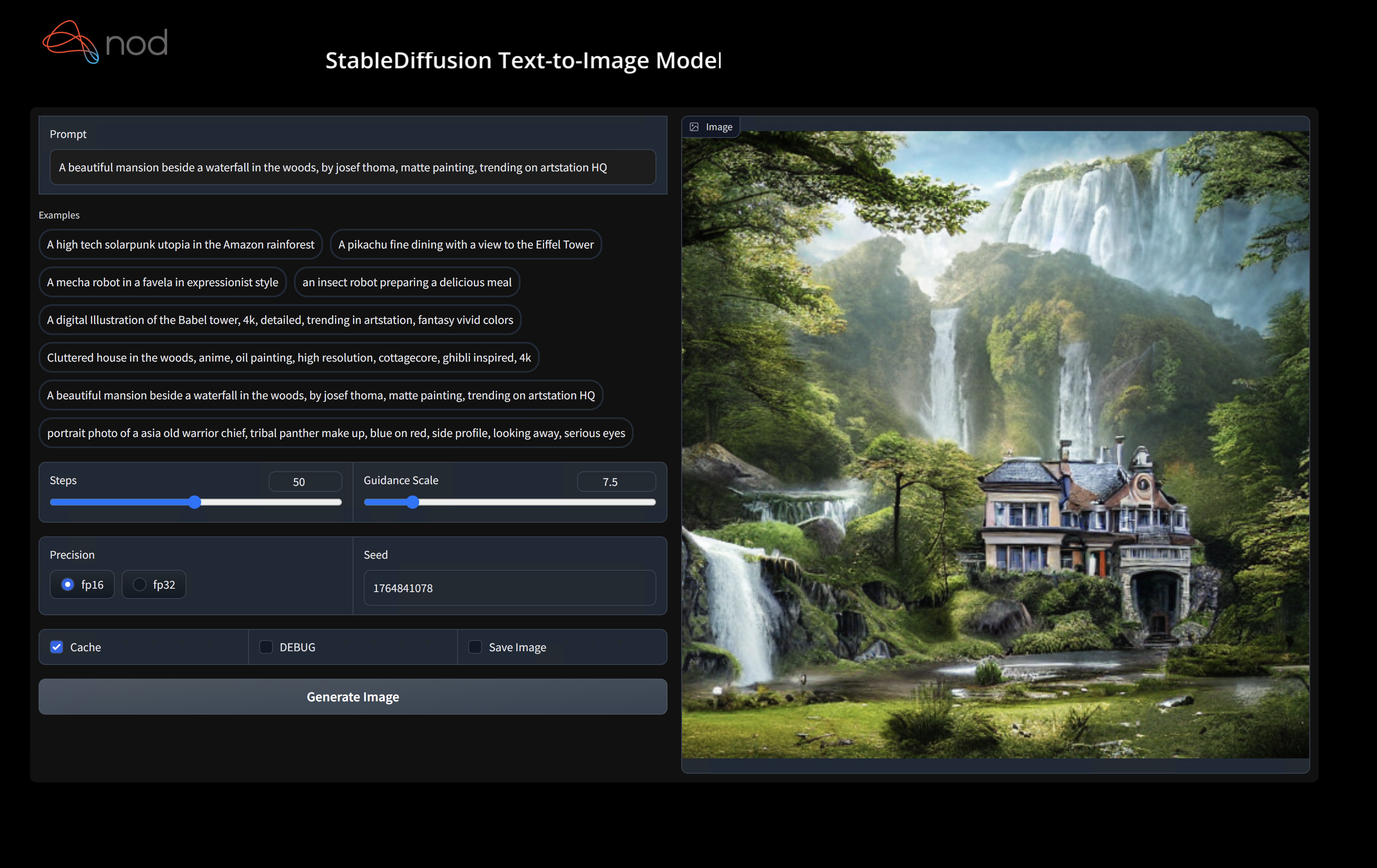
Run Stable Diffusion on your device - Commandline
Windows 10/11 Users
(shark1.venv) PS C:\g\shark> python .\apps\stable_diffusion\scripts\main.py --app="txt2img" --precision="fp16" --prompt="tajmahal, snow, sunflowers, oil on canvas" --device="vulkan"
Linux / macOS Users
python3.11 apps/stable_diffusion/scripts/main.py --app=txt2img --precision=fp16 --device=vulkan --prompt="tajmahal, oil on canvas, sunflowers, 4k, uhd"
You can replace vulkan with cpu to run on your CPU or with cuda to run on CUDA devices. If you have multiple vulkan devices you can address them with --device=vulkan://1 etc
The output on a AMD 7900XTX would look something like:
Average step time: 47.19188690185547ms/it
Clip Inference time (ms) = 109.531
VAE Inference time (ms): 78.590

Total image generation time: 2.5788655281066895sec
Here are some samples generated:


Find us on SHARK Discord server if you have any trouble with running it on your hardware.
Binary Installation
Setup a new pip Virtual Environment
This step sets up a new VirtualEnv for Python
python --version #Check you have 3.11 on Linux, macOS or Windows Powershell
python -m venv shark_venv
source shark_venv/bin/activate   # Use shark_venv/Scripts/activate on Windows

# If you are using conda create and activate a new conda env

# Some older pip installs may not be able to handle the recent PyTorch deps
python -m pip install --upgrade pip
macOS Metal users please install https://sdk.lunarg.com/sdk/download/latest/mac/vulkan-sdk.dmg and enable "System wide install"
Install SHARK
This step pip installs SHARK and related packages on Linux Python 3.8, 3.10 and 3.11 and macOS / Windows Python 3.11
pip install nodai-shark -f https://nod-ai.github.io/SHARK/package-index/ -f https://llvm.github.io/torch-mlir/package-index/ -f https://nod-ai.github.io/SRT/pip-release-links.html --extra-index-url https://download.pytorch.org/whl/nightly/cpu
Run shark tank model tests.
pytest tank/test_models.py
See tank/README.md for a more detailed walkthrough of our pytest suite and CLI.
Download and run Resnet50 sample
curl -O https://raw.githubusercontent.com/nod-ai/SHARK/main/shark/examples/shark_inference/resnet50_script.py
#Install deps for test script
pip install --pre torch torchvision torchaudio tqdm pillow gsutil --extra-index-url https://download.pytorch.org/whl/nightly/cpu
python ./resnet50_script.py --device="cpu"  #use cuda or vulkan or metal
Download and run BERT (MiniLM) sample
curl -O https://raw.githubusercontent.com/nod-ai/SHARK/main/shark/examples/shark_inference/minilm_jit.py
#Install deps for test script
pip install transformers torch --extra-index-url https://download.pytorch.org/whl/nightly/cpu
python ./minilm_jit.py --device="cpu"  #use cuda or vulkan or metal
Development, Testing and Benchmarks
If you want to use Python3.11 and with TF Import tools you can use the environment variables like:
Set USE_IREE=1 to use upstream IREE
# PYTHON=python3.11 VENV_DIR=0617_venv IMPORTER=1 ./setup_venv.sh
Run any of the hundreds of SHARK tank models via the test framework
python -m  shark.examples.shark_inference.resnet50_script --device="cpu" # Use gpu | vulkan
# Or a pytest
pytest tank/test_models.py -k "MiniLM"
How to use your locally built IREE / Torch-MLIR with SHARK
If you are a Torch-mlir developer or an IREE developer and want to test local changes you can uninstall
the provided packages with pip uninstall torch-mlir and / or pip uninstall iree-compiler iree-runtime and build locally
with Python bindings and set your PYTHONPATH as mentioned here
for IREE and here
for Torch-MLIR.
How to use your locally built Torch-MLIR with SHARK:
1.) Run `./setup_venv.sh in SHARK` and activate `shark.venv` virtual env.
2.) Run `pip uninstall torch-mlir`.
3.) Go to your local Torch-MLIR directory.
4.) Activate mlir_venv virtual envirnoment.
5.) Run `pip uninstall -r requirements.txt`.
6.) Run `pip install -r requirements.txt`.
7.) Build Torch-MLIR.
8.) Activate shark.venv virtual environment from the Torch-MLIR directory.
8.) Run `export PYTHONPATH=`pwd`/build/tools/torch-mlir/python_packages/torch_mlir:`pwd`/examples` in the Torch-MLIR directory.
9.) Go to the SHARK directory.
Now the SHARK will use your locally build Torch-MLIR repo.
Benchmarking Dispatches
To produce benchmarks of individual dispatches, you can add --dispatch_benchmarks=All --dispatch_benchmarks_dir=<output_dir> to your pytest command line argument.
If you only want to compile specific dispatches, you can specify them with a space seperated string instead of "All". E.G. --dispatch_benchmarks="0 1 2 10"
For example, to generate and run dispatch benchmarks for MiniLM on CUDA:
pytest -k "MiniLM and torch and static and cuda" --benchmark_dispatches=All -s --dispatch_benchmarks_dir=./my_dispatch_benchmarks
The given command will populate <dispatch_benchmarks_dir>/<model_name>/ with an ordered_dispatches.txt that lists and orders the dispatches and their latencies, as well as folders for each dispatch that contain .mlir, .vmfb, and results of the benchmark for that dispatch.
if you want to instead incorporate this into a python script, you can pass the dispatch_benchmarks and dispatch_benchmarks_dir commands when initializing SharkInference, and the benchmarks will be generated when compiled. E.G:
shark_module = SharkInference(
        mlir_model,
        device=args.device,
        mlir_dialect="tm_tensor",
        dispatch_benchmarks="all",
        dispatch_benchmarks_dir="results"
    )
Output will include:
- An ordered list ordered-dispatches.txt of all the dispatches with their runtime
- Inside the specified directory, there will be a directory for each dispatch (there will be mlir files for all dispatches, but only compiled binaries and benchmark data for the specified dispatches)
- An .mlir file containing the dispatch benchmark
- A compiled .vmfb file containing the dispatch benchmark
- An .mlir file containing just the hal executable
- A compiled .vmfb file of the hal executable
- A .txt file containing benchmark output
See tank/README.md for further instructions on how to run model tests and benchmarks from the SHARK tank.
API Reference
Shark Inference API
from shark.shark_importer import SharkImporter

# SharkImporter imports mlir file from the torch, tensorflow or tf-lite module.

mlir_importer = SharkImporter(
    torch_module,
    (input),
    frontend="torch",  #tf, #tf-lite
)
torch_mlir, func_name = mlir_importer.import_mlir(tracing_required=True)

# SharkInference accepts mlir in linalg, mhlo, and tosa dialect.

from shark.shark_inference import SharkInference
shark_module = SharkInference(torch_mlir, device="cpu", mlir_dialect="linalg")
shark_module.compile()
result = shark_module.forward((input))
Example demonstrating running MHLO IR.
from shark.shark_inference import SharkInference
import numpy as np

mhlo_ir = r"""builtin.module  {
      func.func @forward(%arg0: tensor<1x4xf32>, %arg1: tensor<4x1xf32>) -> tensor<4x4xf32> {
        %0 = chlo.broadcast_add %arg0, %arg1 : (tensor<1x4xf32>, tensor<4x1xf32>) -> tensor<4x4xf32>
        %1 = "mhlo.abs"(%0) : (tensor<4x4xf32>) -> tensor<4x4xf32>
        return %1 : tensor<4x4xf32>
      }
}"""

arg0 = np.ones((1, 4)).astype(np.float32)
arg1 = np.ones((4, 1)).astype(np.float32)
shark_module = SharkInference(mhlo_ir, device="cpu", mlir_dialect="mhlo")
shark_module.compile()
result = shark_module.forward((arg0, arg1))
Examples Using the REST API
Supported and Validated Models
SHARK is maintained to support the latest innovations in ML Models:
| TF HuggingFace Models | SHARK-CPU | SHARK-CUDA | SHARK-METAL |
|---|---|---|---|
| BERT | 💚 | 💚 | 💚 |
| DistilBERT | 💚 | 💚 | 💚 |
| GPT2 | 💚 | 💚 | 💚 |
| BLOOM | 💚 | 💚 | 💚 |
| Stable Diffusion | 💚 | 💚 | 💚 |
| Vision Transformer | 💚 | 💚 | 💚 |
| ResNet50 | 💚 | 💚 | 💚 |
For a complete list of the models supported in SHARK, please refer to tank/README.md.
Communication Channels
- SHARK Discord server: Real time discussions with the SHARK team and other users
- GitHub issues: Feature requests, bugs etc
Related Projects
IREE Project Channels
- Upstream IREE issues: Feature requests, bugs, and other work tracking
- Upstream IREE Discord server: Daily development discussions with the core team and collaborators
- iree-discuss email list: Announcements, general and low-priority discussion
MLIR and Torch-MLIR Project Channels
#torch-mlirchannel on the LLVM Discord - this is the most active communication channel- Torch-MLIR Github issues here
torch-mlirsection of LLVM Discourse- Weekly meetings on Mondays 9AM PST. See here for more information.
- MLIR topic within LLVM Discourse SHARK and IREE is enabled by and heavily relies on MLIR.
License
nod.ai SHARK is licensed under the terms of the Apache 2.0 License with LLVM Exceptions. See LICENSE for more information.