value:Thank you for taking the time to fill out this bug report. Please provide as much information as possible to help us understand and address the issue effectively.
value:Thank you for taking the time to fill out this bug report. Please provide as much information as possible
to help us understand and address the issue effectively.
- type:checkboxes
attributes:
label:Is there an existing issue for the same bug?
label:Is there an existing issue for the same bug? (If one exists, thumbs up or comment on the issue instead).
description:Please check if an issue already exists for the bug you encountered.
poetry run ./evaluation/integration_tests/scripts/run_infer.sh llm.eval HEAD CodeActAgent '' 10 $N_PROCESSES '' 'haiku_run'
# get integration tests report
REPORT_FILE_HAIKU=$(find evaluation/evaluation_outputs/outputs/integration_tests/CodeActAgent/*haiku*_maxiter_10_N* -name "report.md" -type f | head -n 1)
- name:Run integration test evaluation for DeepSeek
env:
SANDBOX_FORCE_REBUILD_RUNTIME:True
run:|
poetry run ./evaluation/integration_tests/scripts/run_infer.sh llm.eval HEAD CodeActAgent '' 10 $N_PROCESSES '' 'deepseek_run'
# get integration tests report
REPORT_FILE_DEEPSEEK=$(find evaluation/evaluation_outputs/outputs/integration_tests/CodeActAgent/deepseek*_maxiter_10_N* -name "report.md" -type f | head -n 1)
- name:Run integration test evaluation for VisualBrowsingAgent (DeepSeek)
env:
SANDBOX_FORCE_REBUILD_RUNTIME:True
run:|
poetry run ./evaluation/integration_tests/scripts/run_infer.sh llm.eval HEAD VisualBrowsingAgent '' 15 $N_PROCESSES "t05_simple_browsing,t06_github_pr_browsing.py" 'visualbrowsing_deepseek_run'
# Find and export the visual browsing agent test results
REPORT_FILE_VISUALBROWSING_DEEPSEEK=$(find evaluation/evaluation_outputs/outputs/integration_tests/VisualBrowsingAgent/deepseek*_maxiter_15_N* -name "report.md" -type f | head -n 1)
cd evaluation/evaluation_outputs/outputs # Change to the outputs directory
tar -czvf ../../../integration_tests_${TIMESTAMP}.tar.gz integration_tests/CodeActAgent/* integration_tests/VisualBrowsingAgent/* # Only include the actual result directories
body: `[OpenHands](https://github.com/All-Hands-AI/OpenHands) started fixing the ${issueType}! You can monitor the progress [here](https://github.com/${context.repo.owner}/${context.repo.repo}/actions/runs/${context.runId}).`
body: `A potential fix has been generated and a draft PR #${prNumber} has been created. Please review the changes.`
});
process.env.AGENT_RESPONDED = 'true';
} else if (!success && branchName) {
let commentBody = `An attempt was made to automatically fix this issue, but it was unsuccessful. A branch named '${branchName}' has been created with the attempted changes. You can view the branch [here](https://github.com/${context.repo.owner}/${context.repo.repo}/tree/${branchName}). Manual intervention may be required.`;
if (resultExplanation) {
commentBody += `\n\nAdditional details about the failure:\n${resultExplanation}`;
}
github.rest.issues.createComment({
issue_number: issueNumber,
owner: context.repo.owner,
repo: context.repo.repo,
body: commentBody
});
process.env.AGENT_RESPONDED = 'true';
}
# Leave error comment when both PR/Issue comment handling fail
- name:Fallback Error Comment
uses:actions/github-script@v7
if:${{ env.AGENT_RESPONDED == 'false' }}# Only run if no conditions were met in previous steps
body: `The workflow to fix this issue encountered an error. Please check the [workflow logs](https://github.com/${context.repo.owner}/${context.repo.repo}/actions/runs/${context.runId}) for more information.`
echo "Your coworker wants to apply a pull request to this project." > task.txt
echo "Read and review ${{ github.event.pull_request.number }}.diff file. Create a review-${{ github.event.pull_request.number }}.txt and write your concise comments and suggestions there." >> task.txt
echo "Do not ask me for confirmation at any point." >> task.txt
All documentation must be grounded in fact, so you must not make anything up without proper evidence. When you have finished writing documentation, convey to the user what reference source, including web pages, source code, or other sources of documentation you referenced when writing each new fact in the documentation. If you cannot reference a source for anything do not include it in the pull request.
## Best Practices for Documentation
1.**Be Factual**: Only include information that can be verified from reliable sources.
2.**Cite Sources**: Always reference the source of information (code, web pages, official documentation).
3.**Be Clear and Concise**: Use simple language and avoid unnecessary jargon.
4.**Use Examples**: Include practical examples to illustrate concepts.
5.**Structure Properly**: Use headings, lists, and code blocks to organize information.
6.**Keep Updated**: Ensure documentation reflects the current state of the code or system.
## Documentation Process
1. Research and gather information from reliable sources
2. Draft documentation based on verified facts
3. Review for accuracy and completeness
4. Include references for all factual statements
5. Submit only when all information is properly sourced
Remember: If you cannot verify a piece of information, it's better to exclude it than to include potentially incorrect information.
The core AI entity in OpenHands that can perform software development tasks by interacting with tools, browsing the web, and modifying code.
#### Agent Controller
A component that manages the agent's lifecycle, handles its state, and coordinates interactions between the agent and various tools.
#### Agent Delegation
The ability of an agent to hand off specific tasks to other specialized agents for better task completion.
#### Agent Hub
A central registry of different agent types and their capabilities, allowing for easy agent selection and instantiation.
#### Agent Skill
A specific capability or function that an agent can perform, such as file manipulation, web browsing, or code editing.
#### Agent State
The current context and status of an agent, including its memory, active tools, and ongoing tasks.
#### CodeAct Agent
[A generalist agent in OpenHands](https://arxiv.org/abs/2407.16741) designed to perform tasks by editing and executing code.
### Browser
A system for web-based interactions and tasks.
#### Browser Gym
A testing and evaluation environment for browser-based agent interactions and tasks.
#### Web Browser Tool
A tool that enables agents to interact with web pages and perform web-based tasks.
### Commands
Terminal and execution related functionality.
#### Bash Session
A persistent terminal session that maintains state and history for bash command execution.
This uses tmux under the hood.
### Configuration
System-wide settings and options.
#### Agent Configuration
Settings that define an agent's behavior, capabilities, and limitations, including available tools and runtime settings.
#### Configuration Options
Settings that control various aspects of OpenHands behavior, including runtime, security, and agent settings.
#### LLM Config
Configuration settings for language models used by agents, including model selection and parameters.
#### LLM Draft Config
Settings for draft mode operations with language models, typically used for faster, lower-quality responses.
#### Runtime Configuration
Settings that define how the runtime environment should be set up and operated.
#### Security Options
Configuration settings that control security features and restrictions.
### Conversation
A sequence of interactions between a user and an agent, including messages, actions, and their results.
#### Conversation Info
Metadata about a conversation, including its status, participants, and timeline.
#### Conversation Manager
A component that handles the creation, storage, and retrieval of conversations.
#### Conversation Metadata
Additional information about conversations, such as tags, timestamps, and related resources.
#### Conversation Status
The current state of a conversation, including whether it's active, completed, or failed.
#### Conversation Store
A storage system for maintaining conversation history and related data.
### Events
#### Event
Every Conversation comprises a series of Events. Each Event is either an Action or an Observation.
#### Event Stream
A continuous flow of events that represents the ongoing activities and interactions in the system.
#### Action
A specific operation or command that an agent executes through available tools, such as running a command or editing a file.
#### Observation
The response or result returned by a tool after an agent's action, providing feedback about the action's outcome.
### Interface
Different ways to interact with OpenHands.
#### CLI Mode
A command-line interface mode for interacting with OpenHands agents without a graphical interface.
#### GUI Mode
A graphical user interface mode for interacting with OpenHands agents through a web interface.
#### Headless Mode
A mode of operation where OpenHands runs without a user interface, suitable for automation and scripting.
### Agent Memory
The system that decides which parts of the Event Stream (i.e. the conversation history) should be passed into each LLM prompt.
#### Memory Store
A storage system for maintaining agent memory and context across sessions.
#### Condenser
A component that processes and summarizes conversation history to maintain context while staying within token limits.
#### Truncation
A very simple Condenser strategy. Reduces conversation history or content to stay within token limits.
### Microagent
A specialized prompt that enhances OpenHands with domain-specific knowledge, repository-specific context, and task-specific workflows.
#### Microagent Registry
A central repository of available microagents and their configurations.
#### Public Microagent
A general-purpose microagent available to all OpenHands users, triggered by specific keywords.
#### Repository Microagent
A type of microagent that provides repository-specific context and guidelines, stored in the `.openhands/microagents/` directory.
### Prompt
Components for managing and processing prompts.
#### Prompt Caching
A system for caching and reusing common prompts to improve performance.
#### Prompt Manager
A component that handles the loading, processing, and management of prompts used by agents, including microagents.
#### Response Parsing
The process of interpreting and structuring responses from language models and tools.
### Runtime
The execution environment where agents perform their tasks, which can be local, remote, or containerized.
#### Action Execution Server
A REST API that receives agent actions (e.g. bash commands, python code, browsing actions), executes them in the runtime environment, and returns the results.
#### Action Execution Client
A component that handles the execution of actions in the runtime environment, managing the communication between the agent and the runtime.
#### Docker Runtime
A containerized runtime environment that provides isolation and reproducibility for agent operations.
#### E2B Runtime
A specialized runtime environment built on E2B for secure and isolated code execution.
#### Local Runtime
A runtime environment that executes on the local machine, suitable for development and testing.
#### Modal Runtime
A runtime environment built on Modal for scalable and distributed agent operations.
#### Remote Runtime
A sandboxed environment that executes code and commands remotely, providing isolation and security for agent operations.
#### Runtime Builder
A component that builds a Docker image for the Action Execution Server based on a user-specified base image.
### Security
Security-related components and features.
#### Security Analyzer
A component that checks agent actions for potential security risks.
This repository contains the code for OpenHands, an automated AI software engineer. It has a Python backend
(in the `openhands` directory) and React frontend (in the `frontend` directory).
## General Setup:
To set up the entire repo, including frontend and backend, run `make build`.
You don't need to do this unless the user asks you to, or if you're trying to run the entire application.
IMPORTANT: Before making any changes to the codebase, ALWAYS run `make install-pre-commit-hooks` to ensure pre-commit hooks are properly installed.
Before pushing any changes, you MUST ensure that any lint errors or simple test errors have been fixed.
* If you've made changes to the backend, you should run `pre-commit run --config ./dev_config/python/.pre-commit-config.yaml` (this will run on staged files).
* If you've made changes to the frontend, you should run `cd frontend && npm run lint:fix && npm run build ; cd ..`
The pre-commit hooks MUST pass successfully before pushing any changes to the repository. This is a mandatory requirement to maintain code quality and consistency.
If either command fails, it may have automatically fixed some issues. You should fix any issues that weren't automatically fixed,
then re-run the command to ensure it passes. Common issues include:
- Mypy type errors
- Ruff formatting issues
- Trailing whitespace
- Missing newlines at end of files
## Repository Structure
Backend:
- Located in the `openhands` directory
- Testing:
- All tests are in `tests/unit/test_*.py`
- To test new code, run `poetry run pytest tests/unit/test_xxx.py` where `xxx` is the appropriate file for the current functionality
- Write all tests with pytest
Frontend:
- Located in the `frontend` directory
- Prerequisites: A recent version of NodeJS / NPM
- Setup: Run `npm install` in the frontend directory
- Testing:
- Run tests: `npm run test`
- To run specific tests: `npm run test -- -t "TestName"`
- Our test framework is vitest
- Building:
- Build for production: `npm run build`
- Environment Variables:
- Set in `frontend/.env` or as environment variables
- Available variables: VITE_BACKEND_HOST, VITE_USE_TLS, VITE_INSECURE_SKIP_VERIFY, VITE_FRONTEND_PORT
- Internationalization:
- Generate i18n declaration file: `npm run make-i18n`
## Template for Github Pull Request
If you are starting a pull request (PR), please follow the template in `.github/pull_request_template.md`.
## Implementation Details
These details may or may not be useful for your current task.
### Frontend
#### Action Handling:
- Actions are defined in `frontend/src/types/action-type.ts`
- The `HANDLED_ACTIONS` array in `frontend/src/state/chat-slice.ts` determines which actions are displayed as collapsible UI elements
- To add a new action type to the UI:
1. Add the action type to the `HANDLED_ACTIONS` array
2. Implement the action handling in `addAssistantAction` function in chat-slice.ts
3. Add a translation key in the format `ACTION_MESSAGE$ACTION_NAME` to the i18n files
- Actions with `thought` property are displayed in the UI based on their action type:
- Regular actions (like "run", "edit") display the thought as a separate message
- Special actions (like "think") are displayed as collapsible elements only
#### Adding User Settings:
- To add a new user setting to OpenHands, follow these steps:
1. Add the setting to the frontend:
- Add the setting to the `Settings` type in `frontend/src/types/settings.ts`
- Add the setting to the `ApiSettings` type in the same file
- Add the setting with an appropriate default value to `DEFAULT_SETTINGS` in `frontend/src/services/settings.ts`
- Update the `useSettings` hook in `frontend/src/hooks/query/use-settings.ts` to map the API response
- Update the `useSaveSettings` hook in `frontend/src/hooks/mutation/use-save-settings.ts` to include the setting in API requests
- Add UI components (like toggle switches) in the appropriate settings screen (e.g., `frontend/src/routes/app-settings.tsx`)
- Add i18n translations for the setting name and any tooltips in `frontend/src/i18n/translation.json`
- Add the translation key to `frontend/src/i18n/declaration.ts`
2. Add the setting to the backend:
- Add the setting to the `Settings` model in `openhands/storage/data_models/settings.py`
- Update any relevant backend code to apply the setting (e.g., in session creation)
OpenHands is an automated AI software engineer. It is a repo with a Python backend
(in the `openhands` directory) and TypeScript frontend (in the `frontend` directory).
General Setup:
- To set up the entire repo, including frontend and backend, run `make build`
- To run linting and type-checking before finishing the job, run `poetry run pre-commit run --all-files --config ./dev_config/python/.pre-commit-config.yaml`
Backend:
- Located in the `openhands` directory
- Testing:
- All tests are in `tests/unit/test_*.py`
- To test new code, run `poetry run pytest tests/unit/test_xxx.py` where `xxx` is the appropriate file for the current functionality
- Write all tests with pytest
Frontend:
- Located in the `frontend` directory
- Prerequisites: A recent version of NodeJS / NPM
- Setup: Run `npm install` in the frontend directory
- Testing:
- Run tests: `npm run test`
- To run specific tests: `npm run test -- -t "TestName"`
- Building:
- Build for production: `npm run build`
- Environment Variables:
- Set in `frontend/.env` or as environment variables
- Available variables: VITE_BACKEND_HOST, VITE_USE_TLS, VITE_INSECURE_SKIP_VERIFY, VITE_FRONTEND_PORT
- Internationalization:
- Generate i18n declaration file: `npm run make-i18n`
@@ -18,24 +18,24 @@ diverse, inclusive, and healthy community.
Examples of behavior that contributes to a positive environment for our
community include:
* Demonstrating empathy and kindness toward other people
* Being respectful of differing opinions, viewpoints, and experiences
* Giving and gracefully accepting constructive feedback
* Demonstrating empathy and kindness toward other people.
* Being respectful of differing opinions, viewpoints, and experiences.
* Giving and gracefully accepting constructive feedback.
* Accepting responsibility and apologizing to those affected by our mistakes,
and learning from the experience
and learning from the experience.
* Focusing on what is best not just for us as individuals, but for the overall
community
community.
Examples of unacceptable behavior include:
* The use of sexualized language or imagery, and sexual attention or advances of
any kind
* Trolling, insulting or derogatory comments, and personal or political attacks
* Public or private harassment
any kind.
* Trolling, insulting or derogatory comments, and personal or political attacks.
* Public or private harassment.
* Publishing others' private information, such as a physical or email address,
without their explicit permission
without their explicit permission.
* Other conduct which could reasonably be considered inappropriate in a
professional setting
professional setting.
## Enforcement Responsibilities
@@ -61,7 +61,7 @@ representative at an online or offline event.
Instances of abusive, harassing, or otherwise unacceptable behavior may be
reported to the community leaders responsible for enforcement at
contact@all-hands.dev
contact@all-hands.dev.
All complaints will be reviewed and investigated promptly and fairly.
All community leaders are obligated to respect the privacy and security of the
@@ -113,6 +113,20 @@ individual, or aggression toward or disparagement of classes of individuals.
**Consequence**: A permanent ban from any sort of public interaction within the
community.
### Slack and Discord Etiquettes
These Slack and Discord etiquette guidelines are designed to foster an inclusive, respectful, and productive environment for all community members. By following these best practices, we ensure effective communication and collaboration while minimizing disruptions. Let’s work together to build a supportive and welcoming community!
- Communicate respectfully and professionally, avoiding sarcasm or harsh language, and remember that tone can be difficult to interpret in text.
- Use threads for specific discussions to keep channels organized and easier to follow.
- Tag others only when their input is critical or urgent, and use @here, @channel or @everyone sparingly to minimize disruptions.
- Be patient, as open-source contributors and maintainers often have other commitments and may need time to respond.
- Post questions or discussions in the most relevant channel (e.g., for [slack - #general](https://openhands-ai.slack.com/archives/C06P5NCGSFP) for general topics, [slack - #questions](https://openhands-ai.slack.com/archives/C06U8UTKSAD) for queries/questions, [discord - #general](https://discord.com/channels/1222935860639563850/1222935861386018885)).
- When asking for help or raising issues, include necessary details like links, screenshots, or clear explanations to provide context.
- Keep discussions in public channels whenever possible to allow others to benefit from the conversation, unless the matter is sensitive or private.
- Always adhere to [our standards](https://github.com/All-Hands-AI/OpenHands/blob/main/CODE_OF_CONDUCT.md#our-standards) to ensure a welcoming and collaborative environment.
- If you choose to mute a channel, consider setting up alerts for topics that still interest you to stay engaged. For Slack, Go to Settings → Notifications → My Keywords to add specific keywords that will notify you when mentioned. For example, if you're here for discussions about LLMs, mute the channel if it’s too busy, but set notifications to alert you only when “LLMs” appears in messages. Also for Discord, go to the channel notifications and choose the option that best describes your need.
## Attribution
This Code of Conduct is adapted from the [Contributor Covenant][homepage],
Thanks for your interest in contributing to OpenHands! We welcome and appreciate contributions.
## How Can I Contribute?
There are many ways that you can contribute:
1.**Download and use** OpenHands, and send [issues](https://github.com/All-Hands-AI/OpenHands/issues) when you encounter something that isn't working or a feature that you'd like to see.
2.**Send feedback** after each session by [clicking the thumbs-up thumbs-down buttons](https://docs.all-hands.dev/modules/usage/feedback), so we can see where things are working and failing, and also build an open dataset for training code agents.
3.**Improve the Codebase** by sending PRs (see details below). In particular, we have some [good first issues](https://github.com/All-Hands-AI/OpenHands/labels/good%20first%20issue) that may be ones to start on.
## Understanding OpenHands's CodeBase
To understand the codebase, please refer to the README in each module:
@@ -19,79 +11,61 @@ To understand the codebase, please refer to the README in each module:
- [agenthub](./openhands/agenthub/README.md)
- [server](./openhands/server/README.md)
When you write code, it is also good to write tests. Please navigate to the `tests` folder to see existing test suites.
At the moment, we have two kinds of tests: `unit` and `integration`. Please refer to the README for each test suite. These tests also run on GitHub's continuous integration to ensure quality of the project.
## Sending Pull Requests to OpenHands
### 1. Fork the Official Repository
Fork the [OpenHands repository](https://github.com/All-Hands-AI/OpenHands) into your own account.
Clone your own forked repository into your local environment:
Set the official repository as your [upstream](https://www.atlassian.com/git/tutorials/git-forks-and-upstreams) to synchronize with the latest update in the official repository.
You should see both `origin` and `upstream` in the output.
### 3. Synchronize with Official Repository
Synchronize latest commit with official repository before coding:
```shell
git fetch upstream
git checkout main
git merge upstream/main
git push origin main
```
### 4. Set up the Development Environment
## Setting up Your Development Environment
We have a separate doc [Development.md](https://github.com/All-Hands-AI/OpenHands/blob/main/Development.md) that tells you how to set up a development workflow.
### 5. Write Code and Commit It
## How Can I Contribute?
Once you have done this, you can write code, test it, and commit it to a branch (replace `my_branch` with an appropriate name):
There are many ways that you can contribute:
```shell
git checkout -b my_branch
git add .
git commit
git push origin my_branch
```
1.**Download and use** OpenHands, and send [issues](https://github.com/All-Hands-AI/OpenHands/issues) when you encounter something that isn't working or a feature that you'd like to see.
2.**Send feedback** after each session by [clicking the thumbs-up thumbs-down buttons](https://docs.all-hands.dev/usage/feedback), so we can see where things are working and failing, and also build an open dataset for training code agents.
3.**Improve the Codebase** by sending [PRs](#sending-pull-requests-to-openhands) (see details below). In particular, we have some [good first issues](https://github.com/All-Hands-AI/OpenHands/labels/good%20first%20issue) that may be ones to start on.
### 6. Open a Pull Request
## What Can I Build?
Here are a few ways you can help improve the codebase.
* On GitHub, go to the page of your forked repository, and create a Pull Request:
- Click on `Branches`
- Click on the `...` beside your branch and click on `New pull request`
- Set `base repository` to `All-Hands-AI/OpenHands`
- Set `base` to `main`
- Click `Create pull request`
#### UI/UX
We're always looking to improve the look and feel of the application. If you've got a small fix
for something that's bugging you, feel free to open up a PR that changes the [`./frontend`](./frontend) directory.
The PR should appear in [OpenHands PRs](https://github.com/All-Hands-AI/OpenHands/pulls).
If you're looking to make a bigger change, add a new UI element, or significantly alter the style
of the application, please open an issue first, or better, join the #frontend channel in our Slack
to gather consensus from our design team first.
Then the OpenHands team will review your code.
#### Improving the agent
Our main agent is the CodeAct agent. You can [see its prompts here](https://github.com/All-Hands-AI/OpenHands/tree/main/openhands/agenthub/codeact_agent).
## PR Rules
Changes to these prompts, and to the underlying behavior in Python, can have a huge impact on user experience.
You can try modifying the prompts to see how they change the behavior of the agent as you use the app
locally, but we will need to do an end-to-end evaluation of any changes here to ensure that the agent
is getting better over time.
### 1. Pull Request title
We use the [SWE-bench](https://www.swebench.com/) benchmark to test our agent. You can join the #evaluation
channel in Slack to learn more.
#### Adding a new agent
You may want to experiment with building new types of agents. You can add an agent to [`openhands/agenthub`](./openhands/agenthub)
to help expand the capabilities of OpenHands.
#### Adding a new runtime
The agent needs a place to run code and commands. When you run OpenHands on your laptop, it uses a Docker container
to do this by default. But there are other ways of creating a sandbox for the agent.
If you work for a company that provides a cloud-based runtime, you could help us add support for that runtime
by implementing the [interface specified here](https://github.com/All-Hands-AI/OpenHands/blob/main/openhands/runtime/base.py).
#### Testing
When you write code, it is also good to write tests. Please navigate to the [`./tests`](./tests) folder to see existing test suites.
At the moment, we have two kinds of tests: [`unit`](./tests/unit) and [`integration`](./evaluation/integration_tests). Please refer to the README for each test suite. These tests also run on GitHub's continuous integration to ensure quality of the project.
## Sending Pull Requests to OpenHands
You'll need to fork our repository to send us a Pull Request. You can learn more
about how to fork a GitHub repo and open a PR with your changes in [this article](https://medium.com/swlh/forks-and-pull-requests-how-to-contribute-to-github-repos-8843fac34ce8).
### Pull Request title
As described [here](https://github.com/commitizen/conventional-commit-types/blob/master/index.json), a valid PR title should begin with one of the following prefixes:
-`feat`: A new feature
@@ -112,6 +86,38 @@ For example, a PR title could be:
You may also check out previous PRs in the [PR list](https://github.com/All-Hands-AI/OpenHands/pulls).
### 2. Pull Request description
### Pull Request description
- If your PR is small (such as a typo fix), you can go brief.
- If it contains a lot of changes, it's better to write more details.
If your changes are user-facing (e.g. a new feature in the UI, a change in behavior, or a bugfix)
please include a short message that we can add to our changelog.
## How to Make Effective Contributions
### Opening Issues
If you notice any bugs or have any feature requests please open them via the [issues page](https://github.com/All-Hands-AI/OpenHands/issues). We will triage based on how critical the bug is or how potentially useful the improvement is, discuss, and implement the ones that the community has interest/effort for.
Further, if you see an issue you like, please leave a "thumbs-up" or a comment, which will help us prioritize.
### Making Pull Requests
We're generally happy to consider all pull requests with the evaluation process varying based on the type of change:
#### For Small Improvements
Small improvements with few downsides are typically reviewed and approved quickly.
One thing to check when making changes is to ensure that all continuous integration tests pass, which you can check before getting a review.
#### For Core Agent Changes
We need to be more careful with changes to the core agent, as it is imperative to maintain high quality. These PRs are evaluated based on three key metrics:
1.**Accuracy**
2.**Efficiency**
3.**Code Complexity**
If it improves accuracy, efficiency, or both with only a minimal change to code quality, that's great we're happy to merge it in!
If there are bigger tradeoffs (e.g. helping efficiency a lot and hurting accuracy a little) we might want to put it behind a feature flag.
Either way, please feel free to discuss on github issues or slack, and we will give guidance and preliminary feedback.
This guide is for people working on OpenHands and editing the source code.
If you wish to contribute your changes, check out the [CONTRIBUTING.md](https://github.com/All-Hands-AI/OpenHands/blob/main/CONTRIBUTING.md) on how to clone and setup the project initially before moving on.
Otherwise, you can clone the OpenHands project directly.
## Start the server for development
This guide is for people working on OpenHands and editing the source code.
If you wish to contribute your changes, check out the
on how to clone and setup the project initially before moving on. Otherwise,
you can clone the OpenHands project directly.
## Start the Server for Development
### 1. Requirements
* Linux, Mac OS, or [WSL on Windows](https://learn.microsoft.com/en-us/windows/wsl/install) [ Ubuntu <= 22.04]
*[Docker](https://docs.docker.com/engine/install/) (For those on MacOS, make sure to allow the default Docker socket to be used from advanced settings!)
-Linux, Mac OS, or [WSL on Windows](https://learn.microsoft.com/en-us/windows/wsl/install) [Ubuntu >= 22.04]
- [Docker](https://docs.docker.com/engine/install/) (For those on MacOS, make sure to allow the default Docker socket to be used from advanced settings!)
extension installed, you can open the project in a dev container by using the
_Dev Container: Reopen in Container_ command from the Command Palette
(Ctrl+Shift+P).
#### Develop without sudo access
If you want to develop without system admin/sudo access to upgrade/install `Python` and/or `NodeJs`, you can use `conda` or `mamba` to manage the packages for you:
If you want to develop without system admin/sudo access to upgrade/install `Python` and/or `NodeJs`, you can use
`conda` or `mamba` to manage the packages for you:
```bash
# Download and install Mamba (a faster version of conda)
Begin by building the project which includes setting up the environment and installing dependencies. This step ensures that OpenHands is ready to run on your system:
Begin by building the project which includes setting up the environment and installing dependencies. This step ensures
that OpenHands is ready to run on your system:
```bash
make build
```
### 3. Configuring the Language Model
OpenHands supports a diverse array of Language Models (LMs) through the powerful [litellm](https://docs.litellm.ai) library. By default, we've chosen the mighty GPT-4 from OpenAI as our go-to model, but the world is your oyster! You can unleash the potential of Anthropic's suave Claude, the enigmatic Llama, or any other LM that piques your interest.
OpenHands supports a diverse array of Language Models (LMs) through the powerful [litellm](https://docs.litellm.ai) library.
To configure the LM of your choice, run:
```bash
make setup-config
```
```bash
make setup-config
```
This command will prompt you to enter the LLM API key, model name, and other variables ensuring that OpenHands is tailored to your specific needs. Note that the model name will apply only when you run headless. If you use the UI, please set the model in the UI.
This command will prompt you to enter the LLM API key, model name, and other variables ensuring that OpenHands is
tailored to your specific needs. Note that the model name will apply only when you run headless. If you use the UI,
please set the model in the UI.
Note: If you have previously run OpenHands using the docker command, you may have already set some environmental variables in your terminal. The final configurations are set from highest to lowest priority:
Some alternative models may prove more challenging to tame than others. Fear not, brave adventurer! We shall soon unveil LLM-specific documentation to guide you on your quest.
And if you've already mastered the art of wielding a model other than OpenAI's GPT, we encourage you to share your setup instructions with us by creating instructions and adding it [to our documentation](https://github.com/All-Hands-AI/OpenHands/tree/main/docs/modules/usage/llms).
For a full list of the LM providers and models available, please consult the [litellm documentation](https://docs.litellm.ai/docs/providers).
See [our documentation](https://docs.all-hands.dev/usage/llms) for recommended models.
### 4. Running the application
#### Option A: Run the Full Application
Once the setup is complete, launching OpenHands is as simple as running a single command. This command starts both the backend and frontend servers seamlessly, allowing you to interact with OpenHands:
Once the setup is complete, this command starts both the backend and frontend servers, allowing you to interact with OpenHands:
```bash
make run
```
#### Option B: Individual Server Startup
- **Start the Backend Server:** If you prefer, you can start the backend server independently to focus on backend-related tasks or configurations.
```bash
make start-backend
```
- **Start the Frontend Server:** Similarly, you can start the frontend server on its own to work on frontend-related components or interface enhancements.
```bash
make start-frontend
```
- **Start the Backend Server:** If you prefer, you can start the backend server independently to focus on
backend-related tasks or configurations.
```bash
make start-backend
```
- **Start the Frontend Server:** Similarly, you can start the frontend server on its own to work on frontend-related
components or interface enhancements.
```bash
make start-frontend
```
### 6. LLM Debugging
If you encounter any issues with the Language Model (LM) or you're simply curious, you can inspect the actual LLM prompts and responses. To do so, export DEBUG=1 in the environment and restart the backend.
OpenHands will then log the prompts and responses in the logs/llm/CURRENT_DATE directory, allowing you to identify the causes.
If you encounter any issues with the Language Model (LM) or you're simply curious, export DEBUG=1 in the environment and restart the backend.
OpenHands will log the prompts and responses in the logs/llm/CURRENT_DATE directory, allowing you to identify the causes.
### 7. Help
Need assistance or information on available targets and commands? The help command provides all the necessary guidance to ensure a smooth experience with OpenHands.
Need help or info on available targets and commands? Use the help command for all the guidance you need with OpenHands.
```bash
make help
```
```
### 8. Testing
To run tests, refer to the following:
#### Unit tests
```bash
poetry run pytest ./tests/unit/test_*.py
```
#### Integration tests
Please refer to [this README](./tests/integration/README.md) for details.
### 9. Add or update dependency
1. Add your dependency in `pyproject.toml` or use `poetry add xxx`
2. Update the poetry.lock file via `poetry lock --no-update`
1. Add your dependency in `pyproject.toml` or use `poetry add xxx`.
2. Update the poetry.lock file via `poetry lock --no-update`.
### 9. Use existing Docker image
To reduce build time (e.g., if no changes were made to the client-runtime component), you can use an existing Docker container image. Follow these steps:
1. Set the SANDBOX_RUNTIME_CONTAINER_IMAGE environment variable to the desired Docker image.
These are the procedures and guidelines on how issues are triaged in this repo by the maintainers.
## General
*Most issues must be tagged with **enhancement** or **bug**
* Issues may be tagged with what it relates to (**backend**, **frontend**, **agent quality**, etc.)
*All issues must be tagged with **enhancement**, **bug** or **troubleshooting/help**.
* Issues may be tagged with what it relates to (**agent quality**, **resolver**, **CLI**, etc.).
## Severity
* **Low**: Minor issues, single user report
* **Medium**: Affecting multiple users
* **Critical**: Affecting all users or potential security issues
## Effort
* Issues may be estimated with effort required (**small effort**, **medium effort**, **large effort**)
* **High**: High visibility issues or affecting many users.
* **Critical**: Affecting all users or potential security issues.
## Difficulty
* Issues with low implementation difficulty may be tagged with **good first issue**
* Issues with low implementation difficulty may be tagged with **good first issue**.
## Not Enough Information
* User is asked to provide more information (logs, how to reproduce, etc.) when the issue is not clear
* If an issue is unclear and the author does not provide more information or respond to a request, the issue may be closed as **not planned** (Usually after a week)
* User is asked to provide more information (logs, how to reproduce, etc.) when the issue is not clear.
* If an issue is unclear and the author does not provide more information or respond to a request,
the issue may be closed as **not planned** (Usually after a week).
## Multiple Requests/Fixes in One Issue
* These issues will be narrowed down to one request/fix so the issue is more easily tracked and fixed
* Issues may be broken down into multiple issues if required
* These issues will be narrowed down to one request/fix so the issue is more easily tracked and fixed.
* Issues may be broken down into multiple issues if required.
## Stale and Auto Closures
* In order to keep a maintainable backlog, issues that have no activity within 30 days are automatically marked as **Stale**.
* If issues marked as **Stale** continue to have no activity for 7 more days, they will automatically be closed as not planned.
* Issues may be reopened by maintainers if deemed important.
.PHONY:buildcheck-dependenciescheck-systemcheck-pythoncheck-npmcheck-nodejscheck-dockercheck-poetryinstall-python-dependenciesinstall-frontend-dependenciesinstall-pre-commit-hookslint-backendlint-frontendlinttest-frontendtestbuild-frontendstart-backendstart-frontend_run_setuprunrun-wslsetup-configsetup-config-promptssetup-config-basicopenhands-cloud-rundocker-devdocker-runclean help
<a href="https://docs.all-hands.dev/modules/usage/getting-started"><img src="https://img.shields.io/badge/Documentation-000?logo=googledocs&logoColor=FFE165&style=for-the-badge" alt="Check out the documentation"></a>
<a href="https://docs.all-hands.dev/usage/getting-started"><img src="https://img.shields.io/badge/Documentation-000?logo=googledocs&logoColor=FFE165&style=for-the-badge" alt="Check out the documentation"></a>
<a href="https://arxiv.org/abs/2407.16741"><img src="https://img.shields.io/badge/Paper%20on%20Arxiv-000?logoColor=FFE165&logo=arxiv&style=for-the-badge" alt="Paper on Arxiv"></a>
@@ -27,80 +26,95 @@ Welcome to OpenHands (formerly OpenDevin), a platform for software development a
OpenHands agents can do anything a human developer can: modify code, run commands, browse the web,
call APIs, and yes—even copy code snippets from StackOverflow.
Learn more at [docs.all-hands.dev](https://docs.all-hands.dev), or jump to the [Quick Start](#-quick-start).
Learn more at [docs.all-hands.dev](https://docs.all-hands.dev), or [sign up for OpenHands Cloud](https://app.all-hands.dev) to get started.
> [!IMPORTANT]
> Using OpenHands for work? We'd love to chat! Fill out
> [this short form](https://docs.google.com/forms/d/e/1FAIpQLSet3VbGaz8z32gW9Wm-Grl4jpt5WgMXPgJ4EDPVmCETCBpJtQ/viewform)
> to join our Design Partner program, where you'll get early access to commercial features and the opportunity to provide input on our product roadmap.
You'll find OpenHands running at [http://localhost:3000](http://localhost:3000)!
You'll need a model provider and API key. One option that works well: [Claude 3.5 Sonnet](https://www.anthropic.com/api), but you have [many options](https://docs.all-hands.dev/modules/usage/llms).
When you open the application, you'll be asked to choose an LLM provider and add an API key.
[Anthropic's Claude Sonnet 4](https://www.anthropic.com/api) (`anthropic/claude-sonnet-4-20250514`)
works best, but you have [many options](https://docs.all-hands.dev/usage/llms).
---
## 💡 Other ways to run OpenHands
You can also run OpenHands in a scriptable [headless mode](https://docs.all-hands.dev/modules/usage/how-to/headless-mode),
or as an [interactive CLI](https://docs.all-hands.dev/modules/usage/how-to/cli-mode).
> [!CAUTION]
> OpenHands is meant to be run by a single user on their local workstation.
> It is not appropriate for multi-tenant deployments where multiple users share the same instance. There is no built-in authentication, isolation, or scalability.
>
> If you're interested in running OpenHands in a multi-tenant environment, please
> [get in touch with us](https://docs.google.com/forms/d/e/1FAIpQLSet3VbGaz8z32gW9Wm-Grl4jpt5WgMXPgJ4EDPVmCETCBpJtQ/viewform)
> for advanced deployment options.
Visit [Installation](https://docs.all-hands.dev/modules/usage/installation) for more information and setup instructions.
You can also [connect OpenHands to your local filesystem](https://docs.all-hands.dev/usage/runtimes/docker#connecting-to-your-filesystem),
run OpenHands in a scriptable [headless mode](https://docs.all-hands.dev/usage/how-to/headless-mode),
interact with it via a [friendly CLI](https://docs.all-hands.dev/usage/how-to/cli-mode),
or run it on tagged issues with [a github action](https://docs.all-hands.dev/usage/how-to/github-action).
Visit [Running OpenHands](https://docs.all-hands.dev/usage/installation) for more information and setup instructions.
If you want to modify the OpenHands source code, check out [Development.md](https://github.com/All-Hands-AI/OpenHands/blob/main/Development.md).
Having issues? The [Troubleshooting Guide](https://docs.all-hands.dev/modules/usage/troubleshooting) can help.
Having issues? The [Troubleshooting Guide](https://docs.all-hands.dev/usage/troubleshooting) can help.
## 📖 Documentation
<a href="https://deepwiki.com/All-Hands-AI/OpenHands"><img src="https://deepwiki.com/badge.svg" alt="Ask DeepWiki" title="Autogenerated Documentation by DeepWiki"></a>
To learn more about the project, and for tips on using OpenHands,
**check out our [documentation](https://docs.all-hands.dev/modules/usage/getting-started)**.
check out our [documentation](https://docs.all-hands.dev/usage/getting-started).
There you'll find resources on how to use different LLM providers,
troubleshooting resources, and advanced configuration options.
## 🤝 How to Contribute
## 🤝 How to Join the Community
OpenHands is a community-driven project, and we welcome contributions from everyone.
Whether you're a developer, a researcher, or simply enthusiastic about advancing the field of
software engineering with AI, there are many ways to get involved:
OpenHands is a community-driven project, and we welcome contributions from everyone. We do most of our communication
through Slack, so this is the best place to start, but we also are happy to have you contact us on Discord or Github:
-**Code Contributions:** Help us develop new agents, core functionality, the frontend and other interfaces, or sandboxing solutions.
-**Research and Evaluation:** Contribute to our understanding of LLMs in software engineering, participate in evaluating the models, or suggest improvements.
-**Feedback and Testing:** Use the OpenHands toolset, report bugs, suggest features, or provide feedback on usability.
-[Join our Slack workspace](https://join.slack.com/t/openhands-ai/shared_invite/zt-34zm4j0gj-Qz5kRHoca8DFCbqXPS~f_A) - Here we talk about research, architecture, and future development.
-[Join our Discord server](https://discord.gg/ESHStjSjD4) - This is a community-run server for general discussion, questions, and feedback.
-[Read or post Github Issues](https://github.com/All-Hands-AI/OpenHands/issues) - Check out the issues we're working on, or add your own ideas.
For details, please check [CONTRIBUTING.md](./CONTRIBUTING.md).
## 🤖 Join Our Community
Whether you're a developer, a researcher, or simply enthusiastic about OpenHands, we'd love to have you in our community.
Let's make software engineering better together!
- [Slack workspace](https://join.slack.com/t/opendevin/shared_invite/zt-2oikve2hu-UDxHeo8nsE69y6T7yFX_BA) - Here we talk about research, architecture, and future development.
- [Discord server](https://discord.gg/ESHStjSjD4) - This is a community-run server for general discussion, questions, and feedback.
See more about the community in [COMMUNITY.md](./COMMUNITY.md) or find details on contributing in [CONTRIBUTING.md](./CONTRIBUTING.md).
## 📈 Progress
See the monthly OpenHands roadmap [here](https://github.com/orgs/All-Hands-AI/projects/1) (updated at the maintainer's meeting at the end of each month).
title={{OpenHands: An Open Platform for AI Software Developers as Generalist Agents}},
author={Xingyao Wang and Boxuan Li and Yufan Song and Frank F. Xu and Xiangru Tang and Mingchen Zhuge and Jiayi Pan and Yueqi Song and Bowen Li and Jaskirat Singh and Hoang H. Tran and Fuqiang Li and Ren Ma and Mingzhang Zheng and Bill Qian and Yanjun Shao and Niklas Muennighoff and Yizhe Zhang and Binyuan Hui and Junyang Lin and Robert Brennan and Hao Peng and Heng Ji and Graham Neubig},
# Whether to use native tool calling if supported by the model. Can be true, false, or None by default, which chooses the model's default behavior based on the evaluation.
# ATTENTION: Based on evaluation, enabling native function calling may lead to worse results
# in some scenarios. Use with caution and consider testing with your specific use case.
#- SANDBOX_USER_ID=${SANDBOX_USER_ID:-1234} # enable this only if you want a specific non-root sandbox user but you will have to manually adjust permissions of openhands-state for this user
"message":"est un ingénieur logiciel autonome qui peut résoudre des tâches d'ingénierie logicielle et de navigation web à tout moment. Il peut exécuter des requêtes en sciences des données, telles que \"Trouver le nombre de demandes de pull à l'repository OpenHands dans les derniers mois\", et des tâches d'ingénierie logicielle, comme \"Veuillez ajouter des tests à ce fichier et vérifier si tous les tests passent. Si ce n'est pas le cas, réparez le fichier.\"",
"description":"Description for OpenHands"
},
"faq.section.description.2":{
"message":"De plus, OpenHands est une plateforme et communauté pour les développeurs d'agents qui souhaitent tester et évaluer de nouveaux agents.",
"description":"Further Description for OpenHands"
},
"faq.section.title.2":{
"message":"Support",
"description":"Support Section Title"
},
"faq.section.support.answer":{
"message":"Si vous rencontrez un problème que d'autres utilisateurs peuvent également avoir, merci de le signaler sur {githubLink}. Si vous avez des difficultés à l'installation ou des questions générales, rejoignez-vous sur {discordLink} ou {slackLink}.",
"description":"Support Answer"
},
"faq.section.title.3":{
"message":"Comment résoudre un problème sur GitHub avec OpenHands ?",
"description":"GitHub Issue Section Title"
},
"faq.section.github.steps.intro":{
"message":"Pour résoudre un problème sur GitHub en utilisant OpenHands, envoyez une commande à OpenHands demandant qu'il suit des étapes comme les suivantes :",
"message":"Cloner le dépôt et vérifier une nouvelle branche",
"description":"GitHub Step 2"
},
"faq.section.github.step3":{
"message":"Sur la base des instructions dans la description de l'issue, modifiez les fichiers pour résoudre le problème",
"description":"GitHub Step 3"
},
"faq.section.github.step4":{
"message":"Pousser le résultat à GitHub en utilisant la variable d'environnement GITHUB_TOKEN",
"description":"GitHub Step 4"
},
"faq.section.github.step5":{
"message":"Dites-moi le lien que je dois utiliser pour envoyer une demande de pull",
"description":"GitHub Step 5"
},
"faq.section.github.steps.preRun":{
"message":"Avant de lancer OpenHands, vous pouvez faire :",
"description":"GitHub Steps Pre-Run"
},
"faq.section.github.steps.tokenInfo":{
"message":"où XXX est un jeton GitHub que vous avez créé et qui a les autorisations pour pousser dans le dépôt OpenHands. Si vous n'avez pas d'autorisations de modification du dépôt OpenHands, vous devrez peut-être changer cela en :",
"description":"GitHub Steps Token Info"
},
"faq.section.github.steps.usernameInfo":{
"message":"où USERNAME est votre nom GitHub.",
"description":"GitHub Steps Username Info"
},
"faq.section.title.4":{
"message":"Comment OpenHands est-il différent de Devin ?",
"description":"Devin Section Title"
},
"faq.section.openhands.linkText":{
"message":"Devin",
"description":"Devin Link Text"
},
"faq.section.openhands.description":{
"message":"est un produit commercial par Cognition Inc., qui a servi d'inspiration initiale pour OpenHands. Les deux visent à bien faire le travail d'ingénierie logicielle, mais vous pouvez télécharger, utiliser et modifier OpenHands, tandis que Devin peut être utilisé uniquement via le site de Cognition. De plus, OpenHands a évolué au-delà de l'inspiration initiale, et est maintenant un écosystème communautaire pour le développement d'agents en général, et nous serions ravis de vous voir rejoindre et",
"description":"Devin Description"
},
"faq.section.openhands.contribute":{
"message":"contribuer",
"description":"Contribute Link"
},
"faq.section.title.5":{
"message":"Comment OpenHands est-il différent de ChatGPT ?",
"description":"ChatGPT Section Title"
},
"faq.section.chatgpt.description":{
"message":"ChatGPT vous pouvez accéder en ligne, il ne se connecte pas aux fichiers locaux et ses capacités d'exécution du code sont limitées. Alors qu'il peut écrire du code, mais c'est difficile à tester ou à exécuter.",
"description":"ChatGPT Description"
},
"homepage.description":{
"message":"Génération d'code AI pour l'ingénierie logicielle.",
"description":"The homepage description"
},
"homepage.getStarted":{
"message":"Commencer"
},
"welcome.message":{
"message":"Bienvenue à OpenHands, un système d'IA autonome ingénieur logiciel capable d'exécuter des tâches d'ingénierie complexes et de collaborer activement avec les utilisateurs sur les projets de développement logiciel."
},
"theme.ErrorPageContent.title":{
"message":"Cette page a planté.",
"description":"The title of the fallback page when the page crashed"
},
"theme.BackToTopButton.buttonAriaLabel":{
"message":"Retourner en haut de la page",
"description":"The ARIA label for the back to top button"
},
"theme.blog.archive.title":{
"message":"Archives",
"description":"The page & hero title of the blog archive page"
},
"theme.blog.archive.description":{
"message":"Archives",
"description":"The page & hero description of the blog archive page"
},
"theme.blog.paginator.navAriaLabel":{
"message":"Pagination des listes d'articles du blog",
"description":"The ARIA label for the blog pagination"
},
"theme.blog.paginator.newerEntries":{
"message":"Nouvelles entrées",
"description":"The label used to navigate to the newer blog posts page (previous page)"
},
"theme.blog.paginator.olderEntries":{
"message":"Anciennes entrées",
"description":"The label used to navigate to the older blog posts page (next page)"
},
"theme.blog.post.paginator.navAriaLabel":{
"message":"Pagination des articles du blog",
"description":"The ARIA label for the blog posts pagination"
},
"theme.blog.post.paginator.newerPost":{
"message":"Article plus récent",
"description":"The blog post button label to navigate to the newer/previous post"
},
"theme.blog.post.paginator.olderPost":{
"message":"Article plus ancien",
"description":"The blog post button label to navigate to the older/next post"
},
"theme.blog.post.plurals":{
"message":"Un article|{count} articles",
"description":"Pluralized label for \"{count} posts\". Use as much plural forms (separated by \"|\") as your language support (see https://www.unicode.org/cldr/cldr-aux/charts/34/supplemental/language_plural_rules.html)"
},
"theme.blog.tagTitle":{
"message":"{nPosts} tags avec « {tagName} »",
"description":"The title of the page for a blog tag"
},
"theme.tags.tagsPageLink":{
"message":"Voir tous les tags",
"description":"The label of the link targeting the tag list page"
},
"theme.colorToggle.ariaLabel":{
"message":"Basculer entre le mode sombre et clair (actuellement {mode})",
"description":"The ARIA label for the navbar color mode toggle"
},
"theme.colorToggle.ariaLabel.mode.dark":{
"message":"mode sombre",
"description":"The name for the dark color mode"
},
"theme.colorToggle.ariaLabel.mode.light":{
"message":"mode clair",
"description":"The name for the light color mode"
},
"theme.docs.breadcrumbs.navAriaLabel":{
"message":"Bouton de navigation des liens de la page",
"description":"The ARIA label for the breadcrumbs"
"description":"Pluralized label for \"{count} docs tagged\". Use as much plural forms (separated by \"|\") as your language support (see https://www.unicode.org/cldr/cldr-aux/charts/34/supplemental/language_plural_rules.html)"
},
"theme.docs.tagDocListPageTitle":{
"message":"{nDocsTagged} avec \"{tagName}\"",
"description":"The title of the page for a docs tag"
},
"theme.docs.versionBadge.label":{
"message":"Version: {versionLabel}"
},
"theme.docs.versions.unreleasedVersionLabel":{
"message":"Ceci est la documentation de la prochaine version {versionLabel} de {siteTitle}.",
"description":"The label used to tell the user that he's browsing an unreleased doc version"
},
"theme.docs.versions.unmaintainedVersionLabel":{
"message":"Ceci est la documentation de {siteTitle} {versionLabel}, qui n'est plus activement maintenue.",
"description":"The label used to tell the user that he's browsing an unmaintained doc version"
"message":"Réduire la catégorie '{label}' de la barre latérale",
"description":"The ARIA label to collapse the sidebar category"
},
"theme.NavBar.navAriaLabel":{
"message":"Main",
"description":"The ARIA label for the main navigation"
},
"theme.navbar.mobileLanguageDropdown.label":{
"message":"Langues",
"description":"The label for the mobile language switcher dropdown"
},
"theme.NotFound.p1":{
"message":"Nous n'avons pas trouvé ce que vous recherchez.",
"description":"The first paragraph of the 404 page"
},
"theme.NotFound.p2":{
"message":"Veuillez contacter le propriétaire du site qui vous a lié à l'URL d'origine et leur faire savoir que leur lien est cassé.",
"description":"The 2nd paragraph of the 404 page"
},
"theme.TOCCollapsible.toggleButtonLabel":{
"message":"Sur cette page",
"description":"The label used by the button on the collapsible TOC component"
},
"theme.blog.post.readMore":{
"message":"Lire plus",
"description":"The label used in blog post item excerpts to link to full blog posts"
},
"theme.blog.post.readMoreLabel":{
"message":"En savoir plus sur {title}",
"description":"The ARIA label for the link to full blog posts from excerpts"
},
"theme.blog.post.readingTime.plurals":{
"message":"Une minute de lecture|{readingTime} minutes de lecture",
"description":"Pluralized label for \"{readingTime} min read\". Use as much plural forms (separated by \"|\") as your language support (see https://www.unicode.org/cldr/cldr-aux/charts/34/supplemental/language_plural_rules.html)"
},
"theme.docs.breadcrumbs.home":{
"message":"Page d'accueil",
"description":"The ARIA label for the home page in the breadcrumbs"
},
"theme.docs.sidebar.collapseButtonTitle":{
"message":"Réduire le menu latéral",
"description":"The title attribute for collapse button of doc sidebar"
},
"theme.docs.sidebar.collapseButtonAriaLabel":{
"message":"Réduire le menu latérale",
"description":"The title attribute for collapse button of doc sidebar"
},
"theme.docs.sidebar.navAriaLabel":{
"message":"Barre de navigation latérale des docs",
"description":"The ARIA label for the sidebar navigation"
"description":"The label of the back button to return to main menu, inside the mobile navbar sidebar secondary menu (notably used to display the docs sidebar)"
"description":"The ARIA label for hamburger menu button of mobile navigation"
},
"theme.docs.sidebar.expandButtonTitle":{
"message":"Déplier le menu latéral",
"description":"The ARIA label and title attribute for expand button of doc sidebar"
},
"theme.docs.sidebar.expandButtonAriaLabel":{
"message":"Déployer le menu latérale",
"description":"The ARIA label and title attribute for expand button of doc sidebar"
},
"theme.ErrorPageContent.tryAgain":{
"message":"Réessayer",
"description":"The label of the button to try again rendering when the React error boundary captures an error"
},
"theme.common.skipToMainContent":{
"message":"Aller directement au contenu principal",
"description":"The skip to content label used for accessibility, allowing to rapidly navigate to main content with keyboard tab/enter navigation"
},
"theme.tags.tagsPageTitle":{
"message":"Tags",
"description":"The title of the tag list page"
},
"theme.unlistedContent.title":{
"message":"Page non répertoriée",
"description":"The unlisted content banner title"
},
"theme.unlistedContent.message":{
"message":"Cette page n'est pas répertoriée. Les moteurs de recherche ne l'indexeront pas, et seuls les utilisateurs ayant un lien direct peuvent y accéder.",
La réalisation d'une réplication complète des applications de production avec les LLM est une entreprise complexe. Notre stratégie implique :
1.**Recherche Technique de Base :** Se concentrer sur la recherche fondamentale pour comprendre et améliorer les aspects techniques de la génération et de la gestion de code.
2.**Compétences Spécialisées :** Améliorer l'efficacité des composants de base grâce à la curation des données, aux méthodes de formation, et plus encore.
3.**Planification des Tâches :** Développer des capacités pour la détection de bogues, la gestion du code source et l'optimisation.
4.**Évaluation :** Établir des métriques d'évaluation complètes pour mieux comprendre et améliorer nos modèles.
## 🚧 Agent Par Défaut {#default-agent}
- Notre agent par défaut est actuellement le CodeActAgent, capable de générer du code et de gérer des fichiers. Nous travaillons sur d'autres implémentations d'agents, y compris [SWE Agent](https://swe-agent.com/). Vous pouvez [lire à propos de notre ensemble actuel d'agents ici](./agents).
## 🤝 Comment Contribuer {#how-to-contribute}
OpenHands est un projet communautaire, et nous accueillons les contributions de tout le monde. Que vous soyez développeur, chercheur, ou simplement enthousiaste à l'idée de faire progresser le domaine de l'ingénierie logicielle avec l'IA, il existe de nombreuses façons de vous impliquer :
- **Contributions de Code :** Aidez-nous à développer les fonctionnalités de base, l'interface frontend ou les solutions de sandboxing.
- **Recherche et Évaluation :** Contribuez à notre compréhension des LLM en ingénierie logicielle, participez à l'évaluation des modèles ou suggérez des améliorations.
- **Retour d'Information et Tests :** Utilisez l'ensemble d'outils OpenHands, signalez des bogues, suggérez des fonctionnalités ou fournissez des retours sur l'ergonomie.
Pour plus de détails, veuillez consulter [ce document](https://github.com/All-Hands-AI/OpenHands/blob/main/CONTRIBUTING.md).
Nous avons maintenant à la fois un espace de travail Slack pour la collaboration sur la construction d'OpenHands et un serveur Discord pour discuter de tout ce qui est lié, par exemple, à ce projet, aux LLM, aux agents, etc.
- [Espace de travail Slack](https://join.slack.com/t/opendevin/shared_invite/zt-2oikve2hu-UDxHeo8nsE69y6T7yFX_BA)
Si vous souhaitez contribuer, n'hésitez pas à rejoindre notre communauté. Simplifions l'ingénierie logicielle ensemble !
🐚 **Codez moins, créez plus avec OpenHands.**
[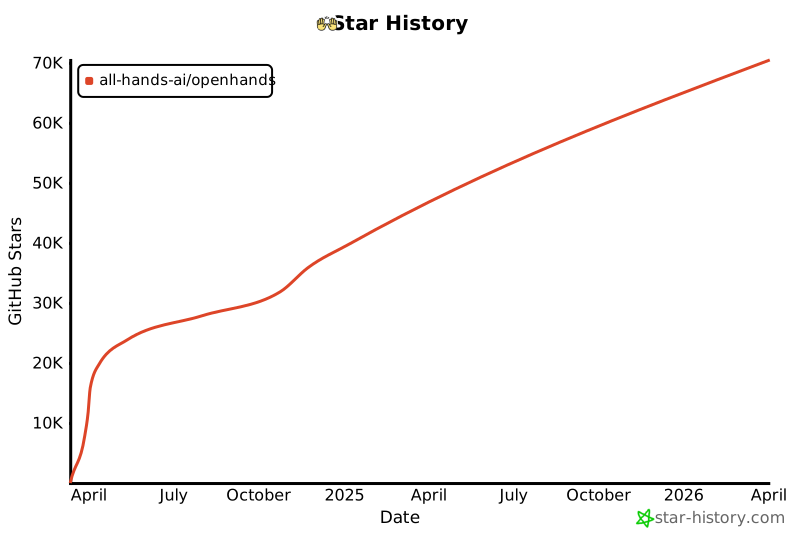](https://star-history.com/#All-Hands-AI/OpenHands&Date)
## 🛠️ Construit Avec {#built-with}
OpenHands est construit en utilisant une combinaison de cadres et de bibliothèques puissants, offrant une base robuste pour son développement. Voici les technologies clés utilisées dans le projet :
Veuillez noter que la sélection de ces technologies est en cours, et que des technologies supplémentaires peuvent être ajoutées ou des existantes supprimées au fur et à mesure de l'évolution du projet. Nous nous efforçons d'adopter les outils les plus adaptés et efficaces pour améliorer les capacités d'OpenHands.
## 📜 Licence {#license}
Distribué sous la licence MIT. Voir [notre licence](https://github.com/All-Hands-AI/OpenHands/blob/main/LICENSE) pour plus d'informations.
Cet agent implémente l'idée CodeAct ([article](https://arxiv.org/abs/2402.01030), [tweet](https://twitter.com/xingyaow_/status/1754556835703751087)) qui consolide les **act**ions des agents LLM en un espace d'action **code** unifié pour à la fois la _simplicité_ et la _performance_ (voir article pour plus de détails).
L'idée conceptuelle est illustrée ci-dessous. À chaque tour, l'agent peut :
1.**Converse** : Communiquer avec les humains en langage naturel pour demander des clarifications, des confirmations, etc.
2.**CodeAct** : Choisir d'accomplir la tâche en exécutant du code
- Exécuter toute commande `bash` Linux valide
- Exécuter tout code `Python` valide avec [un interpréteur Python interactif](https://ipython.org/). Cela est simulé à travers la commande `bash`, voir le système de plugin ci-dessous pour plus de détails.
Pour rendre l'agent CodeAct plus puissant avec seulement l'accès à l'espace d'action `bash`, l'agent CodeAct exploite le système de plugins d'OpenHands:
- [Plugin Jupyter](https://github.com/All-Hands-AI/OpenHands/tree/main/openhands/runtime/plugins/jupyter) : pour l'exécution d'IPython via la commande bash
- [Plugin outil agent SWE](https://github.com/All-Hands-AI/OpenHands/tree/main/openhands/runtime/plugins/swe_agent_commands) : Outils de ligne de commande bash puissants pour les tâches de développement logiciel introduits par [swe-agent](https://github.com/princeton-nlp/swe-agent).
| `__init__` | Initialise un agent avec `llm` et une liste de messages `list[Mapping[str, str]]` |
| `step` | Effectue une étape en utilisant l'agent CodeAct. Cela inclut la collecte d'informations sur les étapes précédentes et invite le modèle à exécuter une commande. |
### En cours de réalisation & prochaine étape
[] Support de la navigation sur le web
[] Compléter le workflow pour l'agent CodeAct afin de soumettre des PRs Github
## Agent Planificateur
### Description
L'agent planificateur utilise une stratégie d'incitation spéciale pour créer des plans à long terme pour résoudre les problèmes.
L'agent reçoit ses paires action-observation précédentes, la tâche actuelle, et un indice basé sur la dernière action effectuée à chaque étape.
| `step` | Vérifie si l'étape actuelle est terminée, retourne `AgentFinishAction` si oui. Sinon, crée une incitation de planification et l'envoie au modèle pour inférence, en ajoutant le résultat comme prochaine action. |
Voici un aperçu de haut niveau de l'architecture du système. Le système est divisé en deux composants principaux : le frontend et le backend. Le frontend est responsable de la gestion des interactions avec l'utilisateur et de l'affichage des résultats. Le backend est responsable de la gestion de la logique métier et de l'exécution des agents.
Cet aperçu est simplifié pour montrer les principaux composants et leurs interactions. Pour une vue plus détaillée de l'architecture du backend, consultez la section [Architecture du Backend](#backend-architecture-fr).
# Architecture du Backend {#backend-architecture-fr}
_**Avertissement**: L'architecture du backend est en cours de développement et est sujette à modifications. Le schéma suivant montre l'architecture actuelle du backend basée sur le commit indiqué dans le pied de page du schéma._
2. Ouvrez le fichier généré dans un éditeur PlantUML, par exemple Visual Studio Code avec l'extension PlantUML ou [PlantText](https://www.planttext.com/)
3. Révisez le PUML généré et apportez toutes les modifications nécessaires au schéma (ajoutez les parties manquantes, corrigez les erreurs, améliorez l'agencement).
_py2puml crée le schéma à partir des annotations de type dans le code, donc les annotations de type manquantes ou incorrectes peuvent entraîner un schéma incomplet ou incorrect._
4. Examinez la différence entre le nouveau schéma et le précédent et vérifiez manuellement si les modifications sont correctes.
_Assurez-vous de ne pas supprimer les parties ajoutées manuellement au schéma par le passé et qui sont toujours pertinentes._
5. Ajoutez le hash du commit qui a été utilisé pour générer le schéma dans le pied de page du schéma.
6. Exporte le schéma sous forme de fichiers PNG et SVG et remplacez les schémas existants dans le répertoire `docs/architecture`. Cela peut être fait avec (par exemple [PlantText](https://www.planttext.com/))
Le sandbox par défaut OpenHands est équipé d'une configuration ubuntu minimaliste. Votre cas d'utilisation pourrait nécessiter des logiciels installés par défaut. Cet article vous enseignera comment réaliser cela en utilisant une image docker personnalisée.
## Configuration
Assurez-vous de pouvoir utiliser OpenHands en suivant la documentation [Development.md](https://github.com/All-Hands-AI/OpenHands/blob/main/Development.md).
## Créer Votre Image Docker
Ensuite, vous devez créer votre image docker personnalisée qui doit être basée sur debian/ubuntu. Par exemple, si nous souhaitons que OpenHands ait accès au "node" binaire, nous utiliserions ce Dockerfile:
```bash
# Commencez avec l'image ubuntu la plus récente
FROM ubuntu:latest
# Effectuez les mises à jour nécessaires
RUN apt-get update && apt-get install
# Installez nodejs
RUN apt-get install -y nodejs
```
Ensuite, construisez votre image docker avec le nom de votre choix. Par exemple "image_personnalisée". Pour cela, créez un répertoire et placez le fichier à l'intérieur avec le nom "Dockerfile", puis dans le répertoire exécutez cette commande:
```bash
docker build -t image_personnalisée .
```
Cela produira une nouvelle image appelée ```image_personnalisée``` qui sera disponible dans Docker Engine.
> Remarque: Dans la configuration décrite ici, OpenHands va fonctionner en tant que utilisateur "openhands" à l'intérieur du sandbox et donc tous les packages installés via le Dockerfile seront disponibles pour tous les utilisateurs sur le système, pas seulement root.
>
> L'installation avec apt-get ci-dessus installe nodejs pour tous les utilisateurs.
## Spécifiez votre image personnalisée dans le fichier config.toml
La configuration OpenHands se fait via le fichier de niveau supérieur ```config.toml``` .
Créez un fichier ```config.toml``` dans le répertoire OpenHands et entrez ces contenus:
> Assurez-vous que ```sandbox_base_container_image``` est défini sur le nom de votre image personnalisée précédente.
## Exécution
Exécutez OpenHands en exécutant ```make run``` dans le répertoire racine.
Naviguez vers ```localhost:3001``` et vérifiez si vos dépendances souhaitées sont disponibles.
Dans le cas de l'exemple ci-dessus, la commande ```node -v``` dans la console produit ```v18.19.1```
Félicitations !
## Explication technique
Lorsqu'une image personnalisée est utilisée pour la première fois, elle ne sera pas trouvée et donc elle sera construite (à l'exécution ultérieure, l'image construite sera trouvée et renvoyée).
L'image personnalisée est construite avec [_build_sandbox_image()](https://github.com/All-Hands-AI/OpenHands/blob/main/openhands/runtime/docker/image_agnostic_util.py#L29), qui crée un fichier docker en utilisant votre image personnalisée comme base et configure ensuite l'environnement pour OpenHands, comme ceci:
> Remarque: Le nom de l'image est modifié via [_get_new_image_name()](https://github.com/All-Hands-AI/OpenHands/blob/main/openhands/runtime/docker/image_agnostic_util.py#L63) et c'est ce nom modifié qui sera recherché lors des exécutions ultérieures.
## Dépannage / Erreurs
### Erreur: ```useradd: UID 1000 est non unique```
Si vous voyez cette erreur dans la sortie de la console, il s'agit du fait que OpenHands essaie de créer le utilisateur openhands dans le sandbox avec un ID d'utilisateur de 1000, cependant cet ID d'utilisateur est déjà utilisé dans l'image (pour une raison inconnue). Pour résoudre ce problème, changez la valeur du champ sandbox_user_id dans le fichier config.toml en une valeur différente:
Si vous voyez un message d'erreur indiquant que le port est utilisé ou indisponible, essayez de supprimer toutes les containers docker en cours d'exécution (exécutez `docker ps` et `docker rm` des containers concernés) puis ré-exécutez ```make run```
## Discuter
Pour d'autres problèmes ou questions rejoignez le [Slack](https://join.slack.com/t/opendevin/shared_invite/zt-2oikve2hu-UDxHeo8nsE69y6T7yFX_BA) ou le [Discord](https://discord.gg/ESHStjSjD4) et demandez!
Lorsque vous utilisez OpenHands, vous rencontrerez sans aucun doute des cas où les choses fonctionnent bien et d'autres où elles ne fonctionnent pas. Nous vous encourageons à fournir des commentaires lorsque vous utilisez OpenHands pour aider l'équipe de développement et, peut-être plus important encore, créer un corpus ouvert d'exemples de formation pour les agents de codage -- Partagez-OpenHands !
## 📝 Comment Fournir des Commentaires
Fournir des commentaires est simple ! Lorsque vous utilisez OpenHands, vous pouvez appuyer sur le bouton de pouce vers le haut ou vers le bas à n'importe quel moment de votre interaction. Vous serez invité à fournir votre adresse email (par exemple, afin que nous puissions vous contacter si nous voulons poser des questions de suivi), et vous pouvez choisir si vous souhaitez fournir des commentaires publiquement ou en privé.
* Les données **publiques** seront distribuées sous la licence MIT, comme OpenHands lui-même, et pourront être utilisées par la communauté pour former et tester des modèles. Évidemment, les commentaires que vous pouvez rendre publics seront plus précieux pour la communauté dans son ensemble, donc lorsque vous ne traitez pas d'informations sensibles, nous vous encourageons à choisir cette option !
* Les données **privées** ne seront partagées qu'avec l'équipe OpenHands dans le but d'améliorer OpenHands.
OpenHands est un **ingénieur logiciel IA autonome** capable d'exécuter des tâches d'ingénierie complexes et de collaborer activement avec les utilisateurs sur des projets de développement logiciel.
Ce projet est entièrement open-source, vous pouvez donc l'utiliser et le modifier comme bon vous semble.
:::tip
Explorez le code source d'OpenHands sur [GitHub](https://github.com/All-Hands-AI/OpenHands) ou rejoignez l'une de nos communautés !
La manière la plus simple d'exécuter OpenHands est à l'intérieur d'un conteneur Docker. Il fonctionne mieux avec la version la plus récente de Docker, `26.0.0`.
Vous devez utiliser Linux, Mac OS ou WSL sur Windows.
Pour démarrer OpenHands dans un conteneur docker, exécutez les commandes suivantes dans votre terminal :
:::warning
Lorsque vous exécutez la commande suivante, les fichiers dans `./workspace` peuvent être modifiés ou supprimés.
:::
```bash
WORKSPACE_BASE=$(pwd)/workspace
docker run -it \
--pull=always \
-e SANDBOX_USER_ID=$(id -u) \
-e WORKSPACE_MOUNT_PATH=$WORKSPACE_BASE \
-v $WORKSPACE_BASE:/opt/workspace_base \
-v /var/run/docker.sock:/var/run/docker.sock \
-p 3000:3000 \
--add-host host.docker.internal:host-gateway \
--name openhands-app-$(date +%Y%m%d%H%M%S) \
ghcr.io/all-hands-ai/openhands:main
```
Vous trouverez OpenHands fonctionnant à l'adresse [http://localhost:3000](http://localhost:3000) avec accès à `./workspace`. Pour qu'OpenHands fonctionne sur votre code, placez-le dans `./workspace`.
OpenHands n'aura accès qu'à ce dossier de workspace. Le reste de votre système ne sera pas affecté car il s'exécute dans un bac à sable sécurisé de docker.
:::tip
Si vous souhaitez utiliser la version **(instable !)** la plus récente, vous pouvez utiliser `ghcr.io/all-hands-ai/openhands:main` comme image (dernière ligne).
:::
Pour le workflow de développement, consultez [Development.md](https://github.com/All-Hands-AI/OpenHands/blob/main/Development.md).
Avez-vous des problèmes ? Consultez notre [Guide de dépannage](https://docs.all-hands.dev/modules/usage/troubleshooting).
:::warning
OpenHands est actuellement en cours de développement, mais vous pouvez déjà exécuter la version alpha pour voir le système de bout en bout en action.
OpenHands utilise LiteLLM pour les appels de complétion. Vous pouvez trouver leur documentation sur Azure [ici](https://docs.litellm.ai/docs/providers/azure)
### Configurations openai Azure
Lors de l'exécution de l'image Docker OpenHands, vous devrez définir les variables d'environnement suivantes en utilisant `-e` :
```
LLM_BASE_URL="<azure-api-base-url>" # e.g. "https://openai-gpt-4-test-v-1.openai.azure.com/"
LLM_API_KEY="<azure-api-key>"
LLM_MODEL="azure/<your-gpt-deployment-name>"
LLM_API_VERSION = "<api-version>" # e.g. "2024-02-15-preview"
```
:::note
Vous pouvez trouver le nom de votre déploiement ChatGPT sur la page des déploiements sur Azure. Par défaut ou initialement, il pourrait être le même que le nom du modèle de chat (par exemple 'GPT4-1106-preview'), mais il n'est pas obligé de l'être. Exécutez OpenHands, et une fois chargé dans le navigateur, allez dans Paramètres et définissez le modèle comme suit : "azure/<your-actual-gpt-deployment-name>". Si ce n'est pas dans la liste, entrez votre propre texte et enregistrez-le.
:::
## Embeddings
OpenHands utilise llama-index pour les embeddings. Vous pouvez trouver leur documentation sur Azure [ici](https://docs.llamaindex.ai/en/stable/api_reference/embeddings/azure_openai/)
### Configurations openai Azure
Le modèle utilisé pour les embeddings Azure OpenAI est "text-embedding-ada-002".
Vous avez besoin du nom de déploiement correct pour ce modèle dans votre compte Azure.
Lors de l'exécution d'OpenHands dans Docker, définissez les variables d'environnement suivantes en utilisant `-e` :
```
LLM_EMBEDDING_MODEL="azureopenai"
LLM_EMBEDDING_DEPLOYMENT_NAME = "<your-embedding-deployment-name>" # e.g. "TextEmbedding...<etc>"
LLM_API_VERSION = "<api-version>" # e.g. "2024-02-15-preview"
OpenHands utilise LiteLLM pour les appels de complétion. Les ressources suivantes sont pertinentes pour utiliser OpenHands avec les LLMs de Google :
- [Gemini - Google AI Studio](https://docs.litellm.ai/docs/providers/gemini)
- [VertexAI - Google Cloud Platform](https://docs.litellm.ai/docs/providers/vertex)
### Configurations de Gemini - Google AI Studio
Pour utiliser Gemini via Google AI Studio lors de l'exécution de l'image Docker d'OpenHands, vous devez définir les variables d'environnement suivantes en utilisant `-e` :
```
GEMINI_API_KEY="<votre-cle-api-google>"
LLM_MODEL="gemini/gemini-1.5-pro"
```
### Configurations de Vertex AI - Google Cloud Platform
Pour utiliser Vertex AI via Google Cloud Platform lors de l'exécution de l'image Docker d'OpenHands, vous devez définir les variables d'environnement suivantes en utilisant `-e` :
OpenHands émettra de nombreuses invitations au LLM que vous configurez. La plupart de ces LLM coûtent de l'argent -- assurez-vous de définir des limites de dépenses et de surveiller l'utilisation.
:::
La variable d'environnement `LLM_MODEL` contrôle le modèle utilisé dans les interactions programmatiques.
Mais en utilisant l'interface utilisateur OpenHands, vous devrez choisir votre modèle dans la fenêtre des paramètres (la roue dentée en bas à gauche).
Les variables d'environnement suivantes peuvent être nécessaires pour certains LLM :
-`LLM_API_KEY`
-`LLM_BASE_URL`
-`LLM_EMBEDDING_MODEL`
-`LLM_EMBEDDING_DEPLOYMENT_NAME`
-`LLM_API_VERSION`
Nous avons quelques guides pour exécuter OpenHands avec des fournisseurs de modèles spécifiques :
- [ollama](llms/local-llms)
- [Azure](llms/azure-llms)
Si vous utilisez un autre fournisseur, nous vous encourageons à ouvrir une PR pour partager votre configuration !
## Remarque sur les modèles alternatifs
Les meilleurs modèles sont GPT-4 et Claude 3. Les modèles locaux et open source actuels ne sont pas aussi puissants.
Lors de l'utilisation d'un modèle alternatif, vous pouvez constater des temps d'attente prolongés entre les messages,
des réponses de mauvaise qualité ou des erreurs sur des JSON mal formés. OpenHands
ne peut être aussi puissant que les modèles qui le pilotent -- heureusement, les membres de notre équipe travaillent activement à la construction de meilleurs modèles open source !
## Réessais d'API et limites de taux
Certains LLM ont des limites de taux et peuvent nécessiter des réessais. OpenHands réessaiera automatiquement les demandes s'il reçoit une erreur 429 ou une erreur de connexion API.
Vous pouvez définir les variables d'environnement `LLM_NUM_RETRIES`, `LLM_RETRY_MIN_WAIT`, `LLM_RETRY_MAX_WAIT` pour contrôler le nombre de réessais et le temps entre les réessais.
Par défaut, `LLM_NUM_RETRIES` est 8 et `LLM_RETRY_MIN_WAIT`, `LLM_RETRY_MAX_WAIT` sont respectivement de 15 secondes et 120 secondes.
Assurez-vous que le serveur Ollama est en cours d'exécution.
Pour des instructions détaillées de démarrage, consultez [ici](https://github.com/ollama/ollama)
Ce guide suppose que vous avez démarré ollama avec `ollama serve`. Si vous exécutez ollama différemment (par exemple, à l'intérieur de docker), les instructions pourraient devoir être modifiées. Veuillez noter que si vous utilisez WSL, la configuration par défaut de ollama bloque les requêtes des conteneurs docker. Voir [ici](#configuring-ollama-service-fr).
## Télécharger des modèles
Les noms des modèles Ollama peuvent être trouvés [ici](https://ollama.com/library). Pour un petit exemple, vous pouvez utiliser
le modèle `codellama:7b`. Des modèles plus grands offriront généralement de meilleures performances.
```bash
ollama pull codellama:7b
```
vous pouvez vérifier quels modèles vous avez téléchargés de cette manière :
```bash
~$ ollama list
NAME ID SIZE MODIFIED
codellama:7b 8fdf8f752f6e 3.8 GB 6 weeks ago
mistral:7b-instruct-v0.2-q4_K_M eb14864c7427 4.4 GB 2 weeks ago
starcoder2:latest f67ae0f64584 1.7 GB 19 hours ago
```
## Démarrer OpenHands
### Docker
Utilisez les instructions [ici](../intro) pour démarrer OpenHands en utilisant Docker.
Mais lors de l'exécution de `docker run`, vous devrez ajouter quelques arguments supplémentaires :
Vous devriez maintenant pouvoir vous connecter à `http://localhost:3000/`
### Compiler à partir des sources
Utilisez les instructions dans [Development.md](https://github.com/All-Hands-AI/OpenHands/blob/main/Development.md) pour compiler OpenHands.
Assurez-vous que `config.toml` soit présent en exécutant `make setup-config` qui en créera un pour vous. Dans `config.toml`, saisissez les éléments suivants :
```
LLM_MODEL="ollama/codellama:7b"
LLM_API_KEY="ollama"
LLM_EMBEDDING_MODEL="local"
LLM_BASE_URL="http://localhost:11434"
WORKSPACE_BASE="./workspace"
WORKSPACE_DIR="$(pwd)/workspace"
```
Remplacez `LLM_MODEL` par celui de votre choix si nécessaire.
Fini ! Vous pouvez maintenant démarrer OpenHands avec : `make run` sans Docker. Vous devriez maintenant pouvoir vous connecter à `http://localhost:3000/`
## Sélection de votre modèle
Dans l'interface OpenHands, cliquez sur l'icône des paramètres en bas à gauche.
Ensuite, dans l'entrée `Model`, saisissez `ollama/codellama:7b`, ou le nom du modèle que vous avez téléchargé précédemment.
S'il n'apparaît pas dans un menu déroulant, ce n'est pas grave, tapez-le simplement. Cliquez sur Enregistrer lorsque vous avez terminé.
Et maintenant, vous êtes prêt à démarrer !
## Configuration du service ollama (WSL){#configuring-ollama-service-fr}
La configuration par défaut pour ollama sous WSL ne sert que localhost. Cela signifie que vous ne pouvez pas l'atteindre depuis un conteneur docker, par exemple, il ne fonctionnera pas avec OpenHands. Testons d'abord que ollama est en cours d'exécution correctement.
```bash
ollama list # obtenir la liste des modèles installés
Maintenant faisons en sorte que cela fonctionne. Modifiez /etc/systemd/system/ollama.service avec les privilèges sudo. (Le chemin peut varier selon la distribution Linux)
```bash
sudo vi /etc/systemd/system/ollama.service
```
ou
```bash
sudo nano /etc/systemd/system/ollama.service
```
Dans la section [Service], ajoutez ces lignes
```
Environment="OLLAMA_HOST=0.0.0.0:11434"
Environment="OLLAMA_ORIGINS=*"
```
Ensuite, sauvegardez, rechargez la configuration et redémarrez le service.
```bash
sudo systemctl daemon-reload
sudo systemctl restart ollama
```
Enfin, testez que ollama est accessible depuis le conteneur
```bash
ollama list # obtenir la liste des modèles installés
docker ps # obtenir la liste des conteneurs docker en cours d'exécution, pour un test le plus précis choisissez le conteneur de sandbox OpenHands.
Il existe certains messages d'erreur qui sont souvent signalés par les utilisateurs.
Nous essaierons de rendre le processus d'installation plus facile et ces messages d'erreur
mieux à l'avenir. Mais pour l'instant, vous pouvez rechercher votre message d'erreur ci-dessous et voir s'il existe des solutions de contournement.
Pour chacun de ces messages d'erreur, **il existe un problème existant**. Veuillez ne pas
ouvrir un nouveau problème - commentez simplement dessus.
Si vous trouvez plus d'informations ou une solution de contournement pour l'un de ces problèmes, veuillez ouvrir un *PR* pour ajouter des détails à ce fichier.
:::tip
Si vous utilisez Windows et que vous rencontrez des problèmes, consultez notre [guide pour les utilisateurs de Windows (WSL)](troubleshooting/windows).
Erreur lors de la création du contrôleur. Veuillez vérifier que Docker est en cours d'exécution et visitez `https://docs.all-hands.dev/modules/usage/troubleshooting` pour plus d'informations sur le débogage.
```
```bash
docker.errors.DockerException: Erreur lors de la récupération de la version de l'API du serveur : ('Connection aborted.', FileNotFoundError(2, 'Aucun fichier ou répertoire de ce type'))
```
### Détails
OpenHands utilise un conteneur Docker pour effectuer son travail en toute sécurité, sans risquer de briser votre machine.
### Solutions de contournement
* Exécutez `docker ps` pour vous assurer que docker est en cours d'exécution
* Assurez-vous que vous n'avez pas besoin de `sudo` pour exécuter docker [voir ici](https://www.baeldung.com/linux/docker-run-without-sudo)
* Si vous êtes sur un Mac, vérifiez les [exigences en matière d'autorisations](https://docs.docker.com/desktop/mac/permission-requirements/) et envisagez particulièrement d'activer l'option `Allow the default Docker socket to be used` sous `Settings > Advanced` dans Docker Desktop.
* De plus, mettez à jour Docker vers la dernière version sous `Check for Updates`
OpenHands ne supporte Windows que via [WSL](https://learn.microsoft.com/en-us/windows/wsl/install).
Veuillez vous assurer de lancer toutes les commandes à l'intérieur de votre terminal WSL.
## Dépannage
### Erreur : 'docker' n'a pas pu être trouvé dans cette distribution WSL 2.
Si vous utilisez Docker Desktop, assurez-vous de le démarrer avant d'exécuter toute commande docker depuis l'intérieur de WSL.
Docker doit également avoir l'option d'intégration WSL activée.
### Recommandation : Ne pas exécuter en tant qu'utilisateur root
Pour des raisons de sécurité, il est fortement recommandé de ne pas exécuter OpenHands en tant qu'utilisateur root, mais en tant qu'utilisateur avec un UID non nul.
De plus, les sandboxes persistants ne seront pas pris en charge lors de l'exécution en tant que root et un message approprié pourrait apparaître lors du démarrage d'OpenHands.
Références :
* [Pourquoi il est mauvais de se connecter en tant que root](https://askubuntu.com/questions/16178/why-is-it-bad-to-log-in-as-root)
* [Définir l'utilisateur par défaut dans WSL](https://www.tenforums.com/tutorials/128152-set-default-user-windows-subsystem-linux-distro-windows-10-a.html#option2)
Astuce pour la 2e référence : pour les utilisateurs d'Ubuntu, la commande pourrait en fait être "ubuntupreview" au lieu de "ubuntu".
### Échec de la création de l'utilisateur openhands
Si vous rencontrez l'erreur suivante lors de l'installation :
```sh
Exception: Failed to create openhands user in sandbox: 'useradd: UID 0 is not unique'
```
Vous pouvez la résoudre en exécutant :
```sh
exportSANDBOX_USER_ID=1000
```
### Installation de Poetry
* Si vous rencontrez des problèmes pour exécuter Poetry même après l'avoir installé pendant le processus de construction, il peut être nécessaire d'ajouter son chemin binaire à votre environnement :
```sh
exportPATH="$HOME/.local/bin:$PATH"
```
* Si `make build` s'arrête avec une erreur telle que :
```sh
ModuleNotFoundError: no module named <module-name>
```
Cela pourrait être un problème avec le cache de Poetry.
Essayez d'exécuter ces 2 commandes l'une après l'autre :
```sh
rm -r ~/.cache/pypoetry
make build
```
### L'objet NoneType n'a pas d'attribut 'request'
Si vous rencontrez des problèmes liés au réseau, tels que `NoneType object has no attribute 'request'` lors de l'exécution de `make run`, il peut être nécessaire de configurer vos paramètres réseau WSL2. Suivez ces étapes :
* Ouvrez ou créez le fichier `.wslconfig` situé à `C:\Users\%username%\.wslconfig` sur votre machine hôte Windows.
* Ajoutez la configuration suivante au fichier `.wslconfig` :
```sh
[wsl2]
networkingMode=mirrored
localhostForwarding=true
```
* Enregistrez le fichier `.wslconfig`.
* Redémarrez WSL2 complètement en quittant toute instance WSL2 en cours d'exécution et en exécutant la commande `wsl --shutdown` dans votre invite de commande ou terminal.
* Après avoir redémarré WSL, essayez d'exécuter `make run` à nouveau.
"description":"The title of the fallback page when the page crashed"
},
"theme.BackToTopButton.buttonAriaLabel":{
"message":"返回顶部",
"description":"The ARIA label for the back to top button"
},
"theme.blog.archive.title":{
"message":"历史博文",
"description":"The page & hero title of the blog archive page"
},
"theme.blog.archive.description":{
"message":"历史博文",
"description":"The page & hero description of the blog archive page"
},
"theme.blog.paginator.navAriaLabel":{
"message":"博文列表分页导航",
"description":"The ARIA label for the blog pagination"
},
"theme.blog.paginator.newerEntries":{
"message":"较新的博文",
"description":"The label used to navigate to the newer blog posts page (previous page)"
},
"theme.blog.paginator.olderEntries":{
"message":"较旧的博文",
"description":"The label used to navigate to the older blog posts page (next page)"
},
"theme.blog.post.paginator.navAriaLabel":{
"message":"博文分页导航",
"description":"The ARIA label for the blog posts pagination"
},
"theme.blog.post.paginator.newerPost":{
"message":"较新一篇",
"description":"The blog post button label to navigate to the newer/previous post"
},
"theme.blog.post.paginator.olderPost":{
"message":"较旧一篇",
"description":"The blog post button label to navigate to the older/next post"
},
"theme.blog.post.plurals":{
"message":"{count} 篇博文",
"description":"Pluralized label for \"{count} posts\". Use as much plural forms (separated by \"|\") as your language support (see https://www.unicode.org/cldr/cldr-aux/charts/34/supplemental/language_plural_rules.html)"
},
"theme.blog.tagTitle":{
"message":"{nPosts} 含有标签「{tagName}」",
"description":"The title of the page for a blog tag"
},
"theme.tags.tagsPageLink":{
"message":"查看所有标签",
"description":"The label of the link targeting the tag list page"
},
"theme.colorToggle.ariaLabel":{
"message":"切换浅色/暗黑模式(当前为{mode})",
"description":"The ARIA label for the navbar color mode toggle"
},
"theme.colorToggle.ariaLabel.mode.dark":{
"message":"暗黑模式",
"description":"The name for the dark color mode"
},
"theme.colorToggle.ariaLabel.mode.light":{
"message":"浅色模式",
"description":"The name for the light color mode"
},
"theme.docs.breadcrumbs.navAriaLabel":{
"message":"页面路径",
"description":"The ARIA label for the breadcrumbs"
"description":"The default description for a category card in the generated index about how many items this category includes"
},
"theme.docs.paginator.navAriaLabel":{
"message":"文件选项卡",
"description":"The ARIA label for the docs pagination"
},
"theme.docs.paginator.previous":{
"message":"上一页",
"description":"The label used to navigate to the previous doc"
},
"theme.docs.paginator.next":{
"message":"下一页",
"description":"The label used to navigate to the next doc"
},
"theme.docs.tagDocListPageTitle.nDocsTagged":{
"message":"{count} 篇文档带有标签",
"description":"Pluralized label for \"{count} docs tagged\". Use as much plural forms (separated by \"|\") as your language support (see https://www.unicode.org/cldr/cldr-aux/charts/34/supplemental/language_plural_rules.html)"
},
"theme.docs.tagDocListPageTitle":{
"message":"{nDocsTagged}「{tagName}」",
"description":"The title of the page for a docs tag"
"description":"The ARIA label to collapse the sidebar category"
},
"theme.NavBar.navAriaLabel":{
"message":"主导航",
"description":"The ARIA label for the main navigation"
},
"theme.navbar.mobileLanguageDropdown.label":{
"message":"选择语言",
"description":"The label for the mobile language switcher dropdown"
},
"theme.NotFound.p1":{
"message":"我们找不到您要找的页面。",
"description":"The first paragraph of the 404 page"
},
"theme.NotFound.p2":{
"message":"请联系原始链接来源网站的所有者,并告知他们链接已损坏。",
"description":"The 2nd paragraph of the 404 page"
},
"theme.TOCCollapsible.toggleButtonLabel":{
"message":"本页总览",
"description":"The label used by the button on the collapsible TOC component"
},
"theme.blog.post.readMore":{
"message":"阅读更多",
"description":"The label used in blog post item excerpts to link to full blog posts"
},
"theme.blog.post.readMoreLabel":{
"message":"阅读 {title} 的全文",
"description":"The ARIA label for the link to full blog posts from excerpts"
},
"theme.blog.post.readingTime.plurals":{
"message":"阅读需 {readingTime} 分钟",
"description":"Pluralized label for \"{readingTime} min read\". Use as much plural forms (separated by \"|\") as your language support (see https://www.unicode.org/cldr/cldr-aux/charts/34/supplemental/language_plural_rules.html)"
},
"theme.docs.breadcrumbs.home":{
"message":"主页面",
"description":"The ARIA label for the home page in the breadcrumbs"
},
"theme.docs.sidebar.collapseButtonTitle":{
"message":"收起侧边栏",
"description":"The title attribute for collapse button of doc sidebar"
},
"theme.docs.sidebar.collapseButtonAriaLabel":{
"message":"收起侧边栏",
"description":"The title attribute for collapse button of doc sidebar"
},
"theme.docs.sidebar.navAriaLabel":{
"message":"文档侧边栏",
"description":"The ARIA label for the sidebar navigation"
"description":"The label of the back button to return to main menu, inside the mobile navbar sidebar secondary menu (notably used to display the docs sidebar)"
[](https://star-history.com/#All-Hands-AI/OpenHands&Date)
Some files were not shown because too many files have changed in this diff
Show More
Reference in New Issue
Block a user
Blocking a user prevents them from interacting with repositories, such as opening or commenting on pull requests or issues. Learn more about blocking a user.

